5. Literal objects
Here, we refer to objects defined literally in the code as ‘literal objects’. Javascript uses the concepts of classes and class instance objects. Therefore, this is not the type of object we are discussing now.
5.1. script [obj-01]
Here we present the basic properties of literal objects. The main one is that the object is manipulated via a pointer.
'use strict';
// an empty object
const obj1={};
// object properties can be dynamically created
obj1.prop1="abcd";
console.log('obj1=',obj1);
// other property
obj1.prop2=[1,2,3];
console.log("obj1=",obj1);
// another property with a different notation
obj1['prop3']=true;
console.log("obj1=",obj1);
// obj1 is a reference to the object (pointer), not the object itself
const obj2=obj1;
// obj2 and obj1 point to the same object
obj2.prop1="xyzt";
console.log("obj1=",obj1);
console.log("obj2=",obj2);
// properties can be variables
const var1='prop1';
console.log('prop1=',obj1[var1]);
Execution
[Running] C:\myprograms\laragon-lite\bin\nodejs\node-v10\node.exe "c:\Temp\19-09-01\javascript\objets\obj-01.js"
obj1=[object Object]
obj1= { prop1: 'abcd', prop2: [ 1, 2, 3 ] }
obj1= { prop1: 'abcd', prop2: [ 1, 2, 3 ], prop3: true }
obj1= { prop1: 'xyzt', prop2: [ 1, 2, 3 ], prop3: true }
obj2= { prop1: 'xyzt', prop2: [ 1, 2, 3 ], prop3: true }
prop1= xyzt
Comments
- Line 3 of the code: an object is manipulated via a pointer. Therefore, [obj1] is a pointer. Modifying the pointed-to object does not modify the pointer [obj1]. This is why, as with arrays, an object reference is declared using the keyword [const];
- line 6 of the code: as with arrays, [console.log] can display objects;
- line 11 of the code: obj1.prop3 can be rewritten as obj1.[‘prop3’]. This latter notation is useful when ‘prop3’ is actually a variable (lines 20–21);
- Lines 13–18 of the code: show that the instruction [obj2=obj1] is a copy of the object’s reference, not the object itself;
5.2. script [obj-02]
This script demonstrates that an object’s properties can have an object as their value. This results in multi-level objects. We also introduce the global object [JSON], which enables object-to-string and string-to-object conversions.
'use strict';
// a multi-level object
const personne = {
  prénom: "martin",
  âge: 12,
  père: {
    prénom: "paul",
    âge: 45
  },
  mère: {
    prénom: "micheline",
    âge: 42
  }
}
// access to properties
console.log("prénom personne=", personne.prénom);
console.log("prénom mère=", personne.mère.prénom);
personne.mère.âge = 40;
console.log("âge mère=", personne.mère.âge);
// console.log can display objects
console.log("personne=", personne);
console.log("mère=", personne.mère);
// you can also display the jSON string of the
let json = JSON.stringify(personne);
console.log("jSON=", json);
// you can reread the jSON
let personne2 = JSON.parse(json);
console.log("père=", personne2.père);
Comments
- line 24: conversion of an object Javascript to a string jSON;
- line 27: conversion of a string jSON into an object Javascript;
Execution
[Running] C:\myprograms\laragon-lite\bin\nodejs\node-v10\node.exe "c:\Temp\19-09-01\javascript\objets\obj-02.js"
prénom personne= martin
prénom mère= micheline
âge mère= 40
personne= { 'first name': 'martin',
'age': 12,
'father': { 'first name': 'paul', 'age': 45 },
'mother': { 'first name': 'micheline', 'age': 40 }
mère= { 'first name': 'micheline', 'age': 40 }
jSON= {"prénom":"martin","âge":12,"père":{"prénom":"paul","âge":45},"mère":{"prénom":"micheline","âge":40}}
père= { 'first name': 'paul', 'age': 45 }
Comments
- line 10: in a jSON string, properties must be enclosed in quotes, as must string-type values;
5.3. script [obj-03]
This script introduces the concept of getter/setter for an object's property:
'use strict';
// object getters and setters
const personne = {
  // getter
  get nom() {
    console.log("getter nom");
    return this._nom;
  },
  // setter
  set nom(unNom) {
    console.log("setter nom");
    this._nom = unNom;
  }
};
// setter
personne.nom = "Hercule";
// getter
console.log(personne.nom);
// the object itself
console.log("personne=", personne);
// this does not prevent direct access to property [_nom]
personne._nom = "xyz";
console.log("personne=", personne);
Comments
- lines 5-7: definition of a [getter], a function that generally returns the value of an object property but can actually return anything. The keyword [function] is replaced by the keyword [get];
- line 7: the getter returns the property [_nom]. Note that this property does not need to be declared;
- Lines 10–13: Definition of [setter], a function that typically assigns the received value to an object property but can actually do anything. The keyword [function] is replaced by the keyword [set]. [setter] can be used to verify the validity of the value passed as a parameter to [setter];
- line 16: the function [set nom] will be called implicitly;
- line 18: the function [get nom] will be called implicitly;
- line 22: shows that the use of getters/setters depends on the developer’s discretion. If the developer knows the name of the property managed by them, they can access it directly;
Execution
[Running] C:\myprograms\laragon-lite\bin\nodejs\node-v10\node.exe "c:\Temp\19-09-01\javascript\objets\obj-03.js"
setter nom
getter nom
Hercule
personne= { nom: [Getter/Setter], _nom: 'Hercules' }
personne= { nom: [Getter/Setter], _nom: 'xyz' }
Note lines 5-6: [console.log] also displays properties that are functions.
5.4. script [obj-04]
This script shows three ways to write the names of an object's properties and two ways to access them.
'use strict';
// object property names can be literal [name], surrounded by apostrophes ['name'], etc
// or quotation marks ["name"]

// literal
const obj1 = {
  nom: "martin",
  prénom: "jean"
};
console.log("prénom=", obj1.prénom);

// surrounded by apostrophes
const obj2 = {
  'nom': "martin",
  'prénom': "jean"
};
console.log("nom=", obj2.nom);

// surrounded by quotation marks
const obj3 = {
  "nom": "martin",
  "prénom": "jean"
};

// two possible syntaxes for accessing the [name] property
console.log("nom=", obj3.nom);
console.log("nom=", obj3['nom']);
Execution
[Running] C:\myprograms\laragon-lite\bin\nodejs\node-v10\node.exe "c:\Temp\19-09-01\javascript\objets\obj-04.js"
prénom= jean
nom= martin
nom= martin
nom= martin
5.5. script [obj-05]
The script demonstrates that the properties of a literal object can be functions. This is very similar to a class instance object, which has both properties and methods.
'use strict';

// an object can have properties of type [function]
const personne = {
  // properties
  prénom: "martin",
  âge: 12,
  père: {
    prénom: "paul",
    âge: 45
  },
  mère: {
    prénom: "micheline",
    âge: 42
  },
  // method
  toString: function () {
    return JSON.stringify(this);
  }
}

// use
console.log("personne=", personne);
console.log("personne.toString=", personne.toString());
- lines 17–19: an internal method of the object. In this method, the object’s properties are accessed via the keyword [this] (line 18). [this] refers to the object itself, [this.prénom] refers to its property [prénom];
Execution
[Running] C:\myprograms\laragon-lite\bin\nodejs\node-v10\node.exe "c:\Temp\19-09-01\javascript\objets\obj-05.js"
personne= { 'first name': 'martin',
'age': 12,
'father': { 'first name': 'paul', 'age': 45 },
'mother': { 'first name': 'micheline', 'age': 42 },
toString: [Function: toString] }
personne.toString= {"prénom":"martin","âge":12,"père":{"prénom":"paul","âge":45},"mère":{"prénom":"micheline","âge":42}}
5.6. script [obj-06]
This script demonstrates how to access an object's properties when their names are not known in advance.
'use strict';

// an object can have properties of type [function]
let personne = {
  // properties
  prénom: "martin",
  âge: 12,
  père: {
    prénom: "paul",
    âge: 45
  },
  mère: {
    prénom: "micheline",
    âge: 42
  },
  // method
  toString: function () {
    return JSON.stringify(this);
  }
}

// use
console.log(personne);
// properties
console.log("-----------------------");
for (const key in personne) {
  if (personne.hasOwnProperty(key)) {
    const element = personne[key];
    console.log(key, "=", element);
  }
}
// to escape the eslint warning (1)
console.log("-----------------------");
for (const key in personne) {
  if (Object.prototype.hasOwnProperty.call(personne, key)) {
    const element = personne[key];
    console.log(key, "=", element);
  }
}
// to escape the eslint warning (2)
console.log("-----------------------");
for (const key in personne) {
  // eslint-disable-next-line no-prototype-builtins
  if (personne.hasOwnProperty(key)) {
    const element = personne[key];
    console.log(key, "=", element);
  }
}
Comments
- lines 26–31: the code that retrieves the list of properties (excluding methods) of an object. This code triggers a ESLint warning:
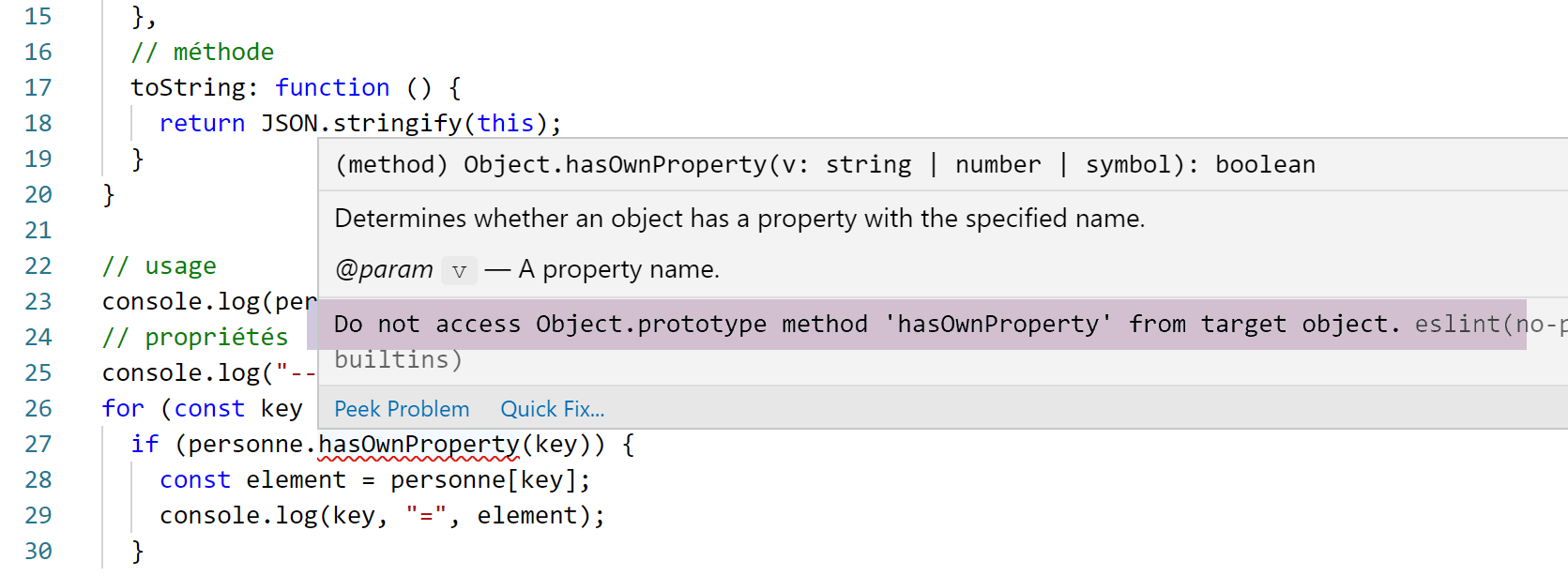
- lines 32–39: the code that allows you to bypass the ESLint warning. We use the prototype of the [Object] class;
- lines 41–47: or we simply disable the warning (line 43);
5.7. script [obj-07]
The script [obj-07] demonstrates the ability to destruct an object:
'use strict';
// destructuring

// literal
const obj1 = {
  nom: "martin",
  prénom: "jean"
};

// destructuring obj1 into variables [n,p]
const { nom: n, prénom: p } = obj1;
console.log("n=", n, "p=", p);

// destructure obj1 in variables [n2,p2]
function f({ nom: n2, prénom: p2 }) {
  console.log("f-n2=", n2, "f-p2=", p2);
}
f(obj1);

// destructuring obj1 into variables [last name,first name]
function g({ nom: nom, prénom: prénom }) {
  console.log("g-nom=", nom, "g-prénom=", prénom);
}
g(obj1);

// destructuring obj1 into variables [last name,first name]
// with shortened notation equivalent to h({name:surname,firstname:firstname})
function h({ nom, prénom }) {
  console.log("h-nom=", nom, "h-prénom=", prénom);
}
h(obj1);
Comments
- line 11: the curly braces {} enable destructuring. The syntax
const { nom: n, prénom: p } = obj1
creates two variables [n] and [p] and is equivalent to:
const n = obj1.nom
const p = obj1.prénom
The declaration could be written as follows:
const { nom => n, prénom => p } = obj1
to indicate that the values of the [nom, prénom] attributes go into the variables [n, p];
- the destructuring operation is repeated on lines 15, 21, and 28. Each time, the presence of curly braces {} indicates that an object will be destructured into variables;
- Line 28 may be confusing. It is a shorthand for the notation:
function h({ nom : nom, prénom : prénom })
The results of the execution are as follows:
5.8. script [obj-08]
The script [obj-08] shows how to obtain a copy of an object:
'use strict'

// object cloning
const obj1 = {
  nom: "martin",
  prénom: "jean"
};

// clone (copy) of obj1 with the spread operator
const obj2 = { ...obj1 }

// checks
// obj2 points to a copy of obj1
console.log("obj2===obj1 :", obj1 === obj2)
console.log("obj2=", obj2)
- line 10: the operation to copy the object [obj1]. The ... operator is called the spread operator;
The results of the execution are as follows:
- line 1: shows that the references [obj1] and [obj2] do not point to the same object;
- line 2: shows that the object pointed to by [obj2] is a copy of the object pointed to by [obj1];
5.9. Conclusion
The scripts in this section have shown that the literal object of Javascript is similar to the class instance object in object-oriented languages. Properties, methods, and getters/setters can be defined on it. It is a dynamic object whose properties can be defined at runtime. It then behaves like a dictionary whose elements can be of any type, including the type [fonction].