10. ES6 Modules
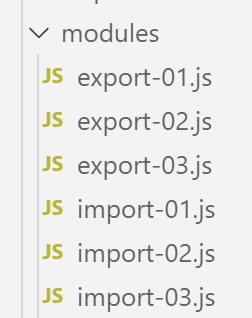
ES6 modules allow you to build JavaScript applications structured into independent, reusable modules.
10.1. scripts [import-01, export-01]
The script [import-01] will use the module [export-01]. This is defined as follows:
// export par défaut d'un objet non nommé
export default {
  data: 2,
  do() {
    console.log(this.data);
  }
};
Comments
- Lines [2–7] define an unnamed object with the properties [data, do];
- Line 2: The [export default] statement exports this object. It can therefore be imported;
The [export-01] module is used by the [import-01] script as follows:
'use strict';
// import d'un objet exporté par défaut
import export01 from './export-01';
// utilisation de cet objet
export01.do();
// on peut importer un export par défaut sous n'importe quel nom
import data from './export-01';
console.log(data.data);
Comments
- Lines 3 and 7 import the default exported object from the [export-01] module under two different names;
- Once an object is imported, it can be used as if it had been defined locally in the script;
Execution
[Running] C:\myprograms\laragon-lite\bin\nodejs\node-v10\node.exe -r esm "c:\Data\st-2019\dev\es6\javascript\modules\import-01.js"
2
2
10.2. scripts [import-02, export-02]
These scripts demonstrate the export of a named object.
The [export-02] script is as follows:
// export par défaut d'un objet nommé
const data = {
  data: 2,
  do() {
    console.log(this.data);
  }
};
// export
export default data;
- line 9: we export the [data] object;
Whether the exported object is named or not does not affect the import operation. The [import-02] script is as follows:
'use strict';
// import d'un objet exporté par défaut
import module1 from './export-02';
// utilisation de cet objet
module1.do();
// on peut importer un export par défaut sous n'importe quel nom
import module2 from './export-02';
console.log(module2.data);
Execution
[Running] C:\myprograms\laragon-lite\bin\nodejs\node-v10\node.exe -r esm "c:\Data\st-2019\dev\es6\javascript\modules\import-02.js"
2
2
10.3. scripts [import-03, export-03]
A module can export multiple elements.
The [export-03] script is as follows:
// multi-exports
// object export
const data = {
  data: 2,
  do() {
    console.log(this.data);
  }
};
// export function
export { data };
function doSomething() {
  console.log("doSomething");
}
export { doSomething };
Comments
- Lines 10 and 14: exporting two elements. An element is exported using the syntax [export {element}];
The [import-03] script uses the [export-03] module as follows:
'use strict';
// import d'un module [export03]
import {data, doSomething} from './export-03';
// utilisation des imports
data.do();
doSomething();
// autre écriture
import * as module from './export-03';
// utilisation de l'import
console.log(module.data);
module.doSomething();
- line 3: [imports] are done using the exact names of the exported objects;
- line 8: you can import all exported objects into a named object (here [module]);
Execution
[Running] C:\myprograms\laragon-lite\bin\nodejs\node-v10\node.exe -r esm "c:\Data\st-2019\dev\es6\javascript\modules\import-03.js"
2
doSomething
{ data: 2, do: [Function: do] }
doSomething