4. Classes, Structures, Interfaces
4.1. The Object by Example
4.1.1. General Overview
We will now explore object-oriented programming through examples. An object is an entity that contains data defining its state (referred to as fields, attributes, etc.) and functions (referred to as methods). An object is created based on a template called a class:
public class C1{
    Type1 p1;        // field p1
    Type2 p2;        // p2 field
    …
    Type3 m3(…){        // m3 method
        …
    }
    Type4 m4(…){        // m4 method
        …
    }
    …
}
From the previous class C1, we can create many objects O1, O2,… All will have the fields p1, p2,… and the methods m3, m4,… But they will have different values for their fields pi, thus each having its own state. If o1 is an object of type C1, o1.p1 denotes the property p1 of o1 and o1.m1 denotes the method m1 of o1.
Let’s consider a first object model: the Person class.
4.1.2. Creating the C# project
In the previous examples, we had only a single source file in a project: Program.cs. From now on, we can have multiple source files in the same project. Here’s how to do it.
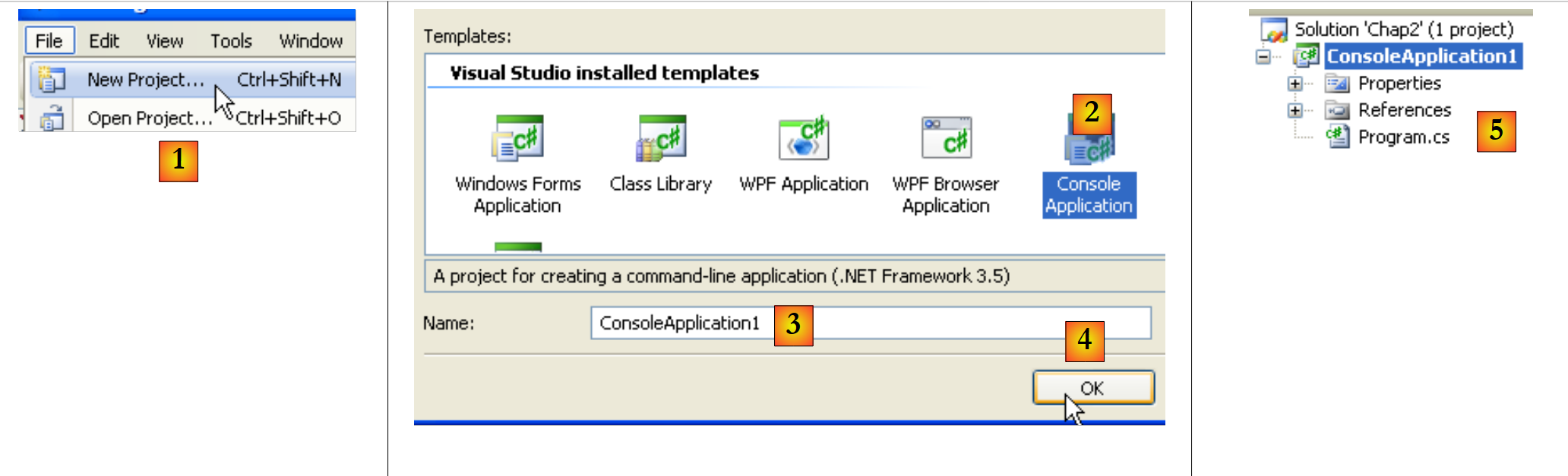 |
In [1], create a new project. In [2], select a Console Application. In [3], leave the default value. In [4], confirm. In [5], the project that was generated. The contents of Program.cs are as follows:
using System;
using System.Collections.Generic;
using System.Linq;
using System.Text;

namespace ConsoleApplication1 {
    class Program {
        static void Main(string[] args) {
        }
    }
}
Let's save the created project:
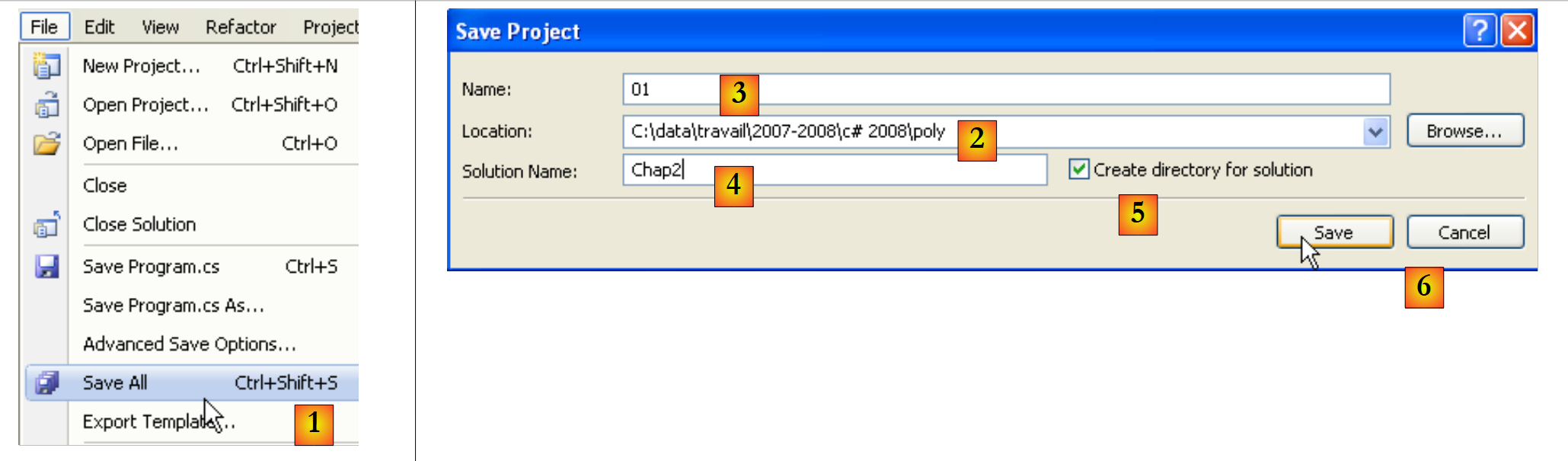 |
In [1], select the option backup. In [2], specify the folder where you want to save the project. In [3], give the project a name. In [5], indicate that you want to create a solution. A solution is a collection of projects. In [4], enter the name of the solution. In [6], confirm the save.
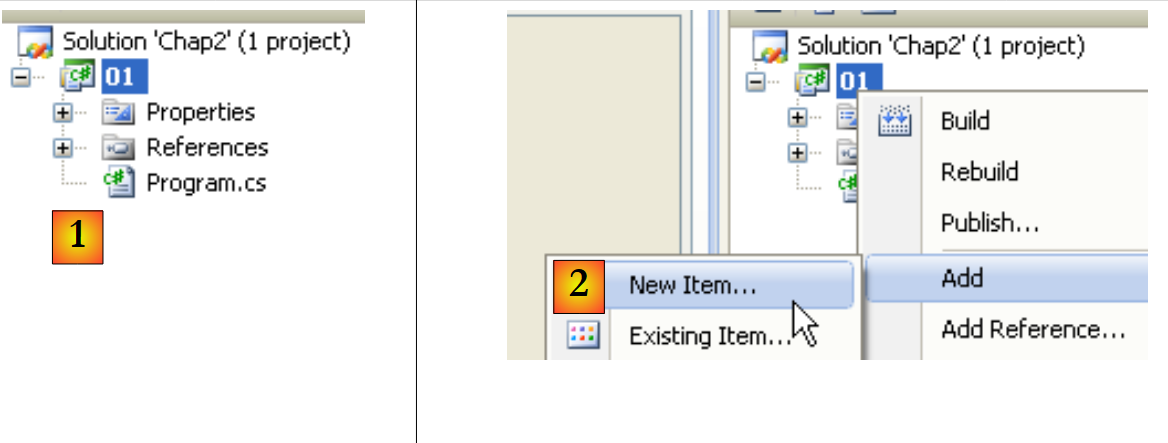 |
In [1], the project is saved. In [2], add a new item to the project.
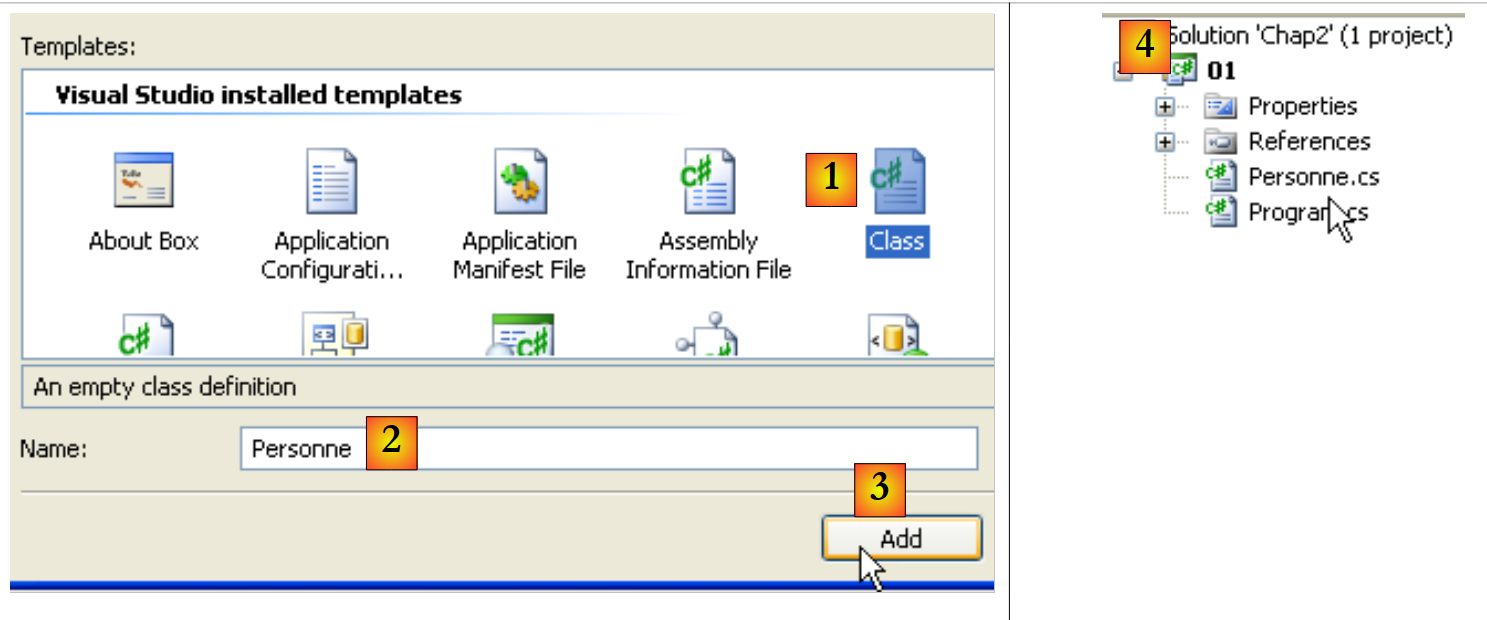 |
In [1], indicate that you want to add a class. In [2], enter the class name. In [3], confirm the information. In [4], the [01] project has a new source file Personne.cs:
using System;
using System.Collections.Generic;
using System.Linq;
using System.Text;

namespace ConsoleApplication1 {
    class Personne {
    }
}
We change the namespace of each source file to Chap2 and remove the imports of unnecessary namespaces:
using System;

namespace Chap2 {
    class Personne {
    }
}
using System;

namespace Chap2 {
    class Program {
        static void Main(string[] args) {
        }
    }
}
4.1.3. Definition of the Person class
The definition of the Person class in the source file [Personne.cs] will be as follows:
using System;

namespace Chap2 {
    public class Personne {
        // attributes
        private string prenom;
        private string nom;
        private int age;

        // method
        public void Initialise(string P, string N, int age) {
            this.prenom = P;
            this.nom = N;
            this.age = age;
        }

        // method
        public void Identifie() {
            Console.WriteLine("[{0}, {1}, {2}]", prenom, nom, age);
        }
    }

}
Here we have the definition of a class, which is a data type. When we create variables of this type, we call them objects or class instances. A class is therefore a template from which objects are constructed.
The members or fields of a class can be data (attributes), methods (functions), or properties. Properties are special methods used to retrieve or set the value of an object’s attributes. These fields can be accompanied by one of the following three keywords:
A private field is accessible only by the class’s internal methods | |
A public field is accessible by any method, whether or not it is defined within the class | |
A protected field (protected) is accessible only by the internal methods of the class or a derived object (see the concept of inheritance later). |
In general, a class’s data is declared private, while its methods and properties are declared public. This means that the user of an object (the programmer)
- will not have direct access to the object’s private data
- can call the object’s public methods, particularly those that provide access to its private data.
The syntax for declaring a class C is as follows:
public class C{
    private  donnée ou méthode ou propriété privée;
    public  donnée ou méthode ou propriété publique;
    protected  donnée ou méthode ou propriété protégée;
}
The order in which private, protected, and public attributes are declared is arbitrary.
4.1.4. The Initialize method
Let’s return to our Person class declared as:
using System;

namespace Chap2 {
    public class Personne {
        // attributes
        private string prenom;
        private string nom;
        private int age;

        // method
        public void Initialise(string p, string n, int age) {
            this.prenom = p;
            this.nom = n;
            this.age = age;
        }

        // method
        public void Identifie() {
            Console.WriteLine("[{0}, {1}, {2}]", prenom, nom, age);
        }
    }

}
What is the role of the Initialize method? Because lastName, firstName, and age are private members of the Person class, the statements:
are invalid. We need to initialize an object of type Person using a public method. This is the role of the Initialize method. We will write:
The syntax p1.Initialise is valid because Initialize is public.
4.1.5. The new operator
The sequence of statements
is incorrect. The statement
declares p1 as a reference to an object of type Person. This object does not yet exist, so p1 is not initialized. It is as if we had written:
where we explicitly use the *null* keyword to indicate that the variable p1 does not yet reference any object. When we then write
we call the Initialize method of the object referenced by p1. However, this object does not yet exist, and the compiler will report an error. To make p1 reference an object, we must write:
This creates an uninitialized Person object: the attributes name and first_name, which are references to objects of type String, will have the value null, and age will have the value 0. There is therefore a default initialization. Now that p1 references an object, the initialization statement for this object
is valid.
4.1.6. The keyword this
Let’s look at the code for the Initialize method:
        public void Initialise(string p, string n, int age) {
            this.prenom = p;
            this.nom = n;
            this.age = age;
}
The statement this.prenom=p means that the firstName attribute of the current object (this) is assigned the value p. The keyword this refers to the current object: the one in which the executed method is located. How do we know this? Let’s look at how the object referenced by p1 is initialized in the calling program:
It is the Initialise method of the p1 object that is called. When we reference the this object within this method, we are actually referencing the p1 object. The Initialise method could also have been written as follows:
        public void Initialise(string p, string n, int age) {
            prenom = p;
            nom = n;
            this.age = age;
}
When a method of an object references an attribute A of that object, the notation this.A is implied. It must be used explicitly when there is a conflict of identifiers. This is the case with the statement:
this.age=age;
where age refers to both an attribute of the current object and the age parameter passed to the method. To resolve this ambiguity, the age attribute must be identified as *this.age*.
4.1.7. A test program
Here is a short test program. It is written in the source file [Program.cs]:
using System;

namespace Chap2 {
    class P01 {
        static void Main() {
            Personne p1 = new Personne();
            p1.Initialise("Jean", "Dupont", 30);
            p1.Identifie();
        }
    }
}
Before running the [01] project, you may need to specify the source file to run:
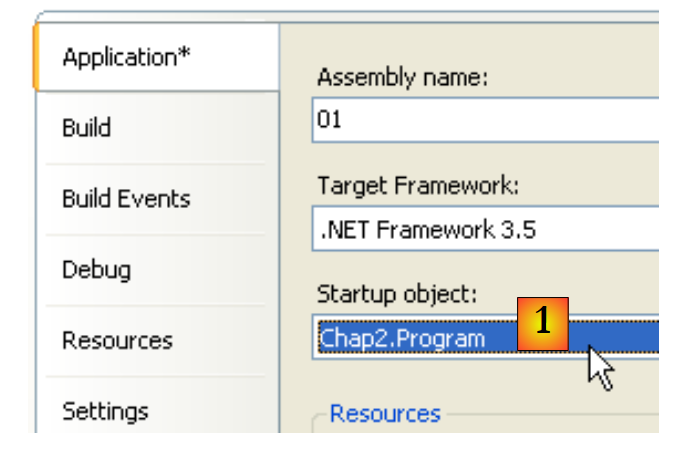 |
In the properties of the [01] project, specify [1] as the class to execute.
The results obtained upon execution are as follows:
4.1.8. Another method: Initialize
Let’s consider the Person class again and add the following method to it:
        public void Initialise(Personne p) {
            prenom = p.prenom;
            nom = p.nom;
            age = p.age;
}
We now have two methods named Initialize: this is valid as long as they accept different parameters. That is the case here. The parameter is now a reference p to a person. The attributes of the person p are then assigned to the current object (this). Note that the Initialize method has direct access to the attributes of the object p even though they are of type private. This is always true: an object o1 of a class C always has access to the attributes of objects of the same class C.
Here is a test of the new Person class:
using System;

namespace Chap2 {
    class Program {
        static void Main() {
            Personne p1 = new Personne();
            p1.Initialise("Jean", "Dupont", 30);
            p1.Identifie();
            Personne p2 = new Personne();
            p2.Initialise(p1);
            p2.Identifie();
        }
    }
}
and its results:
4.1.9. Constructors of the Person class
A constructor is a method that bears the name of the class and is called when the object is created. It is generally used to initialize the object. It is a method that can accept arguments but returns no result. Its prototype or definition is not preceded by any type (not even void).
If a class C has a constructor that accepts n arguments args, the declaration and initialization of an object of this class can be done as follows:
or
When a class C has one or more constructors, one of these constructors must be used to create an object of that class. If a class C has no constructors, it has a default constructor, which is the constructor without parameters: public C(). The object’s attributes are then initialized with default values. This is what happened in the previous programs, where we wrote:
Let’s create two constructors for our Person class:
using System;

namespace Chap2 {
    public class Personne {
        // attributes
        private string prenom;
        private string nom;
        private int age;

        // manufacturers
        public Personne(String p, String n, int age) {
            Initialise(p, n, age);
        }
        public Personne(Personne P) {
            Initialise(P);
        }

        // method
        public void Initialise(string p, string n, int age) {
...
        }

        public void Initialise(Personne p) {
...
        }

        // method
        public void Identifie() {
            Console.WriteLine("[{0}, {1}, {2}]", prenom, nom, age);
        }
    }

}
Our two constructors simply call the Initialize methods discussed earlier. Recall that when, in a constructor, we find the notation Initialize(p) for example, the compiler translates it to this.Initialise(p). In the constructor, the Initialize method is therefore called to operate on the object referenced by this, that is, the current object, the one being constructed.
Here is a short test program:
using System;

namespace Chap2 {
    class Program {
        static void Main() {
            Personne p1 = new Personne("Jean", "Dupont", 30);
            p1.Identifie();
            Personne p2 = new Personne(p1);
            p2.Identifie();
        }
    }
}
and the results obtained:
4.1.10. Object references
We are still using the same Person class. The test program looks like this:
using System;

namespace Chap2 {
    class Program2 {
        static void Main() {
            // p1
            Personne p1 = new Personne("Jean", "Dupont", 30);
            Console.Write("p1="); p1.Identifie();
            // p2 references the same object as p1
            Personne p2 = p1;
            Console.Write("p2="); p2.Identifie();
            // p3 references an object that will be a copy of the object referenced by p1
            Personne p3 = new Personne(p1);
            Console.Write("p3="); p3.Identifie();
            // change the state of the object referenced by p1
            p1.Initialise("Micheline", "Benoît", 67);
            Console.Write("p1="); p1.Identifie();
            // as p2=p1, the object referenced by p2 must have changed state
            Console.Write("p2="); p2.Identifie();
            // as p3 does not reference the same object as p1, the object referenced by p3 must not have changed
            Console.Write("p3="); p3.Identifie();
        }
    }
}
The results are as follows:
When declaring the variable p1 as
p1 refers to the Person object ("Jean", "Dupont", 30) but is not the object itself. In C, we would say that it is a pointer, c.a.d, to the address of the created object. If we then write:
It is not the Person("Jean", "Dupont", 30) object that is modified; it is the reference p1 that changes value. The Person("Jean", "Dupont", 30) object will be "lost" if it is not referenced by any other variable.
When we write:
we initialize the pointer p2: it "points" to the same object (it refers to the same object) as the pointer p1. Thus, if we modify the object "pointed to" (or referenced) by p1, we also modify the one referenced by p2.
When we write:
a new Person object is created. This new object will be referenced by p3. If you modify the object "pointed to" (or referenced) by p1, you do not modify the one referenced by p3 in any way. This is what the results show.
4.1.11. Passing Object Reference Parameters
In the previous chapter, we examined how function parameters are passed when they represent a simple C# type represented by a structure .NET. Let’s see what happens when the parameter is an object reference:
using System;
using System.Text;

namespace Chap1 {
    class P12 {
        public static void Main() {
            // example 4
            StringBuilder sb0 = new StringBuilder("essai0"), sb1 = new StringBuilder("essai1"), sb2 = new StringBuilder("essai2"), sb3;
            Console.WriteLine("Dans fonction appelante avant appel : sb0={0}, sb1={1}, sb2={2}", sb0,sb1, sb2);
            ChangeStringBuilder(sb0, sb1, ref sb2, out sb3);
            Console.WriteLine("Dans fonction appelante après appel : sb0={0}, sb1={1}, sb2={2}, sb3={3}", sb0, sb1, sb2, sb3);

        }

        private static void ChangeStringBuilder(StringBuilder sbf0, StringBuilder sbf1, ref StringBuilder sbf2, out StringBuilder sbf3) {
            Console.WriteLine("Début fonction appelée : sbf0={0}, sbf1={1}, sbf2={2}", sbf0,sbf1, sbf2);
            sbf0.Append("*****");
            sbf1 = new StringBuilder("essai1*****");
            sbf2 = new StringBuilder("essai2*****");
            sbf3 = new StringBuilder("essai3*****");
            Console.WriteLine("Fin fonction appelée : sbf0={0}, sbf1={1}, sbf2={2}, sbf3={3}", sbf0, sbf1, sbf2, sbf3);
        }
    }
}
- Line 8: defines 3 objects of type StringBuilder. A StringBuilder object is similar to a string object. When manipulating a string object, a new string object is returned. Thus, in the code sequence:
Line 1 creates a string object in memory, and s is its address. On line 2, s.ToUpperCase() creates another string object in memory. Thus, between lines 1 and 2, s has changed its value (it now points to the new object). The StringBuilder class, on the other hand, allows you to transform a string without creating a second object. This is the example given above:
- line 8: 4 references [sb0, sb1, sb2, sb3] to objects of type StringBuilder
- line 10: are passed to the ChangeStringBuilder method with different modes: sb0, sb1 with the default mode, sb2 with the ref keyword, sb3 with the out keyword.
- Lines 15–22: a method with formal parameters [sbf0, sbf1, sbf2, sbf3]. The relationships between the formal parameters sbfi and the actual parameters sbi are as follows:
- sbf0 and sb0 are, at the start of the method, two distinct references pointing to the same object (pass-by-value of addresses)
- The same applies to sbf1 and sb1
- sbf2 and sb2 are, at the start of the method, the same reference to the same object (ref keyword)
- After the method is executed, sbf3 and sb3 are the same reference to the same object (keyword out)
The results obtained are as follows:
Explanations:
- sb0 and sbf0 are two distinct references to the same object. This object was modified via sbf0—line 3. This modification can be seen via sb0—line 4.
- sb1 and sbf1 are two distinct references to the same object. sbf1’s value is modified within the method and now points to a new object—line 3. This does not change the value of sb1, which continues to point to the same object—line 4.
- sb2 and sbf2 are the same reference to the same object. sbf2 has its value modified within the method and now points to a new object—line 3. Since sbf2 and sb2 are one and the same entity, the value of sb2 has also been modified, and sb2 points to the same object as sbf2—lines 3 and 4.
- Before the method call, sb3 had no value. After the method, sb3 receives the value of sbf3. We therefore have two references to the same object—lines 3 and 4
4.1.12. Temporary objects
In an expression, you can explicitly call an object’s constructor: the object is created, but you do not have access to it (to modify it, for example). This temporary object is created for the purpose of evaluating the expression and then discarded. The memory space it occupied will be automatically reclaimed later by a program called a "garbage collector," whose role is to reclaim memory space occupied by objects that are no longer referenced by program data.
Consider the following new test program:
using System;

namespace Chap2 {
    class Program {
        static void Main() {
            new Personne(new Personne("Jean", "Dupont", 30)).Identifie();
        }
    }
}
and let's modify the constructors of the Person class so that they display a message:
        // manufacturers
        public Personne(String p, String n, int age) {
            Console.WriteLine("Constructeur Personne(string, string, int)");
            Initialise(p, n, age);
        }
        public Personne(Personne P) {
            Console.Out.WriteLine("Constructeur Personne(Personne)");
            Initialise(P);
}
We get the following results:
showing the successive construction of the two temporary objects.
4.1.13. Methods for reading and writing private attributes
We add the necessary methods to the Person class to read or modify the state of the objects' attributes:
using System;

namespace Chap2 {
    public class Personne {
        // attributes
        private string prenom;
        private string nom;
        private int age;

        // manufacturers
        public Personne(String p, String n, int age) {
            Console.WriteLine("Constructeur Personne(string, string, int)");
            Initialise(p, n, age);
        }
        public Personne(Personne p) {
            Console.Out.WriteLine("Constructeur Personne(Personne)");
            Initialise(p);
        }

        // method
        public void Initialise(string p, string n, int age) {
            this.prenom = p;
            this.nom = n;
            this.age = age;
        }

        public void Initialise(Personne p) {
            prenom = p.prenom;
            nom = p.nom;
            age = p.age;
        }

        // accessors
        public String GetPrenom() {
            return prenom;
        }
        public String GetNom() {
            return nom;
        }
        public int GetAge() {
            return age;
        }

        //modifiers
        public void SetPrenom(String P) {
            this.prenom = P;
        }
        public void SetNom(String N) {
            this.nom = N;
        }
        public void SetAge(int age) {
            this.age = age;
        }

        // method
        public void Identifie() {
            Console.WriteLine("[{0}, {1}, {2}]", prenom, nom, age);
        }
    }

}
We test the new class with the following program:
using System;

namespace Chap2 {
    class Program {
        static void Main(string[] args) {
            Personne p = new Personne("Jean", "Michelin", 34);
            Console.Out.WriteLine("p=(" + p.GetPrenom() + "," + p.GetNom() + "," + p.GetAge() + ")");
            p.SetAge(56);
            Console.Out.WriteLine("p=(" + p.GetPrenom() + "," + p.GetNom() + "," + p.GetAge() + ")");
        }
    }
}
and we get the results:
4.1.14. Properties
There is another way to access a class’s attributes: by creating properties. These allow us to manipulate private attributes as if they were public.
Consider the following Person class, where the previous accessors and mutators have been replaced by read-write properties:
using System;

namespace Chap2 {
    public class Personne {
        // attributes
        private string prenom;
        private string nom;
        private int age;

        // manufacturers
        public Personne(String p, String n, int age) {
            Initialise(p, n, age);
        }
        public Personne(Personne p) {
            Initialise(p);
        }

        // method
        public void Initialise(string p, string n, int age) {
            this.prenom = p;
            this.nom = n;
            this.age = age;
        }

        public void Initialise(Personne p) {
            prenom = p.prenom;
            nom = p.nom;
            age = p.age;
        }

         // properties
        public string Prenom {
            get { return prenom; }
            set {
                // valid first name?
                if (value == null || value.Trim().Length == 0) {
                    throw new Exception("prénom (" + value + ") invalide");
                } else {
                    prenom = value;
                }
            }//if
        }//first name

        public string Nom {
            get { return nom; }
            set {
                // valid name?
                if (value == null || value.Trim().Length == 0) {
                    throw new Exception("nom (" + value + ") invalide");
                } else { nom = value; }
            }//if
        }//name


        public int Age {
            get { return age; }
            set {
                // valid age?
                if (value >= 0) {
                    age = value;
                } else
                    throw new Exception("âge (" + value + ") invalide");
            }//if
        }//age

        // method
        public void Identifie() {
            Console.WriteLine("[{0}, {1}, {2}]", prenom, nom, age);
        }
    }

}
A property allows you to read (get) or set the value of an attribute. A property is declared as follows:
where Type must be the type of the attribute managed by the property. It can have two methods called get and set. The get method is usually responsible for returning the value of the attribute it manages (it could return something else; nothing prevents it from doing so). The set method receives a parameter called value, which it normally assigns to the attribute it manages. It can use this opportunity to check the validity of the received value and potentially throw an exception if the value is invalid. This is what is done here.
How are these get and set methods called? Consider the following test program:
using System;

namespace Chap2 {
    class Program {
        static void Main(string[] args) {
            Personne p = new Personne("Jean", "Michelin", 34);
            Console.Out.WriteLine("p=(" + p.Prenom + "," + p.Nom + "," + p.Age + ")");
            p.Age = 56;
            Console.Out.WriteLine("p=(" + p.Prenom + "," + p.Nom + "," + p.Age + ")");
            try {
                p.Age = -4;
            } catch (Exception ex) {
                Console.Error.WriteLine(ex.Message);
            }//try-catch
        }
    }
}
In the statement
Console.Out.WriteLine("p=(" + p.Prenom + "," + p.Nom + "," + p.Age + ")");
We are trying to retrieve the values of the FirstName, LastName, and Age properties for person p. The get method for these properties is then called, and it returns the value of the attribute they manage.
In the statement
we want to set the value of the Age property. The set method of this property is then called. It will receive 56 in its value parameter.
A property P of a class C that defines only the method get is said to be read-only. If c is an object of class C, the operation c.P=value will be rejected by the compiler.
Executing the previous test program yields the following results:
Properties therefore allow us to manipulate private attributes as if they were public. Another feature of properties is that they can be used in conjunction with a constructor according to the following syntax:
This syntax is equivalent to the following code:
The order of the properties does not matter. Here is an example.
A new constructor with no parameters is added to the Person class:
        public Personne() {
}
The constructor does not initialize the object’s members. This is called the default constructor. It is used when the class does not define any constructors.
The following code creates and initializes (line 6) a new Person using the syntax shown above:
using System;

namespace Chap2 {
    class Program {
        static void Main(string[] args) {
            Personne p2 = new Personne { Age = 7, Prenom = "Arthur", Nom = "Martin" };
            Console.WriteLine("p2=({0},{1},{2})", p2.Prenom, p2.Nom, p2.Age);
        }
    }
}
In line 6 above, the parameterless constructor Person() is used. In this particular case, we could also have written
Personne p2 = new Personne() { Age = 7, Prenom = "Arthur", Nom = "Martin" };
but the parentheses for the parameterless Person() constructor are not required in this syntax.
The results of the execution are as follows:
In many cases, the get methods and property setter simply read and write a private field without any further processing. In this scenario, you can use an automatic property declared as follows:
The private field associated with the property is not declared. It is automatically generated by the compiler. It can only be accessed via its property. Thus, instead of writing:
    private string prenom;
...
     // associated property
        public string Prenom {
            get { return prenom; }
            set {
                // valid first name?
                if (value == null || value.Trim().Length == 0) {
                    throw new Exception("prénom (" + value + ") invalide");
                } else {
                    prenom = value;
                }
            }//if
        }//first name
we can write:
without declaring the private field firstName. The difference between the two properties above is that the first one checks the validity of the first name in the set, while the second one performs no validation.
Using the automatic FirstName property is equivalent to declaring a public FirstName field:
One might wonder if there is a difference between the two declarations. Declaring a class field as public is discouraged. This violates the concept of encapsulating an object’s state, which should be private and exposed through public methods.
If the automatic property is declared virtual, it can then be overridden in a child class:
    class Class1 {
        public virtual string Prop { get; set; }
}
    class Class2 : Class1 {
        public override string Prop { get { return base.Prop; } set {... } }
}
In line 2 above, the child class Class2 can include code in the set block that validates the value assigned to the automatic property base.Prop of the parent class Class1.
4.1.15. Class methods and attributes
Suppose we want to count the number of Person objects created in an application. We could manage a counter ourselves, but we risk overlooking temporary objects created here and there. It would seem safer to include an instruction in the Person class constructors that increments a counter. The problem is passing a reference to this counter so that the constructor can increment it: we need to pass a new parameter to them. We can also include the counter in the class definition. Since it is an attribute of the class itself and not of a particular instance of that class, we declare it differently using the static keyword:
private static long nbPersonnes;
To reference it, we write Personne.nbPersonnes to indicate that it is an attribute of the Person class itself. Here, we have created a private attribute that cannot be accessed directly from outside the class. We therefore create a public property to provide access to the class attribute nbPersonnes. To set the value of nbPersonnes, the get method of this property does not require a specific Person object: indeed, nbPersonnes is an attribute of the entire class. Therefore, we need a property that is also declared as static:
        public static long NbPersonnes {
            get { return nbPersonnes; }
}
which will be called from outside using the syntax Personne.NbPersonnes. Here is an example.
The Person class becomes the following:
using System;

namespace Chap2 {
    public class Personne {

        // class attributes
        private static long nbPersonnes;
        public static long NbPersonnes {
            get { return nbPersonnes; }
        }

        // instance attributes
        private string prenom;
        private string nom;
        private int age;

        // manufacturers
        public Personne(String p, String n, int age) {
            Initialise(p, n, age);
            nbPersonnes++;
        }
        public Personne(Personne p) {
            Initialise(p);
            nbPersonnes++;
        }

...
}
Lines 20 and 24: the constructors increment the static field on line 7.
With the following program:
using System;

namespace Chap2 {
    class Program {
        static void Main(string[] args) {
            Personne p1 = new Personne("Jean", "Dupont", 30);
            Personne p2 = new Personne(p1);
            new Personne(p1);
            Console.WriteLine("Nombre de personnes créées : " + Personne.NbPersonnes);
        }
    }
}
The following results are obtained:
4.1.16. An array of people
An object is a piece of data like any other, and as such, multiple objects can be grouped into an array:
using System;

namespace Chap2 {
    class Program {
        static void Main(string[] args) {
            // a table of people
            Personne[] amis = new Personne[3];
            amis[0] = new Personne("Jean", "Dupont", 30);
            amis[1] = new Personne("Sylvie", "Vartan", 52);
            amis[2] = new Personne("Neil", "Armstrong", 66);
            // display
            foreach (Personne ami in amis) {
                ami.Identifie();
            }
        }
    }
}
- Line 7: creates an array of 3 elements of type Person. These 3 elements are initialized here with the value null, c.a.d, meaning they do not reference any objects. Again, in a technical sense, we refer to it as an "array of objects" when it is actually just an array of object references. The creation of the object array, which is an object itself (indicated by the use of `new`), does not create any objects of the type of its elements: this must be done subsequently.
- lines 8–10: creation of the 3 objects of type Person
- lines 12–14: display of the contents of the friends array
The following results are obtained:
4.2. Inheritance by example
4.2.1. General Information
Here we discuss the concept of inheritance. The purpose of inheritance is to "customize" an existing class so that it meets our needs. Suppose we want to create a Teacher class: a teacher is a specific type of person. They have attributes that other people do not have: the subject they teach, for example. But they also have the attributes of any person: first name, last name, and age. A Teacher is therefore a full member of the Person class but has additional attributes. Rather than writing a Teacher class from scratch, we would prefer to build upon the existing Person class and adapt it to the specific characteristics of teachers. This is what the concept of inheritance allows us to do.
To express that the Teacher class inherits the properties of the Person class, we would write:
The Person class is called the parent (or base) class, and the Teacher class is called the derived (or child) class. A Teacher object has all the characteristics of a Person object: it has the same attributes and methods. These attributes and methods of the parent class are not repeated in the definition of the child class; we simply list the attributes and methods added by the child class:
We assume that the Person class is defined as follows:
using System;

namespace Chap2 {
    public class Personne {

        // class attributes
        private static long nbPersonnes;
        public static long NbPersonnes {
            get { return nbPersonnes; }
        }

        // instance attributes
        private string prenom;
        private string nom;
        private int age;

        // manufacturers
        public Personne(String prenom, String nom, int age) {
            Nom = nom;
            Prenom = prenom;
            Age = age;
            nbPersonnes++;
            Console.WriteLine("Constructeur Personne(string, string, int)");
        }
        public Personne(Personne p) {
            Nom = p.Nom;
            Prenom = p.Prenom;
            Age = p.Age;
            nbPersonnes++;
            Console.WriteLine("Constructeur Personne(Personne)");
        }

        // properties
        public string Prenom {
            get { return prenom; }
            set {
                // valid first name?
                if (value == null || value.Trim().Length == 0) {
                    throw new Exception("prénom (" + value + ") invalide");
                } else {
                    prenom = value;
                }
            }//if
        }//first name

        public string Nom {
            get { return nom; }
            set {
                // valid name?
                if (value == null || value.Trim().Length == 0) {
                    throw new Exception("nom (" + value + ") invalide");
                } else { nom = value; }
            }//if
        }//name

        public int Age {
            get { return age; }
            set {
                // valid age?
                if (value >= 0) {
                    age = value;
                } else
                    throw new Exception("âge (" + value + ") invalide");
            }//if
        }//age

        // property
        public string Identite {
            get { return String.Format("[{0}, {1}, {2}]", prenom, nom, age);}
        }
    }

}
The Identify method has been replaced by the read-only Identity property, which identifies the person. We create a Teacher class that inherits from the Person class:
using System;

namespace Chap2 {
    class Enseignant : Personne {
        // attributes
        private int section;

        // manufacturer
        public Enseignant(string prenom, string nom, int age, int section)
            : base(prenom, nom, age) {
            // the section is saved using the Section property
            Section = section;
            // follow-up
            Console.WriteLine("Construction Enseignant(string, string, int, int)");
        }//manufacturer

        // property Section
        public int Section {
            get { return section; }
            set { section = value; }
        }// Section

    }
}
The Teacher class adds to the methods and attributes of the Person class:
- line 4: the Teacher class derives from the Person class
- line 6: a `section` attribute representing the section number to which the teacher belongs within the teaching staff (roughly one section per subject). This private attribute is accessible via the public `Section` property in lines 18–21
- line 9: a new constructor that initializes all of a teacher’s attributes
4.2.2. Creating a Teacher object
A child class does not inherit constructors from its Parent class. It must therefore define its own constructors. The constructor for the Teacher class is as follows:
        // manufacturer
        public Enseignant(string prenom, string nom, int age, int section)
            : base(prenom, nom, age) {
            // section is memorized
            Section = section;
            // follow-up
            Console.WriteLine("Construction enseignant(string, string, int, int)");
}//manufacturer
The declaration
        public Enseignant(string prenom, string nom, int age, int section)
            : base(prenom, nom, age) {
states that the constructor receives four parameters—firstName, lastName, age, and section—and passes three of them (firstName, lastName, age) to its base class, in this case the Person class. We know that this class has a constructor Person(string, string, int) that will allow us to construct a person using the passed parameters (firstName, lastName, age). Once the base class has been constructed, the construction of the Teacher object continues by executing the body of the constructor:
Note that on the left side of the = sign, it is not the object’s section attribute that was used, but the Section property associated with it. This allows the constructor to take advantage of any validity checks that this method might perform. This avoids having to place these checks in two different places: the constructor and the property.
In summary, the constructor of a derived class:
- passes to its base class the parameters it needs to construct itself
- uses the other parameters to initialize its own attributes
We could have chosen to write:
// manufacturer
  public Enseignant(string prenom, string nom, int age, int section){
    this.prenom=prenom;
        this.nom=nom;
        this.age=age;
      this.section=section;
  }
That's impossible. The Person class has declared its three fields—first_name, last_name, and age—as private. Only objects of the same class have direct access to these fields. All other objects, including child objects as in this case, must use public methods to access them. This would have been different if the Person class had declared the three fields as protected (protected): it would then have allowed derived classes to have direct access to the three fields. In our example, using the parent class’s constructor was therefore the correct solution and is the standard approach: when constructing a child object, we first call the parent object’s constructor and then complete the initializations specific to the child object (section in our example).
Let’s try a first test program [Program.cs]:
using System;

namespace Chap2 {
    class Program {
        static void Main(string[] args) {
            Console.WriteLine(new Enseignant("Jean", "Dupont", 30, 27).Identite);
        }
    }
}
This program simply creates a Teacher object (new) and identifies it. The Teacher class does not have an *Identity* method, but its parent class does have one, which is also public: through inheritance, it becomes a public method of the Teacher class.
The entire project is as follows:
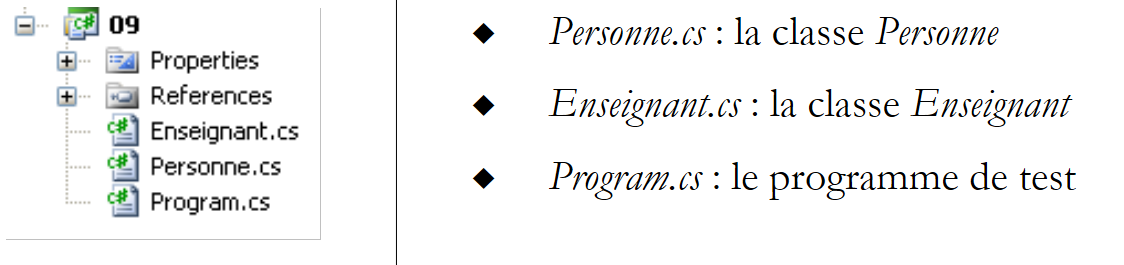 |
The results obtained are as follows:
We can see that:
- a Person object (line 1) was constructed before the Teacher object (line 2)
- the identity obtained is that of the Person object
4.2.3. Redefining a method or property
In the previous example, we had the identity of the Person part of the teacher, but some information specific to the Teacher class (the section) is missing. We therefore need to write a property that allows us to identify the teacher:
using System;

namespace Chap2 {
    class Enseignant : Personne {
        // attributes
        private int section;

        // manufacturer
        public Enseignant(string prenom, string nom, int age, int section)
            : base(prenom, nom, age) {
            // the section is saved using the Section property
            Section = section;
            // follow-up
            Console.WriteLine("Construction Enseignant(string, string, int, int)");
        }//manufacturer

        // property Section
        public int Section {
            get { return section; }
            set { section = value; }
        }// section

        // property Identity
        public new string Identite {
            get { return String.Format("Enseignant[{0},{1}]", base.Identite, Section); }
        }
    }
}
Lines 24–26: The Identity property of the Teacher class relies on the Identity property of its parent class (base.Identite) (line 25) to display its "Person" portion, then supplements it with the Section field, which is specific to the Teacher class. Note the declaration of the Identity property:
public new string Identite{
Let E be a Teacher object. This object contains a Person object:
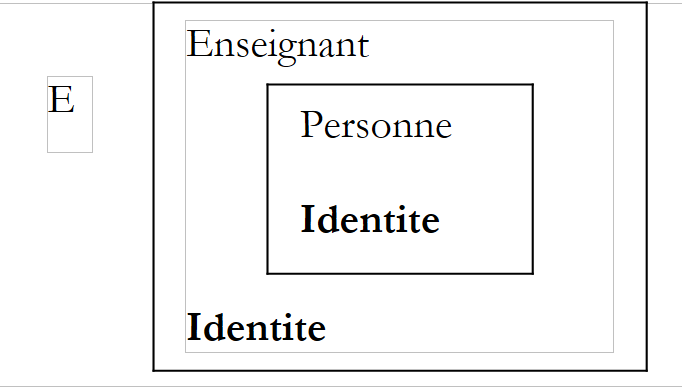 |
The Identity property is defined in both the Teacher class and its parent class Person. In the child class Teacher, the Identity property must be preceded by the keyword new to indicate that we are redefining a new Identity property for the Teacher class.
public new string Identite{
The Teacher class now has two Identity properties:
- the one inherited from the parent Person class
- its own
If E is a Teacher object, E.Identite refers to the Identity property of the Teacher class. We say that the Identity property of the child class overrides or hides the Identity property of the parent class. In general, if O is an object and M is a method, to execute the method O.M, the system searches for a method M in the following order:
- in the class of object O
- in its parent class, if it has one
- in the parent class of its parent class, if it exists
- etc…
Inheritance therefore allows methods and properties with the same name in the parent class to be redefined in the child class. This is what allows the child class to be adapted to its own needs. Combined with polymorphism, which we will discuss shortly, the redefinition of methods and properties is the main benefit of inheritance.
Let’s consider the same test program as before:
using System;

namespace Chap2 {
    class Program {
        static void Main(string[] args) {
            Console.WriteLine(new Enseignant("Jean", "Dupont", 30, 27).Identite);
        }
    }
}
The results obtained this time are as follows:
4.2.4. Polymorphism
Consider a class hierarchy: C0 ← C1 ← C2 ← … ← Cn
where Ci ← Cj indicates that class Cj is derived from class Ci. This implies that class Cj has all the characteristics of class Ci plus additional ones. Let Oi be objects of type Ci. It is valid to write:
Indeed, by inheritance, class Cj has all the characteristics of class Ci plus others. Therefore, an object Oj of type Cj contains within it an object of type Ci. The operation
means that Oi is a reference to the object of type Ci contained within the object Oj.
The fact that a variable Oi of class Ci can in fact refer not only to an object of class Ci but to any object derived from class Ci is called polymorphism: the ability of a variable to refer to different types of objects.
Let’s take an example and consider the following class-independent (static) function:
We could just as easily write
as
In the latter case, the formal parameter p of type Person in the static method Display will receive a value of type Teacher. Since the Teacher type derives from the Person type, this is valid.
4.2.5. Redefinition and Polymorphism
Let’s complete our Display method:
        public static void Affiche(Personne p) {
            // displays identity of p
            Console.WriteLine(p.Identite);
}//poster
The property p.Identite returns a string identifying the Person object p. What happens in the previous example if the parameter passed to the Display method is an object of type Teacher:
            Enseignant e = new Enseignant(...);
            Affiche(e);
Let's look at the following example:
using System;

namespace Chap2 {
    class Program2 {
        static void Main(string[] args) {
            // a teacher
            Enseignant e = new Enseignant("Lucile", "Dumas", 56, 61);
            Affiche(e);
            // a person
            Personne p = new Personne("Jean", "Dupont", 30);
            Affiche(p);
        }

        // poster
        public static void Affiche(Personne p) {
            // displays identity of p
            Console.WriteLine(p.Identite);
        }//poster
    }
}
The results are as follows:
The execution shows that the p.Identite statement (line 17) evaluated the Identity property of a Person each time, first (line 7) for the person contained in the Teacher e, then (line 10) for the Person p itself. It did not adapt to the object actually passed as a parameter to Display. We would have preferred to have the full identity of the Teacher e. To achieve this, the notation p.Identite would have had to reference the Identity property of the object actually pointed to by p rather than the Identity property of the "Person" part of the object actually pointed to by p.
It is possible to achieve this result by declaring Identite as a virtual property in the base class Personne:
public virtual string Identite {
            get { return String.Format("[{0}, {1}, {2}]", prenom, nom, age); }
        }
The virtual keyword makes Identity a virtual property. This keyword can also be applied to methods. Derived classes that redefine a virtual property or method must then use the override keyword instead of new to qualify their redefined property/method. Thus, in the Teacher class, the Identity property is redefined as follows:
        public override string Identite {
            get { return String.Format("Enseignant[{0},{1}]", base.Identite, Section); }
}
The previous program then produces the following results:
This time, on line 3, we have the teacher's full identity. Now let's redefine a method rather than a property. The object class (C# alias for System.Object) is the "parent" class of all C# classes. So when we write:
we are implicitly writing:
The System.Object class defines a virtual method ToString:
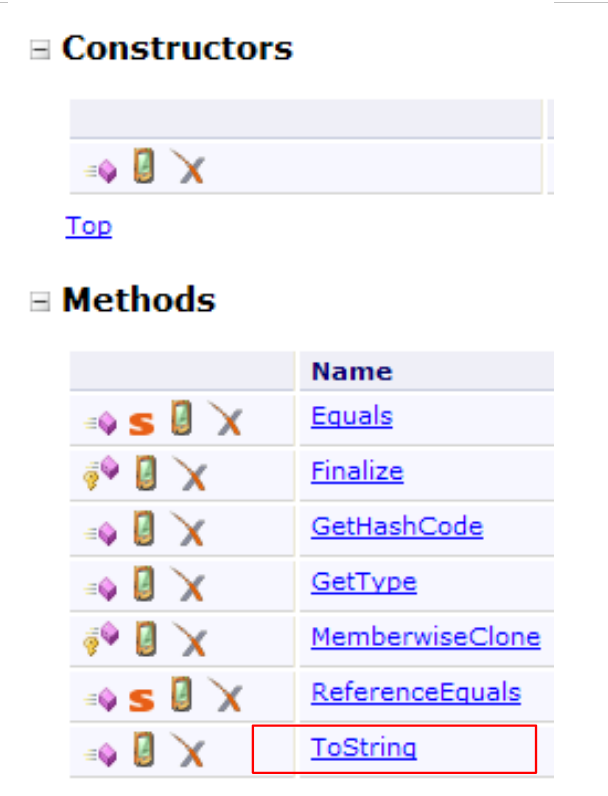 |
The ToString method returns the name of the class to which the object belongs, as shown in the following example:
using System;

namespace Chap2 {
    class Program2 {
        static void Main(string[] args) {
            // a teacher
            Console.WriteLine(new Enseignant("Lucile", "Dumas", 56, 61).ToString());
            // a person
            Console.WriteLine(new Personne("Jean", "Dupont", 30).ToString());
        }
    }
}
The results are as follows:
Note that although we have not redefined the ToString method in the Person and Teacher classes, we can see that the ToString method of the Object class was able to display the actual class name of the object.
Let’s redefine the ToString method in the Person and Teacher classes:
        // method ToString
        public override string ToString() {
            return Identite;
}
The definition is the same in both classes. Consider the following test program:
using System;
namespace Chap2 {
    class Program3 {
        public static void Main() {
            // a teacher
            Enseignant e = new Enseignant("Lucile", "Dumas", 56, 61);
            Affiche(e);
            // a person
            Personne p = new Personne("Jean", "Dupont", 30);
            Affiche(p);
        }
        // poster
        public static void Affiche(Personne p) {
            // displays identity of p
            Console.WriteLine(p);
        }//Poster
    }
}
Let’s focus on the Display method, which takes a Person p as a parameter. In line 15, the WriteLine method of the Console class has no variant that accepts a Person-type parameter. Among the various variants of WriteLine, there is one that accepts an Object type as a parameter. The compiler will use this method, WriteLine(Object o), because this signature means that the parameter o can be of type Object or a derived type. Since Object is the base class of all classes, any object can be passed as a parameter to WriteLine, and therefore an object of type Person or Teacher. The method WriteLine(Object o) writes o.ToString() to the Out write stream. Since the ToString method is virtual, if the object o (of type Object or a derived type) has overridden the ToString method, the latter will be used. This is the case here with the Person and Teacher classes.
This is shown by the execution results:
4.3. Redefining the meaning of an operator for a class
4.3.1. Introduction
Consider the statement
where op1 and op2 are two operands. It is possible to redefine the meaning of the + operator. If the operand op1 is an object of class C1, a static method must be defined in class C1 with the following signature:
When the compiler encounters the statement
it translates it to C1.operator+(op1,op2). The type returned by the operator method is important. Indeed, consider the operation op1+op2+op3. It is translated by the compiler to (op1+op2)+op3. Let res12 be the result of op1+op2. The operation performed next is res12+op3. If res12 is of type C1, it will also be translated as C1.operator+(res12,op3). This allows operations to be chained together.
We can also redefine unary operators that have only a single operand. Thus, if op1 is an object of type C1, the operation op1++ can be redefined by a static method of the C1 class:
What has been said here is true for most operators, with a few exceptions:
- the == and != operators must be redefined together
- the operators &&, ||, [], (), +=, -=, ... cannot be redefined
4.3.2. An example
We create a class ListeDePersonnes derived from the class ArrayList. This class implements a dynamic list and is presented in the following chapter. From this class, we use only the following elements:
- the method L.Add(Object o) for adding an object o to the list L. Here, the object o will be a Person object.
- the property L.Count, which returns the number of elements in the list L
- the notation L[i], which returns the i-th element of the list L
The class ListeDePersonnes will inherit all attributes, methods, and properties from the class ArrayList. Its definition is as follows:
using System;
using System.Collections;
using System.Text;

namespace Chap2 {
    class ListeDePersonnes : ArrayList{
        // redefine + operator, to add a person to the list
        public static ListeDePersonnes operator +(ListeDePersonnes l, Personne p) {
            // person p is added to the ListeDePersonnes l
            l.Add(p);
            // we return the ListeDePersonnes l
            return l;
        }// operator +

        // ToString
        public override string ToString() {
            // render (él1, él2, ..., éln)
            // opening parenthesis
            StringBuilder listeToString = new StringBuilder("(");
            // browse the list of people (this)
            for (int i = 0; i < Count - 1; i++) {
                listeToString.Append(this[i]).Append(",");
            }//for
            // last element
            if (Count != 0) {
                listeToString.Append(this[Count-1]);
            }
            // closing parenthesis
            listeToString.Append(")");
            // you must return a string
            return listeToString.ToString();
        }//ToString
    }
}
- line 6: the class ListeDePersonnes derives from the class ArrayList
- lines 8–13: definition of the + operator for the operation l + p, where l is of type ListeDePersonnes and p is of type Person or a derived type.
- line 10: the person p is added to the list l. The Add method of the parent class ArrayList is used here.
- Line 12: The reference to the list l is returned so that the + operators can be chained together, as in l + p1 + p2. The operation l+p1+p2 will be interpreted (based on operator precedence) as (l+p1)+p2. The operation l+p1 will return the reference l. The operation (l+p1)+p2 then becomes l+p2, which adds person p2 to the list of people l.
- Line 16: We redefine the method ToString to display a list of people in the form (person1, person2, ...), where personi is itself the result of the method ToString of the Person class.
- line 19: we use an object of type StringBuilder. This class is more suitable than the string class whenever numerous operations need to be performed on the string, in this case additions. In fact, each operation on a string object returns a new string object, whereas the same operations on a StringBuilder object modify the object but do not create a new one. We use the Append method to concatenate the strings.
- Line 21: We iterate through the elements of the list of people. This list is referred to here as `this`. It is the current object on which the `ToString` method is executed. The `Count` property is a property of the parent class `ArrayList`.
- Line 22: Element number i of the current list this is accessible via the notation this[i]. Again, this is a property of the ArrayList class. Since we are adding strings, the method this[i].ToString() will be used. Since this method is virtual, the ToString method of the this object, of type Person or a derived class, will be used.
- Line 31: We need to return an object of type string (line 16). The StringBuilder class has a method ToString that allows converting from a StringBuilder type to a string type.
Note that the class ListeDePersonnes has no constructor. In this case, we know that the constructor
will be used. This constructor does nothing other than call the parameterless constructor of its parent class:
A test class might look like this:
using System;

namespace Chap2 {
    class Program1 {
        static void Main(string[] args) {
            // a list of people
            ListeDePersonnes l = new ListeDePersonnes();
            // add people
            l = l + new Personne("jean", "martin",10) + new Personne("pauline", "leduc",12);
            // display
            Console.WriteLine("l=" + l);
            l = l + new Enseignant("camille", "germain",27,60);
            Console.WriteLine("l=" + l);
        }
    }
}
- line 7: creating a list of people l
- line 9: adding 2 people using the + operator
- line 12: adding a teacher
- lines 11 and 13: use of the redefined method ListOfPeople.ToString().
The results:
4.4. Defining an indexer for a class
Here we continue to use the class ListeDePersonnes. If l is a ListeDePersonnes object, we want to be able to use the notation l[i] to refer to the person with index i in the list l, both in read operations (Person p=l[i]) and in write operations (l[i]=new Person(...)).
To be able to write l[i], where l[i] refers to a Person object, we need to define the following this method in the ListeDePersonnes class:
        public Personne this[int i] {
            get { ... }
            set { ... }
}
The method *this[int i]* is called an indexer because it gives meaning to the expression obj[i], which resembles array notation, even though *obj is not an array but an object. The get method of the this method of the obj object is called when we write variable=obj[i], and the set method is called when we write obj[i]=value*.
The class ListeDePersonnes derives from the class ArrayList, which itself has an indexer:
There is a conflict between the this method of the ListeDePersonnes class:
public Personne this[int i]
and the this method of the ArrayList class
public object this[int i]
because they have the same name and accept the same parameter type (int).To indicate that the this method of the ListeDePersonnes class "hides" the method of the same name in the ArrayList class, we must add the new keyword to the declaration of the ListeDePersonnes indexer. We will therefore write:
    public new Personne this[int i]{
        get { ... }
        set { ... }
    }
Let’s complete this method. The method this.get is called when we write variable=l[i], for example, where l is of type ListeDePersonnes. We must then return the person with index i from the list l. This is done using the notation base[i], which makes the object with index i of the underlying class ArrayList a subclass of the class ListeDePersonnes. Since the returned object is of type Object, a type cast to the Person class is required.
    public new Personne this[int i]{
        get { return (Personne) base[i]; }
        set { ... }
    }
The set method is called when you write l[i]=p, where p is a Person. This assigns the person p to the i-th element of the list l.
    public new Personne this[int i]{
        get { ... }
        set { base[i]=value; }
    }
Here, the Person p represented by the keyword value is assigned to element number i of the base class ArrayList.
The indexer for the class ListeDePersonnes will therefore be as follows:
    public new Personne this[int i]{
        get { return (Personne) base[i]; }
        set { base[i]=value; }
    }
Now, we also want to be able to write Person p=l["nom"], c.a.d to index the list l not by an element number but by a person's name. To do this, we define a new indexer:
        // indexer via a name
        public int this[string nom] {
            get {
                // we're looking for the person
                for (int i = 0; i < Count; i++) {
                    if (((Personne)base[i]).Nom == nom)
                        return i;
                }//for
                return -1;
            }//get
}
The first line
public int this[string nom]
indicates that the class ListeDePersonnes is indexed by a string named name and that the result of l[nom] is an integer. This integer will be the position in the list of the person with the name name, or -1 if that person is not in the list. We define only the property get, thereby disallowing the assignment l["nom"]=value, which would have required the definition of the set property. The keyword new is not required in the indexer declaration because the base class ArrayList does not define an indexer this[string].
In the body of get, the list of people is traversed in search of the name passed as a parameter. If it is found at position i, i is returned; otherwise, -1 is returned.
The previous test program is completed as follows:
using System;

namespace Chap2 {
    class Program2 {
        static void Main(string[] args) {
            // a list of people
            ListeDePersonnes l = new ListeDePersonnes();
            // add people
            l = l + new Personne("jean", "martin",10) + new Personne("pauline", "leduc",12);
            // display
            Console.WriteLine("l=" + l);
            l = l + new Enseignant("camille", "germain",27,60);
            Console.WriteLine("l=" + l);
            // change item 1
            l[1] = new Personne("franck", "gallon",5);
            // display element 1
            Console.WriteLine("l[1]=" + l[1]);
            // display list l
            Console.WriteLine("l=" + l);
            // people search
            string[] noms = { "martin", "germain", "xx" };
            for (int i = 0; i < noms.Length; i++) {
                int inom = l[noms[i]];
                if (inom != -1)
                    Console.WriteLine("Personne(" + noms[i] + ")=" + l[inom]);
                else
                    Console.WriteLine("Personne(" + noms[i] + ") n'existe pas");
            }//for
        }
    }
}
Its execution yields the following results:
4.5. Structures
The C# structure is analogous to the structure in the C language and is very similar to the concept of a class. A structure is defined as follows:
Despite similarities in their declarations, there are significant differences between classes and structures. For example, the concept of inheritance does not exist with structures. If we are writing a class that is not intended to be derived from another, what are the differences between structures and classes that will help us choose between the two? Let’s use the following example to find out:
using System;

namespace Chap2 {
    class Program1 {
        static void Main(string[] args) {
            // a sp1 structure
            SPersonne sp1;
            sp1.Nom = "paul";
            sp1.Age = 10;
            Console.WriteLine("sp1=SPersonne(" + sp1.Nom + "," + sp1.Age + ")");
            // a sp2 structure
            SPersonne sp2 = sp1;
            Console.WriteLine("sp2=SPersonne(" + sp2.Nom + "," + sp2.Age + ")");
            // sp2 is modified
            sp2.Nom = "nicole";
            sp2.Age = 30;
            // checking sp1 and sp2
            Console.WriteLine("sp1=SPersonne(" + sp1.Nom + "," + sp1.Age + ")");
            Console.WriteLine("sp2=SPersonne(" + sp2.Nom + "," + sp2.Age + ")");

            // an op1 object
            CPersonne op1=new CPersonne();
            op1.Nom = "paul";
            op1.Age = 10;
            Console.WriteLine("op1=CPersonne(" + op1.Nom + "," + op1.Age + ")");
            // an op2 object
            CPersonne op2=op1;
            Console.WriteLine("op2=CPersonne(" + op2.Nom + "," + op2.Age + ")");
            // op2 is modified
            op2.Nom = "nicole";
            op2.Age = 30;
            // op1 and op2 verification
            Console.WriteLine("op1=CPersonne(" + op1.Nom + "," + op1.Age + ")");
            Console.WriteLine("op2=CPersonne(" + op2.Nom + "," + op2.Age + ")");
        }
    }
    // structure SPersonne
    struct SPersonne {
        public string Nom;
        public int Age;
    }

    // class CPersonne
    class CPersonne {
        public string Nom;
        public int Age;
    }

}
- lines 38–41: a structure with two public fields: Name, Age
- lines 44–47: a class with two public fields: Name, Age
If we run this program, we get the following results:
Where we previously used a Person class, we now use a structure SPersonne:
    struct SPersonne {
        public string Nom;
        public int Age;
}
The structure does not have a constructor here. It could have one, as we will show later. By default, it always has a parameterless constructor, in this case SPersonne().
- Line 7 of the code: the declaration
SPersonne sp1;
is equivalent to the statement:
SPersonne sp1=new Spersonne();
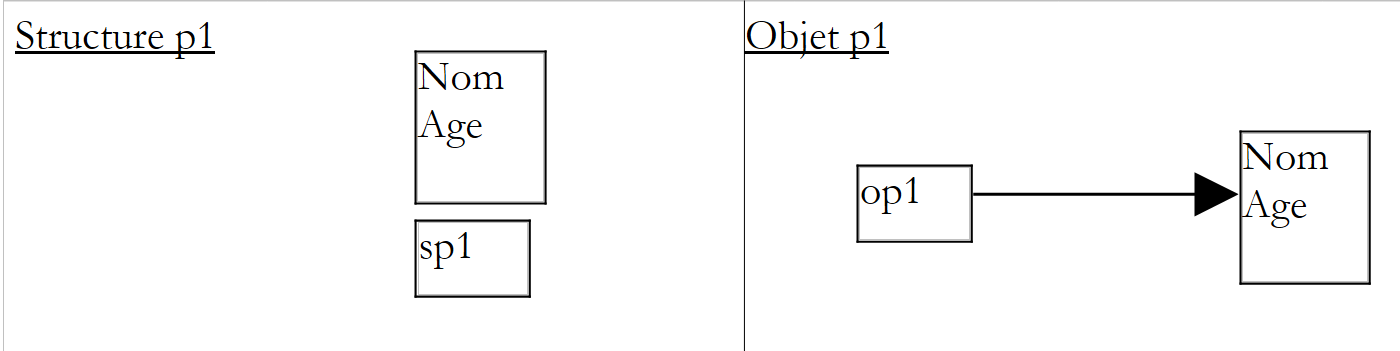
A structure (Name,Age) is created, and the value of sp1 is this structure itself. In the case of a class, the object (Name,Age) must be created explicitly using the new operator (line 22):
CPersonne op1=new CPersonne();
The previous statement creates an object CPersonne (roughly equivalent to our structure) and the value of p1 is then the address (the reference) of this object.
To summarize
- in the case of the structure, the value of sp1 is the structure itself
- in the case of the class, the value of op1 is the address of the created object
 |
When we write line 12 in the program:
SPersonne sp2 = sp1;
a new structure sp2(Name,Age) is created and initialized with the value of sp1, i.e., the structure itself.
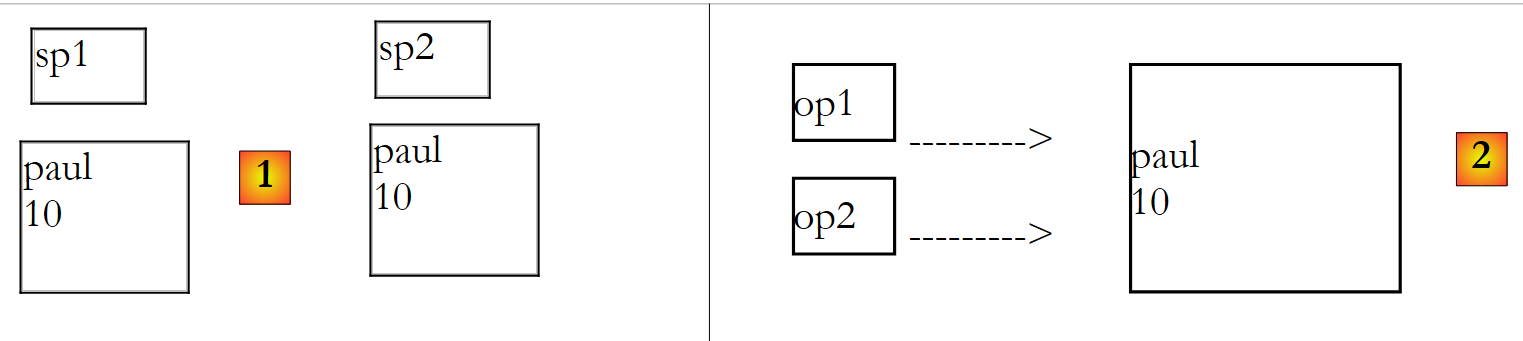 |
The structure of sp1 is duplicated in sp2 [1]. This is a value copy. Now consider the statement on line 27:
CPersonne op2=op1;
In the case of classes, the value of op1 is copied into op2, but since this value is actually the object’s address, the object itself is not duplicated [2].
In the case of the structure [1], if we modify the value of sp2, we do not modify the value of sp1, as the program demonstrates. In the case of the object [2], if the object pointed to by op2 is modified, the one pointed to by op1 is also modified since they are the same. This is also shown by the program’s results.
We can therefore conclude from these explanations that:
- the value of a structure-type variable is the structure itself
- the value of a variable of type object is the address of the object it points to
Once this fundamental difference is understood, the structure proves to be very similar to a class, as shown in the following new example:
using System;

namespace Chap2 {

    // structure SPersonne
    struct SPersonne {
        // private attributes
        private string nom;
        private int age;

        // properties
        public string Nom {
            get { return nom; }
            set { nom = value; }
        }//name

        public int Age {
            get { return age; }
            set { age = value; }
        }//age

        // Manufacturer
        public SPersonne(string nom, int age) {
            this.nom = nom;
            this.age = age;
        }//manufacturer

        // ToString
        public override string ToString() {
            return "SPersonne(" + Nom + "," + Age + ")";
        }//ToString
    }//structure
}//namespace
- lines 8-9: two private fields
- lines 12-20: the associated public properties
- lines 23-26: a constructor is defined. Note that the parameterless constructor SPersonne() is always present and does not need to be declared. Its declaration is rejected by the compiler. In the constructor on lines 23–26, one might be tempted to initialize the private fields `name` and `age` via their public properties `Name` and `Age`. This is rejected by the compiler. The structure’s methods cannot be used during its construction.
- Lines 29–31: redefinition of the method ToString.
A test program could look like this:
using System;

namespace Chap2 {
    class Program1 {
        static void Main(string[] args) {
            // one person p1
            SPersonne p1=new SPersonne();
            p1.Nom="paul";
            p1.Age= 10;
            Console.WriteLine("p1={0}",p1);
            // one person p2
            SPersonne p2 = p1;
            Console.WriteLine("p2=" + p2);
            // p2 is modified
            p2.Nom = "nicole";
            p2.Age = 30;
            // checking p1 and p2
            Console.WriteLine("p1=" + p1);
            Console.WriteLine("p2=" + p2);
            // one person p3
            SPersonne p3 = new SPersonne("amandin", 18);
            Console.WriteLine("p3=" + p3);
            // one person p4
            SPersonne p4 = new SPersonne { Nom = "x", Age = 10 };
            Console.WriteLine("p4=" + p4);
        }
    }
}
- line 7: we are required to explicitly use the parameterless constructor, because there is another constructor in the structure. If the structure had no constructors, the statement
SPersonne p1;
would have been sufficient to create an empty structure.
- lines 8-9: the structure is initialized via its public properties
- line 10: the method p1.ToString will be used in WriteLine.
- line 21: creation of a structure using the constructor SPersonne(string,int)
- Line 24: Creation of a structure using the parameterless constructor SPersonne() with, within curly braces, initialization of private fields via their public properties.
The following execution results are obtained:
The only notable difference here between a structure and a class is that with a class, the objects p1 and p2 would have pointed to the same object at the end of the program.
4.6. Interfaces
An interface is a set of method or property prototypes that forms a contract. A class that decides to implement an interface commits to providing an implementation of all the methods defined in the interface. The compiler verifies this implementation.
Here, for example, is the definition of the System.Collections.IEnumerator interface:
public interface System.Collections.IEnumerator


{    // Prop
e   rties Object Curren

t    { get; }
     // Methods
     bool MoveNe
xt(); void Reset(); }
The properties and methods of the interface are defined only by their signatures. They are not implemented (have no code). It is the classes that implement the interface that provide code for the interface's methods and properties.
- line 1: Class C implements class IEnumerator. Note that the colon (:) used for implementing an interface is the same as the one used for class inheritance.
- Lines 3–5: The implementation of the methods and properties of the IEnumerator interface.
Consider the following interface:
namespace Chap2 {
    public interface IStats {
        double Moyenne { get; }
        double EcartType();
    }
}
The IStats interface provides:
- a read-only property Average: to calculate the average of a series of values
- a method EcartType: to calculate the standard deviation
Note that it is not specified anywhere which series of values is being referred to. It could be the average of a class’s grades, the monthly average sales of a particular product, the average temperature in a given location, etc. This is the principle of interfaces: we assume the existence of methods in the object but not that of specific data.
A first implementation class for the IStats interface could be a class used to store the grades of students in a class for a given subject. A student would be characterized by the following Student structure:
    public struct Elève {
        public string Nom { get; set; }
        public string Prénom { get; set; }
}//Student
The student would be identified by their first and last name. Lines 2–3 contain the automatic properties for these two attributes.
A grade would be characterized by the following Note structure:
    public struct Note {
        public Elève Elève { get; set; }
        public double Valeur { get; set; }
}//Note
The grade would be identified by the graded student and the grade itself. Lines 2–3 contain the automatic properties for these two attributes.
The grades of all students in a given subject are collected in the following class TableauDeNotes:
using System;
using System.Text;

namespace Chap2 {

    public class TableauDeNotes : IStats {
        // attributes
        public string Matière { get; set; }
        public Note[] Notes { get; set; }
        public double Moyenne { get; private set; }
        private double ecartType;

        // manufacturer
        public TableauDeNotes(string matière, Note[] notes) {
            // saving via public properties
            Matière = matière;
            Notes = notes;
            // calculating the average score
            double somme = 0;
            for (int i = 0; i < Notes.Length; i++) {
                somme += Notes[i].Valeur;
            }
            if (Notes.Length != 0) Moyenne = somme / Notes.Length;
            else Moyenne = -1;
            // standard deviation
            double carrés = 0;
            for (int i = 0; i < Notes.Length; i++) {
                carrés += Math.Pow((Notes[i].Valeur - Moyenne), 2);
            }//for
            if (Notes.Length != 0)
                ecartType = Math.Sqrt(carrés / Notes.Length);
            else ecartType = -1;
        }//manufacturer

        public double EcartType() {
            return ecartType;
        }

        // ToString
        public override string ToString() {
            StringBuilder valeur = new StringBuilder(String.Format("matière={0}, notes=(", Matière));
            int i;
            // concatenate all the notes
            for (i = 0; i < Notes.Length-1; i++) {
valeur.Append("[").Append(Notes[i].Elève.Prénom).Append(",").Append(Notes[i].Elève.Nom).Append(",").Append(Notes[i].Valeur).Append("],");
            };
            //final note
            if (Notes.Length != 0) {
valeur.Append("[").Append(Notes[i].Elève.Prénom).Append(",").Append(Notes[i].Elève.Nom).Append(",").Append(Notes[i].Valeur).Append("]");
            }
            valeur.Append(")");
            // end
            return valeur.ToString();
        }//ToString

    }//class
}
- line 6: the class TableauDeNotes implements the interface IStats. It must therefore implement the Average property and the EcartType method. These are implemented on lines 10 (Average) and 35–37 (EcartType)
- lines 8–10: three automatic properties
- line 8: the subject for which the object stores grades
- line 9: the table of student grades (Student, Grade)
- line 10: the average of the grades—property implementing the Average property of the IStats interface.
- line 11: field storing the standard deviation of the grades - the associated method get (EcartType) in lines 35–37 implements the method EcartType of the IStats interface.
- Line 9: The grades are stored in an array. This array is passed to the constructor in lines 14–33 when the TableauDeNotes class is instantiated.
- Lines 14–33: The constructor. Here, we assume that the grades passed to the constructor will not change thereafter. Therefore, we use the constructor to immediately calculate the mean and standard deviation of these grades and store them in the fields on lines 10–11. The mean is stored in the private field underlying the automatic property Mean in line 10, and the standard deviation in the private field of line 11.
- Line 10: The method get of the automatic property Average will return the underlying private field.
- Lines 35–37: The EcartType method returns the value of the private field in line 11.
There are a few subtleties in this code:
- Line 23: The set method of the Average property is used to perform the assignment. This method was declared private on line 10 so that assigning a value to the Average property is only possible within the class.
- lines 40–54: use a StringBuilder object to construct the string representing the TableauDeNotes object in order to improve performance. It should be noted that code readability suffers significantly as a result. This is the downside.
In the previous class, grades were stored in an array. It was not possible to add a new grade after the TableauDeNotes object was constructed. We now propose a second implementation of the IStats interface, called ListeDeNotes, where this time the grades would be stored in a list, with the ability to add grades after the initial construction of the ListeDeNotes object.
The code for the ListeDeNotes class is as follows:
using System;
using System.Text;
using System.Collections.Generic;

namespace Chap2 {

    public class ListeDeNotes : IStats {
        // attributes
        public string Matière { get; set; }
        public List<Note> Notes { get; set; }
        public double moyenne = -1;
        public double ecartType = -1;

        // manufacturer
        public ListeDeNotes(string matière, List<Note> notes) {
            // saving via public properties
            Matière = matière;
            Notes = notes;
        }//manufacturer

        // add a note
        public void Ajouter(Note note) {
            // add note
            Notes.Add(note);
            // mean and standard deviation reset
            moyenne = -1;
            ecartType = -1;
        }

        // ToString
        public override string ToString() {
            StringBuilder valeur = new StringBuilder(String.Format("matière={0}, notes=(", Matière));
            int i;
            // concatenate all the notes
            for (i = 0; i < Notes.Count - 1; i++) {
valeur.Append("[").Append(Notes[i].Elève.Prénom).Append(",").Append(Notes[i].Elève.Nom).Append(",").Append(Notes[i].Valeur).Append("],");
            };
            //final note
            if (Notes.Count != 0) {
valeur.Append("[").Append(Notes[i].Elève.Prénom).Append(",").Append(Notes[i].Elève.Nom).Append(",").Append(Notes[i].Valeur).Append("]");
            }
            valeur.Append(")");
            // end
            return valeur.ToString();
        }//ToString

        // average score
        public double Moyenne {
            get {
                if (moyenne != -1) return moyenne;
                // calculating the average score
                double somme = 0;
                for (int i = 0; i < Notes.Count; i++) {
                    somme += Notes[i].Valeur;
                }
                // we return the average
                if (Notes.Count != 0) moyenne = somme / Notes.Count;
                return moyenne;
            }
        }

        public double EcartType() {
            // standard deviation
            if (ecartType != -1) return ecartType;
            // average
            double moyenne = Moyenne;
            double carrés = 0;
            for (int i = 0; i < Notes.Count; i++) {
                carrés += Math.Pow((Notes[i].Valeur - moyenne), 2);
            }//for
            // we return the standard deviation
            if (Notes.Count != 0)
                ecartType = Math.Sqrt(carrés / Notes.Count);
            return ecartType;
        }
    }//class
}
- line 7: the class ListeDeNotes implements the interface IStats
- line 10: grades are now stored in a list rather than an array
- line 11: the automatic property Average of the class TableauDeNotes has been dropped here in favor of a private field average, line 11, associated with the read-only public property Average in lines 48-60
- lines 22–28: it is now possible to add a grade to those already stored, which was not possible previously.
- lines 15–19: as a result, the mean and standard deviation are no longer calculated in the constructor but in the interface methods themselves: Mean (lines 48–60) and EcartType (62–76). However, the recalculation is only triggered if the mean and standard deviation are different from -1 (lines 50 and 64).
A test class could look like this:
using System;
using System.Collections.Generic;

namespace Chap2 {
    class Program1 {
        static void Main(string[] args) {
            // some students & english notes
            Elève[] élèves1 =  { new Elève { Prénom = "Paul", Nom = "Martin" }, new Elève { Prénom = "Maxime", Nom = "Germain" }, new Elève { Prénom = "Berthine", Nom = "Samin" } };
            Note[] notes1 = { new Note { Elève = élèves1[0], Valeur = 14 }, new Note { Elève = élèves1[1], Valeur = 16 }, new Note { Elève = élèves1[2], Valeur = 18 } };
            // which we save in a TableauDeNotes object
            TableauDeNotes anglais = new TableauDeNotes("anglais", notes1);
            // average and standard deviation display
            Console.WriteLine("{2}, Moyenne={0}, Ecart-type={1}", anglais.Moyenne, anglais.EcartType(), anglais);
            // we put the students and the material in a ListeDeNotes object
            ListeDeNotes français = new ListeDeNotes("français", new List<Note>(notes1));
            // average and standard deviation display
            Console.WriteLine("{2}, Moyenne={0}, Ecart-type={1}", français.Moyenne, français.EcartType(), français);
            // we add a note
            français.Ajouter(new Note { Elève = new Elève { Prénom = "Jérôme", Nom = "Jaric" }, Valeur = 10 });
            // average and standard deviation display
            Console.WriteLine("{2}, Moyenne={0}, Ecart-type={1}", français.Moyenne, français.EcartType(), français);
        }
    }
}
- line 8: creating an array of students using the parameterless constructor and initializing via public properties
- line 9: creation of an array of grades using the same technique
- line 11: a TableauDeNotes object for which the mean and standard deviation are calculated line 13
- line 15: a ListeDeNotes object for which the mean and standard deviation are calculated line 17. The List<Note> class has a constructor that accepts an object implementing the IEnumerable<Note> interface. The notes1 array implements this interface and can be used to construct the List<Note> object.
- Line 19: Adding a new note
- line 21: recalculating the mean and standard deviation
The results of the execution are as follows:
In the previous example, two classes implement the IStats interface. That said, the example does not demonstrate the value of the IStats interface. Let’s rewrite the test program as follows:
using System;
using System.Collections.Generic;

namespace Chap2 {
    class Program2 {
        static void Main(string[] args) {
            // some students & English notes
            Elève[] élèves1 =  { new Elève { Prénom = "Paul", Nom = "Martin" }, new Elève { Prénom = "Maxime", Nom = "Germain" }, new Elève { Prénom = "Berthine", Nom = "Samin" } };
            Note[] notes1 = { new Note { Elève = élèves1[0], Valeur = 14 }, new Note { Elève = élèves1[1], Valeur = 16 }, new Note { Elève = élèves1[2], Valeur = 18 } };
            // which we save in a TableauDeNotes object
            TableauDeNotes anglais = new TableauDeNotes("anglais", notes1);
            // average and standard deviation display
            AfficheStats(anglais);
            // we put the students and the material in a ListeDeNotes object
            ListeDeNotes français = new ListeDeNotes("français", new List<Note>(notes1));
            // average and standard deviation display
            AfficheStats(français);
            // we add a note
            français.Ajouter(new Note { Elève = new Elève { Prénom = "Jérôme", Nom = "Jaric" }, Valeur = 10 });
            // average and standard deviation display
            AfficheStats(français);
        }

        // display mean and standard deviation of a type IStats
        static void AfficheStats(IStats valeurs) {
            Console.WriteLine("{2}, Moyenne={0}, Ecart-type={1}", valeurs.Moyenne, valeurs.EcartType(), valeurs);
        }
    }
}
- Lines 25–27: The static method AfficheStats takes a IStats type as a parameter, which is an interface type. This means that the actual parameter can be any object that implements the IStats interface. When using data of an interface type, this means that only the interface methods implemented by the data will be used. The rest is ignored. This property is similar to the polymorphism seen with classes. If a set of classes Ci that are not related to each other through inheritance (and thus cannot use inheritance-based polymorphism) share a set of methods with the same signature, it may be useful to group these methods into an interface I that all the relevant classes would implement. Instances of these classes Ci can then be used as actual parameters of functions that accept a formal parameter of type I, c.a.d. These functions use only the methods of the Ci objects defined in the interface I, and not the specific attributes and methods of the various Ci classes.
- line 13: the method AfficheStats is called with a type TableauDeNotes that implements the interface IStats
- line 17: same as above, but with a type ListeDeNotes
The execution results are identical to those of the previous example.
A variable can be of the type of an interface. Thus, we can write:
The declaration on line 1 indicates that stats1 is an instance of a class implementing the IStats interface. This declaration implies that the compiler will only allow access in stats1 to the methods of the interface: the Average property and the EcartType method.
Finally, note that interfaces can have multiple implementations, such as c.a.d. We can write
where the Ij are interfaces.
4.7. Abstract classes
An abstract class is a class that cannot be instantiated. You must create derived classes that can be instantiated.
Abstract classes can be used to refactor the code of a class hierarchy. Let’s examine the following case:
using System;

namespace Chap2 {
    abstract class Utilisateur {
        // fields
        private string login;
        private string motDePasse;
        private string role;

        // manufacturer
        public Utilisateur(string login, string motDePasse) {
            // information is recorded
            this.login = login;
            this.motDePasse = motDePasse;
            // user identification
            role=identifie();
            // identified?
            if (role == null) {
                throw new ExceptionUtilisateurInconnu(String.Format("[{0},{1}]", login, motDePasse));
            }
        }

        // toString
        public override string ToString() {
            return String.Format("Utilisateur[{0},{1},{2}]", login, motDePasse, role);
        }

        // identifies
        abstract public string identifie();
    }
}
- lines 11-21: the constructor of the User class. This class stores information about a web application user. The application has various types of users authenticated via a username and password (lines 6-7). These two pieces of information are verified against a LDAP service for some users, against a SGBD service for others, and so on...
- lines 13–14: authentication information is stored
- Line 16: It is verified by an `identifie` method. Because the identification method is not defined, it is declared abstract on line 29 using the `abstract` keyword. The `identifie` method returns a string specifying the user’s role (basically, what they are authorized to do). If this string is a null pointer, an exception is thrown on line 19.
- Line 4: Because it has an abstract method, the class itself is declared abstract using the abstract keyword.
- Line 29: The abstract method `identify` has no definition. Derived classes will provide one.
- Lines 24–26: The method ToString, which identifies an instance of the class.
Here, we assume that the developer wants to control the construction of instances of the User class and derived classes, perhaps because they want to ensure that a specific type of exception is thrown if the user is not recognized (line 19). Derived classes can rely on this constructor. To do so, they must provide the identify method.
The ExceptionUtilisateurInconnu class is as follows:
using System;

namespace Chap2 {
    class ExceptionUtilisateurInconnu : Exception {
        public ExceptionUtilisateurInconnu(string message) : base(message){
        }
    }
}
- line 3: it derives from the Exception class
- lines 4–6: it has a single constructor that takes an error message as a parameter. This is passed to the parent class (line 5), which has the same constructor.
We now derive the User class from the Administrator child class:
namespace Chap2 {
    class Administrateur : Utilisateur {
        // manufacturer
        public Administrateur(string login, string motDePasse)
            : base(login, motDePasse) {
        }

        // identifies
        public override string identifie() {
            // identification LDAP
            // ...
            return "admin";
        }
    }
}
- lines 4–6: the constructor simply passes the parameters it receives to its parent class
- lines 9-12: the identify method of the Administrator class. We assume that an administrator is identified by a system ID LDAP. This method overrides the identify method of its parent class. Because it overrides an abstract method, there is no need to use the override keyword.
We now derive the User class from the Observer child class:
namespace Chap2 {
    class Observateur : Utilisateur{
        // manufacturer
        public Observateur(string login, string motDePasse)
            : base(login, motDePasse) {
        }

        //identifies
        public override string identifie() {
            // identification SGBD
            // ...
            return "observateur";
        }

    }
}
- lines 4–6: the constructor simply passes the parameters it receives to its parent class
- lines 9-13: the `identify` method of the Observer class. We assume that an observer is identified by verifying their identification data in a database.
Ultimately, the Administrator and Observer objects are instantiated by the same constructor, that of the parent User class. This constructor will use the identify method provided by these classes.
A third class, Unknown, also derives from the User class:
namespace Chap2 {
    class Inconnu : Utilisateur{

        // manufacturer
        public Inconnu(string login, string motDePasse)
            : base(login, motDePasse) {
        }

        //identifies
        public override string identifie() {
            // unknown user
            // ...
            return null;
        }

    }
}
- Line 13: The `identify` method sets the pointer to `null` to indicate that the user was not recognized.
A test program might look like this:
using System;

namespace Chap2 {
    class Program {
        static void Main(string[] args) {
            Console.WriteLine(new Observateur("observer","mdp1"));
            Console.WriteLine(new Administrateur("admin", "mdp2"));
            try {
                Console.WriteLine(new Inconnu("xx", "yy"));
            } catch (ExceptionUtilisateurInconnu e) {
                Console.WriteLine("Utilisateur non connu : "+ e.Message);
            }
        }
    }
}
Note that in lines 6, 7, and 9, the method [Utilisateur].ToString() is called by the method WriteLine.
The results of the execution are as follows:
4.8. Classes, interfaces, generic methods
Suppose we want to write a method that swaps two integers. This method could be as follows:
        public static void Echanger1(ref int value1, ref int value2){
            // exchange the value1 and value2 references
            int temp = value2;
            value2 = value1;
            value1 = temp;
}
Now, if we wanted to swap two references to Person objects, we would write:
        public static void Echanger2(ref Personne value1, ref Personne value2){
            // exchange the value1 and value2 references
            Personne temp = value2;
            value2 = value1;
            value1 = temp;
}
What distinguishes the two methods is the type T of the parameters: int in Swap1, Person in Swap2. Generic classes and interfaces address the need for methods that differ only in the type of some of their parameters.
With a generic class, the Exchange method could be rewritten as follows:
namespace Chap2 {
    class Generic1<T> {
        public static void Echanger(ref T value1, ref T value2){
            // exchange the value1 and value2 references
            T temp = value2;
            value2 = value1;
            value1 = temp;
        }
    }
}
- line 2: the Generic1 class is parameterized by a type denoted T. It can be given any name. This type T is then reused in the class on lines 3 and 5. The Generic1 class is said to be a generic class.
- line 3: defines the two references to a type T to be swapped
- line 5: the temporary variable temp is of type T.
A test program for the class could look like this:
using System;

namespace Chap2 {
    class Program {
        static void Main(string[] args) {
            // int
            int i1 = 1, i2 = 2;
            Generic1<int>.Echanger(ref i1, ref i2);
            Console.WriteLine("i1={0},i2={1}", i1, i2);
            // string
            string s1 = "s1", s2 = "s2";
            Generic1<string>.Echanger(ref s1, ref s2);
            Console.WriteLine("s1={0},s2={1}", s1, s2);
            // Person
            Personne p1 = new Personne("jean", "clu", 20), p2 = new Personne("pauline", "dard", 55);
            Generic1<Personne>.Echanger(ref p1, ref p2);
            Console.WriteLine("p1={0},p2={1}", p1, p2);

        }
    }
}
- Line 8: When using a generic class parameterized by types T1, T2, ... these types must be "instantiated". Line 8: We use the static method Swap of type Generic1<int> to indicate that the references passed to the Swap method are of type int.
- Line 12: We use the static method Echanger of type Generic1<string> to indicate that the references passed to the Echanger method are of type string.
- Line 16: The static Echanger method of type Generic1<Person> is used to indicate that the references passed to the Echanger method are of type Person.
The results of the execution are as follows:
The Echanger method could also have been written as follows:
namespace Chap2 {
    class Generic2 {
        public static void Echanger<T>(ref T value1, ref T value2){
            // exchange the value1 and value2 references
            T temp = value2;
            value2 = value1;
            value1 = temp;
        }
    }
}
- line 2: the Generic2 class is no longer generic
- Line 3: The static method `Echanger` is generic
The test program then becomes the following:
using System;

namespace Chap2 {
    class Program2 {
        static void Main(string[] args) {
            // int
            int i1 = 1, i2 = 2;
            Generic2.Echanger<int>(ref i1, ref i2);
            Console.WriteLine("i1={0},i2={1}", i1, i2);
            // string
            string s1 = "s1", s2 = "s2";
            Generic2.Echanger<string>(ref s1, ref s2);
            Console.WriteLine("s1={0},s2={1}", s1, s2);
            // Person
            Personne p1 = new Personne("jean", "clu", 20), p2 = new Personne("pauline", "dard", 55);
            Generic2.Echanger<Personne>(ref p1, ref p2);
            Console.WriteLine("p1={0},p2={1}", p1, p2);
        }
    }
}
- Lines 8, 12, and 16: The Swap method is called by specifying the parameter types within <>. In fact, the compiler can infer which variant of the Swap method to use based on the types of the actual parameters. Therefore, the following syntax is valid:
            Generic2.Echanger(ref i1, ref i2);
...
            Generic2.Echanger(ref s1, ref s2);
...
            Generic2.Echanger(ref p1, ref p2);
Lines 1, 3, and 5: the variant of the Swap method being called is no longer specified. The compiler is able to infer it from the nature of the actual parameters used.
Constraints can be placed on generic parameters:
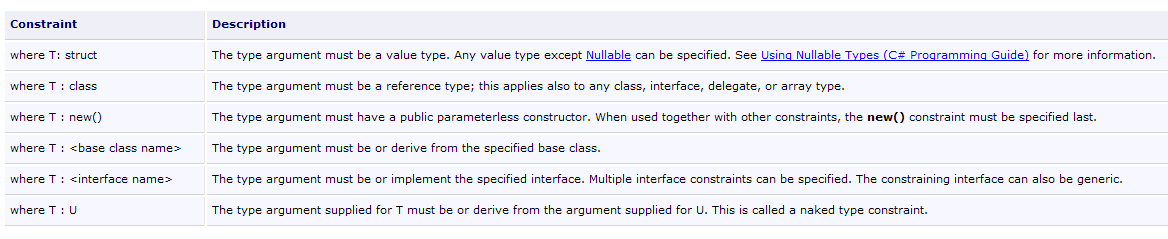
Consider the following new generic Swap method:
namespace Chap2 {
    class Generic3 {
        public static void Echanger<T>(ref T value1, ref T value2) where T : class {
            // exchange the value1 and value2 references
            T temp = value2;
            value2 = value1;
            value1 = temp;
        }
    }
}
- line 3: type T must be a reference (class, interface)
Consider the following test program:
using System;

namespace Chap2 {
    class Program4 {
        static void Main(string[] args) {
            // int
            int i1 = 1, i2 = 2;
            Generic3.Echanger<int>(ref i1, ref i2);
            Console.WriteLine("i1={0},i2={1}", i1, i2);
            // string
            string s1 = "s1", s2 = "s2";
            Generic3.Echanger(ref s1, ref s2);
            Console.WriteLine("s1={0},s2={1}", s1, s2);
            // Person
            Personne p1 = new Personne("jean", "clu", 20), p2 = new Personne("pauline", "dard", 55);
            Generic3.Echanger(ref p1, ref p2);
            Console.WriteLine("p1={0},p2={1}", p1, p2);

        }
    }
}
The compiler reports an error on line 8 because the type int is not a class or an interface; it is a struct:

Consider the following new generic method Exchange:
namespace Chap2 {
    class Generic4 {
        public static void Echanger<T>(ref T element1, ref T element2) where T : Interface1 {
            // retrieve the value of the 2 elements
            int value1 = element1.Value();
            int value2 = element2.Value();
            // if 1st element > 2nd element, exchange elements
            if (value1 > value2) {
                T temp = element2;
                element2 = element1;
                element1 = temp;
            }
        }
    }
}
- Line 3: The type T must implement the Interface1 interface. This interface has a Value method, used on lines 5 and 6, which returns the value of the object of type T.
- Lines 8–12: The two references, element1 and element2, are swapped only if the value of element1 is greater than the value of element2.
The Interface1 interface is as follows:
namespace Chap2 {
    interface Interface1 {
        int Value();
    }
}
It is implemented by the following Class1 class:
using System;
using System.Threading;

namespace Chap2 {
    class Class1 : Interface1 {
        // object value
        private int value;

        // manufacturer
        public Class1() {
            // wait 1 ms
            Thread.Sleep(1);
            // random value between 0 and 99
            value = new Random(DateTime.Now.Millisecond).Next(100);
        }

        // accessor private field value
        public int Value() {
            return value;
        }

        // instance status
        public override string ToString() {
            return value.ToString();
        }
    }
}
- line 5: Class1 implements the Interface1 interface
- line 7: the value of an instance of Class1
- lines 10–14: the value field is initialized with a random value between 0 and 99
- lines 18–20: the Value method of the Interface1 interface
- lines 23–25: the ToString method of the class
The Interface1 interface is also implemented by the Class2 class:
using System;

namespace Chap2 {
    class Class2 : Interface1 {
        // object values
        private int value;
        private String s;

        // manufacturer
        public Class2(String s) {
            this.s = s;
            value = s.Length;
        }

        // accessor private field value
        public int Value() {
            return value;
        }

        // instance status
        public override string ToString() {
            return s;
        }
    }
}
- line 4: Class2 implements the Interface1 interface
- line 6: the value of an instance of Class2
- lines 10–13: the value field is initialized with the length of the string passed to the constructor
- lines 16–18: the Value method of the Interface1 interface
- lines 21-22: the ToString method of the class
A test program could look like this:
using System;

namespace Chap2 {
    class Program5 {
        static void Main(string[] args) {
            // exchange instances of type Class1
            Class1 c1, c2;
            for (int i = 0; i < 5; i++) {
                c1 = new Class1();
                c2 = new Class1();
                Console.WriteLine("Avant échange --> c1={0},c2={1}", c1, c2);
                Generic4.Echanger(ref c1, ref c2);
                Console.WriteLine("Après échange --> c1={0},c2={1}", c1, c2);
            }
            // exchange Class2 instances
            Class2 c3, c4;
            c3 = new Class2("xxxxxxxxxxxxxx");
            c4 = new Class2("xx");
            Console.WriteLine("Avant échange --> c3={0},c4={1}", c3, c4);
            Generic4.Echanger(ref c3, ref c4);
            Console.WriteLine("Avant échange --> c3={0},c4={1}", c3, c4);
        }
    }
}
- lines 8–14: instances of type Class1 are swapped
- lines 16-22: instances of type Class2 are swapped
The results of the execution are as follows:
To illustrate the concept of a gener e interface, we will sort an array of people first by their names, then by their ages. The method that allows us to sort an array is the static Sort method of the Array class:

Note that a static method is called by prefixing the method name with the class name, not the name of an instance of the class. The Sort method has different signatures (it is overloaded). We will use the following signature:
Sort is a generic method where T denotes any type. The method takes two parameters:
- T[] array: the array of elements of type T to be sorted
- IComparer<T> comparator: a reference to an object implementing the IComparer<T> interface.
IComparer<T> is a generic interface defined as follows:
The IComparer<T> interface has only a single method. The Compare method:
- takes two elements t1 and t2 of type T as parameters
- returns 1 if t1 > t2, 0 if t1 == t2, and -1 if t1 < t2. It is up to the developer to define the meaning of the operators <, ==, and >. For example, if p1 and p2 are two Person objects, we can say that p1 > p2 if p1’s name comes before p2’s name in alphabetical order. We will then have a sort in ascending order by the people's names. If we want a sort by age, we will say that p1 > p2 if the age of p1 is greater than the age of p2.
- To sort in descending order, simply reverse the results of +1 and -1
We now know enough to sort an array of people. The program is as follows:
using System;
using System.Collections.Generic;

namespace Chap2 {
    class Program6 {
        static void Main(string[] args) {
            // a table of people
            Personne[] personnes1 = { new Personne("claude", "pollon", 25), new Personne("valentine", "germain", 35), new Personne("paul", "germain", 32) };
            // display
            Affiche("Tableau à trier", personnes1);
            // sort by name
            Array.Sort(personnes1, new CompareNoms());
            // display
            Affiche("Tableau après le tri selon les nom et prénom", personnes1);
            // sorted by age
            Array.Sort(personnes1, new CompareAges());
            // display
            Affiche("Tableau après le tri selon l'âge", personnes1);
        }

        static void Affiche(string texte, Personne[] personnes) {
            Console.WriteLine(texte.PadRight(50, '-'));
            foreach (Personne p in personnes) {
                Console.WriteLine(p);
            }
        }
    }

    // first and last name comparison class
    class CompareNoms : IComparer<Personne> {
        public int Compare(Personne p1, Personne p2) {
            // compare names
            int i = p1.Nom.CompareTo(p2.Nom);
            if (i != 0)
                return i;
            // equal names - first names are compared
            return p1.Prenom.CompareTo(p2.Prenom);
        }
    }

    // age comparison class
    class CompareAges : IComparer<Personne> {
        public int Compare(Personne p1, Personne p2) {
            // comparing ages
            if (p1.Age > p2.Age)
                return 1;
            else if (p1.Age == p2.Age)
                return 0;
            else
                return -1;
        }
    }

}
- line 8: the array of people
- line 12: sorting the array of people by last name and first name. The second parameter of the generic Sort method is an instance of the CompareNoms class, which implements the generic interface IComparer<Person>.
- lines 30–39: the class CompareNoms implementing the generic interface IComparer<Person>.
- lines 31–38: implementation of the generic method int CompareTo(T,T) of the interface IComparer<T>. The method uses the String.CompareTo method, described in Section 3.3.5.4, to compare two strings.
- Line 16: Sorting the array of people by age. The second parameter of the generic Sort method is an instance of a class CompareAges that implements the generic interface IComparer<Person> and is defined on lines 42–51.
The results of the execution are as follows:
4.9. Namespaces
To write a line on the screen, we use the statement
If we look at the definition of the Console
Namespace: System
Assembly: Mscorlib (in Mscorlib.dll)
we see that it is part of the System namespace. This means that the Console class should be referred to as System.Console, and we should actually write:
We avoid this by using a using clause:
We say that we import the System namespace using the using clause. When the compiler encounters a class name (here, Console), it will look for it in the various namespaces imported by the using clauses. Here, it will find the Console class in the System namespace. Now let’s note the second piece of information associated with the Console class:
This line indicates which "assembly" contains the definition of the Console class. When compiling outside of Visual Studio and you need to specify the references to the various DLLs containing the classes you need to use, this information can be useful. To reference the DLLs required to compile a class, you write:
where csc is the C# compiler. When creating a class, you can create it within a namespace. The purpose of these namespaces is to avoid name conflicts between classes, for example when they are sold. Consider two companies, E1 and E2, distributing classes packaged respectively in the DLLs e1.dll and e2.dll. Suppose a customer C purchases these two sets of classes, in which both companies have defined a Person class. Customer C compiles a program as follows:
If the source prog.cs uses the Person class, the compiler will not know whether to use the Person class from e1.dll or the one from e2.dll. It will report an error. If company E1 creates its classes in a namespace called E1 and company E2 in a namespace called E2, the two Person classes will be named E1.Personne and E2.Personne. The client must use either E1.Personne or E2.Personne in its classes, but not Person. The namespace resolves this ambiguity.
To create a class in a namespace, write:
4.10. Example Application - V2
We will revisit the tax calculation already covered in the previous chapter, section 3.6, and now implement it using classes and interfaces. Let’s review the problem:
We aim to write a program to calculate a taxpayer’s tax. We consider the simplified case of a taxpayer who has only their salary to report (2004 figures for 2003 income):
- we calculate the number of tax brackets for the employee nbParts = nbEnfants/2 + 1 if they are unmarried, nbEnfants/2+2 if he is married, where nbEnfants is the number of his children.
- if he has at least three children, he has an additional half-share
- his taxable income is calculated as R=0.72*S, where S is his annual salary
- we calculate his family coefficient QF = R / nbParts
- We calculate his tax I. Consider the following table:
4262 | 0 | 0 |
8382 | 0.0683 | 291.09 |
14,753 | 0.1914 | 1,322.92 |
23,888 | 0.2826 | 2,668.39 |
38,868 | 0.3738 | 4,846.98 |
47,932 | 0.4262 | 6,883.66 |
0 | 0.4809 | 9505.54 |
Each row has 3 fields. To calculate tax I, we look for the first row where QF <= field1. For example, if QF = 5000, we will find the row
Tax I is then equal to 0.0683*R - 291.09*nbParts. If QF is such that the condition QF <= field1 is never satisfied, then the coefficients from the last row are used. Here:
which gives the tax I=0.4809*R - 9505.54*nbParts.
First, we define a structure capable of encapsulating a row from the previous table:
namespace Chap2 {
    // a tax bracket
    struct TrancheImpot {
        public decimal Limite { get; set; }
        public decimal CoeffR { get; set; }
        public decimal CoeffN { get; set; }
    }
}
Then we define an interface IImpot capable of calculating the tax:
namespace Chap2 {
    interface IImpot {
        int calculer(bool marié, int nbEnfants, int salaire);
    }
}
- line 3: the method for calculating the tax based on three pieces of data: the taxpayer's marital status, the number of children, and the salary
Next, we define an abstract class that implements this interface:
namespace Chap2 {
    abstract class AbstractImpot : IImpot {

        // tax brackets required to calculate tax
        // come from an external source

        protected TrancheImpot[] tranchesImpot;

        // tAX CALCULATION
        public int calculer(bool marié, int nbEnfants, int salaire) {
            // calculating the number of shares
            decimal nbParts;
            if (marié) nbParts = (decimal)nbEnfants / 2 + 2;
            else nbParts = (decimal)nbEnfants / 2 + 1;
            if (nbEnfants >= 3) nbParts += 0.5M;
            // calculation of taxable income & family quota
            decimal revenu = 0.72M * salaire;
            decimal QF = revenu / nbParts;
            // tAX CALCULATION
            tranchesImpot[tranchesImpot.Length - 1].Limite = QF + 1;
            int i = 0;
            while (QF > tranchesImpot[i].Limite) i++;
            // return result
            return (int)(revenu * tranchesImpot[i].CoeffR - nbParts * tranchesImpot[i].CoeffN);
        }//calculate
    }//class

}
- line 2: the class AbstractImpot implements the interface IImpot.
- line 7: the annual tax calculation data in the form of a protected field. The class AbstractImpot does not know how this field will be initialized. It leaves this to the derived classes. This is why it is declared abstract (line 2) to prevent any instantiation.
- Lines 10–25: The implementation of the `calculate` method of the IImpot interface. Derived classes will not need to rewrite this method. The AbstractImpot class thus serves as a factorization class for the derived classes. It contains what is common to all derived classes.
A class implementing the IImpot interface can be created by deriving from the AbstractImpot class. This is what we will do now:
using System;

namespace Chap2 {
    class HardwiredImpot : AbstractImpot {

        // data tables required for tax calculation
        decimal[] limites = { 4962M, 8382M, 14753M, 23888M, 38868M, 47932M, 0M };
        decimal[] coeffR = { 0M, 0.068M, 0.191M, 0.283M, 0.374M, 0.426M, 0.481M };
        decimal[] coeffN = { 0M, 291.09M, 1322.92M, 2668.39M, 4846.98M, 6883.66M, 9505.54M };

        public HardwiredImpot() {
                // creation of tax bracket table
            tranchesImpot = new TrancheImpot[limites.Length];
                // filling
            for (int i = 0; i < tranchesImpot.Length; i++) {
                tranchesImpot[i] = new TrancheImpot { Limite = limites[i], CoeffR = coeffR[i], CoeffN = coeffN[i] };
                }
        }
    }// class
}// namespace
The HardwiredImpot class hard-codes the data required to calculate the tax in lines 7–9. Its constructor (lines 11–18) uses this data to initialize the protected field tranchesImpot of the parent class AbstractImpot.
A test program could look like this:
using System;

namespace Chap2 {
    class Program {
        static void Main() {
            // interactive tax calculator
            // the user enters three data points on the keyboard: married nbEnfants salary
            // the program then displays Tax payable

            const string syntaxe = "syntaxe : Marié NbEnfants Salaire\n"
                            + "Marié : o pour marié, n pour non marié\n"
                            + "NbEnfants : nombre d'enfants\n"
                            + "Salaire : salaire annuel en F";

            // creation of a IImpot object
            IImpot impot = new HardwiredImpot();

            // infinite loop
            while (true) {
                // tax calculation parameters are requested
                Console.Write("Paramètres du calcul de l'Impot au format : Marié (o/n) NbEnfants Salaire ou rien pour arrêter :");
                string paramètres = Console.ReadLine().Trim();
                // anything to do?
                if (paramètres == null || paramètres == "") break;
                // check the number of arguments in the input line
                string[] args = paramètres.Split(null);
                int nbParamètres = args.Length;
                if (nbParamètres != 3) {
                    Console.WriteLine(syntaxe);
                    continue;
                }//if
                // checking the validity of parameters
                // married
                string marié = args[0].ToLower();
                if (marié != "o" && marié != "n") {
                    Console.WriteLine(syntaxe + "\nArgument marié incorrect : tapez o ou n");
                    continue;
                }//if
                // nbEnfants
                int nbEnfants = 0;
                bool dataOk = false;
                try {
                    nbEnfants = int.Parse(args[1]);
                    dataOk = nbEnfants >= 0;
                } catch {
                }//if
                // correct data?
                if (!dataOk) {
                    Console.WriteLine(syntaxe + "\nArgument NbEnfants incorrect : tapez un entier positif ou nul");
                    continue;
                }
                // salary
                int salaire = 0;
                dataOk = false;
                try {
                    salaire = int.Parse(args[2]);
                    dataOk = salaire >= 0;
                } catch {
                }//try-catch
                // correct data?
                if (!dataOk) {
                    Console.WriteLine(syntaxe + "\nArgument salaire incorrect : tapez un entier positif ou nul");
                    continue;
                }
                // parameters are correct - Impot is calculated
                Console.WriteLine("Impot=" + impot.calculer(marié == "o", nbEnfants, salaire) + " euros");
                // next taxpayer
            }//while
        }
    }
}
The program above allows the user to perform repeated tax calculation simulations.
- Line 16: Creation of an `impot` object that implements the `IImpot` interface. This object is obtained by instantiating a `HardwiredImpot` type, which implements the `IImpot` interface. Note that the variable `impot` was not assigned the type `HardwiredImpot` but rather the type `IImpot`. By writing this, we indicate that we are only interested in the `calculer` method of the `impot` object and not in the rest.
- Lines 19–68: the loop for tax calculation simulations
- Line 22: The three parameters required for the `calculer` method are entered in a single line typed on the keyboard.
- line 26: the method [chaine].Split(null) breaks [chaine] into words. These are stored in an array named args.
- Line 66: Call to the `calculate` method of the `impot` object implementing the `IImpot` interface.
Here is an example of the program in action: