5. Commonly used .NET classes
Here we present a few frequently used classes from the .NET platform. First, we show how to obtain information about the several hundred available classes. This help is indispensable even for experienced C# developers. The quality of documentation (easy access, clear organization, relevant information, etc.) can make or break a development environment.
5.1. Searching for help on .NET classes
Here are some tips for finding help with Visual Studio.NET
5.1.1. Help/Contents
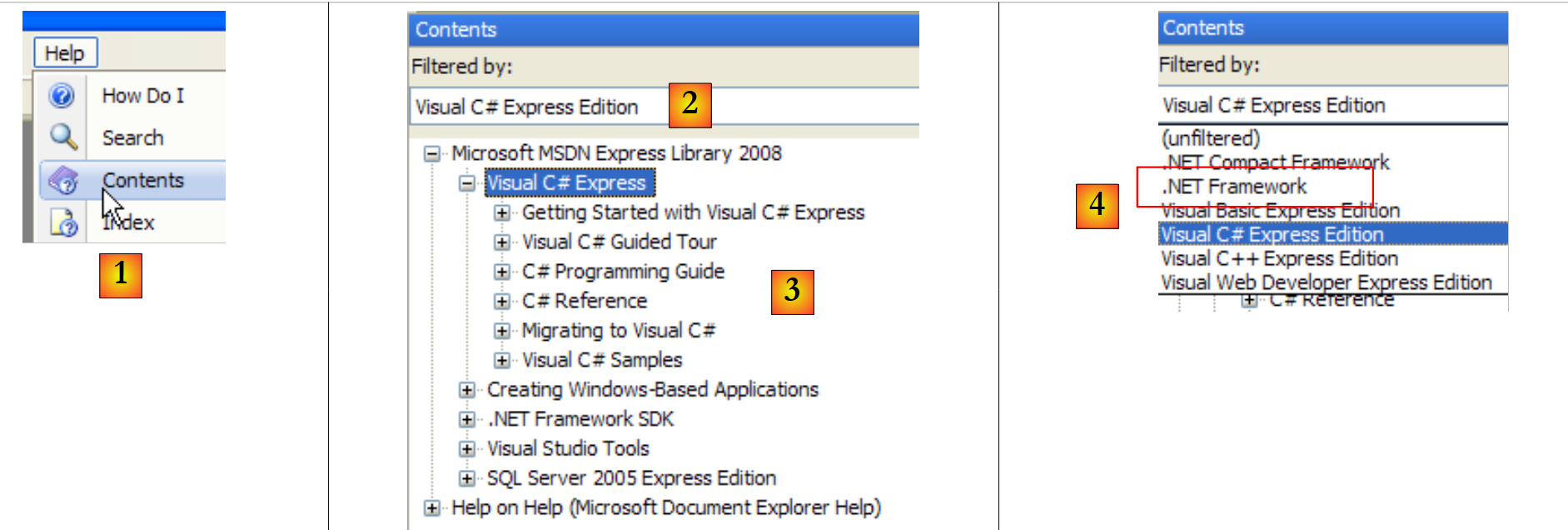 |
- in [1], select Help/Contents from the menu.
- In [2], select the option Visual C# Express Edition
- in [3], the C# help tree
- In [4], another useful option is .NET Framework, which provides access to all the classes in the .NET framework.
Let’s take a look at the chapter headings in the C# Help:
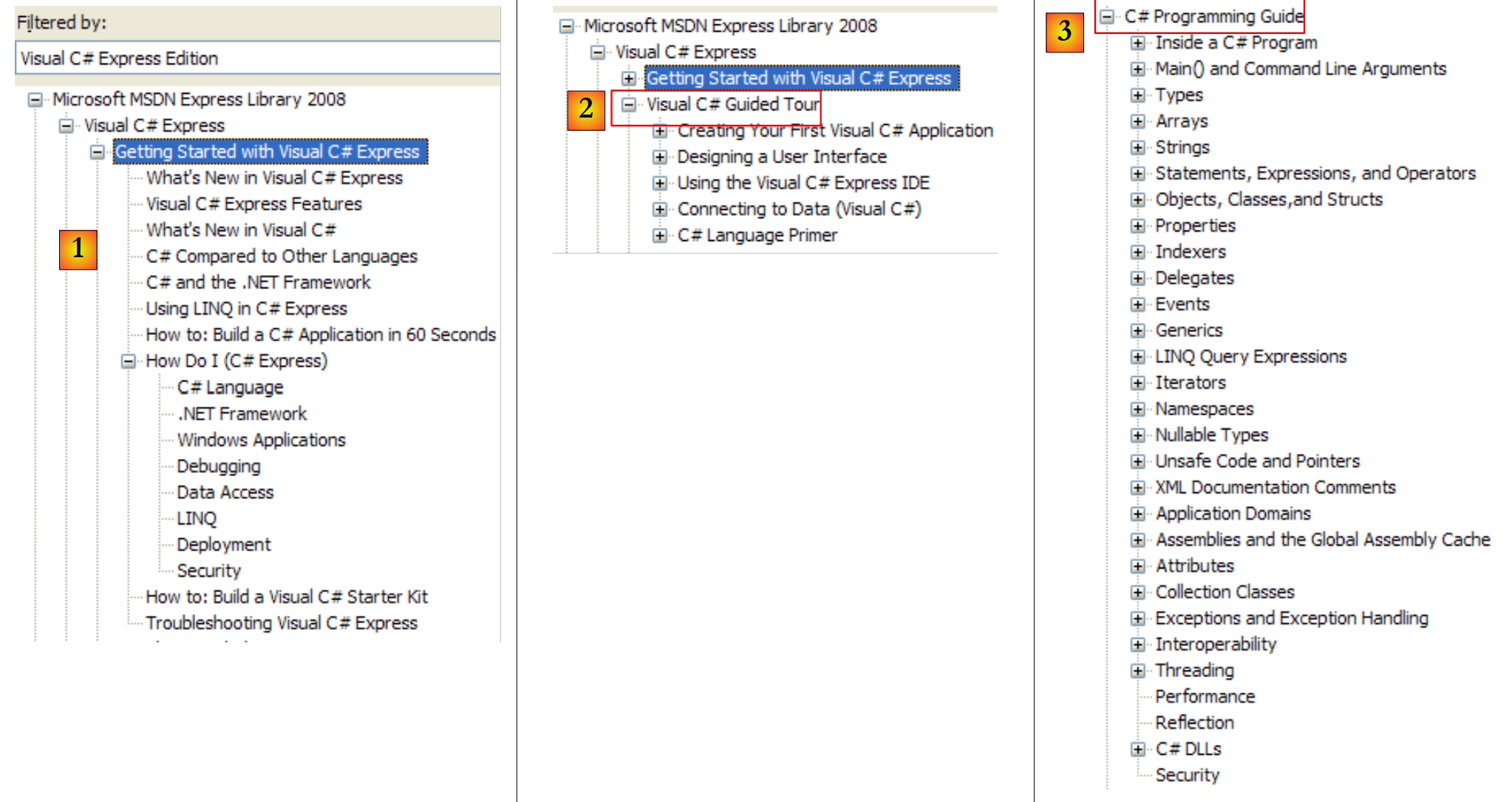 |
- [1]: An Overview of C#
- [2]: A series of examples on certain aspects of C#
- [3]: a C# course—could be a useful alternative to this document…
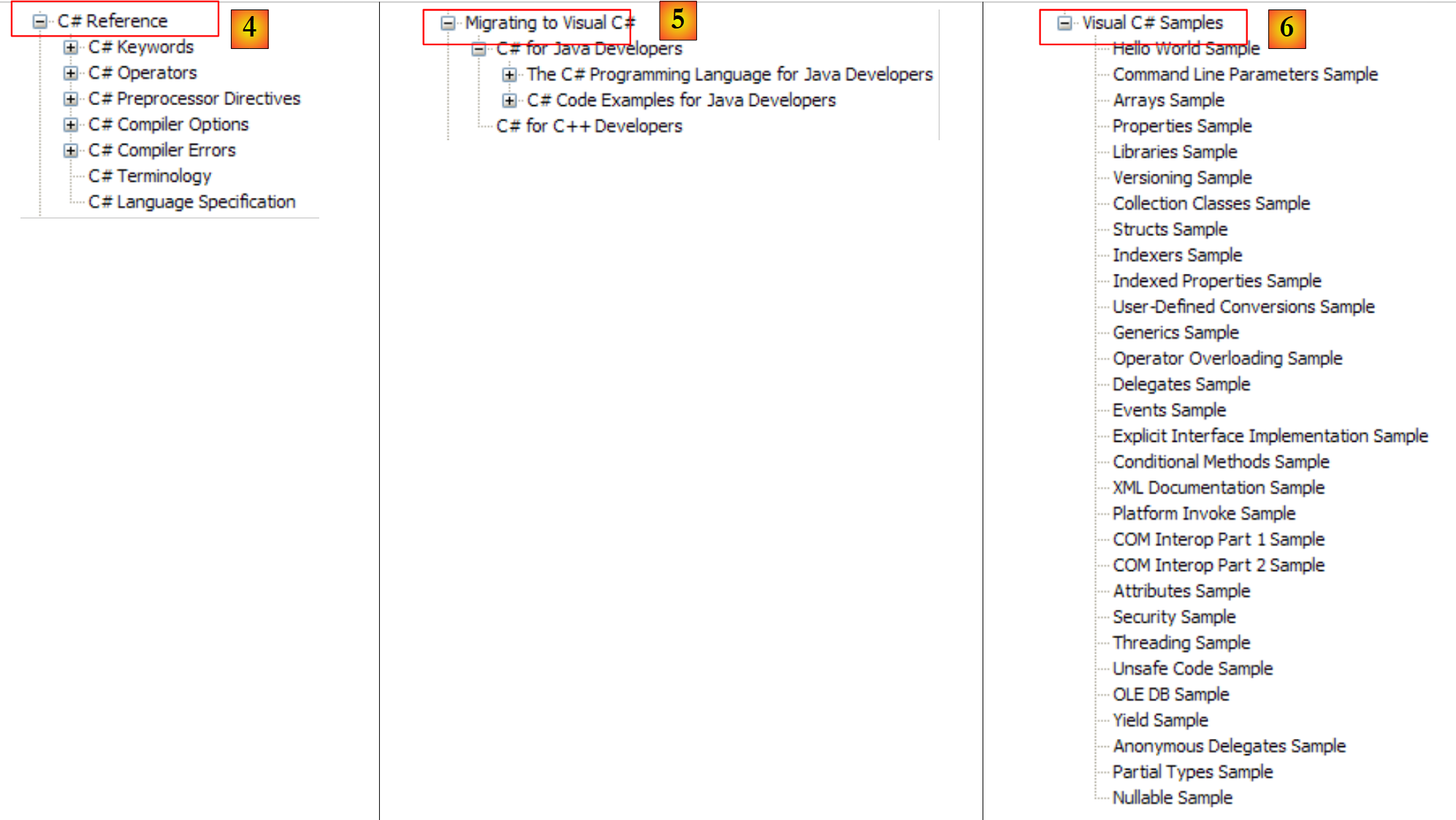 |
- [4]: for a detailed look at C#
- [5]: useful for C++ or Java developers. Helps you avoid a few pitfalls.
- [6]: when looking for examples, you can start here.
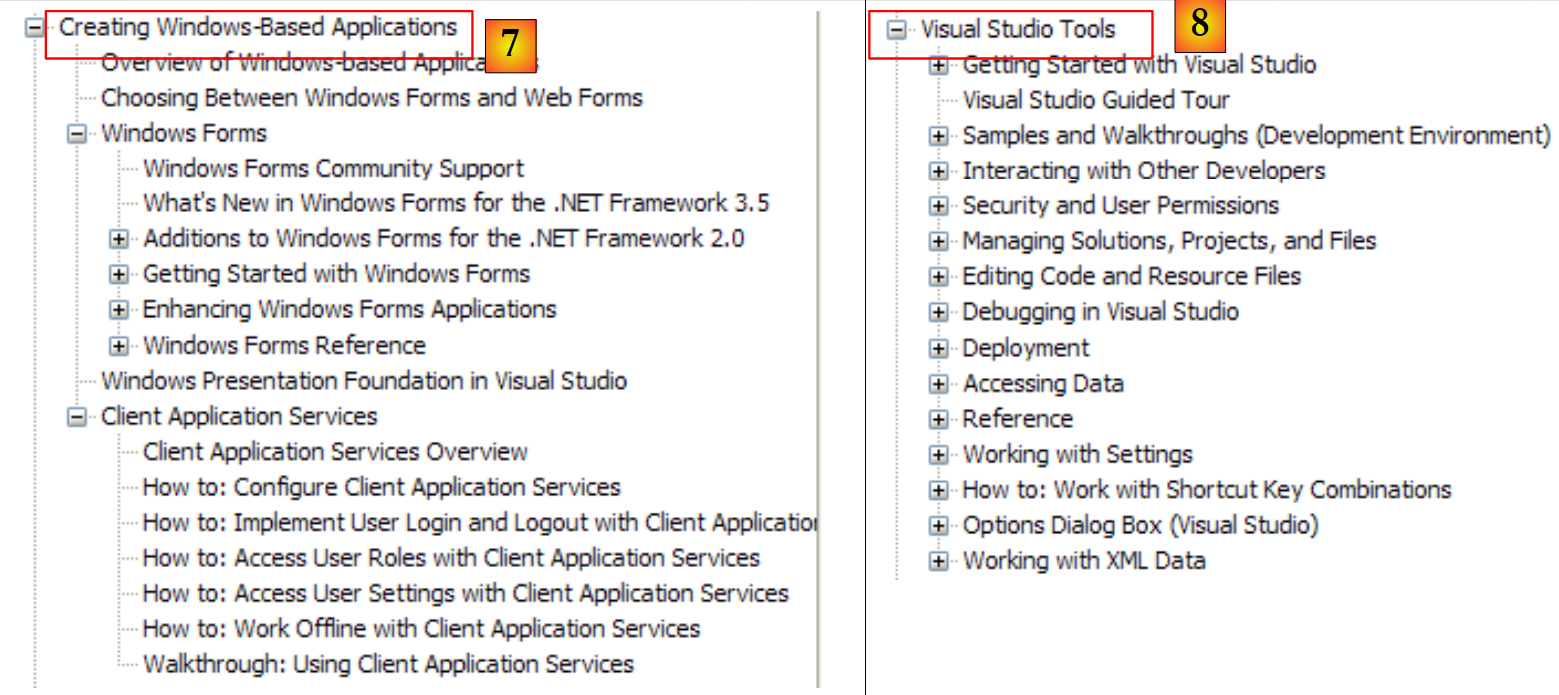 |
- [7]: what you need to know to create graphical user interfaces
- [8]: How to get the most out of IDE Visual Studio Express
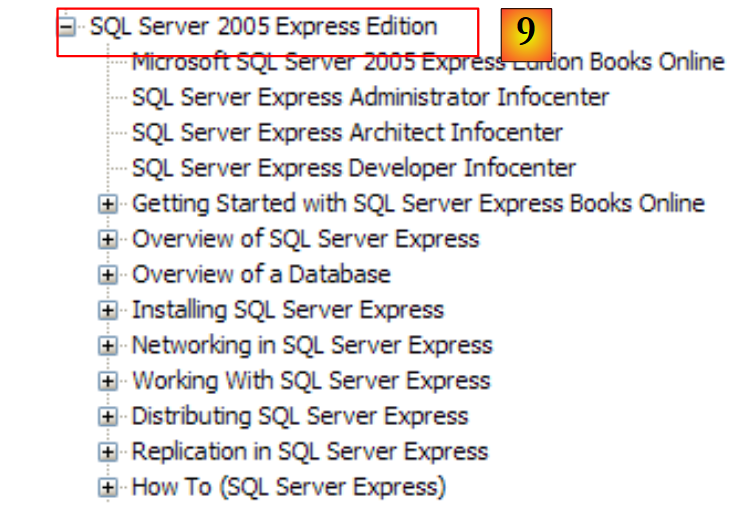 |
- [9]: SQL Server Express 2005 is a high-quality SGBD distributed for free. We will use it in this course.
The C# help is only part of what a developer needs. The other part is help on the hundreds of .NET Framework classes that will make their work easier.
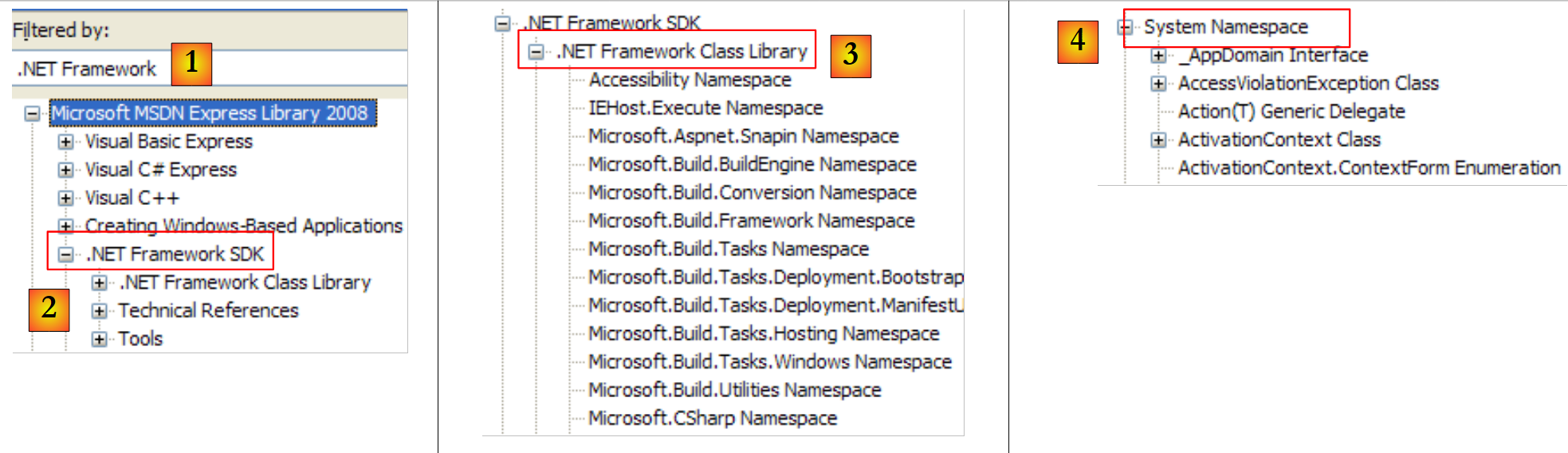 |
- [1]: Select the .NET Framework help
- [2]: Help is located in the .NET Framework branch
- [3]: The .NET Framework Class Library branch lists all classes .NET according to the namespace to which they belong
- [4]: the System namespace that was most frequently used in the examples in the previous chapters
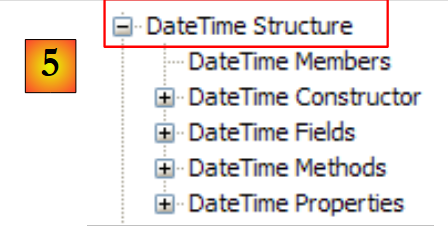 |
- [5]: in the System namespace, an example, here the structure DateTime
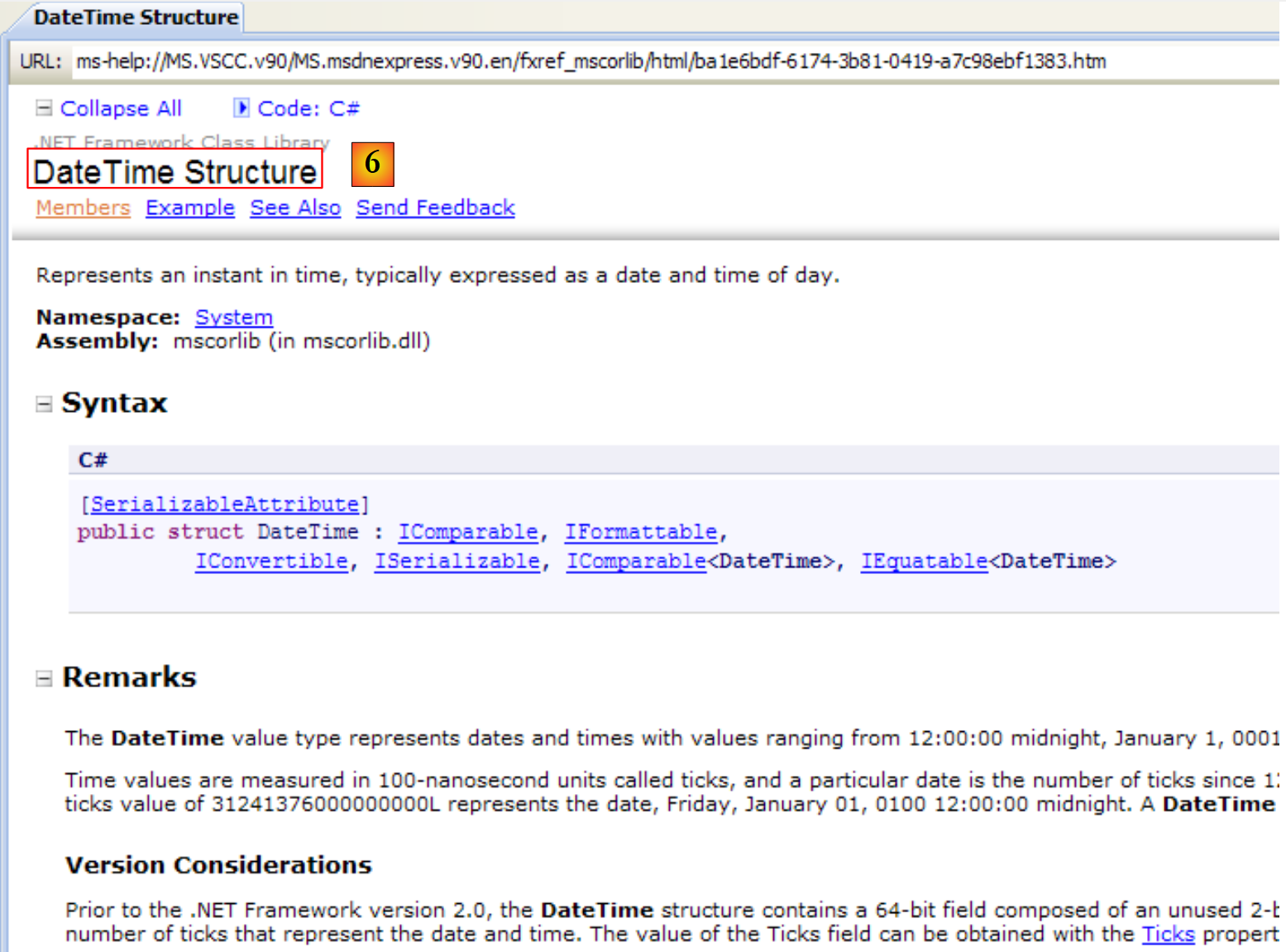 |
- [6]: Help for the structure DateTime
5.1.2. Help/Index/Search
The help provided by MSDN is vast, and you may not know where to look. In that case, you can use the help index:
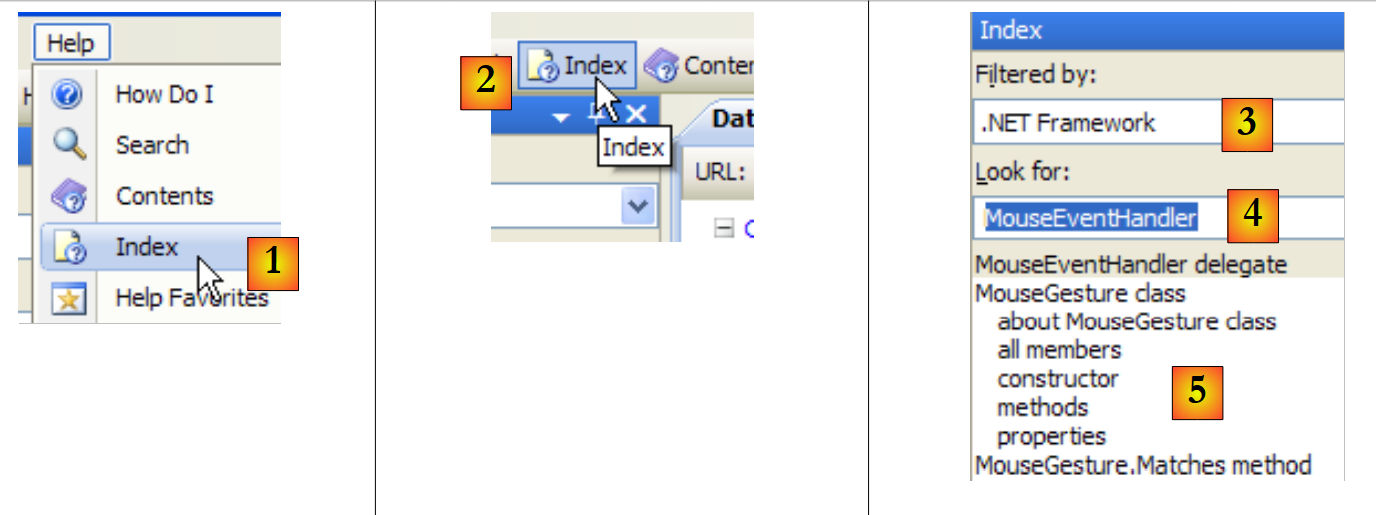 |
- In [1], use option [Help/Index] if the help window is not already open; otherwise, use [2] in an existing help window.
- In [3], specify the domain in which the search should be performed
- In [4], specify what you are looking for, in this case a class
- in [5], the result
Another way to search for help is to use the help's search function:
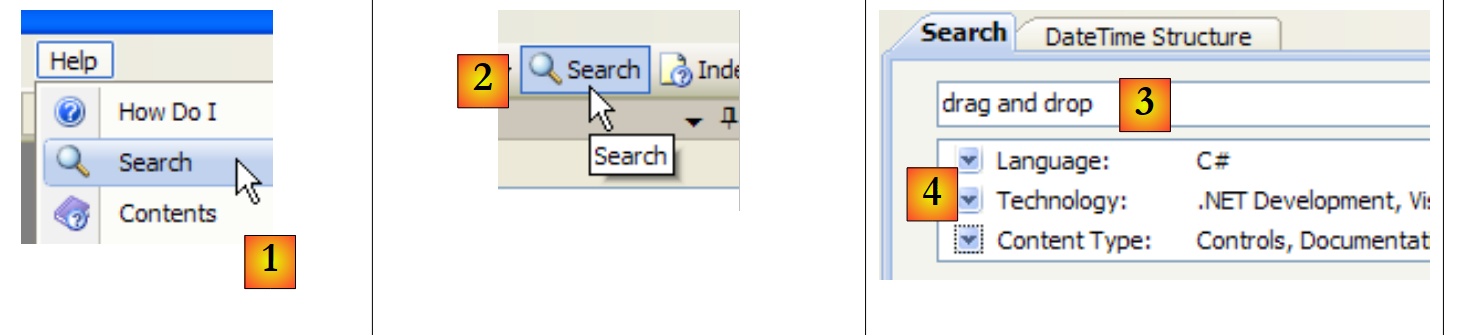 |
- in [1], use option [Help/Search] if the help window is not already open; otherwise, use [2] in an existing help window.
- In [3], specify what you are searching for
- In [4], filter the search areas
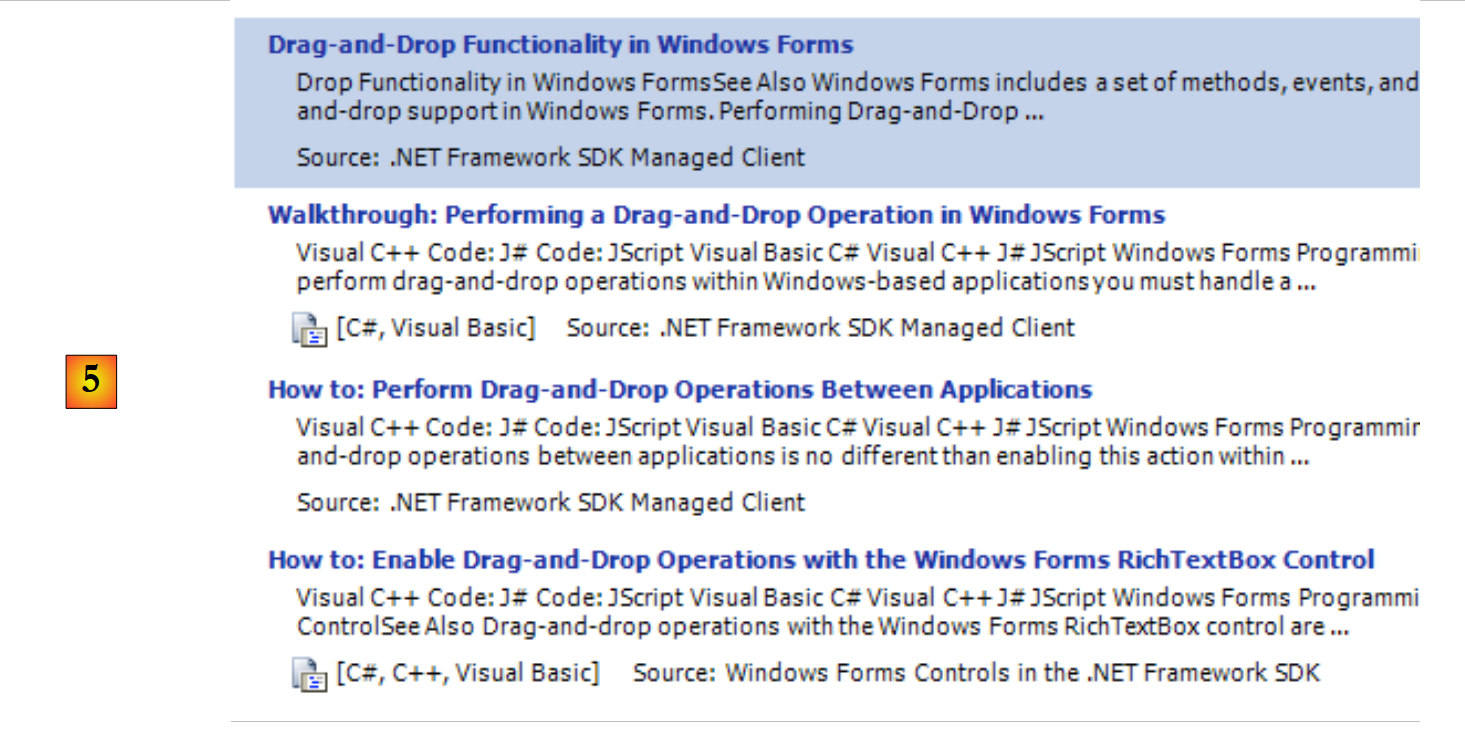 |
- in [5], the results are displayed as different topics where the searched text was found.
5.2. The character strings
5.2.1. The System.String class
 | 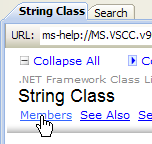 | 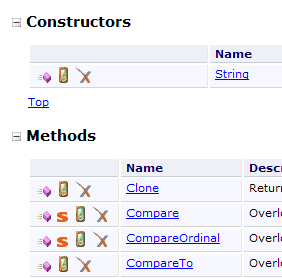 |
The System.String class is identical to the simple type string. It has numerous properties and methods. Here are a few of them:
| |
| |
| |
| |
| |
| |
| |
| |
| |
| |
| |
| |
Note an important point: when a method returns a string, it is a different string from the one on which the method was applied. Thus, S1.Trim() returns a string S2, and S1 and S2 are two different strings.
A string C can be considered an array of characters. Thus
- C[i] is the i-th character of C
- C.Length is the number of characters in C
Consider the following example:
using System;

namespace Chap3 {
    class Program {
        static void Main(string[] args) {
            string uneChaine = "l'oiseau vole au-dessus des nuages";
            affiche("uneChaine=" + uneChaine);
            affiche("uneChaine.Length=" + uneChaine.Length);
            affiche("chaine[10]=" + uneChaine[10]);
            affiche("uneChaine.IndexOf(\"vole\")=" + uneChaine.IndexOf("vole"));
            affiche("uneChaine.IndexOf(\"x\")=" + uneChaine.IndexOf("x"));
            affiche("uneChaine.LastIndexOf('a')=" + uneChaine.LastIndexOf('a'));
            affiche("uneChaine.LastIndexOf('x')=" + uneChaine.LastIndexOf('x'));
            affiche("uneChaine.Substring(4,7)=" + uneChaine.Substring(4, 7));
            affiche("uneChaine.ToUpper()=" + uneChaine.ToUpper());
            affiche("uneChaine.ToLower()=" + uneChaine.ToLower());
            affiche("uneChaine.Replace('a','A')=" + uneChaine.Replace('a', 'A'));
            string[] champs = uneChaine.Split(null);
            for (int i = 0; i < champs.Length; i++) {
                affiche("champs[" + i + "]=[" + champs[i] + "]");
            }//for
            affiche("Join(\":\",champs)=" + System.String.Join(":", champs));
            affiche("(\"  abc  \").Trim()=[" + "  abc  ".Trim() + "]");
        }//Main

        public static void affiche(string msg) {
            // poster msg
            Console.WriteLine(msg);
        }//poster
    }//class
}//namespace
The execution yields the following results:
Let's consider a new example:
using System;

namespace Chap3 {
    class Program {
        static void Main(string[] args) {
            // the line to be analyzed
            string ligne = "un:deux::trois:";
            // field separators
            char[] séparateurs = new char[] { ':' };
            // split
            string[] champs = ligne.Split(séparateurs);
            for (int i = 0; i < champs.Length; i++) {
                Console.WriteLine("Champs[" + i + "]=" + champs[i]);
            }
            // join
            Console.WriteLine("join=[" + System.String.Join(":", champs) + "]");
        }
    }
}
and the execution results:
The Split method of the String class allows you to place elements of a string into an array. The definition of the Split method used here is as follows:
public string[] Split(char[] separator);
character array. These characters represent the characters used to separate the fields in the string. So if the string is "field1, field2, field3", you can use `separator=new char[] {','}`. If the separator is a sequence of spaces, use `separator=null`. | |
An array of strings where each element of the array is a field of the string. |
The Join method is a static method of the String class:
public static string Join(string separator, string[] value);
array of strings | |
a string that will serve as the field separator | |
a string formed by concatenating the elements of the value array, separated by the separator string. |
5.2.2. The System.Text.StringBuilder class
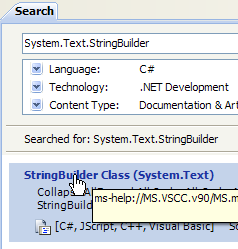 |  | 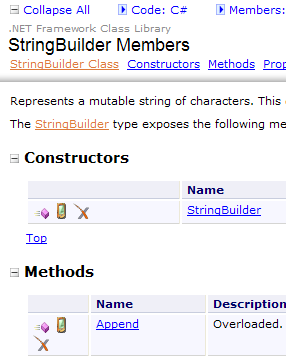 |
Previously, we mentioned that the methods of the String class applied to a string S1 returned another string S2. The System.Text.StringBuilder class allows you to manipulate S1 without having to create a string S2. This improves performance by avoiding the proliferation of strings with very short lifespans.
The class supports various constructors:
| |
|
A StringBuilder object works with blocks of character capacity to store the underlying string. By default, capacity is 16. The third constructor above allows you to specify the block capacity. The number of blocks of capacity characters required to store a string S is automatically adjusted by the StringBuilder class. There are constructors to set the maximum number of characters in a StringBuilder object. By default, this maximum capacity is 2,147,483,647.
Here is an example illustrating this concept of capacity:
using System.Text;
using System;
namespace Chap3 {
    class Program {
        static void Main(string[] args) {
            // str
            StringBuilder str = new StringBuilder("test");
            Console.WriteLine("taille={0}, capacité={1}", str.Length, str.Capacity);
            for (int i = 0; i < 10; i++) {
                str.Append("test");
                Console.WriteLine("taille={0}, capacité={1}", str.Length, str.Capacity);
            }
            // str2
            StringBuilder str2 = new StringBuilder("test",10);
            Console.WriteLine("taille={0}, capacité={1}", str2.Length, str2.Capacity);
            for (int i = 0; i < 10; i++) {
                str2.Append("test");
                Console.WriteLine("taille={0}, capacité={1}", str2.Length, str2.Capacity);
            }
        }
    }
}
- line 7: creation of a StringBuilder object with a block size of 16 characters
- line 8: str.Length is the current number of characters in the string str. str.Capacity is the number of characters the current string str can store before a new block is allocated.
- Line 10: str.Append(String S) concatenates the string S of type String to the string str of type StringBuilder.
- Line 14: Creation of a StringBuilder object with a block capacity of 10 characters
The result of the execution:
These results show that the class follows its own algorithm for allocating new blocks when its capacity is insufficient:
- lines 4-5: capacity increased by 16 characters
- Lines 8–9: The capacity was increased by 32 characters, even though 16 would have been sufficient.
Here are some of the class's methods:
| |
| |
| |
| |
|
Here is an example:
using System.Text;
using System;
namespace Chap3 {
    class Program {
        static void Main(string[] args) {
            // str3
            StringBuilder str3 = new StringBuilder("test");
            Console.WriteLine(str3.Append("abCD").Insert(2, "xyZT").Remove(0, 2).Replace("xy", "XY"));
        }
    }
}
and its results:
5.3. The tables
Tables are derived from the Array class:
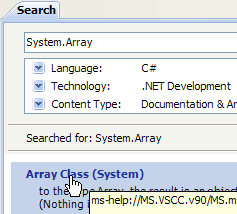 |  | 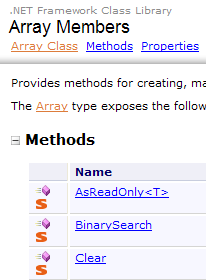 |
The Array class has various methods for sorting an array, searching for an element in an array, resizing an array, etc. We present some properties and methods of this class. Almost all of them are overloaded, c.a.d, meaning they exist in different variants. Every array inherits from it.
Properties
Methods
The following program illustrates the use of certain methods of the Array class:
using System;

namespace Chap3 {
    class Program {
        // search type
        enum TypeRecherche { linéaire, dichotomique };

        // main method
        static void Main(string[] args) {
            // read table elements typed on keyboard
            double[] éléments;
            Saisie(out éléments);
            // unsorted table display
            Affiche("Tableau non trié", éléments);
            // Linear search in unsorted table
            Recherche(éléments, TypeRecherche.linéaire);
            // table sorting
            Array.Sort(éléments);
            // sorted table display
            Affiche("Tableau trié", éléments);
            // Dichotomous search in sorted table
            Recherche(éléments, TypeRecherche.dichotomique);
        }

        // entering values for the elements table
        // elements: reference on table created by the
        static void Saisie(out double[] éléments) {
            bool terminé = false;
            string réponse;
            bool erreur;
            double élément = 0;
            int i = 0;
            // initially, the painting doesn't exist
            éléments = null;
            // table element input loop
            while (!terminé) {
                // question
                Console.Write("Elément (réel) " + i + " du tableau (rien pour terminer) : ");
                // reading the answer
                réponse = Console.ReadLine().Trim();
                // end of input if string empty
                if (réponse.Equals(""))
                    break;
                // input verification
                try {
                    élément = Double.Parse(réponse);
                    erreur = false;
                } catch {
                    Console.Error.WriteLine("Saisie incorrecte, recommencez");
                    erreur = true;
                }//try-catch
                // if no error
                if (!erreur) {
                    // one more element in the table
                    i += 1;
                    // resize table to accommodate new element
                    Array.Resize(ref éléments, i);
                    // insert new element
                    éléments[i - 1] = élément;
                }
            }//while
        }

        // generic method for displaying array elements
        static void Affiche<T>(string texte, T[] éléments) {
            Console.WriteLine(texte.PadRight(50, '-'));
            foreach (T élément in éléments) {
                Console.WriteLine(élément);
            }
        }

        // search for an element in an array
        // elements: array of real
        // TypeRecherche: dichotomous or linear
        static void Recherche(double[] éléments, TypeRecherche type) {
            // Search
            bool terminé = false;
            string réponse = null;
            double élément = 0;
            bool erreur = false;
            int i = 0;
            while (!terminé) {
                // question
                Console.WriteLine("Elément cherché (rien pour arrêter) : ");
                // reading-checking response
                réponse = Console.ReadLine().Trim();
                // finished?
                if (réponse.Equals(""))
                    break;
                // check
                try {
                    élément = Double.Parse(réponse);
                    erreur = false;
                } catch {
                    Console.WriteLine("Erreur, recommencez...");
                    erreur = true;
                }//try-catch
                // if no error
                if (!erreur) {
                    // find the element in the array
                    if (type == TypeRecherche.dichotomique)
                        // dichotomous search
                        i = Array.BinarySearch(éléments, élément);
                    else
                        // linear search
                        i = Array.IndexOf(éléments, élément);
                    // Display response
                    if (i >= 0)
                        Console.WriteLine("Trouvé en position " + i);
                    else
                        Console.WriteLine("Pas dans le tableau");
                }//if
            }//while
        }
    }
}
- lines 27–62: The Saisie method enters the elements of an array typed on the keyboard. Since the array cannot be sized in advance (its final size is unknown), we are forced to resize it with each new element (line 57). A more efficient algorithm would have been to allocate space for the array in groups of N elements. However, an array is not designed to be resized. This scenario is better handled with a list (ArrayList, List<T>).
- Lines 75–113: The Search method allows you to search the array for an element entered via the keyboard. The search method differs depending on whether the array is sorted or not. For an unsorted array, a linear search is performed using the IndexOf method on line 106. For a sorted array, a binary search is performed using the BinarySearch method on line 103.
- Line 18: The elements array is sorted. Here, a variant of Sort is used that has only one parameter: the array to be sorted. The ordering relation used to compare the elements of the array is then the implicit one for these elements. Here, the elements are numeric. The natural order of numbers is used.
The screen output is as follows:
5.4. Generic collections
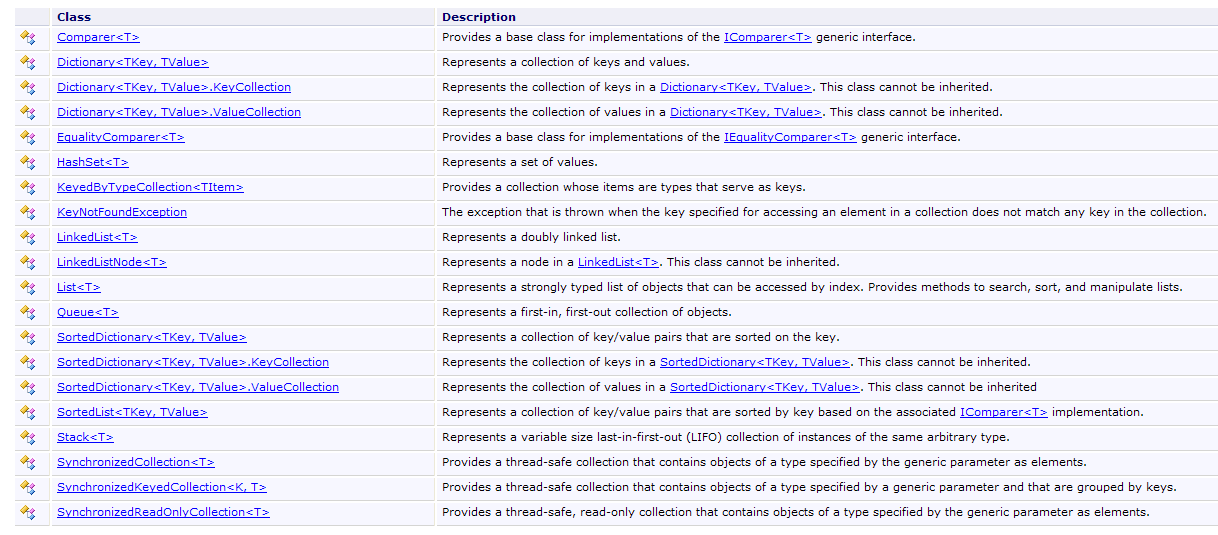
In addition to the array, there are various classes for storing collections of elements. Generic versions are available in the System.Collections.Generic namespace, and non-generic versions in System.Collections. We will introduce two frequently used generic collections: the list and the dictionary.
The list of generic collections is as follows:
5.4.1. The generic class List<T>
The System.Collections.Generic.List<T> class allows you to implement collections of objects of type T whose size varies during program execution. An object of type List<T> is handled almost like an array. Thus, the element i of a list l is denoted l[i].
There is also a non-generic list type: ArrayList, capable of storing references to any objects. ArrayList is functionally equivalent to *List<Object>. A ArrayList* object looks like this:
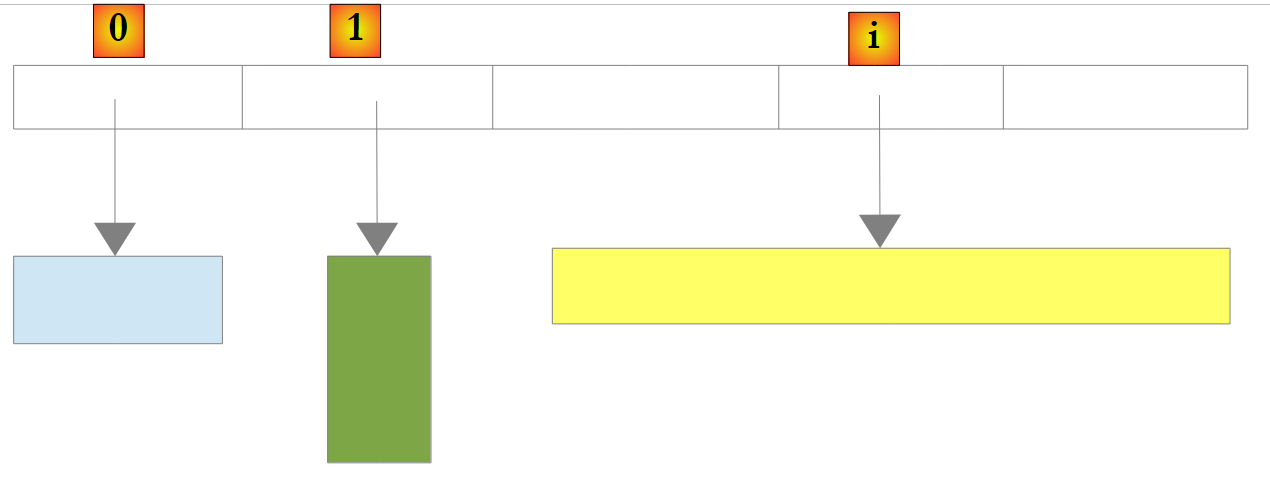 |
In the example above, elements 0, 1, and i of the list point to objects of different types. An object must first be created before its reference can be added to the ArrayList list. Although a ArrayList stores object references, it is possible to store numbers in it. This is done through a mechanism called boxing: the number is encapsulated in an object O of type Object, and it is the reference O that is stored in the list. This mechanism is transparent to the developer. We can thus write:
This will produce the following result:
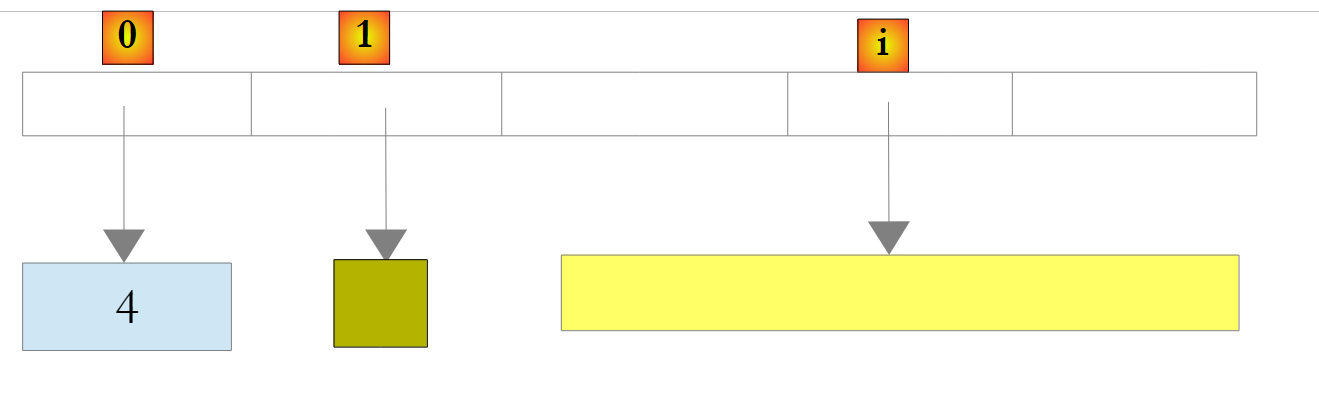 |
In the example above, the number 4 has been encapsulated in an object O, and the reference O is stored in the list. To retrieve it, we can write:
int i = (int)liste[0];
The operation Object -> int is called unboxing. If a list is entirely composed of int types, declaring it as List<int> improves performance. This is because numbers of type int are then stored in the list itself rather than in Object types outside the list. Boxing and unboxing operations no longer occur.
 |
For a List<T> object where T is a class, the list again stores references to objects of type T:
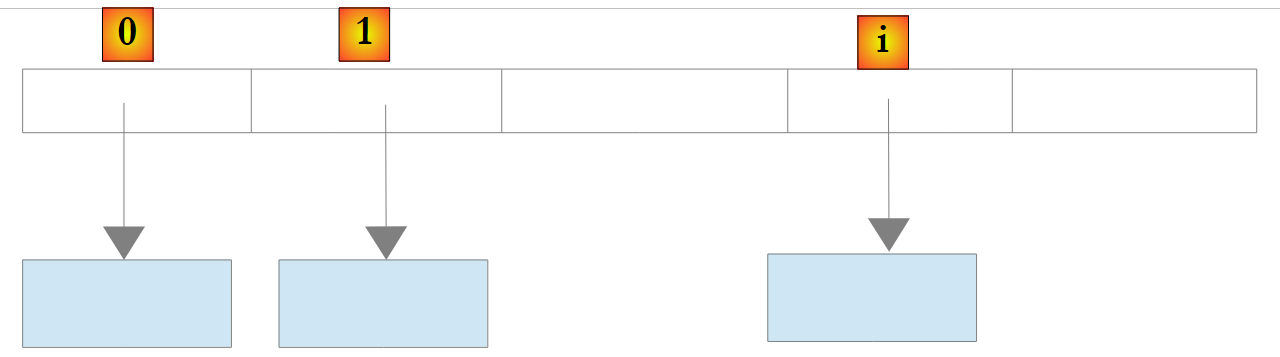 |
Here are some of the properties and methods of generic lists:
Properties
Methods
Let’s revisit the example discussed earlier with an object of type Array and now process it using an object of type List<T>. Because a list is similar to an array, the code changes very little. We will only present the notable changes:
using System;
using System.Collections.Generic;

namespace Chap3 {
    class Program {
        // search type
        enum TypeRecherche { linéaire, dichotomique };

        // main method
        static void Main(string[] args) {
            // play list items typed on keyboard
            List<double> éléments;
            Saisie(out éléments);
            // number of elements
            Console.WriteLine("La liste a {0} éléments et une capacité de {1} éléments", éléments.Count, éléments.Capacity);
            // display unsorted list
            Affiche("Liste non triée", éléments);
            // Linear search in unsorted list
            Recherche(éléments, TypeRecherche.linéaire);
            // list sorting
            éléments.Sort();
            // sorted list display
            Affiche("Liste triée", éléments);
            // Dichotomous search in sorted list
            Recherche(éléments, TypeRecherche.dichotomique);
        }

        // enter values for the items list
        // elements: reference to the list created by the
        static void Saisie(out List<double> éléments) {
...
            // initially, the list is empty
            éléments = new List<double>();
            // list item entry loop
            while (!terminé) {
...
                // if no error
                if (!erreur) {
                    // one more item in the list
                    éléments.Add(élément);
                }
            }//while
        }

        // generic method for displaying the elements of an enumerable object
        static void Affiche<T>(string texte, IEnumerable<T> éléments) {
            Console.WriteLine(texte.PadRight(50, '-'));
            foreach (T élément in éléments) {
                Console.WriteLine(élément);
            }
        }

        // search for an item in a list
        // elements: list of real numbers
        // TypeRecherche: dichotomous or linear
        static void Recherche(List<double> éléments, TypeRecherche type) {
...
            while (!terminé) {
...
                // if no error
                if (!erreur) {
                    // search for the element in the list
                    if (type == TypeRecherche.dichotomique)
                        // dichotomous search
                        i = éléments.BinarySearch(élément);
                    else
                        // linear search
                        i = éléments.IndexOf(élément);
                    // Display response
...
                }//if
            }//while
        }
    }
}
- lines 46–51: the generic method Display<T> takes two parameters:
- the first parameter is text to be written
- the second parameter is an object implementing the generic interface IEnumerable<T>:
The foreach( T element in elements) structure on line 48 is valid for any elements object that implements the IEnumerable interface. Arrays (Array) and lists (List<T>) implement the IEnumerable<T> interface. Therefore, the Display method is suitable for displaying both arrays and lists.
The program's execution results are the same as in the example using the Array class.
5.4.2. The class Dictionary<TKey,TValue>
The class System.Collections.Generic.Dictionary<TKey,TValue> allows you to implement a dictionary. A dictionary can be viewed as a two-column array:
key | value |
key1 | value1 |
key2 | value2 |
.. | ... |
In the class Dictionary<TKey,TValue>, the keys are of type Tkey, and the values are of type TValue. The keys are unique, c.a.d, meaning that no two keys can be identical. Such a dictionary might look like this if the types TKey and TValue denoted classes:
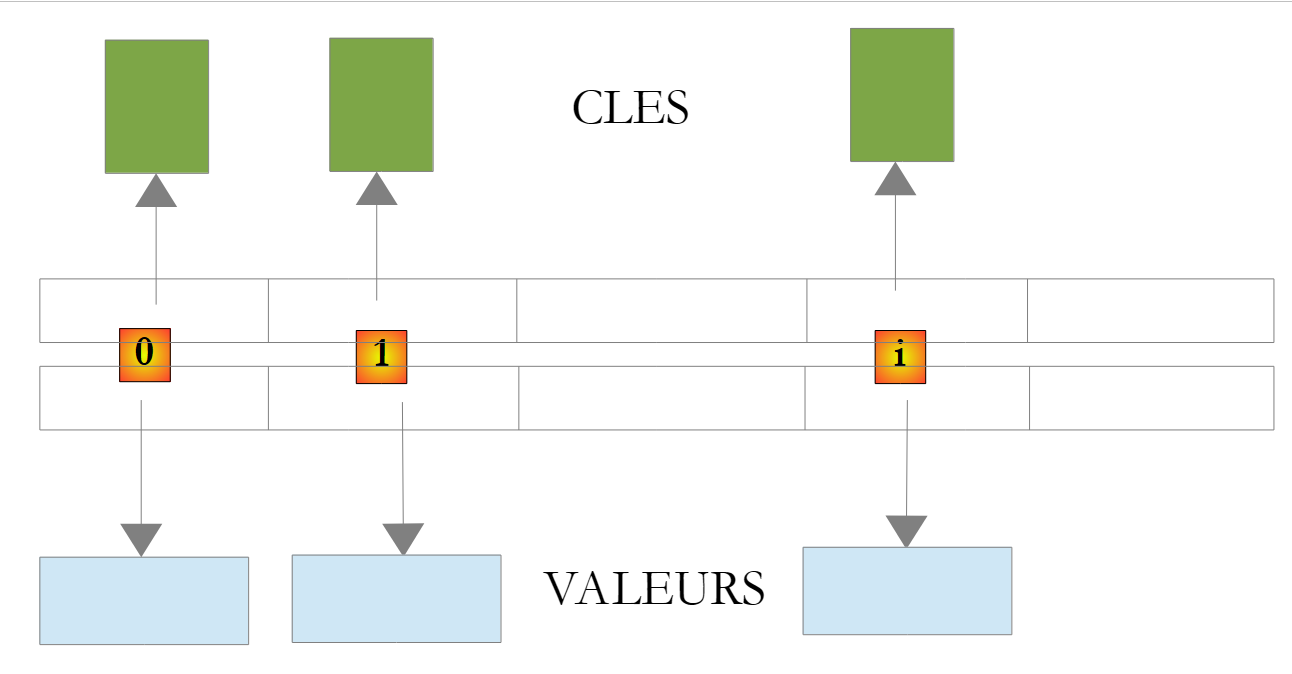 |
The value associated with key C of a dictionary D is obtained using the notation D[C]. This value is both readable and writable. Thus, we can write:
If the key c does not exist in the dictionary D, the expression D[c] throws an exception.
The main methods and properties of the Dictionary<TKey,TValue> class are as follows:
Constructors
Properties
Methods
Consider the following example program:
using System;
using System.Collections.Generic;

namespace Chap3 {
    class Program {
        static void Main(string[] args) {
            // creation of a <string,int> dictionary
            string[] liste = { "jean:20", "paul:18", "mélanie:10", "violette:15" };
            string[] champs = null;
            char[] séparateurs = new char[] { ':' };
            Dictionary<string,int> dico = new Dictionary<string,int>();
            for (int i = 0; i <liste.Length; i++) {
                champs = liste[i].Split(séparateurs);
                dico[champs[0]]= int.Parse(champs[1]);
            }//for
            // number of elements in the dictionary
            Console.WriteLine("Le dictionnaire a " + dico.Count + " éléments");
            // kEY LIST
            Affiche("[Liste des clés]",dico.Keys);
            // list of values
            Affiche("[Liste des valeurs]", dico.Values);
            // list of keys & values
            Console.WriteLine("[Liste des clés & valeurs]");
            foreach (string clé in dico.Keys) {
                Console.WriteLine("clé=" + clé + " valeur=" + dico[clé]);
            }
            // delete the "paul" key
            Console.WriteLine("[Suppression d'une clé]");
            dico.Remove("paul");
            // list of keys & values
            Console.WriteLine("[Liste des clés & valeurs]");
            foreach (string clé in dico.Keys) {
                Console.WriteLine("clé=" + clé + " valeur=" + dico[clé]);
            }
            // dictionary search
            String nomCherché = null;
            Console.Write("Nom recherché (rien pour arrêter) : ");
            nomCherché = Console.ReadLine().Trim();
            int value;
            while (!nomCherché.Equals("")) {
                dico.TryGetValue(nomCherché, out value);
                if (value!=0) {
                    Console.WriteLine(nomCherché + "," + value);
                } else {
                    Console.WriteLine("Nom " + nomCherché + " inconnu");
                }
                // next search
                Console.Out.Write("Nom recherché (rien pour arrêter) : ");
                nomCherché = Console.ReadLine().Trim();
            }//while
        }

        // generic method for displaying elements of an enumerable type
        static void Affiche<T>(string texte, IEnumerable<T> éléments) {
            Console.WriteLine(texte.PadRight(50, '-'));
            foreach (T élément in éléments) {
                Console.WriteLine(élément);
            }
        }

    }
}
- line 8: an array of string that will be used to initialize the dictionary <string,int>
- line 11: the dictionary <string,int>
- lines 12–15: its initialization based on the array string from line 8
- line 17: number of entries in the dictionary
- line 19: the dictionary keys
- line 21: the dictionary values
- line 29: deletion of a dictionary entry
- line 41: search for a key in the dictionary. If it does not exist, the TryGetValue method will set value to 0, since value is of numeric type. This technique can only be used here because we know that the value 0 is not in the dictionary.
The execution results are as follows:
5.5. Text files
5.5.1. The StreamReader class
The System.IO.StreamReader class allows you to read the contents of a text file. It is actually capable of processing streams that are not files. Here are some of its properties and methods:
Constructors
Properties
Methods
Here is an example:
using System;
using System.IO;

namespace Chap3 {
    class Program {
        static void Main(string[] args) {
            // execution directory
            Console.WriteLine("Répertoire d'exécution : "+Environment.CurrentDirectory);
            string ligne = null;
            StreamReader fluxInfos = null;
            // read contents of infos.txt file
            try {
                // reading 1
                Console.WriteLine("Lecture 1----------------");
                using (fluxInfos = new StreamReader("infos.txt")) {
                    ligne = fluxInfos.ReadLine();
                    while (ligne != null) {
                        Console.WriteLine(ligne);
                        ligne = fluxInfos.ReadLine();
                    }
                }
                // reading 2
                Console.WriteLine("Lecture 2----------------");
                using (fluxInfos = new StreamReader("infos.txt")) {
                    Console.WriteLine(fluxInfos.ReadToEnd());
                }
            } catch (Exception e) {
                Console.WriteLine("L'erreur suivante s'est produite : " + e.Message);
            }
        }
    }
}
- line 8: displays the name of the execution directory
- lines 12, 27: a try/catch block to handle any exceptions.
- line 15: the structure using stream=new StreamReader(...) is a convenience feature so you don’t have to explicitly close the stream after using it. This closure is performed automatically as soon as you exit the scope of the using statement.
- line 15: the file being read is named infos.txt. Since this is a relative path, it will be searched for in the execution directory displayed by line 8. If it is not found, an exception will be thrown and handled by the try/catch block.
- Lines 16–20: The file is read line by line
- Line 25: The file is read all at once
The file infos.txt is as follows:
and placed in the following folder of the C# project:
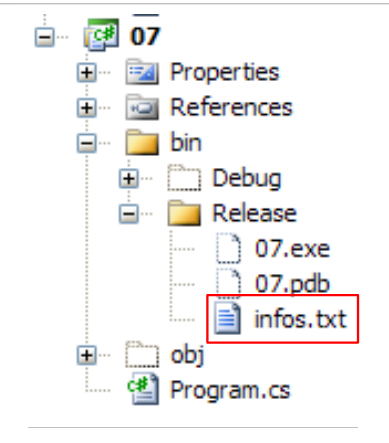 |
We will see that bin/Release is the execution folder when the project is run using Ctrl-F5.
Execution yields the following results:
If, on line 15, we enter the filename xx.txt, we get the following results:
5.5.2. The StreamWriter class
The System.IO.StreamReader class allows you to write to a text file. Like the StreamReader class, it is actually capable of handling streams that are not files. Here are some of its properties and methods:
Constructors
Properties
Methods
Consider the following example:
using System;
using System.IO;

namespace Chap3 {
    class Program2 {
        static void Main(string[] args) {
            // execution directory
            Console.WriteLine("Répertoire d'exécution : " + Environment.CurrentDirectory);
            string ligne = null;                        // one line of text
            StreamWriter fluxInfos = null;    // the text file
            try {
                // text file creation
                using (fluxInfos = new StreamWriter("infos2.txt")) {
                    Console.WriteLine("Mode AutoFlush : {0}", fluxInfos.AutoFlush);
                    // read line typed on keyboard
                    Console.Write("ligne (rien pour arrêter) : ");
                    ligne = Console.ReadLine().Trim();
                    // loop as long as the line entered is not empty
                    while (ligne != "") {
                        // write line to text file
                        fluxInfos.WriteLine(ligne);
                        // read new line on keyboard
                        Console.Write("ligne (rien pour arrêter) : ");
                        ligne = Console.ReadLine().Trim();
                    }//while
                }
            } catch (Exception e) {
                Console.WriteLine("L'erreur suivante s'est produite : " + e.Message);
            }
        }
    }
}
- line 13: again, we use the using(stream) syntax so that we don’t have to explicitly close the stream with a Close operation. This closure is performed automatically when the using block ends.
- Why a try/catch block on lines 11 and 27? On line 13, we could specify a filename in the form /rep1/rep2/ .../file with a path /rep1/rep2/... that does not exist, making it impossible to create the file. An exception would then be thrown. There are other possible exception cases (disk full, insufficient permissions, etc.)
The execution results are as follows:
The file infos2.txt was created in the bin/Release folder of the project:
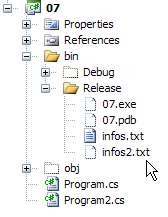 | 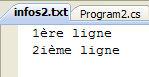 |
5.6. Binary files
The classes System.IO.BinaryReader and System.IO.BinaryWriter are used to read and write binary files.
Consider the following application:
// syntax pg text bin logs
// read a text file (text) and store its contents in a binary file (bin
// the text file has lines of the form name: age, which will be stored in a structure string, int
// (logs) is a text log file
The text file contains the following:
The program is as follows:
using System;
using System.IO;

// syntax pg text bin logs
// read a text file (text) and store its contents in a binary file (bin)
// the text file has lines of the form name: age, which will be stored in a structure string, int
// (logs) is a text log file

namespace Chap3 {
    class Program {
        static void Main(string[] arguments) {
            // you need 3 arguments
            if (arguments.Length != 3) {
                Console.WriteLine("syntaxe : pg texte binaire log");
                Environment.Exit(1);
            }//if

            // variables
            string ligne=null;
            string nom=null;
            int age=0;
            int numLigne = 0;
            char[] séparateurs = new char[] { ':' };
            string[] champs=null;
            StreamReader input = null;
            BinaryWriter output = null;
            StreamWriter logs = null;
            bool erreur = false;
            // read text file - write binary file
            try {
                // open text file in read mode
                input = new StreamReader(arguments[0]);
                // open binary file for writing
                output = new BinaryWriter(new FileStream(arguments[1], FileMode.Create, FileAccess.Write));
                // open write log file
                logs = new StreamWriter(arguments[2]);
                // text file processing
                while ((ligne = input.ReadLine()) != null) {
                    // one more line
                    numLigne++;
                    // empty line?
                    if (ligne.Trim() == "") {
                        // we don't know
                        continue;
                    }
                    // one line name: age
                    champs = ligne.Split(séparateurs);
                    // we need 2 fields
                    if (champs.Length != 2) {
                        // we log the error
                        logs.WriteLine("La ligne n° [{0}] du fichier [{1}] a un nombre de champs incorrect", numLigne, arguments[0]);
                        // next line
                        continue;
                    }//if
                    // 1st field must be non-empty
                    erreur = false;
                    nom = champs[0].Trim();
                    if (nom == "") {
                        // we log the error
                        logs.WriteLine("La ligne n° [{0}] du fichier [{1}] a un nom vide", numLigne, arguments[0]);
                        erreur = true;
                    }
                    // the second field must be an integer >=0
                    if (!int.TryParse(champs[1],out age) || age<0) {
                        // we log the error
                        logs.WriteLine("La ligne n° [{0}] du fichier [{1}] a un âge [{2}] incorrect", numLigne, arguments[0], champs[1].Trim());
                        erreur = true;
                    }//if
                    // if no error, write data to binary file
                    if (!erreur) {
                        output.Write(nom);
                        output.Write(age);
                    }
                    // next line
                }//while
            }catch(Exception e){
                Console.WriteLine("L'erreur suivante s'est produite : {0}", e.Message);
            } finally {
                // closing files
                if(input!=null) input.Close();
                if(output!=null) output.Close();
                if(logs!=null) logs.Close();
            }
        }
    }
}
Let’s take a closer look at the operations involving the BinaryWriter class:
- line 34: the BinaryWriter object is opened by the operation
output=new BinaryWriter(new FileStream(arguments[1],FileMode.Create,FileAccess.Write));
The constructor’s argument must be a stream (Stream). Here, it is a stream created from a file (FileStream) for which we provide:
- (continued)
- the name
- the operation to perform, here FileMode.Create to create the file
- the access type, here FileAccess.Write for write access to the file
- lines 70–73: the write operations
The BinaryWriter class has various overloaded Write methods for writing different types of simple data
- line 81: the operation to close the stream
The three arguments of the Main method are provided to the project (via its properties) [1], and the text file to be processed is placed in the bin/Release folder [2]:
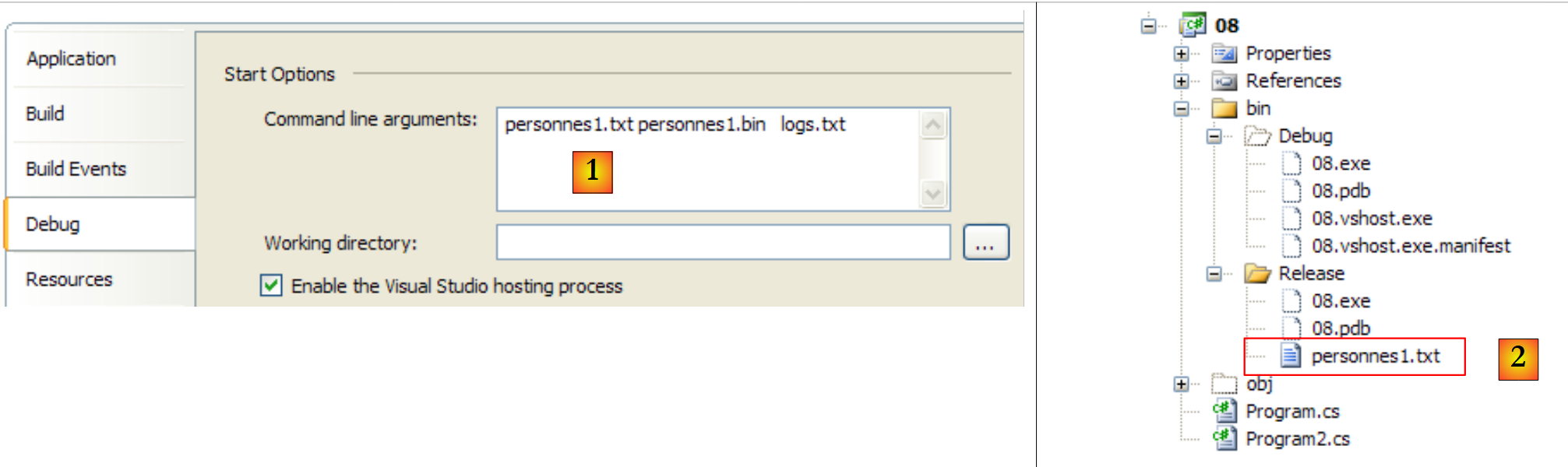 |
With the following [personnes1.txt] file:
The results of the execution are as follows:
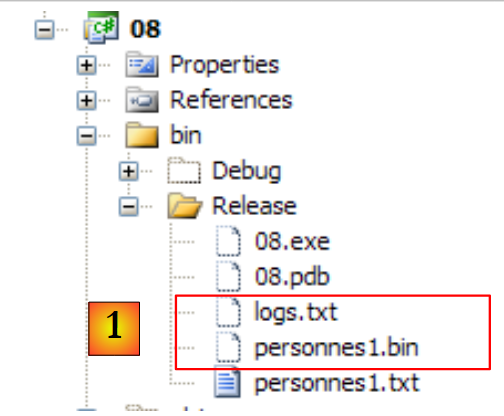 |
- In [1], the binary file [personnes1.bin] created, as well as the log file [logs.txt]. The latter has the following content:
The contents of the binary file [personnes1.bin] will be provided by the following program. This program also accepts three arguments:
// syntax pg bin text logs
// read a binary bin file and store its contents in a text file (text)
// the binary file has a structure string, int
// the text file has lines of the form name: age
// logs is a text log file
So we perform the reverse operation. We read a binary file to create a text file. If the resulting text file is identical to the original file, we will know that the text --> binary --> text conversion was successful. The code is as follows:
using System;
using System.IO;

// syntax pg bin text logs
// read a binary bin file and store its contents in a text file (text)
// the binary file has a structure string, int
// the text file has lines of the form name: age
// logs is a text log file

namespace Chap3 {
    class Program2 {
        static void Main(string[] arguments) {
            // you need 3 arguments
            if (arguments.Length != 3) {
                Console.WriteLine("syntaxe : pg binaire texte log");
                Environment.Exit(1);
            }//if

            // variables
            string nom = null;
            int age = 0;
            int numPersonne = 1;
            BinaryReader input = null;
            StreamWriter output = null;
            StreamWriter logs = null;
            bool fini;
            // read binary file - write text file
            try {
                // open binary file for reading
                input = new BinaryReader(new FileStream(arguments[0], FileMode.Open, FileAccess.Read));
                // open text file for writing
                output = new StreamWriter(arguments[1]);
                // open write log file
                logs = new StreamWriter(arguments[2]);
                // binary file processing
                fini = false;
                while (!fini) {
                    try {
                        // read name
                        nom = input.ReadString().Trim();
                        // age reading
                        age = input.ReadInt32();
                        // writing to text file
                        output.WriteLine(nom + ":" + age);
                        // next person
                        numPersonne++;
                    } catch (EndOfStreamException) {
                        fini = true;
                    } catch (Exception e) {
                        logs.WriteLine("L'erreur suivante s'est produite à la lecture de la personne n° {0} : {1}", numPersonne, e.Message);
                    }
                }//while
            } catch (Exception e) {
                Console.WriteLine("L'erreur suivante s'est produite : {0}", e.Message);
            } finally {
                // closing files
                if (input != null)
                    input.Close();
                if (output != null)
                    output.Close();
                if (logs != null)
                    logs.Close();
            }
        }
    }
}
Let’s take a closer look at the operations involving the BinaryReader class:
- line 30: the BinaryReader object is opened by the operation
input=new BinaryReader(new FileStream(arguments[0],FileMode.Open,FileAccess.Read));
The constructor’s argument must be a stream (Stream). Here, it is a stream created from a file (FileStream) for which we provide:
- (continued)
- the name
- the operation to perform, here FileMode.Open to open an existing file
- the access type, here FileAccess.Read for read access to the file
- lines 40, 42: the read operations
The BinaryReader class has various methods, such as ReadXX, for reading different types of simple data
- line 60: the operation to close the stream
If we run the two programs in sequence, converting personnes1.txt to personnes1.bin and then personnes1.bin to personnes2.txt2, we obtain the following results:
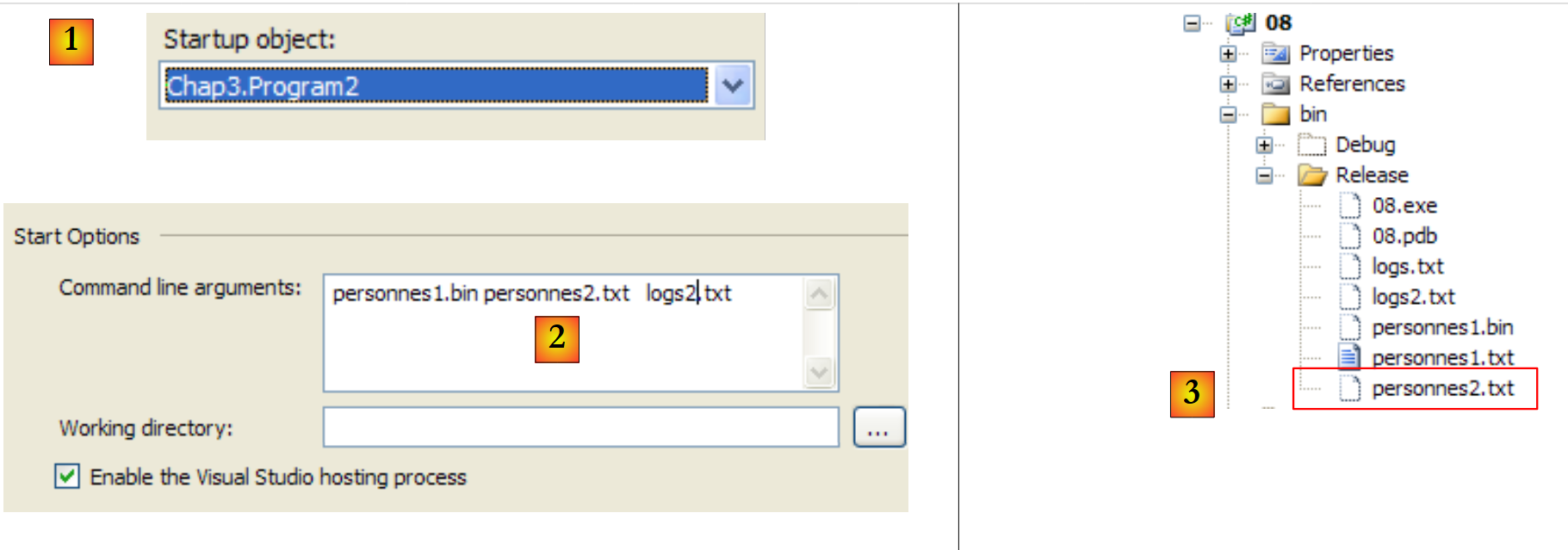 |
- in [1], the project is configured to run the second application
- In [2], the arguments passed to Main
- In [3], the files produced by the application's execution.
The content of [personnes2.txt] is as follows:
5.7. Regular expressions
The System.Text.RegularExpressions.Regex class supports regular expressions. These allow you to validate the format of a string. For example, you can verify that a string representing a date is in the format dd/mm/aa. To do this, a pattern is used, and the string is compared to that pattern. In this example, j, m, and a must be digits. The pattern for a valid date format is therefore "\d\d/\d\d/\d\d", where the symbol \d represents a digit. The symbols that can be used in a pattern are as follows:
Description | |
Designates the following character as a special character or literal. For example, "n" corresponds to the character "n". "\n" corresponds to a newline character. The sequence "\\" corresponds to "\", while "\(" corresponds to "(". | |
Matches the start of the input. | |
Matches the end of the input. | |
Matches the preceding character zero or more times. Thus, "zo*" matches "z" or "zoo". | |
Matches the preceding character one or more times. Thus, "zo+" matches "zoo", but not "z". | |
Matches the preceding character zero or one time. For example, "a?ve?" matches "ve" in "lever". | |
Matches any single character, except the newline character. | |
Searches for the pattern and stores the match. The matching substring can be extracted from the resulting Matches collection using Item [0]...[n]. To find matches with characters inside parentheses ( ), use "\(" or "\)". | |
Matches either x or y. For example, "z|foot" matches "z" or "foot". "(z|f)oo" matches "zoo" or "foo". | |
n is a non-negative integer. Matches exactly n occurrences of the character. For example, "o{2}" does not match "o" in "Bob," but matches the first two "o"s in "fooooot". | |
n is a non-negative integer. Matches at least n occurrences of the character. For example, "o{2,}" does not match "o" in "Bob," but matches all "o"s in "fooooot." "o{1,}" is equivalent to "o+" and "o{0,}" is equivalent to "o*". | |
m and n are non-negative integers. Matches at least n and at most m occurrences of the character. For example, "o{1,3}" matches the first three "o"s in "foooooot" and "o{0,1}" is equivalent to "o?". | |
Character set. Matches any of the specified characters. For example, "[abc]" matches "a" in "plat". | |
Negative character set. Matches any character not listed. For example, "[^abc]" matches "p" in "plat". | |
Character range. Matches any character in the specified range. For example, "[a-z]" matches any lowercase letter between "a" and "z". | |
Negative character range. Matches any character not found in the specified range. For example, "[^m-z]" matches any character not found between "m" and "z". | |
Matches a word boundary, that is, the position between a word and a space. For example, "er\b" matches "er" in "lever," but not "er" in "verbe." | |
Matches a boundary that does not represent a word. "en*t\B" matches "ent" in "bien entendu". | |
Matches a character representing a digit. Equivalent to [0-9]. | |
Matches a character that is not a digit. Equivalent to [^0-9]. | |
Matches a form feed character. | |
Corresponds to a newline character. | |
Equivalent to a carriage return character. | |
Matches any whitespace, including spaces, tabs, page breaks, etc. Equivalent to "[ \f\n\r\t\v]". | |
Matches any non-whitespace character. Equivalent to "[^ \f\n\r\t\v]". | |
Matches a tab character. | |
Matches a vertical tab character. | |
Matches any character representing a word, including an underscore. Equivalent to "[A-Za-z0-9_]". | |
Matches any character that does not represent a word. Equivalent to "[^A-Za-z0-9_]". | |
Matches num, where num is a positive integer. Refers to stored matches. For example, "(.)\1" matches two consecutive identical characters. | |
Matches n, where n is an octal escape value. Octal escape values must consist of 1, 2, or 3 digits. For example, "\11" and "\011" both match a tab character. "\0011" is equivalent to "\001" & "1". Octal escape values must not exceed 256. If they do, only the first two digits are taken into account in the expression. Allows the use of ASCII codes in regular expressions. | |
Corresponds to n, where n is a hexadecimal escape value. Hexadecimal escape values must consist of exactly two digits. For example, "\x41" corresponds to "A". "\x041" is equivalent to "\x04" & "1". Allows the use of the codes ASCII in regular expressions. |
An element in a pattern may appear once or multiple times. Let’s look at some examples involving the \d symbol, which represents a single digit:
pattern | meaning |
\d | a digit |
\d? | 0 or 1 digit |
\d* | 0 or more digits |
\d+ | 1 or more digits |
\d{2} | 2 digits |
\d{3,} | at least 3 digits |
\d{5,7} | between 5 and 7 digits |
Now let’s imagine a pattern capable of describing the expected format for a string:
target string | pattern |
a date in the format dd/mm/aa | \d{2}/\d{2}/\d{2} |
a time in the format hh:mm:ss | \d{2}:\d{2}:\d{2} |
an unsigned integer | \d+ |
a sequence of spaces, which may be empty | \s* |
an unsigned integer that may be preceded or followed by spaces | \s*\d+\s* |
an integer that may be signed and preceded or followed by spaces | \s*[+|-]?\s*\d+\s* |
an unsigned real number that may be preceded or followed by spaces | \s*\d+(.\d*)?\s* |
a real number that may be signed and preceded or followed by spaces | \s*[+|]?\s*\d+(.\d*)?\s* |
a string containing the word "just" | \bjuste\b |
You can specify where to search for the pattern in the string:
pattern | meaning |
^pattern | the pattern starts the string |
pattern$ | the pattern ends the string |
^pattern$ | the pattern starts and ends the string |
pattern | the pattern is searched for anywhere in the string, starting from the beginning. |
search string | pattern |
a string ending with an exclamation point | !$ |
a string ending with a period | \.$ |
a string beginning with the sequence // | ^// |
a string consisting of a single word, optionally followed or preceded by spaces | ^\s*\w+\s*$ |
a string consisting of two words, optionally followed or preceded by spaces | ^\s*\w+\s*\w+\s*$ |
a string containing the word secret | \bsecret\b |
Sub-patterns of a pattern can be "extracted." Thus, not only can we verify that a string matches a particular pattern, but we can also extract from that string the elements corresponding to the sub-patterns of the pattern that have been enclosed in parentheses. For example, if we parse a string containing a date dd/mm/aa and want to extract the elements dd, mm, and aa from that date, we would use the pattern (\d\d)/(\d\d)/(\d\d).
5.7.1. Checking if a string matches a given pattern
A Regex object is constructed as follows:
Once the regular expression pattern is constructed, it can be compared to strings using the IsMatch method:
Here is an example:
using System;
using System.Text.RegularExpressions;

namespace Chap3 {
    class Program {
        static void Main(string[] args) {
            // a regular expression template
            string modèle1 = @"^\s*\d+\s*$";
            Regex regex1 = new Regex(modèle1);
            // compare a copy with the model
            string exemplaire1 = "  123  ";
            if (regex1.IsMatch(exemplaire1)) {
                Console.WriteLine("[{0}] correspond au modèle [{1}]", exemplaire1, modèle1);
            } else {
                Console.WriteLine("[{0}] ne correspond pas au modèle [{1}]", exemplaire1, modèle1);
            }//if
            string exemplaire2 = "  123a  ";
            if (regex1.IsMatch(exemplaire2)) {
                Console.WriteLine("[{0}] correspond au modèle [{1}]", exemplaire2, modèle1);
            } else {
                Console.WriteLine("[{0}] ne correspond pas au modèle [{1}]", exemplaire2, modèle1);
            }//if
        }

    }
}
and the execution results:
5.7.2. Find all occurrences of a pattern in a string
The Matches method retrieves the elements of a string that match a pattern:
The MatchCollection class has a Count property, which is the number of elements in the collection. If results is a MatchCollection object, results[i] is the i-th element of this collection and is of type Match. The Match class has various properties, including the following:
- Value: the value of the Match object, i.e., an element matching the pattern
- Index: the position where the element was found in the searched string
Let’s examine the following example:
using System;
using System.Text.RegularExpressions;

namespace Chap3 {
    class Program2 {
        static void Main(string[] args) {
            // several occurrences of the model in the copy
            string modèle2 = @"\d+";
            Regex regex2 = new Regex(modèle2);
            string exemplaire3 = "  123  456  789 ";
            MatchCollection résultats = regex2.Matches(exemplaire3);
            Console.WriteLine("Modèle=[{0}],exemplaire=[{1}]", modèle2, exemplaire3);
            Console.WriteLine("Il y a {0} occurrences du modèle dans l'exemplaire ", résultats.Count);
            for (int i = 0; i < résultats.Count; i++) {
                Console.WriteLine("[{0}] trouvé en position {1}", résultats[i].Value, résultats[i].Index);
            }//for
        }
    }
}
- line 8: the pattern being searched for is a sequence of digits
- line 10: the string in which this pattern is searched for
- line 11: we retrieve all elements from copy3 that match pattern2
- lines 14–16: we display them
The results of running the program are as follows:
5.7.3. Extracting parts of a pattern
Sub-sets of a pattern can be "extracted." Thus, not only can we verify that a string matches a particular pattern, but we can also extract from that string the elements corresponding to the pattern’s sub-sets that have been enclosed in parentheses. For example, if we parse a string containing a date dd/mm/aa and want to extract the elements dd, mm, and aa from that date, we would use the pattern (\d\d)/(\d\d)/(\d\d).
Let’s examine the following example:
using System;
using System.Text.RegularExpressions;

namespace Chap3 {
    class Program3 {
        static void Main(string[] args) {
            // capture elements in the model
            string modèle3 = @"(\d\d):(\d\d):(\d\d)";
            Regex regex3 = new Regex(modèle3);
            string exemplaire4 = "Il est 18:05:49";
            // model checking
            Match résultat = regex3.Match(exemplaire4);
            if (résultat.Success) {
                // the copy corresponds to the model
                Console.WriteLine("L'exemplaire [{0}] correspond au modèle [{1}]",exemplaire4,modèle3);
                // display groups of parentheses
                for (int i = 0; i < résultat.Groups.Count; i++) {
                    Console.WriteLine("groupes[{0}]=[{1}] trouvé en position {2}",i, résultat.Groups[i].Value,résultat.Groups[i].Index);
                }//for
            } else {
                // the copy does not correspond to the model
                Console.WriteLine("L'exemplaire[{0}] ne correspond pas au modèle [{1}]", exemplaire4, modèle3);
            }
        }
    }
}
Running this program produces the following results:
The new feature is found in lines 12–19:
- line 12: the string example4 is compared to the regex3 pattern using the Match method. This returns a Match object, which has already been introduced. Here, we use two new properties of this class:
- Success (line 13): indicates whether there was a match
- Groups (lines 17, 18): a collection where
- Groups[0] corresponds to the part of the string matching the pattern
- Groups[i] (i>=1) corresponds to parenthesis group #i
If the result is of type Match, résultats.Groups is of type GroupCollection and résultats.Groups[i] is of type Group. The Group class has two properties that we use here:
- Value (line 18): the value of the Group object, which is the element corresponding to the content of a parenthesis
- Index (line 18): the position where the element was found in the searched string
5.7.4. A practice program
Finding the regular expression that verifies whether a string matches a certain pattern can sometimes be a real challenge. The following program allows you to practice. It takes a pattern and a string and indicates whether or not the string matches the pattern.
using System;
using System.Text.RegularExpressions;

namespace Chap3 {
    class Program4 {
        static void Main(string[] args) {
            // data
            string modèle, chaine;
            Regex regex = null;
            MatchCollection résultats;
            // the user is asked for models and samples to compare with this one
            while (true) {
                // the model is requested
                Console.Write("Tapez le modèle à tester ou rien pour arrêter :");
                modèle = Console.In.ReadLine();
                // finished?
                if (modèle.Trim() == "")
                    break;
                // we create the regular expression
                try {
                    regex = new Regex(modèle);
                } catch (Exception ex) {
                    Console.WriteLine("Erreur : " + ex.Message);
                    continue;
                }
                // the user is asked for the specimens to be compared with the model
                while (true) {
                    Console.Write("Tapez la chaîne à comparer au modèle [{0}] ou rien pour arrêter :", modèle);
                    chaine = Console.ReadLine();
                    // finished?
                    if (chaine.Trim() == "")
                        break;
                    // we make the comparison
                    résultats = regex.Matches(chaine);
                    // success?
                    if (résultats.Count == 0) {
                        Console.WriteLine("Je n'ai pas trouvé de correspondances");
                        continue;
                    }//if
                    // the elements corresponding to the model are displayed
                    for (int i = 0; i < résultats.Count; i++) {
                        Console.WriteLine("J'ai trouvé la correspondance [{0}] en position [{1}]", résultats[i].Value, résultats[i].Index);
                        // sub-elements
                        if (résultats[i].Groups.Count != 1) {
                            for (int j = 1; j < résultats[i].Groups.Count; j++) {
                                Console.WriteLine("\tsous-élément [{0}] en position [{1}]", résultats[i].Groups[j].Value, résultats[i].Groups[j].Index);
                            }
                        }
                    }
                }
            }
        }
    }
}
Here is an example of execution:
5.7.5. The Split method
We have already encountered this method in the String class:
|
The Split method of the Regex class allows us to specify the separator based on a pattern:
|
Suppose, for example, that a text file contains lines of the form field1, field2, ..., fieldn. The fields are separated by a comma, but this may be preceded or followed by spaces. The Split method of the string class is therefore not suitable. The method in RegEx provides the solution. If line is the line read, the fields can be obtained by
as shown in the following example:
using System;
using System.Text.RegularExpressions;

namespace Chap3 {
    class Program5 {
        static void Main(string[] args) {
            // a line
            string ligne = "abc  , def  , ghi";
            // a model
            Regex modèle = new Regex(@"\s*,\s*");
            // decomposition of line into fields
            string[] champs = modèle.Split(ligne);
            // display
            for (int i = 0; i < champs.Length; i++) {
                Console.WriteLine("champs[{0}]=[{1}]", i, champs[i]);
            }
        }
    }
}
Execution results:
5.8. Example Application - V3
We return to the application discussed in sections 3.6 (version 1) and 4.10 (version 2).
In the last version examined, the tax calculation was performed in the abstract class AbstractImpot:
namespace Chap2 {
    abstract class AbstractImpot : IImpot {

        // tax brackets required to calculate tax
        // come from an external source

        protected TrancheImpot[] tranchesImpot;

        // tAX CALCULATION
        public int calculer(bool marié, int nbEnfants, int salaire) {
            // calculating the number of shares
            decimal nbParts;
            if (marié) nbParts = (decimal)nbEnfants / 2 + 2;
            else nbParts = (decimal)nbEnfants / 2 + 1;
            if (nbEnfants >= 3) nbParts += 0.5M;
            // calculation of taxable income & family quota
            decimal revenu = 0.72M * salaire;
            decimal QF = revenu / nbParts;
            // tAX CALCULATION
            tranchesImpot[tranchesImpot.Length - 1].Limite = QF + 1;
            int i = 0;
            while (QF > tranchesImpot[i].Limite) i++;
            // return result
            return (int)(revenu * tranchesImpot[i].CoeffR - nbParts * tranchesImpot[i].CoeffN);
        }//calculate
    }//class

}
The calculate method on line 38 uses the tranchesImpot array from line 35, an array that is not initialized by the AbstractImpot class. This is why it is abstract and must be derived to be useful. This initialization was performed by the derived class HardwiredImpot:
using System;

namespace Chap2 {
    class HardwiredImpot : AbstractImpot {

        // data tables required for tax calculation
        decimal[] limites = { 4962M, 8382M, 14753M, 23888M, 38868M, 47932M, 0M };
        decimal[] coeffR = { 0M, 0.068M, 0.191M, 0.283M, 0.374M, 0.426M, 0.481M };
        decimal[] coeffN = { 0M, 291.09M, 1322.92M, 2668.39M, 4846.98M, 6883.66M, 9505.54M };

        public HardwiredImpot() {
                // creation of tax bracket table
            tranchesImpot = new TrancheImpot[limites.Length];
                // filling
            for (int i = 0; i < tranchesImpot.Length; i++) {
                tranchesImpot[i] = new TrancheImpot { Limite = limites[i], CoeffR = coeffR[i], CoeffN = coeffN[i] };
                }
        }
    }// class
}// namespace
Above, the data needed to calculate the tax was hard-coded into the class. The new version in the example places it in a text file:
4962:0:0
8382:0,068:291,09
14753:0,191:1322,92
23888:0,283:2668,39
38868:0,374:4846,98
47932:0,426:6883,66
0:0,481:9505,54
Since working with this file may throw exceptions, we create a special class to handle them:
using System;

namespace Chap3 {
    class FileImpotException : Exception {
        // error codes
        [Flags]
        public enum CodeErreurs { Acces = 1, Ligne = 2, Champ1 = 4, Champ2 = 8, Champ3 = 16 };

        // error code
        public CodeErreurs Code { get; set; }

        // manufacturers
        public FileImpotException() {
        }
        public FileImpotException(string message)
            : base(message) {
        }
        public FileImpotException(string message, Exception e)
            : base(message,e) {
        }
    }
}
- Line 4: The FileImpotException class derives from the Exception class. It will be used to store any errors that occur while processing the text data file.
- line 7: an enumeration representing error codes:
- Acces: error accessing the text data file
- Line: line missing the three expected fields
- Field1: Field 1 is incorrect
- Field2: Field 2 is incorrect
- Field3: Field 3 is incorrect
Some of these errors may occur in combination (Field1, Field2, Field3). Therefore, the enumeration CodeErreurs has been annotated with the attribute [Flags], which implies that the different values of the enumeration must be powers of 2. An error in fields 1 and 2 will then result in the error code Field1 | Field2.
- Line 10: The automatic property Code will store the error code.
- Line 15: a constructor that allows you to create a FileImpotException object by passing an error message as a parameter.
- Line 18: a constructor that allows you to create a FileImpotException object by passing it an error message and the exception that caused the error as parameters.
The class that initializes the tranchesImpot array of the AbstractImpot class is now as follows:
using System;
using System.Collections.Generic;
using System.IO;
using System.Text.RegularExpressions;

namespace Chap3 {
    class FileImpot : AbstractImpot {

        public FileImpot(string fileName) {
            // data
            List<TrancheImpot> listTranchesImpot = new List<TrancheImpot>();
            int numLigne = 1;
            // exception
            FileImpotException fe = null;
            // read the contents of the fileName file, line by line
            Regex pattern = new Regex(@"s*:\s*");
            // initially no error
            FileImpotException.CodeErreurs code = 0;
            try {
                using (StreamReader input = new StreamReader(fileName)) {
                    while (!input.EndOfStream && code == 0) {
                        // current line
                        string ligne = input.ReadLine().Trim();
                        // ignore empty lines
                        if (ligne == "") continue;
                        // line broken down into three fields separated by :
                        string[] champsLigne = pattern.Split(ligne);
                        // do we have 3 fields?
                        if (champsLigne.Length != 3) {
                            code = FileImpotException.CodeErreurs.Ligne;
                        }
                        // 3-field conversions
                        decimal limite = 0, coeffR = 0, coeffN = 0;
                        if (code == 0) {
                            if (!Decimal.TryParse(champsLigne[0], out limite)) code = FileImpotException.CodeErreurs.Champ1;
                            if (!Decimal.TryParse(champsLigne[1], out coeffR)) code |= FileImpotException.CodeErreurs.Champ2;
                            if (!Decimal.TryParse(champsLigne[2], out coeffN)) code |= FileImpotException.CodeErreurs.Champ3; ;
                        }
                        // mistake?
                        if (code != 0) {
                            // we note the error
                            fe = new FileImpotException(String.Format("Ligne n° {0} incorrecte", numLigne)) { Code = code };
                        } else {
                            // the new tax bracket is memorized
                            listTranchesImpot.Add(new TrancheImpot() { Limite = limite, CoeffR = coeffR, CoeffN = coeffN });
                            // next line
                            numLigne++;
                        }
                    }
                }
                // transfer the listImpot list to the tranchesImpot array
                if (code == 0) {
                    // transfer the listImpot list to the tranchesImpot array
                    tranchesImpot = listTranchesImpot.ToArray();
                }
            } catch (Exception e) {
                // we note the error
                fe= new FileImpotException(String.Format("Erreur lors de la lecture du fichier {0}", fileName), e) { Code = FileImpotException.CodeErreurs.Acces };
            }
            // error to report?
            if (fe != null) throw fe;
        }
    }
}
- line 7: the class FileImpot derives from the class AbstractImpot, just as the class HardwiredImpot did in version 2.
- line 9: The constructor of the FileImpot class is responsible for initializing the trancheImpot field of its base class AbstractImpot. It takes as a parameter the name of the text file containing the data.
- Line 11: The field tranchesImpot of the base class AbstractImpot is an array that must be populated with data from the filename file passed as a parameter. Reading a text file is a sequential process. The number of lines is not known until the entire file has been read. Therefore, the array tranchesImpot cannot be sized. The data will be temporarily stored in the generic list listTranchesImpot.
Recall that the type TrancheImpot is a structure:
namespace Chap3 {
    // a tax bracket
    struct TrancheImpot {
        public decimal Limite { get; set; }
        public decimal CoeffR { get; set; }
        public decimal CoeffN { get; set; }
    }
}
- Line 14: The FileImpotException type is used to handle any errors that may occur when processing the text file.
- line 16: the regular expression for the field separator in a line of the text file in the format field1:field2:field3. The fields are separated by the colon (:) character, preceded and followed by any number of spaces.
- line 18: the error code in case of an error
- line 20: processing the text file with a StreamReader
- line 21: the loop continues as long as there is a line left to read and no error has occurred
- line 27: the read line is split into fields using the regular expression from line 16
- lines 29–31: check that the line has exactly three fields—log any errors
- lines 33–38: convert the three strings into three decimal numbers—log any errors
- Lines 40–43: If an error occurred, a FileImpotException exception is thrown.
- lines 44-47: if there was no error, proceed to reading the next line of the text file after storing the data from the current line.
- lines 52-55: upon exiting the while loop, the data from the generic list listTranchesImpot is copied into the array tranchesImpot of the base class AbstractImpot. Recall that this was the purpose of the constructor.
- Lines 56–59: Handling of a potential exception. This is encapsulated in an object of type FileImpotException.
- Line 61: If the exception fe from line 18 has been initialized, then it is thrown.
The entire C# project is as follows:
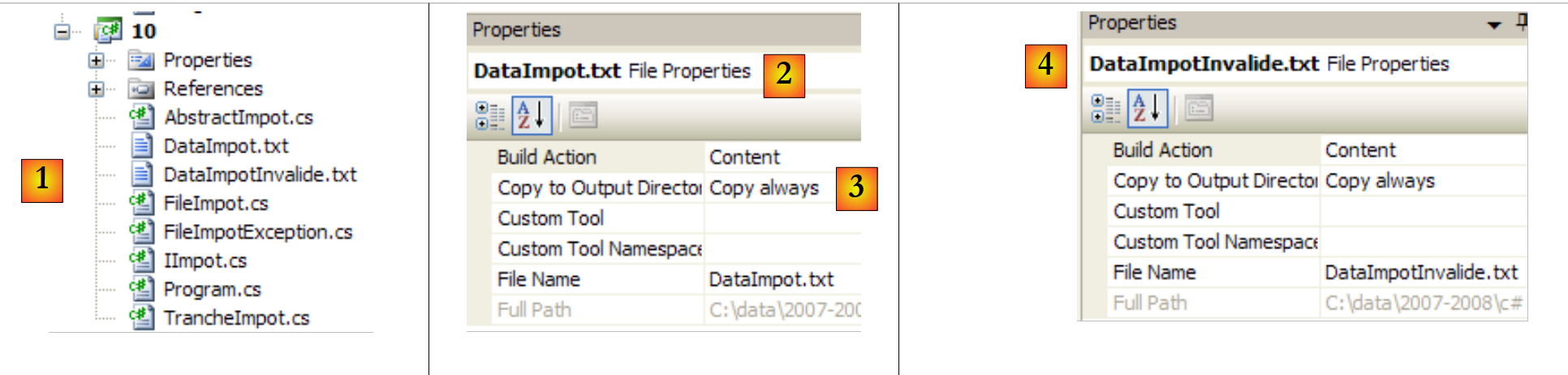 |
- in [1]: the entire project
- in [2,3]: the properties of the file [DataImpot.txt] [2]. The property [Copy to Output Directory] [3] is set to always. This ensures that the file [DataImpot.txt] will be copied to the bin/Release folder (Release mode) or bin/Debug (Debug mode) on every run. This is where the executable looks for it.
- In [4]: the same is done with the file [DataImpotInvalide.txt].
The contents of [DataImpot.txt] are as follows:
4962:0:0
8382:0,068:291,09
14753:0,191:1322,92
23888:0,283:2668,39
38868:0,374:4846,98
47932:0,426:6883,66
0:0,481:9505,54
The contents of [DataImpotInvalide.txt] are as follows:
The test program [Program.cs] has not changed: it is the one from version, Section 4.10, with the following difference:
using System;

namespace Chap3 {
    class Program {
        static void Main() {
...
             // creation of a IImpot object
            IImpot impot = null;
            try {
                // creation of a IImpot object
                impot = new FileImpot("DataImpot.txt");
            } catch (FileImpotException e) {
                // error display
                string msg = e.InnerException == null ? null : String.Format(", Exception d'origine : {0}", e.InnerException.Message);
                Console.WriteLine("L'erreur suivante s'est produite : [Code={0},Message={1}{2}]", e.Code, e.Message, msg == null ? "" : msg);
                // program stop
                Environment.Exit(1);
            }

            // infinite loop
            while (true) {
...
            }//while
        }
    }
}
- line 8: impot object of type IImpot
- line 11: instantiation of the impot object with an object of type FileImpot. This may generate an exception that is handled by the try/catch blocks on lines 9, 12, and 18.
Here are some execution examples:
With the file [DataImpot.txt]
With a non-existent file [xx]
With the file [DataImpotInvalide.txt]