3. C# language basics
3.1. Introduction
We'll start by treating C# as a classical programming language. We'll look at classes later. There are two things in a program:
- data
- the instructions that handle them
We generally try to separate data from instructions:
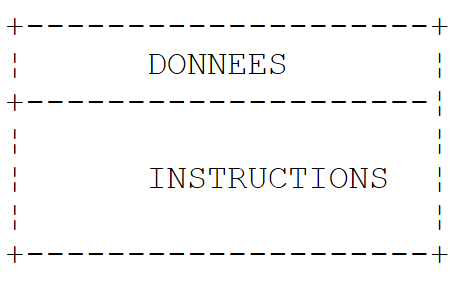 |
3.2. C# data
C# uses the following data types:
- whole numbers
- real numbers
- decimal numbers
- characters and strings
- booleans
- objects
3.2.1. Predefined data types
C# type | Type .NET | Represented data | Suffix literal values | Coding | Value domain |
Char (S) | character | 2 bytes | unicode character (UTF-16) | ||
String (C) | character string | reference to a sequence of Unicode characters | |||
Int32 (S) | whole number | 4 bytes | [-231, 231-1] [-2147483648, 2147483647] | ||
UInt32 (S) | .. | U | 4 bytes | [0, 232-1] [0, 4294967295] | |
Int64 (S) | .. | L | 8 bytes | [-263, 263 -1] [-9223372036854775808, 9223372036854775807] | |
UInt64 (S) | .. | UL | 8 bytes | [0, 264 -1] [0, 18446744073709551615] | |
.. | 1 byte | [-27 , 27 -1] [-128,+127] | |||
Byte (S) | .. | 1 byte | [0 , 28 -1] [0,255] | ||
Int16 (S) | .. | 2 bytes | [-215, 215-1] [-32768, 32767] | ||
UInt16 (S) | .. | 2 bytes | [0, 216-1] [0,65535] | ||
Single (S) | real number | F | 4 bytes | [1.5 10-45, 3.4 10+38in absolute terms | |
Double (S) | .. | D | 8 bytes | [-1.7 10+308, 1.7 10+308in absolute terms | |
Decimal (S) | decimal number | M | 16 bytes | [1.0 10-28,7.9 10+28] in absolute value with 28 significant digits | |
Boolean (S) | .. | 1 byte | true, false | ||
Object (C) | object reference | object reference |
Above, C# types are indicated by their equivalent .NET type, with the comment (S) if the type is a structure and (C) if the type is a class. On discovered that there are two possible types for a 32-bit integer: int and Int32. The type int is a C# type. Int32 is a structure belonging to the System. Its full name is System.Int32. The type int is a C# alias for the structure .NET System.Int32. Similarly, the C# string is an alias for type .NET System.String. System.String is a class and not a structure. The two concepts are similar, but with the following fundamental difference:
- a variable of type Structure can be manipulated via its value
- a variable of type Class can be manipulated via its address (reference in object language).
A structure as a class are complex types with attributes and methods. For example, we can write :
Above is the literal 3 is C# by default int, type .NET System.Int32. This structure has a GetType() which renders an object encapsulating the characteristics of the data type System.Int32. These include the property FullName returns the full name of the type. As you can see, the literal 3 is more complex than it first appears.
Here is a program illustrating these points:
using System;

namespace Chap1 {
    class P00 {
        static void Main(string[] args) {
             // example 1
            int ent = 2;
            float fl = 10.5F;
            double d = -4.6;
            string s = "essai";
            uint ui = 5;
            long l = 1000;
            ulong ul = 1001;
            byte octet = 5;
            short sh = -4;
            ushort ush = 10;
            decimal dec = 10.67M;
            bool b = true;
            Console.WriteLine("Type de ent[{1}] : [{0},{2}]", ent.GetType().FullName, ent,sizeof(int));
            Console.WriteLine("Type de fl[{1}]: [{0},{2}]", fl.GetType().FullName, fl, sizeof(float));
            Console.WriteLine("Type de d[{1}] : [{0},{2}]", d.GetType().FullName, d, sizeof(double));
            Console.WriteLine("Type de s[{1}] : [{0}]", s.GetType().FullName, s);
            Console.WriteLine("Type de ui[{1}] : [{0},{2}]", ui.GetType().FullName, ui, sizeof(uint));
            Console.WriteLine("Type de l[{1}] : [{0},{2}]", l.GetType().FullName, l, sizeof(long));
            Console.WriteLine("Type de ul[{1}] : [{0},{2}]", ul.GetType().FullName, ul, sizeof(ulong));
            Console.WriteLine("Type de b[{1}] : [{0},{2}]", octet.GetType().FullName, octet, sizeof(byte));
            Console.WriteLine("Type de sh[{1}] : [{0},{2}]", sh.GetType().FullName, sh, sizeof(short));
            Console.WriteLine("Type de ush[{1}] : [{0},{2}]", ush.GetType().FullName, ush, sizeof(ushort));
            Console.WriteLine("Type de dec[{1}] : [{0},{2}]", dec.GetType().FullName, dec, sizeof(decimal));
            Console.WriteLine("Type de b[{1}] : [{0},{2}]", b.GetType().FullName, b, sizeof(bool));
        }
    }
}
- line 7: declaration of an integer ent
- line 19: the type of a variable v can be obtained by v.GetType().FullName. The size of an S structure can be obtained by sizeof(S). Instruction Console.WriteLine("... {0} ... {1} ...",param0, param1, ...) writes to the screen the text that is its first parameter, replacing each notation with {i} by the value of the expression parami.
- line 22: the type string operator cannot be used, as it designates a class and not a structure sizeof.
Here's the result:
The display produces .NET types, not C# aliases.
3.2.2. Notation of literal data
145, -7, 0xFF (hexadecimal) | |
100000L | |
134.789, -45E-18 (-45 10-18) | |
134.789F, -45E-18F (-45 10-18) | |
100000M | |
'A', 'b' | |
"today" "c:\chap1\paragraph3" @"c:\chap1\paragraph3" | |
true, false | |
new DateTime(1954,10,13) (year, month, day) for 13/10/1954 |
Note the two literal strings: "c:\chap1\\paragraph3"and @"c:\chap1\paragraph3". In literal strings, the \ character is interpreted. Thus "\n" represents the end-of-line mark and not the succession of the two characters \ and n. If we wanted this succession, we'd have to write "\\n" where the sequence is interpreted as a single \ character. You could also write @"\n" to get the same result. The syntax @"text" requires that text be taken exactly as written. This is sometimes called a string verbatim.
3.2.3. Data reporting
3.2.3.1. Role of declarations
A program manipulates data characterized by a name and a type. This data is stored in memory. When the program is translated, the compiler assigns each data item a memory location characterized by an address and a size. It does this with the help of declarations made by the programmer.
They also enable the compiler to detect programming errors. For example, the
x=x*2;
will be declared erroneous if x is a string, for example.
3.2.3.2. Declaration of constants
The syntax for declaring a constant is as follows:
For example:
Why declare constants?
- The program will be easier to read if the constant is given a meaningful name:
- Modifying the program will be easier if the "constant" changes. For example, in the previous case, if the vat rate changes to 33%, the only modification to be made will be to modify the instruction defining its value:
If 0.186 had been used explicitly in the program, many instructions would have had to be modified.
3.2.3.3. Variable declaration
A variable is identified by a name and refers to a data type. C# is case-sensitive. Thus FIN and end are different.
Variables can be initialized when they are declared. The syntax for declaring one or more variables is :
where Identificateur_de_type is either a predefined type or a type defined by the programmer. Optionally, a variable can be initialized as well as declared.
You can also avoid specifying the exact type of a variable by using the keyword var instead of Identificateur_de_type :
The key word var doesn't mean that variables don't have a specific type. The variable variablei a the data type valuei assigned to it. Initialization is ici mandatory so that the compiler can deduce the variable's type.
Here's an example:
using System;

namespace Chap1 {
    class P00 {
        static void Main(string[] args) {
            int i=2;
            Console.WriteLine("Type de int i=2 : {0},{1}",i.GetType().Name,i.GetType().FullName);
            var j = 3;
            Console.WriteLine("Type de var j=3 : {0},{1}", j.GetType().Name, j.GetType().FullName);
            var aujourdhui = DateTime.Now;
            Console.WriteLine("Type de var aujourdhui : {0},{1}", aujourdhui.GetType().Name, aujourdhui.GetType().FullName);
        }
    }
}
- line 6: explicitly typed data
- line 7: (data).GetType().Name is the short name for (data), (donnée).GetType().FullName is the full name of (data)
- line 8: implicitly typed data. Because 3 is of type int, j will be of type int.
- line 10: implicitly typed data. Because DateTime.Now type is DateTime, today type will be DateTime.
On execution, we obtain the following result:
A variable implicitly typed by the keyword var cannot then change type. For example, after line 10 of the code, the line :
var aujourdhui = "aujourd'hui";
We'll see later that it's possible to declare a type "on the fly" in an expression. In this case, it's a anonymous, a type to which the user has not given a name. The compiler will give this new type a name. If a anonymous is to be assigned to a variable, the only way to declare it is to use the keyword var.
3.2.4. Conversions between numbers and strings
nombre.ToString() | |
int.Parse(string) or System.Int32.Parse | |
long.Parse(string) or System.Int64.Parse | |
double.Parse(string) or System.Double.Parse(string) | |
float.Parse(string) or System.Float.Parse(string) |
Converting a string to a number may fail if the string does not represent a valid number. A fatal error called exception. This error can be handled by the try/catch next :
try{
    appel de la fonction susceptible de générer l'exception
} catch (Exception e){
    traiter l'exception e
}
instruction suivante
If the function doesn't generate an exception, we go to following instruction, otherwise we go to the body of the clause catch then to following instruction. We'll come back to exception handling later. Here's a program demonstrating some techniques for converting between numbers and strings. In this example, the function poster writes the value of its parameter to the screen. Thus poster(S) writes the value of S to the screen where S is of type string.
using System;

namespace Chap1 {
    class P01 {
        static void Main(string[] args) {

             // data
            const int i = 10;
            const long l = 100000;
            const float f = 45.78F;
            double d = -14.98;

             // number --> string
            affiche(i.ToString());
            affiche(l.ToString());
            affiche(f.ToString());
            affiche(d.ToString());

             //boolean --> string
            const bool b = false;
            affiche(b.ToString());

             // string --> int
            int i1;
            i1 = int.Parse("10");
            affiche(i1.ToString());
            try {
                i1 = int.Parse("10.67");
                affiche(i1.ToString());
            } catch (Exception e) {
                affiche("Erreur : " + e.Message);
            }

             // chain --> long
            long l1;
            l1 = long.Parse("100");
            affiche(l1.ToString());
            try {
                l1 = long.Parse("10.675");
                affiche(l1.ToString());
            } catch (Exception e) {
                affiche("Erreur : " + e.Message);
            }

             // chain --> double
            double d1;
            d1 = double.Parse("100,87");
            affiche(d1.ToString());
            try {
                d1 = double.Parse("abcd");
                affiche(d1.ToString());
            } catch (Exception e) {
                affiche("Erreur : " + e.Message);
            }

             // string --> float
            float f1;
            f1 = float.Parse("100,87");
            affiche(f1.ToString());
            try {
                d1 = float.Parse("abcd");
                affiche(f1.ToString());
            } catch (Exception e) {
                affiche("Erreur : " + e.Message);
            }

         }// fine hand

        public static void affiche(string S) {
            Console.Out.WriteLine("S={0}",S);
        }
     }// end of class
}
Lines 30-32 handle the possible exception that can occur. e.Message is the error message linked to the exception e.
The results are as follows:
Note that real numbers in string form must use the comma and not the decimal point. Thus, we write
but
3.2.5. Data tables
A C# array is an object used to group data of the same type under the same identifier. Its declaration is as follows:
n is the number of data items the array can contain. The syntax Table[i] designates data no i where i belongs to the interval [0,n-1]. Any reference to data Table[i] where i does not belong to the interval [0,n-1] will trigger an exception. An array can be initialized as well as declared:
or simply :
Arrays have a property Length which is the number of elements in the array.
A two-dimensional picture can be declared as follows:
Type[,] array=new Type[n,m];
where n is the number of lines, m number of columns. The syntax Table[i,j] designates element j in line i of table. The two-dimensional array can also be initialized at the same time as it is declared:
or simply :
The number of elements in each dimension can be obtained using the GetLength(i) where i=0 represents the dimension corresponding to the 1st index, i=1 the dimension corresponding to the 2nd index, ..
The total number of dimensions is obtained with the property Rank, the total number of elements with the Length.
A table of tables is declared as follows:
Type[][] array=new Type[n][];
The above statement creates an array of n lines. Each element table[i] is a one-dimensional array reference. These references array[i] are not initialized in the above declaration. Their value is the reference null.
The following example illustrates the creation of an array of tables:
            // un tableau de tableaux
            string[][] noms = new string[3][];
            for (int i = 0; i < noms.Length; i++) {
                noms[i] = new string[i + 1];
            }//for
            // initialisation
            for (int i = 0; i < noms.Length; i++) {
                for (int j = 0; j < noms[i].Length; j++) {
                    noms[i][j] = "nom" + i + j;
                }//for j
            }//for i
- line 2: a table names of 3 string[][]. Each element is an array pointer (an object reference) whose elements are of type string[].
- lines 3-5: the 3 elements of the table names are initialized. Each now "points" to an array of elements of type string[]. names[i][j] is the j type table string [] referenced by names[i].
- line 9: element initialization names[i][j] inside a double loop. Ici names[i] is an array of i+1 elements. As names[i] is a painting, names[i].Length is its number of elements.
Here is an example of the three types of table we have just presented:
using System;

namespace Chap1 {
     // tables

    using System;

     // test class
    public class P02 {
        public static void Main() {
             // an initialized 1-dimensional array
            int[] entiers = new int[] { 0, 10, 20, 30 };
            for (int i = 0; i < entiers.Length; i++) {
                Console.Out.WriteLine("entiers[{0}]={1}", i, entiers[i]);
            }//for

             // an initialized 2-dimensional array
            double[,] réels = new double[,] { { 0.5, 1.7 }, { 8.4, -6 } };
            for (int i = 0; i < réels.GetLength(0); i++) {
                for (int j = 0; j < réels.GetLength(1); j++) {
                    Console.Out.WriteLine("réels[{0},{1}]={2}", i, j, réels[i, j]);
                }//for j
            }//for i

             // a table of tables
            string[][] noms = new string[3][];
            for (int i = 0; i < noms.Length; i++) {
                noms[i] = new string[i + 1];
            }//for
             // initialization
            for (int i = 0; i < noms.Length; i++) {
                for (int j = 0; j < noms[i].Length; j++) {
                    noms[i][j] = "nom" + i + j;
                }//for j
            }//for i
             // display
            for (int i = 0; i < noms.Length; i++) {
                for (int j = 0; j < noms[i].Length; j++) {
                    Console.Out.WriteLine("noms[{0}][{1}]={2}", i, j, noms[i][j]);
                }//for j
            }//for i
         }//Main
     }//class
}//namespace
On execution, we obtain the following results:
3.3. Basic C# instructions
A distinction is made between
1 the elementary instructions executed by the computer.
2 instructions for controlling the program sequence.
The elementary instructions become clear when you consider the structure of a microcomputer and its peripherals.
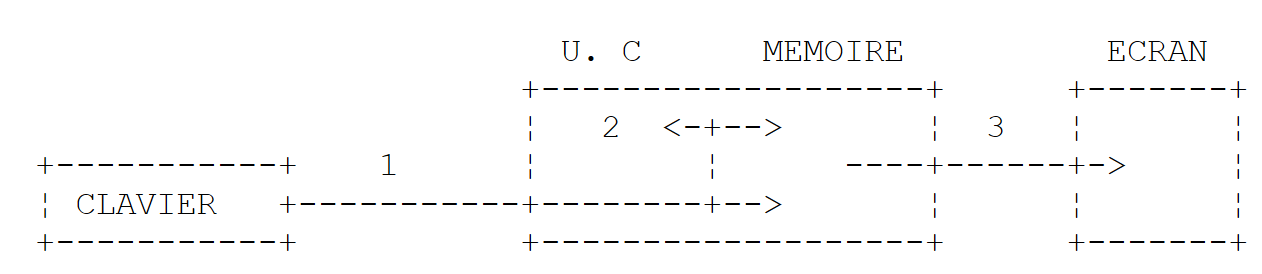 |
-
reading information from the keyboard
-
information processing
-
writing information on screen
3.3.1. Writing on screen
There are different screen writing instructions:
Console.Out.WriteLine(expression)
Console.WriteLine(expression)
Console.Error.WriteLine (expression)
where expression is any type of data that can be converted into a string for display on the screen. All C# or .NET objects have a ToString() which is used to perform this conversion.
The class System.Console gives access screen-writing operations (Write, WriteLine). The class Console has two properties Out and Error which are writing flow type TextWriter :
- Console.WriteLine() is equivalent to Console.Out.WriteLine() and writes about the Out usually associated with the screen.
- Console.Error.WriteLine() written on the stream Error, usually associated with the screen.
The flows Out and Error can be redirected to text files at program runtime, as we'll see shortly.
3.3.2. Reading typed data
The data stream from the keyboard is designated by the object Console.In type TextReader. This type of object can be used to read a line of text using the ReadLine :
The Console class offers a ReadLine method associated by default with the In. We can therefore write :
The line typed on the keyboard is stored in the variable line and can then be used by the program. The stream In can be redirected to a file, like the Out and Error.
3.3.3. Input-output example
Here's a short program to illustrate keyboard/screen I/O operations:
using System;

namespace Chap1 {
     // test class
    public class P03 {
        public static void Main() {

             // write to Out feed
            object obj = new object();
            Console.Out.WriteLine(obj);

             // write to the Error stream
            int i = 10;
            Console.Error.WriteLine("i=" + i);

             // reading a line entered on the keyboard
            Console.Write("Tapez une ligne : ");
            string ligne = Console.ReadLine();
            Console.WriteLine("ligne={0}", ligne);
         }//fine hand
     }//end of class
}
- line 9: obj is an object reference
- line 10: obj is written to the screen. By default, the obj.ToString() which is called.
- line 14: you can also write :
Console.Error.WriteLine("i={0}",i);
The 1st parameter "i={0}" is the display format, the other parameters, the expressions to be displayed. The {n} elements are "positional" parameters. At runtime, the {n} parameter is replaced by the value of expression no. n.
The result is as follows:
- line 1: the display produced by line 10 of the code. The obj.ToString() displayed the type name of the variable obj : System.Object. The type object is a C# alias of type .NET System.Object.
3.3.4. I/O redirection
Under DOS and UNIX there are three standard devices called :
- standard input device - defaults to the keypad and is numbered 0
- standard output device - defaults to the display and is numbered 1
- standard error device - defaults to the screen and is numbered 2
In C#, the Console.Out writes to device 1, the write stream Console.Error is written to device 2 and the read stream Console.In reads data from device 0.
When you run a program under Dos or Unix, you can set which devices 0, 1 and 2 will be used for the executed program. Consider the following command line:
Behind the arguments argi program pg, standard I/O devices can be redirected to files:
standard input stream no. 0 is redirected to the in.txt. In the program, the Console.In will therefore take its data from the in.txt. | |
redirects output no. 1 to the file out.txt. This means that in the program the Console.Out will write its data to the out.txt | |
ditto, but the written data is added to the current file contents out.txt. | |
redirects output no. 2 to the file error.txt. This means that in the program the Console.Error will write its data to the error.txt | |
ditto, but the written data is added to the current file contents error.txt. | |
Devices 1 and 2 are both redirected to |
Note that to redirect I/O streams from the pg to files, the pg does not need to be modified. The operating system determines the nature of peripherals 0, 1 and 2. Consider the following program:
using System;

namespace Chap1 {

     // redirections
    public class P04 {
        public static void Main(string[] args) {
            // lecture flux In
            string data = Console.In.ReadLine();
             // write Out feed
            Console.Out.WriteLine("écriture dans flux Out : " + data);
            // écriture flux Error
            Console.Error.WriteLine("écriture dans flux Error : " + data);
         }//Main
     }//class
}
Let's generate the executable of this source code:
 |
- in [1]: the executable is created by right-clicking on the project / Build
- in [2]: in a Dos window, the executable 04.exe has been created in the bin/Release of the project.
Let's issue the following commands in the Dos window [2] :
- line 1: the string test in the in.txt
- lines 2-3: display file contents in.txt for verification
- line 4: program execution 04.exe. The flow In is redirected to the in.txt, the flow Out to the out.txt, the flow Error to the err.txt. Execution does not cause any display.
- lines 5-6: file contents out.txt. This content shows us that :
- the file in.txt has been read
- the screen display has been redirected to out.txt
- lines 7-8: similar check for the file err.txt
We can clearly see that flows Out and In do not write to the same devices, as they have been redirected separately.
3.3.5. Assigning the value of an expression to a variable
We are interested ici in the operation variable=expression;
The expression can be of type : arithmetic, relational, Boolean, characters
3.3.5.1. Interpretation of the assignment operation
The operation variable=expression;
is itself a expression whose evaluation takes place as follows:
- the right-hand side of the assignment is evaluated: the result is a V value.
- the value V is assigned to the variable
- the V value is also the value of the assignment, this time seen as an expression.
This is how the
is legal. Because of the priority, the rightmost = operator will be evaluated. We therefore have
The expression V2=expression is evaluated and assigned the value V. Evaluating this expression has caused V to be assigned to V2. The following = operator is then evaluated as :
The value of this expression is still V. Its evaluation causes V to be assigned to V1.
So the V1=V2=expression
is an expression whose evaluation
- causes the value of expression to variables V1 and V2
- results in the value of expression.
This can be generalized to an expression like :
3.3.5.2. Arithmetic expression
The operators for arithmetic expressions are as follows:
-
addition
-
subtraction
* multiplication
/ division: the result is the exact quotient if at least one of the operands is real. If both operands are integers, the result is the whole quotient. Thus 5/2 -> 2 and 5.0/2 ->2.5.
% division: the result is the remainder, whatever the nature of the operands, the quotient being a whole number. It is therefore the operation modulo.
There are various mathematical functions. Here are some of them:
square root | |
Cosinus | |
Sinus | |
Tangent | |
x to the power y (x>0) | |
Exponential | |
Neperian logarithm | |
absolute value |
etc...
All these functions are defined in a C# class called Math. When used, they must be prefixed with the name of the class in which they are defined. For example, write :
The complete definition of the Math is as follows:
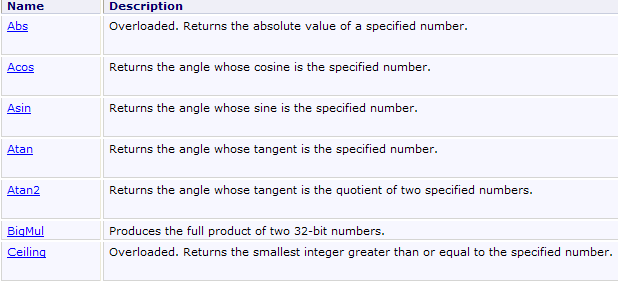
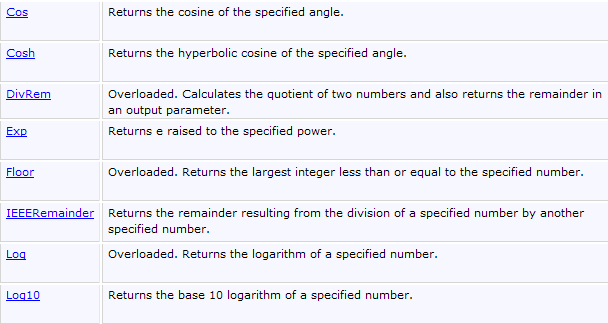
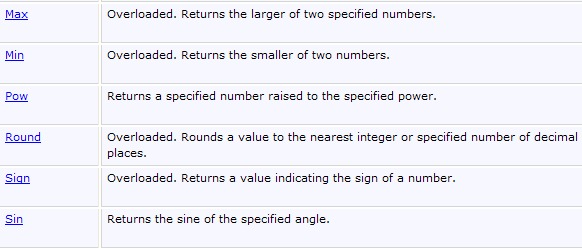
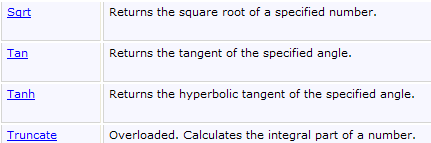

3.3.5.3. Priorities for evaluating arithmetic expressions
The priority of operators when evaluating an arithmetic expression is as follows (from highest to lowest priority):
Operators in the same [ ] block have the same priority.
3.3.5.4. Relational expressions
The operators are as follows:
operator priorities
The result of a relational expression is the Boolean false if expression is false, true or else.
Comparison of two characteristics
Let's consider two characters C1 and C2. They can be compared using the operators
Their Unicode codes, which are numbers, are then compared. In Unicode order, we have the following relationships:
Comparing two strings
They are compared character by character. The first inequality encountered between two characters induces an inequality of the same meaning on the strings.
Examples :
Either compare the "Cat" and "Dog" strings
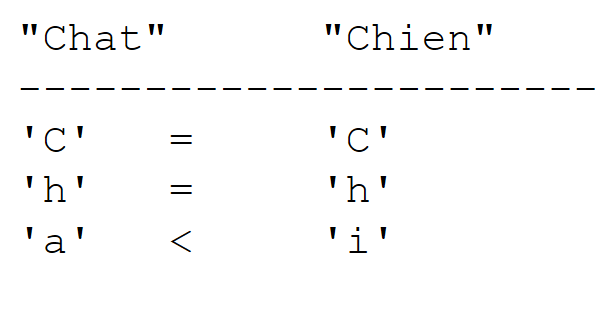 |
This last inequality means that "Cat" < "Dog".
Either compare the "Cat" and "Kitten" chains. There is a tie all the time until the "Cat" chain is exhausted. In this case, the exhausted chain is declared the "smallest". We therefore have the relationship
Functions for comparing two strings
You can use the relational operators == and != to test equality of two strings, or the Equals class System.String. For < <= > >= relationships, use the CompareTo class System.String :
using System;

namespace Chap1 {
    class P05 {
        static void Main(string[] args) {
            string chaine1="chat", chaine2="chien";
            int n = chaine1.CompareTo(chaine2);
            bool egal = chaine1.Equals(chaine2);
            Console.WriteLine("i={0}, egal={1}", n, egal);
            Console.WriteLine("chien==chaine1:{0},chien!=chaine2:{1}", "chien"==chaine1,"chien" != chaine2);
        }
    }
}
Line 7, the variable i will have the value :
    0    if both chains are equal

    1    if channel 1 > channel 2

    -1    if chain n°1 < chain n°2
Line 8, the variable egal will have the value true if both chains are equal, false otherwise. Line 10 uses the == and != operators to check whether two strings are equal or not.
Execution results :
3.3.5.5. Boolean expressions
The operators that can be used are AND (&&) OR(||) NOT (!). The result of a Boolean expression is a Boolean.
operator priorities :
- !
- &&
- ||
            double x = 3.5;
            bool valide = x > 2 && x < 4;
Relational operators have priority operators && and ||.
3.3.5.6. Bit processing
Operators
Let be i and j two integers.
shifts i n bits to the left. The incoming bits are zeros. | |
shifts i n bits to the right. If i is a signed integer (signed char, int, long), the sign bit is preserved. | |
performs the logical ET of i and j bit by bit. | |
performs the logical OU of i and j bit by bit. | |
complements i to 1 | |
makes the OU EXCLUSIF of i and j |
Or the following code:
short i = 100, j = -13;
ushort k = 0xF123;
Console.WriteLine("i=0x{0:x4}, j=0x{1:x4}, k=0x{2:x4}", i,j,k);
Console.WriteLine("i<<4=0x{0:x4}, i>>4=0x{1:x4},k>>4=0x{2:x4},i&j=0x{3:x4},i|j=0x{4:x4},~i=0x{5:x4},j<<2=0x{6:x4},j>>2=0x{7:x4}", i << 4, i >> 4, k >> 4, (short)(i & j), (short)(i | j), (short)(~i), (short)(j << 2), (short)(j >> 2));
- format {0:x4} displays parameter n° 0 in hexadecimal format (x) with 4 characters (4).
The results are as follows:
3.3.5.7. Operator combination
a=a+b peut s'écrire a+=b
a=a-b peut s'écrire a-=b
The same applies to operators /, %,* ,<<, >>, &, |, ^. So a=a/2; can be written as a/=2;
3.3.5.8. Increment and decrement operators
Scoring variable++ means variable=variable+1 or even variable+=1
Scoring variable-- means variable=variable-1 or even variable-=1.
3.3.5.9. The ternary operator?
The expression
is evaluated as follows:
1 the expression expr_cond is evaluated. It is a conditional expression with a real or fake
2 If true, the value of the expression is that of expr1 and expr2 is not evaluated.
3 If false, the opposite occurs: the value of the expression is that of expr2 and expr1 is not evaluated.
The operation i=(j>4 ? j+1:j-1); will be assigned to variable i : j+1 if j>4, j-1 or else. It's the same as writing if(j>4) i=j+1; else i=j-1; but it's more concise.
3.3.5.10. General priority for operators
gd | |
dg | |
dg | |
gd | |
gd | |
gd | |
gd | |
gd | |
gd | |
gd | |
gd | |
gd | |
gd | |
dg | |
dg |
gd indicates that for equal priority, left-right priority is observed. This means that when there are operators of equal priority in an expression, the leftmost operator in the expression is evaluated first. dg indicates right-left priority.
3.3.5.11. Type changes
In an expression, you can momentarily change the encoding of a value. This is known as changing the data type or type casting. The syntax for changing the type of a value in an expression is next:
The value then assumes the indicated type. This leads to a change in the encoding of the value.
using System;

namespace Chap1 {
    class P06 {
        static void Main(string[] args) {
            int i = 3, j = 4;
            float f1=i/j;
            float f2=(float)i/j;
            Console.WriteLine("f1={0}, f2={1}",f1,f2);
        }
    }
}
- line 7, f1 will have the value 0.0. The 3/4 division is an integer division since both operands are of type int.
- line 8, (float)i is the value of i transformed into float. Now we have a division between a real of type float and an integer of type int. This is the division between real numbers. The value of j will also be transformed into a float, then divide the two reals. f2 will then have the value 0.75.
Here are the results:
In the (float)i :
- i is an exact 2-byte coded value
- (float) i is the same value encoded as a real 4-byte approximation
The value of i. This transcoding only takes place for the duration of a calculation, and the variable i always retaining its type int.
3.4. Program flow control instructions
3.4.1. Stop
The Exit defined in the Environment stops program execution.
syntaxe        void Exit(int status)
action        arrête le processus en cours et rend la valeur status au processus père
Exit terminates the current process and returns control to the calling process. The value of status can be used by it. Under DOS, this status variable is rendered in the system variable ERRORLEVEL whose value can be tested in a batch file. Under Unix, with the Shell Bourne command interpreter, the variable $? which retrieves the value of status.
will stop program execution with a status value of 0.
3.4.2. Simple choice structure
notes:
- the condition is enclosed in brackets.
- each action is terminated by a semicolon.
- braces are not terminated by semicolons.
- braces are only necessary if there is more than one action.
- the clause else may be absent.
- there is no clause then.
The algorithmic equivalent of this structure is the if .. then ... otherwise :
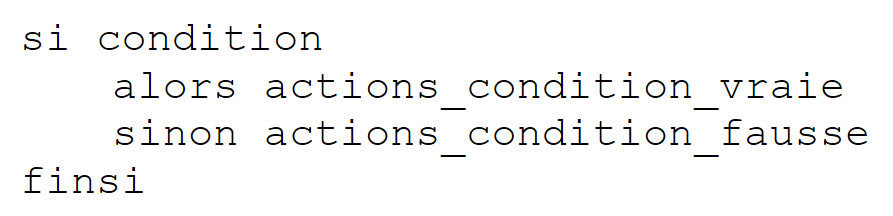 |
example
if (x>0) { nx=nx+1;sx=sx+x;} else dx=dx-x;
Choice structures can be nested:
The following problem sometimes arises:
using System;

namespace Chap1 {
    class P07 {
        static void Main(string[] args) {
            int n = 5;
            if (n > 1)
                if (n > 6)
                    Console.Out.WriteLine(">6");
                else Console.Out.WriteLine("<=6");
        }
    }
}
In the previous example, the else of line 10 refers to which if ? The rule is that a else always refers to the if nearest : if(n>6), line 8, in the example. Consider another example:
            if (n2 > 1) {
                if (n2 > 6) Console.Out.WriteLine(">6");
       } else Console.Out.WriteLine("<=1");
Ici we wanted to put a else at if(n2>1) and no else at if(n2>6). Because of the previous remark, we are obliged to put braces on the if(n2>1) {...} else ...
3.4.3. Case structure
The syntax is as follows:
switch(expression) {
    case v1:
            actions1;
            break;
    case v2:
            actions2;
            break;
         . .. .. .. .. ..
    default:
            actions_sinon;
            break;
}
notes
- the value of the switch can be an integer, a character, a string
- the expression is enclosed in brackets.
- the clause default may be absent.
- the values vi are possible values of the expression. If the value of the expression is vi , the actions behind the clause case vi are executed.
- instruction break takes us out of the case structure.
- each instruction block linked to a value vi must end with a branch instruction (break, goto, return, ...) otherwise the compiler reports an error.
example
Visit algorithms
                selon la valeur de choix
                    cas 0
                         fin du module
                    cas 1
                         exécuter module M1
                    cas 2
                        exécuter module M2
                    sinon
                         erreur<--vrai
                findescas
In C#
3.4.4. Repeat structures
3.4.4.1. Known number of repetitions
Structure for
The syntax is as follows:
    for (i=id;i<=if;i=i+ip){
       actions;
      }
Notes
- the 3 arguments of for are enclosed in a parenthesis and separated by semicolons.
- every for is terminated by a semicolon.
- the brace is only necessary if there is more than one action.
- the brace is not followed by a semicolon.
The algorithmic equivalent is the for :
which can be translated as a as :
Structure foreach
The syntax is as follows:
foreach (Type variable in collection)
    instructions;
}
Notes
- collection is a collection of enumerable objects. The collection of enumerable objects we already know is the array
- Type is the type of the objects in the collection. For an array, this would be the type of the array elements
- variable is a variable local to the loop which will successively take as its value all the values in the collection.
Thus the following code :
            string[] amis = { "paul", "hélène", "jacques", "sylvie" };
            foreach (string nom in amis) {
                Console.WriteLine(nom);
         }
would show :
3.4.4.2. Number of repetitions unknown
There are many structures in C# for this case.
Structure tantque (while)
    while(condition){
          actions;
        }
We loop as long as the condition is verified. The loop may never be executed.
notes:
- the condition is enclosed in brackets.
- each action is terminated by a semicolon.
- the brace is only necessary if there is more than one action.
- the brace is not followed by a semicolon.
The corresponding algorithmic structure is tantque :
Repeat structure until (do while)
The syntax is as follows:
    do{
       instructions;
    }while(condition);
We loop until the condition becomes false. Ici the loop is made at least once.
notes
- the condition is enclosed in brackets.
- each action is terminated by a semicolon.
- the brace is only necessary if there is more than one action.
- the brace is not followed by a semicolon.
The corresponding algorithmic structure is repeat ... until :
Structure for general (for)
The syntax is as follows:
for(instructions_départ;condition;instructions_fin_boucle){
    instructions;
}
We loop as long as the condition is true (evaluated before each loop turn). Start_instructions are performed before entering the loop for the first time. Instructions_fin_boucle are executed after each loop.
notes
- the various instructions in instructions_depart and instructions_fin_boucle are separated by commas.
The corresponding algorithmic structure is as follows:
Examples
The following code fragments all calculate the sum of the first 10 integers.
            int i, somme, n=10;
            for (i = 1, somme = 0; i <= n; i = i + 1)
                somme = somme + i;

            for (i = 1, somme = 0; i <= n; somme = somme + i, i = i + 1) ;

            i = 1; somme = 0;
            while (i <= n) { somme += i; i++; }

            i = 1; somme = 0;
            do somme += i++;
            while (i <= n);
3.4.4.3. Loop management instructions
exits for loop, while, do ... while. | |
advances the for, while, do ... loops to the next iteration. while |
3.5. Exception handling
Many C# functions are likely to generate exceptions, i.e. errors. When a function is likely to generate an exception, the programmer should manage it with the aim of obtaining more error-resistant programs: you must always avoid the savage "crash" of an application.
An exception is handled as follows:
try{
    code susceptible de générer une exception
} catch (Exception e){
    traiter l'exception e
}
instruction suivante
If the function doesn't generate an exception, we go to following instruction, otherwise we go to the body of the clause catch then to following instruction. Note the following points :
- e is an object of type Exception or derivative. You can be more precise by using types such as IndexOutOfRangeException, FormatException, SystemException, etc.: there are several types of exception. By writing catch (Exception e), indicates that you want to handle all exception types. If the code in the try is likely to generate several types of exception, you may want to be more precise by managing the exception with several catch :
try{
    code susceptible de générer les exceptions
} catch ( IndexOutOfRangeException e1){
    traiter l'exception e1
}
} catch ( FormatException e2){
    traiter l'exception e2
}
instruction suivante
- We can add to the clauses try/catch, a clause finally :
try{
    code susceptible de générer une exception
} catch (Exception e){
    traiter l'exception e
}
finally{
    code exécuté après try ou catch
}
instruction suivante
Whether there is an exception or not, the clause code finally will always be executed.
- In the catch, you may not want to use the Exception available. Instead of writing catch (Exception e){..}, we write catch(Exception){...} or simply catch {...}.
- The class Exception has a property Message which is a message detailing the error that has occurred. So if we want to display this one, we'll write :
catch (Exception ex){
    Console.WriteLine("L'erreur suivante s'est produite : {0}",ex.Message);
    ...
}//catch
- The class Exception has a method ToString which returns a string indicating the type of exception and the value of the Message. We can thus write :
catch (Exception ex){
    Console.WriteLine("L'erreur suivante s'est produite : {0}", ex.ToString());
    ...
}//catch
We can also write :
The compiler will assign the {0} parameter the value ex.ToString().
The following example shows an exception generated by the use of a non-existent array element:
using System;

namespace Chap1 {
    class P08 {
        static void Main(string[] args) {
             // declaring & initializing an array
            int[] tab = { 0, 1, 2, 3 };
            int i;
             // table display with for
            for (i = 0; i < tab.Length; i++)
                Console.WriteLine("tab[{0}]={1}", i, tab[i]);
             // table display with a for each
            foreach (int élmt in tab) {
                Console.WriteLine(élmt);
            }
             // generating an exception
            try {
                tab[100] = 6;
            } catch (Exception e) {
                Console.Error.WriteLine("L'erreur suivante s'est produite : " + e);
                return;
             }//try-catch
            finally {
                Console.WriteLine("finally ...");
            }
        }
    }
}
Above, line 18 will generate an exception because the array tab has no element no. 100. Running the program gives the following results:
- line 9: exception [System.IndexOutOfRangeException] occurred
- line 11: the clause finally (lines 23-25) of the code was executed, even though line 21 contained an instruction return to exit the method. Note that the finally is always executed.
Here's another example of how to handle the exception caused by assigning a string to an integer variable when the string does not represent an integer:
using System;

namespace Chap1 {
    class P08 {
        static void Main(string[] args) {

             // example 2
             // We ask for the name
            Console.Write("Nom : ");
             // reading response
            string nom = Console.ReadLine();
             // age requested
            int age = 0;
            bool ageOK = false;
            while (!ageOK) {
                 // question
                Console.Write("âge : ");
                 // read-verify answer
                try {
                    age = int.Parse(Console.ReadLine());
                    ageOK = age>=1;
                } catch {
                 }//try-catch
                if (!ageOK) {
                    Console.WriteLine("Age incorrect, recommencez...");
                }
             }//while
             // final display
            Console.WriteLine("Vous vous appelez {0} et vous avez {1} an(s)",nom,age);
        }
    }
}
- lines 15-27: the loop for entering a person's age
- line 20: the line typed on the keyboard is transformed into an integer using the int.Parse. This method throws an exception if conversion is not possible. This is why the operation has been placed in a try / catch.
- lines 22-23: if an exception is thrown, we go to the catch where nothing is done. Thus, the Boolean ageOK positioned at false, line 14, will it remain false.
- line 21: if you reach this line, the conversion string -> int has been successful. However, check that the integer obtained is greater than or equal to 1.
- lines 24-26: an error message is issued if the age is incorrect.
Some performance results :
3.6. Application example - V1
We propose to write a program to calculate a taxpayer's income tax. The simplified case is that of a taxpayer with only his salary to declare (2004 figures for 2003 income):
- the number of employee shares is calculated nbParts=nbEnfants/2 +1 if unmarried, nbEnfants/2+2 if married, where nbEnfants is its number of children.
- if he has at least three children, he gets half a share more
- calculate your taxable income R=0.72*S where S is his annual salary
- calculate your family coefficient QF=R/nbParts
- calculate your tax I. Consider the following table :
4262 | 0 | 0 |
8382 | 0.0683 | 291.09 |
14753 | 0.1914 | 1322.92 |
23888 | 0.2826 | 2668.39 |
38868 | 0.3738 | 4846.98 |
47932 | 0.4262 | 6883.66 |
0 | 0.4809 | 9505.54 |
Each line has 3 fields. To calculate tax I, look for the first line where QF<=champ1. For example, if QF=5000 we find the line
Tax I is then equal to 0.0683*R - 291.09*nbParts. If QF is such that the relation QF<=champ1 is never checked, then the coefficients of the last line are used. Ici :
0 0.4809 9505.54
which gives tax I=0.4809*R - 9505.54*nbParts.
The corresponding C# program is as follows:
using System;

namespace Chap1 {
    class Impots {
        static void Main(string[] args) {
             // data tables required for tax calculation
            decimal[] limites = { 4962M, 8382M, 14753M, 23888M, 38868M, 47932M, 0M };
            decimal[] coeffR = { 0M, 0.068M, 0.191M, 0.283M, 0.374M, 0.426M, 0.481M };
            decimal[] coeffN = { 0M, 291.09M, 1322.92M, 2668.39M, 4846.98M, 6883.66M, 9505.54M };

             // marital status is restored
            bool OK = false;
            string reponse = null;
            while (!OK) {
                Console.Write("Etes-vous marié(e) (O/N) ? ");
                reponse = Console.ReadLine().Trim().ToLower();
                if (reponse != "o" && reponse != "n")
                    Console.Error.WriteLine("Réponse incorrecte. Recommencez");
                else OK = true;
             }//while
            bool marie = reponse == "o";

             // number of children
            OK = false;
            int nbEnfants = 0;
            while (!OK) {
                Console.Write("Nombre d'enfants : ");
                try {
                    nbEnfants = int.Parse(Console.ReadLine());
                    OK = nbEnfants >= 0;
                } catch {
                 }// try
                if (!OK) {
                    Console.WriteLine("Réponse incorrecte. Recommencez");
                }
             }// while

             // salary
            OK = false;
            int salaire = 0;
            while (!OK) {
                Console.Write("Salaire annuel : ");
                try {
                    salaire = int.Parse(Console.ReadLine());
                    OK = salaire >= 0;
                } catch {
                 }// try
                if (!OK) {
                    Console.WriteLine("Réponse incorrecte. Recommencez");
                }
             }// while

             // calculating the number of shares
            decimal nbParts;
            if (marie) nbParts = (decimal)nbEnfants / 2 + 2;
            else nbParts = (decimal)nbEnfants / 2 + 1;
            if (nbEnfants >= 3) nbParts += 0.5M;

             // taxable income
            decimal revenu = 0.72M * salaire;

             // family quotient
            decimal QF = revenu / nbParts;

             // search for tax bracket corresponding to QF
            int i;
            int nbTranches = limites.Length;
            limites[nbTranches - 1] = QF;
            i = 0;
            while (QF > limites[i]) i++;
             // tax
            int impots = (int)(coeffR[i] * revenu - coeffN[i] * nbParts);

             // the result is displayed
            Console.WriteLine("Impôt à payer : {0} euros", impots);
        }
    }
}
- lines 7-9: numerical values are suffixed with M (Money) to be of type decimal.
- line 16:
- Console.ReadLine() makes the chain C1 typed
- C1.Trim() removes leading and trailing spaces C1 - renders a string C2
- C2.ToLower() makes the chain C3 which is the chain C2 transformed into lower case.
- line 21: the Boolean marie receives the value true or false relationship answer=="o"
- line 29: the string typed on the keyboard is transformed into a int. If the transformation fails, an exception is thrown.
- line 30: the Boolean OK receives the value true or false relationship nbEnfants>=0
- lines 55-56: you can't simply write nbEnfants/2. If nbEnfants was equal to 3, we'd have 3/2, an integer division that would give 1 and not 1.5. So we write (decimal)nbEnfants to make one of the operands of the division real and thus have a division between reals.
Here are some examples:
Etes-vous marié(e) (O/N) ? oui
Réponse incorrecte. Recommencez
Etes-vous marié(e) (O/N) ? o
Nombre d'enfants : trois
Réponse incorrecte. Recommencez
Nombre d'enfants : 3
Salaire annuel : 60000 euros
Réponse incorrecte. Recommencez
Salaire annuel : 60000
Impôt à payer : 2959 euros
3.7. Main program arguments
The main function Main can accept an array of strings as a parameter: String[] (or string[]). This table contains the command line arguments used to launch the application. For example, if we run program P with the following command (Dos) :
P arg0 arg1 … argn
and if the Main is declared as follows:
args[0]="arg0", args[1]="arg1" ... Here's an example:
using System;

namespace Chap1 {
    class P10 {
        static void Main(string[] args) {
             // list parameters received
            Console.WriteLine("Il y a  " + args.Length + " arguments");
            for (int i = 0; i < args.Length; i++) {
                Console.Out.WriteLine("arguments[" + i + "]=" + args[i]);
            }
        }
    }
}
To pass arguments to the executed code, proceed as follows:
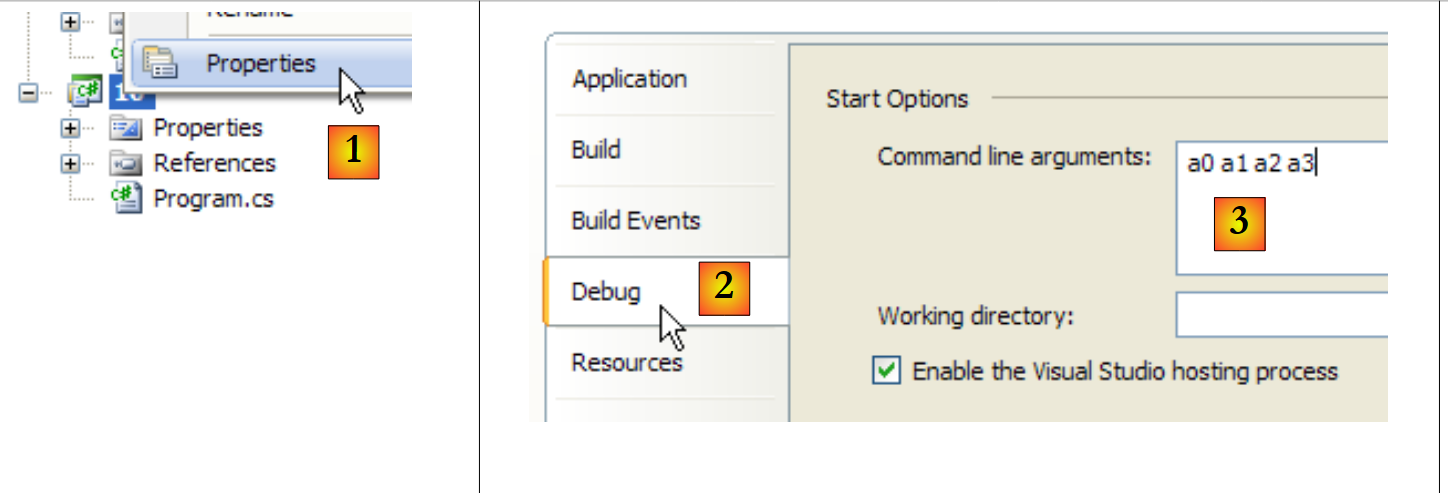 |
- in [1]: right-click on the project / Properties
- in [2]: [Debug] tab
- in [3]: put the arguments
Execution gives the following results:
Note that the
is valid if the Main expects no parameters.
3.8. Enumerations
An enumeration is a data type whose value domain is a set of integer constants. Let's consider a program that has to manage the grades of an exam. There would be five of them: Fair,AssezBien,Fine,TrèsBien, Excellent.
We could then define an enumeration for these five constants:
enum Mentions { Passable, AssezBien, Bien, TrèsBien, Excellent };
Internally, these five constants are encoded by consecutive integers starting with 0 for the first constant, 1 for the next, etc... A variable can be declared as taking these values in the enumeration :
            // une variable qui prend ses valeurs dans l'énumération Mentions
Mentions maMention = Mentions.Passable;
A variable can be compared with the various possible values in the enumeration:
            if (maMention == Mentions.Passable) {
                Console.WriteLine("Peut mieux faire");
}
You can obtain all the values of the enumeration :
             // list of statements in string form
            foreach (Mentions m in Enum.GetValues(maMention.GetType())) {
                Console.WriteLine(m);
}
In the same way as the simple type int is equivalent to the System.Int32, the simple type enum is equivalent to the System.Enum. This structure has a static method GetValues which allows you to obtain all the values of an enumerated type that you is passed as a parameter. This must be an object of type Type which is a class of information about the type of data. The type of a variable v is obtained by v.GetType(). The type of type T is obtained by typeof(T). So ici maMention.GetType() gives object Type enumeration Mentions and Enum.GetValues(maMention.GetType()) the list of enumeration values Mentions.
If we now write
             //list of mentions in integer form
            foreach (int m in Enum.GetValues(typeof(Mentions))) {
                Console.WriteLine(m);
}
Line 2, the loop variable is of integer type. We then obtain the list of enumeration values in integer form. The object of type System.Type corresponding to the data type Mentions is obtained by typeof(Mentions). We could have writtennt, maMention.GetType().
The following program highlights what has just been written:
using System;

namespace Chap1 {
    class P11 {
        enum Mentions { Passable, AssezBien, Bien, TrèsBien, Excellent };
        static void Main(string[] args) {
             // a variable that takes its values from the Mentions enumeration
            Mentions maMention = Mentions.Passable;
             // variable value display
            Console.WriteLine("mention=" + maMention);
             // test with enumeration value
            if (maMention == Mentions.Passable) {
                Console.WriteLine("Peut mieux faire");
            }
             // list of statements in string form
            foreach (Mentions m in Enum.GetValues(maMention.GetType())) {
                Console.WriteLine(m);
            }
             //list of mentions in integer form
            foreach (int m in Enum.GetValues(typeof(Mentions))) {
                Console.WriteLine(m);
            }
        }
    }
}
The results are as follows:
3.9. Passing parameters to a function
We're interested ici in the way parameters are passed through a function. Consider the following static function:
        private static void ChangeInt(int a) {
            a = 30;
            Console.WriteLine("Paramètre formel a=" + a);
}
In the function definition, line1, a is called a formal parameter. It is there only for the purposes of defining the changeInt. It might as well have been called b. Let's now consider one use of this function:
        public static void Main() {
            int age = 20;
            ChangeInt(age);
            Console.WriteLine("Paramètre effectif age=" + age);
}
Ici in the instruction on line 3, ChangeInt(age), age is the effective parameter which will transmit its value to the formal parameter a. We're interested in how a formal parameter retrieves the value of an actual parameter.
3.9.1. Passage by value
The following example shows that, by default, function parameters are passed by value, i.e. the value of the actual parameter is copied into the corresponding formal parameter. We have two distinct entities. If the function modifies the formal parameter, the effective parameter remains unchanged.
using System;

namespace Chap1 {
    class P12 {
        public static void Main() {
            int age = 20;
            ChangeInt(age);
            Console.WriteLine("Paramètre effectif age=" + age);
        }
        private static void ChangeInt(int a) {
            a = 30;
            Console.WriteLine("Paramètre formel a=" + a);
        }
    }
}
The results are as follows:
The value 20 of the effective parameter age has been copied into the formal parameter a (line 10). This was then modified (line 11). The actual parameter remained unchanged. This mode is suitable for function input parameters.
3.9.2. Passage by reference
In a reference run, the effective parameter and the formal parameter are one and the same entity. If the function modifies the formal parameter, the effective parameter is also modified. In C#, both must be preceded by the keyword ref :
Here's an example:
using System;

namespace Chap1 {
    class P12 {
        public static void Main() {
             // example 2
            int age2 = 20;
            ChangeInt2(ref age2);
            Console.WriteLine("Paramètre effectif age2=" + age2);
        }
        private static void ChangeInt2(ref int a2) {
            a2 = 30;
            Console.WriteLine("Paramètre formel a2=" + a2);
        }
    }
}
and performance results :
The effective parameter has followed the modification of the formal parameter. This mode is suitable for function output parameters.
3.9.3. Passage by reference with the out keyword
Consider the previous example in which the variable age2 function would not be initialized before calling the changeInt :
using System;

namespace Chap1 {
    class P12 {
        public static void Main() {
             // example 2
            int age2;
            ChangeInt2(ref age2);
            Console.WriteLine("Paramètre effectif age2=" + age2);
        }
        private static void ChangeInt2(ref int a2) {
            a2 = 30;
            Console.WriteLine("Paramètre formel a2=" + a2);
        }
    }
}
When we compile this program, we get an error :
We can get around this obstacle by assigning an initial value to age2. You can also replace the keyword ref with the keyword out. We then express that the parameter is only an output parameter and therefore does not need an initial value:
using System;

namespace Chap1 {
    class P12 {
        public static void Main() {
             // example 3
            int age3;
            ChangeInt3(out age3);
            Console.WriteLine("Paramètre effectif age3=" + age3);
        }
        private static void ChangeInt3(out int a3) {
            a3 = 30;
            Console.WriteLine("Paramètre formel a3=" + a3);
        }
    }
}
The results are as follows: