8. User Events
In the previous chapter, we discussed the concept of events associated with form components. We will now see how to create events in our own classes.
8.1. Predefined delegate objects
We encountered the concept of delegate objects in the previous chapter, but only briefly. When we looked at how event handlers for form components were declared, we saw code similar to the following:
this.buttonAfficher.Click += new System.EventHandler(this.buttonAfficher_Click);
where buttonAfficher was a component of type [Button]. This class has a Click field defined as follows:
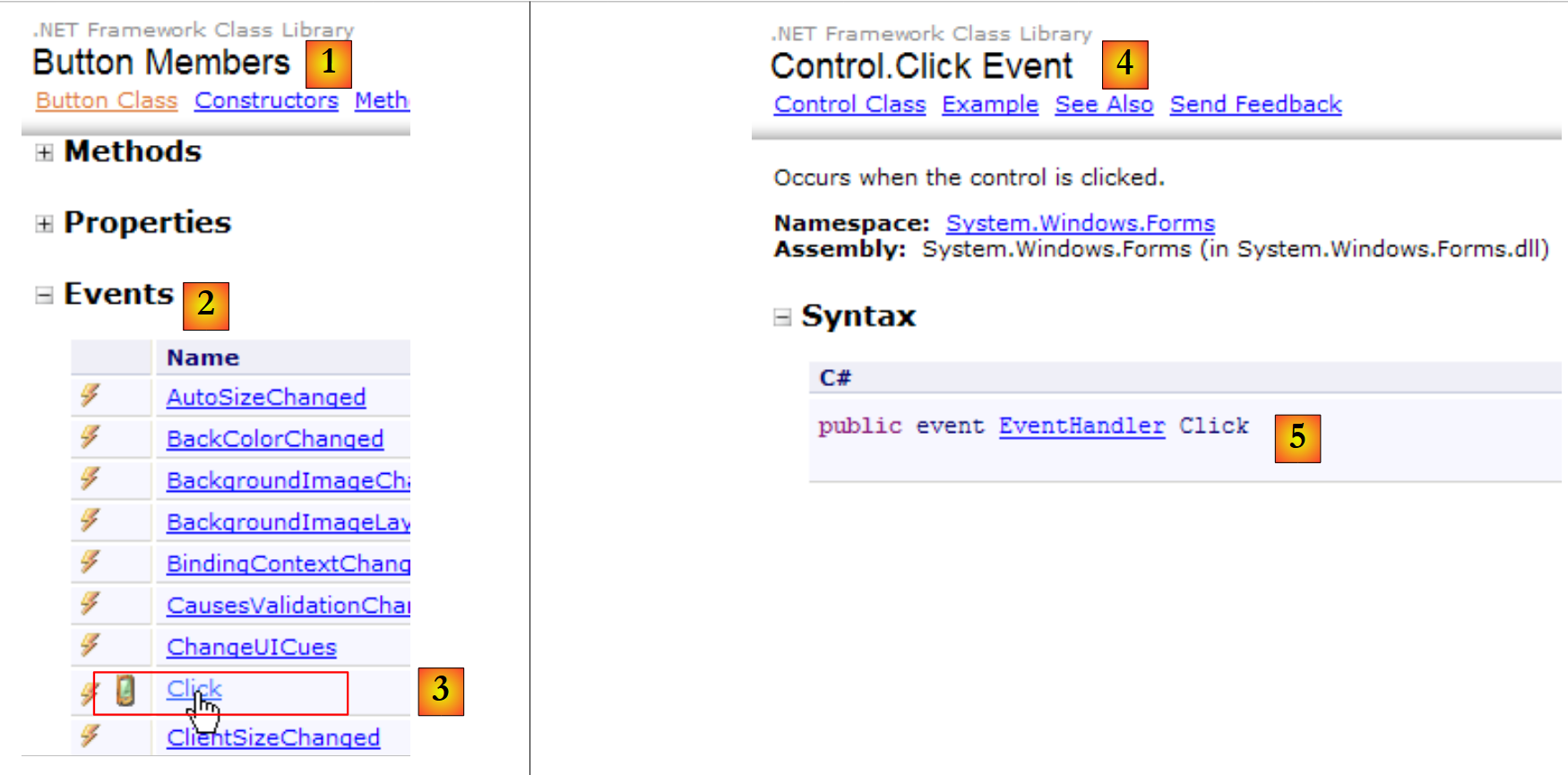 |
- [1]: the [Button] class
- [2]: its events
- [3,4]: the Click event
- [5]: the declaration of the [Control.Click] event [4].
- EventHandler is a method prototype (a template) called a delegate.
- event is a keyword that restricts the functionality of the delegate EventHandler: a delegate object has richer functionality than an event object.
The delegate EventHandler is defined as follows:
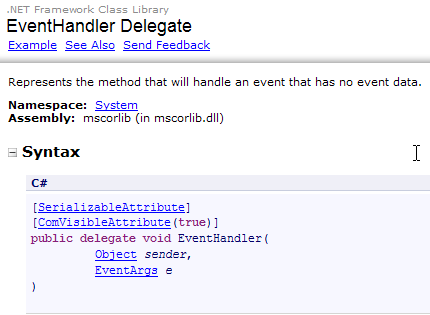 |
The delegate EventHandler refers to a method template:
- with a first parameter of type Object
- with a type EventArgs as its second parameter
- returns no results
A method corresponding to the model defined by EventHandler could be as follows:
private void buttonAfficher_Click(object sender, EventArgs e);
To create an object of type EventHandler, proceed as follows:
EventHandler evtHandler=new EventHandler(méthode correspondant au prototype défini par le type EventHandler);
You can then write:
A variable of type delegate is actually a list of references to methods corresponding to the delegate’s prototype. To add a new method M to the variable evtHandler above, use the following syntax:
The += notation can be used even if evtHandler is an empty list.
The statement:
this.buttonAfficher.Click += new System.EventHandler(this.buttonAfficher_Click);
adds a method of type EventHandler to the list of methods for the buttonAfficher.Click event. When the Click event on the buttonAfficher component occurs, VB executes the statement:
where:
- source is the object-type component that triggered the event
- evt is of type EventArgs and contains no information
All methods with the signature void M(object,EventArgs) that have been associated with the Click event by:
this.buttonAfficher.Click += new System.EventHandler(M);
will be called with the parameters (source, evt) passed by VB.
8.2. Defining delegate objects
The statement
public delegate int Opération(int n1, int n2);
defines a type called Operation that represents a function prototype accepting two integers and returning an integer. It is the delegate keyword that makes Operation a function prototype definition.
A variable op of type Operation will be used to store a list of functions corresponding to the Operation prototype:
A fi method is stored in the op variable using op=new Operation(fi) or, more simply, op=fi. To add a method fj to the list of already registered functions, we write op+= fj. To remove an already registered method fk, we write op-=fk. If in our example we write n=op(n1,n2), all methods registered in the variable op will be executed with the parameters n1 and n2. The result n retrieved will be that of the last method executed. It is not possible to obtain the results produced by all the methods. For this reason, if a list of methods is stored in a delegate function, they most often return a result of type void.
Consider the following example:
using System;
namespace Chap6 {
    class Class1 {
        // function prototype definition
        // accepts 2 integers as parameters and returns an integer
        public delegate int Opération(int n1, int n2);

        // two instance methods corresponding to the prototype
        public int Ajouter(int n1, int n2) {
            Console.WriteLine("Ajouter(" + n1 + "," + n2 + ")");
            return n1 + n2;
        }//add

        public int Soustraire(int n1, int n2) {
            Console.WriteLine("Soustraire(" + n1 + "," + n2 + ")");
            return n1 - n2;
        }//subtract

        // a static method corresponding to the prototype
        public static int Augmenter(int n1, int n2) {
            Console.WriteLine("Augmenter(" + n1 + "," + n2 + ")");
            return n1 + 2 * n2;
        }//increase

        static void Main(string[] args) {

            // define an operation object to store functions
            // we register the static function increase
            Opération op = Augmenter;
            // the delegate is executed
            int n = op(4, 7);
            Console.WriteLine("n=" + n);

            // creation of a c1 object of type class1
            Class1 c1 = new Class1();
            // we register c1's add method in the delegate
            op = c1.Ajouter;
            // execution of delegated object
            n = op(2, 3);
            Console.WriteLine("n=" + n);
            // the subtract method of c1 is registered in the delegate
            op = c1.Soustraire;
            n = op(2, 3);
            Console.WriteLine("n=" + n);
            //registration of two functions in the delegate
            op = c1.Ajouter;
            op += c1.Soustraire;
            // execution of delegated object
            op(0, 0);
            // remove a function from the delegate
            op -= c1.Soustraire;
            // the delegate is executed
            op(1, 1);
        }
    }
}
- Line 3: defines a class named Class1.
- Line 6: Definition of the Opération delegate: a prototype of methods accepting two parameters of type int and returning a result of type int
- Lines 9–12: The instance method Add has the signature of the Operation delegate.
- lines 14–17: the instance method Subtract has the signature of the Operation delegate.
- lines 20–23: the class method Increase has the signature of the Operation delegate.
- line 25: the Main method is executed
- line 20: the variable op is of type Operation delegate. It will contain a list of methods with the signature of the Operation delegate type. It is assigned a first method reference, that of the static method Class1.Augmenter.
- Line 31: The op delegate is executed: all methods referenced by op will be executed. They will be executed with the parameters passed to the op delegate. Here, only the static method Class1.Augmenter will be executed.
- Line 35: An instance c1 of the Class1 class is created.
- line 37: the instance method c1.Ajouter is assigned to the op delegate. Increase was a static method; Add is an instance method. We wanted to show that this does not matter.
- Line 39: The op delegate is executed: the Add method will be executed with the parameters passed to the op delegate.
- Line 42: We do the same with the instance method Subtract.
- Lines 46–47: We place the Add and Subtract methods in the op delegate.
- line 49: the op delegate is executed: both the Add and Subtract methods will be executed with the parameters passed to the op delegate.
- line 51: the Subtract method is removed from the op delegate.
- line 53: the op delegate is executed: the remaining Add method will be executed.
The results of the execution are as follows:
8.3. Delegates or interfaces?
The concepts of delegates and interfaces may seem quite similar, and one might wonder what exactly the differences are between these two concepts. Let’s consider the following example, which is similar to one we’ve already studied:
using System;
namespace Chap6 {
    class Program1 {
        // function prototype definition
        // accepts 2 integers as parameters and returns an integer
        public delegate int Opération(int n1, int n2);

        // two instance methods corresponding to the prototype
        public static int Ajouter(int n1, int n2) {
            Console.WriteLine("Ajouter(" + n1 + "," + n2 + ")");
            return n1 + n2;
        }//add

        public static int Soustraire(int n1, int n2) {
            Console.WriteLine("Soustraire(" + n1 + "," + n2 + ")");
            return n1 - n2;
        }//subtract

        // Executing a delegate
        public static int Execute(Opération op, int n1, int n2){
            return op(n1, n2);
        }

        static void Main(string[] args) {
            // delegate execution Add
            Console.WriteLine(Execute(Ajouter, 2, 3));
            // delegate execution Subtract
            Console.WriteLine(Execute(Soustraire, 2, 3));
            // executing a multicast delegate
            Opération op = Ajouter;
            op += Soustraire;
            Console.WriteLine(Execute(op, 2, 3));
            // remove a function from the delegate
            op -= Soustraire;
            // the delegate is executed
            Console.WriteLine(Execute(op, 2, 3));
        }
    }
}
Line 20: The Execute method expects a reference to an object of type Operation delegate, defined on line 6. This allows different methods (lines 26, 28, 32, and 36) to be passed to the Execute method. This polymorphism can also be achieved using an interface:
using System;

namespace Chap6 {

    // interface IOperation
    public interface IOperation {
        int operation(int n1, int n2);
    }

    // class Add
    public class Ajouter : IOperation {
        public int operation(int n1, int n2) {
            Console.WriteLine("Ajouter(" + n1 + "," + n2 + ")");
            return n1 + n2;
        }
    }

    // class Subtract
    public class Soustraire : IOperation {
        public int operation(int n1, int n2) {
            Console.WriteLine("Soustraire(" + n1 + "," + n2 + ")");
            return n1 - n2;
        }
    }

    // test class
    public static class Program2 {
        // Executing the single method of the IOperation interface
        public static int Execute(IOperation op, int n1, int n2) {
            return op.operation(n1, n2);
        }

        public static void Main() {
            // delegate execution Add
            Console.WriteLine(Execute(new Ajouter(), 2, 3));
            // delegate execution Subtract
            Console.WriteLine(Execute(new Soustraire(), 2, 3));
        }
    }
}
- lines 6–8: the [IOperation] interface defines an operation method.
- lines 11–16 and 19–24: The classes [Ajouter] and [Soustraire] implement the [IOperation] interface.
- lines 29–31: the Execute method, whose first parameter is of the type of the IOperation interface. The Execute method will successively receive, as its first parameter, an instance of the Add class and then an instance of the Subtract class.
We can clearly see the polymorphic aspect that the delegate-type parameter had in the previous example. Both examples also highlight the differences between these two concepts.
Delegate and interface types are interchangeable
- if the interface has only one method. Indeed, the delegate type is a wrapper for a single method, whereas the interface can define multiple methods.
- if the delegate’s multicast aspect is not used. This concept of multicasting does not exist in the interface.
If both of these conditions are met, then you can choose between the following two signatures for the Execute method:
int Execute(IOperation op, int n1, int n2)
int Execute(Opération op, int n1, int n2)
The second one, which uses the delegate, may be more flexible to use. In fact, in the first signature, the first parameter of the method must implement the IOperation interface. This requires creating a class to define the method that is to be passed as the first parameter to the Execute method. In the second signature, any existing method with the correct signature will work. No additional construction is required.
8.4. Event Handling
Delegate objects can be used to define events. A class C1 can define an event evt as follows:
- A delegate type is defined inside or outside class C1:
- Class C1 defines a field of type delegate Evt:
- When an instance c1 of class C1 wants to signal an event, it will execute its delegate Evt1 by passing it the parameters defined by the delegate Evt. All methods registered in the delegate Evt1 will then be executed with these parameters. We can say that they have been notified of the event Evt1.
- If an object c2 using an object c1 wants to be notified of the occurrence of the Evt1 event on object c1, it will register one of its methods, c2.M, in the delegate object c1.Evt1 of object c1. Thus, its method c2.M will be executed every time the Evt1 event occurs on object c1. It can also unsubscribe when it no longer wishes to be notified of the event.
- Since the delegate object c1.Evt1 can register multiple methods, different objects can register with the delegate c1.Evt1 to be notified of the Evt1 event on c1.
In this scenario, we have:
- a class that signals an event
- classes that are notified of this event. We say that they subscribe to the event.
- a delegate type that defines the signature of the methods that will be notified of the event
The .NET framework defines:
- a standard signature for an event delegate
- source: the object that raised the event
- evtInfo: an object of type EventArgs or derived from it that provides information about the event
- the delegate name must end with EventHandler
- A standard way to declare an event of type MyEventHandler in a class:
The Evt1 field is of type delegate. The keyword event is there to restrict the operations that can be performed on it:
- from outside class C1, only the += and -= operations are allowed. This prevents the accidental removal (e.g., by a developer error) of methods subscribed to the event. You can simply subscribe (+=) or unsubscribe (-=) from the event.
- Only an instance of type C1 can execute the call Evt1(source,evtInfo), which triggers the execution of the methods subscribed to the Evt1 event.
The .NET framework provides a generic method that matches the signature of an event delegate:
public delegate void EventHandler<TEventArgs>(object source, TEventArgs evtInfo) where TEventArgs : EventArgs
- The delegate EventHandler uses the generic type TEventArgs, which is the type of its second parameter
- The type TEventArgs must derive from the type EventsArgs (where TEventArgs : EventArgs)
With this generic delegate, the declaration of an X event in class C will follow the recommended pattern below:
- define a type XEventArgs derived from EventArgs to encapsulate information about event X
- define in class C an event of type EventHandler<XEventArgs>.
- Define a protected method in class C
intended to "publish" the X event to subscribers.
Consider the following example:
- A Sender class encapsulates a temperature. This temperature is monitored. When this temperature exceeds a certain threshold, an event must be triggered. We will call this event TemperatureTropHaute. Information about this event will be encapsulated in a type TemperatureTropHauteEventArgs.
- A Subscriber class subscribes to the previous event. When it is notified of the event, it displays a message on the console.
- A console program creates a publisher and two subscribers. It enters temperatures via the keyboard and stores them in a Publisher instance. If the temperature is too high, the Publisher instance publishes the event TemperatureTropHaute.
To comply with the recommended event handling method, we first define the TemperatureTropHauteEventArgs type to encapsulate the event information:
using System;

namespace Chap6 {
    public class TemperatureTropHauteEventArgs:EventArgs {
        // temperature during evt
        public decimal Temperature { get; set; }
        // manufacturers
        public TemperatureTropHauteEventArgs() {
        }
        public TemperatureTropHauteEventArgs(decimal temperature) {
            Temperature = temperature;
        }
    }
}
- Line 6: The information encapsulated by the TemperatureTropHauteEventArgs class is the temperature that triggered the TemperatureTropHaute event.
The Emitter class is as follows:
using System;

namespace Chap6 {
    public class Emetteur {
        static decimal SEUIL = 19;

        // observed temperature
        private decimal temperature;
        // name of source
        public string Nom { get; set; }
        // event reported
        public event EventHandler<TemperatureTropHauteEventArgs> TemperatureTropHaute;

        // read/write temperature
        public decimal Temperature {
            get {
                return temperature;
            }
            set {
                temperature = value;
                if (temperature > SEUIL) {
                    // subscribers are notified of the event
                    OnTemperatureTropHaute(new TemperatureTropHauteEventArgs(temperature));
                }
            }
        }

        // reporting an event
        protected virtual void OnTemperatureTropHaute(TemperatureTropHauteEventArgs evt) {
            // issue of event TemperatureTropHaute to subscribers
            TemperatureTropHaute(this, evt);
        }
    }
}
- line 5: the temperature threshold above which the TemperatureTropHaute event will be published.
- line 10: the sender has a name for identification
- line 12: the event TemperatureTropHaute.
- lines 15–26: the get method that returns the temperature and the set method that records it. It is the set method that triggers the publication of the TemperatureTropHaute event if the temperature to be recorded exceeds the threshold in line 5. It triggers the event via the OnTemperatureTropHauteHandler method in line 29 by passing it a TemperatureTropHauteEventArgs object as a parameter, in which the temperature that exceeded the threshold has been recorded.
- Lines 29–32: The TemperatureTropHaute event is published with the emitter itself as the first parameter and the TemperatureTropHauteEventArgs object received as a parameter as the second parameter.
The Subscriber class that will subscribe to the TemperatureTropHaute event is as follows:
using System;

namespace Chap6 {
    public class Souscripteur {
        // name
        public string Nom { get; set; }

        // event manager TemperatureTropHaute
        public void EvtTemperatureTropHaute(object source, TemperatureTropHauteEventArgs e) {
            // operator console display
            Console.WriteLine("Souscripteur [{0}] : la source [{1}] a signalé une température trop haute : [{2}]", Nom, ((Emetteur)source).Nom, e.Temperature);
        }
    }
}
- line 6: each subscriber is identified by a name.
- lines 9–12: the method that will be associated with the TemperatureTropHaute event. It has the signature of the EventHandler<TEventArgs> delegate type that an event handler must have. The method displays on the console: the name of the subscriber displaying the message, the name of the sender that reported the event, and the temperature that triggered it.
- The subscription to event TemperatureTropHaute for a Publisher object is not handled within the Subscriber class. It will be handled by an external class.
The program [Program.cs] links all these elements together:
using System;
namespace Chap6 {
    class Program {
        static void Main(string[] args) {
            // creation of an evts transmitter
            Emetteur e1 = new Emetteur() { Nom = "e" };
            // creation of a table of 2 subscribers
            Souscripteur[] souscripteurs = new Souscripteur[2];
            for (int i = 0; i < souscripteurs.Length; i++) {
                // creation subscriber
                souscripteurs[i] = new Souscripteur() { Nom = "s" + i };
                // we subscribe him to e1's TemperatureTropHaute event
                e1.TemperatureTropHaute += souscripteurs[i].EvtTemperatureTropHaute;
            }
            // temperatures are read from the keyboard
            decimal temperature;
            Console.Write("Température (rien pour arrêter) : ");
            string saisie = Console.ReadLine().Trim();
            // as long as the line entered is not empty
            while (saisie != "") {
                // is the input a decimal number?
                if (decimal.TryParse(saisie, out temperature)) {
                    // correct temperature - recorded
                    e1.Temperature = temperature;
                } else {
                    // we report the error
                    Console.WriteLine("Température incorrecte");
                }
                // new entry
                Console.Write("Température (rien pour arrêter) : ");
                saisie = Console.ReadLine().Trim();
            }//while
        }
    }
}
- line 6: creation of the publisher
- lines 8–14: creation of two subscribers that are subscribed to the TemperatureTropHaute event of the publisher.
- lines 20-32: loop for entering temperatures via the keyboard
- line 24: if the entered temperature is valid, it is sent to the e1 Publisher object, which will trigger the TemperatureTropHaute event if the temperature is above 19 °C.
The results of the execution are as follows: