6. 3-tier architectures
6.1. Introduction
Let's revisit the latest version from the tax calculation application:
using System;

namespace Chap3 {
    class Program {
        static void Main() {
            // interactive tax calculator
            // the user enters three data points on the keyboard: married nbEnfants salary
            // the program then displays Tax payable
...

            // creation of a IImpot object
            IImpot impot = null;
            try {
                // creation of a IImpot object
                impot = new FileImpot("DataImpotInvalide.txt");
            } catch (FileImpotException e) {
                // error display
...
                // program stop
                Environment.Exit(1);
            }
            // infinite loop
            while (true) {
                // tax calculation parameters are requested
                Console.Write("Paramètres du calcul de l'Impot au format : Marié (o/n) NbEnfants Salaire ou rien pour arrêter :");
                string paramètres = Console.ReadLine().Trim();
...
                // parameters are correct - Impot is calculated
                Console.WriteLine("Impot=" + impot.calculer(marié == "o", nbEnfants, salaire) + " euros");
                // next taxpayer
            }//while
        }
    }
}
The previous solution includes standard programming operations:
- retrieving data stored in files, databases, etc. (lines 12–21)
- user interaction, lines 26 (input) and 29 (display)
- the use of a business logic algorithm, line 29
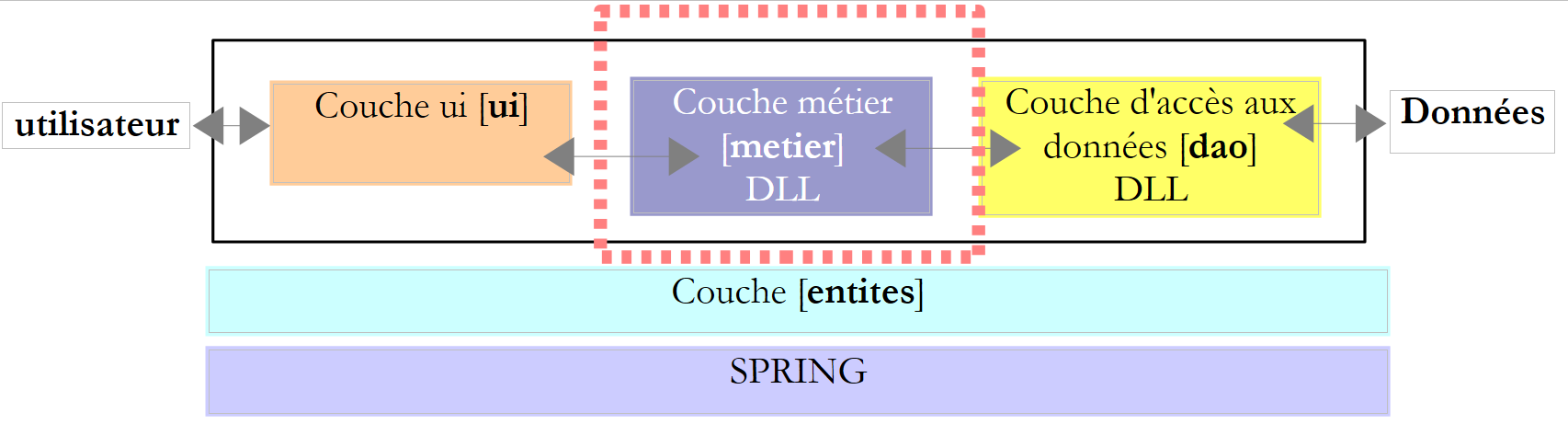
Practice has shown that isolating these different processes into separate classes improves application maintainability. The architecture of an application structured in this way is as follows:
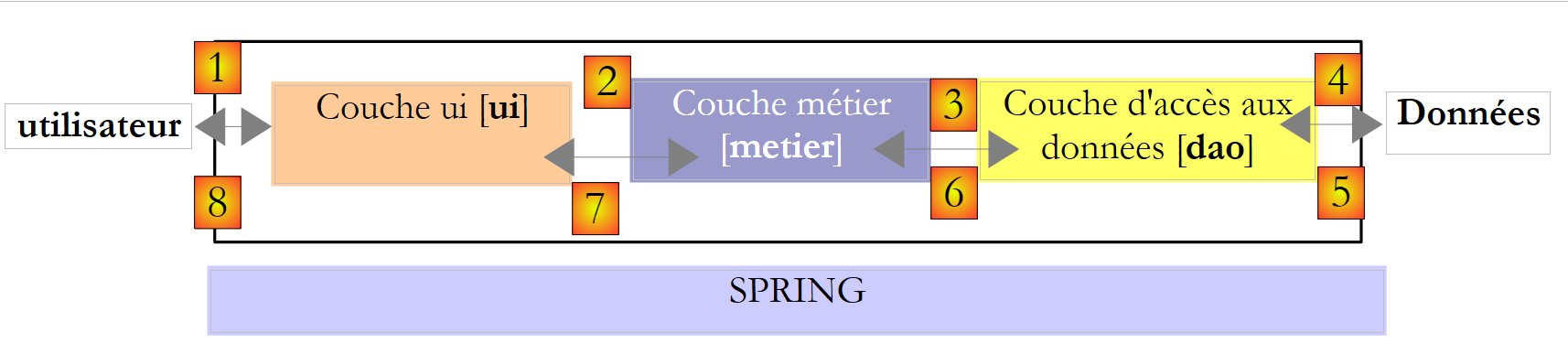 |
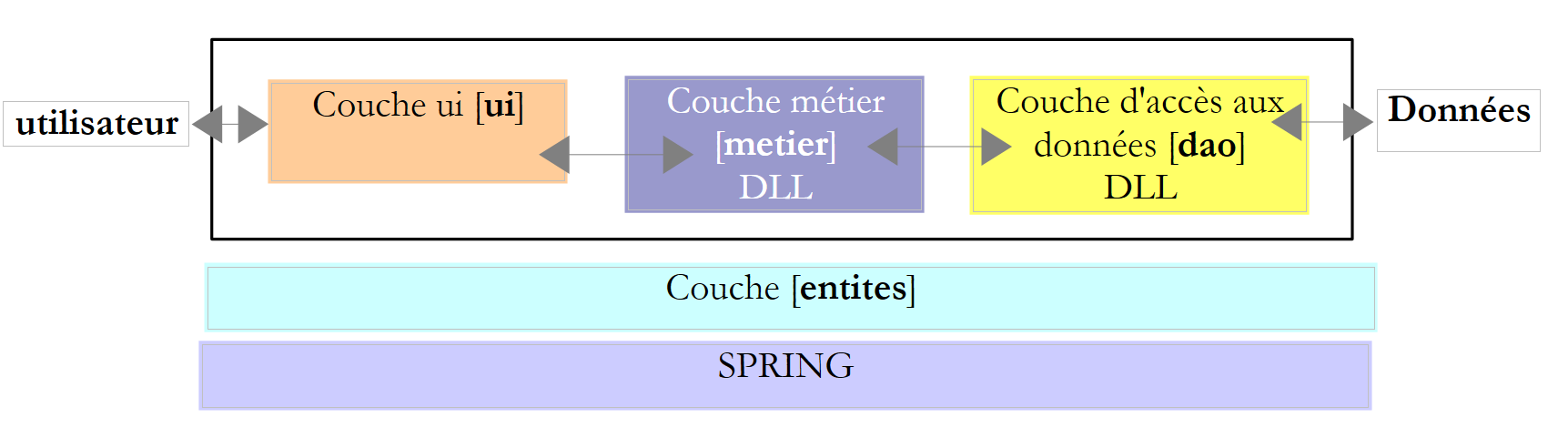
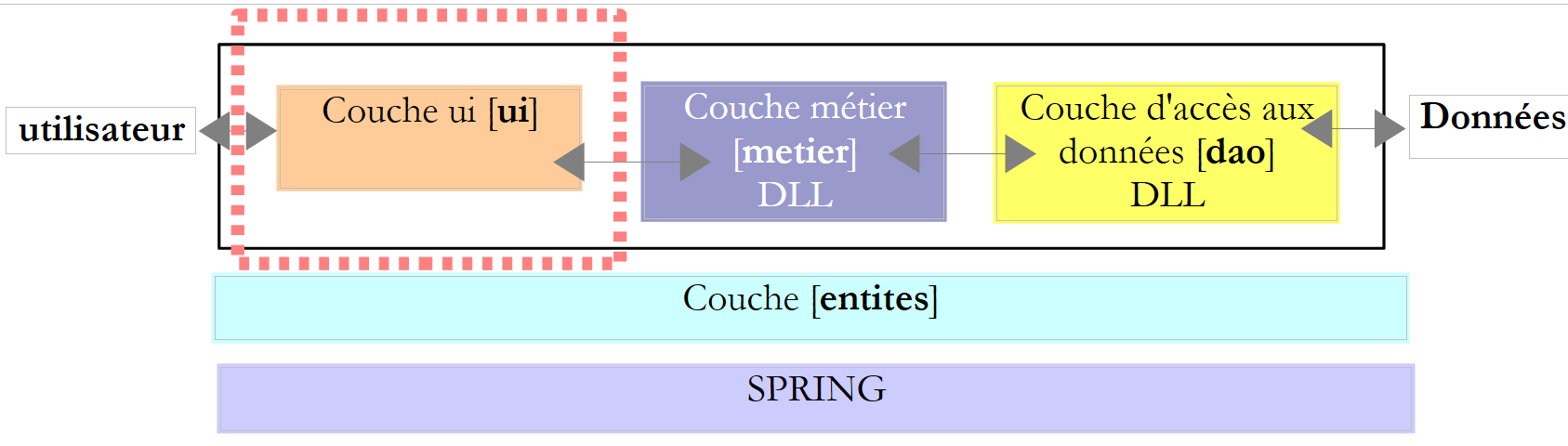
This architecture is called a "three-tier architecture." The term "three-tier" normally refers to an architecture where each tier is on a different machine. When the tiers are on the same machine, the architecture becomes a "three-layer" architecture.
- The [metier] layer contains the application’s business rules. For our tax calculation application, these are the rules used to calculate a taxpayer’s tax. This layer requires data to function:
- tax brackets, which change every year
- the number of children, the taxpayer’s marital status, and annual income
In the diagram above, the data can come from two sources:
- the data access layer or [dao] (DAO = Data Access Object) for data already stored in files or databases. This could be the case here for tax brackets, as was done in the previous version of the application.
- the user interface layer or [ui] (UI = User Interface) for data entered by the user or displayed to the user. This could be the case here for the number of children, marital status, and the taxpayer’s annual income
- Generally speaking, the [dao] layer handles access to persistent data (files, databases) or non-persistent data (network, sensors, etc.).
- The [ui] layer, on the other hand, handles interactions with the user, if there is one.
- The three layers are made independent through the use of interfaces.
We will revisit the [Impots] application, which we have already studied several times, to give it a three-layer architecture. To do this, we will examine the [ui, metier, dao] layers one by one, starting with the [dao] layer, which handles persistent data.
First, we need to define the interfaces for the different layers of the [Impots] application.
6.2. The interfaces of the [Impots] application
Remember that an interface defines a set of method signatures. The classes that implement the interface provide the implementation for these methods.
Let’s return to the 3-tier architecture of our application:
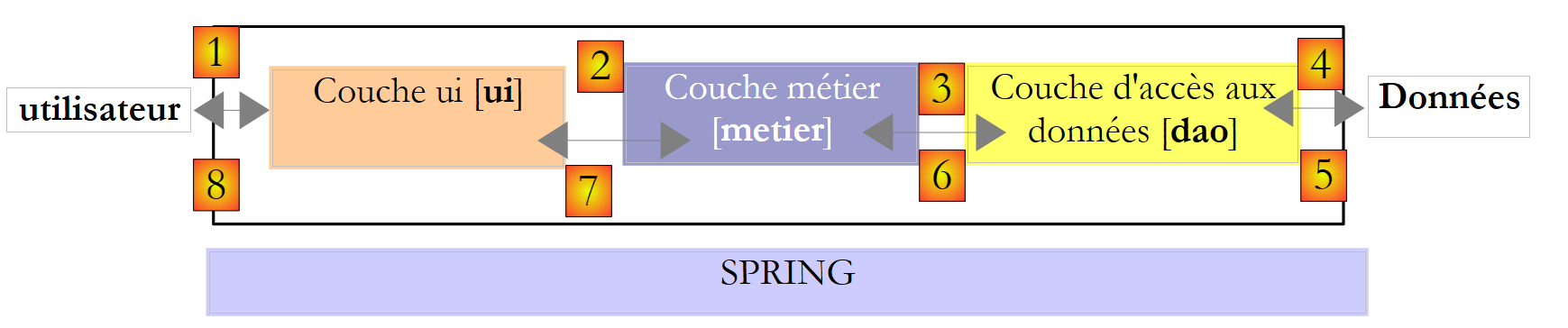 |
In this type of architecture, it is often the user who takes the initiative. The user makes a request in [1] and receives a response in [8]. This is called the request-response cycle. Let’s take the example of calculating a taxpayer’s tax. This will require several steps:
- The [ui] layer will need to ask the user for the number of children, marital status, and annual income. This is the [1] operation described above.
- Once this is done, the [ui] layer will ask the business layer to calculate the tax. To do this, it will send the data it received from the user to the business layer. This is operation [2].
- The [metier] layer needs certain information to complete its task: the tax brackets. It will request this information from the [dao] layer via the path [3, 4, 5, 6]. [3] is the initial request, and [6] is the response to that request.
- Having all the data it needed, layer [metier] calculates the tax.
- The [metier] layer can now respond to the request from the [ui] layer made in (b). This is the [7] path.
- Layer [ui] will format these results and then present them to the user. This is the path [8].
- One could imagine that the user is running tax simulations and wants to save them. They will use the path [1-8] to do so.
We can see from this description that a layer uses the resources of the layer to its right, never those of the layer to its left. Consider two contiguous layers:
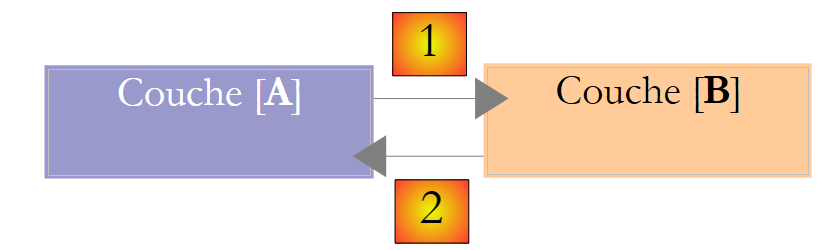 |
The [A] layer makes requests to the [B] layer. In the simplest cases, a layer is implemented by a single class. An application evolves over time. Thus, the [B] layer may have different implementation classes, such as [B1, B2, ...]. If the [B] layer is the [dao] layer, the latter may have an initial implementation, [B1], that retrieves data from a file. A few years later, we may want to store the data in a database. We will then build a second implementation class, [B2]. If, in the initial application, the [A] layer worked directly with the [B1] class, we would be forced to partially rewrite the code of the [A] layer. Suppose, for example, that we wrote something like the following in the [A] layer:
- line 1: an instance of the [B1] class is created
- line 3: data is requested from this instance
Assuming that the new implementation class [B2] uses methods with the same signature as those in the [B1] class, all instances of [B1] will need to be changed to [B2]. That is a very favorable scenario and quite unlikely if you haven’t paid attention to these method signatures. In practice, it is common for the classes [B1] and [B2] to have different method signatures, meaning that a significant portion of the [A] layer must be completely rewritten.
We can improve this by placing an interface between the [A] and [B] layers. This means that the method signatures presented by the [B] layer to the [A] layer are fixed in an interface. The previous diagram then becomes the following:
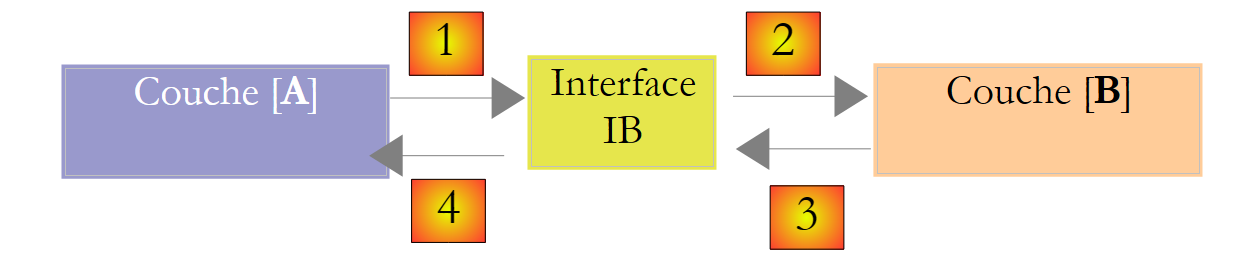 |
The [A] layer no longer communicates directly with the [B] layer but with its interface [IB]. Thus, in the code of the [A] layer, the implementation class [Bi] of the [B] layer appears only once, when implementing the [IB] interface. That being said, it is the interface [IB] and not its implementation class that is used in the code. The previous code becomes the following:
- line 1: a [ib] instance implementing the [IB] interface is created by instantiating the [B1] class
- line 3: data is requested from the [ib] instance
Now, if we replace the [B1] implementation of the [B] layer with a [B2] implementation, and both of these implementations adhere to the same [IB] interface, then only line 1 of the [A] layer needs to be modified, and no others. This is a major advantage that alone justifies the systematic use of interfaces between two layers.
We can go even further and make the [A] layer completely independent of the [B] layer. In the code above, line 1 is problematic because it hard-codes a reference to the [B1] class. Ideally, the [A] layer should be able to use an implementation of the [IB] interface without having to name a class. This would be consistent with our diagram above. We can see that the [A] layer addresses the [IB] interface, and there is no reason why it would need to know the name of the class that implements this interface. This detail is not useful to the [A] layer.
The Spring framework (http://www.springframework.org) enables this result. The previous architecture evolves as follows:
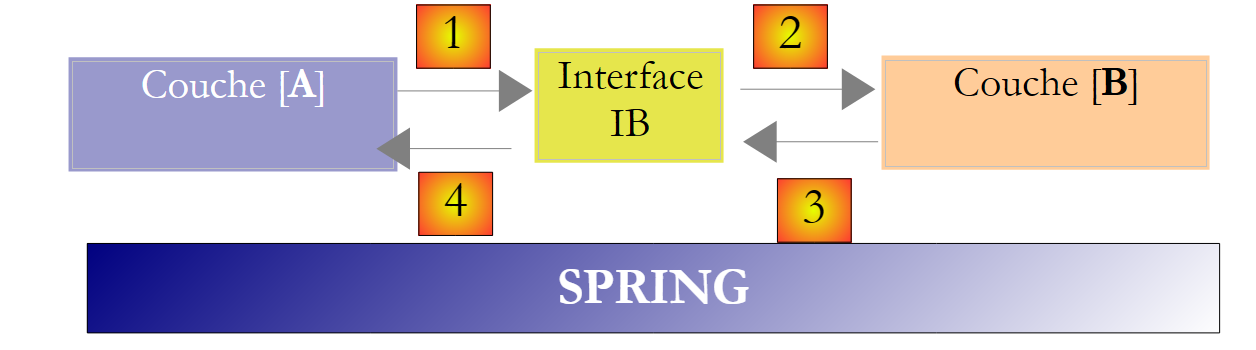 |
The cross-cutting layer [Spring] will allow a layer to obtain, via configuration, a reference to the layer located to its right without having to know the name of the layer’s implementation class. This name will be in the configuration files and not in the C# code. The C# code for the [A] layer then takes the following form:
- line 1: a [ib] instance implementing the [IB] interface of the [B] layer. This instance is created by Spring based on information found in a configuration file. Spring will handle creating:
- the [b] instance implementing the [B] layer
- the instance [a] implementing the layer [A]. This instance will be initialized. The [ib] field above will be assigned the reference [b] of the object implementing the [B] layer
- Line 3: Data is requested from the [ib] instance
We can now see that the implementation class [B1] of layer B does not appear anywhere in the code of layer [A]. When the [B1] implementation is replaced by a new [B2] implementation, nothing will change in the code of the [A] class. We will simply change the Spring configuration files to instantiate [B2] instead of [B1].
The combination of Spring and C# interfaces brings a decisive improvement to application maintenance by making the layers of the application tightly coupled with one another. This is the solution we will use for a new version in the [Impots] application.
Let’s return to the three-tier architecture of our application:
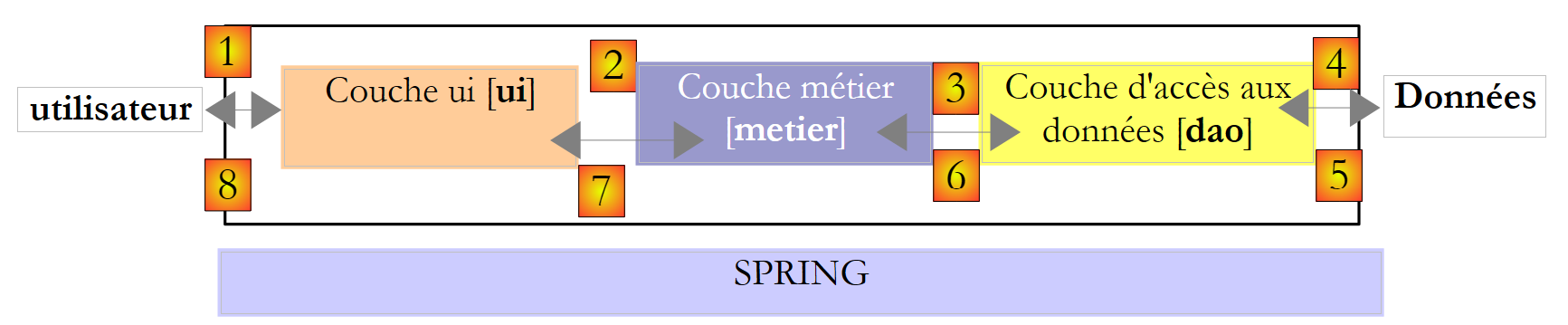 |
In simple cases, we can start from the [metier] layer to discover the application’s interfaces. To function, it needs data:
- already available in files, databases, or via the network. This data is provided by the [dao] layer.
- not yet available. It is then provided by the [ui] layer, which obtains it from the application user.
What interface must the [dao] layer provide to the [metier] layer? What interactions are possible between these two layers? The [dao] layer must provide the following data to the [metier] layer:
- tax brackets
In our application, the [dao] layer uses existing data but does not create new data. A definition of the [dao] layer interface could be as follows:
using Entites;

namespace Dao {
    public interface IImpotDao {
        // tax brackets
        TrancheImpot[] TranchesImpot{get;}
    }
}
- line 3: the [dao] layer will be placed in the [Dao] namespace
- line 6: the interface IImpotDao defines the property TranchesImpot, which will provide the tax brackets to the layer [métier].
- Line 1: imports the namespace in which the TrancheImpot structure is defined:
namespace Entites {
    // a tax bracket
    public struct TrancheImpot {
        public decimal Limite { get; set; }
        public decimal CoeffR { get; set; }
        public decimal CoeffN { get; set; }
    }
}
Let’s return to the three-tier architecture of our application:
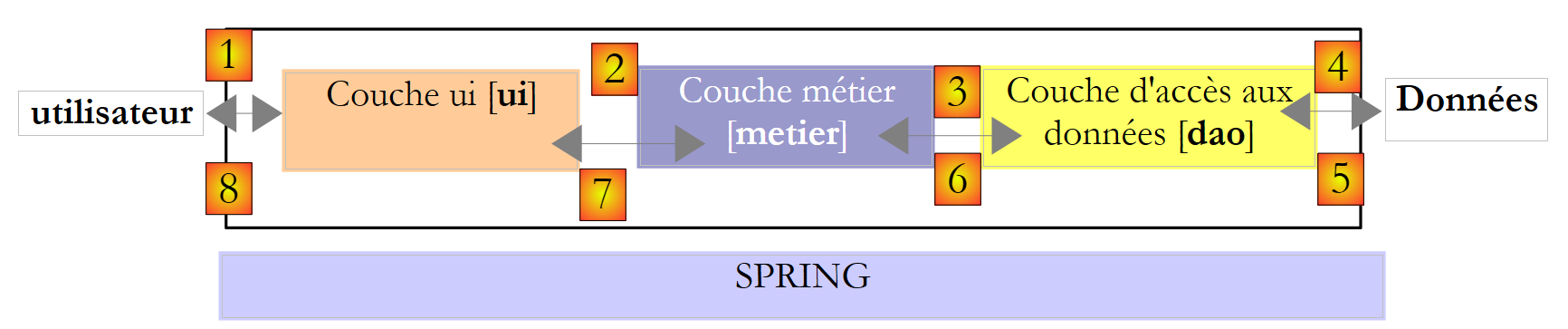 |
What interface should the [metier] layer present to the [ui] layer? Let’s review the interactions between these two layers:
- The [ui] layer asks the user for the number of children, marital status, and annual salary. This is the [1] operation described above.
- Once this is done, the [ui] layer will ask the business layer to calculate the number of seats. To do this, it will send the data it received from the user to the business layer. This is operation [2].
A definition of the interface for the [metier] layer could be as follows:
namespace Metier {
    interface IImpotMetier {
        int CalculerImpot(bool marié, int nbEnfants, int salaire);
    }
}
- line 1: everything related to the [metier] layer will be placed in the [Metier] namespace.
- Line 2: The IImpotMetier interface defines only one method: the one that calculates a taxpayer’s tax based on their marital status, number of children, and annual salary.
We are examining an initial implementation of this layered architecture.
6.3. Sample Application - version 4
6.3.1. The Visual Studio project
The Visual Studio project will be as follows:
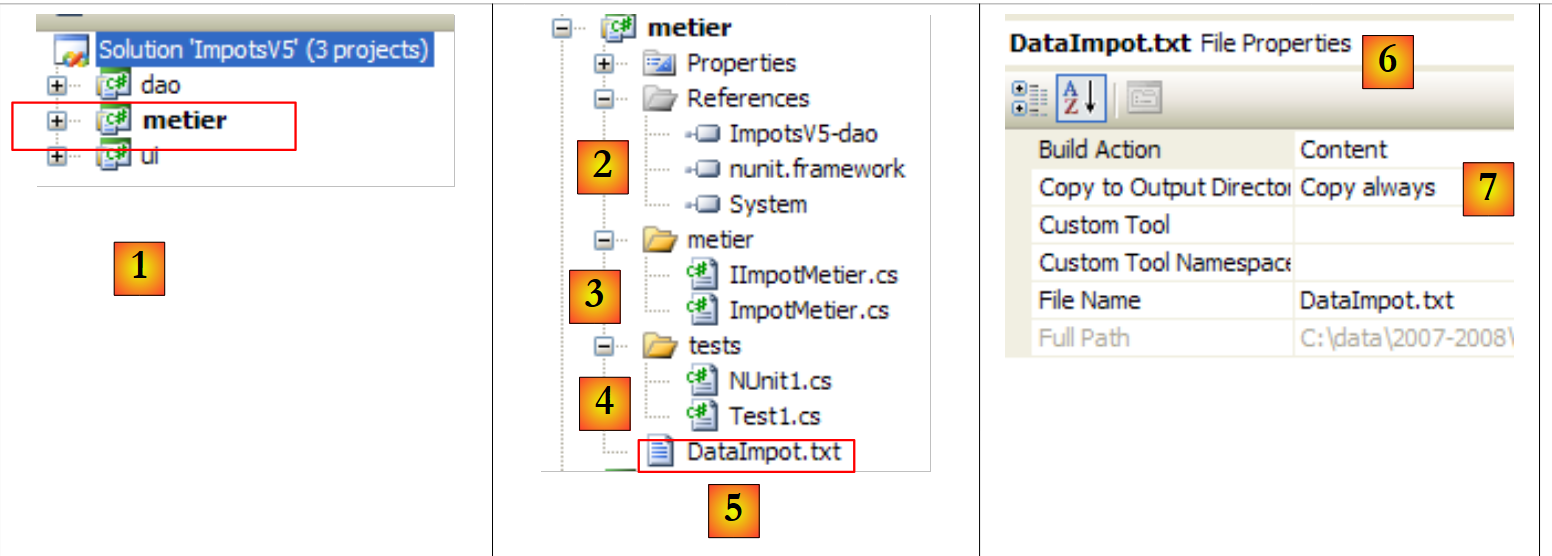
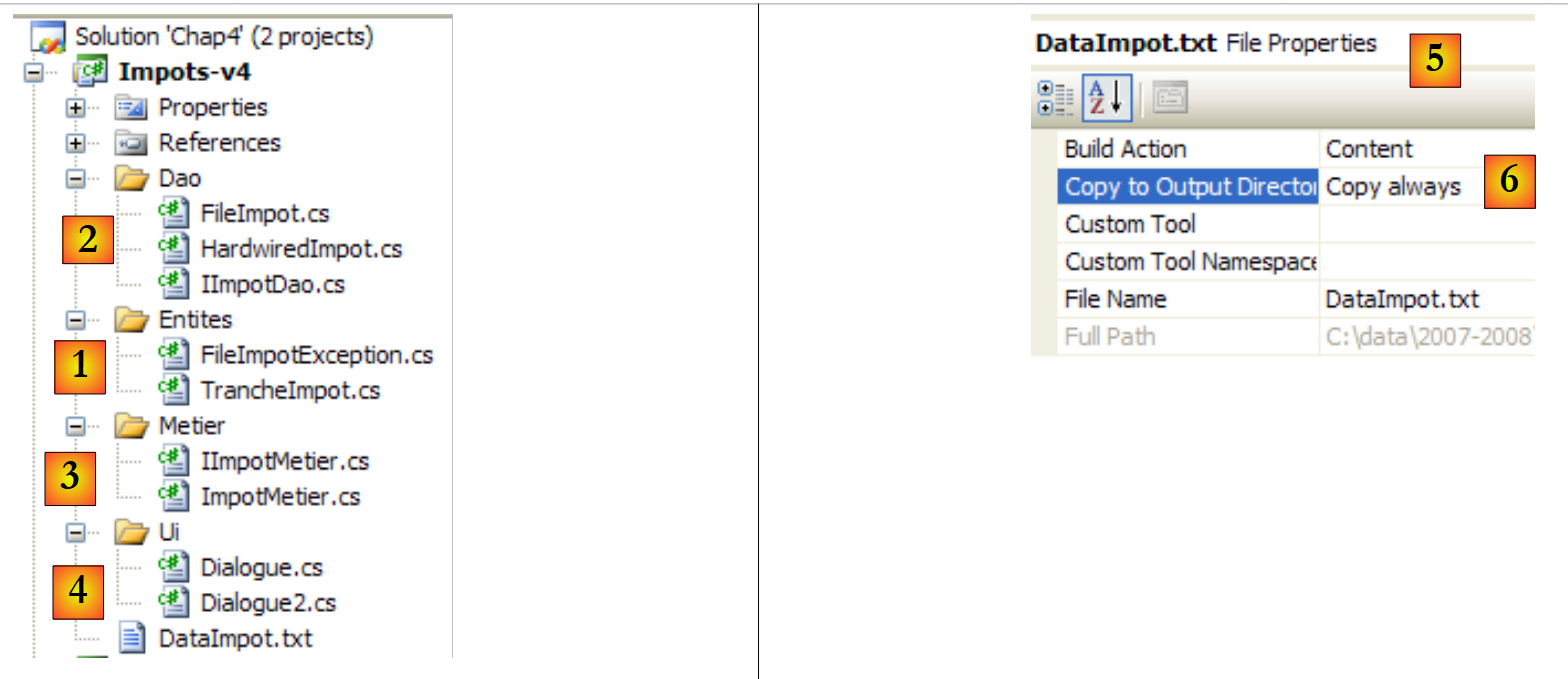 |
- [1]: the [Entites] folder contains objects that span the layers [ui, metier, dao]: the TrancheImpot structure, the FileImpotException exception.
- [2]: the [Dao] folder contains the classes and interfaces of the [dao] layer. We will use two implementations of the IImpotDao interface: the HardwiredImpot class discussed in Section 4.10 and FileImpot discussed in Section 5.8.
- [3]: the [Metier] folder contains the classes and interfaces of the [metier] layer
- [4]: The [Ui] folder contains the classes of the [ui] layer
- [5]: The file [DataImpot.txt] contains the tax brackets used by the implementation FileImpot of the layer [dao]. [6] is configured to be automatically copied to the project's runtime folder.
6.3.2. Application Entities
Let’s revisit the 3-tier architecture of our application:
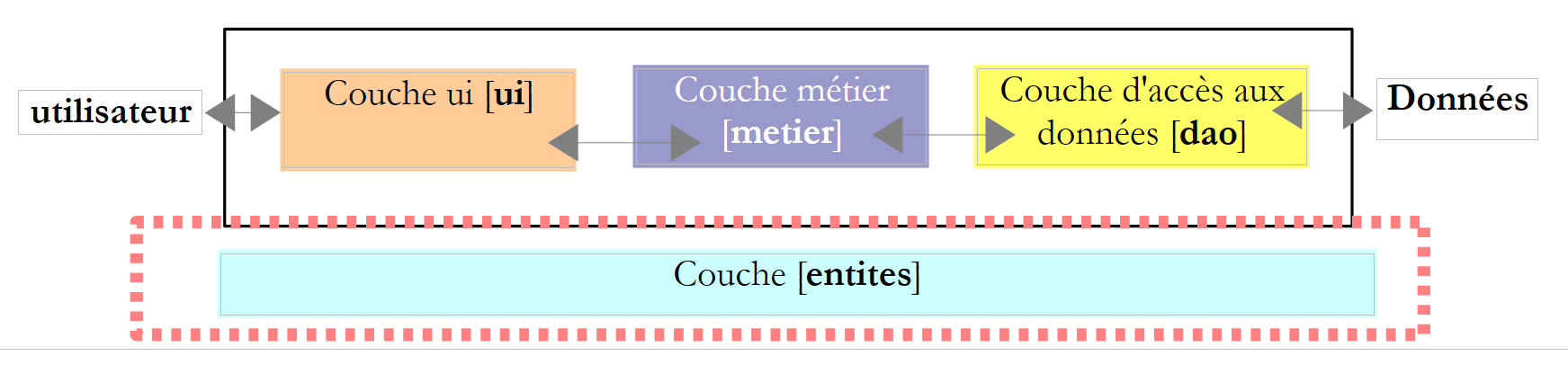 |
We refer to classes that span multiple layers as entities. This generally applies to classes and structures that encapsulate data from the [dao] layer. These entities typically extend up to the [ui] layer.
The application entities are as follows:
The TrancheImpot structure
namespace Entites {
    // a tax bracket
    public struct TrancheImpot {
        public decimal Limite { get; set; }
        public decimal CoeffR { get; set; }
        public decimal CoeffN { get; set; }
    }
}
The exception FileImpotException
using System;

namespace Entites {
    public class FileImpotException : Exception {
        // error codes
        [Flags]
        public enum CodeErreurs { Acces = 1, Ligne = 2, Champ1 = 4, Champ2 = 8, Champ3 = 16 };

        // error code
        public CodeErreurs Code { get; set; }

        // manufacturers
        public FileImpotException() {
        }
        public FileImpotException(string message)
            : base(message) {
        }
        public FileImpotException(string message, Exception e)
            : base(message, e) {
        }
    }
}
Note: The FileImpotException class is only useful if the [dao] layer is implemented by the FileImpot class.
6.3.3. The [dao] layer
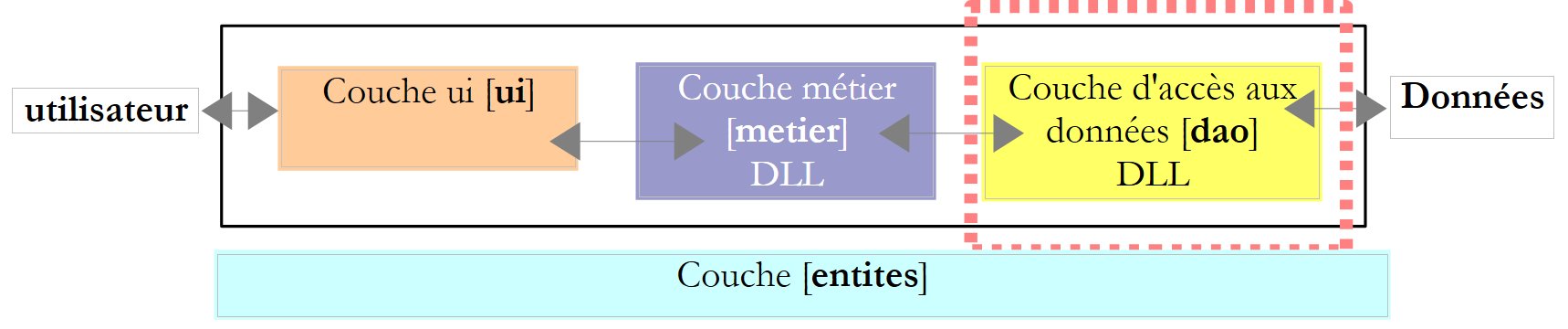 |
Recall the interface of the [dao] layer:
using Entites;

namespace Dao {
    public interface IImpotDao {
        // tax brackets
        TrancheImpot[] TranchesImpot{get;}
    }
}
We will implement this interface in two different ways.
First, using the HardwiredImpot class discussed in Section 4.10:
using System;
using Entites;

namespace Dao {
    public class HardwiredImpot : IImpotDao {

        // data tables required for tax calculation
        decimal[] limites = { 4962M, 8382M, 14753M, 23888M, 38868M, 47932M, 0M };
        decimal[] coeffR = { 0M, 0.068M, 0.191M, 0.283M, 0.374M, 0.426M, 0.481M };
        decimal[] coeffN = { 0M, 291.09M, 1322.92M, 2668.39M, 4846.98M, 6883.66M, 9505.54M };
        // tax brackets
        public TrancheImpot[] TranchesImpot { get; private set; }

        // manufacturer
        public HardwiredImpot() {
            // creation of tax bracket table
            TranchesImpot = new TrancheImpot[limites.Length];
            // filling
            for (int i = 0; i < TranchesImpot.Length; i++) {
                TranchesImpot[i] = new TrancheImpot { Limite = limites[i], CoeffR = coeffR[i], CoeffN = coeffN[i] };
            }
        }
    }// class
}// namespace
- line 5: the class HardwiredImpot implements the interface IImpotDao
- Line 12: Implementation of the TranchesImpot property of the IImpotDao interface. This property is an automatic property. It implements the get method of the TranchesImpot property of the IImpotDao interface. We have also declared a private set method—internal to the class—so that the constructor in lines 15–22 can initialize the tax bracket array.
The IImpotDao interface will also be implemented by the FileImpot class discussed in Section 5.8:
using System;
using System.Collections.Generic;
using System.IO;
using System.Text.RegularExpressions;
using Entites;

namespace Dao {
    class FileImpot : IImpotDao {

        // data file
        public string FileName { get; set; }

        // tax brackets
        public TrancheImpot[] TranchesImpot { get; private set; }

        // manufacturer
        public FileImpot(string fileName) {
            // save the file name
            FileName = fileName;
            // data
            List<TrancheImpot> listTranchesImpot = new List<TrancheImpot>();
            int numLigne = 1;
            // exception
            FileImpotException fe = null;
            // read the contents of the fileName file, line by line
            Regex pattern = new Regex(@"s*:\s*");
            // initially no error
            FileImpotException.CodeErreurs code = 0;
            try {
                using (StreamReader input = new StreamReader(FileName)) {
                    while (!input.EndOfStream && code == 0) {
                        // current line
                        string ligne = input.ReadLine().Trim();
                        // ignore empty lines
                        if (ligne == "")
                            continue;
                        // line broken down into three fields separated by :
                        string[] champsLigne = pattern.Split(ligne);
                        // do we have 3 fields?
                        if (champsLigne.Length != 3) {
                            code = FileImpotException.CodeErreurs.Ligne;
                        }
                        // 3-field conversions
                        decimal limite = 0, coeffR = 0, coeffN = 0;
                        if (code == 0) {
                            if (!Decimal.TryParse(champsLigne[0], out limite))
                                code = FileImpotException.CodeErreurs.Champ1;
                            if (!Decimal.TryParse(champsLigne[1], out coeffR))
                                code |= FileImpotException.CodeErreurs.Champ2;
                            if (!Decimal.TryParse(champsLigne[2], out coeffN))
                                code |= FileImpotException.CodeErreurs.Champ3;
                            ;
                        }
                        // mistake?
                        if (code != 0) {
                            // we note the error
                            fe = new FileImpotException(String.Format("Ligne n° {0} incorrecte", numLigne)) { Code = code };
                        } else {
                            // the new tax bracket is memorized
                            listTranchesImpot.Add(new TrancheImpot() { Limite = limite, CoeffR = coeffR, CoeffN = coeffN });
                            // next line
                            numLigne++;
                        }
                    }
                }
            } catch (Exception e) {
                // we note the error
                fe = new FileImpotException(String.Format("Erreur lors de la lecture du fichier {0}", FileName), e) { Code = FileImpotException.CodeErreurs.Acces };
            }
            // error to report?
            if (fe != null) {
                // we launch the exception
                throw fe;
            } else {
                // return the listImpot list in the tranchesImpot array
                TranchesImpot = listTranchesImpot.ToArray();
            }
        }
    }
}
- This code was already discussed in Section 5.8.
- line 14: the TranchesImpot method of the IImpotDao interface
- line 76: initialization of tax brackets in the class constructor, based on the file whose name the constructor received on line 17.
6.3.4. The [metier] layer
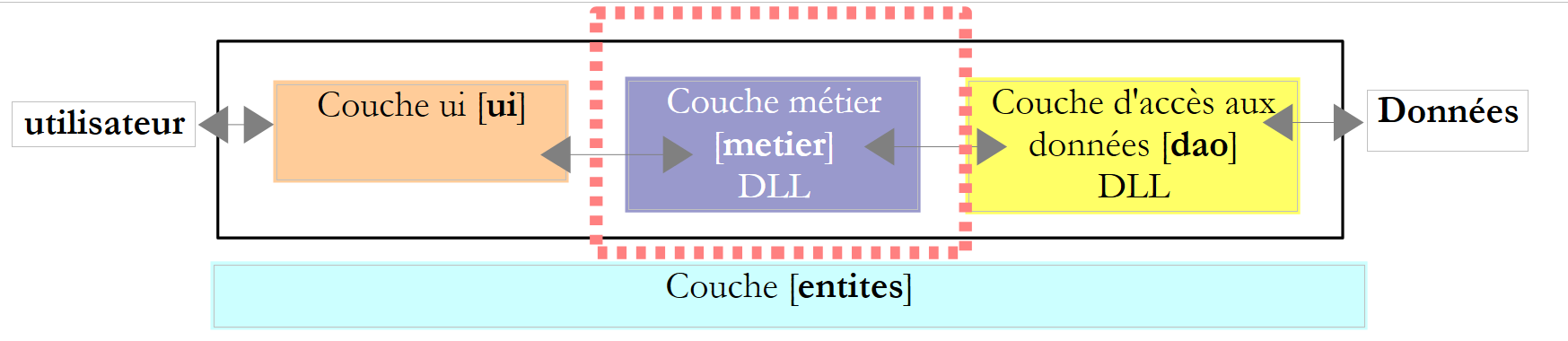 |
Let’s review the interface of this layer:
namespace Metier {
    public interface IImpotMetier {
        int CalculerImpot(bool marié, int nbEnfants, int salaire);
    }
}
The implementation ImpotMetier of this interface is as follows:
using Entites;
using Dao;

namespace Metier {
    public class ImpotMetier : IImpotMetier {

        // layer [dao]
        private IImpotDao Dao { get; set; }

        // tax brackets
        private TrancheImpot[] tranchesImpot;

        // manufacturer
        public ImpotMetier(IImpotDao dao) {
            // memorization
            Dao = dao;
            // tax brackets
            tranchesImpot = dao.TranchesImpot;
        }

        // tAX CALCULATION
        public int CalculerImpot(bool marié, int nbEnfants, int salaire) {
            // calculating the number of shares
            decimal nbParts;
            if (marié)
                nbParts = (decimal)nbEnfants / 2 + 2;
            else
                nbParts = (decimal)nbEnfants / 2 + 1;
            if (nbEnfants >= 3)
                nbParts += 0.5M;
            // calculation of taxable income & family quota
            decimal revenu = 0.72M * salaire;
            decimal QF = revenu / nbParts;
            // tAX CALCULATION
            tranchesImpot[tranchesImpot.Length - 1].Limite = QF + 1;
            int i = 0;
            while (QF > tranchesImpot[i].Limite)
                i++;
            // return result
            return (int)(revenu * tranchesImpot[i].CoeffR - nbParts * tranchesImpot[i].CoeffN);
        }//calculate
    }//class

}
- line 5: the class [Metier] implements the interface [IImpotMetier].
- lines 14-19: the [metier] layer must collaborate with the [dao] layer. It must therefore have a reference to the object implementing the IImpotDao interface. This is why this reference is passed as a parameter to the constructor.
- Line 16: The reference to the [dao] layer is stored in the private field of line 8
- Line 18: Using this reference, the constructor retrieves the tax bracket table and stores a reference to it in the private property of line 8.
- Lines 22–41: Implementation of the CalculerImpot method of the IImpotMetier interface. This implementation uses the tax bracket table initialized by the constructor.
6.3.5. The [ui] layer
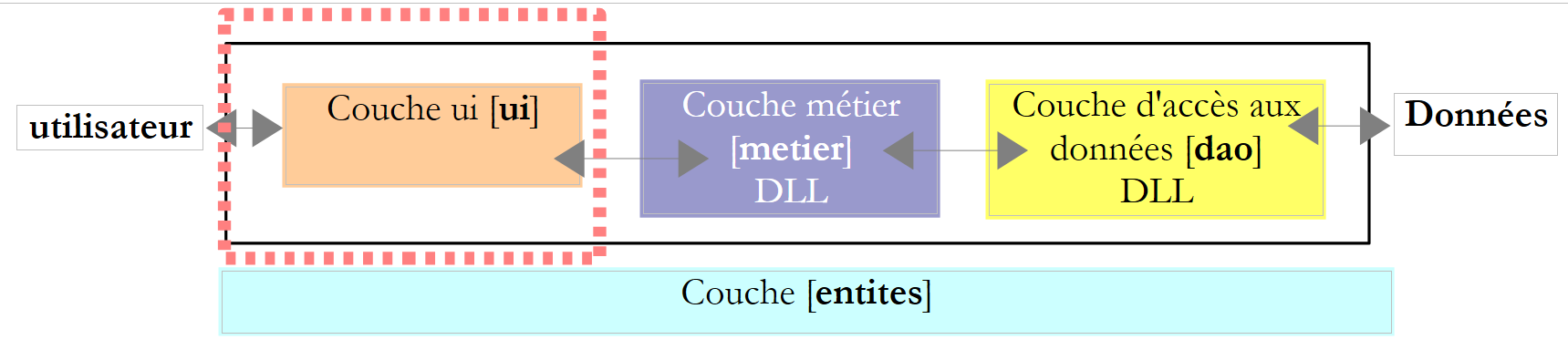 |
The user interface classes in versions 2 and 3 were very similar. The one for version 2 was as follows:
using System;

namespace Chap2 {
    public class Program {
        static void Main() {
...

            // creation of a IImpot object
            IImpot impot = new HardwiredImpot();

            // infinite loop
            while (true) {
...
            }//while
        }
    }
}
and that of version 3:
using System;

namespace Chap3 {
    public class Program {
        static void Main() {
...

            // creation of a IImpot object
            IImpot impot = null;
            try {
                // creation of a IImpot object
                impot = new FileImpot("DataImpotInvalide.txt");
            } catch (FileImpotException e) {
                // error display
                string msg = e.InnerException == null ? null : String.Format(", Exception d'origine : {0}", e.InnerException.Message);
                Console.WriteLine("L'erreur suivante s'est produite : [Code={0},Message={1}{2}]", e.Code, e.Message, msg == null ? "" : msg);
                // program stop
                Environment.Exit(1);
            }
            // infinite loop
            while (true) {
...
            }//while
        }
    }
}
The only difference is how the IImpot object, which enables tax calculation, is instantiated. This object corresponds here to our [métier] layer.
For a [dao] implementation using the HardwiredImpot class, the dialog class is as follows:
using System;
using Metier;
using Dao;
using Entites;

namespace Ui {
    public class Dialogue2 {
        static void Main() {
...

            // we create the [metier and dao] layers
            IImpotMetier metier = new ImpotMetier(new HardwiredImpot());

            // infinite loop
            while (true) {
...
                // parameters are correct - Impot is calculated
                Console.WriteLine("Impot=" + metier.CalculerImpot(marié == "o", nbEnfants, salaire) + " euros");
                // next taxpayer
            }//while
        }
    }
}
- line 12: instantiation of layers [dao] and [metier]. Note that layer [metier] requires layer [dao].
- line 18: use of the [metier] layer to calculate the tax
For a [dao] implementation with the FileImpot class, the dialog class is as follows:
using System;
using Metier;
using Dao;
using Entites;

namespace Ui {
    public class Dialogue {
        static void Main() {
...
            // we create the [metier and dao] layers
            IImpotMetier metier = null;
            try {
        // layer creation [job]
                metier = new ImpotMetier(new FileImpot("DataImpot.txt"));
            } catch (FileImpotException e) {
                // error display
                string msg = e.InnerException == null ? null : String.Format(", Exception d'origine : {0}", e.InnerException.Message);
                Console.WriteLine("L'erreur suivante s'est produite : [Code={0},Message={1}{2}]", e.Code, e.Message, msg == null ? "" : msg);
                // program stop
                Environment.Exit(1);
            }
            // infinite loop
            while (true) {
...
                // parameters are correct - Impot is calculated
                Console.WriteLine("Impot=" + metier.CalculerImpot(marié == "o", nbEnfants, salaire) + " euros");
                // next taxpayer
            }//while
        }
    }
}
- lines 11–21: instantiation of layers [dao] and [metier]. Since the instantiation of layer [dao] may throw an exception, this is handled
- line 26: use of the [metier] layer to calculate the tax, as in the previous version
6.3.6. Conclusion
The layered architecture and the use of interfaces have brought a certain flexibility to our application. This is particularly evident in the way the [ui] layer instantiates the [dao] and [métier] layers:
        // we create the [metier and dao] layers
IImpotMetier metier = new ImpotMetier(new HardwiredImpot());
in one case, and:
// we create the [metier and dao] layers
            IImpotMetier metier = null;
            try {
        // layer creation [job]
                metier = new ImpotMetier(new FileImpot("DataImpot.txt"));
            } catch (FileImpotException e) {
                // error display
                string msg = e.InnerException == null ? null : String.Format(", Exception d'origine : {0}", e.InnerException.Message);
                Console.WriteLine("L'erreur suivante s'est produite : [Code={0},Message={1}{2}]", e.Code, e.Message, msg == null ? "" : msg);
                // program stop
                Environment.Exit(1);
            }
in the other. Except for exception handling in case 2, the instantiation of the [dao] and [metier] layers is similar in both applications. Once the [dao] and [metier] layers are instantiated, the code for the [ui] layer is identical in both cases. This is because the [métier] layer is manipulated via its IImpotMetier interface and not via its implementation class. Changing the [metier] layer or the [dao] layer of the application without changing their interfaces will always amount to changing only the preceding lines in the [ui] layer.
Another example of the flexibility provided by this architecture is the implementation of the [métier] layer:
using Entites;
using Dao;

namespace Metier {
    public class ImpotMetier : IImpotMetier {

        // layer [dao]
        private IImpotDao Dao { get; set; }

        // tax brackets
        private TrancheImpot[] tranchesImpot;

        // manufacturer
        public ImpotMetier(IImpotDao dao) {
            // memorization
            Dao = dao;
            // tax brackets
            tranchesImpot = dao.TranchesImpot;
        }

        // tAX CALCULATION
        public int CalculerImpot(bool marié, int nbEnfants, int salaire) {
...
        }//calculate
    }//class

}
In line 14, we see that the [métier] layer is built from a reference to the interface of the [dao] layer. Changing the implementation of the latter therefore has zero impact on the [métier] layer. This is why our single implementation of the [métier] layer was able to work without modifications with two different implementations of the [dao] layer.
6.4. Example application - version 5
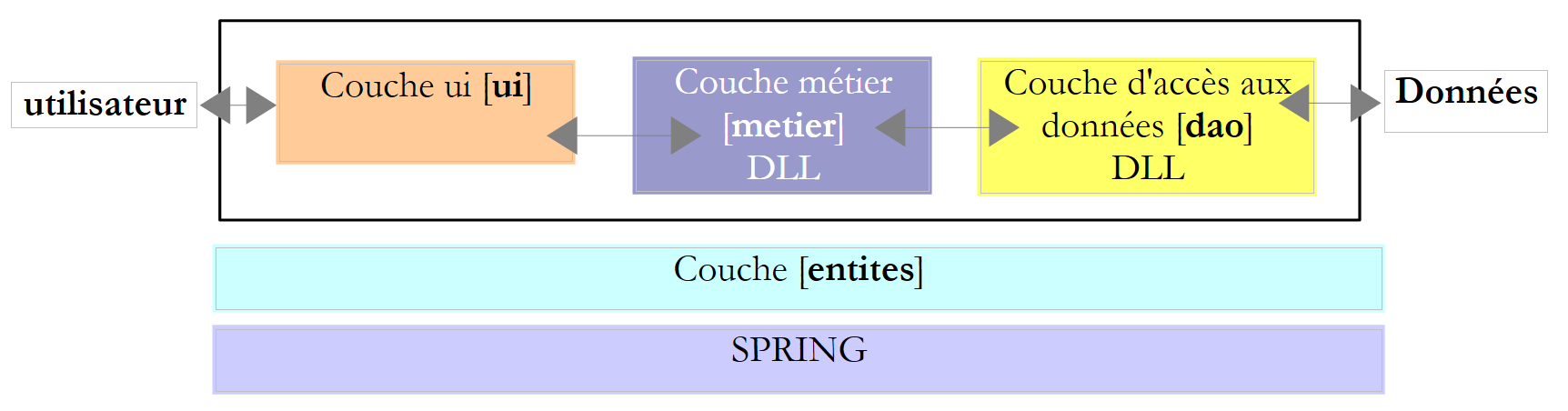 |
This new version builds on the previous one with the following modifications:
- The [métier] and [dao] layers are each encapsulated within a DLL and tested using the NUnit unit testing framework.
- Layer integration is handled by the Spring framework
In large projects, multiple developers work on the same project. Layered architectures facilitate this way of working: because the layers communicate with each other through well-defined interfaces, a developer working on one layer does not have to worry about the work of other developers on other layers. Everyone simply needs to adhere to the interfaces.
In the example above, the developer of the [métier] layer will need an implementation of the [dao] layer when testing their layer. Until that is finished, they can use a dummy implementation of the [dao] layer as long as it adheres to the IImpotDao interface. This is another advantage of the layered architecture: a delay in the [dao] layer does not prevent testing of the [métier] layer. The dummy implementation of the [dao] layer also has the advantage of often being easier to implement than the actual [dao] layer, which may require launching a SGBD, having network connections, etc.
Once the [dao] layer is complete and tested, it will be provided to the developers of the [métier] layer in the form of a DLL rather than source code. Ultimately, the application is often delivered as an .exe executable (that of the [ui] layer) and .dll class libraries (the other layers).
6.4.1. NUnit
The tests performed so far for our various applications were based on visual verification. We verified that what was displayed on the screen matched what was expected. This method is impractical when there are numerous tests to perform. Humans are indeed prone to fatigue, and their ability to verify tests diminishes over the course of the day. Tests must therefore be automated and designed to require no human intervention.
An application evolves over time. With each update, we must verify that the application does not "regress," c.a.d, and that it continues to pass the functional tests that were performed during its initial development. These tests are called "non-regression" tests. A moderately large application may require hundreds of tests. In fact, every method in every class of the application is tested. These are called unit tests. They can involve a lot of developers if they haven’t been automated.
Tools have been developed to automate testing. One of them is called NUnit. It is available on the [http://www.nunit.org] website:
 | 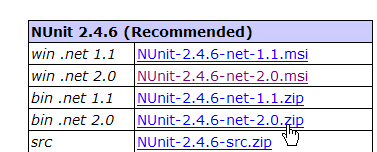 |
version 2.4.6, shown above, was used for this document (March 2008). The installation places a [1] icon on the desktop:
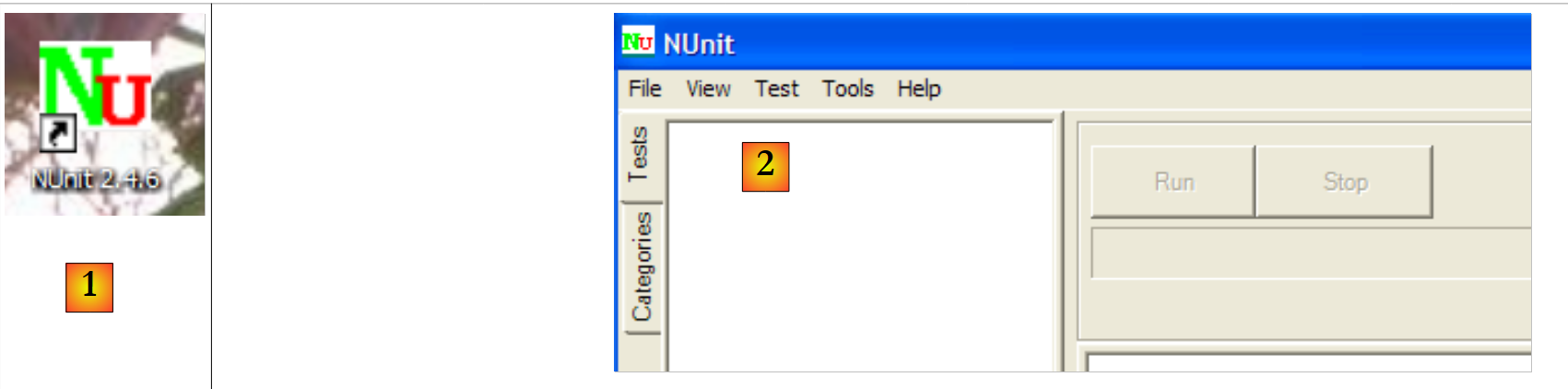 |
Double-clicking the [1] icon launches the NUnit [2] graphical interface. This does nothing to aid test automation, since once again we are reduced to a visual check: the tester verifies the test results displayed in the graphical interface. Nevertheless, tests can also be run using batch tools, and their results saved to XML files. This is the method used by development teams: tests are run overnight, and developers receive the results the next morning.
Let’s examine the principle of NUnit tests with an example. First, let’s create a new C# project of the Console Application type:
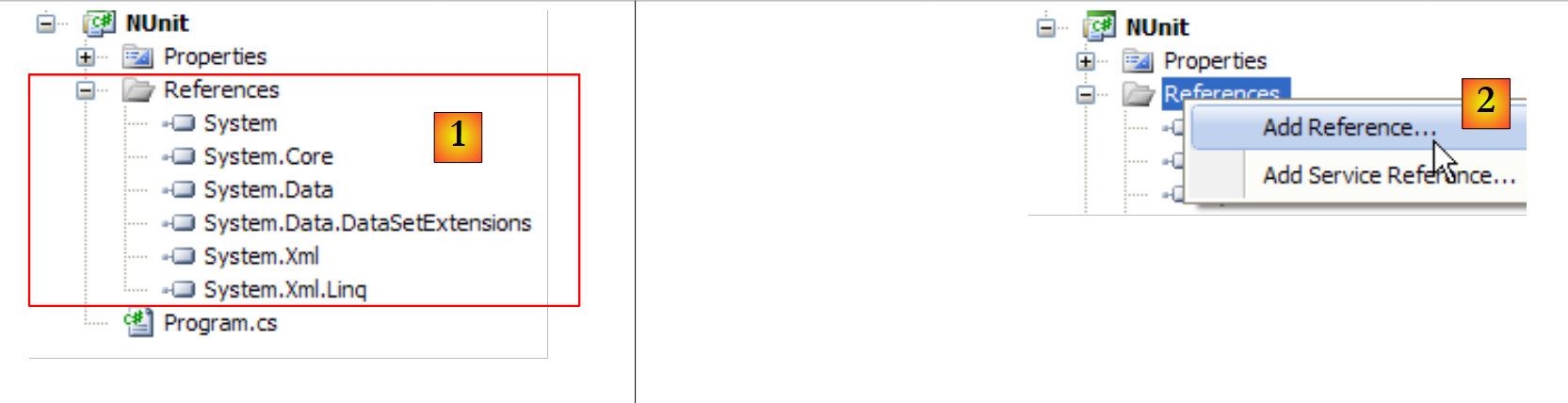 |
In [1], we see the project references. These references are DLL files containing classes and interfaces used by the project. Those shown in [1] are included by default in every new C# project. To use the classes and interfaces of the NUnit framework, we need to add a new reference to the project.
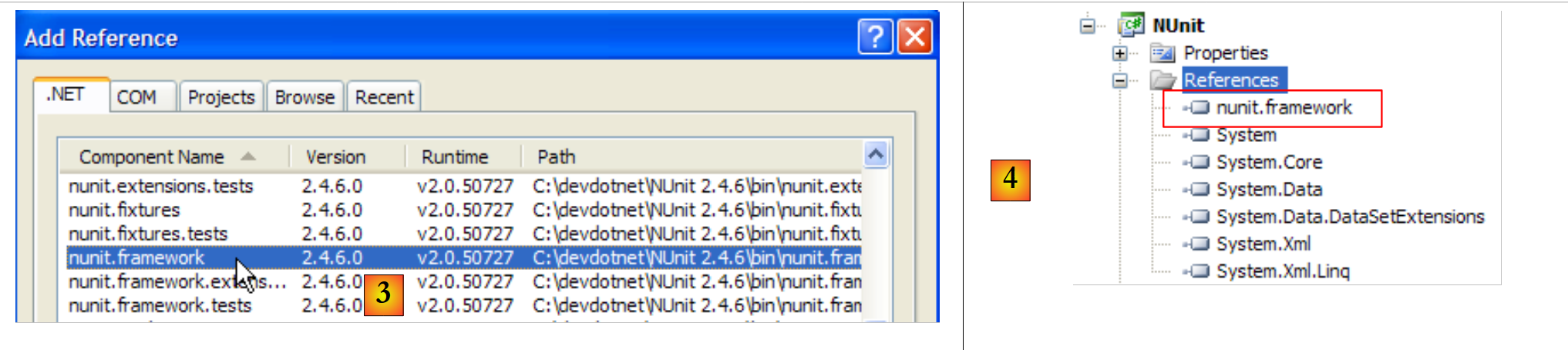 |
In the .NET tab above, we select the [nunit.framework] component. The [nunit.*] components above are not components present by default in the .NET environment. They were added there by the previous installation of the NUnit framework. Once the reference has been validated, it appears as [4] in the project’s reference list.
Before generating the application, the [bin/Release] folder in the project is empty. After generation (F6), you can see that the [bin/Release] folder is no longer empty:
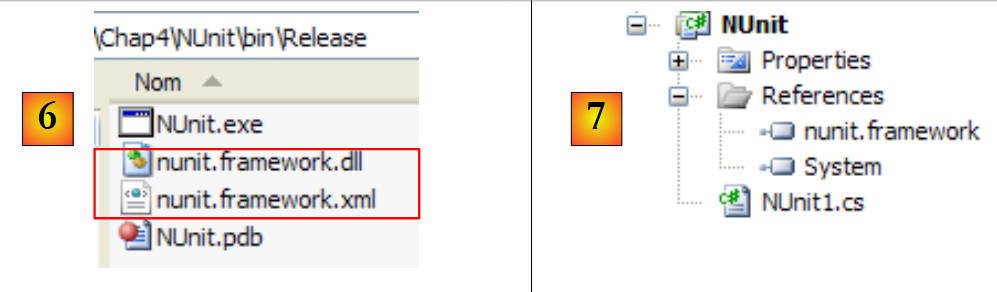 |
In [6], we see the presence of DLL and [nunit.framework.dll]. It was the addition of the [nunit.framework] reference that caused this DLL to be copied into the runtime folder. This is indeed one of the folders that will be explored by CLR (Common Language Runtime) and NET to find the classes and interfaces referenced by the project.
Let’s create a first test class, NUnit. To do this, we’ll delete the default class [Program.cs] and then add a new class, [Nunit1.cs], to the project. We also remove the unnecessary references [7].
The test class NUnit1 will be as follows:
using System;
using NUnit.Framework;

namespace NUnit {
    [TestFixture]
    public class NUnit1 {
        public NUnit1() {
            Console.WriteLine("constructeur");
        }
        [SetUp]
        public void avant() {
            Console.WriteLine("Setup");
        }
        [TearDown]
        public void après() {
            Console.WriteLine("TearDown");
        }
        [Test]
        public void t1() {
            Console.WriteLine("test1");
            Assert.AreEqual(1, 1);
        }
        [Test]
        public void t2() {
            Console.WriteLine("test2");
            Assert.AreEqual(1, 2, "1 n'est pas égal à 2");
        }
    }
}
- line 6: the class NUnit1 must be public. The public keyword is not generated by default by Visual Studio. It must be added.
- line 5: the [TestFixture] attribute is a NUnit attribute. It indicates that the class is a test class.
- Lines 7–9: The constructor. It is used here only to display a message on the screen. We want to see when it is executed.
- Line 10: The [SetUp] attribute defines a method executed before each unit test.
- Line 14: The attribute [TearDown] defines a method executed after each unit test.
- Line 18: The attribute [Test] defines a test method. For each method annotated with the [Test] attribute, the method annotated with [SetUp] will be executed before the test, and the method annotated with [TearDown] will be executed after the test.
- Line 21: one of the [Assert.*] methods defined by the NUnit framework. The following [Assert] methods are available:
- [Assert.AreEqual(expression1, expression2)]: checks that the values of the two expressions are equal. Many expression types are accepted (int, string, float, double, decimal, ...). If the two expressions are not equal, an exception is thrown.
- [Assert.AreEqual(réel1, réel2, delta)]: checks that two real numbers are equal to within delta, c.a.d abs(real1-real2)<=delta. For example, you can write [Assert.AreEqual(réel1, réel2, 1E-6)] to check that two values are equal to within 10⁻⁶.
- [Assert.AreEqual(expression1, expression2, message)] and [Assert.AreEqual(réel1, réel2, delta, message)] are variants that allow you to specify the error message to be associated with the exception thrown when the [Assert.AreEqual] method fails.
- [Assert.IsNotNull(object)] and [Assert.IsNotNull(object, message)]: checks that object is not equal to null.
- [Assert.IsNull(object)] and [Assert.IsNull(object, message)]: checks whether object is equal to null.
- [Assert.IsTrue(expression)] and [Assert.IsTrue(expression, message)]: checks that expression is equal to true.
- [Assert.IsFalse(expression)] and [Assert.IsFalse(expression, message)]: checks that expression is equal to false.
- [Assert.AreSame(object1, object2)] and [Assert.AreSame(object1, object2, message)]: checks that the references object1 and object2 point to the same object.
- [Assert.AreNotSame(object1, object2)] and [Assert.AreNotSame(object1, object2, message)]: checks that the references object1 and object2 do not point to the same object.
- line 21: the assertion must pass
- line 26: the assertion must fail
Let’s configure the project so that its build produces a DLL file instead of an .exe executable:
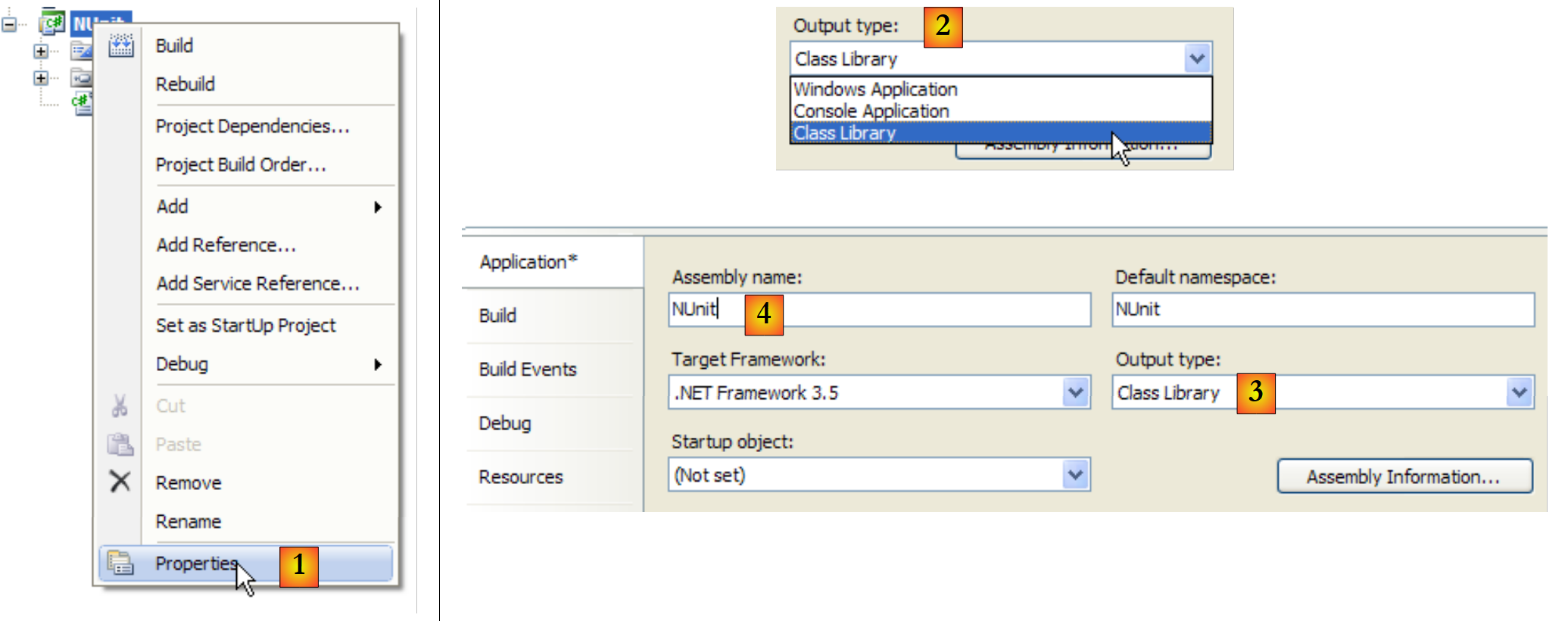 |
- in [1]: project properties
- in [2, 3]: as the project type, select [Class Library] (Class Library)
- in [4]: the project build will generate a DLL (assembly) named [Nunit.dll]
Now let’s use NUnit to run the test class:
 |
- in [1]: opening a project NUnit
- in [2, 3]: loading DLL bin/Release/Nunit.dll generated by the C# project
- to [4]: DLL has been loaded
- to [5]: the test tree
- to [6]: running them
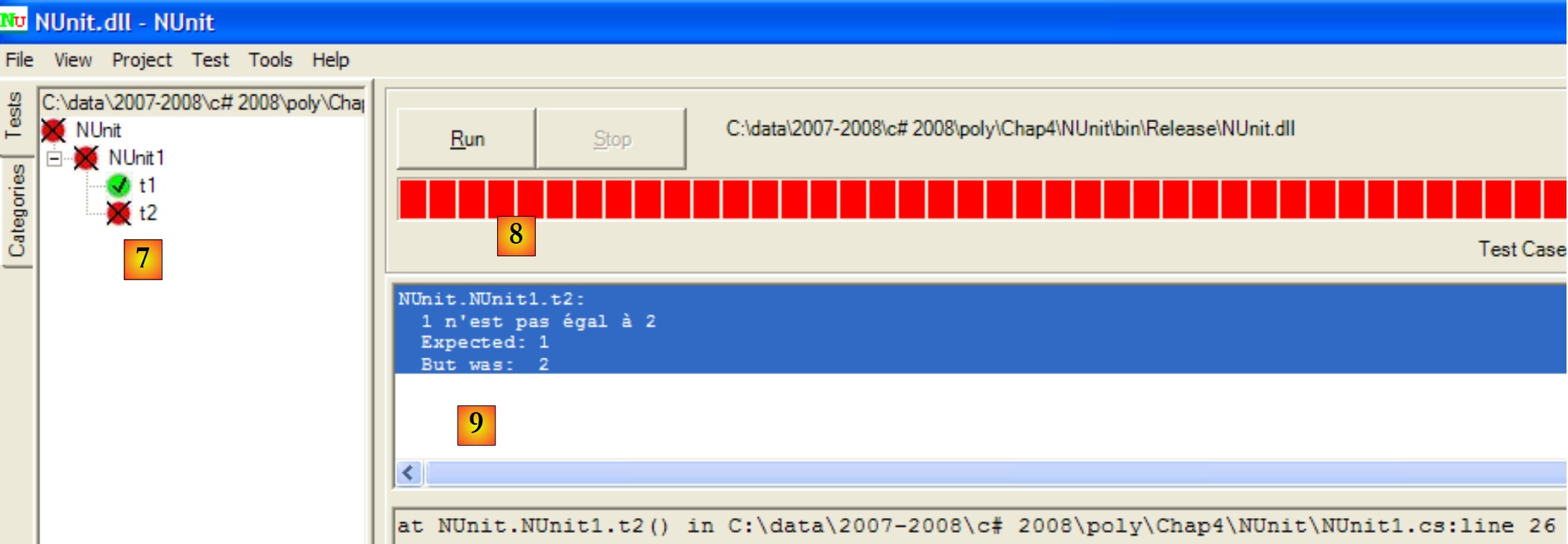 |
- in [7]: the results: t1 passed, t2 failed
- in [8]: a red bar indicates the overall failure of the test suite
- in [9]: the error message related to the failed test
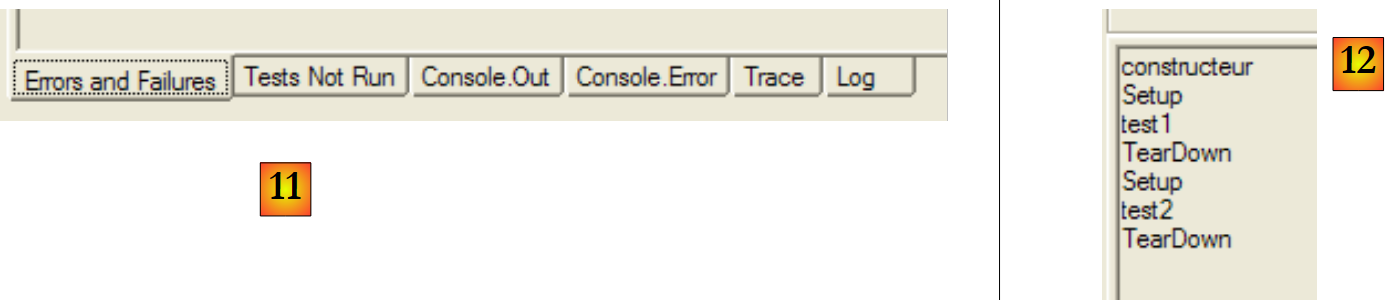 |
- in [11]: the different tabs in the results window
- in [12]: the [Console.Out] tab. Here we can see that:
- the constructor was executed only once
- the method [SetUp] was executed before each of the two tests
- the [TearDown] method was executed after each of the two tests
It is possible to specify the methods to be tested:
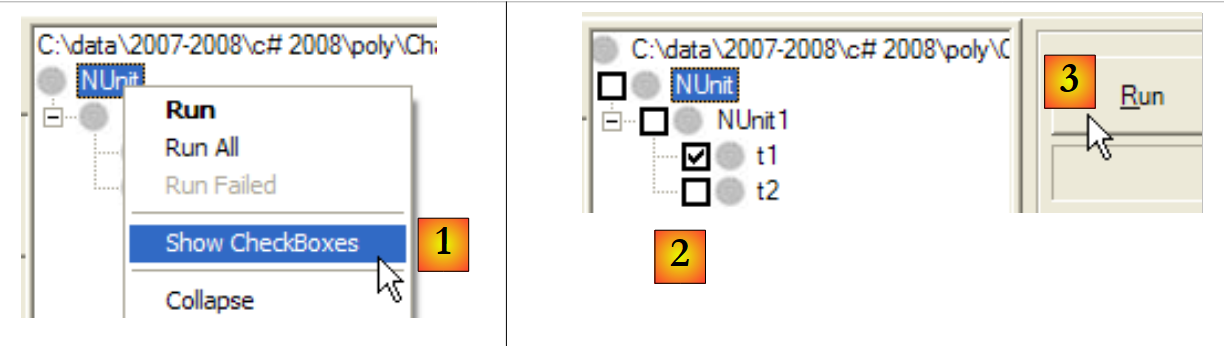 |
- in [1]: a checkbox is displayed next to each test
- In [2]: the tests to be executed are checked
- in [3]: the tests are executed
To fix errors, simply correct the C# project and regenerate it. NUnit detects that the DLL it is testing has been changed and automatically loads the new version. You then simply need to rerun the tests.
Consider the following new test class:
using System;
using NUnit.Framework;

namespace NUnit {
    [TestFixture]
    public class NUnit2 : AssertionHelper {
        public NUnit2() {
            Console.WriteLine("constructeur");
        }
        [SetUp]
        public void avant() {
            Console.WriteLine("Setup");
        }
        [TearDown]
        public void après() {
            Console.WriteLine("TearDown");
        }
        [Test]
        public void t1() {
            Console.WriteLine("test1");
            Expect(1, EqualTo(1));
        }
        [Test]
        public void t2() {
            Console.WriteLine("test2");
            Expect(1, EqualTo(2), "1 n'est pas égal à 2");
        }
    }
}
Starting with version 2.4 of NUnit, a new syntax has become available, as seen in lines 21 and 26. For this, the test class must derive from the AssertionHelper class (line 6).
The (non-exhaustive) mapping between the old and new syntax is as follows:
Let's add the following test to the NUnit2 class:
        [Test]
        public void t3() {
            bool vrai = true, faux = false;
            Expect(vrai, True);
            Expect(faux, False);
            Object obj1 = new Object(), obj2 = null, obj3=obj1;
            Expect(obj1, Not.Null);
            Expect(obj2, Null);
            Expect(obj3, SameAs(obj1));
            double d1 = 4.1, d2 = 6.4, d3 = d1;
            Expect(d1, EqualTo(d3).Within(1e-6));
            Expect(d1, Not.EqualTo(d2));
}
If we generate (F6) the new DLL from the C# project, the NUnit project becomes the following:
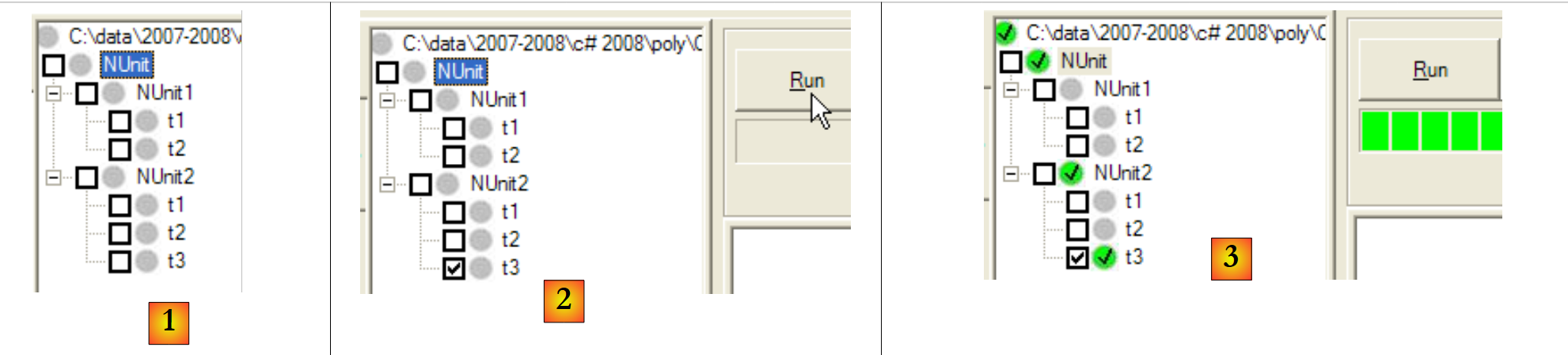 |
- in [1]: the new test class [NUnit2] was automatically detected
- in [2]: test t3 from NUnit2 is executed
- in [3]: test t3 was successful
For more information on NUnit, see the help for NUnit:
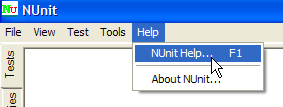 | 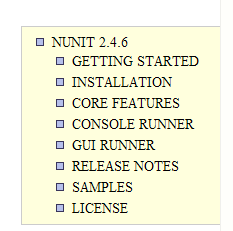 |
6.4.2. The Visual Studio Solution
 |
We will gradually build the following Visual Studio solution:
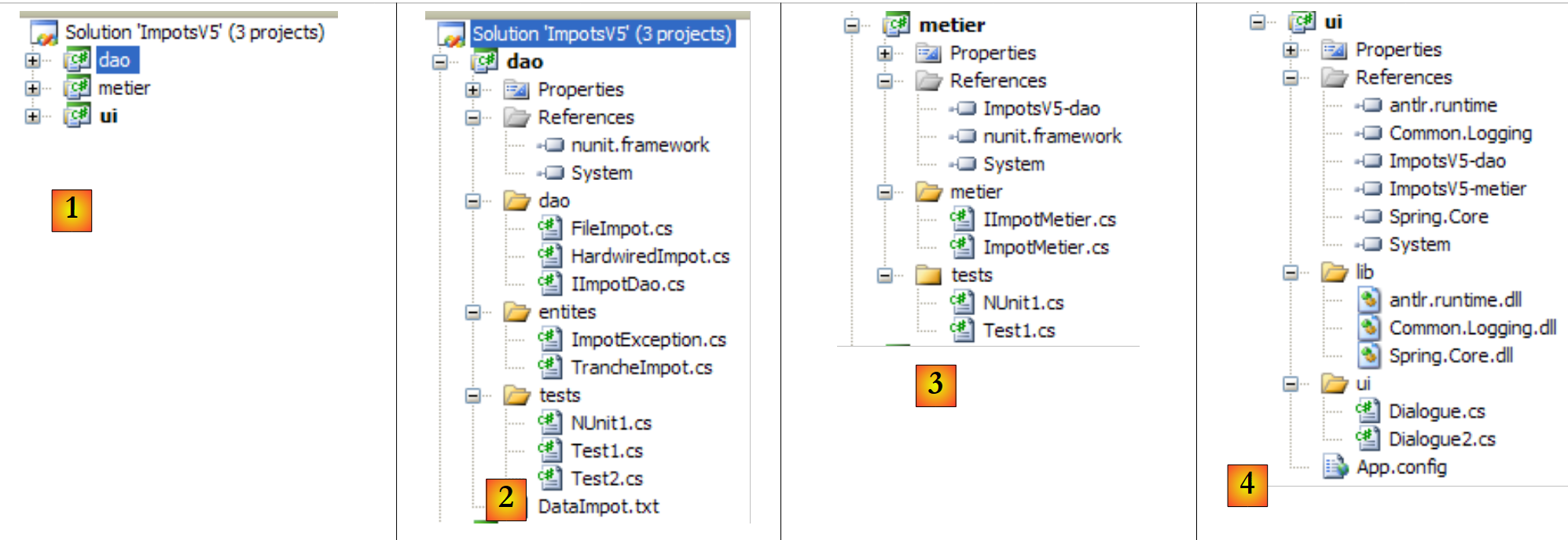 |
- in [1]: the ImpotsV5 solution consists of three projects, one for each of the application’s three layers
- in [2]: the [dao] project of the [dao] layer
- in [3]: the [metier] project of the [metier] layer
- to [4]: the [ui] project from the [ui] layer
The solution ImpotsV5 can be constructed as follows:
1 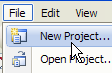 | 234 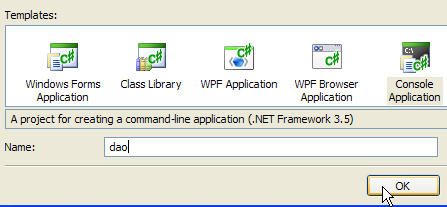 | 5 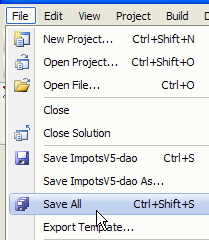 |
- in [1]: create a new project
- in [2]: select a console application
- in [3]: call the project [dao]
- in [4]: create the project
- in [5]: once the project is created, save it
 |
- in [6]: keep the name [dao] for the project
- in [7]: specify a folder to save the project and its solution
- in [8]: Name the solution
- in [9]: specify that the solution must have its own folder
- in [10]: save the project and its solution
- in [11]: the project [dao] in its solution ImpotsV5
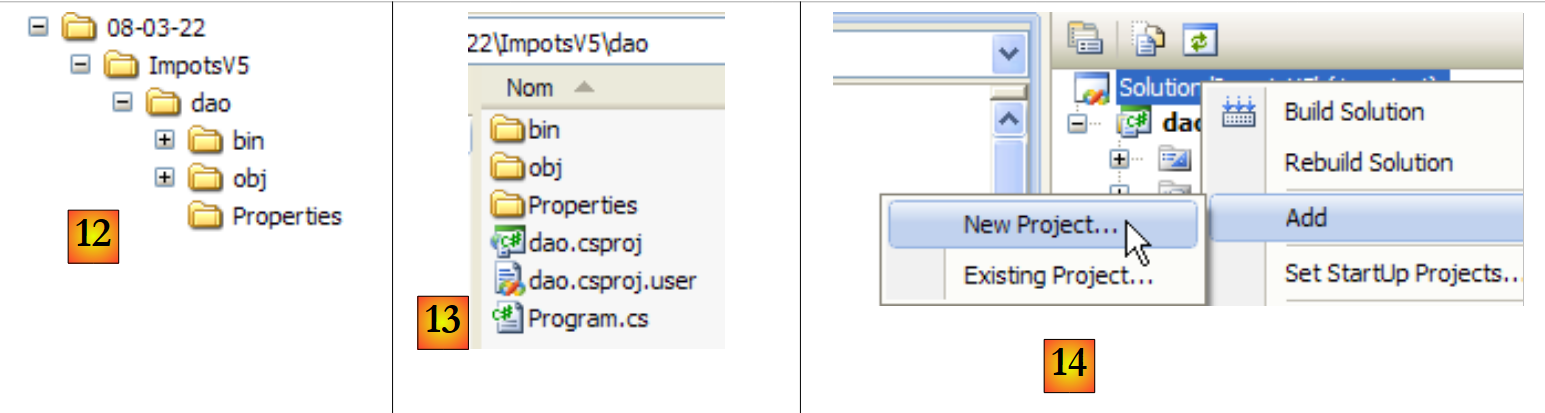 |
- in [12]: the solution folder ImpotsV5. It contains the folder [dao] from the folder [dao].
- in [13]: the contents of the [dao] folder
- to [14]: a new project is added to the ImpotsV5 solution
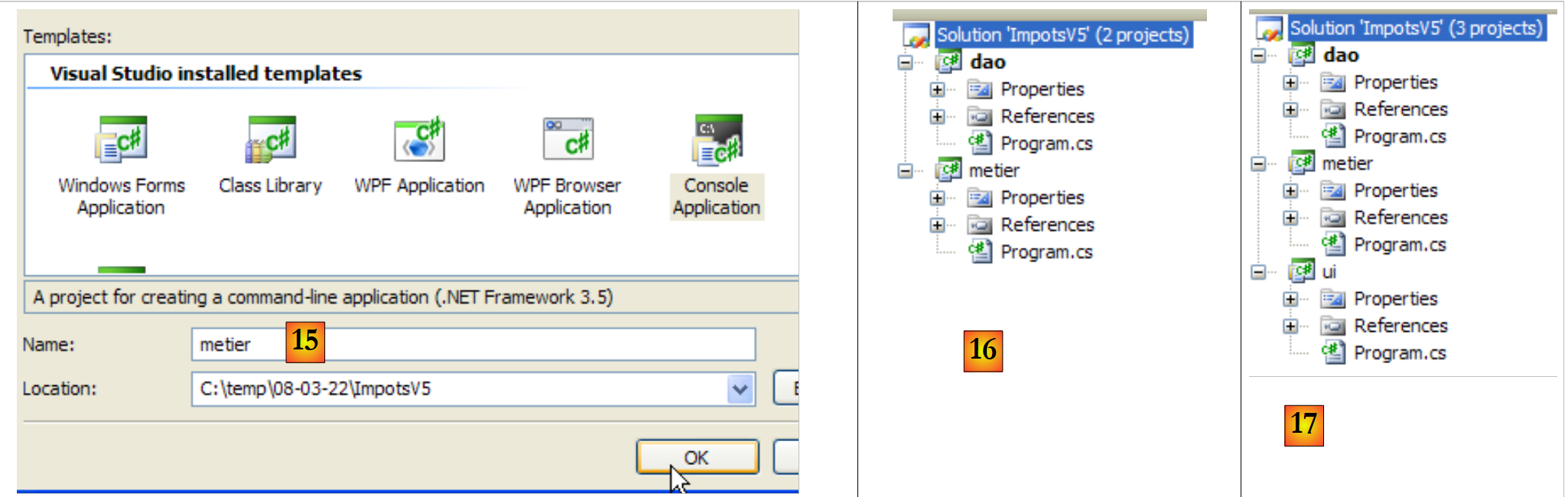 |
- in [15]: the new project is named [metier]
- to [16]: the solution with its two projects
- in [17]: the solution, after adding the third project [ui]
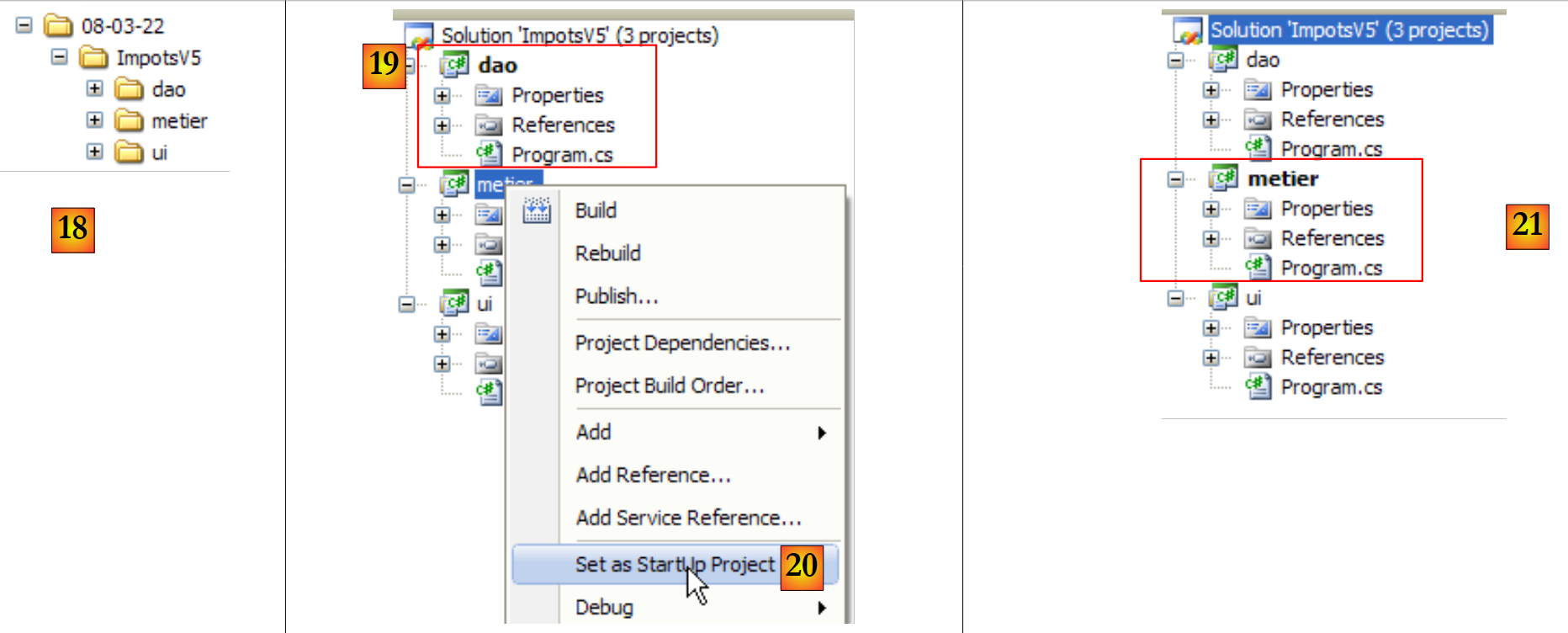 |
- in [18]: the solution folder and the folders for the three projects
- When you run a solution (Ctrl+F5), the active project is executed. The same applies when you build (F6) the solution. The name of the active project is in bold [19] in the solution.
- In [20]: To change the active project in the solution
- to [21]: the project [metier] is now the active project in the solution
6.4.3. The layer [dao]
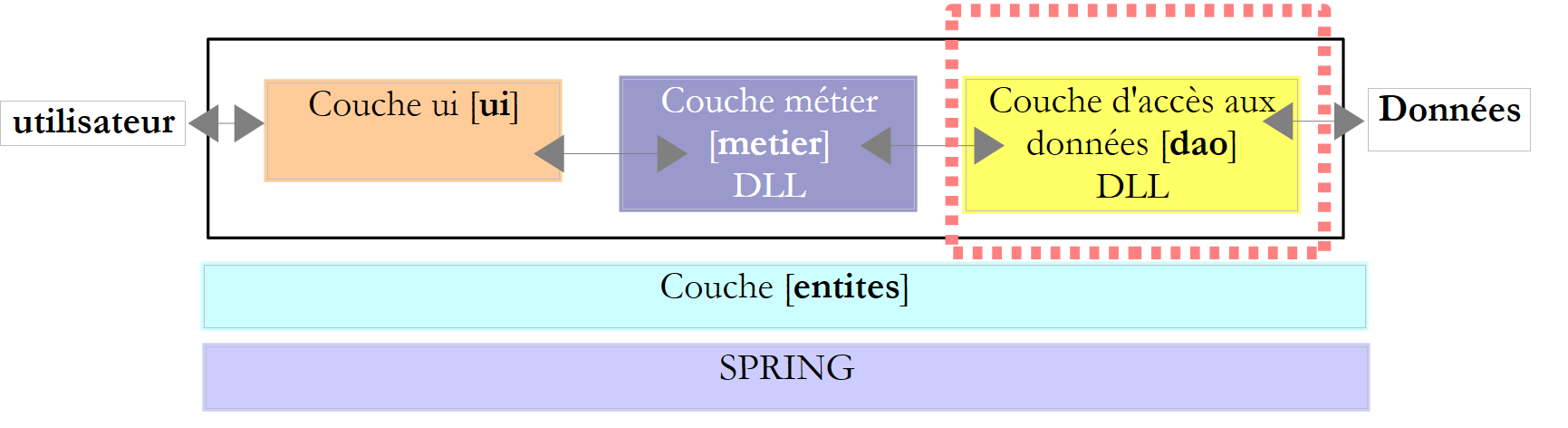 |
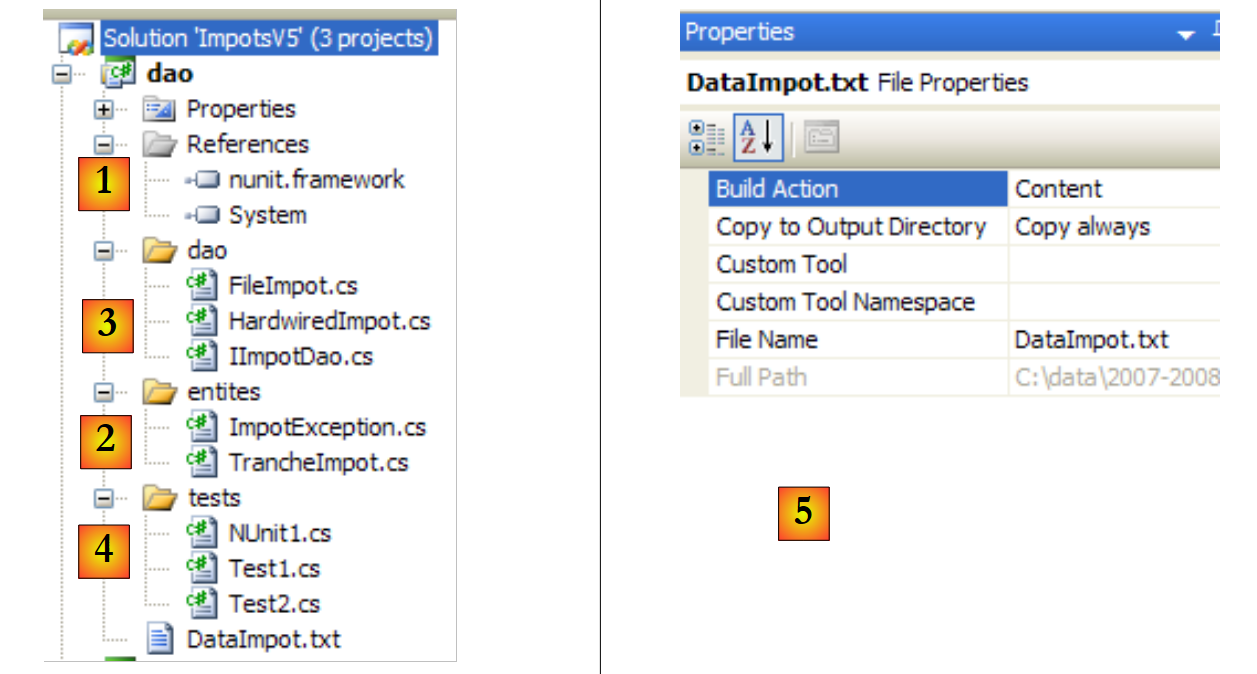 |
Project references (see [1] in the project)
We add the reference [nunit.framework] required for testing [NUnit]
Entities (see [2] in the project)
The class [TrancheImpot] is the one from previous versions. The [FileImpotException] class from the previous version is renamed to [ImpotException] to make it more generic and avoid linking it to a specific [dao] layer:
using System;

namespace Entites {
    public class ImpotException : Exception {

        // error code
        public int Code { get; set; }

        // manufacturers
        public ImpotException() {
        }
        public ImpotException(string message)
            : base(message) {
        }
        public ImpotException(string message, Exception e)
            : base(message, e) {
        }
    }
}
The [dao] layer (see [3] in the project)
The [IImpotDao] interface is the same as that of the previous version. The same applies to the [HardwiredImpot] class. The [FileImpot] class has been updated to reflect the change from the [FileImpotException] exception to the [ImpotException] exception:
...

namespace Dao {
    public class FileImpot : IImpotDao {

        // error codes
        [Flags]
        public enum CodeErreurs { Acces = 1, Ligne = 2, Champ1 = 4, Champ2 = 8, Champ3 = 16 };

...

        // manufacturer
        public FileImpot(string fileName) {
            // save the file name
            FileName = fileName;
...
            // initially no error
            CodeErreurs code = 0;
            try {
                using (StreamReader input = new StreamReader(FileName)) {
                    while (!input.EndOfStream && code == 0) {
...
                        // mistake?
                        if (code != 0) {
                            // we note the error
                            fe = new ImpotException(String.Format("Ligne n° {0} incorrecte", numLigne)) { Code = (int)code };
                        } else {
...
                        }
                    }
                }
            } catch (Exception e) {
                // we note the error
                fe = new ImpotException(String.Format("Erreur lors de la lecture du fichier {0}", FileName), e) { Code = (int)CodeErreurs.Acces };
            }
            // error to report?
...
        }
    }
}
- line 8: the error codes previously in class [FileImpotException] have been moved to class [FileImpot]. These are, in fact, error codes specific to this implementation of interface [IImpotDao].
- Lines 26 and 34: To encapsulate an error, the [ImpotException] class is used instead of the [FileImpotException] class.
The [Test1] test (see [4] in the project)
The [Test1] class simply displays the tax brackets on the screen:
using System;
using Dao;
using Entites;

namespace Tests {
    class Test1 {
        static void Main() {

            // create the [dao] layer
            IImpotDao dao = null;
            try {
                // layer creation [dao]
                dao = new FileImpot("DataImpot.txt");
            } catch (ImpotException e) {
                // error display
                string msg = e.InnerException == null ? null : String.Format(", Exception d'origine : {0}", e.InnerException.Message);
                Console.WriteLine("L'erreur suivante s'est produite : [Code={0},Message={1}{2}]", e.Code, e.Message, msg == null ? "" : msg);
                // program stop
                Environment.Exit(1);
            }
            // display tax brackets
            TrancheImpot[] tranchesImpot = dao.TranchesImpot;
            foreach (TrancheImpot t in tranchesImpot) {
                Console.WriteLine("{0}:{1}:{2}", t.Limite, t.CoeffR, t.CoeffN);
            }
        }
    }
}
- line 13: the [dao] layer is implemented by the [FileImpot] class
- line 14: the [ImpotException] exception, which may occur, is handled.
The [DataImpot.txt] file required for testing is automatically copied to the project's runtime folder (see [5] in the project). The [dao] project will have several classes containing a [Main] method. You must therefore explicitly specify the class to execute when the user requests project execution via Ctrl-F5:
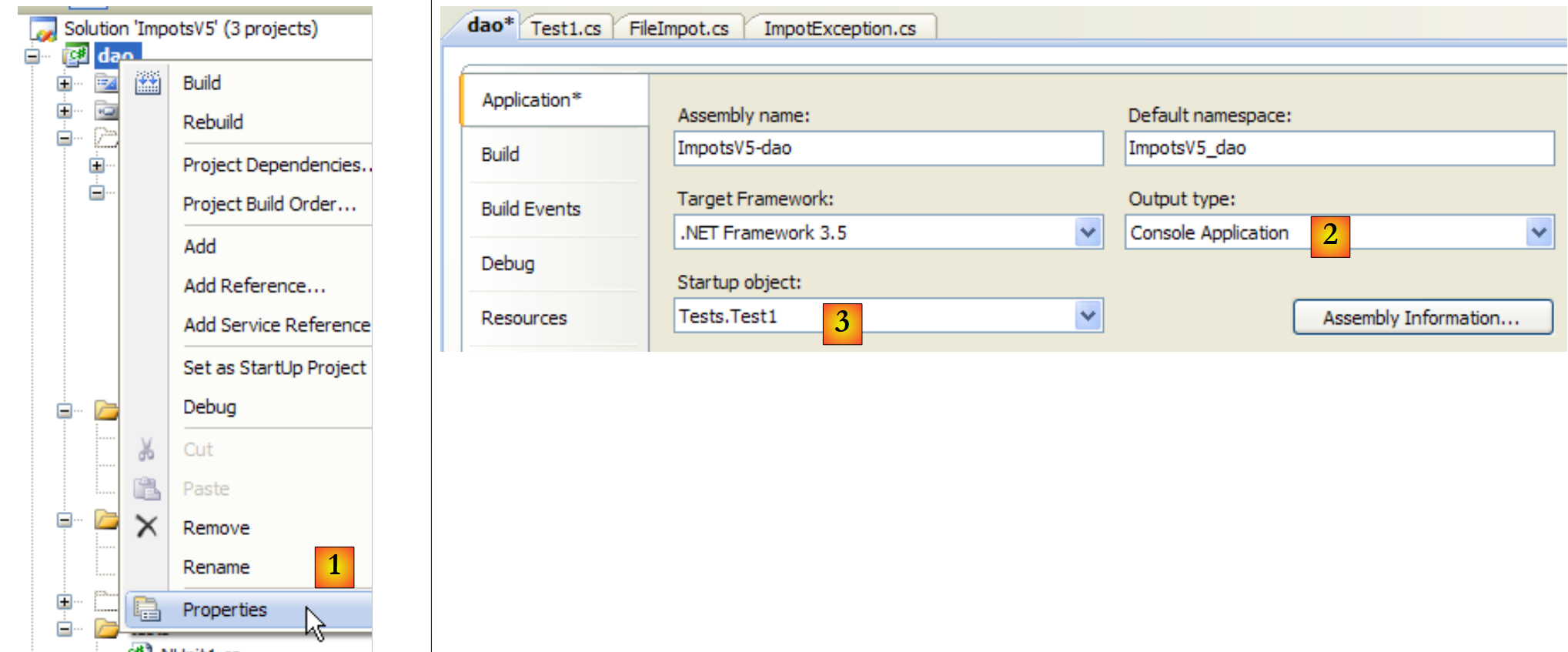 |
- in [1]: access the project properties
- in [2]: specify that it is a console application
- in [3]: specify the class to execute
Running the previous class [Test1] produces the following results:
4962:0:0
8382:0,068:291,09
14753:0,191:1322,92
23888:0,283:2668,39
38868:0,374:4846,98
47932:0,426:6883,66
0:0,481:9505,54
The [Test2] test (see [4] in the project)
The [Test2] class does the same thing as the [Test1] class by implementing the [dao] layer with the [HardwiredImpot] class. Line 13 of [Test1] is replaced with the following:
dao = new HardwiredImpot();
The project is modified to now execute the [Test2] class:
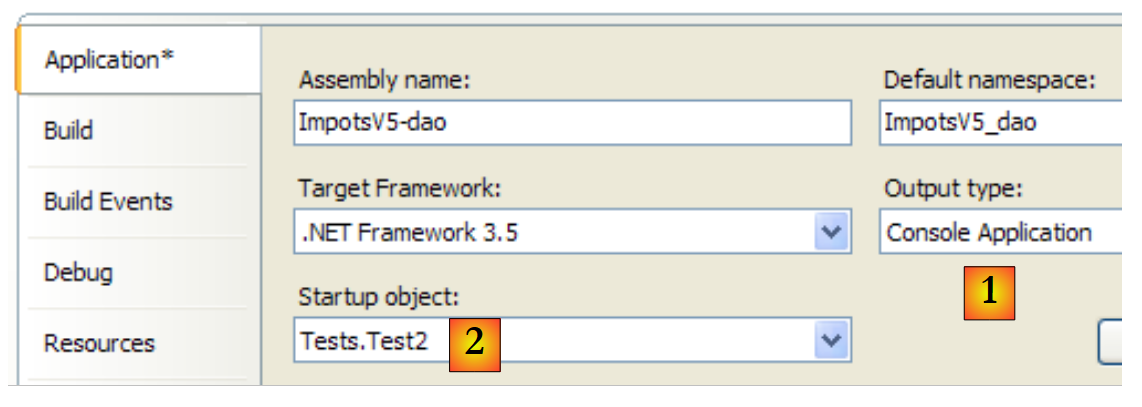 |
The screen results are the same as before.
The NUnit test [NUnit1] (see [4] in the project)
The unit test [NUnit1] is as follows:
using System;
using Dao;
using Entites;
using NUnit.Framework;

namespace Tests {
    [TestFixture]
    public class NUnit1 : AssertionHelper{
        // layer [dao] to be tested
        private IImpotDao dao;

        // manufacturer
        public NUnit1() {
            // layer initialization [dao]
            dao = new FileImpot("DataImpot.txt");
        }

        // test
        [Test]
        public void ShowTranchesImpot(){
            // display tax brackets
            TrancheImpot[] tranchesImpot = dao.TranchesImpot;
            foreach (TrancheImpot t in tranchesImpot) {
                Console.WriteLine("{0}:{1}:{2}", t.Limite, t.CoeffR, t.CoeffN);
            }
            // some tests
            Expect(tranchesImpot.Length,EqualTo(7));
            Expect(tranchesImpot[2].Limite,EqualTo(14753));
            Expect(tranchesImpot[2].CoeffR, EqualTo(0.191));
            Expect(tranchesImpot[2].CoeffN, EqualTo(1322.92));
        }
    }
}
- The test class derives from the [AssertionHelper] class, which allows the use of the static Expect method (lines 27–30).
- line 10: a reference to the [dao] layer
- lines 13–16: the constructor instantiates the [dao] layer with the [FileImpot] class
- lines 19–20: the test method
- line 22: the tax bracket table is retrieved from layer [dao]
- lines 23–25: they are displayed as before. This display would not be necessary in a real unit test. Here, it serves an educational purpose.
- line 27: we verify that there are indeed 7 tax brackets
- Lines 28–30: We verify the values for tax bracket #2
To run this unit test, the project must be of type [Class Library]:
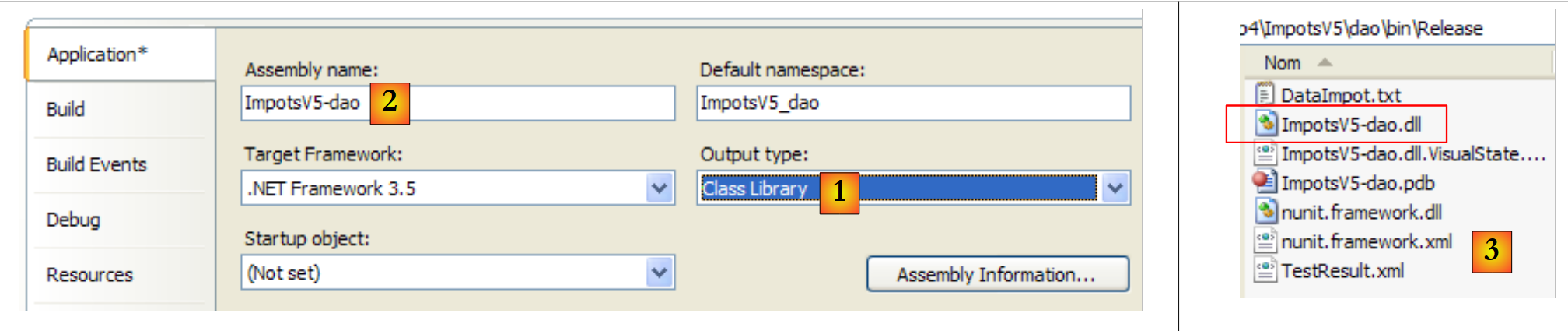 |
- in [1]: the project type has been changed
- in [2]: the generated DLL will be named [ImpotsV5-dao.dll]
- in [3]: after generating (F6) the project, the [dao/bin/Release] folder contains DLL and [ImpotsV5-dao.dll]
The DLL [ImpotsV5-dao.dll] is then loaded into the NUnit framework and executed:
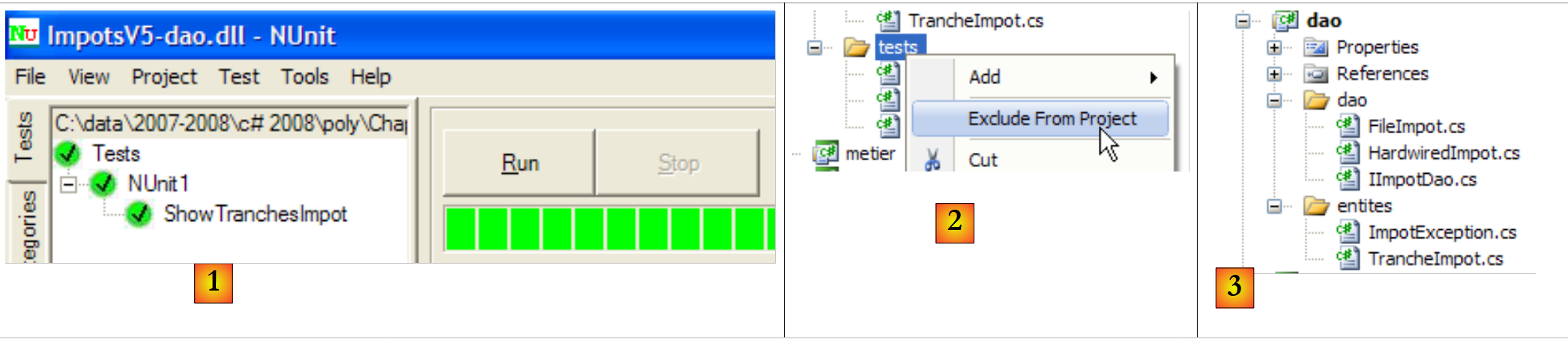 |
- in [1]: the tests were successful. We now consider the [dao] layer operational. Its DLL contains all the classes in the project, including the test classes. These are unnecessary. We are rebuilding DLL to exclude the test classes.
- in [2]: the [tests] folder is excluded from the project
- in [3]: the new project. This is regenerated using F6 to generate a new DLL.
6.4.4. The [metier] layer
 |
 |
- in [1], the [metier] project has become the active project in the solution
- to [2]: the project references
- in [3]: the layer [metier]
- in [4]: the test classes
- in [5]: the [DataImpot.txt] file containing the tax brackets configured in [6] to be automatically copied to the project's execution folder [7]
Project references (see [2] in the project)
As with the [dao] project, the reference [nunit.framework] required for the [NUnit] tests is added. Layer [metier] requires layer [dao]. It therefore needs a reference to DLL from that layer. Proceed as follows:
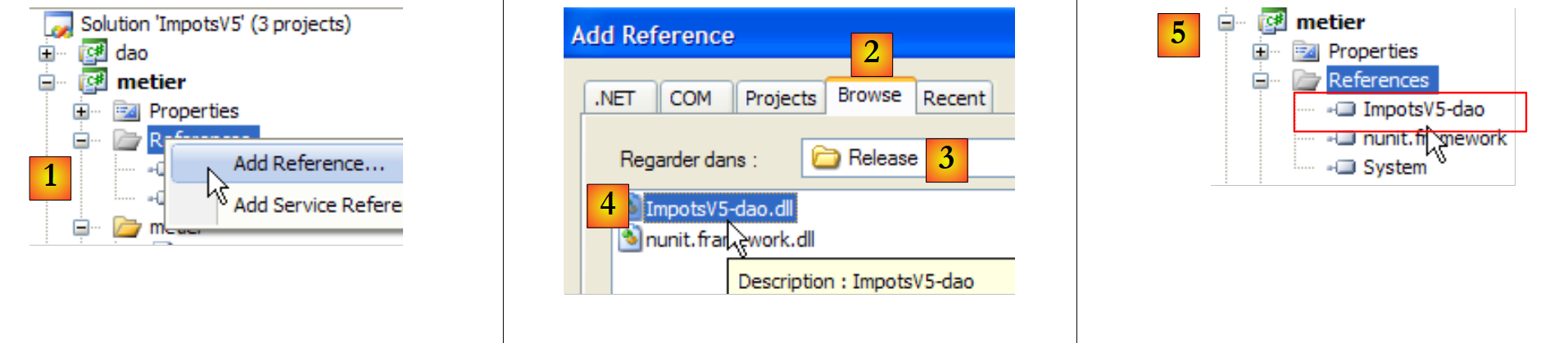 |
- In [1]: add a new reference to the project references of [metier]
- In [2]: select the [Browse] tab
- In [3]: select the [dao/bin/Release] folder
- in [4]: select the DLL and [ImpotsV5-dao.dll] generated in the [dao] project
- in [5]: the new reference
The layer [metier] (see [3] in the project)
The [IImpotMetier] interface is the same as that of the previous version. The same applies to the [ImpotMetier] class.
The [Test1] test (see [4] in the project)
The [Test1] class simply performs some salary calculations:
using System;
using Dao;
using Entites;
using Metier;

namespace Tests {
    class Test1 {
        static void Main() {

            // we create the [metier] layer
            IImpotMetier metier = null;
            try {
                // layer creation [job]
                metier = new ImpotMetier(new FileImpot("DataImpot.txt"));
            } catch (ImpotException e) {
                // error display
                string msg = e.InnerException == null ? null : String.Format(", Exception d'origine : {0}", e.InnerException.Message);
                Console.WriteLine("L'erreur suivante s'est produite : [Code={0},Message={1}{2}]", e.Code, e.Message, msg == null ? "" : msg);
                // program stop
                Environment.Exit(1);
            }
            // we calculate some taxes
            Console.WriteLine(String.Format("Impot(true,2,60000)={0} euros", metier.CalculerImpot(true, 2, 60000)));
            Console.WriteLine(String.Format("Impot(false,3,60000)={0} euros", metier.CalculerImpot(false, 3, 60000)));
            Console.WriteLine(String.Format("Impot(false,3,60000)={0} euros", metier.CalculerImpot(false, 3, 6000)));
            Console.WriteLine(String.Format("Impot(false,3,60000)={0} euros", metier.CalculerImpot(false, 3, 600000)));
        }
    }
}
- line 14: creation of layers [metier] and [dao]. The [dao] layer is implemented with the [FileImpot] class
- lines 12–21: handling of a possible exception of type [ImpotException]
- lines 23–26: repeated calls to the single method CalculerImpot of the interface [IImpotMetier].
The [metier] project is configured as follows:
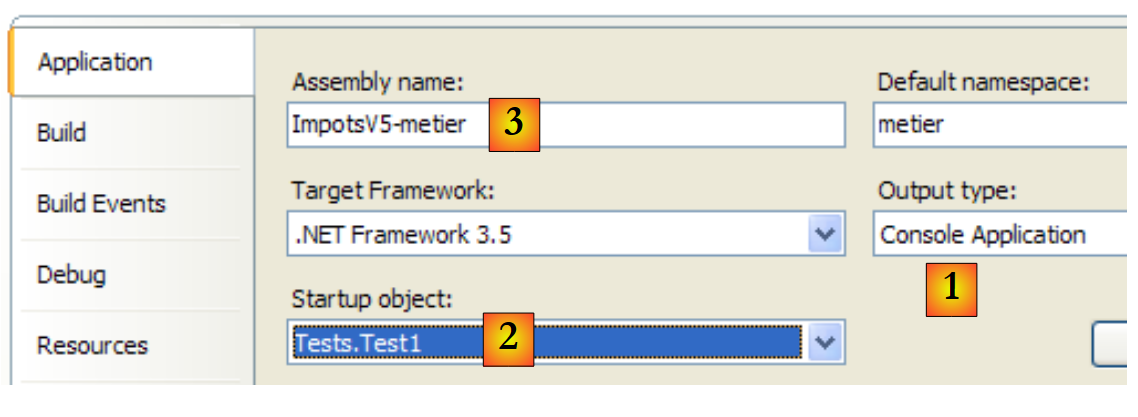 |
- [1]: the project is a console application
- [2]: the executed class is the [Test1] class
- [3]: project generation will produce the executable [ImpotsV5-metier.exe]
Running the project yields the following results:
The [NUnit1] test (see [4] in the project)
The unit test class [NUnit1] takes the four previous calculations and verifies their results:
using Dao;
using Metier;
using NUnit.Framework;

namespace Tests {
    [TestFixture]
    public class NUnit1:AssertionHelper {
        // layer [metier] to test
        private IImpotMetier metier;

        // manufacturer
        public NUnit1() {
            // initialization layer [metier]
            metier = new ImpotMetier(new FileImpot("DataImpot.txt"));
        }

        // test
        [Test]
        public void CalculsImpot(){
            // display tax brackets
            Expect(metier.CalculerImpot(true, 2, 60000), EqualTo(4282));
            Expect(metier.CalculerImpot(false, 3, 60000), EqualTo(4282));
            Expect(metier.CalculerImpot(false, 3, 6000), EqualTo(0));
            Expect(metier.CalculerImpot(false, 3, 600000), EqualTo(179275));
        }
    }
}
- line 14: creation of layers [metier] and [dao]. Layer [dao] is implemented with class [FileImpot]
- Lines 21–24: Repeated calls to the single method CalculerImpot of the interface [IImpotMetier] with verification of the results.
The [metier] project is now configured as follows:
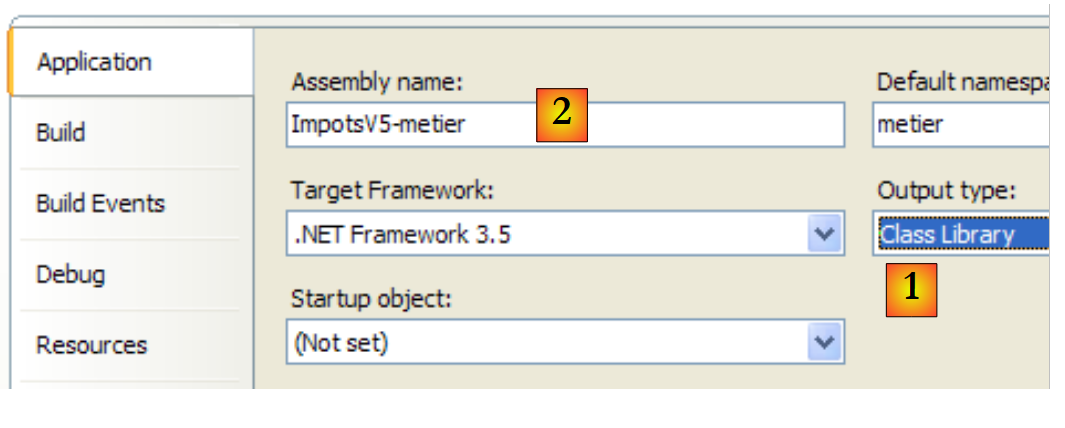 |
- [1]: the project is of type "class library"
- [2]: generating the project will produce DLL and [ImpotsV5-metier.dll]
The project is generated (F6). Then the generated DLL, [ImpotsV5-metier.dll], and are loaded into NUnit and tested:
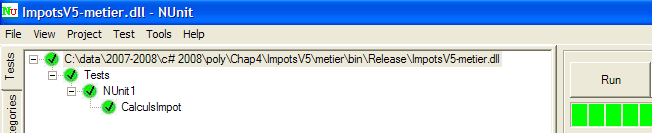 |
The tests above were successful. We now consider the [metier] layer operational. Its DLL contains all the project classes, including the test classes. These are unnecessary. We rebuild DLL to exclude the test classes.
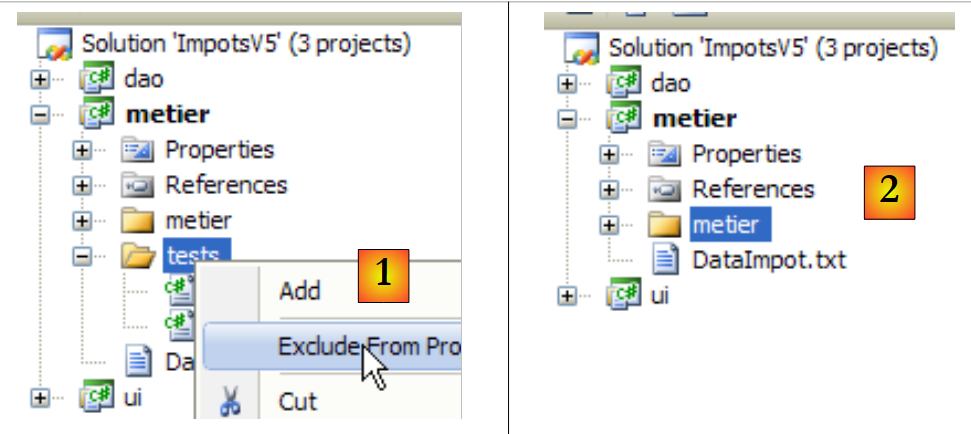 |
- in [1]: the [tests] folder is excluded from the project
- in [2]: the new project. This is regenerated by F6 to generate a new DLL.
6.4.5. The layer [ui]
 |
 |
- in [1], the [ui] project has become the active project in the solution
- to [2]: the project references
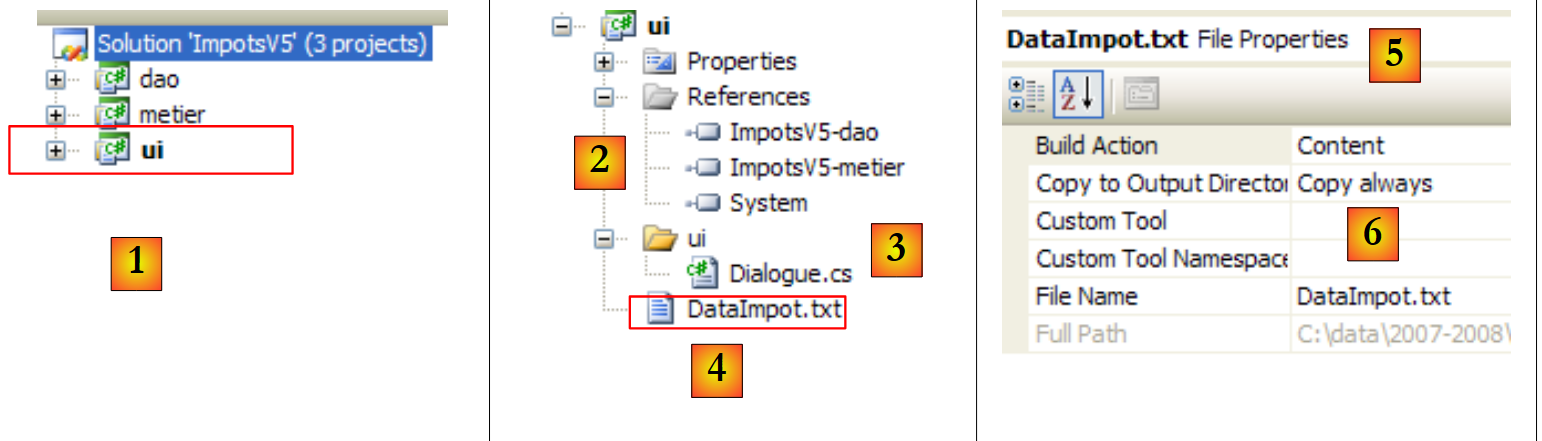
- in [3]: the layer [ui]
- in [4]: the [DataImpot.txt] tax bracket file, configured in [5] to be automatically copied to the [6] project execution folder
Project references (see [2] in the project)
The layer [ui] requires the layers [metier] and [dao] to perform its tax calculations. It therefore needs a reference to the DLL of these two layers. Proceed as shown for layer [metier]
The main class [Dialogue.cs] (see [3] in the project)
The class [Dialogue.cs] is that of the previous version.
Tests
The [ui] project is configured as follows:
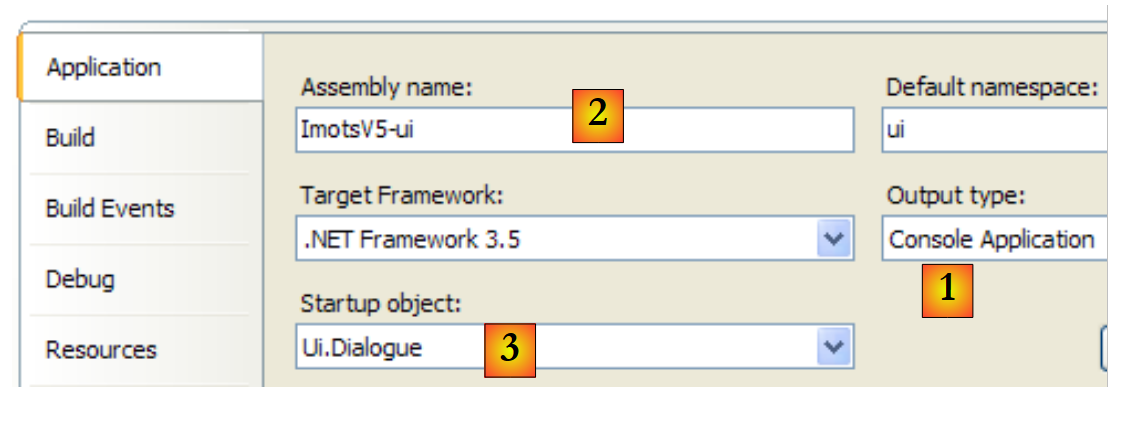 |
- [1]: the project is of the "console application" type
- [2]: project generation will produce the executable [ImpotsV5-ui.exe]
- [3]: the class that will be executed
An example of execution (Ctrl+F5) is as follows:
Paramètres du calcul de l'Impot format: Married (o/n) NbEnfants Salary or nothing to stop :o 2 60000
Impot=4282 euros
6.4.6. The layer [Spring]
Let’s return to the code in [Dialogue.cs], which creates the layers [dao] and [metier]:
// we create the [metier and dao] layers
            IImpotMetier metier = null;
            try {
        // layer creation [job]
                metier = new ImpotMetier(new FileImpot("DataImpot.txt"));
            } catch (ImpotException e) {
                // error display
...
                // program stop
                Environment.Exit(1);
            }
Line 5 creates the layers [dao] and [metier] by explicitly naming the implementation classes for the two layers: FileImpot for the layer [dao], ImpotMetier for the [metier] layer. If the implementation of one of the layers is done with a new class, line 5 will be changed. For example:
metier = new ImpotMetier(new HardwiredImpot());
Apart from this change, nothing will change in the application because each layer communicates with the next via an interface. As long as the interface does not change, communication between layers remains unchanged as well. The Spring framework allows us to take layer independence a step further by letting us externalize the names of the classes implementing the different layers into a configuration file. Changing a layer’s implementation then amounts to changing a configuration file. There is no impact on the application code.
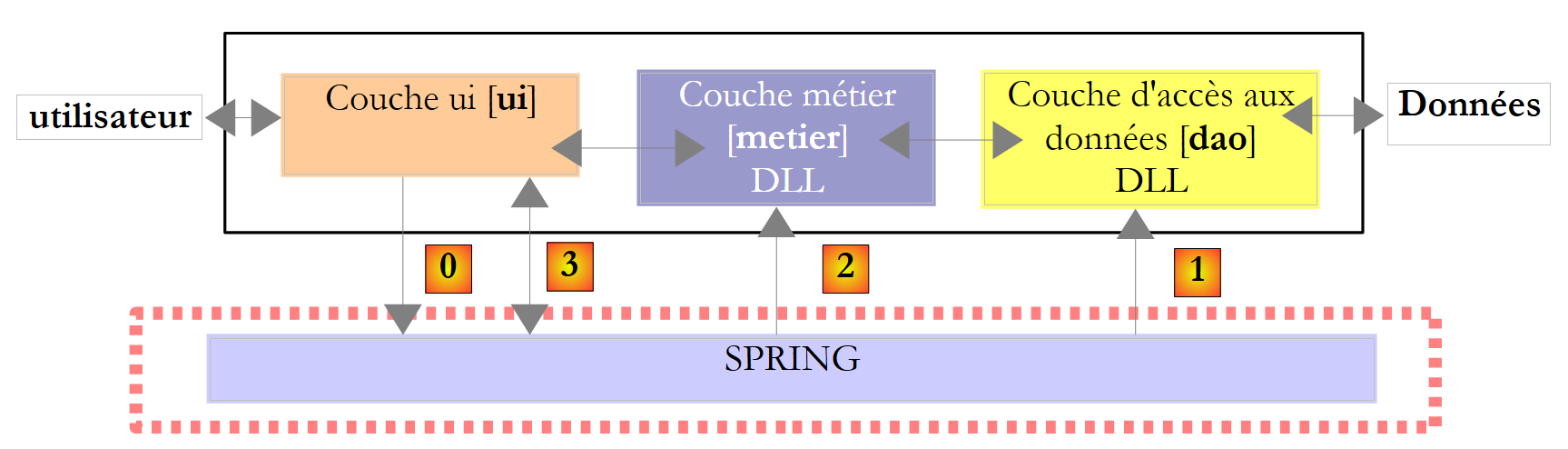 |
In the example above, the [ui] layer will ask Spring toinstantiate the layers [dao], [1], and [metier], [2] based on the information contained in a configuration file. The [ui] layer will then ask Spring [3] for a reference to the [metier] layer:
            // we create the [metier and dao] layers
            IImpotMetier metier = null;
            try {
                // spring context
                IApplicationContext ctx = ContextRegistry.GetContext();
                // a reference is requested on the [metier] layer
                metier = (IImpotMetier)ctx.GetObject("metier");
            } catch (Exception e1) {
...
}
- line 5: Spring instantiates the [dao] and [metier] layers
- line 7: a reference to the [metier] layer is retrieved. Note that the [ui] layer obtained this reference without specifying the name of the class implementing the [metier] layer.
The Spring framework is available in two versions: Java and .NET. The version .NET is available at the url (March 2008) [http://www.springframework.net/]:
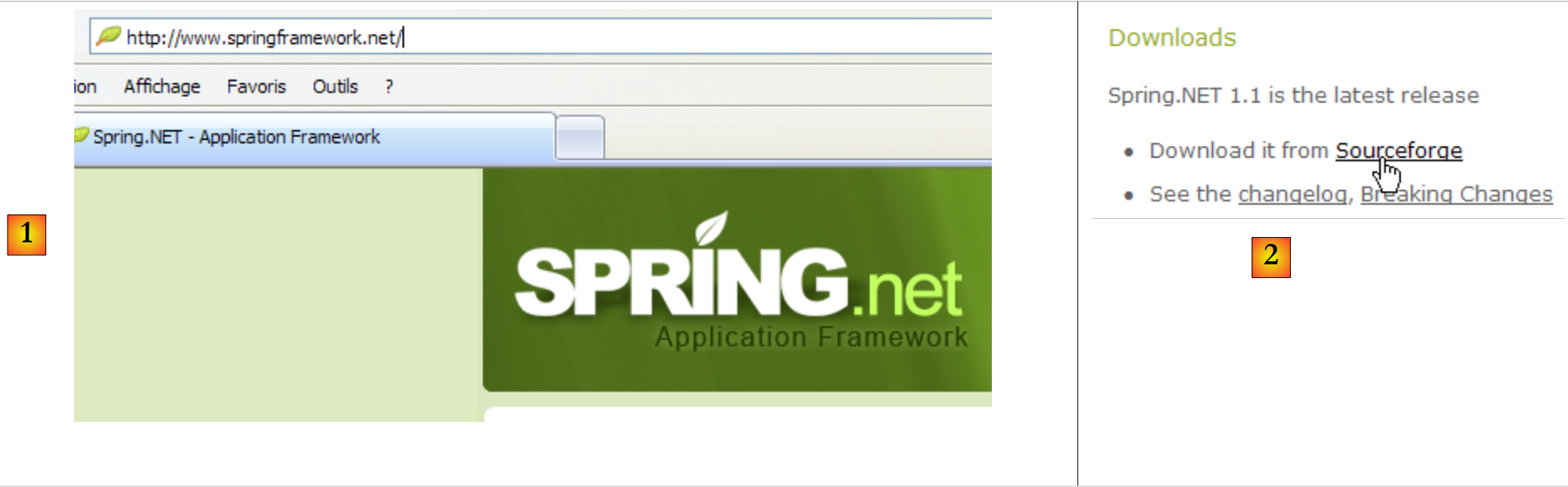 |
- in [1]: the [Spring.net] website
- in [2]: the downloads page
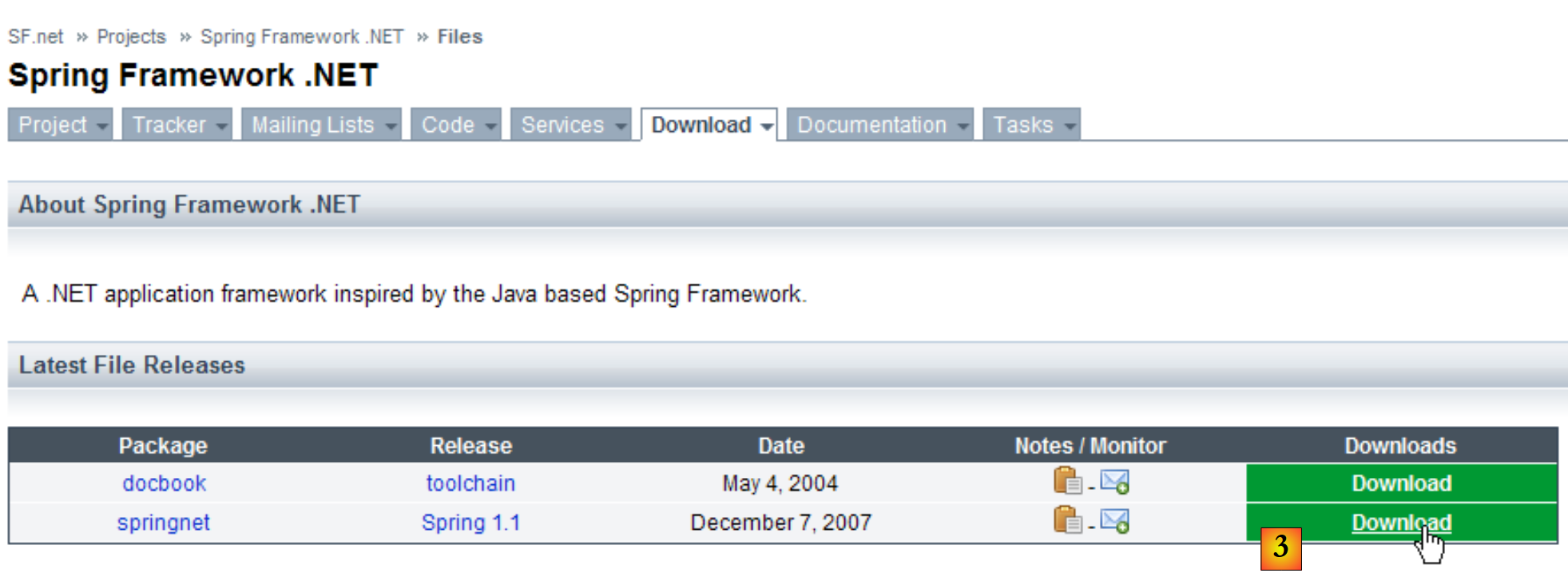 |
- in [3]: download Spring 1.1 (March 2008)
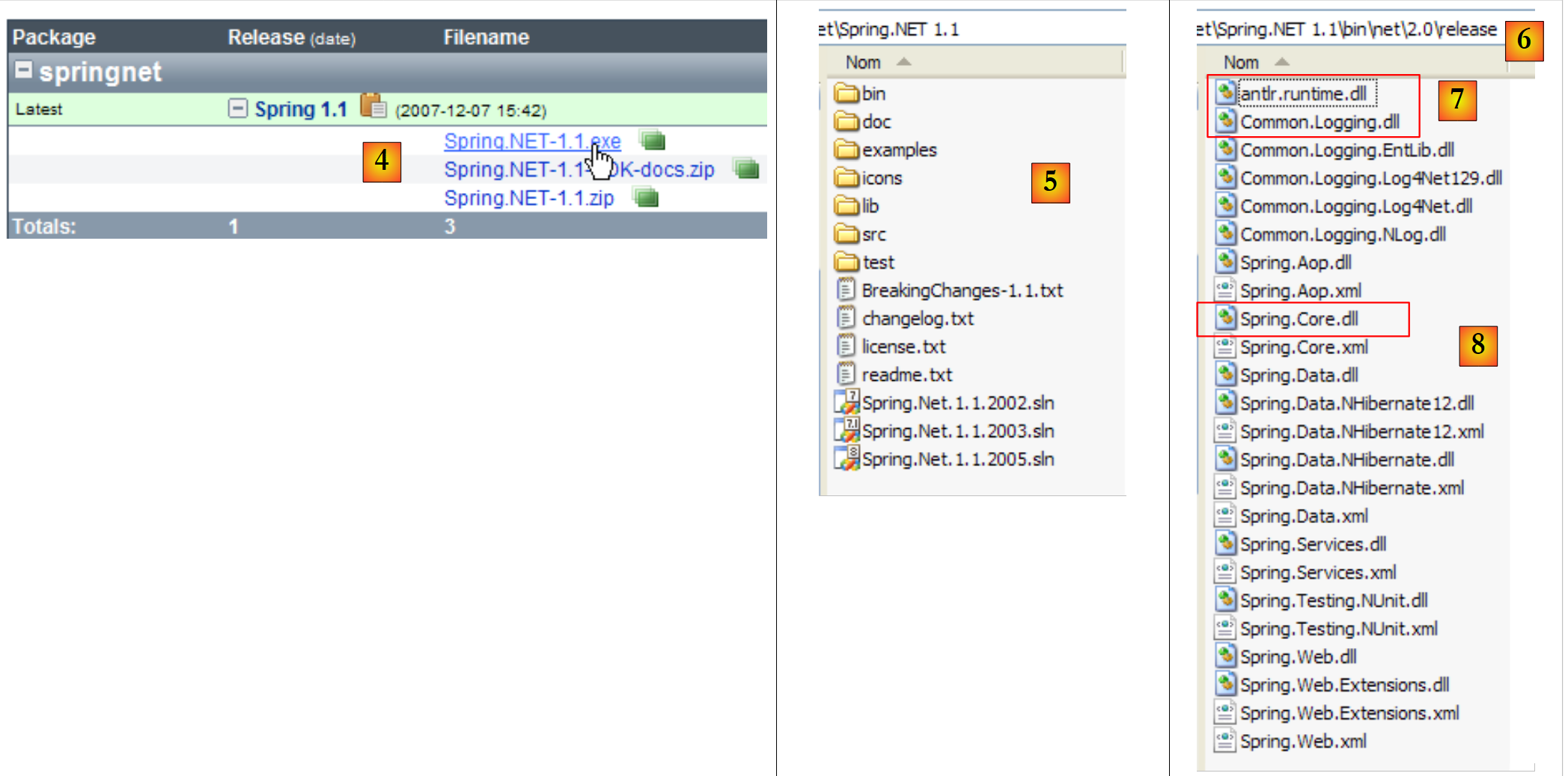 |
- in [4]: download the version .exe file and then install it
- in [5]: the folder generated by the installation
- in [6]: the [bin/net/2.0/release] folder contains the Spring DLL files for Visual Studio projects .NET 2.0 or higher. Spring is a rich framework. The aspect of Spring that we will use here to manage layer integration in an application is called IoC: Inversion of Control or DI: Dependency Injection. Spring provides libraries for database access with NHibernate, the generation and operation of web services, web applications, ...
- The DLL components required to manage layer integration within an application are DLL, [7], and [8].
We store these three DLL files in a [lib] folder within our project:
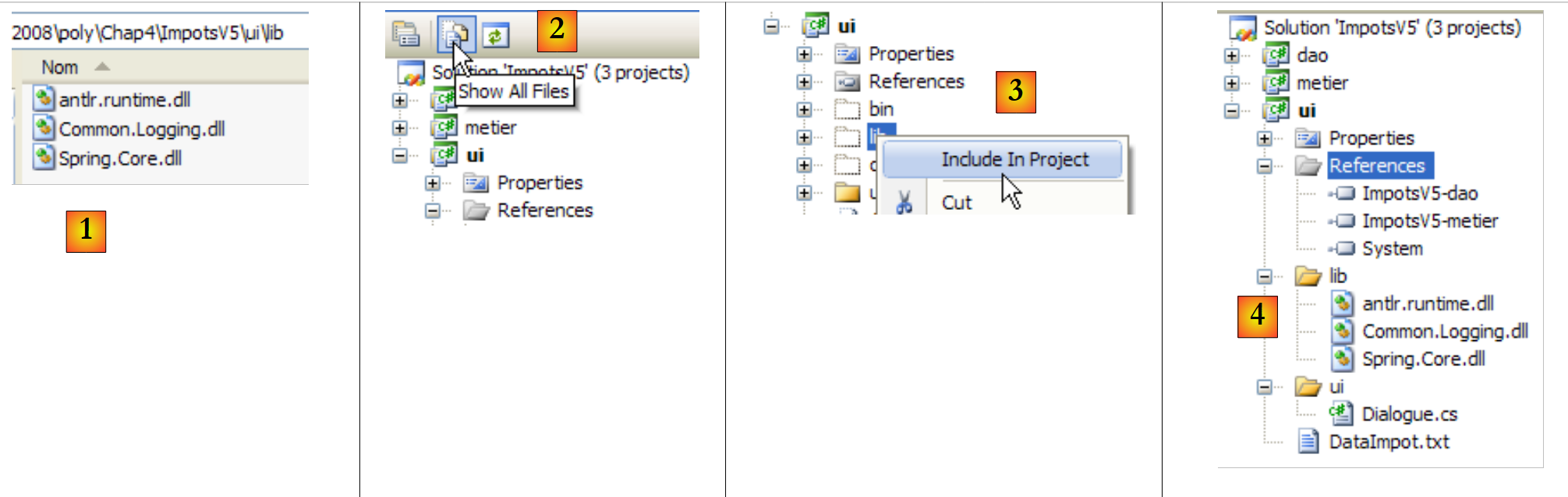 |
- [1]: the three DLL files are placed in the [lib] folder using Windows Explorer
- [2]: In the [ui] project, we display all the files
- [3]: The [ui/lib] folder is now visible. It is included in the project
- [4]: The [ui/lib] folder is part of the project
Creating the [lib] folder is not strictly necessary. The references could have been created directly on the three DLL files in the [bin/net/2.0/release] folder of [Spring.net]. However, creating the [lib] folder allows the application to be developed on a machine that does not have [Spring.net], thereby making it less dependent on the available development environment.
We add references to the three new DLL files to the [ui] project:
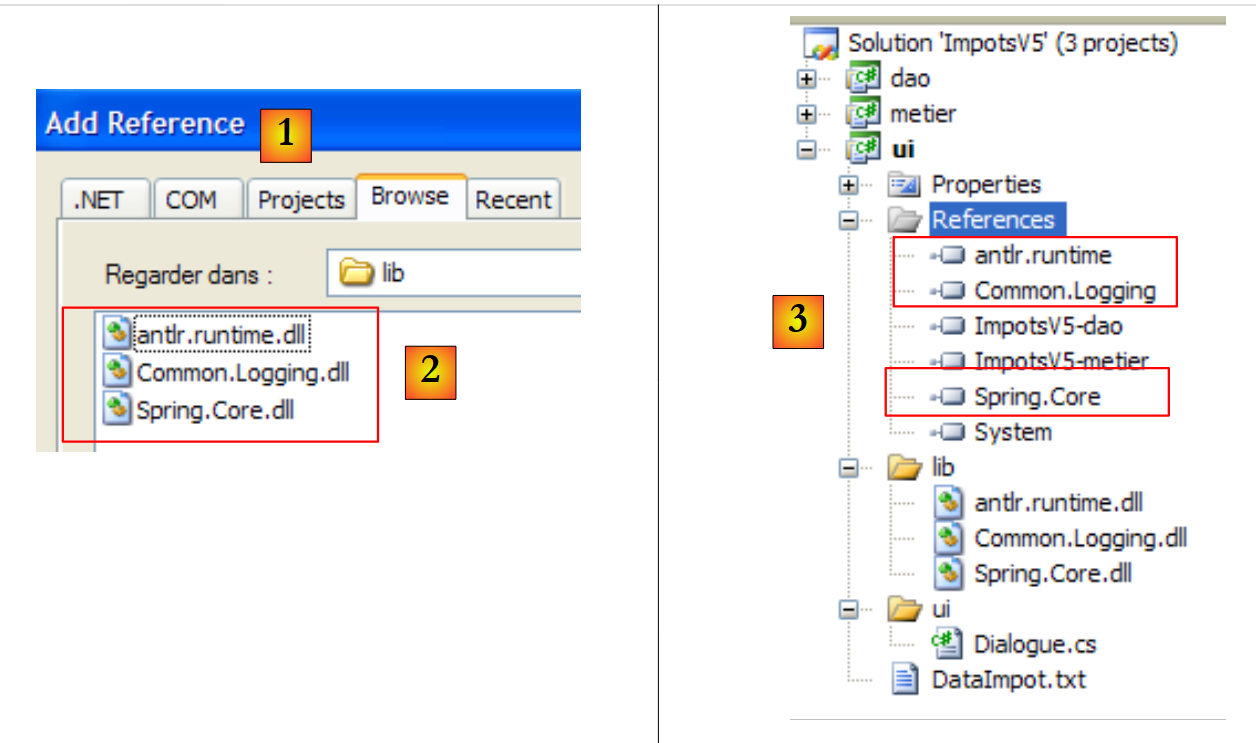 |
- [1]: we create references to the three DLL files in the [lib] folder: [2]
- [3]: the three DLL are part of the project references
Let’s return to an overview of the application architecture:
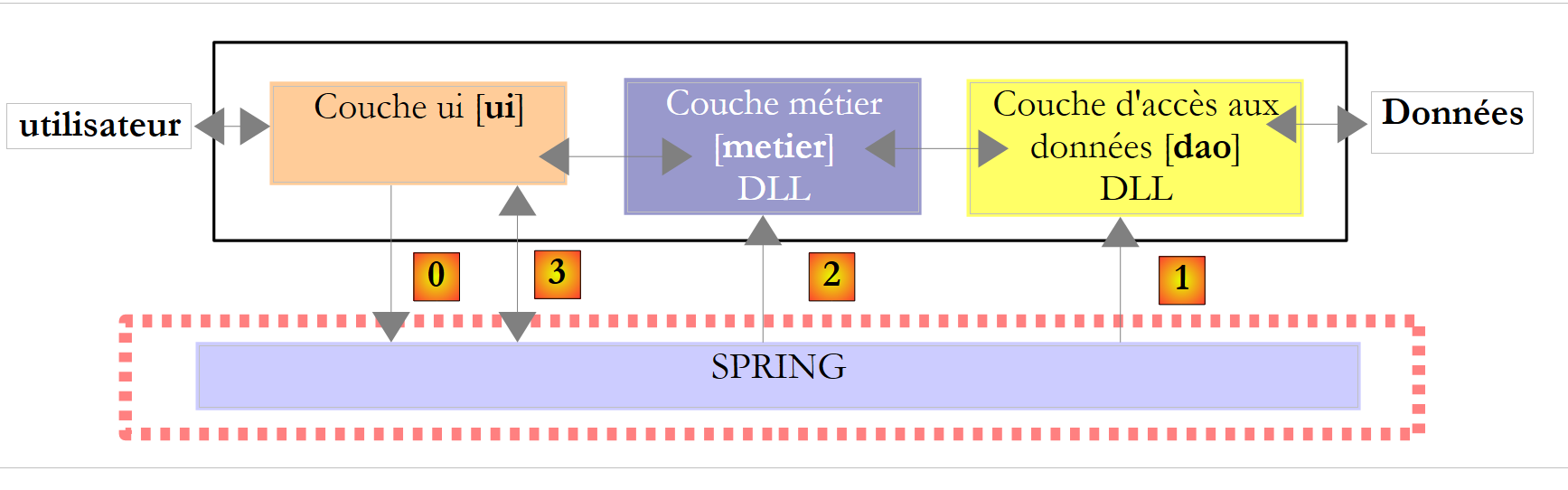 |
Above, the [ui] layer will ask Spring toinstantiate the [dao], [1], and [metier], [2] layers based on the information contained in a configuration file. The [ui] layer will then ask Spring [3] for a reference to the [metier] layer. This will be implemented in the [ui] layer with the following code:
            // we create the [metier and dao] layers
            IImpotMetier metier = null;
            try {
                // spring context
                IApplicationContext ctx = ContextRegistry.GetContext();
                // a reference is requested on the [metier] layer
                metier = (IImpotMetier)ctx.GetObject("metier");
            } catch (Exception e1) {
...
}
- Line 5: Spring instantiates the [dao] and [metier] layers
- line 7: retrieving a reference to the [metier] layer.
The line [5] above uses the configuration file [App.config] from the Visual Studio project. In a C# project, this file is used to configure the application. [App.config] is therefore not a Spring concept but a Visual Studio concept that Spring uses. Spring can use configuration files other than [App.config]. The solution presented here is therefore not the only one available.
Let’s create the [App.config] file using the Visual Studio wizard:
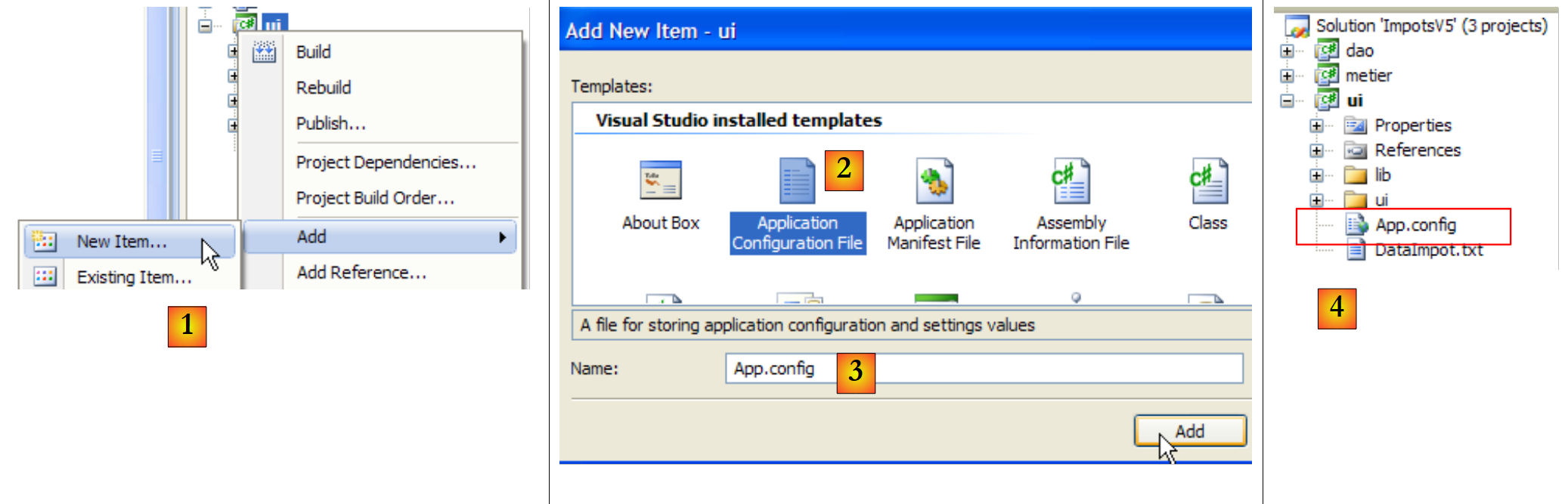 |
- in [1]: add a new item to the project
- in [2]: select "Application Configuration File"
- in [3]: [App.config] is the default name for this configuration file
- in [4]: the file [App.config] has been added to the project
The contents of the [App.config] file are as follows:
<?xml version="1.0" encoding="utf-8" ?>
<configuration>
</configuration>
[App.config] is a XML file. The project configuration is defined between the <configuration> tags. The configuration required for Spring is as follows:
<?xml version="1.0" encoding="utf-8" ?>
<configuration>

    <configSections>
        <sectionGroup name="spring">
            <section name="context" type="Spring.Context.Support.ContextHandler, Spring.Core" />
            <section name="objects" type="Spring.Context.Support.DefaultSectionHandler, Spring.Core" />
        </sectionGroup>
    </configSections>

    <spring>
        <context>
            <resource uri="config://spring/objects" />
        </context>
        <objects xmlns="http://www.springframework.net">
            <object name="dao" type="Dao.FileImpot, ImpotsV5-dao">
                <constructor-arg index="0" value="DataImpot.txt"/>
            </object>
            <object name="metier" type="Metier.ImpotMetier, ImpotsV5-metier">
                <constructor-arg index="0" ref="dao"/>
            </object>
        </objects>
    </spring>
</configuration>
- Lines 11–23: The section delimited by the <spring> tag is called the <spring> section group. You can create as many section groups as you want in [App.config].
- A section group contains sections: this is the case here:
- lines 12–14: the <spring/context> section
- lines 15-22: the <spring/objects> section
- Lines 4–9: The <configSections> section defines the list of handlers for the section groups present in [App.config].
- lines 5-8: defines the list of handlers for the sections of the <spring> group (name="spring").
- line 6: the handler for the <context> section of the <spring> group:
- name: name of the managed section
- type: name of the class managing the section in the form NomClasse, NomDLL.
- The <context> section of the <spring> group is managed by the class [Spring.Context.Support.ContextHandler], which can be found in DLL [Spring.Core.dll]
- Line 7: the handler for the <objects> section of the <spring> group
Lines 4–9 are standard in a [App.config] file with Spring. We simply copy them from one project to another.
- Lines 12–14: define the <spring/context> section.
- line 13: the <resource> tag is used to indicate where the file defining the classes that Spring must instantiate is located. These can be in [App.config] as shown here, but they can also be in another configuration file. The location of these classes is specified in the uri attribute of the <resource> tag:
- <resource uri="config://spring/objects> indicates that the list of classes to be instantiated is located in the file [App.config] (config:), in the //spring/objects section, c.a.d, within the <objects> tag of the <spring> tag.
- <resource uri="file://spring-config.xml"> would indicate that the list of classes to be instantiated is located in the file [spring-config.xml]. This file should be placed in the project’s runtime folders (bin/Release or bin/Debug). The simplest approach is to place it, as was done for the [DataImpot.txt] file, in the project root directory with the [Copy to output directory=always] property.
Lines 12–14 are standard in a [App.config] file with Spring. You simply copy them from one project to another.
- Lines 15–22: define the classes to be instantiated. This is where the specific configuration of an application takes place. The <objects> tag delimits the section defining the classes to be instantiated.
- Lines 16–18: define the class to be instantiated for the [dao] layer
- Line 16: Each object instantiated by Spring is enclosed in a <object> tag. This tag has a name attribute, which is the name of the instantiated object. It is through this attribute that the application requests a reference from Spring: "give me a reference to the object named dao." The type attribute defines the class to be instantiated in the form NomClasse, NomDLL. Thus, line 16 defines an object named "dao", an instance of the class "Dao."FileImpot" is located in the DLL "ImpotsV5-dao.dll". Note that the full class name (including the namespace) is provided and that the .dll suffix is not specified in the name of the DLL.
A class can be instantiated in two ways with Spring:
- via a specific constructor to which parameters are passed: this is what is done in lines 16–18.
- via the default constructor without parameters. The object is then initialized via its public properties: the <object> tag has <property> sub-tags to initialize these various properties. We do not have an example of this case here.
- (continued)
- line 16: the instantiated class is the FileImpot class. It has the following constructor:
public FileImpot(string fileName);
The constructor parameters are defined using <constructor-arg> tags.
- line 17: defines the first and only parameter of the constructor. The index attribute is the constructor parameter number, and the value attribute is its value: <constructor-arg index="i" value="valuei"/>
- Lines 19–21: define the class to be instantiated for the [metier] layer: the [Metier.ImpotMetier] class, which is located within the DLL [ImpotsV5-metier.dll].
- line 19: the instantiated class is the ImpotMetier class. This class has the following constructor:
public ImpotMetier(IImpotDao dao);
- (continued)
- Line 20: defines the first and only parameter of the constructor. In the example above, the constructor parameter dao is an object reference. In this case, within the <constructor-arg> tag, the ref attribute is used instead of the value attribute that was used for the [dao] layer: <constructor-arg index="i" ref="refi"/>. In the constructor above, the parameter dao represents an instance on the [dao] layer. This instance was defined by lines 16–18 of the configuration file. Thus, in line 20:
<constructor-arg index="0" ref="dao"/>
ref="dao" represents the Spring object "dao" defined by lines 16–18.
To summarize, the file [App.config]:
- instantiates the [dao] layer with the FileImpot class, which receives DataImpot.txt as a parameter (lines 16–18). The resulting object is named "dao"
- instantiates the [metier] layer with the ImpotMetier class, which receives the previous "dao" object as a parameter (lines 19–21).
All that remains is to use this Spring configuration file in the [ui] layer. To do this, we duplicate the [Dialogue.cs] class into [Dialogue2.cs] and make the latter the main class of the [ui] project:
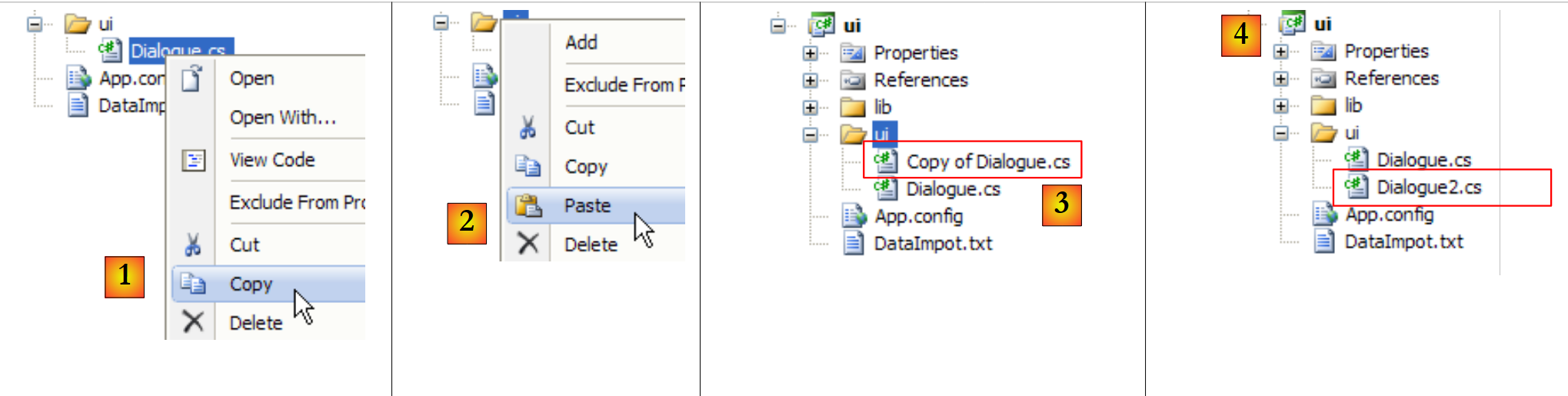 |
- in [1]: copy of [Dialogue.cs]
- into [2]: merge
- to [3]: a copy of [Dialogue.cs]
- in [4]: renamed to [Dialogue2.cs]
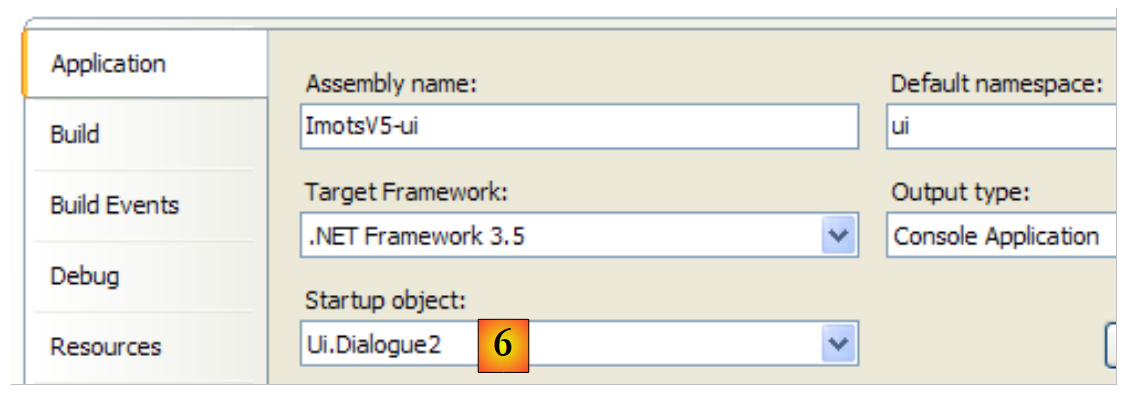 |
- in [6]: [Dialogue2.cs] is made the main class of the [ui] project.
The following code from [Dialogue.cs]:
            // we create the [metier and dao] layers
            IImpotMetier metier = null;
            try {
        // layer creation [job]
                metier = new ImpotMetier(new FileImpot("DataImpot.txt"));
            } catch (ImpotException e) {
                // error display
                string msg = e.InnerException == null ? null : String.Format(", Exception d'origine : {0}", e.InnerException.Message);
                Console.WriteLine("L'erreur suivante s'est produite : [Code={0},Message={1}{2}]", e.Code, e.Message, msg == null ? "" : msg);
                // program stop
                Environment.Exit(1);
            }
            // infinite loop
            while (true) {
...
becomes the following in [Dialogue2.cs]:
            // we create the [metier and dao] layers
            IApplicationContext ctx = null;
            try {
                // spring context
                ctx = ContextRegistry.GetContext();
            } catch (Exception e1) {
                // error display
                Console.WriteLine("Chaîne des exceptions : \n{0}", "".PadLeft(40, '-'));
                Exception e = e1;
                while (e != null) {
                    Console.WriteLine("{0}: {1}", e.GetType().FullName, e.Message);
                    Console.WriteLine("".PadLeft(40, '-'));
                    e = e.InnerException;
                }
                // program stop
                Environment.Exit(1);
            }
            // a reference is requested on the [metier] layer
            IImpotMetier metier = (IImpotMetier)ctx.GetObject("metier");
            // infinite loop
            while (true) {
....................................
- Line 2: IApplicationContext provides access to all objects instantiated by Spring. This object is called the application’s Spring context, or simply the application context. At this point, this context has not yet been initialized. The following try/catch block performs this initialization.
- line 5: the Spring configuration in [App.config] is read and processed. After this operation, if no exception occurred, all objects in the <objects> section have been instantiated:
- the Spring object "dao" is an instance on the [dao] layer
- the Spring object "metier" is an instance on the [metier] layer
- line 19: the [Dialogue2.cs] class requires a reference to the [metier] layer. This reference is requested from the application context. The IApplicationContext object provides access to Spring objects via their names (name attribute of the <object> tag in the Spring configuration). The returned reference is a reference to the generic type Object. We must cast the returned reference to the correct type, in this case the type of the [metier] layer interface: IImpotMetier.
If everything went well, after line 19, [Dialogue2.cs] has a reference to the [metier] layer. The code in lines 21 and beyond is that of the [Dialogue.cs] class already discussed.
- Lines 6–17: Handling the exception that occurs when the Spring configuration file cannot be fully processed. There may be various reasons for this: incorrect syntax in the configuration file itself, or the inability to instantiate one of the configured objects. In our example, the latter case would occur if the file DataImpot.txt from line 17 of [App.config] were not found in the project’s runtime directory.
The exception thrown on line 6 is a chain of exceptions where each exception has two properties:
- Message: the error message associated with the exception
- InnerException: the previous exception in the exception chain
The loop on lines 10–14 displays all exceptions in the chain in the following format: exception class and associated message.
When you run the [ui] project with a valid configuration file, you get the usual results:
Paramètres du calcul de l'Impot format: Married (o/n) NbEnfants Salary or nothing to stop :o 2 60000
Impot=4282 euros
When running project [ui] with a non-existent [DataImpotInexistant.txt] file,
            <object name="dao" type="Dao.FileImpot, ImpotsV5-dao">
                <constructor-arg index="0" value="DataImpotInexistant.txt"/>
            </object>
the following results are obtained:
- line 17: the original exception of type [FileNotFoundException]
- line 15: the [dao] layer wraps this exception in a [Entites.ImpotException] type
- line 9: the exception thrown by Spring because it failed to instantiate the object named "dao". During the process of creating this object, two other exceptions occurred earlier: those on lines 11 and 13.
- Because the object "dao" could not be created, the application context could not be created. This is the meaning of the exception on line 5. Previously, another exception, the one on line 7, had occurred.
- Line 3: the top-level exception, the last in the chain: a configuration error is reported.
From all this, we can conclude that it is the deepest exception—in this case, the one on line 17—that is often the most significant. Note, however, that Spring has retained the error message from line 17 and passed it up to the top-level exception on line 3 in order to identify the root cause of the error at the highest level.
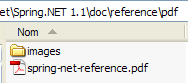
Spring alone deserves a book. We have only scratched the surface here. You can explore it further with the document [spring-net-reference.pdf], which can be found in the Spring installation folder:
 |
You can also read [http://tahe.developpez.com/dotnet/springioc], a Spring tutorial presented in a VB.NET context.