4. Spring 入门 JDBC
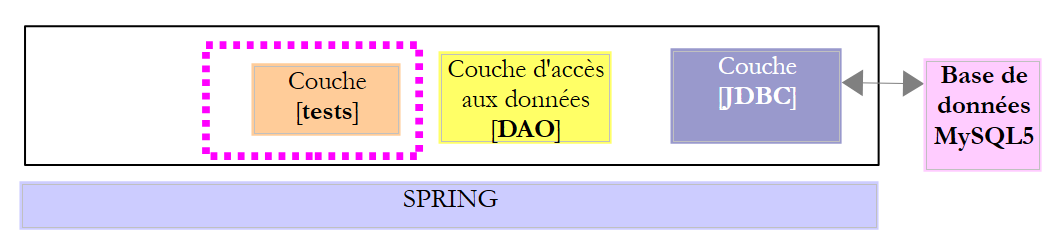
在本章中,我们将研究以下架构:
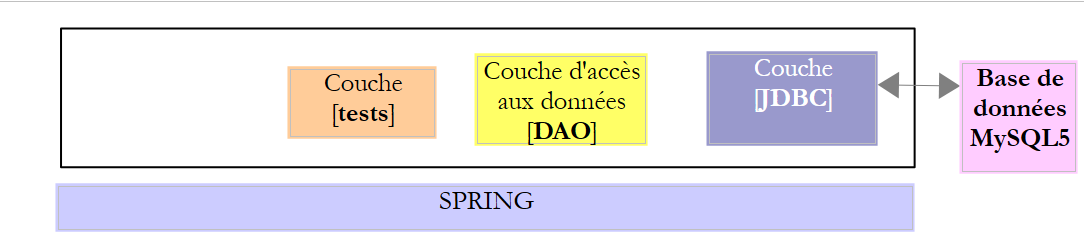 |
因此,这与之前的架构相同。我们将引入两项修改:
- 数据库将包含两张通过外键关系关联的表;
- [DAO]层将使用[Spring JDBC]库进行实现,该库为API和JDBC的管理提供了便利;
4.1. 搭建工作环境
使用 STS,导入位于 [<exemples>/spring-database-generic/spring-jdbc] 文件夹中的 [spring-jdbc-04] 项目
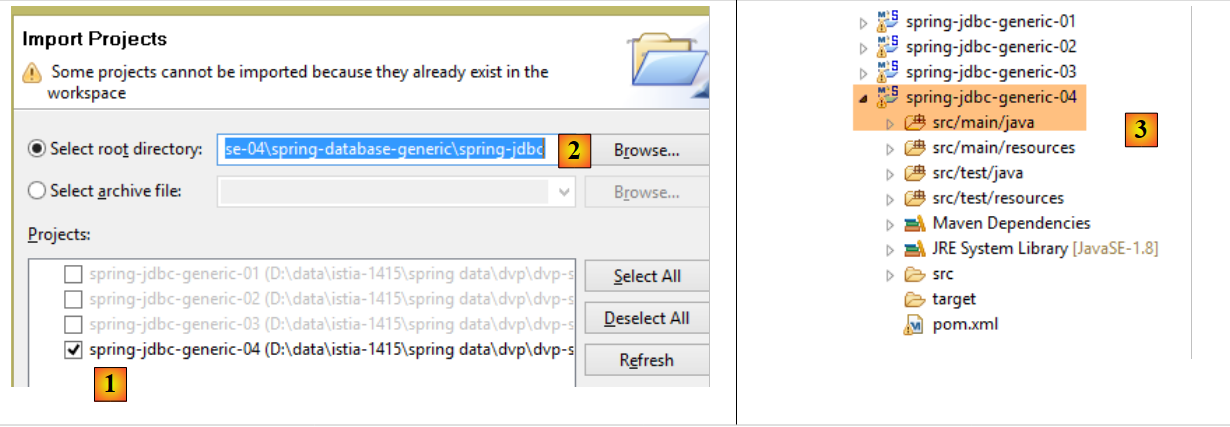 |
此外,我们需要使用客户端 [MyManager] 创建一个新的数据库 MySQL(参见第 3.1 节):
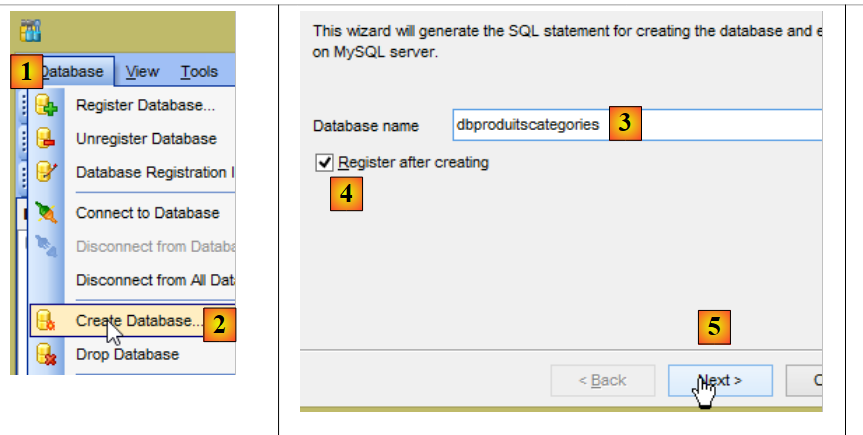 |
- 在 [3] 中,以下示例基于名为 [dbproduitscategories] 的 MySQL 数据库;
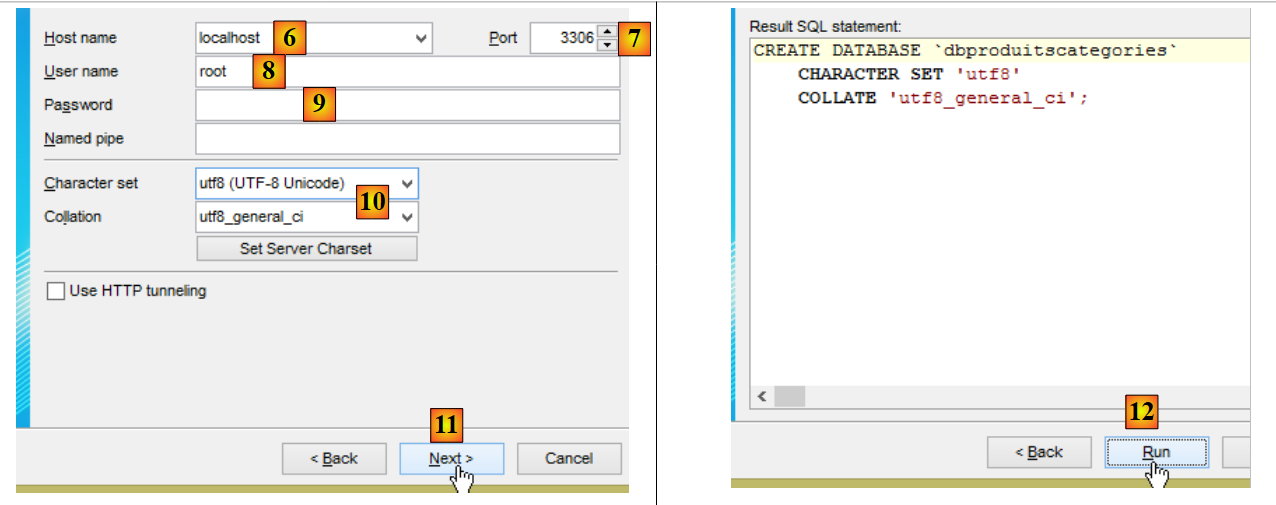 |
- 将用户密码设置为 root(本文档中该密码为 root);
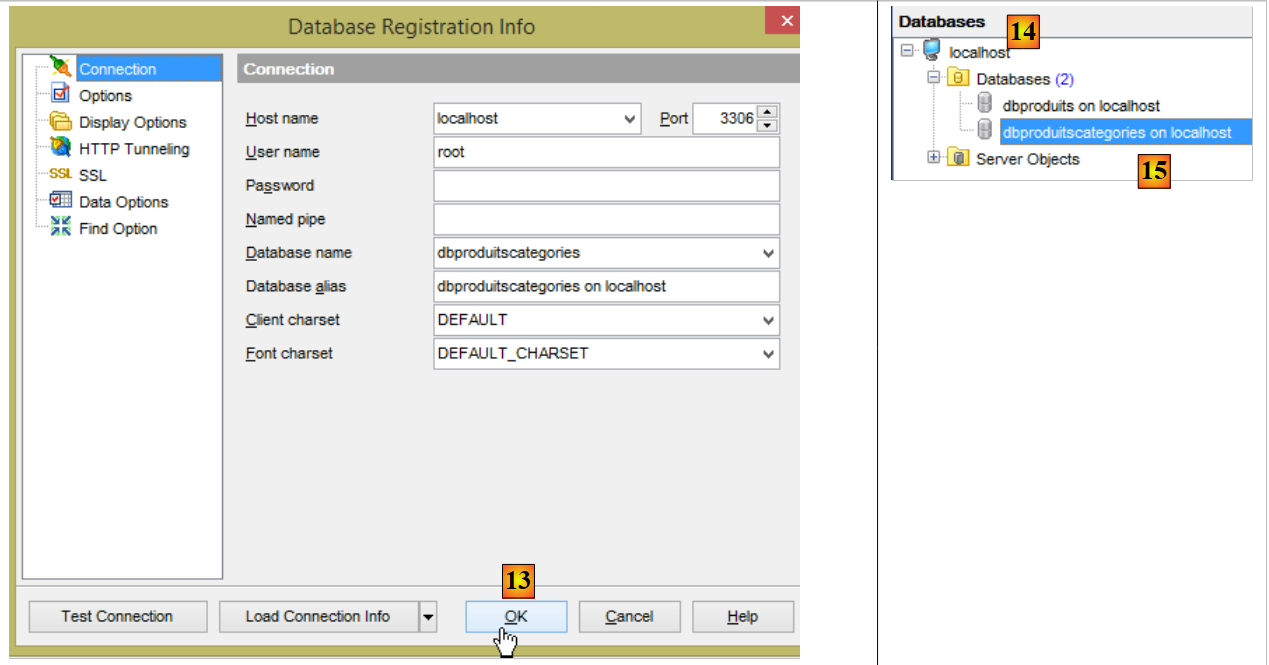 |
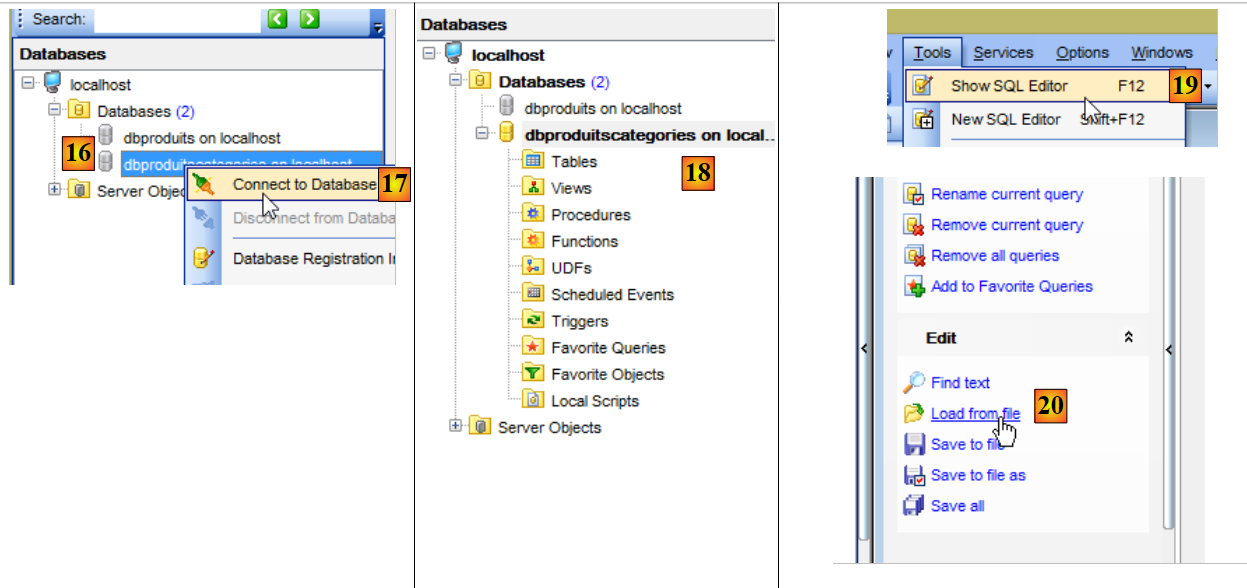 |
- 在 [18] 中,数据库 [dbproduitscategories] 已创建为空。通过脚本 SQL [19-20] 创建表并填充数据;
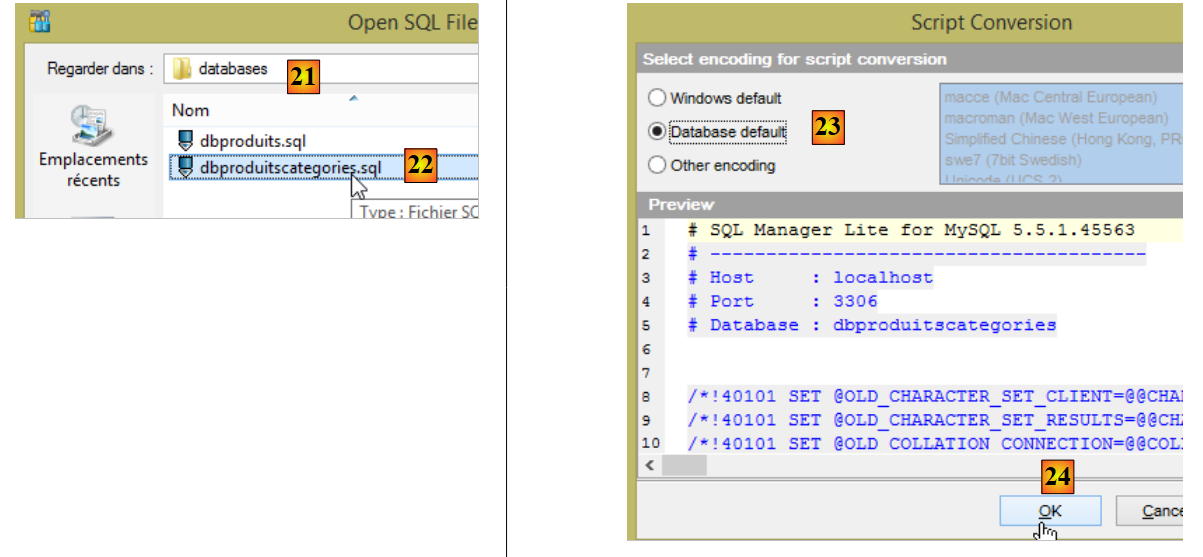 |
- 在 [21] 中,请定位到文件夹 [<exemples>/spring-database-config/mysql/databases];
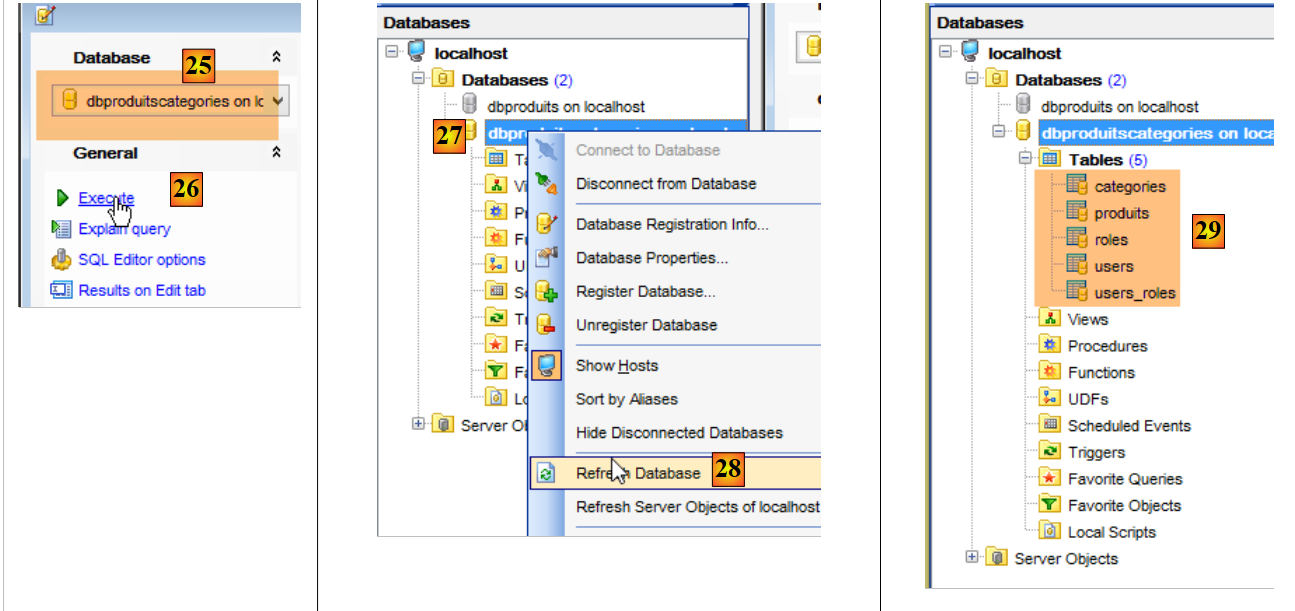 |
- 在 [25] 中,请确保您当前所在的是 [dbproduitscategories] 数据库,而非 [dbproduits] 数据库;
- 在 [29] 中,脚本 SQL 已创建了五个表。 [ROLES, USERS, USERS_ROLES] 表仅在处理为将 [dbproduitscategories] 数据库发布到 Web 上而构建的 Web 服务的安全性时才会使用;
4.2. 数据库 [dbproduitscategories]
数据库 [dbproduitscategories] 是之前研究过的 [dbproduits] 数据库的扩展。 在表 [PRODUITS] 中,产品的类别由一个没有特殊含义的编号标识,而在这里,该编号将成为表 [CATEGORIES] 上的外键。
[PRODUITS]表如下所示:
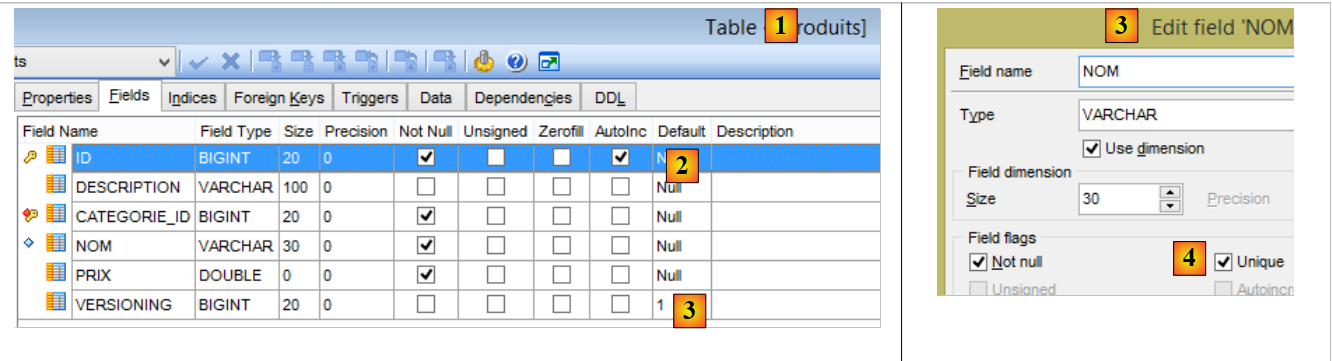 |
- [ID]:表 [2] 的自增主键;
- [NOM]:产品 [4] 的唯一名称;
- [PRIX]:产品的价格;
- [DESCRIPTION]:产品的描述;
- [VERSIONING] 是产品的版本号。其初始版本为 1 [3]。每次修改产品时,操作该表的代码都会递增其版本号;
- [CATEGORIE_ID]:表[CATEGORIES]的外键,用于标识产品所属的类别;
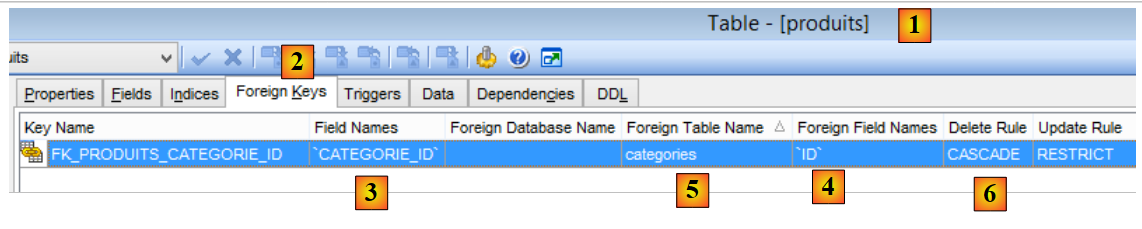 |
- 在 [1-3] 中,作为表 [PRODUITS] 的外键 [CATEGORIE_ID]。 它指向表 [CATEGORIES] 的列 [ID] [4-5];
- 当某分类被删除时,与其关联的所有产品也会被删除 [6]。这一点值得注意,因为它在构建利用 [dbproduitscategories] 数据库的 [DAO] 层时会被用到;
类别表 [CATEGORIES] 如下:
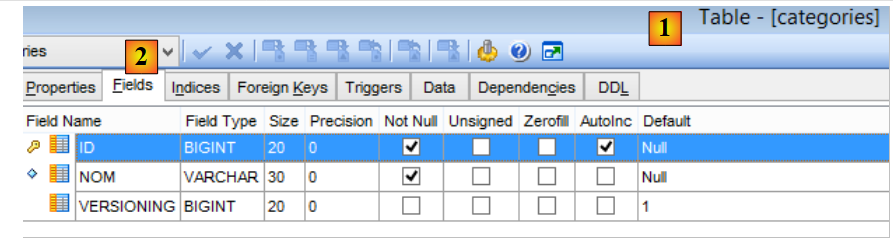 |
- [ID]:自增主键;
- [VERSIONING]:分类版本号;
- [NOM]:类别的唯一名称;
4.3. Eclipse 项目
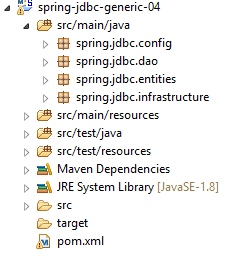 |
项目 [spring-jdbc-04] 实现了以下架构:
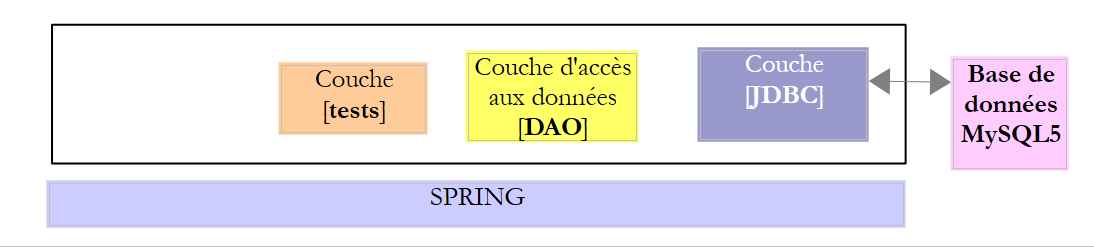 |
[spring-jdbc-04] 项目是一个由以下 [pom.xml] 文件配置的 Maven 项目:
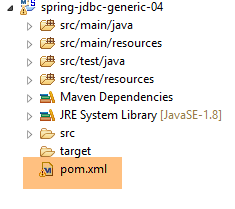 |
<?xml version="1.0" encoding="UTF-8"?>
<project xmlns="http://maven.apache.org/POM/4.0.0" xmlns:xsi="http://www.w3.org/2001/XMLSchema-instance"
    xsi:schemaLocation="http://maven.apache.org/POM/4.0.0 http://maven.apache.org/xsd/maven-4.0.0.xsd">
    <modelVersion>4.0.0</modelVersion>

    <groupId>dvp.spring.database</groupId>
    <artifactId>spring-jdbc-generic-04</artifactId>
    <version>0.0.1-SNAPSHOT</version>
    <packaging>jar</packaging>

    <name>spring-jdbc-generic-04</name>
    <description>Demo project for Spring JdbcTemplate</description>

    <parent>
        <groupId>org.springframework.boot</groupId>
        <artifactId>spring-boot-starter-parent</artifactId>
        <version>1.2.3.RELEASE</version>
        <relativePath /> <!-- 从存储库查找父级 -->
    </parent>

    <properties>
        <project.build.sourceEncoding>UTF-8</project.build.sourceEncoding>
        <java.version>1.8</java.version>
    </properties>

    <dependencies>
        <!-- SGBD 的配置 JDBC -->
        <dependency>
            <groupId>dvp.spring.database</groupId>
            <artifactId>generic-config-jdbc</artifactId>
            <version>0.0.1-SNAPSHOT</version>
        </dependency>
        <!-- Spring JdbcTemplate -->
        <dependency>
            <groupId>org.springframework.boot</groupId>
            <artifactId>spring-boot-starter-jdbc</artifactId>
        </dependency>
    </dependencies>

    <build>
        <plugins>
            <plugin>
                <groupId>org.apache.maven.plugins</groupId>
                <artifactId>maven-surefire-plugin</artifactId>
                <version>2.18.1</version>
            </plugin>
        </plugins>
    </build>

</project>
- 第 28-32 行:该项目依赖于 [mysql-config-jdbc] 项目,该项目配置了 JDBC 层;
- 第34-37行:[spring-boot-starter-jdbc]构建项引入了Spring库JDBC;
最终,依赖关系如下:
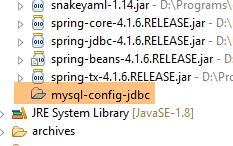 |
4.4. Spring 配置
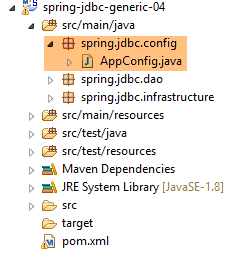 |
用于配置 Spring 项目的 [AppConfig] 类如下:
package spring.jdbc.config;

import generic.jdbc.config.ConfigJdbc;

import org.apache.tomcat.jdbc.pool.DataSource;
import org.springframework.context.annotation.Bean;
import org.springframework.context.annotation.ComponentScan;
import org.springframework.context.annotation.Configuration;
import org.springframework.context.annotation.Import;
import org.springframework.jdbc.core.namedparam.NamedParameterJdbcTemplate;
import org.springframework.jdbc.core.simple.SimpleJdbcInsert;
import org.springframework.jdbc.datasource.DataSourceTransactionManager;
import org.springframework.transaction.PlatformTransactionManager;
import org.springframework.transaction.annotation.EnableTransactionManagement;

@Configuration
@ComponentScan(basePackages = { "spring.jdbc.dao" })
@EnableTransactionManagement
@Import({ generic.jdbc.config.ConfigJdbc.class })
public class AppConfig {

    // 数据源
    @Bean
    public DataSource dataSource() {
        // 数据源 TomcatJdbc
        DataSource dataSource = new DataSource();
        // 访问配置JDBC
        dataSource.setDriverClassName(ConfigJdbc.DRIVER_CLASSNAME);
        dataSource.setUsername(ConfigJdbc.USER_DBPRODUITSCATEGORIES);
        dataSource.setPassword(ConfigJdbc.PASSWD_DBPRODUITSCATEGORIES);
        dataSource.setUrl(ConfigJdbc.URL_DBPRODUITSCATEGORIES);
        // 初始打开的连接
        dataSource.setInitialSize(5);
        // 结果
        return dataSource;
    }

    // 事务管理器
    @Bean
    public PlatformTransactionManager transactionManager(DataSource dataSource) {
        return new DataSourceTransactionManager(dataSource);
    }

    // JdbcTemplate
    @Bean
    public NamedParameterJdbcTemplate namedParameterJdbcTemplate(DataSource dataSource) {
        return new NamedParameterJdbcTemplate(dataSource);
    }

    // 产品插入
    @Bean
    public SimpleJdbcInsert simpleJdbcInsertProduit(DataSource dataSource) {
        return new SimpleJdbcInsert(dataSource).withTableName(ConfigJdbc.TAB_PRODUITS).usingGeneratedKeyColumns(
                ConfigJdbc.TAB_PRODUITS_ID);
    }

    // 添加类别
    @Bean
    public SimpleJdbcInsert simpleJdbcInsertCategorie(DataSource dataSource) {
        return new SimpleJdbcInsert(dataSource).withTableName(ConfigJdbc.TAB_CATEGORIES).usingGeneratedKeyColumns(
                ConfigJdbc.TAB_CATEGORIES_ID);
    }

}
- 第 16 行:该类是一个 Spring 配置类;
- 第 17 行:将扫描 [spring.jdbc.dao] 包,以查找除 [AppConfig] 类中已有的组件之外的其他 Spring 组件。其中将包含实现 [DAO] 层的组件;
- 第 18 行:我们将不自行管理事务,而是交由 Spring JDBC 负责。唯一需要做的是,在需要在事务中执行的方法上添加 Spring [@Transactional] 注解。 第 18 行确保该注解会被处理,而非被忽略。事务管理由项目 Spring JDBC 的某个依赖项负责,该项目通过文件 [pom.xml] 导入;
- 第 19 行:导入 [mysql-config-jdbc] 项目中 [generic.jdbc.config.ConfigJdbc] 类中已定义的 Bean;
- 第 23-36 行:引入示例 [spring-jdbc-02] 中定义的数据源 [tomcat-jdbc];
- 第 40-42 行:与之前定义的数据源关联的事务管理器。该 Bean 必须命名为 [transactionManager],因为注解 [@EnableTransactionManagement] 使用的正是此名称。 [DataSourceTransactionManager] 处理器由 Spring 库 JDBC 引入(第 12 行);
- 第 45-48 行:[namedParameterJdbcTemplate] Bean,[DAO] 层的实现将基于此 Bean。 该 Bean 由 Spring 库 JDBC 引入(第 10 行)。该 Bean 同样与之前定义的数据源相关联(第 47 行);
- 第 51-55 行:Bean [simpleJdbcInsertProduit](名称可自定义)将用于向表 [PRODUITS] 中插入产品并获取生成的主键。使用的各项参数如下:
- [dataSource]:第24-36行中的数据源[tomcat-jdbc];
- [ConfigJdbc.TAB_PRODUITS]:表 [PRODUITS];
- [ConfigJdbc.TAB_CATEGORIES_ID]:表 [PRODUITS] 的主键列。请注意,对于 PostgreSQL,该列的名称必须为小写;
- 第 58-62 行:将使用 Bean [simpleJdbcInsertCategorie] 向表 [CATEGORIES] 中插入一个类别,并获取生成的主键;
4.5. 项目的异常
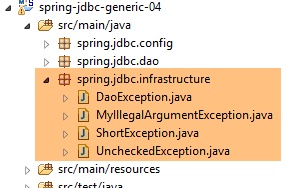 |
我们在项目 [spring-jdbc-03] 中已经见过类 [UncheckedException, DaoException, ShortException]。现在我们添加一个新的:
package spring.jdbc.infrastructure;

public class MyIllegalArgumentException extends UncheckedException {

    private static final long serialVersionUID = 1L;

    // 制造商
    public MyIllegalArgumentException() {
        super();
    }

    public MyIllegalArgumentException(int code, Throwable e, String className) {
        super(code, e, className);
    }

}
- 类 [MyIllegalArgumentException] 继承自类 [UncheckedException],因此属于非受控类。它将用于报告对 [DAO] 层方法的调用参数不正确的情况。 未将其命名为 [IllegalArgumentException],是因为该异常已在 JDK 中存在,且这有时会导致编译器生成错误的 [import];
4.6. 项目实体
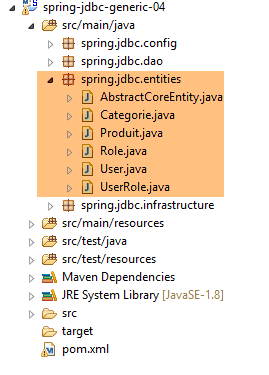 |
[spring.jdbc.entities] 包中的类是 [dbproduitscategories] 数据库表中各行的映射。目前我们将忽略 [USERS, ROLES, USERS_ROLE] 表的映射。
所有实体都继承自父类 [AbstractCoreEntity]:
package spring.jdbc.entities;

public abstract class AbstractCoreEntity {
    // 房产
    protected Long id;
    protected Long version;

    // 制造商
    public AbstractCoreEntity() {

    }

    public AbstractCoreEntity(Long id, Long version) {
        this.id = id;
        this.version = version;
    }

    public AbstractCoreEntity(AbstractCoreEntity entity) {
        this.id = entity.id;
        this.version = entity.version;
    }

    public void setAbstractCoreEntity(AbstractCoreEntity entity) {
        this.id = entity.id;
        this.version = entity.version;
    }

    // ------------------------------------------------------------
    // 重新定义 [equals] 和 [hashcode]
    @Override
    public int hashCode() {
        return (id != null ? id.hashCode() : 0);
    }

    @Override
    public boolean equals(Object entity) {
        if (!(entity instanceof AbstractCoreEntity)) {
            return false;
        }
        String class1 = this.getClass().getName();
        String class2 = entity.getClass().getName();
        if (!class2.equals(class1)) {
            return false;
        }
        AbstractCoreEntity other = (AbstractCoreEntity) entity;
        return id != null && other.id != null && id.equals(other.id);
    }

    // 获取器和设置器
...
}
- 第5行:字段[id]将与列[ID](即表的主键)建立关联;
- 第 6 行:字段 [version] 将与表中的列 [VERSIONING] 关联;
- 第8-26行:用于构建或初始化[AbstractCoreEntity]对象的各种构造函数和方法;
- 第35-47行:方法[equals]规定,若两个[AbstractCoreEntity]对象具有相同的[id]字段,则它们相等。 此处需注意,[AbstractCoreEntity]对象将表示表中的行,其中[id]是主键,因此不可能存在两个具有相同[id]的行;
- 第30-33行:一个[hashCode]的实例;
类 [Produit] 将是表 [PRODUITS] 中某行数据的映射:
package spring.jdbc.entities;

import com.fasterxml.jackson.annotation.JsonFilter;

@JsonFilter("jsonFilterProduit")
public class Produit extends AbstractCoreEntity {
    // 属性
    private String nom;
    private Long idCategorie;
    private double prix;
    private String description;
    private Categorie categorie;

    // 构造函数
    public Produit() {

    }

    public Produit(Long id, Long version, String nom, Long idCategorie, double prix, String description,
            Categorie categorie) {
        super(id, version);
        this.nom = nom;
        this.idCategorie = idCategorie;
        this.prix = prix;
        this.description = description;
        this.categorie = categorie;
    }

    // 签名
    public String toString() {
        return String.format("[id=%s, version=%s, nom=%s, prix=10.2f, desc=%s, idCategorie=%s]", id, version, nom, prix,
                description, idCategorie);
    }

    // 获取器和设置器
...
}
- 第 6 行:类 [Produit] 继承自类 [AbstractCoreEntity];
- 第 8-12 行:字段 [id, version, nom, idCategorie, prix, description] 是表 [PRODUITS] 中列 [ID, VERSIONING, NOM, CATEGORIE_ID, PRIX, DESCRIPTION] 的映射;
- 第12行:主键为[idCategorie]的[Categorie]类型对象。该字段是否填写视具体情况而定。 当该字段有值时,称为长版本产品 [LongProduit];否则称为短版本产品 [ShortProduit];
- 第5行:一个过滤器jSON。需注意,项目[mysql-config-jdbc]包含库jSON。 需要该过滤器是因为字段 [categorie] 可能有值也可能为空。在此情况下,产品的 jSON 表示形式会有所不同。 为处理这两种情况,需配置第 5 行中的 [jsonFilterProduit] 过滤器。jSON 过滤器可动态指定需从 jSON 表示中排除的字段。 当检测到字段 [categorie] 未填写时,将将其从产品表示 jSON 中排除;
类 [Categorie] 是表 [CATEGORIES] 中某行数据的映射:
package spring.jdbc.entities;

import java.util.ArrayList;
import java.util.List;

import com.fasterxml.jackson.annotation.JsonFilter;

@JsonFilter("jsonFilterCategorie")
public class Categorie extends AbstractCoreEntity {

    // 属性
    private String nom;
    public List<Produit> produits;

    // 构造函数
    public Categorie() {

    }

    public Categorie(Long id, Long version, String nom, List<Produit> produits) {
        super(id, version);
        this.nom = nom;
        this.produits = produits;
    }

    // 签名
    public String toString() {
        return String.format("[id=%s, version=%s, nom=%s]", id, version, nom);
    }

    // 方法
    public void addProduit(Produit produit) {
        // 添加产品
        if (produits == null) {
            produits = new ArrayList<Produit>();
        }
        if (produit != null) {
            // 正在添加产品
            produits.add(produit);
            // 设置其类别
            produit.setCategorie(this);
            produit.setIdCategorie(this.id);
        }
    }

    // 获取器和设置器
...
}
- 第 9 行:类 [Categorie] 继承自类 [AbstractCoreEntity];
- 第 12 行:字段 [id, version, nom] 是表 [CATEGORIES] 中列 [ID, VERSIONING, NOM] 的映射;
- 第13行:字段[produits]表示该类别的商品列表。该字段并非总是被填充。当未填充时,称为短版本类别[ShortCategorie];否则称为长版本类别[LongCategorie];
- 第32-44行:方法[addProduit]用于向该类别添加产品(第39行),并在所添加的产品中设置其所属类别的特征(idCategorie和categorie);
- 第 8 行:一个名为 jSON 的过滤器。当库 jSON 需要对对象 [Categorie] 进行序列化/反序列化时,必须向其指定如何处理名为 [jsonFilterCategorie] 的过滤器;
4.7. Idao<T> 接口
 |
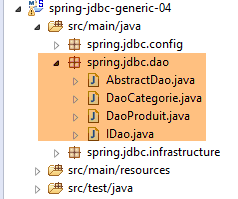 |
[DAO] 层的 [IDao] 接口具有以下签名:
package spring.jdbc.dao;

import java.util.List;

import spring.jdbc.entities.AbstractCoreEntity;

public interface IDao<T extends AbstractCoreEntity> {

    // 所有 T 实体的列表
    public List<T> getAllShortEntities();

    public List<T> getAllLongEntities();

    // 特定实体的列表 - 简短版本
    public List<T> getShortEntitiesById(Iterable<Long> ids);

    public List<T> getShortEntitiesById(Long... ids);

    public List<T> getShortEntitiesByName(Iterable<String> names);

    public List<T> getShortEntitiesByName(String... names);

    // 特定实体的列表 - 长版本
    public List<T> getLongEntitiesById(Iterable<Long> ids);

    public List<T> getLongEntitiesById(Long... ids);

    public List<T> getLongEntitiesByName(Iterable<String> names);

    public List<T> getLongEntitiesByName(String... names);

    // 更新多个实体
    public List<T> saveEntities(Iterable<T> entities);

    public List<T> saveEntities(@SuppressWarnings("unchecked") T... entities);

    // 删除所有实体
    public void deleteAllEntities();

    // 删除多个实体
    public void deleteEntitiesById(Iterable<Long> ids);

    public void deleteEntitiesById(Long... ids);

    public void deleteEntitiesByName(Iterable<String> names);

    public void deleteEntitiesByName(String... names);

    public void deleteEntitiesByEntity(Iterable<T> entities);

    public void deleteEntitiesByEntity(@SuppressWarnings("unchecked") T... entities);
}
- 第 7 行:这里有一个由类型 T 参数化的 [IDao] 接口,且附带一个条件:该类型必须继承自类 [AbstractCoreEntity] 或实现接口 [AbstractCoreEntity]。 关键字 [extends] 适用于这两种情况。在此,T 将由类型 [Produit] 或类型 [Categorie] 实例化。 事实上,我们很快就会发现,对类型 [Produit] 和 [Categorie] 执行的操作(插入、修改、删除、选择)是相同的。因此,将这些方法整合到一个通用接口中似乎是合乎逻辑的;
- 根据具体情况,[LongEntity] 和 [ShortEntity] 表示不同的场景:
- 当 T 为类型 [Produit] 时:
- [ShortEntity] 是未填充其 [Categorie categorie] 字段的产物;
- [LongEntity] 是其 [Categorie categorie] 字段已填写的产物;
- 当 T 为类型 [Categorie] 时:
- [ShortEntity] 是未填写 [List<Produit> produits] 字段的类别;
- [LongEntity] 是其 [List<Produit> produits] 字段已填写的产品;
- 当 T 为类型 [Produit] 时:
因此,我们拥有一个包含19个方法的丰富接口。其中大部分方法存在重复。以方法 [getShortEntitiesById] 为例:
    public List<T> getShortEntitiesById(Iterable<Long> ids);

    public List<T> getShortEntitiesById(Long... ids);
- 第1行和第3行:参数是需要生成简短版本的实体的主键列表。该列表以两种不同形式呈现:
- 第 1 行:一个实现 [Iterable<Long>] 接口的列表。 类型 [List<Long>] 实现了该接口,但还有许多其他类型。如果我们使用 [List<Long> ids],对于我们的示例来说就足够了,但这会迫使示例中的用户在参数类型与预期不完全一致时进行转换;
- 第 3 行:遗憾的是,Long[] 类型并未实现 [Iterable<Long>] 接口。 在这种情况下,我们将使用第3行的版本。形式参数 [Long... ids](3个点)既可以接收数组的值,也可以接收一组ID的值:getShortEntitiesById(id1, id2, ...);
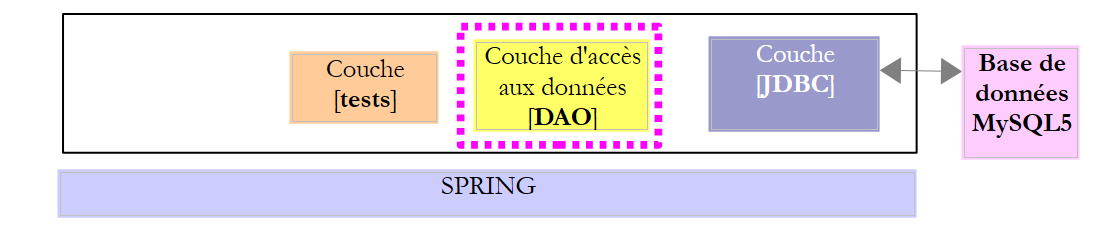
正是这个接口 IDao<T> 将由以下架构实现:
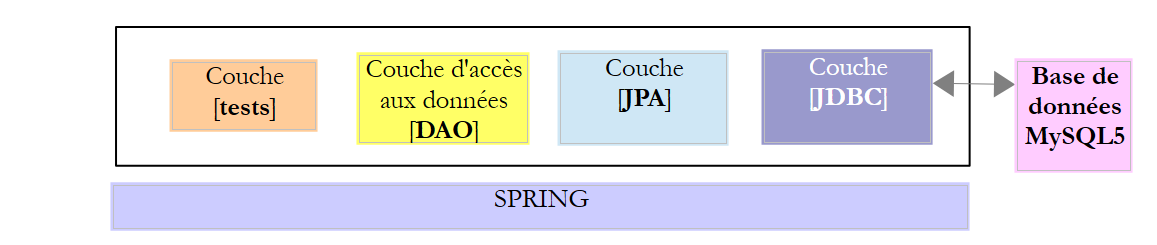 |
其中,[JPA]层(Java Persistence API)将插入在[DAO]层与JDBC驱动程序(属于SGBD)之间。 这将使我们能够为这两种架构建立一个通用的测试层。在两种情况下,[DAO]层都将提供两个接口:
- IDao<产品>,用于访问表 [PRODUITS];
- IDao<类别>,用于访问表 [CATEGORIES];
4.8. IDao<T> 接口的实现
|
- 接口 IDao<Product> 由类 [DaoProduit] 实现;
- 接口 IDao<Categorie> 由类 [DaoCategorie] 实现;
类 [DaoProduit] 和 [DaoCategorie] 均继承自以下抽象类 [AbstractDao] :
package spring.jdbc.dao;

import java.util.ArrayList;
import java.util.List;

import org.springframework.beans.factory.annotation.Autowired;
import org.springframework.beans.factory.annotation.Qualifier;
import org.springframework.transaction.annotation.Transactional;

import spring.jdbc.entities.AbstractCoreEntity;
import spring.jdbc.infrastructure.MyIllegalArgumentException;

import com.google.common.collect.Lists;

public abstract class AbstractDao<T extends AbstractCoreEntity> implements IDao<T> {

    // 插入
    @Autowired
    @Qualifier("maxPreparedStatementParameters")
    protected int maxPreparedStatementParameters;

    // 本地
    protected String simpleClassName = getClass().getSimpleName();

    @Override
    @Transactional(readOnly = true)
    public List<T> getShortEntitiesById(Iterable<Long> ids) {
        // 参数有效性
        List<T> entities = checkNullOrEmptyArgument(true, ids);
        if (entities != null) {
            return entities;
        }
        // 分批获取
        entities = new ArrayList<T>();
        int taille = maxPreparedStatementParameters;
        List<Long> listIds = Lists.newArrayList(ids);
        int nbIds = listIds.size();
        for (int i = 0; i < nbIds; i += taille) {
            int limit = Math.min(nbIds, i + taille);
            entities.addAll(getShortEntitiesById(listIds.subList(i, limit)));
        }
        // 结果
        return entities;
    }

    @Override
    @Transactional(readOnly = true)
    public List<T> getShortEntitiesById(Long... ids) {
        // 参数有效性
        List<T> entities = checkNullOrEmptyArgument(true, ids);
        if (entities != null) {
            return entities;
        }
        // 结果
        return getShortEntitiesById((Iterable<Long>) Lists.newArrayList(ids));
    }

    @Override
    @Transactional(readOnly = true)
    public List<T> getShortEntitiesByName(Iterable<String> names) {
    ...
    }

    @Override
    @Transactional(readOnly = true)
    public List<T> getShortEntitiesByName(String... names) {
    ...
    }

    @Override
    @Transactional(readOnly = true)
    public List<T> getLongEntitiesById(Iterable<Long> ids) {
    ...
    }

    @Override
    @Transactional(readOnly = true)
    public List<T> getLongEntitiesById(Long... ids) {
    ...
    }

    @Override
    @Transactional(readOnly = true)
    public List<T> getLongEntitiesByName(Iterable<String> names) {
    ...
    }

    @Override
    @Transactional(readOnly = true)
    public List<T> getLongEntitiesByName(String... names) {
    ...
    }

    @Override
    @Transactional
    public List<T> saveEntities(Iterable<T> entities) {
    ...
    }

    @Override
    @Transactional
    public List<T> saveEntities(@SuppressWarnings("unchecked") T... entities) {
    ...
    }

    @Override
    public void deleteEntitiesById(Iterable<Long> ids) {
    ...
    }

    @Override
    public void deleteEntitiesById(Long... ids) {
    ...
    }

    @Override
    public void deleteEntitiesByName(Iterable<String> names) {
    ...
    }

    @Override
    public void deleteEntitiesByName(String... names) {
    ...
    }

    @Override
    public void deleteEntitiesByEntity(Iterable<T> entities) {
    ...
    }

    @Override
    public void deleteEntitiesByEntity(@SuppressWarnings("unchecked") T... entities) {
    ...
    }

    protected void deleteEntitiesByEntity(List<T> entities) {
    ...
    }

    @Override
    @Transactional(readOnly = true)
    public abstract List<T> getAllShortEntities();

    @Override
    @Transactional(readOnly = true)
    public abstract List<T> getAllLongEntities();

    @Override
    public abstract void deleteAllEntities();

    // 私有方法 ----------------------------------------------
    private <T2> List<T> checkNullOrEmptyArgument(boolean checkEmpty, Iterable<T2> elements) {
...
    }

    @SuppressWarnings("unchecked")
    private <T2> List<T> checkNullOrEmptyArgument(boolean checkEmpty, T2... elements) {
    ...
    }

    // 受保护的方法 ----------------------------------------------
    abstract protected List<T> getShortEntitiesById(List<Long> ids);

    abstract protected List<T> getShortEntitiesByName(List<String> names);

    abstract protected List<T> getLongEntitiesById(List<Long> ids);

    abstract protected List<T> getLongEntitiesByName(List<String> names);

    abstract protected List<T> saveEntities(List<T> entities);

    abstract protected void deleteEntitiesById(List<Long> ids);

    abstract protected void deleteEntitiesByName(List<String> names);

}
- 第 15 行:类 [AbstractDao] 是抽象类(关键字 abstract)。因此,它无法被实例化,只能被派生。该类具有以下几个作用:
- 确定每个方法所处的事务类型;
- 尽可能让接口 [IDao<Produit>] 和 [IDao<Categorie>] 的两个实现具有最大程度的共通性。这主要涉及对参数有效性的验证。不接受 null 类型的参数,也不接受空列表;
- 将参数类型 T... params 和 Iterable<T> params 统一为单一类型:List<T> params;
- 一旦工作涉及两个接口中的任一个,立即将其委托给子类;
得益于类 [AbstractDao] 对不同方法参数的统一处理,子类 [DaoProduit] 和 [DaoCategorie] 只需实现 10 个方法,而非 19 个:
    // 由子类实现的方法 ----------------------------------------------
    abstract protected List<T> getShortEntitiesById(List<Long> ids);

    abstract protected List<T> getShortEntitiesByName(List<String> names);

    abstract protected List<T> getLongEntitiesById(List<Long> ids);

    abstract protected List<T> getLongEntitiesByName(List<String> names);

    abstract protected List<T> saveEntities(List<T> entities);

    abstract protected void deleteEntitiesById(List<Long> ids);

    abstract protected void deleteEntitiesByName(List<String> names);

    @Override
    @Transactional(readOnly = true)
    public abstract List<T> getAllShortEntities();

    @Override
    @Transactional(readOnly = true)
    public abstract List<T> getAllLongEntities();

    @Override
public abstract void deleteAllEntities();
下面我们来看一下类 [AbstractDao] 中的几个方法。
方法 [getShortEntitiesById]
该方法旨在根据给定的主键获取实体的简短版本。
    // 注入
    @Autowired
    @Qualifier("maxPreparedStatementParameters")
    protected int maxPreparedStatementParameters;

    // 局部
    protected String simpleClassName = getClass().getSimpleName();

    @Override
    @Transactional(readOnly = true)
    public List<T> getShortEntitiesById(Iterable<Long> ids) {
    ...
}
- 第2-4行:注入在配置文件[ConfigJdbc]中定义的Bean [maxPreparedStatementParameters],该配置文件用于配置特定SGBD的JDBC层:
    // [PreparedStatement] 的最大参数数
    public final static int MAX_PREPAREDSTATEMENT_PARAMETERS = 10000;

    @Bean(name = "maxPreparedStatementParameters")
    public int maxPreparedStatementParameters() {
        return MAX_PREPAREDSTATEMENT_PARAMETERS;
}
- 第 1-7 行:定义了 Bean [maxPreparedStatementParameters],该 Bean 将确定可传递给类型 [PreparedStatement] 的参数最大数量。 而 SGBD 和 MySQL 则不存在此需求,它们接受 [PreparedStatement] 类型的 10000 个参数。 在使用 SGBD 和 SQL 服务器进行测试时,系统抛出异常,指出类型 [PreparedStatement] 的最大参数数量为 2100。 因此,该数值已成为各 SGBD 配置中的一个参数。它必须被放置在每个 SGBD 的 [sgbd-config-jdbc] 配置项目中;
让我们回到 [getShortEntitiesById] 方法的代码:
    // 注入
    @Autowired
    @Qualifier("maxPreparedStatementParameters")
    protected int maxPreparedStatementParameters;

    // 本地
    protected String simpleClassName = getClass().getSimpleName();

    @Override
    @Transactional(readOnly = true)
    public List<T> getShortEntitiesById(Iterable<Long> ids) {
    ...
}
- 第 7 行:类名。用作异常类 [DaoException] 构造函数之一的参数;
- 第 10 行:注解 [@Transactional(readOnly = true)] 表明该方法必须在只读事务中执行。 鉴于该方法仅执行读取操作,且失败时无需回滚任何内容,此类事务的必要性值得商榷。这是[Spring Data]库的作者提出的建议,并解释了原因。我采纳了他的建议;
该方法的主体代码如下:
    @Override
    @Transactional(readOnly = true)
    public List<T> getShortEntitiesById(Iterable<Long> ids) {
        // 参数有效性
        List<T> entities = checkNullOrEmptyArgument(true, ids);
        if (entities != null) {
            return entities;
        }
...
}
- 第 5 行:通过以下方法验证参数 [ids] 的有效性:
    private <T2> List<T> checkNullOrEmptyArgument(boolean checkEmpty, Iterable<T2> elements) {
        // 元素为空?
        if (elements == null) {
            throw new MyIllegalArgumentException(222, new NullPointerException("L'argument ne peut être null"), simpleClassName);
        }
        // 元素为空?
        if (!elements.iterator().hasNext()) {
            if (checkEmpty) {
                throw new MyIllegalArgumentException(223, new RuntimeException("l'argument ne peut être une liste vide"),
                        simpleClassName);
            } else {
                return new ArrayList<T>();
            }
        }
        // 默认结果
        return null;
}
- 第 1 行:方法 [checkNullOrEmptyArgument] 是一个由类型 <T2> 参数化的泛型方法。T2 是作为方法第二个参数传递的元素的类型。 这可能是 [Long, String, AbstractCoreEntity];
- 第 1 行:方法 [checkNullOrEmptyArgument] 接受两个参数:
- [Iterable<T2> elements]:待测试的参数;
- [checkEmpty]:若需验证前一个参数是否为非空列表,则该参数为真;
- 第4-6行:验证参数[elements]是否不属于null。若不满足,则抛出类型为[MyIllegalArgumentException]的异常;
- 第 8-15 行:如果列表为空,且需要验证其非空,则抛出类型为 [MyIllegalArgumentException] 的异常;
- 第 13 行:如果列表为空,且无需验证其非空性,则返回一个包含类型 T 元素的空列表。接口 [Iterable<T2>] 提供了一个方法 [iterator()],用于遍历实现该接口的列表中的元素。 该迭代器有两个有用的方法:
- [itérateur].hasNext():若列表中仍有待处理的元素则返回 true,否则返回 false;
- [iterateur].next():返回列表中的当前元素,并向前移动一个元素;
- 最终,
- 如果参数 [T2... elements] 是 null 或为空,则抛出类型为 [MyIllegalArgumentException] 的异常;
- 如果参数 [T2... elements] 是一个空列表且该操作合法,则返回一个包含类型 T 元素的空列表;
当待测试的参数类型为 [T2... elements] 时,存在一个类似的方法:
@SuppressWarnings("unchecked")
    private <T2> List<T> checkNullOrEmptyArgument(boolean checkEmpty, T2... elements) {
    ...
    }
让我们回到方法 [getShortEntitiesById] 的代码:
    @Override
    @Transactional(readOnly = true)
    public List<T> getShortEntitiesById(Iterable<Long> ids) {
        // 参数有效性
        List<T> entities = checkNullOrEmptyArgument(true, ids);
        // 分批获取
        entities = new ArrayList<T>();
        int taille = maxPreparedStatementParameters;
        List<Long> listIds = Lists.newArrayList(ids);
        int nbIds = listIds.size();
        for (int i = 0; i < nbIds; i += taille) {
            int limit = Math.min(nbIds, i + taille);
            entities.addAll(getShortEntitiesById(listIds.subList(i, limit)));
        }
        // 结果
        return entities;
}
- 第 7 行:如果执行到此处,说明参数 [Iterable<Long> ids] 是有效的;
- 第7-14行:我们稍后将看到,方法[getShortEntitiesById]将由类型[PreparedStatement]实现,该类型的参数为待查找的主键列表。例如:
public final static String SELECT_SHORTCATEGORIE_BYID = "SELECT c.ID as c_ID, c.VERSIONING as c_VERSIONING, c.NOM as c_NOM FROM CATEGORIES c WHERE c.ID in (:ids)";
:ids 是一个参数,其实际值为 List<Long> 类型。该列表中的每个元素都将成为 [PreparedStatement] 类型中 ? 参数的对象。而我们之前提到,该类型接受的参数数量上限由类中的 [maxPreparedStatementParameters] 字段确定;
- 第 7 行:由方法 [getShortEntitiesById] 返回的 T 实体列表。该列表将由 [maxPreparedStatementParameters] 类型的元素分段构建;
- 第 9 行:基于参数 [Iterable<Long> ids],创建一个 [List<Long> listIds] 类型。 [Lists] 类是 Google Guava 库中的一个类,该库提供了许多用于操作对象集合的静态方法。Google Guava 库已被 Maven 项目 [mysql-config-jdbc] 导入(pom.xml):
        <!-- Google Guava -->
        <dependency>
            <groupId>com.google.guava</groupId>
            <artifactId>guava</artifactId>
            <version>16.0.1</version>
</dependency>
- 第 10 行:要在数据库中搜索的 T 实体数量;
- 第 11-13 行:按 [taille = maxPreparedStatementParameters] 个元素为一组进行查询;
- 第 12 行:用于避免超出列表末尾的计算;
- 第13行:通过调用[getShortEntitiesById(listIds.subList(i, limit))]获取T实体。该方法在类中通过以下方式定义:
abstract protected List<T> getShortEntitiesById(List<Long> ids);
因此,子类将负责从数据库中检索 T 实体:
- 若 T 的类型为 [Produit],则为 [DaoProduit];
- 若 T 的类型为 [Categorie],则为 [DaoCategorie];
父类进行这项操作有双重意义:
- 子类中 [getShortEntitiesById] 方法的签名是唯一的:其参数类型为 [List<Long> ids];
- 子类无需处理 [maxPreparedStatementParameters] 作为 [PreparedStatement] 参数的问题。其父类已代为处理;
- 第 13 行:子类返回的实体被累加到实体列表中,该列表将由父类返回(第 16 行);
现在,让我们来看一下该类中另一个方法 [getShortEntitiesById] 的实现:
    @Override
    @Transactional(readOnly = true)
    public List<T> getShortEntitiesById(Long... ids) {
        // 参数有效性
        List<T> entities = checkNullOrEmptyArgument(true, ids);
        // 结果
        return getShortEntitiesById((Iterable<Long>) Lists.newArrayList(ids));
}
- 第 3 行:参数类型已更改:Long... ids;
- 第 5 行:对该参数的有效性进行测试;
- 第 7 行:调用我们刚刚描述的 [getShortEntitiesById] 方法。这里同样借助了 [Google Guava] 库中的 [Lists] 类。 请注意,必须显式将类型转换为 [Iterable<Long>],以帮助编译器选择正确的方法,因为 [getShortEntitiesById] 方法在该类中有三种签名:
- List<T> getShortEntitiesById(Long... ids) ;
- List<T> getShortEntitiesById(Iterable<Long> ids) ;
- List<T> getShortEntitiesById(List<Long> ids) 该方法为抽象方法,由子类实现;
我们不再对抽象类 [AbstractDao] 进行更多说明,该类是 [DaoProduit] 和 [DaoCategorie] 类的父类。 只需记住,有时将多个类共有的行为提取到一个抽象或非抽象父类中是很有意义的。完成此工作后,子类只需实现以下方法:
    // 子类实现的方法 ----------------------------------------------
    abstract protected List<T> getShortEntitiesById(List<Long> ids);

    abstract protected List<T> getShortEntitiesByName(List<String> names);

    abstract protected List<T> getLongEntitiesById(List<Long> ids);

    abstract protected List<T> getLongEntitiesByName(List<String> names);

    abstract protected List<T> saveEntities(List<T> entities);

    abstract protected void deleteEntitiesById(List<Long> ids);

    abstract protected void deleteEntitiesByName(List<String> names);

    @Override
    @Transactional(readOnly = true)
    public abstract List<T> getAllShortEntities();

    @Override
    @Transactional(readOnly = true)
    public abstract List<T> getAllLongEntities();

    @Override
public abstract void deleteAllEntities();
第 4.8 节的代码展示了每个方法所使用的不同事务类型。请注意以下几点:
- 读取数据库的方法标注为 [@Transactional(readOnly = true)];
- 修改数据库的方法标注为 [@Transactional];
- 标记为 [delete] 的方法未进行事务注解,因此不在事务中执行。其设计理念是:若某次删除操作失败,用户通常不希望撤销此前已成功完成的所有操作;
4.9. 类 [DaoCategorie]
 |
|
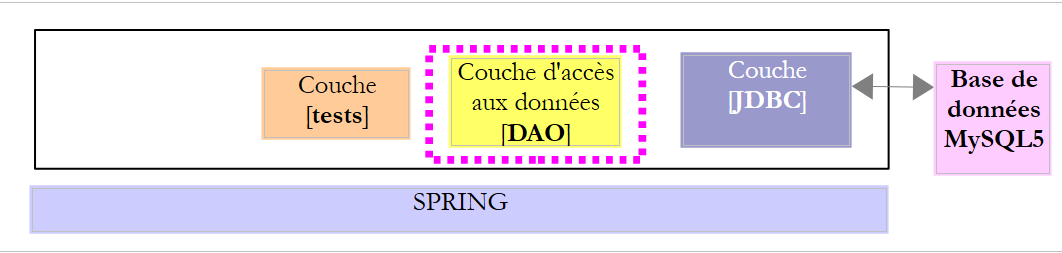
类 [DaoCategorie] 实现了接口 [IDao<Categorie>],该接口负责访问数据库 MySQL [dbproduitscategories] 中表 [CATEGORIES] 的数据。其骨架如下:
package spring.jdbc.dao;

import generic.jdbc.config.ConfigJdbc;

import java.sql.ResultSet;
import java.sql.SQLException;
import java.util.ArrayList;
import java.util.Collections;
import java.util.HashMap;
import java.util.List;
import java.util.Map;

import org.springframework.beans.factory.annotation.Autowired;
import org.springframework.jdbc.core.RowMapper;
import org.springframework.jdbc.core.namedparam.MapSqlParameterSource;
import org.springframework.jdbc.core.namedparam.NamedParameterJdbcTemplate;
import org.springframework.jdbc.core.namedparam.SqlParameterSource;
import org.springframework.jdbc.core.namedparam.SqlParameterSourceUtils;
import org.springframework.jdbc.core.simple.SimpleJdbcInsert;
import org.springframework.stereotype.Component;

import spring.jdbc.entities.Categorie;
import spring.jdbc.entities.Produit;
import spring.jdbc.infrastructure.DaoException;

import com.google.common.collect.Lists;

@Component
public class DaoCategorie extends AbstractDao<Categorie> {

    // 常量

    // 注入
    @Autowired
    private NamedParameterJdbcTemplate namedParameterJdbcTemplate;
    @Autowired
    private SimpleJdbcInsert simpleJdbcInsertCategorie;
    @Autowired
    private IDao<Produit> daoProduit;

    @Override
    public List<Categorie> getAllShortEntities() {
    ...
    }

    @Override
    public List<Categorie> getAllLongEntities() {
    ...
    }

    @Override
    public void deleteAllEntities() {
    ...
    }

    @Override
    protected List<Categorie> getShortEntitiesById(List<Long> ids) {
    ...
    }

    @Override
    protected List<Categorie> getShortEntitiesByName(List<String> names) {
    ...
    }

    @Override
    protected List<Categorie> getLongEntitiesById(List<Long> ids) {
    ...
    }

    @Override
    protected List<Categorie> getLongEntitiesByName(List<String> names) {
    ...
    }

    @Override
    protected List<Categorie> saveEntities(List<Categorie> entities) {
    ...
    }

    @Override
    protected void deleteEntitiesById(List<Long> ids) {
    ...
    }

    @Override
    protected void deleteEntitiesByName(List<String> names) {
    ...
    }

...
}

// --------------------- 映射器
class ShortCategorieMapper implements RowMapper<Categorie> {
....
}

class LongCategorieMapper implements RowMapper<Categorie> {
....
}
- 第 28 行:类 [DaoCategorie] 是 Spring 组件,因此可以被注入到其他 Spring 组件中;
- 第 29 行:类 [DaoCategorie] 继承了抽象类 [AbstractDao<Categorie>],因此它是接口 [IDao<Categorie>] 的实现;
- 第 34-37 行:注入第 4.4 节中描述的 [AppConfig] 类中定义的 Bean;
- 第 38-39 行:注入对类 [DaoProduit] 的引用,该类实现了接口 [IDao<Produit>],用于管理对表 [PRODUITS] 数据的访问;
- 第 41-89 行:实现接口 [IDao<Categorie>];
- 第 95-101 行:两个内部类,它们实现了 [RowMapper<T>] 接口;
让我们依次研究这些方法。
4.9.1. 方法 [getAllShortEntities]
方法 [getAllShortEntities] 将表 [CATEGORIES] 中的所有类别转换为简短版本:
    @Override
    public List<Categorie> getAllShortEntities() {
        try {
            return namedParameterJdbcTemplate.query(ConfigJdbc.SELECT_ALLSHORTCATEGORIES, new ShortCategorieMapper());
        } catch (Exception e) {
            throw new DaoException(202, e, simpleClassName);
        }
}
所有方法都基于在 Spring 配置文件中定义的 [namedParameterJdbcTemplate] 对象,该对象由 Spring 库 JDBC 提供。该对象拥有众多方法。上文中使用的是以下方法:

- [sql] 是待执行的 SQL 命令;
- [rowMapper] 是以下 [RowMapper<T>] 接口的一个实例:

思路如下:
- 方法 [namedParameterJdbcTemplate].query(String sql, RowMapper<T> rowMapper) 执行类型为 [Select] 的命令 SQL。 它处理可能出现的异常,并负责与 SGBD 建立和关闭连接。它唯一无法做到的是将从 [ResultSet] 获取的对象元素封装为 [Categorie] 类型,因为它不知道 [Categorie] 类型的字段与 [Resultset] 的列之间存在何种关联。 我们稍后将看到,这种关联是通过 JPA 技术建立的,这将自动实现将 [ResultSet] 中的元素封装到 T 类型的实例中。 目前,[query] 方法的第二个参数是 [RowMapper<T>] 接口的一个实例,该实例能够执行此封装;
让我们回到代码:
    @Override
    public List<Categorie> getAllShortEntities() {
        try {
            return namedParameterJdbcTemplate.query(ConfigJdbc.SELECT_ALLSHORTCATEGORIES, new ShortCategorieMapper());
        } catch (Exception e) {
            throw new DaoException(202, e, simpleClassName);
        }
}
SQL [ConfigJdbc.SELECT_ALLSHORTCATEGORIES] 的顺序如下:
public final static String SELECT_ALLSHORTCATEGORIES = "SELECT c.ID as c_ID, c.VERSIONING as c_VERSIONING, c.NOM as c_NOM FROM CATEGORIES c";
该查询请求表 [CATEGORIES] 中 [ID, VERSIONING, NOM] 列的数据。我们将始终使用以下语法:
SELECT t1.COL1 as t1_COL1, t1.COL2 as t1_COL2 FROM TABLE1 t1, TABLE2 t2 WHERE ...
重要的是,通过SELECT生成的列名称必须与[as nom_colonne]的属性保持一致。 这是实现与 SGBD 之间兼容性的唯一方法,因为这些程序都有各自专有的命名规则,用于处理由 SELECT 生成的列,其中不同表的列可能具有相同的名称 (例如在本例中,ID、NOM 或 VERSIONING)。因此,我们需要通过自行指定这些列的名称来消除这种歧义。
内部类 [ShortCategorieMapper] 如下所示:
class ShortCategorieMapper implements RowMapper<Categorie> {

    @Override
    public Categorie mapRow(ResultSet rs, int rowNum) throws SQLException {
        return new Categorie(rs.getLong("c_ID"), rs.getLong("c_VERSIONING"), rs.getString("c_NOM"), null);
    }
}
- 第 1 行:类 [ShortCategorieMapper] 实现了接口 [RowMapper<Categorie>],因此必须实现第 4 行至第 5 行中的方法 [mapRow]-5 行中的 [mapRow] 方法,该方法的作用是将由命令 [SELECT] 生成的 [ResultSet rs] 的一行封装到 [Categorie] 类型中;
- 第5行:该封装已完成。需特别注意,[rs.getType(nom)]方法所使用的名称,即为SELECT表中各列的[as nom]属性所使用的名称;
因此,我们已获取到类别列表的简短版本,且无需处理异常或连接问题。这正是 Spring JDBC 库的优势所在:它负责处理表格元素管理中所有可复用的部分,并将无法复用的部分留给开发者处理。
4.9.2. 方法 [getAllLongEntities]
方法 [getAllLongEntities] 将表 [CATEGORIES] 中的所有类别转换为长格式:
    @Override
    public List<Categorie> getAllLongEntities() {
        try {
            return filterCategories(namedParameterJdbcTemplate.query(ConfigJdbc.SELECT_ALLLONGCATEGORIES,
                    new LongCategorieMapper()));
        } catch (Exception e) {
            throw new DaoException(223, e, simpleClassName);
        }
}
SQL [ConfigJdbc.SELECT_ALLLONGCATEGORIES] 的顺序如下:
public final static String SELECT_ALLLONGCATEGORIES = "SELECT p.ID as p_ID, p.VERSIONING as p_VERSION, p.NOM as p_NOM, p.PRIX as p_PRIX, p.DESCRIPTION as p_DESCRIPTION, p.CATEGORIE_ID AS p_CATEGORIE_ID, c.ID as c_ID, c.NOM as c_NOM, c.VERSIONING as c_VERSION FROM PRODUITS p RIGHT JOIN CATEGORIES c ON p.CATEGORIE_ID=c.ID";
此操作旨在将类别与其对应的产品关联起来。具体实现方式是通过外键 [CATEGORIE_ID] 将表 [CATEGORIES] 与表 [PRODUITS] 进行连接,该外键将表 [PRODUITS] 关联至表 [CATEGORIES]。 语法 [FROM PRODUITS p RIGHT JOIN CATEGORIES c ON p.CATEGORIE_ID=c.ID] 还允许检索没有关联产品的类别。在这种情况下,查询 SELECT 会返回一个类别及其所有列均与 NULL 匹配的产品。
类 [LongCategorieMapper] 如下所示:
class LongCategorieMapper implements RowMapper<Categorie> {

    @Override
    public Categorie mapRow(ResultSet rs, int rowNum) throws SQLException {
        Categorie categorie = new Categorie(rs.getLong("c_ID"), rs.getLong("c_VERSION"), rs.getString("c_NOM"), null);
        List<Produit> produits = new ArrayList<Produit>();
        long idProduit = rs.getLong("p_ID");
        // 无产品的类别情况
        if (!rs.wasNull()) {
            produits.add(new Produit(idProduit, rs.getLong("p_VERSION"), rs.getString("p_NOM"), rs.getLong("p_CATEGORIE_ID"),
                    rs.getDouble("p_PRIX"), rs.getString("p_DESCRIPTION"), categorie));
        }
        categorie.setProduits(produits);
        return categorie;
    }
}
- 第 4 行:方法 [mapRow] 必须返回一个 [Categorie] 对象,且其 [produits] 字段已填充, 该对象需基于前一命令 SELECT 生成的 [ResultSet] 中的某一行数据;
最终,该操作:
[namedParameterJdbcTemplate.query(ConfigJdbc.SELECT_ALLLONGCATEGORIES,new LongCategorieMapper())]
将返回如下列表:
其中每个类别 [ci] 都会有一个字段 [produits],该字段将是一个仅包含单个元素 [produitsij] 的产品列表。然而,我们需要的是以下列表:
其中每个类别 [ci] 将包含一个字段 [produits],该字段即为产品列表 [produiti1, produiti2, ...]。通过将生成的类别列表传递给私有方法 [filterCategories],即可实现此结果:
    @Override
    public List<Categorie> getAllLongEntities() {
        try {
            return filterCategories(namedParameterJdbcTemplate.query(ConfigJdbc.SELECT_ALLLONGCATEGORIES,
                    new LongCategorieMapper()));
        } catch (Exception e) {
            throw new DaoException(223, e, simpleClassName);
        }
}
方法 [filterCategories] 如下所示:
    private List<Categorie> filterCategories(List<Categorie> categories) {
        if (categories.size() == 0) {
            return categories;
        }
        // 待渲染的类别
        List<Categorie> cats = new ArrayList<Categorie>();
        // 遍历获取到的类别列表
        for (Categorie categorie : categories) {
            boolean trouve = false;
            for (Categorie cat : cats) {
                if (categorie.equals(cat)) {
                    cat.addProduit(categorie.getProduits().get(0));
                    trouve = true;
                    break;
                }
            }
            // 找到?
            if (!trouve) {
                cats.add(categorie);
            }
        }
        // 结果
        return cats;
}
- 第 1 行:[List<Categorie> categories] 是待筛选(或分组)的类别列表;
- 第 6 行:要返回给调用方的类别列表;
- 第 8-21 行:处理待筛选列表中的每个类别;
- 第10-16行:检查当前类别[categorie]是否已存在于待构建的类别列表[cats]中(需注意:若两个类别的主键相同,则视为相等,参见第4.6节);
- 第11-14行:若已存在,则将封装在[categorie]中的产品添加到[cat]的产品列表中;
- 第18-20行:如果当前类别[categorie]尚未出现在待构建的[cats]类别列表中,则将其连同仅包含一个元素的产品列表一并添加进去;
让我们来看一下 SQL Select 查询返回了没有关联产品的类别的情况。哪个实体返回了类 [LongCategorieMapper]?
class LongCategorieMapper implements RowMapper<Categorie> {

    @Override
    public Categorie mapRow(ResultSet rs, int rowNum) throws SQLException {
        Categorie categorie = new Categorie(rs.getLong("c_ID"), rs.getLong("c_VERSION"), rs.getString("c_NOM"), null);
        List<Produit> produits = new ArrayList<Produit>();
        long idProduit = rs.getLong("p_ID");
        // 无商品的分类情况
        if (!rs.wasNull()) {
            produits.add(new Produit(idProduit, rs.getLong("p_VERSION"), rs.getString("p_NOM"), rs.getLong("p_CATEGORIE_ID"),
                    rs.getDouble("p_PRIX"), rs.getString("p_DESCRIPTION"), categorie));
        }
        categorie.setProduits(produits);
        return categorie;
    }
}
当查询 SQL Select 返回了没有产品的类别时,随该类别一起返回的产品列都包含值 SQL NULL。此情况在第 7-9 行中处理:
- 第 7 行:将产品的主键作为长整型数提取;
- 第 9 行:检查读取的值是否为 SQL NULL(rs.wasNull)。 若非如此,则将该产品添加到第6行的列表中;否则不添加任何内容,产品列表保持为空。
需要注意的是,无论哪种情况,返回的类别都包含一个名为 [produits] 的字段,且该字段的值不为 null。
4.9.3. 方法 [getShortEntitiesById]
方法 [getShortEntitiesById] 与方法 [getAllShortEntities] 类似,区别在于它仅返回主键在列表中明确指定的实体:
    @Override
    protected List<Categorie> getShortEntitiesById(List<Long> ids) {
        try {
            return namedParameterJdbcTemplate.query(ConfigJdbc.SELECT_SHORTCATEGORIE_BYID,
                    Collections.singletonMap("ids", ids), new ShortCategorieMapper());
        } catch (Exception e) {
            throw new DaoException(203, e, simpleClassName);
        }
}
- 第 4 行,所使用的 [query] 方法的签名如下:

第一个参数是一个已配置的 SQL [Select] 命令。第二个参数是一个字典,将每个参数与一个值关联起来。 第三个参数是类实例,该实例将 [Select] 生成的 [ResultSet] 结果中的一行封装为 T 类型的对象;
- 第 4 行:已配置的 SQL [Select] 命令如下:
public final static String SELECT_SHORTCATEGORIE_BYID = "SELECT c.ID as c_ID, c.VERSIONING as c_VERSIONING, c.NOM as c_NOM FROM CATEGORIES c WHERE c.ID in (:ids)";
该命令从表 [CATEGORIES] 中提取主键在列表 ids 中的类别。
- 第 5 行:方法 [query] 的第二个参数是一个字典,它将键 'ids'(第一个参数)与列表 [ids] 关联起来,该列表在第 1 行作为参数传递给了方法 [getShortEntitiesById]。 类 [Collections] 属于我们之前提到的库 [Google Guava]。[Collections.singleMap] 返回一个单元素字典;
- 第5行:负责将[Select]生成的[ResultSet]中的一行封装为[Categorie]类型对象的类,即我们之前研究过的[ShortCategorieMapper]类;
这正是[maxPreparedStatementParameters] Bean发挥作用的地方。事实上,订单SQL中的参数[:ids](该参数代表主键列表)可能包含1个至数千个参数。 该数量存在上限,具体取决于每个 SGBD。对于 MySQL,我们已成功通过 10000 个参数而未出现错误,但未测试超过该数量的情况。 对于 SQL Server,官方限制为 2100。对于 Firebird,1000 个参数已超出承受范围,最终降至 100 个。总体而言,我们尚未对不同 SGBD 的最大参数数量进行测试。
4.9.4. [getLongEntitiesById]方法
[getLongEntitiesById]方法与[getShortEntitiesById]方法类似,区别在于它会将类别名称转换为长格式:
    @Override
    protected List<Categorie> getLongEntitiesById(List<Long> ids) {
        try {
            return filterCategories(namedParameterJdbcTemplate.query(ConfigJdbc.SELECT_LONGCATEGORIE_BYID,
                    Collections.singletonMap("ids", ids), new LongCategorieMapper()));
        } catch (Exception e) {
            throw new DaoException(205, e, simpleClassName);
        }
}
第 4 行,查询 SQL [ConfigJdbc.SELECT_LONGCATEGORIE_BYID] 如下:
public final static String SELECT_LONGCATEGORIE_BYID = "SELECT p.ID as p_ID, p.VERSIONING as p_VERSION, p.NOM as p_NOM, p.PRIX as p_PRIX, p.DESCRIPTION as p_DESCRIPTION, p.CATEGORIE_ID AS p_CATEGORIE_ID, c.ID as c_ID, c.NOM as c_NOM, c.VERSIONING as c_VERSION FROM PRODUITS p RIGHT JOIN CATEGORIES c ON c.ID=p.CATEGORIE_ID WHERE c.ID in (:ids)";
4.9.5. 方法 [getShortEntitiesByName]
方法 [getShortEntitiesByName] 与方法 [getShortEntitiesById] 类似,区别仅在于通过类别名称而非主键进行检索:
    @Override
    protected List<Categorie> getShortEntitiesByName(List<String> names) {
        try {
            return namedParameterJdbcTemplate.query(ConfigJdbc.SELECT_SHORTCATEGORIE_BYNAME,
                    Collections.singletonMap("noms", names), new ShortCategorieMapper());
        } catch (Exception e) {
            throw new DaoException(204, e, simpleClassName);
        }
}
第 4 行,SQL [ConfigJdbc.SELECT_SHORTCATEGORIE_BYNAME] 的顺序如下:
public final static String SELECT_SHORTCATEGORIE_BYNAME = "SELECT c.ID as c_ID, c.VERSIONING as c_VERSIONING, c.NOM as c_NOM FROM CATEGORIES c WHERE c.NOM in (:noms)";
4.9.6. 方法 [getLongEntitiesByName]
方法 [getLongEntitiesByName] 与方法 [getShortEntitiesByName] 类似,只是在长版本中搜索类别:
    @Override
    protected List<Categorie> getLongEntitiesByName(List<String> names) {
        try {
            return filterCategories(namedParameterJdbcTemplate.query(ConfigJdbc.SELECT_LONGCATEGORIE_BYNAME,
                    Collections.singletonMap("noms", names), new LongCategorieMapper()));
        } catch (Exception e) {
            throw new DaoException(215, e, simpleClassName);
        }
}
第 4 行,SQL [ConfigJdbc.SELECT_LONGCATEGORIE_BYNAME] 的顺序如下:
public final static String SELECT_LONGCATEGORIE_BYNAME = "SELECT p.ID as p_ID, p.VERSIONING as p_VERSION, p.NOM as p_NOM, p.PRIX as p_PRIX, p.DESCRIPTION as p_DESCRIPTION, p.CATEGORIE_ID AS p_CATEGORIE_ID, c.ID as c_ID, c.NOM as c_NOM, c.VERSIONING as c_VERSION FROM PRODUITS p RIGHT JOIN CATEGORIES c ON c.ID=p.CATEGORIE_ID WHERE c.NOM in(:noms)";
4.9.7. 方法 [deleteAllEntities]
方法 [deleteAllEntities] 会从表 [CATEGORIES] 中删除所有类别:
    @Override
    public void deleteAllEntities() {
        try {
            // 删除所有分类,并顺带删除所有商品
            namedParameterJdbcTemplate.update(ConfigJdbc.DELETE_ALLCATEGORIES, (Map<String, Object>) null);
        } catch (Exception e) {
            throw new DaoException(208, e, simpleClassName);
        }
}
- 第 4 行:所使用的 [namedParameterJdbcTemplate.update] 方法具有以下签名:

第一个参数是一个配置好的更新命令 SQL(INSERT、UPDATE、DELETE)。 第二个参数是将值与 SQL 订单的各个参数关联起来的字典。该方法返回由 SQL 订单更新的行数。
- 第 4 行:命令 SQL [ConfigJdbc.DELETE_ALLCATEGORIES] 如下:
public final static String DELETE_ALLCATEGORIES = "DELETE FROM CATEGORIES";
因此,这并非一个带参数的命令。这就是为什么方法 [update] 的第二个参数取值为 null。
4.9.8. 方法 [deleteAllEntitiesById]
方法 [deleteAllEntitiesById] 会删除表 [CATEGORIES] 中传入主键的类别:
    @Override
    protected void deleteEntitiesById(List<Long> ids) {
        try {
            namedParameterJdbcTemplate.update(ConfigJdbc.DELETE_CATEGORIESBYID, Collections.singletonMap("ids", ids));
        } catch (Exception e) {
            throw new DaoException(209, e, simpleClassName);
        }
}
第 4 行,SQL [ConfigJdbc.DELETE_CATEGORIESBYID] 的顺序如下:
public final static String DELETE_CATEGORIESBYID = "DELETE FROM CATEGORIES WHERE ID in (:ids)";
4.9.9. 方法 [deleteAllEntitiesByName]
方法 [deleteAllEntitiesByName] 会删除表 [CATEGORIES] 中传入名称的类别:
    @Override
    protected void deleteEntitiesByName(List<String> names) {
        try {
            namedParameterJdbcTemplate.update(ConfigJdbc.DELETE_CATEGORIESBYNAME, Collections.singletonMap("noms", names));
        } catch (Exception e) {
            throw new DaoException(225, e, simpleClassName);
        }
}
第 4 行,SQL [ConfigJdbc.DELETE_CATEGORIESBYNAME] 的顺序如下:
public final static String DELETE_CATEGORIESBYNAME = "DELETE FROM CATEGORIES WHERE NOM in (:noms)";
4.9.10. 方法 [saveEntities]
4.9.10.1. 代码
该方法的签名如下:
    @Override
    protected List<Categorie> saveEntities(List<Categorie> entities) {
该方法接收一个类别列表作为参数。它对该列表执行以下操作:
- 如果类别具有主键 null,则执行操作 SQL INSERT;否则执行操作 SQL UPDATE;
- 该操作将针对该类别的每个产品重复执行;
该方法返回已持久化或更新的类别列表。返回的列表是数据库中类别和产品的精确映射(仅版本号可能不同):实际上,在更新的实体中,这些版本号并未被修改,尽管数据库中已进行了版本号递增。
这无疑是最复杂的方法。其代码如下:
@Override
    protected List<Categorie> saveEntities(List<Categorie> entities) {
        try {
            // --------------------------------------------- 分类
            List<Categorie> insertCategories = new ArrayList<Categorie>();
            List<Categorie> updateCategories = new ArrayList<Categorie>();
            // 扫描分类
            for (Categorie categorie : entities) {
                // 插入还是更新?
                if (categorie.getId() == null) {
                    insertCategories.add(categorie);
                } else {
                    updateCategories.add(categorie);
                }
            }
            // 插入分类
            if (insertCategories.size() > 0) {
                insertCategories(insertCategories);
            }
            // 更新分类
            if (updateCategories.size() > 0) {
                updateCategories(updateCategories);
            }

            // --------------------------------------------- 产品
            // 更新分类下的产品
            List<Produit> allProduits = new ArrayList<Produit>();
            for (Categorie categorie : entities) {
                List<Produit> produits = categorie.getProduits();
                Long idCategorie = categorie.getId();
                if (produits != null) {
                    // 将其添加到所有产品列表中
                    allProduits.addAll(produits);
                    // 逐一扫描产品并将其关联到所属类别
                    for (Produit produit : produits) {
                        // 将产品关联到其所属类别
                        produit.setIdCategorie(idCategorie);
                        produit.setCategorie(categorie);
                    }
                }
            }
            // 插入/更新产品
            daoProduit.saveEntities(allProduits);
            // 结果
            return entities;
        } catch (DaoException e) {
            throw e;
        } catch (Exception e) {
            throw new DaoException(207, e, simpleClassName);
        }
    }
- 第 5-23 行:插入或更新类别;
- 第26-43行:插入或更新产品;
- 第35-39行:该代码将每个产品与其所属类别关联。在之前的类别插入阶段,这些类别已分配了主键,该主键需填入产品的[idCategorie]字段(第37行)。 此外,第37-38行用于纠正调用方未将每个产品正确关联到其所属类别的状况。 为确保关联正确,应使用方法 [Categorie].add(Product p),但用户仍可绕过此方法直接将产品添加至该类别的产品列表中,不过这可能会导致产品 p 的 [idCategorie, categorie] 字段填写错误;
- 第43行:将产品的持久化/更新操作委托给[IDao<Produit>]接口的实例。需要提醒的是,该实例已被注入到[DaoCategorie]类中:
    @Autowired
    private IDao<Produit> daoProduit;
4.9.10.2. 插入类别
类别通过以下私有方法 [insertCategories] 插入到表 [CATEGORIES] 中:
private List<Categorie> insertCategories(List<Categorie> categories) {
        Map<Long, Categorie> mapCategories=new HashMap<Long,Categorie>();
        try {
            // 待添加的分类
            for (Categorie categorie : categories) {
                Number newId = simpleJdbcInsertCategorie.executeAndReturnKey(getMapForCategorie(categorie));
                // 记录主键
                mapCategories.put(newId.longValue(), categorie);
            }
        } catch (Exception e) {
            throw new DaoException(201, e, simpleClassName);
        }
        // 全部为 OK - 将主键分配给持久化类别
        for(Long id : mapCategories.keySet()){
            Categorie categorie=mapCategories.get(id);
            categorie.setId(id);
        }
        // 结果
        return categories;
    }
- 第6行:使用Bean [simpleJdbcInsertCategorie],该Bean通过以下代码行注入到类中:
    @Autowired
    private SimpleJdbcInsert simpleJdbcInsertCategorie;
该 Bean 在项目中的 [AppConfig] 类中定义如下:
import org.springframework.jdbc.core.simple.SimpleJdbcInsert;


    @Bean
    public SimpleJdbcInsert simpleJdbcInsertCategorie(DataSource dataSource) {
        return new SimpleJdbcInsert(dataSource).withTableName(ConfigJdbc.TAB_CATEGORIES)
                .usingGeneratedKeyColumns(ConfigJdbc.TAB_CATEGORIES_ID)
                .usingColumns(ConfigJdbc.TAB_CATEGORIES_NOM);
}
- 第 5 行,类 [SimpleJdbcInsert] 是 Spring 库 JDBC(第 1 行)中的一个类:
- 构造函数 [SimpleJdbcInsert] 的参数是操作所基于的数据源;
- [withTableName]子句用于指定要插入元素的目标表,此处为表[CATEGORIES];
- 子句 [usingGeneratedKeyColumns] 用于指定自动生成的主键列,此处为列 [ID];
- 子句 [usingColumns] 用于将插入操作限制在特定列上。 此处排除了由 SGBD 自动生成的 [ID] 列,以及默认值为 1 的 [VERSIONING] 列;
让我们回到方法 [insertCategories] 的代码:
private List<Categorie> insertCategories(List<Categorie> categories) {
        Map<Long, Categorie> mapCategories=new HashMap<Long,Categorie>();
        try {
            // 待添加的类别
            for (Categorie categorie : categories) {
                Number newId = simpleJdbcInsertCategorie.executeAndReturnKey(getMapForCategorie(categorie));
                // 存储主键
                mapCategories.put(newId.longValue(), categorie);
            }
        } catch (Exception e) {
            throw new DaoException(201, e, simpleClassName);
        }
        // 一切皆为 OK - 为持久化类别分配主键
        for(Long id : mapCategories.keySet()){
            Categorie categorie=mapCategories.get(id);
            categorie.setId(id);
        }
        // 结果
        return categories;
}
- 第 6 行:调用了 [simpleJdbcInsertCategorie.executeAndReturnKey] 方法:

该方法的参数是一个字典,用于建立表中各列与要插入值之间的映射关系。其返回结果为 [Number] 类型的primary key。 方法 [Number.longValue()] 可获取主键,其类型为 [Long]。
方法 [getMapForCategorie] 是以下私有方法:
    private Map<String, ?> getMapForCategorie(Categorie categorie) {
        Map<String, Object> map = new HashMap<String, Object>();
        map.put(ConfigJdbc.TAB_CATEGORIES_NOM, categorie.getNom());
        return map;
}
字典中的键是待填充列的名称 [NOM],字典中的值则是需插入到这些列中的数据。
- 第 8 行 [insertCategories]:检索到的主键被存储在字典中。 我们将等待确认所有实体均已插入,然后再为其分配主键。因为如果发生异常,所有插入操作都将被撤销,而我们希望此时第1行的实体 [categories] 也保持不变;
- 第14-17行:现在已确认一切顺利,将生成的主键分配给类别;
- 第 19 行:返回包含主键的类别列表;
4.9.10.3. 更新类别
通过以下私有方法 [updateCategories] 更新类别:
    private void updateCategories(List<Categorie> categories) {
        try {
            for (Categorie categorie : categories) {
                // 更新数据库中的分类
                int nbLignes = namedParameterJdbcTemplate.update(ConfigJdbc.UPDATE_CATEGORIES,
                        new BeanPropertySqlParameterSource(categorie));
                // 是否成功?
                Long idCategorie = null;
                if (nbLignes == 0) {
                    // 未成功 - 正在排查原因
                    // 正在数据库中查找分类
                    idCategorie = categorie.getId();
                    List<Categorie> categoriesInBd = getShortEntitiesById(idCategorie);
                    if (categoriesInBd.size() == 0) {
                        // 该类别不存在
                        throw new RuntimeException(String.format("Erreur de mise à jour. La catégorie de clé [%s] n'existe pas",
                                idCategorie));
                    } else {
                        // 版本不正确
                        throw new RuntimeException(String.format(
                                "Erreur de mise à jour. La catégorie de clé [%s] n'a pas la bonne version", idCategorie));
                    }
                }
            }
        } catch (DaoException e) {
            throw e;
        } catch (Exception e) {
            throw new DaoException(206, e, simpleClassName);
        }
}
只有当 C1 和 C2 这两个类别具有相同版本号时,才允许将内存中的 C2 类别更新到数据库中的 C1 类别。 该版本号用于防止两个不同用户同时更新该实体:两个用户 U1 和 U2 读取版本号为 V1 的实体 E。 U1 修改了 E 并将该修改保存到数据库中:此时版本号变为 V1+1。 U2 随后修改 E 并将该修改保存到数据库中:它将引发异常,因为其版本号(V1)与数据库中的版本号(V1+1)不一致。
- 第 2-29 行:try 语句包含两个 catch 块:
- 第一个(第25行)用于允许第13行代码可能抛出的[DaoException]类型异常通过;
- 第二个(第27行)用于处理其他类型的异常;
- 第 3 行:扫描所有待更新的类别;
- 第 4 行:使用方法 [namedParameterJdbcTemplate.update] 更新当前分类:
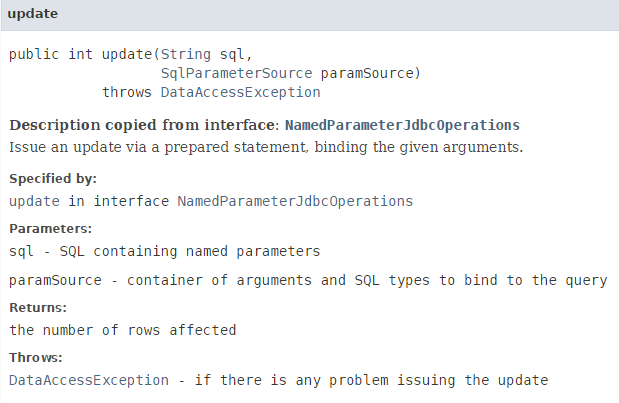
- 让我们分析这条语句:
int nbLignes = namedParameterJdbcTemplate.update(ConfigJdbc.UPDATE_CATEGORIES, new BeanPropertySqlParameterSource(categorie));
SQL [ConfigJdbc.UPDATE_CATEGORIES] 的顺序如下:
public final static String UPDATE_CATEGORIES = "UPDATE CATEGORIES SET VERSIONING=VERSIONING+1, NOM=:nom WHERE ID=:id AND VERSIONING=:version";
该命令有三个参数(:id, :version, :nom),其值位于已修改的 [categorie] 对象中同名的字段中。 利用这一特性,将 [new BeanPropertySqlParameterSource(categorie)] 作为第二个参数传递,表示“参数值位于该 Java Bean 中同名的字段中”;
当该操作正常执行时,返回的结果是修改的行数,即 0 或 1。
让我们回到所研究的代码:
private void updateCategories(List<Categorie> categories) {
        try {
            for (Categorie categorie : categories) {
                // 正在更新数据库中的分类
                int nbLignes = namedParameterJdbcTemplate.update(ConfigJdbc.UPDATE_CATEGORIES,
                        new BeanPropertySqlParameterSource(categorie));
                // 是否成功?
                Long idCategorie = null;
                if (nbLignes == 0) {
                    // 未成功 - 正在排查原因
                    // 正在数据库中查找分类
                    idCategorie = categorie.getId();
                    List<Categorie> categoriesInBd = getShortEntitiesById(idCategorie);
                    if (categoriesInBd.size() == 0) {
                        // 该类别不存在
                        throw new RuntimeException(String.format("Erreur de mise à jour. La catégorie de clé [%s] n'existe pas",
                                idCategorie));
                    } else {
                        // 版本不正确
                        throw new RuntimeException(String.format(
                                "Erreur de mise à jour. La catégorie de clé [%s] n'a pas la bonne version", idCategorie));
                    }
                }
            }
        } catch (DaoException e) {
            throw e;
        } catch (Exception e) {
            throw new DaoException(206, e, simpleClassName);
        }
}
- 第 9 行:检查修改是否成功;
- 第10行:修改未成功。由于子句[WHERE]涉及列[ID]和[VERSIONING],因此需查找导致[WHERE]失败的列;
- 第12-18行:验证该类别的键[id]是否已存在于数据库中。若不存在,则执行[RuntimeException]并显示相应的错误信息;
- 第19-22行:处理版本不正确的情况;
4.10. 类 [DaoProduit]
 |
|
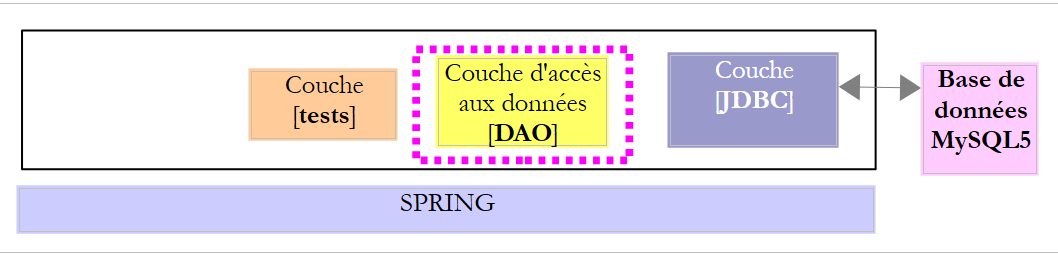
类 [DaoProduit] 实现了接口 [IDao<Produit>],该接口负责访问数据库 MySQL [dbproduitscategories] 中表 [PRODUITS] 的数据。其骨架如下:
package spring.jdbc.dao;

import generic.jdbc.config.ConfigJdbc;

import java.sql.ResultSet;
import java.sql.SQLException;
import java.util.ArrayList;
import java.util.Collections;
import java.util.HashMap;
import java.util.List;
import java.util.Map;

import org.springframework.beans.factory.annotation.Autowired;
import org.springframework.jdbc.core.RowMapper;
import org.springframework.jdbc.core.namedparam.NamedParameterJdbcTemplate;
import org.springframework.jdbc.core.namedparam.SqlParameterSource;
import org.springframework.jdbc.core.simple.SimpleJdbcInsert;
import org.springframework.stereotype.Component;

import spring.jdbc.entities.Categorie;
import spring.jdbc.entities.Produit;
import spring.jdbc.infrastructure.DaoException;

import com.google.common.collect.Lists;

@Component
public class DaoProduit extends AbstractDao<Produit> {

    // 插入
    @Autowired
    private NamedParameterJdbcTemplate namedParameterJdbcTemplate;
    @Autowired
    private SimpleJdbcInsert simpleJdbcInsertProduit;

    @Override
    public List<Produit> getAllShortEntities() {
...
    }

    @Override
    public List<Produit> getAllLongEntities() {
....
    }

    @Override
    public void deleteAllEntities() {
    ...
    }

    @Override
    protected List<Produit> getShortEntitiesById(List<Long> ids) {
...
    }

    @Override
    protected List<Produit> getShortEntitiesByName(List<String> names) {
    ....
    }

    @Override
    protected List<Produit> getLongEntitiesById(List<Long> ids) {
...
    }

    @Override
    protected List<Produit> getLongEntitiesByName(List<String> names) {
        try {
            return namedParameterJdbcTemplate.query(ConfigJdbc.SELECT_LONGPRODUIT_BYNAME,
                    Collections.singletonMap("noms", names), new LongProduitMapper());
        } catch (Exception e) {
            throw new DaoException(112, e, simpleClassName);
        }
    }

    @Override
    protected List<Produit> saveEntities(List<Produit> entities) {
    ...
    }

    @Override
    protected void deleteEntitiesById(List<Long> ids) {
    ....
    }

    @Override
    protected void deleteEntitiesByName(List<String> names) {
...
    }
}

// --------------------- 地图制作工具
class ShortProduitMapper implements RowMapper<Produit> {

...
}

class LongProduitMapper implements RowMapper<Produit> {
...
}
该代码与类 [DaoCategorie] 的代码非常相似。我们将仅研究其中几个方法。
4.10.1. 方法 [getShortEntitiesById]
方法 [getShortEntitiesById] 生成传入主键的产品简短版本:
    @Override
    protected List<Produit> getShortEntitiesById(List<Long> ids) {
        try {
            return namedParameterJdbcTemplate.query(ConfigJdbc.SELECT_SHORTPRODUIT_BYID,
                    Collections.singletonMap("ids", ids), new ShortProduitMapper());
        } catch (Exception e) {
            throw new DaoException(109, e, simpleClassName);
        }
}
- 第4行:命令SQL Select [ConfigJdbc.SELECT_SHORTPRODUIT_BYID]的内容如下:
public final static String SELECT_SHORTPRODUIT_BYID = "SELECT p.ID as p_ID, p.VERSIONING as p_VERSIONING, p.NOM as p_NOM, p.CATEGORIE_ID as p_CATEGORIE_ID, p.PRIX as p_PRIX, p.DESCRIPTION as p_DESCRIPTION FROM PRODUITS p WHERE p.ID in (:ids)";
- 第 4 行:负责将 [ResultSet] 封装到产品列表中的类 [ShortProduitMapper] 如下:
class ShortProduitMapper implements RowMapper<Produit> {

    @Override
    public Produit mapRow(ResultSet rs, int rowNum) throws SQLException {
        return new Produit(rs.getLong("p_ID"), rs.getLong("p_VERSIONING"), rs.getString("p_NOM"),
                rs.getLong("p_CATEGORIE_ID"), rs.getDouble("p_PRIX"), rs.getString("p_DESCRIPTION"), null);
    }
}
4.10.2. 方法 [getLongEntitiesByName]
方法 [getShortEntitiesById] 生成传入名称的产品长格式:
    @Override
    protected List<Produit> getLongEntitiesByName(List<String> names) {
        try {
            return namedParameterJdbcTemplate.query(ConfigJdbc.SELECT_LONGPRODUIT_BYNAME,
                    Collections.singletonMap("noms", names), new LongProduitMapper());
        } catch (Exception e) {
            throw new DaoException(112, e, simpleClassName);
        }
}
- 第4行:命令SQL Select [ConfigJdbc.SELECT_LONGPRODUIT_BYNAME]的内容如下:
public final static String SELECT_LONGPRODUIT_BYID = "SELECT p.ID as p_ID, p.VERSIONING as p_VERSION, p.NOM as p_NOM, p.PRIX as p_PRIX, p.DESCRIPTION as p_DESCRIPTION, p.CATEGORIE_ID AS p_CATEGORIE_ID, c.ID as c_ID, c.NOM as c_NOM, c.VERSIONING as c_VERSION FROM PRODUITS p, CATEGORIES c WHERE p.ID in (:ids) AND p.CATEGORIE_ID=c.ID";
- 第 4 行:负责将 [ResultSet] 中的元素封装到产品(长版本)中的类 [LongProduitMapper] 如下:
class LongProduitMapper implements RowMapper<Produit> {

    @Override
    public Produit mapRow(ResultSet rs, int rowNum) throws SQLException {
        return new Produit(rs.getLong("p_ID"), rs.getLong("p_VERSION"), rs.getString("p_NOM"),
                rs.getLong("p_CATEGORIE_ID"), rs.getDouble("p_PRIX"), rs.getString("p_DESCRIPTION"), new Categorie(rs.getLong("c_ID"), rs.getLong("c_VERSION"), rs.getString("c_NOM"), null));
    }
}
4.10.3. 方法 [saveEntities]
方法 [saveEntities] 既可用于插入新产品(id==null),也可用于更新现有产品(id!=null):
    @Override
    protected List<Produit> saveEntities(List<Produit> entities) {
        try {
            // 待插入的产品
            List<Produit> insertProduits = new ArrayList<Produit>();
            // 待更新的产品
            List<Produit> updateproduits = new ArrayList<Produit>();
            // 正在扫描收到的实体列表
            for (Produit produit : entities) {
                Long id = produit.getId();
                if (id == null) {
                    insertProduits.add(produit);
                } else {
                    updateproduits.add(produit);
                }
            }
            // 新增项
            insertProduits(insertProduits);
            // 修改
            updateProduits(updateproduits);
            // 结果
            return entities;
        } catch (DaoException e) {
            throw e;
        } catch (Exception e) {
            throw new DaoException(103, e, simpleClassName);
        }
}
第 18 行,待插入的产品通过以下私有方法 [insertProduits] 进行插入:
private List<Produit> insertProduits(List<Produit> produits) {
        Map<Long, Produit> mapProduits = new HashMap<Long, Produit>();
        try {
            // 待添加的产品
            for (Produit produit : produits) {
                Number newId = simpleJdbcInsertProduit.executeAndReturnKey(getMapForProduit(produit));
                // 记录主键
                mapProduits.put(newId.longValue(), produit);
            }
        } catch (Exception e) {
            throw new DaoException(201, e, simpleClassName);
        }
        // 全部为 OK - 将主键分配给持久化的产品
        for (Long id : mapProduits.keySet()) {
            Produit produit = mapProduits.get(id);
            produit.setId(id);
        }
        // 结果
        return produits;
    }

    private Map<String, ?> getMapForProduit(Produit produit) {
        Map<String, Object> map = new HashMap<String, Object>();
        map.put(ConfigJdbc.TAB_PRODUITS_NOM, produit.getNom());
        map.put(ConfigJdbc.TAB_PRODUITS_CATEGORIE_ID, produit.getIdCategorie());
        map.put(ConfigJdbc.TAB_PRODUITS_PRIX, produit.getPrix());
        map.put(ConfigJdbc.TAB_PRODUITS_DESCRIPTION, produit.getDescription());
        return map;
    }
该方法与第 4.9.10.3 节中讨论的 [insertCategories] 方法类似。
- 第4行:使用已注入到类中的Bean [simpleJdbcInsertProduit]:
    @Autowired
    private SimpleJdbcInsert simpleJdbcInsertProduit;
该 Bean 在配置该项目的 [AppConfig] 类中定义:
    @Bean
    public SimpleJdbcInsert simpleJdbcInsertProduit(DataSource dataSource) {
        return new SimpleJdbcInsert(dataSource)
                .withTableName(ConfigJdbc.TAB_PRODUITS)
                .usingGeneratedKeyColumns(ConfigJdbc.TAB_PRODUITS_ID)
                .usingColumns(ConfigJdbc.TAB_PRODUITS_NOM, ConfigJdbc.TAB_PRODUITS_PRIX, ConfigJdbc.TAB_PRODUITS_DESCRIPTION,ConfigJdbc.TAB_PRODUITS_CATEGORIE_ID);
}
- 第 3-6 行:Bean [simpleJdbcInsertProduit]
- 关联了数据库数据源 [dbproduitscategories](第 3 行),以及该数据源中的表 [ConfigJdbc.TAB_PRODUITS](第 4 行);
- 该表的主键生成在列 [ConfigJdbc.TAB_PRODUITS_ID] 中(第 5 行);
- 仅为列 [ConfigJdbc.TAB_PRODUITS_NOM, ConfigJdbc.TAB_PRODUITS_PRIX, ConfigJdbc.TAB_PRODUITS_DESCRIPTION, ConfigJdbc.TAB_PRODUITS_CATEGORIE_ID] 赋值(第 6 行);
用于更新产品的方法 [updateProduits](位于 [saveEntities] 的第 20 行)如下:
private void updateProduits(List<Produit> updateProduits) {
        try {
            // 扫描产品
            for (Produit produit : updateProduits) {
                // 在数据库中更新产品
                int nbLignes = namedParameterJdbcTemplate.update(ConfigJdbc.UPDATE_PRODUITS,
                        new BeanPropertySqlParameterSource(produit));
                // 是否成功?
                Long idProduit = null;
                if (nbLignes == 0) {
                    // 未成功 - 正在排查原因
                    // 在数据库中搜索产品
                    idProduit = produit.getId();
                    List<Produit> produitsInBd = getShortEntitiesById(idProduit);
                    if (produitsInBd.size() == 0) {
                        // 该产品不存在
                        throw new RuntimeException(String.format("Erreur de mise à jour. Le produit de clé [%s] n'existe pas",
                                idProduit));
                    } else {
                        // 版本不正确
                        throw new RuntimeException(String.format(
                                "Erreur de mise à jour. Le produit de clé [%s] n'a pas la bonne version", idProduit));
                    }
                }
            }
        } catch (DaoException e) {
            throw e;
        } catch (Exception e) {
            throw new DaoException(106, e, simpleClassName);
        }
    }
该方法与更新类别的操作类似(参见第 4.9.10.3 节)。第 23 行,用于更新产品的 SQL [ConfigJdbc.UPDATE_PRODUITS] 命令如下:
public final static String UPDATE_PRODUITS = "UPDATE PRODUITS SET VERSIONING=VERSIONING+1, NOM=:nom, PRIX=:prix, CATEGORIE_ID=:idCategorie, DESCRIPTION=:description WHERE ID=:id AND VERSIONING=:version";
[:id,:version,:nom,:prix,:idCategorie,:description] 中的参数名称也是 [Produit] 类中的字段名称,因此可以使用第 6-7 行的语句来更新当前产品。
4.11. 测试层
 |
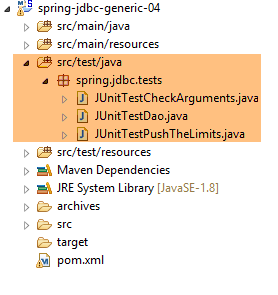 |
测试层由三个测试类组成:
- [JUnitTestCheckArguments]:该类的测试会使用非法参数调用 [DAO] 层的各种方法,并验证其是否能正确响应;
- [JUnitTestDao]:该类的测试调用 [DAO] 层中的各种方法,并验证它们是否按预期执行;
- [JUnitTestPushTheLimits] 并非用于测试 [DAO] 层,而是用于衡量其性能;
该测试层在本文档中起着重要作用。事实上,它是所有 [IDao<T>] 接口实现的共同部分。 SGBD 共有六个(1 个 JDBC 实现、3 个 JPA 实现、 1 个 Spring 实现 MVC,1 个安全 Spring 实现 MVC),因此针对这六个 SGBD 测试对象共计 36 个。测试层使我们能够验证所有实现是否以相同方式响应。
4.11.1. [JUnitTestCheckArguments] 测试
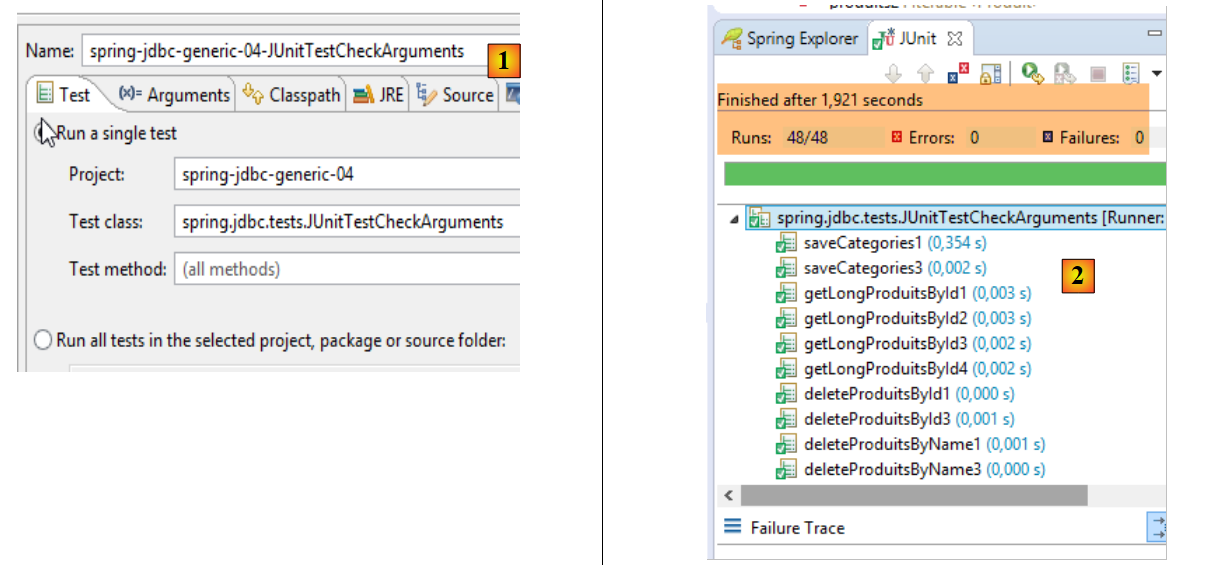
测试类 [JUnitTestCheckArguments] 包含 48 个方法,用于测试当 [DAO] 层的方法被传入错误参数时其响应情况。其骨架如下:
package spring.jdbc.tests;

import org.junit.Assert;
import org.junit.Test;
import org.junit.runner.RunWith;
import org.springframework.beans.factory.annotation.Autowired;
import org.springframework.boot.test.SpringApplicationConfiguration;
import org.springframework.test.context.junit4.SpringJUnit4ClassRunner;

import spring.jdbc.config.AppConfig;
import spring.jdbc.dao.IDao;
import spring.jdbc.entities.Categorie;
import spring.jdbc.entities.Produit;
import spring.jdbc.infrastructure.MyIllegalArgumentException;

import com.google.common.collect.Lists;

@SpringApplicationConfiguration(classes = AppConfig.class)
@RunWith(SpringJUnit4ClassRunner.class)
public class JUnitTestCheckArguments {

    // 图层 [DAO]
    @Autowired
    private IDao<Produit> daoProduit;
    @Autowired
    private IDao<Categorie> daoCategorie;

    // 本地数据
    private Iterable<String> names1 = null;
    private Iterable<String> names2 = Lists.newArrayList(new String[0]);
    private String[] names3 = null;
    private String[] names4 = new String[0];
    private Iterable<Long> ids1 = null;
    private Iterable<Long> ids2 = Lists.newArrayList(new Long[0]);
    private Long[] ids3 = null;
    private Long[] ids4 = new Long[0];
    private Iterable<Categorie> categories1 = null;
    private Iterable<Categorie> categories2 = Lists.newArrayList(new Categorie[0]);
    private Categorie[] categories3 = null;
    private Categorie[] categories4 = new Categorie[0];
    private Iterable<Produit> produits1 = null;
    private Iterable<Produit> produits2 = Lists.newArrayList(new Produit[0]);
    private Produit[] produits3 = null;
    private Produit[] produits4 = new Produit[0];

    ...

}
- 第 19 行:JUnit 测试将与 Spring 框架集成进行;
- 第 18 行:在测试开始前,将实例化项目中 [AppConfig] 类中定义的 Bean;
- 第23-26行:注入[DAO]层中两个接口各自的一个实例;
- 第29-44行:[DAO]层方法的调用参数不正确;
- 第 29 行:将类型为 [Iterable<String>] 的 null 指针用作名称列表;
- 第 30 行:将类型为 [Iterable<String>] 的空列表用作名称列表;
- 第 29 行:将类型为 String[] 的指针 null 作为名称数组;
- 第 30 行:一个类型为 String[] 的空数组,作为名称数组;
- ...
以字段 [names1] 为例,进行如下测试:
    @Test(expected = MyIllegalArgumentException.class)
    public void getShortProduitsByName1() {
        daoProduit.getShortEntitiesByName(names1);
}
- 第 1 行:指定测试 [getShortProduitsByName1] 必须抛出类型为 [MyIllegalArgumentException] 的异常
以字段 [names2] 为例,进行如下测试:
    @Test(expected = MyIllegalArgumentException.class)
    public void getLongCategoriesByName2() {
        daoCategorie.getLongEntitiesByName(names2);
}
使用字段 [names3],例如进行以下测试:
    @Test(expected = MyIllegalArgumentException.class)
    public void getLongCategoriesByName3() {
        daoCategorie.getLongEntitiesByName(names3);
}
使用字段 [names4],例如进行以下测试:
    @Test(expected = MyIllegalArgumentException.class)
    public void getShortProduitsByName4() {
        daoProduit.getShortEntitiesByName(names4);
}
因此共执行 48 次测试以覆盖所有可能情况。执行名为 [spring-jdbc-generic-04-JUnitTestCheckArguments] [1] 的运行配置。所得结果如下:[2]:
 |
4.11.2. 测试 [JUnitTestDao]
测试用例 [JUnitTestDao] 会使用有效的参数调用 [DAO] 层的方法,并验证这些方法是否按预期执行。共有 74 个测试用例,用于验证实体、类别或产品的插入、查询、更新和删除操作。 总计超过1000行代码。我们将仅研究其中部分方法。
4.11.2.1. 测试框架
[JUnitTestDao] 类的框架如下:
package spring.jdbc.tests;

import java.util.ArrayList;
import java.util.HashMap;
import java.util.List;
import java.util.Map;

import org.junit.Assert;
import org.junit.Before;
import org.junit.Test;
import org.junit.runner.RunWith;
import org.springframework.beans.BeansException;
import org.springframework.beans.factory.annotation.Autowired;
import org.springframework.boot.test.SpringApplicationConfiguration;
import org.springframework.context.ApplicationContext;
import org.springframework.test.context.junit4.SpringJUnit4ClassRunner;

import spring.jdbc.config.AppConfig;
import spring.jdbc.dao.IDao;
import spring.jdbc.entities.Categorie;
import spring.jdbc.entities.Produit;

import com.fasterxml.jackson.core.JsonProcessingException;
import com.fasterxml.jackson.databind.ObjectMapper;
import com.google.common.collect.Lists;

@SpringApplicationConfiguration(classes = AppConfig.class)
@RunWith(SpringJUnit4ClassRunner.class)
public class JUnitTestDao {

    // Spring 上下文
    @Autowired
    private ApplicationContext context;
    // 层[DAO]
    @Autowired
    private IDao<Produit> daoProduit;
    @Autowired
    private IDao<Categorie> daoCategorie;

    // 常量
    private final int NB_PRODUITS = 5;
    private final int NB_CATEGORIES = 2;

    // 本地
    // 本地
    private Map<Long, Categorie> mapCategories = new HashMap<Long, Categorie>();
    private Map<Long, Produit> mapProduits = new HashMap<Long, Produit>();

    @Before
    public void clean() {
        // 每次测试前清理数据库
        log("Vidage de la base de données", 1);
        // 清空表 [CATEGORIES],并级联清空表 [PRODUITS]
        daoCategorie.deleteAllEntities();
        // 清空字典
        for (Long id : mapCategories.keySet()) {
            mapCategories.remove(id);
        }
        for (Long id : mapProduits.keySet()) {
            mapProduits.remove(id);
        }
    }
...
}
- 第 27-28 行:与 [JUnitTestCheckArguments] 测试类似,这是一个与 Spring 集成的测试,由项目中的 [AppConfig] 类进行配置;
- 第 32-33 行:注入 Spring 上下文,从而访问其所有 Bean;
- 第35-36行:注入由该类测试的[IDao<Produit>]接口的实例;
- 第 37-38 行:注入该类所测试的 [IDao<Categorie>] 接口的实例;
- 第 41-42 行:当测试需要数据库数据时,将生成一个包含 [NB_CATEGORIES] 类别的数据库,每个类别包含 [NB_PRODUITS] 产品。 因此,[CATEGORIES]表中将包含[NB_CATEGORIES]类,而[PRODUITS]表中将包含[NB_CATEGORIES] * [NB_PRODUITS]产品;
- 第 46-47 行:两个用于存储产品和类别的字典;
- 第49-62行:方法[clean]在每次测试前执行(第49行)。第54行,清空表[CATEGORIES]。 这里需要记住,表 [PRODUITS] 的主键 [CATEGORIE_ID] 位于表 [CATEGORIES] 的 ID 列上,且该主键定义如下:
 |
- (续)
- 在 [1-3] 中,表 [PRODUITS] 的外键为 [CATEGORIE_ID]。 它指向表 [CATEGORIES] [4-5] 中的列 [ID];
- 当某类别被删除时,与其关联的所有产品也会被删除([6])。这一点值得注意,因为它在构建利用[dbproduitscategories]数据库的[DAO]层时会被用到;
因此,当删除表 [CATEGORIES] 的内容时,表 [PRODUITS] 的内容也将被删除。
- 第56-58行:清空类别字典;
- 第59-61行:对产品字典执行相同操作;
需注意的是,每次测试前,数据库中的表均为空,内存中的字典也为空。
4.11.2.2. 方法 [verifyClean]
方法 [verifyClean] 用于验证在执行完方法 [clean] 之后,表是否为空:
    @Test
    public void verifyClean() {
        log("verifyClean", 1);
        List<Categorie> categories = daoCategorie.getAllShortEntities();
        Assert.assertEquals(0, categories.size());
        List<Produit> produits = daoProduit.getAllShortEntities();
        Assert.assertEquals(0, produits.size());
}
4.11.2.3. 方法 [fillDataBase]
该方法用于验证数据库是否已正确填充测试数据:
    @Test
    public void fillDataBase() throws BeansException, JsonProcessingException {
        // 填充数据库和字典
        registerCategories(fill(NB_CATEGORIES, NB_PRODUITS));
        // 显示
        Object[] data = showDataBase();
        List<Categorie> categories = (List<Categorie>) data[0];
        List<Produit> produits = (List<Produit>) data[1];
        // 进行一些验证
        Assert.assertEquals(NB_CATEGORIES, categories.size());
        Assert.assertEquals(NB_PRODUITS * NB_CATEGORIES, produits.size());
        for (Categorie categorie : categories) {
            checkShortCategorie(categorie);
        }
        for (Produit produit : produits) {
            checkShortProduit(produit);
        }
        // 字典应已清空
        Assert.assertEquals(0, mapCategories.size());
        Assert.assertEquals(0, mapProduits.size());
}
此测试使用了多个私有方法:
- [fill] 第 4 行,用于将测试数据填入数据库;
- [registerCategories] 第 4 行,用于将方法 [fill] 返回的数据填入字典中。这两个字典代表持久化实体;
- [showDataBase] 第 6 行,用于读取 [CATEGORIES] 和 [PRODUITS] 这两张表,并返回读取到的内容;
- [checkShortCategorie] 第 13 行验证由 [showDataBase] 读取的类别。它验证该类别的简短版本是否与类别字典中记录的内容一致;
- [checkShortProduit] 第 16 行对产品执行相同操作;
- 当某个实体在字典中被找到时,它将从字典中移除。第19-20行验证两个字典是否为空。如果这两个断言成立,则意味着:
- [showDataBase]读取的所有值均已在字典中找到;
- 字典中不包含除已读取实体以外的其他实体;
私有方法 [fill] 如下:
    private List<Categorie> fill(int nbCategories, int nbProduits) {
        // 填充表
        List<Categorie> categories = new ArrayList<Categorie>();
        for (int i = 0; i < nbCategories; i++) {
            Categorie categorie = new Categorie(null, null, String.format("categorie[%d]", i), null);
            for (int j = 0; j < nbProduits; j++) {
                Produit produit = new Produit(null, null, String.format("produit[%d,%d]", i, j), null,
                        100 * (1 + (double) (i * 10 + j) / 100), String.format("desc[%d,%d]", i, j), null);
                categorie.addProduit(produit);
            }
            categories.add(categorie);
        }
        // 添加分类 - 产品也将按级联方式
        // 插入
        categories = daoCategorie.saveEntities(categories);
        // 结果
        return categories;
}
- 第 3-12 行:构建一个包含 [nbCategories] 个类别的列表,每个类别包含 [nbProduits] 个产品;
- 第 15 行:将该类别列表持久化。我们看到,当类别包含产品时,[daoCategorie.saveEntities] 方法也会将这些产品持久化;
- 第17行:返回持久化的类别列表。持久化的实体(类别和产品)现在在其[id]字段中拥有主键;
私有方法 [registerCategories] 将把这些实体放入两个字典中:
    private void registerCategories(List<Categorie> categories) {
        // 词典
        for (Categorie categorie : categories) {
            mapCategories.put(categorie.getId(), categorie);
            for (Produit produit : categorie.getProduits()) {
                mapProduits.put(produit.getId(), produit);
            }
        }
}
每个字典的访问键均为实体的主键。
完成上述操作后,先前填充的数据库将由以下私有方法 [showDataBase] 读取并显示:
    private Object[] showDataBase() throws BeansException, JsonProcessingException {
        // 分类列表
        log("Liste des catégories", 2);
        List<Categorie> categories = daoCategorie.getAllShortEntities();
        affiche(categories, context.getBean("jsonMapperShortCategorie", ObjectMapper.class));
        // 产品列表
        log("Liste des produits", 2);
        List<Produit> produits = daoProduit.getAllShortEntities();
        affiche(produits, context.getBean("jsonMapperShortProduit", ObjectMapper.class));
        // 结果
        return new Object[] { categories, produits };
}
- 第 4 行和第 8 行:获取类别和产品的简短版本;
- 第11行:返回一个包含两个已获取实体列表的数组;
- 第 5 行和第 9 行:通过以下私有方法 [affiche] 显示实体列表:
    // 显示 T 类型元素列表
    private <T> void affiche(List<T> elements, ObjectMapper mapper) throws JsonProcessingException {
        for (T element : elements) {
            affiche(element, mapper);
        }
}

    // 显示 T 类型元素
    private <T> void affiche(T element, ObjectMapper mapper) throws JsonProcessingException {
        System.out.println(mapper.writeValueAsString(element));
}
实体通过映射器 jSON 进行显示(第 10 行)。 该映射器是第 2 行方法 [affiche] 的第二个参数。Spring 上下文在 Maven 依赖项 [mysql-config-jdbc] 的文件 [ConfigJdbc] 中定义了四个映射器 jSON:
// 过滤器 jSON -------------------------------------
    @Bean
    public ObjectMapper jsonMapper() {
        return new ObjectMapper();
    }

    @Bean
    @Scope(value = ConfigurableBeanFactory.SCOPE_PROTOTYPE)
    ObjectMapper jsonMapperShortCategorie() {
        ObjectMapper jsonMapper = jsonMapper();
        jsonMapper.setFilters(new SimpleFilterProvider().addFilter("jsonFilterCategorie",
                SimpleBeanPropertyFilter.serializeAllExcept("produits")));
        return jsonMapper;
    }

    @Bean
    @Scope(value = ConfigurableBeanFactory.SCOPE_PROTOTYPE)
    ObjectMapper jsonMapperLongCategorie() {
        ObjectMapper jsonMapper = jsonMapper();
        jsonMapper.setFilters(new SimpleFilterProvider().addFilter("jsonFilterCategorie",
                SimpleBeanPropertyFilter.serializeAllExcept()).addFilter("jsonFilterProduit",
                SimpleBeanPropertyFilter.serializeAllExcept("categorie")));
        return jsonMapper;
    }

    @Bean
    @Scope(value = ConfigurableBeanFactory.SCOPE_PROTOTYPE)
    ObjectMapper jsonMapperShortProduit() {
        ObjectMapper jsonMapper = jsonMapper();
        jsonMapper.setFilters(new SimpleFilterProvider().addFilter("jsonFilterProduit",
                SimpleBeanPropertyFilter.serializeAllExcept("categorie")));
        return jsonMapper;
    }

    @Bean
    @Scope(value = ConfigurableBeanFactory.SCOPE_PROTOTYPE)
    ObjectMapper jsonMapperLongProduit() {
        ObjectMapper jsonMapper = jsonMapper();
        jsonMapper.setFilters(new SimpleFilterProvider().addFilter("jsonFilterProduit",
                SimpleBeanPropertyFilter.serializeAllExcept()).addFilter("jsonFilterCategorie",
                SimpleBeanPropertyFilter.serializeAllExcept("produits")));
        return jsonMapper;
    }
- 这些映射器 jSON(第 7-9 行、16-18 行、26-28 行、35-37 行)具有一个属性
[@Scope(value = ConfigurableBeanFactory.SCOPE_PROTOTYPE)]
,这使得它们在每次向 Spring 上下文请求时都会被实例化。这是新的。迄今为止看到的所有 Spring Bean 都是单例:它们只创建一个实例,每次向 Spring 上下文请求引用时,返回的都是该实例。为什么会有这种变化? 实际上,这四个 [jsonMapperShortCategorie, jsonMapperLongCategorie, jsonMapperShortProduit , jsonMapperLongProduit] Bean 共同配置了第 2-5 行定义的唯一映射器 jSON(该映射器确实是单例)。该映射器必须在每次调用上述四个 Bean 中的任意一个时重新配置,而非仅在上下文初始化时配置一次。 如果我们决定使用四个不同的映射器 jSON(每个 Bean 对应一个),那么这些映射器就可以是单例。这完全可行。届时,第 10、19、29、38 行将写为:
ObjectMapper jsonMapper = new ObjectMapper();
@JsonFilter("jsonFilterCategorie")
public class Categorie extends AbstractCoreEntity {
和
@JsonFilter("jsonFilterProduit")
public class Produit extends AbstractCoreEntity {
实体 [Categorie] 的表示 jSON 由过滤器 jSON [jsonFilterCategorie] 控制,而实体由过滤器 jSON [jsonFilterProduit] 控制。Spring 上下文中的四个映射器 jSON 以如下方式配置这两个过滤器:
- 映射器 [jsonMapperShortCategorie] 配置了过滤器 jSON [jsonFilterCategorie],用于生成类别的简短版本: 字段 [produits] 将不会包含在类别 jSON 的表示中;
- 映射器 [jsonMapperLongCategorie] 配置过滤器 jSON [jsonFilterCategorie] 以生成该类别的长版本: 字段 [produits] 将包含在该类别的 jSON 表示形式中;
- 映射器 [jsonMapperShortProduit] 配置了过滤器 jSON 和 [jsonFilterProduit],用于生成产品的简短版本: 字段 [categorie] 将不包含在产品的 jSON 表示中;
- 映射器 [jsonMapperLongProduit] 配置了过滤器 jSON 和 [jsonFilterProduit],用于生成产品的长版本: 字段 [categorie] 将包含在产品的 jSON 表示形式中;
关于私有方法 [showDataBase] 的说明到此结束。让我们回到测试代码 [fillDataBase]:
    @Test
    public void fillDataBase() throws BeansException, JsonProcessingException {
        // 基础和词典填充
        registerCategories(fill(NB_CATEGORIES, NB_PRODUITS));
        // 显示
        Object[] data = showDataBase();
        List<Categorie> categories = (List<Categorie>) data[0];
        List<Produit> produits = (List<Produit>) data[1];
        // 若干验证
        Assert.assertEquals(NB_CATEGORIES, categories.size());
        Assert.assertEquals(NB_PRODUITS * NB_CATEGORIES, produits.size());
        for (Categorie categorie : categories) {
            checkShortCategorie(categorie);
        }
        for (Produit produit : produits) {
            checkShortProduit(produit);
        }
        // 词典必须已用尽
        Assert.assertEquals(0, mapCategories.size());
        Assert.assertEquals(0, mapProduits.size());
}
- 第 6-8 行:我们获取数据库中读取的产品和类别的简短版本;
- 第10-11行:初步验证;
- 第12-14行:由方法[showDataBase]返回的每个类别,均通过后续的私有方法[checkShortCategorie]进行验证:
    private void checkShortCategorie(Categorie actual) {
        Long id = actual.getId();
        Categorie expected = mapCategories.get(actual.getId());
        mapCategories.remove(id);
        Assert.assertEquals(expected.getNom(), actual.getNom());
        // 无法使用 jPA 实现对字段 [produits] 进行可移植性测试
}
- 第 1 行:[Categorie actual] 是从数据库读取的类别,该类别必须与词典 [mapCategories] 中的类别完全一致;
- 第 2 行:获取读取的类别的主键;
- 第3行:从类别字典中检索使用该主键存储的类别;
- 第 4 行:从词典中移除该主键,以确保其他读取的类别不会使用该主键;
- 第 5 行:验证两个类别是否名称相同;
由方法 [showDataBase] 返回的简短产品版本由以下私有方法 [checkShortProduit] 进行验证:
    private void checkShortProduit(Produit actual) {
        Long id = actual.getId();
        Produit expected = mapProduits.get(id);
        mapProduits.remove(id);
        Assert.assertEquals(expected.getNom(), actual.getNom());
        Assert.assertEquals(expected.getDescription(), actual.getDescription());
        Assert.assertEquals(expected.getPrix(), actual.getPrix(), 1e-6);
        Assert.assertEquals(actual.getIdCategorie(), expected.getIdCategorie());
        // 无法使用 jPA 实现以可移植的方式测试字段 [categorie]
}
- 第 1 行:[Produit actual] 是从数据库中读取的简短产品;
- 第2-3行:从持久化产品字典中检索具有相同主键的产品;
- 第 4 行:从字典中删除找到的条目;
- 第 5-8 行:验证两个产品的字段值是否相同;
4.11.2.4. 方法 [getLongCategoriesByName3]
该测试如下:
    @Test
    public void getLongCategoriesByName3() {
        // 基础填充
        List<Categorie> categories = fill(NB_CATEGORIES, NB_PRODUITS);
        // 测试
        log("getLongCategoriesByName3", 1);
        List<Categorie> categories2 = daoCategorie.getLongEntitiesByName("categorie[0]", "categorie[1]");
        Assert.assertEquals(2, categories2.size());
        registerCategories(Lists.newArrayList(categories.get(0), categories.get(1)));
        for (Categorie categorie : categories) {
            checkLongCategorie(categorie);
        }
        Assert.assertEquals(0, mapCategories.size());
}
- 第4行:填充数据库并获取已保存的类别和产品列表;
- 第7行:测试[DAO]层中的[daoCategorie.getLongEntitiesByName(Iterable<String> names)]方法。请求包含两个产品的列表,这些产品通过其长名称进行标识;
- 第8行:验证[daoCategorie.getLongEntitiesByName(Iterable<String> names)]返回的列表是否确实包含两个元素;
- 第 9 行:将第 4 行中持久化的两个元素放入类别字典中;
- 第10-12行:验证读取的两个元素是否确实是之前持久化的那些;
- 第13行:验证类别字典为空,这既表示所有读取的类别均已在字典中找到,也表示该字典中不包含未被读取的值;
第 11 行,方法 [checkLongCategorie] 用于验证类别的长格式:
    private void checkLongCategorie(Categorie actual) {
        Long id = actual.getId();
        Categorie expected = mapCategories.get(actual.getId());
        mapCategories.remove(id);
        Assert.assertEquals(expected.getNom(), actual.getNom());
        Assert.assertNotNull(actual.getProduits());
}
- 第 6 行检查该类别的 [produits] 字段是否不为 null。 实际上,读取长格式分类时,其 [produits] 字段始终不为 null。如果该分类没有产品,则 [produits] 字段为空但存在;
4.11.2.5. 方法 [updateDataBase1]
@Test
    public void updateDataBase1() {
        // 填充
        fill(NB_CATEGORIES, NB_PRODUITS);
        // 测试
        log("Mise à jour du prix des produits de [categorie1]", 1);
        Categorie categorie1 = daoCategorie.getLongEntitiesByName("categorie[1]").get(0);
        List<Produit> produits = categorie1.getProduits();
        Map<Produit, Long> versions = new HashMap<Produit, Long>();
        for (Produit produit : produits) {
            produit.setPrix(1.1 * produit.getPrix());
            versions.put(produit, produit.getVersion());
        }
        daoProduit.saveEntities(produits);
        // 校对
        List<Produit> produitsInBd = daoCategorie.getLongEntitiesByName("categorie[1]").get(0)
                .getProduits();
        Assert.assertEquals(produits.size(), produitsInBd.size());
        // 核查
        for (Produit produit2 : produitsInBd) {
            Produit produit = findProduitByName(produit2.getNom(), produits);
            Assert.assertEquals(produit2.getPrix(), produit.getPrix(), 1e-6);
            Assert.assertEquals(produit2.getVersion().longValue(), versions.get(produit) + 1);
        }
    }

    private Produit findProduitByName(String nom, List<Produit> produits) {
        for (Produit produit : produits) {
            if (produit.getNom().equals(nom)) {
                return produit;
            }
        }
        return null;
    }
方法 [updateDataBase1] 将类别 categorie[1] 下的产品价格提高 10%,并验证两点:
- 基础价格是否已发生变化;
- 更新后的产品版本号是否增加了1;
该代码执行以下操作:
- 第 4 行:填充数据库;
- 第 7 行:从数据库中检索名为 'categorie[1]' 的类别;
- 第8-13行:将所有产品的价格提高10%(第11行)。此外,创建一个字典,将产品与其版本关联起来(第9行和第12行);
- 第14行:调用方法[daoProduit.saveEntities]。该方法将执行产品的更新操作;
- 第 16 行:从数据库中检索名为 'categorie[1]' 的类别下的产品;
- 第20-24行:对于该类别中的所有产品,验证价格是否已修改(第22行)以及版本号是否已增加1(第23行);
4.11.2.6. 方法 [deleteProduitsByProduit1]
方法 [deleteProduitsByProduit1] 从表 [PRODUITS] 中删除产品:
    @Test
    public void deleteProduitsByProduit1() {
        // 填充
        fill(NB_CATEGORIES, NB_PRODUITS);
        // 删除
        daoProduit.deleteEntitiesByEntity(daoProduit.getShortEntitiesByName("produit[0,0]", "produit[1,1]"));
        // 核查
        List<Produit> produits = daoProduit.getShortEntitiesByName("produit[0,0]", "produit[1,1]");
        Assert.assertEquals(0, produits.size());
}
- 第 6 行:删除两个产品;
- 第 8-9 行:验证它们是否已从数据库中删除;
4.11.2.7. 方法 [getLongProduitsById3]
    @Test
    public void getLongProduitsById3() {
        // 填充
        List<Categorie> categories = fill(NB_CATEGORIES, NB_PRODUITS);
        // 测试
        log("getLongProduitsById3", 1);
        List<Produit> produits = daoProduit.getLongEntitiesByName("produit[0,3]", "produit[1,4]");
        Assert.assertEquals(2, produits.size());
        registerProduits(Lists.newArrayList(categories.get(0).getProduits().get(3), categories.get(1).getProduits().get(4)));
        produits = daoProduit.getLongEntitiesById(produits.get(0).getId(), produits.get(1).getId());
        for (Produit produit : produits) {
            checkLongProduit(produit);
        }
        Assert.assertEquals(0, mapProduits.size());
}
- 第4行:向数据库中插入数据,并检索已保存的类别列表;
- 第7行:根据产品名称从数据库中检索两个产品的详细信息;
- 第9行:将第4行类别列表中包含的[produit[0,3], produit[1,4]]这两款产品添加到产品字典中;
- 第10行:通过主键在数据库中查询上述这两款产品;
- 第11-14行:验证读取的数据与产品字典中存储的数据是否一致;
私有方法 [checkLongProduit] 如下:
    private void checkLongProduit(Produit actual) {
        Long id = actual.getId();
        Produit expected = mapProduits.get(id);
        mapProduits.remove(id);
        Assert.assertEquals(expected.getNom(), actual.getNom());
        Assert.assertEquals(expected.getDescription(), actual.getDescription());
        Assert.assertEquals(expected.getPrix(), actual.getPrix(), 1e-6);
        Assert.assertNotNull(actual.getCategorie());
}
4.11.2.8. Conclusion
我们先到此为止。目前共有 74 个测试用例,还可以添加更多,因为我可能遗漏了一些需要测试的场景。尽管这些测试并非穷尽所有情况,但它们已成功检测出许多错误,通常是 [DAO] 层最初编写时未曾设想到的边界情况。 对任何项目而言,全面测试阶段都是必不可少的。
要执行测试,可以使用名为 [spring-jdbc-generic-04.JUnitTestDao] 的导入运行配置。
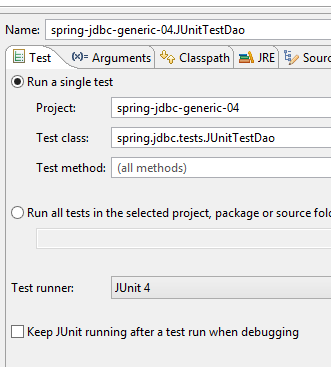 | 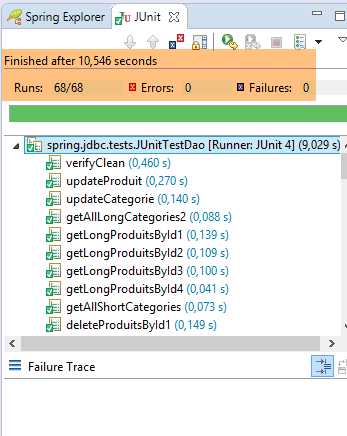 |
4.11.3. 测试 [JUnitTestPushTheLimits]
测试 [JUnitTestPushTheLimits] 是一项性能测试。我们利用 JUnit 测试会显示其执行时间这一特点,来测量 [DAO] 层的性能。 随后将把这些性能数据与 [DAO] 层的 JPA 实现版本的性能数据进行比较。
4.11.3.1. Squelette
[JUnitTestPushTheLimits] 类的骨架如下:
package spring.jdbc.tests;

import java.util.ArrayList;
import java.util.HashMap;
import java.util.List;
import java.util.Map;

import org.junit.Assert;
import org.junit.Before;
import org.junit.Test;
import org.junit.runner.RunWith;
import org.springframework.beans.factory.annotation.Autowired;
import org.springframework.boot.test.SpringApplicationConfiguration;
import org.springframework.test.context.junit4.SpringJUnit4ClassRunner;

import spring.jdbc.config.AppConfig;
import spring.jdbc.dao.IDao;
import spring.jdbc.entities.Categorie;
import spring.jdbc.entities.Produit;

@SpringApplicationConfiguration(classes = AppConfig.class)
@RunWith(SpringJUnit4ClassRunner.class)
public class JUnitTestPushTheLimits {

    // 图层[DAO]
    @Autowired
    private IDao<Produit> daoProduit;
    @Autowired
    private IDao<Categorie> daoCategorie;

    // 常量
    private final int NB_CATEGORIES = 2500;
    private final int NB_PRODUITS = 2;

    // 本地
    private Map<Long, Categorie> hCategories;
    private Map<Long, Produit> hProduits;

    @Before
    public void clean() {
        // 清空表 [CATEGORIES]
        daoCategorie.deleteAllEntities();
        // 字典
        hCategories = new HashMap<Long, Categorie>();
        hProduits = new HashMap<Long, Produit>();
    }

    private List<Categorie> fill(int nbCategories, int nbProduits) {
        // 填充表
        List<Categorie> categories = new ArrayList<Categorie>();
        for (int i = 0; i < nbCategories; i++) {
            Categorie categorie = new Categorie(null, 0L, String.format("categorie[%d]", i), null);
            for (int j = 0; j < nbProduits; j++) {
                Produit produit = new Produit(null, 0L, String.format("produit[%d,%d]", i, j), 0L,
                        100 * (1 + (double) (i * 10 + j) / 100), String.format("desc[%d,%d]", i, j), null);
                categorie.addProduit(produit);
            }
            categories.add(categorie);
        }
        // 添加分类 - 产品也将随之级联插入
        categories = daoCategorie.saveEntities(categories);
        // 词典
        for (Categorie categorie : categories) {
            hCategories.put(categorie.getId(), categorie);
            for (Produit produit : categorie.getProduits()) {
                hProduits.put(produit.getId(), produit);
            }
        }
        // 结果
        return categories;
    }

....

    // -------------------- 私有方法
    private void checkLongProduit(Produit actual) {
        Long id = actual.getId();
        Produit expected = hProduits.get(id);
        hProduits.remove(id);
        Assert.assertEquals(expected.getNom(), actual.getNom());
        Assert.assertEquals(expected.getDescription(), actual.getDescription());
        Assert.assertEquals(expected.getPrix(), actual.getPrix(), 1e-6);
        Assert.assertEquals(expected.getIdCategorie(), actual.getIdCategorie());
        Assert.assertNotNull(actual.getCategorie());
    }

    private void checkShortProduit(Produit actual) {
        Long id = actual.getId();
        Produit expected = hProduits.get(id);
        hProduits.remove(id);
        Assert.assertEquals(expected.getNom(), actual.getNom());
        Assert.assertEquals(expected.getDescription(), actual.getDescription());
        Assert.assertEquals(expected.getPrix(), actual.getPrix(), 1e-6);
        Assert.assertEquals(expected.getIdCategorie(), actual.getIdCategorie());
        boolean erreur = false;
        try {
            actual.getCategorie().getNom();
        } catch (Exception e) {
            erreur = true;
        }
        Assert.assertTrue(erreur);
    }

    private void checkShortCategorie(Categorie actual) {
        Long id = actual.getId();
        Categorie expected = hCategories.get(actual.getId());
        hCategories.remove(id);
        Assert.assertEquals(expected.getNom(), actual.getNom());
        boolean erreur = false;
        try {
            actual.getProduits().size();
        } catch (Exception e) {
            erreur = true;
        }
        Assert.assertTrue(erreur);
    }

    private void checkLongCategorie(Categorie actual) {
        Long id = actual.getId();
        Categorie expected = hCategories.get(actual.getId());
        hCategories.remove(id);
        Assert.assertEquals(expected.getNom(), actual.getNom());
        Assert.assertNotNull(actual.getProduits());
    }

}
这里可以看到类 [JUnitTestDao] 的骨架。我们之前已经接触过所有这些方法。该测试基于包含 2500 个类别的数据库,每个类别包含 2 种产品(第 32-33 行)。 因此,表 [CATEGORIES] 将包含 2500 行,而表 [PRODUITS] 将包含 5000 行。虽然可以增加更多行数,但测试时间已接近一分钟。因此,我们选择了对等待测试结束的用户而言尚可接受的数值。
测试总共18个。它们使用运行配置[1]执行。运行时间显示在[2]中:
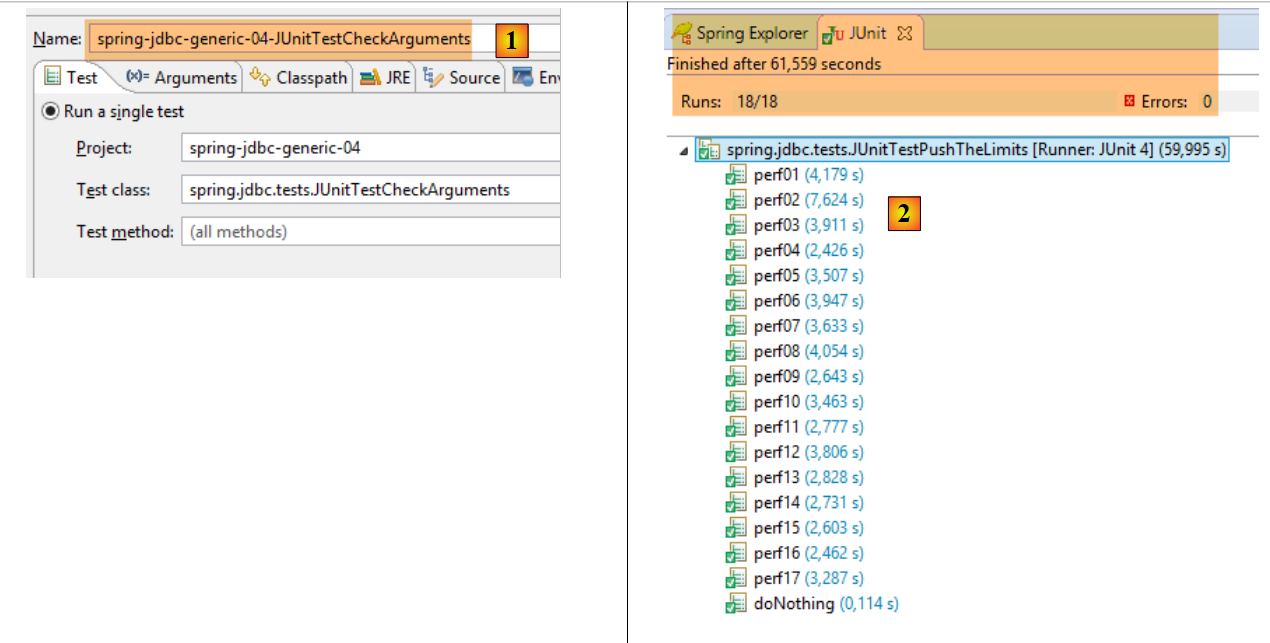 |
4.11.3.2. doNothing [0,114]
方法 [doNothing] 没有任何作用。它用于测量在每次测试前执行的、用于清空数据库的方法 [clean] 的耗时。上表显示,该操作的耗时相对于其他操作而言微乎其微。
    @Test
    public void doNothing() {
        // 清理
}
4.11.3.3. perf01 [4,179]
测试 [perf01] 用于测量数据库的填充时间:
    @Test
    public void perf01() {
        // 插入
        fill(NB_CATEGORIES, NB_PRODUITS);
}
4.11.3.4. perf02 [7,624]
方法 [perf02]:
- 填充数据库;
- 随后修改所有类别的名称及所有产品的价格。
    @Test
    public void perf02() {
        // 更新
        List<Categorie> categories = fill(NB_CATEGORIES, NB_PRODUITS);
        for (Categorie categorie : categories) {
            categorie.setNom(categorie.getNom() + "*");
            for (Produit produit : categorie.getProduits()) {
                produit.setPrix(produit.getPrix() * 1.1);
            }
        }
        // 更新
        daoCategorie.saveEntities(categories);
}
4.11.3.5. perf03[3,911]
方法 [perf03]:
- 填充数据库
- 然后逐一删除所有类别。由于表 [CATEGORIES] 与表 [PRODUITS] 之间存在级联关系,产品也会被一并删除。
令人惊讶的是,此操作的耗时反而比操作内容更少的 [perf01] 和 [4,179 s] 更短。
    @Test
    public void perf03() {
        // 删除分类并级联删除相关产品
        daoCategorie.deleteEntitiesByEntity(fill(NB_CATEGORIES, NB_PRODUITS));
}
如果查看方法 [daoCategorie.deleteEntitiesByEntity] 的代码,会发现将执行一个带有 2500 个参数(即类别数量)的 [PreparedStatement]。 此时,[maxPreparedStatementParameters] Bean 便会介入,将 SQL 任务拆分为多个 [PreparedStatement] 任务,使每个任务的参数数量都在所使用的特定 SGBD Bean 的可处理范围内。
4.11.3.6. perf04[2,426]
方法 [perf04]:
- 填充数据库;
- 随后请求所有类别的详细版本;
    @Test
    public void perf04() {
        // 选择
        List<Categorie> categories = fill(NB_CATEGORIES, NB_PRODUITS);
        List<Long> ids = new ArrayList<Long>();
        for (Categorie categorie : categories) {
            ids.add(categorie.getId());
        }
        daoCategorie.getLongEntitiesById(ids);
}
4.11.3.7. perf05 [3,507]
方法 [perf05]:
- 填充数据库;
- 然后通过主键删除5000个产品(因此可能会有一个包含5000个参数的[PreparedStatement]);
- 验证产品表是否已清空;
    @Test
    public void perf05() {
        // 删除产品
        List<Categorie> categories = fill(NB_CATEGORIES, NB_PRODUITS);
        List<Long> ids = new ArrayList<Long>();
        for (Categorie categorie : categories) {
            for (Produit p : categorie.getProduits()) {
                ids.add(p.getId());
            }
        }
        daoProduit.deleteEntitiesById(ids);
        // 验证
        List<Produit> produits = daoProduit.getAllShortEntities();
        Assert.assertEquals(0, produits.size());
}
4.11.3.8. Résultats
我们将不再逐一介绍各项测试。仅说明其功能及耗时。这些耗时数据仅在相互比较时才有参考价值。因为其数值实际上取决于所使用的测试环境(硬件和软件配置)。但在相同环境下获得的数据,则可以进行比较。
测试总时长:59.995秒
角色 | ||
向数据库中添加2500个类别和5000个产品 | ||
填充并修改数据库 | ||
填充数据库,然后删除所有分类及其产品 | ||
填充数据库并请求所有分类的详细版本 | ||
填充数据库,并通过主键逐一删除5000个产品 | ||
填充数据库,并通过产品名称逐一删除5000个产品 | ||
填充数据库,并通过产品编号逐一删除5000件商品 | ||
填充数据库,并根据产品名称查询所有产品的简短版本 | ||
填充数据库,并根据产品名称查询所有产品的长版本 | ||
填充数据库,并通过主键查询所有产品的短版本 | ||
填充数据库,并通过主键查询所有产品的详细版本 | ||
填充数据库,然后通过名称逐一删除所有类别(以及相关产品) | ||
先填充数据库,然后通过商品编号逐一删除所有分类(以及相关商品) | ||
填充数据库,并通过名称获取所有分类的简短版本 | ||
填充数据库,并根据名称获取所有类别的长版本 | ||
填充数据库,并通过主键查询所有类别的短版本 | ||
填充数据库,并通过主键查询所有类别的详细版本 |
这些结果有时令人惊讶:
- 获取产品的长版本(perf09)比短版本(perf08)更快,尽管长版本涉及两个表之间的连接;
- 首次填充(perf01)的耗时明显超过后续所有填充操作;
- 通过产品名称查询短版本(perf08)比通过主键查询(perf10)耗时更长。这似乎合乎逻辑。但对于长版本而言,情况恰恰相反(perf09、perf11);
因此,我们不会过多关注这些结果。不过,它们将有助于我们将该解决方案 [Spring JDBC] 与其他解决方案进行比较:
- [Spring JDBC] 以及接下来的另外五个:SGBD;
- [Spring JPA];