18. 为 Web 服务 / jSON 编写的客户端
既然 [dbproduitscategories] 数据库已在网上提供,我们将编写一个利用它的应用程序。届时将形成以下客户端/服务器架构:
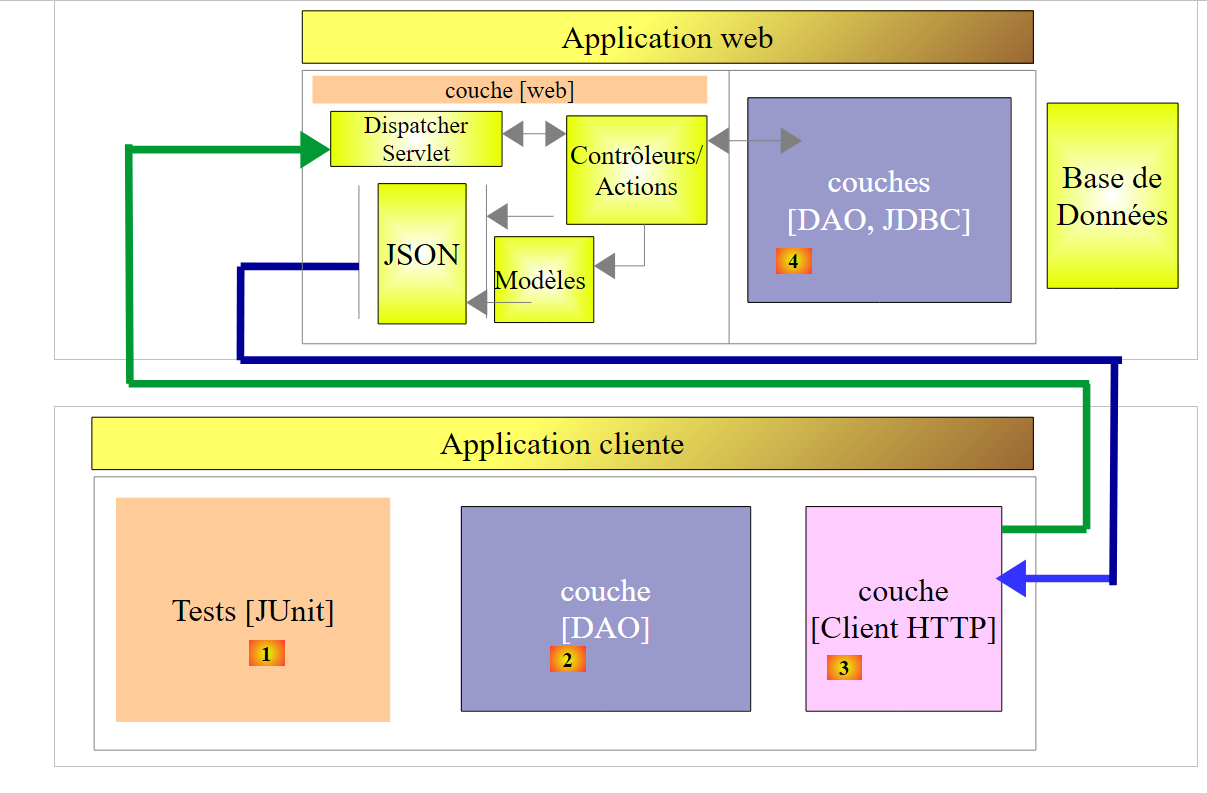 |
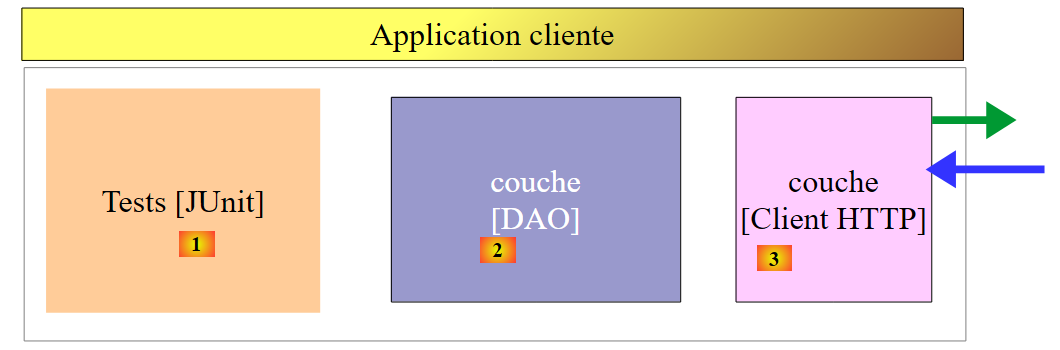
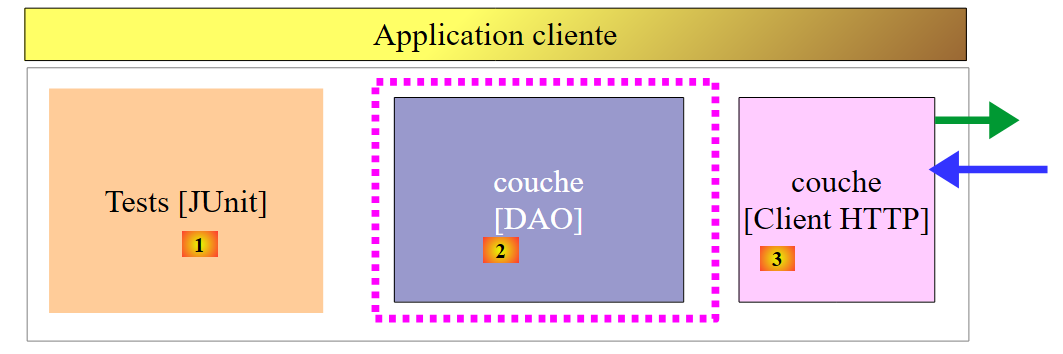
客户端应用程序将包含三个层:
- 一个 [Client HTTP] [3] 层,用于与展示数据库的 Web 应用程序 / jSON 进行通信;
- [DAO] [2] 层,其界面与 [DAO] [4] 层相同;
- 一个测试层 JUnit [1],用于验证客户端和服务器是否正常工作;
18.1. Eclipse 项目
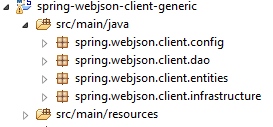
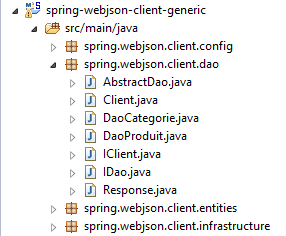
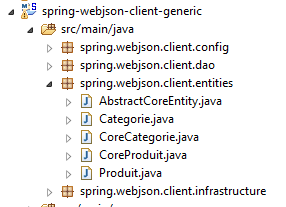
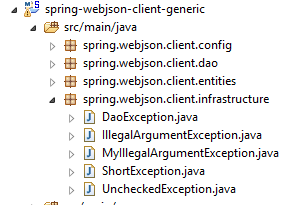
客户端的 Eclipse 项目如下:
 |
 |  |  |
 |  |
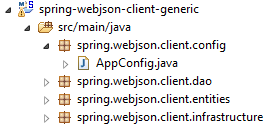
- 包 [spring.webjson.client.config] 包含 [DAO] 层的 Spring 配置;
- 包 [spring.webjson.client.dao] 包含 [DAO] 层的实现;
- [spring.webjson.client.entities] 包包含与 Web 服务 / jSON 交换的对象。我们了解它们;全部;
- [spring.webjson.client.infrastructure] 包包含该项目使用的异常类。我们对它们全部了如指掌;
18.2. 项目的Maven配置
该项目是一个由以下文件 [pom.xml] 配置的 Maven 项目:
<project xmlns="http://maven.apache.org/POM/4.0.0" xmlns:xsi="http://www.w3.org/2001/XMLSchema-instance"
    xsi:schemaLocation="http://maven.apache.org/POM/4.0.0 http://maven.apache.org/xsd/maven-4.0.0.xsd">
    <modelVersion>4.0.0</modelVersion>
    <groupId>dvp.spring.database</groupId>
    <artifactId>spring-webjson-client-generic</artifactId>
    <version>0.0.1-SNAPSHOT</version>

    <description>Client console du serveur web / jSON</description>
    <name>spring-webjson-client-generic</name>

    <properties>
        <project.build.sourceEncoding>UTF-8</project.build.sourceEncoding>
        <java.version>1.7</java.version>
    </properties>

    <parent>
        <groupId>org.springframework.boot</groupId>
        <artifactId>spring-boot-starter-parent</artifactId>
        <version>1.2.3.RELEASE</version>
    </parent>

    <dependencies>
        <!-- Spring -->
        <dependency>
            <groupId>org.springframework</groupId>
            <artifactId>spring-web</artifactId>
        </dependency>
        <!-- Spring使用的jSON库 -->
        <dependency>
            <groupId>com.fasterxml.jackson.core</groupId>
            <artifactId>jackson-core</artifactId>
        </dependency>
        <dependency>
            <groupId>com.fasterxml.jackson.core</groupId>
            <artifactId>jackson-databind</artifactId>
        </dependency>
        <!-- Spring 使用的组件RestTemplate -->
        <dependency>
            <groupId>org.apache.httpcomponents</groupId>
            <artifactId>httpclient</artifactId>
        </dependency>
        <!-- Google Guava -->
        <dependency>
            <groupId>com.google.guava</groupId>
            <artifactId>guava</artifactId>
            <version>16.0.1</version>
        </dependency>
        <!-- 日志库 -->
        <dependency>
            <groupId>org.springframework.boot</groupId>
            <artifactId>spring-boot-starter-logging</artifactId>
        </dependency>
        <!-- Spring Boot 测试 -->
        <dependency>
            <groupId>org.springframework.boot</groupId>
            <artifactId>spring-boot-starter-test</artifactId>
            <scope>test</scope>
        </dependency>
        <!-- Spring Boot -->
        <dependency>
            <groupId>org.springframework.boot</groupId>
            <artifactId>spring-boot</artifactId>
            <scope>test</scope>
        </dependency>
    </dependencies>
    <!-- 插件 -->
    <build>
        <plugins>
            <plugin>
                <groupId>org.apache.maven.plugins</groupId>
                <artifactId>maven-surefire-plugin</artifactId>
                <version>2.18.1</version>
            </plugin>
        </plugins>
    </build>

</project>
- 第 16-20 行:父 Maven 项目 [spring-boot-starter-parent],它允许我们定义若干不带版本号的依赖项,因为版本号已在父项目中定义;
- 第 24-27 行: 尽管我们并非在编写 Web 应用程序,但仍需要依赖项 [spring-web],该依赖项包含类 [RestTemplate],可轻松与 Web 应用程序 / jSON 进行交互;
- 第 29-36 行:一个 jSON 库;
- 第38-41行:一个依赖项,它将使我们能够将timeout附加到客户端的HTTP请求上。 timeout 表示服务器响应的最大等待时间。超过此时间,客户端将通过抛出异常来报告 timeout 错误;
- 第 43-48 行:Google Guava 库;
- 第 50-53 行:日志库;
- 第 54-64 行:用于测试的依赖项 JUnit。它特别引入了测试所需的 JUnit 4 库。 这些依赖项带有 [<scope>test</scope>] 属性,表明它们仅在测试阶段需要。它们不会包含在项目的最终归档中;
18.3. Spring 配置
|
类 [AppConfig] 负责客户端 HTTP 的 Spring 配置。其代码如下:
package spring.webjson.client.config;

import java.util.ArrayList;
import java.util.List;

import org.springframework.beans.factory.config.ConfigurableBeanFactory;
import org.springframework.context.annotation.Bean;
import org.springframework.context.annotation.ComponentScan;
import org.springframework.context.annotation.Configuration;
import org.springframework.context.annotation.Scope;
import org.springframework.http.client.HttpComponentsClientHttpRequestFactory;
import org.springframework.http.converter.HttpMessageConverter;
import org.springframework.http.converter.json.MappingJackson2HttpMessageConverter;
import org.springframework.web.client.RestTemplate;

import com.fasterxml.jackson.databind.ObjectMapper;
import com.fasterxml.jackson.databind.ser.impl.SimpleBeanPropertyFilter;
import com.fasterxml.jackson.databind.ser.impl.SimpleFilterProvider;

@Configuration
@ComponentScan({ "spring.webjson.client.dao" })
public class AppConfig {

    // 常量
    static private final int TIMEOUT = 1000;
    static private final String URL_WEBJSON = "http://localhost:8081";

    // 过滤器jSON
    @Bean
    public ObjectMapper jsonMapper(RestTemplate restTemplate) {
        return ((MappingJackson2HttpMessageConverter) (restTemplate.getMessageConverters().get(0))).getObjectMapper();
    }

    @Bean
    @Scope(value = ConfigurableBeanFactory.SCOPE_PROTOTYPE)
    ObjectMapper jsonMapperShortCategorie(RestTemplate restTemplate) {
        ObjectMapper jsonMapper = jsonMapper(restTemplate);
        jsonMapper.setFilters(new SimpleFilterProvider().addFilter("jsonFilterCategorie",
                SimpleBeanPropertyFilter.serializeAllExcept("produits")));
        return jsonMapper;
    }

    @Bean
    @Scope(value = ConfigurableBeanFactory.SCOPE_PROTOTYPE)
    ObjectMapper jsonMapperLongCategorie(RestTemplate restTemplate) {
        ObjectMapper jsonMapper = jsonMapper(restTemplate);
        jsonMapper.setFilters(new SimpleFilterProvider().addFilter("jsonFilterCategorie",
                SimpleBeanPropertyFilter.serializeAllExcept()).addFilter("jsonFilterProduit",
                SimpleBeanPropertyFilter.serializeAllExcept("categorie")));
        return jsonMapper;
    }

    @Bean
    @Scope(value = ConfigurableBeanFactory.SCOPE_PROTOTYPE)
    ObjectMapper jsonMapperShortProduit(RestTemplate restTemplate) {
        ObjectMapper jsonMapper = jsonMapper(restTemplate);
        jsonMapper.setFilters(new SimpleFilterProvider().addFilter("jsonFilterProduit",
                SimpleBeanPropertyFilter.serializeAllExcept("categorie")));
        return jsonMapper;
    }

    @Bean
    @Scope(value = ConfigurableBeanFactory.SCOPE_PROTOTYPE)
    ObjectMapper jsonMapperLongProduit(RestTemplate restTemplate) {
        ObjectMapper jsonMapper = jsonMapper(restTemplate);
        jsonMapper.setFilters(new SimpleFilterProvider().addFilter("jsonFilterProduit",
                SimpleBeanPropertyFilter.serializeAllExcept()).addFilter("jsonFilterCategorie",
                SimpleBeanPropertyFilter.serializeAllExcept("produits")));
        return jsonMapper;
    }

    @Bean
    public RestTemplate restTemplate(int timeout) {
        // 组件创建 RestTemplate
        HttpComponentsClientHttpRequestFactory factory = new HttpComponentsClientHttpRequestFactory();
        RestTemplate restTemplate = new RestTemplate(factory);
        // 转换器 jSON
        List<HttpMessageConverter<?>> messageConverters = new ArrayList<HttpMessageConverter<?>>();
        messageConverters.add(new MappingJackson2HttpMessageConverter());
        restTemplate.setMessageConverters(messageConverters);
        // 通信超时
        factory.setConnectTimeout(timeout);
        factory.setReadTimeout(timeout);
        // 结果
        return restTemplate;
    }

    @Bean
    public int timeout() {
        return TIMEOUT;
    }

    @Bean
    public String urlWebJson() {
        return URL_WEBJSON;
    }
}
- 第 20 行:该类是一个 Spring 配置类;
- 第 21 行:其他 Spring 组件需从 [spring.webjson.client.dao] 包中获取;
- 第 25 行:将 timeout 的超时时间设为 1 秒(1000 毫秒);
- 第88-91行:返回该值的Bean;
- 第26行:Web服务的URL / jSON;
- 第 93-96 行:返回该值的 Bean;
- 第 72-86 行:[RestTemplate] 类的配置,该类负责与 Web 服务 / jSON 进行交互。若无需配置,可在代码中直接使用 [new RestTemplate()]。 在此,我们希望将与 Web 服务 / jSON 进行交互的 timeout 固定下来。 第 89 行中的 Bean [timeout] 被作为参数传递给了第 73 行中的方法 [restTemplate];
- 第75行:组件[HttpComponentsClientHttpRequestFactory]用于确定通信中的timeout(第82-83行);
- 第 76 行:[RestTemplate] 类是基于该组件构建的。由于它依赖该组件与 Web 服务 / jSON 进行通信,因此数据交换将确实提交给 timeout;
- 第78-80行:将转换器jSON关联至类[RestTemplate]。我们在研究Web服务时已对此进行过说明。客户端与服务器之间交换文本行。 转换器负责将对象序列化为文本,反之亦将文本反序列化为对象。[RestTemplate]类可能关联多个转换器,具体选用哪个取决于服务器发送的HTTP头部信息。 此处仅有一个 jSON 转换器,因为交换的文本行属于 jSON 类型;
- 第82-83行:设定数据交换的timeout参数;
- 第28-70行:定义jSON过滤器。这些与第17.3.2.1节中介绍的服务器过滤器相同;
- 第29-32行:bean [jsonMapper]是转换器[MappingJackson2HttpMessageConverter]的映射器jSON,我们已将其与类[RestTemplate]关联。 我们在 jSON 过滤器的定义中需要它;
- 第 34-41 行:定义过滤器 jSON 的 Bean。方法 [jsonMapperShortCategorie] 接收第 73 行定义的 Bean [restTemplate] 作为参数;
- 第37行:调用第30行的[jsonMapper]方法以获取映射器jSON;
- 第38-39行:设置过滤器以获取不含其产品的类别;
- 第40行:将映射器jSON配置为上述状态;
- 第42-51行:配置过滤器jSON,以获取包含其产品的类别;
- 第53-60行:过滤器jSON,用于生成不含所属类别的商品;
- 第 62-70 行:过滤器 jSON,用于获取包含其所属类别的商品;
所有这些 Bean 都将提供给 [DAO] 层面的代码,以及 JUnit 测试。
18.4. 客户端 HTTP 的实现
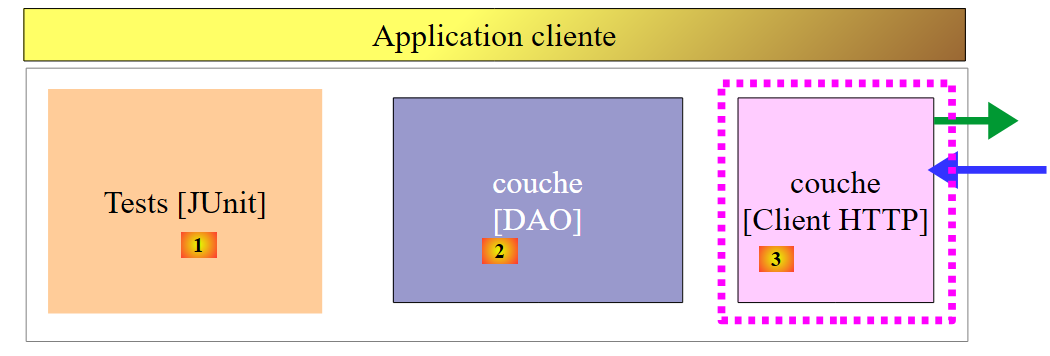 |
上文所述的 [Client HTTP] 层负责与我们刚刚构建的 Web 服务进行交互。现在我们来研究它。
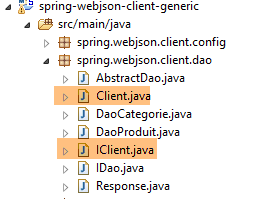 |
类 [Client] 实现了与 Web 服务 / jSON 之间的交互。它实现了以下接口 [IClient]:
package spring.webjson.client.dao;

import org.springframework.http.HttpMethod;

public interface IClient {
    public <T1, T2> T1 getResponse(String url, HttpMethod method, int errStatus, T2 body);
}
该接口仅包含一个方法 [getResponse]:
- 第 6 行:方法 [getResponse] 是一个由两个类型参数化的泛型方法:
- [T1]:是 [Response<T1>] 中服务器预期返回的响应类型,例如 [List<Categorie>],
- [T2]:是操作 POST 提交的参数 jSON 的类型,例如 [List<Produit>];
- 第 6 行:方法 [getResponse] 返回类型为 T1 的结果,例如 [List<Categorie>];
- 第 6 行:[getResponse] 的参数如下:
- [String url]:待查询的URL;
- [HttpMethod method]:请求中的方法HTTP,具体取决于情况,可能是GET或POST,
- [int errStatus]:若与服务器通信时发生错误,则在类[DaoException]中使用的错误代码,
- [T2 body]:若存在 POST,则需提交的值;
类 [Client] 以如下方式实现接口 [IClient]:
package spring.webjson.client.dao;

import java.net.URI;
import java.util.ArrayList;
import java.util.List;

import org.springframework.beans.factory.annotation.Autowired;
import org.springframework.core.ParameterizedTypeReference;
import org.springframework.http.HttpMethod;
import org.springframework.http.MediaType;
import org.springframework.http.RequestEntity;
import org.springframework.http.ResponseEntity;
import org.springframework.stereotype.Component;
import org.springframework.web.client.RestTemplate;

import spring.webjson.client.infrastructure.DaoException;

@Component
public class Client implements IClient {

    // 注入
    @Autowired
    protected RestTemplate restTemplate;
    @Autowired
    protected String urlServiceWebJson;

    // 本地
    private String simpleClassName = getClass().getSimpleName();

    // 通用请求
    @Override
    public <T1, T2> T1 getResponse(String url, HttpMethod method, int errStatus, T2 body) {
    ...
    }

    // 异常的错误消息列表
    protected List<String> getMessagesForException(Exception exception) {
    ...
    }
}
- 第 18 行:类 [Client] 是一个 Spring 组件,因此可以注入到其他 Spring 组件中;
- 第 22-23 行:注入在 [AppConfig] 中定义的 Bean [RestTemplate](参见第 18.3 节),该 Bean 负责与服务器的通信;
- 第 24-25 行:注入 Web 服务 / jSON 中的 URL(该服务在 [AppConfig] 中定义,参见第 18.3 节);
- 第37-39行:私有方法[getMessagesForException]是一个实用方法,用于获取异常中包含的错误消息列表。我们已多次遇到该方法;
继续:
    // 通用请求
    @Override
    public <T1, T2> T1 getResponse(String url, HttpMethod method, int errStatus, T2 body) {
        // 服务器响应
        ResponseEntity<Response<T1>> response;
        try {
            // 正在准备请求
            RequestEntity<?> request = null;
            if (method == HttpMethod.GET) {
                request = RequestEntity.get(new URI(String.format("%s%s", urlServiceWebJson, url)))
                        .accept(MediaType.APPLICATION_JSON).build();
            }
            if (method == HttpMethod.POST) {
                request = RequestEntity.post(new URI(String.format("%s%s", urlServiceWebJson, url)))
                        .header("Content-Type", "application/json").accept(MediaType.APPLICATION_JSON).body(body);
            }
            // 正在执行请求
            response = restTemplate.exchange(request, new ParameterizedTypeReference<Response<T1>>() {
            });
        } catch (Exception e) {
            // 封装异常
            throw new DaoException(errStatus, e, simpleClassName);
        }
        ...
}
- 第18行:该语句向服务器发送请求并接收响应。组件[RestTemplate]提供了大量与服务器交互的方法,但只有方法[exchange]支持泛型参数。因此选择了该方法。 第二个参数确定预期响应的类型。第一个参数是类型为 [RequestEntity] 的请求(第 8 行)。方法 [exchange] 的返回结果类型为 [ResponseEntity<Response<T1>>](第 5 行)。 类型 [ResponseEntity] 封装了服务器的完整响应,包括 HTTP 头部以及服务器发送的文档。 同样,类型 [RequestEntity] 封装了客户端的完整请求,包括 HTTP 头部以及可能提交的值;
- 第 8-16 行:我们需要构建类型为 [RequestEntity] 的请求。根据使用 GET 还是 POST 进行请求,其结构会有所不同;
- 第 10 行:针对 GET 的查询。 类 [RequestEntity] 提供了静态方法,用于创建 GET、POST、HEAD 等请求; [RequestEntity.get] 方法通过串联构建该查询的各个方法,从而创建 GET 查询:
- 方法 [RequestEntity.get] 接受目标 URL 作为参数,该目标以 URI 实例的形式呈现,
- 方法 [accept] 用于定义 HTTP 请求头中的 [Accept] 元素。在此,我们指定接受服务器将发送的 [application/json] 类型;
- 方法 [build] 利用这些不同信息构建请求的类型 [RequestEntity];
- 第 14 行:针对 POST 的请求。[RequestEntity.post] 方法通过串联构建该请求的各个子方法,从而生成 POST 请求:
- 方法 [RequestEntity.post] 接受目标 URL 作为参数,该参数以 URI 实例的形式提供,
- 方法 [header] 定义了一个 HTTP 头部。 此处向服务器发送 [Content-Type: application/json] 头部,以告知服务器将以 jSON 字符串的形式接收所提交的值;
- 方法 [accept] 用于表明我们接受服务器将发送的类型 [application/json];
- 方法 [body] 确定了提交的值。该值是通用方法 [getResponse](第 1 行)的第 4 个参数;
- 第 20-23 行: 若与服务器通信发生错误,则抛出类型为 [DaoException] 的异常,其错误代码即为作为通用方法 [getResponse](第 3 行)第 3 个参数传递的 [errStatus] 参数;
方法 [getResponse] 后续执行如下:
// 通用请求
    @Override
    public <T1, T2> T1 getResponse(String url, HttpMethod method, int errStatus, T2 body) {
    ...
        // 获取响应正文
        Response<T1> entity = response.getBody();
        int status = entity.getStatus();
        // 服务器端出现错误?
        if (status != 0) {
            // 抛出异常
            throw new DaoException(status, new RuntimeException(entity.getException()), simpleClassName);
        } else {
            // 成功
            return entity.getBody();
        }
    }
- 第 4 行:我们已收到服务器的响应。该响应类型为 [ResponseEntity<Response<T1>>](前文分析代码的第 5 行),其中类 [Response] 是服务器端已使用的类:
package spring.webjson.client.dao;

public class Response<T> {

    // ----------------- 属性
    // 操作状态
    private int status;
    // 可能的异常
    private String exception;
    // 响应正文
    private T body;

    // 构造函数
    public Response() {

    }

    public Response(int status, String exception, T body) {
        this.status = status;
        this.exception = exception;
        this.body = body;
    }

    // 获取器和设置器
...
}
让我们回到 [getResponse] 方法:
- 第 6 行:我们提取响应中封装的 [Response<T1>] 类型的文档。该类型包含字段 [int status, String exception, T1 body];
- 第7行:我们从响应中获取[status],这是一个错误代码;
- 第9-12行:若发生错误,则抛出一个异常,其中包含服务器响应中的两个信息[status, exception];
- 第14行:否则,返回响应中包含的[T1]类型,该响应类型为[Response<T1>];
[Client] 类是通用的。它可用于任何 Web 客户端 / jSON。
18.5. [Dao] 层的实现
 |
 |
18.5.1. [AbstractDao] 类
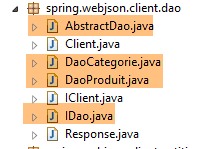
客户端层 [DAO] 与服务器端层 [DAO] 具有相同的接口(参见第 4.7 节):
package spring.webjson.client.dao;

import java.util.List;

import spring.webjson.client.entities.AbstractCoreEntity;

public interface IDao<T extends AbstractCoreEntity> {

    // 所有 T 实体的列表
    public List<T> getAllShortEntities();

    public List<T> getAllLongEntities();

    // 特定实体的列表 - 简短版本
    public List<T> getShortEntitiesById(Iterable<Long> ids);

    public List<T> getShortEntitiesById(Long... ids);

    public List<T> getShortEntitiesByName(Iterable<String> names);

    public List<T> getShortEntitiesByName(String... names);

    // 特定实体的详细版本
    public List<T> getLongEntitiesById(Iterable<Long> ids);

    public List<T> getLongEntitiesById(Long... ids);

    public List<T> getLongEntitiesByName(Iterable<String> names);

    public List<T> getLongEntitiesByName(String... names);

    // 更新多个实体
    public List<T> saveEntities(Iterable<T> entities);

    public List<T> saveEntities(@SuppressWarnings("unchecked") T... entities);

    // 删除所有实体
    public void deleteAllEntities();

    // 删除多个实体
    public void deleteEntitiesById(Iterable<Long> ids);

    public void deleteEntitiesById(Long... ids);

    public void deleteEntitiesByName(Iterable<String> names);

    public void deleteEntitiesByName(String... names);

    public void deleteEntitiesByEntity(Iterable<T> entities);

    public void deleteEntitiesByEntity(@SuppressWarnings("unchecked") T... entities);
}
类 [AbstractDao] 实现了接口 [IDao]。 该类与服务器端的同名类类似(参见第 4.8 节)。它作为 [DaoCategorie] 和 [DaoProduit] 类的父类。两者不完全相同,原因有二:
- 在服务器端,[AbstractDao]类管理以下信息:
    // 插入
    @Autowired
    @Qualifier("maxPreparedStatementParameters")
    protected int maxPreparedStatementParameters;
这些信息在此处并不需要。
- 在服务器端,类 [AbstractDao] 使用注解 [@Transactional] 将每个方法封装在事务中。在客户端,无需管理数据库。因此该注解被移除;
类 [AbstractDao] 仅需在将调用委托给子类之前,验证接口 [IDao] 中方法的调用参数是否有效:
package spring.webjson.client.dao;

import java.util.ArrayList;
import java.util.List;

import spring.webjson.client.entities.AbstractCoreEntity;
import spring.webjson.client.infrastructure.MyIllegalArgumentException;

import com.google.common.collect.Lists;

public abstract class AbstractDao<T1 extends AbstractCoreEntity> implements IDao<T1> {

    // 本地
    protected String simpleClassName = getClass().getSimpleName();

    @Override
    public List<T1> getShortEntitiesById(Iterable<Long> ids) {
        // 参数有效性
        List<T1> entities = checkNullOrEmptyArgument(true, ids);
        if (entities != null) {
            return entities;
        }
        // 结果
        return getShortEntitiesById(Lists.newArrayList(ids));
    }

    @Override
    public List<T1> getShortEntitiesById(Long... ids) {
        // 参数有效性
        List<T1> entities = checkNullOrEmptyArgument(true, ids);
        if (entities != null) {
            return entities;
        }
        // 结果
        return getShortEntitiesById(Lists.newArrayList(ids));
    }
...
    @Override
    public void deleteEntitiesByEntity(@SuppressWarnings("unchecked") T1... entities) {
        ...
    }

    // 私有方法 ----------------------------------------------
    private <T3> List<T1> checkNullOrEmptyArgument(boolean checkEmpty, Iterable<T3> elements) {
        // 元素为空?
        if (elements == null) {
            throw new MyIllegalArgumentException(222, new NullPointerException("L'argument ne peut être null"),
                    simpleClassName);
        }
        // 空元素?
        if (!elements.iterator().hasNext()) {
            if (checkEmpty) {
                throw new MyIllegalArgumentException(223, new RuntimeException("l'argument ne peut être une liste vide"),simpleClassName);
            } else {
                return new ArrayList<T1>();
            }
        }
        // 默认结果
        return null;
    }

    @SuppressWarnings("unchecked")
    private <T3> List<T1> checkNullOrEmptyArgument(boolean checkEmpty, T3... elements) {
        // 空元素?
        if (elements == null) {
            throw new MyIllegalArgumentException(222, new NullPointerException("L'argument ne peut être null"),simpleClassName);
        }
        // 元素为空?
        if (elements.length == 0) {
            if (checkEmpty) {
                throw new MyIllegalArgumentException(223, new RuntimeException("L'argument ne peut être une liste vide"),
                        simpleClassName);
            } else {
                return new ArrayList<T1>();
            }
        }
        // 默认结果
        return null;
    }

    // 受保护的方法 ----------------------------------------------
    abstract protected List<T1> getShortEntitiesById(List<Long> ids);

    abstract protected List<T1> getShortEntitiesByName(List<String> names);

    abstract protected List<T1> getLongEntitiesById(List<Long> ids);

    abstract protected List<T1> getLongEntitiesByName(List<String> names);

    abstract protected List<T1> saveEntities(List<T1> entities);

    abstract protected void deleteEntitiesById(List<Long> ids);

    abstract protected void deleteEntitiesByName(List<String> names);
}
18.5.2. 类 [DaoCategorie]
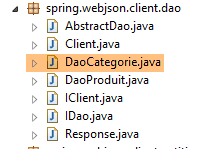 |
[DaoCategorie] 类如下所示:
package spring.webjson.client.dao;

import java.util.List;

import org.springframework.beans.factory.annotation.Autowired;
import org.springframework.context.ApplicationContext;
import org.springframework.http.HttpMethod;
import org.springframework.stereotype.Component;

import spring.webjson.client.entities.Categorie;
import spring.webjson.client.entities.CoreCategorie;
import spring.webjson.client.entities.CoreProduit;
import spring.webjson.client.entities.Produit;
import spring.webjson.client.infrastructure.DaoException;

import com.fasterxml.jackson.core.type.TypeReference;
import com.fasterxml.jackson.databind.ObjectMapper;

@Component
public class DaoCategorie extends AbstractDao<Categorie> {

    @Autowired
    private ApplicationContext context;
    @Autowired
    private IClient client;

...
}
- 第 19 行:类 [DaoClient] 是一个 Spring 组件,因此可以向其中注入其他 Spring 组件;
- 第20行:类[DaoClient]继承了我们刚才看到的类[AbstractDao<Categorie>],因此实现了接口[IDao<Categorie>];
- 第 22-23 行:注入 Spring 上下文以访问其 Bean;
- 第 24-25 行:注入我们刚刚构建的 HTTP 客户端;
[DaoCategorie] 接口中各方法的实现均遵循相同的模式。我们将介绍三个方法,其中一个基于 [GET] 操作,另外两个基于 [POST] 操作。
18.5.2.1. 方法 [getAllLongEntities]
[getAllLongEntities]方法将数据库中所有类别的长版本导出:
    @Override
    public List<Categorie> getAllLongEntities() {
        try {
            // 过滤器 jSON
            ObjectMapper mapper = context.getBean("jsonMapperLongCategorie", ObjectMapper.class);
            // 获取所有类别
            Object map = client.<List<Categorie>, Void> getResponse("/getAllLongCategories", HttpMethod.GET, 232, null);
            // 类别列表 List<Categorie>
            List<Categorie> categories = mapper.readValue(mapper.writeValueAsString(map),
                    new TypeReference<List<Categorie>>() {
                    });
            // 重新建立产品 --> 分类的关联
            return linkCategorieWithProduits(categories);
        } catch (DaoException e1) {
            throw e1;
        } catch (Exception e2) {
            throw new DaoException(233, e2, simpleClassName);
        }
}
- 第 2 行:该方法返回类别列表的完整版本;
- 第 5 行:映射器 jSON,用于序列化提交的值(此处无值)并反序列化由类 [Client] 返回的响应(即所有类别的完整名称);
- 第 7 行:调用类 [Client] 的方法 [getResponse]。该方法负责与 Web 服务 / jSON 进行交互。其参数如下:
- 被调用的服务方法 URL 及被查询的方法 [/getAllLongCategories];
- 要使用的 [GET] 方法;
- 发生错误时使用的错误代码(232);
- 提交的值。此处无值;
- 第 7 行:在表达式 [client.<List<Categorie>, Void>] 中,指定了方法 [getResponse] 的泛型类型 [T1, T2] 的实际参数。 需要说明的是,[T1]是预期响应的类型,而[T2]是传入值的类型。 此处预期返回类型为 [List<Categorie>],且不存在提交的 [Void] 值;
- 第 7 行:方法 [getResponse] 返回的结果被放入一个类型为 [Object] 的对象中。这有些奇怪,因为我们期望的类型是 [List<Categorie>]。 这是因为方法 [getResponse] 处理泛型类型 [T1, T2] 时,会系统性地返回类型 [java.util.LinkedHashMap],因此需要利用该类型来生成正确的类型;
- 第 9 行:返回类别列表。 为此,将对象 [map] [mapper.writeValueAsString(map)] 序列化为字符串 jSON,然后将其重新序列化为类型 [List<Categorie>];
- 第13行:接收到了一个类别列表,其中某些类别可能包含产品。我们接收到了这些产品的简短版本。因此,当它们被反序列化时,生成的 [Produit] 对象具有 [categorie==null] 字段。 方法 [linkCategorieWithProduits] 重新建立了 [Produit] 与其 [Categorie] 之间的关联;
- 第 14-15 行:捕获方法 [getResponse] 可能抛出的 [DaoException] 类型异常,并立即重新抛出该异常。 这种奇怪的行为是因为,如果不这样做,第16-18行将拦截类型为[DaoException]的异常,而这是我们不希望看到的;
- 第 16-18 行:拦截所有其他异常,并将它们封装为 [DaoException] 类型。需要提醒的是,[DAO] 层仅应抛出此类异常;
用于重建 [Produit] 实体与 [Categorie] 实体之间关联的 [linkCategorieWithProduits] 方法如下:
    private List<Categorie> linkCategorieWithProduits(List<Categorie> categories) {
        for (Categorie categorie : categories) {
            List<Produit> produits = categorie.getProduits();
            if (produits != null) {
                for (Produit produit : produits) {
                    produit.setCategorie(categorie);
                }
            }
        }
        return categories;
}
18.5.2.2. 过滤器管理 jSON
让我们回顾一下前一个方法 [getAllLongEntities] 中的 jSON 过滤器管理:
    @Override
    public List<Categorie> getAllLongEntities() {
        try {
            // 筛选器 jSON
            ObjectMapper mapper = context.getBean("jsonMapperLongCategorie", ObjectMapper.class);
            // 获取所有分类
            Object map = client.<List<Categorie>, Void> getResponse("/getAllLongCategories", HttpMethod.GET, 232, null);
            // 类别列表 List<Categorie>
            List<Categorie> categories = mapper.readValue(mapper.writeValueAsString(map),
                    new TypeReference<List<Categorie>>() {
                    });
- 第 5 行:从 Spring 上下文中获取一个 jSON 映射器,该映射器能够处理类别的长版本。让我们回顾一下 Spring 配置中对该映射器的定义 [AppConfig]:
// 筛选器 jSON
    @Bean
    public ObjectMapper jsonMapper(RestTemplate restTemplate) {
        return ((MappingJackson2HttpMessageConverter) (restTemplate.getMessageConverters().get(0))).getObjectMapper();
    }

    @Bean
    @Scope(value = ConfigurableBeanFactory.SCOPE_PROTOTYPE)
    ObjectMapper jsonMapperLongCategorie(RestTemplate restTemplate) {
        ObjectMapper jsonMapper = jsonMapper(restTemplate);
        jsonMapper.setFilters(new SimpleFilterProvider().addFilter("jsonFilterCategorie",
                SimpleBeanPropertyFilter.serializeAllExcept()).addFilter("jsonFilterProduit",
                SimpleBeanPropertyFilter.serializeAllExcept("categorie")));
        return jsonMapper;
}
    @Bean
    public RestTemplate restTemplate(int timeout) {
    ...
    }
- 由方法 [getAlllongEntities] 调用的 Bean [jsonMapperLongCategorie] 即第 7-15 行中的 Bean;
- 第10行:该映射器由第2-5行中的[jsonMapper]方法提供。 可以看出,该映射器 jSON 属于对象 [RestTemplate],该对象负责管理客户端与服务器之间的 HTTP 数据交换。默认情况下,该映射器用于:
- 将发送到服务器的值序列化;
- 反序列化服务器返回的响应;
让我们回到 [getAllLongEntities] 的代码:
            // 过滤器 jSON
            ObjectMapper mapper = context.getBean("jsonMapperLongCategorie", ObjectMapper.class);
            // 获取所有类别
            Object map = client.<List<Categorie>, Void> getResponse("/getAllLongCategories", HttpMethod.GET, 232, null);
            // 分类列表 List<Categorie>
            List<Categorie> categories = mapper.readValue(mapper.writeValueAsString(map),
                    new TypeReference<List<Categorie>>() {
                    });
            // 重新建立产品与类别的关联
return linkCategorieWithProduits(categories);
- 第 2 行:从 Spring 上下文中获取映射器 [jsonMapperLongCategorie];
- 第 4 行:执行方法 [getResponse]。此时会发生:
- 对提交值的自动序列化(此处无数据);
- 对接收到的响应进行自动反序列化,此处为 List<Categorie> 类型。这是因为实体 [Categorie] 具有过滤器 jSON [jsonFilterCategorie],因此需要处理该过滤器。 这就是第2行的原因;
- 第 6 行:结果使用相同的映射器进行第二次序列化/反序列化,以获取 List<Categorie> 类型。第 4 行,[getResponse] 返回的类型是 [Object];
在后续方法中,需注意从 Spring 上下文中请求的映射器 jSON 既用于提交值(序列化),也用于接收值(反序列化)。 如果其中一个或两个值带有 jSON 过滤器,则需要对其进行配置。因此,映射器最多可配置两个过滤器。 在下文中,这种情况从未发生。要么是提交值没有过滤器(List<Long>、List<String>),要么是接收值没有过滤器(List<CoreCategorie>、List<CoreProduit>)。 具有过滤器 jSON 的实体仅为 [Categorie] 和 [Produit]。
18.5.2.3. 方法 [getShortEntitiesById]
方法 [getShortEntitiesById] 会返回其作为参数接收的主键所属类别的简短版本:
    @Override
    protected List<Categorie> getShortEntitiesById(List<Long> ids) {
        try {
            // 筛选器 jSON
            ObjectMapper mapper = context.getBean("jsonMapperShortCategorie", ObjectMapper.class);
            // 获取不含其产品的分类
            Object map = client.<List<Categorie>, List<Long>> getResponse("/getShortCategoriesById", HttpMethod.POST, 204, ids);
            // 分类
            return mapper.readValue(mapper.writeValueAsString(map), new TypeReference<List<Categorie>>() {
            });
        } catch (DaoException e1) {
            throw e1;
        } catch (Exception e2) {
            throw new DaoException(223, e2, simpleClassName);
        }
}
- 第 5 行:映射器 jSON,用于序列化提交的值(主键列表),并反序列化由类 [Client] 返回的响应(类别及其简短版本)。 所选过滤器对提交的值没有任何影响,因为对于提交列表中的元素,并不存在过滤器;
- 第 7 行:调用父类的 [getResponse] 方法。正是该方法负责与 Web 服务 / jSON 进行交互。其参数如下:
- 被调用的服务 [/getShortCategoriesById] 的 URL;
- 要使用的 [POST] 方法;
- 发生错误时使用的错误代码(204);
- 提交的值。此处为一组主键列表;
- 第7行:在表达式 [client.<List<Categorie>, List<Long>>] 中,指定了方法 [getResponse] 中泛型类型 [T1, T2] 的实际参数。 需要提醒的是,[T1] 是预期响应的类型,而 [T2] 是提交值的类型。 此处预期返回类型为 [List<Categorie>],而提交的值是一个类型为 [List<Long>] 的主键列表;
- 第 7 行:由方法 [getResponse] 返回的结果被放入一个类型为 [Object] 的对象中;
- 第 9 行:返回类别列表。 为此,将对象 [map] [mapper.writeValueAsString(map)] 序列化为字符串 jSON,然后将其反序列化为类型 [List<Categorie>];
18.5.2.4. 方法 [saveEntities]
方法 [saveEntities] 将类别持久化到数据库中。其代码如下:
@Override
    protected List<Categorie> saveEntities(List<Categorie> entities) {
        try {
            // 筛选条件 jSON
            ObjectMapper mapper = context.getBean("jsonMapperLongCategorie", ObjectMapper.class);
            // 添加分类
            Object map = client.<List<CoreCategorie>, List<Categorie>> getResponse("/saveCategories", HttpMethod.POST, 200,
                    entities);
            // 已添加的核心分类列表
            List<CoreCategorie> coreCategories = mapper.readValue(mapper.writeValueAsString(map),
                    new TypeReference<List<CoreCategorie>>() {
                    });
            // 根据收到的信息更新分类
            for (int i = 0; i < entities.size(); i++) {
                Categorie categorie = entities.get(i);
                CoreCategorie coreCategorie = coreCategories.get(i);
                categorie.setId(coreCategorie.getId());
                List<Produit> produits = categorie.getProduits();
                if (produits != null) {
                    List<CoreProduit> coreProduits = coreCategorie.getCoreProduits();
                    for (int j = 0; j < produits.size(); j++) {
                        Produit produit = produits.get(j);
                        produit.setId(coreProduits.get(j).getId());
                        produit.setIdCategorie(categorie.getId());
                        produit.setCategorie(categorie);
                    }
                }
            }
            return entities;
        } catch (DaoException e1) {
            throw e1;
        } catch (Exception e2) {
            throw new DaoException(220, e2, simpleClassName);
        }
    }
- 第 2 行:方法 [saveEntities] 用于将作为参数传递的分类持久化到数据库中。它会为这些分类添加主键。如果分类与产品一同传递,产品也会被持久化;
- 第 5 行:映射器 jSON 用于序列化提交的值(类别列表及其长格式),并反序列化由类 [Client] 返回的响应(即 [CoreCategorie] 对象)。 所选过滤器对结果没有任何影响,因为响应中收到的列表项没有过滤器;
- 第7行:调用父类的[getResponse]方法,用于与Web服务/jSON进行交互;
- 第一个参数是 URL [/saveCategories];
- 第二个参数是要使用的 HTTP 方法,此处为 [POST];
- 第三个参数是发生错误时使用的错误代码(200);
- 最后一个参数是提交的值,此处为待保存的分类列表;
- 第7行:方法[getResponse]的通用参数[T1, T2]在此处为[List<CoreCategorie>, List<Categorie>]。第一个类型是预期响应的类型,第二个类型是提交值的类型;
- 第7行:将获得的响应赋值给类型[Object];
- 第9行:重建类型为[List<CoreCategorie>]的响应。应返回的响应类型为[List<Categorie>](第2行),而非[List<CoreCategorie>]。收到的响应是已持久化类别和产品的主键列表;
- 第14-28行:将接收的主键分配给类别和产品(第17、23、24行)。此外,重建链接 [Produit] --> [Categorie](第24-25行);
所有其他方法均遵循相同的框架。
18.6. JUnit 测试
让我们回到正在构建的客户端/服务器架构:
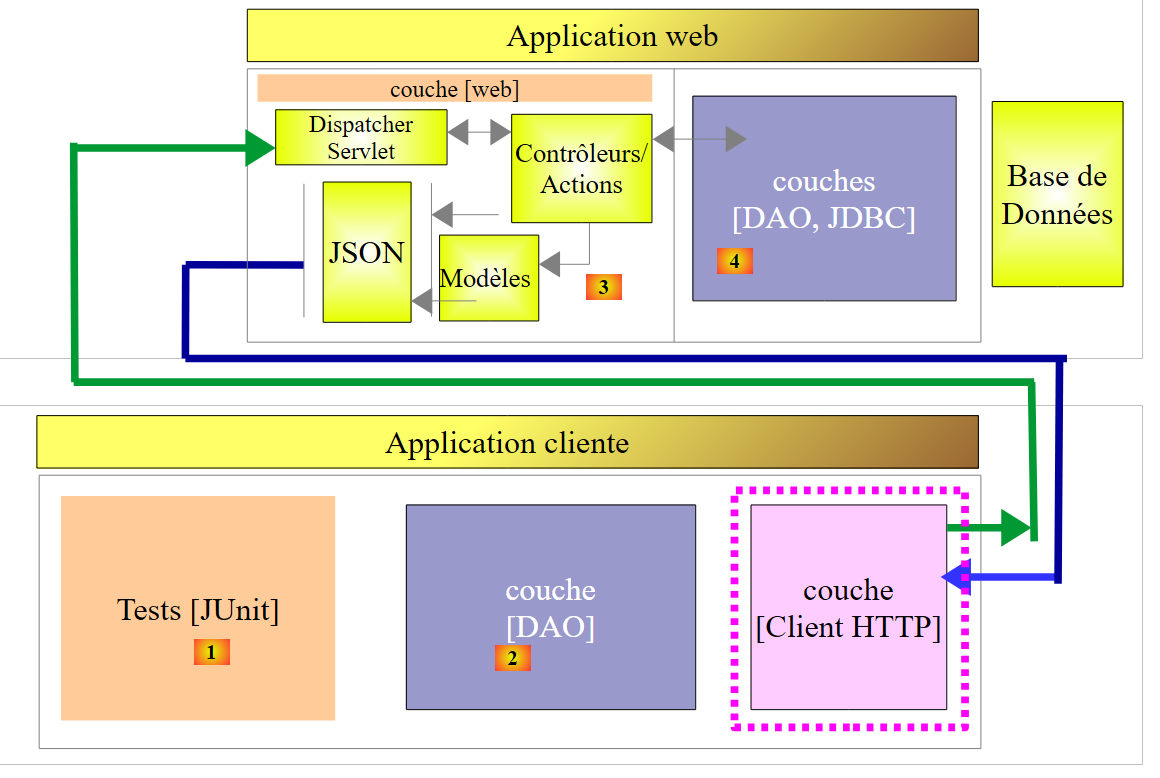 |
我们构建了一个 [DAO] [2] 层,其接口与 [DAO] [4] 层相同。 因此,要测试 [DAO] [2] 层,可以使用之前用于测试 [DAO] [4] 层的 JUnit 测试:
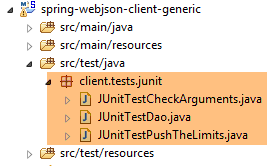 |
这三个测试将根据以下运行配置执行:
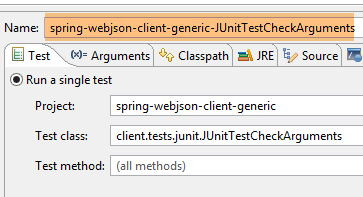 | 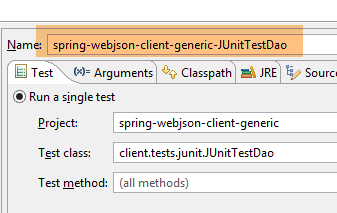 |
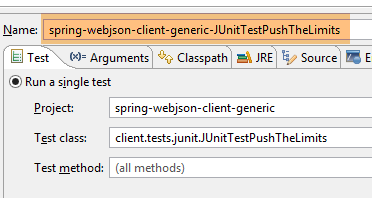 |
这三个测试的结果如下:
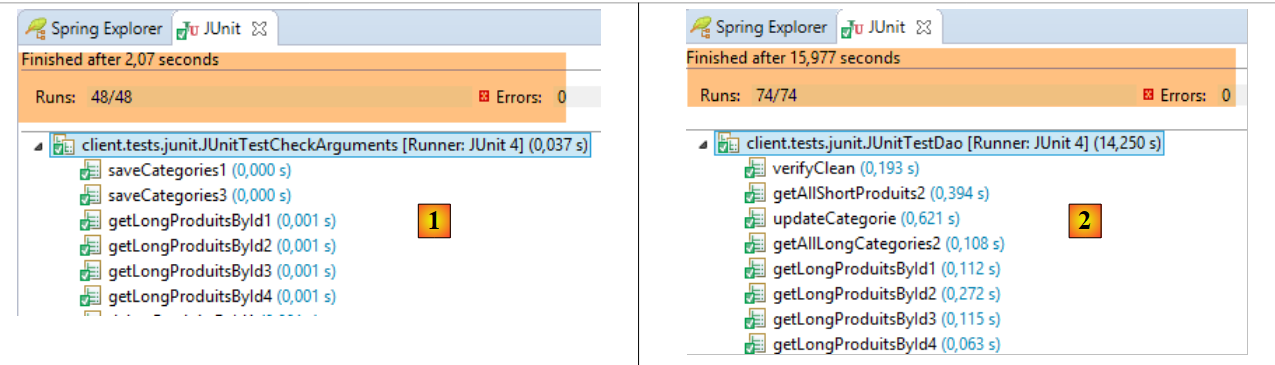 |
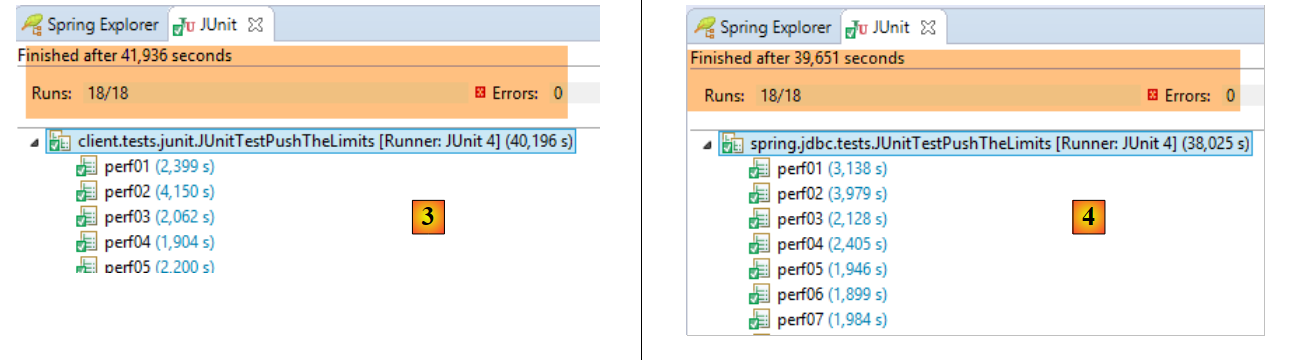 |
- 在 [1] 中,测试 [JUnitTestCheckArguments];
- 在 [2] 中,测试 [JUnitTestDao];
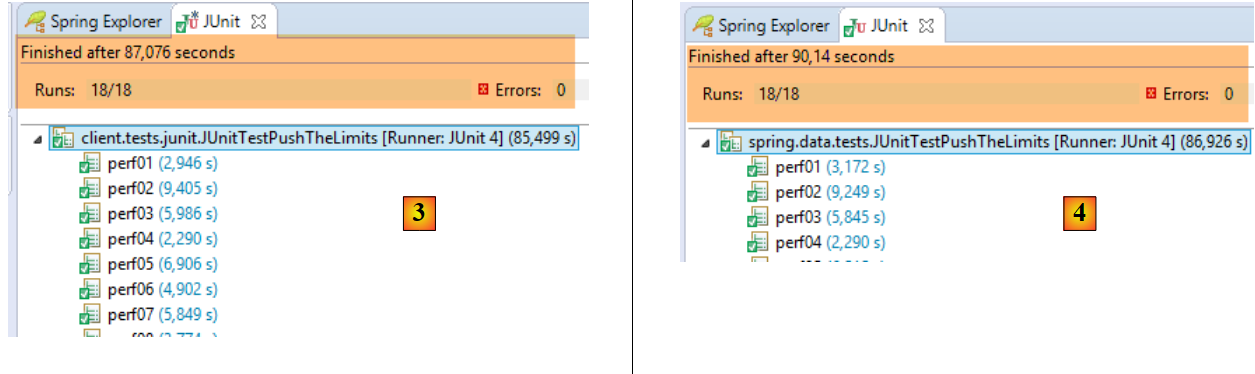
- 在 [3] 中,客户端执行的测试 [JUnitTestPushTheLimits](项目 [spring-webjson-client-generic]);
- 在 [3] 中,服务器端执行的测试为 [JUnitTestPushTheLimits](项目 [spring-jdbc-generic-04])。 可以发现,与访问 SGBD 相比,网络层造成的延迟非常小;
18.7. Web服务实现 / jSON / JPA / Hibernate
现在我们关注以下架构:
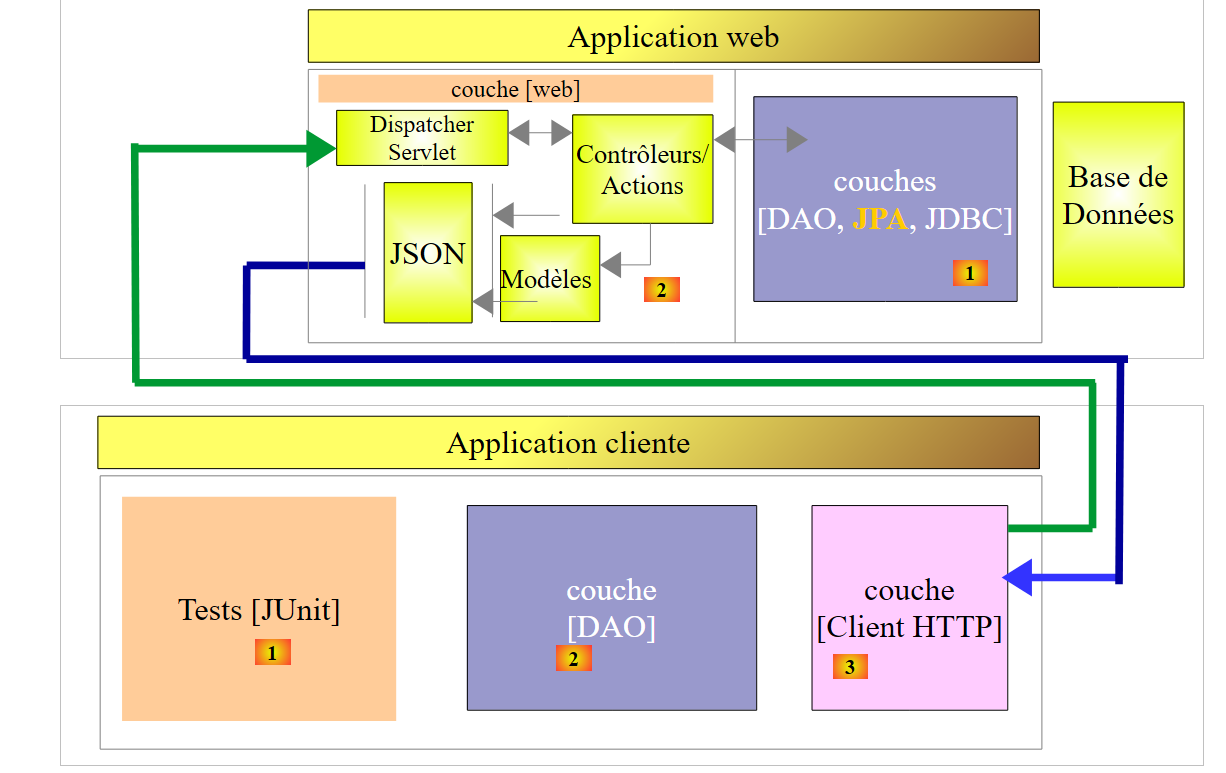 |
修改内容位于 [1]。服务器的 [DAO] 层基于 JPA 的实现。 我们将首先使用 JPA / Hibernate 实现。
18.7.1. Eclipse 项目
目前,Eclipse 中加载的项目如下:
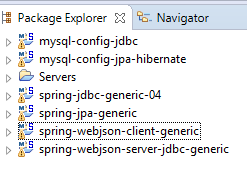 |
[spring-webjson-server-jdbc-generic] 项目基于 [spring-jdbc-generic-04] 项目,该项目配置了 DAO / JDBC 访问 SGBD MySQL 的配置。 我们将创建一个新的项目 [spring-webjson-server-jpa-generic],该项目将基于项目 [spring-jpa-generic],后者配置了访问 SGBD 的 DAO / JPA / JDBC 层,用于访问 SGBD 和 MySQL。 我们知道,在这两种情况下,[DAO] 层都实现了相同的 [IDao] 接口。因此,[web] 层的代码不会改变。
我们可以通过复制/粘贴 [spring-webjson-server-jdbc-generic] 项目来创建 [spring-webjson-server-jpa-generic] 项目:
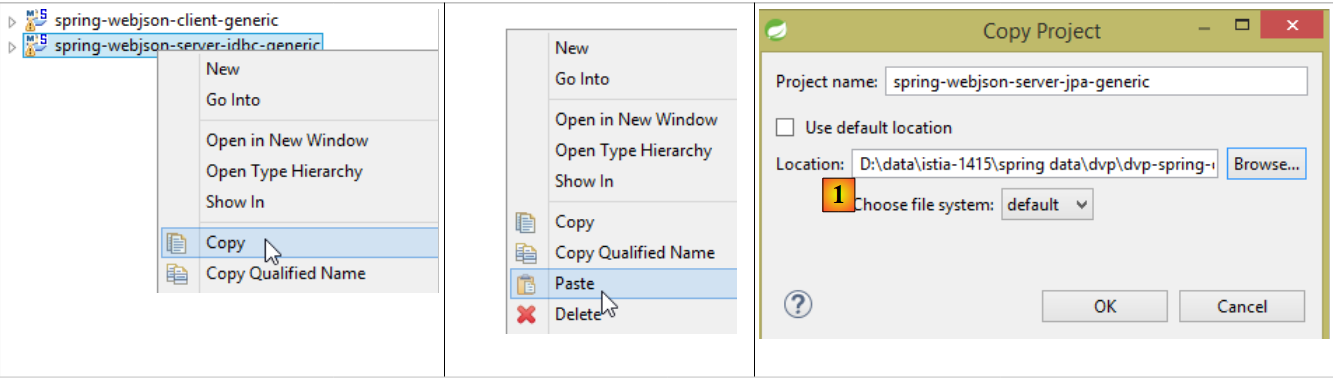 |
- 并将其重命名为 [1],指定一个专门为新项目创建的文件夹;
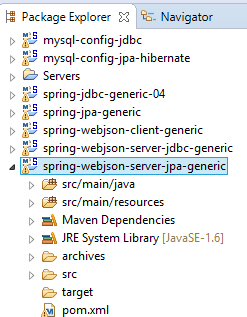 |
需要进行三类修改。第一类修改位于项目的 Maven 配置文件 [pom.xml] 中:
<project xmlns="http://maven.apache.org/POM/4.0.0" xmlns:xsi="http://www.w3.org/2001/XMLSchema-instance"
    xsi:schemaLocation="http://maven.apache.org/POM/4.0.0 http://maven.apache.org/xsd/maven-4.0.0.xsd">
    <modelVersion>4.0.0</modelVersion>
    <groupId>dvp.spring.database</groupId>
    <artifactId>spring-webjson-server-jpa-generic</artifactId>
    <version>0.0.1-SNAPSHOT</version>

    <name>spring-webjson-server-jpa-generic</name>
    <description>démo spring mvc</description>

    <parent>
        <groupId>org.springframework.boot</groupId>
        <artifactId>spring-boot-starter-parent</artifactId>
        <version>1.2.3.RELEASE</version>
    </parent>

    <dependencies>
        <!-- Web层 -->
        <dependency>
            <groupId>org.springframework.boot</groupId>
            <artifactId>spring-boot-starter-web</artifactId>
        </dependency>
        <!-- [DAO] 层 -->
        <dependency>
            <groupId>dvp.spring.database</groupId>
            <artifactId>spring-jpa-generic</artifactId>
            <version>0.0.1-SNAPSHOT</version>
        </dependency>
    </dependencies>
    <!-- 插件 -->
    <build>
        <plugins>
            <plugin>
                <groupId>org.apache.maven.plugins</groupId>
                <artifactId>maven-surefire-plugin</artifactId>
                <version>2.18.1</version>
            </plugin>
        </plugins>
    </build>

</project>
- 第 5 行:更改 Maven 工件的名称;
- 第24-28行:依赖关系现指向项目[spring-jpa-generic],而非[spring-jdbc-generic-04];
最终,依赖关系如下:
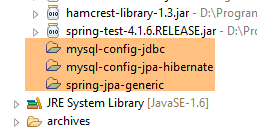 |
完成上述操作后,各个类中出现的导入问题均已解决。例如,[Produit, Categorie] 实体不再需要从 [spring-jdbc-generic-04] 项目中查找,而应从 [spring-jpa-generic] 项目中查找。 在某个类的代码中添加 [Ctrl-Maj-O] 即可重新生成导入语句。
最后需要在配置文件 [AppConfig] 中进行修改:
package spring.webjson.server.config;

import org.springframework.context.annotation.ComponentScan;
import org.springframework.context.annotation.Configuration;
import org.springframework.context.annotation.Import;

@Configuration
@ComponentScan(basePackages = { "spring.webjson.server.service" })
@Import({ spring.data.config.AppConfig.class, WebConfig.class })
public class AppConfig {

}
- 第 9 行:现在导入的是项目 [spring-jpa-generic] 的配置,而不是项目 [spring-jdbc-generic-04] 的配置;
至此准备就绪。我们使用配置文件 [spring-webjson-server-jpa-generic-hibernate-eclipselink] 启动 Web 服务:
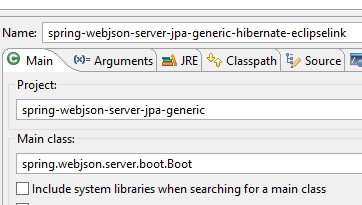 | 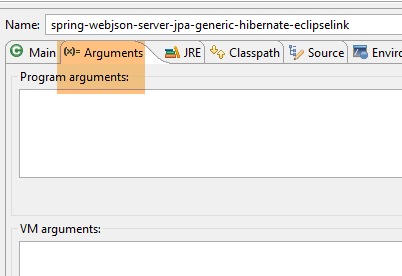 |
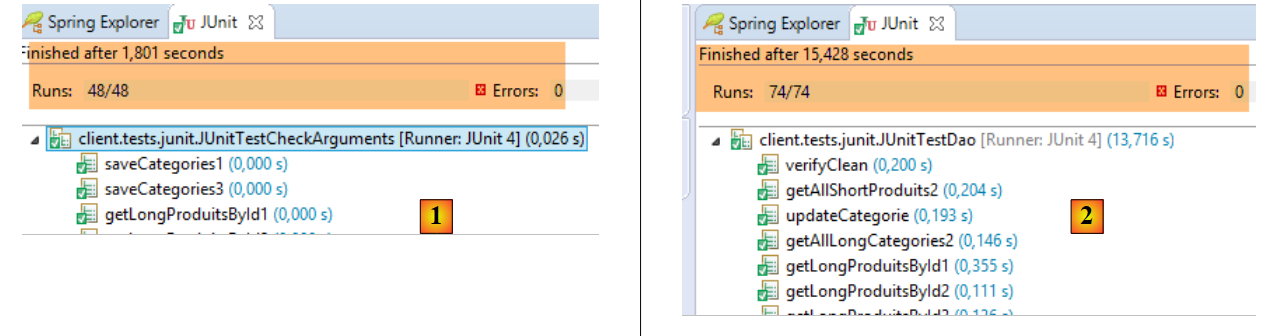
然后我们执行通用客户端 [spring-webjson-client-generic] 的三个测试:
 |
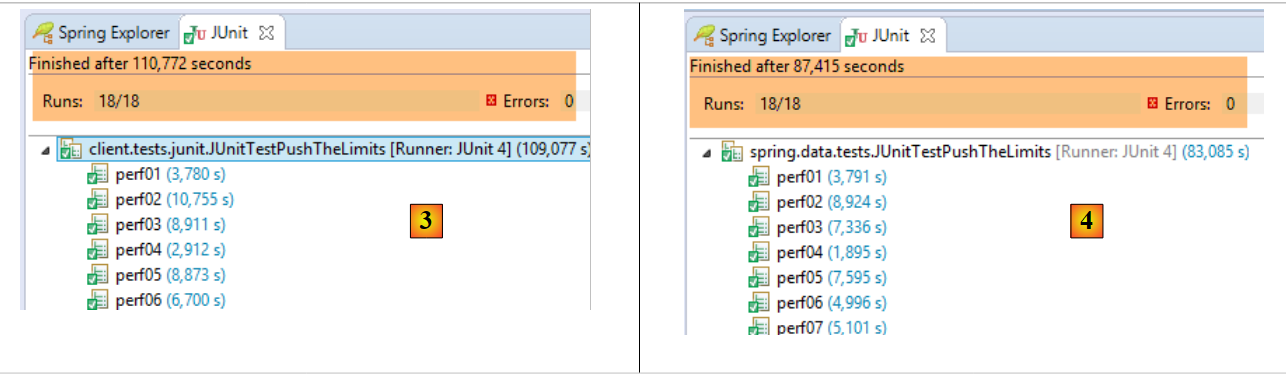 |
- 在 [1] 中,测试 [JUnitTestCheckArguments](运行配置 [spring-webjson-client-generic-JUnitTestCheckArguments]);
- 在 [2] 中,测试 [JUnitTestDao](运行配置 [spring-webjson-client-generic-JUnitTestDao]);
- 在 [3] 中,将客户端执行的测试 [JUnitTestPushTheLimits](运行配置 [spring-webjson-client-generic-JUnitTestPushTheLimits]);
- 在 [4] 中,服务器端执行的测试 [JUnitTestPushTheLimits](运行配置 [spring-jpa-generic-JUnitTestPushTheLimits-hibernate-eclipselink]);
18.7.2. 为什么能运行?
虽然运行正常,但仔细查看代码后,会惊讶于它竟然能运行。尽管由项目 [spring-jdbc-generic-04] 和 [spring-jpa-generic] 实现的 [DAO] 层确实具有相同的接口, 但它们操作的 [Categorie] 和 [Produit] 实体并不相同:在 [spring-jpa-generic] 项目中,这些实体有一个额外的字段 [EntityType entityType],该字段有两种可能的值:
- EntityType.POJO:该实体为普通对象,其所有字段均可自由使用;
- EntityType.PROXY:该实体是由 [JPA] 层渲染的 PROXY 对象。在此情况下,某些字段(实际上是这些字段的获取器)的行为与通常不同,因此制定了以下规则:
- 若为 [Categorie.entityType==EntityType.PROXY],则不得使用方法 [getProduits];
- 若为 [Produit.entityType==EntityType.PROXY],则不得使用 [getCategorie] 方法;
然而,我们刚刚将项目 [spring-webjson-server-jdbc-generic] 迁移到了 [spring-webjson-server-jpa-generic],且未修改任何代码。这怎么可能?
让我们来查看方法 [saveCategories] 的代码:
    @RequestMapping(value = "/saveCategories", method = RequestMethod.POST, consumes = "application/json; charset=UTF-8")
    public Response<List<CoreCategorie>> saveCategories(HttpServletRequest request) {
...
            // 获取提交的值
            String body = CharStreams.toString(request.getReader());
            // 对其进行反序列化
            ObjectMapper mapper = context.getBean("jsonMapperLongCategorie", ObjectMapper.class);
            List<Categorie> categories = mapper.readValue(body, new TypeReference<List<Categorie>>() {
            });
            // 保存分类
            categories = daoCategorie.saveEntities(categories);
            ...
}
- 第 8 行:根据字符串创建了一个 List<Categorie> 对象jSON:
- 在提交的值中,产品没有 [categorie] 字段。实际上,提交该字段是多余的。 如果将其发布,反序列化将构建一个包含字段 [categorie] 的 [Produit] 对象,该字段指向一个新创建的 [Categorie] 对象。 对于 n 个产品,这将导致创建 n 个 [Categorie] 对象,而实际上只需要一个。 此外,产品的 [categorie] 字段将无法指向正确的 [Categorie] 对象——即它们所属的对象。因此,在此处,产品拥有一个 [categorie==null] 字段;
- 在类 [Categorie] 和 [Produit] 中,字段 [EntityType entityType] 的定义如下:
protected EntityType entityType = EntityType.POJO;
因此,序列化生成的实体 [Categorie] 和 [Produit] 均具有类型 POJO。
- 第 11 行:保存类别。这里应该无法正常工作。事实上,如果在 JDBC 的实现中, 字段 [Produit.categorie] 对持久化无用(实际使用的是字段 [idCategorie]),但在实现 JPA 时,该字段却是绝对必要的。 该字段应指向实体 [Categorie],但此处其值为 null。
让我们查看 [DAO / JPA] 层中 [DaoCategorie.saveEntities] 方法的代码:
@Override
    protected List<Categorie> saveEntities(List<Categorie> categories) {
        // 记录待插入的产品
        List<Produit> insertedProduits = new ArrayList<Produit>();
        for (Categorie categorie : categories) {
            EntityType categorieType = categorie.getEntityType();
            List<Produit> produits = null;
            if ((categorieType == EntityType.POJO) && (produits = categorie.getProduits()) != null) {
                for (Produit produit : produits) {
                    if (produit.getId() == null) {
                        insertedProduits.add(produit);
                    }
                    // 借此机会(如有必要)重建产品 --> 分类的关系
                    produit.setCategorie(categorie);
                }
            }
        }
        // 保存分类/产品
        try {
            categoriesRepository.save(categories);
        } catch (Exception e) {
            throw new DaoException(201, e, simpleClassName);
        }
        // 更新已插入产品的字段 [idCategorie]
        for (Produit produit : insertedProduits) {
            produit.setIdCategorie(produit.getCategorie().getId());
        }
        // 结果
        return categories;
    }
- 第 13-14 行:可以看到,对于实体 POJO(第 8 行),[Produit] --> [Categorie] 的关联已被恢复,这正是此处的状况。 这解释了为何分类的持久化功能能够正常工作。这种情况在其他场景下也很有用:我们无法确保用户已将产品正确关联到分类。因此,我们代其完成此操作;
现在让我们来分析负责产品持久化的方法 [ProduitController.saveProduits]:
@RequestMapping(value = "/saveProduits", method = RequestMethod.POST, consumes = "application/json; charset=UTF-8")
    public Response<List<CoreProduit>> saveProduits(HttpServletRequest request) {
    ...
            // 获取提交的值
            String body = CharStreams.toString(request.getReader());
            // 对其进行反序列化
            ObjectMapper mapper = context.getBean("jsonMapperShortProduit", ObjectMapper.class);
            List<Produit> produits = mapper.readValue(body, new TypeReference<List<Produit>>() {
            });
            // 将产品数据持久化
            produits = daoProduit.saveEntities(produits);
            List<CoreProduit> coreProduits = new ArrayList<CoreProduit>();
            for (Produit produit : produits) {
                coreProduits.add(new CoreProduit(produit.getId()));
            }
            // 返回响应
            return new Response<List<CoreProduit>>(0, null, coreProduits);
...
    }
- 第 8 行:根据提交的值重建一个 List<Product> 对象。基于前文所述原因,每个 [Produit] 对象将包含一个字段:
- [EntityType entityType] 等于 [EntityType.POJO];
- [Categorie categorie] 等于 null;
- 第 11 行:产品的持久化操作可能会失败。因为对于 JPA,只有当其字段 [categorie] 指向实体 [Categorie] 时,该产品的持久化才可能成功;
让我们查看 [DAO / JPA] 层中 [DaoProduit.saveEntities] 方法的代码:
    @Override
    protected List<Produit> saveEntities(List<Produit> entities) {
        // (如有必要)重建商品与其分类之间的关联
        for (Produit produit : entities) {
            if (produit.getEntityType() == EntityType.POJO) {
                produit.setCategorie(new Categorie(produit.getIdCategorie(), 0L, null, null));
            }
        }
        // 产品持续供应
        try {
            return Lists.newArrayList(produitsRepository.save(entities));
        } catch (Exception e) {
            throw new DaoException(111, e, simpleClassName);
        }
}
- 第 3-8 行:对于每个类型为 POJO 的 [Produit],会创建一个指向具有正确主键且版本号非 null 的 [Categorie] 对象的链接。 这足以让 JPA 层正确地持久化该产品;
最后来看一个要点。对象 [Categorie] 和 [Produit] 有一个额外的字段 [EntityType entityType],当这些对象发送给客户端时,该字段将被序列化为 jSON。 我们可以使用 [Advanced Rest Client] 进行验证:
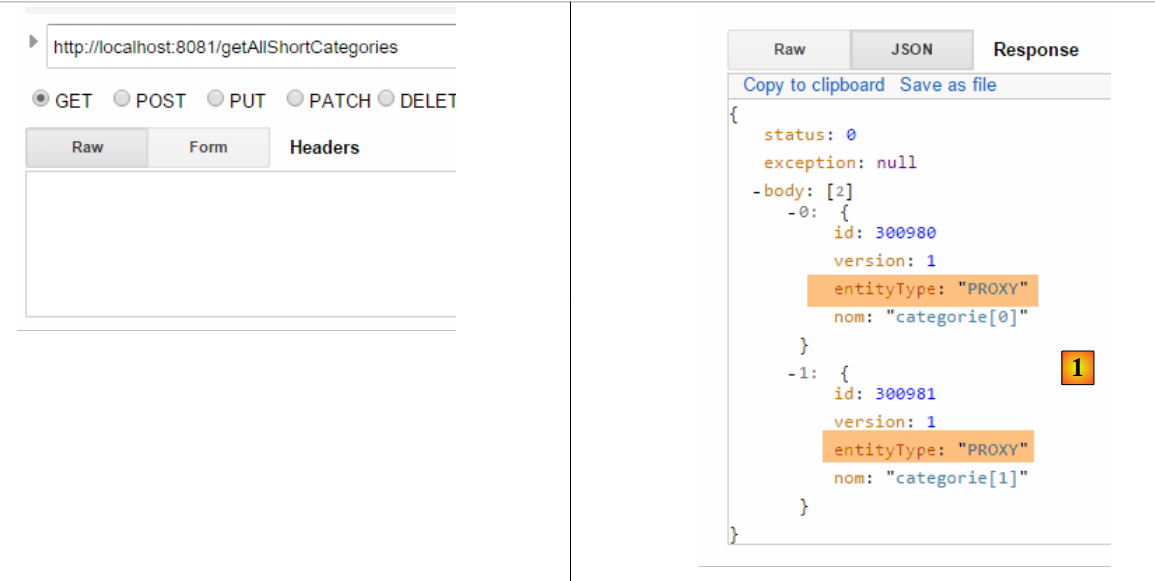 |
在客户端,实体 [Categorie] 和 [Produit] 的定义中未包含字段 [EntityType entityType]。 这是正常的,因为对象 [Categorie] 和 [Produit] 在序列化时不包含其 PROXY、[Categorie.produits] 和 [Produit.categorie] 部分。 因此,在客户端,并不存在名为 PROXY 的实体。只有普通的对象。
在客户端,字符串 jSON [1] 由以下方法接收:
    @Override
    public List<Categorie> getAllShortEntities() {
...
            // 筛选条件 jSON
            ObjectMapper mapper = context.getBean("jsonMapperShortCategorie", ObjectMapper.class);
            // 获取所有分类
            Object map = client.<List<Categorie>, Void> getResponse("/getAllShortCategories", HttpMethod.GET, 202, null);
            // 类别列表 List<Categorie>
            return mapper.readValue(mapper.writeValueAsString(map), new TypeReference<List<Categorie>>() {
            });
...
}
- 第 5 行:配置对象 [RestTemplate] 的映射器 jSON,以便处理对象对象 [Categorie] 中的过滤器 jSON 和 [jsonFilterCategorie],以及对象 [Produit] 中的过滤器 [jsonFilterProduit];
- 第7行:发送值(此处为空)和接收值(List<Categorie>)使用此映射器进行序列化/反序列化。 值得注意的是,在接收到的 jSON 字符串中存在字段 [entityType],尽管该字段在客户端的 [Categorie] 和 [Produit] 实体中并不存在, 却不会引发错误。该字段会被忽略。如果它曾引发错误,我们本会修改客户端过滤器以使其被忽略。
18.8. Web 服务 / jSON / JPA / EclipseLink 的实现
要实现 Web 服务 / jSON / JPA / EclipseLink,只需修改 JPA 的实现:
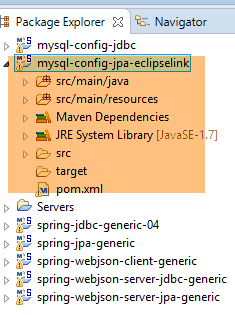 |
注意:按 Alt+F5 后,重新生成所有 Maven 项目。
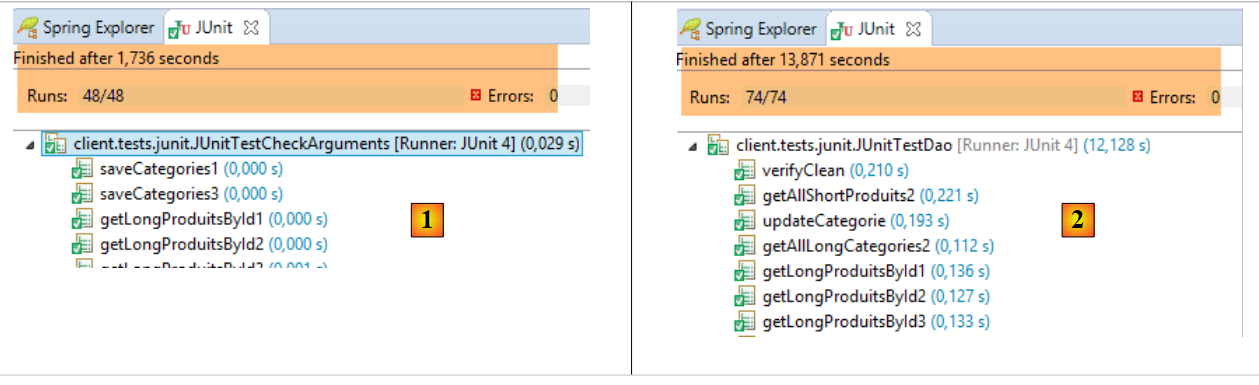
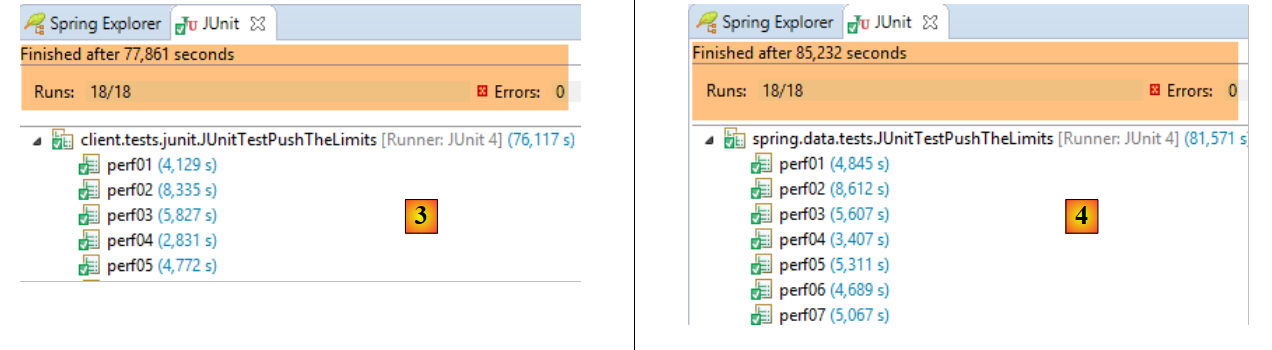
我们将使用已用于 Hibernate 的运行配置 [spring-webjson-server-jpa-generic-hibernate-eclipselink] 来启动 Web 服务。完成此操作后,请运行通用客户端 [spring-webjson-client-generic] 的三个测试:
 |
 |
- 在 [1] 中,测试 [JUnitTestCheckArguments];
- 在 [2] 中,测试 [JUnitTestDao];
- 在 [3] 中,客户端执行的测试 [JUnitTestPushTheLimits](项目 [spring-webjson-client-generic]);
- 在 [4] 中,服务器端执行的测试 [JUnitTestPushTheLimits](运行配置 [spring-jpa-generic-JUnitTestPushTheLimits-hibernate-eclipselink]);
18.9. Web 服务实现 / jSON / JPA / OpenJpa
要实现 Web 服务 / jSON / JPA / OpenJpa,只需更改 JPA 的实现:
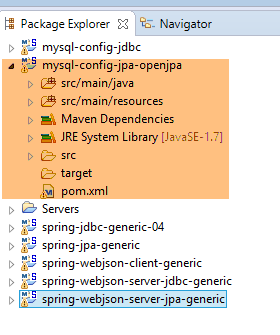 |
注意:按 Alt+F5 后,重新生成所有 Maven 项目。
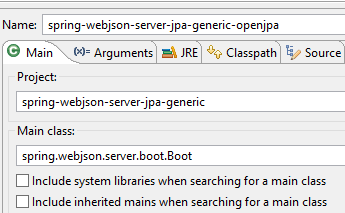
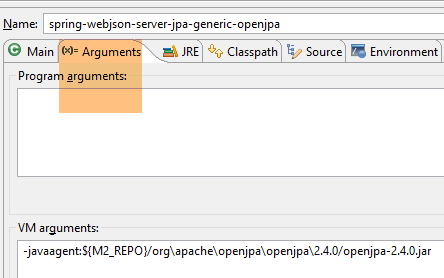
我们将使用运行配置 [spring-webjson-server-jpa-generic-openpa] 启动 Web 服务:
 |  |
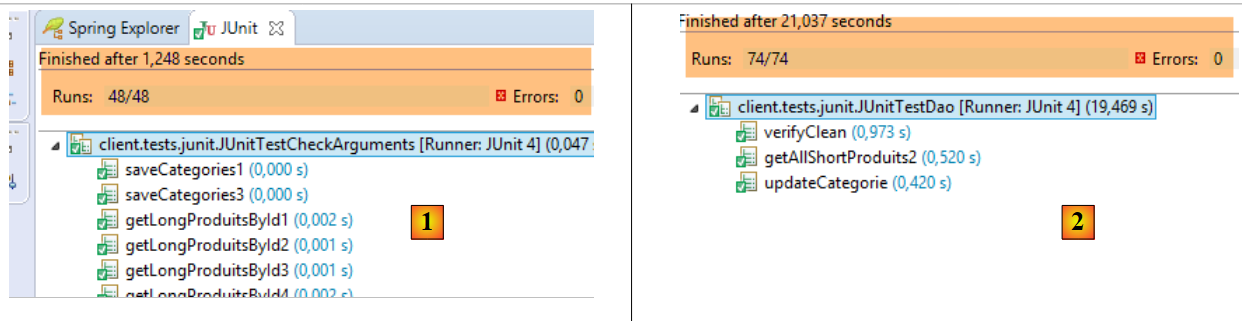
完成上述操作后,请运行通用客户端的三个测试 [spring-webjson-client-generic]:
 |
 |
- 在 [1] 中,测试 [JUnitTestCheckArguments](运行配置 [spring-webjson-client-generic-JUnitTestCheckArguments]);
- 在 [2] 中,测试 [JUnitTestDao](运行配置 [spring-webjson-client-generic-JUnitTestDao]);
- 在 [3] 中,将客户端执行的测试 [JUnitTestPushTheLimits](运行配置 [spring-webjson-client-generic-JUnitTestPushTheLimits]);
- 在 [4] 中,服务器端执行的测试 [JUnitTestPushTheLimits](运行配置 [spring-jpa-generic-JUnitTestPushTheLimits-openpa]);
为了使测试正常运行,必须对 DAO / JPA 层进行修改。 事实上,令人费解的是,[DaoCategorie.saveEntities] 和 [DaoProduit.saveEntities] 方法在填充数据库时出现了故障,提示无法持久化脱离的主键元素。脱离的主键元素是指具有以下任一特征的元素:
- 主键非 null 格式;
- 版本号非 null;
上述两种情况均未被验证。由于不知从何处着手排查,我将需持久化的实体复制到一个全新的列表中,测试才得以通过。此修改本可通过以下方式实现:
- 在 [DAO / JPA] 层中;
- 在创建待持久化实体的 [web] 层中;
我选择在 [DAO / JPA] 层进行修改。虽然性能确实有所下降,但与 SGBD 的响应时间相比,这完全可以忽略不计。具体修改如下:
在项目 [spring-jpa-generic] 的 [DaoCategorie] 类中:
@Override
    protected List<Categorie> saveEntities(List<Categorie> categories) {
        // ***************************************************************************************
        // 克隆类别列表 -- 有时对于 OpenJpa 来说是必要的 -- 未包含错误
        // ***************************************************************************************
        List<Categorie> categories2 = new ArrayList<Categorie>();
        for (Categorie categorie : categories) {
            // 类别
            Categorie categorie2 = new Categorie(categorie.getId(), categorie.getVersion(), categorie.getNom(), null);
            EntityType categorieType = categorie.getEntityType();
            categorie2.setEntityType(categorieType);
            categories2.add(categorie2);
            // 产品
            List<Produit> produits = null;
            if ((categorieType == EntityType.POJO) && (produits = categorie.getProduits()) != null) {
                List<Produit> produits2 = new ArrayList<Produit>();
                for (Produit produit : produits) {
                    Produit produit2 = new Produit(produit.getId(), produit.getVersion(), produit.getNom(),
                            produit.getIdCategorie(), produit.getPrix(), produit.getDescription(), produit.getCategorie());
                    produit2.setEntityType(produit.getEntityType());
                    produits2.add(produit2);
                }
                categorie2.setProduits(produits2);
            }
        }
        // 记录待插入的商品
        List<Produit> insertedProduits = new ArrayList<Produit>();
        for (Categorie categorie : categories2) {
            EntityType categorieType = categorie.getEntityType();
            List<Produit> produits = null;
            if ((categorieType == EntityType.POJO) && (produits = categorie.getProduits()) != null) {
                for (Produit produit : produits) {
                    if (produit.getId() == null) {
                        insertedProduits.add(produit);
                    }
                    // 借此机会(如有必要)恢复产品 --> 分类的关系
                    produit.setCategorie(categorie);
                }
            }
        }
        // 保存类别/产品
        try {
            categoriesRepository.save(categories2);
        } catch (Exception e) {
            throw new DaoException(201, e, simpleClassName);
        }
        // 更新已插入产品的字段 [idCategorie]
        for (Produit produit : insertedProduits) {
            produit.setIdCategorie(produit.getCategorie().getId());
        }
        // 结果
        return categories2;
    }
- 第 3-25 行:作为参数接收的 [categories] 列表(第 2 行)被复制到了 [categories2] 列表中(第 6 行)。 正是该列表被持久化并返回给调用方(第52行)。这会产生一个重要后果:返回的列表与作为参数传递的列表不同,因此原先可以这样写:
现在必须改写为:
List<Categorie> categories=...
categories=daoCategorie.saveEntities(categories)
// 处理 [categories]
在项目 [spring-jpa-generic] 的类 [DaoProduit] 中,方法 [saveEntities] 也进行了类似的修改:
    @Override
    protected List<Produit> saveEntities(List<Produit> entities) {
        // ***************************************************************************************
        // 克隆产品列表——有时对 OpenJpa 来说是必要的——未包含错误
        // ***************************************************************************************
        List<Produit> produits2 = new ArrayList<Produit>();
        for (Produit produit : entities) {
            Produit produit2 = new Produit(produit.getId(), produit.getVersion(), produit.getNom(), produit.getIdCategorie(),
                    produit.getPrix(), produit.getDescription(), produit.getCategorie());
            produit2.setEntityType(produit.getEntityType());
            produits2.add(produit2);
        }

        // (如有必要)恢复产品与其分类之间的关联
        for (Produit produit : produits2) {
            if (produit.getEntityType() == EntityType.POJO) {
                produit.setCategorie(new Categorie(produit.getIdCategorie(), 0L, null, null));
            }
        }
        // 保存产品数据
        try {
            return Lists.newArrayList(produitsRepository.save(produits2));
        } catch (Exception e) {
            throw new DaoException(111, e, simpleClassName);
        }
}
18.10. Web 服务实现 / jSON / JPA / EclipseLink / PostgreSQL
要实现 Web 服务 / jSON / JPA / EclipseLink / PostgresQL,需安装:
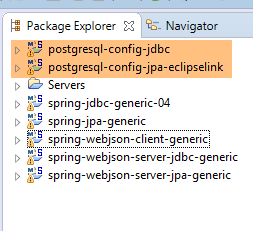
- PostgreSQL 的 JDBC 层配置项目 [postgresql-config-jdbc];
- PostgreSQL 层配置项目 JPA;
- 按 Alt-F5 并重新生成所有 Maven 项目;
 |
启动 SGBD 和 PostgreSQL,并使用之前已用过的运行配置 [spring-webjson-server-jpa-generic-hibernate-eclipselink] 启动 Web 服务。 完成上述操作后,执行通用客户端 [spring-webjson-client-generic] 的三个测试:
 |
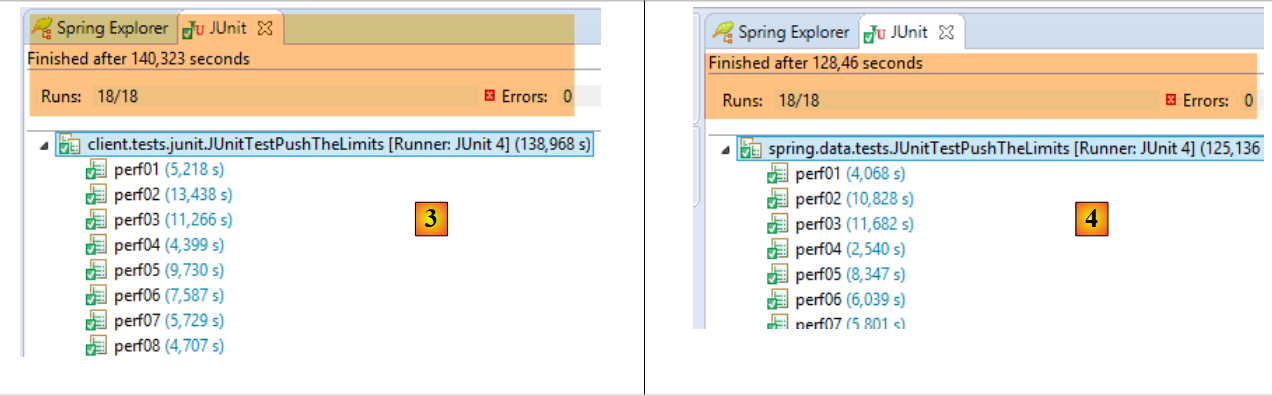 |
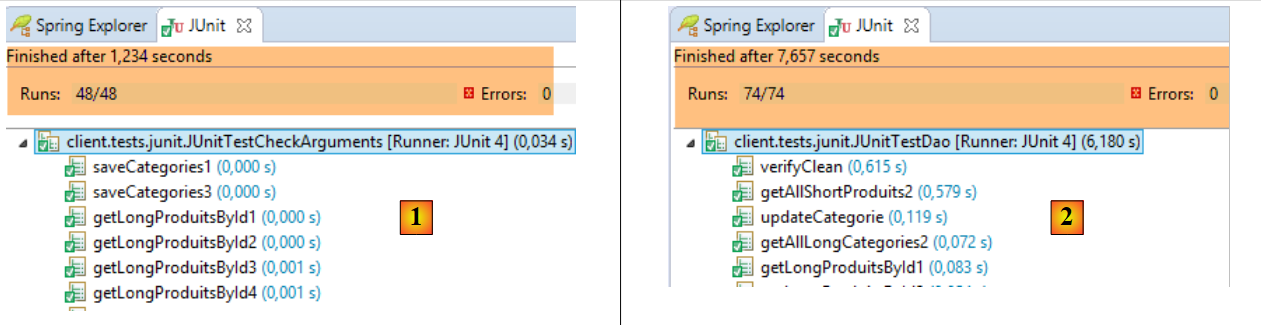
- 在 [1] 中,测试 [JUnitTestCheckArguments](运行配置 [spring-webjson-client-generic-JUnitTestCheckArguments]);
- 在 [2] 中,测试 [JUnitTestDao](运行配置 [spring-webjson-client-generic-JUnitTestDao]);
- 在 [3] 中,将客户端执行的测试 [JUnitTestPushTheLimits](运行配置 [spring-webjson-client-generic-JUnitTestPushTheLimits]);
- 在 [4] 中,服务器端执行的测试 [JUnitTestPushTheLimits](运行配置 [spring-jpa-generic-JUnitTestPushTheLimits-hibernate-eclipselink]);