11. Project [vuejs-09]: Using a Plugin [eventBus]
The [vuejs-09] project is identical to the [vuejs-08] project except that it introduces the concept of a plugin. The project directory structure is as follows:
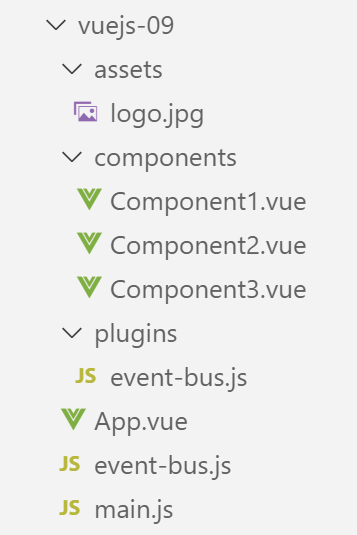
11.1. The [./plugins/event-bus] plugin
The [./event-bus.js] script remains the same as in the previous example:
import Vue from 'vue';
const eventBus = new Vue();
export default eventBus;
The [./plugins/event-bus.js] plugin is as follows:
export default {
  install(Vue, eventBus) {
    // adds a [$eventBus] property to the Vue class
    Object.defineProperty(Vue.prototype, '$eventBus', {
      // when Vue.$eventBus is referenced, we return the 2nd parameter [eventBus]
      get: () => eventBus,
    })
  }
}
Comments
- A [Vue] plugin is an object with a [install] function (line 2). This function will be automatically called when code declares the use of the plugin;
- lines 1–9: the object exported by the script;
- line 2: the function [install] accepts two parameters here:
- [Vue]: the function obtained by the [import Vue from ‘Vue’] statement. Can be thought of as a class;
- [eventBus]: the object exported by the script [./event-bus];
- Lines 4–7: Modify the definition (known as the prototype) of the function [Vue] by adding the property [$eventBus]. If we consider the term [classe], the property [$eventBus] is added to the class [Vue]. Components that are instances of [Vue] will therefore have access to this new property;
- line 6 indicates that when the property [Vue].$eventBus is referenced, the parameter [eventBus] from line 2 will be returned. We will see a little later that this second parameter will be the object [eventBus] exported by the script [./event-bus.js]. So ultimately, when a C component uses the expression [C.$eventBus], it will reference the [eventBus] object exported by the [./event-bus.js] script. This will prevent it from importing the [./event-bus.js] script. This is the benefit of the plugin: simplifying access to the [eventBus] object exported by the [./event-bus.js] script;
- Note that the plugin does not have to be named [event-bus.js] itself. It could have been named [plugin-event-bus], for example;
- Note also that the $ in [$eventBus] is a convention used to denote properties of [Vue] that were added via plugins. This convention is not mandatory. In this text, we will follow it;
11.2. The main script [main.js]
The script [./plugins/event-bus.js] defines a plugin for the [Vue.js] framework. This plugin is not yet used, only defined. It is the script [main.js] that activates it:
// imports
import Vue from 'vue'
import App from './App.vue'

// plugins
import BootstrapVue from 'bootstrap-vue'
Vue.use(BootstrapVue);

// bootstrap
import 'bootstrap/dist/css/bootstrap.css'
import 'bootstrap-vue/dist/bootstrap-vue.css'

// eventbus
import eventBus from './event-bus';
import PluginEventBus from './plugins/event-bus';
Vue.use(PluginEventBus, eventBus);

// configuration
Vue.config.productionTip = false

// instantiation project [App]
new Vue({
  render: h => h(App),
}).$mount('#app')
Comments
- Lines 14–16 activate the [PluginEventBus] plugin. After line 16, all instances of the [Vue] class (function) have the [$eventBus] property, which points for each of them to the same object exported by the [./event-bus.js] script. This will be the case for each of the project’s components;
11.3. The main view [App]
The main view [App] remains the same as it was in the previous project.
11.4. The [Component1] component
The [Component1] component now uses its [$eventBus] property to listen for the [someEvent] event:
<template>
  <b-row>
    <b-col>
      <b-alert show
               variant="warning"
               v-if="showMsg">Evénement [someEvent] intercepté par [Component1]. Valeur reçue={{data}}</b-alert>
    </b-col>
  </b-row>
</template>

<script>
  export default {
    name: "component1",
    // component status
    data() {
      return {
        data: "",
        showMsg: false
      };
    },
    // event management methods
    methods: {
      // evt management [someEvent]
      doSomething(data) {
        this.data = data;
        this.showMsg = true;
      }
    },
    // component lifecycle management
    // évt [created] - the component has been created
    created() {
      // listening to event [someEvent]
      this.$eventBus.$on("someEvent", this.doSomething);
    }
  };
</script>
Comments
- Line 33, use of the component's [this.$eventBus] property. Note also that the script on line 11 no longer imports the [./event-bus.js] script;
11.5. The [Component2] component
The [Component2] component now uses its [$eventBus] property to trigger the [someEvent] event:
<template>
  <div>
    <b-button @click="createEvent">Créer un événement</b-button>
  </div>
</template>
<!-- script -->
<script>
  export default {
    name: "component2",
    // event management methods
    methods: {
      createEvent() {
        this.$eventBus.$emit("someEvent", { x: 2, y: 4 })
      }
    }
  };
</script>
Comments
- Line 13, use of the component's [this.$eventBus] property. Note also that the script on line 7 no longer imports the [./event-bus.js] script;
11.6. Component [Component3]
The [Component3] component has the same code as [Component1]. It also listens for the [someEvent] event.
11.7. Running the project
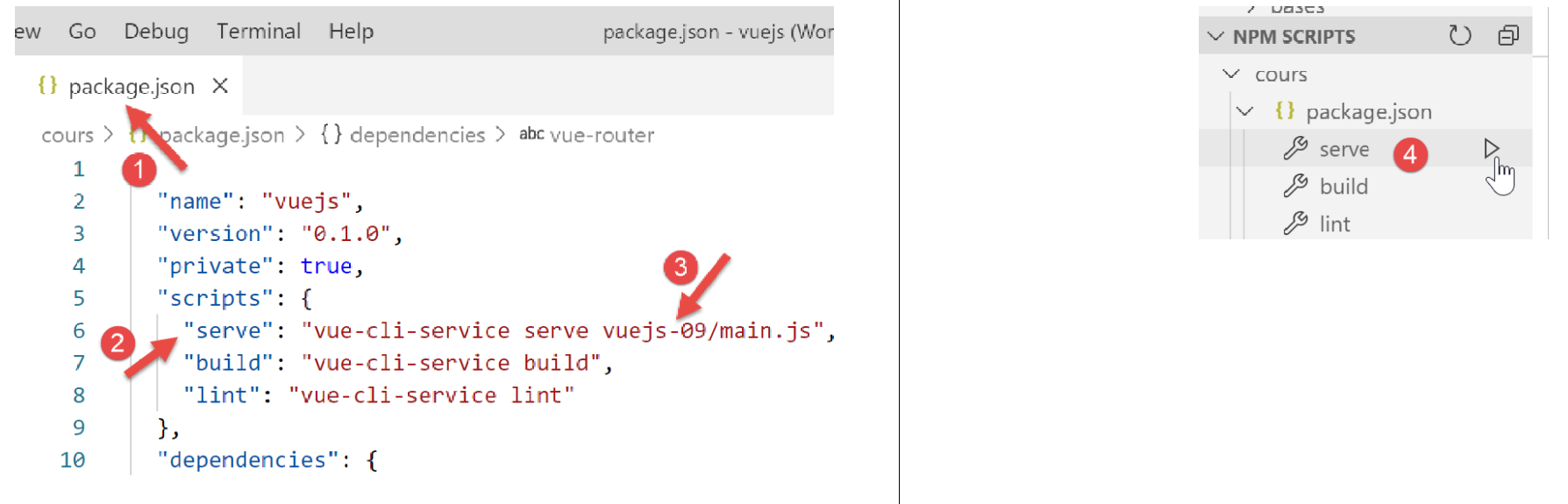
We get the same results as in the previous project.