19. Improvements to the Vue.js client
19.1. Introduction
We will test the [vuejs-21] project with the development server. We will therefore need the server to send the CORS headers again. The [config.json] file in the version 14 directory of the tax calculation server must therefore allow these headers:
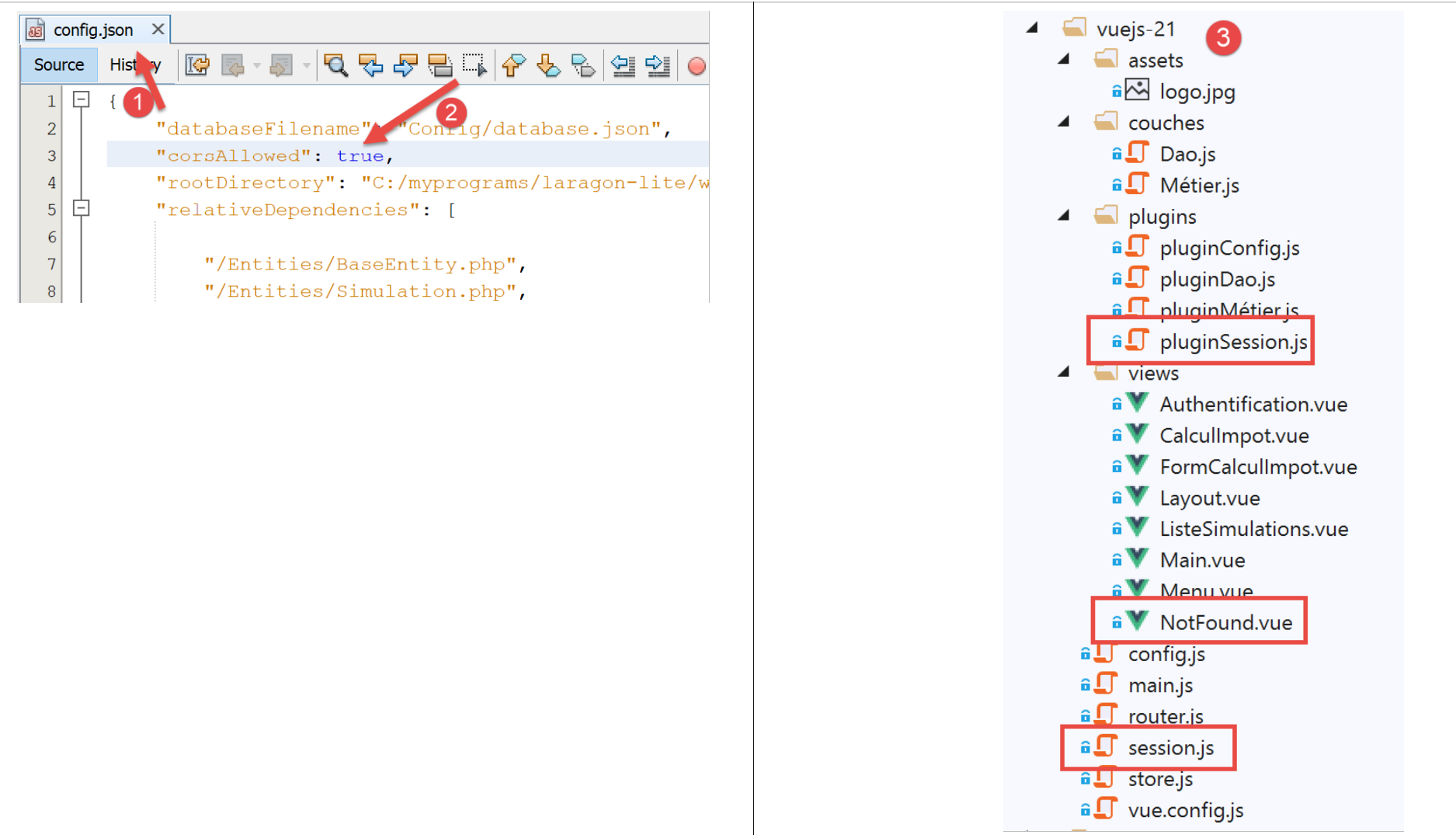
The [vuejs-21] project is initially created by duplicating the [vuejs-20] project. It is then modified to [3].
New files appear:
- [session.js]: exports a [session] object that will encapsulate information about the current session;
- [pluginSession]: makes the previous object [session] available in the [$session] property of the views;
- [NotFound.vue]: a new view displayed when the user manually requests a URL that does not exist;
The following files will be modified:
- [main.js]: will initialize the current session and then, when the user manually enters URL, will restore it;
- [router.js]: checks are added to handle cases where the user manually enters URL;
- [store.js]: a new mutation is added;
- [config.js]: a new configuration is added;
- Various views, primarily to save the current session at key points in the application’s lifecycle. The session is then restored whenever the user manually enters URL;
19.2. The [Vuex] store
The [./store] script evolves as follows:
// vuex plugin
import Vue from 'vue'
import Vuex from 'vuex'
Vue.use(Vuex);

// blind Vuex
const store = new Vuex.Store({
  state: {
    // simulation table
    simulations: [],
    // last simulation number
    idSimulation: 0
  },
  mutations: {
    // delete line n° index
    deleteSimulation(state, index) {
      ...
    },
    // add a simulation
    addSimulation(state, simulation) {
      ...
    },
    // state cleaning
    clear(state) {
      // more simulations
      state.simulations = [];
      // simulation numbering starts from 0
      state.idSimulation = 0;
    }
  }
});
// export object [store]
export default store;
- lines 24-29: change [clear] deletes the list of saved simulations and resets the last simulation number to 0.
19.3. The session
The need for a session arises because when the user types a URL into the browser’s address bar, the [main.js] script is executed again. However, this script contains the instruction:
// blind Vuex
import store from './store'
This instruction imports the following [./store] file:
// vuex plugin
import Vue from 'vue'
import Vuex from 'vuex'
Vue.use(Vuex);

// blind Vuex
const store = new Vuex.Store({
  state: {
    // simulation table
    simulations: [],
    // last simulation number
    idSimulation: 0
  },
  mutations: {
    ...
  }
});
// export object [store]
export default store;
As we can see in lines 7–13, we import an empty array of simulations. So if we had simulations before the user typed URL into the browser’s address bar, we no longer have them afterward. The idea is:
- to use a session that would store the information we want to keep if the user manually types URL;
- to save it at key points in the application;
- restore it in [main.js], which is always executed when a URL is typed manually;
The [./session] script is as follows:
// we import the Vuex blind
import store from './store'
// import configuration
import config from './config';

// the [session] object
const session = {
  // session started
  started: false,
  // authentication
  authenticated: false,
  // backup time
  saveTime: "",
  // layer [métier]
  métier: null,
  // vuex status
  state: null,

  // save session in a jSON string
  save() {
    // we add a few features to the session
    this.saveTime = Date.now();
    this.state = store.state;
    // transform it into jSON
    const json = JSON.stringify(this);
    // it is stored on the browser
    localStorage.setItem("session", json);
    // eslint-disable-next-line no-console
    console.log("session save", json);
  },

  // session restoration
  restore() {
    // retrieve session jSON from the browser
    const json = localStorage.getItem("session")
    // if we have recovered anything
    if (json) {
      // restore all session keys
      const restore = JSON.parse(json);
      for (var key in restore) {
        if (restore.hasOwnProperty(key)) {
          this[key] = restore[key];
        }
      }
      // if you have exceeded a certain period of inactivity since the start of the session, you start again from scratch
      let durée = Date.now() - this.saveTime;
      if (durée > config.duréeSession) {
        // empty the session - it will also be saved
        session.clear();
      } else {
        // regenerate the Vuex blind
        store.replaceState(JSON.parse(JSON.stringify(this.state)));
      }
    }
    // eslint-disable-next-line no-console
    console.log("session restore", this);
  },

    // clean the session
  clear() {
    // eslint-disable-next-line no-console
    console.log("session clear");
    // raz certain session fields
    this.authenticated = false;
    this.saveTime = "";
    this.started = false;
    if (this.métier) {
      // reset the [taxAdminData] field
      this.métier.taxAdminData = null;
    }
    // vuex blinds are also cleaned
    store.commit("clear");
    // save the new session
    this.save();
  },
}

// export object [session]
export default session;
Comments
- line 2: the session will also encapsulate the [Vuex] store (list of simulations, number of the last simulation performed);
- lines 7-17: information stored by the session:
- [started]: whether the jSON session with the server has started or not;
- [authenticated]: whether the user has authenticated;
- [saveTime]: the date in milliseconds of the last save;
- [métier]: a reference to layer [métier]. This layer contains the data [taxAdminData], which enables tax calculation;
- [state]: the state of the [Vuex] store (list of simulations, number of the last simulation performed);
- lines 20–30: the [save] method saves the session locally on the browser running the application;
- line 22: the save time is recorded;
- line 23: retrieves the [state] from the [Vuex] store;
- line 25: the session string jSON is created;
- line 27: store it locally on the browser associated with the key [session];
- lines 33–57: the [restore] method allows a session to be restored from its local backup on the browser;
- line 35: the local backup jSON is retrieved;
- line 37: if something was retrieved;
- lines 39–44: the [session] object is reconstructed;
- line 46: the time elapsed since the last backup is calculated;
- lines 47–50: if this duration exceeds a value [config.duréeSession] set by configuration, the session is reset (line 49) and saved at that time;
- line 52: otherwise, the [state] attribute of the [Vuex] store is regenerated;
- lines 60–75: the method [clear] resets the session;
- lines 64–70: the session properties are reset to their initial values;
- line 72: as well as the store [Vuex];
- line 74: the new session is saved;
19.4. The configuration file [config]
The [./config] file changes as follows:
// use of the [axios] library
const axios = require('axios');
// query timeout HTTP
axios.defaults.timeout = 2000;
...

// configuration export
export default {
  // object [axios]
  axios: axios,
  // maximum session inactivity time: 5 min = 300 s = 300000 ms
  duréeSession: 300000
}
- line 12: we will manage the application session much like we manage a web session. Here, we set a maximum inactivity duration of 5 minutes;
19.5. The [pluginSession] plugin
As has been done many times before, the [pluginSession] plugin will allow views to access the session via the [this.$session] property:
export default {
  install(Vue, session) {
    // adds a [$session] property to the view class
    Object.defineProperty(Vue.prototype, '$session', {
      // when Vue.$session is referenced, we return the 2nd parameter [session]
      get: () => session,
    })
  }
}
19.6. The main script [main]
The main script [./main.js] evolves as follows:
// start-up log
// eslint-disable-next-line no-console
console.log("main started");

// imports
import Vue from 'vue'

...

// instantiation layer [métier]
import Métier from './couches/Métier';
const métier = new Métier();

// plugin [métier]
import pluginMétier from './plugins/pluginMétier'
Vue.use(pluginMétier, métier)

// blind Vuex
import store from './store'

// session
import session from './session';
import pluginSession from './plugins/pluginSession'
Vue.use(pluginSession, session)

// we restore the session before restarting
session.restore();

// restore the [métier] layer
if (session.métier && session.métier.taxAdminData) {
  métier.setTaxAdminData(session.métier.taxAdminData);
}

// start-up of UI
new Vue({
  el: '#app',
  // the router
  router: router,
  // the Vuex awning
  store: store,
  // the main view
  render: h => h(Main),
})

// end log
// eslint-disable-next-line no-console
console.log("main terminated, session=", session);
- line 19: import the session;
- line 20: import its plugin;
- Line 21: The [pluginSession] plugin is integrated into [Vue]. After this instruction, all views have the session in their [$session] attribute;
- Line 27: The session is restored. The session imported on line 11 is then initialized with the contents of its last save;
- After line 16, the views have a [$métier] property initialized on line 12. This property does not contain the [taxAdminData] information used to calculate the tax;
- lines 30–32: if the restoration just performed has restored the [session.métier.taxAdminData] property, then the [$métier] property of the views is initialized with this value;
19.7. The routing file [router]
The routing file [./router] changes as follows:
// imports
import Vue from 'vue'
import VueRouter from 'vue-router'
// the views
import Authentification from './views/Authentification'
import CalculImpot from './views/CalculImpot'
import ListeSimulations from './views/ListeSimulations'
import NotFound from './views/NotFound'
// the session
import session from './session'

// routing plugin
Vue.use(VueRouter)

// application routes
const routes = [
  // authentication
  { path: '/', name: 'authentification', component: Authentification },
  { path: '/authentification', name: 'authentification', component: Authentification },
  // tAX CALCULATION
  {
    path: '/calcul-impot', name: 'calculImpot', component: CalculImpot,
    meta: { authenticated: true }
  },
  // list of simulations
  {
    path: '/liste-des-simulations', name: 'listeSimulations', component: ListeSimulations,
    meta: { authenticated: true }
  },
  // end of session
  {
    path: '/fin-session', name: 'finSession'
  },
  // unknown page
  {
    path: '*', name: 'notFound', component: NotFound,
  },
]

// the router
const router = new VueRouter({
  // the roads
  routes,
  // the URL display mode
  mode: 'history',
  // the basic URL of the application
  base: '/client-vuejs-impot/'
})

// route verification
router.beforeEach((to, from, next) => {
  // eslint-disable-next-line no-console
  console.log("router to=", to, "from=", from);
  // route reserved for authenticated users?
  if (to.meta.authenticated && !session.authenticated) {
    next({
      // move on to authentication
      name: 'authentification',
    })
    // return to event loop
    return;
  }
  // special case of end of session
  if (to.name === "finSession") {
    // clean the session
    session.clear();
    // go to [authentification] view
    next({
      name: 'authentification',
    })
    // return to event loop
    return;
  }
  // other cases - next normal routing view
  next();
})

// router export
export default router
Comments
- lines 16–38: some routes have been enhanced with additional information;
- line 19: a new route has been created to go to the [Authentification] view;
- lines 21–24: The route leading to the [CalculImpot] view now has a [meta] property (this name is required). The content of this object can be anything and is set by the developer;
- line 23: we set the property [authenticated] (this name can be anything) in [meta]. This means that to access the view [CalculImpot], the user must be authenticated;
- lines 26–29: we do the same for the route leading to the view [ListeSimulations]. Here too, the user must be authenticated;
- The [meta.authenticated] property will allow us to verify that a user who manually enters the URL values for the [CalculImpot, ListeSimulations] views cannot access them unless they are authenticated;
- Lines 51–76: The [beforeEach] method is executed before a view is routed. This is the right time to perform checks;
- [to]: the next route if no action is taken;
- [from]: the last route displayed;
- [next]: function to change the next route displayed;
- line 55: check if the next route requires the user to be authenticated;
- lines 56–59: if so, and the user is not authenticated, change the next route to view [Authentification];
- lines 64–73: handle the special case of route [finSession] from lines 30–32. This route has no associated view;
- line 66: the session is reset to its initial value;
- lines 68–70: set the view [Authentification] as the next view;
- line 75: if neither of the previous two cases applies, we simply proceed to the route specified by the routing file;
- lines 35–37: a view named [NotFound] is provided if the route entered by the user does not match any known route. This view is imported on line 8. Routes are checked in the order specified in the routing file. Therefore, if we reach line 36, it means that the requested route is none of the routes listed in lines 18–33;
19.8. The [NotFound] view
The view [NotFound] is displayed if the route entered by the user does not match any known route:
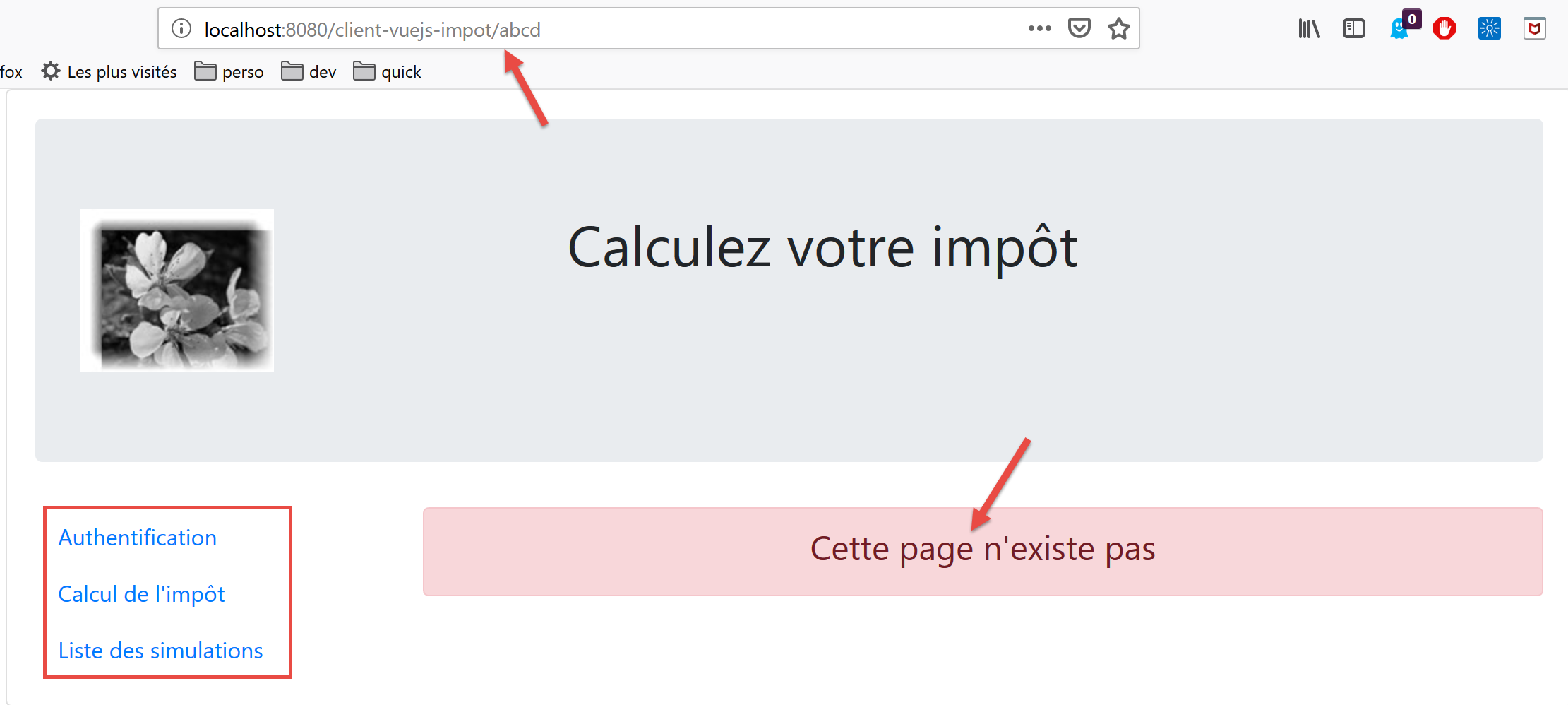
The view code is as follows:
<!-- definition HTML of the view -->
<template>
  <!-- layout -->
  <Layout :left="true" :right="true">
    <!-- alert in the right-hand column -->
    <template slot="right">
      <!-- message on yellow background -->
      <b-alert show variant="danger" align="center">
        <h4>Cette page n'existe pas</h4>
      </b-alert>
    </template>
    <!-- navigation menu in the left-hand column -->
    <Menu slot="left" :options="options" />
  </Layout>
</template>

<script>
// imports
import Layout from "./Layout";
import Menu from "./Menu";
export default {
  // components
  components: {
    Layout,
    Menu
  },
  // internal state of the component
  data() {
    return {
      // navigation menu options
      options: [
        {
          text: "Authentification",
          path: "/"
        }
      ]
    };
  },
  // life cycle
  created() {
    // eslint-disable-next-line
    console.log("NotFound created");
    // we look at which menu options to offer
    if (this.$session.authenticated && this.$métier.taxAdminData) {
      // the user can run simulations
      Array.prototype.push.apply(this.options, [
        {
          text: "Calcul de l'impôt",
          path: "/calcul-impot"
        },
        {
          text: "Liste des simulations",
          path: "/liste-des-simulations"
        }
      ]);
    }
  }
};
</script>
Comments
- line 4: it uses both columns of the routed views;
- lines 6–11: an error message;
- line 13: the navigation menu occupies the left column;
- lines 31–36: the menu’s default options;
- lines 40–57: code executed when the view is created;
- line 44: we check if the user can run simulations;
- lines 45–55: if so, two options are added to the navigation menu—those requiring authentication and an operational [métier] layer (lines 46–55);
19.9. The [Authentification] view
The [Authentification] view changes as follows:
<!-- definition HTML of the view -->
<template>
  <Layout :left="false" :right="true">
    ...
  </Layout>
</template>

<!-- view dynamics -->
<script>
import Layout from "./Layout";
export default {
  // component status
  data() {
    return {
      // user
      user: "",
      // password
      password: "",
      // controls the display of an error msg
      showError: false,
      // the error message
      message: ""
    };
  },

  // components used
  components: {
    Layout
  },

  // calculated properties
  computed: {
    // valid entries
    valid() {
      return this.user && this.password && this.$session.started;
    }
  },

  // event managers
  methods: {
    // ----------- authentication
    async login() {
      try {
        // start waiting
        this.$emit("loading", true);
        // you are not yet authenticated
        this.$session.authenticated = false;
        // blocking server authentication
        const response = await this.$dao.authentifierUtilisateur(
          this.user,
          this.password
        );
        // end of loading
        this.$emit("loading", false);
        // server response analysis
        if (response.état != 200) {
          // error is displayed
          this.message = response.réponse;
          this.showError = true;
          // return to event loop
          return;
        }
        // no error
        this.showError = false;
        // you are authenticated
        this.$session.authenticated = true;
        // --------- we now request data from the tax authorities
        // initially, no data
        this.$métier.setTaxAdminData(null);
        // start waiting
        this.$emit("loading", true);
        // blocking request to the server
        const response2 = await this.$dao.getAdminData();
        // end of loading
        this.$emit("loading", false);
        // response analysis
        if (response2.état != 1000) {
          // error is displayed
          this.message = response2.réponse;
          this.showError = true;
          // return to event loop
          return;
        }
        // no error
        this.showError = false;
        // the received data is stored in the [métier] layer
        this.$métier.setTaxAdminData(response2.réponse);
        // we can move on to tax calculation
        this.$router.push({ name: "calculImpot" });
      } catch (error) {
        // the error is traced back to the main component
        this.$emit("error", error);
      } finally {
        // maj session
        this.$session.métier = this.$métier;
        // save the session
        this.$session.save();
      }
    }
  },
  // life cycle: the component has just been created
  created() {
    // eslint-disable-next-line
    console.log("Authentification created");
    // can the user run simulations?
    if (
      this.$session.started &&
      this.$session.authenticated &&
      this.$métier.taxAdminData
    ) {
      // then the user can run simulations
      this.$router.push({ name: "calculImpot" });
      // return to event loop
      return;
    }
    // if the jSON session has already been started, it will not be restarted
    if (!this.$session.started) {
      // start waiting
      this.$emit("loading", true);
      // on initialise la session avec le serveur - requête asynchrone
      // we use the promise rendered by [dao] layer methods
      this.$dao
        // on initialise une session jSON
        .initSession()
        // we got the answer
        .then(response => {
          // end waiting
          this.$emit("loading", false);
          // response analysis
          if (response.état != 700) {
            // error is displayed
            this.message = response.réponse;
            this.showError = true;
            // return to event loop
            return;
          }
          // the session has started
          this.$session.started = true;
        })
        // in case of error
        .catch(error => {
          // trace the error to view [Main]
          this.$emit("error", error);
        })
        // in all cases
        .finally(() => {
          // save the session
          this.$session.save();
        });
    }
  }
};
</script>
Comments
- The instructions that use the session introduced in this version from client [Vue.js] have been highlighted in yellow;
- lines 97, 148: at the end of the [login, created] methods, the session is saved regardless of the result of the HTTP queries that occur in these methods ([finally] clause in both cases);
- The [created] method in lines 102–150 is executed every time the [Authentification] view is created. If the user entered the URL for the view, the session will tell us what to do;
- Lines 106–115: If the jSON session is started, the user is authenticated, and the [this.$métier.taxAdminData] data is initialized, then the user can go directly to the tax calculation form (line 112);
- line 117: the [created] method was used in the previous version to initialize a jSON session with the server. This step is unnecessary if it has already been performed;
- lines 42–66: the authentication method;
- line 66: if authentication is successful, this is noted in the session;
- lines 67–92: the request to the server for tax administration data [taxAdminData];
- line 95: at the end of this phase, the session’s [métier] property is updated regardless of whether the operation succeeded or not;
19.10. The [CalculImpot] view
The code for the view [CalculImpot] evolves as follows:
<!-- definition HTML of the view -->
<template>
  ...
</template>

<script>
// imports
import FormCalculImpot from "./FormCalculImpot";
import Menu from "./Menu";
import Layout from "./Layout";

export default {
  // inner state
  data() {
    return {
      // menu options
      options: [
        {
          text: "Liste des simulations",
          path: "/liste-des-simulations"
        },
        {
          text: "Fin de session",
          path: "/fin-session"
        }
      ],
      // tax calculation result
      résultat: "",
      résultatObtenu: false
    };
  },
  // components used
  components: {
    Layout,
    FormCalculImpot,
    Menu
  },
  // event management methods
  methods: {
    // tax calculation result
    handleResultatObtenu(résultat) {
      // we build the result string HTML
      ...
      // a + simulation
      this.$store.commit("addSimulation", résultat);
      // save the session
      this.$session.save();
    }
  },
  // life cycle
  created() {
    // eslint-disable-next-line
    console.log("CalculImpot created");
  }
};
</script>
Comments
- line 45: the calculated simulation is added to the [Vuex] store. This affects the session that contains the [state] property of the store. Therefore, the session is saved (line 47);
- line 51: a method [created] is created to track view creations in the logs;
19.11. The view [ListeSimulations]
The view [ListeSimulations] evolves as follows:
<!-- definition HTML of the view -->
<template>
  ...
  </div>
</template>

<script>
// imports
import Layout from "./Layout";
import Menu from "./Menu";
export default {
  // components
  components: {
    Layout,
    Menu
  },
  // inner state
  data() {
    ...
  },
  // calculated internal state
  computed: {
    // list of simulations taken from the Vuex blind
    simulations() {
      return this.$store.state.simulations;
    }
  },
  // methods
  methods: {
    supprimerSimulation(index) {
      // eslint-disable-next-line
      console.log("supprimerSimulation", index);
      // delete simulation n° [index]
      this.$store.commit("deleteSimulation", index);
      // save the session
      this.$session.save();
    }
  },
  // life cycle
  created() {
    // eslint-disable-next-line
    console.log("ListeSimulations created");
  }
};
</script>
Comments
- line 36: after deleting a simulation on line 34, we save the session to reflect this state change;
- lines 40–43: we continue to track the creation of views;
19.12. Project Execution
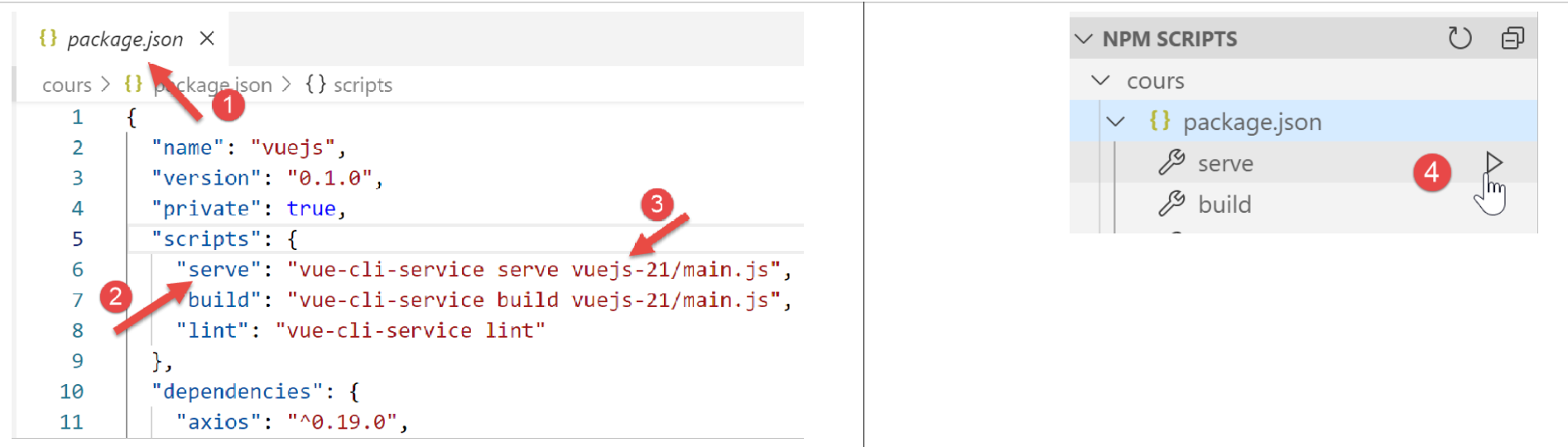
During testing, verify the following points:
- if the user “uses” the application via the menu links in navigation and the action buttons/links, it works;
- if the user manually enters URL, the application continues to function. In particular, perform the following test:
- Perform simulations;
- once on the [ListeSimulations] view, reload (F5) the view. In the previous [vuejs-20] application, the simulations were lost at that point. Here, that is not the case: the simulations already performed are still present;
- check the logs to understand:
- when the [main] script is executed. You should see that it runs every time the user manually enters a URL;
- when the views are created. You should see that they are created every time they are about to be displayed;
- how routing works. Before each routing, a log is generated that tells you:
- the route you came from;
- the route you are going to;
19.13. Deploying the application on a local server
As an exercise, follow the section titled |Deployment on a Local Server| to deploy the [vuejs-21] project to the local Laragon server. Then test it.
19.14. Developing the version mobile app
In theory, using Bootstrap should allow us to have an application that works on different devices: smartphones, tablets, laptops, and desktop computers. What differentiates these devices is their screen size.
If we test version [vuejs-21] on a mobile device, we see that the view display is a mess. version [vuejs-22] fixes this issue. All changes were made in the view templates. They primarily involved optimizing the display for a smartphone screen. Once this is optimized, the display on larger screens works smoothly thanks to Bootstrap.
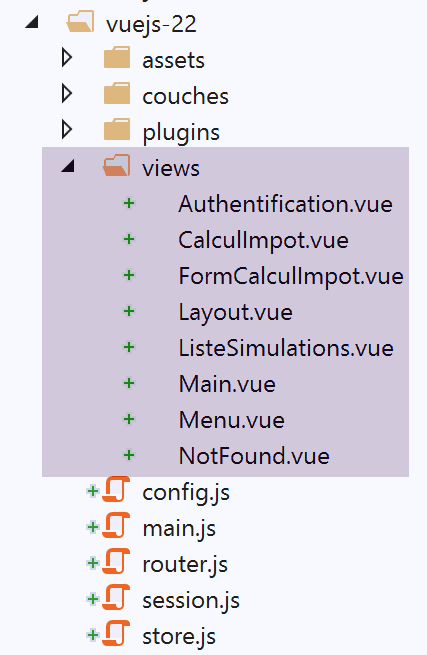
19.14.1. The [Main] view
The [Main] view changes as follows:
<!-- definition HTML of the view -->
<template>
  <div class="container">
    <b-card>
      <!-- jumbotron -->
      <b-jumbotron>
        <b-row>
          <b-col sm="4">
            <img src="../assets/logo.jpg" alt="Cerisier en fleurs" />
          </b-col>
          <b-col sm="8">
            <h1>Calculez votre impôt</h1>
          </b-col>
        </b-row>
      </b-jumbotron>
      ....
    </b-card>
  </div>
</template>
Comments
- line 8: where it used to say [cols=’4’], we now write [sm=’4’]. [sm] means [small]. Smartphone screens fall into this category. The other categories are [xs=extra small, md=medium, lg=large, xl=extra large];
- line 11: same;
19.14.2. The view [Layout]
The view [Layout] evolves as follows:
<!-- definition HTML of the routed view layout -->
<template>
  <!-- line -->
  <div>
    <b-row>
      <!-- three-column zone on the left -->
      <b-col sm="3" v-if="left">
        <slot name="left" />
      </b-col>
      <!-- nine-column zone on the right -->
      <b-col sm="9" v-if="right">
        <slot name="right" />
      </b-col>
    </b-row>
  </div>
</template>
19.14.3. The [Authentification] view
The [Authentification] view changes as follows:
<!-- definition HTML of the view -->
<template>
  <Layout :left="false" :right="true">
    <template slot="right">
      <!-- form HTML - post values with [authentifier-utilisateur] action -->
      <b-form @submit.prevent="login">
        <!-- title -->
        <b-alert show variant="primary">
          <h4>Bienvenue. Veuillez vous authentifier pour vous connecter</h4>
        </b-alert>
        <!-- 1st line -->
        <b-form-group label="Nom d'utilisateur" label-for="user" description="Tapez admin">
          <!-- user input field -->
          <b-col sm="6">
            <b-form-input type="text" id="user" placeholder="Nom d'utilisateur" v-model="user" />
          </b-col>
        </b-form-group>
        <!-- 2nd line -->
        <b-form-group label="Mot de passe" label-for="password" description="Tapez admin">
          <!-- password input field -->
          <b-col sm="6">
            <b-input type="password" id="password" placeholder="Mot de passe" v-model="password" />
          </b-col>
        </b-form-group>
        <!-- 3rd line -->
        <b-alert
          show
          variant="danger"
          v-if="showError"
          class="mt-3"
        >L'erreur suivante s'est produite : {{message}}</b-alert>
        <!-- button type [submit] on a 3rd line -->
        <b-row>
          <b-col sm="2">
            <b-button variant="primary" type="submit" :disabled="!valid">Valider</b-button>
          </b-col>
        </b-row>
      </b-form>
    </template>
  </Layout>
</template>
Comments
- Lines 11 and 19: We removed the [label-cols] attribute, which set the number of columns for the input label. Without this attribute, the label appears above the input field. This is better suited for smartphone screens;
19.14.4. The [CalculImpot] view
The [CalculImpot] view has been updated as follows:
<!-- definition HTML of the view -->
<template>
  <div>
    <Layout :left="true" :right="true">
      <!-- tax calculation form on the right -->
      <FormCalculImpot slot="right" @resultatObtenu="handleResultatObtenu" />
      <!-- menu from navigation to left -->
      <Menu slot="left" :options="options" />
    </Layout>
    <!-- display area for tax calculation results under the form -->
    <b-row v-if="résultatObtenu" class="mt-3">
      <!-- empty three-column zone -->
      <b-col sm="3" />
      <!-- nine-column zone -->
      <b-col sm="9">
        <b-alert show variant="success">
          <span v-html="résultat"></span>
        </b-alert>
      </b-col>
    </b-row>
  </div>
</template>
19.14.5. The view [FormCalculImpot]
The [FormCalculImpot] view changes as follows:
<!-- definition HTML of the view -->
  <template>
  <!-- form HTML -->
  <b-form @submit.prevent="calculerImpot" class="mb-3">
    <!-- 12-column message on blue background -->
    <b-row>
      <b-col sm="12">
        <b-alert show variant="primary">
          <h4>Remplissez le formulaire ci-dessous puis validez-le</h4>
        </b-alert>
      </b-col>
    </b-row>
    <!-- form elements -->
    <!-- first line -->
    <b-form-group label="Etes-vous marié(e) ou pacsé(e) ?">
      <!-- 5-column radio buttons-->
      <b-col sm="5">
        <b-form-radio v-model="marié" value="oui">Oui</b-form-radio>
        <b-form-radio v-model="marié" value="non">Non</b-form-radio>
      </b-col>
    </b-form-group>
    <!-- second line -->
    <b-form-group label="Nombre d'enfants à charge" label-for="enfants">
      <b-form-input
        type="text"
        id="enfants"
        placeholder="Indiquez votre nombre d'enfants"
        v-model="enfants"
        :state="enfantsValide"
      ></b-form-input>
      <!-- possible error message -->
      <b-form-invalid-feedback :state="enfantsValide">Vous devez saisir un nombre positif ou nul</b-form-invalid-feedback>
    </b-form-group>
    <!-- third line -->
    <b-form-group
      label="Salaire annuel net imposable"
      label-for="salaire"
      description="Arrondissez à l'euro inférieur"
    >
      <b-form-input
        type="text"
        id="salaire"
        placeholder="Salaire annuel"
        v-model="salaire"
        :state="salaireValide"
      ></b-form-input>
      <!-- possible error message -->
      <b-form-invalid-feedback :state="salaireValide">Vous devez saisir un nombre positif ou nul</b-form-invalid-feedback>
    </b-form-group>
    <!-- fourth line, [submit] button -->
    <b-col sm="3">
      <b-button type="submit" variant="primary" :disabled="formInvalide">Valider</b-button>
    </b-col>
  </b-form>
</template>
Comments
- lines 15, 23, 35: the [label-cols] attribute has been removed;
In addition, we are updating the validity checks:
...
// calculated internal state
  computed: {
    // form validation
    formInvalide() {
      return (
        // disabled salary
        !this.salaire.match(/^\s*\d+\s*$/) ||
        // or disabled children
        !this.enfants.match(/^\s*\d+\s*$/) ||
        // or tax data not obtained
        !this.$métier.taxAdminData
      );
    },
    // salary validation
    salaireValide() {
      // must be numeric >=0
      return Boolean(
        this.salaire.match(/^\s*\d+\s*$/) || this.salaire.match(/^\s*$/)
      );
    },
    // child validation
    enfantsValide() {
      // must be numeric >=0
      return Boolean(
        this.enfants.match(/^\s*\d+\s*$/) || this.enfants.match(/^\s*$/)
      );
    }
},
...
Comments
- line 19: when nothing has been entered, the entry is considered valid. This ensures a valid entry when the view is initially displayed. In the previous version, the entry initially appeared as incorrect;
- line 26: same as above;
- lines 5–14: the validation button is active only if both entries contain something and are valid;
19.14.6. The [Menu] view
The [Menu] view changes as follows:
<!-- definition HTML of the view -->
<template>
  <b-card class="mb-3">
    <!-- bootstrap vertical menu -->
    <b-nav vertical>
      <!-- menu options -->
      <b-nav-item
        v-for="(option,index) of options"
        :key="index"
        :to="option.path"
        exact
        exact-active-class="active"
      >{{option.text}}</b-nav-item>
    </b-nav>
  </b-card>
</template>
Comments
- line 3: we add the <b-card> tag to surround the menu with a thin border. This helps position the menu more clearly on a smartphone;
19.14.7. View [ListeSimulations]
The [ListeSimulations] view remains unchanged:
<!-- definition HTML of the view -->
<template>
  <div>
    <!-- layout -->
    <Layout :left="true" :right="true">
      <!-- simulations in right-hand column -->
      <template slot="right">
        <template v-if="simulations.length==0">
          <!-- no simulations -->
          <b-alert show variant="primary">
            <h4>Votre liste de simulations est vide</h4>
          </b-alert>
        </template>
        <template v-if="simulations.length!=0">
          <!-- there are simulations -->
          <b-alert show variant="primary">
            <h4>Liste de vos simulations</h4>
          </b-alert>
          <!-- simulation table -->
          <b-table striped hover responsive :items="simulations" :fields="fields">
            <template v-slot:cell(action)="data">
              <b-button variant="link" @click="supprimerSimulation(data.index)">Supprimer</b-button>
            </template>
          </b-table>
        </template>
      </template>
      <!-- navigation menu in left-hand column -->
      <Menu slot="left" :options="options" />
    </Layout>
  </div>
</template>
Comments
- Line 20: Note the [responsive] attribute, which causes the table display to adapt to the screen size:
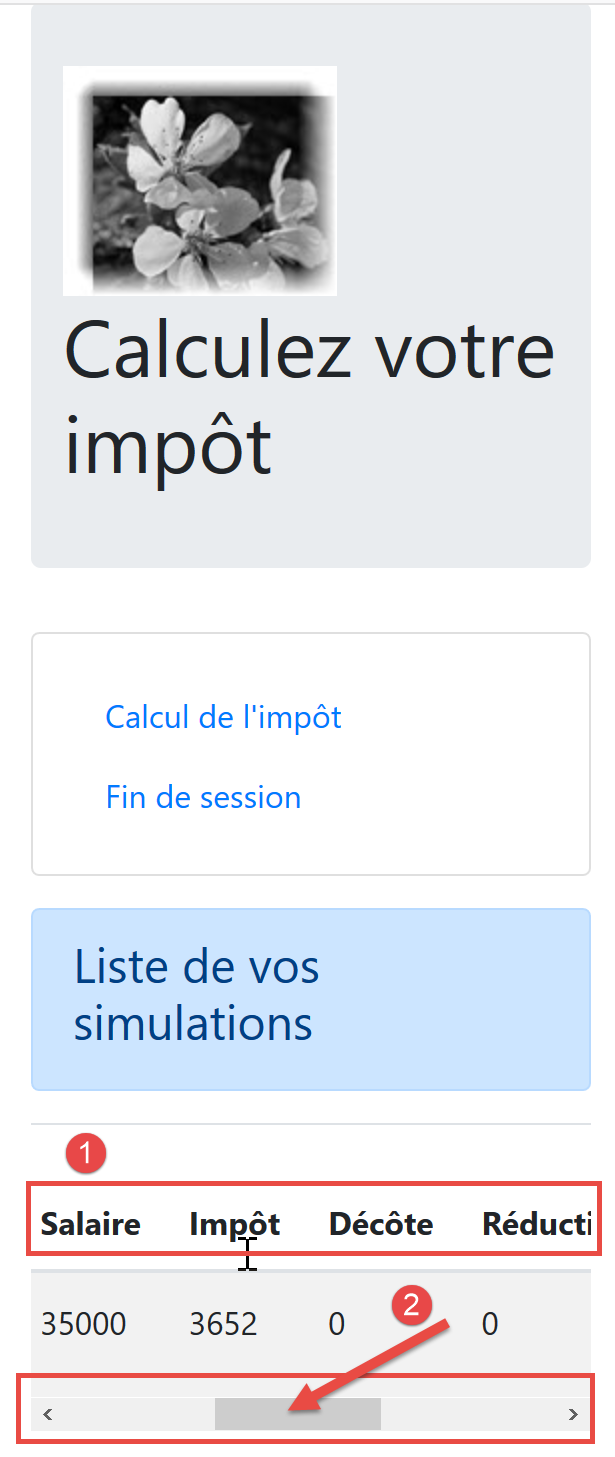
- In [2], on small screens, a horizontal scroll bar allows the table to be displayed;
19.14.8. The [NotFound] view
It remains unchanged.
19.14.9. Mobile views
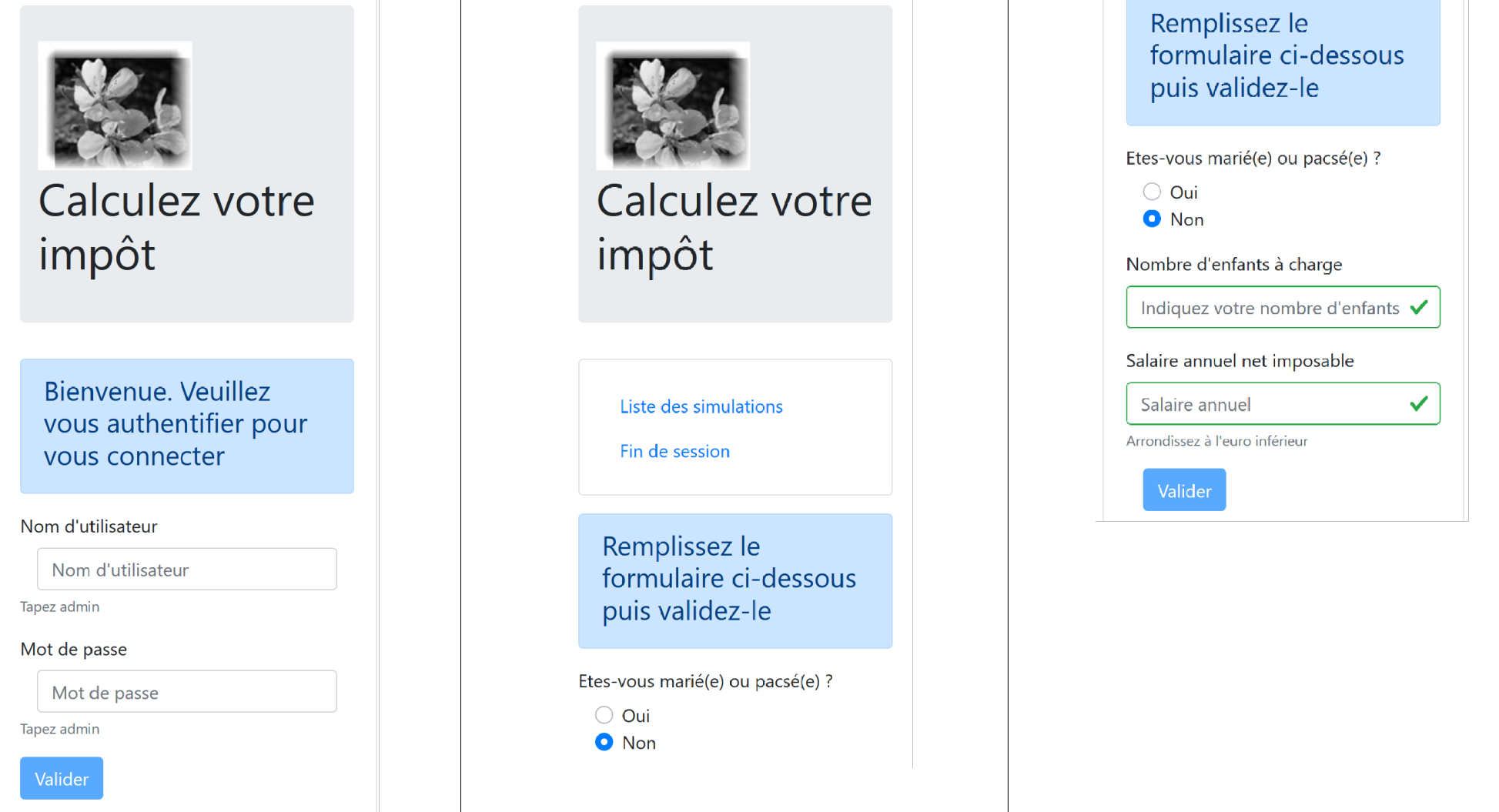
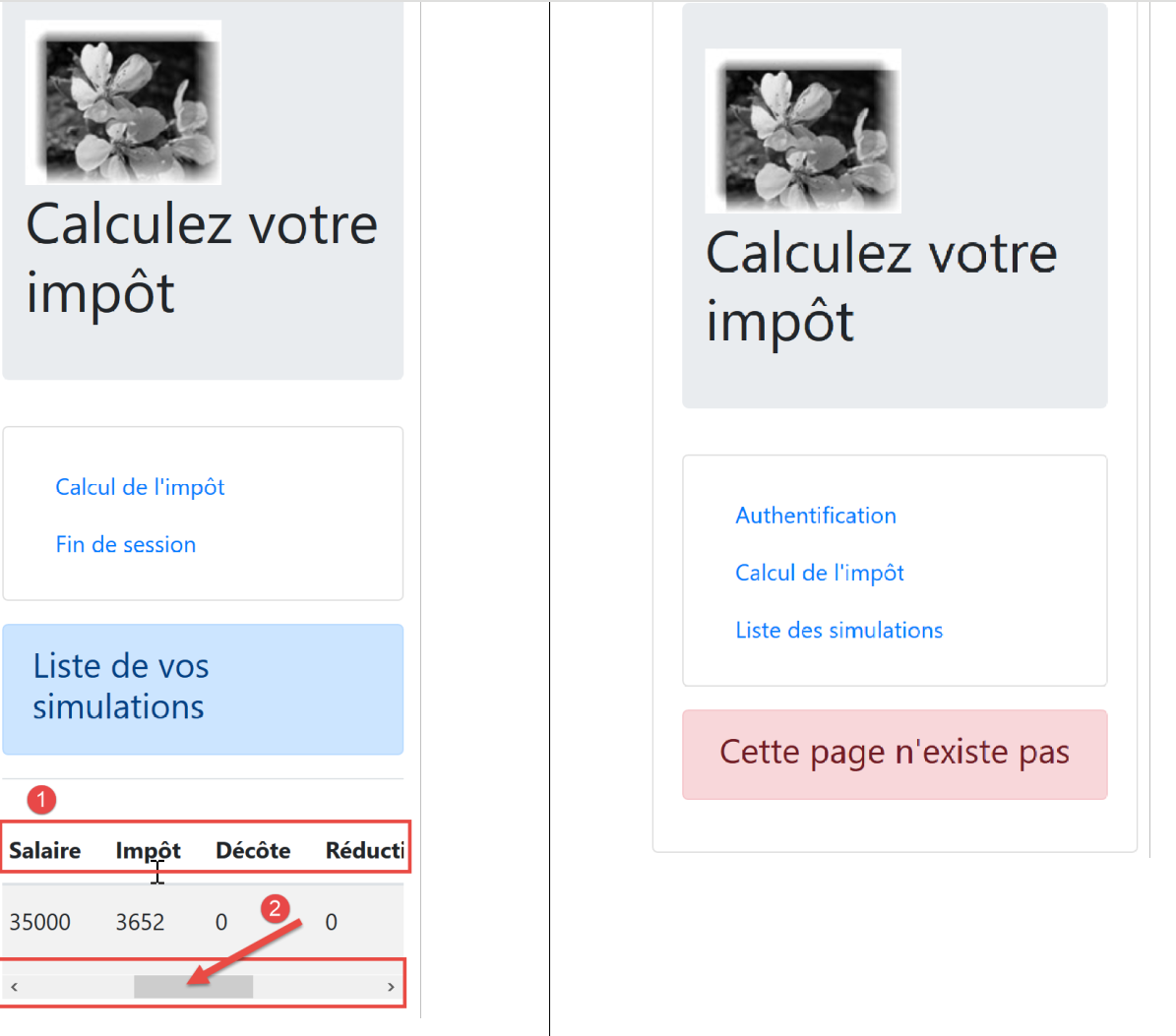
Note: there is certainly potential to create views that are even better suited for mobile. I’m thinking in particular of the menu in navigation, which could be improved, but there are other areas as well. The primary goal of this document was not to create a mobile app. In that case, we might have turned to a framework like Ionic |https://ionicframework.com/|.