9. Working with a Data Source
Here, we aim to lay the groundwork for working with databases within a Struts application.
9.1. The Struts /listarticles application
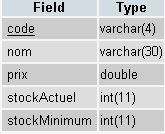
We want to display the contents of a table storing the characteristics of items sold by a store.
 |
|
The table contains the following:
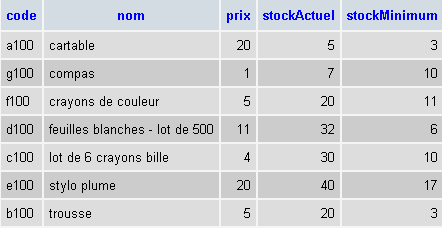
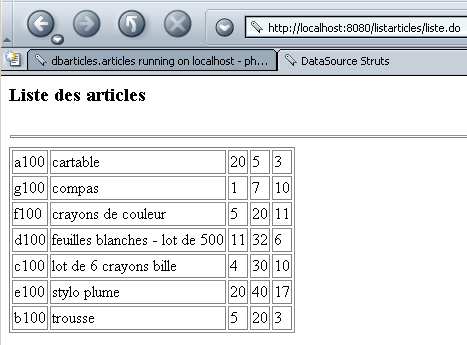
The listarticles application will display the same information (though less elegantly) on a web page:
9.2. Struts /listarticles application configuration
The application's web.xml file is standard:
web.xml
<?xml version="1.0" encoding="ISO-8859-1"?>

<!DOCTYPE web-app
    PUBLIC "-//Sun Microsystems, Inc.//DTD Web Application 2.3//EN"
    "http://java.sun.com/dtd/web-app_2_3.dtd">

<web-app>
    <servlet>
      <servlet-name>action</servlet-name>
    <servlet-class>org.apache.struts.action.ActionServlet</servlet-class>
    <init-param>
        <param-name>config</param-name>
      <param-value>/WEB-INF/struts-config.xml</param-value>
    </init-param>
    <load-on-startup>1</load-on-startup>
  </servlet>
  <servlet-mapping>
      <servlet-name>action</servlet-name>
    <url-pattern>*.do</url-pattern>
  </servlet-mapping>

  <taglib>
      <taglib-uri>/WEB-INF/struts-bean.tld</taglib-uri>
    <taglib-location>/WEB-INF/struts-bean.tld</taglib-location>
  </taglib>
  <taglib>
      <taglib-uri>/WEB-INF/struts-logic.tld</taglib-uri>
    <taglib-location>/WEB-INF/struts-logic.tld</taglib-location>
  </taglib>

</web-app>
The struts-config.xml file introduces a new <data-sources> section that allows you to declare and configure data sources:
struts-config.xml
<?xml version="1.0" encoding="ISO-8859-1" ?>

<!DOCTYPE struts-config PUBLIC
          "-//Apache Software Foundation//DTD Struts Configuration 1.1//EN"
          "http://jakarta.apache.org/struts/dtds/struts-config_1_1.dtd">

<struts-config>
    <data-sources>
        <data-source key="dbarticles">
            <set-property property="driverClass" value="com.mysql.jdbc.Driver"></set-property>
            <set-property property="url" value="jdbc:mysql://localhost/dbarticles"></set-property>
            <set-property property="user" value="admarticles"></set-property>
            <set-property property="password" value="mdparticles"></set-property>
            <set-property property="minCount" value="2"></set-property>
            <set-property property="maxCount" value="5"></set-property>
        </data-source>
    </data-sources>

    <action-mappings>
        <action path="/liste" type="istia.st.struts.articles.ListeArticlesAction">
            <forward name="afficherListeArticles" path="/vues/listarticles.jsp"/>
            <forward name="afficherErreurs" path="/vues/erreurs.jsp"/>
        </action>
    </action-mappings>

    <message-resources parameter="istia.st.struts.articles.ApplicationResources"
        null="false" />

</struts-config>
9.2.1. Data Sources
The <data-sources> section is used to declare all of the application's data sources, each of which is described by a <data-source> section. This tag supports several attributes:
identifies the data source when there are multiple sources. | |
the name of the class to be instantiated to access the database. This class is typically found in a class library (.jar) provided by the DBMS vendor. This library contains the JDBC driver for database access. The driverClass property specifies this driver. The .jar file containing the DBMS access classes will be placed in the application’s WEB-INF/lib folder. | |
Connection string to a specific database. The JDBC driver allows access to all databases managed by the DBMS. The url property lets us specify which one we will use. | |
Database access is protected. The DBMS manages users identified by a username and password. These are specified in the tag’s user and password attributes. | |
Struts manages a pool of connections to the DBMS. Opening a connection to a DBMS is a resource-intensive operation in terms of time and memory. Rather than opening and closing a connection to the DBMS for each request made to the application, the application manages a pool of n connections, where n is in the range [minCount, maxCount]. If, during a request, the application needs a connection: - it will attempt to obtain one from the connection pool. If it finds a free one, it uses it. - if there are no free connections in the pool and there are fewer than maxCount connections in the pool, a new connection is opened and added to the pool. The current query can use it. - If there are no free connections and no way to create a new one, the request is put on hold. When the current request closes the connection, it is not actually closed but returned to the pool. |
Here, we have the following properties:
dbarticles - this is the name under which the data source will be known in the application context | |
com.mysql.jdbc.Driver. We are using a MySQL database. | |
jdbc:mysql://localhost/dbarticles. The database is named dbarticles and is located on the local machine. | |
admarticles, mdparticles. This user has been granted full privileges on the dbarticles database. | |
2, 5. Minimum of 2 connections in the pool, maximum of 5. |
9.2.2. Actions
The actions declared in the Struts configuration file are as follows:
    <action-mappings>
        <action path="/liste" type="istia.st.struts.articles.ListeArticlesAction">
            <forward name="afficherListeArticles" path="/vues/listarticles.jsp"/>
            <forward name="afficherErreurs" path="/vues/erreurs.jsp"/>
        </action>
    </action-mappings>
The only action is called /list and is associated with the class istia.st.struts.articles.ListeArticlesAction. This action ends by displaying:
- the articles page (/vues/listarticles.jsp)
- the error page (/views/errors.jsp)
9.2.3. The message file
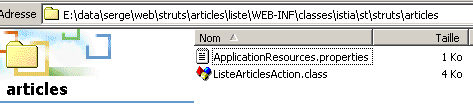
The ApplicationResources.properties message file will be placed in the WEB-INF/classes/istia/st/struts/articles folder. Its contents will be as follows:
# erreurs
errors.header=<ul>
errors.footer=</ul>
erreur.dbarticles=<li>Erreur d'accès à la base des articles ({0})</li>
Only one error can occur: a database access error. In fact, there are several possible types of errors, all grouped under the same error message. The exact cause of the error will, however, be specified in the {0} parameter.
9.3. Views
9.3.1. The errors.jsp view
This view must display a list of errors. We have encountered it several times already.
<%@ taglib uri="/WEB-INF/struts-html.tld" prefix="html" %>

<html>
    <head>
      <title>Liste d'articles - erreurs</title>
  </head>
  <body>
      <h2>Les erreurs suivantes se sont produites</h2>
        <html:errors/>
  </body>
</html>
This view simply displays the list of errors using the <html:errors/> tag.
9.3.2. The listarticles.jsp view
This view must display the contents of the ARTICLES table in the database. Its code is as follows:
<%@ taglib uri="/WEB-INF/struts-bean.tld" prefix="bean" %>
<%@ taglib uri="/WEB-INF/struts-logic.tld" prefix="logic" %>

<%
    // listarticles : ArrayList dans la requête
    // listArticles(i) : tableau (String[5]) de 5 éléments
%>

<html>
    <head>
        <title>DataSource Struts</title>
    </head>
    <body>
        <h3>Liste des articles</h3>
        <hr>
        <table border="1">
            <logic:iterate id="ligne" name="listArticles">
                <tr>
                    <logic:iterate id="colonne" name="ligne">
                        <td><bean:write name="colonne"/></td>
                    </logic:iterate>
                </tr>
            </logic:iterate>
        </table>
    </body>
</html>
The /list action will place the contents of the ARTICLES table into an ArrayList object named listArticles in the request. Each element of the listArticles object is an array of 5 strings representing the 5 pieces of information (code, name, price, currentStock, minimumStock) associated with an item in the table. The view must display the contents of the listArticles object in an HTML table. To do this, it uses the <logic:iterate> tag:
            <logic:iterate id="ligne" name="listArticles">
                <tr>
                    <logic:iterate id="colonne" name="ligne">
                        <td><bean:write name="colonne"/></td>
                    </logic:iterate>
                </tr>
            </logic:iterate>
There are two iterations here. The first loops over the elements of the ArrayList object listArticles. The current element of listArticles is called row here. The row element represents a String[5] object that is traversed using the second iteration. The element of this second iteration is called column. It represents the current element of an array of strings and is therefore a string (code, name, price, currentStock, minimumStock). Its value is displayed using the <bean:write> tag.
The view uses tags from the struts-logic and struts-bean libraries. Therefore, you must declare their use:
<%@ taglib uri="/WEB-INF/struts-bean.tld" prefix="bean" %>
<%@ taglib uri="/WEB-INF/struts-logic.tld" prefix="logic" %>
9.4. The /list action
The purpose of the /list action is to include an ArrayList object representing the contents of the ARTICLES table in the request, so that a view can use it. Its code is as follows:
package istia.st.struts.articles;

import java.io.IOException;
import java.sql.Connection;
import java.sql.ResultSet;
import java.sql.Statement;
import java.util.ArrayList;

import javax.servlet.ServletException;
import javax.servlet.http.HttpServletRequest;
import javax.servlet.http.HttpServletResponse;
import javax.sql.DataSource;

import org.apache.struts.action.Action;
import org.apache.struts.action.ActionError;
import org.apache.struts.action.ActionErrors;
import org.apache.struts.action.ActionForm;
import org.apache.struts.action.ActionForward;
import org.apache.struts.action.ActionMapping;

public class ListeArticlesAction extends Action {

    public ActionForward execute(
        ActionMapping mapping,
        ActionForm form,
        HttpServletRequest request,
        HttpServletResponse response)
        throws IOException, ServletException {

         // reads the contents of a connection's items table
         // performed at context init
         // retrieve the dbarticles data source
        DataSource dataSource = this.getDataSource(request, "dbarticles");
        if (dataSource == null) {
             // the data source could not be created
            ActionErrors erreurs = new ActionErrors();
            erreurs.add(    "dbarticles",new ActionError("erreur.dbarticles","La source de données n'a pu être créée"));
            this.saveErrors(request, erreurs);
            return mapping.findForward("afficherErreurs");
        }
         // here the data source exists - we use it Conne        ction connexion = null;
        Statement st = null;
        ResultSet rs = null;
        String requête = null;
        ArrayList alArticles = new ArrayList();
         // error handling
        try {
             // get a connection
            connexion = dataSource.getConnection();
             // prepare query SQL
            requête =
                "select code, nom, prix, stockActuel, stockMinimum from articles order by nom";
             // execute it
            st = connexion.createStatement();
            rs = st.executeQuery(requête);
             // exploit results
            while (rs.next()) {
                 // save current line
                alArticles.add(
                    new String[] {
                        rs.getString("code"),
                        rs.getString("nom"),
                        rs.getString("prix"),
                        rs.getString("stockactuel"),
                        rs.getString("stockMinimum")});
                // next line
            } //while
             // free up resources
            rs.close();
            st.close();
            connexion.close();
        } catch (Exception ex) {
             // errors have occurred
            ActionErrors erreurs = new ActionErrors();
            erreurs.add("dbarticles",new ActionError("erreur.dbarticles", ex.getMessage()));
            this.saveErrors(request, erreurs);
            return mapping.findForward("afficherErreurs");
        }
         // it's good
        request.setAttribute("listArticles", alArticles);
        return mapping.findForward("afficherListeArticles");
    } //execute
} //class
The reader is likely able to grasp the essence of the code above. We will focus only on the single new element: the use of a DataSource object provided by the Struts framework. This DataSource object represents the connection pool configured by the <data-source key="dbarticles"> section of the configuration file. After its creation, the DataSource object was placed in the application context so that all objects in that context can access it. It is therefore retrieved as follows:
         // retrieve the dbarticles data source
        DataSource dataSource = this.getDataSource(request, "dbarticles");
Here, we request the data source identified by the key "dbarticles". If we retrieve a null pointer, it means the data source could not be created during application initialization. In this case, we log the error in an ActionErrors object and redirect to the error page identified by the key "afficherErreurs" in the configuration file:
        <action path="/liste" type="istia.st.struts.articles.ListeArticlesAction">
            <forward name="afficherListeArticles" path="/vues/listarticles.jsp"/>
            <forward name="afficherErreurs" path="/vues/erreurs.jsp"/>
        </action>
    </action-mappings>
Once the data source is obtained, we have access to the connection pool. A connection to the database is obtained using the following code:
Here, the pool will provide us with a reused connection or a newly created one if there are still connections available.
9.5. Deployment
The application context is defined in Tomcat’s server.xml configuration file:
<Context path="/listarticles" reloadable="true" docBase="E:\data\serge\web\struts\articles\liste" />
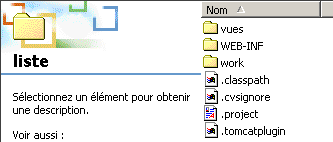
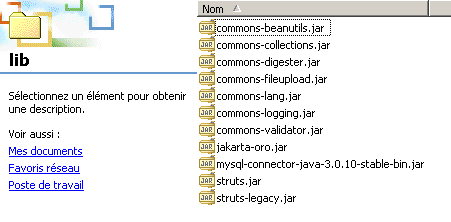
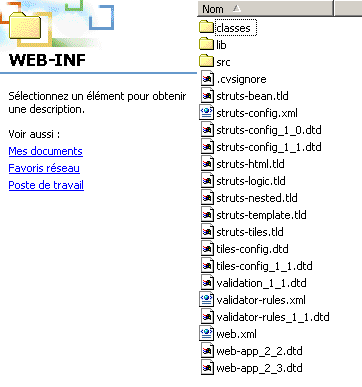
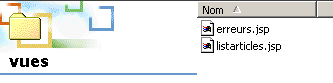
The application directory structure is as follows:
  | ||
  | ||
 | ||
Note the mysql-connector-java-3.0.10-stable-bin.jar library in WEB-INF/lib. This is the file that contains the JDBC driver for the MySQL database used here.
9.6. Testing
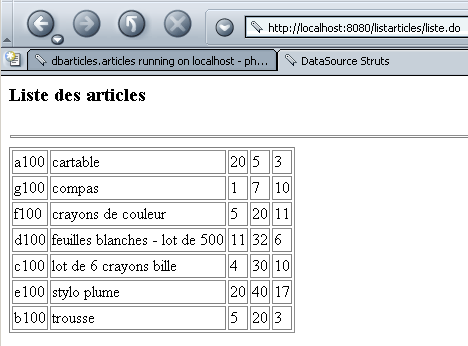
We start Tomcat and request the URL http://localhost:8080/listarticles/liste.do:
9.7. A second data source
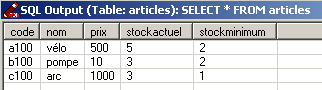
We are now using a second data source located in a Postgres database. Here too, the data is in an ARTICLES table with the same columns as before. Its contents are as follows:
This new data source is declared in the Struts configuration file:
    <data-sources>
        <data-source key="dbarticles" >
            <set-property property="driverClass" value="com.mysql.jdbc.Driver"></set-property>
            <set-property property="url" value="jdbc:mysql://localhost/dbarticles"></set-property>
            <set-property property="user" value="admarticles"></set-property>
            <set-property property="password" value="mdparticles"></set-property>
            <set-property property="minCount" value="2"></set-property>
            <set-property property="maxCount" value="5"></set-property>
        </data-source>
        <data-source key="pgdbarticles" type="org.apache.commons.dbcp.BasicDataSource">
            <set-property property="driverClassName" value="org.postgresql.Driver" />
            <set-property property="url" value="jdbc:postgresql://localhost/dbarticles" />
            <set-property property="username" value="serge" />
            <set-property property="password" value="serge" />
            <set-property property="maxActive" value="10" />
            <set-property property="maxWait" value="5000" />
            <set-property property="defaultAutoCommit" value="false" />
            <set-property property="defaultReadOnly" value="false" />
        </data-source>
    </data-sources>
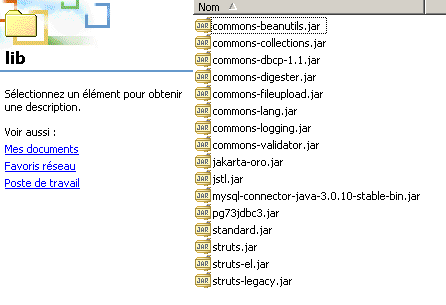
The new data source will have the identifier (key) pgdbarticles. The new feature comes from the class implementing the javax.sql.DataSource interface. The default class is org.apache.struts.util.GenericDataSource, defined in the struts.jar library. This class will be deprecated in future versions of Struts, and for version 1.1, it is recommended to use the org.apache.commons.dbcp.BasicDataSource class found in the commons-dbcp-1.1.jar library. This library is not necessarily included with the Struts package. It can be found at the URL http://jakarta.apache.org/commons/index.html, specifically at http://jakarta.apache.org/site/binindex.cgi. You must download the product called Commons DBCP. For Windows, you can download the .zip file. This contains the library’s source code as well as the corresponding .jar file. You must extract this from the .zip archive and place it in the application’s WEB-INF/lib folder. You must also place the driver for the DBMS being used in this same folder:
To use this data source, we change a statement in the code of the /list action:
This time, we request the data source named pgdbarticles, i.e., the Postgres data source.
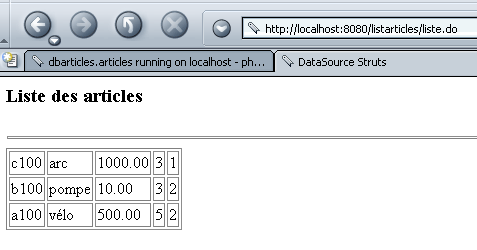
All that remains is to compile everything, start Tomcat, and request the URL http://localhost:8080/listarticles/liste.do:
9.8. Conclusion
We have shown how to use a connection pool to access a database. Note that we have not followed the MVC architecture here. In fact, the /list action itself executes the SQL queries to access the data. It would have been preferable for it to call an intermediate business class that would hide the fact that the data is being retrieved from a database management system. It is likely that the business class would then create the connection pool, and there would be no need to declare it in the Struts configuration file. Here’s a clue: the presence of a <data-sources> section in the configuration file may indicate that our application does not follow the MVC architecture.