2. The strutspersonne application
We have implemented a "person" application using the traditional method: servlets and JSP pages. We now propose to introduce Struts using this same application.
2.1. How the application works
Let’s review how the “person” application we developed works. It consists of:
- a main servlet. This handles all the application logic.
- three JSP pages: formulaire.personne.jsp, reponse.personne.jsp, and erreurs.personne.jsp
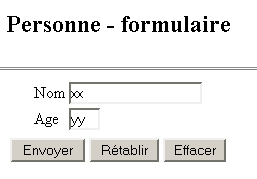
The application works as follows. It is accessible via the URL http://localhost:8080/personne/main. At this URL, a form provided by the formulaire.personne.jsp page is displayed:
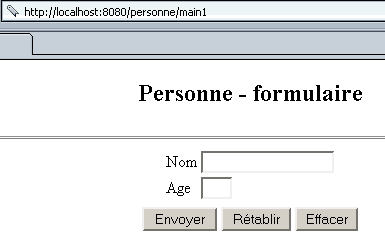
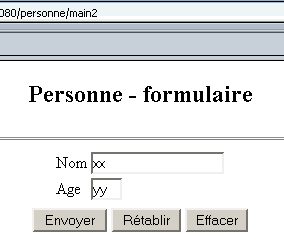
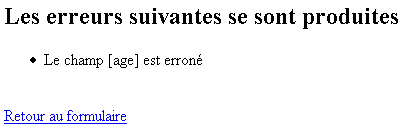
The user fills out the form and clicks the [Submit] button. The [Reset] button is a reset button, meaning it restores the document to the state in which it was received. The [Delete] button is a standard button. The user must provide a valid name and age. If this is not the case, an error page is sent to them via the JSP page erreurs.personne.jsp. Here are some examples:
Exchange #1
 |  |
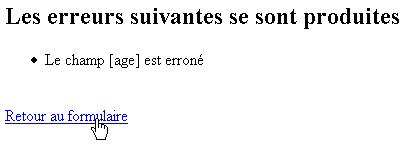
If you follow the [Back to form] link, you will find the form in the state you left it:
Exchange #2
 |  |
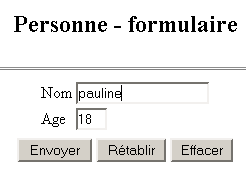
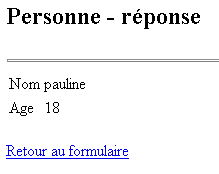
If the user submits valid data, the application sends a response via the JSP page reponse.personne.jsp.
Exchange #1
 |  |
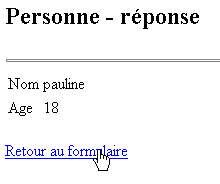
If you follow the [Back to form] link, you will find the form in the state you left it:
Exchange #2
 | 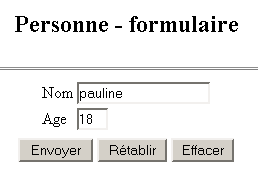 |
2.2. The application's Struts architecture
We will adopt the following Struts architecture:
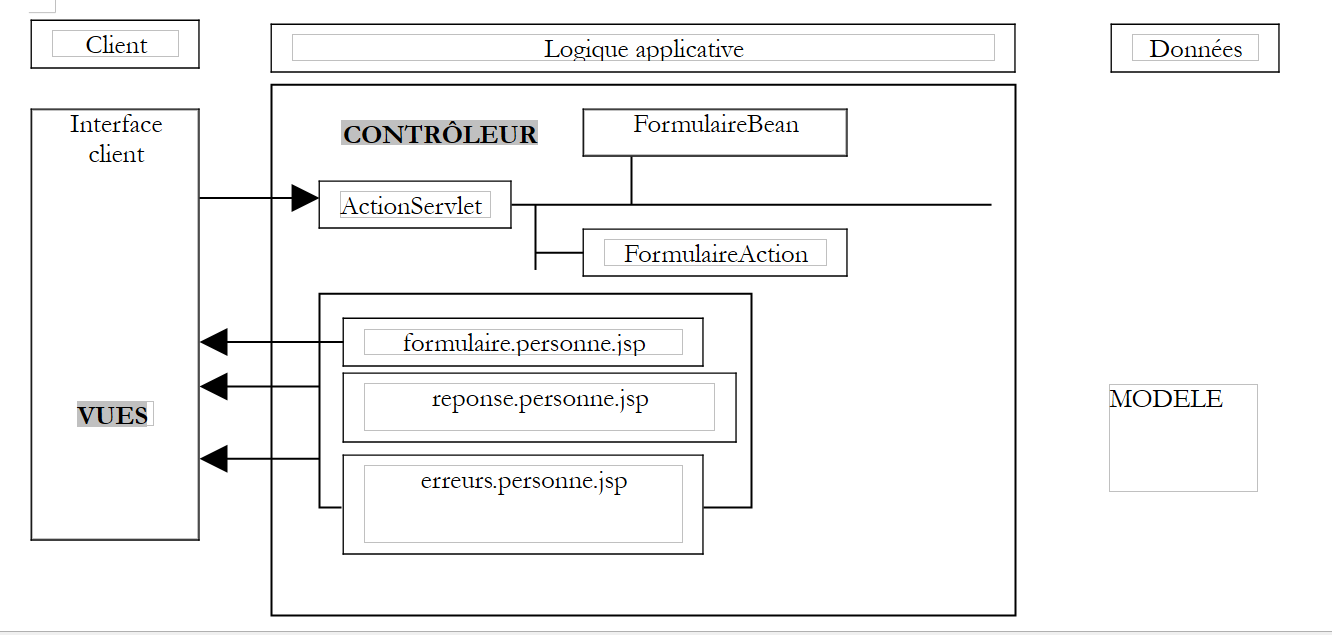 |
- There will be three views
- The controller will be the one provided by Struts
- FormBean is the class responsible for storing the values from the form presented by the view form.person.jsp
- FormAction is the class responsible for processing the values of FormBean and specifying the response page to be sent:
- the errors.person.jsp view if the form data is incorrect
- the reponse.personne.jsp view otherwise
For the developer, the task consists of writing the code:
- the three views
- the FormBean associated with the form
- the FormAction class responsible for processing the form
2.3. Compiling the classes required for the Struts application
To compile the classes required for our application, we will use JBuilder. JBuilder works with a JDK that does not contain the classes required for Struts applications. We can configure JBuilder as follows:
- Tools / Configure JDKs
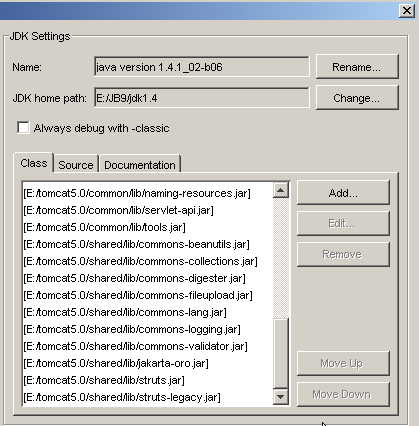
- Use the [Add] button to add the .jar files provided by Struts to JBuilder’s class archives. If you have extracted the Struts archive to your disk, you can add all the .jar files from the <struts>/lib folder to JBuilder:
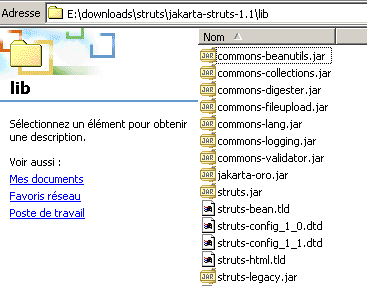
You can add all the above .jar files to JBuilder’s archives. We have already seen that Tomcat also needs access to the Struts archives. For Tomcat 4.x, you can place the Struts .jar files in <tomcat4>\common\lib. For Tomcat 5.x, you can place them in <tomcat5>\shared\lib. You can then configure JBuilder to locate the Struts .jar files in the same location as Tomcat. This is what was done in the screenshot showing the JBuilder .jar files mentioned earlier. They were taken from <tomcat5>\shared\lib.
So, if JBuilder reports that it cannot find a Struts class while compiling a class, check two things:
- the spelling of the class
- the .jar files used by JBuilder. All Struts .jar files must be included.
2.4. The views of the strutspersonne application
The three views of the application are as follows:
- form.person.jsp: displays the form for entering a person’s name and age
- reponse.personne.jsp: displays the entered values if they are valid
- errors.person.jsp: displays any errors
2.4.1. The erreurs.personne.jsp view
This view, which displays a list of errors, will be defined as follows:
<%@ taglib uri="/WEB-INF/struts-html.tld" prefix="html" %>

<html>
    <head>
      <title>Personne</title>
  </head>
  <body>
      <h2>Les erreurs suivantes se sont produites</h2>
        <html:errors/>
    <html:link page="/formulaire.do">
            Retour au formulaire
        </html:link>
  </body>
</html>
There are two new features in this code:
- the presence of <html:XX/> tags, which are not HTML tags. You can create libraries of JSP tags that are converted into Java code when the JSP page is transformed into a servlet.
- The JSP page must declare the tag libraries it uses. It does so here with the line
This line provides two pieces of information:
- uri: the location of the file governing the library’s usage rules. The struts-html.tld file is included in the Struts distribution. In the example above, it is placed in the WEB-INF folder.
- prefix: the identifier used in the code to prefix the library’s tags. This prevents naming conflicts that could arise when using multiple tag libraries simultaneously. It is possible to find two tags with the same name in two different libraries. By giving each library a different prefix, any ambiguity is eliminated.
- The <html:errors> tag displays the list of errors that the Struts controller sends to it.
- The <html:link> tag generates a link pointing to /C/page where
- C is the application context
- page is the URL specified in the page attribute of the tag
The
will generate the following HTML code:
where C is the application context
2.4.2. Testing the errors.person.jsp view
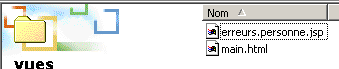
- The errors.person.jsp file is placed in the views folder of the strutspersonne application:
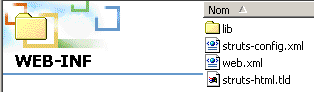
- The struts-html.tld file is taken from the Struts distribution (<struts>/lib) and placed in WEB-INF:
- The struts-config.xml file is modified as follows:
<?xml version="1.0" encoding="ISO-8859-1" ?>
<!DOCTYPE struts-config PUBLIC
"-//Apache Software Foundation//DTD Struts Configuration 1.1//EN"
"http://jakarta.apache.org/struts/dtds/struts-config_1_1.dtd">
<struts-config>
<action-mappings>
<action
path="/main"
parameter="/vues/main.html"
type="org.apache.struts.actions.ForwardAction"
/>
<action
path="/erreurs"
parameter="/vues/erreurs.personne.jsp"
type="org.apache.struts.actions.ForwardAction"
/>
</action-mappings>
</struts-config>
We create a new URL /errors in the configuration file to be handled by the Struts controller. The URL /errors.do will be redirected to the view /views/errors.person.jsp. The struts-config.xml file is placed in the WEB-INF folder.
- We restart Tomcat so that the new struts-config.xml file is taken into account, then we request the URL http://localhost:8080/strutspersonne/erreurs.do:
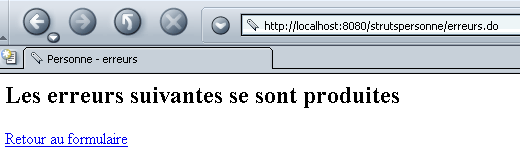
The <html:errors/> tag produced nothing. This is normal; the ForwardAction did not generate the list of errors expected by the tag. Nevertheless, the response above shows that our JSP view is at least syntactically correct; otherwise, we would have received an error page. Let’s check the HTML code received by the browser (View/Source):
<html>
<head>
<title>Personne - erreurs</title>
</head>
<body>
<h2>Les erreurs suivantes se sont produites</h2>
<a href="/strutspersonne/formulaire.do">Retour au formulaire</a>
</body>
</html>
Note the link generated by the <html:link> tag. The /strutspersonne context has been automatically included in the link. This allows the application to be moved from one context to another (e.g., changing machines) without having to change the links generated by <html:link>.
2.4.3. The reponse.personne.jsp view
This view, which confirms the values entered in the form, is as follows:
<%@ taglib uri="/WEB-INF/struts-html.tld" prefix="html" %>
<%
// on récupère les données nom, age
//String nom=(String)request.getAttribute("nom");
String nom="jean";
//String age=(String)request.getAttribute("age");
String age="24";
%>
<html>
<head>
<title>Personne</title>
</head>
<body>
<h2>Personne - réponse</h2>
<hr>
<table>
<tr>
<td>Nom</td>
<td><%= nom %>
</tr>
<tr>
<td>Age</td>
<td><%= age %>
</tr>
</table>
<br>
    <html:link page="/formulaire.do">
            Retour au formulaire
        </html:link>
</body>
</html>
The page displays two pieces of information, [name] and [age], which will be passed to it by the controller in the predefined request object. Here, we are conducting a test where the controller will not have the opportunity to set the values of [name] and [age]. Therefore, we initialize these two pieces of information with arbitrary values. Additionally, here too the link back to the form is generated by an <html:link> tag.
2.4.4. Testing the reponse.personne.jsp view
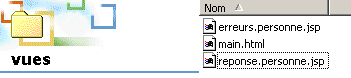
- The reponse.personne.jsp file is located in the views folder of the strutspersonne application:
- The struts-config.xml file is modified as follows:
<?xml version="1.0" encoding="ISO-8859-1" ?>

<!DOCTYPE struts-config PUBLIC
          "-//Apache Software Foundation//DTD Struts Configuration 1.1//EN"
          "http://jakarta.apache.org/struts/dtds/struts-config_1_1.dtd">

<struts-config>
    <action-mappings>
      <action
          path="/main"
          parameter="/vues/main.html"
          type="org.apache.struts.actions.ForwardAction"
      />
      <action
          path="/erreurs"
          parameter="/vues/erreurs.personne.jsp"
          type="org.apache.struts.actions.ForwardAction"
      />
      <action
          path="/reponse"
          parameter="/vues/reponse.personne.jsp"
          type="org.apache.struts.actions.ForwardAction"
      />
    </action-mappings>
</struts-config>
We create a new URL /reponse in the configuration file to be handled by the Struts controller. The URL /reponse.do will be redirected to the view /vues/reponse.personne.jsp. The struts-config.xml file is placed in the WEB-INF folder.
- We restart Tomcat so that the new struts-config.xml file is taken into account, then we request the URL http://localhost:8080/strutspersonne/erreurs.do:
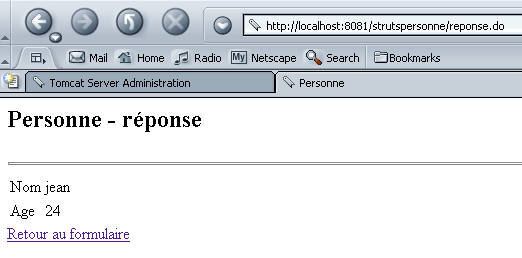
We get exactly what we expected.
2.4.5. The formulaire.personne.jsp view
This view displays the form for entering the user's name and age. Its JSP code is as follows:
<%@ taglib uri="/WEB-INF/struts-html.tld" prefix="html" %>

<html>
    <meta http-equiv="pragma" content="no-cache">
    <head>
      <title>Personne - formulaire</title>
    <script language="javascript">
        function effacer(){
          with(document.frmPersonne){
            nom.value="";
          age.value="";
        }
      }
    </script>
  </head>

  <body>
      <center>
        <h2>Personne - formulaire</h2>
      <hr>
      <html:form action="/main" name="frmPersonne" type="istia.st.struts.personne.FormulaireBean">
          <table>
            <tr>
              <td>Nom</td>
            <td><html:text property="nom" size="20"/></td>
          </tr>
          <tr>
              <td>Age</td>
            <td><html:text property="age" size="3"/></td>
          </tr>
            <tr>
        </table>
        <table>
            <tr>
              <td><html:submit value="Envoyer"/></td>
            <td><html:reset value="Rétablir"/></td>
            <td><html:button property="btnEffacer" value="Effacer" onclick="effacer()"/></td>
          </tr>
        </table>
      </html:form>
    </center>
  </body>
</html>
We see the struts-html.tld tag library used in the errors view. New tags appear:
is used both to generate the HTML tag <form> and to provide information to the controller that will process this form:
Note that the method used to send form parameters (GET/POST) to the controller is not specified. This could be done using the method attribute. If this attribute is missing, the POST method is used by default. | |||||||
Used to generate the <input type="text" value="..."> tag:
| |||||||
is used to generate the HTML tag <input type="submit"...> | |||||||
is used to generate the HTML tag <input type="reset"...> | |||||||
is used to generate the HTML tag <input type="button"...> |
2.4.6. The bean associated with the formulaire.personne.jsp form
- With Struts, every form must be associated with a bean responsible for storing the form’s values and maintaining them in the current session. A bean is a Java class that must adhere to a specific syntax. The bean associated with a form must extend the ActionForm class defined in the Struts library:
- The names of the bean’s attributes must correspond to the form fields (property attributes of the form’s <html:text> tags). Based on the code from the previous form, the bean must therefore have two fields named name and age.
- For each field XX in the form, the bean must define two methods:
- public void setXX(Type value): to assign a value to the XX attribute
- public getXX(Value type): to retrieve the value of the XX field
The bean associated with the previous form could be as follows:
package istia.st.struts.personne;

import org.apache.struts.action.ActionForm;

public class FormulaireBean extends ActionForm {
   // name
  private String nom = null;
  public String getNom() {
    return nom;
  }
  public void setNom(String nom) {
    this.nom = nom;
  }

   // age
  private String age = null;
  public String getAge() {
    return age;
  }
  public void setAge(String age) {
    this.age = age;
  }
}
We will compile this class using JBuilder.
2.4.7. Testing the formulaire.personne.jsp view
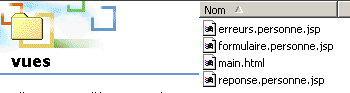
The formulaire.personne.jsp file is placed in the views folder of the strutspersonne application:
- The struts-config.xml file is modified as follows:
<?xml version="1.0" encoding="ISO-8859-1" ?>

<!DOCTYPE struts-config PUBLIC
          "-//Apache Software Foundation//DTD Struts Configuration 1.1//EN"
          "http://jakarta.apache.org/struts/dtds/struts-config_1_1.dtd">

<struts-config>
    <action-mappings>
      <action
          path="/main"
          parameter="/vues/main.html"
          type="org.apache.struts.actions.ForwardAction"
      />
      <action
          path="/erreurs"
          parameter="/vues/erreurs.personne.jsp"
          type="org.apache.struts.actions.ForwardAction"
      />
      <action
          path="/reponse"
          parameter="/vues/reponse.personne.jsp"
          type="org.apache.struts.actions.ForwardAction"
      />
      <action
          path="/formulaire"
          parameter="/vues/formulaire.personne.jsp"
          type="org.apache.struts.actions.ForwardAction"
      />
    </action-mappings>
</struts-config>
In the configuration file, we create a new URL /form to be handled by the Struts controller. The URL /form.do will be redirected to the view /views/form.person.jsp. The struts-config.xml file is placed in the WEB-INF folder.
- We place the FormulaireBean class in WEB-INF/classes:

- We restart Tomcat so that the new struts-config.xml file is taken into account, then we request the URL http://localhost:8080/strutspersonne/formulaire.do:
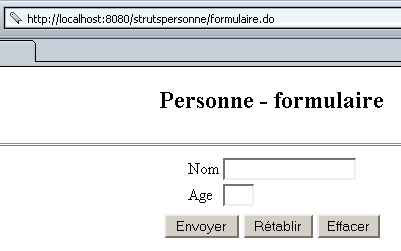
The form displays correctly. We might be curious to see how the <html:XX> tags scattered throughout the form’s JSP code were “translated”:
<html>
    <meta http-equiv="pragma" content="no-cache">
    <head>
      <title>Personne - formulaire</title>
    <script language="javascript">
        function effacer(){
          with(document.frmPersonne){
            nom.value="";
          age.value="";
        }
      }
    </script>
  </head>

  <body>
      <center>

        <h2>Personne - formulaire</h2>
      <hr>
      <form name="frmPersonne" method="post" action="/strutspersonne/main.do">
          <table>
            <tr>
              <td>Nom</td>
            <td><input type="text" name="nom" size="20" value=""></td>
          </tr>

          <tr>
              <td>Age</td>
            <td><input type="text" name="age" size="3" value=""></td>
          </tr>
            <tr>
        </table>
        <table>
            <tr>

              <td><input type="submit" value="Envoyer"></td>
            <td><input type="reset" value="Rétablir"></td>
            <td><input type="button" name="btnEffacer" value="Effacer" onclick="effacer()"></td>
          </tr>
        </table>
      </form>
    </center>
  </body>
</html>
In the resulting form, the [Reset] and [Clear] buttons work. The [Submit] button redirects to the URL /strutspersonne/main.do. According to the application’s web.xml file, the Struts controller will handle this. According to the struts-config.html file, the controller must redirect the request to the view /vues/main.html. Let’s try it:
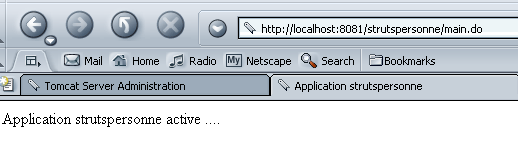
Everything works as expected. We still need to actually process the form values, i.e., write the Action class that will receive the form data into a FormBean object.