7. QuiEst Application
Here we describe a Struts application that is slightly more sophisticated than the previous ones, which had to be simple for educational purposes.
7.1. The users Class
We have a Java class that stores information about the users of a Unix machine. This information is stored in three specific files:
- /etc/passwd: list of users
- /etc/group: list of groups
- /etc/aliases: list of email aliases
The contents of these three files are as follows:
- /etc/passwd
The lines in this file have the following format:
login:pwd:uid:gid:id:dir:shell
where
user login | |
their encrypted password | |
user ID | |
his group ID | |
his identity | |
his login directory | |
his shell |
Thus, a user's line might look like this:
The previous user has ID 110 and belongs to group 57. The definition of group 57 can be found in the /etc/group file.
- /etc/group
The lines in this file have the following format:
nomGroupe:pwd:gid:membre1,membre2,....
where
group name | |
its encrypted password - this field is usually empty | |
the group ID | |
user logins - this field may be empty |
Thus, the line for group 57 above could be as follows:
which indicates that group 57 is named iup2-auto.
- /etc/aliases
The lines in this file have the following format:
with
alias | |
one or more tabs | |
the login of the user to whom the alias belongs |
Thus, the line
guillaume.dupond: dupond
means that the alias guillaume.dupond belongs to the user with the login name dupond. Remember that aliases are used in email addresses. So, if in the previous example, the Unix machine is named shiva.istia.univ-angers.fr, an email addressed to guillaume.dupond@shiva.istia.univ-angers.fr will be delivered to the mailbox of the user with the login name dupond on that machine.
We will not be looking at the entire interface of the users class here, but simply at its constructor and a few methods:
import java.io.*;
import java.util.*;

public class users{


   // attributes
  private Hashtable usersByLogin=new Hashtable();       // login --> login, pwd, ..., dir
    private ArrayList erreurs=new ArrayList();             // list of error messages

....

   // manufacturer
  public users(String usersFileName, String groupsFileName, String aliasesFileName) throws Exception {
        // usersFileName: name of the user file with lines of the form
         // login:pwd:uid:gid:id:dir:shell
         // groupsFileName: name of the group file with lines of the form
         // name:pwd:number:member1,member2,...
         // aliasesFileName: name of alias file with lines of the form
         // alias:[tab]login
         // builds the usersByLogin dictionary
....
    }// manufacturer

     // user list
  public Hashtable getUsersByLogin(){
    return usersByLogin;
  }

   // errors
  public ArrayList getErreurs(){
    return erreurs;
  }
A dictionary (Hashtable) whose keys are the logins from the passwd file. The value associated with each key is an array of strings (String [7]) whose elements are the 7 fields of the passwd file line associated with the login. Some fields may be empty if the line has fewer than 7 fields. | |
list of error messages - empty if there are no errors |
7.2. The web application that is
We propose to build the following web application (form page):
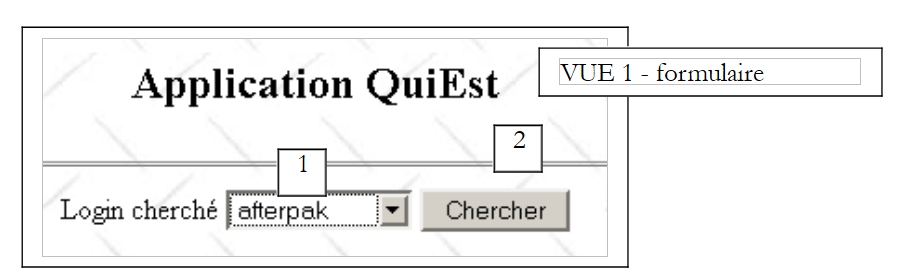 |
No. | name | type HTML | role |
1 | cmbLogins | <select ...>...</select> | displays a list of all logins for which information can be requested |
2 | btnChercher | <input type="submit" ...> | to start the search |
When the user clicks the [Chercher] button (2), the login for (1) is requested from a U object of type users. If the login exists, the following response is returned (info page):
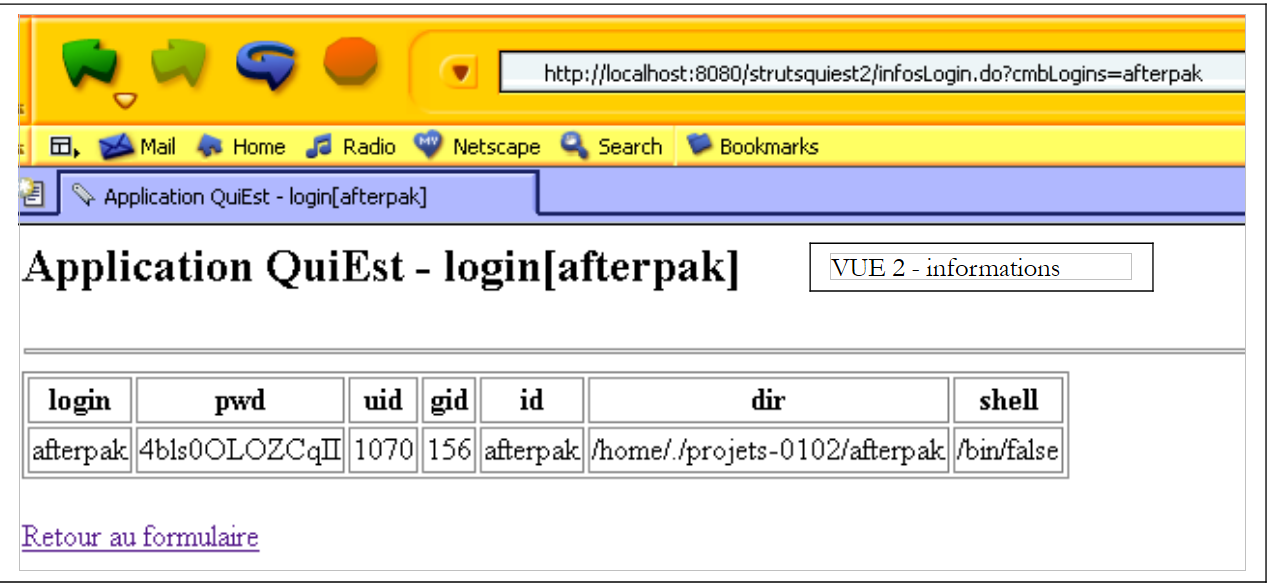 |
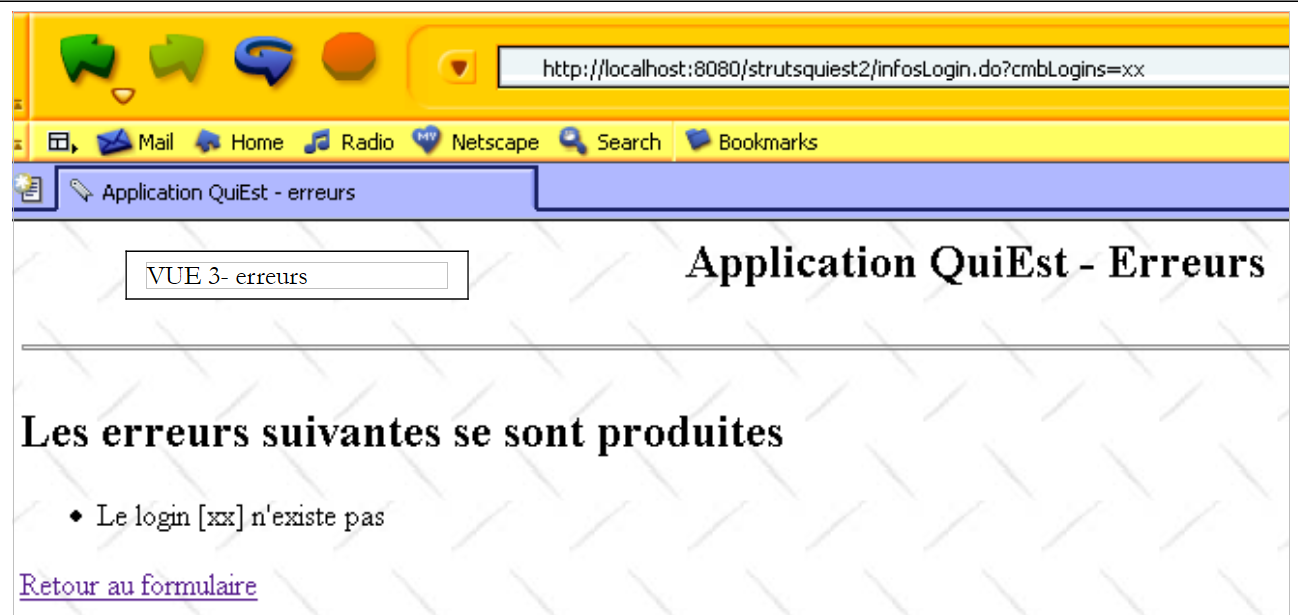
As shown by the browser’s URL above, the form parameters are sent to the server via a GET. We can therefore directly provide the browser with this configured URL. This is what we are doing here to enter a login that does not exist. We receive the following response (error page):
 |
7.3. The application architecture
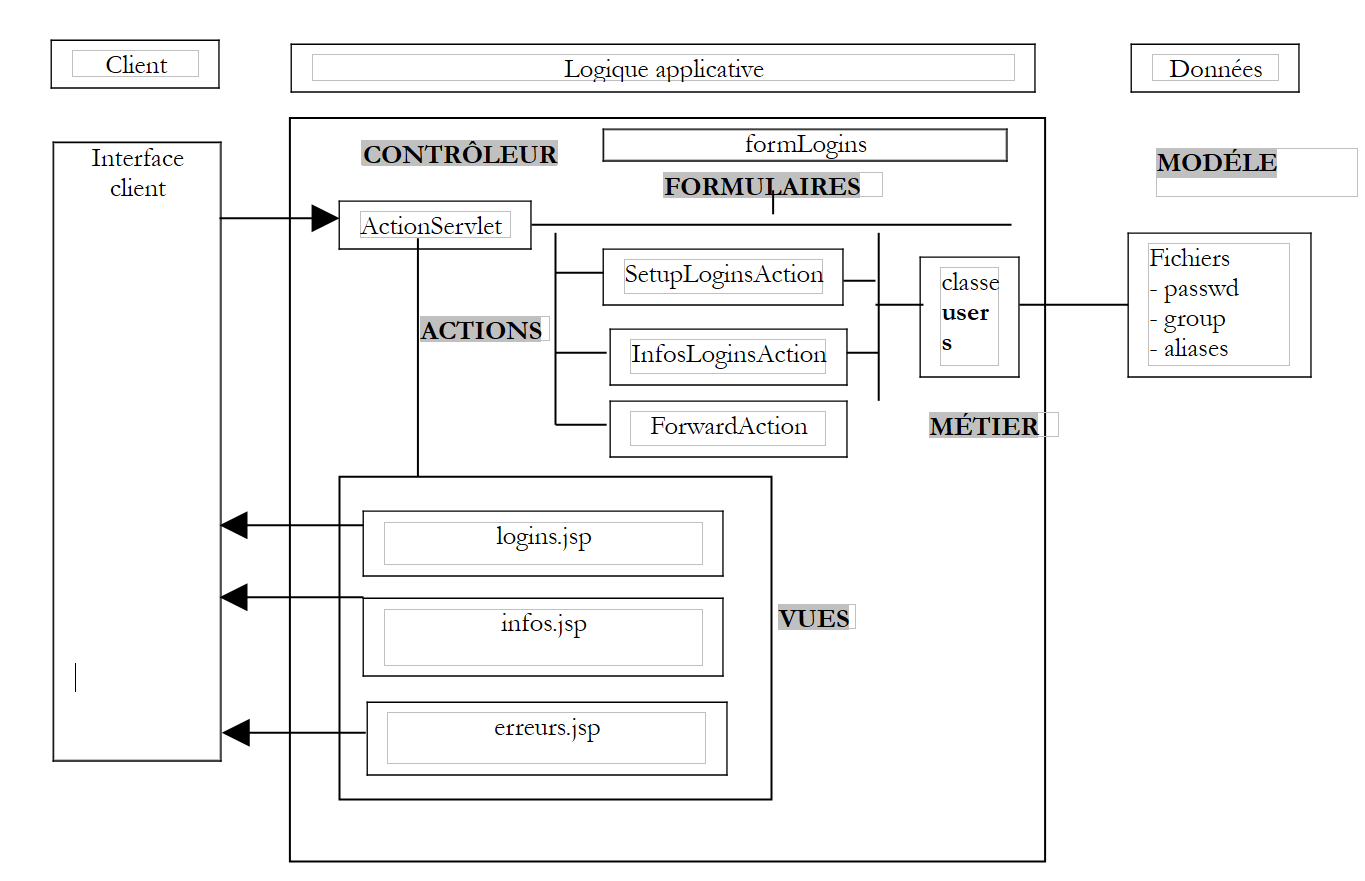 |
This architecture includes the following components:
- the views:
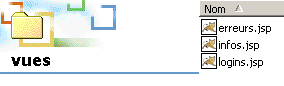
- logins.jsp, used to display the list of logins (view 1)
- infos.jsp, used to display information related to a login (view 2)
- erreurs.jsp, used to display a list of errors (view 3)
- Forms of type ActionForm used by the actions:
- formLogins used to collect data from the logins.jsp form
- the actions:
- SetupLoginAction, which prepares the content of formulaire.jsp and then displays this view
- InfosLoginAction which processes the content of logins.jsp once it has been sent to the server
- ForwardAction, which processes the link [Retour vers le formulaire] from views infos.jsp and erreurs.jsp
- the users business class used by the actions to retrieve their data
- the model provided by the three flat files passwd, group, and aliases
7.4. The web application configuration files
7.4.1. The server.xml file
The application context will be named /strutsquiest2. We will therefore add the following line to the Tomcat file server.xml:
Once this is done, we may need to restart Tomcat so that it takes the new context into account. We can verify its validity by requesting URL http://localhost:8080/strutsquiest2.
7.4.2. The web.xml file
The application's web.xml configuration file will be as follows:
<?xml version="1.0" encoding="UTF-8"?>
<!DOCTYPE web-app PUBLIC "-//Sun Microsystems, Inc.//DTD Web Application 2.2//EN" "http://java.sun.com/j2ee/dtds/web-app_2_2.dtd">
<web-app>
    <servlet>
        <servlet-name>strutsquiest2</servlet-name>
        <servlet-class>istia.st.struts.quiest.Quiest2ActionServlet</servlet-class>
        <init-param>
            <param-name>config</param-name>
            <param-value>/WEB-INF/struts-config.xml</param-value>
        </init-param>
        <init-param>
            <param-name>passwdFileName</param-name>
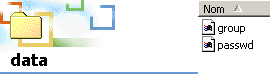
            <param-value>data/passwd</param-value>
        </init-param>
        <init-param>
            <param-name>groupFileName</param-name>
            <param-value>data/group</param-value>
        </init-param>
    </servlet>

    <servlet-mapping>
        <servlet-name>strutsquiest2</servlet-name>
        <url-pattern>*.do</url-pattern>
    </servlet-mapping>
</web-app>
This web.xml file introduces a new feature. The Struts controller is no longer org.apache.struts.action.ActionServlet but a derived class that we have named here istia.st.struts.quiest.Quiest2ActionServlet. This will allow us to retrieve the two initialization parameters: passwdFileName (location of the passwd file) and groupFileName (location of the group file). The aliases file is not needed in this application.
7.4.3. The struts-config.xml file
The struts-config.xml file will be as follows:
<?xml version="1.0" encoding="ISO-8859-1" ?>

<!DOCTYPE struts-config PUBLIC
          "-//Apache Software Foundation//DTD Struts Configuration 1.1//EN"
          "http://jakarta.apache.org/struts/dtds/struts-config_1_1.dtd">

<struts-config>
    <form-beans>
        <form-bean name="formLogins" type="org.apache.struts.action.DynaActionForm">
            <form-property name="cmbLogins" type="java.lang.String" initial=""/>
            <form-property name="tLogins" type="java.lang.String[]"/>
        </form-bean>
    </form-beans>

    <action-mappings>

      <action
          path="/init"
            name="formLogins"
            validate="false"
            scope="session"
          type="istia.st.struts.quiest.SetupLoginsAction"
      >
            <forward name="afficherLogins" path="/vues/logins.jsp"/>
            <forward name="afficherErreurs" path="/vues/erreurs.jsp"/>
        </action>

      <action
          path="/infosLogin"
            name="formLogins"
            validate="false"
            scope="session"
          type="istia.st.struts.quiest.InfosLoginAction"
      >
            <forward name="afficherErreurs" path="/vues/erreurs.jsp"/>
            <forward name="afficherInfos" path="/vues/infos.jsp"/>
        </action>

      <action
          path="/retourLogins"
            parameter="/vues/logins.jsp"
          type="org.apache.struts.actions.ForwardAction"
      />

    </action-mappings>

        <message-resources
          parameter="istia.st.struts.quiest.ApplicationResources"
    null="false"
  />

</struts-config>
It contains three main sections:
- form declarations in the <form-beans> section
- the declaration of actions in the <action-mappings> section
- the declaration of the resource file in <message-resources>
7.4.4. The application's form objects (beans)
    <form-beans>
        <form-bean name="formLogins" type="org.apache.struts.action.DynaActionForm">
            <form-property name="cmbLogins" type="java.lang.String" initial=""/>
            <form-property name="tLogins" type="java.lang.String[]"/>
        </form-bean>
    </form-beans>
There is only one form bean in our application, named formLogins and derived from DynaActionForm. It will be used in the following situations:
- to contain the data needed to display view #1
- retrieve the values from the form in view #1 when the user submits it (submit)
The structure of the formLogins bean is linked to the form in view #1. Let’s examine it:
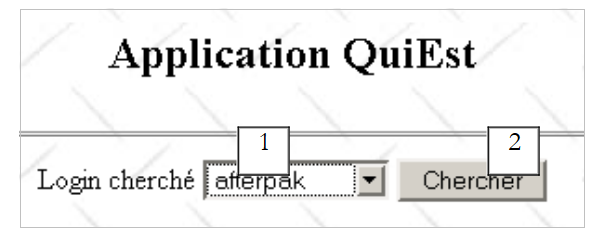 |
No. | name | type HTML | role |
1 | cmbLogins | <select ...>...</select> | displays a list of all logins for which information can be requested |
2 | btnChercher | <input type="submit" ...> | to start the search |
Let's distinguish several cases:
- from the client to the server, the formLogins object is used to hold the values from the HTML form above, which will be submitted via the [Envoyer] button. It therefore requires a field cmbLogins to receive the value of the field HTML, cmbLogins, c.a.d—the login chosen by the user.
- From the server to the client, the formLogins object is used to provide the initial content for view #1. Its tLogins field will serve as the content for list 1. Its field cmbLogins will be used to determine which item in List 1 to select.
7.4.5. Application Actions
Actions are handled by objects of type Action or derived types. Actions are configured within the <action-mappings> tags:
    <action-mappings>

      <action
          path="/init"
            name="formLogins"
            validate="false"
            scope="session"
          type="istia.st.struts.quiest.SetupLoginsAction"
      >
            <forward name="afficherLogins" path="/vues/logins.jsp"/>
            <forward name="afficherErreurs" path="/vues/erreurs.jsp"/>
        </action>

      <action
          path="/infosLogin"
            name="formLogins"
            validate="false"
            scope="session"
          type="istia.st.struts.quiest.InfosLoginAction"
      >
            <forward name="afficherErreurs" path="/vues/erreurs.jsp"/>
            <forward name="afficherInfos" path="/vues/infos.jsp"/>
        </action>

      <action
          path="/retourLogins"
            parameter="/vues/logins.jsp"
          type="org.apache.struts.actions.ForwardAction"
      />

    </action-mappings>
The /init action
      <action
          path="/init"
            name="formLogins"
            validate="false"
            scope="session"
          type="istia.st.struts.quiest.SetupLoginsAction"
      >
            <forward name="afficherLogins" path="/vues/logins.jsp"/>
            <forward name="afficherErreurs" path="/vues/erreurs.jsp"/>
        </action>
Let's describe how the /init action works:
- The /init action normally occurs only once during the first request-response cycle when the user requests the URL http://localhost:8080/strutsquiest2/init.do
- the formsLogins object is created or recycled. It is retrieved (recycling) or placed (creation) in the session as specified by the scope attribute.
- Its reset method is called. Note that this method does nothing by default in the ActionForm class and its derived classes. It is called just before the data from the client request is copied into the ActionForm object and is used to clear the object before this copy. What is the client request here? The /init action is triggered when the requested url is http://localhost:8080/strutsquiest2/init.do. This URL can be requested by a GET or a POST. Simply include parameters in this request with the same names as the fields in formLogins, and they will be initialized as shown in the following example:
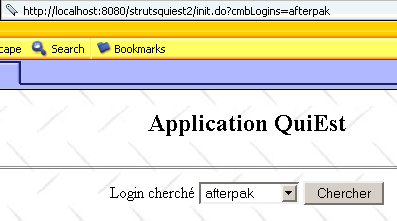
- The request contains the parameter cmbLogins (afterpak). The Struts controller therefore copied the value of this parameter into the cmbLogins field of formLogins. The SetupLoginsAction action then ran and completed by displaying the logins.jsp view. This view has a form in which certain fields receive their values from formLogins. Thus, the HTML select field named cmbLogins received its value from the cmbLogins field (=afterpak) in formLogins. This is why the list of logins appears positioned on the "afterpak" login.
- We could also have some fun passing a tLogins parameter as follows:
This would initialize the field tLogins of formLogins with an array {"login1","login2"}. However, as we will see later, the SetupLoginsAction action assigns a value to the tLogins field and replaces the array thus created with a new array. It is this latter array that therefore appears in the logins.jsp view.
- The previous discussion, though somewhat complex, has the merit of showing that we cannot assume that the /init action will be triggered without parameters from the client. It may therefore be useful to use the reset method to clear formLogins. In this case, we would need to derive the DynaActionForm class. We have not done so here.
- Once the reset method of formLogins is called, the controller copies the data from the client request into the fields of the same name in formLogins. Normally, the /init action is called without client parameters, but we showed earlier that nothing prevents the client from invoking the /init action with arbitrary parameters. At the end of this phase, the fields cmbLogins and tLogins may therefore very well have a value. We have seen that the cmbLogins field would retain this value, but not the tLogins field.
- The controller then checks the action’s validate attribute. Here, it has the value “false.” The validate method of formLogins will not be called. We will therefore not write it.
- The SetupLoginsAction object is created or recycled if it already existed, and its execute method is called. Its sole purpose is to assign a value to the tLogins field of formLogins. This value is the array of logins, which will be requested from the users business class. This operation may fail. This is why the /init action can be followed by two views:
- the erreurs.jsp view if the users class was unable to provide the login table
- the view logins.jsp; otherwise
- the controller will display one of these two views
- the request-response cycle for the /init action is complete.
The /infosLogin action
      <action
          path="/infosLogin"
            name="formLogins"
            validate="false"
            scope="session"
          type="istia.st.struts.quiest.InfosLoginAction"
      >
            <forward name="afficherErreurs" path="/vues/erreurs.jsp"/>
            <forward name="afficherInfos" path="/vues/infos.jsp"/>
        </action>
Let's describe how the action /infosLogin works:
- The /infosLogin action normally occurs when the user clicks the [Chercher] button in the logins.jsp view. A request is then sent to the server, defined by the HTML <form> tag in the view:
<html:form name="formLogins" method="get" action="/infosLogin" type="org.apache.struts.action.DynaActionForm">
- We can see that the request is sent to the server via the get method. The user can therefore type it in manually:
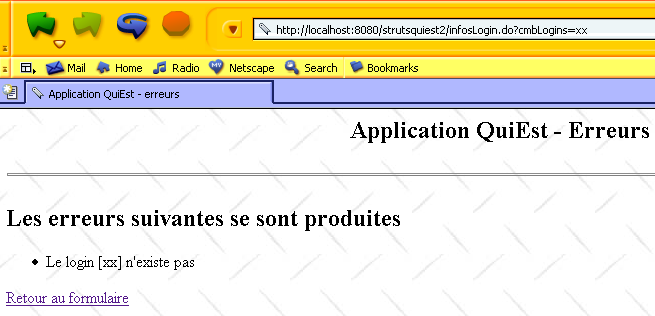
- the formsLogins object is created or recycled. It is retrieved (recycling) or placed (creation) in the session as specified by the scope attribute.
- Its reset method is called just before the data from the client request is copied into the ActionForm object. It is normally in the form http://localhost:8080/strutsquiest2/infosLogin.do?cmbLogins=xx where xx is a login chosen from the list of logins. But it could also be anything if the user used the previous URL by passing arbitrary parameters. Consider the following sequence of pages:
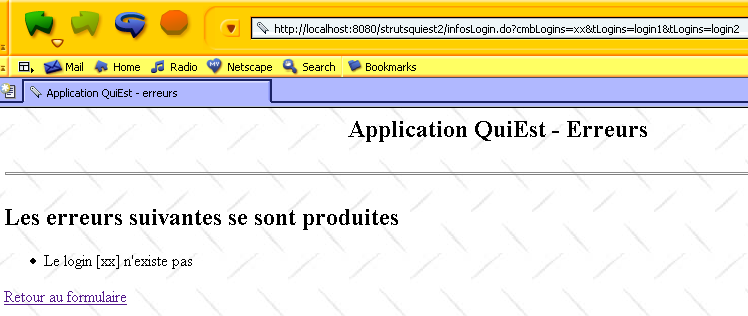
- the action /infosLogin was called with the parameter string cmbLogins=xx&tLogins=login1&tLogins=login2. The fields cmbLogins and tLogins of formLogins will therefore receive the values "xx" and {"login1","login2"}, respectively. The action /infosLogin will request information associated with the "xx" login from the users business class. The users class will respond that this login does not exist. Hence the view shown above. Now, let’s use the link [Retour au formulaire] above:
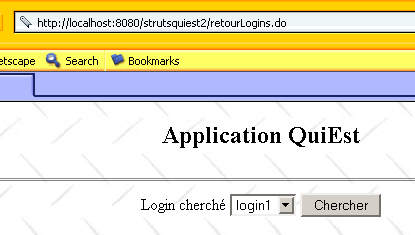
- The /retourLogins action is triggered by the [Retour au formulaire] link. This action simply displays the logins.jsp view without any intermediate steps. Recall that the tLogins field is used to populate the list of logins in the logins.jsp view. Since the user changed this value to {"login1","login2"}, these two logins now appear in the list. Once again, we cannot stress enough the absolute necessity of accounting for arbitrary parameters set by a user or a program in the operation of an application. The solution to the problem presented here would be for the link [Retour au formulaire] to point to the /init action. This would ensure that the correct list of logins is obtained.
- Let’s return to a normal request to the /infosLogin action, such as:
http://localhost:8080/strutsquiest2/infosLogin.do?cmbLogins=afterpak
- The Struts controller will assign a value to the cmbLogins field of the ActionForm object. The tLogins field, however, will not be assigned a value (there is no corresponding field in the submitted request). This behavior is acceptable to us. Therefore, we will not need to write a custom reset method for formLogins.
- Once the reset method of formLogins is called, the controller copies the data from the client request into the fields of the same name in formLogins. The cmbLogins field will receive a value: the login chosen by the user (afterpak).
- The controller then checks the action’s validate attribute. Here, it has the value “false.” The validate method of formLogins will not be called.
- The object InfosLoginAction is created or recycled if it already existed, and its execute method is called. Its role is to retrieve the information associated with the login cmbLogins. This information will be requested from the users business class. This operation may fail (e.g., login does not exist). This is why the action /infosLogin can be followed by two views:
- the view erreurs.jsp if the users class was unable to provide the requested information
- the view infos.jsp otherwise
- the controller will display one of these two views
- the request-response cycle for the /infosLogin action is complete.
The /retourLogins action
      <action
          path="/retourLogins"
            parameter="/vues/logins.jsp"
          type="org.apache.struts.actions.ForwardAction"
      />
- The action /retourLogins is triggered by clicking the link [Retour au formulaire] on the views erreurs.jsp and infos.jsp.
- Here, there is no form associated with the action. We therefore proceed immediately to executing the execute method of a ForwardAction object, which will return a ActionForward object pointing to the view /vues/logins.jsp.
7.4.6. The application's message file
The third section of the struts-config.xml file is the message file:
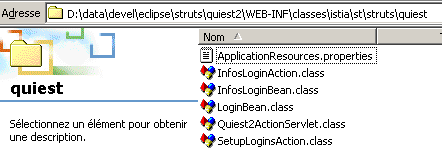
The file ApplicationResources.properties is located in WEB-INF/classes/istia/st/struts/quiest. Its contents are as follows:
errors.header=<ul>
errors.footer=</ul>
parametreManquant=<li>Le paramètre [{0}] n'a pas été initialisé</li>
usersException=<li>Erreur d'initialisation de l'application : {0}</li>
loginInconnu=<li>Le login [{0}] n'existe pas</li>
7.5. The view code
Readers are encouraged to review the lesson on form handling if they do not understand the view code presented below.
7.5.1. The logins.jsp view
Remember that this view is displayed in two cases:
- when the /init action is called during the first request-response cycle
- when the /retourLogins action is called during subsequent cycles
The code for the logins.jsp view is as follows:
<%@ taglib uri="/WEB-INF/struts-html.tld" prefix="html" %>

<html>
    <head>
      <title>Quiest - formulaire</title>
  </head>
  <body background="<html:rewrite page="/images/standard.jpg"/>">
      <center>
        <h2>Application QuiEst</h2>
      <hr>
      <html:form name="formLogins" method="get" action="/infosLogin" type="org.apache.struts.action.DynaActionForm">
          <table>
            <tr>
              <td>Login cherché</td>
            <td>
                <html:select name="formLogins" property="cmbLogins">
                      <html:options name="formLogins" property="tLogins"/>
                  </html:select>
            </td>
            <td>
                <html:submit value="Chercher"/>
            </td>
          </tr>
        </table>
      </html:form>
    </center>
  </body>
</html>
7.5.2. The infos.jsp view
This view is displayed upon a successful call to the action /infosLogin. Its code is as follows:
<%@ taglib uri="/WEB-INF/struts-html.tld" prefix="html" %>
<%@ taglib uri="/WEB-INF/struts-bean.tld" prefix="bean" %>

<html>
    <head>
      <title><bean:write name="infosLoginBean" scope="request" property="titre"/></title>
  </head>
  <body background="<html:rewrite page="/images/standard.jpg"/>">
      <h2><bean:write name="infosLoginBean" scope="request" property="titre"/></h2>
    <hr>
    <table border="1">
            <tr>
                <th>login</th><th>pwd</th><th>uid</th><th>gid</th><th>id</th><th>dir</th><th>shell</th>
            </tr>
            <tr>
                <td><bean:write name="infosLoginBean" scope="request" property="infosLogin[0]"/></td>
                <td><bean:write name="infosLoginBean" scope="request" property="infosLogin[1]"/></td>
                <td><bean:write name="infosLoginBean" scope="request" property="infosLogin[2]"/></td>
                <td><bean:write name="infosLoginBean" scope="request" property="infosLogin[3]"/></td>
                <td><bean:write name="infosLoginBean" scope="request" property="infosLogin[4]"/></td>
                <td><bean:write name="infosLoginBean" scope="request" property="infosLogin[5]"/></td>
                <td><bean:write name="infosLoginBean" scope="request" property="infosLogin[6]"/></td>
            </tr>
    </table>
    <br>
    <html:link page="/retourLogins.do">
            Retour au formulaire
        </html:link>
  </body>
</html>
This view uses an object named infosLoginBean, which is included in the request by the action /infosLogin. This object has two fields:
String titre;                        // title to be displayed in the view
String[] infosLogin;        // table of information to be displayed in the view
We will discuss this class in more detail when we cover the code for the InfosLoginAction class.
7.5.3. The erreurs.jsp view
This view is displayed when the /init or /infosLogin actions end with an error. Its code is as follows:
<%@ taglib uri="/WEB-INF/struts-html.tld" prefix="html" %>

<html>
    <head>
      <title>Application QuiEst - erreurs</title>
  </head>
  <body background="<html:rewrite page="/images/standard.jpg"/>">
        <h2 align="center">Application QuiEst - Erreurs</h2>
        <hr>
      <h2>Les erreurs suivantes se sont produites</h2>
        <html:errors/>
    <html:link page="/retourLogins.do">
            Retour au formulaire
        </html:link>
  </body>
</html>
7.6. Java classes
The file web.xml references a Java class:
<web-app>
    <servlet>
      <servlet-name>strutsquiest2</servlet-name>
    <servlet-class>istia.st.struts.quiest.Quiest2ActionServlet</servlet-class>
....
  </servlet>

...
</web-app>
The struts-config.xml configuration file references two Java classes:
      <action
          path="/infosLogin"
            name="formLogins"
            validate="false"
            scope="session"
          type="istia.st.struts.quiest.InfosLoginAction"
      >
            <forward name="afficherErreurs" path="/vues/erreurs.jsp"/>
            <forward name="afficherInfos" path="/vues/infos.jsp"/>
        </action>

      <action
          path="/init"
            name="formLogins"
            validate="false"
            scope="session"
          type="istia.st.struts.quiest.SetupLoginsAction"
      >
            <forward name="afficherLogins" path="/vues/logins.jsp"/>
            <forward name="afficherErreurs" path="/vues/erreurs.jsp"/>
        </action>
7.6.1. The Quiest2ActionServlet class
The Quiest2ActionServlet class is derived from the ActionServlet class, the Struts controller class. We derive the ActionServlet class to customize its init method. This method, executed only once during the initial loading of the servlet, will allow us to construct a business object of type users. This object only needs to be constructed once, and the init method is a good place to perform this construction. The users object requires two files to be constructed: the passwd and group files. The locations of these two files are passed as parameters to the servlet in the application’s web.xml file:
    <servlet>
      <servlet-name>strutsquiest2</servlet-name>
    <servlet-class>istia.st.struts.quiest.Quiest2ActionServlet</servlet-class>
    <init-param>
        <param-name>config</param-name>
      <param-value>/WEB-INF/struts-config.xml</param-value>
    </init-param>
    <init-param>
        <param-name>passwdFileName</param-name>
      <param-value>data/passwd</param-value>
    </init-param>
    <init-param>
        <param-name>groupFileName</param-name>
      <param-value>data/group</param-value>
    </init-param>
  </servlet>
The servlet code is as follows:
package istia.st.struts.quiest;

import java.util.*;
import javax.servlet.*;
import org.apache.struts.action.*;
import istia.st.users.*;

public class Quiest2ActionServlet
  extends ActionServlet {

   // servlet attributes
  private users u = null;
  private ActionErrors erreurs = new ActionErrors();
  private String[] tLogins;

   //init
  public void init() throws ServletException {

    // don't forget to initialize the parent class
    super.init();

     // local variables
    final String[] initParams = {"passwdFileName", "groupFileName"};
    Properties params = new Properties();

    // retrieve servlet initialization parameters
    ServletConfig config = getServletConfig();
    String servletPath = config.getServletContext().getRealPath("/");
    for (int i = 0; i < initParams.length; i++) {
      String valeur = config.getInitParameter(initParams[i]);
      if (valeur == null) {
        erreurs.add(ActionErrors.GLOBAL_ERROR, new ActionError("parametreManquant", initParams[i]));
        valeur = "";
      }
       // the parameter
      params.setProperty(initParams[i], valeur);
    } //for
     // return if there were initialization errors
    if (erreurs.size() != 0) {
      return;
    }
     // create a users object
    try {
      u = new users(servletPath + "/" + params.getProperty("passwdFileName"),
                    servletPath + "/" + params.getProperty("groupFileName"), null);
    }
    catch (Exception ex) {
      erreurs.add(ActionErrors.GLOBAL_ERROR, new ActionError("usersException", ex.getMessage()));
      return;
    } //catch
     // retrieve the list of logins
    tLogins = new String[u.getUsersByLogin().size()];
    Enumeration eLogins = u.getUsersByLogin().keys();
    for (int i = 0; i < tLogins.length; i++) {
      tLogins[i] = (String) eLogins.nextElement();
    }
     // sort logins
    Arrays.sort(tLogins);
  } //init

   // servlet private info access method
  public Object[] getInfos() {
    return new Object[] {erreurs, u, tLogins};
  }
}
In summary, the init method works as follows:
- First, the init method of the parent class (ActionServlet) is called so that it initializes correctly
- then the initialization parameters are read. If any are missing, the private attribute ActionErrors errors is set.
- If the initialization parameters are present, a users object is constructed. This construction may throw an exception. In this case, the ActionErrors errors attribute is populated.
- If the construction was successful, the list of all logins is retrieved from the created object and sorted into an array that is stored in the private attribute String[] tLogins.
- The constructed users object is stored in the private attribute users u.
- The public method getInfos allows you to retrieve the three private attributes (u, errors, tLogins) in an array of objects.
7.6.2. The SetupLoginsAction class
The purpose of this action is to initialize the DynaActionForm formLogins object. Once placed in the session, this object will no longer need to be reinitialized. The action SetupLoginsAction therefore occurs only once. Its code is as follows:
package istia.st.struts.quiest;

import java.io.*;
import javax.servlet.*;
import javax.servlet.http.*;
import org.apache.struts.action.*;

public class SetupLoginsAction
  extends Action {

  public ActionForward execute(ActionMapping mapping, ActionForm form,
                               HttpServletRequest request, HttpServletResponse response) throws IOException,ServletException {

     // prepares the form to be displayed
     // retrieve info from the controller servlet
     // infos=(ActionErrors errors, users u, String[] tLogins)
    Object[] infos = ( (Quiest2ActionServlet)this.getServlet()).getInfos();

     // were there any initialization errors?
    ActionErrors erreurs = (ActionErrors) infos[0];
    if (!erreurs.isEmpty()) {
      this.saveErrors(request, erreurs);
      return mapping.findForward("afficherErreurs");
    }

     // put the logins in the form
    DynaActionForm formLogins=(DynaActionForm) form;
    formLogins.set("tLogins",infos[2]);
    return mapping.findForward("afficherLogins");
  }
}
As with all Struts actions, the code is located in the execute method. This method:
- retrieves from the Struts controller the information that the controller has stored using its init method. This is done by the getServlet() method of the Action class.
- Among this information is the controller’s ActionErrors errors attribute. If this list of errors is not empty, it is placed in the request and the erreurs.jsp view is requested.
- If the error list is empty, then the list of logins initially created by the controller is assigned to the tLogins field of the formLogins bean. The logins.jsp view is then requested, which will display the list of logins.
7.6.3. The classes InfosLoginBean and InfosLoginAction
The purpose of action InfosLoginAction is to retrieve the information associated with the login chosen by the user and display it to the user. The information will be collected in an object of type InfosLoginBean:
package istia.st.struts.quiest;

public class InfosLoginBean implements java.io.Serializable{

   // bean holding the info needed for the info page
  private String titre;
  private String[] infosLogin;

  // manufacturer
  public InfosLoginBean(String titre, String[] infosLogin){
    this.titre=titre;
    this.infosLogin=infosLogin;
  }

   // getters
  public String getTitre(){
    return this.titre;
  }
  public String[] getInfosLogin(){
    return this.infosLogin;
  }
  public String getInfosLogin(int i){
    return this.infosLogin[i];
  }
}
The previous class is a bean, c.a.d. A Java class where a private attribute T unAttribut is automatically associated with two private methods:
- void setUnAttribut(T value) { unAttribut = value; }
- T getUnAttribut(){ return unAttribut;}
Note the special syntax of the get and set methods. If the attribute is an array T[] unAttribut, you can create get and set methods for the array elements:
- void setUnAttribut(T value, int i){unAttribut[i]=value;}
- T getUnAttribut(int i){ return unAttribut[i];}
To better understand this, let’s look at the code for the infos.jsp view, which must be sent following the InfosLoginAction action:
<%@ taglib uri="/WEB-INF/struts-html.tld" prefix="html" %>
<%@ taglib uri="/WEB-INF/struts-bean.tld" prefix="bean" %>

<html>
    <head>
      <title><bean:write name="infosLoginBean" scope="request" property="titre"/></title>
  </head>
  <body background="<html:rewrite page="/images/standard.jpg"/>">
      <h2><bean:write name="infosLoginBean" scope="request" property="titre"/></h2>
    <hr>
    <table border="1">
            <tr>
                <th>login</th><th>pwd</th><th>uid</th><th>gid</th><th>id</th><th>dir</th><th>shell</th>
            </tr>
            <tr>
                <td><bean:write name="infosLoginBean" scope="request" property="infosLogin[0]"/></td>
                <td><bean:write name="infosLoginBean" scope="request" property="infosLogin[1]"/></td>
                <td><bean:write name="infosLoginBean" scope="request" property="infosLogin[2]"/></td>
                <td><bean:write name="infosLoginBean" scope="request" property="infosLogin[3]"/></td>
                <td><bean:write name="infosLoginBean" scope="request" property="infosLogin[4]"/></td>
                <td><bean:write name="infosLoginBean" scope="request" property="infosLogin[5]"/></td>
                <td><bean:write name="infosLoginBean" scope="request" property="infosLogin[6]"/></td>
            </tr>
    </table>
    <br>
    <html:link page="/retourLogins.do">
            Retour au formulaire
        </html:link>
  </body>
</html>
Let's take the following tag:
It instructs the system to write the value of the title field (property) of the infosLoginBean object (name) included in the request (scope). The value to be written will be obtained via request.getAttribute("infosLoginBean").getTitre(). Therefore, the method getTitre must exist in the class InfosLoginBean. This is the case. The tag
instructs the system to write the value of the infosLogin[0] element of the infosLoginBean object included in the request. The value to be written will be obtained via request.getAttribute("infosLoginBean").getInfosLogin(0). Therefore, the method getInfosLogin(int i) must exist in the class InfosLoginBean. This is the case.
The purpose of the InfosLoginAction class is to construct the preceding InfosLoginBean object from a login chosen by the user. Its code is as follows:
package istia.st.struts.quiest;

import java.io.*;
import javax.servlet.*;
import javax.servlet.http.*;
import org.apache.struts.action.*;
import istia.st.users.*;

public class InfosLoginAction
  extends Action {

  public ActionForward execute(ActionMapping mapping, ActionForm form,
                               HttpServletRequest request, HttpServletResponse response) throws IOException,ServletException {

     // should display login information

     // retrieve info from the controller servlet
     // infos=(ActionErrors errors, users u, LoginBean[] tLogins)
    Object[] infos = ( (Quiest2ActionServlet)this.getServlet()).getInfos();

     // were there any initialization errors?
    ActionErrors erreurs = (ActionErrors) infos[0];
    if (!erreurs.isEmpty()) {
      this.saveErrors(request, erreurs);
      return mapping.findForward("afficherErreurs");
    }

     // first retrieve this login
    String login = (String) ( (DynaActionForm) form).get("cmbLogins");

    // do we have anything?
    if (login == null) {
      // not normal - the login form is returned
            DynaActionForm formLogins=(DynaActionForm) form;
            formLogins.set("tLogins",infos[2]);
            return mapping.findForward("afficherLogins");
    }

     // we have a login - we're looking for it
    String[] infosLogin = (String[]) ( (users) infos[1]).getUsersByLogin().get(login);

     // have we found?
    if (infosLogin == null) {
      // login not found - error page displayed
      ActionErrors erreurs2=new ActionErrors();
      erreurs2.add(ActionErrors.GLOBAL_ERROR, new ActionError("loginInconnu", login));
      this.saveErrors(request, erreurs2);
      return mapping.findForward("afficherErreurs");
    }

     // the login has been found - we put the information found in the query
    String titre="Application QuiEst - login["+login+"]";
    InfosLoginBean infosLoginBean= new InfosLoginBean(titre,infosLogin);
    request.setAttribute("infosLoginBean",infosLoginBean);
    return mapping.findForward("afficherInfos");
  }

}
The execute method works as follows:
- It retrieves the information collected by the Struts controller during initialization. If the controller detected any errors, execution stops there and prompts the user to view those errors.
- We verify that a login is present. If the user went through the login selection form, the login is present. However, the user could just as easily type the action’s URL (url) directly into their browser without passing any parameters. If no login is present, we redisplay the list of logins.
- If a login is present, we request the information associated with the users business class. If the class cannot find the login being searched for, the error page is displayed. Otherwise, a InfosLoginBean object is created to hold the information needed by the infos.jsp view. This object is included in the request, and the infos.jsp page is displayed.
7.7. Deployment
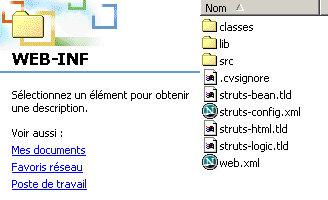
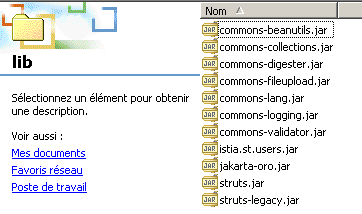
The application tree is as follows:
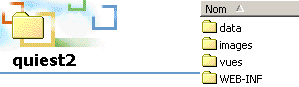 |  |
 |  |
 |  |
 |
7.8. Conclusion
We used Struts in a realistic application utilizing a business class. We also demonstrated that special attention must be paid to the request sent by a client and that no assumptions should be made about its nature. A request can be of any type, and every application must begin by verifying its validity.