8. Creating a Plugin
It is possible to create applications called plugins that are loaded when a Struts application starts and unloaded when it shuts down. This typically allows for initialization when the application starts and resource release when it shuts down. These operations can also be performed by extending the ActionServlet controller class, which is what was done in the previous application. The plugin is an alternative to this solution. A plugin can be a more complex application than a simple environment initialization. We saw an example of this in the lesson where the concepts of declarative validation rules were introduced. A plugin is declared in the Struts configuration file. The ValidatorPlugIn plugin was declared in the struts-config.xml file of the application that used it:
    <plug-in className="org.apache.struts.validator.ValidatorPlugIn">
        <set-property
        property="pathnames"
      value="/WEB-INF/validator-rules.xml,/WEB-INF/validation.xml"
    />
    </plug-in>
We will now describe a Struts application that uses a plugin.
8.1. Configuration of the Struts /plugin1 application
We propose to build the Struts application /plugin1 configured as follows:
web.xml
<?xml version="1.0" encoding="ISO-8859-1"?>

<!DOCTYPE web-app
    PUBLIC "-//Sun Microsystems, Inc.//DTD Web Application 2.3//EN"
    "http://java.sun.com/dtd/web-app_2_3.dtd">

<web-app>
    <servlet>
      <servlet-name>action</servlet-name>
    <servlet-class>org.apache.struts.action.ActionServlet</servlet-class>
    <init-param>
        <param-name>config</param-name>
      <param-value>/WEB-INF/struts-config.xml</param-value>
    </init-param>
    <load-on-startup>1</load-on-startup>
  </servlet>
  <servlet-mapping>
      <servlet-name>action</servlet-name>
    <url-pattern>*.do</url-pattern>
  </servlet-mapping>

  <taglib>
      <taglib-uri>/WEB-INF/struts-bean.tld</taglib-uri>
    <taglib-location>/WEB-INF/struts-bean.tld</taglib-location>
  </taglib>
  <taglib>
      <taglib-uri>/WEB-INF/struts-logic.tld</taglib-uri>
    <taglib-location>/WEB-INF/struts-logic.tld</taglib-location>
  </taglib>

</web-app>
We won’t dwell on this file, as it is standard.
struts-config.xml
<?xml version="1.0" encoding="ISO-8859-1" ?>

<!DOCTYPE struts-config PUBLIC
          "-//Apache Software Foundation//DTD Struts Configuration 1.1//EN"
          "http://jakarta.apache.org/struts/dtds/struts-config_1_1.dtd">

<struts-config>

    <plug-in className="istia.st.struts.plugins.MyPlugin">
        <set-property property="passwdFileName" value="data/passwd"/>
        <set-property property="groupFileName" value="data/group"/>
    </plug-in>

</struts-config>
We have added only one section, the one for the plugin. The attributes of the <plug-in> tag used here are as follows:
plugin class name | |
allows the plugin to be initialized with (key, value) pairs |
The purpose of this application is to demonstrate how the plugin can retrieve its initialization parameters and make them available to other objects sharing the same application context. We will use a simple view named JSP to display the plugin’s initialization values, which explains why there are no actions in the configuration file.
8.2. The plugin’s Java class
A Java class serving as a plugin for a Struts application must implement the org.apache.struts.action.PlugIn interface. This implementation involves writing two methods:
- public void init(ActionServlet servlet, ModuleConfig conf)
- public void destroy()
When the Struts application is loaded, its controller will instantiate all the plugins declared in the struts-config.xml file. It will then execute the init method for each of them. It is within this method that the plugin performs its initialization. Here, we will simply read the plugin’s initialization parameters and place them in the application context so that they are available to all other objects in the application. When the application is unloaded, the controller will execute the destroy method of each of the loaded plugins. This is the time to free up resources that are no longer needed. Here, we have nothing to do.
The class code is as follows:
package istia.st.struts.plugins;

import javax.servlet.ServletException;
import org.apache.struts.action.ActionServlet;
import org.apache.struts.action.PlugIn;
import org.apache.struts.config.ModuleConfig;
import org.apache.struts.config.PlugInConfig;

public class MyPlugin implements PlugIn {

    // method called when application context is deleted
    public void destroy() {
    }

     // method called on initial creation of application context
    public void init(ActionServlet servlet, ModuleConfig conf)
        throws ServletException {
         // class name of this object
        String className=this.getClass().getName();
        // plug-in list
        PlugInConfig[] pluginConfigs = conf.findPlugInConfigs();
         // explore plugins to find the right one
         // which is named after this class
        boolean trouvé=false;
        for (int i = 0; ! trouvé && i < pluginConfigs.length; i++) {
            // plugin name
            String pluginClassName=pluginConfigs[i].getClassName();
             // if it's not the right plugin, continue
            if(! pluginClassName.equals(className)) continue;
            // it's the right one - you memorize its properties in context
            servlet.getServletContext().setAttribute("initialisations",pluginConfigs[i].getProperties());
            trouvé=true;
        }//for i
    } //init
} //class
Note the following points:
- The init method receives a parameter named conf here, of type ModuleConfig, which provides access to the contents of the struts-config.xml file.
- The [ModuleConfig].findPlugInConfigs() method retrieves all <plug-in> sections from the Struts configuration file in the form of an array of PlugInConfig objects.
- The PluginConfig class represents a <plug-in> section of the configuration file. The method [PlugInConfig].getProperties allows us to access the <set-property> elements of the section in the form of a dictionary java.util.Map.
- The plugin's property dictionary is placed in the application context.
- Since there may be multiple plugins, we need to find the one we are interested in. It is the one with the same name as the class that is running.
Here, we chose to place the entire dictionary in the context. We could have chosen to use this one. The following code snippet illustrates one way to do this:
            Map initialisations = pluginConfigs[i].getProperties();
             // iterate over dictionary entries
            Iterator entrées = initialisations.entrySet().iterator();
            while (entrées.hasNext()) {
                 // retrieve current input (key,value)
                Map.Entry entrée = (Map.Entry) entrées.next();
                String clé = (String) entrée.getKey();
                String valeur = (String) entrée.getValue();
                // exploit (key,value)
                //...
            }
8.3. The code for view infos.jsp
The infos.jsp view is responsible for displaying the contents of the plugin's property dictionary that has been placed in the application context. Since the infos.jsp view is part of this context, it has access to it. Its code is as follows:
<%@ taglib uri="/WEB-INF/struts-bean.tld" prefix="bean" %>
<%@ taglib uri="/WEB-INF/struts-logic.tld" prefix="logic" %>

<html>
    <head>
        <title>Plugin</title>
    </head>
    <body>
        <h3>Infos du plugin<br></h3>
        <table border="1">
            <tr>
                <th>Clé</th><th>Valeur</th>
            </tr>
            <logic:iterate id="element" name="initialisations">
                <tr>
                    <td><bean:write name="element" property="key"/></td>
                    <td><bean:write name="element" property="value"/></td>
                </tr>
            </logic:iterate>
        </table>
    </body>
</html>
Notes:
- We use the struts-logic and struts-bean tag libraries
- The <logic:iterate> tag allows us to display the initializations dictionary that was placed in the context by the plugin's init method. The name attribute specifies the object to iterate over. This must be something that resembles a collection, an iterator, etc. The object is searched for in all scopes (page, request, session, context). Here, it will be found in the context scope. The id parameter is used to name the current element of the collection as the iteration proceeds. Here, within the body of the <logic:iterate> tag, `element` represents the current element of a dictionary. This is represented by an object `java.util.Map.Entry`, which is essentially a (key, value) pair from the dictionary.
- In the body of the <logic:iterate> tag, we display (<bean:write>) the content of the current element element. This is treated as an object with two properties: the key and the value. Both of these properties are displayed.
8.4. Deployment
The application context is defined in Tomcat’s server.xml configuration file:
<Context path="/plugin11" reloadable="true" docBase="E:\data\serge\web\struts\plugins\1" />
The application directory structure is as follows:
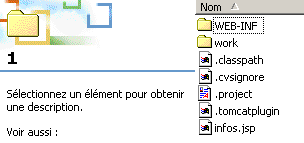 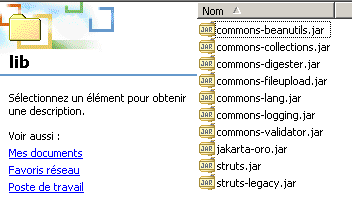 | 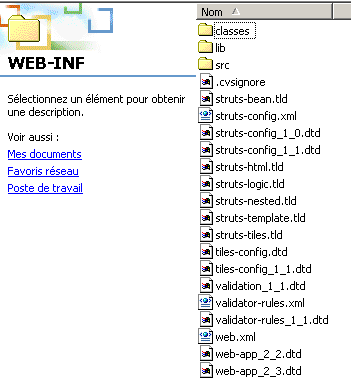 | |
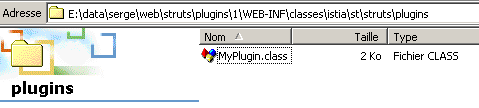 | ||
8.5. Tests
We start Tomcat and request the URL http://localhost:8080/plugin1/infos.jsp URL:
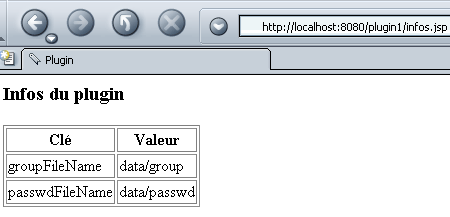
We observe that the infos.jsp view successfully accessed the information stored in the application context by the plugin.
8.6. Conclusion
We have demonstrated that a Struts application can be initialized using a plugin. This can serve as an alternative to deriving the ActionServlet class to perform the same task.