5. Dynamic forms with integrity constraints
We will now develop a new application called strutspersonne2 using
- a dynamic form like in strutspersonne1
- a file declaring the integrity constraints to be checked by the fields of this dynamic form
5.1. Declaration of integrity constraints
The class used to store the name and age values in the strutspersonne1 application was declared as follows:
    <form-beans>
        <form-bean name="frmPersonne" type="istia.st.struts.personne.PersonneDynaForm">
            <form-property name="nom" type="java.lang.String" initial=""/>
            <form-property name="age" type="java.lang.String" initial=""/>
        </form-bean>
    </form-beans>
We had to write the PersonneDynaForm class to provide a validate method capable of verifying that the name and age values in the dynamic form were valid. There were two types of checks to perform:
- both fields had to be non-empty
- the age field had to match the mask (regular expression) \s*\d+\s*
These two validations are among those that the StrutsValidator environment can perform. This environment comes with Struts and includes a number of classes found in commons-validator.jar and jakarta-oro.jar. If you followed the procedure described at the beginning of this document for installing the Struts libraries within Tomcat, these libraries are already available in Tomcat. Make sure they are also available in JBuilder. This was also explained at the beginning of this document.
The new form declaration in struts-config.xml becomes the following:
    <form-beans>
        <form-bean name="frmPersonne" type="org.apache.struts.validator.DynaValidatorForm">
            <form-property name="nom" type="java.lang.String" initial=""/>
            <form-property name="age" type="java.lang.String" initial=""/>
        </form-bean>
    </form-beans>
There is therefore very little difference. The class associated with the dynamic form is now a predefined class from StrutsValidator: org.apache.struts.validator.DynaValidatorForm. The developer no longer needs to write a class. They specify the integrity constraints that the form must check in a separate XML file. The Struts controller must know the name of this file. For this purpose, a new configuration section appears in the struts-config.xml file:
    <plug-in className="org.apache.struts.validator.ValidatorPlugIn">
        <set-property
        property="pathnames"
      value="/WEB-INF/validator-rules.xml,/WEB-INF/validation.xml"
    />
    </plug-in>
The <plug-in> section is used to load a class external to Struts. Its main attribute is classname, which specifies the name of the class to be instantiated. The instantiated object may need to be initialized. This is done using the set-property tag, which has two attributes:
- property: the name of the property to initialize
- value: the value of the property
Here, the DynaValidatorForm class needs to know two pieces of information:
- the XML file, which defines the standard integrity constraints that the class can verify
- the file XML defining the integrity constraints for the application’s various dynamic forms
This information is provided here by the pathnames property. The value of this property is a list of XML files that the validator will load:
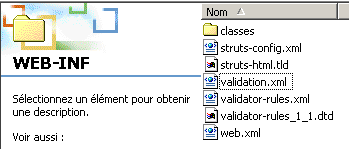
- validator-rules.xml is the file defining the standard integrity constraints. It is included with Struts. It can be found in <struts>\lib along with its definition file DTD:

- validation.xml defines the integrity constraints for the application’s various dynamic forms. It is created by the developer. Its name is arbitrary.
These two files can be placed anywhere under WEB-INF. In our example, they will be placed directly under WEB-INF:
5.2. Writing integrity constraints for dynamic forms
The validation.xml file will contain our integrity constraints for the name and age fields of the frmPersonne form of type org.apache.struts.validator.DynaValidatorForm. Its content is as follows:
<form-validation>
    <global>
      <constant>
        <constant-name>entierpositif</constant-name>
        <constant-value>^\s*\d+\s*$</constant-value>
    </constant>
  </global>
    <formset>
        <form name="frmPersonne">
          <field property="nom" depends="required">
             <arg0 key="personne.nom"/>
          </field>
          <field property="age" depends="required,mask">
             <arg0 key="personne.age"/>
              <var>
                  <var-name>mask</var-name>
                  <var-value>${entierpositif}</var-value>
              </var>
          </field>
    </form>
    </formset>
</form-validation>
The following writing rules must be followed:
- All rules are contained within a <form-validation> tag
- The <global> tag is used to define information with global scope, c.a.d. This applies to all forms if there are multiple forms. Here, we have placed constants within the <global> tag. A constant is defined by its name (the <constant-name> tag) and its value (the <constant-value> tag). We define the constant `entierpositif` with the regular expression that a positive integer must satisfy: `_^\s*\d+\s*$` (a sequence of digits possibly preceded and/or followed by spaces).
- The <formset> tag defines the set of forms for which there are integrity constraints to be verified
- The <form name="unFormulaire"> tag is used to define the integrity constraints for a specific form, the one whose name is given by the name attribute. This name must exist in the list of forms defined in struts-config.xml. Here, the form frmPersonne used is defined in struts-config.xml by the following section:
    <form-beans>
        <form-bean name="frmPersonne" type="org.apache.struts.validator.DynaValidatorForm">
            <form-property name="nom" type="java.lang.String" initial=""/>
            <form-property name="age" type="java.lang.String" initial=""/>
        </form-bean>
- A <form> tag contains as many <field> tags as there are integrity constraints to be checked for the form. A <field> tag has the following attributes:
- property: name of the form field for which integrity constraints are defined
- depends: list of integrity constraints to be checked.
- The possible constraints are as follows: required (the field must not be empty), mask (the field value must match a regular expression defined by the mask variable), integer: the field value must be an integer, byte (byte), long (long integer), float (single-precision floating-point), double (double-precision floating-point), short (short integer), date (the field value must be a valid date), range (the field value must be within a given range), email: (the field value must be a valid email address), ...
- Integrity constraints are checked in the order specified by the `depends` attribute. If a constraint fails, the subsequent ones are not tested.
- Each constraint is linked to an error message defined by a key. Here are a few examples in the form constraint (key): required (errors.required), mask (errors.invalid), integer (errors.integer), byte (errors.byte), long (errors.long), ...
- the error messages associated with the previous keys are defined in the validator-rules.xml file:
   # Struts Validator Error Messages
   errors.required={0} is required.
   errors.minlength={0} can not be less than {1} characters.
   errors.maxlength={0} can not be greater than {1} characters.
   errors.invalid={0} is invalid.

   errors.byte={0} must be a byte.
   errors.short={0} must be a short.
   errors.integer={0} must be an integer.
   errors.long={0} must be a long.
   errors.float={0} must be a float.
   errors.double={0} must be a double.

   errors.date={0} is not a date.
   errors.range={0} is not in the range {1} through {2}.
   errors.creditcard={0} is an invalid credit card number.
   errors.email={0} is an invalid e-mail address.
- As we can see above, the messages are in English. Furthermore, they are included as comments in the file, which specifies that they should be placed in the application’s message file. Note that this is defined in a section of the struts-config.xml file:
The parameter attribute indicates that the application's messages are in the file
WEB-INF/classes/resources/personneressources.properties.
Error messages should therefore be placed in this file. They are added to the existing ones:
personne.formulaire.nom.vide=<li>Vous devez indiquer un nom</li>
personne.formulaire.age.vide=<li>Vous devez indiquer un age</li>
personne.formulaire.age.incorrect=<li>L'âge est incorrect</li>
errors.header=<ul>
errors.footer=</ul>
# Struts Validator error messages
# the key is predefined and must not be changed
# the associated error msg is free
# the msg can have up to 4 parameters {0} to {3}
errors.required=<li>Le champ [{0}] doit être renseigné.</li>
errors.minlength=<li>Le champ [{0}] foit avoir au moins {1} caractère.</li>
errors.maxlength=<li>Le champ [{0}] ne peut avoir plus de {1} caractères.</li>
errors.invalid=<li>Le champ [{0}] est incorrect.</li>
errors.byte=<li>{0} doit être un octet.</li>
errors.short=<li>{0} doit être un entier court.</li>
errors.integer=<li>{0} doit être un entier.</li>
errors.long=<li>{0} doit être un entier long.</li>
errors.float=<li>{0} doit être un réel simple.</li>
errors.double=<li>{0} doit être un réel double.</li>
errors.date=<li>{0} n'est pas une date valide.</li>
errors.range=<li>{0} doit être dans l'intervalle {1} à {2}.</li>
errors.creditcard=<li>{0} n'est pas un numéro de carte valide.</li>
errors.email=<li>{0} n'est pas une adresse électronique valide.</li>
personne.nom=nom
personne.age=age
Let’s go through the integrity constraints in the validation.xml file one by one to explain them:
<formset>
<form name="frmPersonne">
<field property="nom" depends="required">
<arg0 key="personne.nom"/>
</field>
...
</form>
</formset>
Note that these integrity constraints apply to the name and age fields of a dynamic form defined in struts-config.xml:
<form-bean name="frmPersonne" type="org.apache.struts.validator.DynaValidatorForm">
<form-property name="nom" type="java.lang.String" initial=""/>
<form-property name="age" type="java.lang.String" initial=""/>
</form-bean>
It is important that the names of the form and its fields are identical in both files. The integrity constraint on the "name" field (property="name") specifies that the field must not be empty (depends="required"). If this is not the case, a ActionError object with key errors.required will be generated. The message associated with this key is found in the personne.ressources.properties file:
We can see that this message uses a {0} parameter. Its value is set by the <arg0> tag in the integrity constraint:
Here again, arg0 is designated by a key that is also found in the message file:
If we put all of this together, the error message generated if the name field is not filled in is:
Let’s now analyze the second constraint, the one on the age field:
<global>
<constant>
<constant-name>entierpositif</constant-name>
<constant-value>^\s*\d+\s*$</constant-value>
</constant>
</global>
<formset>
<form name="frmPersonne">
...
<field property="age" depends="required,mask">
<arg0 key="personne.age"/>
<var>
<var-name>mask</var-name>
<var-value>${entierpositif}</var-value>
</var>
</field>
</form>
</formset>
There are two constraints for the age field: required and mask. We can repeat the previous explanation for the required constraint. This means that the error message associated with this constraint will be:
The second constraint is mask**. This means that the field content must match a pattern expressed by a regular expression. The value of this expression is defined in a <**var**> tag that defines a variable named **mask** (<**var-name**>) with the value ${positiveInteger}** (<**var-value**>).positiveInteger is a constant defined in the <global> section of the file with the value of the regular expression ^\s*\d+\s*$. The integrity constraint is therefore that the age must be a sequence of one or more digits, optionally preceded or followed by spaces. If this constraint is not met, a ActionError object with key errors.invalid will be generated. In the error log, this key is associated with the following message:
The constraint must define a value for the {0} parameter. It does so using the <arg0> tag:
In the message file, the key personne.age is associated with the following message:
The error message that will be generated if the mask constraint is not verified is therefore:
5.3. The application classes
In a Struts application, the classes to be written are those for forms (ActionForm or derived) and those for actions (Action or derived). In the new strutspersonne2 application, there is no longer a class for the form. The form content is defined in struts-config.xml and the associated integrity constraints in WEB-INF/validation.xml. In the strutspersonne1 application, the form processing class FormulaireAction was as follows:
package istia.st.struts.personne;
....
public class FormulaireAction
extends Action {
public ActionForward execute(ActionMapping mapping, ActionForm form,
HttpServletRequest request, HttpServletResponse response) throws IOException,
ServletException {
// we have a valid form, otherwise we wouldn't have got here
DynaActionForm formulaire=(DynaActionForm)form;
request.setAttribute("nom",formulaire.get("nom"));
request.setAttribute("age",formulaire.get("age"));
return mapping.findForward("reponse");
}//execute
}
The FormulaireAction class expected to receive a form in the form of a DynaActionForm object (boxed code). However, in the struts-config.xml file, the form class is defined as follows:
<form-bean name="frmPersonne" type="org.apache.struts.validator.DynaValidatorForm">
...
</form-bean>
The form will therefore be placed in an object of type DynaValidatorForm. It turns out that this class is derived from the DynaActionForm class. The execute method of our FormulaireAction class therefore remains valid. It does not need to be rewritten.
5.4. Deployment and testing of the strutspersonne2 application
5.4.1. Creating the context
We have named this new application strutspersonne2. We create a new definition in the Tomcat 4.x file <tomcat>\conf\serveur.xml:
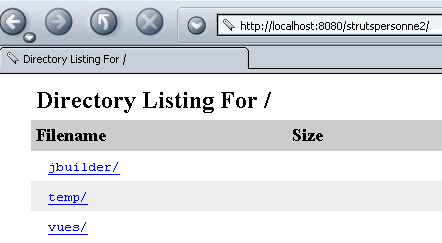
Once this is done, Tomcat must be restarted. You can verify the validity of the context by requesting the URL:
http://localhost:8080/strutspersonne2/
5.4.2. The Views
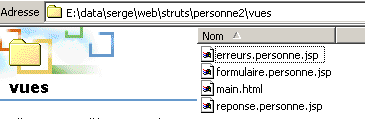
Copy the views folder from the strutspersonne1 application into the strutspersonne2 application folder. The views have not changed.
5.4.3. The WEB-INF folder
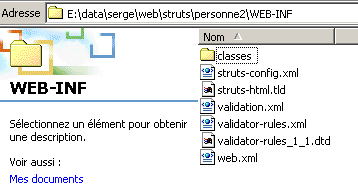
Copy the WEB-INF folder from the strutspersonne1 application into the strutspersonne2 application folder. A few files have changed:
The configuration file struts-config.xml becomes the following:
<?xml version="1.0" encoding="ISO-8859-1" ?>
<!DOCTYPE struts-config PUBLIC
"-//Apache Software Foundation//DTD Struts Configuration 1.1//EN"
"http://jakarta.apache.org/struts/dtds/struts-config_1_1.dtd">
<struts-config>
<form-beans>
<form-bean name="frmPersonne" type="org.apache.struts.validator.DynaValidatorForm">
<form-property name="nom" type="java.lang.String" initial=""/>
<form-property name="age" type="java.lang.String" initial=""/>
</form-bean>
</form-beans>
<action-mappings>
<action
path="/main"
name="frmPersonne"
validate="true"
input="/erreurs.do"
scope="session"
type="istia.st.struts.personne.FormulaireAction"
>
<forward name="reponse" path="/reponse.do"/>
</action>
<action
path="/erreurs"
parameter="/vues/erreurs.personne.jsp"
type="org.apache.struts.actions.ForwardAction"
/>
<action
path="/reponse"
parameter="/vues/reponse.personne.jsp"
type="org.apache.struts.actions.ForwardAction"
/>
<action
path="/formulaire"
parameter="/vues/formulaire.personne.jsp"
type="org.apache.struts.actions.ForwardAction"
/>
</action-mappings>
    <message-resources
      parameter="ressources.personneressources"
    null="false"
  />
<plug-in className="org.apache.struts.validator.ValidatorPlugIn">
<set-property
property="pathnames"
value="/WEB-INF/validator-rules.xml,/WEB-INF/validation.xml"
/>
</plug-in>
</struts-config>
This file is identical to the one in the strutspersonne1 application, except for the dynamic definition of the form and the inclusion of the validation plugin (boxed sections).
Add the following validation file, validation.xml, to WEB-INF:
<form-validation>
<global>
<constant>
<constant-name>entierpositif</constant-name>
<constant-value>^\s*\d+\s*$</constant-value>
</constant>
</global>
<formset>
<form name="frmPersonne">
<field property="nom" depends="required">
<arg0 key="personne.nom"/>
</field>
<field property="age" depends="required,mask">
<arg0 key="personne.age"/>
<var>
<var-name>mask</var-name>
<var-value>${entierpositif}</var-value>
</var>
</field>
</form>
</formset>
</form-validation>
Add the files validator-rules.xml and validator-rules_1_1.dtd, located in <struts>\lib, to WEB-INF:
In the WEB-INF/classes folder, there is now only one class:
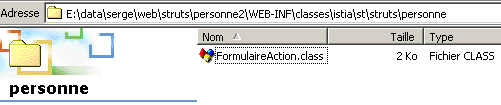
In the WEB-INF\classes\resources folder, you will find the following personneressources.properties message file:
personne.formulaire.nom.vide=<li>Vous devez indiquer un nom</li>
personne.formulaire.age.vide=<li>Vous devez indiquer un age</li>
personne.formulaire.age.incorrect=<li>L'âge est incorrect</li>
errors.header=<ul>
errors.footer=</ul>

   # Struts Validator error messages
    # the key is predefined and must not be changed
    # the associated error msg is free
    # the msg can have up to 4 parameters {0} to {3}

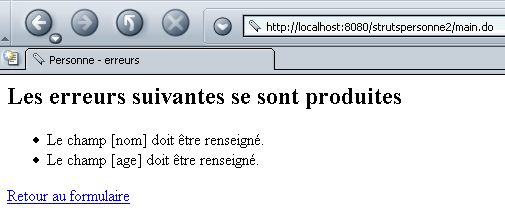
   errors.required=<li>Le champ [{0}] doit être renseigné.</li>
   errors.minlength=<li>Le champ [{0}] foit avoir au moins {1} caractère.</li>
   errors.maxlength=<li>Le champ [{0}] ne peut avoir plus de {1} caractères.</li>
   errors.invalid=<li>Le champ [{0}] est incorrect.</li>

   errors.byte=<li>{0} doit être un octet.</li>
   errors.short=<li>{0} doit être un entier court.</li>
   errors.integer=<li>{0} doit être un entier.</li>
   errors.long=<li>{0} doit être un entier long.</li>
   errors.float=<li>{0} doit être un réel simple.</li>
   errors.double=<li>{0} doit être un réel double.</li>

   errors.date=<li>{0} n'est pas une date valide.</li>
   errors.range=<li>{0} doit être dans l'intervalle {1} à {2}.</li>
   errors.creditcard=<li>{0} n'est pas un numéro de carte valide.</li>
   errors.email=<li>{0} n'est pas une adresse électronique valide.</li>

   personne.nom=nom
     personne.age=age

5.5. Tests
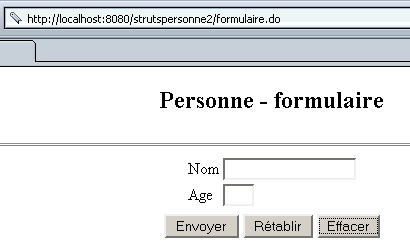
We are ready for testing. Below are some screenshots that the reader is invited to reproduce.
We request URL http://localhost:8080/strutspersonne2/formulaire.do:
We use the [Envoyer] button without filling in the fields:
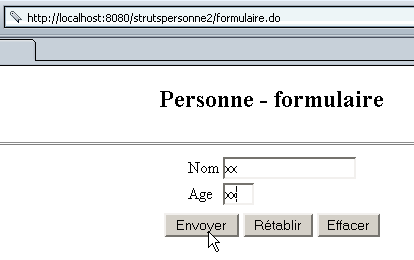
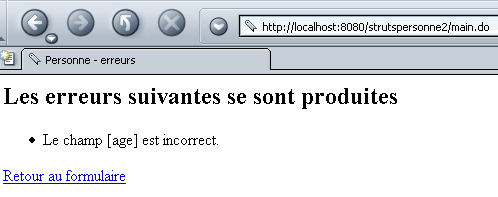
We try again with an error in the age field:
We get the following response:
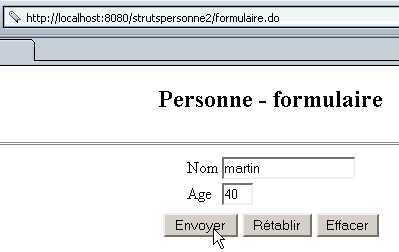
We try again, this time entering the correct values:
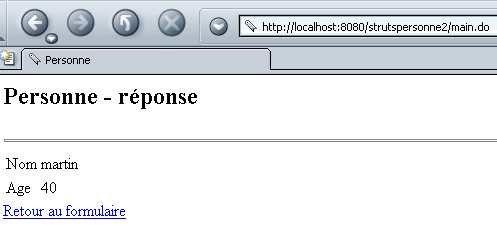
We get the following response:
5.6. Conclusion
We have shown that using dynamic forms with "standard" integrity constraints avoids the need to create classes to represent them. If the integrity constraints deviate from the standard, then we are once again required to create classes to verify these new constraints.