6. HTML Forms
So far, we have used a single form containing only two input fields. Here, we propose to create and process a form using standard graphical components (radio buttons, checkboxes, input fields, combo boxes, lists).
6.1. The application views
The application will have only two views. The first displays a blank form:
VUE 1 - form
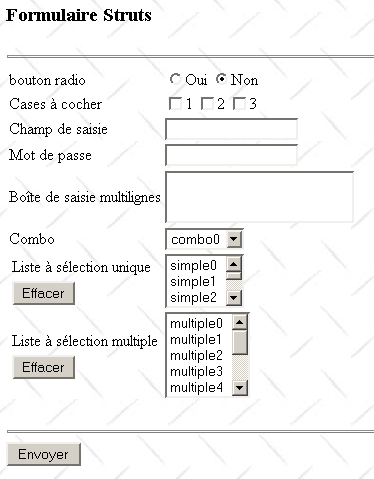
This first view, named formulaire.jsp, will allow us to implement various tags from the struts-html library. The user fills out the form:
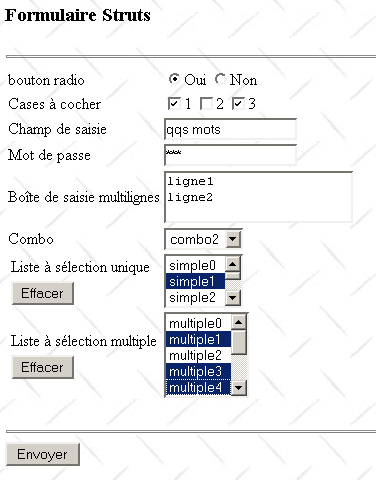
The [Envoyer] button provides confirmation of the entered values. This will be the second view:
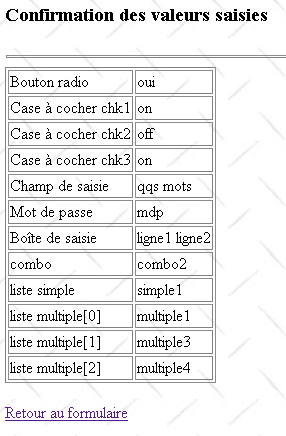
This second view will allow us to use two other Struts tag libraries: struts-bean and struts-logic. The link [Retour au formulaire] allows us to return to the form as it was filled out. We are then taken back to the first view.
6.2. The application architecture
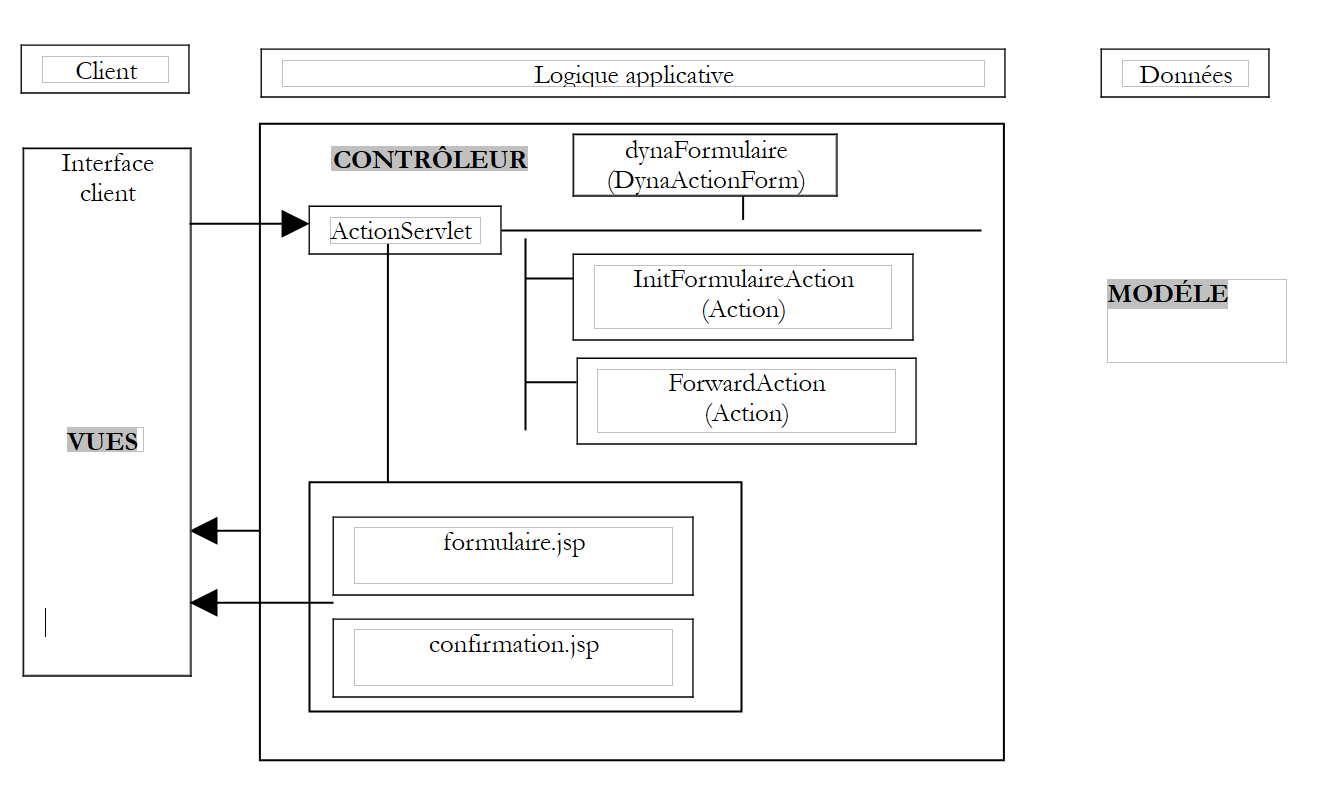 |
- The form (view 1) will be represented by a dynamic Struts object named dynaFormulaire, a subclass of DynaActionForm. It will be displayed by the view formulaire.jsp.
- The Struts action InitFormulaireAction will be responsible for retrieving the data required to display the form
- The completed form will be processed by action ForwardAction, which will simply redirect the request to the second view, confirmation.jsp. This view will be responsible for displaying the form values.
6.3. Application Configuration
6.3.1. The server.xml file
The application context will be named /form2. We will therefore add the following line to the Tomcat file server.xml:
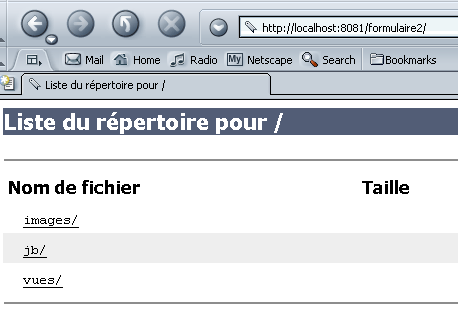
Once this is done, we may need to restart Tomcat so that it takes the new context into account. We can verify its validity by requesting URL http://localhost:8080/formulaire2:
6.3.2. The web.xml file
The application's configuration file web.xml will be as follows:
<?xml version="1.0" encoding="ISO-8859-1"?>

<!DOCTYPE web-app
    PUBLIC "-//Sun Microsystems, Inc.//DTD Web Application 2.3//EN"
    "http://java.sun.com/dtd/web-app_2_3.dtd">

<web-app>
    <servlet>
      <servlet-name>action</servlet-name>
    <servlet-class>org.apache.struts.action.ActionServlet</servlet-class>
    <init-param>
        <param-name>config</param-name>
      <param-value>/WEB-INF/struts-config.xml</param-value>
    </init-param>
  </servlet>

  <servlet-mapping>
      <servlet-name>action</servlet-name>
    <url-pattern>*.do</url-pattern>
  </servlet-mapping>

  <taglib>
      <taglib-uri>/WEB-INF/struts-html.tld</taglib-uri>
    <taglib-location>/WEB-INF/struts-html.tld</taglib-location>
  </taglib>
  <taglib>
      <taglib-uri>/WEB-INF/struts-bean.tld</taglib-uri>
    <taglib-location>/WEB-INF/struts-bean.tld</taglib-location>
  </taglib>
  <taglib>
      <taglib-uri>/WEB-INF/struts-logic.tld</taglib-uri>
    <taglib-location>/WEB-INF/struts-logic.tld</taglib-location>
  </taglib>

</web-app>
Compared to the web.xml configuration files we’ve already seen, we’re making a few changes:
- We are introducing two new tag libraries: struts-bean and struts-logic. They will be used in the confirmation.jsp view. The formulaire.jsp view, on the other hand, will use the struts-html library.
6.3.3. The struts-config.xml file
The struts-config.xml file will be as follows:
<?xml version="1.0" encoding="ISO-8859-1" ?>

<!DOCTYPE struts-config PUBLIC
          "-//Apache Software Foundation//DTD Struts Configuration 1.1//EN"
          "http://jakarta.apache.org/struts/dtds/struts-config_1_1.dtd">

<struts-config>
    <form-beans>
        <form-bean name="dynaFormulaire" type="istia.st.struts.formulaire.DynaFormulaire">
            <form-property name="opt" type="java.lang.String" initial="non"/>
            <form-property name="chk1" type="java.lang.String"/>
            <form-property name="chk2" type="java.lang.String"/>
            <form-property name="chk3" type="java.lang.String"/>
            <form-property name="champSaisie" type="java.lang.String" initial=""/>
            <form-property name="mdp" type="java.lang.String" initial=""/>
            <form-property name="boiteSaisie" type="java.lang.String" initial=""/>
            <form-property name="combo" type="java.lang.String"/>
            <form-property name="listeSimple" type="java.lang.String"/>
            <form-property name="listeMultiple" type="java.lang.String[]"/>
            <form-property name="secret" type="java.lang.String" initial="xxx"/>
            <form-property name="valeursCombo" type="java.lang.String[]" />
            <form-property name="valeursListeSimple" type="java.lang.String[]" />
            <form-property name="valeursListeMultiple" type="java.lang.String[]"/>
        </form-bean>
    </form-beans>

    <action-mappings>
      <action
          path="/confirmation"
            name="dynaFormulaire"
            validate="false"
            scope="session"
          parameter="/vues/confirmation.jsp"
          type="org.apache.struts.actions.ForwardAction"
      />

      <action
          path="/init"
            name="dynaFormulaire"
            validate="false"
            scope="session"
          type="istia.st.struts.formulaire.InitFormulaireAction"
      >
            <forward name="afficherFormulaire" path="/vues/formulaire.jsp"/>
        </action>

      <action
          path="/affiche"
          parameter="/vues/formulaire.jsp"
          type="org.apache.struts.actions.ForwardAction"
      />

    </action-mappings>

        <message-resources
      parameter="ApplicationResources"
        null="false"/>

</struts-config>
It contains three main sections:
- form declarations in the <form-beans> section
- the declaration of actions in the <action-mappings> section
- the declaration of the resource file in <message-resources>
6.3.4. The application's form objects (beans)
The objects used to represent the application’s HTML forms are objects of type ActionForm or derived types (DynaActionForm, DynaValidatorForm, ...). They are called beans because their construction follows the rules of JavaBeans. There is only one form bean in our application, called dynaFormulaire and of a type derived from DynaActionForm. It will be used in the following situations:
- to contain the data needed to display view #1
- retrieve the values from the form in view #1 when the user submits it (submit)
- contain the data required to display view #2
The structure of the dynaFormulaire bean is closely linked to the form in view #1. Let’s examine it:
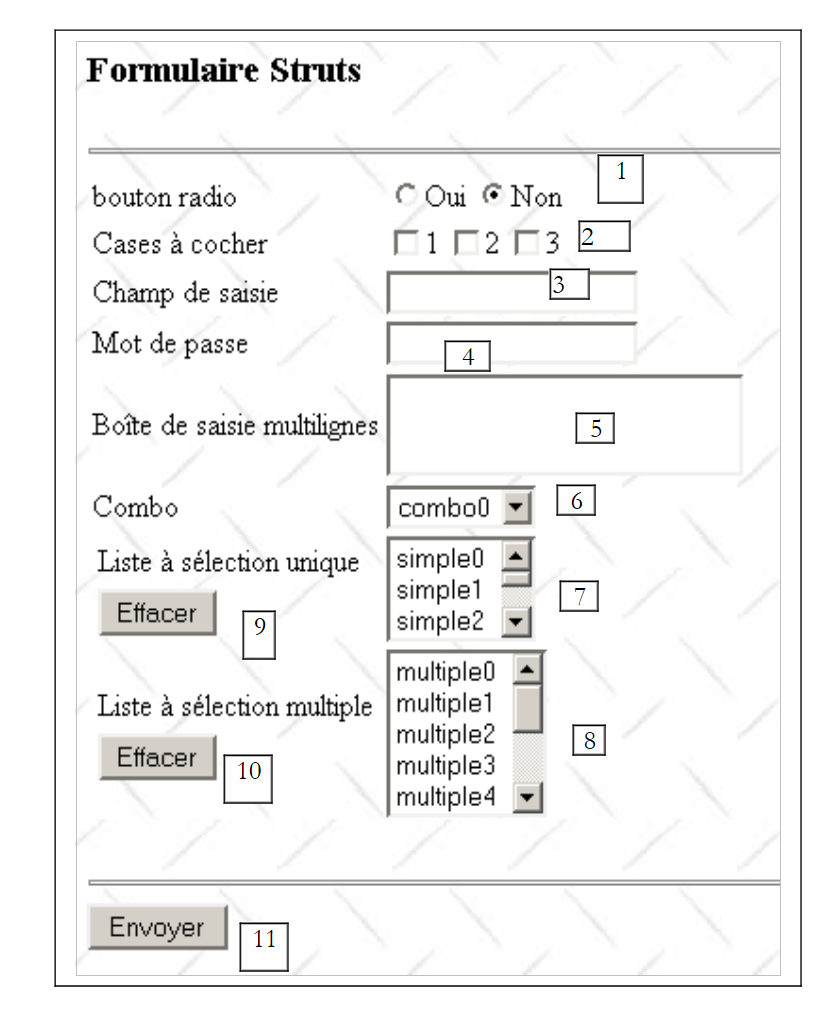 |
No. | Type HTML | Role |
<input name="opt" type="radio" value="yes"> <input name="opt" type="radio" value="no"> | group of radio buttons linked together (same name) | |
<input name="chk1" type="radio" value="on"> <input name="chk2" type="radio" value="on"> <input name="chk3" type="radio" value="on"> | groups of checkboxes (not the same name) | |
<input type="text" name="champSaisie" > | an input field | |
<input type="password" name="mdp"> | a password field | |
<textarea name="boiteSaisie">...</textarea> | a multi-line input field | |
<select name="combo" size="1">..</select> | a combo box | |
<select name="listeSimple" size="3">..</select> | a single-select list | |
<select name="listeMultiple" size="3" multiple>..</select> | a multiple-select list | |
<input type="button" value="Clear" onclick='clearList("simpleList")'> | button to deselect selected items in listeSimple (7) | |
<input type="button" value="Clear" onclick='clearList("multipleList")'> | button to deselect the selected items in listeMultiple (8) | |
<input type="submit" value="Submit"> | submit button on the form | |
<input type="hidden" name="secret" value="..."> | a hidden field |
Let's distinguish several cases:
- The dynaFormulaire object is used to hold the values from the HTML form above, which will be submitted via the [Envoyer] button. It must therefore have the same fields as in the HTML form. The field type is determined by the following rule:
- if the HTML field provides only one value, then the dynaFormulaire field will be of type java.lang.String
- if the field HTML provides multiple values, then the field dynaFormulaire will be of type java.lang.String[]
In the HTML form above, only the listeMultiple field can be associated with multiple values (those selected by the user). Therefore, an initial definition of the dynaFormulaire object would be as follows:
        <form-bean name="dynaFormulaire" type="istia.st.struts.formulaire.DynaFormulaire">
            <form-property name="opt" type="java.lang.String" initial="non"/>
            <form-property name="chk1" type="java.lang.String"/>
            <form-property name="chk2" type="java.lang.String"/>
            <form-property name="chk3" type="java.lang.String"/>
            <form-property name="champSaisie" type="java.lang.String" initial=""/>
            <form-property name="mdp" type="java.lang.String" initial=""/>
            <form-property name="boiteSaisie" type="java.lang.String" initial=""/>
            <form-property name="combo" type="java.lang.String"/>
            <form-property name="listeSimple" type="java.lang.String"/>
            <form-property name="listeMultiple" type="java.lang.String[]"/>
            <form-property name="secret" type="java.lang.String" initial="xxx"/>
        </form-bean>
How will dynaFormulaire be populated with the values from the HTML form sent by the web client?
the opt field will receive the value "yes" if the HTML <input type="radio" name="opt" value="yes"> field has been checked, the value "no" if the field <input type="radio" name="opt" value="no"> has been checked. | |
the chk1 field will receive the value "on" if the field HTML <input name="chk1" type="radio" value="1"> has been checked, otherwise nothing. In the latter case, the chk1 field will retain its previous value. | |
same | |
same | |
The field champSaisie will receive the text entered by the user in the field HTML <input type="text" name="champSaisie">. This text may be an empty string. | |
The "mdp" field will receive the text entered by the user in the field HTML <input type="password" name="mdp">. This text may be an empty string. | |
The boiteSaisie field will receive the text entered by the user in the HTML field <textarea name="boiteSaisie">...</textarea>. This text forms a single string, consisting of the lines typed by the user, separated from one another by the character sequence "\r\n". The resulting text may be an empty string. | |
The combo field will receive the option selected by the user in the HTML field <select name="combo" size="1">..</select>. The selected option is the one that appears in the combo box. If the selected option HTML is of the type <option value="XX">YY</option>, the combo box will receive the value "XX". If the selected option HTML is of the type <option>YY</option>, the combo box will receive the value "YY". | |
the listeSimple field will receive the option selected by the user in the HTML field <select name="listeSimple" size="..">..</select> if there is one. If there is none, the listeSimple field will not receive any value and will retain its previous value. The value actually assigned to the listeSimple field follows the rules specified for the combo box. | |
the field listeMultiple of type String[] will receive the options selected by the user in the field HTML <select name="listeMultiple" size=".." multiple>..</select> if any. If there are none, the array listeMultiple will not receive any values and its content will remain unchanged. The values actually assigned to the listeMultiple array follow the rules specified for the combo box. | |
The secret field will receive the value XX from the HTML field <input type="hidden" name="secret" value="XX">. This text may optionally be an empty string. |
- The dynaFormulaire object is used to provide the initial content for view #1. The values of the preceding fields will be used for the following purposes:
must have the value "yes" or "no" so that the browser knows which radio button to select | |
if chk1 has the value "on", the checkbox will be checked; otherwise, it will not be | |
same | |
same | |
The field value will be displayed in the input field champSaisie | |
the field value will be displayed in the password entry field | |
The field value will be displayed in the input field boiteSaisie | |
The value of this field indicates which combo box item should be selected when the form is displayed | |
same | |
The values in table listeMultiple indicate which items in the multiple-select list should be selected when the form is displayed | |
The value of the field will be assigned to the value attribute of the secret field HTML. |
View No. 1 requires additional information:
- the list of values to display in the drop-down list
- the list of values to display in the list listeSimple
- the list of values to display in the list listeMultiple
There are several ways to provide this information to the view. Arrays placed in the request passed to the view would, for example, do the trick. Here, we place these arrays in the dynaFormulaire bean:
        <form-bean name="dynaFormulaire" type="istia.st.struts.formulaire.DynaFormulaire">
...
            <form-property name="valeursCombo" type="java.lang.String[]" />
            <form-property name="valeursListeSimple" type="java.lang.String[]" />
            <form-property name="valeursListeMultiple" type="java.lang.String[]"/>
        </form-bean>
The dynaFormulaire form will be initialized by the /init action, which will call an object derived from Action named InitFormulaireAction. This object will be responsible for creating the three arrays needed to display the three lists and placing them in the dynaFormulaire bean. The configuration file gives this bean a scope equal to the session. This means that the Struts controller will place this bean in the session. We will therefore not need to regenerate it between request-response cycles. Consequently, the /init action will be called only once.
- The dynaFormulaire object is also used to provide the content for view #2. This view simply displays the values.
6.3.5. Application Actions
Actions are handled by objects of type Action or derived types. Actions are configured within the <action-mappings> tags:
    <action-mappings>
      <action
          path="/confirmation"
            name="dynaFormulaire"
            validate="false"
            scope="session"
          parameter="/vues/confirmation.jsp"
          type="org.apache.struts.actions.ForwardAction"
      />

      <action
          path="/init"
            name="dynaFormulaire"
            validate="false"
            scope="session"
          type="istia.st.struts.formulaire.InitFormulaireAction"
      >
            <forward name="afficherFormulaire" path="/vues/formulaire.jsp"/>
        </action>

      <action
          path="/affiche"
          parameter="/vues/formulaire.jsp"
          type="org.apache.struts.actions.ForwardAction"
      />

    </action-mappings>
Note that there isn’t always a form associated with an action. This is the case, above, with the /affiche action. Before detailing each action, let’s review how the action-form pair works within an <action> tag:
- An action begins with a request from a web client and ends with the sending of a response page. This is the client-server web request-response cycle. The request is received by the Struts controller of type ActionServlet or a derived type. This controller also sends the response.
- The form bean of type ActionForm or a derived type is created if it does not already exist. The controller checks whether it can find an object named name in the scope specified by scope. If so, it uses it. If not, it creates it and places it in the scope specified by scope, associated with the attribute specified by name.
In the example of the /init action, for instance, the controller will call request.getSession().getAttribute("dynaFormulaire") to determine whether dynaFormulaire has already been created or not. If not, it will create it and add it to the session using a statement like request.getSession().setAttribute("dynaFormulaire", new DynaFormulaire(...)).
- The controller will also look for an Action object of the type specified by the type attribute. If it does not find one, it creates it; otherwise, it uses it.
- The reset method of the form bean will be called. This bean, except during its initial creation, is reused. It therefore contains data that you may want to "clean up." This is done in the reset method of the ActionForm bean or its derived class.
- If the action is the target of a submitted form, then the form values found in the client request are copied into the fields of the same name in the form bean. Note that the reset method was called before this copying.
- If the configuration specifies the attribute validate="true", the validate method of the form bean will be called. This method must then validate the bean’s data. This validation usually occurs only when the form has just received new data via a posted form and you want to verify the validity of that data. This method returns any list of errors to the controller in a ActionErrors object.
- If the ActionErrors object is not empty, the controller displays the view specified by the action’s input attribute.
- If data validation is not requested or if it was successful, the controller executes the `execute` method of the `Action` object or derived class associated with the current action. It is within this method that the web client’s request is processed. The `execute` method returns a `ActionForward` object indexed by string keys. These keys are those declared by the forward tags of the configured action. In our example, the /init action has a single forward tag. It associates the key "afficherFormulaire" with the view formulaire.jsp.
- The controller displays the view associated with the received key. This view may actually be an action, in which case the previous process is repeated.
The /init action
        <action
          path="/init"
            name="dynaFormulaire"
            validate="false"
            scope="session"
          type="istia.st.struts.formulaire.InitFormulaireAction"
      >
            <forward name="afficherFormulaire" path="/vues/formulaire.jsp"/>
        </action>
- The /init action normally occurs once during the first request-response cycle when the user requests the URL http://localhost:8080/form2/init.do
- the dynaFormulaire object is created or recycled. It is retrieved (recycling) or placed (creation) in the session as specified by the scope attribute.
- Its reset method is called. What should it do? Normally, the fields of the ActionForm object are reset to their default values. However, in this case, we will not do so, because the dynaFormulaire object is placed in the session (scope="session"). The fields of dynaFormulaire must therefore retain their values. What are these values when the dynaFormulaire object is initially created? There are two cases:
- the field has an initial value specified in the configuration file:
In this case, the Struts controller will create this field with this initial value.
- the field has no initial value specified in the configuration: Java’s initialization rules apply. Generally, numeric fields will have the value zero, strings will have the empty string, and other objects will have the value null.
Let’s look at the initial configuration of dynaFormulaire:
        <form-bean name="dynaFormulaire" type="istia.st.struts.formulaire.DynaFormulaire">
            <form-property name="opt" type="java.lang.String" initial="non"/>
            <form-property name="chk1" type="java.lang.String"/>
            <form-property name="chk2" type="java.lang.String"/>
            <form-property name="chk3" type="java.lang.String"/>
            <form-property name="champSaisie" type="java.lang.String" initial=""/>
            <form-property name="mdp" type="java.lang.String" initial=""/>
            <form-property name="boiteSaisie" type="java.lang.String" initial=""/>
            <form-property name="combo" type="java.lang.String"/>
            <form-property name="listeSimple" type="java.lang.String"/>
            <form-property name="listeMultiple" type="java.lang.String[]"/>
            <form-property name="secret" type="java.lang.String" initial="xxx"/>
            <form-property name="valeursCombo" type="java.lang.String[]" />
            <form-property name="valeursListeSimple" type="java.lang.String[]" />
            <form-property name="valeursListeMultiple" type="java.lang.String[]"/>
        </form-bean>
The initial values of the fields in dynaFormulaire after its creation will be as follows:
Field | Initial Value |
"no" | |
empty string | |
empty string | |
empty string | |
empty string | |
empty string | |
empty string | |
array of empty strings | |
"xxx" | |
array of empty strings |
- One might imagine that the reset method of dynaFormulaire assigns values to the three arrays that populate the three lists in the formulaire.jsp view. This would be possible here because the data in these three arrays is generated arbitrarily. However, the most common scenario is that this data comes from the application model, the M in MVC. Here, we will take a middle ground—to keep the example simple—by having these values generated by the action InitFormulaireAction, and thus by the C of MVC.
- There is no requirement to write a reset method in dynaFormulaire, since the class ActionForm from which it derives has such a method that does nothing (no initializations).
- Once the reset method of dynaFormulaire is called, the controller checks the validate attribute of the action. Here, it has the value "false". The validate method of dynaFormulaire will not be called.
- The InitFormulaireAction object is created or recycled if it already existed, and its execute method is launched. This method will assign arbitrary values to the three arrays of dynaFormulaire: valeursCombo, valeursListeSimple, and valeursListeMultiple. The method returns a ActionForward with the key "afficherFormulaire".
- The controller displays the view /vues/formulaire.jsp, which was associated with the key "afficherFormulaire" by a forward tag from the /init action.
The /confirmation action
      <action
          path="/confirmation"
            name="dynaFormulaire"
            validate="false"
            scope="session"
          parameter="/vues/confirmation.jsp"
          type="org.apache.struts.actions.ForwardAction"
      />
- The /confirmation action occurs when the user clicks the [Envoyer] button on view #1. The browser then "posts" the form filled out by the user to the Struts controller.
- The dynaFormulaire object is retrieved from the session
- its reset method is called. Once it has been called, the Struts controller will copy the values of the form fields posted by the client into the fields of the same name in dynaFormulaire. Let’s review the list of fields in the latter and see how this copying works:
Field | Associated HTML code | Field value after copying the form values |
<input type="radio" name="opt" value="yes">Yes <input type="radio" name="opt" value="no" checked="checked">No | - "yes" or "no" depending on the selected radio button | |
<input type="checkbox" name="chk1" value="on"> | - "on" if the chk1 checkbox has been checked - retains its previous value if the chk1 checkbox has not been checked | |
<input type="checkbox" name="chk2" value="on"> | - "on" if the chk2 checkbox has been checked - retains its previous value if the chk2 checkbox has not been checked | |
<input type="checkbox" name="chk2" value="on"> | - "on" if the chk3 checkbox has been checked - retains its previous value if the chk3 checkbox has not been checked | |
<input type="text" name="champSaisie" value=""> | - value entered by the user in champSaisie | |
<input type="password" name="mdp" value=""> | - value entered by the user in mdp | |
<textarea name="boiteSaisie"></textarea> | - value entered by the user in boiteSaisie | |
<select name="combo">...</select> | - value selected by the user in combo | |
<select name="listeSimple" size="3">...</select> | - value selected by the user in listeSimple | |
<select name="listeMultiple" multiple="multiple" size="5"> | - array of strings containing the values selected by the user in listeMultiple | |
<input type="hidden" name="secret" value="xxx"> | - "xxx". |
We encounter an issue with fields that do not necessarily receive a value in the request sent by the browser. This applies to checkboxes chk1 through chk3 and the two lists listeSimple and listeMultiple. In this case, these fields retain their previous values, those acquired during the previous request-response cycle.
Let’s consider the checkbox chk1, for example, and assume that in the previous request-response cycle, the user had checked this box. The browser then sent the information chk1="on" in the parameter string of its request. The server therefore assigned the value "on" to the chk1 field of dynaFormulaire. Now suppose that in the current cycle, the user does not check the chk1 checkbox. In this case, in the parameter string of the new request, the browser does not send something like chk1="off" but sends nothing. As a result, the chk1 field in dynaFormulaire will retain its "on" value and thus have a value that does not reflect that of the form validated by the user. We will use the reset method of dynaFormulaire to resolve this issue. In this method, we will set the three fields chk1, chk2, and chk3 to "off". In our example with chk1, either the user:
- checks the chk1 checkbox. Then the browser sends the information chk1="on" and the chk1 field in dynaFormulaire will change to "on"
- do not check the chk1 box. In that case, the browser does not send a value for the chk1 field, which will retain its previous "off" value. In both cases, the value stored in the chk1 field of dynaFormulaire is correct.
The issue is similar for the two lists listeSimple and listeMultiple. If no option has been selected from these lists, they will not be included in the query parameters and will therefore retain their previous values. In the reset method of dynaFormulaire, we will reset listeSimple to an empty string and listeMultiple to an array of strings of length 0.
- Once the reset method of dynaFormulaire is called, the controller copies the information sent to it in the client request back into the fields of dynaFormulaire
- A ForwardAction object is created or recycled, and its execute method is called. ForwardAction is a predefined class that returns a ActionForward object pointing to the view defined by the action’s “parameter” attribute, in this case /vues/confirmation.jsp.
- The controller sends this view. The cycle is complete.
The action /displays
      <action
          path="/affiche"
          parameter="/vues/formulaire.jsp"
          type="org.apache.struts.actions.ForwardAction"
      />
- The /display action is triggered by clicking the [Retour vers le formulaire] link in view #2.
- Here, there is no form associated with the action. We therefore proceed immediately to executing the execute method of a ForwardAction object, which will return a ActionForward object pointing to the view /vues/formulaire.jsp.
6.3.6. The application's message file
The third section of the struts-config.xml file is the message file:
The file ApplicationResources.properties is located in WEB-INF/classes. It will be empty. Even though it is empty, it must still be declared in the configuration file; otherwise, the struts-bean tag library, which we will discuss later, will generate an error. This library is used by the view confirmation.jsp.
6.4. The view code
6.4.1. The formulaire.jsp view
Remember that this view is displayed in two cases:
- when the /init action is called during the first request-response cycle
- when the /affiche action is called during subsequent cycles
The code for the formulaire.jsp view is as follows:
<%@ taglib uri="/WEB-INF/struts-html.tld" prefix="html" %>

<html>
  <head>
      <title>formulaire</title>
  </head>
  <body background='<html:rewrite page="/images/standard.jpg"/>'>
      <h3>Formulaire Struts</h3>
    <hr>
    <html:form action="/confirmation" name="dynaFormulaire" type="istia.st.struts.formulaire.DynaFormulaire">
      <table border="0">
        <tr>
          <td>bouton radio</td>
          <td>
                        <html:radio name="dynaFormulaire" property="opt" value="oui">Oui</html:radio>
                        <html:radio name="dynaFormulaire" property="opt" value="non">Non</html:radio>
          </td>
        </tr>
        <tr>
          <td>Cases à cocher</td>
          <td>
                        <html:checkbox name="dynaFormulaire" property="chk1">1</html:checkbox>
                        <html:checkbox name="dynaFormulaire" property="chk2">2</html:checkbox>
                        <html:checkbox name="dynaFormulaire" property="chk3">3</html:checkbox>
          </td>
        </tr>
        <tr>
          <td>Champ de saisie</td>
          <td>
                        <html:text name="dynaFormulaire" property="champSaisie" />
          </td>
        </tr>
        <tr>
          <td>Mot de passe</td>
          <td>
              <html:password name="dynaFormulaire" property="mdp" />
          </td>
        </tr>
        <tr>
          <td>Boîte de saisie multilignes</td>
          <td>
              <html:textarea name="dynaFormulaire" property="boiteSaisie" />
          </td>
        </tr>
        <tr>
          <td>Combo</td>
          <td>
              <html:select name="dynaFormulaire" property="combo">
                            <html:options name="dynaFormulaire" property="valeursCombo"/>
                        </html:select>
          </td>
        </tr>
        <tr>
          <td>
                        <table>
                            <tr>
                                <td>Liste à sélection unique</td>
                            </tr>
                            <tr>
                                <td>
                                    <input type="button" value="Effacer" onclick="this.form.listeSimple.selectedIndex=-1"/>
                                </td>
                            </tr>
                        </table>
          <td>
              <html:select name="dynaFormulaire" property="listeSimple" size="3">
                            <html:options name="dynaFormulaire" property="valeursListeSimple"/>
                        </html:select>
          </td>
        </tr>
        <tr>
                    <td>
                        <table>
                            <tr>
                                <td>Liste à sélection multiple</td>
                            </tr>
                            <tr>
                                <td>
                                    <input type="button" value="Effacer" onclick="this.form.listeMultiple.selectedIndex=-1"/>
                                </td>
                            </tr>
                        </table>
                    </td>
          <td>
              <html:select name="dynaFormulaire" property="listeMultiple" size="5" multiple="true">
                            <html:options name="dynaFormulaire" property="valeursListeMultiple"/>
                        </html:select>
          </td>
        </tr>
      </table>
      <html:hidden name="dynaFormulaire" property="secret"/>
            <br>
            <hr>
            <html:submit>Envoyer</html:submit>
    </html:form>
  </body>
</html>
This JSP page uses tags from the struts-html library. Remember that to use a tag library, you must:
- declare it in the application's web.xml file using a <tag-lib> tag
  <taglib>
      <taglib-uri>/WEB-INF/struts-html.tld</taglib-uri>
    <taglib-location>/WEB-INF/struts-html.tld</taglib-location>
  </taglib>
- Place the code for this library somewhere in the application directory tree, here WEB-INF/struts-html.tld
- Declare the use of this library at the beginning of the JSP pages that use it:
The formulaire.jsp view uses tags that we will now explain:
<body background="<html:rewrite page="/images/standard.jpg"/>"> | |||
The html:rewrite tag allows you to omit the application name in URL. It has one attribute:
So, as shown above, if you decide to name the application "form3," the code for the background attribute does not need to be rewritten. The html:rewrite tag will generate the new code HTML background="/formulaire3/images/standard.jpg" |
<html:form action="/confirmation" name="dynaFormulaire" type="istia.st.struts.formulaire.DynaFormulaire"> | |||||||
The html:form tag generates the HTML form tag. It has several attributes:
We can see that by default, the generated code HTML uses the method POST. In this same code HTML, the action’s URL has been rewritten to be prefixed with the application name and suffixed with .do. |
<html:radio name="dynaFormulaire" property="opt" value="yes">Yes</html:radio> | |||||||
The html:radio tag is used to generate the HTML <input type="radio" ...> tag. It supports various attributes:
The text between the start and end tags is the text that will be displayed next to the radio button. |
<html:checkbox name="dynaFormulaire" property="chk1">1</html:checkbox> | |||||||
The html:checkbox tag is used to generate the HTML <input type="checkbox" ...> tag. It supports various attributes:
The text between the start and end tags is the text that will be displayed next to the checkbox. |
<html:text name="dynaFormulaire" property="champSaisie" /> | |||||||
The html:text tag is used to generate the HTML <input type="text" ...> tag. It supports various attributes:
|
<html:password name="dynaFormulaire" property="mdp" /> | |
The html:password tag is used to generate the HTML <input type="password" ...> tag. It supports various attributes: |
<html:textarea name="dynaFormulaire" property="boiteSaisie" /> | |||||||
The html:textarea tag is used to generate the HTML <textarea>...</textarea> tag. It supports various attributes:
|
<html:select name="dynaFormulaire" property="combo">....</html:select> | |||||||
The html:select tag is used to generate the HTML <select>...</select> tag. It supports various attributes:
|
<html:select name="dynaFormulaire" property="combo"> <html:options name="dynaFormulaire" property="valeursCombo"/> </html:select> | |||||
The html:options tag is used to generate the HTML <option>...</option> within a HTML <select> tag. There are various ways to specify how to find the values to populate the select element. Here, we have used the name and property attributes:
|
The other two lists are generated in a similar manner to the previous one:
          <html:select name="dynaFormulaire" property="listeSimple" size="3">
            <html:options name="dynaFormulaire" property="valeursListeSimple"/>
        </html:select>
Above, we specify a size attribute other than 1 to get a list instead of a combo box.
<html:select name="dynaFormulaire" property="listeMultiple" size="5" multiple="true">
        <html:options name="dynaFormulaire" property="valeursListeMultiple"/>
    </html:select>
Above, we specify the multiple="true" attribute to create a list with multiple selections.
<html:hidden name="dynaFormulaire" property="secret"/> | |||||
The html:hidden tag is used to generate the HTML <input type="hidden" ...> tag.
|
To fully understand the relationship between the formulaire.jsp view and the dynaFormulaire bean that represents it in memory, it is important to remember that the dynaFormulaire bean is used for both reading and writing:
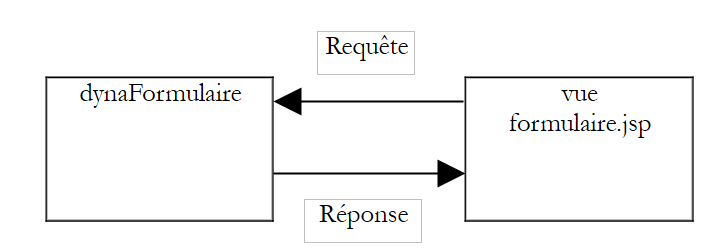 |
The request occurs when the user clicks the [Envoyer] button on the form. The browser then "submits" the HTML form to the /confirmation action. We have already explained what happens then, and in particular that the fields in dynaFormulaire will receive the values of the fields with the same names in the HTML form.
What happens when the controller requests the display of view formulaire.jsp in response to a request? Let’s review the tags one by one:
<body background="<html:rewrite page="/images/standard.jpg"/>"> | |
generates the code HTML |
<html:form action="/confirmation" name="dynaFormulaire" type="istia.st.struts.formulaire.DynaFormulaire"> ... </html:form> | |
generates the code HTML |
<html:radio name="dynaFormulaire" property="opt" value="yes">Yes</html:radio> <html:radio name="dynaFormulaire" property="opt" value="no">No</html:radio> | |
If the opt field of dynaFormulaire is "yes", generate the code HTML |
<html:checkbox name="dynaFormulaire" property="chk1">1</html:checkbox> <html:checkbox name="dynaFormulaire" property="chk2">2</html:checkbox> <html:checkbox name="dynaFormulaire" property="chk3">3</html:checkbox> | |
If the chk1 and chk3 fields of dynaFormulaire are "on" and the chk2 field is "off", generate the code HTML |
<html:text name="dynaFormulaire" property="champSaisie" /> | |
if the field champSaisie is "this is a test", generate the code HTML |
<html:password name="dynaFormulaire" property="mdp" /> | |
if the password field is "azerty", generate the code HTML |
<html:password name="dynaFormulaire" property="mdp" /> | |
if the mdp field is "azerty", generates the code HTML |
<html:password name="dynaFormulaire" property="mdp" /> | |
if the mdp field is "azerty", generates the code HTML |
<html:select name="dynaFormulaire" property="combo"> <html:options name="dynaFormulaire" property="valeursCombo"/> </html:select> | |
if the combo field is "combo2", generates the code HTML |
<html:select name="dynaFormulaire" property="listeSimple" size="3"> <html:options name="dynaFormulaire" property="valeursListeSimple"/> </html:select> | |
if the listeSimple field is "simple1", generates the HTML code |
<html:select name="dynaFormulaire" property="listeMultiple" size="5" multiple="true"> <html:options name="dynaFormulaire" property="valeursListeMultiple"/> </html:select> | |
if the listeMultiple field is the array {"multiple0","multiple2"}, generates the HTML code |
<html:hidden name="dynaFormulaire" property="secret"/> | |
if the secret field has the value "xxx", generates the code HTML |
<html:submit>Submit</html:submit> | |
generates the code HTML |
The last thing to explain is the code javascript included in the page JSP and linked to the two buttons [Effacer] that deselect the selected items in the lists listeSimple and listeMultiple:
<input type="button" value="Effacer" onclick="this.form.listeSimple.selectedIndex=-1"/>
<input type="button" value="Effacer" onclick="this.form.listeMultiple.selectedIndex=-1"/>
The tag
<html:form action="/confirmation" name="dynaFormulaire" type="istia.st.struts.formulaire.DynaFormulaire">
generates the following HTML code:
To understand the Javascript code associated with the [Effacer] buttons, let’s review how the various elements of a web document are designated within a Javascript code that processes this document:
Data | Meaning |
refers to the entire web document | |
refers to the collection of forms defined in the document | |
refers to form number i in the document | |
refers to the <form> form with the name attribute equal to "nomFormulaire" | |
refers to the form <form> with the attribute name set to "nomFormulaire" | |
refers to the collection of elements belonging to the form designated by the expression [formulaire]. This collection includes all <input>, <textarea>, and <select> tags in the designated form. | |
refers to element number i of [formulaire] | |
refers to the element in [formulaire] with the attribute name equal to nomComposant | |
refers to the element of [formulaire] with the attribute name equal to nomComposant | |
refers to the value of the [composant] component of the [formulaire] form when the HTML code of the form can have a value attribute (<input>, <textarea>) | |
refers to the index of the option selected in a list. Can be used for reading and writing. Setting this property to -1 deselects all items in the list. | |
refers to the array of options associated with a <select> tag | |
refers to the i-th option of the specified <select> tag | |
Boolean indicating whether the option #i of the specified [select] tag is selected (true) or not. Can be used for reading and writing |
Let’s revisit the code for the two buttons:
<input type="button" value="Effacer" onclick="this.form.listeSimple.selectedIndex=-1"/>
<input type="button" value="Effacer" onclick="this.form.listeMultiple.selectedIndex=-1"/>
When the button is clicked, the code associated with the "onclick" attribute is executed. Here, it is inline code. Most often, we write onclick="function(...)", where function is a function defined within a **<script language="javascript">...</script>** tag. What does the code above do? Let’s comment out the code for the first button:
refers to the web document in which the button is located | |
refers to the form in which the button is located | |
refers to the listeSimple component of the form | |
refers to the index of the option selected in listeSimple. Setting this property to -1 deselects all option. |
6.4.2. The confirmation.jsp view
Recall that this view is displayed following the /confirmation action, c.a.d, after the form contained in the formulaire.jsp view has been submitted by the web client. Its sole purpose is to display the values entered by the user. Its code is as follows:
<%@ taglib uri="/WEB-INF/struts-bean.tld" prefix="bean" %>
<%@ taglib uri="/WEB-INF/struts-html.tld" prefix="html" %>
<%@ taglib uri="/WEB-INF/struts-logic.tld" prefix="logic" %>

<html>
    <head>
      <title>Confirmation</title>
  </head>
  <body background="<html:rewrite page="/images/standard.jpg"/>">
      <h3>Confirmation des valeurs saisies</h3>
    <hr/>
    <table border="1">
        <tr>
        <td>Bouton radio</td>
        <td><bean:write name="dynaFormulaire" scope="session" property="opt"/></td>
      </tr>
        <tr>
        <td>Case à cocher chk1</td>
        <td><bean:write name="dynaFormulaire" scope="session" property="chk1"/></td>
      </tr>
        <tr>
        <td>Case à cocher chk2</td>
        <td><bean:write name="dynaFormulaire" scope="session" property="chk2"/></td>
      </tr>
        <tr>
        <td>Case à cocher chk3</td>
        <td><bean:write name="dynaFormulaire" scope="session" property="chk3"/></td>
      </tr>

        <tr>
        <td>Champ de saisie</td>
        <td><bean:write name="dynaFormulaire" scope="session" property="champSaisie"/></td>
      </tr>
        <tr>
        <td>Mot de passe</td>
        <td><bean:write name="dynaFormulaire" scope="session" property="mdp"/></td>
      </tr>

        <tr>
        <td>Boîte de saisie</td>
        <td><bean:write name="dynaFormulaire" scope="session" property="boiteSaisie"/></td>
      </tr>

        <tr>
        <td>combo</td>
        <td><bean:write name="dynaFormulaire" scope="session" property="combo"/></td>
      </tr>
        <tr>
        <td>liste simple</td>
        <td><bean:write name="dynaFormulaire" scope="session" property="listeSimple"/></td>
      </tr>
            <logic:iterate id="choix" indexId="index" name="dynaFormulaire" property="listeMultiple">
          <tr>
          <td>liste multiple[<bean:write name="index"/>]</td>
          <td><bean:write name="choix"/></td>
        </tr>
            </logic:iterate>
    </table>
        <br>
    <html:link page="/affiche.do">
            Retour au formulaire
        </html:link>
  </body>
</html>
Here we introduce two new tag libraries: struts-bean and struts-logic. The struts-bean library provides access to objects in the request, session, or application context. The struts-logic library allows you to introduce execution logic using tags. Neither of these libraries is essential. As we have seen, a JSP page can:
- retrieve objects from the request (request.getAttribute(...)), the session (session.getAttribute(...), or the application context
- include dynamic parts in the HTML code using variables <%= variable %>
- contain Java code <% Java code %>
The inclusion of Java code in JSP pages is a source of frustration for anyone who wants a strict separation between application logic (Java code) and presentation (use of tags). That is why tag libraries were created for them.
We will proceed as we did for the formulaire.jsp view and explain each of the tags present in the confirmation.jsp code if they have not already been encountered in the formulaire.jsp view. First, note that the page begins by declaring the three tag libraries it will use:
<%@ taglib uri="/WEB-INF/struts-bean.tld" prefix="bean" %>
<%@ taglib uri="/WEB-INF/struts-html.tld" prefix="html" %>
<%@ taglib uri="/WEB-INF/struts-logic.tld" prefix="logic" %>
Note also that these three libraries must be declared in the application's web.xml file. We will now comment on the tags in the formulaire.jsp document:
writes a value to the current HTML stream. The bean:write tag supports the following attributes: name: name of the object to use scope: scope (request, session, context) in which to search for this object property: field of the object designated by name whose property is to be written. This field can be an object of any type. The toString method of the object will be used. Here, the value of the opt field of dynaFormulaire is written. The result will be either "yes" if the user has checked the radio button with the attribute value="yes", or "no" if they have checked the radio button with the attribute value="no" |
writes the value of the chk1 field from dynaFormulaire. The result will be either "on" if the user has checked the box, or "off" otherwise. The same applies to chk2 and chk3. |
writes the value of the champSaisie field from dynaFormulaire, i.e., the text entered by the user in that field. The same applies to mdp, boiteSaisie. |
writes the value of the combo field dynaFormulaire. This will be the value attribute of the <option> element selected by the user. |
writes the value of the listeSimple field from dynaFormulaire. This will be the value attribute of the <option> element selected by the user, if one was selected. Otherwise, it will be an empty string. |
Here, we introduce logic tags. We are dealing with a multiple-choice list. The value of the listeMultiple field of the dynaFormulaire object is an array of String. In Java, we would write a loop. The logic:iterate tag allows us to perform this same loop without writing Java code. In this example, the logic:iterate tag has the following attributes: name="dynaFormulaire": name of the object to use property="listeMultiple": name of the property in the object specified by name that contains the collection to be iterated over in the loop. Here, this collection is the array of values selected in listeMultiple. This array may be empty. id="choice": an identifier denoting the current element in the array at each iteration of the loop. During the first iteration, choice will represent listeMultiple[0]; during the second, listeMultiple[1]; and so on. indexID="index": identifier designating the index of the current array element in each loop iteration. During the first iteration, index will have the value 0, during the second the value 1, and so on. The code HTML contained between the <logic:iterate ...> and </logic:iterate> tags is repeated for each element of the collection designated by the pair (name,property). The dynamic part of this code is as follows:
Based on what was stated previously, at iteration number i (i>=0), the generated code HTML is equivalent to the following code: |
generates a link relative to the application context, which eliminates the need to know the context. The HTML code generated by this tag is as follows: |
6.5. The Java classes
The struts-config.xml configuration file references two Java classes:
        <form-bean name="dynaFormulaire" type="istia.st.struts.formulaire.DynaFormulaire">
...
      <action
          path="/init"
            name="dynaFormulaire"
            validate="false"
            scope="session"
          type="istia.st.struts.formulaire.InitFormulaireAction"
      >
The DynaFormulaire class is the class that will contain the values from view #1 formulaire.jsp. The InitFormulaireAction class is the class that will process the values of the form submitted by the [Envoyer] button from formulaire.jsp.
6.5.1. The class DynaFormulaire
To hold the values of a form, an object of type DynaActionForm is sufficient unless you need to override one of the reset or validate methods of this class. Here, the validate method does not need to be overridden since no data validation is performed. However, the reset method does need to be overridden. This is because the fields of the DynaFormulaire object will receive their values from the form submitted by the web client. However, some fields may not receive a value if they are not present in the request. This occurs in the following cases:
- a checkbox that was not checked by the user
- a list with more than one item, or no option has been selected
For forms containing this type of component, the reset method must
- set the value "off" for the field associated with the checkbox
- assign the empty string to the field associated with a single-select list
- assign an empty array of character strings to the field associated with a multi-select list
Thus, if these fields do not receive a value from the request, they retain the value assigned by reset, which corresponds to the state of the component in the form validated by the user (checkbox unchecked, list with no items selected).
The code for class DynaFormulaire, a subclass of DynaActionForm, is as follows:
package istia.st.struts.formulaire;

import org.apache.struts.action.DynaActionForm;
import org.apache.struts.action.ActionMapping;
import javax.servlet.http.HttpServletRequest;

public class DynaFormulaire extends DynaActionForm {
  public void reset(ActionMapping mapping, HttpServletRequest request){
    // reset checkboxes - value off
    set("chk1","off");
    set("chk2","off");
    set("chk2","off");
    // reset listeSimple - empty string
    set("listeSimple","");
     // reset listeMultiple - empty table
    set("listeMultiple",new String[]{});
  }
}
6.5.2. The InitFormulaireAction class
The InitFormulaireAction class is associated with the /init action in the struts-config.xml file:
      <action
          path="/init"
            name="dynaFormulaire"
            validate="false"
            scope="session"
          type="istia.st.struts.formulaire.InitFormulaireAction"
      >
            <forward name="afficherFormulaire" path="/vues/formulaire.jsp"/>
        </action>
The /init action is used only once during the initial construction of the DynaFormulaire object. Its purpose is to populate the three combo boxes in the form: listeSimple and listeMultiple. This content is provided in the form of three arrays, which are properties of the dynaFormulaire object:
        <form-bean name="dynaFormulaire" type="istia.st.struts.formulaire.DynaFormulaire">
            <form-property name="opt" type="java.lang.String" initial="non"/>
...
            <form-property name="valeursCombo" type="java.lang.String[]" />
            <form-property name="valeursListeSimple" type="java.lang.String[]" />
            <form-property name="valeursListeMultiple" type="java.lang.String[]"/>
        </form-bean>
Once the arrays valeursCombo, valeursListeSimple, and valeursListeMultiple have been initialized by InitFormulaireAction, they no longer need to be initialized. This is because the dynaFormulaire object is placed in the session and therefore retains its value across request-response cycles. This is why the /init action is executed only once. The code for InitFormulaireAction is as follows:
package istia.st.struts.formulaire;

import java.io.*;
import javax.servlet.*;
import javax.servlet.http.*;
import org.apache.struts.action.*;

public class InitFormulaireAction
  extends Action {
  public ActionForward execute(ActionMapping mapping, ActionForm form,
       HttpServletRequest request, HttpServletResponse response) throws IOException,    ServletException {

     // prepares the form to be displayed

     // we put the information needed for the form in its bean
    DynaFormulaire formulaire = (DynaFormulaire) form;
    formulaire.set("valeursCombo", getValeurs(5, "combo"));
    formulaire.set("valeursListeSimple", getValeurs(7, "simple"));
    formulaire.set("valeursListeMultiple", getValeurs(10, "multiple"));
     // we give back
    return mapping.findForward("afficherFormulaire");
  } //execute

   // list of combo values
  private String[] getValeurs(int taille, String label) {
    String[] valeurs = new String[taille];
    for (int i = 0; i < taille; i++) {
      valeurs[i] = label + i;
    }
    return valeurs;
  }
}
- The class extends the Action class. This is mandatory.
- The Struts controller uses an Action object via its execute method. Therefore, this is the method that must be redefined. This method receives the following parameters:
- ActionMapping mapping: an object representing the application configuration in Struts-config.xml
- ActionForm form: the form associated with the action, if one is defined in the action’s configuration (the action’s name attribute).
- HttpServletRequest request: the client request
- HttpServletResponse: the response to the client
- The InitFormulaireAction class must initialize the dynaFormulaire form. This form is passed to the execute method as the ActionForm form parameter. Note that dynaFormulaire is of type DynaFormulaire, a class derived from the DynaActionForm class, which is itself derived from the ActionForm class.
- In the execute method, values are assigned to the three fields valeursCombo, valeursListeSimple, and valeursListeMultiple using the set method of the DynaActionForm class. These values are arbitrary arrays for the sake of simplicity. Note that the set method assigns a value to an existing field. It cannot be used to create new fields. This is why it is necessary to define the three fields valeursCombo, valeursListeSimple, and valeursListeMultiple in the definition of the dynaFormulaire object in struts-config.xml.
- The execute method ends by returning the key of the view to be displayed to the controller as a response to the client. Here, it is the key afficherFormulaire that, in the file struts-config.xml, has been associated with the view /vues/formulaire.jsp.
6.6. Deployment
The application directory structure is as follows:
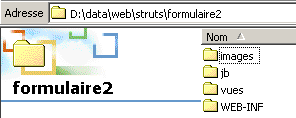 | 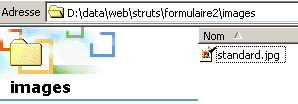 |
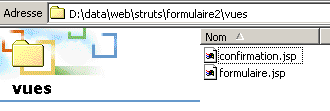 | 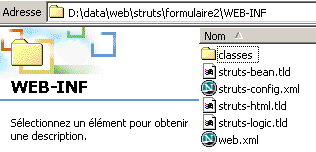 |

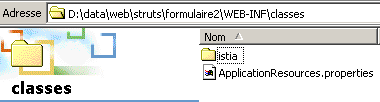
Note that the ApplicationResources.properties file above is required by the struts-bean tag library. We know that this file contains the application’s messages. These are accessible to the struts-bean library. Here, our application does not define any messages. Therefore, the ApplicationResources.properties file exists but is empty.
6.7. Conclusion
In this lesson, we have detailed how to manage the various components of a HTML form. We can now use complex forms in our Struts applications.