3. Form processing by the controller
We will now focus on how the controller processes the form values when the user clicks the [Envoyer] button on the form.
3.1. The struts-config.xml file
The new Struts controller configuration file struts-config.xml is as follows:
<?xml version="1.0" encoding="ISO-8859-1" ?>

<!DOCTYPE struts-config PUBLIC
          "-//Apache Software Foundation//DTD Struts Configuration 1.1//EN"
          "http://jakarta.apache.org/struts/dtds/struts-config_1_1.dtd">

<struts-config>
    <form-beans>
        <form-bean
            name="frmPersonne"
            type="istia.st.struts.personne.FormulaireBean"
        />
    </form-beans>

    <action-mappings>
      <action
          path="/main"
          name="frmPersonne"
            scope="session"
            validate="true"
            input="/erreurs.do"
          parameter="/vues/main.html"
          type="org.apache.struts.actions.ForwardAction"
      />
      <action
          path="/erreurs"
          parameter="/vues/erreurs.personne.jsp"
          type="org.apache.struts.actions.ForwardAction"
      />
      <action
          path="/reponse"
          parameter="/vues/reponse.personne.jsp"
          type="org.apache.struts.actions.ForwardAction"
      />
      <action
          path="/formulaire"
          parameter="/vues/formulaire.personne.jsp"
          type="org.apache.struts.actions.ForwardAction"
      />
    </action-mappings>

    <message-resources parameter="ressources.personneressources"/>
</struts-config>
We have highlighted the changes:
- a <form-beans> section appears. It is used to define the classes associated with each form in the application. There must be as many <form-bean> tags as there are different forms in the application. Here, we have only one form, so there is only one <form-bean> section. For each form, we must define:
- its name (name attribute)
- the name of the class derived from ActionForm that is responsible for storing the form values (type attribute)
These two attributes cannot be arbitrary. They must be identical to those used in the <html:form> tag of the HTML code for the form. Here is the code for the form (name, age):
The form must be declared in the same way in the struts-config.html file. This is what is done here:
- The configuration of the /main action has changed. This action is responsible for processing the form values. Therefore, we must provide the information it needs in the action:
      <action
          path="/main"
          name="frmPersonne"
            scope="session"
            validate="true"
            input="/erreurs.do"
          parameter="/vues/main.html"
          type="org.apache.struts.actions.ForwardAction"
      />
The /main servlet will process a form, which must be given a name. The name attribute handles this. This name must reference the name attribute of one of the <form-bean> sections, in this case frmPersonne.
The scope="session" attribute indicates that the form values must be stored in the session. This is not always necessary. Here, it is. Indeed, in the /reponse.do and /erreurs.do views, we find links leading back to the form. In both cases, we want to display the form with the values entered by the user during a previous client-server exchange. Hence the need to store the form in the session.
The validate attribute indicates whether or not the validate method of the frmPersonne object should be called. This method is used to verify the validity of the form data. Here, we specify that the data must be verified, which means we will need to write a validate method in the FormulaireBean class. The form’s validate method is called by the Struts controller before the /main servlet is invoked. It returns an object of type ActionErrors, which is analogous to an error list. If this list exists and is not empty, the Struts controller will stop there and send the view specified by the input attribute as the response. The view will receive the ActionErrors list in the request, which it can display using the <html:errors> tag. Above, we specify that in case of errors, the /main servlet must send the /erreurs.do view. Note that this view is associated with the following URL /views/erreurs.reponse.jsp:
<%@ taglib uri="/WEB-INF/struts-html.tld" prefix="html" %>

<html>
    <head>
      <title>Personne</title>
  </head>
  <body>
      <h2>Les erreurs suivantes se sont produites</h2>
        <html:errors/>
    <html:link page="/formulaire.do">
            Retour au formulaire
        </html:link>
    </body>
</html>
The view correctly uses the <html:errors> tag, which will display the list of errors. In this error list, you will find not error messages but message identifiers present in the file referenced by the <message-resources> tag (note: resources with a single "s"):
The tag below indicates that the file containing the messages used by the application is located in the file WEB-INF/classes/ressources/personneressources.properties:
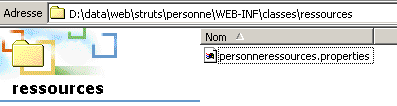
What is in this file? It is a properties file corresponding to the Java Properties class, i.e., a set of key=value lines:
errors.header=<ul>
errors.footer=</ul>
personne.formulaire.nom.vide=<li>Vous devez indiquer un nom</li>
personne.formulaire.age.incorrect=<li>L'âge [{0}] est incorrect</li>
This message file has at least two functions:
- it allows you to change the application's messages without having to recompile it
- it enables the internationalization of Struts applications. You can create multiple resource files, one per language. Struts will automatically use the correct message file provided certain naming conventions are followed.
- If the form’s validate method returns an empty error list, then the Struts controller calls the execute method of the ForwardAction servlet. It is important to understand here that when the servlet’s `execute` method runs, it means the form data has been deemed valid (provided, of course, it was validated via `validate="true"`). It is within the `execute` method of the servlet associated with the action that the developer actually processes the form. This is where the core of the processing takes place (application logic, use of business classes and data access classes). Ultimately, the method returns a result of type ActionForward, which tells the constructor which view to send back to the client. Here we have used Struts’ predefined action ForwardAction. Its execute method simply returns a ActionForward pointing to the URL specified by the parameter attribute:
      <action
          path="/main"
          name="frmPersonne"
            validate="true"
            input="/erreurs.do"
          parameter="/vues/main.html"
          type="org.apache.struts.actions.ForwardAction"
      />
So, if the form data is valid, the /main action will return the /vues/main.html view that we have already used.
3.2. The new class FormulaireBean
We have already created an initial version from the FormulaireBean class, which is responsible for storing the data (name, age) from the formulaire.personne.jsp form. This version did not validate the data. Now, we must do so since we specified in the struts-config.xml file that the form data must be validated (validate="true") before being sent to the ForwardAction servlet. The class code becomes the following:
package istia.st.struts.personne;

import javax.servlet.http.*;
import org.apache.struts.action.*;

public class FormulaireBean
  extends ActionForm {
   // name
  private String nom = null;
  public String getNom() {
    return nom;
  }

  public void setNom(String nom) {
    this.nom = nom;
  }

   // age
  private String age = null;
  public String getAge() {
    return age;
  }

  public void setAge(String age) {
    this.age = age;
  }

   // validation
  public ActionErrors validate(ActionMapping mapping, HttpServletRequest request) {
    // error management
    ActionErrors erreurs = new ActionErrors();
     // name must be non-empty
    if (nom == null || nom.trim().equals("")) {
      erreurs.add("nomvide", new ActionError("personne.formulaire.nom.vide"));
       // age must be a positive integer
    }
    if (age == null || age.trim().equals("")) {
      erreurs.add("agevide", new ActionError("personne.formulaire.age.vide"));
    }
    else {
      // age must be a positive integer
      if (!age.matches("^\\s*\\d+\\s*$")) {
        erreurs.add("ageincorrect", new ActionError("personne.formulaire.age.incorrect", age));
        // return the list of errors
      }
    } //if
     // return the error list
    return erreurs;
  }
}
The new feature lies in the implementation of the validate method. This method is called by the Struts controller after it has assigned the values of the form fields with the same names to the name and age attributes of the class. It must verify the validity of the name and age attributes. The code above is fairly straightforward:
- an empty error list (ActionErrors errors) is created
- the name field is checked. If it is empty, an error is added to the errors list using the method ActionErrors.add("key", ActionError).
- The same is done if the age field is not an integer.
- The validate method returns the list of errors (ActionErrors errors) to the Struts controller. If errors is null or if erreurs.size() returns 0, the controller assumes that no errors occurred. It will then execute the `execute` method of the Action class associated with the action (type="org.apache.struts.actions.ForwardAction"). Otherwise, it will return the view associated with the error case in the form (input="/erreurs.do").
We add an error to the list ActionErrors errors via ActionErrors.add("cléErreur", new ActionError("cléMessage"[,param0, param1, param2, param3])). The first parameter "cléErreur" is used to uniquely identify a ActionError element in the ActionErrors list, much like in a dictionary. It can be any value. ActionError is an object that is associated with an error message using its constructor ActionError(String cléMessage[,String param0, String param1, String param2, String param3]) where cléMessage is the identifier of the message associated with the error and up to 4 optional parameters. The identifier cléMessage is not arbitrary. It is one of the identifiers found in the file designated by the <message-resources> tag in the struts-config.xml file:
Note that this file (actually WEB-INF/classes/ressources/personneressources.properties) contains the following keys:
errors.header=<ul>
errors.footer=</ul>
personne.formulaire.nom.vide=<li>Vous devez indiquer un nom</li>
personne.formulaire.age.incorrect=<li>L'âge [{0}] est incorrect</li>
We can verify that the message keys used by the validate method of the FormulaireBean class do indeed exist in the file above. We used the HTML tag <li> for each error message so that the <html:errors> tag displays them as a HTML list. We have seen that the ActionError object can be constructed not only with a message key but also with additional parameters:
If a ActionError has been constructed with additional parameters (up to a maximum of four), these are accessible in the message text via the notation {0} to {3}. Thus, the validate method of FormulaireBean constructs a ActionError with the key personne.formulaire.age.incorrect and the additional parameter param0 age:
The message associated with the key personne.formulaire.age.incorrect in the .properties file is
The {0} will be replaced by the age value. Finally, the messages with the keys errors.header and errors.footer will be written before and after the list of errors, respectively. Here, these two keys are used to include the tags HTML <ul> and </ul>, which must surround the <li> tags.
3.3. Form validation tests
We are ready to test the form's validity. Below is a reminder of where the various application components should be placed:
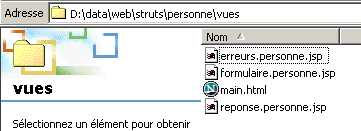 | |
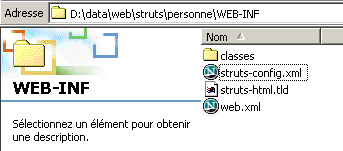 | |
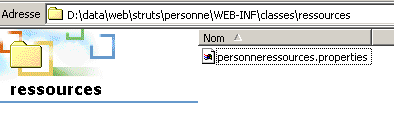 | |
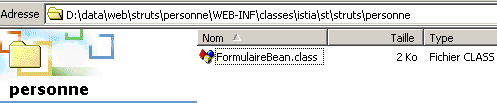 |
3.3.1. Test 1
Let’s restart Tomcat so it can read the new configuration files, then request the URL http://localhost:8080/strutspersonne/formulaire.do:
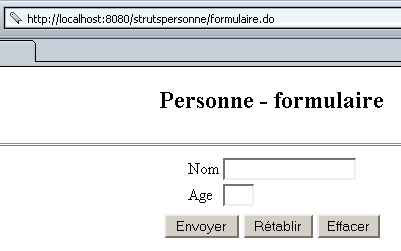
Explanations:
- In struts-config.html, the following section was exploited:
      <action
          path="/formulaire"
          parameter="/vues/formulaire.personne.jsp"
          type="org.apache.struts.actions.ForwardAction"
      />
If we view the HTML code for the received page, we see that the <form> tag on the page is as follows:
The [Envoyer] button, which is of type submit, will therefore send the form data to the URL /strutspersonne/main.do.
3.3.2. Test 2
Let’s use the [Envoyer] button while leaving the input fields blank. We get the following response:
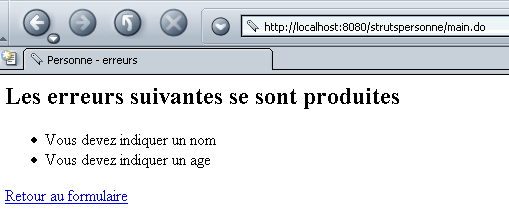
Explanation:
- As indicated above, the form data was sent to URL /strutspersonne/main.do. The following sections of the struts-config.xml file were then used:
        <form-bean
            name="frmPersonne"
            type="istia.st.struts.personne.FormulaireBean"
            scope="session"
        />
....
      <action
          path="/main"
          name="frmPersonne"
            validate="true"
            input="/erreurs.do"
          parameter="/vues/main.html"
          type="org.apache.struts.actions.ForwardAction"
      />
The /main action has been triggered. It uses the frmPersonne form (name="frmPersonne"). The Struts controller has therefore instantiated, if necessary, an object of the FormulaireBean class (type="istia.st.struts.personne.FormulaireBean" in the form-bean tag). It populated the name and age attributes of this object with the fields of the same name from the HTML form:
          <table>
            <tr>
              <td>Nom</td>
            <td><html:text property="nom" size="20"/></td>
          </tr>
          <tr>
              <td>Age</td>
            <td><html:text property="age" size="3"/></td>
          </tr>
            <tr>
        </table>
Once this is done, the Struts controller calls the validate method of the FormulaireBean object because the validate attribute of the /main action is set to true in the configuration file:
      <action
          path="/main"
          name="frmPersonne"
            validate="true"
            input="/erreurs.do"
          parameter="/vues/main.html"
          type="org.apache.struts.actions.ForwardAction"
      />
The validate method of the FormulaireBean class is as follows:
  // validation
  public ActionErrors validate(ActionMapping mapping, HttpServletRequest request) {
    // error management
    ActionErrors erreurs = new ActionErrors();
     // name must be non-empty
    if (nom == null || nom.trim().equals("")) {
      erreurs.add("nomvide", new ActionError("personne.formulaire.nom.vide"));
       // age must be a positive integer
    }
    if (age == null || age.trim().equals("")) {
      erreurs.add("agevide", new ActionError("personne.formulaire.age.vide"));
    }
    else {
      // age must be a positive integer
      if (!age.matches("^\\s*\\d+\\s*$")) {
        erreurs.add("ageincorrect", new ActionError("personne.formulaire.age.incorrect", age));
        // return the list of errors
      }
    } //if
     // return the error list
    return erreurs;
  }
Since the fields [nom] and [age] were empty, the validate method above generated a list of two errors, which it returned to the Struts controller. Because there were errors, the controller then returned the view associated with the input attribute to the client. To determine which view this was, it used the following section of its configuration file:
      <action
          path="/erreurs"
          parameter="/vues/erreurs.personne.jsp"
          type="org.apache.struts.actions.ForwardAction"
      />
It ultimately sent the view /views/erreurs.personne.jsp. This view has the following code:
<%@ taglib uri="/WEB-INF/struts-html.tld" prefix="html" %>

<html>
    <head>
      <title>Personne</title>
  </head>
  <body>
      <h2>Les erreurs suivantes se sont produites</h2>
        <html:errors/>
    <html:link page="/formulaire.do">
            Retour au formulaire
        </html:link>
  </body>
</html>
The <html:errors> tag simply displays the list of messages sent to it by the Struts controller. It uses the message file specified by the <message-resources> tag:
It contains the following keys and messages:
personne.formulaire.nom.vide=<li>Vous devez indiquer un nom</li>
personne.formulaire.age.vide=<li>Vous devez indiquer un age</li>
personne.formulaire.age.incorrect=<li>L'âge [{0}] est incorrect</li>
errors.header=<ul>
errors.footer=</ul>
- The message associated with the key errors.header is written
- the messages associated with the various keys in the received ActionErrors list are written
- the message associated with key errors.footer is written
3.3.3. Test 3
Let's use the [Retour au formulaire] link on the errors page. We get the following page:
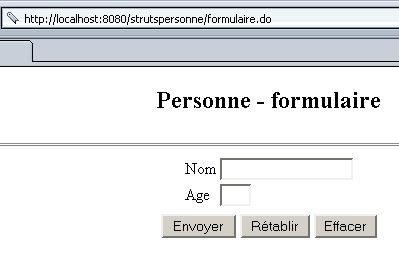
Explanations:
- The link [Retour au formulaire] has the following code:
The Struts controller used the following section from its configuration file:
      <action
          path="/formulaire"
          parameter="/vues/formulaire.personne.jsp"
          type="org.apache.struts.actions.ForwardAction"
      />
It therefore returned the view /views/formulaire.personne.jsp.
3.3.4. Test 4
We fill out the following form and then use the [Envoyer] button:
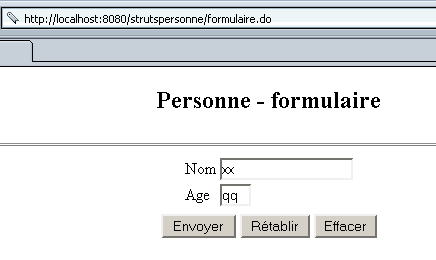
We receive the following response:
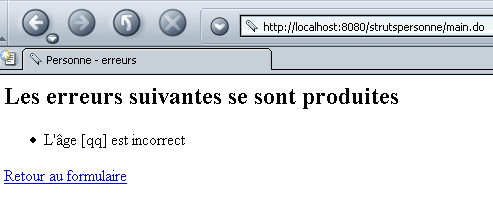
Explanations: these are the same as for Test 2.
3.3.5. Test 5
We use the link [Retour au formulaire] above. We get the following page:
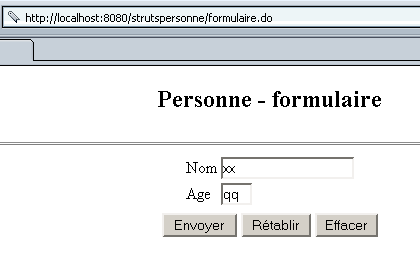
We see that the form appears exactly as we submitted it.
Explanations: These are the same as for Test #3, with additional information:
- The displayed form HTML has the following tags:
          <table>
            <tr>
              <td>Nom</td>
            <td><html:text property="nom" size="20"/></td>
          </tr>
          <tr>
              <td>Age</td>
            <td><html:text property="age" size="3"/></td>
          </tr>
            <tr>
        </table>
The <html:text> tags have two functions:
- When sending form values from the client to the server, the values of the form input fields are assigned to the fields of the same name in the FormulaireBean object
- when the server sends the HTML code for the form to be displayed to the client, the value attributes of the input fields associated with the <html:text> tags are initialized with the values of the fields with the same name in the FormulaireBean object.
We are dealing here with two different client-server exchanges:
- in the first, the user filled out the form and submitted it to the server
- in the second, the user used the [Retour au formulaire] link to return to the form.
The only way for the form to be redisplayed with its original values in the second interaction is for those values to be stored in the client’s session. This is what was specified in the section configuring the /main action:
      <action
          path="/main"
          name="frmPersonne"
            scope="session"
            validate="true"
            input="/erreurs.do"
          parameter="/vues/main.html"
          type="org.apache.struts.actions.ForwardAction"
      />
If we had set scope="request", the form data would not have been stored in the session, and we would not have been able to retrieve its values in the second exchange.
3.3.6. Test 6
Let’s return to the form to enter valid data this time:
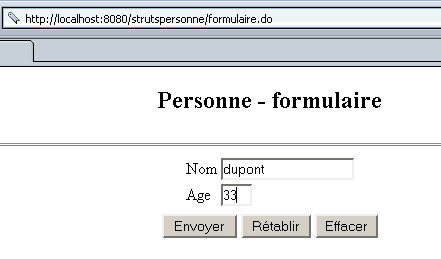
Submit the form. We get the following result:
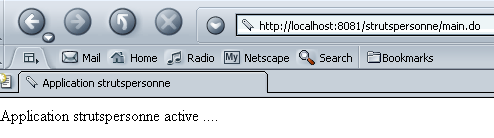
Explanation:
- Since the [Envoyer] button sends the form values to URL /strutspersonne/main.do, we see the same explanations as in Test #2 until the result ActionErrors from the validate method of FormulaireBean is returned to the Struts controller. But here, this list is empty. The controller then uses a new part of the /main action configuration:
      <action
          path="/main"
          name="frmPersonne"
            scope="session"
            validate="true"
            input="/erreurs.do"
          parameter="/vues/main.html"
          type="org.apache.struts.actions.ForwardAction"
      />
The Struts controller creates, if necessary, an object of the type specified by the type attribute. The execute method of this class is executed and must return an object of type ActionForward specifying the view that the controller must send to the client as a response. Here, the type attribute refers to the predefined class ForwardAction. The execute method of this class does nothing and simply returns a ActionForward object pointing to the view defined by the parameter attribute, in this case the view /vues/main.html. This is indeed the view that the controller returned.
3.3.7. Test 7
We request the view /formulaire.do again:
We see the form as we submitted it. The explanation has already been given. By configuration (scope="session"), we specified that the form should remain in the session. Its values are therefore preserved throughout client-server exchanges.
We’re almost done. We still need to create a real action for when the form data is valid. For now, we’ve used the predefined action ForwardAction to simplify our demonstration.
3.4. New configuration for the /main action
We are not changing the current struts-config.xml configuration file, except to modify its /main section as follows:
      <action
          path="/main"
          name="frmPersonne"
            scope="session"
            validate="true"
            input="/erreurs.do"
          type="istia.st.struts.personne.FormulaireAction"
      >
            <forward name="reponse" path="/reponse.do"/>
        </action>
The type attribute now refers to another class called FormulaireAction, which we will need to create. It is the execute method of this class that will be executed if the data in the frmPersonne form is valid. We have specified that the execute method does what it is supposed to do and returns an object of type ActionForward indicating the view that the controller should return to the client. There are often several possible views depending on the result of the form processing. The list of different possible views is specified within the <forward> tags included in the <action> tag. The syntax for such a tag is as follows:
any name that uniquely identifies a view | |
URL of the view associated with the key |
3.5. The FormulaireAction class
Writing the FormulaireAction class essentially consists of writing its execute method:
package istia.st.struts.personne;

import org.apache.struts.action.Action;
import org.apache.struts.action.ActionMapping;
import org.apache.struts.action.ActionForm;
import org.apache.struts.action.ActionForward;
import javax.servlet.http.HttpServletRequest;
import javax.servlet.http.HttpServletResponse;
import java.io.IOException;
import javax.servlet.ServletException;

public class FormulaireAction extends Action {

  public ActionForward execute(ActionMapping mapping, ActionForm form,
                               HttpServletRequest request, HttpServletResponse response)
                                         throws IOException,ServletException {

     // we have a valid form, otherwise we wouldn't have got here
    FormulaireBean formulaire=(FormulaireBean)form;
    request.setAttribute("nom",formulaire.getNom());
    request.setAttribute("age",formulaire.getAge());
    return mapping.findForward("reponse");
  }//execute
}
The execute method takes four parameters:
- ActionMapping mapping: an "image" object representing the configuration of the currently executing action; in this case, an image of the following configuration:
      <action
          path="/main"
          name="frmPersonne"
            validate="true"
            input="/erreurs.do"
          type="istia.st.struts.personne.FormulaireAction"
      >
            <forward name="reponse" path="/reponse.do"/>
        </action>
This allows the action to access the keys associated with the views that can be returned to the client at the end of the action. The method being executed must return one of these keys.
- ActionForm form: the bean object containing the form values used by the current action. Here, it is the frmPersonne object of type FormulaireBean. Thus, the action has access to the form values.
- HttpServletRequest request: the client request, which may have been enriched by various servlets. The action thus has access to all parameters of the initial request (request.getParameter) as well as all attributes added to this initial request (request.getAttribute). In our example, the execute method enriches the request by adding the name and age. This is completely unnecessary here since these two values are already present, but as parameters rather than attributes. The code is included here for illustrative purposes.
- HttpServletResponse response: the response that will be sent to the client. The action could enrich this response. Here, it does not.
Here, we are dealing with a special case. The execute method has almost nothing to do. It simply needs to indicate that the next view is the **/reponse.do view and specify in the request that this view will receive the name and age information it needs to display. It does this using the findForward method of the ActionMapping class, which accepts as a parameter one of the keys found in the forward** tags of the action’s configuration. Here, there is only one such tag:
Our execute method therefore returns a ActionForward with "reponse" as the key to indicate that the /reponse.do view must be sent.
3.6. Testing FormulaireAction
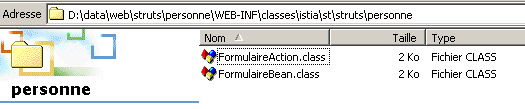
We compile the previous class with JBuilder and place the generated .class file in WEB-INF/classes:
We modify the view /vues/reponse.personne.jsp:
<%
     // we retrieve the data name, age
  String nom=(String)request.getAttribute("nom");
  String age=(String)request.getAttribute("age");
%>

<html>
    <head>
      <title>Personne</title>
  </head>
  <body>
      <h2>Personne - réponse</h2>
    <hr>
    <table>
        <tr>
          <td>Nom</td>
        <td><%= nom %>
      </tr>
        <tr>
          <td>Age</td>
        <td><%= age %>
      </tr>
    </table>
    <html:link page="/formulaire.do">
            Retour au formulaire
        </html:link>
  </body>
</html>
The view retrieves the name and age information from the request attributes it receives. We request the form from URL http://localhost:8080/strutspersonne/formulaire.do and then fill it out:
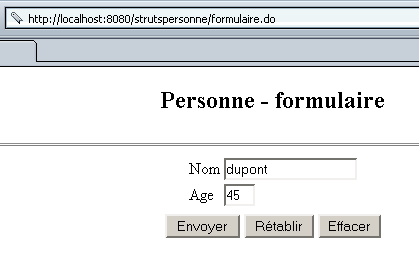
We click the [Envoyer] button and receive the following response:
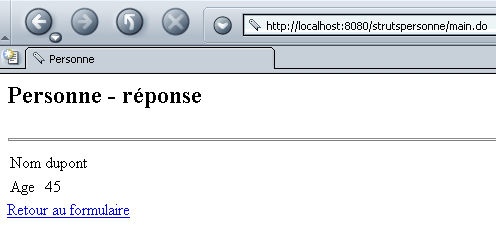
Explanations:
- We will refer to the explanation given for Test #2 for the beginning of the process. Let’s review the configuration of the /main action:
      <action
          path="/main"
          name="frmPersonne"
            scope="session"
            validate="true"
            input="/erreurs.do"
          type="istia.st.struts.personne.FormulaireAction"
      >
            <forward name="reponse" path="/reponse.do"/>
        </action>
- After the form was submitted to the controller at URL /main.do, the controller created or reused a frmPersonne object of type FormulaireBean and populated it with the form values
- The validate method of the frmPersonne object was called. Since the data was valid, the validate method returned an empty ActionErrors list.
- A FormulaireAction object was created or recycled, and its execute method was called. This method returned a ActionForward object with the key "reponse".
- The controller then sent the view associated with the response key, c.a.d. /reponse.do and therefore /views/reponse.personne.jsp.
- The view reponse.personne.jsp was displayed with the values set in the request by the execute method of the object FormulaireAction.
3.7. Conclusion
We have built a complete but simple application. When actually implementing it with Struts, Tomcat, and JBuilder, there are many opportunities to make mistakes, particularly in the application configuration files. At first glance, it may seem simpler to build this application without Struts using a servlet and JSP pages. For beginners, this is probably true. With experience, however, it becomes easier to develop with Struts. Many companies mandate the Struts methodology for their web development for the following reasons:
- Struts adheres to the MVC model
- When all developers work in the same way, application maintenance becomes easier because they have a standard architecture.