3. The Action Model
An action requires the information sent by the browser: the parameters of the URL ([?name=martin&age=42]), form fields, the request body JSON, and sometimes a request header HTTP. The original course refers to the set of this information as the action’s model. This chapter shows how [Spring MVC] provides this information to the action, converts it to the correct type, and validates it. This process is called data binding ([data binding]).
Note on terminology: in [Spring MVC], the word “model” ([Model]) primarily refers to the data that an action passes to its view (Chapter 4, “The View and Its Model”). An action’s model, as used in this chapter, is what it receives.
Examples 07 through 12 are, like those in the previous chapter, modules [Maven] from the folder [examples]. You can run one of them by opening a terminal in that folder and typing [../mvnw spring-boot:run] ([..\mvnw spring-boot:run] under [Windows]); [Ctrl-C] stops the server. Each example has a file named [application.properties] that looks like this:
| # the listening port of the server (8080 by default)
server.port=5000
# the error responses of Spring Boot do not contain the call stack
spring.web.error.include-stacktrace=never
|
- line 2: the server’s listening port;
- line 4: when a request fails, [Spring Boot] responds with an error document JSON (we’ll see many of these in this chapter). This property prevents the exception’s call stack ([stack trace])—which is long and should never be shown to a user—from being included. This is necessary because the [spring-boot-devtools] dependency (the development tools, declared in the parent [pom.xml]) changes several default settings during development: in particular, it adds the exception message (property [spring.web.error.include-message]) and the call stack ([spring.web.error.include-stacktrace]) to this JSON. We keep the message, as it is useful for understanding what happened; in production, without the development tools, it disappears as well.
3.1. Example 07: The parameters of URL
The [controllers/ParametersController.java] file:
| package example07.controllers;
import java.util.Map;
import org.springframework.web.bind.annotation.GetMapping;
import org.springframework.web.bind.annotation.RequestMapping;
import org.springframework.web.bind.annotation.RequestParam;
import org.springframework.web.bind.annotation.RestController;
@RestController
@RequestMapping("/parameters")
public class ParametersController {
// /parameters/action01?name=martin: the [name] URL parameter -> the [name] action parameter
// required = false: the parameter may be missing, it is then null
@GetMapping("/action01")
public String action01(@RequestParam(required = false) String name) {
return "name = [%s], of type %s".formatted(name, name == null ? "null" : name.getClass().getSimpleName());
}
// /parameters/action02?age=42: the value is CONVERTED to the parameter type;
// without required = false, the parameter is mandatory
@GetMapping("/action02")
public String action02(@RequestParam int age) {
return "age = [%d], of type int".formatted(age);
}
// /parameters/action03?age=42: Integer (and not int) accepts the null value
@GetMapping("/action03")
public String action03(@RequestParam(required = false) Integer age) {
return "age = [%s]".formatted(age);
}
// /parameters/action04?page=2: a default value if the parameter is missing
@GetMapping("/action04")
public String action04(@RequestParam(defaultValue = "1") int page) {
return "page = [%d]".formatted(page);
}
// /parameters/action05?q=spring: the name of the URL parameter, when it differs
@GetMapping("/action05")
public String action05(@RequestParam(name = "q", required = false) String search) {
return "search = [%s]".formatted(search);
}
// /parameters/action06?name=martin&age=42: all the parameters at once
@GetMapping("/action06")
public Map<String, String> action06(@RequestParam Map<String, String> parameters) {
return parameters;
}
}
|
Let’s comment on this code:
- Lines 16–17: The annotation [@RequestParam] associates a parameter of the action with a parameter of URL (the part following [?], known as the query string or [query string]). Unless otherwise specified, the parameter in URL has the same name as the parameter in [Java]: [name]. This name is known at runtime only because the parent project of [Spring Boot] instructs the compiler to preserve it in the compiled code (option [-parameters]). An annotation can accept named arguments, called attributes: [required = false] indicates that the parameter may be omitted; in that case, it is equivalent to [null]. Line 18: The method [formatted] replaces each occurrence of [%s] in the string with the following argument; [name.getClass().getSimpleName()] is the short name of the value’s type;
- Lines 23–24: The parameter is declared as type [int]: [Spring MVC] converts the received string (["42"]) into a number. Without the [required = false] attribute, [@RequestParam] makes the parameter required: this is the default value for [required]. A missing parameter, or one whose conversion fails, causes a 400 error, and the action is not executed;
- lines 29–30: a [int] cannot be equal to [null]. For an optional number, the parameter is declared with the type [Integer], the class [Java], which “wraps” a [int] ([wrapper]): A [Integer] object can have the value [null], which allows distinguishing between “no age” and “age 0”;
- lines 35–36: the [defaultValue] attribute provides the value to use when the parameter is missing (it also makes the parameter optional). It is a string, converted in the same way as the received value would be;
- lines 41–42: The attribute [name] specifies the name of the parameter for URL when it differs from that of the parameter [Java]: the [search] parameter of the action receives the [q] parameter from the URL;
- Lines 47–48: A parameter of type [Map<String, String>] labeled [@RequestParam] receives all parameters from URL, without conversion: a dictionary (parameter name, value). The action returns it as-is, and [Spring MVC] serializes it to JSON.
The results:
| curl -i "http://localhost:5000/parameters/action01?name=martin"
|
| HTTP/1.1 200
Content-Type: text/plain;charset=UTF-8
Content-Length: 31
name = [martin], of type String
|
| curl -i "http://localhost:5000/parameters/action01"
|
| HTTP/1.1 200
Content-Type: text/plain;charset=UTF-8
Content-Length: 27
name = [null], of type null
|
The [Tomcat] server does not output the text [OK] after the 200 code on the first line: this text is optional in HTTP/1.1; only the code matters. Quotation marks around the URL are required when it contains the character [&], which has a special meaning for the console; we include them everywhere. A parameter of type [int]:
| curl -i "http://localhost:5000/parameters/action02?age=42"
|
| HTTP/1.1 200
Content-Type: text/plain;charset=UTF-8
Content-Length: 23
age = [42], of type int
|
| curl -i "http://localhost:5000/parameters/action02?age=abc"
|
| HTTP/1.1 400
Content-Type: application/json
{"timestamp":"2026-09-25T16:46:05.177Z","status":400,"error":"Bad Request","message":"Method parameter 'age': Failed to convert value of type 'java.lang.String' to required type 'int'; For input string: \"abc\"","path":"/parameters/action02"}
|
| curl -i "http://localhost:5000/parameters/action02"
|
| HTTP/1.1 400
Content-Type: application/json
{"timestamp":"2026-09-25T16:46:05.205Z","status":400,"error":"Bad Request","message":"Required parameter 'age' is not present.","path":"/parameters/action02"}
|
This is a significant difference from [ASP.NET Core MVC], where an impossible conversion did not prevent the action from executing. With [@RequestParam], [Spring MVC] throws an exception before calling the action: [MethodArgumentTypeMismatchException] for an impossible conversion, [MissingServletRequestParameterException] for a missing required parameter (the server console displays the names of these exceptions). A component of [Spring MVC] converts them into a 400 error response ([Bad Request], invalid request), and [Spring Boot] generates the body of this response: This is the JSON error response already encountered in the previous chapter. Its fields:
- [timestamp]: the date and time of the error (in Coordinated Universal Time);
- [status], [error]: the code HTTP and its description;
- [message]: the exception message, included here because the development tools requested it;
- [path]: the request path.
A browser requesting a page with the code HTML receives a minimal error page instead—the “Whitelabel Error Page.” We’ll see in Example 12 how to handle these exceptions yourself. With the type [Integer]:
| curl -i "http://localhost:5000/parameters/action03?age=42"
|
| HTTP/1.1 200
Content-Type: text/plain;charset=UTF-8
Content-Length: 10
age = [42]
|
| curl -i "http://localhost:5000/parameters/action03"
|
| HTTP/1.1 200
Content-Type: text/plain;charset=UTF-8
Content-Length: 12
age = [null]
|
| curl -i "http://localhost:5000/parameters/action03?age=abc"
|
| HTTP/1.1 400
Content-Type: application/json
{"timestamp":"2026-09-25T16:46:05.250Z","status":400,"error":"Bad Request","message":"Method parameter 'age': Failed to convert value of type 'java.lang.String' to required type 'java.lang.Integer'; For input string: \"abc\"","path":"/parameters/action03"}
|
A missing parameter is treated as [null]; an invalid parameter always results in a 400 error. The default value:
| curl -i "http://localhost:5000/parameters/action04"
|
| HTTP/1.1 200
Content-Type: text/plain;charset=UTF-8
Content-Length: 10
page = [1]
|
| curl -i "http://localhost:5000/parameters/action04?page=2"
|
| HTTP/1.1 200
Content-Type: text/plain;charset=UTF-8
Content-Length: 10
page = [2]
|
| curl -i "http://localhost:5000/parameters/action04?page="
|
| HTTP/1.1 200
Content-Type: text/plain;charset=UTF-8
Content-Length: 10
page = [1]
|
A parameter that is present but empty ([?page=]) is treated as if it were missing: it takes the default value. The last two actions:
| curl -i "http://localhost:5000/parameters/action05?q=spring"
|
| HTTP/1.1 200
Content-Type: text/plain;charset=UTF-8
Content-Length: 17
search = [spring]
|
| curl -i "http://localhost:5000/parameters/action06?name=martin&age=42"
|
| HTTP/1.1 200
Content-Type: application/json
Content-Length: 28
{"name":"martin","age":"42"}
|
Here, age is a string (["42"]): with no declared type, there is no conversion. Finally, parameter names are case-sensitive:
| curl -i "http://localhost:5000/parameters/action01?NAME=martin"
|
| HTTP/1.1 200
Content-Type: text/plain;charset=UTF-8
Content-Length: 27
name = [null], of type null
|
The parameter [NAME] is not the same as the parameter [name], which is therefore missing. This is another difference from [ASP.NET Core MVC], which ignores case. Note that:
- [@RequestParam] links an action parameter to a parameter of the same name in URL, including uppercase letters (attribute [name] if the names differ);
- the parameter is required by default; [required = false] makes it optional, and [defaultValue] provides a fallback value;
- its value is converted to the declared type, and an impossible conversion results in a 400 error without executing the action. An object type ([Integer], not [int]) allows for receiving [null].
Accented characters and spaces are encoded in a URL ([%C3%A9] for [é], etc.): [Spring MVC] decodes them before the binding. The browser displays the encoded URL and the received JSON:

3.2. Example 08: An action template described by a class
When an action has multiple parameters, they are described by a class. Each field in the class has validation constraints, in the form of annotations. These are defined by [Bean Validation], the [Java] validation standard (package [jakarta.validation]), the most widely used implementation of which is [Hibernate Validator]. They are not part of [Spring MVC]: you must add the validation starter to the [pom.xml] from the example:
| <?xml version="1.0" encoding="UTF-8"?>
<project xmlns="http://maven.apache.org/POM/4.0.0"
xmlns:xsi="http://www.w3.org/2001/XMLSchema-instance"
xsi:schemaLocation="http://maven.apache.org/POM/4.0.0 https://maven.apache.org/xsd/maven-4.0.0.xsd">
<modelVersion>4.0.0</modelVersion>
<parent>
<groupId>course.springmvc</groupId>
<artifactId>examples</artifactId>
<version>1.0</version>
</parent>
<artifactId>example08</artifactId>
<dependencies>
<!-- validation (Bean Validation, Hibernate Validator) -->
<dependency>
<groupId>org.springframework.boot</groupId>
<artifactId>spring-boot-starter-validation</artifactId>
</dependency>
</dependencies>
</project>
|
- lines 6–10: the parent project, [pom.xml], in the [examples] folder;
- Lines 13–19: The starter [spring-boot-starter-validation] includes [Hibernate Validator] and configures it. Remember that a starter is a dependency that groups together other dependencies, along with their versions and automatic configuration. Examples 09 through 12 share the same dependency.
The file [models/PersonModel.java]:
| package example08.models;
import jakarta.validation.constraints.Email;
import jakarta.validation.constraints.Max;
import jakarta.validation.constraints.Min;
import jakarta.validation.constraints.NotBlank;
import jakarta.validation.constraints.NotNull;
import jakarta.validation.constraints.Pattern;
import jakarta.validation.constraints.Size;
// the action model: a class whose every field carries its constraints
public class PersonModel {
@NotBlank(message = "the name is required")
@Size(min = 2, max = 20, message = "the name must have 2 to 20 characters")
private String name;
@NotNull(message = "the age is required")
@Min(value = 0, message = "the age must be between 0 and 150")
@Max(value = 150, message = "the age must be between 0 and 150")
private Integer age;
@NotNull(message = "the title is required")
@Pattern(regexp = "Mr|Mme|Melle", message = "unknown title")
private String title;
// optional: no @NotNull
@Email(message = "invalid email address")
private String email;
// the accessors (getters and setters): model binding fills
// each field through its setter; JSON serialization reads it through its getter
public String getName() { return name; }
public void setName(String name) { this.name = name; }
public Integer getAge() { return age; }
public void setAge(Integer age) { this.age = age; }
public String getTitle() { return title; }
public void setTitle(String title) { this.title = title; }
public String getEmail() { return email; }
public void setEmail(String email) { this.email = email; }
}
|
Let’s comment on this code:
- lines 3–9: the validation annotations, all in the [jakarta.validation.constraints] package;
- lines 14–16: the name is required and cannot be empty ([@NotBlank] rejects [null], an empty string, and a string consisting of spaces) and must be between 2 and 20 characters long ([@Size]). Each annotation accepts a custom error message (attribute [message]);
- lines 18–21: The age is converted to an integer, which is required ([@NotNull]), and must be between 0 and 150 ([@Min], [@Max]). It is declared as [Integer] rather than [int], so that “no age” ([null]) is detected by [@NotNull] instead of being set to 0;
- lines 23–25: the title must match the regular expression [Mr|Mme|Melle] ([@Pattern]): it must be one of these three values;
- lines 28–29: the email address is optional (no [@NotNull]); if present, it must be valid ([@Email]). All constraints other than [@NotNull] and [@NotBlank] accept the value [null]: this is what makes a field optional;
- lines 33–43: the accessors. By convention, the value of the field [name] is read by the method [getName] ([getter]) and written by the method [setName] ([setter]). A class that has a parameterless constructor (in this case, the one implicitly provided by [Java]) and accessors that follow this convention is called a JavaBean. This is the form expected by the data binding: [Spring MVC] creates the object using its parameterless constructor, then, for each parameter in the request, calls the setter with the same name: [setName("martin")] for [?name=martin], after converting the value to the setter’s type. The converter JSON, on the other hand, reads the fields using their getters.
The file [controllers/PersonsController.java]:
| package example08.controllers;
import java.util.LinkedHashMap;
import java.util.Map;
import org.springframework.web.bind.annotation.GetMapping;
import org.springframework.web.bind.annotation.RequestMapping;
import org.springframework.web.bind.annotation.RestController;
import example08.models.PersonModel;
import jakarta.validation.Valid;
@RestController
@RequestMapping("/persons")
public class PersonsController {
// /persons/action01?name=martin&age=42&title=Mr
// @Valid: the model is validated BEFORE the action runs; if it is
// invalid, the request is rejected AUTOMATICALLY (400 error)
@GetMapping("/action01")
public Map<String, Object> action01(@Valid PersonModel person) {
Map<String, Object> response = new LinkedHashMap<>();
response.put("person", person);
response.put("ageType", person.getAge().getClass().getSimpleName());
return response;
}
}
|
- Line 21: The action receives a [PersonModel]. The parameter has no annotation [@RequestParam]: for a parameter whose type is not a "simple" type (string, number, date, etc.), [Spring MVC] implies the annotation [@ModelAttribute], which could have been written. The parameter is then a command object ([command object]), created and populated by the data binding as just described. Query parameters that do not correspond to any setter are ignored;
- line 21: the annotation [@Valid] (from [jakarta.validation]) requests that the object be validated after it has been populated, by checking the constraints on its fields. If the data binding or validation fails, [Spring MVC] throws the [MethodArgumentNotValidException] exception: the action is not executed, and the response is a 400 error. This is equivalent to the [[ApiController]] attribute of [ASP.NET Core MVC];
- lines 22–25: the action returns the received person and their age type. [LinkedHashMap] is a dictionary that preserves the insertion order of its keys: JSON will output them in that order.
The [application.properties] file in the example has two additional lines:
| # the listening port of the server (8080 by default)
server.port=5000
# the error responses of Spring Boot do not contain the call stack
spring.web.error.include-stacktrace=never
# the error responses detail the validation errors
spring.web.error.include-binding-errors=always
|
- Line 6: When the error response results from a validation check, it contains the list of errors (field [errors]). The development tools already enable this; this line keeps it enabled in production. Without it—and without the development tools—the error response is reduced to [{"timestamp":"...","status":400,"error":"Bad Request","path":"/persons/action01"}]: the client learns that their request is incorrect, but not why.
A valid request, with a [pirate] parameter that does not correspond to any field:
| curl -i "http://localhost:5000/persons/action01?name=martin&age=42&title=Mr&pirate=1"
|
| HTTP/1.1 200
Content-Type: application/json
Content-Length: 83
{"person":{"age":42,"email":null,"name":"martin","title":"Mr"},"ageType":"Integer"}
|
The age is indeed a number (a [Integer]), and the parameter [pirate] was ignored. The person’s properties are sorted alphabetically: this is the default setting for [Jackson] 3, the JSON library used by [Spring MVC]. An invalid query (the response JSON has been formatted for readability: one property per line):
| curl -i "http://localhost:5000/persons/action01?name=m&age=abc&title=Dr&email=xx"
|
| HTTP/1.1 400
Content-Type: application/json
{
"timestamp": "2026-09-25T16:46:41.520Z",
"status": 400,
"error": "Bad Request",
"message": "Validation failed for object='personModel'. Error count: 4",
"errors": [
{
"arguments": [{"arguments":null,"code":"age","codes":["personModel.age","age"],"defaultMessage":"age"}],
"bindingFailure": true,
"code": "typeMismatch",
"codes": ["typeMismatch.personModel.age","typeMismatch.age","typeMismatch.java.lang.Integer","typeMismatch"],
"defaultMessage": "Failed to convert property value of type 'java.lang.String' to required type 'java.lang.Integer' for property 'age'; For input string: \"abc\"",
"field": "age",
"objectName": "personModel",
"rejectedValue": "abc"
},
{
"objectName": "personModel",
"field": "email",
"rejectedValue": "xx",
"codes": ["Email.personModel.email","Email.email","Email.java.lang.String","Email"],
"arguments": [{"arguments":null,"code":"email","codes":["personModel.email","email"],"defaultMessage":"email"},[],{"arguments":null,"codes":[".*"],"defaultMessage":".*"}],
"bindingFailure": false,
"code": "Email",
"defaultMessage": "invalid email address"
},
{
"objectName": "personModel",
"field": "title",
"rejectedValue": "Dr",
"codes": ["Pattern.personModel.title","Pattern.title","Pattern.java.lang.String","Pattern"],
"arguments": [{"arguments":null,"code":"title","codes":["personModel.title","title"],"defaultMessage":"title"},[],{"arguments":null,"codes":["Mr|Mme|Melle"],"defaultMessage":"Mr|Mme|Melle"}],
"bindingFailure": false,
"code": "Pattern",
"defaultMessage": "unknown title"
},
{
"objectName": "personModel",
"field": "name",
"rejectedValue": "m",
"codes": ["Size.personModel.name","Size.name","Size.java.lang.String","Size"],
"arguments": [{"arguments":null,"code":"name","codes":["personModel.name","name"],"defaultMessage":"name"},20,2],
"bindingFailure": false,
"code": "Size",
"defaultMessage": "the name must have 2 to 20 characters"
}
],
"path": "/persons/action01"
}
|
The action was not executed. The field [errors] lists the errors, one per rejected field. For each:
- [field], [rejectedValue]: the field and the rejected value;
- [defaultMessage]: the error message; this is the most useful;
- [code]: the name of the violated constraint ([Size], [Email]...) or [typeMismatch] for a conversion error; [bindingFailure] is equivalent to [true] for a conversion error (the error occurred during the link, before validation);
- [codes], [arguments]: keys and values used to look up the message in a message file. This is how the English error message for the conversion error (key [typeMismatch...]) will be replaced with a custom message, as shown in Example 19.
The order of the errors is not guaranteed: it may change from one run to the next. The same applies without any parameters:
| curl -i http://localhost:5000/persons/action01
|
| HTTP/1.1 400
Content-Type: application/json
{
"timestamp": "2026-09-25T16:46:41.574Z",
"status": 400,
"error": "Bad Request",
"message": "Validation failed for object='personModel'. Error count: 3",
"errors": [
{
"objectName": "personModel",
"field": "age",
"rejectedValue": null,
"codes": ["NotNull.personModel.age","NotNull.age","NotNull.java.lang.Integer","NotNull"],
"arguments": [{"arguments":null,"code":"age","codes":["personModel.age","age"],"defaultMessage":"age"}],
"bindingFailure": false,
"code": "NotNull",
"defaultMessage": "the age is required"
},
{
"objectName": "personModel",
"field": "title",
"rejectedValue": null,
"codes": ["NotNull.personModel.title","NotNull.title","NotNull.java.lang.String","NotNull"],
"arguments": [{"arguments":null,"code":"title","codes":["personModel.title","title"],"defaultMessage":"title"}],
"bindingFailure": false,
"code": "NotNull",
"defaultMessage": "the title is required"
},
{
"objectName": "personModel",
"field": "name",
"rejectedValue": null,
"codes": ["NotBlank.personModel.name","NotBlank.name","NotBlank.java.lang.String","NotBlank"],
"arguments": [{"arguments":null,"code":"name","codes":["personModel.name","name"],"defaultMessage":"name"}],
"bindingFailure": false,
"code": "NotBlank",
"defaultMessage": "the name is required"
}
],
"path": "/persons/action01"
}
|
Only one message per field: The constraints [@Size] and [@Pattern] accept the value [null]; only [@NotBlank] and [@NotNull] reject it. Like [@RequestParam], the data binding is case-sensitive: with [?NAME=martin&age=42&title=Mr], you get the error “the name is required,” because [NAME] does not match any setter.
3.2.1. Why a class named JavaBean and not a record?
Starting with [Java] 16, a single-line record describes a non-modifiable data class: [record Point(int x, int y) {}] declares the fields [x] and [y], a constructor that takes all of them, and the read methods [x()] and [y()]. A record has no setters. [Spring MVC] knows how to populate a record: it calls its constructor with the query parameters (this is called constructor binding). Let’s replace, just to see, the class [PersonModel] with the equivalent record (the action then reads the age using [person.age()]):
| public record PersonModel(
@NotBlank(message = "the name is required")
@Size(min = 2, max = 20, message = "the name must have 2 to 20 characters")
String name,
@NotNull(message = "the age is required")
@Min(value = 0, message = "the age must be between 0 and 150")
@Max(value = 150, message = "the age must be between 0 and 150")
Integer age,
@NotNull(message = "the title is required")
@Pattern(regexp = "Mr|Mme|Melle", message = "unknown title")
String title,
@Email(message = "invalid email address")
String email) {
}
|
A valid query returns the same result, up to the order of the JSON properties: a record’s properties are written in the order of its components ([{"name":"martin","age":42,"title":"Mr","email":null}]). But the previous invalid query now returns only an error:
| curl -i "http://localhost:5000/persons/action01?name=m&age=abc&title=Dr&email=xx"
|
| HTTP/1.1 400
Content-Type: application/json
{
"timestamp": "2026-09-25T16:47:45.491Z",
"status": 400,
"error": "Bad Request",
"message": "Validation failed for object='personModel'. Error count: 1",
"errors": [
{
"arguments": [{"arguments":null,"code":"age","codes":["personModel.age","age"],"defaultMessage":"age"}],
"bindingFailure": true,
"code": "typeMismatch",
"codes": ["typeMismatch.personModel.age","typeMismatch.age","typeMismatch.java.lang.Integer","typeMismatch"],
"defaultMessage": "Failed to convert value of type 'java.lang.String' to required type 'java.lang.Integer'; For input string: \"abc\"",
"field": "age",
"objectName": "personModel",
"rejectedValue": "abc"
}
],
"path": "/persons/action01"
}
|
The age conversion failed; therefore, the record constructor could not be called because one of its parameters lacked a value; with no object, there is no validation: errors in the name, title, and email address are not reported. With a JavaBean, on the other hand, each setter is called independently: an incorrectly converted field is left blank and receives a conversion error, while the others are filled in, and validation proceeds (example 09). For a HTML form, where the goal is to report all errors at once, this is essential: all forms in this course are therefore JavaBeans forms. A record remains valid for a template whose fields cannot have conversion errors: this is the case in Example 10.
This automatic rejection is suitable for a JSON server, queried by a [JavaScript] client that displays errors in its own way. For a HTML application, a JSON error makes no sense: the goal is to redisplay the form with its errors. The following example shows how to maintain control.
The [PersonModel] class in Example 09 is identical to the one in Example 08; only the controller changes. The [controllers/PersonsController.java] file:
| package example09.controllers;
import java.util.stream.Collectors;
import org.springframework.http.MediaType;
import org.springframework.validation.BindingResult;
import org.springframework.web.bind.annotation.GetMapping;
import org.springframework.web.bind.annotation.RequestMapping;
import org.springframework.web.bind.annotation.RestController;
import example09.models.PersonModel;
import jakarta.validation.Valid;
@RestController
@RequestMapping("/persons")
public class PersonsController {
// a BindingResult parameter, just after the model: the action is ALWAYS
// executed, and it is the action that decides what to do with an invalid model
@GetMapping(value = "/action01", produces = MediaType.TEXT_HTML_VALUE)
public String action01(@Valid PersonModel person, BindingResult result) {
// result: the result of the binding AND of the validation of the model
if (!result.hasErrors()) {
return "<p>Welcome %s %s (%d years old)</p>".formatted(person.getTitle(), person.getName(), person.getAge());
}
// the errors, field by field
String items = result.getFieldErrors().stream()
.map(error -> "<li>%s: %s</li>".formatted(error.getField(), error.getDefaultMessage()))
.collect(Collectors.joining());
return "<p>The form contains errors:</p><ul>" + items + "</ul>";
}
}
|
Let’s break down this code:
- Line 20: The [produces] attribute of [@GetMapping] sets the response type: [MediaType.TEXT_HTML_VALUE] is the constant ["text/html"]. The string returned by the action is therefore sent as a HTML page;
- line 21: the action has a second parameter, of type [BindingResult], placed immediately after the validated model. Its presence changes everything: in the event of a binding or validation error, [Spring MVC] no longer throws an exception; it stores the errors in this [BindingResult] and executes the action, which decides what to do with them. [BindingResult] serves the same role as [ModelState] in [ASP.NET Core MVC];
- lines 23–25: [hasErrors()] indicates whether there are any errors. If there are none, a welcome page ([%d] is replaced by an integer);
- lines 27–29: otherwise, the list of errors. [getFieldErrors()] returns the list of errors associated with a field ([FieldError]), along with the field name ([getField()]) and the message ([getDefaultMessage()]). The process uses the API from the [Java] streams ([Stream]): [stream()] generates the list items one by one, [map] transforms each one (in this case, an error into a line: HTML [<li>]), [collect(Collectors.joining())] concatenates everything into a string. The argument for [map] is a lambda: an anonymous function, written as [parameter -> expression];
- line 30: a page listing the errors. In both cases, the response has a status code of 200.
A valid request in a browser:

An invalid request:
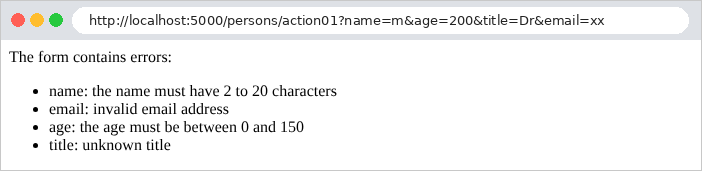
A conversion error appears in [BindingResult] as a validation error, but does not prevent the other fields from being validated:
| curl -i "http://localhost:5000/persons/action01?name=m&age=abc&title=Mr"
|
| HTTP/1.1 200
Content-Type: text/html;charset=UTF-8
Content-Length: 247
<p>The form contains errors:</p><ul><li>age: Failed to convert property value of type 'java.lang.String' to required type 'java.lang.Integer' for property 'age'; For input string: "abc"</li><li>name: the name must have 2 to 20 characters</li></ul>
|
This is the technique that all forms in the case study will use (see Example 19): The action receives the form (a JavaBean annotated with [@Valid]) followed by a [BindingResult], and redisplays the form if there are any errors.
3.4. Example 10: Multiple Parameters
The same parameter can appear multiple times in a request: this is the case with checkboxes on a form or a multiple-selection list ([?color=red&color=green]).
The [controllers/ArraysController.java] file:
| package example10.controllers;
import java.util.LinkedHashMap;
import java.util.List;
import java.util.Map;
import org.springframework.validation.BindingResult;
import org.springframework.validation.ObjectError;
import org.springframework.web.bind.annotation.GetMapping;
import org.springframework.web.bind.annotation.RequestMapping;
import org.springframework.web.bind.annotation.RequestParam;
import org.springframework.web.bind.annotation.RestController;
import example10.models.ChoiceModel;
import jakarta.validation.Valid;
@RestController
@RequestMapping("/arrays")
public class ArraysController {
// /arrays/action01?color=red&color=green: a simple parameter
@GetMapping("/action01")
public Map<String, String> action01(@RequestParam(required = false) String color) {
Map<String, String> response = new LinkedHashMap<>();
response.put("color", color);
return response;
}
// /arrays/action02?color=red&color=green: a list
@GetMapping("/action02")
public Map<String, Object> action02(@RequestParam(required = false) List<String> color) {
List<String> colors = color == null ? List.of() : color;
Map<String, Object> response = new LinkedHashMap<>();
response.put("color", colors);
response.put("count", colors.size());
return response;
}
// /arrays/action03?color=red: a list, validated by ChoiceModel
@GetMapping("/action03")
public Map<String, Object> action03(@Valid ChoiceModel choice, BindingResult result) {
Map<String, Object> response = new LinkedHashMap<>();
response.put("colors", choice.color());
response.put("valid", !result.hasErrors());
response.put("errors", result.getAllErrors().stream().map(ObjectError::getDefaultMessage).toList());
return response;
}
}
|
The [action01] action (lines 22–27) shows what a single parameter receives:
| curl -i "http://localhost:5000/arrays/action01?color=red"
|
| HTTP/1.1 200
Content-Type: application/json
Content-Length: 15
{"color":"red"}
|
| curl -i "http://localhost:5000/arrays/action01?color=red&color=green"
|
| HTTP/1.1 200
Content-Type: application/json
Content-Length: 21
{"color":"red,green"}
|
A parameter of type [String] that receives multiple values concatenates them, separated by commas: ["red,green"]. This is a trap: you think you’re receiving a single color, but you actually receive a disguised list of colors. A list-type parameter ([action02], lines 30–37) receives them all, each in a separate list element. [List<String>] is a list of strings; [List.of()] (line 32) is an empty list, which replaces [null] when the parameter is missing:
| curl -i "http://localhost:5000/arrays/action02?color=red"
|
| HTTP/1.1 200
Content-Type: application/json
Content-Length: 27
{"color":["red"],"count":1}
|
| curl -i "http://localhost:5000/arrays/action02?color=red&color=green"
|
| HTTP/1.1 200
Content-Type: application/json
Content-Length: 35
{"color":["red","green"],"count":2}
|
| curl -i "http://localhost:5000/arrays/action02"
|
| HTTP/1.1 200
Content-Type: application/json
Content-Length: 22
{"color":[],"count":0}
|
Conversely, a single value containing commas is split:
| curl -i "http://localhost:5000/arrays/action02?color=red,green"
|
| HTTP/1.1 200
Content-Type: application/json
Content-Length: 35
{"color":["red","green"],"count":2}
|
Converting a string to a list, like converting a list to a string, uses a comma as the separator. We could also have declared an array ([String[] color]). All that remains is to validate the list. The file [models/ChoiceModel.java]:
| package example10.models;
import java.util.List;
import jakarta.validation.constraints.Pattern;
import jakarta.validation.constraints.Size;
// a list, and a constraint on EACH element of the list:
// the @Pattern annotation is placed INSIDE the generic type List<...>
public record ChoiceModel(
@Size(min = 1, message = "choose at least one color")
List<@Pattern(regexp = "red|green|blue", message = "unknown color: ${validatedValue}") String> color) {
// the "compact" constructor of a record: a missing list becomes an empty list
public ChoiceModel {
color = color == null ? List.of() : color;
}
}
|
Let’s comment on this code:
- line 10: [ChoiceModel] is a single-field record (see examples 03 and 08), [color]. Constructor binding poses no problem here: a list of strings cannot result in a conversion error;
- line 12: [@Size(min = 1)], when applied to a list, refers to the number of elements in the list: there must be at least one;
- line 13: the annotation [@Pattern] is placed inside the generic type, before [String]: it does not apply to the list, but to each of its elements. Each color must be [red], [green], or [blue]. In the message, [${validatedValue}] is replaced by the rejected value;
- lines 16–18: the compact constructor of a record: a block executed at the beginning of the constructor, before the fields are assigned, which can modify its parameters. Here, a missing list ([null]) becomes an empty list.
The [action03] action of the [ArraysController] controller receives a validated [ChoiceModel], followed by a [BindingResult], and returns its contents along with the validation status. [choice.color()] reads the record field. [result.getAllErrors()] returns all errors, and [ObjectError::getDefaultMessage] is a method reference: a shorthand notation for the lambda [error -> error.getDefaultMessage()]. [toList()] collects the stream into a list.
| curl -i "http://localhost:5000/arrays/action03?color=red&color=green"
|
| HTTP/1.1 200
Content-Type: application/json
Content-Length: 51
{"colors":["red","green"],"valid":true,"errors":[]}
|
| curl -i "http://localhost:5000/arrays/action03?color=red&color=black"
|
| HTTP/1.1 200
Content-Type: application/json
Content-Length: 74
{"colors":["red","black"],"valid":false,"errors":["unknown color: black"]}
|
| curl -i "http://localhost:5000/arrays/action03"
|
| HTTP/1.1 200
Content-Type: application/json
Content-Length: 66
{"colors":[],"valid":false,"errors":["choose at least one color"]}
|
[ASP.NET Core MVC] required a validation method written in [C#] to verify each item in the list; with [Bean Validation], an annotation in the generic type is sufficient.
3.5. Example 11: The parameters of a POST request
A HTML form submitted via the POST method places its fields in the request body, not in the URL. The [controllers/PostController.java] file:
| package example11.controllers;
import java.util.LinkedHashMap;
import java.util.Map;
import org.springframework.util.MultiValueMap;
import org.springframework.validation.BindingResult;
import org.springframework.validation.ObjectError;
import org.springframework.web.bind.annotation.PostMapping;
import org.springframework.web.bind.annotation.RequestBody;
import org.springframework.web.bind.annotation.RequestHeader;
import org.springframework.web.bind.annotation.RequestMapping;
import org.springframework.web.bind.annotation.RequestParam;
import org.springframework.web.bind.annotation.RestController;
import example11.models.PersonModel;
import jakarta.validation.Valid;
import tools.jackson.databind.JsonNode;
@RestController
@RequestMapping("/post")
public class PostController {
// the fields of an HTML form (application/x-www-form-urlencoded body)
@PostMapping("/action01")
public Map<String, Object> action01(@RequestHeader("Content-Type") String type,
@RequestParam MultiValueMap<String, String> fields) {
Map<String, Object> response = new LinkedHashMap<>();
response.put("receivedType", type);
response.put("fields", fields);
return response;
}
// a JSON body: @RequestBody deserializes it
@PostMapping("/action02")
public Map<String, Object> action02(@RequestHeader("Content-Type") String type, @RequestBody JsonNode body) {
Map<String, Object> response = new LinkedHashMap<>();
response.put("receivedType", type);
response.put("body", body);
return response;
}
// a single field of the form: @RequestParam, as for a URL parameter
@PostMapping("/action03")
public String action03(@RequestParam(required = false) String name) {
return "name = [%s]".formatted(name);
}
// the form fields, bound and validated by the PersonModel class
@PostMapping("/action04")
public Map<String, Object> action04(@Valid PersonModel person, BindingResult result) {
Map<String, Object> response = new LinkedHashMap<>();
response.put("person", person);
response.put("valid", !result.hasErrors());
response.put("errors", result.getAllErrors().stream().map(ObjectError::getDefaultMessage).sorted().toList());
return response;
}
}
|
Let’s comment on this code:
- line 25: [@PostMapping] associates the action with the POST requests, just as [@GetMapping] does with the GET requests;
- line 26: [@RequestHeader("Content-Type")] provides the value of a request header: in this case, the type of its body;
- line 27: a parameter of type [MultiValueMap<String, String>], annotated as [@RequestParam], receives all the request parameters. A [MultiValueMap] is a dictionary in which each key is associated with a list of values: it retains all the values of a repeated parameter, whereas the [Map<String, String>] from Example 07 would retain only one;
- Line 36: [@RequestBody] instructs the system to read the request body and deserialize it—that is, to convert it into a [Java] object. The body must be a JSON document (which is what a [JavaScript] client sends), read by the [Jackson] library. [JsonNode] represents any JSON document; we could have declared a class or a record. Line 18: In [Jackson] 3, used by [Spring Boot] 4, the classes are in the [tools.jackson.databind] package (and no longer in [com.fasterxml.jackson.databind] as in [Jackson] 2);
- lines 44–45: [@RequestParam] reads a form field exactly as a parameter of URL;
- lines 50–51: the entire form, bound and validated by the [PersonModel] class (a copy, in the [example11.models] package, of the one from Example 08) (a command object, as in Example 09);
- line 55: [sorted()] sorts the messages so that the order of the errors remains consistent from one execution to the next.
The [-d] option of [curl] sends a POST request with a body in the format of a HTML form ([application/x-www-form-urlencoded]):
| curl -i -d "name=martin&age=42" http://localhost:5000/post/action01
|
| HTTP/1.1 200
Content-Type: application/json
Content-Length: 94
{"receivedType":"application/x-www-form-urlencoded","fields":{"name":["martin"],"age":["42"]}}
|
Each field is associated with a list of values, which in this case contains only one value. The same content in JSON format:
| curl -i -H "Content-Type: application/json" -d '{"name":"martin","age":42}' http://localhost:5000/post/action02
|
| HTTP/1.1 200
Content-Type: application/json
Content-Length: 69
{"receivedType":"application/json","body":{"name":"martin","age":42}}
|
(The [-H] option of [curl] adds a header to the request; under [Windows], at the command prompt, you would type [-d "{\"name\":\"martin\",\"age\":42}"]). In the first case, the age is a string (a HTML form carries only text), and in the second, it is a number. [Spring MVC] selects the converter that reads the body based on the [Content-Type] header in the request. An action [@RequestBody] that expects JSON therefore rejects a body of a different type, returning a 415 error ([Unsupported Media Type], unsupported content type):
| curl -i -d "name=martin&age=42" http://localhost:5000/post/action02
|
| HTTP/1.1 415
Accept: application/json, application/*+json
Content-Type: application/json
{"timestamp":"2026-09-25T16:48:45.851Z","status":415,"error":"Unsupported Media Type","message":"Content-Type 'application/x-www-form-urlencoded;charset=UTF-8' is not supported.","path":"/post/action02"}
|
The response header [Accept] lists the accepted types. An invalid JSON body, on the other hand, results in a 400 error:
| curl -i -H "Content-Type: application/json" -d '{"name":"martin",' http://localhost:5000/post/action02
|
| HTTP/1.1 400
Content-Type: application/json
{"timestamp":"2026-09-25T16:48:45.879Z","status":400,"error":"Bad Request","message":"JSON parse error: Unexpected end-of-input within/between Object entries","path":"/post/action02"}
|
The other two actions:
| curl -i -d "name=martin&age=42" http://localhost:5000/post/action03
|
| HTTP/1.1 200
Content-Type: text/plain;charset=UTF-8
Content-Length: 15
name = [martin]
|
| curl -i -d "name=martin&age=42&title=Mme" http://localhost:5000/post/action04
|
| HTTP/1.1 200
Content-Type: application/json
Content-Length: 89
{"person":{"age":42,"email":null,"name":"martin","title":"Mme"},"valid":true,"errors":[]}
|
| curl -i -d "name=martin&age=200" http://localhost:5000/post/action04
|
| HTTP/1.1 200
Content-Type: application/json
Content-Length: 149
{"person":{"age":200,"email":null,"name":"martin","title":null},"valid":false,"errors":["the age must be between 0 and 150","the title is required"]}
|
[@RequestParam] and the control objects do not distinguish URL from the body: they treat the parameters of URL and the form fields as a single unit. A parameter present in both locations therefore receives two values:
| curl -i "http://localhost:5000/post/action03?name=durand" -d "name=martin"
|
| HTTP/1.1 200
Content-Type: text/plain;charset=UTF-8
Content-Length: 22
name = [durand,martin]
|
A POST action responds with a 200 status code, just like a GET action. For an application HTML, an action POST responds either with a page (the form redisplayed) or with a redirect (see Example 20).
3.6. Example 12: Custom Data Binding and Validation
Data binding and validation can be extended. The case study makes moderate use of them, but understanding them helps clarify how [Spring MVC] works.
| 12-custom-binding/
├── src/main/java/example12/
│ ├── controllers/
│ │ └── ExamplesController.java
│ ├── binding/
│ │ ├── DateFrConverter.java
│ │ ├── Language.java
│ │ ├── LanguageResolver.java
│ │ ├── NoSpace.java
│ │ ├── NoSpaceValidator.java
│ │ └── WebConfig.java
│ └── Example12Application.java
├── src/main/resources/
│ └── application.properties
└── pom.xml
|
3.6.1. A converter: DateFrConverter
To convert the string ["42"] to [int], [Spring MVC] uses a converter ([Converter]). It provides converters for all common types; you can write your own. The file [binding/DateFrConverter.java]:
| package example12.binding;
import java.time.LocalDate;
import java.time.format.DateTimeFormatter;
import java.time.format.DateTimeParseException;
import java.time.format.ResolverStyle;
import org.springframework.core.convert.converter.Converter;
// a converter: turns a French date "23/09/2026" into a LocalDate.
// It will be used for ANY parameter of type LocalDate (see WebConfig)
public class DateFrConverter implements Converter<String, LocalDate> {
// uuuu: the year; STRICT: "31/02/2026" is rejected (and not brought back to February 28)
private static final DateTimeFormatter FORMAT =
DateTimeFormatter.ofPattern("dd/MM/uuuu").withResolverStyle(ResolverStyle.STRICT);
@Override
public LocalDate convert(String text) {
try {
return LocalDate.parse(text, FORMAT);
} catch (DateTimeParseException e) {
// failure: an exception, which Spring turns into a conversion error
throw new IllegalArgumentException("[" + text + "] is not a valid dd/mm/yyyy date");
}
}
}
|
- line 12: a converter implements the generic interface [Converter<S, T>], where [S] is the source type and [T] is the target type: here, from [String] to [LocalDate] (a date without a time);
- lines 15–16: the date format, [dd/mm/yyyy]. In [STRICT] mode, a date that does not exist (31/02/2026) is rejected; this mode requires writing the year as [uuuu] rather than [yyyy];
- lines 19–21: The interface’s only method, [convert], returns the resulting date;
- lines 22–25: If the conversion fails, the converter throws an exception. [Spring MVC] results in a conversion error, just as with [?age=abc]: error 400 for a [@RequestParam], [typeMismatch] error in the [BindingResult] for an order object field. Our exception is retained as the cause of the conversion error: we will retrieve its message in the controller.
3.6.2. A resolver argument: the @Language annotation and LanguageResolver
An action parameter may come from a source other than URL or the form. For each parameter of an action, [Spring MVC] queries a list of objects called [argument resolvers] (“argument resolvers”): the first one that declares it can handle the parameter provides its value. This is how [@RequestParam], [@RequestHeader], [@RequestBody], and so on work. You can add your own. First, you need a way to identify the relevant parameters: a “custom” annotation. The file [binding/Language.java]:
| package example12.binding;
import java.lang.annotation.ElementType;
import java.lang.annotation.Retention;
import java.lang.annotation.RetentionPolicy;
import java.lang.annotation.Target;
// a "home-made" annotation: @Language String language. It does nothing by
// itself: it marks a parameter, which LanguageResolver will know how to fill.
@Target(ElementType.PARAMETER)
@Retention(RetentionPolicy.RUNTIME)
public @interface Language {
}
|
- line 12: [@interface] declares an annotation. This annotation has no attributes;
- line 10: [@Target] specifies where the annotation can be placed: in this case, only on a method parameter;
- line 11: [@Retention(RetentionPolicy.RUNTIME)]: the annotation is preserved in the compiled code and is readable at runtime. This is essential for [Spring MVC] to recognize it.
The file [binding/LanguageResolver.java]:
| package example12.binding;
import org.springframework.core.MethodParameter;
import org.springframework.web.bind.support.WebDataBinderFactory;
import org.springframework.web.context.request.NativeWebRequest;
import org.springframework.web.method.support.HandlerMethodArgumentResolver;
import org.springframework.web.method.support.ModelAndViewContainer;
// an "argument resolver": it provides the value of the parameters annotated @Language,
// read from the header "Accept-Language: fr-FR,fr;q=0.9,en;q=0.8" -> "fr"
public class LanguageResolver implements HandlerMethodArgumentResolver {
// does this resolver handle this parameter?
@Override
public boolean supportsParameter(MethodParameter parameter) {
return parameter.hasParameterAnnotation(Language.class) && parameter.getParameterType() == String.class;
}
// the value of the parameter
@Override
public Object resolveArgument(MethodParameter parameter, ModelAndViewContainer mavContainer,
NativeWebRequest request, WebDataBinderFactory binderFactory) {
String header = request.getHeader("Accept-Language");
String first = header == null ? "" : header.split(",")[0].trim();
return first.length() >= 2 ? first.substring(0, 2).toLowerCase() : "fr";
}
}
|
- line 11: a resolver implements the [HandlerMethodArgumentResolver] interface;
- lines 14–17: [supportsParameter] returns [true] for the parameters it handles: those marked with the annotation [@Language] and of type [String]. [MethodParameter] describes a parameter of the action;
- Lines 20–26: [resolveArgument] provides the parameter’s value. Among its arguments, [NativeWebRequest] provides access to the request. Line 23: the header [Accept-Language], which specifies the user’s preferred languages. Lines 24–25: The first two letters of the first language, in lowercase, or ["fr"] if the header is missing. The operator [? :] returns its second operand if the condition is true, and the third operand otherwise.
3.6.3. A validation constraint: @NoSpace
A custom validation constraint consists of two elements: an annotation and the class that performs the validation. The file [binding/NoSpace.java]:
| package example12.binding;
import java.lang.annotation.ElementType;
import java.lang.annotation.Retention;
import java.lang.annotation.RetentionPolicy;
import java.lang.annotation.Target;
import jakarta.validation.Constraint;
import jakarta.validation.Payload;
// a "home-made" validation constraint: @NoSpace.
// @Constraint designates the class that does the check.
@Target({ ElementType.FIELD, ElementType.PARAMETER })
@Retention(RetentionPolicy.RUNTIME)
@Constraint(validatedBy = NoSpaceValidator.class)
public @interface NoSpace {
// the default error message
String message() default "the field must not contain any space";
// two attributes required by the Bean Validation standard (rarely used)
Class<?>[] groups() default {};
Class<? extends Payload>[] payload() default {};
}
|
- line 13: the constraint can be applied to a class field or a method parameter;
- line 15: [@Constraint] turns the annotation into a constraint [Bean Validation] and specifies the class that validates it;
- line 19: the default error message. An annotation attribute is declared as a method with no parameters, and [default] gives it a default value: we would write [@NoSpace] or [@NoSpace(message = "...")];
- lines 22–24: two attributes required by the standard: [groups] allows you to check only a subset of the constraints, and [payload] allows you to attach information to a constraint. We do not use them, but they must be declared.
The file [binding/NoSpaceValidator.java]:
| package example12.binding;
import jakarta.validation.ConstraintValidator;
import jakarta.validation.ConstraintValidatorContext;
// the check of the @NoSpace constraint, for a value of type String
public class NoSpaceValidator implements ConstraintValidator<NoSpace, String> {
@Override
public boolean isValid(String value, ConstraintValidatorContext context) {
// null is accepted: requiring it is the job of @NotNull
return value == null || !value.contains(" ");
}
}
|
- line 7: the validation class implements [ConstraintValidator<A, T>], where [A] is the annotation and [T] is the type of the validated values;
- Lines 10–13: [isValid] returns [true] if the value is acceptable. The value [null] is accepted, as it satisfies all standard constraints except [@NotNull] and [@NotBlank].
3.6.4. Configuration: WebConfig
The converter and resolver must be declared in [Spring MVC]; the constraint is identified by the annotation [@Constraint]. The file [binding/WebConfig.java]:
| package example12.binding;
import java.util.List;
import org.springframework.context.annotation.Configuration;
import org.springframework.format.FormatterRegistry;
import org.springframework.web.method.support.HandlerMethodArgumentResolver;
import org.springframework.web.servlet.config.annotation.WebMvcConfigurer;
// WebMvcConfigurer: a configuration class that complements the one of Spring MVC.
// We override the methods we are interested in.
@Configuration
public class WebConfig implements WebMvcConfigurer {
// the converters: String -> LocalDate
@Override
public void addFormatters(FormatterRegistry registry) {
registry.addConverter(new DateFrConverter());
}
// the "argument resolvers": the @Language parameters
@Override
public void addArgumentResolvers(List<HandlerMethodArgumentResolver> resolvers) {
resolvers.add(new LanguageResolver());
}
}
|
- Line 12: [@Configuration] refers to a configuration class: [Spring Boot] discovers it at startup (it is in a subpackage of the one containing the [Example12Application] class), creates an instance of it, and uses it;
- Line 13: The [WebMvcConfigurer] interface allows you to extend the configuration of [Spring MVC] established by [Spring Boot], without replacing it. It has many methods, which do nothing by default; we override ([@Override]) the ones we’re interested in;
- lines 16–19: [addFormatters] registers converters. [DateFrConverter] will be used for any parameter of type [LocalDate] in the application;
- Lines 22–25: [addArgumentResolvers] adds resolvers to the list of those in [Spring MVC].
3.6.5. The controller
The [controllers/ExamplesController.java] file:
| package example12.controllers;
import java.time.LocalDate;
import org.springframework.http.HttpStatus;
import org.springframework.web.bind.annotation.ExceptionHandler;
import org.springframework.web.bind.annotation.GetMapping;
import org.springframework.web.bind.annotation.RequestMapping;
import org.springframework.web.bind.annotation.RequestParam;
import org.springframework.web.bind.annotation.ResponseStatus;
import org.springframework.web.bind.annotation.RestController;
import org.springframework.web.method.annotation.HandlerMethodValidationException;
import org.springframework.web.method.annotation.MethodArgumentTypeMismatchException;
import example12.binding.Language;
import example12.binding.NoSpace;
@RestController
@RequestMapping("/examples")
public class ExamplesController {
// /examples/schedule?day=23/09/2026: a custom converter (DateFrConverter)
@GetMapping("/schedule")
public String schedule(@RequestParam LocalDate day) {
return "schedule for the day [" + day + "]";
}
// /examples/hello: a parameter that does not come from the URL, but from a header
@GetMapping("/hello")
public String hello(@Language String language) {
return "en".equals(language) ? "Hello!" : "Bonjour !";
}
// /examples/search?keyword=spring: a custom validation constraint,
// placed directly on a parameter of the action
@GetMapping("/search")
public String search(@RequestParam(required = false) @NoSpace String keyword) {
return "search for [" + keyword + "]";
}
// --------------------------------------------------------------- errors
// @ExceptionHandler: a controller method that turns an exception thrown
// by one of its actions (or by the binding of its parameters) into a response
// an impossible conversion (DateFrConverter threw an exception)
@ExceptionHandler
@ResponseStatus(HttpStatus.BAD_REQUEST)
public String conversion(MethodArgumentTypeMismatchException e) {
// the original exception, the one from DateFrConverter: its message is ours
return e.getMostSpecificCause().getMessage();
}
// a parameter that violates a validation constraint (@NoSpace)
@ExceptionHandler
@ResponseStatus(HttpStatus.BAD_REQUEST)
public String validation(HandlerMethodValidationException e) {
return e.getAllErrors().get(0).getDefaultMessage();
}
}
|
- line 24: a regular parameter of type [LocalDate]: there is no indication that [DateFrConverter] should be used; its type specifies this;
- line 30: the parameter [language] is provided by [LanguageResolver], via the annotation [@Language];
- line 37: A validation constraint can also apply directly to an action parameter (here, with [@RequestParam]). There is no need for [@Valid]: [Spring MVC] automatically validates parameters that have a constraint. If it fails, it raises the [HandlerMethodValidationException] exception;
- lines 46–51: a method annotated with [@ExceptionHandler] is an exception handler: if a controller action, or the binding of its parameters, throws an exception of the same type as its parameter (here, [MethodArgumentTypeMismatchException], a conversion failure), [Spring MVC] calls it instead of generating its own error response. What it returns becomes the response, with the code set by [@ResponseStatus]: 400 ([HttpStatus.BAD_REQUEST]). Line 50: [getMostSpecificCause()] throws the original exception—the one raised by [DateFrConverter]—which contains our message;
- Lines 54–58: The same applies to the failure to validate a parameter. [getAllErrors()] returns the list of errors, from which we retain the message of the first one.
Without these two handlers, the response would be the JSON error from [Spring Boot], with a technical message in English for the date that does not include our own. An exception handler applies only to its controller; in Example 24, we’ll see how to write one for the entire application ([@ControllerAdvice]).
The results:
| curl -i "http://localhost:5000/examples/schedule?day=23/09/2026"
|
| HTTP/1.1 200
Content-Type: text/plain;charset=UTF-8
Content-Length: 33
schedule for the day [2026-09-23]
|
| curl -i "http://localhost:5000/examples/schedule?day=2026-09-23"
|
| HTTP/1.1 400
Content-Type: text/plain;charset=UTF-8
Content-Length: 43
[2026-09-23] is not a valid dd/mm/yyyy date
|
| curl -i "http://localhost:5000/examples/schedule?day=31/02/2026"
|
| HTTP/1.1 400
Content-Type: text/plain;charset=UTF-8
Content-Length: 43
[31/02/2026] is not a valid dd/mm/yyyy date
|
A date [LocalDate] is written as [2026-09-23] when converted to a string (format ISO). The language:
| curl -i -H "Accept-Language: fr-FR,fr;q=0.9" http://localhost:5000/examples/hello
|
| HTTP/1.1 200
Content-Type: text/plain;charset=UTF-8
Content-Length: 9
Bonjour !
|
| curl -i -H "Accept-Language: en-US,en;q=0.9" http://localhost:5000/examples/hello
|
| HTTP/1.1 200
Content-Type: text/plain;charset=UTF-8
Content-Length: 6
Hello!
|
The constraint [@NoSpace]:
| curl -i "http://localhost:5000/examples/search?keyword=spring"
|
| HTTP/1.1 200
Content-Type: text/plain;charset=UTF-8
Content-Length: 19
search for [spring]
|
| curl -i "http://localhost:5000/examples/search?keyword=spring%20mvc"
|
| HTTP/1.1 400
Content-Type: text/plain;charset=UTF-8
Content-Length: 36
the field must not contain any space
|
([%20] is the encoding of a space in URL)
3.6.6. Conclusion
The action model is constructed by linking data from the request: parameters from URL and form fields ([@RequestParam], order object), the JSON body ([@RequestBody]), headers ([@RequestHeader]), and anything a custom resolver can provide. The values are converted to the parameter type and then validated against the [Bean Validation] constraints when the model is annotated with [@Valid]. A conversion error involving a [@RequestParam], or an invalid model without a [BindingResult], results in a 400 error without executing the action: this is appropriate for a JSON server. For a HTML application, the form is a JavaBean annotated with [@Valid], followed by a [BindingResult] parameter that the action queries (example 09), in order to be able to redisplay the form with its errors. This is the subject of the next chapter.