5. Internationalization
An internationalized application displays its text in the user’s language. The case study is in French and English. The principle is simple: the views no longer contain text, but rather keys ([MENU.HOME]), and a dictionary for each language associates a text with each key. The selected language is stored in a cookie.
[Spring] has its own translation system: the [MessageSource] interface, whose standard implementation reads files such as [messages_fr.properties], [messages_en.properties]... We will keep the interface, since [Spring] and [Thymeleaf] use it for translation, but we will implement it ourselves, using a small class that reads JSON dictionaries: These are the same files as those in versions [ASP.NET Core MVC] and [NestJS] from the case study, and their format can be read and written without any special tools. However, we’ll let [Spring MVC] handle the language selection for each query: this is the role of its language resolver ([LocaleResolver]), which we encountered in Example 16.
5.1. Example 22: A Bilingual Application
| 22-i18n/
├── src/main/java/example22/
│ ├── config/
│ │ └── WebConfig.java
│ ├── controllers/
│ │ ├── LanguageController.java
│ │ └── PagesController.java
│ ├── translation/
│ │ ├── Formats.java
│ │ └── Translator.java
│ └── Example22Application.java
├── src/main/resources/
│ ├── i18n/
│ │ ├── en.json
│ │ └── fr.json
│ ├── static/css/
│ │ └── styles.css
│ ├── templates/
│ │ ├── fragments/
│ │ │ └── navbar.html
│ │ ├── pages/
│ │ │ ├── home.html
│ │ │ └── products.html
│ │ └── layout.html
│ └── application.properties
└── pom.xml
|
The files [pom.xml] (the starter [Thymeleaf]), [application.properties] (port 5000), [Example22Application.java] (the startup class), and [styles.css] are the same as those in the previous examples.
5.1.1. The dictionaries
The file [src/main/resources/i18n/fr.json]:
| {
"MENU": {
"HOME": "Accueil",
"PRODUCTS": "Produits"
},
"HOME": {
"TITLE": "Bienvenue",
"HELLO": "Bonjour {name} !",
"DATE": "Nous sommes le {date}."
},
"PRODUCTS": {
"TITLE": "Nos produits",
"NAME": "Produit",
"PRICE": "Prix",
"COUNT": "{n} produit(s) au catalogue."
}
}
|
The file [src/main/resources/i18n/en.json]:
| {
"MENU": {
"HOME": "Home",
"PRODUCTS": "Products"
},
"HOME": {
"TITLE": "Welcome",
"HELLO": "Hello {name}!",
"DATE": "Today is {date}."
},
"PRODUCTS": {
"TITLE": "Our products",
"NAME": "Product",
"PRICE": "Price",
"COUNT": "{n} product(s) in the catalogue."
}
}
|
- A dictionary is a JSON file, organized by page or by topic: The key [HOME.HELLO] refers to the text [HELLO] in section [HOME];
- Line 8: A text may contain parameters, enclosed in curly braces, which are replaced during translation. Word order varies from one language to another: this is why a text is not created by simply concatenating translated segments.
The dictionaries are placed in [src/main/resources]: [Maven] copies this folder into [target/classes], along with the compiled classes. They are therefore part of the classpath—the set of folders and archives where [Java] searches for the application’s classes and resources: this is where the program will read them, regardless of the folder from which it is launched.
5.1.2. The translation service
The [translation/Translator.java] file, in two parts. The first part reads the dictionaries and translates:
| package example22.translation;
import java.io.IOException;
import java.io.InputStream;
import java.util.HashMap;
import java.util.List;
import java.util.Locale;
import java.util.Map;
import java.util.regex.Matcher;
import java.util.regex.Pattern;
import org.springframework.context.MessageSource;
import org.springframework.context.MessageSourceResolvable;
import org.springframework.core.io.ClassPathResource;
import org.springframework.stereotype.Component;
import tools.jackson.databind.JsonNode;
import tools.jackson.databind.ObjectMapper;
// the translation service: the JSON dictionaries, read ONCE at startup.
// It implements Spring's MessageSource interface, and is called [messageSource]:
// Spring then uses it for ALL the translations, and Thymeleaf for the
// #{...} expressions of the views.
@Component("messageSource")
public class Translator implements MessageSource {
public static final List<String> LANGUAGES = List.of("fr", "en");
public static final String DEFAULT_LANGUAGE = "en";
// {name}: a parameter in a text
private static final Pattern PARAMETER = Pattern.compile("\\{(\\w+)\\}");
// language -> (full key "HOME.HELLO" -> text)
private final Map<String, Map<String, String>> dictionaries = new HashMap<>();
public Translator() throws IOException {
ObjectMapper json = new ObjectMapper();
for (String language : LANGUAGES) {
// the dictionaries are in src/main/resources/i18n, hence in the classpath
try (InputStream stream = new ClassPathResource("i18n/" + language + ".json").getInputStream()) {
Map<String, String> dictionary = new HashMap<>();
flatten(json.readTree(stream), "", dictionary);
dictionaries.put(language, dictionary);
}
}
}
// the closest supported language to [locale]: "fr_FR" -> "fr"; "de" -> "en"
public static String language(Locale locale) {
String language = locale == null ? "" : locale.getLanguage();
return LANGUAGES.contains(language) ? language : DEFAULT_LANGUAGE;
}
// translate("HOME.HELLO", ["name", "Marie"], en) -> "Hello Marie!"
// The parameters are passed as pairs (name, value).
public String translate(String key, Object[] parameters, Locale locale) {
if (key == null || key.isEmpty()) {
return "";
}
// a missing key displays the key itself: an oversight is visible on screen
String text = dictionaries.get(language(locale)).getOrDefault(key, key);
if (parameters == null || parameters.length == 0) {
return text;
}
Map<String, String> values = new HashMap<>();
for (int i = 0; i + 1 < parameters.length; i += 2) {
values.put(String.valueOf(parameters[i]), String.valueOf(parameters[i + 1]));
}
// each {name} is replaced by the value of the parameter of the same name
Matcher m = PARAMETER.matcher(text);
return m.replaceAll(r -> Matcher.quoteReplacement(values.getOrDefault(r.group(1), r.group())));
}
// { "MENU": { "HOME": "Home" } } -> { "MENU.HOME": "Home" }
private static void flatten(JsonNode node, String prefix, Map<String, String> result) {
for (Map.Entry<String, JsonNode> property : node.properties()) {
String key = prefix.isEmpty() ? property.getKey() : prefix + "." + property.getKey();
if (property.getValue().isObject()) {
flatten(property.getValue(), key, result);
} else {
result.put(key, property.getValue().asString());
}
}
}
|
Let’s break down this code:
- lines 24–25: the service is a bean (annotated with [@Component]), and therefore a singleton: the files are read only once, at startup. It implements the [MessageSource] interface from [Spring] and is named [messageSource], as specified by the annotation. This name is not chosen at random: it is under this name that [Spring] searches for the application’s translation service. [Spring Boot], which creates one by default (it would read the [messages*.properties] files), refrains from doing so as soon as a bean with that name exists;
- lines 27–28: the supported languages and the default language. [List.of] creates a read-only list;
- line 31: the regular expression [\{(\w+)\}] (an opening curly brace, one or more word characters, captured, a closing curly brace), which identifies parameters in a text. In a string [Java], the backslash is written as [\\]. [Pattern.compile] parses it once and for all;
- line 34: for each language, a dictionary [Java] ([Map]) that associates each complete key ([HOME.HELLO]) with its text;
- lines 36–46: the constructor reads the files JSON. [ClassPathResource] refers to a file in the classpath (see above). The [try (...)] statement (known as a “try-with-resources” statement) automatically closes the stream opened within its parentheses at the end of the block, even if an error occurs. The [ObjectMapper] object from the [Jackson] library (the one that [Spring] uses for JSON) parses the text and converts it into a [JsonNode] node tree;
- lines 49–52: the supported language closest to any given language. A [Locale] object of type [Java] denotes a language, possibly specified by a country ([fr], [en_US]...) ; [getLanguage()] provides its two-letter code. An unsupported language ([de]) returns the default language;
- lines 56–72: the translation. The key is looked up in the dictionary for the requested language; if it is not found, the key itself is displayed ([getOrDefault]): an omission is immediately visible on the screen;
- lines 65–68: the parameters are stored in an array [Object[]], as (name, value) pairs: [["name", "Marie"]]. The loop organizes them into a dictionary [name -> value]. We’ll see why this somewhat unusual format was chosen;
- lines 70–71: [replaceAll] replaces each [{name}] parameter found in the text with the result of the lambda: the value of the parameter with the same name ([r.group(1)] is the captured portion in parentheses), or the parameter itself, left as is, if it has no value ([r.group()] is the entire text found). [Matcher.quoteReplacement] protects the characters [$] and [\] that a value might contain, and which otherwise have a specific meaning for [replaceAll];
- Lines 75–84: The method “flattens” JSON: The object ["HOME": { "HELLO": "..." }] yields the key [HOME.HELLO]. It calls itself (recursive method) to traverse nested objects. [properties()] returns the (name, value) pairs of an object JSON; [asString()] returns the value of a text.
The second part implements the [MessageSource] interface:
| // ------------------------------------------------ the MessageSource interface
@Override
public String getMessage(String code, Object[] args, String defaultMessage, Locale locale) {
return translate(code, args, locale);
}
@Override
public String getMessage(String code, Object[] args, Locale locale) {
return translate(code, args, locale);
}
// a message described by several possible codes (the validation errors):
// the first code present in the dictionary wins
@Override
public String getMessage(MessageSourceResolvable message, Locale locale) {
Map<String, String> dictionary = dictionaries.get(language(locale));
String[] codes = message.getCodes() == null ? new String[0] : message.getCodes();
for (String code : codes) {
if (dictionary.containsKey(code)) {
return translate(code, message.getArguments(), locale);
}
}
String defaultText = message.getDefaultMessage();
return defaultText != null ? defaultText : (codes.length > 0 ? codes[0] : "");
}
}
|
- lines 3–11: the two methods that translate a code (a key) and its arguments into a given language; they call [translate]. The annotation [@Override] instructs the compiler to verify that a method of the interface is indeed overridden;
- lines 15–26: The third method receives a [MessageSourceResolvable] object, which describes a message using several possible codes, ranging from the most specific to the most general. This is how [Spring] describes validation errors (see Example 19): a constraint [@NotBlank] on the field [name] of an object [person] yields the codes [NotBlank.person.name], [NotBlank.name], [NotBlank]... The first code present in the dictionary takes precedence; if none is present, the default message is returned, or the first code. The case study uses this to translate its error messages.
In [Spring], the usual format for message parameters is positional: [Hello {0}!], where the first argument replaces [{0}]. We prefer named parameters, which are more readable in a dictionary ([Hello {name}!]) and are identical to those in other versions of the case study. However, the [MessageSource] interface only passes an array of arguments—hence the convention of (name, value) pairs.
5.1.3. Translating in Views
In a view [Thymeleaf], the expression [#{KEY}]—simply introduced by the array in Example 14—is the translation of the key [KEY] into the query language: [Thymeleaf] calls the bean [messageSource], that is, our [Translator]. Arguments are passed in parentheses: [#{HOME.HELLO('name', ${name})}] calls [getMessage("HOME.HELLO", ["name", "Marie"], language)]. No classes need to be written on the view side—this is the advantage of having implemented the [Spring] interface.
That leaves the dates and amounts, which aren’t translated but are formatted according to the language. The file [translation/Formats.java]:
| package example22.translation;
import java.math.BigDecimal;
import java.text.NumberFormat;
import java.time.LocalDate;
import java.time.format.DateTimeFormatter;
import java.time.format.FormatStyle;
import java.util.Currency;
import org.springframework.context.i18n.LocaleContextHolder;
import org.springframework.stereotype.Component;
// dates and amounts, formatted in the language of the request (see example 16)
@Component("formats")
public class Formats {
// a date in full words
public String longDate(LocalDate date) {
return date.format(DateTimeFormatter.ofLocalizedDate(FormatStyle.FULL).withLocale(LocaleContextHolder.getLocale()));
}
// an amount in euros
public String money(BigDecimal amount) {
NumberFormat format = NumberFormat.getCurrencyInstance(LocaleContextHolder.getLocale());
format.setCurrency(Currency.getInstance("EUR"));
return format.format(amount);
}
}
|
This is, more or less, the class from Example 16:
- line 14: a bean named [formats], which the views refer to as [${@formats.longDate(...)}];
- lines 19 and 24: [LocaleContextHolder.getLocale()] specifies the language of the current request. We’ll see who sets it;
- line 19: a date in long format ([FormatStyle.FULL]), in that language;
- lines 24–26: an amount, in the monetary format of that language, in euros regardless of the language.
5.1.4. Language Selection
The file [config/WebConfig.java]:
| package example22.config;
import java.time.Duration;
import java.util.Locale;
import org.springframework.context.annotation.Bean;
import org.springframework.context.annotation.Configuration;
import org.springframework.web.servlet.LocaleResolver;
import org.springframework.web.servlet.i18n.CookieLocaleResolver;
import org.springframework.web.servlet.config.annotation.ResourceHandlerRegistry;
import org.springframework.web.servlet.config.annotation.WebMvcConfigurer;
// the configuration of Spring MVC, complemented
@Configuration
public class WebConfig implements WebMvcConfigurer {
// Bootstrap, shared by the examples: the examples/common/bootstrap folder
// is served under the URL /bootstrap/...
@Override
public void addResourceHandlers(ResourceHandlerRegistry registry) {
registry.addResourceHandler("/bootstrap/**")
// "file:": a folder of the disk, relative to the current folder. Two
// attempts: started from the folder of the example, or from [examples]
.addResourceLocations("file:../common/bootstrap/", "file:common/bootstrap/");
}
// the language of each request: the one of the [language] cookie, English otherwise.
// The bean must be called [localeResolver]: it is under this name that Spring looks for it.
@Bean
public LocaleResolver localeResolver() {
CookieLocaleResolver resolver = new CookieLocaleResolver("language");
resolver.setDefaultLocale(Locale.ENGLISH);
resolver.setCookieMaxAge(Duration.ofDays(365));
resolver.setCookieHttpOnly(true);
resolver.setCookieSameSite("Lax");
return resolver;
}
}
|
Let’s break down this code:
- Lines 19–25: the files from [Bootstrap], as in the previous examples;
- Lines 29–37: The bean [localeResolver] (which is the name [Spring MVC] uses to look for it) sets the language for each request. At the beginning of each request, [Spring MVC] asks it for the language and stores it in [LocaleContextHolder] for the duration of the request: the methods of [Formats], the [#{...}] expressions of [Thymeleaf], and the [#locale] variable in the views retrieve it from there;
- line 31: a [CookieLocaleResolver], provided by [Spring], reads the language from a cookie, here named [language]. The cookie contains the language code ([en]);
- line 32: without a cookie, the language is English. Note that the browser’s language (header [Accept-Language]) is then ignored: the user chooses the language using the FR / EN buttons;
- Lines 33–35: The characteristics of the cookie that [CookieLocaleResolver] will write when the language is changed: a one-year lifespan; [HttpOnly] (the [JavaScript] on the page cannot read it); [SameSite=Lax] (it is not sent by POST requests coming from other sites).
The [controllers/LanguageController.java] file:
| package example22.controllers;
import java.net.URI;
import java.util.Locale;
import org.springframework.http.HttpStatus;
import org.springframework.stereotype.Controller;
import org.springframework.web.bind.annotation.GetMapping;
import org.springframework.web.bind.annotation.PathVariable;
import org.springframework.web.server.ResponseStatusException;
import org.springframework.web.servlet.LocaleResolver;
import example22.translation.Translator;
import jakarta.servlet.http.HttpServletRequest;
import jakarta.servlet.http.HttpServletResponse;
@Controller
public class LanguageController {
private final LocaleResolver localeResolver;
public LanguageController(LocaleResolver localeResolver) {
this.localeResolver = localeResolver;
}
// GET /language/fr: stores the choice in a cookie, then goes back to the previous page
@GetMapping("/language/{language}")
public String change(@PathVariable String language, HttpServletRequest request, HttpServletResponse response) {
if (!Translator.LANGUAGES.contains(language)) {
throw new ResponseStatusException(HttpStatus.NOT_FOUND);
}
// the LocaleResolver writes its cookie itself (name, value, lifetime...)
localeResolver.setLocale(request, response, Locale.forLanguageTag(language));
return "redirect:" + originPage(request);
}
// the page we come from (Referer header), of which we keep only the path:
// redirecting to a full address taken from the request would allow
// sending the user to another site ("open redirect" vulnerability)
private static String originPage(HttpServletRequest request) {
String referer = request.getHeader("Referer");
try {
URI url = URI.create(referer);
String path = url.getRawPath();
// "//site.com/..." would be understood by the browser as an address
// on ANOTHER site: rejected too
if (path == null || !path.startsWith("/") || path.startsWith("//")) {
return "/";
}
return url.getRawQuery() == null ? path : path + "?" + url.getRawQuery();
} catch (RuntimeException e) {
// no Referer header (NullPointerException), or an invalid address
return "/";
}
}
}
|
Let’s break down this code:
- lines 20–24: the controller receives [LocaleResolver] via dependency injection;
- lines 27–35: [GET /language/fr] stores the selection in a cookie, then redirects to the page the user came from. An unknown language triggers a 404 error ([ResponseStatusException], see Example 21);
- line 33: We do not create the cookie ourselves; instead, we ask [LocaleResolver] to change the language, and it writes the cookie with the name and characteristics specified in [WebConfig]. [Locale.forLanguageTag("en")] creates the object [Locale] for English;
- line 34: [redirect:] requests a redirect (see example 04);
- lines 40–55: The original page is specified by the header [Referer], which the browser adds when a link is clicked. We retain only the path and parameters ([getRawPath], [getRawQuery]: as they appear in the address, without decoding). Redirecting to a full URL from the request would allow a malicious site to create a link that, after passing through our site, sends the user to the malicious site (a vulnerability known as [open redirect]);
- lines 45–49: a path beginning with two slashes is also rejected: the browser would interpret [//pirate.example/trap] as the address [http://pirate.example/trap], on another site;
- lines 51–54: without the header [Referer], [URI.create(null)] triggers a [NullPointerException]; an invalid address, a [IllegalArgumentException]. Both are derived from [RuntimeException]: this takes you back to the home page.
5.1.5. The views
The file [templates/layout.html]:
| <!doctype html>
<!--/* #locale: the language of the request; its two-letter code: #locale.language */-->
<html xmlns:th="http://www.thymeleaf.org" th:lang="${#locale.language}" th:fragment="page(title, content)">
<head>
<meta charset="utf-8">
<!--/* the title is a KEY, provided by the page, translated by the layout */-->
<title th:text="#{${title}}">Title</title>
<link rel="stylesheet" href="/bootstrap/css/bootstrap.min.css">
<link rel="stylesheet" href="/css/styles.css">
</head>
<body>
<div class="container py-3">
<nav th:replace="~{fragments/navbar :: navbar}"></nav>
<main th:replace="${content}"></main>
</div>
</body>
</html>
|
- Line 3: The template (see Example 15) is a fragment with two parameters: the page title and its content. The page’s [lang] attribute reflects the selected language (useful for screen readers and spell-checkers): [#locale] is the language of the request, and [#locale.language] is its two-letter code;
- line 7: the page title is a key, provided by the page and translated by the template: in [#{${title}}], the key itself is the result of an expression;
- line 13: the navigation bar, a fragment from another file.
The file [templates/fragments/navbar.html]:
| <nav class="navbar navbar-expand bg-light rounded mb-3 px-3" th:fragment="navbar">
<div class="navbar-nav me-auto">
<!--/* #{KEY}: the translation of a key, in the language of the request */-->
<a class="nav-link" href="/" th:text="#{MENU.HOME}">Home</a>
<a class="nav-link" href="/products" th:text="#{MENU.PRODUCTS}">Products</a>
</div>
<!--/* the current language is highlighted */-->
<div class="btn-group btn-group-sm" th:with="language=${#locale.language}">
<a class="btn" th:classappend="${language == 'fr'} ? 'btn-primary' : 'btn-outline-primary'" href="/language/fr">FR</a>
<a class="btn" th:classappend="${language == 'en'} ? 'btn-primary' : 'btn-outline-primary'" href="/language/en">EN</a>
</div>
</nav>
|
- Lines 4–5: Two translated texts. The text written within the tag ([Home]) is displayed only if the file is opened directly in a browser; [Thymeleaf] replaces it with the translation;
- line 8: [th:with] defines a local variable, [language], which can be used within the tag and its child tags;
- Lines 9–10: two links (changing the language does not modify any application data: a GET is sufficient), with the current language highlighted: [th:classappend] adds a class, CSS, to those of the tag.
The file [templates/pages/home.html]:
| <!doctype html>
<html xmlns:th="http://www.thymeleaf.org" th:replace="~{layout :: page('HOME.TITLE', ~{::main})}">
<body>
<main>
<h1 th:text="#{HOME.TITLE}">Welcome</h1>
<!--/* a parameter: the pair (name of the parameter, value) */-->
<p th:text="#{HOME.HELLO('name', ${name})}">Hello Marie!</p>
<!--/* the date, formatted first, then passed as the [date] parameter */-->
<p th:text="#{HOME.DATE('date', ${@formats.longDate(today)})}">Today is...</p>
</main>
</body>
</html>
|
- line 2: the page calls the template, using the key for its title and content (the [main] tag);
- line 7: a parameter, passed as a (name, value) pair;
- line 9: the date is first formatted by the [formats] bean, then passed as the [date] parameter to the message.
The [templates/pages/products.html] file:
| <!doctype html>
<html xmlns:th="http://www.thymeleaf.org" th:replace="~{layout :: page('PRODUCTS.TITLE', ~{::main})}">
<body>
<main>
<h1 th:text="#{PRODUCTS.TITLE}">Our products</h1>
<table class="table table-sm w-auto">
<thead><tr><th th:text="#{PRODUCTS.NAME}">Product</th><th class="text-end" th:text="#{PRODUCTS.PRICE}">Price</th></tr></thead>
<tbody>
<tr th:each="product : ${products}">
<td th:text="${product.name}">Keyboard</td>
<td class="text-end" th:text="${@formats.money(product.price)}">€25.00</td>
</tr>
</tbody>
</table>
<p th:text="#{PRODUCTS.COUNT('n', ${#lists.size(products)})}">3 product(s) in the catalogue.</p>
</main>
</body>
</html>
|
- line 11: the amount, formatted according to the language;
- line 15: a numeric parameter: [#lists.size] specifies the size of the list; [Translator] converts the value to a string ([String.valueOf]).
The file [controllers/PagesController.java]:
| package example22.controllers;
import java.math.BigDecimal;
import java.time.LocalDate;
import java.util.List;
import org.springframework.stereotype.Controller;
import org.springframework.ui.Model;
import org.springframework.web.bind.annotation.GetMapping;
// the actions know nothing about the language: they provide data,
// the views translate and format them
@Controller
public class PagesController {
public record Product(String name, BigDecimal price) {
}
@GetMapping("/")
public String home(Model model) {
model.addAttribute("name", "Marie");
model.addAttribute("today", LocalDate.of(2026, 9, 23));
return "pages/home";
}
@GetMapping("/products")
public String products(Model model) {
model.addAttribute("products", List.of(
new Product("Keyboard", new BigDecimal("25")),
new Product("Mouse", new BigDecimal("12.5")),
new Product("Screen", new BigDecimal("1149"))));
return "pages/products";
}
}
|
Actions are language-agnostic: they provide data, while views translate and format it. The price is a [BigDecimal], and the [Java] type for exact decimal numbers is suitable for monetary amounts (line 16). The date on the home page is a fixed date, September 23, 2026 (line 22), not the current date: therefore, the results below do not depend on the day the example is run.
5.1.6. Execution
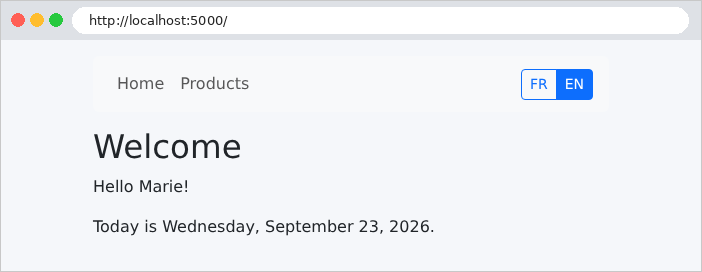
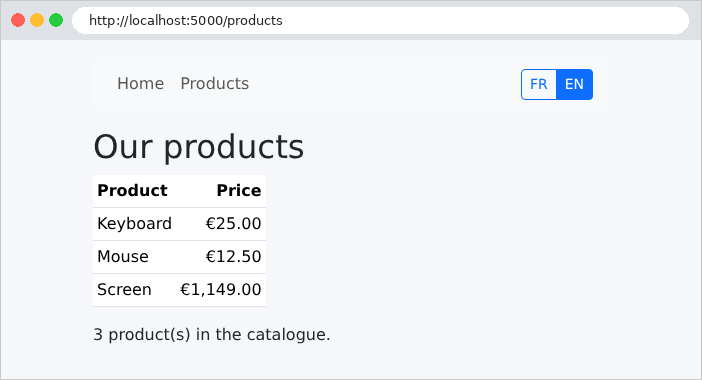
In English (no cookie yet), at URL http://localhost:5000/ and http://localhost:5000/products:
A click on a language button (here EN), simulated with [curl] (the [-H] option adds the [Referer] header that the browser would have sent):
| curl -i -H "Referer: http://localhost:5000/products" http://localhost:5000/language/en
|
| HTTP/1.1 302
Set-Cookie: language=en; Path=/; Max-Age=31536000; Expires=Sat, 25 Sep 2027 16:49:23 GMT; HttpOnly; SameSite=Lax
Location: http://localhost:5000/products
Content-Length: 0
|
[CookieLocaleResolver] sets the [language] cookie, with the value [en], with the requested characteristics ([Max-Age] and [Expires] both specify the lifetime, for older and newer browsers, respectively). The redirect returns to the original page ([Tomcat]; the server has expanded the path [/products] into a full address). A click on FR works the same way (cookie [language=fr]): the pages are now in French:
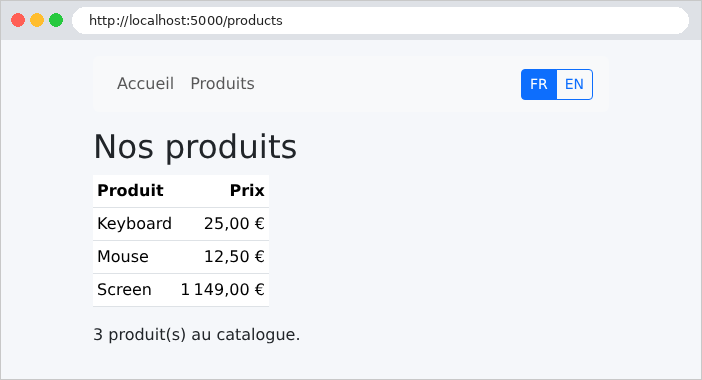
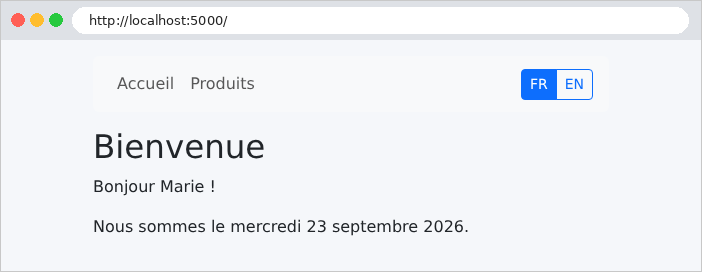
The dates and amounts followed: “mercredi 23 septembre 2026,” “1 149,00 €.”
A malicious site attempting to exploit our redirect would only see a page from our site:
| curl -i -H "Referer: https://pirate.example/trap?x=1" http://localhost:5000/language/fr
curl -i -H "Referer: https://pirate.example//pirate.example/trap" http://localhost:5000/language/fr
|
| HTTP/1.1 302
Set-Cookie: language=fr; Path=/; Max-Age=31536000; Expires=Sat, 25 Sep 2027 16:49:24 GMT; HttpOnly; SameSite=Lax
Location: http://localhost:5000/trap?x=1
Content-Length: 0
HTTP/1.1 302
Set-Cookie: language=fr; Path=/; Max-Age=31536000; Expires=Sat, 25 Sep 2027 16:49:24 GMT; HttpOnly; SameSite=Lax
Location: http://localhost:5000/
Content-Length: 0
|
An unsupported language:
| curl -i http://localhost:5000/language/de
|
| HTTP/1.1 404
Content-Type: application/json
{"timestamp":"2026-09-25T16:49:23.993Z","status":404,"error":"Not Found","message":"404 NOT_FOUND","path":"/language/de"}
|
The default error response from [Spring Boot]: from JSON to [curl], a HTML page for a browser. Chapter 7 shows how to replace it with our own page.
Finally, remember that a cookie is controlled by the client. A manually created [language=de] cookie is accepted by [CookieLocaleResolver]: the text remains in English (the default language of [Translator]), but the date is formatted in German:
| curl -b "language=de" http://localhost:5000/
|
| <html lang="de">
<p>Hello Marie!</p>
<p>Today is Mittwoch, 23. September 2026.</p>
|
(only three lines of the page are shown). This is no big deal: the user is only fooling themselves.
The case study proceeds exactly this way, using more comprehensive dictionaries ([i18n/fr.json] and [i18n/en.json]): same bean [messageSource], same [CookieLocaleResolver], same controller [/language/{language}]. The only difference is that the error messages generated by the business and web layers are also keys, translated at the last moment by the view.