1. Introduction
The document’s PDF is |HERE|.
The document’s codes are |HERE|.
This document is a product of Anthropic’s IA Claude. It follows the document “Step-by-Step Introduction to the [ASP.NET Core MVC] Web Framework” (2026), which itself followed the document “Step-by-Step Introduction to the [NestJS] Web Framework” (2026). This document adapts the [ASP.NET Core MVC] course to the [Java] environment:
- the [ASP.NET Core MVC] framework and the [C#] language are replaced by the [Spring MVC] framework, along with [Spring Boot] 4, and the [Java] language 21;
- the [Razor] views are replaced by [Thymeleaf] views;
- ORM and [Entity Framework Core] are replaced by [Spring Data JPA] and ORM and [Hibernate], still based on [MySQL].
The document closely follows the progression of the [ASP.NET Core MVC] course: first, numerous small projects, each focused on a single concept, followed by a comprehensive case study—a web application for scheduling appointments at a medical practice—with all files fully commented. The examples have the same numbers and cover the same topics as in the [ASP.NET Core MVC] course: a reader familiar with that course can compare the two frameworks example by example. However, this is not necessary: this document stands on its own and assumes no prior knowledge of [ASP.NET], nor, for that matter, of [Spring]. The only prerequisites are a basic understanding of web programming (the HTTP protocol, the HTML language) and the [Java] language.
1.1. The Role of Spring MVC in a Web Application
A web application is often built in layers, with each layer communicating only with its neighboring layers:
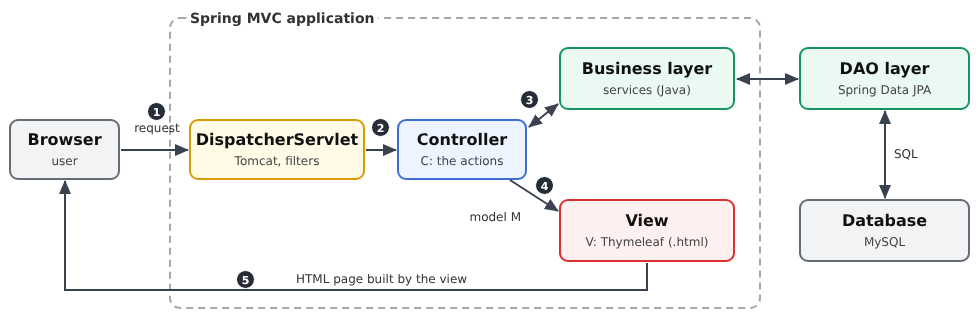
- The web layer receives HTTP requests from the browser and returns HTML pages to it. [Spring MVC] helps us write this layer;
- the business layer contains the application’s business rules (e.g., “a patient can have only one upcoming appointment”). It knows nothing about the web: it could just as easily serve a command-line application;
- the data access layer (layer [DAO], for [Data Access Object]) reads from and writes to the database. We will use [Spring Data JPA], which relies on ORM and [Hibernate] ([Object Relational Mapper]) to map the rows of the tables and objects in [Java].
The web layer itself follows the [MVC] ([Model – View – Controller]) model:
- the controller (C) is a class whose methods, called actions, each handle a specific type of request (for example, [GET /schedule]). An action reads the request parameters, invokes the business layer, and then selects the view to display;
- the model (M) is the set of data that the action passes to the view;
- the view (V) is a file named [Thymeleaf] (with the extension [.html]): a HTML page in which certain tags have attributes [th:...] ([th:text], [th:each]...), which the [Thymeleaf] engine replaces with data from the template.
The processing of a request follows the numbered steps in the diagram:
- 1: The browser sends a HTTP request, for example, [GET /schedule?doctorId=1&day=2026-09-24];
- 2: The [Tomcat] web server, embedded in the application by [Spring Boot], receives the request. It passes through a series of filters (cookie reading, authentication, etc.), then reaches [DispatcherServlet], the single entry point for [Spring MVC], which selects the action responsible for handling this request: this is routing. Before reaching the action, the request may still pass through interceptors, which we’ll explore in later chapters;
- 3: The action requests the data it needs from the business layer; if necessary, the business layer contacts the [DAO] layer, which queries the [MySQL] database in SQL;
- 4: The action constructs the view model M and designates the view that should display it;
- 5: The view engine [Thymeleaf] generates the page HTML, which [Spring MVC] returns to the browser.
[Spring] is the world's most widely used framework ([Java]) for developing enterprise applications. Free and open-source, it works anywhere that [Java] ([Windows], [Linux], [macOS]) works. [Spring MVC] is the web component; [Spring Boot] is an overlay that automatically configures the entire setup (web server, JSON conversion, view engine, data access, etc.) based on the libraries present in the project, and turns the application into a standard [Java] program, launched by a [main] method. [Spring MVC] can create servers that return JSON to a [JavaScript] client ([Angular], [React], [Flutter]...) as well as traditional web applications, where the server generates the HTML pages and the browser simply displays them. This document focuses on the latter use case. Like [ASP.NET Core], [Spring] is based on two ideas: annotations ([@GetMapping], [@RequestMapping], [@PreAuthorize]...) describe the roles of classes and methods, and dependency injection provides each object with the dependencies it needs. [Spring] is, in fact, one of the frameworks that popularized this second idea.
1.2. Tools Used
The examples were written and tested using the following tools (their installation is described in the appendix):
- [JDK] 21 ([Java Development Kit]), which contains the [javac] compiler and the [java] virtual machine. [Java] 21 is a version of LTS (long-term support);
- the [Maven] 3.9.11 build tool, which does not need to be installed: each project contains a Maven Wrapper (the scripts [mvnw] and [mvnw.cmd]), which automatically downloads the correct version of [Maven] upon first use;
- the [Visual Studio Code] editor, along with the [Extension Pack for Java] and [Spring Boot Extension Pack] extensions;
- a recent browser ([Chrome], [Firefox], [Edge]);
- the command-line tool [curl], which displays the raw HTTP responses (it is included with [Windows] 10 and 11);
- the SGBD [MySQL] (or [MariaDB]), for example, the one for [Laragon] under [Windows], starting from the chapter on data access, and for the case study.
Unlike SDK and [.NET], which contain [ASP.NET Core], [JDK] does not contain [Spring]: The framework is a set of libraries that [Maven] downloads from the central repository [Maven Central] during the first compilation (so you must be connected to the Internet on that day), and then stores in a local folder ([.m2] in the user’s home directory). These libraries are grouped into starters: a starter is a single dependency that provides everything needed for a specific feature. All examples use [spring-boot-starter-webmvc] ([Spring MVC] and the server [Tomcat]); in addition, there are [spring-boot-starter-validation] (data validation, starting in Chapter 3), [spring-boot-starter-thymeleaf] (views, starting in Chapter 4), [spring-boot-starter-security-oauth2-resource-server] ([Spring Security] and the JWT tokens, in Chapter 8), [spring-boot-starter-data-jpa] and the [mysql-connector-j] driver (database access, in Chapter 9). The versions used are those of [Spring Boot] 4.1.1: [Spring Framework] 7.0.9, [Spring Security] 7.1.1, [Hibernate] 7.4.5, [Thymeleaf] 3.1.5, [Jackson] 3 (conversion from JSON), and [Tomcat] 11.
1.3. Run the Case Study
Reviewer’s note: I advise the reader to complete the case study immediately as described below. Once you fully understand the role of this appointment scheduling application, ask your favorite IA to modify the application as follows: from now on, each doctor will be able to:
- set their own appointment slots between two dates. This will allow them to adjust their schedule as needed;
- remove certain time slots from the calendar for a given day—for example, if they are unavailable for personal reasons;
The modification is not straightforward because it involves a change to the database structure. Ask IA to provide you with the new application code and the SQL script to create the new database. To do this, you’ll need to provide him with the ZIP file containing the complete project as well as the SQL script for the old database.
Also, I haven’t reviewed the course created by Claude. He had already produced two perfect courses: [NestJS] and [ASP.NET Core MVC]. I assumed the same was true for this one. If you run into a problem understanding something, the solution is always the same: ask your favorite IA to explain what you don’t understand. Claude, for example, is very good at this. You may need to “upload” the example you don’t understand to him.
End of note.
The case study at the end of this document is a complete application. Readers will likely want to see it in action before delving into the details of the framework: here’s how to run it. It’s located in the [rdvmedecins2-spring-mvc] folder, next to the [examples] folder:
You must have installed [JDK] 21, [Visual Studio Code], and [MySQL] (see appendices). [Maven] does not need to be installed. Then:
- Create the [dbrdvmedecins2] database by running the [rdvmedecins2-spring-mvc/database/dbrdvmedecins2.sql] script. Using [Laragon], open the [HeidiSQL] tool (Database button), then run the script via the File / Run SQL menu. At the command line, from the [rdvmedecins2-spring-mvc] folder:
- Check the connection to the database. The application connects to [MySQL] on [localhost], port 3306, using the user [root] without a password (the default settings for [Laragon]). If your [root] account has a password, enter it in the application’s [src/main/resources/application.properties] file, on the [spring.datasource.password=] line (for example, [spring.datasource.password=myPassword]). To avoid writing a password to a project file, you can also specify it in the environment variable [SPRING_DATASOURCE_PASSWORD], which takes precedence over the file: [set SPRING_DATASOURCE_PASSWORD=myPassword] over [Windows] (command prompt), [export SPRING_DATASOURCE_PASSWORD=myPassword] over [Linux] and [macOS];
- open the folder [rdvmedecins2-spring-mvc] within [Visual Studio Code] (File menu / Open Folder), then open a terminal (Terminal menu / New Terminal);
- Launch the application under [Linux] and [macOS]:
and under [Windows]:
- On the first run, the Maven Wrapper downloads [Maven], then [Maven] downloads the application libraries, which takes a few minutes. The application is then compiled and launched. The console displays the [Spring Boot] banner, followed by the startup messages (we’ve included only the main ones here):
Each line begins with the date and time (replaced here by [...]), followed by the message level ([INFO], [WARN], [ERROR]), the process number and thread name (also replaced by [...]), and finally the abbreviated name of the class that is writing the message. It shows that the application is running in the [dev] profile (a set of development-specific settings that, among other things, displays SQL requests), that the [Tomcat] server is listening on port 8081, that the connection to the database was successful (the [HikariCP] connection “pool” is ready), and that the application has already read the list of doctors and clients (the two requests SQL). Along with [MariaDB], [Hibernate] also displays a warning [HHH000511], which has no consequences;
- Open the URL [http://localhost:8081] in a browser:
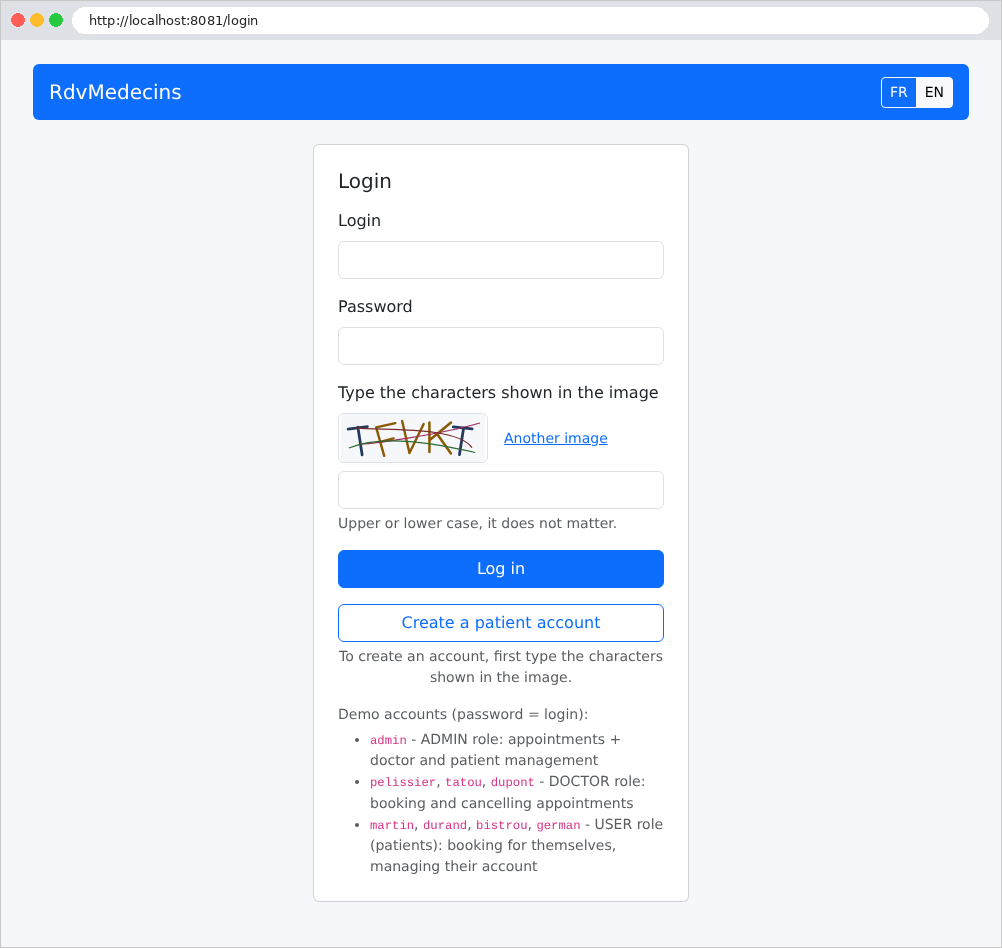
- Log in with one of the demo accounts, whose password is the same as the username: [admin] (administrator), [pelissier], [tatou], [dupont] (doctors), [martin], [durand], [bistrou], [german] (patients). You must also enter the characters from the image, in uppercase or lowercase.
When the application starts up, it reads the database: if [MySQL] is inaccessible, it stops immediately, and the console displays the reason. If the message is [Communications link failure] (or [Connection refused]), it means that [MySQL] has not started; with [Access denied for user 'root'@'localhost'], it means the password is incorrect; with [Unknown database 'dbrdvmedecins2'], it means the script SQL was not executed; with [Port 8081 was already in use], that port 8081 is already in use (by version [ASP.NET Core] of the application, for example); with [release version 21 not supported] (or [invalid target release: 21]), that the installed [JDK] is older than version 21. The application’s [README.md] file describes other cases. Stop the application using [Ctrl-C] in the terminal.
The last chapter of the document explains how to use the application and then discusses each of its files.
1.4. Examples
The examples are stored in the [examples] folder, with one subfolder per example:
Each example is a [Maven] project that can be compiled and run on its own. A [Maven] project is described by a [pom.xml] ([Project Object Model]) file: its identity, the libraries it depends on (its dependencies), and how to build it. The 28 projects are modules of a parent project, described by the file [examples/pom.xml]. The scripts [mvnw] ([Linux], [macOS]) and [mvnw.cmd] ([Windows]) are the Maven Wrapper; the file [.mvn/wrapper/maven-wrapper.properties] specifies the version of [Maven] that it must download (3.9.11).
The [common/bootstrap] folder contains the CSS and [Bootstrap] frameworks, shared by the examples that format their pages (starting with Example 15).
Each example has the standard structure of a [Maven] project:
- [src/main/java]: the [Java] code, organized into packages (the [example13], [example13/controllers]... folders). A package named [Java] acts as a namespace for [C#]; the name of a package reflects the path to its folder ([example13.controllers]);
- [Example13Application.java]: the application’s startup class, which contains the [main] method (see Example 01);
- [controllers]: the controllers;
- [models]: the classes that describe the models (actions and views);
- [src/main/resources]: files that are not part of the [Java] code;
- [templates]: the views [Thymeleaf] (starting in Chapter 4);
- [application.properties]: the application configuration (listening port, and later, database connection, etc.);
- [pom.xml]: the project file, which describes how to build the application.
During compilation, [Maven] creates a folder named [target] in each example, where it stores the compiled classes; this folder can be safely deleted.
To run an example, open a terminal in the example folder (in [Visual Studio Code]: right-click the example folder, then select "Open in the built-in terminal") and type the following in [Linux] and [macOS]:
and under [Windows]:
The Maven Wrapper is located in the [examples] folder, which is the parent folder of the example folder: hence [../] (or [..\]). The command [spring-boot:run] compiles the example (in its [target] folder) and then launches the application. All examples listen on port 5000: only one can be running at a time. Stop the server by running [Ctrl-C] in the terminal. You can also compile all the examples at once from the [examples] folder to verify that the installation is complete:
([mvnw compile] under [Windows]).
When you open the [examples] folder within [Visual Studio Code], the [Extension Pack for Java] extension finds the parent file [pom.xml] and imports all the modules (they appear in the “Java Projects” pane): you then have syntax highlighting, code completion, and error reporting in each file. With its default settings, it also compiles each [.java] file as soon as you save it. The [Spring Boot Extension Pack] extension adds a “Spring Boot Dashboard” pane, which lists the applications found and allows you to start or stop them without using the terminal (the exact appearance of these panes depends on the version of the extensions). Finally, all examples depend on [Spring Boot DevTools] (see below): a running application restarts automatically—within one or two seconds—as soon as one of its classes is recompiled. With [Visual Studio Code], therefore, in principle, simply saving a modified file is enough for the application to take it into account.
The file [pom.xml] from the parent project [examples/pom.xml]:
Let’s comment on this file:
- Lines 14–19: The parent project itself inherits from a parent, [spring-boot-starter-parent], version 4.1.1. This project sets the versions for all libraries in [Spring] and the libraries they use, which are chosen to work together: this is why no dependencies specify a version later on. It also controls the compilation (UTF-8 encoding of the source code, version of [Java]...). The empty element [<relativePath/>] indicates that this parent is not a neighboring folder, but must be searched for in the [Maven] repositories;
- lines 22–24: the project’s identity: a group ([groupId]), a name ([artifactId]), and a version. Modules use this identity to refer to their parent;
- line 26: a project of type [pom] produces neither classes nor archives; it groups modules and passes its settings to them;
- lines 28–31: the target version of [Java]: [Java] 21;
- lines 34–63: the modules, one by one; for example, the name of their folder. A [Maven] command run in the [examples] folder applies to all modules;
- lines 66–78: dependencies common to all examples, inherited by each module;
- lines 68–71: the starter [spring-boot-starter-webmvc] provides [Spring MVC], the [Tomcat] web server, embedded in the application (no server needs to be installed), and the [Jackson] library, which converts [Java] objects to JSON;
- Lines 73–77: [Spring Boot DevTools], development tools: automatic restart of the application when a class is recompiled, disabling of caches (such as the view cache), and more detailed error messages. These are for development purposes only: the [Spring Boot] plugin (lines 80–88) does not include them in the executable archive ([.jar]) intended for production, and they are automatically disabled if the application is launched by [java -jar];
- lines 80–88: the [Maven] plugin for [Spring Boot]. This plugin provides the [spring-boot:run] command, as well as the creation of an executable archive ([mvnw package]).
The [pom.xml] file in an example is very short. For example, [01-structure/pom.xml]:
- lines 6–10: the parent—the [examples] project, identified by its ID. The module inherits its dependencies and settings, and through it, those of [spring-boot-starter-parent];
- line 11: the module’s name. Its group and version are those of the parent.
An example that requires an additional library declares it in its own [pom.xml]. For example, [13-first-view/pom.xml], which uses the view engine [Thymeleaf]:
- Lines 3–6: A dependency is identified by its group and name; its version is set by [spring-boot-starter-parent].
The file [src/main/resources/application.properties] begins the same way in all examples:
- Line 2: The server’s listening port. Without this line, [Spring Boot] would listen on port 8080; we have chosen port 5000, the one used in the [ASP.NET Core MVC] course;
- Line 4: When a request fails, [Spring Boot] returns an error response (we’ll cover this in the next chapter). This setting ensures that the response never contains the call stack (the list of methods currently executing at the time of the error), which would reveal information about the application’s code to an attacker.
Each line is in the form [key=value]; lines beginning with [#] are comments. Some examples add their own keys after these two lines.
Finally, examples that use [Bootstrap] find it in the [common/bootstrap] folder, not in their own folder: thus, only one copy of the file exists. Each of these examples has a configuration class that serves this folder under URL and [/bootstrap/...]. For example, [15-layout/src/main/java/example15/config/WebConfig.java]:
- lines 8–9: a configuration class for [Spring MVC] (examples 06 and 12 will explain this mechanism);
- lines 14–18: the URL files that begin with [/bootstrap/] are served from the [../common/bootstrap/] folder, relative to the current folder—that is, the folder for the example when it is launched as described above. A page can thus use the stylesheet [/bootstrap/css/bootstrap.min.css]. The second folder, [common/bootstrap/], is used when the application is launched from the [examples] folder, rather than from the example folder.
1.5. Document Content
The document proceeds as follows:
Chapter | Contents | Examples |
Controllers, Actions, and | From the browser to the action: routes, responses, redirects, services, and dependency injection | 01–06 |
The Action Model | Request parameters: binding, conversion, validation, forms POST | 07 to 12 |
The view and its template | Thymeleaf, template, fragments, forms, validation, PRG | 13 to 21 |
Internationalization | An Application in French and English | 22 |
Data Scopes | application, query, session, client | 23 |
The Lifecycle of a Request | servlet filters, interceptors, [@ControllerAdvice], template binding, error page | 24 |
Authentication and Authorization | Spring Security, JWT in a cookie, roles, CAPTCHA, attempt limits | 25–27 |
Layered Architecture | Web / Business Logic / DAO with Spring Data JPA and MySQL | 28 |
Case Study | The RdvMedecins application, explained file by file | - |
Each example introduces only a few new concepts, and the chapters build on one another: it is best to read them in order. The case study, meanwhile, draws on all the concepts from the previous chapters: whenever relevant, its commentary refers to the example where the concept was introduced. The appendices describe how to install the tools: [JDK] 21, [Visual Studio Code] and its extensions, the Maven Wrapper, [MySQL] with [Laragon], and [curl].