2. Controllers, Actions, Routing
This chapter examines the path a request takes, from the browser to the action that processes it, and the response that action returns. Views will not be covered until Chapter 4: here, actions return text or JSON directly.
2.1. Example 01: The Structure of a Spring Application MVC
The first example is the smallest possible [Spring MVC] application. In addition to the [pom.xml] and [application.properties] files presented in the introduction, it has two files:
2.1.1. The entry point: Example01Application.java
Let’s walk through this code:
- Line 1: the class package. It must match the file’s directory ([src/main/java/example01]);
- Lines 3–4: Classes from other packages used by this file. Unlike [C#], [Java] has no implicit imports (except for the [java.lang] package, which contains [String], [Integer]...): each file explicitly imports the classes it uses;
- Line 9: [@SpringBootApplication] is an annotation. A [Java] annotation is written as [@Name], immediately before what it describes (a class, a method, a parameter...): it adds information that the framework reads at startup. This is equivalent to the [[...]] attributes of [C#]. [@SpringBootApplication] marks the application’s startup class and combines three annotations: [@Configuration] (the class can declare objects managed by [Spring]; see Example 06), [@EnableAutoConfiguration] (autoconfiguration: [Spring Boot] automatically configures everything supported by the available libraries, in this case [Spring MVC], [Tomcat], and [Jackson]) and [@ComponentScan] (component scanning: [Spring] searches for classes annotated with [@Controller], [@Service]... in the package of that class, [example01], and in all its subpackages, such as [example01.controllers]);
- Line 13: The [main] method, the entry point for any [Java] program. It is [public] (visible from anywhere) and [static] (it belongs to the class, not to an object of the class). The parameter [args] contains the command-line arguments;
- line 16: [SpringApplication.run] starts [Spring]: reads the configuration (the [application.properties] file, environment variables, command-line arguments...), creates the application objects, then starts the web server [Tomcat], which waits for requests until the application is stopped ([Ctrl-C]). [Example01Application.class] refers to the class itself: [Spring] reads the annotation [@SpringBootApplication] from it and deduces the package to scan.
There’s nothing else to write: no list of controllers, no route declarations. The component scan finds the controllers, and auto-configuration sets up everything else.
2.1.2. The controller: controllers/HomeController.java
- line 1: the class is in the [example01.controllers] package, a subpackage of [example01]: the component scan finds it;
- line 8: the annotation [@Controller] designates the class as a controller for [Spring MVC]. The class does not need to inherit from a framework class (this differs from [ASP.NET Core MVC]); by convention, its name ends with [Controller]. [Spring] creates the controller object itself at startup;
- line 12: the annotation [@GetMapping("/")] associates the method [index] with requests of type [GET /]. A method associated in this way with a route is an action;
- line 14: the annotation [@ResponseBody] specifies that the value returned by the action is the body of the response sent to the browser. Without it, [Spring MVC] would treat the returned string as the name of a view to be displayed (we’ll see this in Example 04, then in Chapter 4);
- Lines 15–16: The action returns a string. By convention, [Java] method names begin with a lowercase letter.
2.1.3. Execution
In a terminal window open to the [01-structure] folder, type [../mvnw spring-boot:run] ([..\mvnw spring-boot:run] under [Windows]). After compilation, [Spring Boot] displays its banner, followed by its startup messages (we replace the date, time, process number, and thread name with [...], and abbreviate the paths):
The startup messages indicate the version of [Java], the listening port (5000, set by [application.properties]), and the version of the [Tomcat] server embedded in the application. They also indicate the active profile: [default]. A profile is a set of settings (development, production, etc.); the case study will use one. Let’s request URL and [http://localhost:5000/] using a browser:

then with [curl]. The [-i] option also displays the HTTP headers from the response (we’ll only include a few of them here):
The first line of the response is the status code, 200, without the usual text [OK]: [Tomcat] does not send it, because the HTTP protocol does not require it. The browser and [curl] accept only the code.
[curl] received the string with the header [Content-Type: text/plain]: plain text. However, the browser displayed it as HTML (as can be seen from the font, which is the same as that used on HTML pages). This is because, for a string returned by an action with no other specifications, [Spring MVC] selects the response type based on the [Accept] header in the request, through which the client specifies the types it accepts: this is content negotiation. [curl] sends [Accept: */*] (all types) and receives [text/plain]; a browser sends [Accept: text/html,...] and receives [text/html]. Let’s verify this by sending a browser header (option [-H]) with [curl]:
This differs from [ASP.NET Core MVC], which always sent a string as plain text. Example 02 will show how to specify the response type.
Upon the first request, the console displays three more lines:
[DispatcherServlet] is the entry point for [Spring MVC] (see the diagram in the introduction): [Tomcat] forwards all requests to it, and it is this function that selects the action assigned to each one. [Tomcat] only prepares it when the first request is received.
2.2. Example 02: Routing
Routing associates a URL and a method HTTP (GET, POST...) with an action. Example 02 has two controllers:
The class [Example02Application] is identical, except for the name, to the one in Example 01: this is true for all examples. The file [controllers/HomeController.java]:
- Line 8: [@RestController] combines [@Controller] and [@ResponseBody]: all actions in the class directly return the body of the response. This is the most common form for a controller that does not generate views; we will use it until Chapter 4;
- line 13: An annotation can have multiple attributes, written as [name = value]. [value] is the route path (when it stands alone, [value =] can be omitted, as in Example 01) ; [produces] specifies the response type (the header [Content-Type]), here [text/html], regardless of the request header [Accept]. [MediaType.TEXT_HTML_VALUE] is a constant that equals ["text/html"]: a typo in its name would cause a compilation error, which is not the case for a hand-written string;
- Lines 15–26: a block of text ([text block], [Java] 15), delimited by three quotation marks. It can span multiple lines and contain quotation marks without escaping them. The indentation common to all its lines (including that of the closing ["""]) is removed.
The [index] action thus returns a HTML page that contains links to the actions of the other controller:
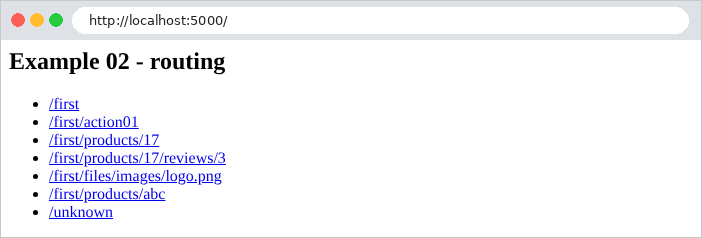
The [controllers/FirstController.java] file:
Let’s comment on this code:
- lines 10–11: The annotation ***
[@RequestMapping("/first")]***, applied to the class, sets the prefix common to all routes in the controller: its actions handleURLroutes that begin with***[/first]***; - Lines 15–16: [@GetMapping("")]: The action [index] processes [GET /first]. The action ID URL is the concatenation of the controller prefix and the action path;
- lines 21–22: The action [action01] processes [GET /first/action01];
- lines 27–28: the same path, but for the method POST: [@PostMapping] replaces [@GetMapping]. There are also [@PutMapping], [@DeleteMapping], [@PatchMapping]... (and [@RequestMapping], applied to a method, accepts all HTTP methods). The name of the method [Java] ([action01Post]) is arbitrary: only the annotations matter for routing. Furthermore, within the same class, two methods cannot have the same name with the same parameters;
- Lines 33–34: [{id}] is a path variable: this segment of URL can take on multiple values. [\d+] is a regular expression: the segment must consist of one or more digits; otherwise, the route does not match. In a string [Java], the character [\] is written as [\\]: hence [{id:\\d+}]. The annotation [@PathVariable] instructs [Spring MVC] to pass the segment’s value to the action’s parameter of the same name, [id], after converting it to [int]: For [/first/products/17], [id] is equal to the number 17. This is the data binding ([data binding]), which the next chapter will examine in detail. In order for [Spring] to know the names of the parameters, the compiler must preserve them in the compiled classes (option [-parameters]): [spring-boot-starter-parent] handles this;
- line 35: the operator [+] concatenates a string and a number;
- lines 39–41: two path variables are passed as two parameters to the action. The method [formatted] replaces each instance of [%d] in the text with an integer, in the order of the arguments;
- lines 45–47: [{*path}] is a “catch-all” variable ([catch-all]): it accepts any ending of URL, including [/]. Its value begins with a [/].
Here are the results for a few queries:
To send a POST request, use the [-X POST] option of [curl]:
A HTTP method that is not handled by any action for this path results in a 405 error ([Method Not Allowed]). The [Allow] header lists the accepted methods:
Finally, a URL that is not handled by any route results in a 404 error. This is also the case for an identifier that does not comply with the regular expression [\d+]: no route matches [/first/products/abc].
Unlike those for [ASP.NET Core], the error responses for [Spring Boot] contain the following information: the date of the error, the status code, its description, a message, and the requested path. The message [No static resource] can be explained as follows: when no action matches URL, [Spring MVC] searches for a static file with that name (an image, a stylesheet... stored in the application’s [src/main/resources/static] folder); since it cannot find one, it reports a 404 error. [Spring Boot] then generates the error response, and content negotiation comes into play again: [curl] receives from JSON, a browser, a page named HTML, the “Whitelabel Error Page” (an “unbranded” error page):
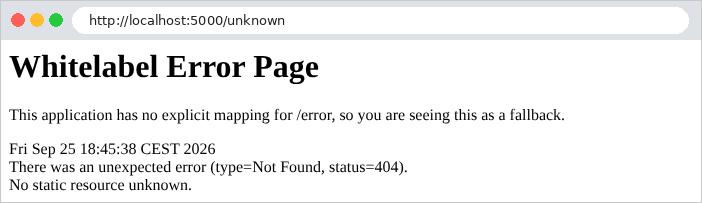
Chapter 7 will show how to replace this page with an application-specific error page.
2.3. Example 03: Action Responses
What an action returns determines the response HTTP. Example 03 reviews the main cases. The file [controllers/ResponsesController.java]:
Let’s break down this code:
- lines 22–25: a string, marked as plain text by the [produces] attribute (see Example 02): the browser displays it as-is, tags included;
- lines 28–31: the same string, declared as HTML: the browser interprets it;
- lines 34–35: a record ([Java] 16): a data class, declared on a single line. The compiler creates a private, read-only field for each component ([lastName], [firstName], [age]), a constructor that initializes them, an access method for each ([lastName()], [firstName()], [age()]), and utility methods ([equals], [hashCode], [toString]). The record is declared here within the controller: it is a nested class, whose full name is [ResponsesController.Person];
- lines 38–41: an object is serialized into JSON, with the header [Content-Type: application/json]. It is the [Jackson] library, provided by the [spring-boot-starter-webmvc] starter, that performs the conversion: the names of the JSON properties correspond to the components of the record;
- lines 44–47: a list is serialized into a JSON array. [List.of(...)] creates a read-only list. [List<String>] is a generic type: a list whose elements are strings;
- lines 51–54: when the action needs to select the status code, it returns a [ResponseEntity<T>]: an object that describes the complete response (code, headers, body of type [T]). It is created using static methods of the [ResponseEntity] class, which are called sequentially: [status(HttpStatus.CREATED)] sets the code to 201 ([Created]), [body(...)] sets the content, which will be serialized in JSON. [Map.of("message", "resource created")] creates a non-modifiable dictionary (a [Map]) with a single key, which [Jackson] serializes into the JSON object;
- Lines 57–60: [noContent()] returns a 204 response ([No Content]): “no content.” [build()] returns a response with no body, resulting in the type [ResponseEntity<Void>];
- Lines 63–70: an asynchronous action. It returns a [CompletableFuture<T>], a “pending” result (the equivalent of a [Task<T>] task from [C#] or a [JavaScript] promise); [Spring MVC] immediately releases the thread of [Tomcat] that was processing the request, and sends the response only when the result is available. [supplyAsync(function, executor)] calculates the result using the function, which is executed here after a delay of 500 ms. The function is written as a lambda: [() -> expression] is a function with no parameters that returns the value of the expression. [Duration.between] measures the time elapsed between two points in time;
- lines 73–76: an error anticipated by the program: a [ResponseEntity] with code 404, containing JSON. The [ResponseEntity] class also has aliases: [ok(...)] (200), [badRequest()] (400), [notFound()] (404)...;
- Lines 79–82: An unexpected error: the action throws an exception, which it does not handle. [Spring Boot] then responds with a 500 error ([Internal Server Error]).
Responses received:
For the exception, the error response from [Spring Boot] (see Example 02) contains the exception message but not the call stack, which is prohibited by the [application.properties] file (see introduction). The message itself appears there only because the development tools ([Spring Boot DevTools]) are active: in production, without them, the response would be:
An exception message can indeed provide information to an attacker. The error details are written to the server console (we are reproducing only the beginning here):
In a browser, the difference between [text/plain] and [text/html] is visible:


2.4. Example 04: Redirects
An action may respond with a redirect: a 301 or 302 status code and a [Location] header that tells the browser which URL to request next. The browser requests it immediately, without any user intervention. Redirects are ubiquitous in a web application: after a successful form submission, after logging in, after changing the language...
The [controllers/RedirectsController.java] file:
Let’s comment on this code:
- line 15: the class is annotated as [@Controller], not [@RestController]. A string returned by an action is therefore—except for [@ResponseBody]—the name of a view; and a view name that begins with [redirect:] is a special name that triggers a redirect;
- Lines 19–22: A permanent redirect (status code 301, [Moved Permanently]): The page has permanently moved to a new address. Browsers and search engines can save the new address. It is created using a [ResponseEntity] (see Example 03): [location(...)] sets the header [Location], whose value is an object [URI] (an address);
- lines 24–28: The annotation [@ResponseBody] is required here: the rendered string is the body of the response, not a view name;
- lines 31–34: ["redirect:" + url] generates a temporary redirect (status code 302, [Found]), in this case to a calculated address;
- lines 38–42: a redirect to a template address: in [redirect:/page/{name}], [Spring MVC] replaces [{name}] with the value of the [name] attribute, which is stored in the [RedirectAttributes] object. This object is provided by [Spring MVC] to the action that requests it as a parameter. The advantage over the previous form: the value is correctly encoded for a URL (see below). The [RedirectAttributes] object will also be used, in Chapter 4, to send messages to the next page;
- lines 51–54: you can redirect to another site.
[curl] demonstrates the redirection without actually following it:
With the option [-L], [curl] follows the redirect, just as a browser would. We then see the two successive responses:
Both actions result in the same redirect. Note that the address in the [Location] header is absolute this time ([http://localhost:5000/...]), whereas the action returned a relative address ([/page/contact]): A redirect to [redirect:] goes through the server [Tomcat], which completes the address because [Spring Boot] sets it that way by default (property [server.tomcat.use-relative-redirects], which is set to [false]). The redirection of the action [oldPage], generated by a [ResponseEntity], on the other hand, keeps the address as is. Both forms are correct.
The difference between the two actions becomes apparent when the destination contains a character that must be encoded in a URL, such as a space (encoded as [%20]):
The path variable [destination] was assigned the decoded value, [my contact]. The concatenation of the action [go] copies it exactly as is: the header [Location] contains a raw space, which makes it an invalid address (a URL does not contain a space). Some clients correct this on their own ([curl -L], for example, still follows the redirect and lands on the [my contact] page), while others do not: this is a pitfall, as the error goes unnoticed during testing. The template URL for the [toTemplate] action, on the other hand, is correctly encoded: this is the proper way to insert a variable value into a redirect. In the browser, only the final page is visible; the address bar displays the new URL:

2.5. Example 05: The Request and Response Objects
[Spring MVC] is based on API, [Servlet], and [Jakarta EE] (formerly [Java EE]), the [Java] web server standard: [Tomcat] is a servlet container, and [DispatcherServlet] is a servlet—that is, an object to which the server delegates requests. In this standard, each request is represented by a [HttpServletRequest] object, and the response being generated by a [HttpServletResponse] object. An action can receive either one: you simply need to request them as parameters. This is sometimes necessary, and we’ll do it in the case study (to read or set a cookie, for example), but you need to know what you’re doing.
The file [controllers/HttpController.java]:
Let’s comment on this code:
- lines 12–13: the classes API and [Servlet] are in the [jakarta.servlet...] package;
- line 22: the action declares a parameter of type [HttpServletRequest]: [Spring MVC] passes it the current request. This is how [Spring MVC] provides an action with what it needs: based on the type of its parameters, or based on their annotations ([@PathVariable]...);
- line 24: a mutable dictionary. [Map] is an interface (a type that describes operations without implementing them; we’ll return to this in Example 06), [LinkedHashMap] is one of its implementations; [<>] uses the generic types from the declaration ([<String, String>]);
- lines 25–29: the request: the method HTTP ([getMethod]), the path ([getRequestURI]), the parameters of URL ([getQueryString], excluding [?], or [null] if none exists), a header ([getHeader]) and the client’s address IP ([getRemoteAddr]);
- lines 34–38: the action adds a header to the response, then normally returns its value, which [Spring MVC] sends. This is the most common use of the response object;
- lines 41–46: the action writes the response itself—status code, type, and then the body—using the [PrintWriter] object returned by [getWriter()]. It returns nothing ([void]): [Spring MVC] then considers that the response has been written by the action. The [throws IOException] clause declares that the method may throw a [IOException] (a write error): in [Java], a method must declare in this way the so-called controlled exceptions that it does not handle;
- Lines 49–56: The mistake to avoid: writing part of the response and then returning a result. Once the first bytes of the body have been sent to the browser (here, forced by [flushBuffer]), the status code and headers—which are sent before the body—can no longer be changed.
The responses obtained:
(the [-A] option of [curl] sets the [User-Agent] header, which identifies the browser)
For the last request, the client receives a 200 status code and the beginning of the response, rather than the requested 404. And, unlike [ASP.NET Core], the server does not report anything: the console remains silent, and the error may go unnoticed. The response reveals a second flaw: it has no [Content-Type] header. The action did not set the response type before writing to it: the response object then encodes the text according to the default character set of the [Servlet] standard, [ISO-8859-1], whereas the terminal expects UTF-8, so any accented characters would be replaced by [�] (this English text contains none). The browser, for its part, receives no indication of a character set; it guesses one—in this case, successfully:

Later in the document, actions will almost always return a value (an object, a [ResponseEntity], a view name), and let [Spring MVC] write the response. [HttpServletRequest] and [HttpServletResponse] will only be used to read the request and set cookies.
2.6. Example 06: Services and Dependency Injection
Controllers should not contain application logic; they delegate it to services. A service is an ordinary object that [Spring] creates and provides to the classes that need it: this is dependency injection. The objects that [Spring] creates and manages in this way are called beans (from the English word for “grains”; controllers are also beans). The set of beans in an application forms the [Spring] context, or bean container. Example 06 breaks down a small application into two parts: products and customers:
2.6.1. The Product
A record (see Example 03), this time in its own file. The type [BigDecimal] represents amounts without rounding errors, which the type [double] does not guarantee.
2.6.2. The service contract: ProductsService
- Line 7: An interface describes what the service can do, without specifying how. Classes that use the service will only be aware of this interface. Unlike the convention for [C#] ([IProductsService]), the name of an interface [Java] does not begin with [I];
- line 9: [List<Product>]: a list of products;
- line 11: [Optional<Product>]: a product, or nothing if no product has this identifier. A [Optional] is a box, either empty or containing a value: it forces the caller to consider the case where there is no product, whereas a [null] might be overlooked (and cause a [NullPointerException]).
2.6.3. The implementation: InMemoryProductsService
- line 8: the class implements the interface ([implements]): it must provide all of its methods;
- lines 10–13: the data, here in memory, in a read-only list. The amounts are constructed from strings: [new BigDecimal("1.5")] is exactly 1.5;
- Lines 15 and 20: The annotation [@Override] indicates that the method belongs to an interface (or a parent class): the compiler verifies that it actually exists;
- line 22: an iterator ([stream]) traverses the list: [filter] retains only the products that satisfy the condition, written as a single-parameter lambda (see Example 03), [p]; [findFirst] returns the first remaining product in a [Optional], which is empty if there are none. [p.id()] is the method for accessing the record’s [id] component.
The class has no annotations: it is an ordinary [Java] class, which knows nothing about [Spring]. We’ll see later how it becomes a bean.
2.6.4. The ProductsController controller
- Lines 17–22: Dependency injection. The controller declares in its constructor that it needs a [ProductsService]; [Spring], which creates the controller, provides it with a bean of that type (see below). The controller never calls [new InMemoryProductsService()]: it doesn’t even know this class, only the interface. We could replace the implementation (with a version that reads a database, or with a test version) without modifying the controller. The field is declared as
***[final]***: it can only be assigned once, in the constructor; - lines 24–27: the action delegates to the service. The list is serialized as JSON;
- lines 29–35: [{id:\\d+}] accepts only numbers; a nonexistent product returns a 404 response. The [Optional] returned by the service is processed in two steps: [map] transforms its content, if any, into a 200 response; [orElseGet] provides the response to use if [Optional] is empty—in this case, a 404 response accompanied by a message. [ResponseEntity::ok] is a method reference: a shorter way to write the lambda [p -> ResponseEntity.ok(p)]. The type [ResponseEntity<?>] ([?]: any body type) allows the action to return a product or a dictionary; the notation [.<ResponseEntity<?>>map(...)] specifies this type to the compiler, which cannot infer it on its own.
2.6.5. The controller ClientsController
- lines 19–23: [ClientsController] receives the same service as [ProductsController]. The class has only one constructor: [Spring] uses it for injection without any further specification. This is the recommended form of injection, and the one used throughout the document;
- lines 26–27: a nested record describing the response JSON;
- line 33: the calculation of the total. [map] converts the product stream into a price stream ([Product::price] is a reference to the record’s access method [price()]), then [reduce] accumulates them, starting from zero ([BigDecimal.ZERO]) and adding them two by two ([BigDecimal::add]).
2.6.6. Declaring Beans
[Spring] can only provide a service if it is aware of it: each service must be declared as a bean. Controllers are declared via their [@RestController] annotation, which is detected during component scanning (see Example 01). The [InMemoryProductsService] class, on the other hand, has no annotation: it is declared in the [products/ProductsConfig.java] file:
- line 9: the annotation [@Configuration] designates the class as a configuration class; it, too, is found during the component scan, and [Spring] executes its annotated methods [@Bean] at startup. It groups together the declarations for the “products” section of the application;
- lines 14–17: a method named [@Bean] creates a bean. It means: “when a class requests a [ProductsService], provide it with the object returned by this method.” The method name ([productsService]) becomes the bean’s name.
There is another, shorter way to declare a bean: annotate the class itself with [@Service] (or [@Component], including [@Service], [@Controller] and [@Repository] are variants), which the component scan finds just as it finds controllers. Placing [@Service] before the class [InMemoryProductsService] would render the file [ProductsConfig.java] unnecessary. The [@Bean] method is useful when the class cannot carry an annotation (a class from a library, for example), or when creating the object requires code. Both forms will be used later in this document.
By default, a bean is a singleton: [Spring] creates a single instance at startup and provides it to all classes that request it throughout the application's lifetime. [ProductsController] and [ClientsController] thus receive the same [InMemoryProductsService] object. There are other scopes: [prototype] (a new instance for each request), [request] (one instance per HTTP request), [session]... Chapter 6 will revisit this topic.
Controllers are also singletons: a single [ProductsController] object handles all requests, potentially simultaneously, across multiple threads. This is a key difference from [ASP.NET Core MVC], which creates a new controller object for each request. A [Spring] controller must therefore not store request-specific data in its fields: its fields contain only the injected services, declared as [final].
The [Example06Application] class is the same as in the previous examples: there is nothing to register there; the component scan finds the controllers and the configuration class in the [clients] and [products] subpackages.
2.6.7. Execution
The case study is structured exactly like this: lightweight controllers that delegate to injected services, described by interfaces and declared as beans.