8. Authentication and Authorization
Two distinct questions arise for each request:
- Who is the user? This is authentication: the user has identified themselves with a username and password, and each subsequent request must prove that it comes from them;
- Does the user have permission to access this page? This is authorization: in the case study, only a user with the role ADMIN manages doctors and clients.
Since the server is stateless (Chapter 6), proof of identity must be included with every request. A token JWT ([JSON Web Token]) is used: after login, the server generates a token containing the user’s identity and signs it with a secret key. The token is stored in a cookie; the browser sends it back with every request; the server verifies the signature. The user can read their token but cannot modify it: any modification invalidates the signature.
With [Spring], these two issues are handled by [Spring Security], a project in the [Spring] family that is distinct from [Spring MVC]. [Spring Security] is a chain of servlet filters (see Chapter 7), positioned before [DispatcherServlet]: every request passes through it before reaching [Spring MVC].
- Authentication is handled by a filter that searches for a token in the request, verifies it, and derives the authenticated user—a [Authentication] object stored in the request’s security context. For JWT tokens, this filter is provided by the “resource server” component ([resource server]) of [Spring Security], whose name derives from the [OAuth2] protocol: a resource server is a server that accepts tokens generated by another server (in this case, by itself);
- authorization is handled by another filter, which applies rules written in [Java] for each URL (“this address is public,” “this one requires an authenticated user”), and annotations applied to controllers ([@PreAuthorize], Example 26).
The examples in this chapter use one more starter: [spring-boot-starter-security-oauth2-resource-server]. It includes [Spring Security], its “resource server” component, and the [Nimbus JOSE + JWT] library, which generates and verifies tokens. Password hashing ([bcrypt]) is part of [Spring Security]: there are no other libraries to declare. [Maven] downloads these libraries during the first compilation; therefore, an Internet connection is required.
8.1. Example 25: Login, Token, Protected Page
| 25-jwt/
├── src/
│ └── main/
│ ├── java/
│ │ └── example25/
│ │ ├── auth/
│ │ │ ├── AuthService.java
│ │ │ ├── JwtProperties.java
│ │ │ └── UsersService.java
│ │ ├── config/
│ │ │ ├── SecurityConfig.java
│ │ │ └── WebConfig.java
│ │ ├── controllers/
│ │ │ ├── AuthController.java
│ │ │ └── ProfileController.java
│ │ └── Example25Application.java
│ └── resources/
│ ├── templates/
│ │ ├── auth/
│ │ │ └── login.html
│ │ ├── profile/
│ │ │ └── profile.html
│ │ └── layout.html
│ └── application.properties
└── pom.xml
|
The file [pom.xml]:
| <?xml version="1.0" encoding="UTF-8"?>
<project xmlns="http://maven.apache.org/POM/4.0.0"
xmlns:xsi="http://www.w3.org/2001/XMLSchema-instance"
xsi:schemaLocation="http://maven.apache.org/POM/4.0.0 https://maven.apache.org/xsd/maven-4.0.0.xsd">
<modelVersion>4.0.0</modelVersion>
<parent>
<groupId>course.springmvc</groupId>
<artifactId>examples</artifactId>
<version>1.0</version>
</parent>
<artifactId>example25</artifactId>
<dependencies>
<!-- the Thymeleaf views -->
<dependency>
<groupId>org.springframework.boot</groupId>
<artifactId>spring-boot-starter-thymeleaf</artifactId>
</dependency>
<!-- Spring Security, with authentication by JWT token (creation and checking of the tokens) -->
<dependency>
<groupId>org.springframework.boot</groupId>
<artifactId>spring-boot-starter-security-oauth2-resource-server</artifactId>
</dependency>
</dependencies>
</project>
|
- lines 15–18: the [Thymeleaf] views;
- lines 20–23: [Spring Security] and token-based authentication JWT. As soon as [Spring Security] is present in the project, [Spring Boot] protects all URL in the application by default. It is the configuration class [SecurityConfig], shown below, that sets our own rules.
The [application.properties] file:
| # the listening port of the server (8080 by default)
server.port=5000
# the error responses of Spring Boot do not contain the call stack
spring.web.error.include-stacktrace=never
# the key that signs the JWT tokens (at least 32 characters), and their lifetime
jwt.secret=a-secret-key-of-at-least-32-characters-for-example-25
jwt.duration-minutes=60
|
- lines 6–7: two application-specific properties: the key that signs the tokens and their lifetime. Anyone who knows the key can generate valid tokens: in production, it is not stored in a project file; instead, it is provided by an environment variable ([JWT_SECRET], which takes precedence over the file) or a secret vault. The algorithm used (HMAC-SHA256) requires a key of at least 32 bytes (256 bits): [Nimbus] refuses to sign with a shorter key.
The file [auth/JwtProperties.java]:
| package example25.auth;
import org.springframework.boot.context.properties.ConfigurationProperties;
// the [jwt.*] properties of application.properties, stored in a record:
// jwt.secret -> secret; jwt.duration-minutes -> durationMinutes
@ConfigurationProperties("jwt")
public record JwtProperties(String secret, int durationMinutes) {
}
|
- lines 7–8: the annotation [@ConfigurationProperties("jwt")] instructs [Spring Boot] to populate this record with the properties beginning with [jwt.]: [jwt.secret] goes into the [secret] component, and [jwt.duration-minutes] goes into the [durationMinutes] component (hyphens are ignored, as are uppercase letters: this is the flexible binding for [Spring Boot]). The value [60] is converted to [int]; a value that is not a number would cause the application to terminate immediately upon startup, with a clear error message. The record becomes a bean, which is received via injection just like any other service. It is declared by the annotation [@EnableConfigurationProperties] of [SecurityConfig] (below).
We could have read each property using the [@Value("${jwt.secret}")] annotation; the record groups together the properties of a single subject and assigns a type to each.
The file [auth/UsersService.java]:
| package example25.auth;
import java.util.List;
import java.util.Optional;
import org.springframework.security.crypto.password.PasswordEncoder;
import org.springframework.stereotype.Service;
// the users, in memory (the next chapter will put them in a database)
@Service
public class UsersService {
public record User(String login, String name, String role, String passwordHash) {
}
private final List<User> users;
// PasswordEncoder: the hashing of the passwords (bcrypt, see SecurityConfig)
public UsersService(PasswordEncoder hashing) {
// a password is NEVER kept, only its hash
users = List.of(
new User("marie", "Marie Pélissier", "USER", hashing.encode("marie")),
new User("admin", "Administrator", "ADMIN", hashing.encode("admin")));
}
public Optional<User> find(String login) {
return users.stream().filter(u -> u.login().equals(login)).findFirst();
}
}
|
- lines 13–14: a user, along with their role, in the form of a record nested within the service;
- lines 19–24: a password is never stored; only its hash is retained—a hash value calculated by a one-way function. It is possible to verify that a password matches a hash, but not to recover the password from the hash. The service receives via injection a [PasswordEncoder], the interface for [Spring Security] for password hashing, and uses it to generate the hashes for the two test accounts (line 22);
- lines 26–28: searching for a user by their login returns a [Optional<User>]—a container that either holds a user or is empty. The list is traversed as a stream ([stream()]): [filter] retains only the elements that satisfy the condition, and [findFirst] returns the first one (in a [Optional]).
The file [auth/AuthService.java]:
| package example25.auth;
import java.time.Duration;
import java.time.Instant;
import java.util.Optional;
import org.springframework.http.ResponseCookie;
import org.springframework.security.crypto.password.PasswordEncoder;
import org.springframework.security.oauth2.jose.jws.MacAlgorithm;
import org.springframework.security.oauth2.jwt.JwsHeader;
import org.springframework.security.oauth2.jwt.JwtClaimsSet;
import org.springframework.security.oauth2.jwt.JwtEncoder;
import org.springframework.security.oauth2.jwt.JwtEncoderParameters;
import org.springframework.stereotype.Service;
import example25.auth.UsersService.User;
@Service
public class AuthService {
// the name of the cookie that carries the token
public static final String COOKIE = "token";
private final UsersService users;
private final PasswordEncoder hashing;
private final JwtEncoder encoder;
private final JwtProperties properties;
public AuthService(UsersService users, PasswordEncoder hashing, JwtEncoder encoder,
JwtProperties properties) {
this.users = users;
this.hashing = hashing;
this.encoder = encoder;
this.properties = properties;
}
// the user, or "nothing" if the login is unknown or the password wrong
public Optional<User> validate(String login, String password) {
if (login == null || password == null) {
return Optional.empty();
}
return users.find(login).filter(u -> hashing.matches(password, u.passwordHash()));
}
// the user's JWT token, signed with the secret key
public String createToken(User user) {
Instant now = Instant.now();
// the content of the token: the "claims" (statements about the user)
JwtClaimsSet claims = JwtClaimsSet.builder()
.subject(user.login())
.claim("name", user.name())
.claim("role", user.role())
.issuedAt(now)
.expiresAt(now.plus(duration()))
.build();
// the header: the signature algorithm (HMAC-SHA256)
JwsHeader header = JwsHeader.with(MacAlgorithm.HS256).build();
return encoder.encode(JwtEncoderParameters.from(header, claims)).getTokenValue();
}
// the cookie that carries the token: the JavaScript of the page cannot read it
public ResponseCookie cookie(String token) {
return ResponseCookie.from(COOKIE, token).path("/").httpOnly(true).sameSite("Lax").maxAge(duration()).build();
}
private Duration duration() {
return Duration.ofMinutes(properties.durationMinutes());
}
}
|
Let’s comment on this code:
- line 22: the name of the cookie that carries the token;
- lines 29–35: the service receives from its constructor the user service, the password encoder, the token encoder [JwtEncoder], and the properties [jwt.*]. These last three beans are declared in [SecurityConfig];
- lines 38–43: login and password verification. [Optional.filter] clears the container if the condition is false: the result contains the user only if the login exists and if [hashing.matches(password, hash)] recognizes the password;
- lines 49–55: the token’s content, the claims (statements about the user). [subject] (the claim [sub]) is the conventional name for the user’s identifier. We include here what the pages need (name, role), so as not to have to query the database with every request. [issuedAt] and [expiresAt] provide the claims [iat] (creation date) and [exp] (expiration date);
- line 57: the token header, which specifies the signature algorithm: HMAC-SHA256, denoted as [HS256];
- line 58: the encoder generates the signed token; [getTokenValue()] converts it to text form;
- lines 62–64: the cookie that carries the token, generated by the class [ResponseCookie] from [Spring]: [httpOnly(true)] prevents the [JavaScript] on the page from reading it, which protects the token if a malicious script were to execute on the page; [sameSite("Lax")] prevents the browser from including it in POST requests sent from another site (see below, the [CSRF] protection); [maxAge] sets the cookie’s lifetime to match the token’s lifetime.
The [config/SecurityConfig.java] file is the core of this example. Its first part declares the beans required for security:
| package example25.config;
import java.nio.charset.StandardCharsets;
import javax.crypto.SecretKey;
import javax.crypto.spec.SecretKeySpec;
import org.springframework.boot.context.properties.EnableConfigurationProperties;
import org.springframework.context.annotation.Bean;
import org.springframework.context.annotation.Configuration;
import org.springframework.http.ResponseCookie;
import org.springframework.security.config.annotation.web.builders.HttpSecurity;
import org.springframework.security.config.http.SessionCreationPolicy;
import org.springframework.security.crypto.bcrypt.BCryptPasswordEncoder;
import org.springframework.security.crypto.password.PasswordEncoder;
import org.springframework.security.oauth2.jose.jws.MacAlgorithm;
import org.springframework.security.oauth2.jwt.JwtDecoder;
import org.springframework.security.oauth2.jwt.JwtEncoder;
import org.springframework.security.oauth2.jwt.NimbusJwtDecoder;
import org.springframework.security.oauth2.jwt.NimbusJwtEncoder;
import org.springframework.security.oauth2.server.resource.authentication.JwtAuthenticationConverter;
import org.springframework.security.oauth2.server.resource.authentication.JwtGrantedAuthoritiesConverter;
import org.springframework.security.oauth2.server.resource.web.BearerTokenResolver;
import org.springframework.security.web.AuthenticationEntryPoint;
import org.springframework.security.web.SecurityFilterChain;
import org.springframework.web.util.WebUtils;
import example25.auth.AuthService;
import example25.auth.JwtProperties;
import jakarta.servlet.http.Cookie;
// the configuration of Spring Security
@Configuration
@EnableConfigurationProperties(JwtProperties.class)
public class SecurityConfig {
// the key that signs and checks the tokens (symmetric HMAC-SHA256 algorithm)
@Bean
public SecretKey jwtKey(JwtProperties properties) {
return new SecretKeySpec(properties.secret().getBytes(StandardCharsets.UTF_8), "HmacSHA256");
}
// the building of the tokens (Nimbus library, brought by Spring Security)
@Bean
public JwtEncoder jwtEncoder(SecretKey key) {
return NimbusJwtEncoder.withSecretKey(key).algorithm(MacAlgorithm.HS256).build();
}
// the checking of the tokens: signature and expiration date
@Bean
public JwtDecoder jwtDecoder(SecretKey key) {
return NimbusJwtDecoder.withSecretKey(key).macAlgorithm(MacAlgorithm.HS256).build();
}
// the hashing of the passwords: bcrypt, with a cost of 10
@Bean
public PasswordEncoder passwordEncoder() {
return new BCryptPasswordEncoder(10);
}
|
- line 33: a configuration class, whose methods [@Bean] create beans (see Example 06);
- line 34: registration of the [JwtProperties] record as a bean, populated from [application.properties];
- lines 38–41: the signature key, generated from the text of the [jwt.secret] property. The same key is used to sign and verify tokens: the algorithm is symmetric. A method [@Bean] can accept other beans as parameters: in this case, the properties [jwt.*];
- lines 44–47: the token encoder, which signs using the key. [NimbusJwtEncoder] relies on the [Nimbus] library;
- lines 50–53: the decoder, which verifies each received token: first the signature (using the same key), then the expiration date (with a 60-second tolerance for clocks that are out of sync). The authentication filter uses it for every request that carries a token;
- lines 56–59: password hashing using the [bcrypt] algorithm, with a “cost” of 10: [bcrypt] is intentionally slow (2¹⁰ calculation cycles) to discourage anyone from trying millions of passwords. Two hashes of the same password are different (a random “salt” is added): [matches] is responsible for verifying them.
The second part describes the chain of security filters:
| // the chain of the security filters: who can access what, and how
// the user is recognized
@Bean
public SecurityFilterChain securityFilters(HttpSecurity http) throws Exception {
http
// 1. the access rules, examined in order
.authorizeHttpRequests(access -> access
.requestMatchers("/", "/login", "/error", "/bootstrap/**").permitAll()
.anyRequest().authenticated())
// 2. authentication by JWT token (OAuth2 "resource server")
.oauth2ResourceServer(jwt -> jwt
.bearerTokenResolver(tokenFromCookie())
.authenticationEntryPoint(toLogin())
.jwt(config -> config.jwtAuthenticationConverter(converter())))
// 3. protected page requested without a token: off to the login page
.exceptionHandling(errors -> errors.authenticationEntryPoint(toLogin()))
// 4. logout (POST /logout): delete the cookie, then go to /login
.logout(logout -> logout.logoutUrl("/logout").deleteCookies(AuthService.COOKIE)
.logoutSuccessUrl("/login"))
// 5. the server is stateless: no HTTP session
.sessionManagement(session -> session.sessionCreationPolicy(SessionCreationPolicy.STATELESS))
// 6. no anti-CSRF token: the SameSite=Lax cookie already protects
// the POST requests coming from other sites
.csrf(csrf -> csrf.disable());
return http.build();
}
// the token is read from the cookie (and not from the Authorization header)
private static BearerTokenResolver tokenFromCookie() {
return request -> {
Cookie cookie = WebUtils.getCookie(request, AuthService.COOKIE);
return cookie == null ? null : cookie.getValue();
};
}
// no authenticated user (no token, invalid or expired token):
// we delete the possible cookie and redirect to the login page
private static AuthenticationEntryPoint toLogin() {
return (request, response, exception) -> {
if (WebUtils.getCookie(request, AuthService.COOKIE) != null) {
response.addHeader("Set-Cookie", ResponseCookie.from(AuthService.COOKIE, "").path("/").maxAge(0).build().toString());
}
response.sendRedirect("/login");
};
}
// from the token to the authenticated user: the [name] claim is their name, the
// [role] claim their role; Spring Security writes the roles with the ROLE_ prefix
private static JwtAuthenticationConverter converter() {
JwtGrantedAuthoritiesConverter roles = new JwtGrantedAuthoritiesConverter();
roles.setAuthoritiesClaimName("role");
roles.setAuthorityPrefix("ROLE_");
JwtAuthenticationConverter converter = new JwtAuthenticationConverter();
converter.setJwtGrantedAuthoritiesConverter(roles);
converter.setPrincipalClaimName("name");
return converter;
}
}
|
Let’s break down this code:
- lines 4–5: a bean of type [SecurityFilterChain]: the chain of security filters. [Spring Boot] provides a [HttpSecurity] object, which we configure, method by method, before building the chain (line 26). Each method receives a lambda that configures a part of the settings;
- lines 8–10: the access rules for URL, examined in the following order: [/], [/login], [/error] (the error page for [Spring Boot]), and the files in [Bootstrap] are public ([permitAll()]); any other URL ([anyRequest()]) requires an authenticated user. The [/profile] page is therefore protected, without needing to write anything in its controller;
- Lines 12–15: JWT token-based authentication. By default, the resource server looks for the token in the request’s [Authorization: Bearer ...] header: this is how a [JavaScript] client or a mobile app operates. A browser does not add this header on its own: it is instructed to retrieve the token from the cookie (line 13). Line 15 changes the way the token is mapped to a user (see lines 50–58);
- lines 14 and 17: the authentication entry point ([authentication entry point]) is called when a protected page is requested without an authenticated user. By default, the response is a 401 error with no content: useful for a [JavaScript] client, but confusing for a user. The user is redirected to the login page. This is declared twice: the resource server filter directly calls its own entry point when the request contains a token that it rejects (line 14); line 17 covers the case of a protected page requested without a token;
- lines 19–20: Logout is handled by [Spring Security] itself, via a filter ([LogoutFilter]) that intercepts [POST /logout]: it deletes the token cookie ([deleteCookies]) and redirects to [/login]. No controller action is required;
- line 22: [STATELESS]: [Spring Security] does not create a session (HTTP; see Chapter 6) and does not use it to retain the user. The user is recognized with each request solely by the token;
- line 25: the [CSRF] protection ([Cross-Site Request Forgery], cross-site request forgery) is disabled. A [CSRF] attack involves a malicious site tricking the victim’s browser into sending a POST form to our site: the browser would include the cookie, and the request would be authenticated. By default, [Spring Security] requires an anti-CSRF token in every POST form—a hidden field that the malicious site cannot know. Here, the [SameSite=Lax] cookie is sufficient: the browser does not include it in a POST request originating from another site, so that request arrives without an authenticated user. However, no request with the cookie GET must modify any data (see Example 21): a [Lax] cookie accompanies links coming from other sites;
- Lines 30–35: the token resolver ([BearerTokenResolver]): a single-method interface, written here as a lambda, which returns the request token, or [null]. [WebUtils.getCookie] searches for a cookie by name;
- Lines 39–46: The entry point: a redirect to [/login] (line 44). If the request contained a [token] cookie, it means the token is invalid (invalid signature) or has expired: the cookie is cleared by resetting it to an empty value with a lifetime of zero (lines 41–43). Without this step, the browser would resend the rejected token with the request [GET /login], which the filter would in turn reject—resulting in a redirect loop;
- lines 50–58: from the token to the authenticated user. For [Spring Security], a user’s permissions are authorities ([authorities]): simple character strings. By default, the resource server reads them from the token’s [scope] claim, with the prefix [SCOPE_]. They are read from the [role] claim (line 52), with the prefix [ROLE_] (line 53), which [Spring Security] expects for a role: the role [USER] of the token becomes the authority [ROLE_USER]. Line 56 indicates that the user name ([Authentication.getName()]) is the claim [name], not [sub].
The filters that [Spring Security] placed in the chain are written to the console at startup, if logging level [DEBUG] is requested for class [DefaultSecurityFilterChain]:
| ../mvnw spring-boot:run -Dspring-boot.run.arguments=--logging.level.org.springframework.security.web.DefaultSecurityFilterChain=debug
|
| ... DEBUG ... o.s.s.web.DefaultSecurityFilterChain : Will secure any request with filters: DisableEncodeUrlFilter, WebAsyncManagerIntegrationFilter, SecurityContextHolderFilter, HeaderWriterFilter, LogoutFilter, OAuth2ProtectedResourceMetadataFilter, BearerTokenAuthenticationFilter, RequestCacheAwareFilter, SecurityContextHolderAwareRequestFilter, AnonymousAuthenticationFilter, SessionManagementFilter, ExceptionTranslationFilter, AuthorizationFilter
|
Notably, the following can be identified:
- [HeaderWriterFilter], which adds security headers ([X-Content-Type-Options: nosniff], [X-Frame-Options: DENY], [Cache-Control: no-cache, no-store...]) to each response: these are not included in the responses in this chapter;
- [LogoutFilter], which processes [/logout];
- [BearerTokenAuthenticationFilter], the resource server filter: it reads the token (using our resolver), verifies it (using the decoder), and places the authenticated user in the security context;
- [AnonymousAuthenticationFilter]: without a token, the user is “anonymous”;
- [ExceptionTranslationFilter], which transforms access denials into HTTP responses: entry point for an anonymous user, 403 error for an authenticated user (example 26);
- [AuthorizationFilter], the last one, which applies the rules in [authorizeHttpRequests].
The [controllers/AuthController.java] file:
| package example25.controllers;
import java.util.Optional;
import org.springframework.http.HttpHeaders;
import org.springframework.stereotype.Controller;
import org.springframework.ui.Model;
import org.springframework.web.bind.annotation.GetMapping;
import org.springframework.web.bind.annotation.PostMapping;
import org.springframework.web.bind.annotation.RequestParam;
import example25.auth.AuthService;
import example25.auth.UsersService.User;
import jakarta.servlet.http.HttpServletResponse;
@Controller
public class AuthController {
private final AuthService auth;
public AuthController(AuthService auth) {
this.auth = auth;
}
@GetMapping("/")
public String home() {
return "redirect:/profile";
}
@GetMapping("/login")
public String form() {
return "auth/login";
}
@PostMapping("/login")
public String login(@RequestParam(required = false) String login,
@RequestParam(required = false) String password, HttpServletResponse response, Model model) {
Optional<User> user = auth.validate(login, password);
if (user.isEmpty()) {
// a deliberately vague message: we do not say whether it is the login or the password
model.addAttribute("error", "Incorrect login or password.");
model.addAttribute("login", login);
return "auth/login";
}
// the token, in a cookie
response.addHeader(HttpHeaders.SET_COOKIE, auth.cookie(auth.createToken(user.get())).toString());
return "redirect:/profile";
}
}
|
Let’s break down this code:
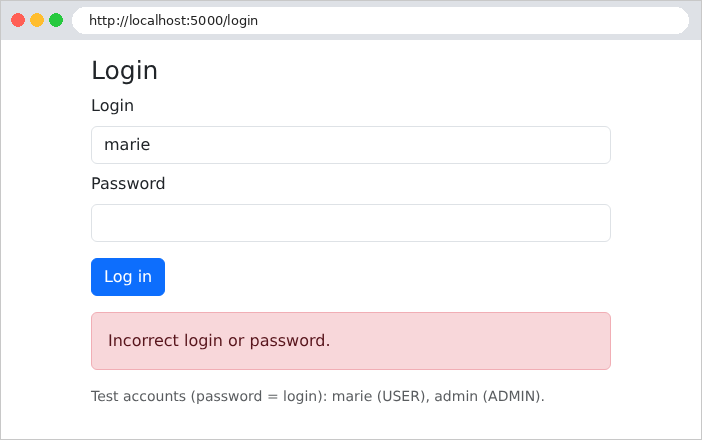
- lines 35–44: the login. The parameters are optional ([required = false]): a missing parameter defaults to [null], and [AuthService.validate] rejects it. If the login fails, the form is redisplayed with a deliberately vague message: stating “this login does not exist” would help an attacker find valid logins;
- line 46: if successful, the cookie is added to the response as a [Set-Cookie] header, before the redirect to the profile;
- There is no [/logout] action: logout is handled by the [LogoutFilter] filter, even before the request reaches [Spring MVC].
The file [controllers/ProfileController.java]:
| package example25.controllers;
import org.springframework.security.core.Authentication;
import org.springframework.security.core.annotation.AuthenticationPrincipal;
import org.springframework.security.oauth2.jwt.Jwt;
import org.springframework.stereotype.Controller;
import org.springframework.ui.Model;
import org.springframework.web.bind.annotation.GetMapping;
// reserved for authenticated users: see SecurityConfig (anyRequest().authenticated())
@Controller
public class ProfileController {
// Authentication: the user authenticated by the token;
// @AuthenticationPrincipal Jwt: the token itself, already checked
@GetMapping("/profile")
public String profile(Authentication user, @AuthenticationPrincipal Jwt token, Model model) {
model.addAttribute("name", user.getName());
model.addAttribute("admin", user.getAuthorities().stream()
.anyMatch(a -> a.getAuthority().equals("ROLE_ADMIN")));
model.addAttribute("claims", token.getClaims());
return "profile/profile";
}
}
|
- Line 10: No security annotation on the controller: the rule [anyRequest().authenticated()] from [SecurityConfig] already protects [/profile];
- Line 17: An action can receive the authenticated user as a parameter, of type [Authentication], stored in the security context by the resource server filter. The annotation [@AuthenticationPrincipal] provides access to this user’s principal: for authentication via JWT, it is the token itself (type [Jwt]), which has already been verified;
- line 18: the user’s name, the claim [name] (see [setPrincipalClaimName]);
- Lines 19–20: Is the user an administrator? We check for the authority [ROLE_ADMIN] among the user’s authorities;
- line 21: the token’s claims, in dictionary form ([Map<String, Object>]).
The file [templates/profile/profile.html]:
| <!doctype html>
<html xmlns:th="http://www.thymeleaf.org" th:replace="~{layout :: page(~{::main})}">
<body>
<main>
<h1 class="h3" th:text="|Hello ${name}|">Hello</h1>
<p>Your role: <b th:text="${admin} ? 'administrator' : 'user'">user</b>.</p>
<p>The content of your token:</p>
<table class="table table-sm w-auto">
<!--/* a loop over a dictionary: each element has a key and a value */-->
<tr th:each="claim : ${claims}"><td><code th:text="${claim.key}">sub</code></td><td th:text="${claim.value}">marie</td></tr>
</table>
<!--/* logging out: a POST form reduced to its button */-->
<form method="post" action="/logout">
<button class="btn btn-outline-secondary" type="submit">Log out</button>
</form>
</main>
</body>
</html>
|
- line 10: [th:each] also iterates through a dictionary: each element has a key ([claim.key]) and a value ([claim.value]);
- Lines 13–15: Logout, via a POST form reduced to its button.
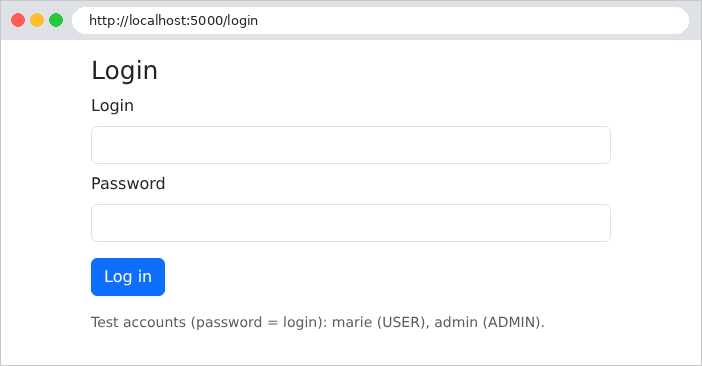
The file [templates/auth/login.html]:
| <!doctype html>
<html xmlns:th="http://www.thymeleaf.org" th:replace="~{layout :: page(~{::main})}">
<body>
<main>
<h1 class="h3">Login</h1>
<form method="post" action="/login">
<div class="mb-2">
<label class="form-label" for="login">Login</label>
<input class="form-control" id="login" name="login" th:value="${login}" required>
</div>
<div class="mb-3">
<label class="form-label" for="password">Password</label>
<input class="form-control" type="password" id="password" name="password" required>
</div>
<button class="btn btn-primary" type="submit">Log in</button>
</form>
<div class="alert alert-danger mt-3" th:if="${error != null}" th:text="${error}">error</div>
<p class="text-muted small mt-3">Test accounts (password = login): marie (USER), admin (ADMIN).</p>
</main>
</body>
</html>
|
- line 9: the entered username is redisplayed after a failed login; the password is never redisplayed;
- line 17: the error message, if there is one.
The template [templates/layout.html] and the class [config/WebConfig.java], which serve the files from [Bootstrap] under URL and [/bootstrap/...], are the same as those in the previous examples (see Example 15 and Chapter 1).
8.1.1. Execution
Without a cookie, the protected page redirects to the login page:
| curl -i http://localhost:5000/profile
|
| HTTP/1.1 302
Location: http://localhost:5000/login
Content-Length: 0
|
([Tomcat] does not include the text [Found], which usually follows the 302 code: it is optional.)
An incorrect password:
Successful login, as seen by [curl]:
| curl -i -c cookies.txt -d "login=marie&password=marie" http://localhost:5000/login
|
| HTTP/1.1 302
Set-Cookie: token=eyJraWQiOiJLQzBjVllOZXdUWWFTY1FWM21EV1ZEbFQ0bDZWYmFfUTNSNjB6cmNtWmQ0IiwiYWxnIjoiSFMyNTYifQ.eyJuYW1lIjoiTWFyaWUgUMOpbGlzc2llciIsInN1YiI6Im1hcmllIiwicm9sZSI6IlVTRVIiLCJleHAiOjE3OTAzNTgzNTYsImlhdCI6MTc5MDM1NDc1Nn0.ZsCOrkYPuZFYu2xPtIx3JGpKBQCOJP9dqF8fzkwpLmo; Path=/; Max-Age=3600; Expires=Fri, 25 Sep 2026 17:45:56 GMT; HttpOnly; SameSite=Lax
Location: http://localhost:5000/profile
Content-Length: 0
|
The token consists of three parts separated by periods: a header, the content, and the signature. The first two are simply encoded as [base64url]. The decoded header:
| {"kid":"KC0cVYNewTYaScQV3mDWVDlT4l6Vba_Q3R60zrcmZd4","alg":"HS256"}
|
It contains the signature algorithm ([alg]) and a key identifier ([kid], [key id]): when a server uses multiple keys, the [kid] tells it which key signed the token. [NimbusJwtEncoder] calculates this itself from the key (it is the SHA-256 fingerprint of the key, according to the [JWK Thumbprint] standard): it reveals nothing about the key. The decoded content:
| {
"name": "Marie Pélissier",
"sub": "marie",
"role": "USER",
"exp": 1790358356,
"iat": 1790354756
}
|
We find the claims generated by [createToken]. The dates [exp] and [iat] are written in seconds since January 1, 1970. The token is not encrypted: nothing secret is included in it. In the browser, at the URL http://localhost:5000/profile:
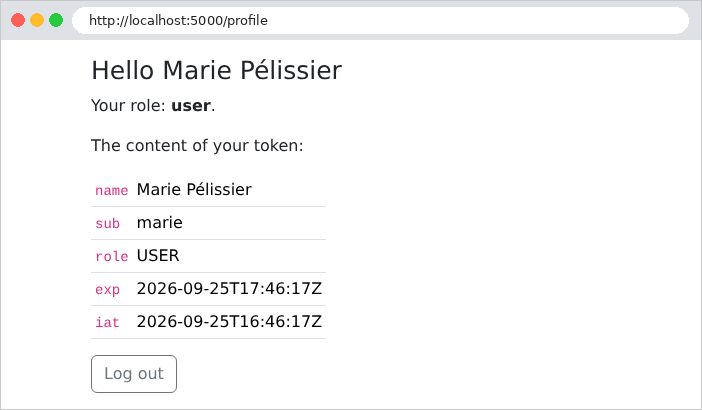
On the page, the dates [exp] and [iat] are displayed in the ISO 8601 format: the decoder converted them into [Instant] objects (one instant in universal time, hence the final [Z]). We can see that the token is valid for one hour.
Now let’s try modifying the token to assign ourselves the role ADMIN: we decode the content, replace [USER] with [ADMIN], and re-encode it... but we cannot recalculate the signature without the secret key:
| curl -i -b "token=eyJraWQiOi...(modified content)...(old signature)" http://localhost:5000/profile
|
| HTTP/1.1 302
Set-Cookie: token=; Path=/; Max-Age=0; Expires=Thu, 01 Jan 1970 00:00:00 GMT
Location: http://localhost:5000/login
Content-Length: 0
|
The signature no longer matches the content: the decoder rejects the token, the filter calls the entry point, which clears the cookie and redirects to the login page. Logout:
| curl -i -b cookies.txt -X POST http://localhost:5000/logout
|
| HTTP/1.1 302
Set-Cookie: token=; Expires=Thu, 01 Jan 1970 00:00:10 GMT; Path=/
Location: http://localhost:5000/login
Content-Length: 0
|
The [LogoutFilter] filter clears the cookie by resetting it—empty—with an expired expiration date. Note that, since the [CSRF] protection is disabled, [Spring Security] also accepts logout via a GET ([curl -i http://localhost:5000/logout] returns the same response): this is safe here (at worst, a malicious link logs the user out), but our pages always log users out using a POST.
8.2. Example 26: Roles
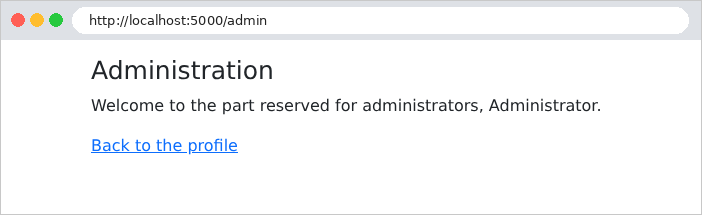
Example 26 builds on Example 25 and adds a page reserved for the role ADMIN. The role is already an authority of the authenticated user ([ROLE_ADMIN]): it just needs to be required. The file [controllers/AdminController.java]:
| package example26.controllers;
import org.springframework.security.access.prepost.PreAuthorize;
import org.springframework.security.core.Authentication;
import org.springframework.stereotype.Controller;
import org.springframework.ui.Model;
import org.springframework.web.bind.annotation.GetMapping;
// the whole controller is reserved for the ADMIN role: one must be authenticated AND
// have the ADMIN role (the "role" claim of the token, see SecurityConfig)
@Controller
@PreAuthorize("hasRole('ADMIN')")
public class AdminController {
@GetMapping("/admin")
public String admin(Authentication user, Model model) {
model.addAttribute("name", user.getName());
return "admin/admin";
}
}
|
- line 12: the annotation [@PreAuthorize] sets a condition, which is checked before each action of the controller is called. The condition is an expression in the [SpEL] language ([Spring Expression Language]): [hasRole('ADMIN')] is true if the user has the [ROLE_ADMIN] authority (the prefix [ROLE_] is added by [hasRole]). An anonymous user is first redirected to the login page (entry point); an authenticated user without this role receives a 403 response, “Access Denied.” [hasAnyRole('ADMIN', 'DOCTOR')] would accept either of these roles.
For [@PreAuthorize] to be taken into account, the class [SecurityConfig] has one additional annotation:
| // the configuration of Spring Security.
// @EnableMethodSecurity: enables the @PreAuthorize annotations of the controllers
@Configuration
@EnableMethodSecurity
@EnableConfigurationProperties(JwtProperties.class)
public class SecurityConfig {
|
- Line 4: [@EnableMethodSecurity] enables method security. [Spring] then wraps each bean whose method carries [@PreAuthorize] in a proxy: an intermediary object that receives calls on behalf of the bean, checks the condition, and then calls the actual method or throws a [AccessDeniedException] exception. We’ll revisit this proxy mechanism in the context of transactions in the next chapter.
The filter chain has changed in two places:
| .oauth2ResourceServer(jwt -> jwt
.bearerTokenResolver(tokenFromCookie())
.authenticationEntryPoint(toLogin())
.accessDeniedHandler(accessDenied())
.jwt(config -> config.jwtAuthenticationConverter(converter())))
// 3. protected page requested without a token: off to the login page;
// insufficient role: a 403 response, turned into a page by ErrorPageController
.exceptionHandling(errors -> errors.authenticationEntryPoint(toLogin())
.accessDeniedHandler(accessDenied()))
|
- lines 4 and 9: the access denial handler ([access denied handler]). The exception thrown by [@PreAuthorize] is propagated, via [Spring MVC], to the filter [ExceptionTranslationFilter], which passes it to this handler. The resource server’s handler would return a 403 response with no content, including a [WWW-Authenticate] header intended for a [JavaScript] client. As with the entry point, this is replaced in two places.
The handler itself, at the end of the file:
| // insufficient role: a 403 error response, which the server forwards to /error
private static AccessDeniedHandler accessDenied() {
return (request, response, exception) -> response.sendError(HttpServletResponse.SC_FORBIDDEN);
}
|
- lines 2–4: our handler simply uses [sendError(403)]. The [Tomcat] server then forwards the request to the URL [/error] (see Example 24), that is, to the error handler. This is why [/error] appears among the public URL instances: the forwarded request also passes through the filter chain.
The file [controllers/ErrorPageController.java]:
| package example26.controllers;
import org.springframework.boot.webmvc.error.ErrorController;
import org.springframework.stereotype.Controller;
import org.springframework.ui.Model;
import org.springframework.web.bind.annotation.RequestMapping;
import jakarta.servlet.RequestDispatcher;
import jakarta.servlet.http.HttpServletRequest;
import jakarta.servlet.http.HttpServletResponse;
// the page of the error responses (403, 404...): see example 24
@Controller
public class ErrorPageController implements ErrorController {
@RequestMapping("/error")
public String error(HttpServletRequest request, HttpServletResponse response, Model model) {
Object code = request.getAttribute(RequestDispatcher.ERROR_STATUS_CODE);
int status = code instanceof Integer c ? c : 500;
response.setStatus(status);
model.addAttribute("code", status);
return "error";
}
}
|
- lines 14–16: the error page controller, as in Example 24: it implements the [ErrorController] interface of [Spring Boot], thereby replacing the default error page;
- Lines 18–21: The status code of the error response (403, 404, etc.) is an attribute of the request; it is copied into the response and into the view template.
The view [templates/error.html]:
| <!doctype html>
<html xmlns:th="http://www.thymeleaf.org" th:replace="~{layout :: page(~{::main})}">
<body>
<main>
<div class="alert alert-danger">
<h1 class="h4" th:text="|Error ${code}|">Error 403</h1>
<p class="mb-0" th:text="${code == 403} ? 'Access denied: this page is reserved for administrators.' : 'An error occurred.'">message</p>
</div>
<p><a href="/profile">Back to the profile</a></p>
</main>
</body>
</html>
|
- line 7: a specific message for error 403, and a generic message for the others.
Finally, the profile page has one more link, to [/admin]. The user [marie] (role USER) attempts to open the administration page from her profile:
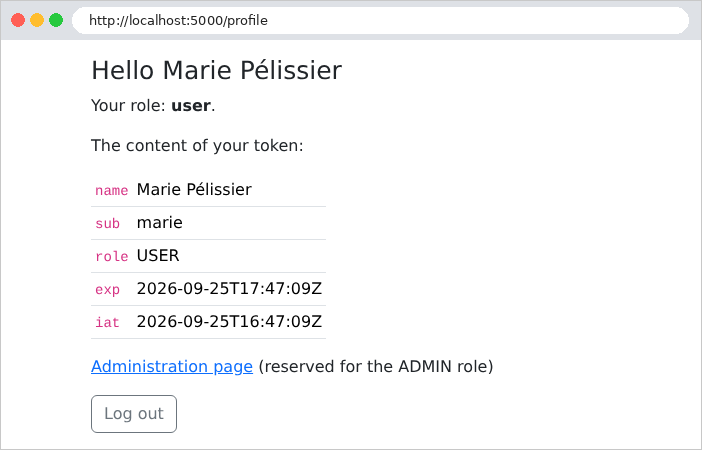
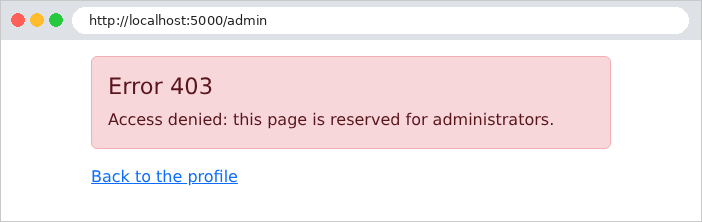
The same attempt by [admin]:
With [curl], we see a 403 error:
| curl -i -c cookies.txt -d "login=marie&password=marie" http://localhost:5000/login
curl -i -b cookies.txt http://localhost:5000/admin
|
| HTTP/1.1 403
Content-Type: text/html;charset=UTF-8
<!doctype html>
<html lang="en">
<head>
<meta charset="utf-8">
<title>Authentication</title>
<link rel="stylesheet" href="/bootstrap/css/bootstrap.min.css">
</head>
<body>
<div class="container py-3" style="max-width: 34rem">
<main>
<div class="alert alert-danger">
<h1 class="h4">Error 403</h1>
<p class="mb-0">Access denied: this page is reserved for administrators.</p>
</div>
<p><a href="/profile">Back to the profile</a></p>
</main>
</div>
</body>
</html>
|
The case study has three roles (ADMIN, DOCTOR, USER) and uses exactly these mechanisms: Rule [anyRequest().authenticated()] protects all pages except the login and account creation pages; [@PreAuthorize("hasRole('ADMIN')")] restricts access to doctor and client management to the administrator; [@PreAuthorize("hasRole('USER')")] restricts access to the patient area to patients. The 403 page is displayed there.
8.3. Example 27: CAPTCHA and attempt limits
A login page attracts bots: programs that try thousands of different username/password combinations. Two complementary safeguards:
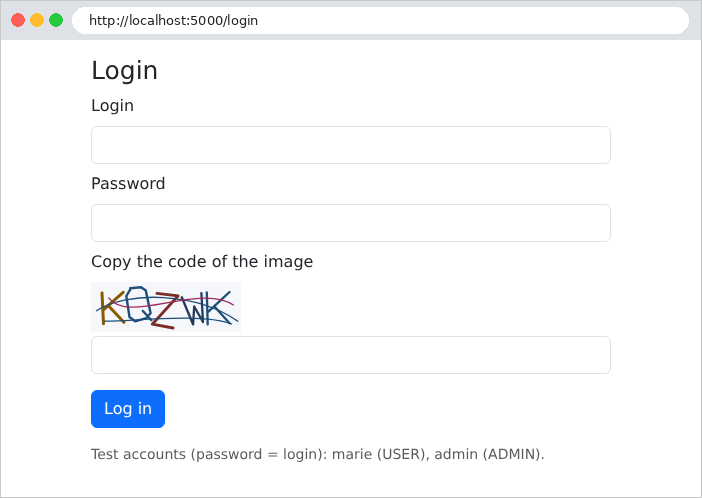
- a CAPTCHA: an image of distorted characters that a human can read easily but that a simple bot cannot decipher;
- an attempt limit: after a few failed attempts, the address IP is blocked for a while.
Example 27 adds these two safeguards to Example 25. The file [auth/CaptchaService.java]:
| package example27.auth;
import java.time.Duration;
import java.time.Instant;
import java.util.Map;
import java.util.UUID;
import java.util.concurrent.ConcurrentHashMap;
import org.springframework.stereotype.Service;
// singleton: the pending captchas are kept in memory by the server
@Service
public class CaptchaService {
// a captcha: its identifier, and its image (SVG)
public record Captcha(String id, String svg) {
}
// the expected answer, and its expiry date
private record Expected(String text, Instant expires) {
}
private static final Duration LIFETIME = Duration.ofMinutes(10);
// identifier -> expected answer.
// ConcurrentHashMap: a dictionary usable by several simultaneous requests
private final Map<String, Expected> pending = new ConcurrentHashMap<>();
public Captcha generate() {
String text = CaptchaDrawing.randomText(5);
String id = UUID.randomUUID().toString(); // a random identifier, impossible to guess
pending.put(id, new Expected(text, Instant.now().plus(LIFETIME)));
return new Captcha(id, CaptchaDrawing.svg(text));
}
// the captcha is CONSUMED in every case: an image is used only once
public boolean check(String id, String input) {
Expected expected = id == null ? null : pending.remove(id);
return expected != null && input != null
&& expected.expires().isAfter(Instant.now())
&& expected.text().equalsIgnoreCase(input.trim());
}
}
|
Let’s comment on this code:
- lines 11–13: a service is a singleton bean (see Example 06): a single instance, shared by all requests. Pending CAPTCHAs are therefore kept in memory by the server;
- lines 16–21: two records: the CAPTCHA sent to the page (ID and image), and the expected response, stored by the server;
- line 27: The expected responses are stored under a random identifier. The page contains only the image and the identifier: the response never leaves the server. The service is used by concurrent requests, executed by different threads: [ConcurrentHashMap] is a dictionary designed for this purpose;
- lines 29–34: a five-character text string generated at random, stored for ten minutes, and rendered as an image. [UUID.randomUUID()] generates a 128-bit random identifier that is impossible to guess;
- lines 37–42: The verification process consumes the CAPTCHA ([remove] removes it from the dictionary and returns the removed value): an image is used only once; a bot cannot reuse a solution it has already found. An expired CAPTCHA is rejected; uppercase letters do not matter ([equalsIgnoreCase]).
The image is handled by the [auth/CaptchaDrawing.java] class, taken from the case study. No library is required: the image is in the [SVG] format ([Scalable Vector Graphics]), a vector image format consisting of text (XML), which the browser can display. The beginning of the file:
| // the drawing of a captcha: an SVG image (XML text) built by hand
final class CaptchaDrawing {
private static final int WIDTH = 150;
private static final int HEIGHT = 50;
// SecureRandom: a "cryptographic" random number generator,
// unpredictable (unlike Random, whose sequence could be guessed)
private static final SecureRandom RANDOM = new SecureRandom();
// The "font": each character is a list of strokes, each stroke a
// sequence of points (x, y) in a 4 x 6 grid (y pointing down).
// Characters too easy to confuse with each other: excluded (0 O, 1 I L).
private static final Map<Character, double[][]> FONT = new LinkedHashMap<>();
static {
|
- line 2: a class [final] (which cannot be inherited from), without the keyword [public]: it is visible only to classes in its package, [example27.auth];
- line 9: the random number is generated by [SecureRandom], a cryptographic generator: the sequence of its outputs is unpredictable, even for someone who knows the previous outputs. This is not the case for [Random], whose sequence can be reconstructed from just a few draws: a bot could then predict the following CAPTCHAs;
- lines 11–14: Each character is described by a list of strokes in a small grid. Characters that are easily confused (0 and O, 1, I, and L) are excluded. The rest of the file (not reproduced here) populates this dictionary in a [static { ... }] block that is executed once when the class is loaded.
The image drawing:
| static String svg(String text) {
StringBuilder svg = new StringBuilder();
svg.append("<svg xmlns=\"http://www.w3.org/2000/svg\" width=\"%d\" height=\"%d\" viewBox=\"0 0 %d %d\">"
.formatted(WIDTH, HEIGHT, WIDTH, HEIGHT));
svg.append("<rect width=\"100%\" height=\"100%\" fill=\"#f5f7fa\"/>");
// the characters: each one enlarged, tilted, shifted, and each point
// slightly moved at random
double step = (WIDTH - 20) / (double) text.length();
for (int i = 0; i < text.length(); i++) {
double scale = random(4.6, 5.6); // size of a grid unit, in pixels
double angle = random(-0.35, 0.35); // rotation, in radians (about ±20°)
double cx = 10 + step * (i + 0.5) + random(-3, 3); // center of the character
double cy = HEIGHT / 2.0 + random(-4, 4);
StringBuilder d = new StringBuilder();
for (double[] stroke : FONT.get(text.charAt(i))) {
for (int k = 0; k < stroke.length; k += 2) {
// grid point, centered on (2, 3), distorted, rotated, placed
double x = (stroke[k] - 2 + random(-0.2, 0.2)) * scale;
double y = (stroke[k + 1] - 3 + random(-0.2, 0.2)) * scale;
double px = cx + x * Math.cos(angle) - y * Math.sin(angle);
double py = cy + x * Math.sin(angle) + y * Math.cos(angle);
d.append(k == 0 ? 'M' : 'L').append(number(px)).append(' ').append(number(py)).append(' ');
}
}
svg.append("<path d=\"%s\" fill=\"none\" stroke=\"%s\" stroke-width=\"%s\" stroke-linecap=\"round\" stroke-linejoin=\"round\"/>"
.formatted(d.toString().trim(), color(), number(random(2.2, 3))));
}
// 3 noise strokes: curves that cross the image
for (int n = 0; n < 3; n++) {
svg.append("<path d=\"M%s %s C%s %s %s %s %s %s\" fill=\"none\" stroke=\"%s\" stroke-width=\"1.3\"/>"
.formatted(number(random(0, 20)), number(random(5, 45)),
number(random(30, 60)), number(random(0, 50)), number(random(90, 120)), number(random(0, 50)),
number(random(130, 150)), number(random(5, 45)), color()));
}
svg.append("</svg>");
return svg.toString();
}
// a number with a decimal point, whatever the language of the server
// (in French, "%.1f" would write "12,5" - unreadable for SVG)
private static String number(double value) {
return String.format(Locale.ROOT, "%.1f", value);
}
|
- Lines 3–5: The image SVG is a [<svg>] element measuring 150 x 50 pixels, on a light background (a [<rect>] rectangle). ["...".formatted(...)] replaces the [%d] and [%s] in the text with the given values, such as [String.format];
- Lines 9–28: Each character becomes a path [<path>]: a sequence of points connected by segments ([M]: go to the point; [L]: draw a segment to the point). Each character is enlarged, tilted, and randomly shifted, and each of its points is slightly moved: no two images of the same text are ever identical;
- lines 31–36: three scrambling curves ([C]: a Bézier curve) cross the image to confuse a character recognition program;
- lines 43–45: Numbers are written with a decimal point regardless of the server’s language ([Locale.ROOT]): in French, [%.1f] would write a comma, which SVG does not recognize.
The file [auth/LimiterService.java]:
| package example27.auth;
import java.time.Duration;
import java.time.Instant;
import java.util.HashMap;
import java.util.Map;
import org.springframework.stereotype.Service;
// singleton: counts the login failures of each IP address
@Service
public class LimiterService {
private static final int MAX_FAILURES = 3;
private static final Duration BLOCK_DURATION = Duration.ofMinutes(1);
private static class Counter {
int failures;
Instant blockedUntil = Instant.MIN;
}
private final Map<String, Counter> counters = new HashMap<>();
// synchronized: several simultaneous requests, a single access at a time
// the number of remaining blocking seconds (0: not blocked)
public synchronized long blockedSeconds(String ip) {
Counter c = counters.get(ip);
if (c == null) {
return 0;
}
Duration remaining = Duration.between(Instant.now(), c.blockedUntil);
return remaining.isNegative() || remaining.isZero() ? 0 : (remaining.toMillis() + 999) / 1000;
}
public synchronized void failure(String ip) {
Counter c = counters.computeIfAbsent(ip, key -> new Counter());
c.failures++;
if (c.failures >= MAX_FAILURES) {
c.blockedUntil = Instant.now().plus(BLOCK_DURATION);
c.failures = 0; // after the block, we start again from zero
}
}
public synchronized void success(String ip) {
counters.remove(ip);
}
}
|
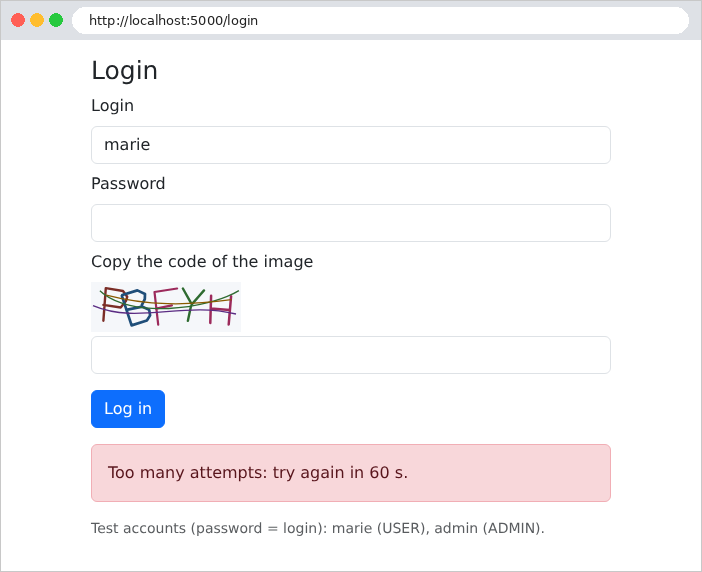
- lines 14–15: Three failures block the address IP for one minute;
- lines 17–20: the counter for an address: number of failures, and end date of the block ([Instant.MIN], a very long time ago, initially);
- line 22: the counter dictionary is shared by all requests. It is a simple [HashMap], which does not support concurrent access: each method is therefore [synchronized]. The keyword ensures that only one thread at a time executes one of the object’s [synchronized] methods: two simultaneous failures cannot occur (see [AtomicInteger], Chapter 6);
- lines 27–34: the remaining blocking time, rounded up to the next second;
- lines 36–43: a failure is counted; on the third failure, the address is blocked. [computeIfAbsent] returns the address counter after creating it if it did not exist;
- lines 45–47: a success clears the counter.
The file [controllers/AuthController.java]:
| package example27.controllers;
import java.util.Optional;
import org.springframework.http.HttpHeaders;
import org.springframework.stereotype.Controller;
import org.springframework.ui.Model;
import org.springframework.web.bind.annotation.GetMapping;
import org.springframework.web.bind.annotation.PostMapping;
import org.springframework.web.bind.annotation.RequestParam;
import example27.auth.AuthService;
import example27.auth.CaptchaService;
import example27.auth.LimiterService;
import example27.auth.UsersService.User;
import jakarta.servlet.http.HttpServletRequest;
import jakarta.servlet.http.HttpServletResponse;
@Controller
public class AuthController {
private final AuthService auth;
private final CaptchaService captchas;
private final LimiterService limiter;
public AuthController(AuthService auth, CaptchaService captchas, LimiterService limiter) {
this.auth = auth;
this.captchas = captchas;
this.limiter = limiter;
}
@GetMapping("/")
public String home() {
return "redirect:/profile";
}
@GetMapping("/login")
public String form(Model model) {
return loginPage(model, null, null);
}
@PostMapping("/login")
public String login(@RequestParam(required = false) String login,
@RequestParam(required = false) String password, @RequestParam(required = false) String captchaId,
@RequestParam(required = false) String captcha, HttpServletRequest request,
HttpServletResponse response, Model model) {
// the client's IP address
String ip = request.getRemoteAddr();
// 1. a blocked address is not even listened to
long seconds = limiter.blockedSeconds(ip);
if (seconds > 0) {
return loginPage(model, login, "Too many attempts: try again in " + seconds + " s.");
}
// 2. the captcha first (cheap), the password (bcrypt, expensive) next
if (!captchas.check(captchaId, captcha)) {
limiter.failure(ip);
return loginPage(model, login, "The image code is incorrect.");
}
Optional<User> user = auth.validate(login, password);
if (user.isEmpty()) {
limiter.failure(ip);
return loginPage(model, login, "Incorrect login or password.");
}
limiter.success(ip);
response.addHeader(HttpHeaders.SET_COOKIE, auth.cookie(auth.createToken(user.get())).toString());
return "redirect:/profile";
}
// each display of the form builds a NEW captcha
private String loginPage(Model model, String login, String error) {
model.addAttribute("login", login);
model.addAttribute("error", error);
model.addAttribute("captcha", captchas.generate());
return "auth/login";
}
}
|
Let’s comment on this code:
- line 48: the client’s address IP, provided by the network connection;
- lines 51–54: A blocked address isn’t even listened to;
- lines 56–59: the CAPTCHA is verified first, then the password (a computationally expensive [bcrypt] operation) only if the CAPTCHA is correct. An incorrect CAPTCHA counts as a failure;
- lines 71–76: Each time the form is displayed, a new CAPTCHA is generated and placed in the view template. This also applies to the first display (lines 37–40).
The file [templates/auth/login.html]:
| <!doctype html>
<html xmlns:th="http://www.thymeleaf.org" th:replace="~{layout :: page(~{::main})}">
<body>
<main>
<h1 class="h3">Login</h1>
<form method="post" action="/login">
<div class="mb-2">
<label class="form-label" for="login">Login</label>
<input class="form-control" id="login" name="login" th:value="${login}" required>
</div>
<div class="mb-2">
<label class="form-label" for="password">Password</label>
<input class="form-control" type="password" id="password" name="password" required>
</div>
<div class="mb-3">
<label class="form-label" for="captcha">Copy the code of the image</label>
<!--/* the SVG image, built by the server: inserted without escaping */-->
<div class="mb-1" th:utext="${captcha.svg}">image</div>
<!--/* the captcha identifier travels in a hidden field; the answer stays on the server */-->
<input type="hidden" name="captchaId" th:value="${captcha.id}">
<input class="form-control" id="captcha" name="captcha" autocomplete="off" required>
</div>
<button class="btn btn-primary" type="submit">Log in</button>
</form>
<div class="alert alert-danger mt-3" th:if="${error != null}" th:text="${error}">error</div>
<p class="text-muted small mt-3">Test accounts (password = login): marie (USER), admin (ADMIN).</p>
</main>
</body>
</html>
|
- line 18: the image SVG is text (from XML): it is inserted into the page as-is. [th:utext] ([unescaped text]) inserts the text without escaping: the characters [<] and [>] remain tags (with [th:text], they would become [<] and [>], and the page would display the image code). [th:utext] is valid here: it is HTML generated by the server, not user input;
- line 20: the CAPTCHA ID is passed in a hidden field; the response, however, remains on the server;
- line 21: [autocomplete="off"]: the browser does not suggest previous entries, which are irrelevant for a CAPTCHA.
The file [config/SecurityConfig.java] is exactly the same as in Example 25 (and not the one in Example 26: there is neither [@EnableMethodSecurity] nor an access denial handler here, since no page is reserved for a specific role). In particular, the access rule [/login] remains unchanged: the login page remains public, and the CAPTCHA is verified by the controller, not by [Spring Security].
The login page, at URL http://localhost:5000/login:
An incorrectly entered CAPTCHA:
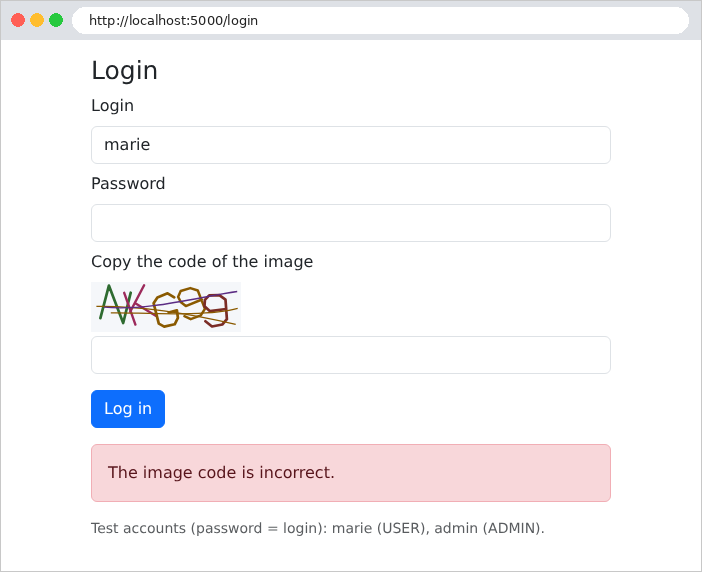
A new CAPTCHA has been generated. Resubmitting a CAPTCHA that has already been used—even if entered correctly—results in the same message: the answer was removed from the dictionary during its initial verification. After three failed attempts, even the correct password, along with the correct CAPTCHA, is rejected for one minute:
The case study applies these two security measures to its login page and account creation process, with adjustable thresholds in the file [application.properties] (properties [rdvmedecins.protection.*]).