11. Case Study: The RdvMedecins Application
11.1. The Problem
The RdvMedecins application manages appointments for a medical practice. Each doctor has time slots (from 8:00 a.m. to 12:00 p.m. in 20-minute increments, for example); an appointment consists of a day, a time slot, and a client (a patient). This is the exact implementation, in [Spring MVC], of the [ASP.NET Core MVC] application from the previous lesson: same database, same business rules, same pages, same URLs, same translation dictionaries. The HTML pages are generated by the server using [Thymeleaf] views; database access is handled by [Spring Data JPA] and [Hibernate].
Three user roles share the application:
Role | Who | What they can do |
ADMIN | The administrator ([admin]) | View schedules, make and cancel appointments for any patient; manage (list, add, edit, delete) doctors and clients |
DOCTOR | Doctors | view schedules, make appointments, and cancel appointments for any patient |
USER | clients (patients) | view schedules without seeing other patients’ names; book an appointment for themselves; cancel their appointment; manage their account; create an account |
Key management rules:
- No appointments in the past;
- a time slot can only be booked once per day;
- a patient may have only one upcoming appointment at a time;
- two doctors (or two clients) cannot have the same first and last names, and a login belongs to only one account;
- A doctor with appointments cannot be deleted; A client is deleted along with their appointments;
- the login page is protected against bots (CAPTCHA, limited attempts), and creating a client account requires first solving the CAPTCHA on that page.
11.2. Using the Application
11.2.1. The login page
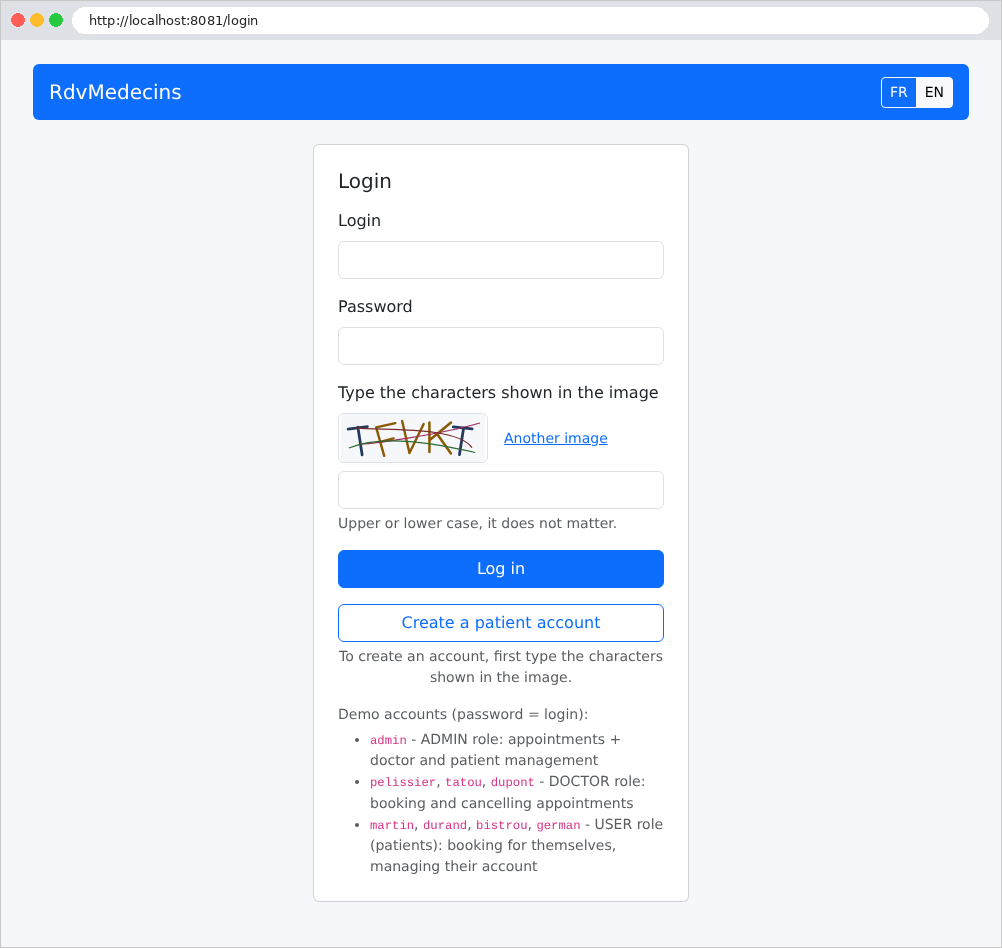
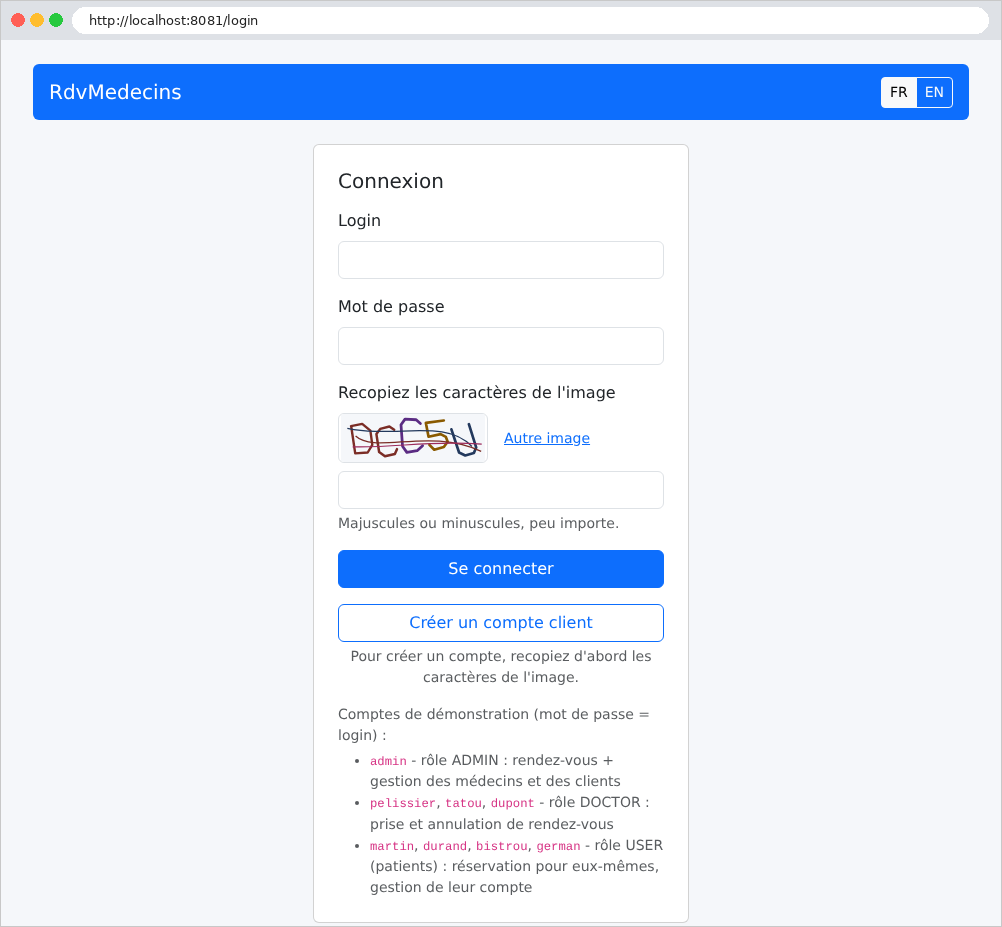
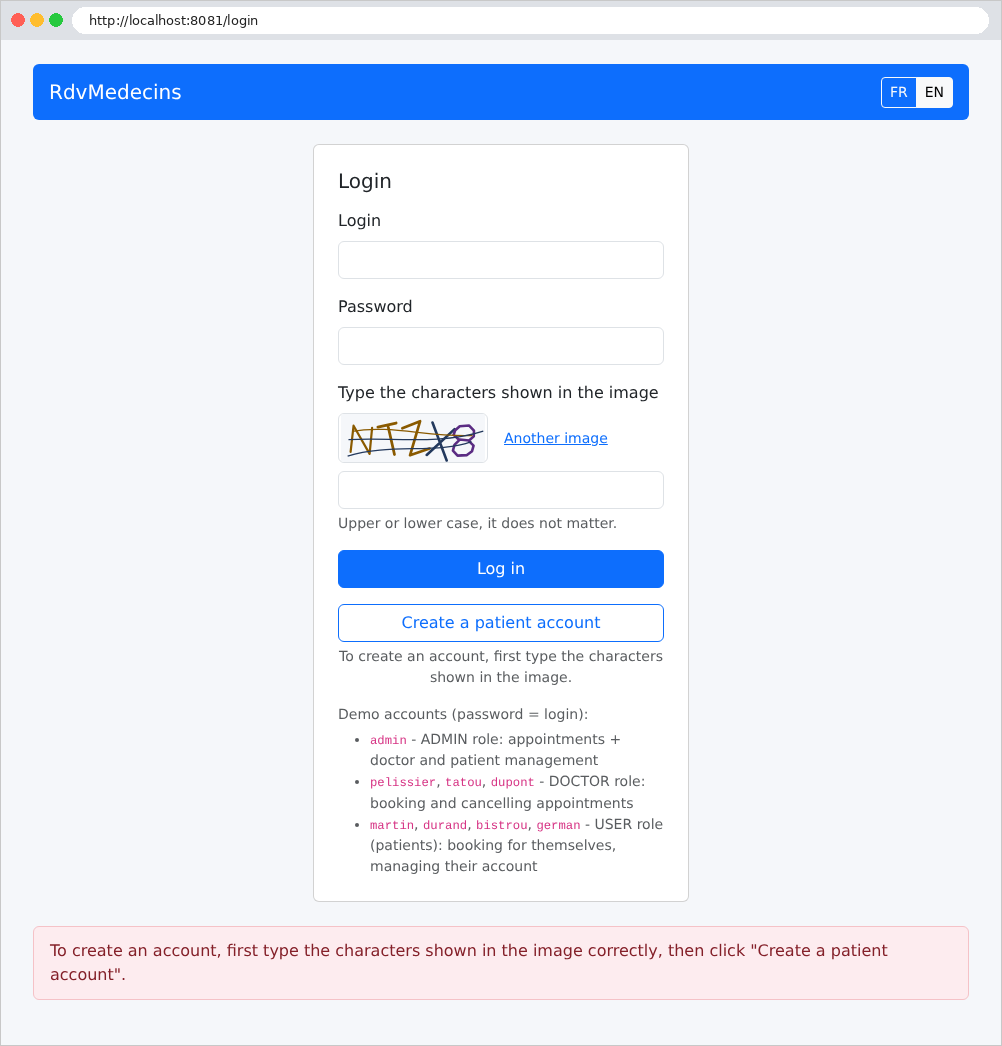
The page features two buttons: Log in and Create a patient account. Both require you to enter the characters shown in the image. The buttons FR / EN change the language:
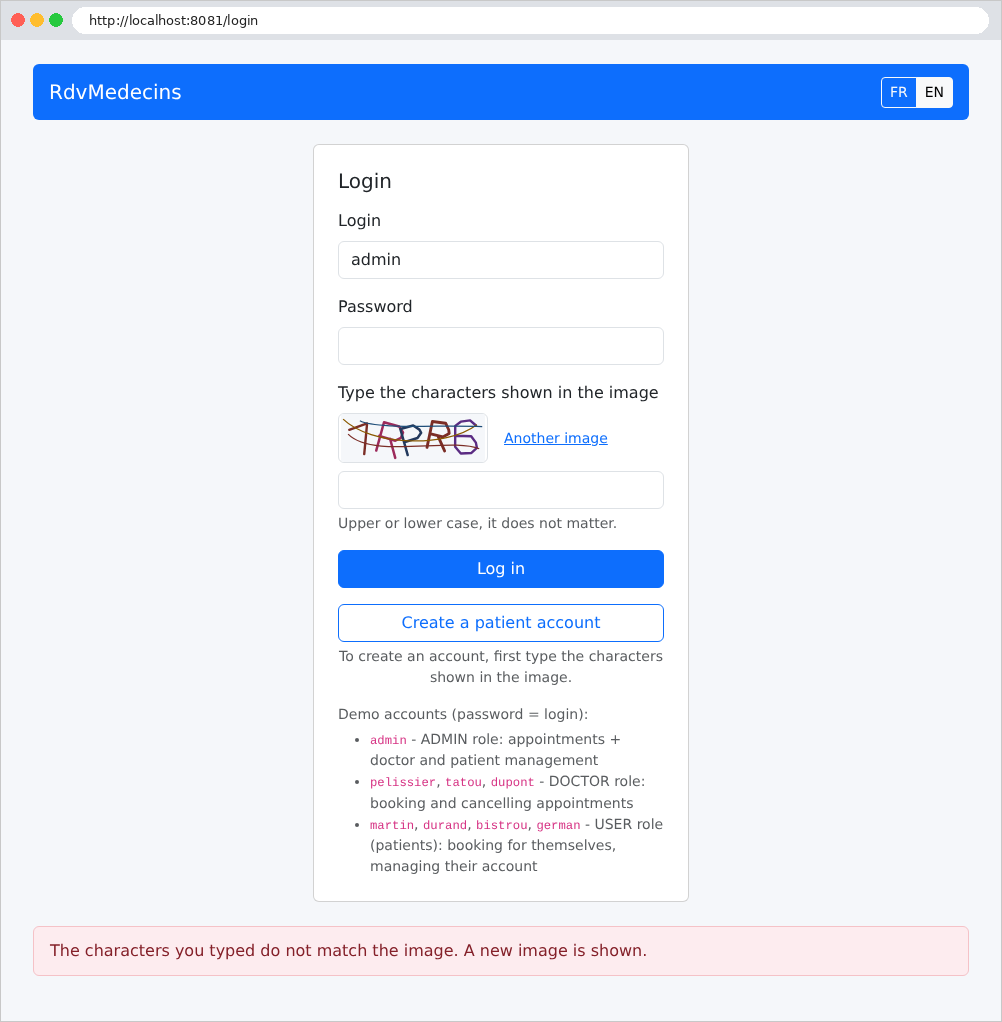
An error (in this case, an incorrectly entered CAPTCHA) is displayed at the bottom of the page on a light pink background:
11.2.2. The calendar, as seen by the administrator and doctors
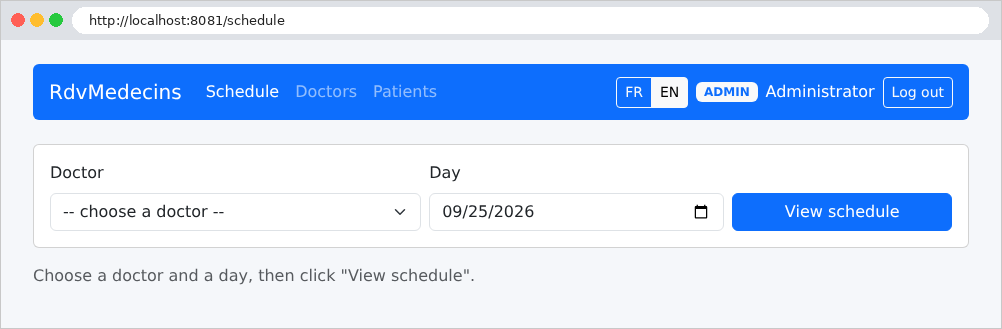
Once logged in, the administrator is taken to the calendar page. They select a doctor and a day:
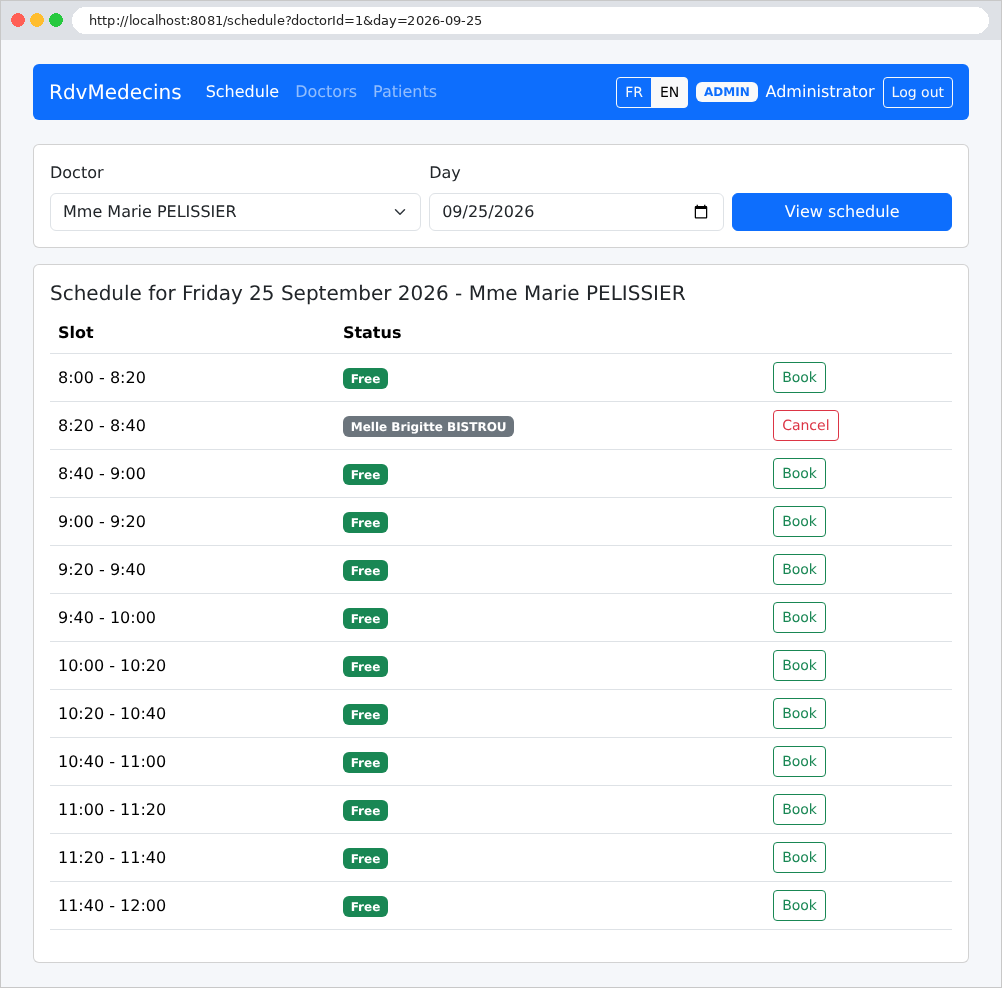
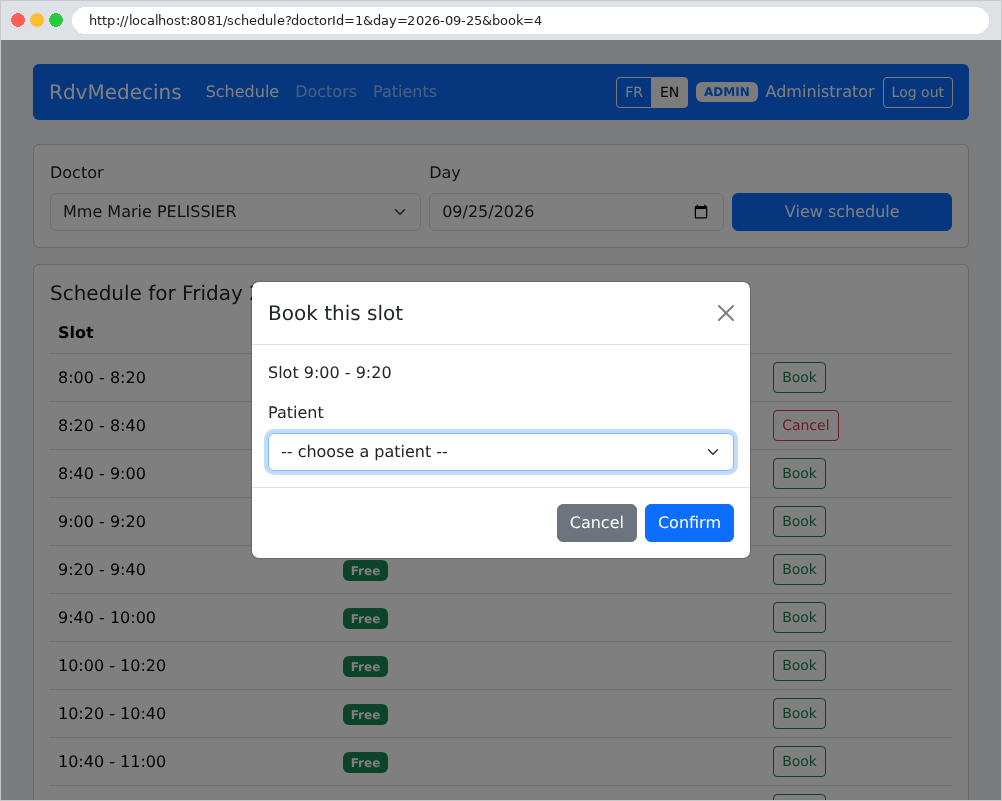
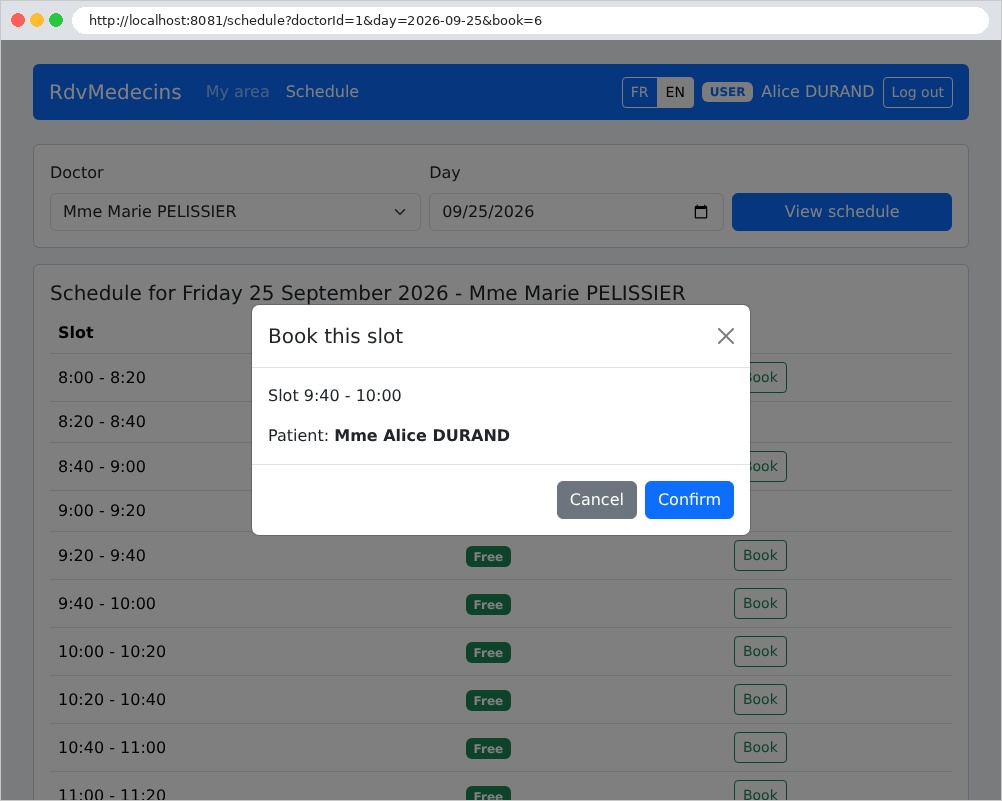
Each time slot is either available (Book button) or occupied (patient’s name, Cancel button). Clicking Book opens a window asking for the patient’s information. This window is generated by the server, just like the rest of the page: the URL now contains the parameter [book=4], which is the number of the selected time slot:
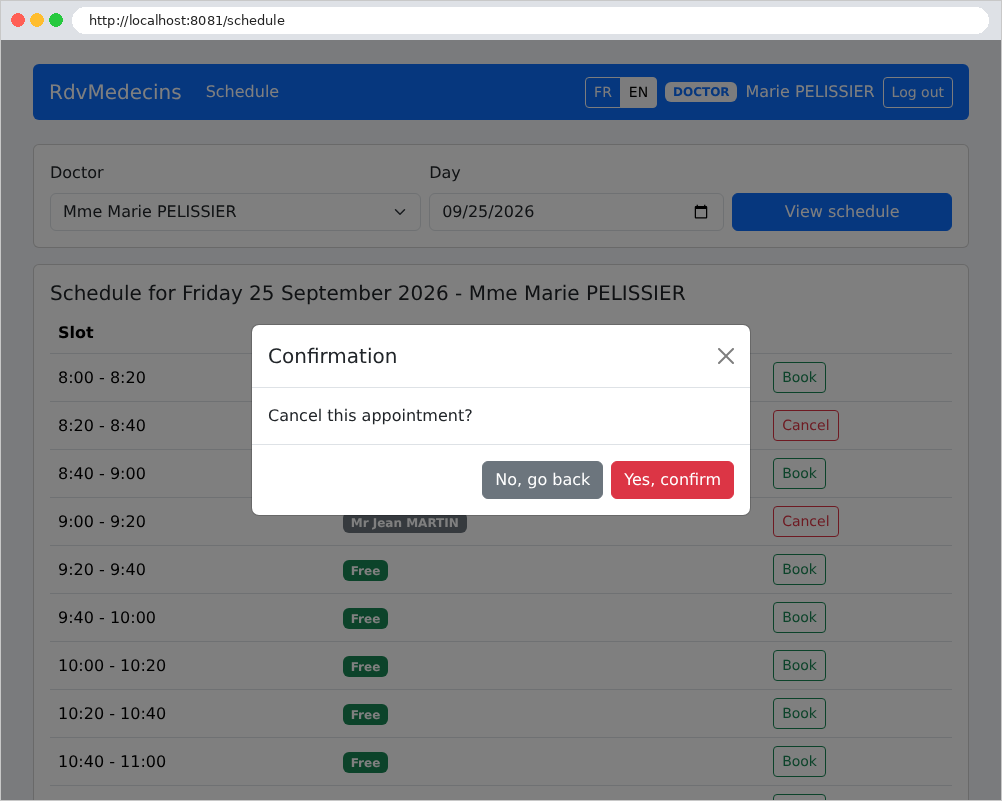
Clicking “Cancel” prompts a confirmation (here by Dr. Pélissier, whose navigation bar does not include the administration menus):
11.2.3. The Patient Portal
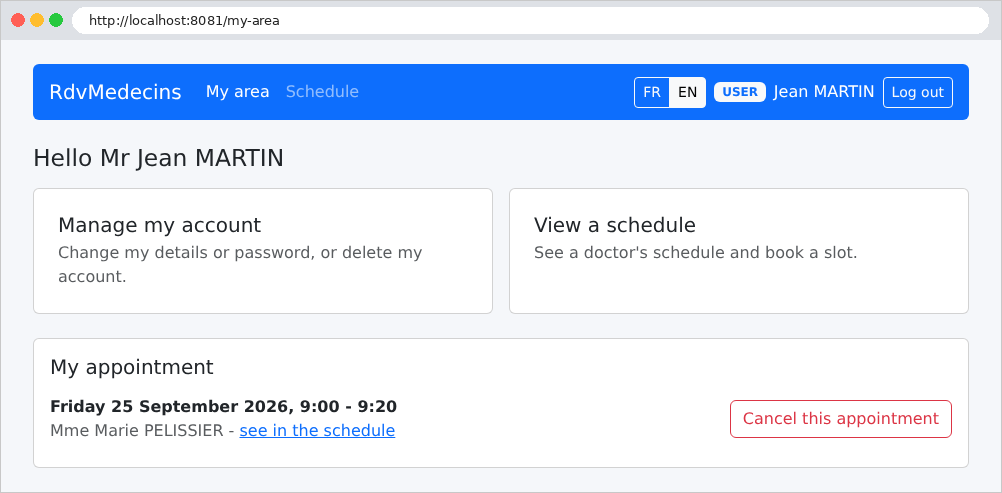
A patient (role USER) arrives at My area: their upcoming appointment, which they can cancel, and links to their account management and calendar:
In the calendar, they see their own appointment (in blue), but not the names of other patients, which are replaced by “Booked”: this name does not even appear in the page’s source code. Since they already have an upcoming appointment, they cannot schedule another one: no “Book” button is displayed (on the calendar for another day or another doctor—where their appointment does not appear—a message explains why):
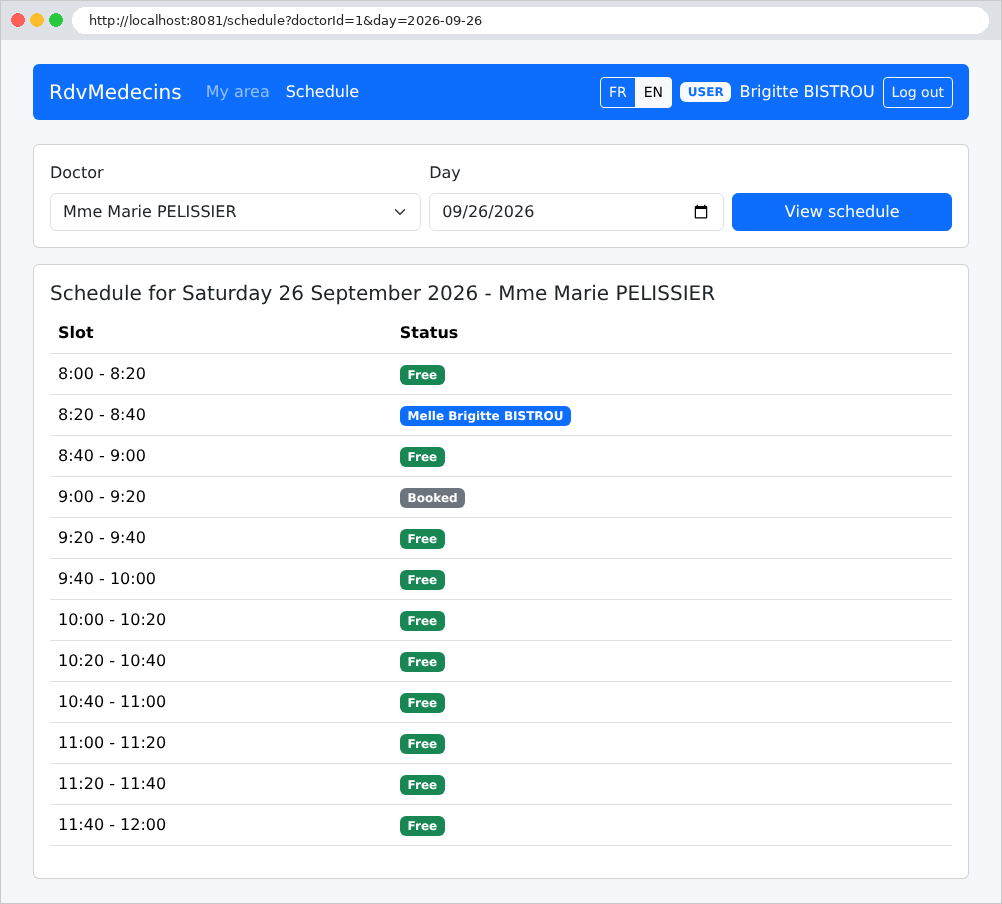
A patient without an appointment can book an available slot for themselves: the booking window does not prompt the user to select a patient.
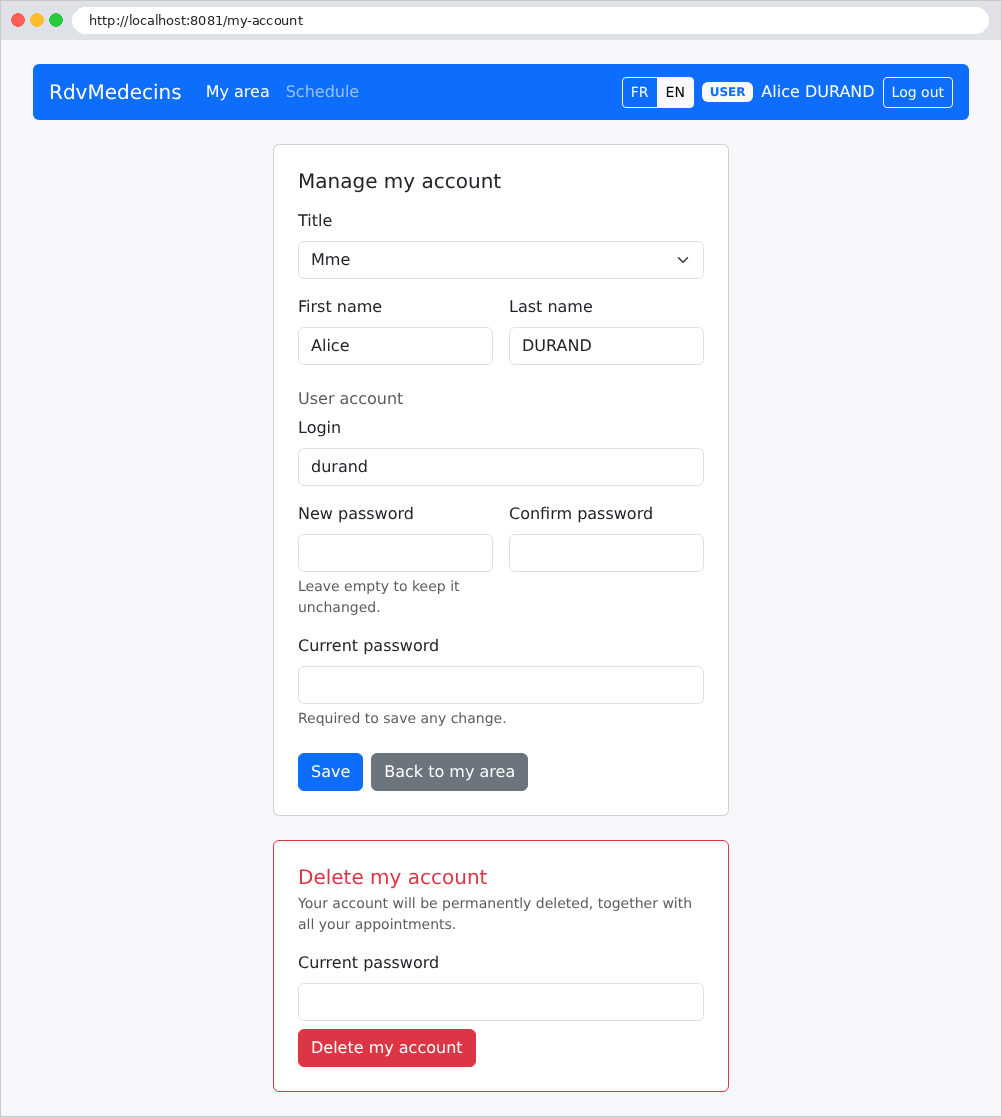
Account management: edit personal information, change the password, or delete the account (and its appointments). The current password is required for any changes:
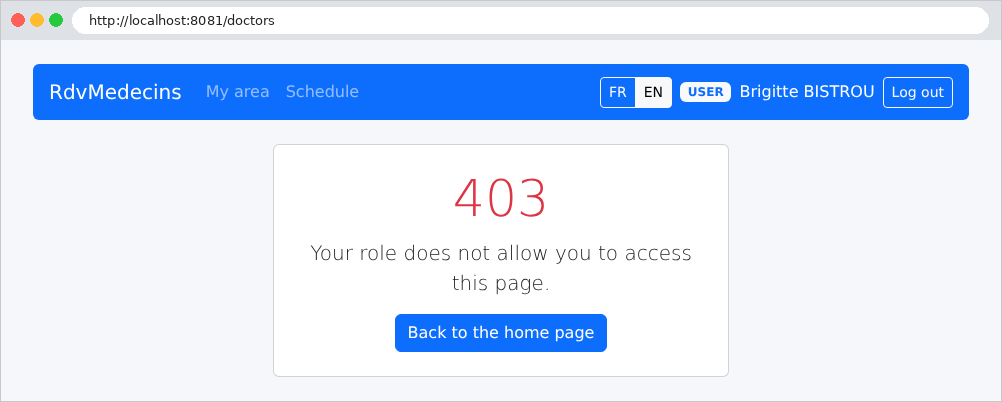
A patient who attempts to open a page reserved for the administrator (here, [/doctors], typed manually) receives an error page:
11.2.4. Managing Doctors and Patients
The administrator has two additional menus, Doctors and Patients:
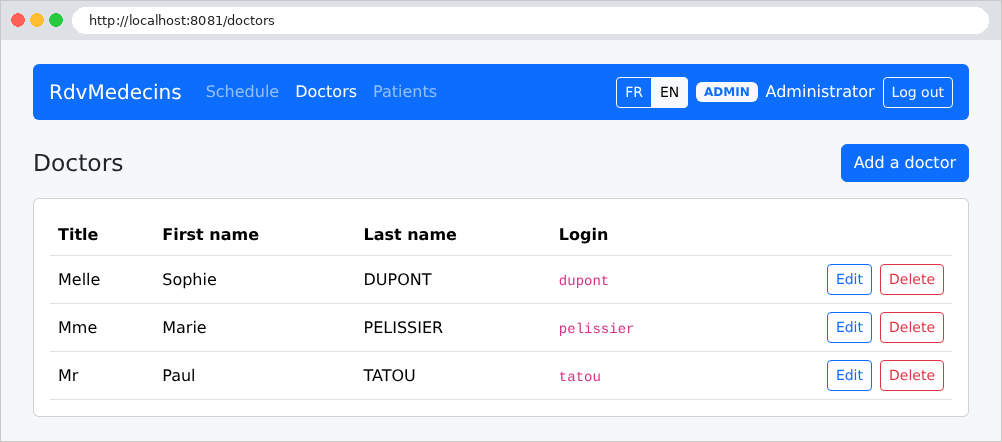
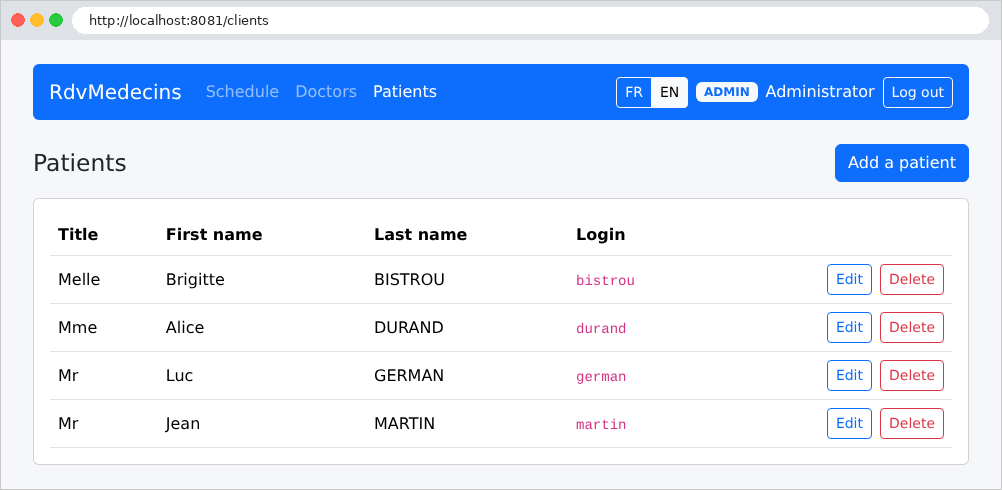
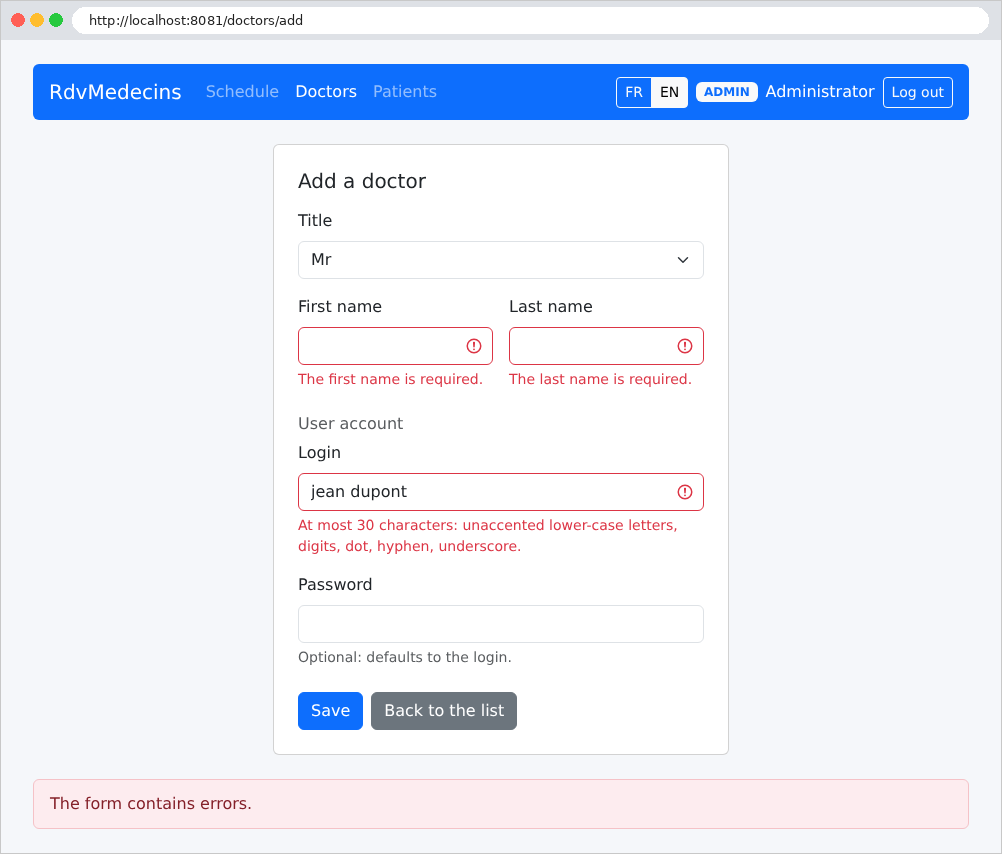
The form for adding a doctor, submitted with errors:
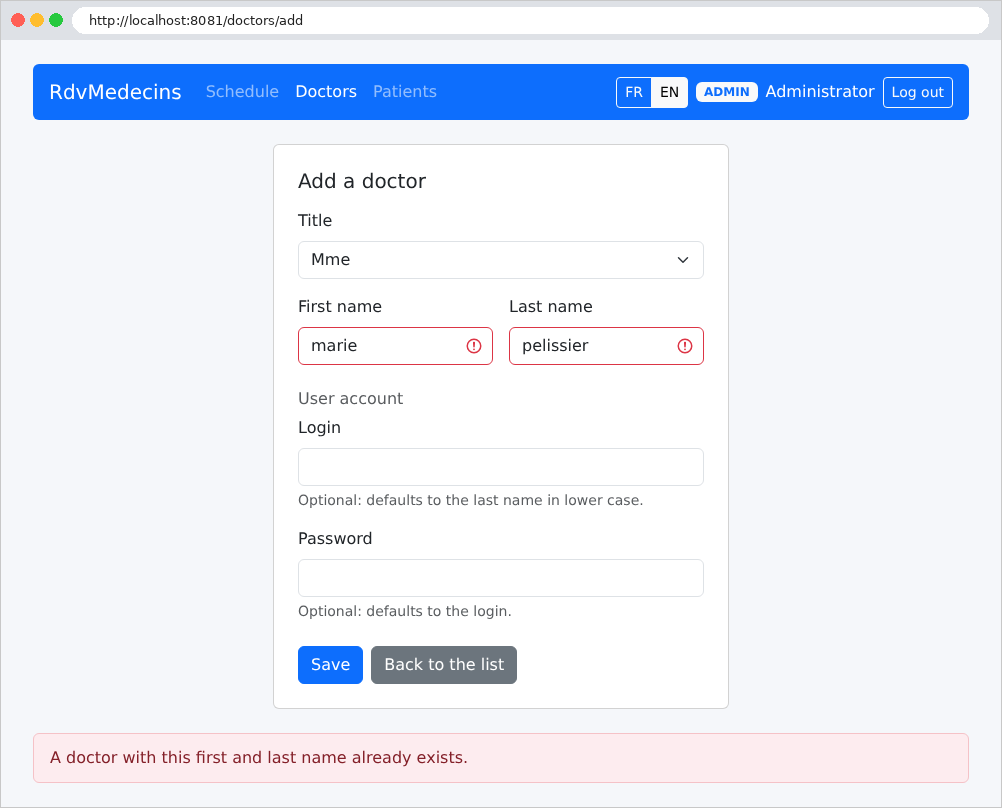
A name identical to that of an existing doctor is rejected, even when written in lowercase (we’ll see that it’s the database itself that compares names without distinguishing between uppercase and lowercase letters or accents):
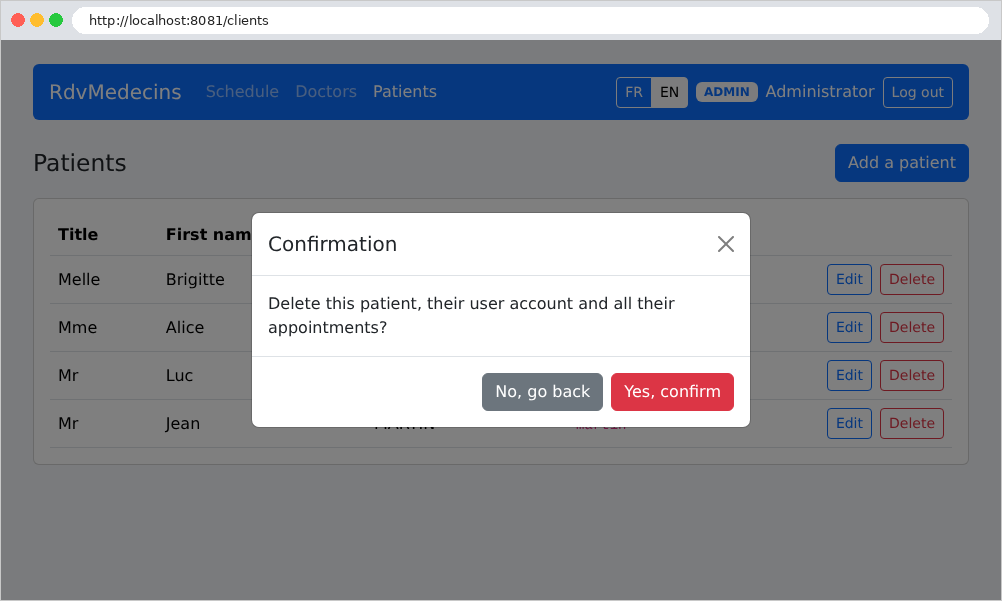
Deleting a patient requires confirmation:
11.2.5. Creating a patient account
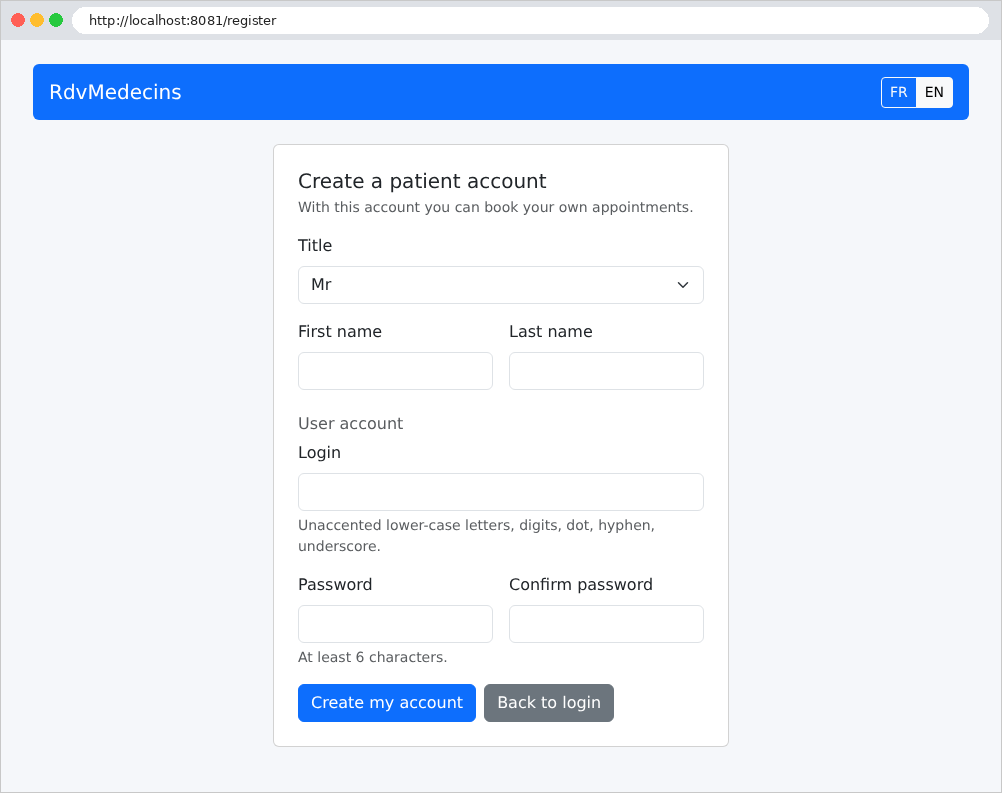
From the login page, the “Create a patient account” button only opens the form if the CAPTCHA has been entered correctly:
11.3. Installation and Execution
The application is located in the [rdvmedecins2-spring-mvc] folder, next to the [examples] folder. It is a standalone [Maven] project: it does not depend on the parent project containing the examples, and has its own Maven Wrapper (see below). The [README.md] file in the folder contains all of the following.
11.3.1. Required Software
Two software packages are sufficient:
- JDK 21 ([Java Development Kit]), which contains the [javac] compiler and the [java] virtual machine. [Java] 21 is a version of LTS (long-term support). A free distribution is suitable, for example, [Eclipse Temurin] (https://adoptium.net); under [Linux], the [openjdk-21-jdk] package. Verify the installation in a terminal:
| openjdk version "21.0.10" 2026-01-20
OpenJDK Runtime Environment (build 21.0.10+7-Ubuntu-124.04)
OpenJDK 64-Bit Server VM (build 21.0.10+7-Ubuntu-124.04, mixed mode, sharing)
|
- A [MySQL] 8 server, for example, the one for [Laragon] under [Windows] (see Example 28). [MariaDB] is also suitable: the application has been tested with it.
[Maven] does not need to be installed: the [mvnw] script (Maven Wrapper) downloads it automatically on first launch, and then [Maven] downloads the project libraries from the [Maven Central] repository. You must therefore be connected to the Internet during the first compilation. The recommended editor is [Visual Studio Code], with the “Extension Pack for Java” and the “Spring Boot Extension Pack”; however, everything can be done via the command line.
11.3.2. Create the database
The [dbrdvmedecins2] database is created by the [database/dbrdvmedecins2.sql] script. Using [Laragon], open the [HeidiSQL] tool (Database button), then run the script via the File / Run SQL menu. From the command line, in the application folder:
| mysql -u root -p < database/dbrdvmedecins2.sql
|
The [-p] option prompts for the password for [root]; omit it if the account does not have a password (as is the case with [Laragon]). This is the same database as the one used by version [ASP.NET Core]: if it already exists, this step is optional. The script can be run at any time to revert to the original data.
All configuration settings are in the file [src/main/resources/application.properties] (discussed below). By default, the application connects to [MySQL] on [localhost], port 3306, using the user [root] without a password: these are the default settings for [Laragon]. If your [root] account has a password, the easiest way is to write it in this file, under the key [spring.datasource.password]. To avoid writing a password in a project file, you can also specify it via an environment variable, which takes precedence over the file. Its name is derived from the key’s name: capital letters, with [.] and [-] replaced by [_]:
| export SPRING_DATASOURCE_PASSWORD=myPassword # Linux, macOS
set SPRING_DATASOURCE_PASSWORD=myPassword # Windows (cmd)
$env:SPRING_DATASOURCE_PASSWORD="myPassword" # Windows (PowerShell)
|
The variable applies only to the terminal where it was defined: the application is then launched there.
11.3.4. Launch the application
Open the [rdvmedecins2-spring-mvc] folder in [Visual Studio Code] (File menu / Open Folder), then open a terminal (Terminal menu / New Terminal), and type:
Under [Windows], type [mvnw spring-boot:run] at the command prompt, or [.\mvnw spring-boot:run] in [PowerShell]. The first time it runs, [mvnw] downloads [Maven], which in turn downloads the libraries, compiles the application, and then launches it. After the messages from [Maven], the console displays the application’s messages:
| . ____ _ __ _ _
/\\ / ___'_ __ _ _(_)_ __ __ _ \ \ \ \
( ( )\___ | '_ | '_| | '_ \/ _` | \ \ \ \
\\/ ___)| |_)| | | | | || (_| | ) ) ) )
' |____| .__|_| |_|_| |_\__, | / / / /
=========|_|==============|___/=/_/_/_/
:: Spring Boot :: (v4.1.1)
2026-09-25T18:46:42.404+02:00 INFO 19025 --- [ restartedMain] rdvmedecins.RdvMedecinsApplication : Starting RdvMedecinsApplication using Java 21.0.10 with PID 19025 (/home/serge/cours/rdvmedecins2-spring-mvc/target/classes started by serge in /home/serge/cours/rdvmedecins2-spring-mvc)
2026-09-25T18:46:42.422+02:00 INFO 19025 --- [ restartedMain] rdvmedecins.RdvMedecinsApplication : The following 1 profile is active: "dev"
2026-09-25T18:46:42.598+02:00 INFO 19025 --- [ restartedMain] .e.DevToolsPropertyDefaultsPostProcessor : Devtools property defaults active! Set 'spring.devtools.add-properties' to 'false' to disable
2026-09-25T18:46:42.598+02:00 INFO 19025 --- [ restartedMain] .e.DevToolsPropertyDefaultsPostProcessor : For additional web related logging consider setting the 'logging.level.web' property to 'DEBUG'
2026-09-25T18:46:43.729+02:00 INFO 19025 --- [ restartedMain] .s.d.r.c.RepositoryConfigurationDelegate : Bootstrapping Spring Data JPA repositories in DEFAULT mode.
2026-09-25T18:46:43.795+02:00 INFO 19025 --- [ restartedMain] .s.d.r.c.RepositoryConfigurationDelegate : Finished Spring Data repository scanning in 55 ms. Found 5 JPA repository interfaces.
2026-09-25T18:46:44.511+02:00 INFO 19025 --- [ restartedMain] o.s.boot.tomcat.TomcatWebServer : Tomcat initialized with port 8081 (http)
2026-09-25T18:46:44.524+02:00 INFO 19025 --- [ restartedMain] o.apache.catalina.core.StandardService : Starting service [Tomcat]
2026-09-25T18:46:44.525+02:00 INFO 19025 --- [ restartedMain] o.apache.catalina.core.StandardEngine : Starting Servlet engine: [Apache Tomcat/11.0.24]
2026-09-25T18:46:44.552+02:00 INFO 19025 --- [ restartedMain] b.w.c.s.WebApplicationContextInitializer : Root WebApplicationContext: initialization completed in 1949 ms
2026-09-25T18:46:44.747+02:00 INFO 19025 --- [ restartedMain] org.hibernate.orm.jpa : HHH008540: Processing PersistenceUnitInfo [name: default]
2026-09-25T18:46:44.783+02:00 INFO 19025 --- [ restartedMain] org.hibernate.orm.core : HHH000001: Hibernate ORM core version 7.4.5.Final
2026-09-25T18:46:45.287+02:00 INFO 19025 --- [ restartedMain] o.s.o.j.p.SpringPersistenceUnitInfo : No LoadTimeWeaver setup: ignoring JPA class transformer
2026-09-25T18:46:45.317+02:00 INFO 19025 --- [ restartedMain] com.zaxxer.hikari.HikariDataSource : HikariPool-1 - Starting...
2026-09-25T18:46:45.487+02:00 INFO 19025 --- [ restartedMain] com.zaxxer.hikari.pool.HikariPool : HikariPool-1 - Added connection com.mysql.cj.jdbc.ConnectionImpl@4a05c6b0
2026-09-25T18:46:45.488+02:00 INFO 19025 --- [ restartedMain] com.zaxxer.hikari.HikariDataSource : HikariPool-1 - Start completed.
2026-09-25T18:46:45.537+02:00 WARN 19025 --- [ restartedMain] org.hibernate.orm.core : HHH000511: The 5.5.5 version for [org.hibernate.dialect.MySQLDialect] is no longer supported, hence certain features may not work properly.The minimum supported version is 8.0.0. Check the community dialects project for available legacy versions.
2026-09-25T18:46:45.554+02:00 INFO 19025 --- [ restartedMain] org.hibernate.orm.connections.pooling : HHH10001005: Database info:
Database JDBC URL [jdbc:mysql://localhost:3306/dbrdvmedecins2]
Database driver: MySQL Connector/J
Database dialect: MySQLDialect
Database version: 5.5.5
Default catalog/schema: dbrdvmedecins2/undefined
Autocommit mode: undefined/unknown
Isolation level: REPEATABLE_READ [default REPEATABLE_READ]
JDBC fetch size: none
Pool: DataSourceConnectionProvider
Minimum pool size: undefined/unknown
Maximum pool size: undefined/unknown
2026-09-25T18:46:47.573+02:00 INFO 19025 --- [ restartedMain] org.hibernate.orm.core : HHH000489: No JTA platform available (set 'hibernate.transaction.jta.platform' to enable JTA platform integration)
2026-09-25T18:46:47.597+02:00 INFO 19025 --- [ restartedMain] j.LocalContainerEntityManagerFactoryBean : Initialized JPA EntityManagerFactory for persistence unit 'default'
2026-09-25T18:46:47.688+02:00 INFO 19025 --- [ restartedMain] o.s.d.j.r.query.QueryEnhancerFactories : Hibernate is in classpath; If applicable, HQL parser will be used.
Hibernate: select d1_0.id,d1_0.first_name,d1_0.last_name,d1_0.title,u1_0.id,u1_0.login,u1_0.name,u1_0.password,u1_0.role,u1_0.version,d1_0.`user`,d1_0.version from doctors d1_0 left join users u1_0 on u1_0.id=d1_0.`user` order by d1_0.last_name,d1_0.first_name
Hibernate: select c1_0.id,c1_0.first_name,c1_0.last_name,c1_0.title,u1_0.id,u1_0.login,u1_0.name,u1_0.password,u1_0.role,u1_0.version,c1_0.`user`,c1_0.version from clients c1_0 left join users u1_0 on u1_0.id=c1_0.`user` order by c1_0.last_name,c1_0.first_name
2026-09-25T18:46:52.549+02:00 INFO 19025 --- [ restartedMain] o.s.boot.tomcat.TomcatWebServer : Tomcat started on port 8081 (http) with context path '/'
2026-09-25T18:46:52.563+02:00 INFO 19025 --- [ restartedMain] rdvmedecins.RdvMedecinsApplication : Started RdvMedecinsApplication in 10.82 seconds (process running for 11.321)
2026-09-25T18:46:52.928+02:00 INFO 19025 --- [omcat-handler-0] o.a.c.c.C.[Tomcat].[localhost].[/] : Initializing Spring DispatcherServlet 'dispatcherServlet'
2026-09-25T18:46:52.929+02:00 INFO 19025 --- [omcat-handler-0] o.s.web.servlet.DispatcherServlet : Initializing Servlet 'dispatcherServlet'
2026-09-25T18:46:52.930+02:00 INFO 19025 --- [omcat-handler-0] o.s.web.servlet.DispatcherServlet : Completed initialization in 1 ms
|
We’ll return to this console in the “Starting the Application” section. For now, note the line [Tomcat started on port 8081]: the application is ready at address [http://localhost:8081]. Port 8081 allows you to run a course example (port 5000) at the same time. The [ASP.NET Core] version of the application also listens on port 8081: do not run both at the same time.
Stop the application by entering [Ctrl-C] in the terminal.
11.3.5. Demo Accounts
The password for each account is its username; you must also enter the characters from the image, in uppercase or lowercase:
Username | Role |
[admin] | ADMIN (the administrator) |
[pelissier], [tatou], [dupont] | DOCTOR (the doctors) |
[martin], [durand], [bistrou], [german] | USER (patients) |
A guide to exploring the app:
- [admin]: Schedule, Ms. Marie PELISSIER, today: a time slot is already booked by Ms. Brigitte BISTROU. Book a slot for Mr. Jean MARTIN, then try to book a second appointment for him (declined). Doctors and Patients menus: add, edit, delete (Dr. PELISSIER, who has appointments, cannot be deleted);
- [pelissier]: his daily schedule is displayed directly; the address [/doctors], entered manually, returns a 403 error page;
- [martin]: My area, their appointment, the calendar where other patients appear as “Booked”; Manage my account;
- login page: Create a patient account, then log in with the new account;
- Buttons FR / EN: The entire interface changes languages, including dates.
11.3.6. Development mode
The command [./mvnw spring-boot:run] launches the application with the profile [dev] (see [pom.xml], below): the console then displays each SQL command sent to the database by [Hibernate] (the two [Hibernate: select ...] lines in the console above). Two other tools facilitate development:
- the [Spring Boot DevTools] library (see [pom.xml]) automatically restarts the application as soon as a class is recompiled in the [target/classes] folder. [Visual Studio Code] recompiles a [.java] file on every save; without it, you would have to type [./mvnw compile] in a second terminal. The restart takes only a few seconds: only the application’s classes are reloaded, not the libraries. A modified [templates/*.html] view, on the other hand, is reloaded the next time the page is displayed, once it has been copied to [target/classes] in the same way;
- The debugger: With the “Extension Pack for Java,” the Run and Debug links appear above the [main] method in [RdvMedecinsApplication.java]; Debug starts the application under the debugger’s control. Set a breakpoint by clicking in the margin of a line of code. The Spring Boot Dashboard view in the “Spring Boot Extension Pack” offers the same commands.
11.3.7. An Executable Archive
To install the application on a server, package it into a single archive:
| ./mvnw package
java -jar target/rdvmedecins-1.0.jar
|
The first command compiles the application and creates the [target/rdvmedecins-1.0.jar] archive (approximately 60 MB): it contains the application, all its libraries, and the [Tomcat] server itself. The second command launches it: only a JDK (or a JRE) 21 is required on the machine. When launched this way, the application does not have the [dev] profile (the console does not display the SQL commands), and [Spring Boot DevTools] is not in the archive. Each key in [application.properties] can be replaced on the command line, for example, with [java -jar target/rdvmedecins-1.0.jar --server.port=9000].
11.3.8. Common Issues
Upon startup, [Hibernate] queries the database to determine its version, then the application reads the lists of doctors and clients from it: if the database is inaccessible, the application stops immediately, with an error displayed in the console. This error is often buried in a long call stack, and the last line, [Caused by: ...], isn’t very descriptive ([Unable to determine Dialect without JDBC metadata]: [Hibernate] was unable to query the database). Instead, look for the message from the database itself, which [Hibernate] also writes in a warning at the beginning of the error. For example, with a database that doesn’t exist:
| ... WARN ... org.hibernate.orm.jdbc.error : HHH000247: ErrorCode: 1049, SQLState: 42000
... WARN ... org.hibernate.orm.jdbc.error : Unknown database 'dbunknown'
...
Caused by: java.sql.SQLSyntaxErrorException: Unknown database 'dbunknown'
...
Caused by: org.hibernate.HibernateException: Unable to determine Dialect without JDBC metadata (please set 'jakarta.persistence.jdbc.url' for common cases or 'hibernate.dialect' when a custom Dialect implementation must be provided)
|
The most common messages:
Message | Probable Cause |
[Communications link failure] or [Connection refused] | [MySQL] has not started, or is not listening on [localhost:3306] |
[Access denied for user 'root'@'localhost'] | The password for [MySQL] must be entered (see “Configuring Database Access”) |
[Unknown database 'dbrdvmedecins2'] | The script [database/dbrdvmedecins2.sql] has not been run |
[rdvmedecins.auth.jwt-secret must be at least 32 characters long] | The secret key for the tokens is too short in [application.properties] |
[Port 8081 was already in use] | Port 8081 is already in use (is version [ASP.NET Core] running?): stop it, or change to [server.port] |
[JAVA_HOME is not set] or [release version 21 not supported] | JDK is missing or older than version 21 |
[Could not transfer artifact] while [mvnw] is running | The [Maven Central] repository is inaccessible (no Internet connection, proxy) |
With [MariaDB], [Hibernate] also displays a harmless warning upon startup: [HHH000511: The 5.5.5 version for [org.hibernate.dialect.MySQLDialect] is no longer supported]. [MariaDB] actually presents itself to the [MySQL] driver with a version number of “5.5.5,” which [Hibernate] interprets as a very old [MySQL].
11.4. The application architecture
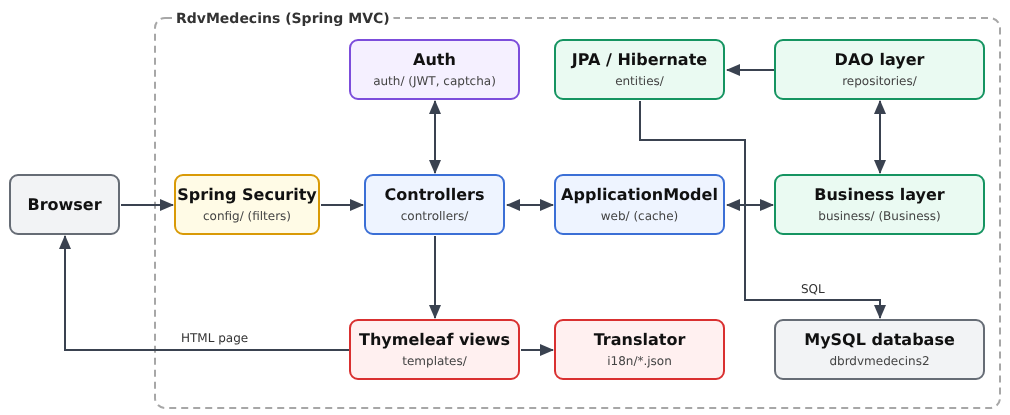
- The browser sends its requests to the [Tomcat] server, which is integrated into the application. Each request first passes through the filter chain of [Spring Security] (configured by [config/SecurityConfig.java]), which identifies the user based on the JWT token in their cookie and denies access to protected pages;
- [controllers]: the web layer controllers. They all pass through a single bean, [ApplicationModel] (file [web]), which stores the lists of doctors and clients in memory and forwards other requests to the business layer;
- [auth]: the connection, JWT tokens, the CAPTCHA, attempt limits, and the account creation pass;
- [web]: elements common to the web layer: the cache and the [ApplicationModel] facade, translation, flash messages, validation, attributes common to all views, and exception handling; [models]: form and view templates;
- [business]: business rules and transactions;
- [repositories]: the DAO layer, one [Spring Data JPA] interface per table;
- [entities]: the entities [JPA], which [Hibernate] reads from and writes to the database; [domain]: the calendar objects, calculated by the business layer;
- [templates]: the [Thymeleaf] views, which generate the HTML pages; [i18n]: dictionaries, used by the translator; [static]: the stylesheet, the page script, and [Bootstrap];
- [config]: the configuration written in [Java] (security, language, flash messages, typed properties); [RdvMedecinsApplication.java] starts the whole process.
The application folder:
| rdvmedecins2-spring-mvc/
├── .mvn/
│ └── wrapper/
│ └── maven-wrapper.properties
├── database/
│ ├── dbrdvmedecins2.sql
│ └── README.md
├── src/
│ └── main/
│ ├── java/
│ │ └── rdvmedecins/
│ │ ├── auth/
│ │ │ ├── AuthService.java
│ │ │ ├── Captcha.java
│ │ │ ├── CaptchaService.java
│ │ │ ├── CaptchaDrawing.java
│ │ │ ├── AttemptLimiterService.java
│ │ │ ├── RegistrationPassService.java
│ │ │ ├── README.md
│ │ │ ├── InvalidSessionException.java
│ │ │ └── ConnectedUser.java
│ │ ├── config/
│ │ │ ├── AuthProperties.java
│ │ │ ├── ProtectionProperties.java
│ │ │ ├── README.md
│ │ │ ├── SecurityConfig.java
│ │ │ └── WebConfig.java
│ │ ├── controllers/
│ │ │ ├── ScheduleController.java
│ │ │ ├── AuthController.java
│ │ │ ├── ClientsController.java
│ │ │ ├── ErrorController.java
│ │ │ ├── PatientAreaController.java
│ │ │ ├── RegistrationController.java
│ │ │ ├── LanguageController.java
│ │ │ ├── DoctorsController.java
│ │ │ ├── PersonsControllerBase.java
│ │ │ └── README.md
│ │ ├── domain/
│ │ │ ├── DoctorDaySchedule.java
│ │ │ ├── DoctorDaySlot.java
│ │ │ └── README.md
│ │ ├── entities/
│ │ │ ├── AbstractEntity.java
│ │ │ ├── Client.java
│ │ │ ├── Slot.java
│ │ │ ├── Doctor.java
│ │ │ ├── Person.java
│ │ │ ├── README.md
│ │ │ ├── Role.java
│ │ │ ├── Appointment.java
│ │ │ └── User.java
│ │ ├── business/
│ │ │ ├── Dates.java
│ │ │ ├── PersonData.java
│ │ │ ├── Business.java
│ │ │ ├── BusinessException.java
│ │ │ ├── BusinessService.java
│ │ │ └── README.md
│ │ ├── models/
│ │ │ ├── Forms.java
│ │ │ ├── ViewModels.java
│ │ │ ├── README.md
│ │ │ └── InputRules.java
│ │ ├── repositories/
│ │ │ ├── ClientRepository.java
│ │ │ ├── SlotRepository.java
│ │ │ ├── DoctorRepository.java
│ │ │ ├── PersonRepository.java
│ │ │ ├── README.md
│ │ │ ├── AppointmentRepository.java
│ │ │ └── UserRepository.java
│ │ ├── web/
│ │ │ ├── ApplicationModel.java
│ │ │ ├── CookieFlashMapManager.java
│ │ │ ├── Flash.java
│ │ │ ├── HtmlExceptionHandler.java
│ │ │ ├── FlashMessage.java
│ │ │ ├── CommonModel.java
│ │ │ ├── Utils.java
│ │ │ ├── README.md
│ │ │ ├── Translator.java
│ │ │ ├── FlashType.java
│ │ │ └── Validation.java
│ │ └── RdvMedecinsApplication.java
│ └── resources/
│ ├── i18n/
│ │ ├── en.json
│ │ └── fr.json
│ ├── static/
│ │ ├── css/
│ │ │ └── styles.css
│ │ ├── js/
│ │ │ └── app.js
│ │ └── lib/
│ │ └── bootstrap/
│ │ ├── css/
│ │ │ └── bootstrap.min.css
│ │ └── LICENSE
│ ├── templates/
│ │ ├── fragments/
│ │ │ ├── captcha.html
│ │ │ ├── person-fields.html
│ │ │ ├── confirmation.html
│ │ │ ├── errors.html
│ │ │ ├── flash.html
│ │ │ ├── navbar.html
│ │ │ └── booking.html
│ │ ├── persons/
│ │ │ ├── form.html
│ │ │ └── list.html
│ │ ├── schedule.html
│ │ ├── account.html
│ │ ├── error.html
│ │ ├── area.html
│ │ ├── registration.html
│ │ ├── layout.html
│ │ ├── login.html
│ │ └── README.md
│ ├── application-dev.properties
│ └── application.properties
├── mvnw
├── mvnw.cmd
├── pom.xml
└── README.md
|
This is the standard organization of a [Maven] project, as seen in the examples: the [Java] code in [src/main/java], organized into packages (a [Java] package is a folder of classes, whose name—here, for example, [rdvmedecins.web]—reflects the path); everything else (configuration, views, dictionaries, static files) in [src/main/resources]. During compilation, [Maven] copies the contents of [src/main/resources] into [target/classes], alongside the compiled classes: together, these form the application’s classpath—the set of folders and archives where the virtual machine searches for classes and files. This is why the code refers to a dictionary as [i18n/fr.json], without the prefix [src/main/resources]. The folder [target], created by [Maven], is not shown.
Each main folder contains a file named [README.md] that lists its files. The following table compares the folders in the two versions of the application:
ASP.NET Core MVC | Spring MVC | Contents |
[Program.cs] | [RdvMedecinsApplication.java], [config/] | Startup, Configuration |
[Config/] | [config/] | typed properties |
[Auth/] | [auth/] | Authentication |
[Controllers/] | [controllers/] | controllers |
[Web/], [Models/] | [web/], [models/] | Common Web Layer Services, Templates |
[Business/] | [business/] | business layer |
[Repositories/], [Data/] | [repositories/] | DAO layer |
[Entities/], [Domain/] | [entities/], [domain/] | entities, calendar items |
[Views/] | [templates/] | views |
[i18n/] | [i18n/] | dictionaries |
[wwwroot/] | [static/] | static files |
[appsettings.json] | [application.properties] | Configuration |
[RdvMedecins.csproj] | [pom.xml] | The project file |
The following comments on all files, from the lower layers (database) to the upper layers (views).
11.5. The database
The [dbrdvmedecins2] database is created by the [database/dbrdvmedecins2.sql] script (see “Create the Database”). It is, word for word, the script from version [ASP.NET Core], preceded by a line labeled [SET NAMES]: both applications can work on the same database, and one can replace the other without making any changes. We demonstrate this with two excerpts: the structure, followed by the data.
11.5.1. database/dbrdvmedecins2.sql
| -- =========================================================================
-- Database [dbrdvmedecins2] - MySQL 8
--
-- Evolution of [dbrdvmedecins]:
-- 1. the [doctors] and [clients] tables get a [user] column,
-- foreign key to users(id): every doctor and every client is
-- now also a user able to log in;
-- 2. a third role appears: DOCTOR (in addition to ADMIN and USER);
-- 3. the script creates a [users] row for each doctor (role DOCTOR)
-- and for each client (role USER):
-- - login = last name in lower case
-- - password = last name in lower case, hashed with bcrypt (10 rounds)
-- - display name = first name + last name
--
-- 4. uniqueness constraints, all NAMED (the application recognizes
-- the name of the violated constraint in the MySQL error message):
-- - unq_users_login : a login belongs to one account only;
-- - unq_doctors_first_name_last_name : two doctors cannot have the
-- same first and last names;
-- - unq_clients_first_name_last_name : same for the clients.
-- Beware: the utf8mb4_unicode_ci collation compares regardless of
-- case and accents - "Hélène DUPONT" and "helene dupont"
-- are therefore considered identical.
--
-- The [users] table must now be created BEFORE [doctors] and [clients]
-- (they reference it), and dropped AFTER them.
-- =========================================================================
-- the script is written in UTF-8
SET NAMES utf8mb4;
-- we start again from an empty database on each run of the script (handy in development)
CREATE DATABASE IF NOT EXISTS dbrdvmedecins2 CHARACTER SET utf8mb4 COLLATE utf8mb4_unicode_ci;
USE dbrdvmedecins2;
-- drop order: from the "child" tables to the "parent" tables
DROP TABLE IF EXISTS appointments;
DROP TABLE IF EXISTS slots;
DROP TABLE IF EXISTS clients;
DROP TABLE IF EXISTS doctors;
DROP TABLE IF EXISTS users;
-- -------------------------------------------------------------------------
-- table [users]: the users allowed to log in to the application
-- -------------------------------------------------------------------------
CREATE TABLE users (
id INT AUTO_INCREMENT PRIMARY KEY,
version INT NOT NULL DEFAULT 0,
login VARCHAR(30) NOT NULL, -- login identifier
password VARCHAR(100) NOT NULL, -- HASHED password (bcrypt) - never in clear
name VARCHAR(40) NOT NULL, -- name displayed once logged in
role VARCHAR(10) NOT NULL, -- 'ADMIN', 'DOCTOR' or 'USER'
-- a login can belong to one account only
CONSTRAINT unq_users_login UNIQUE (login)
);
-- -------------------------------------------------------------------------
-- table [doctors]: the doctors of the practice
-- -------------------------------------------------------------------------
CREATE TABLE doctors (
id INT AUTO_INCREMENT PRIMARY KEY, -- primary key (technical identifier)
version INT NOT NULL DEFAULT 0, -- row version number (optimistic lock)
title VARCHAR(5) NOT NULL, -- Melle, Mme, Mr
last_name VARCHAR(20) NOT NULL,
first_name VARCHAR(20) NOT NULL,
`user` INT NOT NULL, -- foreign key -> users(id)
CONSTRAINT fk_doctors_user FOREIGN KEY (`user`) REFERENCES users(id),
-- one account per doctor, and one doctor per account
CONSTRAINT unq_doctors_user UNIQUE (`user`),
-- two doctors cannot have the same first and last names
CONSTRAINT unq_doctors_first_name_last_name UNIQUE (first_name, last_name)
);
-- -------------------------------------------------------------------------
-- table [clients]: the doctors' patients
-- -------------------------------------------------------------------------
CREATE TABLE clients (
id INT AUTO_INCREMENT PRIMARY KEY,
version INT NOT NULL DEFAULT 0,
title VARCHAR(5) NOT NULL,
last_name VARCHAR(20) NOT NULL,
first_name VARCHAR(20) NOT NULL,
`user` INT NOT NULL, -- foreign key -> users(id)
CONSTRAINT fk_clients_user FOREIGN KEY (`user`) REFERENCES users(id),
-- one account per client, and one client per account
CONSTRAINT unq_clients_user UNIQUE (`user`),
-- two clients cannot have the same first and last names
CONSTRAINT unq_clients_first_name_last_name UNIQUE (first_name, last_name)
);
-- -------------------------------------------------------------------------
-- table [slots]: the time slots of each doctor
-- -------------------------------------------------------------------------
CREATE TABLE slots (
id INT AUTO_INCREMENT PRIMARY KEY,
version INT NOT NULL DEFAULT 0,
doctor_id INT NOT NULL, -- foreign key -> doctors(id)
start_hour INT NOT NULL, -- start hour of the slot
start_minute INT NOT NULL, -- start minute of the slot
end_hour INT NOT NULL, -- end hour of the slot
end_minute INT NOT NULL, -- end minute of the slot
CONSTRAINT fk_slots_doctor FOREIGN KEY (doctor_id) REFERENCES doctors(id)
);
-- -------------------------------------------------------------------------
-- table [appointments]: the appointments booked by the clients
-- -------------------------------------------------------------------------
CREATE TABLE appointments (
id INT AUTO_INCREMENT PRIMARY KEY,
version INT NOT NULL DEFAULT 0,
day DATE NOT NULL, -- day of the appointment
slot_id INT NOT NULL, -- foreign key -> slots(id)
client_id INT NOT NULL, -- foreign key -> clients(id)
CONSTRAINT fk_appointments_slot FOREIGN KEY (slot_id) REFERENCES slots(id),
CONSTRAINT fk_appointments_client FOREIGN KEY (client_id) REFERENCES clients(id),
-- the same slot, on the same day, can be booked only once
CONSTRAINT unq1_appointments UNIQUE (day, slot_id)
);
|
Let’s comment on this first part:
- line 30: the script tells the server that it is written in UTF-8. Without this line, the [mysql] client on certain systems would send accented characters (“Hélène”) in a different encoding, and they would be stored incorrectly;
- line 33: the database is created if it does not yet exist, with the character set [utf8mb4] and the collation [utf8mb4_unicode_ci], as in Example 28: string comparisons ignore uppercase letters and accents. This also applies to uniqueness constraints: [Hélène DUPONT] and [helene dupont] are, for [MySQL], two instances of the same person, and “Admin” is the same login as “admin”;
- Lines 37–41: The script starts with an empty database on each run. Tables are deleted from the “child” tables to the “parent” tables: a table referenced by a foreign key ([users], for example, referenced by [doctors] and [clients]) cannot be deleted as long as another table still references it. Tables are created in the reverse order;
- lines 46–55: user accounts. Each table begins with a primary key [id], assigned by the database ([AUTO_INCREMENT]), and a column [version], which is set to 0 when the row is created;
- rows 49–52: the login, password, display name after logging in, and role ([ADMIN], [DOCTOR], or [USER]). The [password] column never contains the password itself, but rather its hash, [bcrypt] (see Example 25): 60 characters, which the column (100 characters) can easily accommodate;
- Line 54: A login belongs to only one account. As in Example 28, the constraint is named: when [MySQL] rejects a write operation, its error message specifies the name of the violated constraint, and the business layer uses this to select the message to display (see “The Business Layer”);
- lines 60–72: doctors: title, last name, first name;
- line 62: the column [version] is used for the optimistic lock (see Example 28): it is incremented each time the row is modified, which makes it possible to detect whether another user has modified the row between when it was read and when it was written. Here, it is [Hibernate] that increments it, thanks to the [@Version] annotation of the entities (see “Entities”);
- Lines 66–67: Each doctor has an account: the [user] column is a foreign key referencing [users(id)]. The database rejects a value that does not refer to any account, and refuses to delete an account that is still referenced by a doctor. Since [user] is a reserved word in [MySQL], the column name is enclosed in backticks;
- line 69: an account belongs to only one doctor: the relationship between [doctors] and [users] is a “one-to-one” relationship;
- line 71: Two doctors cannot have the same first and last names. The constraint applies to the pair of columns: two doctors can have the same last name if they do not have the same first name. A doctor and a client, however, can have the same last name: these are two different tables;
- Lines 77–89: Clients (patients) follow the same model: one account per client (foreign key [fk_clients_user], uniqueness constraint [unq_clients_user]); no two clients can have the same first and last names;
- lines 94–103: each doctor’s time slots (foreign key [doctor_id]): start hour and minute, end hour and minute. A time slot does not have a date: it repeats every day;
- lines 108–118: appointments: a date (type [DATE], without a time), a time slot, and a client, identified by two foreign keys;
- line 117: the same time slot can only be booked once per day. The database itself enforces this rule: if two users book the same time slot at the same time, the second [INSERT] is rejected, regardless of what the application verified just before.
The second part of the script inserts the sample data:
| -- =========================================================================
-- Demo data
-- =========================================================================
-- the users: passwords hashed with bcrypt (10 salt rounds)
-- admin/admin (ADMIN)
-- one DOCTOR account per doctor, one USER account per client
-- (the user/user demo account is gone: a USER account is
-- now ALWAYS a client's account, who can book and manage the account)
-- (login = password = last name in lower case)
INSERT INTO users (login, password, name, role) VALUES
('admin', '$2b$10$YSNBJXXHX9mp13nPZb6YGu8M1jR6uvPwO1s2X73z0QAqBR7TOQjoq', 'Administrator', 'ADMIN'),
-- doctors
('pelissier', '$2b$10$DnSDOK5ONrdMxTTr1NKCHOphR3WSp5QAyG9S9ueruw9HwlxI.16ba', 'Marie PELISSIER', 'DOCTOR'),
('tatou', '$2b$10$PeovBO.gmJUKP4PglI/fwu4xtWOYSxoM5VTWjTj7uQ4wcd9P9.htS', 'Paul TATOU', 'DOCTOR'),
('dupont', '$2b$10$az7wvPKC1h0EiAxXwu/PU.vYjzmB04rd5B7QnK0mvxp4niYIHVoc.', 'Sophie DUPONT', 'DOCTOR'),
-- clients
('martin', '$2b$10$GT6S5pp.WdGapFw/UmocXesbC6LEjJfZzgatCUyG9Sf4o1iBNlqZW', 'Jean MARTIN', 'USER'),
('durand', '$2b$10$l2gl/zCder8E7Nh4VxGRX.0.SsO3FDiXt6YwqYq3v9nFzgC/jQCy6', 'Alice DURAND', 'USER'),
('bistrou', '$2b$10$naeRp2YUU6c.QDl5itJMAum3Y5aHdUV6jwIcsbp0D.64jPG4F6E9m', 'Brigitte BISTROU', 'USER'),
('german', '$2b$10$tTWxh3ROWF7NjhZOMnWDMOsZcnSWUiwwfy5C3G0.xhccTXALKyLeW', 'Luc GERMAN', 'USER');
-- the doctors: the [user] column is looked up from the login,
-- rather than assuming the values of the primary keys of [users]
INSERT INTO doctors (title, last_name, first_name, `user`) VALUES
('Mme', 'PELISSIER', 'Marie', (SELECT id FROM users WHERE login = 'pelissier')),
('Mr', 'TATOU', 'Paul', (SELECT id FROM users WHERE login = 'tatou')),
('Melle','DUPONT', 'Sophie', (SELECT id FROM users WHERE login = 'dupont'));
INSERT INTO clients (title, last_name, first_name, `user`) VALUES
('Mr', 'MARTIN', 'Jean', (SELECT id FROM users WHERE login = 'martin')),
('Mme', 'DURAND', 'Alice', (SELECT id FROM users WHERE login = 'durand')),
('Melle','BISTROU', 'Brigitte', (SELECT id FROM users WHERE login = 'bistrou')),
('Mr', 'GERMAN', 'Luc', (SELECT id FROM users WHERE login = 'german'));
-- slots of doctor PELISSIER (doctor_id = 1): from 8:00 to 12:00 in 20-minute steps
INSERT INTO slots (doctor_id, start_hour, start_minute, end_hour, end_minute) VALUES
(1, 8, 0, 8, 20), (1, 8, 20, 8, 40), (1, 8, 40, 9, 0),
(1, 9, 0, 9, 20), (1, 9, 20, 9, 40), (1, 9, 40, 10, 0),
(1, 10, 0, 10, 20), (1, 10, 20, 10, 40), (1, 10, 40, 11, 0),
(1, 11, 0, 11, 20), (1, 11, 20, 11, 40), (1, 11, 40, 12, 0);
-- slots of doctor TATOU (doctor_id = 2): from 14:00 to 18:00 in 20-minute steps
INSERT INTO slots (doctor_id, start_hour, start_minute, end_hour, end_minute) VALUES
(2, 14, 0, 14, 20), (2, 14, 20, 14, 40), (2, 14, 40, 15, 0),
(2, 15, 0, 15, 20), (2, 15, 20, 15, 40), (2, 15, 40, 16, 0),
(2, 16, 0, 16, 20), (2, 16, 20, 16, 40), (2, 16, 40, 17, 0),
(2, 17, 0, 17, 20), (2, 17, 20, 17, 40), (2, 17, 40, 18, 0);
-- an appointment already booked, to see an occupied slot right away in the schedule
INSERT INTO appointments (day, slot_id, client_id) VALUES
(CURDATE(), 2, 3);
|
- lines 5–21: the demo accounts: the administrator, three doctors (role [DOCTOR]), and four clients (role [USER]). Each user’s password is their login ([admin] / [admin], [pelissier] / [pelissier]...). The hashes begin with [$2b$10$]: the [bcrypt] algorithm, in its [2b] version, with a cost of 10 (see Example 25). The [BCryptPasswordEncoder] encoder for [Spring Security], configured for this same version, can verify them (see “Authentication”);
- lines 25–28: Each doctor’s [user] column is retrieved via a subquery on the login, rather than assuming the credentials assigned by the database to the accounts;
- lines 30–34: clients are handled in the same way;
- lines 36–41: twelve 20-minute time slots, from 8:00 a.m. to 12:00 p.m., for Dr. PELISSIER. Here, the doctor’s ID (1) is hard-coded: the table [doctors] has just been created, so its IDs start at 1;
- lines 43–48: twelve time slots, from 2:00 PM to 6:00 PM, for Dr. TATOU. Dr. DUPONT has no time slots: his schedule is empty;
- lines 50–52: an appointment has already been scheduled for Brigitte BISTROU (client #3) during Dr. PELISSIER’s second time slot (8:20 a.m.). [CURDATE()] is the date the script is run: upon the first login, today’s calendar shows a slot that is already booked.
11.6. Project configuration
11.6.1. pom.xml
The file [pom.xml] ([Project Object Model]) describes the project in [Maven]: its identifier, the version of [Java], the libraries used, and how to launch the application. This is the equivalent of the [RdvMedecins.csproj] file for version [ASP.NET Core]. The examples each had a [pom.xml] file, all of which were derived from a common [pom.xml] file located in the [examples] folder; the case study, a standalone project, writes everything to its own file.
| <?xml version="1.0" encoding="UTF-8"?>
<!--
=========================================================================
pom.xml - the Maven project file: identity of the project, Java version,
libraries used, and plugin that compiles and runs the application.
The libraries (dependencies) are downloaded from Maven Central
during the first build, and stored in the ~/.m2 folder of the
user. Their versions are not written here: they are set,
all compatible with each other, by the Spring Boot parent project.
=========================================================================
-->
<project xmlns="http://maven.apache.org/POM/4.0.0"
xmlns:xsi="http://www.w3.org/2001/XMLSchema-instance"
xsi:schemaLocation="http://maven.apache.org/POM/4.0.0 https://maven.apache.org/xsd/maven-4.0.0.xsd">
<modelVersion>4.0.0</modelVersion>
<parent>
<groupId>org.springframework.boot</groupId>
<artifactId>spring-boot-starter-parent</artifactId>
<version>4.1.1</version>
<relativePath/>
</parent>
<groupId>course.springmvc</groupId>
<artifactId>rdvmedecins</artifactId>
<version>1.0</version>
<name>RdvMedecins</name>
<properties>
<!-- Java 21, LTS version (long-term support) -->
<java.version>21</java.version>
</properties>
<dependencies>
<!-- Spring MVC and the Tomcat web server, embedded in the application -->
<dependency>
<groupId>org.springframework.boot</groupId>
<artifactId>spring-boot-starter-webmvc</artifactId>
</dependency>
<!-- the Thymeleaf views -->
<dependency>
<groupId>org.springframework.boot</groupId>
<artifactId>spring-boot-starter-thymeleaf</artifactId>
</dependency>
<!-- form validation (Bean Validation, Hibernate Validator) -->
<dependency>
<groupId>org.springframework.boot</groupId>
<artifactId>spring-boot-starter-validation</artifactId>
</dependency>
<!-- Spring Security: JWT token authentication, roles, bcrypt hashing -->
<dependency>
<groupId>org.springframework.boot</groupId>
<artifactId>spring-boot-starter-security-oauth2-resource-server</artifactId>
</dependency>
<!-- Spring Data JPA: the Hibernate ORM, transactions, repositories -->
<dependency>
<groupId>org.springframework.boot</groupId>
<artifactId>spring-boot-starter-data-jpa</artifactId>
</dependency>
<!-- the MySQL JDBC driver (it also suits MariaDB) -->
<dependency>
<groupId>com.mysql</groupId>
<artifactId>mysql-connector-j</artifactId>
<scope>runtime</scope>
</dependency>
<!-- the development tools: automatic restart after a change -->
<dependency>
<groupId>org.springframework.boot</groupId>
<artifactId>spring-boot-devtools</artifactId>
<optional>true</optional>
</dependency>
</dependencies>
<build>
<plugins>
<!-- mvnw spring-boot:run runs the application, with the [dev] profile
(see src/main/resources/application-dev.properties) -->
<plugin>
<groupId>org.springframework.boot</groupId>
<artifactId>spring-boot-maven-plugin</artifactId>
<configuration>
<profiles>
<profile>dev</profile>
</profiles>
</configuration>
</plugin>
</plugins>
</build>
</project>
|
Let’s comment on this file:
- Lines 18–23: the parent project, [spring-boot-starter-parent], in version 4.1.1 of [Spring Boot]. The project inherits its settings: the UTF-8 encoding of the source files, the compiler configuration, the plugin configuration, and, most importantly, the versions of all the libraries that [Spring Boot] can integrate—selected to be compatible with one another. This is why none of the dependencies listed below specify their versions. To upgrade to a newer version of [Spring Boot], you only need to change line 21;
- line 22: the empty element [relativePath] tells [Maven] not to look for the parent in the project’s parent folder (which is where the parent of the examples was located), but in the library repositories;
- lines 25–28: the project’s identity: the group (a reverse domain name, by convention), the artifact’s name, its version, and a human-readable name. The archive created by [./mvnw package] is named [artifact-version.jar], or [rdvmedecins-1.0.jar]. Since no [packaging] element is provided, it is a [jar] archive, which is the default case;
- lines 30–33: the [Java] version: the compiler generates code for [Java] 21, and refuses to compile with an older JDK;
- lines 35–73: the dependencies. Almost all of them are starters for [Spring Boot]: a starter is a dependency that does not provide code itself but pulls in a coherent set of libraries for a given feature. Each starter also triggers the corresponding auto-configuration upon startup (see “Application Startup”);
- lines 37–40: [Spring MVC] and the [Tomcat] web server, integrated into the application: no server needs to be installed; the application itself is a web server;
- lines 42–45: the [Thymeleaf] view engine (see Example 13);
- lines 47–50: form validation: API [Bean Validation] ([@NotBlank], [@Size]...) and its implementation, [Hibernate Validator] (see Example 19);
- lines 52–55: [Spring Security], with its “resource server” module [OAuth2], which can verify a token JWT (see Example 25). It also provides the hash [bcrypt] for passwords: no separate library;
- lines 57–60: [Spring Data JPA], along with ORM, [Hibernate], the transaction manager, and the connection pool [HikariCP] (see Example 28) ;
- lines 62–66: the driver JDBC for [MySQL] and [mysql-connector-j], which is also suitable for [MariaDB]. The scope [runtime] (line 65) means that the application code does not need it to be compiled (it only communicates with JPA and JDBC); the driver is loaded only at runtime;
- lines 68–72: [Spring Boot DevTools], the development tools (automatic restart). [optional] (line 71): the dependency is not passed on to projects that would depend on it, and the [Spring Boot] plugin does not include it in the executable archive: it is used only during development;
- Lines 79–87: the [Spring Boot] plugin for [Maven]. This plugin provides the [spring-boot:run] command and, during a [./mvnw package] run, converts the standard [jar] archive into an executable archive containing all the libraries;
- Lines 82–86: [spring-boot:run] activates the profile [dev], which adds the file [application-dev.properties] to the configuration (see below). A profile is a name that designates a set of settings; this one applies only to [spring-boot:run]: an application launched by [java -jar] has no active profile unless one is specified ([java -jar target/rdvmedecins-1.0.jar --spring.profiles.active=dev]).
11.6.2. The Maven Wrapper
The Maven Wrapper allows you to build the project without having [Maven] installed. It consists of three files:
- [mvnw] (for [Linux] and [macOS]) and [mvnw.cmd] (for [Windows]): two scripts, provided by the [Apache Maven] project, which should not be modified and are not reproduced here. They read the following file, download the version of [Maven] specified in it if it is not already present, place it in the [.m2/wrapper] folder within the user’s home directory, and then execute the following command: [./mvnw spring-boot:run] runs [mvn spring-boot:run] with the correct version of [Maven];
- [.mvn/wrapper/maven-wrapper.properties]:
| wrapperVersion=3.3.4
distributionType=only-script
distributionUrl=https://repo.maven.apache.org/maven2/org/apache/maven/apache-maven/3.9.11/apache-maven-3.9.11-bin.zip
|
- line 1: the version of the Maven Wrapper itself;
- line 2: [only-script]: the wrapper consists solely of the scripts [mvnw] and [mvnw.cmd], without the [maven-wrapper.jar] archive used by its previous versions;
- line 3: the download link for the [Maven] distribution: version 3.9.11. Everyone building the project thus uses the same version of [Maven], regardless of which version may be installed on their machine.
The libraries downloaded by [Maven] are stored in the [.m2/repository] folder within the home directory: they are shared by all projects and are downloaded only once.
11.6.3. src/main/resources/application.properties
The file [application.properties] serves the same purpose as the file [appsettings.json] in version [ASP.NET Core]. Each line associates a value with a key; the keys are separated by periods ([spring.datasource.url]). [Spring Boot] contains hundreds of keys that configure its components (those beginning with [server.], [spring.], etc.); the application can add its own (in this case, those beginning with [rdvmedecins.]). A line beginning with [#] is a comment.
| # =========================================================================
# application.properties - the configuration of the application.
#
# Each value can be replaced without modifying this file, by an
# environment variable: spring.datasource.password is then written
# SPRING_DATASOURCE_PASSWORD (upper case, "." and "-" replaced by "_").
# =========================================================================
# the listening port: neither 8080 (Spring Boot's default port, often already
# taken), nor 5000 (that of the examples) - everything can thus run at the same time
server.port=8081
# ---- the MySQL database [dbrdvmedecins2] (script: database/dbrdvmedecins2.sql)
spring.datasource.url=jdbc:mysql://localhost:3306/dbrdvmedecins2
spring.datasource.username=root
spring.datasource.password=
# Hibernate neither creates nor modifies the tables: that is the role of the SQL script
spring.jpa.hibernate.ddl-auto=none
# the database connection is not kept open while the view is being built
spring.jpa.open-in-view=false
# ---- the requests are processed by "virtual" threads (Java 21): a
# thread that waits for the database no longer blocks a system thread
spring.threads.virtual.enabled=true
# ---- the error responses never contain the stack trace
spring.web.error.include-stacktrace=never
# ---- authentication (see config/AuthProperties.java)
# secret key of the JWT tokens: at least 32 characters (HMAC-SHA256).
# Must absolutely be changed in production (long random string).
rdvmedecins.auth.jwt-secret=change-me-to-a-long-random-string
# validity duration of a token, in seconds (7200 s = 2 h); the cookie that
# carries the token has the same lifetime
rdvmedecins.auth.jwt-expires-in-seconds=7200
# true in production (site served over HTTPS): the authentication cookie
# is then never sent over an unencrypted connection
rdvmedecins.auth.cookie-secure=false
# ---- protection against robots (see config/ProtectionProperties.java)
# login: failures allowed for the same login from the same IP address...
rdvmedecins.protection.login-max-failures=5
# ... before a block of this duration (the whole IP address is also blocked
# if it accumulates 5 times more failures, all logins together)
rdvmedecins.protection.login-block-minutes=15
# client account creation: maximum accounts created per hour and per IP
# address. In a classroom, all the computers often go out through the same address:
# increase if needed.
rdvmedecins.protection.registration-max-per-hour=10
|
Let’s comment on this file:
- line 11: the listening port for the [Tomcat] server. The default port for [Spring Boot] is 8080; the examples were listening on port 5000; the application listens on port 8081, like version [ASP.NET Core];
- Line 14: The database address, in the form URL JDBC (see Example 28): the protocol [jdbc:mysql], followed by the server, the port, and the database name. [Spring Boot] uses this to determine which driver to load;
- Lines 15–16: the username and password for [MySQL]; by default, those for [Laragon] are [root], with no password. Line 16 is the one to fill in if the [root] account has a password;
- line 18: [Hibernate] can create or modify tables on its own based on the entities; here, it does not modify them: the database structure is that of the SQL script, shared with the [ASP.NET Core] version;
- line 20: By default, [Spring Boot] keeps the database connection open until the end of the query, including while the view is being generated (the “open in view” mode), and signals this choice with a warning at startup. The application disables this behavior, as shown in Example 28: all data required by a view is read by the business layer, within its transaction, before the view is rendered. Thus, a connection is never kept open longer than necessary;
- Line 24: Requests are processed by virtual threads, a new feature in [Java] 21. A web server processes each request in a thread (an execution thread); a system thread is a costly resource, and [Tomcat] maintains only a limited number of them (200 by default). However, a thread waiting for a response from the database does nothing but remains occupied. A virtual thread is a lightweight thread managed by the virtual machine: while it waits, the system thread that was hosting it executes another thread. The application code does not need to be changed to take advantage of this;
- line 27: error responses never contain the call stack, which would reveal the application’s internal workings to an attacker (see Chapter 1);
- lines 32–38: the authentication keys: the secret key that signs the tokens (at least 32 characters; must be replaced in production with a long random string), the token’s lifetime (two hours), and the [Secure] option in the cookie that carries it. In production, the site is served as HTTPS, and the cookie must never travel over an unencrypted connection: the option is set to [true];
- Lines 42–49: the thresholds for bot protection (see Example 27): the number of allowed failed login attempts and the duration of the resulting block; the number of customer accounts created per hour from the same IP address IP.
The keys [rdvmedecins.auth.*] and [rdvmedecins.protection.*] are read as typed records (see [config/AuthProperties.java], below). In the file, compound names are written in lowercase letters separated by hyphens ([jwt-secret]): this is the convention used by [Spring Boot], which maps them to the names in [Java] ([jwtSecret]).
[Spring Boot] reads the configuration from several successive sources, each of which can override the values from the previous ones: [application.properties], then [application-{profile}.properties] for each active profile (see the following file), then the environment variables, and finally the command-line arguments ([--server.port=9000]). The name of an environment variable is derived from the key: uppercase letters, with [.] and [-] replaced by [_]. [spring.datasource.password] thus becomes [SPRING_DATASOURCE_PASSWORD], and [rdvmedecins.auth.jwt-secret] becomes [RDVMEDECINS_AUTH_JWT_SECRET]: this is how you provide a secret to the application in production without writing it to a project file.
11.6.4. src/main/resources/application-dev.properties
| # =========================================================================
# application-dev.properties - completes application.properties when the
# [dev] profile is active (mvnw spring-boot:run activates it, see pom.xml):
# the SQL statements sent by Hibernate are displayed in the console.
# =========================================================================
spring.jpa.show-sql=true
|
- Line 6: When the [dev] profile is active, [Spring Boot] reads the [application-dev.properties] file after [application.properties] and merges the two: the keys present in the second file replace those in the first; the others are retained. During development, the key [spring.jpa.show-sql] is therefore added: [Hibernate] writes to the console every SQL command it sends to the database, preceded by [Hibernate:]. This is equivalent to the [appsettings.Development.json] file in version [ASP.NET Core], with the profile acting as the [Development] environment. We have seen that it is [pom.xml] that activates this profile for [spring-boot:run].
11.6.5. config/AuthProperties.java
| // =========================================================================
// config/AuthProperties.java
// -------------------------------------------------------------------------
// The [rdvmedecins.auth.*] properties of application.properties, as
// a typed record. Spring Boot matches the names:
// rdvmedecins.auth.jwt-secret -> jwtSecret
// rdvmedecins.auth.jwt-expires-in-seconds -> jwtExpiresInSeconds
// rdvmedecins.auth.cookie-secure -> cookieSecure
// and converts the values to the type of the components (int, boolean).
// A class that needs it receives this record by dependency injection:
// we thus avoid reading character strings all over the place.
// =========================================================================
package rdvmedecins.config;
import org.springframework.boot.context.properties.ConfigurationProperties;
@ConfigurationProperties("rdvmedecins.auth")
public record AuthProperties(
// secret key used to sign / verify the JWT tokens. The HMAC-SHA256
// algorithm requires a key of at least 256 bits, i.e. 32 bytes.
String jwtSecret,
// validity duration of a token, in seconds; the cookie that carries it
// has the same lifetime
int jwtExpiresInSeconds,
// true in production (HTTPS): the authentication cookie is never
// sent over an unencrypted connection
boolean cookieSecure) {
}
|
Let’s comment on this code:
- line 18: the keys [rdvmedecins.auth.*] of [application.properties], in the form of a record: a class whose fields—declared in parentheses (the “components” of the record)—are set once and for all by the constructor. The compiler generates this constructor itself, along with a getter method for each component, with the same name: [jwtSecret()], [jwtExpiresInSeconds()], [cookieSecure()];
- Line 17: The annotation [@ConfigurationProperties] specifies the key prefix. Upon startup, [Spring Boot] creates the record by calling its constructor with the values of the keys [rdvmedecins.auth.jwt-secret], [rdvmedecins.auth.jwt-expires-in-seconds], and [rdvmedecins.auth.cookie-secure], converted to the type of each component (["7200"] becomes the integer 7200, [false] becomes the boolean [false]). A value that cannot be converted (text where a number is expected) causes the application to crash on startup, with a message indicating the offending key. A missing key results in the type’s default value: [null], 0, or [false];
- lines 21–27: the three components. The record becomes a bean, which a class that needs it receives via its constructor (dependency injection; see Example 06): this is what [config/SecurityConfig.java] and [auth/AuthService.java] do (see “Authentication”). This avoids having to read character strings all over the place: the names are verified by the compiler, and the values are already converted.
This is the technique used in Example 25, which declared its record using the annotation [@EnableConfigurationProperties(JwtProperties.class)]. The case study has two of them and lets [Spring Boot] find them on its own, thanks to the [@ConfigurationPropertiesScan] annotation on the main class (see “Starting the Application”).
11.6.6. config/ProtectionProperties.java
| // =========================================================================
// config/ProtectionProperties.java
// -------------------------------------------------------------------------
// The [rdvmedecins.protection.*] properties: the thresholds of the protection
// against robots (see auth/AttemptLimiterService.java).
// =========================================================================
package rdvmedecins.config;
import org.springframework.boot.context.properties.ConfigurationProperties;
@ConfigurationProperties("rdvmedecins.protection")
public record ProtectionProperties(
// login: number of failures (wrong captcha or password) allowed
// for the same login from the same IP address, before this pair is blocked...
int loginMaxFailures,
// ... for this duration (an IP address is also blocked if it accumulates
// 5 times more failures, all logins together)
int loginBlockMinutes,
// client account creation: maximum number of accounts created per hour
// from the same IP address
int registrationMaxPerHour) {
}
|
- Lines 11–21: the keys [rdvmedecins.protection.*], following the same pattern. The record is injected into [auth/AttemptLimiterService.java], which reads its thresholds from there (see “Authentication”).
11.7. Application Startup
Version [ASP.NET Core] consolidated all startup-related functionality into [Program.cs]: registering each service, then constructing the middleware pipeline in a specific order. With [Spring Boot], this work is distributed: the main class simply starts [Spring Boot]; which in turn configures the essentials itself, based on the available libraries and [application.properties]; and every aspect that the application wants to configure differently has its own configuration class, located in the [config] folder.
11.7.1. RdvMedecinsApplication.java
| // =========================================================================
// RdvMedecinsApplication.java
// -------------------------------------------------------------------------
// The entry point of the application: the main method starts Spring Boot.
//
// @SpringBootApplication gathers three annotations:
// - @Configuration: the class can declare beans (@Bean);
// - @EnableAutoConfiguration: Spring Boot itself configures what the
// libraries present require (Spring MVC, Thymeleaf, JPA, Spring
// Security...), according to application.properties;
// - @ComponentScan: Spring looks for the annotated classes (@Controller,
// @Service, @Component, @Repository...) in the [rdvmedecins] package and
// its sub-packages, and turns them into beans, which it provides to those who
// need them (dependency injection).
//
// @ConfigurationPropertiesScan: the records annotated @ConfigurationProperties
// (config package) receive the values of application.properties.
//
// No equivalent here to the "middleware pipeline" of the Program.cs of ASP.NET
// Core: the order of the filters is set by Spring Boot and Spring Security, and
// each aspect is configured in its own class (config/SecurityConfig,
// config/WebConfig...).
// =========================================================================
package rdvmedecins;
import org.springframework.boot.SpringApplication;
import org.springframework.boot.autoconfigure.SpringBootApplication;
import org.springframework.boot.context.properties.ConfigurationPropertiesScan;
@SpringBootApplication
@ConfigurationPropertiesScan
public class RdvMedecinsApplication {
public static void main(String[] args) {
SpringApplication.run(RdvMedecinsApplication.class, args);
}
}
|
Let’s comment on this code:
- lines 34–36: the [main] method, the entry point for any [Java] program, as shown in the examples. [SpringApplication.run] creates the container for [Spring] (the “application context,” which creates and manages all beans), starts the server [Tomcat], and then returns control; the program continues to run as long as the server is listening. The class passed as a parameter serves as the starting point for the configuration;
- line 30: the [@SpringBootApplication] annotation—which was already present in all the examples—combines the three annotations detailed in the file’s comment (lines 6–14). [@ComponentScan] causes [Spring] to traverse the [rdvmedecins] package and all its subpackages: each annotated class—[@Controller], [@Service], [@Component] (or [@Configuration], [@ControllerAdvice]...)—becomes a bean within it. The [Spring Data JPA] repository interfaces are found in the same way, in the same packages, through the auto-configuration of [Spring Data JPA] (see below). Therefore, unlike in [Program.cs], there is no list of services to maintain: simply adding an annotated class to one of these packages is sufficient. This is why the main class is placed in the root package, above all the others;
- line 31: [@ConfigurationPropertiesScan] does the same for the annotated records in [@ConfigurationProperties] (see [config/AuthProperties.java]).
The app's beans are all singletons: a single instance shared by all requests. Version [ASP.NET Core] distinguished between three lifetimes ([Singleton], [Scoped], [Transient]) because its DAO layer depended on a [DbContext] instance created for each request. With [Spring], the repositories and the business layer do not depend on any request: it is [Spring] that provides each processing task with a connection taken from the connection pool (a pool of open connections, reused from one query to the next) and, for writes by the business layer, its transaction. This point is discussed in more detail in the sections on the DAO layer and the business layer.
[@EnableAutoConfiguration], contained within [@SpringBootApplication], triggers auto-configuration: Upon startup, [Spring Boot] scans the libraries present in the classpath and the beans already declared by the application, and creates any missing beans itself, configured according to [application.properties]. The startup console, shown above, allows you to monitor this process:
What Is Configured | Present thanks to | Console Logs |
the [Tomcat] server, on port [server.port] | [spring-boot-starter-webmvc] | [Tomcat initialized with port 8081], then [Tomcat started on port 8081] |
the [DispatcherServlet] servlet, the front-end controller for [Spring MVC], which receives all requests and distributes them among the actions | [spring-boot-starter-webmvc] | [Initializing Servlet 'dispatcherServlet'], on the first request |
the static files in the [static/] folder, served as-is ([/css/styles.css]...) | [spring-boot-starter-webmvc] | none |
the engine [Thymeleaf]: the view [schedule] is the file [templates/schedule.html] | [spring-boot-starter-thymeleaf] | none |
the form validator ([Hibernate Validator]) | [spring-boot-starter-validation] | none |
The data source ([DataSource]): a connection pool [HikariCP] to URL [spring.datasource.url] | [spring-boot-starter-data-jpa], [mysql-connector-j] | [HikariPool-1 - Start completed] |
[Hibernate] (the “factory” for [EntityManager] and [JPA]), the transaction manager, and the [TransactionTemplate] bean used by the business layer | [spring-boot-starter-data-jpa] | [Hibernate ORM core version 7.4.5.Final], [Database info], [Initialized JPA EntityManagerFactory] |
an implementation of each of the five repository interfaces in the [repositories/] folder (the sixth, [PersonRepository], a model common to both doctors and clients, is marked as [@NoRepositoryBean]: [Spring Data JPA] does not implement it) | [spring-boot-starter-data-jpa] | [Found 5 JPA repository interfaces] |
automatic restart and disabling the view cache [Thymeleaf] | [spring-boot-devtools] | [Devtools property defaults active!], [restartedMain] |
Let’s comment on a few lines from this console:
- [The following 1 profile is active: "dev"]: the profile activated by [pom.xml]; [application-dev.properties] is therefore read;
- [restartedMain] is the name of the thread that starts the application: that of [Spring Boot DevTools], which will restart it after each recompilation. Launched by [java -jar], without DevTools, the application starts in the [main] thread;
- the warning [HHH000511] appears only with [MariaDB] (see “Common Issues”);
- the two lines [Hibernate: select ...] are cache-loading requests (see below), displayed via the [dev] profile. Here we see the join that [Hibernate] derived from the entities to retrieve each doctor along with their account [users];
- [Tomcat started on port 8081] comes after these requests: the server only accepts requests once all beans have been created, including the cache;
- The last three lines only appear with the first request: [Spring Boot] initializes [DispatcherServlet] only when it is needed. Their thread, [tomcat-handler-0] (of which the console only displays the end of the name), is a virtual thread (see [application.properties]).
Auto-configuration takes a back seat to the application: it creates a bean only if the application has not declared one with the same role. This is how the application overrides default settings that do not suit its needs:
- security: without configuration, [Spring Boot] would protect all pages with a login form and a password generated at startup; [config/SecurityConfig.java] declares its own filter chain and its own token decoder, JWT (see “Authentication”);
- Translations: The bean [messageSource], which [Thymeleaf] uses for its expressions [#{...}], is the class [web/Translator.java], which reads the dictionaries JSON (see Example 22 and “The Web Layer: Shared Services”);
- the error page: errors (400, 403, 404, 500...) are handled by the server at the address [/error]. [Spring Boot] usually places its own controller there; [controllers/ErrorController.java] takes its place (see Example 24 and “The Web Layer: Controllers”);
- the language of each request and the Flash attributes: these are the two beans of [config/WebConfig.java], discussed below.
Nor is there, as in [Program.cs], a middleware pipeline to configure: each request passes through the filter chain of [Spring Security]—whose order is determined by [Spring Security] itself—before reaching [DispatcherServlet], which selects the action based on the controller annotations (see Example 24).
11.7.3. config/WebConfig.java
| // =========================================================================
// config/WebConfig.java
// -------------------------------------------------------------------------
// The additions to the configuration of Spring MVC:
// - the language of each request, read from a cookie (see example 22);
// - the flash attributes, stored in a cookie (see web/CookieFlashMapManager).
// The static files of the src/main/resources/static folder (css/, js/,
// lib/bootstrap/) are served by Spring Boot without configuration.
// =========================================================================
package rdvmedecins.config;
import java.time.Duration;
import java.util.Locale;
import org.springframework.context.annotation.Bean;
import org.springframework.context.annotation.Configuration;
import org.springframework.web.servlet.FlashMapManager;
import org.springframework.web.servlet.LocaleResolver;
import org.springframework.web.servlet.i18n.CookieLocaleResolver;
import rdvmedecins.web.CookieFlashMapManager;
@Configuration
public class WebConfig {
// the language of each request: that of the [rdvmedecins_language] cookie,
// set by LanguageController; English otherwise. The bean must be called
// [localeResolver]: it is under this name that Spring MVC looks for it.
@Bean
public LocaleResolver localeResolver() {
CookieLocaleResolver resolver = new CookieLocaleResolver("rdvmedecins_language");
resolver.setDefaultLocale(Locale.ENGLISH);
resolver.setCookieMaxAge(Duration.ofDays(365));
resolver.setCookieHttpOnly(true);
resolver.setCookieSameSite("Lax");
return resolver;
}
// the flash attributes in a cookie, and not in the HTTP session. The bean
// must be called [flashMapManager]: it then replaces that of Spring MVC.
@Bean
public FlashMapManager flashMapManager() {
return new CookieFlashMapManager();
}
}
|
Let’s comment on this code:
- line 23: a class annotated with [@Configuration] declares beans using methods annotated with [@Bean] (see Example 06). On startup, [Spring] calls each of these methods once and stores the resulting object as a bean. The bean is named after the method;
- Line 30: [LocaleResolver] determines the language ([Locale]) of each request. [Spring MVC] looks for it under the name [localeResolver]: it is the method name that makes it the replacement for [Spring Boot], which would follow the browser’s preferred language;
- Line 31: The language is read from the [rdvmedecins_language] cookie, as in Example 22. This cookie is set by the same object when [controllers/LanguageController.java] sends it the selected language (buttons FR / EN);
- line 32: without a cookie, the language is English;
- lines 33–35: the cookie lasts for one year; it is [HttpOnly] (the page’s script cannot read it), and [SameSite=Lax] (the browser does not send it with requests made by another site, except when simply navigating to the application);
- Lines 41–44: [FlashMapManager] preserves the Flash attributes between a POST and the subsequent redirect (the Post/Redirect/Get pattern; see Example 20). The [Spring MVC] bean stores them in the HTTP session; however, the application is stateless: it does not retain any user data between requests, as the user is identified by the JWT token in their cookie. The bean named [flashMapManager] therefore replaces the one named [Spring MVC] with the class [web/CookieFlashMapManager.java], which stores the flash attributes in a cookie (see “The Web Layer: Common Services”).
11.7.4. Loading the Cache on Startup
The lists of doctors and clients are displayed on almost every page (drop-down lists in the calendar, administration pages). Rather than retrieving them from the database with every request, the application keeps them in memory within the [web/ApplicationModel.java] bean, through which all controllers pass. This bean reloads them after every addition, modification, or deletion of a doctor or client.
The initial loading occurs at startup, in a method of this bean annotated with [@PostConstruct]. This annotation instructs [Spring] to call the method once the object has been created and its dependencies injected (in this case, the business layer): during startup, therefore, before the server accepts the first request. These are the two [Hibernate: select ...] requests in the console. A read error is not caught: the application stops immediately, with the error appearing in the console. An inaccessible database (URL error, [MySQL] server stopped) actually stops the application even earlier, as soon as [Hibernate] is initialized (see “Common Problems”).
For this load, version [ASP.NET Core] had to explicitly create a “scope” in [Program.cs], because its facade depended on the [DbContext] from a request. This is not the case here: [ApplicationModel] is a singleton, just like the business layer it uses. The file is documented in the section “The Web Layer: Common Services.”
11.7.5. From Program.cs of ASP.NET Core to Spring Boot
For readers familiar with version [ASP.NET Core], here’s where each part of [Program.cs] is located:
Program.cs (ASP.NET Core) | Spring Boot |
[WebApplication.CreateBuilder(args)] ... [app.Run()] | [SpringApplication.run(...)] ([RdvMedecinsApplication.java]) |
[builder.Services.AddScoped<...>()], one call per service | [@ComponentScan]: annotated classes [@Service], [@Component], [@Controller]... ; the registration interfaces (auto-configuration of [Spring Data JPA]); the [@Bean] methods of the classes [@Configuration] |
[Configure<AuthOptions>(...)] and [IOptions<AuthOptions>] | records [@ConfigurationProperties] and [@ConfigurationPropertiesScan] |
[AddDbContext] and [UseMySql] | Automatic configuration of the data source and [Hibernate], based on [spring.datasource.*] |
[AddControllersWithViews] | Auto-configuration of [DispatcherServlet] and [Thymeleaf] |
[AddJwtAuthentication], [UseAuthentication], [UseAuthorization] | [config/SecurityConfig.java] (filter chain from [Spring Security]) |
[UseStaticFiles] (folder [wwwroot]) | Automatic (folder [static]) |
[UseRequestLocalization] and [CookieRequestCultureProvider] | bean [localeResolver] ([CookieLocaleResolver], [config/WebConfig.java]) |
[TempData] (cookie) | bean [flashMapManager] ([CookieFlashMapManager], [config/WebConfig.java]) |
[UseExceptionHandler], [UseStatusCodePagesWithReExecute] | the address [/error], processed by [controllers/ErrorController.java] |
[CreateScope()], then [LoadAsync()], before [app.Run()] | method [@PostConstruct] from [web/ApplicationModel.java] |
[appsettings.Development.json] and [ASPNETCORE_ENVIRONMENT] | [application-dev.properties] and the [dev] profile |
[dotnet watch] | [Spring Boot DevTools] |
11.8. The entities
The entities [JPA] map to the database tables and classes [Java] (see Example 28). Each entity class is annotated as [@Entity]; its fields are associated with columns via annotations ([@Column], [@Id], [@JoinColumn]...) from the [jakarta.persistence] package. These annotations are those defined in the [JPA] standard (Jakarta Persistence); [Hibernate], the implementation of the standard used by [Spring Boot], reads them when the application starts to determine which class goes into which table and which field goes into which column. The database is not created by [Hibernate], but by the script SQL [database/dbrdvmedecins2.sql] (see the “The Database” section): the entities must simply accurately describe the tables that already exist.
The application entities are located in the [entities] folder:
File | Table | Role |
[AbstractEntity.java] | - | The common fields [id] and [version] (optimistic lock) |
[Person.java] | - | Fields common to both doctors and clients: [title], [lastName], [firstName], and the user account |
[Doctor.java] | [doctors] | a doctor |
[Client.java] | [clients] | a patient |
[Slot.java] | [slots] | a doctor's appointment slot |
[Appointment.java] | [appointments] | an appointment |
[User.java] | [users] | a user account |
[Role.java] | - | a list of the three roles |
11.8.1. entities/AbstractEntity.java
| // =========================================================================
// entities/AbstractEntity.java
// -------------------------------------------------------------------------
// The two fields common to all the entities: the identifier [id] and the
// version number [version] (optimistic lock).
//
// @MappedSuperclass: this class has no table; its fields are added
// to the tables of the child classes (Doctor, Client, Slot, Appointment, User).
//
// The annotations @Id, @Column, @Version... come from the JPA standard (Jakarta
// Persistence, package jakarta.persistence): Hibernate reads them at startup
// to know which class goes into which table, which field into which column.
// =========================================================================
package rdvmedecins.entities;
import jakarta.persistence.Column;
import jakarta.persistence.GeneratedValue;
import jakarta.persistence.GenerationType;
import jakarta.persistence.Id;
import jakarta.persistence.MappedSuperclass;
import jakarta.persistence.Version;
@MappedSuperclass
public abstract class AbstractEntity {
// the primary key, generated by the database (AUTO_INCREMENT column): Hibernate
// reads its value back after each INSERT. Integer (and not int): an entity
// not yet saved has a null id.
@Id
@GeneratedValue(strategy = GenerationType.IDENTITY)
@Column(name = "id")
private Integer id;
// @Version: the optimistic lock. Each UPDATE sent by Hibernate carries
// the condition "WHERE id = ... AND version = <value read>", and writes the
// version increased by 1. If someone has modified the row in the meantime,
// no row is updated: Hibernate throws an exception
// (OptimisticLockException, which Spring translates into
// ObjectOptimisticLockingFailureException, see business/BusinessService.java).
@Version
@Column(name = "version")
private Integer version;
public Integer getId() {
return id;
}
public Integer getVersion() {
return version;
}
}
|
- Line 23: [@MappedSuperclass] refers to a parent class without a table: it does not correspond to any table, but its fields and their annotations are added to those of its child classes. All entities in the application inherit from it and therefore have an identifier and a version. The class is also [abstract]: a [AbstractEntity] object is never created;
- lines 29–32: the primary key ([@Id]), column [id]. [@GeneratedValue(strategy = GenerationType.IDENTITY)] indicates that the value is generated by the database (column [AUTO_INCREMENT]): [Hibernate] sends [INSERT] without an identifier, then reads back the one assigned by the database. Key point to remember for later: the [INSERT] for a new entity is sent immediately upon calling [save], because [Hibernate] needs the identifier right away. The type is [Integer], not [int]: a [Integer] may be equivalent to [null], which is the case for an entity that has not yet been registered;
- Lines 40–42: the row version, for the optimistic lock (see Example 28). With [@Version], [Hibernate] does all the work: each [UPDATE] it sends carries the condition [WHERE id = ... AND version = <value read>] and writes the version incremented by 1. If the row has been modified in the meantime by someone else, no row is updated, and [Hibernate] throws an exception, which [Spring] translates into [ObjectOptimisticLockingFailureException] (see “The Business Layer”). This differs from [Entity Framework Core], where the application had to increment the version itself before each save;
- Lines 44–50: read-only accessors. There are no methods named [setId] or [setVersion]: these values are written only by [Hibernate]. Since the [@Id] annotation is placed on a field (and not on a [getId] method), [Hibernate] reads and writes fields directly—even private ones—without going through the accessors. This is referred to as field access.
11.8.2. entities/Person.java
| // =========================================================================
// entities/Person.java
// -------------------------------------------------------------------------
// Parent class (without table) of the [Doctor] and [Client] entities: a title, a
// last name, a first name - and the associated user account ([user] column).
//
// A relation declared in a @MappedSuperclass is inherited by the
// child classes exactly like the columns: the [user] relation therefore exists
// in the [doctors] table AND in the [clients] table.
// =========================================================================
package rdvmedecins.entities;
import jakarta.persistence.Column;
import jakarta.persistence.FetchType;
import jakarta.persistence.JoinColumn;
import jakarta.persistence.MappedSuperclass;
import jakarta.persistence.OneToOne;
@MappedSuperclass
public abstract class Person extends AbstractEntity {
@Column(name = "title", length = 5)
private String title; // Melle, Mme, Mr
@Column(name = "last_name", length = 20)
private String lastName;
@Column(name = "first_name", length = 20)
private String firstName;
// -----------------------------------------------------------------------
// The relation to the user account: a doctor (a client) has ONE
// account, and an account belongs to ONE person (UNIQUE [user] column).
// - @OneToOne: "one to one" relation;
// - fetch = LAZY: the User is read from the database only if requested (in the
// query, see @EntityGraph in repositories/, or by accessing the field
// during a transaction);
// - @JoinColumn: the column of the foreign key. The backquotes
// (`user`) ask Hibernate to "protect" this name, which is a
// reserved word of MySQL.
// -----------------------------------------------------------------------
@OneToOne(fetch = FetchType.LAZY)
@JoinColumn(name = "`user`")
private User user;
// the same column, read as a simple number: we thus know the id of the
// account without loading the User. insertable / updatable = false: it is the
// [user] field above that writes the column, this one only reads it.
@Column(name = "`user`", insertable = false, updatable = false)
private Integer userId;
public String getTitle() { return title; }
public void setTitle(String title) { this.title = title; }
public String getLastName() { return lastName; }
public void setLastName(String lastName) { this.lastName = lastName; }
public String getFirstName() { return firstName; }
public void setFirstName(String firstName) { this.firstName = firstName; }
public User getUser() { return user; }
public void setUser(User user) { this.user = user; }
public Integer getUserId() { return userId; }
}
|
- Lines 19–20: the parent class—which also has no associated table ([@MappedSuperclass])—of [Doctor] and [Client], itself a child of [AbstractEntity]. Doctors and clients have the same columns: they are entered only once;
- rows 22–29: the title (Ms., Mr., etc.), last name, and first name. The attribute [length] of [@Column] specifies the column width; it is actually only used if [Hibernate] creates the tables itself, which is not the case here (see the section “JPA, Hibernate, and Spring Data”): this is not a validation rule, but merely an accurate documentation of the SQL script;
- Lines 42–44: The relationship to the user account, in the form of a field of type [User] (the object itself, not its identifier). [@OneToOne] defines a “one-to-one” relationship: a doctor (a customer) has one account, and one account belongs to at most one person (the column [user] is [UNIQUE] in the script SQL). [@JoinColumn] names the column that contains the foreign key. [fetch = FetchType.LAZY] specifies lazy loading: when [Hibernate] reads a person, it does not read their account; instead, the [user] field receives a proxy, an object that impersonates the [User] and will only read the row from the [users] table upon the first call to one of its methods, and only if the transaction is still open. To retrieve the person along with their account, the query must explicitly request this (see “The DAO layer”);
- Line 43: [user] is a reserved word in [MySQL]: if written as is in a SQL query, it would cause a syntax error. The grave accents surrounding the name in [@JoinColumn] instruct [Hibernate] to protect that name: it will enclose it in grave accents in every SQL command, as the script SQL does;
- Lines 49–50: the same column [user], this time read as a simple number. This allows us to determine the account ID without loading the account itself: the business layer uses it to delete a person’s account. A column can be written to by only one field: [insertable = false, updatable = false] indicates that this field only reads it, and that it is the field [user] that writes to it (in [INSERT] and [UPDATE]);
- lines 52–64: the accessors. A class whose private fields are read by methods named [getXxx] and written by methods named [setXxx] follows the JavaBean convention; The [Thymeleaf] views are based on this convention ([${doctor.lastName}] calls [getLastName()]). There is no [setUserId]: the [userId] field is read-only.
Here is the SQL query, captured in the application console, that [Hibernate] sends to retrieve a doctor and their account (see [findWithUserById] in the DAO layer). Here we see the [user] column with its grave accents, and the join with the [users] table:
| Hibernate: select d1_0.id,d1_0.first_name,d1_0.last_name,d1_0.title,u1_0.id,u1_0.login,u1_0.name,u1_0.password,u1_0.role,u1_0.version,d1_0.`user`,d1_0.version from doctors d1_0 left join users u1_0 on u1_0.id=d1_0.`user` where d1_0.id=?
|
The [user] column in the [doctors] table (also known as [d1_0]) is read only once, even though two fields correspond to it: [Hibernate] uses it to populate the [userId] field and links the [user] field to the record retrieved by the join. [?] is a query parameter (the doctor’s ID) that is sent separately to the database.
11.8.3. entities/Doctor.java
| // =========================================================================
// entities/Doctor.java
// -------------------------------------------------------------------------
// A doctor of the practice (table [doctors]).
//
// SQL uniqueness constraint: unq_doctors_first_name_last_name (two doctors cannot
// have the same first and last names) - created by the SQL script,
// recognized by its name in the business layer.
// =========================================================================
package rdvmedecins.entities;
import jakarta.persistence.Entity;
import jakarta.persistence.Table;
// @Entity: a class whose objects are the rows of a table;
// @Table: the name of this table
@Entity
@Table(name = "doctors")
public class Doctor extends Person {
}
|
- line 17: [@Entity] defines the class as an entity: its objects are rows in a table;
- line 18: [@Table] names this table [doctors]. Without it, [Hibernate] would search for a table with the same name as the class;
- Line 19: The class inherits all its fields from [Person], and the identifier and version from [AbstractEntity]. It has no explicit constructor: the [Java] compiler therefore provides it with a default constructor—public and parameterless—which is exactly what [JPA] requires (see [Appointment.java]) and what the business layer will use ([Doctor::new]) will use. The uniqueness constraint [unq_doctors_first_name_last_name], mentioned in the comment, is created by the script SQL; the business layer recognizes it by its name.
Unlike version [ASP.NET Core], [Doctor] does not declare the inverse relationship to its time slots (a list [@OneToMany]): the application would not use it; it reads a physician’s time slots via the DAO layer.
11.8.4. entities/Client.java
| // =========================================================================
// entities/Client.java
// -------------------------------------------------------------------------
// Beware: [Client] here designates a PATIENT of the medical practice, not an
// HTTP client! It is the vocabulary of the original business domain, kept
// as is (table [clients]).
//
// SQL uniqueness constraint: unq_clients_first_name_last_name (see Doctor.java).
// =========================================================================
package rdvmedecins.entities;
import jakarta.persistence.Entity;
import jakarta.persistence.Table;
@Entity
@Table(name = "clients")
public class Client extends Person {
}
|
A client, meaning a patient at the practice (not a HTTP client): a [Person] from the [clients] table (lines 15–17), with no additional fields.
11.8.5. entities/Slot.java
| // =========================================================================
// entities/Slot.java
// -------------------------------------------------------------------------
// A time slot of a doctor (table [slots]): 8:00 - 8:20, etc.
// =========================================================================
package rdvmedecins.entities;
import jakarta.persistence.Column;
import jakarta.persistence.Entity;
import jakarta.persistence.FetchType;
import jakarta.persistence.JoinColumn;
import jakarta.persistence.ManyToOne;
import jakarta.persistence.Table;
@Entity
@Table(name = "slots")
public class Slot extends AbstractEntity {
@Column(name = "start_hour")
private int startHour; // start hour of the slot
@Column(name = "start_minute")
private int startMinute; // start minute of the slot
@Column(name = "end_hour")
private int endHour; // end hour of the slot
@Column(name = "end_minute")
private int endMinute; // end minute of the slot
// several slots for the same doctor: @ManyToOne ("many to one"),
// foreign key [doctor_id]. Same technique as Person.user / userId.
@ManyToOne(fetch = FetchType.LAZY)
@JoinColumn(name = "doctor_id")
private Doctor doctor;
@Column(name = "doctor_id", insertable = false, updatable = false)
private Integer doctorId;
public int getStartHour() { return startHour; }
public int getStartMinute() { return startMinute; }
public int getEndHour() { return endHour; }
public int getEndMinute() { return endMinute; }
public Doctor getDoctor() { return doctor; }
public Integer getDoctorId() { return doctorId; }
}
|
- lines 19–29: the start and end hours and minutes of the time slot, of type [int]: these columns are declared as [NOT NULL] in the database; a primitive type—which cannot be [null]—is suitable for them;
- Lines 33–35: the “many-to-one” relationship to the doctor ([@ManyToOne]): multiple time slots for one doctor, foreign key in column [doctor_id]; the doctor is loaded lazily ([LAZY]). Same technique as for an individual’s account;
- lines 37–38: the same column [doctor_id], read-only, in the form of a number. Queries for “appointment slots for doctor #2” will target this field, without having to load the doctor;
- lines 40–45: read-only accessors: the application never creates or modifies appointment slots (they are created by the script SQL).
By default, a [@ManyToOne] relationship is loaded immediately ([EAGER]): reading an appointment slot would also read its doctor, and then that doctor’s account... Instead, all relationships in the application are declared as [LAZY], and each query explicitly requests the relationships it needs: this way, we know exactly which SQL is sent.
11.8.6. entities/Appointment.java
| // =========================================================================
// entities/Appointment.java
// -------------------------------------------------------------------------
// An appointment (table [appointments]): a client, on a slot, on a given day.
//
// SQL uniqueness constraint: unq1_appointments (day, slot_id) - a slot is
// booked only once per day. Created by the SQL script, recognized by its
// name in the business layer.
// =========================================================================
package rdvmedecins.entities;
import java.time.LocalDate;
import jakarta.persistence.Column;
import jakarta.persistence.Entity;
import jakarta.persistence.FetchType;
import jakarta.persistence.JoinColumn;
import jakarta.persistence.ManyToOne;
import jakarta.persistence.Table;
@Entity
@Table(name = "appointments")
public class Appointment extends AbstractEntity {
// LocalDate: a date WITHOUT time, which corresponds exactly to the SQL type
// DATE of the [day] column
@Column(name = "day")
private LocalDate day;
@ManyToOne(fetch = FetchType.LAZY)
@JoinColumn(name = "client_id")
private Client client;
@Column(name = "client_id", insertable = false, updatable = false)
private Integer clientId;
@ManyToOne(fetch = FetchType.LAZY)
@JoinColumn(name = "slot_id")
private Slot slot;
@Column(name = "slot_id", insertable = false, updatable = false)
private Integer slotId;
// a constructor without parameters is required by JPA (Hibernate creates the
// objects read from the database with it)
protected Appointment() {
}
// a new appointment
public Appointment(LocalDate day, Slot slot, Client client) {
this.day = day;
this.slot = slot;
this.client = client;
}
public LocalDate getDay() { return day; }
public Client getClient() { return client; }
public Integer getClientId() { return clientId; }
public Slot getSlot() { return slot; }
public Integer getSlotId() { return slotId; }
}
|
- line 22: the appointment table. Its uniqueness constraint [unq1_appointments (day, slot_id)] ensures that a time slot is reserved only once per day;
- lines 27–28: the day of the appointment. The type [LocalDate] (package [java.time]) represents a date without a time: it corresponds exactly to the type SQL [DATE] in column [day], regardless of time zone. [Hibernate] performs the conversion in both directions;
- lines 30–42: the client and the appointment time slot: two “many-to-one” relationships, each defined with an object field (which populates the column) and a read-only numeric field ([clientId], [slotId]);
- Lines 46–47: [JPA] requires every entity to have a parameterless constructor: [Hibernate] uses this constructor to create the objects it reads from the database before filling in their fields. As soon as a class declares a constructor (lines 50–54), the compiler no longer provides a default constructor for it: it must therefore be written. It is declared as [protected]: [Hibernate] can use it, but the rest of the application, which does not see it, is forced to use the full constructor. [JPA] accepts a constructor from [public] or [protected], but not from [private]: [Hibernate] creates its delegates by defining child classes of entities, and a child class must be able to call its parent’s constructor (this is also why an entity class must not be declared as [final]);
- lines 50–54: the constructor for a new appointment: a date, a time slot, a client. It populates the object fields [slot] and [client], which set the foreign keys; the read-only fields [clientId] and [slotId] will only be populated when an appointment is read from the database;
- Lines 56–60: read-only accessors: an appointment is never modified, only created or deleted.
11.8.7. entities/Role.java
| // =========================================================================
// entities/Role.java
// -------------------------------------------------------------------------
// The three roles of a user (users.role column):
// - ADMIN : the administrator - appointments + management of doctors and clients;
// - DOCTOR : a doctor - books and cancels appointments;
// - USER : a client (patient) - books for themselves, manages their account.
//
// An enumeration (enum): the compiler refuses any other value. JPA
// stores it in the database as TEXT ('ADMIN'...), as the SQL script does
// (see @Enumerated in User.java).
// =========================================================================
package rdvmedecins.entities;
public enum Role {
ADMIN,
DOCTOR,
USER
}
|
- lines 15–19: the three roles, in the form of an enumeration ([enum]): a variable of type [Role] can only have the value [Role.ADMIN], [Role.DOCTOR], [Role.USER] (or [null]), and the compiler rejects any other value. [Role] is not an entity: it is the type of a field of [User]. Each value has a name ([name()] yields ["ADMIN"]) and a sequence number ([ordinal()] yields 0 for [ADMIN]): this is the choice between the two, for the database, that [@Enumerated] makes in [User.java].
11.8.8. entities/User.java
| // =========================================================================
// entities/User.java
// -------------------------------------------------------------------------
// A user allowed to log in to the application (table [users]).
// Each doctor and each client has THEIR user account ([user] column
// of the [doctors] and [clients] tables, see Person.java).
//
// SQL uniqueness constraint: unq_users_login (a login belongs to only one
// account). It is created by the database/dbrdvmedecins2.sql script;
// the business layer recognizes it by its NAME (see business/BusinessService.java).
// =========================================================================
package rdvmedecins.entities;
import jakarta.persistence.Column;
import jakarta.persistence.Entity;
import jakarta.persistence.EnumType;
import jakarta.persistence.Enumerated;
import jakarta.persistence.Table;
@Entity
@Table(name = "users")
public class User extends AbstractEntity {
@Column(name = "login", length = 30)
private String login;
// the HASHED password (bcrypt) - never in clear
@Column(name = "password", length = 100)
private String password;
// the name displayed once logged in - for a doctor or a client:
// "firstName LASTNAME" (e.g. "Marie PELISSIER")
@Column(name = "name", length = 40)
private String name;
// ADMIN, DOCTOR or USER, stored in the database as text (STRING) and not
// as an ordinal number (ORDINAL: 0, 1, 2)
@Enumerated(EnumType.STRING)
@Column(name = "role", length = 10)
private Role role;
public String getLogin() { return login; }
public void setLogin(String login) { this.login = login; }
public String getPassword() { return password; }
public void setPassword(String password) { this.password = password; }
public String getName() { return name; }
public void setName(String name) { this.name = name; }
public Role getRole() { return role; }
public void setRole(Role role) { this.role = role; }
}
|
- Lines 20–22: the accounts of users authorized to log in: the administrator, each doctor, and each client. The constraint [unq_users_login] prohibits two accounts with the same login;
- lines 24–25: the username;
- lines 28–29: the hash [bcrypt] of the password, never the password itself (see example 25);
- lines 33–34: the name displayed in the navigation bar once logged in (“Marie PELISSIER”);
- lines 38–40: the role. By default, [JPA] would sort a list in the database by its order number ([EnumType.ORDINAL]: 0, 1, 2), which would have two drawbacks: the [role] column in the SQL script contains text, and adding a value in the middle of the enumeration at some point would alter the order of the numbers already recorded. [@Enumerated(EnumType.STRING)] stores the value’s name (['ADMIN']...) and converts it back to [Role] when reading;
- Lines 42–52: the getters. The [User] class does not declare a relationship to the doctor or client that owns it: the relationship is known only on the [Person] side, which carries the foreign key.
11.9. JPA, Hibernate, and Spring Data
Version [ASP.NET Core] of the application contained a class named [DbContext], which was the core component of [Entity Framework Core]: it maintained the connection, provided access to the tables, tracked the loaded entities, and sent changes to the database. Version [Spring] has no hand-coded equivalent: these roles are distributed among objects that [Spring Boot] creates itself at startup, based on the configuration. This section explains who does what; it does not correspond to any [Java] file in the project.
11.9.1. Three layers
Data access is based on three layers, which the [spring-boot-starter-data-jpa] starter provides together (see the “Project Configuration” section):
- [JPA] (Jakarta Persistence) is a standard: a set of interfaces and annotations ([@Entity], [EntityManager]...), without any code to make them work;
- [Hibernate] is an implementation of this standard: it reads the entity annotations, writes the SQL commands, sends them to the database via the JDBC ([mysql-connector-j]), and converts the resulting lines into [Java] objects;
- [Spring Data JPA] adds the repositories on top of this: all you need to do is describe a DAO via an interface, and [Spring] will write the implementation (see “The DAO Layer”).
11.9.2. The EntityManager and the persistence context
The central object of [JPA] is the [EntityManager] (the “entity manager”): it is responsible for reading ([find]), saving ([persist]), and deleting ([remove]) entities, as well as executing queries. It manages a persistence context: the set of entities it has read or saved, known as “managed” entities. For each managed entity, it keeps a copy of the state as read from the database. At the time of synchronization with the database (the *flush*), which occurs no later than just before the [COMMIT] of the transaction, it compares each entity with its copy and sends a [UPDATE] itself for each one that has changed (*dirty checking*). Therefore, there is no “save changes” method to call: simply modifying a managed entity is sufficient. A persistence context also ensures that a single row is represented by only one object: reading doctor #1 twice within the same transaction returns the same [Java] object twice.
This is exactly the “change tracking” of [DbContext] from [Entity Framework Core], with one important difference: with [Spring], the persistence context is bound to the transaction. It is created at the start of the transaction and closed at its end ([COMMIT] or [ROLLBACK]). The entities it managed then become detached: they are ordinary [Java] objects that are no longer tracked by anyone. Modifying them no longer has any effect on the database, and their [LAZY] relationships that have not been loaded can no longer be loaded.
The application never directly manipulates the [EntityManager]: the [Spring Data JPA] repositories handle this on its behalf. When a repository method is called while a transaction is in progress (opened by the business layer), it uses that transaction’s [EntityManager]: all repositories called during the transaction therefore share the same persistence context, the same connection, and the same transaction. When no transaction is in progress, the methods inherited from [JpaRepository] ([findById], [save]...) open a short-lived transaction for the duration of the call (read-only for read operations); the queries declared in our interfaces ([findAllByOrderByLastNameAscFirstNameAsc], the [@Query] methods, etc.) are executed without a transaction: [Spring] creates a [EntityManager] for the duration of the call, then closes it. In both cases, the returned entities are immediately detached.
11.9.3. The configuration
Everything [Hibernate] needs is produced by [Spring Boot] (this is the auto-configuration) based on the keys [spring.datasource.*] and [spring.jpa.*] from the file [application.properties] (see the “Project Configuration” section):
| # ---- the MySQL database [dbrdvmedecins2] (script: database/dbrdvmedecins2.sql)
spring.datasource.url=jdbc:mysql://localhost:3306/dbrdvmedecins2
spring.datasource.username=root
spring.datasource.password=
# Hibernate neither creates nor modifies the tables: that is the role of the SQL script
spring.jpa.hibernate.ddl-auto=none
# the database connection is not kept open while the view is being built
spring.jpa.open-in-view=false
|
- Lines 2–4: The keys [spring.datasource.*] describe the connection: the database’s URL and JDBC (the [jdbc:mysql:] protocol, the machine, the port, and the database name), the username, and the password. [Spring Boot] actually creates a [DataSource], a connection pool. Opening a connection to a database is resource-intensive: this [DataSource] is a connection pool (the [HikariCP] library), which keeps a few connections open and lends them out in turn;
- Line 6: [ddl-auto=none]: [Hibernate] neither creates nor modifies tables (it could create them from entities, using the value [create], or populate them with [update]): The database is described by the script SQL, and only by it;
- Line 8: [open-in-view=false] closes [EntityManager] as soon as the transaction ends, without keeping it open until the end of the HTTP query (see below).
Based on [DataSource] and the entities, [Spring Boot] also creates [EntityManagerFactory] (which creates [EntityManager]), a transaction manager ([JpaTransactionManager]), and a [TransactionTemplate], which the business layer uses to open its transactions. The SQL dialect (specific features of [MySQL]: [limit], grave accents, etc.) is automatically derived from the database to which you connect.
The [application-dev.properties] file, which is also read when the [dev] profile is active (as is the case with [./mvnw spring-boot:run]), adds the [spring.jpa.show-sql=true] key: [Hibernate] then displays in the console every SQL command it sends. All the requests shown in this chapter were captured in this way.
Compared to [DbContext] in version [ASP.NET Core], two items are missing because they are no longer needed: the list of tables (the entities are found automatically because they are in the application package or one of its subpackages) and the details from [OnModelCreating] (the “one-to-one” relationship is specified by [@OneToOne], the conversion of the role to text by [@Enumerated], and the version increment by [@Version]).
11.9.4. open-in-view=false: explicitly load the relationships
By default ([spring.jpa.open-in-view=true]), [Spring Boot] opens a [EntityManager] at the start of each HTTP request and closes it only after the view has been generated: A view can then read an unloaded [LAZY] relation ([${appointment.client.lastName}]), and [Hibernate] sends the necessary query at display time. This is convenient, but SQL requests can then be sent from anywhere, including from a view [Thymeleaf], the connection remains tied up throughout the entire page rendering process, and a loop involving 20 events can trigger 20 small requests instead of one (the so-called “N+1” problem). [Spring Boot] also displays a warning upon startup when the key is not specified.
The application selects [open-in-view=false]: [EntityManager] is closed at the end of each transaction (or each call to a repository made outside a transaction), and entities that leave the business layer are detached. The result is a rule that must be followed everywhere: each read explicitly loads the relationships that the page will need, using [@EntityGraph] or [join fetch] (see “The DAO Layer”). Reading a [LAZY] relation that has not been loaded—for example, a doctor’s account read by a query that did not request it—would trigger a [LazyInitializationException]: the agent can no longer read anything; the [EntityManager] is closed. On the other hand, we know exactly which requests are sent and when: all of them are in the DAO layer.
11.10. The domain: the calendar
The [domain] folder contains two classes that do not correspond to any tables: they describe a doctor’s schedule for a single day, calculated by the business layer ([BusinessService.getDoctorDaySchedule]) and displayed by the schedule controller.
11.10.1. domain/DoctorDaySlot.java
| // =========================================================================
// domain/DoctorDaySlot.java
// -------------------------------------------------------------------------
// A "business" object (without table) that associates a time slot with the
// appointment possibly booked on this slot, on a given day.
//
// A Java record is a class whose fields are set once and for
// all by the constructor (immutable object): exactly what is needed
// for a computed object, that nobody modifies afterwards.
// =========================================================================
package rdvmedecins.domain;
import rdvmedecins.entities.Slot;
import rdvmedecins.entities.Appointment;
// appointment: null if the slot is free that day
public record DoctorDaySlot(Slot slot, Appointment appointment) {
}
|
- Line 17: a time slot, and the appointment scheduled for that slot on that day, or [null] if the slot is free. A record (starting with [Java] 16) declares a class on a single line, whose fields are set once and for all by the constructor: the compiler itself writes the private fields and [final] (non-modifiable), the two-parameter constructor, the accessors [slot()] and [appointment()] (without the prefix [get]), and the methods [equals], [hashCode], and [toString]. The body of the record, enclosed in curly braces, is empty here. We have already encountered the records for data transmitted to the business layer (see Example 28).
11.10.2. domain/DoctorDaySchedule.java
| // =========================================================================
// domain/DoctorDaySchedule.java
// -------------------------------------------------------------------------
// The complete schedule of a doctor for a given day: the list of their
// time slots, each one free or taken by an appointment. Computed by
// BusinessService.getDoctorDaySchedule, turned into an HTML table by
// ScheduleController.
// =========================================================================
package rdvmedecins.domain;
import java.time.LocalDate;
import java.util.List;
import rdvmedecins.entities.Doctor;
public record DoctorDaySchedule(Doctor doctor, LocalDate day, List<DoctorDaySlot> doctorDaySlots) {
}
|
The schedule (line 16): a doctor, a day, and the list of their time slots—available or booked—in chronological order. The [Thymeleaf] views can read a record’s accessors: [${schedule.day}] calls [day()].
11.11. The DAO layer
One DAO per table, as in Example 28: methods without business logic, which simply query or modify the database. These are referred to here as repositories. With [Spring Data JPA], a repository is a simple interface: when the application starts, [Spring] generates a class that implements it, turns it into a bean, and injects it where it is needed. The interface inherits from [JpaRepository<T, ID>] ([T]: the entity type; [ID]: the type of its primary key), which provides the standard methods: [findById], [findAll], [save], [deleteById], [getReferenceById]... Application-specific queries are added in three ways:
- by method name: [Spring Data JPA] analyzes the name ([find] ... [By] *criteria* [OrderBy] *sort*) and derives the query from it. An error in a field name is detected at startup, causing the process to fail;
- in JPQL, with the annotation [@Query]. [JPQL] (Jakarta Persistence Query Language) is the query language for [JPA]: it resembles SQL, but refers to entities and their fields ([Appointment], [a.client]), rather than tables and their columns. [Hibernate] translates it into SQL;
- in SQL, along with [@Query(nativeQuery = true)], when [JPQL] is not sufficient.
Methods that may return nothing return a [Optional<T>] (package [java.util]): a box that contains an object or is empty. The caller cannot use the result without first checking whether it exists ([isPresent()], [orElseThrow(...)]...): there is no forgotten [null].
Like entities, repositories do not manage transactions: the business layer opens them.
11.11.1. repositories/PersonRepository.java
The repositories for doctors and clients would be identical: a generic interface writes to them only once.
| // =========================================================================
// repositories/PersonRepository.java
// -------------------------------------------------------------------------
// The DAO layer common to the doctors and the clients.
//
// With Spring Data JPA, a DAO is a simple INTERFACE: Spring writes
// its implementation itself at startup. JpaRepository<T, Integer> already
// brings findById, findAll, save, delete...; we add our queries to it:
// - either by the NAME of the method, which Spring Data translates into a query
// (findFirstByFirstNameAndLastName -> ... WHERE first_name = ? AND last_name = ? LIMIT 1);
// - or by a JPQL query written in a @Query annotation. JPQL
// looks like SQL, but deals with the classes and their fields, not with
// the tables and their columns.
//
// The DAOs of the doctors and of the clients would be identical: this
// GENERIC interface writes them only once, T being Doctor or Client.
// @NoRepositoryBean: Spring does not create a DAO for this interface
// itself, only for its sub-interfaces DoctorRepository and
// ClientRepository. In the queries, #{#entityName} designates the entity of
// the sub-interface (Doctor or Client).
//
// Transactions: all the DAO methods of the same HTTP request
// use the current transaction, if there is one (see BusinessService).
// =========================================================================
package rdvmedecins.repositories;
import java.util.List;
import java.util.Optional;
import org.springframework.data.jpa.repository.EntityGraph;
import org.springframework.data.jpa.repository.JpaRepository;
import org.springframework.data.jpa.repository.Modifying;
import org.springframework.data.jpa.repository.Query;
import org.springframework.data.repository.NoRepositoryBean;
import rdvmedecins.entities.Person;
@NoRepositoryBean
public interface PersonRepository<T extends Person> extends JpaRepository<T, Integer> {
// list sorted by last name then first name, user account included.
// @EntityGraph(attributePaths = "user"): ALSO brings back the account, through a
// join (SELECT ... FROM doctors LEFT JOIN users ...). Without it, the
// account would only be read on first access - impossible outside a
// transaction: these lists are kept in memory by the cache
// (web/ApplicationModel.java), long after the end of the request.
@EntityGraph(attributePaths = "user")
List<T> findAllByOrderByLastNameAscFirstNameAsc();
// a person and their account
@EntityGraph(attributePaths = "user")
Optional<T> findWithUserById(int id);
// the person whose user account is [userId]
@EntityGraph(attributePaths = "user")
Optional<T> findByUserId(int userId);
// the person who has these first and last names, if there is one. The comparison
// is made by MySQL, hence with the collation of the database
// (utf8mb4_unicode_ci: regardless of case and accents) -
// exactly the same rule as that of the SQL uniqueness constraint.
Optional<T> findFirstByFirstNameAndLastName(String firstName, String lastName);
// a DELETE sent directly to the database, without reading the person first.
// @Modifying: the query modifies data (it is not a SELECT)
@Modifying
@Query("delete from #{#entityName} p where p.id = :id")
void remove(int id);
}
|
Let’s comment on this code:
- line 39: [PersonRepository<T extends Person>] is a generic interface: [T] is a type parameter, replaced by an actual type ([Doctor] or [Client]) in the subinterfaces, such as [T] in [List<T>]. [extends Person] accepts only [Person] or its child classes for [T]: In queries, [T] therefore necessarily includes the fields [lastName], [firstName], [user], [userId]... The interface inherits from [JpaRepository<T, Integer>]: entity [T], primary key of type [Integer];
- line 38: [@NoRepositoryBean] instructs [Spring Data JPA] not to create a repository for this interface itself, which does not refer to any specific entity ([T] is unknown), but only for its subinterfaces [DoctorRepository] and [ClientRepository];
- lines 47–48: all people, sorted by last name then first name. The method name is the query: [findAll] (the word [All] is included solely for readability), [By] with no criteria (all rows), [OrderByLastNameAscFirstNameAsc] (sorted in ascending order by last name, then by first name). [@EntityGraph(attributePaths = "user")] requires that the relation [user] also be loaded in the same query via a join; without it, the [user] field for each person would be an unloaded proxy. This is essential here: these lists are kept in memory by the cache ([web/ApplicationModel.java]) long after the transaction ends, and the views display each person’s login;
- Lines 51–52: a person and their account, or an empty [Optional]. [JpaRepository] already provides [findById], but without the account; you cannot add [@EntityGraph] to it without changing all of its uses. Therefore, we declare another method: in a method name, [Spring Data JPA] ignores the text between [find] and [By] (here, [WithUser]), which serves only to tell the reader what the method returns. The query is that of [findById] ([where id = ?]), and [@EntityGraph] adds the join to it;
- lines 55–56: the person whose account is [userId]: the criterion applies to the field [userId] (read-only), and therefore directly to the column [user]. This is how a logged-in patient, whose token contains the account ID, retrieves their customer record;
- line 62: a possible namesake. [First] limits the result to a single row ([limit ?] within SQL), [ByFirstNameAndLastName] meets both criteria, linked by [and]. The method’s parameters are associated with the criteria in order. The comparison is performed by [MySQL], according to the database’s collation, without regard to uppercase letters or accents, exactly like the uniqueness constraint;
- lines 66–68: the deletion of a person via a query [JPQL] [delete], sent directly to the database without first reading the person (the equivalent of [ExecuteDeleteAsync] from [Entity Framework Core]). [@Modifying] indicates that the request modifies data: without it, [Spring Data JPA] would treat it as a [select]. Such a query must run within a transaction that allows writes: the business layer opens this transaction. It does not go through the persistence context, and therefore does not go through the optimistic lock;
- Line 67: The interface is generic, but a [JPQL] query must specify a particular entity: [delete from Doctor] or [delete from Client]. [#{...}] introduces an expression SpEL (Spring Expression Language, the expression language of [Spring]), which is evaluated at startup; the variable [#entityName] denotes the name of the entity in the specific repository. For [DoctorRepository], the query becomes [delete from Doctor p where p.id = :id];
- lines 67–68: [:id] is a named parameter of the request, associated with the method’s parameter [id] (by name). Its value is sent to the database separately from the query text: there is no string concatenation, so a SQL injection is not possible.
Here are the requests actually sent by [Hibernate] for the list of clients (line 48) and for searching for a namesake among the doctors (line 62):
| Hibernate: select c1_0.id,c1_0.first_name,c1_0.last_name,c1_0.title,u1_0.id,u1_0.login,u1_0.name,u1_0.password,u1_0.role,u1_0.version,c1_0.`user`,c1_0.version from clients c1_0 left join users u1_0 on u1_0.id=c1_0.`user` order by c1_0.last_name,c1_0.first_name
Hibernate: select d1_0.id,d1_0.first_name,d1_0.last_name,d1_0.title,d1_0.`user`,d1_0.version from doctors d1_0 where d1_0.first_name=? and d1_0.last_name=? limit ?
|
The first retrieves customers and their accounts in a single query ([left join users]); the second, without [@EntityGraph], retrieves only the [doctors] table.
11.11.2. repositories/DoctorRepository.java
| // =========================================================================
// repositories/DoctorRepository.java
// -------------------------------------------------------------------------
// The DAO of the doctors: everything is inherited from PersonRepository.
// Spring Data builds its implementation at startup.
// =========================================================================
package rdvmedecins.repositories;
import rdvmedecins.entities.Doctor;
public interface DoctorRepository extends PersonRepository<Doctor> {
}
|
The doctors’ repository (line 11): [PersonRepository<Doctor>], with nothing else. It is this interface—excluding [@NoRepositoryBean]—that [Spring Data JPA] implements: all inherited methods in it pertain to the [Doctor] entity.
11.11.3. repositories/ClientRepository.java
| // =========================================================================
// repositories/ClientRepository.java
// -------------------------------------------------------------------------
// The DAO of the clients: that of the persons, plus a locking method.
// =========================================================================
package rdvmedecins.repositories;
import java.util.Optional;
import org.springframework.data.jpa.repository.Query;
import rdvmedecins.entities.Client;
public interface ClientRepository extends PersonRepository<Client> {
// -----------------------------------------------------------------------
// puts a LOCK on the row of a client until the end of the current
// transaction (SELECT ... FOR UPDATE), and returns its id
// (empty Optional if the client does not exist). A second transaction that
// requests the same lock WAITS until the first one is finished.
// Used for booking an appointment (see BusinessService.addAppointment):
// two simultaneous bookings for the same patient are thus processed
// one AFTER the other, and the second sees the appointment created by the first.
//
// nativeQuery = true: the query is SQL, sent as is to the database,
// and not JPQL translated by Hibernate. JPA can also put this lock
// (@Lock(LockModeType.PESSIMISTIC_WRITE) on a JPQL query), but
// Hibernate then writes "FOR UPDATE OF c1_0", a MySQL 8 syntax that
// MariaDB (the "MySQL" of some distributions) refuses. This SQL
// works with both.
// :id is a PARAMETER of the query (no string concatenation,
// hence no SQL injection possible).
// -----------------------------------------------------------------------
@Query(value = "select id from clients where id = :id for update", nativeQuery = true)
Optional<Integer> lock(int id);
}
|
- Line 14: the customer repository—the one for individuals, containing [T = Client], plus a method;
- Lines 34–35: Reading a client with a lock. [SELECT ... FOR UPDATE] places a lock on the line until the end of the current transaction: another transaction requesting the same lock waits until the first one is complete. The appointment scheduling function ([BusinessService.addAppointment]) uses this to process two simultaneous reservations for the same patient one after the other: the second reservation sees the appointment created by the first and thus complies with the “only one upcoming appointment” rule. The method returns only the client ID ([select id]) in an empty [Optional] if the client does not exist: it is used solely to acquire the lock and verify the client’s existence;
- line 34: [nativeQuery = true]: the query is from SQL, sent as-is to the database, and not from [JPQL]. However, [JPA] can set this lock on its own: the annotation [@Lock(LockModeType.PESSIMISTIC_WRITE)], added to a request from [JPQL], instructs [Hibernate] to add the locking clause to it. But for [MySQL] 8, [Hibernate] then writes [for update of c1_0] (the lock applies only to the specified table), a syntax specific to [MySQL] 8 that [MariaDB]—often installed in place of [MySQL]—rejects. The manually entered SQL, [for update] without [of], works with both. [:id] is, once again, a query parameter.
The query, as it appears in the console during a reservation:
| Hibernate: select id from clients where id = ? for update
|
11.11.4. repositories/SlotRepository.java
| // =========================================================================
// repositories/SlotRepository.java
// -------------------------------------------------------------------------
// DAO layer of the [Slot] entity.
// =========================================================================
package rdvmedecins.repositories;
import java.util.List;
import java.util.Optional;
import org.springframework.data.jpa.repository.EntityGraph;
import org.springframework.data.jpa.repository.JpaRepository;
import org.springframework.data.jpa.repository.Modifying;
import org.springframework.data.jpa.repository.Query;
import rdvmedecins.entities.Slot;
public interface SlotRepository extends JpaRepository<Slot, Integer> {
// a slot and its doctor
@EntityGraph(attributePaths = "doctor")
Optional<Slot> findWithDoctorById(int id);
// the slots of a doctor, in chronological order
List<Slot> findByDoctorIdOrderByStartHourAscStartMinuteAsc(int doctorId);
// deletes all the slots of a doctor (deletion of a doctor):
// DELETE FROM slots WHERE doctor_id = ?
@Modifying
@Query("delete from Slot s where s.doctorId = :doctorId")
void deleteByDoctor(int doctorId);
}
|
- line 18: a regular repository: entity [Slot], primary key [Integer];
- lines 21–22: an appointment slot and its physician ([@EntityGraph(attributePaths = "doctor")]), modeled after [findWithUserById];
- line 25: a doctor’s time slots, in chronological order: [ByDoctorId] filters on the field [doctorId] (i.e., the column [doctor_id]), [OrderByStartHourAscStartMinuteAsc] sorts by hour and then by start minute. [Hibernate] sends [select ... from slots s1_0 where s1_0.doctor_id=? order by s1_0.start_hour,s1_0.start_minute];
- Lines 29–31: Deleting a doctor’s time slots using a single [DELETE]. The business layer calls this method before deleting the doctor; otherwise, the foreign key [slots.doctor_id] would prevent the deletion. The method is not called [deleteByDoctorId]: a name like that would also be interpreted by [Spring Data JPA], but the inferred query would first read the time slots and then delete them one by one; the query [@Query] sends a single command, [DELETE].
11.11.5. repositories/AppointmentRepository.java
| // =========================================================================
// repositories/AppointmentRepository.java
// -------------------------------------------------------------------------
// DAO layer of the [Appointment] entity.
//
// The JPQL queries navigate from one entity to another through the relation
// fields (a.slot.doctorId): Hibernate writes the necessary SQL joins
// itself. "join fetch" also brings back the joined entity (the equivalent
// of an @EntityGraph).
// =========================================================================
package rdvmedecins.repositories;
import java.time.LocalDate;
import java.util.List;
import java.util.Optional;
import org.springframework.data.jpa.repository.JpaRepository;
import org.springframework.data.jpa.repository.Modifying;
import org.springframework.data.jpa.repository.Query;
import rdvmedecins.entities.Appointment;
public interface AppointmentRepository extends JpaRepository<Appointment, Integer> {
// an appointment, its client and its slot
@Query("select a from Appointment a join fetch a.client join fetch a.slot where a.id = :id")
Optional<Appointment> read(int id);
// the appointments of a doctor on a given day, client and slot included.
// The [appointments] table does not reference the doctor directly: we go through the slot.
@Query("""
select a from Appointment a join fetch a.client join fetch a.slot s
where s.doctorId = :doctorId and a.day = :day""")
List<Appointment> doctorDayAppointments(int doctorId, LocalDate day);
// the appointments of a client from the day [fromDay] (included), in
// chronological order, with the slot AND the doctor of this slot
@Query("""
select a from Appointment a join fetch a.slot s join fetch s.doctor
where a.clientId = :clientId and a.day >= :fromDay
order by a.day, s.startHour, s.startMinute""")
List<Appointment> clientUpcomingAppointments(int clientId, LocalDate fromDay);
// number of appointments of a client from the day [fromDay] (included)
long countByClientIdAndDayGreaterThanEqual(int clientId, LocalDate fromDay);
// number of appointments (past or future) of a doctor
@Query("select count(a) from Appointment a where a.slot.doctorId = :doctorId")
long countByDoctor(int doctorId);
// deletes an appointment: DELETE FROM appointments WHERE id = ?
@Modifying
@Query("delete from Appointment a where a.id = :id")
void remove(int id);
// deletes ALL the appointments (past and future) of a client
@Modifying
@Query("delete from Appointment a where a.clientId = :clientId")
void deleteByClient(int clientId);
}
|
Let’s comment on this code:
- Lines 26–27: an appointment with her client and her time slot. In [JPQL], [join fetch a.client] performs a join and loads the joined entity into the result: this is the equivalent, written in the query, of [@EntityGraph]. A join is performed by following a relationship field ([a.client]): [Hibernate] knows the foreign key ([@JoinColumn]) and writes the condition [on] itself. With [@Query], the method name is arbitrary: the written query is the one that is executed. The name [findById] is already taken by the method inherited from [JpaRepository], which does not load either the client or the time slot;
- Lines 31–34: a doctor’s appointments for a given day, each with its own client and time slot. The query is written in a text block [Java] (since [Java] 15): a string delimited by three quotation marks ["""], which can span multiple lines. The table [appointments] does not directly reference doctors: we go through the time slot, to which the join assigns the alias [s], and then filter on [s.doctorId]. [a.day = :day] compares two dates: [Hibernate] passes [LocalDate] as a value of SQL [DATE];
- Lines 38–42: A patient’s appointments starting on the day [fromDay], along with their time slot and the doctor assigned to that slot: [join fetch s.doctor] follows the relationship from the time slot to its doctor (two cascading joins). The sort is based on the day, then on the time of the time slot. This is what “My Account” displays. The assigned doctor does not have their own record ([user]): the page does not need it;
- Line 45: the number of appointments for a client starting on the day [fromDay], for the rule “only one upcoming appointment”: [count] generates a [select count(...)], [GreaterThanEqual] generates the comparison [>=]. The result is of type [long];
- Lines 48–49: the number of appointments a doctor has, to prevent the removal of a doctor who has any. [a.slot.doctorId] follows the relationship [slot] without [join fetch]: [Hibernate] adds the join with [slots] to filter, without loading anything;
- lines 52–54: Canceling an appointment via a direct [DELETE] call. [JpaRepository] does indeed provide [deleteById], but this method first reads the appointment and then deletes it;
- lines 57–59: Deleting all of a client’s appointments, past and future: the business layer calls this before deleting the client, which the foreign key [appointments.client_id] would otherwise protect.
Here is the query from line 42, as [Hibernate] translates it into SQL: the two [join fetch]s have become two joins, and the time slot and doctor columns are read at the same time as those of the appointment:
| Hibernate: select a1_0.id,a1_0.client_id,a1_0.day,s1_0.id,d1_0.id,d1_0.first_name,d1_0.last_name,d1_0.title,d1_0.`user`,d1_0.version,s1_0.doctor_id,s1_0.end_hour,s1_0.end_minute,s1_0.start_hour,s1_0.start_minute,s1_0.version,a1_0.slot_id,a1_0.version from appointments a1_0 join slots s1_0 on s1_0.id=a1_0.slot_id join doctors d1_0 on d1_0.id=s1_0.doctor_id where a1_0.client_id=? and a1_0.day>=? order by a1_0.day,s1_0.start_hour,s1_0.start_minute
|
Note that a [join fetch] produces an inner join ([join]), whereas the [@EntityGraph] from [PersonRepository] produced an outer join ([left join]): here, every appointment must have a time slot, and every time slot must have a doctor.
11.11.6. repositories/UserRepository.java
| // =========================================================================
// repositories/UserRepository.java
// -------------------------------------------------------------------------
// DAO layer of the [User] entity. Creating (or deleting) a doctor or a
// client also creates (or deletes) their account - see business/BusinessService.java.
// =========================================================================
package rdvmedecins.repositories;
import java.util.Optional;
import org.springframework.data.jpa.repository.JpaRepository;
import org.springframework.data.jpa.repository.Modifying;
import org.springframework.data.jpa.repository.Query;
import rdvmedecins.entities.User;
public interface UserRepository extends JpaRepository<User, Integer> {
// Optional.empty() if no user has this login
Optional<User> findByLogin(String login);
@Modifying
@Query("delete from User u where u.id = :id")
void remove(int id);
}
|
- Line 20: The account associated with this login, or an empty [Optional]. It is used for logging in ([AuthService]) and to verify that a login is available before assigning it;
- Lines 22–24: Deleting an account via a direct [DELETE] call. The order is the reverse of the creation process: the business layer first deletes the person, who references the account, and then deletes the account.
Account creation and modification use the [save] method, inherited from [JpaRepository]: for a new entity (ID [null]), it calls [persist] from [EntityManager] (a [INSERT]); for an entity that has already been registered, it calls [merge]. We will see that the business layer actually only needs [save] for creations.
11.12. The Business Layer
The business layer contains the application’s business rules: no appointments in the past, only one upcoming appointment per patient, unique usernames and individuals, and the ability to delete a doctor or a client. It relies on the DAO layer ([repositories] file) for reading and writing, opens transactions, and knows nothing about HTML or the interface language. More specifically, this is the [PersonsBusiness] layer from Example 28.
11.12.1. business/Dates.java
| // =========================================================================
// business/Dates.java
// -------------------------------------------------------------------------
// Today's date. It is used by BUSINESS RULES (no booking
// in the past, a single UPCOMING appointment per patient): it therefore lives
// in the business layer. The web layer reuses it.
// =========================================================================
package rdvmedecins.business;
import java.time.LocalDate;
public final class Dates {
private Dates() {
}
// today's date, in the time zone of the server
public static LocalDate today() {
return LocalDate.now();
}
}
|
- Line 12: a utility class that simply contains a method named [static], called by the class name ([Dates.today()]). [final] prevents inheritance from it;
- lines 14–15: a constructor [private] prevents the creation of [Dates] objects, which would make no sense;
- lines 18–20: today’s date, in the server’s time zone, in the form of a [LocalDate] (a date without a time, the type of [Appointment.day]). Two [LocalDate] objects are compared using the following methods: [day.isBefore(today)], [isAfter], [equals]. The current date is used for business rules, so it resides in the business layer; the web layer reuses it (for example, in [ScheduleController], to determine whether a day is still bookable).
11.12.2. business/BusinessException.java
| // =========================================================================
// business/BusinessException.java
// -------------------------------------------------------------------------
// The exception thrown by the business layer when a BUSINESS RULE is
// violated (login already taken, doctor who still has appointments, slot
// already booked...). It does not carry a text, but a translation
// KEY (e.g. "ERRORS.LOGIN_TAKEN"): it is the web layer that will
// translate it into French or English when displaying the page
// (see i18n/fr.json, i18n/en.json).
//
// A BusinessException is not an anomaly: it is a normal answer
// ("this login is already taken"), displayed to the user. Any other
// exception is a real anomaly, which leads to the error page 500.
//
// RuntimeException: an "unchecked" exception; the methods that
// throw it do not have to declare it (throws), and Spring cancels (ROLLBACK) the
// transaction it interrupts.
// =========================================================================
package rdvmedecins.business;
import java.util.Map;
public class BusinessException extends RuntimeException {
// translation key of the message
private final String key;
// possible parameters of the message ({minutes}...)
private final Map<String, String> params;
public BusinessException(String key) {
this(key, Map.of());
}
public BusinessException(String key, Map<String, String> params) {
super(key);
this.key = key;
this.params = params;
}
public String getKey() {
return key;
}
public Map<String, String> getParams() {
return params;
}
}
|
- Line 23: the exception thrown when a business rule rejects an operation (see Example 28). It inherits from [RuntimeException]: it is an unchecked exception. In [Java], a method that can throw a checked exception must declare it ([throws ...]), and the caller must handle it; an unchecked exception is exempt from this requirement. Another important consequence: [Spring] rolls back ([ROLLBACK]) a transaction interrupted by an unchecked exception (whereas with [@Transactional], a checked exception would, by default, allow the transaction to commit);
- Lines 26 and 29: the message translation key ([ERRORS.LOGIN_TAKEN]) and any associated parameters. Difference from Example 28: the exception does not carry text in French, but rather a key. The business layer thus ignores the interface language: it is the web layer that will translate the key using the dictionaries [i18n/fr.json] and [i18n/en.json] (see the “Dictionaries” section). The fields are [final]: set by the constructor, they do not change;
- lines 31–33: the constructor without message parameters. [this(key, Map.of())] calls the class’s other constructor with an empty dictionary: [Map.of()] creates a read-only dictionary. The web layer therefore never has to test [null]. The exceptions thrown by [BusinessService] actually use only this constructor;
- line 36: [super(key)] passes the key to the parent class’s constructor, which uses it as the exception message ([getMessage()]), useful in error logs;
- lines 41–47: the accessors.
A [BusinessException] is not an error: it is a normal response (“this login is already taken”), which the controllers intercept to display to the user, either on the page or in a pop-up message. Any other exception is a true error, which results in a 500 error page.
11.12.3. business/Business.java
| // =========================================================================
// business/Business.java
// -------------------------------------------------------------------------
// The contract of the business layer: reads, schedule, appointments, management
// of the doctors and the clients.
//
// Optional<T>: a result that may be absent (a doctor who does not exist
// ...). The caller is forced to handle this case: no forgotten null.
// =========================================================================
package rdvmedecins.business;
import java.time.LocalDate;
import java.util.List;
import java.util.Optional;
import rdvmedecins.domain.DoctorDaySchedule;
import rdvmedecins.entities.Client;
import rdvmedecins.entities.Slot;
import rdvmedecins.entities.Doctor;
import rdvmedecins.entities.Appointment;
public interface Business {
// ------------------------------------------------ reads
List<Client> getAllClients();
List<Doctor> getAllDoctors();
List<Slot> getAllSlots(int doctorId);
List<Appointment> getDoctorDayAppointments(int doctorId, LocalDate day);
Optional<Client> getClientById(int id);
Optional<Doctor> getDoctorById(int id);
Optional<Appointment> getAppointmentById(int id);
Optional<Slot> getSlotById(int id);
Optional<DoctorDaySchedule> getDoctorDaySchedule(int doctorId, LocalDate day);
// the client (patient) whose user account is [userId]
Optional<Client> getClientByUserId(int userId);
// the appointments of a client, of today or future, with slot and doctor
List<Appointment> getClientUpcomingAppointments(int clientId);
// ------------------------------------------------ appointments (ADMIN, DOCTOR, USER)
// throws a BusinessException if:
// - the day is past ("ERRORS.PAST_DATE");
// - the patient already has an upcoming appointment ("ERRORS.PATIENT_HAS_UPCOMING_APPOINTMENT");
// - the slot is already booked that day ("ERRORS.SLOT_ALREADY_BOOKED").
Appointment addAppointment(LocalDate day, Slot slot, Client client);
void deleteAppointment(Appointment appointment);
// ------------------------------------------------ doctors (ADMIN)
// creates the doctor AND their user account (role DOCTOR)
Doctor addDoctor(PersonData data);
// edits the doctor AND their user account
Doctor editDoctor(int id, PersonData data);
// deletes the doctor, their slots AND their account - refused if they have appointments
void deleteDoctor(int id);
// ------------------------------------------------ clients
// (the ADMIN; addClient is also used for the registration of a patient,
// editClient and deleteClient by the patient for their own account)
// creates the client AND their user account (role USER)
Client addClient(PersonData data);
Client editClient(int id, PersonData data);
// deletes the client, their account AND all their appointments (past and future)
void deleteClient(int id);
}
|
- line 22: the business layer contract: what the other layers can request from it, without specifying how it’s done (interfaces were discussed in Example 06);
- lines 25–47: the reads. Those that may find nothing (lines 33–44) return a [Optional]: an unknown doctor returns an empty [Optional], never a [null]. The lists, on the other hand, are empty when there is nothing to return;
- lines 50–56: appointments. The comment for [addAppointment] lists the possible error codes: this is part of the contract that controllers must be familiar with;
- lines 60–66: physician management (reserved for ADMIN). Each physician is created, modified, and deleted along with their user account;
- lines 72–77: client management, using the same logic. [addClient] is also used to register a patient, while [editClient] and [deleteClient] are used for patients who manage their own accounts.
The methods of an interface are implicitly [public] and [abstract]: they are not explicitly defined. Two beans implement this contract: [BusinessService], presented below, and [ApplicationModel] (folder [web]), which extends it with a cache of doctor and client lists and delegates the rest to [BusinessService] (see the section “The Web Layer: Common Services”). The controllers use [ApplicationModel].
11.12.4. business/PersonData.java
| // =========================================================================
// business/PersonData.java
// -------------------------------------------------------------------------
// The data typed in the "doctor" or "client" form, as
// the web layer passes them to the business layer.
// =========================================================================
package rdvmedecins.business;
public record PersonData(
String title, // Mr, Mme, Melle
String lastName,
String firstName,
// creation: optional (null), defaults to the last name in lower case
// edit: optional, the login is unchanged if it is absent
String login,
// creation: optional, defaults to the login
// edit: optional, the password is unchanged if it is absent
String password,
// edit: the version of the record at the time the form was
// displayed (optimistic lock, see AbstractEntity.version)
Integer version) {
}
|
The data for a doctor or client to be created or modified, as transmitted by the web layer (see Example 28): a record, whose components are written here one per line to leave room for comments (lines 9–21). Title, last name, and first name are always provided. Username and password (lines 15 and 18) are optional and are set to [null] when not entered: upon creation, they default to the last name in lowercase; upon modification, they remain unchanged. [version] (line 21) is the version of the record read when the edit form is displayed: it is used for optimistic locking. Its type is [Integer], not [int], so that it can be [null] (upon creation, there is no version).
11.12.5. business/BusinessService.java
This is the most comprehensive file in the application. We’ll show it in five consecutive excerpts.
11.12.5.1. The descriptors
| // =========================================================================
// business/BusinessService.java
// -------------------------------------------------------------------------
// Implementation of the business layer.
//
// The management of the doctors and clients obeys three business rules:
//
// 1. a person (doctor or client) and their user account ALWAYS go
// together: they are created, edited and deleted together, in
// the same TRANSACTION - either everything succeeds, or nothing is written;
// 2. the login is unique in the whole application, and two doctors (or
// two clients) cannot have the same first and last names;
// 3. deletion:
// - a DOCTOR who has appointments cannot be deleted (their
// patients would lose their appointment without being warned): they must
// first be cancelled. Their time slots disappear with them;
// - a CLIENT, on the other hand, disappears with ALL their appointments (past and
// future) - whether the deletion comes from the ADMIN or from the patient
// themselves.
//
// And two rules for booking an appointment, whatever the role of
// the one who books (ADMIN, DOCTOR or the patient themselves):
// 4. no appointment in the past;
// 5. a patient has only ONE upcoming appointment at a time.
//
// Doctors and clients follow exactly the same rules: the common code
// is written ONCE (generic private methods xxxPerson), and parameterized
// by a small "descriptor" that tells which type of person we are dealing with.
//
// The TRANSACTIONS are opened explicitly, by a TransactionTemplate
// (see the transaction method, at the end of the file), in order to translate into
// BusinessException the errors that the database reports at COMMIT time.
// =========================================================================
package rdvmedecins.business;
import java.time.LocalDate;
import java.util.List;
import java.util.Locale;
import java.util.Map;
import java.util.Objects;
import java.util.Optional;
import java.util.function.Function;
import java.util.function.IntConsumer;
import java.util.function.IntToLongFunction;
import java.util.function.Supplier;
import java.util.regex.Matcher;
import java.util.regex.Pattern;
import java.util.stream.Collectors;
import org.springframework.core.NestedExceptionUtils;
import org.springframework.dao.DataIntegrityViolationException;
import org.springframework.dao.OptimisticLockingFailureException;
import org.springframework.security.crypto.password.PasswordEncoder;
import org.springframework.stereotype.Service;
import org.springframework.transaction.support.TransactionTemplate;
import rdvmedecins.domain.DoctorDaySchedule;
import rdvmedecins.domain.DoctorDaySlot;
import rdvmedecins.entities.Client;
import rdvmedecins.entities.Slot;
import rdvmedecins.entities.Doctor;
import rdvmedecins.entities.Person;
import rdvmedecins.entities.Role;
import rdvmedecins.entities.Appointment;
import rdvmedecins.entities.User;
import rdvmedecins.repositories.ClientRepository;
import rdvmedecins.repositories.SlotRepository;
import rdvmedecins.repositories.DoctorRepository;
import rdvmedecins.repositories.PersonRepository;
import rdvmedecins.repositories.AppointmentRepository;
import rdvmedecins.repositories.UserRepository;
// @Service: a bean of the business layer; a single instance (singleton)
// for the whole application
@Service
public class BusinessService implements Business {
// everything that distinguishes a doctor from a client for the business rules
private record Descriptor<T extends Person>(
PersonRepository<T> dao,
Supplier<T> factory, // Doctor::new or Client::new
Role role, // DOCTOR or USER
String notFoundKey, // message if the person does not exist
String alreadyExistsKey, // message if the same first and last names already exist
// optional (null): if present, the deletion is REFUSED as long as
// the person has appointments (countAppointments > 0), with the message hasAppointmentsKey
IntToLongFunction countAppointments,
String hasAppointmentsKey,
// optional: what must be deleted BEFORE the person (the rows
// that reference it through a foreign key)
IntConsumer beforeDelete) {
}
private final DoctorRepository doctorRepository;
private final ClientRepository clientRepository;
private final SlotRepository slotRepository;
private final AppointmentRepository appointmentRepository;
private final UserRepository userRepository;
private final PasswordEncoder hasher;
private final TransactionTemplate transactions;
private final Descriptor<Doctor> doctorDescriptor;
private final Descriptor<Client> clientDescriptor;
// all the dependencies are provided by the dependency injection of
// Spring. TransactionTemplate: a bean provided by Spring Boot, which executes
// code in a transaction.
public BusinessService(DoctorRepository doctorRepository, ClientRepository clientRepository,
SlotRepository slotRepository, AppointmentRepository appointmentRepository, UserRepository userRepository,
PasswordEncoder hasher, TransactionTemplate transactions) {
this.doctorRepository = doctorRepository;
this.clientRepository = clientRepository;
this.slotRepository = slotRepository;
this.appointmentRepository = appointmentRepository;
this.userRepository = userRepository;
this.hasher = hasher;
this.transactions = transactions;
doctorDescriptor = new Descriptor<>(
doctorRepository,
Doctor::new,
Role.DOCTOR,
"ERRORS.DOCTOR_NOT_FOUND",
"ERRORS.DOCTOR_ALREADY_EXISTS",
appointmentRepository::countByDoctor,
"ERRORS.DOCTOR_HAS_APPOINTMENTS",
// a doctor without appointments may still have time slots:
// they no longer make sense without them, we delete them along (otherwise
// the foreign key slots.doctor_id would forbid the deletion)
slotRepository::deleteByDoctor);
clientDescriptor = new Descriptor<>(
clientRepository,
Client::new,
Role.USER,
"ERRORS.PATIENT_NOT_FOUND",
"ERRORS.PATIENT_ALREADY_EXISTS",
// no countAppointments: the deletion of a client is never refused;
// their appointments (past and future) are deleted along (otherwise
// the foreign key appointments.client_id would forbid the deletion)
null,
null,
appointmentRepository::deleteByClient);
}
|
- lines 6–24: The header comment summarizes the five business rules applied by the class;
- lines 50–52: the exceptions from [Spring] that indicate a database error, and a utility for examining them (see the last excerpt);
- line 53: the [PasswordEncoder] interface of [Spring Security], which calculates the [bcrypt] hashes (see Example 25). The corresponding bean, a [BCryptPasswordEncoder] with a cost of 10 (the same as that of the passwords in the SQL script), is declared in [config/SecurityConfig.java] (see the “Authentication” section);
- line 55: [TransactionTemplate], which executes code within a transaction (see the last excerpt);
- lines 75–76: [@Service] makes the class a business-layer bean. Like all default beans, it is a singleton: a single instance for the entire application, shared by all requests. This is not a problem, since the object does not store any request-specific data: its fields are dependencies, set once and for all. The bean’s name is that of the class, with a lowercase first letter: [businessService], the name referenced by [ApplicationModel] in its [@Qualifier]. The class implements the [Business] interface: it must provide all of its methods;
- lines 79–92: everything that distinguishes a doctor from a client in terms of business rules: its repository, how to create an empty object, the role of its account ([DOCTOR] or [USER]), its error messages, and what happens when it is deleted. Since doctors and clients follow the same rules, the code for these rules is written only once, in generic methods that take a descriptor. The descriptor is a generic record, declared within the class (and [private]: no one else uses it);
- Lines 81, 87, and 91: three functional interfaces of the [java.util.function] package—single-method interfaces that describe the type of a function. [Supplier<T>] is a parameterless function that returns a [T] (method [get()]); [IntToLongFunction], a function that takes a [int] and returns a [long] (method [applyAsLong]); [IntConsumer], a function that takes a [int] and returns nothing (method [accept]). A value of this type can be written as a lambda ([x -> ...]) or a method reference ([Class::method]);
- lines 94–102: the class fields: the five repositories, the hash calculator, [TransactionTemplate], and the two descriptors. [final] prevents them from being modified after the constructor;
- lines 107–109: all dependencies are provided via dependency injection by [Spring]: the class has only one constructor, which [Spring] calls with the beans of the requested types. The repositories are the implementations written by [Spring Data JPA]; [TransactionTemplate] is created by [Spring Boot];
- Lines 118–129: the doctor descriptor. [new Descriptor<>(...)]: the diamond symbol [<>] allows the compiler to infer the type parameter ([Doctor]) of the variable that receives the object. The values are given in the order of the record’s components;
- line 120: [Doctor::new] is a constructor reference: a parameterless function that returns a [new Doctor()]. It has the expected type [Supplier<Doctor>]. It is not called here; it will be called each time a doctor is created;
- line 124: [appointmentRepository::countByDoctor] is a method reference: the method [countByDoctor] of the object [appointmentRepository], which takes a [int] and returns a [long]—that is, a value of type [IntToLongFunction]. Deleting a doctor will be denied as long as they have appointments;
- line 129: similarly, [slotRepository::deleteByDoctor] (a [int], no result) is a [IntConsumer]: a doctor’s time slots will be deleted before the doctor is deleted;
- Lines 131–142: the client descriptor. [Java] has no named or optional parameters: the two unnecessary components ([countAppointments] and [hasAppointmentsKey]) are assigned [null] (lines 140–141). Deleting a client is therefore never denied, and its appointments (past and future) are deleted before the client itself; otherwise, the foreign key [appointments.client_id] would prevent the deletion.
11.12.5.2. Read Operations and the Calendar
| // =======================================================================
// reads, outside any transaction (each DAO query runs alone,
// with an EntityManager open for the duration of the call)
// =======================================================================
@Override
public List<Client> getAllClients() {
return clientRepository.findAllByOrderByLastNameAscFirstNameAsc();
}
@Override
public List<Doctor> getAllDoctors() {
return doctorRepository.findAllByOrderByLastNameAscFirstNameAsc();
}
@Override
public List<Slot> getAllSlots(int doctorId) {
return slotRepository.findByDoctorIdOrderByStartHourAscStartMinuteAsc(doctorId);
}
@Override
public List<Appointment> getDoctorDayAppointments(int doctorId, LocalDate day) {
return appointmentRepository.doctorDayAppointments(doctorId, day);
}
@Override
public Optional<Client> getClientById(int id) {
return clientRepository.findWithUserById(id);
}
@Override
public Optional<Doctor> getDoctorById(int id) {
return doctorRepository.findWithUserById(id);
}
@Override
public Optional<Appointment> getAppointmentById(int id) {
return appointmentRepository.read(id);
}
@Override
public Optional<Slot> getSlotById(int id) {
return slotRepository.findWithDoctorById(id);
}
@Override
public Optional<Client> getClientByUserId(int userId) {
return clientRepository.findByUserId(userId);
}
@Override
public List<Appointment> getClientUpcomingAppointments(int clientId) {
return appointmentRepository.clientUpcomingAppointments(clientId, Dates.today());
}
// same algorithm as the JSON server (and as the original Spring project)
@Override
public Optional<DoctorDaySchedule> getDoctorDaySchedule(int doctorId, LocalDate day) {
Optional<Doctor> doctor = getDoctorById(doctorId);
if (doctor.isEmpty()) {
return Optional.empty();
}
List<Slot> timeSlots = getAllSlots(doctorId);
// slot no. -> appointment booked on this slot
Map<Integer, Appointment> bookings = getDoctorDayAppointments(doctorId, day).stream()
.collect(Collectors.toMap(Appointment::getSlotId, Function.identity()));
List<DoctorDaySlot> doctorDaySlots = timeSlots.stream()
.map(slot -> new DoctorDaySlot(slot, bookings.get(slot.getId())))
.toList();
return Optional.of(new DoctorDaySchedule(doctor.get(), day, doctorDaySlots));
}
|
- Lines 6–54: The read operations simply delegate to the DAO layer, translating the repository method names (often imposed by [Spring Data JPA]) into business names. [@Override] indicates a method that implements a method from the interface: the compiler verifies that it actually exists in [Business]. These methods do not start a transaction: each query runs independently, with a [EntityManager] created for the duration of the call (see the section “JPA, Hibernate, and Spring Data”). Each loads the relationships required by the pages (a person’s account, the doctor for a time slot, the client and the time slot for an appointment): the returned entities are detached, and controllers and views can safely read these relationships;
- line 53: a patient’s upcoming appointments: the business layer provides the current date to the repository;
- lines 58–71: calculating a doctor’s schedule for a given day. An unknown doctor returns an empty [Optional] ([Optional.empty()]); otherwise, the doctor’s time slots and today’s appointments are retrieved. The schedule performs three successive reads, independent of one another: this is acceptable for a displayed page, which the user will reload if necessary;
- lines 65–66: Today’s appointments are stored in a dictionary ([Map]) whose key is the identifier of their time slot. [stream()] converts the list into a stream: a sequence of elements that are processed using chained operations. [collect(Collectors.toMap(...))] stores the elements of the stream in a dictionary: the key for each appointment is calculated by [Appointment::getSlotId] (a method reference, applied to each appointment), and the value by [Function.identity()], the function that returns its argument: the appointment itself. [toMap] would fail if two keys were equal, but this cannot happen: the constraint [unq1_appointments] prevents two appointments from being scheduled in the same time slot on the same day. The dictionary avoids having to iterate through the entire list of appointments for each time slot;
- lines 67–69: each time slot is associated with its appointment, or with [null]: [get] returns [null] when the key is absent, that is, when the time slot is free. [map] transforms each element of the stream using the lambda [slot -> new DoctorDaySlot(...)]: an anonymous function whose parameter [slot] is written to the left of the arrow and the result to the right. [toList()] collects the result in a read-only list. The chronological order of the time slots, as specified by the query, is preserved;
- line 70: the calendar, in a full [Optional] ([Optional.of]); [doctor.get()] extracts the doctor from its [Optional], which we know here is not empty. The result is a [DoctorDaySchedule] object from the [domain] record, which the calendar view will display.
11.12.5.3. Scheduling an Appointment
| // =======================================================================
// appointments
// =======================================================================
// -----------------------------------------------------------------------
// booking of an appointment, in a transaction:
// 1. no appointment in the past;
// 2. we LOCK the row of the patient (SELECT ... FOR UPDATE): if the
// same patient books two slots at the same instant (two tabs,
// double click...), the second transaction waits for the end of the
// first one - and then sees the appointment it has just created;
// 3. a single upcoming appointment per patient;
// 4. finally the insertion. If the slot has just been taken by ANOTHER
// patient, it is the SQL constraint unq1_appointments (day, slot_id) that
// refuses the insertion - translated into BusinessException by [transaction].
// -----------------------------------------------------------------------
@Override
public Appointment addAppointment(LocalDate day, Slot slot, Client client) {
return transaction(() -> {
LocalDate today = Dates.today();
if (day.isBefore(today)) {
throw new BusinessException("ERRORS.PAST_DATE");
}
int patientId = clientRepository.lock(client.getId())
.orElseThrow(() -> new BusinessException("ERRORS.PATIENT_NOT_FOUND"));
if (appointmentRepository.countByClientIdAndDayGreaterThanEqual(patientId, today) > 0) {
throw new BusinessException("ERRORS.PATIENT_HAS_UPCOMING_APPOINTMENT");
}
// getReferenceById: a "reference" to the slot and the patient,
// without reading them again from the database - knowing their id is enough to
// write the foreign keys
Slot slotRef = slotRepository.getReferenceById(slot.getId());
Client patientRef = clientRepository.getReferenceById(patientId);
return appointmentRepository.save(new Appointment(day, slotRef, patientRef));
});
}
@Override
public void deleteAppointment(Appointment appointment) {
transaction(() -> {
appointmentRepository.remove(appointment.getId());
return null;
});
}
|
- lines 19 and 35: the entire booking takes place within a transaction: the method passes to [transaction] (see the last excerpt) a parameterless lambda, [() -> { ... }], which performs the task and returns the created appointment. A lambda can use the parameters of the surrounding method ([day], [slot], [client]), provided they are never modified;
- Lines 21–23: No appointments in the past. This rule is enforced here regardless of the role of the person making the reservation (ADMIN, DOCTOR, or the patient), even if the web layer has already hidden the “Book” buttons for past dates: a request can be created manually;
- lines 24–25: the patient’s row is locked by [SELECT ... FOR UPDATE] (see [ClientRepository]). This is a pessimistic lock: it is acquired before any work begins, assuming a potential conflict, and remains in place until the end of the transaction. Without it, two reservations for the same patient sent at the same time (two tabs, a double-click) could both pass the following test before either one has written its appointment to disk. With the lock, the second transaction waits for the first to finish, then sees the appointment it created. A patient who cannot be found (deleted in the meantime) is rejected: [orElseThrow] returns the contents of [Optional], or raises the exception generated by the lambda if it is empty;
- lines 26–28: only one upcoming appointment per patient;
- Lines 32–33: [getReferenceById] returns a reference to an entity—an agent—that contains only the identifier, without reading the line from the database. To write the foreign keys for line [appointments], you only need to know the identifiers for the time slot and the patient; there is no need to read them again. We do not directly use the [slot] and [client] objects received as parameters: they come from the web layer, are detached, and are not part of this transaction’s persistence context;
- Line 34: the insertion. [save] saves the new appointment (key [IDENTITY]: [INSERT] is released immediately) and returns it. If another patient has just booked the same time slot, the lock did not prevent it (the lock applies to the patient’s record): it is the database’s uniqueness constraint [unq1_appointments (day, slot_id)] that rejects the insertion, and [transaction] translates the error into [BusinessException] with key [ERRORS.SLOT_ALREADY_BOOKED];
- Lines 39–44: Canceling an appointment, with no specific rules. The [remove] method in the repository is a [@Modifying] request: it requires a transaction that accepts the writes, hence the call to [transaction]. The lambda must return a value: it returns [null], which no one uses.
Here are the SQL commands sent during a reservation, as recorded in the console. The first one reads the time slot and its doctor ([getSlotById], called by the controller before [addAppointment]); the next three are those for the transaction: the lock, the count, and the insertion. Thanks to [getReferenceById], neither the time slot nor the customer is read again:
| Hibernate: select s1_0.id,d1_0.id,d1_0.first_name,d1_0.last_name,d1_0.title,d1_0.`user`,d1_0.version,s1_0.doctor_id,s1_0.end_hour,s1_0.end_minute,s1_0.start_hour,s1_0.start_minute,s1_0.version from slots s1_0 left join doctors d1_0 on d1_0.id=s1_0.doctor_id where s1_0.id=?
Hibernate: select id from clients where id = ? for update
Hibernate: select count(a1_0.id) from appointments a1_0 where a1_0.client_id=? and a1_0.day>=?
Hibernate: insert into appointments (client_id,day,slot_id,version) values (?,?,?,?)
|
[INSERT] also writes to column [version]: [Hibernate] assigns version 0 to any new entity.
11.12.5.4. Management of doctors and clients
| // =======================================================================
// doctors and clients - the public methods delegate to the common
// private methods, with the right descriptor
// =======================================================================
@Override
public Doctor addDoctor(PersonData data) {
return addPerson(doctorDescriptor, data);
}
@Override
public Doctor editDoctor(int id, PersonData data) {
return editPerson(doctorDescriptor, id, data);
}
@Override
public void deleteDoctor(int id) {
deletePerson(doctorDescriptor, id);
}
@Override
public Client addClient(PersonData data) {
return addPerson(clientDescriptor, data);
}
@Override
public Client editClient(int id, PersonData data) {
return editPerson(clientDescriptor, id, data);
}
// the client, their account AND all their appointments (ADMIN, or the patient
// themselves from "Manage my account": same method, same rule)
@Override
public void deleteClient(int id) {
deletePerson(clientDescriptor, id);
}
// -----------------------------------------------------------------------
// creation: the user account first (the person references it),
// then the person - all in ONE transaction.
// -----------------------------------------------------------------------
private <T extends Person> T addPerson(Descriptor<T> d, PersonData data) {
String lastName = data.lastName().trim().toUpperCase(Locale.ROOT);
String firstName = data.firstName().trim();
// the rules of the dbrdvmedecins2 database: login = last name in lower case,
// password = login - unless the ADMIN has typed other ones
String login = (empty(data.login()) ? lastName : data.login()).toLowerCase(Locale.ROOT);
String password = empty(data.password()) ? login : data.password();
return transaction(() -> {
checkPersonUnique(d, firstName, lastName, null);
checkLoginFree(login);
User user = new User();
user.setLogin(login);
user.setPassword(hasher.encode(password));
user.setName(firstName + " " + lastName);
user.setRole(d.role());
userRepository.save(user);
T person = d.factory().get();
person.setTitle(data.title());
person.setLastName(lastName);
person.setFirstName(firstName);
person.setUser(user);
return d.dao().save(person);
});
}
// -----------------------------------------------------------------------
// edit: the person AND their account (the display name "firstName LASTNAME"
// must follow; the login and the password change only if they have been
// typed).
// -----------------------------------------------------------------------
private <T extends Person> T editPerson(Descriptor<T> d, int id, PersonData data) {
return transaction(() -> {
T person = d.dao().findWithUserById(id).orElseThrow(() -> new BusinessException(d.notFoundKey()));
// optimistic lock: if the version in the database is no longer that of the
// form, someone has edited this record in the meantime - we refuse
// rather than silently overwrite their changes.
// (If the concurrent edit happens AFTER this read, it is
// the "WHERE version = ..." clause of the UPDATE that detects it.)
if (data.version() != null && !data.version().equals(person.getVersion())) {
throw new BusinessException("ERRORS.CONCURRENT_UPDATE");
}
String lastName = data.lastName().trim().toUpperCase(Locale.ROOT);
String firstName = data.firstName().trim();
checkPersonUnique(d, firstName, lastName, id);
// we merely modify the objects: the entity read in the
// transaction is "managed" by JPA, which will send the necessary UPDATEs
// itself at COMMIT (no need to call save)
person.setTitle(data.title());
person.setLastName(lastName);
person.setFirstName(firstName);
User user = person.getUser();
user.setName(firstName + " " + lastName);
if (!empty(data.login()) && !data.login().toLowerCase(Locale.ROOT).equals(user.getLogin())) {
String login = data.login().toLowerCase(Locale.ROOT);
checkLoginFree(login);
user.setLogin(login);
}
if (!empty(data.password())) {
user.setPassword(hasher.encode(data.password()));
}
return person;
});
}
// -----------------------------------------------------------------------
// deletion, in ONE transaction, in the order imposed by the foreign
// keys:
// 1. possible refusal if appointments remain (doctor);
// 2. what references the person (slots of a doctor, appointments
// of a client);
// 3. the person (it references its account);
// 4. its account.
// -----------------------------------------------------------------------
private <T extends Person> void deletePerson(Descriptor<T> d, int id) {
transaction(() -> {
T person = d.dao().findById(id).orElseThrow(() -> new BusinessException(d.notFoundKey()));
if (d.countAppointments() != null && d.countAppointments().applyAsLong(id) > 0) {
throw new BusinessException(d.hasAppointmentsKey());
}
if (d.beforeDelete() != null) {
d.beforeDelete().accept(id);
}
d.dao().remove(id);
userRepository.remove(person.getUserId());
return null; // [transaction] expects a result: we do not need one here
});
}
// refuses first and last names already used by ANOTHER person of the same type
// (currentId: the person being edited, who obviously has the
// right to keep their own first and last names; null for a creation)
private <T extends Person> void checkPersonUnique(Descriptor<T> d, String firstName, String lastName,
Integer currentId) {
Optional<T> namesake = d.dao().findFirstByFirstNameAndLastName(firstName, lastName);
if (namesake.isPresent() && !Objects.equals(namesake.get().getId(), currentId)) {
throw new BusinessException(d.alreadyExistsKey());
}
}
private void checkLoginFree(String login) {
if (userRepository.findByLogin(login).isPresent()) {
throw new BusinessException("ERRORS.LOGIN_TAKEN");
}
}
private static boolean empty(String text) {
return text == null || text.isEmpty();
}
|
- lines 6–36: the six public methods delegate to the three private generic methods, using the correct descriptor. The compiler infers [T] from the descriptor: [Doctor] for [doctorDescriptor], [Client] for [clientDescriptor];
- line 42: [<T extends Person>], written before the return type, makes [addPerson] a generic method: it has its own parameter of type [T], which must be [Person] or a subclass;
- Lines 43–48: Data preparation, outside the transaction. [trim()] removes leading and trailing spaces from the string; the name is capitalized. [Locale.ROOT] requires a conversion independent of the server language (in Turkish, for example, the lowercase version of [I] is not [i]). By default, the username is the same as the name, and it is always in lowercase; by default, the password is the same as the username: these are the account rules for the SQL script. [a ? b : c] is the conditional operator: [b] if [a] is true, [c] otherwise;
- lines 51–52: In the transaction, the two uniqueness rules: no duplicate names, free login. These are checked before writing to the database to display a clear message (see Example 28);
- lines 54–59: the user account is created first, since the person references it (foreign key). The password is never stored in plain text: [hasher.encode] calculates its hash, [bcrypt]. [save] immediately sends [INSERT] (key [IDENTITY]): after this call, [user] has an identifier and is now a managed entity;
- Lines 61–66: Then the person. [d.factory().get()] refers to the descriptor’s factory reference: [new Doctor()] or [new Client()]. [setUser(user)] links the person to their account: for the person’s [INSERT], [Hibernate] will write the account ID in the [user] column. If this second write operation fails, the transaction also rolls back the first one: an account can never exist without a person;
- lines 75–111: modification of the person and their account in a single transaction;
- line 77: the person and their account ([findWithUserById]), or a [BusinessException] with the descriptor key if it does not exist;
- lines 84–86: the optimistic lock (see Example 28): the form has carried over the version of the record read to its display; if the version in the database is different, someone has modified the record in the meantime, and the system rejects the update rather than silently overwriting their work. Unlike the pessimistic lock used for reservations, nothing is blocked: we assume that conflicts are rare, and we simply detect them. The versions are [Integer], which are objects: we compare them with [equals], not with [!=], which would compare the object references. If the concurrent modification occurs after this read, it is the condition [WHERE version = ...] of [UPDATE] that will detect it (see the last excerpt);
- lines 88–90: the new first and last names, and the check for homonyms. It transmits the person’s identifier: the person obviously has the right to keep their own first and last names;
- lines 95–97: the read object is simply modified. Read into the transaction, it is managed by [EntityManager], which will itself send [UPDATE] at the time of [COMMIT], by comparing the object to the read state (see the section “JPA, Hibernate, and Spring Data”): there is no [save] to call. The [UPDATE] will increment the version and check the old one;
- lines 99–108: the account follows the person. It was loaded along with the person ([@EntityGraph]) and is also managed: its display name is recalculated; its login changes only if it was entered and differs from the current one (in which case it must be available); its password changes only if it was entered; and it is hashed as well;
- line 109: the modified person is returned; after the [COMMIT], she is detached, but her account, which has been loaded, remains readable by the controller;
- lines 122–135: deletion, within a transaction, in the order dictated by the foreign keys;
- line 124: [findById] is sufficient: the account is not needed, only its identifier, which is provided by the [userId] field without loading the account;
- lines 125–127: potential rejection: a doctor with scheduled appointments cannot be deleted (their patients would lose their appointments without being notified). [d.countAppointments().applyAsLong(id)] calls the function listed in the descriptor, i.e., [appointmentRepository.countByDoctor(id)];
- lines 128–130: Deleting references to the person: a doctor’s time slots, a client’s appointments;
- lines 131–132: the person, followed by their account, which the person was referencing;
- line 133: [transaction] expects a function that returns a result: [null] is returned, which no one will use;
- lines 140–146: a homonym is rejected, unless it refers to the person currently being edited ([currentId], [null] for a new creation). [Objects.equals(a, b)] compares two objects and accepts [null]: [namesake.get().getId().equals(null)] would also work, but [Objects.equals] avoids the need to determine which of the two could be [null];
- lines 148–152: a username already taken—by a doctor, a client, or the administrator—is rejected;
- lines 154–156: a missing ([null]) or empty string: this is how an optional field that hasn’t been entered is handled.
Note that only create operations call [save]. An update simply modifies existing entities, and a delete is performed via [delete] queries: this is the standard way of working with [JPA].
11.12.5.5. Transactions and uniqueness constraints
| // -----------------------------------------------------------------------
// executes [work] in a transaction:
// transactions.execute(...) -> START TRANSACTION, then the work, then
// COMMIT if all went well; if an exception is thrown
// (BusinessException included), ROLLBACK: nothing is written.
//
// The "login free" and "unique first + last name" checks are made BEFORE
// the write, to give a clear message. But two ADMINs could
// save the same login (or the same doctor) at the same instant: in this
// rare case, it is an SQL uniqueness constraint that refuses the second
// write - at the moment Hibernate sends the SQL statements, often at
// COMMIT, hence AFTER the end of the work. That is why we intercept the
// exceptions here, AROUND the transaction, to translate them into the same
// BusinessException.
// -----------------------------------------------------------------------
private <R> R transaction(Supplier<R> work) {
try {
return transactions.execute(status -> work.get());
} catch (BusinessException e) {
throw e;
} catch (RuntimeException e) {
BusinessException businessError = translateDatabaseError(e);
if (businessError != null) {
throw businessError;
}
throw e; // a real anomaly: we let it propagate
}
}
// -----------------------------------------------------------------------
// Database errors -> BusinessException
//
// Spring translates the exceptions of Hibernate and of the JDBC driver into a
// database-independent hierarchy of exceptions (DataAccessException):
// - OptimisticLockingFailureException: the UPDATE "WHERE id = ... AND
// version = ..." modified no row (optimistic lock);
// - DataIntegrityViolationException: a constraint of the database refused
// the write. For a UNIQUE constraint, the MySQL error message
// (the "most specific" cause of the exception) quotes the NAME of the constraint:
// Duplicate entry 'marie-PELISSIER' for key 'doctors.unq_doctors_first_name_last_name'
// (MySQL 8 prefixes the name with that of the table, MariaDB does not). That is
// why the SQL script NAMES all its constraints.
// Any other error is a real anomaly: we return null (not translated).
// -----------------------------------------------------------------------
private static final Map<String, String> CONSTRAINT_MESSAGES = Map.of(
"unq_users_login", "ERRORS.LOGIN_TAKEN",
"unq_doctors_first_name_last_name", "ERRORS.DOCTOR_ALREADY_EXISTS",
"unq_clients_first_name_last_name", "ERRORS.PATIENT_ALREADY_EXISTS",
"unq1_appointments", "ERRORS.SLOT_ALREADY_BOOKED");
private static final Pattern CONSTRAINT = Pattern.compile("for key '(?:[^'.]*\\.)?([^']+)'");
private static BusinessException translateDatabaseError(RuntimeException e) {
if (e instanceof OptimisticLockingFailureException) {
return new BusinessException("ERRORS.CONCURRENT_UPDATE");
}
if (e instanceof DataIntegrityViolationException) {
String message = String.valueOf(NestedExceptionUtils.getMostSpecificCause(e).getMessage());
Matcher match = CONSTRAINT.matcher(message);
if (match.find() && CONSTRAINT_MESSAGES.containsKey(match.group(1))) {
return new BusinessException(CONSTRAINT_MESSAGES.get(match.group(1)));
}
}
return null;
}
}
|
- Line 16: All entries go through this generic method: [R] is the type of the result of the process ([Appointment], [Doctor], [Client], or [Object] when the lambda returns [null]), and [Supplier<R>] is the type of a parameterless function that returns a [R];
- Line 18: [transactions.execute(...)] opens a transaction ([START TRANSACTION]), executes the lambda passed to it, then commits the transaction ([COMMIT]) and returns the result of the lambda. If the lambda throws an unchecked exception—including [BusinessException]—the transaction is rolled back ([ROLLBACK]) and the exception is rethrown. The lambda function receives the transaction status as a parameter ([status]), which would allow it to request a rollback without throwing an exception; however, it does not use this—it simply calls [work.get()];
- lines 19–20: a [BusinessException] (a rejected business rule) is passed back unchanged to the controller. This block must precede the following one: [BusinessException] is itself a [RuntimeException], and [Java] attempts the [catch] blocks in order;
- lines 21–26: any other exception is handled by [translateDatabaseError]: if it is a known database error, the corresponding [BusinessException] is raised instead; otherwise, it is a true anomaly, rethrown as-is, which will generate a 500 error page;
- Lines 45–49: For each named uniqueness constraint in the SQL script, its translation key. This is why the script SQL names all its constraints. [Map.of(k1, v1, k2, v2...)] creates a read-only dictionary; [static final] makes it a class constant, created only once;
- line 51: a regular expression, compiled once and for all by [Pattern.compile]. It extracts the constraint name from the database error message (see below);
- lines 53–65: the translation of a database error into [BusinessException], or [null] if the error is not recognized;
- lines 54–56: [UPDATE ... WHERE id = ... AND version = ...] did not modify any rows: someone modified the record between reading and saving (optimistic lock). [instanceof] checks the actual type of an object. The exception received is a [ObjectOptimisticLockingFailureException], a child of [OptimisticLockingFailureException];
- lines 57–63: a database constraint rejected the write;
- line 58: the [Spring] exception wraps the [Hibernate] exception, which itself wraps the driver exception [MySQL]: each exception retains the previous one as its cause ([getCause()]). [NestedExceptionUtils.getMostSpecificCause(e)] traces back to the root cause, that of the driver, whose message is that of [MySQL]. [String.valueOf] handles a message from [null] (it then returns the string ["null"]);
- lines 59–61: the name of the constraint is searched for in this message, and it is translated if it appears in the dictionary. [find()] searches for the regular expression in the message; [group(1)] returns what the first group captured in parentheses. Any other error, including a violation of a constraint not found in the dictionary, is returned untranslated: this is a true anomaly.
The error message for a violated uniqueness constraint specifies the name of the constraint. Here is the one produced by [MariaDB] when the same first and last names are entered twice (collation does not distinguish between uppercase and lowercase letters: [marie pelissier] is a duplicate of [Marie PELISSIER]):
| ERROR 1062 (23000) at line 1: Duplicate entry 'marie-pelissier' for key 'unq_doctors_first_name_last_name'
|
[MySQL] 8 writes [for key 'doctors.unq_doctors_first_name_last_name'], with the table name as a prefix. The regular expression [for key '(?:[^'.]*\.)?([^']+)'] accepts both forms: [(?:[^'.]*\.)?] skips an optional prefix ending with a period (a group [(?:...)] that captures nothing), and the group [([^']+)] captures the name up to the apostrophe. In the string [Java], the period is written as [\\.]: the backslash is doubled because it is itself an escape character within a string [Java].
It remains to be explained why the application uses [TransactionTemplate] rather than the annotation [@Transactional] from Example 28. There are two reasons:
- an error in the database does not always show up in the work itself. The [INSERT] for a new entity is sent immediately (key [IDENTITY]): a uniqueness constraint violated by a creation raises an exception during [save], within the lambda. However, the [UPDATE] for a modified entity is not sent until the [COMMIT] (see [editPerson]): only then does the database report an already taken login or an outdated version. With [@Transactional], the [COMMIT] occurs after the method returns, within the [Spring] code that wraps it: the method cannot intercept the errors it causes. Example 28 circumvented this issue by calling [saveAndFlush], which forces the immediate sending of the SQL commands. With [transactions.execute(...)], [COMMIT] is executed within the [transaction] method: its [try] handles all errors, whether they occur during processing or during [COMMIT];
- [@Transactional] operates through a proxy: [Spring] wraps the bean in an object that opens the transaction before calling the method. A call from one method to another within the same object does not go through this proxy: if placed on the private method [addPerson], which is called by [addDoctor], the annotation would have no effect. [TransactionTemplate] does not have this limitation: it is a regular method call.
Finally, in the event of a failure, there is nothing to clean up: the persistence context is bound to the transaction and disappears with it in [ROLLBACK]. The [ASP.NET Core] version, on the other hand, was supposed to clear the change tracking from its [DbContext], which lasted for the entire request.
11.13. Authentication
The [auth] file includes, in a more comprehensive form, examples 25 through 27: the JWT token in a cookie, roles, CAPTCHA, and attempt limits. It also includes a “pass” for creating a customer account. The configuration for [Spring Security] itself, which brings these components together, is stored with the other configuration classes in the file [config/SecurityConfig.java]: this is where we’ll start. The [AuthController] controller, discussed at the end of this section, serves the login page.
11.13.1. config/SecurityConfig.java
The file is presented in two excerpts. The first declares the cryptography beans: the key, token generation and verification, and password hashing.
| // =========================================================================
// config/SecurityConfig.java
// -------------------------------------------------------------------------
// The configuration of Spring Security (see chapter 8): who can access
// what, and how the user is recognized on each request.
//
// Spring Security is a servlet FILTER CHAIN, placed in front of Spring
// MVC. For each request:
// 1. the OAuth2 "resource server" filter looks for a JWT token (here, in
// the rdvmedecins_jwt cookie), checks its signature and its expiry
// date, and derives the user from it (Authentication);
// 2. the authorization filter applies the URL access rules;
// 3. only then does Spring MVC call the action, whose annotations
// @PreAuthorize (enabled by @EnableMethodSecurity) check the role.
// Two failure cases, two responses suited to an HTML application:
// - no authenticated user (no token, expired or forged token)
// -> redirect to the login page;
// - insufficient role -> 403 response, which ErrorController turns into a page.
// =========================================================================
package rdvmedecins.config;
import java.nio.charset.StandardCharsets;
import javax.crypto.SecretKey;
import javax.crypto.spec.SecretKeySpec;
import org.springframework.context.annotation.Bean;
import org.springframework.context.annotation.Configuration;
import org.springframework.http.HttpMethod;
import org.springframework.security.config.annotation.method.configuration.EnableMethodSecurity;
import org.springframework.security.config.annotation.web.builders.HttpSecurity;
import org.springframework.security.config.http.SessionCreationPolicy;
import org.springframework.security.crypto.bcrypt.BCryptPasswordEncoder;
import org.springframework.security.crypto.bcrypt.BCryptPasswordEncoder.BCryptVersion;
import org.springframework.security.crypto.password.PasswordEncoder;
import org.springframework.security.oauth2.jose.jws.MacAlgorithm;
import org.springframework.security.oauth2.jwt.JwtDecoder;
import org.springframework.security.oauth2.jwt.JwtEncoder;
import org.springframework.security.oauth2.jwt.NimbusJwtDecoder;
import org.springframework.security.oauth2.jwt.NimbusJwtEncoder;
import org.springframework.security.oauth2.server.resource.authentication.JwtAuthenticationConverter;
import org.springframework.security.oauth2.server.resource.authentication.JwtGrantedAuthoritiesConverter;
import org.springframework.security.web.AuthenticationEntryPoint;
import org.springframework.security.web.SecurityFilterChain;
import org.springframework.security.web.access.AccessDeniedHandler;
import org.springframework.security.web.servlet.util.matcher.PathPatternRequestMatcher;
import jakarta.servlet.http.HttpServletResponse;
import rdvmedecins.auth.AuthService;
import rdvmedecins.auth.ConnectedUser;
import rdvmedecins.web.Flash;
import rdvmedecins.web.FlashMessage;
@Configuration
@EnableMethodSecurity
public class SecurityConfig {
// the key that signs and verifies the tokens (symmetric algorithm HMAC-SHA256)
@Bean
public SecretKey jwtKey(AuthProperties auth) {
byte[] bytes = auth.jwtSecret().getBytes(StandardCharsets.UTF_8);
if (bytes.length < 32) {
// HMAC-SHA256 requires a key of at least 256 bits: we say it
// clearly at startup rather than at the first login
throw new IllegalStateException(
"rdvmedecins.auth.jwt-secret must be at least 32 characters long (see application.properties).");
}
return new SecretKeySpec(bytes, "HmacSHA256");
}
// the building of the tokens (see auth/AuthService.java)
@Bean
public JwtEncoder jwtEncoder(SecretKey key) {
return NimbusJwtEncoder.withSecretKey(key).algorithm(MacAlgorithm.HS256).build();
}
// the verification of the tokens: signature and expiry date
@Bean
public JwtDecoder jwtDecoder(SecretKey key) {
return NimbusJwtDecoder.withSecretKey(key).macAlgorithm(MacAlgorithm.HS256).build();
}
// the hashing of the passwords: bcrypt, 10 rounds, version $2b$ - like
// the hashes of the SQL script
@Bean
public PasswordEncoder passwordEncoder() {
return new BCryptPasswordEncoder(BCryptVersion.$2B, 10);
}
|
Let’s comment on this code:
- Lines 4–18: The header comment recalls the principle discussed in Chapter 8: [Spring Security] is a chain of servlet filters, executed before the request reaches [Spring MVC]. One filter identifies the user based on the token, another applies the access rules to URL, and then the [@PreAuthorize] annotation on each action verifies the role;
- Line 54: [@Configuration] turns the class into a source of beans: each of its methods annotated with [@Bean] is called once at startup, and the object it returns becomes a singleton bean, which [Spring] injects wherever it is requested;
- Line 55: [@EnableMethodSecurity] enables validation of the [@PreAuthorize("hasRole('ADMIN')")] annotations placed on controllers (see Example 26). Without it, these annotations would be ignored without any error messages;
- lines 59–69: the secret key that signs and verifies tokens (see Example 25). The parameter [AuthProperties auth] is the record that provides a typed structure for the properties [rdvmedecins.auth.*] of [application.properties] (see “Project Configuration”): [Spring] provides it just like any other bean. A new feature compared to Example 25: a key that is too short is rejected. The HMAC-SHA256 algorithm requires a 256-bit key, or 32 bytes; the [Nimbus] library, which generates the tokens, would only verify this when the first token is generated—that is, upon the first connection. The exception thrown here, during bean creation, instead prevents the application from starting, with a message that specifies exactly what needs to be corrected;
- Lines 72–81: token generation ([JwtEncoder]) and verification ([JwtDecoder]) using the same key; the algorithm is symmetric. The decoder verifies the signature and the expiration date (claim [exp]). By default, it allows a sixty-second tolerance for clock discrepancies between servers: a token remains valid for one minute after it expires;
- lines 85–88: password hashing using the [bcrypt] algorithm (see Example 25). This time there are two parameters: the cost (10: the algorithm performs 2^10 calculation cycles, which makes a brute-force attack involving millions of password attempts very costly) and the algorithm version. The passwords in the SQL script were hashed by a library that writes hashes starting with [$2b$10$], whereas [BCryptPasswordEncoder] writes [$2a$] by default. Both versions are verified without difficulty; enforcing the [$2B] version (a constant in the [BCryptVersion] enumeration: the character [$] is allowed in an identifier [Java]) simply gives the accounts created by the application hashes of the same form as those in the script.
The second excerpt is the filter string itself, with its two fallback responses.
| @Bean
public SecurityFilterChain securityFilters(HttpSecurity http, Flash flash) throws Exception {
AuthenticationEntryPoint toLogin = toLogin(flash);
AccessDeniedHandler accessDenied = (request, response, exception) ->
response.sendError(HttpServletResponse.SC_FORBIDDEN);
http
// 1. the URL access rules, examined in order. The public
// pages: login, account creation, language choice,
// static files, error page. All the others require an
// authenticated user; the roles are checked by the
// @PreAuthorize of the controllers.
.authorizeHttpRequests(access -> access
.requestMatchers("/", "/login", "/register", "/register/**", "/language/**",
"/css/**", "/js/**", "/lib/**", "/error")
.permitAll()
.anyRequest().authenticated())
// 2. JWT token authentication, read from the cookie
.oauth2ResourceServer(jwt -> jwt
.bearerTokenResolver(AuthService::tokenOf)
.authenticationEntryPoint(toLogin)
.accessDeniedHandler(accessDenied)
.jwt(config -> config.jwtAuthenticationConverter(converter())))
// 3. the two failure cases
.exceptionHandling(errors -> errors
.authenticationEntryPoint(toLogin)
.accessDeniedHandler(accessDenied))
// 4. logout (POST /logout): clear the token's cookie,
// then go to the login page. POST only: a simple
// link (GET), placed on another site, cannot log out
// the user without their knowledge
.logout(out -> out
.logoutRequestMatcher(PathPatternRequestMatcher.withDefaults().matcher(HttpMethod.POST, "/logout"))
.deleteCookies(AuthService.JWT_COOKIE)
.logoutSuccessUrl("/login"))
// 5. the server is stateless: never any HTTP session
.sessionManagement(session -> session.sessionCreationPolicy(SessionCreationPolicy.STATELESS))
// 6. no anti-CSRF token: the SameSite=Lax cookies already protect
// the POST requests coming from other sites (see AuthService)
.csrf(csrf -> csrf.disable());
return http.build();
}
// -----------------------------------------------------------------------
// no authenticated user -> login page. If a cookie was
// present, its token is no longer valid: the session has expired.
// We then clear the cookie, and warn the user with a flash
// message (put outside Spring MVC, hence the Flash bean).
// -----------------------------------------------------------------------
private static AuthenticationEntryPoint toLogin(Flash flash) {
return (request, response, exception) -> {
if (AuthService.tokenOf(request) != null) {
AuthService.clearToken(response);
flash.put(request, response, FlashMessage.error("ERRORS.SESSION_EXPIRED"), "/login");
}
response.sendRedirect("/login");
};
}
// -----------------------------------------------------------------------
// from the token to the authenticated user: the [name] claim is their name
// (Authentication.getName()), the [role] claim their role. Spring Security
// writes the roles with the ROLE_ prefix: the claim role=ADMIN becomes
// the authority ROLE_ADMIN, which hasRole('ADMIN') checks.
// -----------------------------------------------------------------------
private static JwtAuthenticationConverter converter() {
JwtGrantedAuthoritiesConverter roles = new JwtGrantedAuthoritiesConverter();
roles.setAuthoritiesClaimName(ConnectedUser.ROLE);
roles.setAuthorityPrefix("ROLE_");
JwtAuthenticationConverter converter = new JwtAuthenticationConverter();
converter.setJwtGrantedAuthoritiesConverter(roles);
converter.setPrincipalClaimName(ConnectedUser.NAME);
return converter;
}
}
|
Let’s break down this code:
- line 2: the bean [SecurityFilterChain] describes the filter chain. [HttpSecurity] is an object builder provided by [Spring Security]: Each method called on it ([authorizeHttpRequests], [oauth2ResourceServer], [logout]...) configures an aspect of security, and [build()] (line 40) constructs the chain. Each receives a lambda (see Example 25) that configures the aspect in question. The parameter [Flash flash] is an application bean (folder [web]), which is used to post a flash message from [Spring MVC];
- Lines 4–5: the response to an insufficient role: [sendError(403)]. The lambda implements the [AccessDeniedHandler] interface, which has only one method (a functional interface). [sendError] does not generate a page itself: the [Tomcat] server forwards the request to [/error], where [ErrorController] (see “The Web Layer: Controllers”) generates the 403 error page, as in Example 26;
- Lines 12–16: The access rules for URL, examined in order: the first one, which corresponds to URL, applies. The root directory, login, account creation, language selection, static files, and the error page are public ([/**] refers to everything under a given path). Any other URL requires an authenticated user. Roles are not checked here, but on each action, via [@PreAuthorize]: the rule is thus written next to the code it protects. [/error] must be public: otherwise, the error page for a visitor who is not logged in would itself be denied;
- lines 18–22: token-based authentication JWT, handled by the “resource server” module ([OAuth2] “resource server”) of [Spring Security], as in Example 25. By default, this module looks for the token in the [Authorization: Bearer ...] header; line 19 provides it with another [BearerTokenResolver], which reads it from the [rdvmedecins_jwt] cookie. [AuthService::tokenOf] is a method reference: the shorthand notation for the lambda [request -> AuthService.tokenOf(request)]. The static method [tokenOf] (file [auth/AuthService.java]) does indeed have exactly the form required by the functional interface [BearerTokenResolver]: it receives the request and returns the token, or [null]. Line 22: the converter that creates the authenticated user from the verified token (lines 65–73);
- Lines 20 and 25: The same entry point, [toLogin], is specified twice, because there are two ways to be unauthenticated. A present but invalid token (expired, forged) is rejected by the resource server filter, which calls its own entry point (line 20). No token: the filter allows the anonymous request to pass, and the authorization filter rejects it by calling the entry point for [exceptionHandling] (line 25). Similarly, the handler for insufficient role is specified in both locations (lines 21 and 26). The handler in [exceptionHandling] (line 26) handles the rejections from [@PreAuthorize]; line 21 is a precaution to ensure that the two configurations remain symmetrical. Without any handler, the resource server would respond with a 403 error in its own way, with a [WWW-Authenticate] header intended for a client [JavaScript], and without an error page;
- Lines 31–34: Logout is handled by [Spring Security] itself; no controller has an action named [/logout]. [deleteCookies] clears the token cookie, then the browser is redirected to [/login]. Line 32 accepts only the POST method: when CSRF protection is disabled (line 39), [Spring Security] accepts [/logout] with any method—including GET—and a simple image ([<img src="http://.../logout">]) placed on another site would be enough to log the user out. [PathPatternRequestMatcher] describes a request by its method and path;
- line 36: [STATELESS]: [Spring Security] never creates a session HTTP (the [JSESSIONID] cookie from examples 20 and 23) and does not use it to track the user: the user is recognized with each request based on their token. The server does not store anything in memory between requests;
- line 39: By default, [Spring Security] protects POST forms against the CSRF attack (a trap page on another site that submits a form to our site) by requiring each form to include a hidden field containing a random token. We don’t need this here, just as in Example 25: the application’s cookies are [SameSite=Lax], and the browser does not attach them to a POST coming from another site; the malicious request would therefore arrive without the token JWT—anonymous—and would be rejected;
- Lines 49–57: the entry point, i.e., the response to an unauthenticated request: a redirect to the login page (see Example 25). New feature (lines 51–54): If the request contained a token cookie, it means the user was logged in, but their token is no longer valid (expired or forged). We delete this now-useless cookie and set a flash message saying “session expired,” which the login page will display instead of leaving the user wondering why they ended up there. The message is a translation key (see Example 22). We are currently in a filter for [Spring Security], preceding [Spring MVC]: the [RedirectAttributes] object from Example 20 does not yet exist, hence the [Flash] bean (commented out with the [web] folder);
- Lines 65–73: The converter from Example 26 takes the verified token and creates the object [Authentication], which represents the user making the request. The claim [role] provides the authorizations, prefixed by [ROLE_]: The claim [role=ADMIN] becomes the authorization [ROLE_ADMIN], which is verified by [hasRole('ADMIN')]. The claim [name] becomes the user name ([Authentication.getName()]). The claim names are the constants in the [ConnectedUser] record (next file).
This is the equivalent, in [Spring], of the configuration of the [JwtBearer] handler for [ASP.NET Core] and its “events”: [BearerTokenResolver] acts as the event [OnMessageReceived], and [AuthenticationEntryPoint] acts as [OnChallenge].
Let’s examine these responses with [curl], for requests that do not require a login. A protected page, requested without a cookie, redirects to the login page:
| curl -i http://localhost:8081/schedule
|
| HTTP/1.1 302
Location: http://localhost:8081/login
Content-Length: 0
|
To proceed, we need a token. This is the token for patient [martin]; it was generated for this purpose using the secret key from [application.properties], by a small program that performs the calculation HMAC-SHA256. This highlights the importance of keeping this secret key safe: anyone who knows it can generate a token for anyone. The reader, however, does not need this calculation: they log in using their browser, then copy the value of the [rdvmedecins_jwt] cookie from the developer tools (F12). In production, it is replaced with a long random string (see “Project Configuration”). A token consists of three Base64-encoded parts, separated by periods: the header, the content, and the signature.
| eyJhbGciOiJIUzI1NiJ9.eyJzdWIiOiI1IiwibG9naW4iOiJtYXJ0aW4iLCJuYW1lIjoiSmVhbiBNQVJUSU4iLCJyb2xlIjoiVVNFUiIsImV4cCI6MTc5MDM2MjAzNiwiaWF0IjoxNzkwMzU0ODM2fQ.hA1rLedxez9s4xqNcNNjyni_kDI9h496EBk8Oj2apdQ
|
Once decoded, the first two parts are plaintext: the token is signed, not encrypted.
| {"alg":"HS256"}
{"sub":"5","login":"martin","name":"Jean MARTIN","role":"USER","exp":1790362036,"iat":1790354836}
|
With this token, the site’s root redirects the patient to their home page, “My Account”:
| curl -i -H "Cookie: rdvmedecins_jwt=eyJhbGciOiJIUzI1NiJ9.eyJzdWIiOiI1Ii...apdQ" http://localhost:8081/
|
| HTTP/1.1 302
Location: http://localhost:8081/my-area
Content-Length: 0
|
(the token is truncated in the command). Access to the doctors’ management section, restricted to ADMIN, is denied: [@PreAuthorize] denies access, the manager [accessDenied] responds with [sendError(403)], and the error page is generated by [ErrorController]:
| curl -i -H "Cookie: rdvmedecins_jwt=eyJhbGciOiJIUzI1NiJ9.eyJzdWIiOiI1Ii...apdQ" http://localhost:8081/doctors
|
| HTTP/1.1 403
Content-Type: text/html;charset=UTF-8
<!doctype html>
...
<h1 class="display-4 text-danger">403</h1>
<p class="lead">Your role does not allow you to access this page.</p>
...
|
The attacker now attempts to impersonate ADMIN: they replace ["role":"USER"] with ["role":"ADMIN"] in the token’s content, while keeping the signature. The modified content no longer matches the signature: the token is rejected and treated as an expired session:
| curl -i -H "Cookie: rdvmedecins_jwt=eyJhbGciOiJIUzI1NiJ9.eyJzdWIiOiI1IiwibG9naW4iOiJtYXJ0aW4iLCJuYW1lIjoiSmVhbiBNQVJUSU4iLCJyb2xlIjoiQURNSU4iLCJleHAiOjE3OTAzNjIwMzYsImlhdCI6MTc5MDM1NDgzNn0.hA1rLedxez9s4xqNcNNjyni_kDI9h496EBk8Oj2apdQ" http://localhost:8081/doctors
|
| HTTP/1.1 302
Set-Cookie: rdvmedecins_jwt=; Path=/; Max-Age=0; Expires=Thu, 01 Jan 1970 00:00:00 GMT
Set-Cookie: rdvmedecins_flash=eyJwYXRoIjoiL2xvZ2luIiwiZXhwaXJlcyI6MTc5MDM1NTA1OTIwNywiZmxhc2giOnsidHlwZSI6IkRBTkdFUiIsImtleSI6IkVSUk9SUy5TRVNTSU9OX0VYUElSRUQiLCJwYXJhbXMiOnt9fX0; Path=/; HttpOnly; SameSite=Lax
Location: http://localhost:8081/login
Content-Length: 0
|
The entry point [toLogin] performed the three expected actions: the token cookie is cleared (the first header, [Set-Cookie], resets it to empty with a lifetime of zero), a flash message is stored in the [rdvmedecins_flash] cookie (second header, documented in the [web/CookieFlashMapManager.java] file), and the browser is redirected to [/login], where the message appears at the bottom of the page:
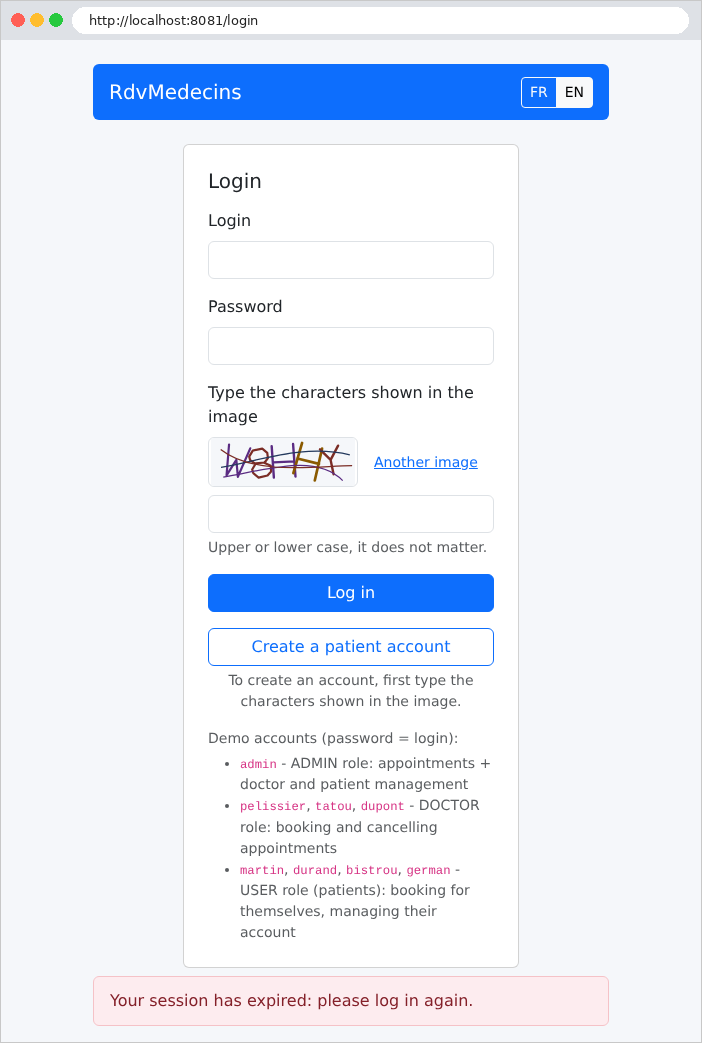
The same process applies to an expired token, and even on a public page such as [/login]: the resource server filter checks any presented token before the access rules are examined.
That leaves logout. On POST, it deletes the token cookie and redirects to the login page:
| curl -i -X POST http://localhost:8081/logout
|
| HTTP/1.1 302
Set-Cookie: rdvmedecins_jwt=; Expires=Thu, 01 Jan 1970 00:00:10 GMT; Path=/
Location: http://localhost:8081/login
Content-Length: 0
|
In GET, URL and [/logout] are simply protected pages like any other—and unknown ones at that: without a token, the request is redirected to the login page by the entry point; with a valid token, it would return a 404 page. Under no circumstances does it log the user out:
| curl -i http://localhost:8081/logout
|
| HTTP/1.1 302
Location: http://localhost:8081/login
Content-Length: 0
|
11.13.2. auth/ConnectedUser.java
| // =========================================================================
// auth/ConnectedUser.java
// -------------------------------------------------------------------------
// What the JWT token contains, and how to read it back.
//
// In Spring Security, the user of the request is an
// Authentication object, stored in the SecurityContext of the request. With
// JWT token authentication (see config/SecurityConfig.java), it is a
// JwtAuthenticationToken, which contains the verified token: a Jwt object, whose
// "claims" are the fields of the token. A controller
// gets it through a parameter @AuthenticationPrincipal Jwt token.
//
// The claims of our tokens (see AuthService.setToken):
// sub : the id of the user account (JWT convention: "subject")
// login : the login
// name : the display name ("Marie PELISSIER"), for the navigation bar
// role : ADMIN, DOCTOR or USER
// =========================================================================
package rdvmedecins.auth;
import org.springframework.security.oauth2.jwt.Jwt;
import rdvmedecins.entities.Role;
// the connected user, in a typed form
public record ConnectedUser(int userId, String login, String name, Role role) {
// the names of the claims
public static final String SUB = "sub";
public static final String LOGIN = "login";
public static final String NAME = "name";
public static final String ROLE = "role";
// the user described by an already verified token; null if the token is
// absent (unauthenticated request) or malformed
public static ConnectedUser of(Jwt token) {
if (token == null) {
return null;
}
try {
return new ConnectedUser(
Integer.parseInt(token.getSubject()),
token.getClaimAsString(LOGIN),
token.getClaimAsString(NAME),
Role.valueOf(token.getClaimAsString(ROLE)));
} catch (RuntimeException e) {
// NumberFormatException, IllegalArgumentException, NullPointerException
return null;
}
}
public boolean isAdmin() {
return role == Role.ADMIN;
}
public boolean isPatient() {
return role == Role.USER;
}
}
|
Let's break down this code:
- Lines 6–11: In [Spring Security], the request user is an object [Authentication], stored in the request’s [SecurityContext]. With the JWT tokens, it is a [JwtAuthenticationToken], which contains the verified token, a [Jwt] object. An action receives it via a parameter annotated as [@AuthenticationPrincipal Jwt token] (see Example 25);
- line 26: the logged-in user in a typed form: an integer identifier, a role of type [Role] (the enumeration [ADMIN], [DOCTOR], [USER] from the [entities] folder), instead of a token whose claims are identified by name. This is a record (see “The Domain: The Calendar”): [Java] generates the constructor and accessors [userId()], [login()], [name()], and [role()] for us;
- Lines 29–32: the names of the token’s claims, grouped into constants: a typo in [ConnectedUser.NAME] is flagged by the compiler, whereas an error in the string ["name"] would only be discovered at runtime. A record can contain static fields: these belong to the class, not to each object;
- lines 36–50: the static method [of] creates the user from a token that has already been verified (its signature is valid), or returns [null]. [getSubject()] returns the claim [sub], the account ID, written as text; [Integer.parseInt] converts it to an integer. [Role.valueOf] returns the enumeration constant with the given name. Both of these methods throw an exception if the text is invalid (or if it is [null]): a properly signed but incomplete token therefore returns [null], rather than a 500 error;
- lines 52–58: two methods for views and controllers that avoid comparing roles: [isAdmin()] and [isPatient()]. A view named [Thymeleaf] simply writes [${user.isAdmin()}].
11.13.3. auth/AuthService.java
The file is presented in two excerpts.
| // =========================================================================
// auth/AuthService.java
// -------------------------------------------------------------------------
// The authentication logic:
// - validateUser() : checks a login / password pair;
// - setToken() : builds the JWT token of a validated user
// and stores it in a cookie;
// - clearToken() : deletes this cookie;
// - currentUser() : the connected user of the current request.
//
// Where does the JWT token travel?
// With a JavaScript client, it was the client's code that kept the token
// and added it itself to each request (header "Authorization: Bearer
// ..."). A browser that displays ordinary HTML pages cannot
// do that: for it to present the token by itself on each request, it
// must be stored in a COOKIE. The options of this cookie matter for
// security:
// - HttpOnly : the page's JavaScript cannot read the cookie (an
// injected script could therefore not steal the token);
// - SameSite=Lax : the browser does NOT send the cookie with a POST coming
// from another site. As all the actions that modify data are
// POSTs, a trapped page on another site cannot book or
// delete anything by impersonating the user
// (so-called CSRF attack);
// - Secure : in production (HTTPS), the cookie never travels in clear text;
// - Max-Age : the cookie disappears at the same time as the token expires.
// =========================================================================
package rdvmedecins.auth;
import java.time.Duration;
import java.time.Instant;
import java.util.Optional;
import org.springframework.http.HttpHeaders;
import org.springframework.http.ResponseCookie;
import org.springframework.security.core.Authentication;
import org.springframework.security.core.context.SecurityContextHolder;
import org.springframework.security.crypto.password.PasswordEncoder;
import org.springframework.security.oauth2.jose.jws.MacAlgorithm;
import org.springframework.security.oauth2.jwt.JwsHeader;
import org.springframework.security.oauth2.jwt.Jwt;
import org.springframework.security.oauth2.jwt.JwtClaimsSet;
import org.springframework.security.oauth2.jwt.JwtDecoder;
import org.springframework.security.oauth2.jwt.JwtEncoder;
import org.springframework.security.oauth2.jwt.JwtEncoderParameters;
import org.springframework.security.oauth2.jwt.JwtException;
import org.springframework.stereotype.Service;
import org.springframework.web.util.WebUtils;
import jakarta.servlet.http.Cookie;
import jakarta.servlet.http.HttpServletRequest;
import jakarta.servlet.http.HttpServletResponse;
import rdvmedecins.config.AuthProperties;
import rdvmedecins.entities.User;
import rdvmedecins.repositories.UserRepository;
@Service
public class AuthService {
// the name of the cookie that carries the token
public static final String JWT_COOKIE = "rdvmedecins_jwt";
private final UserRepository userRepository;
private final PasswordEncoder hasher;
private final JwtEncoder encoder;
private final JwtDecoder decoder;
private final AuthProperties auth;
public AuthService(UserRepository userRepository, PasswordEncoder hasher, JwtEncoder encoder,
JwtDecoder decoder, AuthProperties auth) {
this.userRepository = userRepository;
this.hasher = hasher;
this.encoder = encoder;
this.decoder = decoder;
this.auth = auth;
}
// Optional.empty() if the login does not exist or if the password is wrong.
// matches hashes the typed password with the "salt" contained in the
// stored hash, then compares the two results.
public Optional<User> validateUser(String login, String password) {
return userRepository.findByLogin(login).filter(user -> hasher.matches(password, user.getPassword()));
}
|
Let’s comment on this code:
- lines 11–26: The comment explains why the token is sent in a cookie and the role of each of its options (see Example 25). A browser that follows links and submits forms does not know how to add a [Authorization] header to its requests; however, it automatically sends back the cookies it has received;
- line 57: [@Service] makes the class a singleton bean (see Example 06), just like [@Component]: the two annotations are equivalent, with [@Service] simply indicating that it is a service;
- line 61: the name of the cookie that carries the token;
- lines 63–76: the service receives the DAO containing user accounts ([UserRepository], see “The DAO layer”), the [bcrypt] encoder, the token encoder and decoder (the [SecurityConfig] beans), and the authentication properties. The fields are [final]: they do not change after construction;
- lines 81–83: the account, if the username and password are correct (see Example 25). [findByLogin] returns a [Optional<User>], a box that either contains an account or is empty (see “The DAO Layer”); [filter] retains the account only if the condition is true; otherwise, it returns an empty box. The condition, [hasher.matches(...)], hashes the entered password with the “salt” contained in the stored hash and compares the two results: the password itself is never stored.
| // -----------------------------------------------------------------------
// builds the JWT token of [user] and puts it in a cookie.
// The token is SIGNED (HMAC-SHA256) with the secret key: the browser
// can read it (it is not encrypted), but not modify it - any
// modification would make the signature invalid.
// -----------------------------------------------------------------------
public void setToken(HttpServletResponse response, User user) {
Instant now = Instant.now();
JwtClaimsSet claims = JwtClaimsSet.builder()
.subject(String.valueOf(user.getId()))
.claim(ConnectedUser.LOGIN, user.getLogin())
.claim(ConnectedUser.NAME, user.getName())
.claim(ConnectedUser.ROLE, user.getRole().name())
.issuedAt(now)
.expiresAt(now.plusSeconds(auth.jwtExpiresInSeconds()))
.build();
String token = encoder.encode(JwtEncoderParameters.from(JwsHeader.with(MacAlgorithm.HS256).build(), claims))
.getTokenValue();
ResponseCookie cookie = ResponseCookie.from(JWT_COOKIE, token)
.httpOnly(true)
.sameSite("Lax")
.secure(auth.cookieSecure())
.maxAge(Duration.ofSeconds(auth.jwtExpiresInSeconds()))
.path("/")
.build();
response.addHeader(HttpHeaders.SET_COOKIE, cookie.toString());
}
// clears the cookie: we set it again, empty, with a zero lifetime
public static void clearToken(HttpServletResponse response) {
response.addHeader(HttpHeaders.SET_COOKIE, ResponseCookie.from(JWT_COOKIE, "").path("/").maxAge(0).build().toString());
}
// the token present in the request, whether valid or not
public static String tokenOf(HttpServletRequest request) {
Cookie cookie = WebUtils.getCookie(request, JWT_COOKIE);
return cookie == null ? null : cookie.getValue();
}
// -----------------------------------------------------------------------
// the connected user, or null.
// Normally, Spring Security has already established it (SecurityContextHolder).
// But an error page is built by a SECOND internal request,
// sent by the server to the address /error, which does not go through
// authentication again: we then read the cookie's token ourselves, so
// that the navigation bar of the error page shows the user.
// -----------------------------------------------------------------------
public ConnectedUser currentUser(HttpServletRequest request) {
Authentication authentication = SecurityContextHolder.getContext().getAuthentication();
if (authentication != null && authentication.getPrincipal() instanceof Jwt token) {
return ConnectedUser.of(token);
}
String token = tokenOf(request);
if (token == null) {
return null;
}
try {
return ConnectedUser.of(decoder.decode(token));
} catch (JwtException e) {
return null; // expired or forged token
}
}
}
|
Let’s comment on this code:
- Lines 8–19: The token, generated as in Example 25. It contains the account ID (claim [sub]), the login, the name displayed in the navigation bar, the role, the issuance date ([iat], “issued at”), and the expiration date ([exp]), which is two hours later by default. [JwtClaimsSet.builder()] returns an object constructor: one method is called per claim, followed by [build()]. Line 18: The token header specifies the algorithm HS256 (HMAC-SHA256), and the encoder signs the entire token with the secret key;
- Lines 20–27: the cookie, with the options from Example 25 ([HttpOnly], [SameSite=Lax]) and two additional ones: [Secure], enabled in production (site served as [HTTPS]), prevents the browser from sending the cookie over an unencrypted connection; [Path=/] ensures it is included with all requests to the site. [Max-Age] deletes the cookie when the token expires. [ResponseCookie] generates the text for the [Set-Cookie] header, which is added to the response by line 27;
- lines 31–33: Deleting a cookie involves setting it again, empty, with a lifetime of zero; the browser deletes it immediately. For the browser to recognize the cookie to be deleted, the path ([Path]) must be the same as the one used when it was set. The method is static: it does not depend on any field of the object. It is used by the entry point [SecurityConfig] and the exception handler [HtmlExceptionHandler] (file [web]), which do not require an instance of [AuthService];
- lines 36–39: the token present in the request, without verifying it. [WebUtils.getCookie] searches for a cookie by name among those in the request. This is the method that [SecurityConfig] provides as [BearerTokenResolver];
- lines 49–63: the logged-in user, or [null]. In the typical case (lines 50–53), [Spring Security] has already established this: [SecurityContextHolder.getContext().getAuthentication()] returns the [Authentication] object from the current request, whose “principal” is the verified token. [instanceof Jwt token] checks the object’s type and, if the check succeeds, stores it in the variable [token], which has already been converted to [Jwt]. The second case (lines 54–62) involves the error page: when a request ends with a 403 or 404 error, the server generates the page via a second, internal request to [/error]. The resource server filter does not process this internal request: the user is not authenticated for it. To ensure that the error page’s navigation bar still displays the user, we verify the cookie token ourselves using the decoder from [SecurityConfig]; an expired or forged token triggers a [JwtException], and we return [null].
The [currentUser] method is called for each page by [web/CommonModel.java], which sets the user in the template for all views.
11.13.4. auth/InvalidSessionException.java
| // =========================================================================
// auth/InvalidSessionException.java
// -------------------------------------------------------------------------
// The token is valid, but the account it designates no longer exists: it has been
// deleted since the login (by the patient themselves in another
// tab, or by the ADMIN). We treat this case as an expired session:
// web/HtmlExceptionHandler clears the cookie and redirects to the
// login page.
// =========================================================================
package rdvmedecins.auth;
public class InvalidSessionException extends RuntimeException {
public InvalidSessionException() {
super("the account of the connected user no longer exists");
}
}
|
- Lines 12–16: A token may be valid (properly signed, not expired) even though the account it refers to has been deleted since the user logged in. The patient pages detect this by searching for the client associated with the account (method [connectedPatient] in file [web/Utils.java]) and then throw this exception; the exception handler [HtmlExceptionHandler] (see Example 24) intercepts it, deletes the cookie, and redirects to the login page with the message “session expired.” The exception is derived from [RuntimeException]: it is an unchecked exception, which methods do not need to declare using a [throws] clause. The constructor passes its message to the parent class’s constructor via [super(...)].
11.13.5. auth/Captcha.java
| // =========================================================================
// auth/Captcha.java
// -------------------------------------------------------------------------
// A captcha: id, to put in the hidden "captchaId" field of the form;
// svg, the image, to insert as is in the page.
// =========================================================================
package rdvmedecins.auth;
public record Captcha(String id, String svg) {
}
|
- Line 9: a CAPTCHA, as received by the page: the identifier, to be placed in a hidden form field, and the image [SVG], to be inserted as-is into the page. A single record is sufficient: the object is read-only. The expected response does not appear here: it never leaves the server.
11.13.6. auth/CaptchaService.java
| // =========================================================================
// auth/CaptchaService.java
// -------------------------------------------------------------------------
// A CAPTCHA ("test to tell a human from a robot") made by the
// server itself, without any external service: a few distorted characters,
// scrambled by strokes, in an SVG image (see CaptchaDrawing.java). A
// human reads them without difficulty; a robot that merely sends
// forms in a loop cannot do it.
//
// How it works:
// 1. generate() draws a random text, turns it into an image, and stores the
// right answer IN THE SERVER'S MEMORY, under a random identifier;
// 2. the page displays the image and puts the identifier in a hidden field of the
// form (the answer itself never leaves the server);
// 3. verify(id, input) compares the input with the expected answer, then
// FORGETS this captcha: each image is used only once, a robot cannot
// replay an answer already found.
//
// SINGLETON bean (a single instance for the whole server), used by
// several requests IN PARALLEL: hence the ConcurrentHashMap, a
// dictionary that several threads can read and modify at the same time
// without corrupting it.
//
// Accepted limit: the memory of a single process. With several servers
// behind a load balancer, a shared storage would be needed.
// =========================================================================
package rdvmedecins.auth;
import java.time.Duration;
import java.time.Instant;
import java.util.Map;
import java.util.UUID;
import java.util.concurrent.ConcurrentHashMap;
import org.springframework.stereotype.Service;
@Service
public class CaptchaService {
// validity duration of an image: you have 10 minutes to fill in the form
private static final Duration LIFETIME = Duration.ofMinutes(10);
// memory safeguard: beyond this, we forget all the pending captchas
private static final int MAX_CAPTCHAS = 10_000;
// the expected answer, and its expiry date
private record Expected(String text, Instant expires) {
}
// id -> expected answer
private final Map<String, Expected> pending = new ConcurrentHashMap<>();
public Captcha generate() {
purge();
String text = CaptchaDrawing.randomText(5); // 5 characters
String id = UUID.randomUUID().toString(); // a random identifier, impossible to guess
pending.put(id, new Expected(text, Instant.now().plus(LIFETIME)));
return new Captcha(id, CaptchaDrawing.svg(text));
}
// true if [input] is the right answer to captcha [id] (regardless
// of case). The captcha is consumed in all cases.
// remove is ATOMIC: if two requests present the same captcha at the
// same instant, only one removes it - the other fails.
public boolean verify(String id, String input) {
Expected expected = id == null ? null : pending.remove(id);
return expected != null && input != null
&& expected.expires().isAfter(Instant.now())
&& expected.text().equalsIgnoreCase(input.trim());
}
private void purge() {
Instant now = Instant.now();
pending.entrySet().removeIf(e -> !e.getValue().expires().isAfter(now));
if (pending.size() >= MAX_CAPTCHAS) {
pending.clear();
}
}
}
|
The service is the same as in Example 27, with two additions: an expiration time and a limit. Let’s walk through this code:
- line 37: a singleton bean—a single service for the entire server, meaning a single list of pending CAPTCHAs shared by all requests;
- lines 41–44: an image is valid for ten minutes, and the number of pending CAPTCHAs is capped. Each time the login page is displayed, a CAPTCHA is added to memory; without a limit, a bot that requested this page millions of times without ever responding would eventually exhaust the server’s memory. [10_000]: the character [_] separates the digits into groups for readability;
- lines 47–48: the expected response and its expiration date. The record is nested and private: it exists only for this service. [Instant] represents a specific point in time, independent of the time zone;
- line 51: identifier → expected response. The service is a singleton, used by concurrent requests, each on its own execution thread ([thread]): hence [ConcurrentHashMap] (see Example 27), a dictionary that multiple [threads] instances can read and modify at the same time without corrupting it. The field is declared as being of the type defined by the [Map] interface: the rest of the code does not depend on the chosen implementation;
- lines 53–59: cleaning up, followed by a randomly generated five-character text string, stored under a random identifier ([UUID.randomUUID()], 122 random bits, impossible to guess), and rendered by [CaptchaDrawing];
- lines 65–70: the verification, identical to that in Example 27: the CAPTCHA is removed from the dictionary in all cases ([remove] returns the removed value, or [null]), then we verify that it existed, that it has not expired, and that the entry—with spaces removed—is correct, regardless of case ([equalsIgnoreCase]). [remove] is atomic: if two requests present the same CAPTCHA at the same time, only one removes it; the other receives [null]. Each image is therefore used only once: a bot cannot reuse a previously found answer;
- Lines 72–78: cleanup. [removeIf] removes from the dictionary the entries for which the lambda function returns [true]—in this case, the expired CAPTCHAs. If the limit is still reached (an attack is underway), all pending captchas are discarded: bona fide users who were filling out the form at that moment will have to re-enter a new image. This situation only occurs in the event of an attack: this simple solution is sufficient.
11.13.7. auth/CaptchaDrawing.java
The class that draws the image is the one from Example 27. It is presented in two sections: the character “font,” followed by the drawing.
| // =========================================================================
// auth/CaptchaDrawing.java
// -------------------------------------------------------------------------
// The drawing of the SVG image (150 x 50 pixels) of a captcha, taken as is
// from example 27. An important point: each character is drawn with
// STROKES (<path>), never written as text (<text>) - otherwise a robot
// would only have to read the source code of the image.
// =========================================================================
package rdvmedecins.auth;
import java.security.SecureRandom;
import java.util.LinkedHashMap;
import java.util.Locale;
import java.util.Map;
final class CaptchaDrawing {
private static final int WIDTH = 150;
private static final int HEIGHT = 50;
// SecureRandom: a "cryptographic" random number generator,
// unpredictable (unlike Random, whose sequence could be guessed)
private static final SecureRandom RANDOM = new SecureRandom();
// The "font": each character is a list of strokes, each stroke a
// sequence of points (x, y) in a 4 x 6 grid (y downwards).
// Characters too easy to confuse with each other: excluded (0 O, 1 I L).
private static final Map<Character, double[][]> FONT = new LinkedHashMap<>();
static {
FONT.put('A', new double[][] { { 0, 6, 2, 0, 4, 6 }, { 0.8, 3.8, 3.2, 3.8 } });
FONT.put('B', new double[][] { { 0, 0, 0, 6, 3, 6, 4, 5, 4, 4, 3, 3, 0, 3 }, { 0, 0, 3, 0, 4, 1, 4, 2, 3, 3 } });
FONT.put('C', new double[][] { { 4, 1, 3, 0, 1, 0, 0, 1, 0, 5, 1, 6, 3, 6, 4, 5 } });
FONT.put('D', new double[][] { { 0, 0, 0, 6, 2.5, 6, 4, 4.5, 4, 1.5, 2.5, 0, 0, 0 } });
FONT.put('E', new double[][] { { 4, 0, 0, 0, 0, 6, 4, 6 }, { 0, 3, 3, 3 } });
FONT.put('F', new double[][] { { 4, 0, 0, 0, 0, 6 }, { 0, 3, 3, 3 } });
FONT.put('G', new double[][] { { 4, 1, 3, 0, 1, 0, 0, 1, 0, 5, 1, 6, 3, 6, 4, 5, 4, 3.5, 2.5, 3.5 } });
FONT.put('H', new double[][] { { 0, 0, 0, 6 }, { 4, 0, 4, 6 }, { 0, 3, 4, 3 } });
FONT.put('J', new double[][] { { 4, 0, 4, 5, 3, 6, 1, 6, 0, 5 } });
FONT.put('K', new double[][] { { 0, 0, 0, 6 }, { 4, 0, 0, 3.5 }, { 1.3, 2.6, 4, 6 } });
FONT.put('M', new double[][] { { 0, 6, 0, 0, 2, 3.5, 4, 0, 4, 6 } });
FONT.put('N', new double[][] { { 0, 6, 0, 0, 4, 6, 4, 0 } });
FONT.put('P', new double[][] { { 0, 6, 0, 0, 3, 0, 4, 1, 4, 2, 3, 3, 0, 3 } });
FONT.put('Q', new double[][] { { 1, 0, 3, 0, 4, 1, 4, 5, 3, 6, 1, 6, 0, 5, 0, 1, 1, 0 }, { 2.5, 4.5, 4, 6.3 } });
FONT.put('R', new double[][] { { 0, 6, 0, 0, 3, 0, 4, 1, 4, 2, 3, 3, 0, 3 }, { 2, 3, 4, 6 } });
FONT.put('S', new double[][] { { 4, 1, 3, 0, 1, 0, 0, 1, 0, 2, 1, 3, 3, 3, 4, 4, 4, 5, 3, 6, 1, 6, 0, 5 } });
FONT.put('T', new double[][] { { 0, 0, 4, 0 }, { 2, 0, 2, 6 } });
FONT.put('U', new double[][] { { 0, 0, 0, 5, 1, 6, 3, 6, 4, 5, 4, 0 } });
FONT.put('V', new double[][] { { 0, 0, 2, 6, 4, 0 } });
FONT.put('W', new double[][] { { 0, 0, 1, 6, 2, 2.5, 3, 6, 4, 0 } });
FONT.put('X', new double[][] { { 0, 0, 4, 6 }, { 4, 0, 0, 6 } });
FONT.put('Y', new double[][] { { 0, 0, 2, 3, 4, 0 }, { 2, 3, 2, 6 } });
FONT.put('Z', new double[][] { { 0, 0, 4, 0, 0, 6, 4, 6 } });
FONT.put('2', new double[][] { { 0, 1, 1, 0, 3, 0, 4, 1, 4, 2, 0, 6, 4, 6 } });
FONT.put('3', new double[][] { { 0, 1, 1, 0, 3, 0, 4, 1, 4, 2, 3, 3, 1.5, 3 }, { 3, 3, 4, 4, 4, 5, 3, 6, 1, 6, 0, 5 } });
FONT.put('4', new double[][] { { 3, 6, 3, 0, 0, 4, 4, 4 } });
FONT.put('5', new double[][] { { 4, 0, 0, 0, 0, 3, 3, 3, 4, 4, 4, 5, 3, 6, 1, 6, 0, 5 } });
FONT.put('6', new double[][] { { 4, 1, 3, 0, 1, 0, 0, 1, 0, 5, 1, 6, 3, 6, 4, 5, 4, 4, 3, 3, 0, 3 } });
FONT.put('7', new double[][] { { 0, 0, 4, 0, 1.5, 6 } });
FONT.put('8', new double[][] { { 1, 3, 0, 2, 0, 1, 1, 0, 3, 0, 4, 1, 4, 2, 3, 3, 1, 3, 0, 4, 0, 5, 1, 6, 3, 6, 4, 5, 4, 4, 3, 3 } });
FONT.put('9', new double[][] { { 4, 3, 1, 3, 0, 2, 0, 1, 1, 0, 3, 0, 4, 1, 4, 5, 3, 6, 1, 6, 0, 5 } });
}
private static final char[] ALPHABET = FONT.keySet().stream()
.map(String::valueOf).reduce("", String::concat).toCharArray();
// a few dark colors, easy to read on the light background
private static final String[] COLORS = { "#1f4e79", "#7b2d26", "#2e6b30", "#5b2c83", "#8a5a00", "#23395d", "#9c2a5b" };
|
Let’s comment on this code:
- line 16: the class is not [public]; without a modifier, it is visible only within its package ([rdvmedecins.auth]), where only [CaptchaService] uses it. [final] prohibits deriving another class from it;
- line 23: [SecureRandom] is a “cryptographic” random number generator: its outputs are unpredictable, whereas those of [Random] could be guessed based on previous outputs. A single generator is used for all draws; it can be used by multiple [threads] instances at the same time;
- lines 28–62: the “font”: for each character, a list of strokes, each stroke being a sequence of (x, y) coordinates in a 4 × 6 grid. [double[][]] is an array of arrays, written here in expanded form with curly braces. The dictionary is populated by a [static { ... }] block (lines 30–62), which is executed once when the class is loaded. Characters that are easily confused (0 and O, 1, I, and L) are omitted. A [LinkedHashMap] preserves the insertion order of the keys;
- lines 64–65: the usable characters—that is, the font keys—are collected into an array of [char]. The stream (see “The Business Layer”) of keys is converted into single-character strings ([String::valueOf]), which are concatenated ([reduce("", String::concat)]), and then the resulting string is split into an array ([toCharArray()]).
| private CaptchaDrawing() {
}
static String randomText(int length) {
StringBuilder text = new StringBuilder();
for (int i = 0; i < length; i++) {
text.append(ALPHABET[RANDOM.nextInt(ALPHABET.length)]);
}
return text.toString();
}
private static double randomBetween(double min, double max) {
return min + (max - min) * RANDOM.nextDouble();
}
private static String color() {
return COLORS[RANDOM.nextInt(COLORS.length)];
}
static String svg(String text) {
StringBuilder svg = new StringBuilder();
svg.append("<svg xmlns=\"http://www.w3.org/2000/svg\" width=\"%d\" height=\"%d\" viewBox=\"0 0 %d %d\">"
.formatted(WIDTH, HEIGHT, WIDTH, HEIGHT));
svg.append("<rect width=\"100%\" height=\"100%\" fill=\"#f5f7fa\"/>");
// the characters: each one enlarged, tilted, shifted, and each point
// slightly moved at random
double step = (WIDTH - 20) / (double) text.length();
for (int i = 0; i < text.length(); i++) {
double scale = randomBetween(4.6, 5.6); // size of a grid unit, in pixels
double angle = randomBetween(-0.35, 0.35); // rotation, in radians (about ±20°)
double cx = 10 + step * (i + 0.5) + randomBetween(-3, 3); // center of the character
double cy = HEIGHT / 2.0 + randomBetween(-4, 4);
StringBuilder d = new StringBuilder();
for (double[] stroke : FONT.get(text.charAt(i))) {
for (int k = 0; k < stroke.length; k += 2) {
// grid point, centered on (2, 3), distorted, rotated, placed
double x = (stroke[k] - 2 + randomBetween(-0.2, 0.2)) * scale;
double y = (stroke[k + 1] - 3 + randomBetween(-0.2, 0.2)) * scale;
double px = cx + x * Math.cos(angle) - y * Math.sin(angle);
double py = cy + x * Math.sin(angle) + y * Math.cos(angle);
d.append(k == 0 ? 'M' : 'L').append(number(px)).append(' ').append(number(py)).append(' ');
}
}
svg.append("<path d=\"%s\" fill=\"none\" stroke=\"%s\" stroke-width=\"%s\" stroke-linecap=\"round\" stroke-linejoin=\"round\"/>"
.formatted(d.toString().trim(), color(), number(randomBetween(2.2, 3))));
}
// 3 scrambling strokes: curves that cross the image
for (int n = 0; n < 3; n++) {
svg.append("<path d=\"M%s %s C%s %s %s %s %s %s\" fill=\"none\" stroke=\"%s\" stroke-width=\"1.3\"/>"
.formatted(number(randomBetween(0, 20)), number(randomBetween(5, 45)),
number(randomBetween(30, 60)), number(randomBetween(0, 50)), number(randomBetween(90, 120)), number(randomBetween(0, 50)),
number(randomBetween(130, 150)), number(randomBetween(5, 45)), color()));
}
svg.append("</svg>");
return svg.toString();
}
// a number with a decimal point, whatever the server's language
// (in French, "%.1f" would write "12,5" - unreadable for SVG)
private static String number(double value) {
return String.format(Locale.ROOT, "%.1f", value);
}
}
|
Let’s comment on this code:
- lines 1–2: a private constructor—the class contains only static methods, so no objects are ever created;
- lines 4–18: random selections: a text of the requested length, a real number between two bounds, a color. [nextInt(n)] returns an integer between 0 and n – 1, [nextDouble()] returns a real number between 0 and 1;
- Lines 20–58: The image is a [SVG] text, assembled within a [StringBuilder] (a string that is extended without having to be rewritten each time an element is added). The [formatted] method replaces the [%d] (an integer) and the [%s] (a string) with its arguments, in order. Each character (lines 29–47) becomes a [<path>] path: each grid point is slightly shifted, enlarged, rotated, and placed at its position in the image, with a randomly selected color and line thickness. The characters are lines, never text: a robot cannot read them from the image’s code. Three scrambling curves then cross the image (lines 50–55);
- lines 62–64: the numbers in [SVG] are written with a decimal point. [Locale.ROOT] enforces this notation regardless of the server’s language: with French as the language, [%.1f] would use a comma (see Chapter 5).
11.13.8. auth/AttemptLimiterService.java
The file is presented in two excerpts.
| // =========================================================================
// auth/AttemptLimiterService.java
// -------------------------------------------------------------------------
// Second rampart against robots (the first one is the captcha): we COUNT
// the attempts, and beyond a threshold we BLOCK for a while.
//
// - login: after loginMaxFailures failures (wrong captcha or wrong
// password) for the same login from the same IP address, this pair
// is blocked for loginBlockMinutes minutes. The same IP address is also
// blocked if it accumulates 5 times more failures, all logins together (a
// robot that tries thousands of different logins);
// - account creation: at most registrationMaxPerHour accounts created per
// hour from the same IP address.
//
// Beware in the classroom: all the computers often go out to the Internet
// through the SAME IP address. That is why the login block applies
// first to the (IP, login) pair - a student who types a wrong
// password does not block their neighbors - and why the thresholds can be set
// in application.properties (rdvmedecins.protection.*).
//
// Singleton bean, called by parallel requests: all the public methods
// are "synchronized" - a single thread at a time reads AND modifies
// the counters.
// =========================================================================
package rdvmedecins.auth;
import java.time.Duration;
import java.time.Instant;
import java.util.HashMap;
import java.util.Locale;
import java.util.Map;
import org.springframework.stereotype.Service;
import rdvmedecins.config.ProtectionProperties;
@Service
public class AttemptLimiterService {
private static class Counter {
int count; // attempts counted in the current window
Instant start; // start of the counting window
Instant blockedUntil = Instant.MIN; // Instant.MIN if not blocked
}
private static final Duration ONE_HOUR = Duration.ofHours(1);
private final Map<String, Counter> counters = new HashMap<>();
private final int maxLoginFailures;
private final Duration loginBlockDuration;
private final int maxRegistrations;
public AttemptLimiterService(ProtectionProperties protection) {
this.maxLoginFailures = protection.loginMaxFailures();
this.loginBlockDuration = Duration.ofMinutes(protection.loginBlockMinutes());
this.maxRegistrations = protection.registrationMaxPerHour();
}
// ---------------------------------------------------------------- login
// number of remaining block minutes (0 = the attempt is allowed)
public synchronized long loginBlockMinutes(String ip, String login) {
return Math.max(remainingMinutes(loginKey(ip, login)), remainingMinutes(ipKey(ip)));
}
public synchronized void loginFailure(String ip, String login) {
count(loginKey(ip, login), maxLoginFailures, loginBlockDuration, loginBlockDuration);
count(ipKey(ip), maxLoginFailures * 5, loginBlockDuration, loginBlockDuration);
}
// a successful login resets the counter of THIS login
public synchronized void loginSuccess(String ip, String login) {
counters.remove(loginKey(ip, login));
}
// ---------------------------------------------------------------- registration
public synchronized long registrationBlockMinutes(String ip) {
return remainingMinutes("registration|" + ip);
}
// one-hour window; once the quota is reached, blocked until the end of the hour
public synchronized void registrationSuccess(String ip) {
count("registration|" + ip, maxRegistrations, ONE_HOUR, ONE_HOUR);
}
|
Compared to [LimiterService] in Example 27, the limiter protects two operations (the connection and account creation), the connection lock applies to the pair (address IP, login), and the thresholds are configurable in [application.properties]. Let’s comment on this code:
- lines 40–44: a counter: the number of attempts, the start of the counting window, and the end of the lock ([Instant.MIN], the earliest possible time, if there is no lock). This is a static, private nested class: it exists only for this service. It is a regular class, not a record: a counter read from the dictionary is modified in place, which is not allowed with a record;
- Line 48: a regular [HashMap], not a [ConcurrentHashMap]: counting an attempt involves reading a counter, modifying it, and possibly replacing it, and this entire sequence of operations must execute without another request interrupting it. This is the role of the keyword [synchronized] (see Example 27), placed on each public method: only one [thread] at a time can execute one of the object’s [synchronized] methods; the others wait their turn;
- lines 54–58: the thresholds, read once and for all from the [ProtectionProperties] record, which provides a typed form to the [rdvmedecins.protection.*] properties: the number of allowed connection failures (5 by default), the block duration (15 minutes), and the number of accounts created per hour (10);
- lines 63–65: the remaining lockout time for a login attempt: the longer of the two possible lockout periods, that of the pair (address IP, login) and that of the address IP alone;
- lines 67–70: A failed attempt is counted twice. For the pair (address IP, login): five failed attempts using the same login block that login, from that address only. For the address IP alone, with a threshold five times higher: a bot that tries a large number of different logins is also blocked. In a classroom, all computers often connect to the Internet via the same address, IP: a student who enters the wrong password should not block their neighbors, hence the blocking by pair;
- lines 73–75: a successful login resets the counter for that specific login (not the one for the address IP);
- lines 79–86: For account creation, only successful attempts are counted: a maximum of ten accounts per hour from the same address, IP. Once the quota is reached, the address is blocked for one hour.
| // ---------------------------------------------------------------- shared mechanics
// (the private methods are always called by a synchronized method)
private long remainingMinutes(String key) {
Counter c = counters.get(key);
if (c == null) {
return 0;
}
Duration remaining = Duration.between(Instant.now(), c.blockedUntil);
// rounded UP to the minute: 30 s of remaining block -> "1 minute"
return remaining.isNegative() || remaining.isZero() ? 0 : (remaining.toSeconds() + 59) / 60;
}
// counts an attempt; if the threshold is reached within the window, blocks
private void count(String key, int max, Duration window, Duration block) {
Instant now = Instant.now();
purge(now);
Counter c = counters.get(key);
if (c == null || Duration.between(c.start, now).compareTo(window) > 0) {
c = new Counter();
c.start = now;
counters.put(key, c);
}
c.count++;
if (c.count >= max) {
c.blockedUntil = now.plus(block);
c.count = 0; // after the block, we start again from zero
c.start = c.blockedUntil;
}
}
// we forget the counters that are no longer useful (neither blocked, nor recent)
private void purge(Instant now) {
if (counters.size() < 1000) {
return;
}
counters.values().removeIf(c -> c.blockedUntil.isBefore(now)
&& Duration.between(c.start, now).compareTo(ONE_HOUR) > 0);
}
private static String loginKey(String ip, String login) {
return "login|" + ip + "|" + login.trim().toLowerCase(Locale.ROOT);
}
private static String ipKey(String ip) {
return "ip|" + ip;
}
}
|
Let’s break down this code:
- lines 4–12: the remaining block time, rounded up to the next whole number: there is “1 minute” remaining, not “0 minutes,” when there are 20 seconds left. [Duration.between] measures the time difference between two points in time. These private methods are not [synchronized]: they are always called by a public method that already holds the object’s lock;
- lines 15–30: counting. An unknown key, or one whose counting window has expired, starts with a new counter. When the threshold is reached, the key is locked, and counting will resume from zero once the lock is released;
- lines 33–39: cleanup of counters that are no longer needed (neither locked nor recent), performed only when the dictionary exceeds 1,000 entries. [values()] is a view of the dictionary’s values: [removeIf] removes the counters from it, and the corresponding entries disappear from the dictionary;
- lines 41–47: generation of the dictionary keys. The login is stripped of spaces and converted to lowercase: [Admin] and [admin] share the same counter; a bot cannot bypass the block by changing the case. [Locale.ROOT] makes the conversion independent of the server’s language.
Let’s examine the block. A bot attempting the login [robot] without being able to read the image fails the CAPTCHA; each failure is counted. On the sixth attempt, the pair (address IP, [robot]) is blocked, and the CAPTCHA is no longer even checked. Here is the message displayed at the bottom of the page for each of the six attempts:
| curl -X POST -d "login=robot&password=x&captchaId=unknown&captcha=ABCDE" http://localhost:8081/login
|
| <div>The characters you typed do not match the image. A new image is shown.</div>
<div>The characters you typed do not match the image. A new image is shown.</div>
<div>The characters you typed do not match the image. A new image is shown.</div>
<div>The characters you typed do not match the image. A new image is shown.</div>
<div>The characters you typed do not match the image. A new image is shown.</div>
<div>Too many failed attempts. Try again in 15 minute(s).</div>
|
The other logins remain usable from the same address.
11.13.9. auth/RegistrationPassService.java
| // =========================================================================
// auth/RegistrationPassService.java
// -------------------------------------------------------------------------
// The "pass" for account creation.
//
// To open the "Create a client account" page, you must first have
// copied the captcha of the authentication page (see
// RegistrationController, POST /register/access). The server then issues
// a pass:
// - a random identifier, stored in an HttpOnly cookie;
// - valid for 15 minutes (the time to fill in the form, even when
// trying several times after input errors);
// - consumed as soon as an account is created: ONE solved captcha = ONE account at
// most. A robot cannot create accounts in series.
//
// Without a valid pass, GET and POST /register redirect to the
// authentication page: typing the URL /register directly does not make it
// possible to bypass the captcha.
//
// Like the captcha, the passes live in the memory of the process.
// =========================================================================
package rdvmedecins.auth;
import java.time.Duration;
import java.time.Instant;
import java.util.Map;
import java.util.UUID;
import java.util.concurrent.ConcurrentHashMap;
import org.springframework.http.ResponseCookie;
import org.springframework.stereotype.Service;
@Service
public class RegistrationPassService {
public static final String COOKIE = "rdvmedecins_registration";
private static final Duration LIFETIME = Duration.ofMinutes(15);
private static final int MAX_PASSES = 10_000;
// id -> expiry date
private final Map<String, Instant> passes = new ConcurrentHashMap<>();
// issues a new pass; returns its identifier
public String issue() {
purge();
String id = UUID.randomUUID().toString();
passes.put(id, Instant.now().plus(LIFETIME));
return id;
}
// true if [id] is an existing, non-expired pass
public boolean isValid(String id) {
Instant expires = id == null ? null : passes.get(id);
return expires != null && expires.isAfter(Instant.now());
}
// the pass has been used: we forget it
public void consume(String id) {
if (id != null) {
passes.remove(id);
}
}
// the cookie is only sent by the browser to the /register... addresses
public static ResponseCookie cookie(String id) {
return ResponseCookie.from(COOKIE, id).httpOnly(true).sameSite("Lax").maxAge(LIFETIME)
.path("/register").build();
}
// ... and it is cleared by setting it again, empty, with a zero lifetime
public static ResponseCookie clearedCookie() {
return ResponseCookie.from(COOKIE, "").maxAge(0).path("/register").build();
}
private void purge() {
Instant now = Instant.now();
passes.values().removeIf(expires -> !expires.isAfter(now));
if (passes.size() >= MAX_PASSES) {
passes.clear();
}
}
}
|
You can create a customer account from the login page, provided you have solved the CAPTCHA. The registration form is displayed and submitted via subsequent requests: these requests must know that a previous request successfully solved the CAPTCHA. This is the role of the token, issued and verified by [RegistrationController] (see “The Web Layer: Controllers”):
- line 36: the name of the cookie that carries the token;
- lines 38–42: a token is valid for fifteen minutes; pending tokens are kept in memory, like captchas, with the same time limit;
- lines 45–50: A pass is a random identifier, stored along with its expiration date; the controller places it in a cookie;
- lines 53–56: the registration form is displayed—and accepted—only with a valid token. Verification does not consume the token ([get], not [remove]): the user can resubmit the form multiple times if they made input errors;
- lines 59–63: Creating an account uses up the pass: solving a CAPTCHA entitles the user to one account, and no more;
- lines 66–74: the cookie and its deletion. [path("/register")] restricts the transmission of the cookie to URL requests that begin with [/register]: other requests do not carry it unnecessarily. The deleted cookie must have the same path;
- lines 76–82: cleanup, identical to that for the CAPTCHA.
11.13.10. controllers/AuthController.java
The login page controller is shown in two excerpts.
| // =========================================================================
// controllers/AuthController.java
// -------------------------------------------------------------------------
// The NON-protected routes of the login:
// GET / redirects to the home page of the role (or to /login)
// GET /login displays the login form (with its captcha)
// POST /login checks attempt limit, captcha, login / password
// (POST /logout, the logout, is handled by Spring Security itself,
// see config/SecurityConfig.java)
//
// Protection against robots, in this order:
// 1. too many recent failures for this login from this IP address?
// -> immediate refusal, without even looking at the password;
// 2. wrong answer to the captcha? -> refusal (counted as a failure);
// 3. only then, check of the password.
// We NEVER check the password of an attempt refused at steps
// 1 or 2: a robot can therefore learn nothing by insisting.
// =========================================================================
package rdvmedecins.controllers;
import java.util.Map;
import java.util.Optional;
import org.springframework.stereotype.Controller;
import org.springframework.ui.Model;
import org.springframework.web.bind.annotation.GetMapping;
import org.springframework.web.bind.annotation.PostMapping;
import org.springframework.web.bind.annotation.RequestParam;
import jakarta.servlet.http.HttpServletRequest;
import jakarta.servlet.http.HttpServletResponse;
import rdvmedecins.auth.AuthService;
import rdvmedecins.auth.CaptchaService;
import rdvmedecins.auth.AttemptLimiterService;
import rdvmedecins.auth.ConnectedUser;
import rdvmedecins.entities.Role;
import rdvmedecins.entities.User;
import rdvmedecins.models.ViewModels.LoginModel;
import rdvmedecins.models.ViewModels.Message;
@Controller
public class AuthController {
private final AuthService authService;
private final CaptchaService captchaService;
private final AttemptLimiterService limiter;
public AuthController(AuthService authService, CaptchaService captchaService, AttemptLimiterService limiter) {
this.authService = authService;
this.captchaService = captchaService;
this.limiter = limiter;
}
// the home page of each role, right after the login
public static String homePage(Role role) {
return role == Role.USER ? "/my-area" : "/schedule";
}
// -----------------------------------------------------------------------
// GET /
// The route is public (see SecurityConfig): Spring Security may have
// established the user if the cookie contains a valid token, but
// requires nothing. AuthService.currentUser() tells whether there is one (or null).
// -----------------------------------------------------------------------
@GetMapping("/")
public String home(HttpServletRequest request) {
ConnectedUser user = authService.currentUser(request);
return "redirect:" + (user != null ? homePage(user.role()) : "/login");
}
// -----------------------------------------------------------------------
// GET /login[?login=xxx]: the optional parameter pre-fills the
// login field (used right after the creation of an account, see RegistrationController)
// -----------------------------------------------------------------------
@GetMapping("/login")
public String showLogin(@RequestParam(required = false) String login, HttpServletRequest request,
Model model) {
// already logged in (token still valid): straight to the home page
ConnectedUser user = authService.currentUser(request);
if (user != null) {
return "redirect:" + homePage(user.role());
}
String input = login == null ? "" : login.substring(0, Math.min(login.length(), 30));
return form(model, input, null);
}
// -----------------------------------------------------------------------
// POST /login
// The parameters of the action are filled with the form fields
// of the same name. required = false: an absent field gives null (and not a
// 400 error) - it is the code that decides what to do with it.
// -----------------------------------------------------------------------
|
Let’s comment on this code:
- lines 11–17: The order in which login checks are performed matters. The password from an attempt that was rejected due to a lockout or an incorrect CAPTCHA is never verified: a persistent bot learns nothing;
- lines 41–52: [@Controller] turns the class into a controller whose actions return view names (see Example 13). It receives the three services it needs via its constructor. No annotations for [@PreAuthorize]: its pages are public (see [SecurityConfig]);
- lines 55–57: The home page depends on the role: “My area” for a patient, the calendar for others. The method is static: it does not depend on any field of the object;
- lines 65–69: the site root redirects (prefix [redirect:], see Example 04) to the role’s home page or to the login page. The route is public, but the resource server filter runs for all requests: if the cookie contains a valid token, the user is authenticated, even here; [authService.currentUser] returns the user, or returns [null];
- lines 75–85: a user who is already logged in is redirected to their home page. The optional parameter [login], derived from URL ([@RequestParam(required = false)], see Example 07), pre-fills the field after an account is created. [substring] retains at most the first thirty characters: data from the request is never used without taking precautions.
| @PostMapping("/login")
public String logIn(
@RequestParam(required = false) String login,
@RequestParam(required = false) String password,
@RequestParam(required = false) String captchaId,
@RequestParam(required = false) String captcha,
HttpServletRequest request, HttpServletResponse response, Model model) {
login = login == null ? "" : login.trim();
password = password == null ? "" : password;
String ip = ipAddress(request);
// 1. too many recent failures?
long minutes = limiter.loginBlockMinutes(ip, login);
if (minutes > 0) {
return form(model, login,
new Message("ERRORS.TOO_MANY_ATTEMPTS", Map.of("minutes", String.valueOf(minutes))));
}
// 2. the captcha
if (!captchaService.verify(captchaId, captcha)) {
limiter.loginFailure(ip, login);
return form(model, login, Message.of("ERRORS.WRONG_CAPTCHA"));
}
// 3. the password
Optional<User> user = login.isEmpty() || password.isEmpty()
? Optional.empty()
: authService.validateUser(login, password);
if (user.isEmpty()) {
limiter.loginFailure(ip, login);
return form(model, login, Message.of("LOGIN.ERROR"));
}
limiter.loginSuccess(ip, login);
authService.setToken(response, user.get());
return "redirect:" + homePage(user.get().getRole());
}
// the IP address of the visitor. Behind a reverse proxy (nginx...), one
// would have to enable server.forward-headers-strategy=native to get
// that of the visitor and not that of the proxy.
public static String ipAddress(HttpServletRequest request) {
return request.getRemoteAddr();
}
// the form, always with a NEW captcha (each image is used
// only once); we display the typed login again, never the password
private String form(Model model, String login, Message error) {
model.addAttribute("model", new LoginModel("LOGIN.TITLE", error, login, captchaService.generate()));
return "login";
}
}
|
Let’s break down this code:
- lines 2–7: the fields of the login form (see Example 11), including the CAPTCHA ID, passed via a hidden field, and the user’s input. All are optional ([required = false]): a missing field results in [null] instead of a 400 error, and it is up to the action to decide what to do with it. The action also receives the request (for the address IP and the CAPTCHA), the response (to store the token cookie there), and the view template;
- lines 8–9: a missing username becomes an empty string with spaces removed; a missing password becomes an empty string;
- lines 13–17: 1. A blocked pair isn’t even processed: neither the CAPTCHA nor the password is checked. The error is a message to be translated (record [Message], file [models]): a translation key and a parameter—the number of minutes to wait. [Map.of] creates a read-only dictionary;
- lines 20–23: 2. the CAPTCHA. An incorrect CAPTCHA counts as a failure (see example 27);
- lines 26–32: 3. Only then, the password. An empty username or password is not subjected to the computationally expensive [bcrypt] calculation: an empty box is used directly ([Optional.empty()]). Unknown username or incorrect password: the same message, intentionally vague (see example 25), and one more failure;
- lines 34–36: success: counter reset to zero, token stored in the cookie, redirection to the role’s home page. [user.get()] retrieves the account from its box, which we know is not empty;
- lines 42–44: the client’s address, IP, provided by the network connection. The method is public and static: [RegistrationController] and [PatientAreaController] also use it for the rate limiter. Behind an intermediary server (a reverse proxy such as [nginx]), this address would be that of the proxy: the comment indicates that the [Spring Boot] property should be enabled in this case;
- Lines 48–51: The login page, which always displays a new CAPTCHA: each image is used only once. Its template, record [LoginModel] (folder [models]), contains the translation key for the page title, any error messages, the entered username (never the password), and the CAPTCHA. It is stored in the template under the name [model], the name used by all views in the application. The view is [login] (file [templates/login.html]).
The handling of an attempt with an incorrect CAPTCHA can be seen in [curl]: the login page is returned (status code 200), with the entered username, a new image, and the error message at the bottom of the page:
| curl -i -X POST -d "login=admin&password=admin&captchaId=unknown&captcha=ABCDE" http://localhost:8081/login
|
| HTTP/1.1 200
Content-Type: text/html;charset=UTF-8
...
value="admin" required>
...
<div class="error-zone" role="alert">
<div>The characters you typed do not match the image. A new image is shown.</div>
...
|
The response does not mention the password, which was not checked. A successful login, on the other hand, cannot be shown with [curl], since the image must be read; it is visible in the browser (see “Using the Application”): the response to POST is a redirect (302) to the role’s home page, with the header [Set-Cookie] that sets the token.
11.14. The Web Layer: Shared Services
Before we get to the controllers and views, here’s what they have in common: translation, attributes shared by all views, flash messages, exception handling, caching of doctor and client lists, preparation of forms to be re-displayed, and a few utility functions. All these files are in the [web] folder. It brings together most of the techniques from Examples 15 through 24.
11.14.1. web/Translator.java
The file is presented in two excerpts.
| // =========================================================================
// web/Translator.java
// -------------------------------------------------------------------------
// French / English translation of the interface (see example 22).
//
// The dictionaries are the SAME files as those of the NestJS and
// ASP.NET Core versions of the application (i18n/fr.json, i18n/en.json), read only
// once at startup.
//
// The bean is called [messageSource] and implements the MessageSource interface
// of Spring: it is therefore the one Thymeleaf uses for the expressions
// #{KEY} of the views. The parameters of a text ({name}, {minutes}...) are
// passed in two ways:
// #{AREA.HELLO('name', ${patient})} by pairs (name, value);
// #{${message.key}(${message.params})} by a dictionary (Map).
//
// THE CURRENT LANGUAGE: it is the LocaleResolver (see config/WebConfig.java)
// that determines it on each request, from a cookie. Spring stores it in
// LocaleContextHolder, and passes it to Thymeleaf.
// =========================================================================
package rdvmedecins.web;
import java.io.IOException;
import java.io.InputStream;
import java.util.HashMap;
import java.util.List;
import java.util.Locale;
import java.util.Map;
import java.util.regex.Matcher;
import java.util.regex.Pattern;
import org.springframework.context.MessageSource;
import org.springframework.context.MessageSourceResolvable;
import org.springframework.core.io.ClassPathResource;
import org.springframework.stereotype.Component;
import tools.jackson.databind.JsonNode;
import tools.jackson.databind.ObjectMapper;
@Component("messageSource")
public class Translator implements MessageSource {
public static final List<String> LANGUAGES = List.of("fr", "en");
public static final String DEFAULT_LANGUAGE = "en";
// {name}: a parameter in a text
private static final Pattern PARAMETER = Pattern.compile("\\{(\\w+)\\}");
// language -> (full key "LOGIN.TITLE" -> text)
private final Map<String, Map<String, String>> dictionaries = new HashMap<>();
public Translator() throws IOException {
ObjectMapper json = new ObjectMapper();
for (String language : LANGUAGES) {
try (InputStream stream = new ClassPathResource("i18n/" + language + ".json").getInputStream()) {
Map<String, String> dictionary = new HashMap<>();
flatten(json.readTree(stream), "", dictionary);
dictionaries.put(language, dictionary);
}
}
}
// the supported language that corresponds to [locale]: "fr_FR" -> "fr" ; "de" -> "en"
public static String language(Locale locale) {
String language = locale == null ? "" : locale.getLanguage();
return LANGUAGES.contains(language) ? language : DEFAULT_LANGUAGE;
}
// -----------------------------------------------------------------------
// translate("DOCTORS.ADDED", { name: "Marie PELISSIER" }, en)
// -> looks for "DOCTORS.ADDED" in the dictionary of the language, and
// replaces {name} with its value. A key missing from the requested language
// is looked for in English; missing everywhere, we display the key
// itself (an omission is thus spotted immediately).
// -----------------------------------------------------------------------
public String translate(String key, Map<String, String> params, Locale locale) {
if (key == null || key.isEmpty()) {
return "";
}
String text = dictionaries.get(language(locale)).get(key);
if (text == null) {
text = dictionaries.get(DEFAULT_LANGUAGE).getOrDefault(key, key);
}
if (params == null || params.isEmpty()) {
return text;
}
Matcher m = PARAMETER.matcher(text);
return m.replaceAll(r -> Matcher.quoteReplacement(params.getOrDefault(r.group(1), r.group())));
}
|
This is the translation service from Example 22. The dictionaries [i18n/fr.json] and [i18n/en.json] are the same files as those in version [ASP.NET Core], read only once at startup (see “Dictionaries”). Let’s comment on this code:
- lines 40–41: The class implements the [MessageSource] interface from [Spring], which is the interface for services that provide text, and the bean is named [messageSource] (the argument of [@Component]). It is under this name that [Spring] searches for the application’s [MessageSource]: our bean therefore replaces the one that [Spring Boot] would have configured, and it is this bean that [Thymeleaf] queries for each [#{KEY}] expression in the views (see Example 22);
- lines 43–44: the supported languages and the default language. [List.of] creates a read-only list;
- line 47: a regular expression that recognizes a parameter in text: [{], one or more word characters ([\w+], captured by parentheses), [}]. In a string [Java], the backslash is written as [\\]. The pattern is compiled once ([Pattern.compile]) and then reused;
- line 50: for each language, a “full key → text” dictionary. The bean is a singleton used by concurrent requests; however, a simple [HashMap] is sufficient, since the dictionaries, populated by the constructor, are subsequently only read;
- Lines 52–61: The constructor reads the two JSON files. [ClassPathResource] refers to a file in the “classpath”—the set of folders and archives where the virtual machine searches for classes: the [src/main/resources] folder is copied there during compilation. [ObjectMapper] is the tool for reading and writing JSON from the [Jackson] library (version 3, hence the [tools.jackson] package). [readTree] returns the document tree from JSON, which the [flatten] method converts into a dictionary. The [try (...)] construct closes the stream at the end of the block, even if an exception occurs. If a file is missing, the [IOException] exception, declared by [throws], prevents the application from starting;
- Lines 64–67: The supported language corresponding to [Locale], the [Java] object that describes a language and, optionally, a country: [en_US] yields [en]; an unmanaged language yields [en];
- lines 76–89: the translation. If a key is missing from the dictionary of the requested language, it is looked up in the English dictionary; if it is missing everywhere, the key itself is returned ([getOrDefault(key, key)]): an omission is immediately visible on the screen. The text’s parameters [{name}] are then replaced with their values (line 88): [replaceAll] calls the lambda function for each parameter found; [r.group(1)] is the name captured between the curly braces, [r.group()] is the entire text found, and [{name}] is left as is if no value is provided. [Matcher.quoteReplacement] escapes the characters [$] and [\], which would otherwise have a specific meaning for [replaceAll].
| // the parameters passed by Thymeleaf (or by Spring): a single
// dictionary, or pairs (name, value)
@SuppressWarnings("unchecked")
private static Map<String, String> params(Object[] args) {
Map<String, String> params = new HashMap<>();
if (args == null || args.length == 0) {
return params;
}
if (args.length == 1 && args[0] instanceof Map<?, ?> dictionary) {
dictionary.forEach((name, value) -> params.put(String.valueOf(name), String.valueOf(value)));
return params;
}
for (int i = 0; i + 1 < args.length; i += 2) {
params.put(String.valueOf(args[i]), String.valueOf(args[i + 1]));
}
return params;
}
// { "LOGIN": { "TITLE": "Login" } } -> { "LOGIN.TITLE": "Login" }
private static void flatten(JsonNode node, String prefix, Map<String, String> result) {
for (Map.Entry<String, JsonNode> property : node.properties()) {
String key = prefix.isEmpty() ? property.getKey() : prefix + "." + property.getKey();
if (property.getValue().isObject()) {
flatten(property.getValue(), key, result);
} else {
result.put(key, property.getValue().asString());
}
}
}
// ------------------------------------------------ the MessageSource interface
@Override
public String getMessage(String code, Object[] args, String defaultMessage, Locale locale) {
return translate(code, params(args), locale);
}
@Override
public String getMessage(String code, Object[] args, Locale locale) {
return translate(code, params(args), locale);
}
// a message described by several possible codes (a validation
// error, for example): the first code present in the dictionary
// wins; otherwise, the default message, which is itself a key
@Override
public String getMessage(MessageSourceResolvable message, Locale locale) {
Map<String, String> dictionary = dictionaries.get(language(locale));
String[] codes = message.getCodes() == null ? new String[0] : message.getCodes();
for (String code : codes) {
if (dictionary.containsKey(code)) {
return translate(code, params(message.getArguments()), locale);
}
}
return translate(message.getDefaultMessage(), Map.of(), locale);
}
}
|
Let’s break down this code:
- Lines 5–18: The parameters for a message are passed as an array of objects ([Object[]]) in one of two possible ways. A view that writes [#{AREA.HELLO('name', ${patient})}] passes (name, value) pairs (lines 14–16). A view that displays a flash message or an error writes [#{${message.key}(${message.params})}]: it passes a single argument, the parameter dictionary (lines 10–13). [instanceof Map<?, ?> dictionary] checks the type and stores the converted object in the variable [dictionary]; [<?, ?>] means “keys and values of any type.” [String.valueOf] converts any object to text;
- lines 21–30: flattening of JSON: [{ "LOGIN": { "TITLE": "Login" } }] becomes [{ "LOGIN.TITLE": "Login" }]. The method is recursive: it calls itself for each nested object, extending the key prefix;
- lines 34–42: the two main methods of the [MessageSource] interface: a code (the key), its arguments, and the language. [@Override] instructs the compiler to verify that the method does indeed redefine a method of the interface. The default message provided by the first method is ignored: a missing key is displayed as is;
- lines 47–57: The third method receives a message described by several possible codes, such as those generated by [Spring] for a validation or conversion error ([typeMismatch.version], [typeMismatch]...). The first code found in the dictionary takes precedence; otherwise, the default message is translated. In this application, validation constraint messages are translation keys (see [models/Forms.java]): the default message is therefore itself a key.
The request language does not appear anywhere in the controllers: it is the [LocaleResolver] (bean [localeResolver] of [config/WebConfig.java], see “Project Configuration”) that reads it from the [rdvmedecins_language] cookie at the beginning of each request; [Spring] then passes it to [Thymeleaf], which passes it to [getMessage].
11.14.2. web/CommonModel.java
| // =========================================================================
// web/CommonModel.java
// -------------------------------------------------------------------------
// What ALL the views need, whatever the page (see example
// 15): @ControllerAdvice makes this class a complement of all the
// controllers, and each @ModelAttribute method, executed before each
// action, adds an attribute to the model of the view:
// - user : the connected user (or null), for the navigation bar;
// - language : "fr" or "en";
// - path : the requested URL (active menu of the navigation bar,
// "Another image" link of the captcha).
// The flash message is added to the model by Spring MVC itself,
// under the name [flash] (see CookieFlashMapManager.java).
// =========================================================================
package rdvmedecins.web;
import java.util.Locale;
import org.springframework.web.bind.annotation.ControllerAdvice;
import org.springframework.web.bind.annotation.ModelAttribute;
import jakarta.servlet.http.HttpServletRequest;
import rdvmedecins.auth.AuthService;
import rdvmedecins.auth.ConnectedUser;
@ControllerAdvice
public class CommonModel {
private final AuthService authService;
public CommonModel(AuthService authService) {
this.authService = authService;
}
@ModelAttribute("user")
public ConnectedUser user(HttpServletRequest request) {
return authService.currentUser(request);
}
// Locale: the language of the request, provided by Spring (see config/WebConfig.java)
@ModelAttribute("language")
public String language(Locale locale) {
return Translator.language(locale);
}
@ModelAttribute("path")
public String path(HttpServletRequest request) {
return request.getRequestURI();
}
}
|
All pages display the same navigation bar: the logged-in user’s name, their role-based menus, the currently selected menu highlighted, and the FR / EN buttons. Therefore, the template for each view must contain the user, the language, and the requested URL. Rather than adding them in every action, we add them once and for all, as in Example 15:
- line 26: [@ControllerAdvice] makes the class a component of all controllers (see Examples 15 and 24);
- Lines 35–38: A method named [@ModelAttribute("user")] is executed before each action, and the value it returns is added to the template under the specified name. Here, the logged-in user, or [null], obtained via [AuthService.currentUser] (see [auth/AuthService.java]): the navigation bar displays [${user.name}], [${user.isAdmin()}]... Like actions, these methods receive the parameters they need—in this case, the request;
- lines 41–44: the current language ([fr] or [en]), for the page’s [lang] attribute and the FR / EN. A parameter of type [Locale] receives the request language, which is set by [LocaleResolver];
- lines 47–49: the path of the requested URL, for example [/my-area]: the navigation bar highlights the menu whose path begins this way (see Example 16), and the “Another image” link in the CAPTCHA reloads the current page.
The flash message, the fourth common piece of data, does not require a method: [Spring MVC] adds it to the template itself (see [CookieFlashMapManager.java], below). In [ASP.NET Core MVC], this data consisted of properties of a parent class shared by all views; [Thymeleaf] does not have a parent class for the views, and instead, each view’s template receives this data.
11.14.3. web/FlashType.java
| // =========================================================================
// web/FlashType.java - the two kinds of flash messages (see Flash.java)
// =========================================================================
package rdvmedecins.web;
public enum FlashType {
SUCCESS, // Bootstrap class alert-success: at the top of the page
DANGER // an error: at the bottom of the page (see templates/fragments/errors.html)
}
|
- lines 6–9: the two types of flash messages, in the form of an enumeration: a type whose possible values are fixed once and for all. A success message is displayed at the top of the page (fragment [templates/fragments/flash.html]), and an error message at the bottom (fragment [templates/fragments/errors.html]; see “Views”).
11.14.4. web/FlashMessage.java
| // =========================================================================
// web/FlashMessage.java
// -------------------------------------------------------------------------
// A "flash" message: a message to display ONCE, on the NEXT page
// (see example 20). key: translation key; params: its parameters
// ({name}, {login}...).
// =========================================================================
package rdvmedecins.web;
import java.util.Map;
public record FlashMessage(FlashType type, String key, Map<String, String> params) {
// the name of the flash attribute, in the model of the views
public static final String ATTRIBUTE = "flash";
public static FlashMessage success(String key) {
return new FlashMessage(FlashType.SUCCESS, key, Map.of());
}
public static FlashMessage success(String key, Map<String, String> params) {
return new FlashMessage(FlashType.SUCCESS, key, params);
}
public static FlashMessage error(String key) {
return new FlashMessage(FlashType.DANGER, key, Map.of());
}
public static FlashMessage error(String key, Map<String, String> params) {
return new FlashMessage(FlashType.DANGER, key, params);
}
public boolean successful() {
return type == FlashType.SUCCESS;
}
}
|
- line 12: a flash message (see Example 20) consists of a type, a translation key, and its parameters—not pre-translated text—and will be translated by the next page into that page’s language;
- line 15: the name under which the message is passed, and under which the views find it in their template: [flash]. A controller, for example, writes [redirect.addFlashAttribute(FlashMessage.ATTRIBUTE, FlashMessage.success("SCHEDULE.CANCELLED"))];
- lines 17–31: four static methods that create a message, with or without parameters. Methods with the same name but different parameters are overloads: the compiler selects the correct one based on the arguments. [Map.of()] is an empty dictionary;
- lines 33–35: a test for views: [${flash.successful()}].
11.14.5. web/CookieFlashMapManager.java
| // =========================================================================
// web/CookieFlashMapManager.java
// -------------------------------------------------------------------------
// The "flash" messages: a message to display ONCE, on the NEXT
// page. It is the natural complement of the "Post / Redirect / Get" pattern
// used by all the forms of the application: a successful POST does not
// build a page, it redirects (302) to a GET page; the message
// must survive the redirect.
//
// Spring MVC offers it as standard: a controller puts a flash attribute
// (RedirectAttributes.addFlashAttribute, see example 20), which ends up
// in the model of the NEXT request, then disappears. By default, Spring
// keeps it in the HTTP SESSION (SessionFlashMapManager). But our
// server is STATELESS: it keeps nothing between two requests (the JWT
// token is in a cookie). We therefore replace the "flash attribute
// manager" (FlashMapManager) of Spring with ours, which stores them in a
// COOKIE - it is the [flashMapManager] bean of config/WebConfig.java.
//
// AbstractFlashMapManager does the bulk of the work (which request the
// message is intended for, expiry...): all that remains is to read and write the
// list of the flash attributes. We keep only one, as JSON text
// encoded in base64 (a cookie cannot contain just any character).
//
// The cookie is neither encrypted nor signed: it contains only a translation
// KEY and its parameters, displayed escaped. A user who
// modified it would only change the message they see themselves.
// =========================================================================
package rdvmedecins.web;
import java.nio.charset.StandardCharsets;
import java.util.ArrayList;
import java.util.Base64;
import java.util.List;
import org.springframework.http.HttpHeaders;
import org.springframework.http.ResponseCookie;
import org.springframework.web.servlet.FlashMap;
import org.springframework.web.servlet.support.AbstractFlashMapManager;
import org.springframework.web.util.WebUtils;
import jakarta.servlet.http.Cookie;
import jakarta.servlet.http.HttpServletRequest;
import jakarta.servlet.http.HttpServletResponse;
import tools.jackson.databind.ObjectMapper;
public class CookieFlashMapManager extends AbstractFlashMapManager {
public static final String COOKIE = "rdvmedecins_flash";
// what the cookie contains: the page the message is intended for, the
// expiry date (in milliseconds), the message
private record CookieContent(String path, long expires, FlashMessage flash) {
}
private final ObjectMapper json = new ObjectMapper();
// the flash attributes of the previous request (null: none)
@Override
protected List<FlashMap> retrieveFlashMaps(HttpServletRequest request) {
Cookie cookie = WebUtils.getCookie(request, COOKIE);
if (cookie == null) {
return null;
}
try {
byte[] bytes = Base64.getUrlDecoder().decode(cookie.getValue());
CookieContent content = json.readValue(bytes, CookieContent.class);
FlashMap flashMap = new FlashMap();
flashMap.put(FlashMessage.ATTRIBUTE, content.flash());
flashMap.setTargetRequestPath(content.path());
flashMap.setExpirationTime(content.expires());
// a MODIFIABLE list: Spring removes the consumed messages
// from it itself (List.of(...) would give an unmodifiable list)
return new ArrayList<>(List.of(flashMap));
} catch (RuntimeException e) {
return null; // unreadable cookie: we ignore it
}
}
// the list to keep for the next requests: empty -> we clear the cookie
@Override
protected void updateFlashMaps(List<FlashMap> flashMaps, HttpServletRequest request,
HttpServletResponse response) {
ResponseCookie cookie;
if (flashMaps.isEmpty() || !(flashMaps.getLast().get(FlashMessage.ATTRIBUTE) instanceof FlashMessage flash)) {
cookie = ResponseCookie.from(COOKIE, "").path("/").maxAge(0).build();
} else {
FlashMap last = flashMaps.getLast();
CookieContent content = new CookieContent(last.getTargetRequestPath(), last.getExpirationTime(), flash);
String value = Base64.getUrlEncoder().withoutPadding()
.encodeToString(json.writeValueAsString(content).getBytes(StandardCharsets.UTF_8));
cookie = ResponseCookie.from(COOKIE, value).path("/").httpOnly(true).sameSite("Lax").build();
}
response.addHeader(HttpHeaders.SET_COOKIE, cookie.toString());
}
}
|
In Example 20, the Flash attributes of [Spring MVC] were preserved between the redirect and the next page in the HTTP session: a server memory space specific to each browser, identified by the [JSESSIONID] cookie. However, our server is stateless: it does not retain anything in memory between requests, as the user is identified by their token. This class therefore stores the Flash attributes in a cookie, just as [TempData] did in the [ASP.NET Core] version. Let’s comment on this code:
- line 46: [Spring MVC] delegates the storage of Flash attributes to a bean of type [FlashMapManager]. [AbstractFlashMapManager] does the bulk of the work: it knows which request a Flash attribute is intended for, when it expires, and when it has been consumed. A derived class only needs to implement two methods: reading the list of pending Flash attributes (lines 58–77) and saving it (lines 80–94). The [flashMapManager] bean from [config/WebConfig.java] creates an object of this class; it bears the name under which [Spring MVC] searches for this handler, and thus replaces the one from [Spring MVC];
- lines 52–53: the contents of the cookie: the path to the page for which the message is intended, its expiration date (in milliseconds), and the message;
- line 55: [Jackson] converts an object to JSON text and vice versa, including a record;
- lines 58–77: the parsing process, called at the beginning of each request. The cookie is decoded (base64, then JSON), and the message is placed back into a [FlashMap] object (a dictionary of flash attributes, with its target path and expiration date), the only one in the list. The returned list must be modifiable (lines 71–73): [Spring MVC] removes the message from the list itself when it consumes it. An unreadable cookie (modified manually, for example) must not cause the page to fail: the exception is caught and the cookie is ignored;
- Lines 80–94: The function called when the list has changed—a message has been posted, consumed, or expired. An empty list clears the cookie; otherwise, the last message posted is written to the cookie. The expression [instanceof FlashMessage flash], placed in the condition, checks the attribute’s type and stores it in the variable [flash], which is used in line 88. The text JSON is encoded in Base64 ([Base64.getUrlEncoder()], a variant without the characters [+] and [/]) because a cookie cannot contain just any character; the quotation marks and accents in JSON are not allowed. The cookie has no expiration time ([Max-Age]): it is a browser session cookie, and it is the expiration time of the content (three minutes by default) that matters;
- Lines 24–26: The cookie is neither encrypted nor signed, unlike the cookie in [TempData] and [ASP.NET Core]. This is unnecessary: it contains only a translation key and its parameters, which are displayed in escaped form by the views; a user who modified it would only change the message they themselves see.
We saw, with [SecurityConfig], that a “session expired” message was stored in this cookie. Here is the decoded content of the cookie used in the following command (captured during a different test than the one above: only the expiration date differs):
| {"path":"/login","expires":1790355130312,"flash":{"type":"DANGER","key":"ERRORS.SESSION_EXPIRED","params":{}}}
|
The following request, to [/login], consumes the message: the page displays it, and the response deletes the cookie.
| curl -i -H "Cookie: rdvmedecins_flash=eyJwYXRoIjoiL2xvZ2luIiwiZXhwaXJlcyI6MTc5MDM1NTEzMDMxMiwiZmxhc2giOnsidHlwZSI6IkRBTkdFUiIsImtleSI6IkVSUk9SUy5TRVNTSU9OX0VYUElSRUQiLCJwYXJhbXMiOnt9fX0" http://localhost:8081/login
|
| HTTP/1.1 200
Set-Cookie: rdvmedecins_flash=; Path=/; Max-Age=0; Expires=Thu, 01 Jan 1970 00:00:00 GMT
Content-Type: text/html;charset=UTF-8
...
<div class="error-zone" role="alert">
<div>Your session has expired: please log in again.</div>
</div>
...
|
The message is displayed only once: when the page is reloaded, it no longer shows it.
11.14.6. web/Flash.java
| // =========================================================================
// web/Flash.java
// -------------------------------------------------------------------------
// Putting a flash message from ANYWHERE, including outside
// Spring MVC: the JWT authentication (expired session, see
// config/SecurityConfig.java) runs in a Spring Security filter,
// BEFORE Spring MVC - a RedirectAttributes does not exist there yet.
// We then address the FlashMapManager (CookieFlashMapManager) directly.
// In a controller, we rather use RedirectAttributes.addFlashAttribute.
// =========================================================================
package rdvmedecins.web;
import org.springframework.stereotype.Component;
import org.springframework.web.servlet.FlashMap;
import org.springframework.web.servlet.FlashMapManager;
import jakarta.servlet.http.HttpServletRequest;
import jakarta.servlet.http.HttpServletResponse;
@Component
public class Flash {
private final FlashMapManager manager;
public Flash(FlashMapManager manager) {
this.manager = manager;
}
// puts [message], intended for the page [target] (the next request)
public void put(HttpServletRequest request, HttpServletResponse response, FlashMessage message, String target) {
FlashMap flashMap = new FlashMap();
flashMap.put(FlashMessage.ATTRIBUTE, message);
flashMap.setTargetRequestPath(target);
manager.saveOutputFlashMap(flashMap, request, response);
}
}
|
In a controller, a flash message is displayed with [RedirectAttributes.addFlashAttribute] (see Example 20). The entry point for [SecurityConfig], on the other hand, executes in a filter for [Spring Security], before [Spring MVC] has taken over the request:
- line 20: [@Component] converts the class into a bean, which [SecurityConfig] receives as a parameter;
- lines 25–27: the bean receives the Flash attribute handler, i.e., our [CookieFlashMapManager];
- lines 30–35: we create the [FlashMap] ourselves—which [Spring MVC] normally creates—including the message and the path to the page that should receive it ([/login]). [saveOutputFlashMap] passes it to the handler, which writes the cookie to the response.
11.14.7. web/HtmlExceptionHandler.java
| // =========================================================================
// web/HtmlExceptionHandler.java
// -------------------------------------------------------------------------
// How errors become HTML pages. Three mechanisms
// share the work (see example 24):
//
// 1. this class: an InvalidSessionException (account deleted since
// the login) -> back to the login page;
// 2. a 400, 403 or 404 error response (ResponseStatusException thrown
// by a controller, insufficient role, unknown page...) is passed
// by the server to the address /error: ErrorController turns it into a page;
// 3. any other exception (a real anomaly) is written to the
// server log, then passed to /error as well: the user
// sees the error page 500 - never the stack trace.
// =========================================================================
package rdvmedecins.web;
import org.springframework.web.bind.annotation.ControllerAdvice;
import org.springframework.web.bind.annotation.ExceptionHandler;
import org.springframework.web.servlet.support.RequestContextUtils;
import jakarta.servlet.http.HttpServletRequest;
import jakarta.servlet.http.HttpServletResponse;
import rdvmedecins.auth.AuthService;
import rdvmedecins.auth.InvalidSessionException;
@ControllerAdvice
public class HtmlExceptionHandler {
@ExceptionHandler(InvalidSessionException.class)
public String invalidSession(HttpServletRequest request, HttpServletResponse response) {
AuthService.clearToken(response);
// the flash attribute of the redirect that follows (the equivalent of
// RedirectAttributes.addFlashAttribute, for an @ExceptionHandler method)
RequestContextUtils.getOutputFlashMap(request)
.put(FlashMessage.ATTRIBUTE, FlashMessage.error("ERRORS.SESSION_EXPIRED"));
return "redirect:/login";
}
// the other exceptions are not handled here: they propagate
// up to the server, which passes them to /error (page 500)
}
|
The header comment (lines 4–14) describes the three mechanisms that convert errors into HTML pages (see Example 24). Two of them require no code: an error response ([sendError(403)], a [ResponseStatusException] raised by a controller, an unknown URL) is sent by the server to the address [/error], where [ErrorController] generates the page; an unhandled exception is logged in the server log, along with its call stack, and then also forwarded to [/error], which displays the 500 error page. The user never sees the call stack, which would help an attacker (property [spring.web.error.include-stacktrace=never]; see “Project Configuration”). There remains one special case, addressed here:
- line 27: [@ControllerAdvice], as with [CommonModel]: the class’s methods apply to all controllers;
- lines 30–31: a method [@ExceptionHandler] is called when an action throws the specified exception (see Example 24). It can receive the request and response, and return a view name or a redirect, just like an action;
- lines 32–37: The logged-in user’s account has been deleted since they logged in, even though their token is still valid (see [auth/InvalidSessionException.java]). We clear the token cookie, display a “session expired” flash message, and redirect to the login page: the user is treated as if their session had expired. A method named [@ExceptionHandler] cannot accept a parameter named [RedirectAttributes]: [RequestContextUtils.getOutputFlashMap(request)] directly returns the [FlashMap] that the redirect will pass to the next page.
11.14.8. web/ApplicationModel.java
The file is presented in two excerpts.
| // =========================================================================
// web/ApplicationModel.java
// -------------------------------------------------------------------------
// The cache / facade already present in the JSON server (equivalent of the
// [ApplicationModel] class of the original Spring project): the lists of
// doctors and clients are read once at startup, then served
// from memory.
//
// These lists may CHANGE (the ADMIN adds, edits, deletes
// doctors and clients): each write therefore goes through this facade,
// which reloads the list concerned right afterwards. That is the whole point of a
// SINGLE entry point to the business layer: the rule "write =>
// reload of the cache" is written only here.
//
// The facade is a SINGLETON bean, like the business layer itself: with
// Spring, the DAOs and the business layer depend on no request (it is
// Spring that associates with each thread ITS transaction and ITS connection). The
// cache and the facade can therefore be the same object.
//
// Spring processes the requests IN PARALLEL, on several threads. We therefore never
// modify a list in place: we REPLACE it entirely with a
// new one. Swapping a reference is atomic; "volatile" guarantees that
// all the threads immediately see the new list.
// =========================================================================
package rdvmedecins.web;
import java.time.LocalDate;
import java.util.List;
import java.util.Objects;
import java.util.Optional;
import org.springframework.beans.factory.annotation.Qualifier;
import org.springframework.stereotype.Service;
import jakarta.annotation.PostConstruct;
import rdvmedecins.domain.DoctorDaySchedule;
import rdvmedecins.entities.Client;
import rdvmedecins.entities.Slot;
import rdvmedecins.entities.Doctor;
import rdvmedecins.entities.Appointment;
import rdvmedecins.business.PersonData;
import rdvmedecins.business.Business;
// same contract as the business layer (Business)
@Service
public class ApplicationModel implements Business {
private final Business business;
private volatile List<Doctor> doctors = List.of();
private volatile List<Client> clients = List.of();
// two beans implement Business: BusinessService and ApplicationModel
// itself. @Qualifier designates the one we want, by its name.
public ApplicationModel(@Qualifier("businessService") Business business) {
this.business = business;
}
// -----------------------------------------------------------------------
// initial loading of the two lists. @PostConstruct: Spring calls
// this method once the object is created and its dependencies injected, at
// application startup. A read error is not caught:
// it stops the server, rather than letting it start "empty" (an
// unreachable database stops it even earlier, as soon as Hibernate starts).
// -----------------------------------------------------------------------
@PostConstruct
public void load() {
reloadDoctors();
reloadClients();
}
private void reloadDoctors() {
doctors = List.copyOf(business.getAllDoctors());
}
private void reloadClients() {
clients = List.copyOf(business.getAllClients());
}
// ------------------------------------------------ reads from the cache
@Override
public List<Doctor> getAllDoctors() {
return doctors;
}
@Override
public List<Client> getAllClients() {
return clients;
}
// the doctor whose user account is [userId] - used to preselect,
// for a connected doctor, their own schedule
public Optional<Doctor> getDoctorByUserId(int userId) {
return doctors.stream().filter(d -> Objects.equals(d.getUserId(), userId)).findFirst();
}
|
Lists of doctors and clients are displayed on almost every page (drop-down lists in the calendar, administration pages). Rather than retrieving them from the database with every request, we keep them in memory: this is application-scope data (see Example 23). Let’s comment on this code:
- Lines 45–46: The class is a singleton bean that implements the [Business] interface, which is the business layer interface (see “The Business Layer”): For controllers, this class is the business layer, and it is the only one they receive (for example, [public ScheduleController(ApplicationModel application)]). It is a facade: a single entry point that hides what lies behind it. In [ASP.NET Core], the cache had to be a service separate from the facade, because the business layer resides there only for the duration of a request; with [Spring], the business layer itself is a singleton (it is [Spring] that associates each [thread] with its transaction and database connection): a single object suffices (lines 15–18);
- line 48: the actual business layer, [BusinessService], to which the facade forwards requests;
- lines 50–51: the cache itself: the two lists, which are initially empty ([List.of()]). [Spring] processes requests in parallel across multiple [threads] instances. A shared list must therefore never be modified while another request is iterating through it. The rule chosen is simple: never modify a list; instead, replace it with a new one. Replacing a reference is done in a single operation, and the keyword [volatile] ensures that all [threads] instances immediately see the new list; without it, a [thread] might continue to read an old value, stored in its processor’s cache;
- Lines 55–57: Two beans are of type [Business]: [BusinessService] and [ApplicationModel] itself. Simply requesting “a [Business]” would be ambiguous, and [Spring] would refuse to start. [@Qualifier("businessService")] refers to the desired bean by name; a bean declared by [@Service] is named by default after its class, with a lowercase first letter;
- Lines 66–70: the initial loading of the two lists. [@PostConstruct] calls the method via [Spring] once the object has been created and its dependencies injected, during application startup, before the server accepts any requests. A read error is not caught: it terminates the application, which is better than having a server start up with empty lists (an inaccessible database, incidentally, terminates the application even earlier, as soon as [Hibernate] starts up; see “Installation and Execution”);
- lines 72–78: reloading a list: the entire list is read from the database and replaces the one in the cache. [List.copyOf] creates a read-only copy of the list;
- lines 82–90: Lists are served from memory. The list returned is the one from the cache itself: since it is read-only, a caller attempting to add an item to it would trigger an exception, and the cache cannot be accidentally modified;
- lines 94–96: the doctor associated with an account, retrieved from the cache: a logged-in doctor immediately sees their own schedule. The stream of doctors is filtered ([filter]), and [findFirst] returns the first doctor selected in a [Optional], which is empty if none are suitable. [getUserId()] returns a [Integer] (an object), and [userId] is a [int]: [Objects.equals] compares the two values without risk of error, even if [Integer] was equal to [null].
| // ------------------------------------------------ simple delegations
@Override
public List<Slot> getAllSlots(int doctorId) {
return business.getAllSlots(doctorId);
}
@Override
public List<Appointment> getDoctorDayAppointments(int doctorId, LocalDate day) {
return business.getDoctorDayAppointments(doctorId, day);
}
@Override
public Optional<Client> getClientById(int id) {
return business.getClientById(id);
}
@Override
public Optional<Doctor> getDoctorById(int id) {
return business.getDoctorById(id);
}
@Override
public Optional<Appointment> getAppointmentById(int id) {
return business.getAppointmentById(id);
}
@Override
public Optional<Slot> getSlotById(int id) {
return business.getSlotById(id);
}
@Override
public Optional<DoctorDaySchedule> getDoctorDaySchedule(int doctorId, LocalDate day) {
return business.getDoctorDaySchedule(doctorId, day);
}
// no cache here: it is the most recent data that matters (a patient
// who has just edited or deleted their account)
@Override
public Optional<Client> getClientByUserId(int userId) {
return business.getClientByUserId(userId);
}
@Override
public List<Appointment> getClientUpcomingAppointments(int clientId) {
return business.getClientUpcomingAppointments(clientId);
}
@Override
public Appointment addAppointment(LocalDate day, Slot slot, Client client) {
return business.addAppointment(day, slot, client);
}
@Override
public void deleteAppointment(Appointment appointment) {
business.deleteAppointment(appointment);
}
// ------------------------------------------------ writes => reload
@Override
public Doctor addDoctor(PersonData data) {
Doctor doctor = business.addDoctor(data);
reloadDoctors();
return doctor;
}
@Override
public Doctor editDoctor(int id, PersonData data) {
Doctor doctor = business.editDoctor(id, data);
reloadDoctors();
return doctor;
}
@Override
public void deleteDoctor(int id) {
business.deleteDoctor(id);
reloadDoctors();
}
@Override
public Client addClient(PersonData data) {
Client client = business.addClient(data);
reloadClients();
return client;
}
@Override
public Client editClient(int id, PersonData data) {
Client client = business.editClient(id, data);
reloadClients();
return client;
}
@Override
public void deleteClient(int id) {
business.deleteClient(id);
reloadClients();
}
}
|
Let’s comment on this code:
- lines 3–58: Other requests are passed on as-is to the business layer;
- lines 38–43: The account holder is intentionally not looked up in the cache; a patient who has just modified or deleted their account must be viewed as they appear in the database;
- lines 60–101: any write operation involving doctors or clients is followed by a reload of the relevant list. Since this bean is the sole entry point for controllers to the business layer, the rule “write = cache reload” is implemented only here, and the cache cannot become stale. If the business layer rejects the operation ([BusinessException]), the exception terminates the method before the cache is reloaded, as this step is no longer necessary.
11.14.9. web/Validation.java
| // =========================================================================
// web/Validation.java
// -------------------------------------------------------------------------
// What is needed to DISPLAY AGAIN a refused form: the input errors
// field by field, and the fields to outline in red.
// =========================================================================
package rdvmedecins.web;
import java.util.Collection;
import java.util.HashMap;
import java.util.HashSet;
import java.util.List;
import java.util.Map;
import java.util.Set;
import org.springframework.validation.BindingResult;
import org.springframework.validation.FieldError;
import rdvmedecins.models.ViewModels.FormState;
import rdvmedecins.models.ViewModels.Message;
public final class Validation {
private Validation() {
}
// -----------------------------------------------------------------------
// BindingResult (filled by Spring during the binding and the validation
// of the form) -> the dictionary field -> key of the message, keeping
// only the first message of each field: { "lastName": "ERRORS.LASTNAME_REQUIRED", ... }
//
// A CONVERSION error (a text where a number is expected:
// version="abc") has the code "typeMismatch" and a technical message, in
// English: we replace it with the key ERRORS.INVALID_FORM.
// -----------------------------------------------------------------------
public static Map<String, String> errorsOf(BindingResult result) {
Map<String, String> errors = new HashMap<>();
for (FieldError error : result.getFieldErrors()) {
String key = error.isBindingFailure() || error.getDefaultMessage() == null
? "ERRORS.INVALID_FORM"
: error.getDefaultMessage();
errors.putIfAbsent(error.getField(), key);
}
return errors;
}
// -----------------------------------------------------------------------
// the form fields concerned by each "input" business error
// (a duplicate): they are outlined in red, the message being at the bottom of the page
// -----------------------------------------------------------------------
public static final Map<String, List<String>> BUSINESS_ERROR_FIELDS = Map.of(
"ERRORS.LOGIN_TAKEN", List.of("login"),
"ERRORS.DOCTOR_ALREADY_EXISTS", List.of("firstName", "lastName"),
"ERRORS.PATIENT_ALREADY_EXISTS", List.of("firstName", "lastName"));
// the state of a form to (re)display: a message under each field
// refused by the validation (errors), and the fields to outline in red,
// those plus possibly others (otherFields)
public static FormState state(Map<String, String> errors, Collection<String> otherFields) {
Set<String> fields = new HashSet<>(errors.keySet());
if (otherFields != null) {
fields.addAll(otherFields);
}
return new FormState(errors, fields);
}
// THE error message of the page, displayed at the bottom of the page: [error] if
// there is one, otherwise "The form contains errors." if there are
// field errors, otherwise nothing
public static Message pageMessage(Map<String, String> errors, Message error) {
if (error != null) {
return error;
}
return errors.isEmpty() ? null : Message.of("ERRORS.INVALID_FORM");
}
}
|
When a form is rejected, the page is re-displayed with the entered data, a message below each invalid field, the invalid fields highlighted in red, and a message at the bottom of the page. This class prepares this information for the controllers:
- lines 22–25: a utility class: [final] (cannot be subclassed), a private constructor (cannot create objects of this class), and only static methods;
- lines 36–45: converts the [BindingResult] (see examples 09 and 19)—populated by [Spring] during form binding and validation—into a simple “field → message key” dictionary. [putIfAbsent] adds an entry only if the field does not already have one: only the first message for each field is retained, and only one message is displayed below the field. Validation constraint messages are translation keys (see [models/Forms.java]); a conversion error ([isBindingFailure()]: text where a number is expected), on the other hand, has a technical message in English, replaced by the key [ERRORS.INVALID_FORM];
- lines 51–54: certain errors in the business layer pertain to specific fields: a username that is already taken, or a doctor or client with the same name. These fields will be highlighted in red, with the message displayed at the bottom of the page. [Map.of] generates the dictionary as a single expression;
- lines 59–65: the state of the form to be displayed: the messages below the fields, and the fields to be highlighted in red—that is, those with a message—plus the [otherFields] fields (those indicating a business error). A [HashSet] is a set: each element appears only once. The result is a [FormState] record (see [models/ViewModels.java]);
- lines 70–75: the message at the bottom of the page: the specific error message, if any; otherwise, if there are field errors, the message “The form contains errors”; otherwise, nothing ([null]).
11.14.10. web/Utils.java
| // =========================================================================
// web/Utils.java
// -------------------------------------------------------------------------
// Small utility functions of the web layer:
// - labels: "Mme Alice DURAND";
// - dates: "yyyy-MM-dd", times "8:05", days "Wednesday 23 September 2026";
// - input: reading of a positive integer sent by the browser;
// - patient: the patient (Client entity) of the connected user.
//
// A "utility" class: only static methods, we never create
// an object of this class (private constructor).
// =========================================================================
package rdvmedecins.web;
import java.time.LocalDate;
import java.time.format.DateTimeFormatter;
import java.time.format.DateTimeParseException;
import java.time.format.ResolverStyle;
import java.util.Locale;
import java.util.Optional;
import org.springframework.security.oauth2.jwt.Jwt;
import rdvmedecins.auth.InvalidSessionException;
import rdvmedecins.auth.ConnectedUser;
import rdvmedecins.entities.Client;
import rdvmedecins.entities.Slot;
import rdvmedecins.entities.Person;
public final class Utils {
private Utils() {
}
// ----------------------------------------------------------------- labels
// "Mme Alice DURAND"
public static String label(Person p) {
return p.getTitle() + " " + p.getFirstName() + " " + p.getLastName();
}
// ----------------------------------------------------------------- dates
// the format of the dates in the URLs and in the <input type="date"> field;
// STRICT: "2026-02-30" is refused (and not brought back to March 2)
private static final DateTimeFormatter ISO = DateTimeFormatter.ofPattern("uuuu-MM-dd")
.withResolverStyle(ResolverStyle.STRICT);
// the date, if [text] is a date that exists in the yyyy-MM-dd format
public static Optional<LocalDate> validDate(String text) {
try {
return Optional.of(LocalDate.parse(text, ISO));
} catch (DateTimeParseException | NullPointerException e) {
return Optional.empty();
}
}
public static String iso(LocalDate day) {
return day.format(ISO);
}
// "8:05" rather than "8:5"
public static String formatTime(int h, int m) {
return "%d:%02d".formatted(h, m);
}
public static String time(Slot s) {
return formatTime(s.getStartHour(), s.getStartMinute()) + " - " + formatTime(s.getEndHour(), s.getEndMinute());
}
// "mercredi 23 septembre 2026" / "Wednesday 23 September 2026", according to the
// language of the request
public static String formatDay(LocalDate day, Locale language) {
return day.format(DateTimeFormatter.ofPattern("EEEE d MMMM yyyy", language));
}
// ----------------------------------------------------------------- input
// "3" -> 3 ; "", "abc", "-2", "+2", null -> null
public static Integer positiveInteger(String value) {
if (value == null || !value.matches("\\d{1,9}")) {
return null;
}
int n = Integer.parseInt(value);
return n > 0 ? n : null;
}
// ----------------------------------------------------------------- user
// the user described by the token of the request (parameter
// @AuthenticationPrincipal Jwt token of an action). A valid but
// incomplete token (missing claims) is treated as an expired session.
public static ConnectedUser user(Jwt token) {
ConnectedUser user = ConnectedUser.of(token);
if (user == null) {
throw new InvalidSessionException();
}
return user;
}
// ----------------------------------------------------------------- patient
// -----------------------------------------------------------------------
// The patient (Client entity) that corresponds to the connected user.
//
// The JWT token only contains the id of the ACCOUNT (users.id). For a role
// USER, we find the corresponding client thanks to the clients.user column.
//
// If there is none, the account has been deleted since the
// login while its token is still valid: we treat it as an
// expired session (see InvalidSessionException).
// -----------------------------------------------------------------------
public static Client connectedPatient(ApplicationModel application, ConnectedUser user) {
if (user == null) {
throw new InvalidSessionException();
}
return application.getClientByUserId(user.userId()).orElseThrow(InvalidSessionException::new);
}
}
|
Let’s comment on this code:
- lines 38–40: the name of a doctor or a client: “Mme Alice DURAND.” The parameter is of type [Person], the parent class of entities [Doctor] and [Client] (see “Entities”): the same function is used for both;
- Lines 46–47: the date format in the URL entities and in the [<input type="date">] field. The [STRICT] mode rejects a date that does not exist: [2026-02-30] is an error, rather than being converted to March 2 (see Example 12). In this mode, the year is written as [uuuu]: [yyyy] would refer to the year “of the era,” which would require specifying the era as well (before or after J.-C);
- lines 50–56: the date, if the text is a valid date in the format [yyyy-MM-dd]; otherwise, it is empty. A text in the format [null] triggers a [NullPointerException], which is intercepted as a misspelled date: the format [catch (A | B e)] intercepts two types of exceptions;
- lines 58–60: the reverse operation: a date converted to the text [yyyy-MM-dd];
- lines 63–69: a time in the format [8:05] (the [%02d] format writes an integer with at least two digits, padded with zeros), and the time of a time slot: [8:00 - 8:20];
- lines 73–75: a day spelled out in full, in the language of the request, which the controller receives as a parameter ([Locale]): “mercredi 23 septembre 2026” or “Wednesday 23 September 2026.” [EEEE] is the day of the week spelled out in full, and [MMMM] is the month;
- lines 80–86: an identifier sent by the browser (in URL or a form field): a strictly positive integer, or [null]. The regular expression [\d{1,9}] accepts only digits, up to nine: no signs, no spaces, and no numbers too large for a [int]. The controller then simply needs to test [null];
- lines 93–99: the user identified by the request token, which an action receives via a parameter named [@AuthenticationPrincipal Jwt token]. A properly signed but incomplete token is treated as an expired session;
- Lines 113–118: The patient (entity [Client]) associated with the logged-in user. The token JWT contains only the account ID; we are looking for the client associated with that account. If it no longer exists, it means the account has been deleted since the user logged in: [InvalidSessionException] will be handled by [HtmlExceptionHandler], as seen above, which redirects to the login page. [orElseThrow] logs the client out of their [Optional] session, or raises the exception generated by its argument if [Optional] is empty. [InvalidSessionException::new] is a constructor reference: the abbreviated form of the lambda [() -> new InvalidSessionException()].
Two types of classes transfer data between the browser, controllers, and views: forms, which are populated by the model binding based on what the browser sends and then validated; and view models, which are prepared by controllers for the views. The former are JavaBeans, the latter are records; we’ll see why. They are stored in the [models] folder, along with the input validation rules they share.
| // =========================================================================
// models/InputRules.java
// -------------------------------------------------------------------------
// The input rules common to the "person" forms.
// =========================================================================
package rdvmedecins.models;
import java.util.List;
public final class InputRules {
private InputRules() {
}
public static final List<String> TITLES = List.of("Mr", "Mme", "Melle");
// login: lower-case letters, digits, dot, hyphen, underscore - 30 characters at most
public static final String LOGIN_FORMAT = "^[a-z0-9._-]{1,30}$";
// minimum length of a password CHOSEN by a patient
public static final int PASSWORD_MIN = 6;
// " dupont " -> "dupont" ; " " -> null
public static String clean(String value) {
return value == null || value.isBlank() ? null : value.trim();
}
// an empty field -> null; for a password, we do NOT remove the
// spaces (they can be part of it)
public static String emptyToNull(String value) {
return value == null || value.isEmpty() ? null : value;
}
}
|
- line 15: the possible titles. These are used to generate the drop-down list for the forms (see [ViewModels.java], below);
- line 18: the format of a username, described by a regular expression: 1 to 30 characters consisting of lowercase letters, digits, a period, an underscore, and a hyphen. [^] and [$] denote the beginning and end of the text;
- line 21: the minimum length of a password chosen by a patient;
- lines 18 and 21: these two fields are constants: [static final], initialized with a value hard-coded in the program. The compiler knows their values, which allows them to be used as arguments for an annotation, for example, [@Size(min = InputRules.PASSWORD_MIN)]. This is not the case for the list [TITLES] (line 15), which is created at runtime;
- lines 24–26: cleaning up an input: leading and trailing spaces are removed, and an empty field or one consisting only of spaces ([isBlank()]) becomes [null], i.e., absent;
- lines 30–32: for a password, an empty field becomes [null], but the spaces are retained: they are part of the password.
The file is presented in two excerpts.
| // =========================================================================
// models/Forms.java
// -------------------------------------------------------------------------
// The fields of the "person" forms and their constraints. Three
// forms share the same identity fields (title, first name, last name):
//
// PersonFields title, first name, last name
// ├─ PersonForm + OPTIONAL login / password, version
// │ (the ADMIN adds or edits a doctor / client)
// ├─ RegistrationForm + MANDATORY login / password / confirmation
// │ (a patient creates their account)
// └─ MyAccountForm + login, optional new password,
// mandatory CURRENT password, version
// (a patient edits their account)
//
// MODEL BINDING: when a controller action receives a parameter of
// one of these classes, Spring MVC creates the object and fills each field, through
// its setter, with the parameter of the same name (see example 18).
//
// VALIDATION: with @Valid, Spring then checks the constraints
// (@NotBlank, @Size...) and stores the errors in the BindingResult that follows
// the parameter (see examples 09 and 19).
//
// The error messages are translation KEYS (see i18n/*.json).
//
// INPUT CLEANING: the setters remove the superfluous spaces
// (an empty input becomes null) and put the login in lower case. A
// password, on the other hand, is not "cleaned" (spaces can be part of it).
//
// The classes are "nested" (static) in the Forms class: a single
// file for four small classes. They are designated by
// Forms.PersonForm...
// =========================================================================
package rdvmedecins.models;
import jakarta.validation.constraints.NotBlank;
import jakarta.validation.constraints.NotNull;
import jakarta.validation.constraints.Pattern;
import jakarta.validation.constraints.Size;
public final class Forms {
private Forms() {
}
// ------------------------------------------------------------------ common base
public abstract static class PersonFields {
@NotNull(message = "ERRORS.INVALID_TITLE")
@Pattern(regexp = "Mr|Mme|Melle", message = "ERRORS.INVALID_TITLE")
private String title;
// maximum lengths = those of the SQL columns (VARCHAR(20))
@NotBlank(message = "ERRORS.FIRSTNAME_REQUIRED")
@Size(max = 20, message = "ERRORS.FIRSTNAME_TOO_LONG")
private String firstName;
@NotBlank(message = "ERRORS.LASTNAME_REQUIRED")
@Size(max = 20, message = "ERRORS.LASTNAME_TOO_LONG")
private String lastName;
public String getTitle() { return title; }
public void setTitle(String title) { this.title = title; }
public String getFirstName() { return firstName; }
public void setFirstName(String firstName) { this.firstName = InputRules.clean(firstName); }
public String getLastName() { return lastName; }
public void setLastName(String lastName) { this.lastName = InputRules.clean(lastName); }
}
|
The header comment (lines 4–32) describes the three “person” forms and their common base. The forms follow the approach used in Examples 18 and 19: an action receives a parameter annotated as [@Valid], followed by a parameter [BindingResult]. [Spring MVC] creates the object, populates it with the received fields (template binding), then checks the constraints set by the annotations (validation) and stores any errors in [BindingResult]. These annotations ([@NotNull], [@NotBlank], [@Size], [@Pattern]) are those of the [Bean Validation] standard (package [jakarta.validation]), introduced by the starter [spring-boot-starter-validation] along with its implementation, [Hibernate Validator]. Let’s comment on this code:
- lines 41–44: a class whose sole purpose is to group four small nested classes into a single file. Declared as [static], they are independent of any instance of [Forms]: they are referred to as [Forms.PersonForm], or simply [PersonForm] after a [import];
- Line 47: the identity fields, common to all three forms. The class is abstract ([abstract]): you cannot create an object of it, only derive from it;
- Lines 49–51: The title, which is required ([@NotNull]) and selected from the list ([@Pattern]). The values are repeated in the regular expression [Mr|Mme|Melle] ([|] means “or”): the argument of an annotation must be a constant, which the list [InputRules.TITLES] is not. [@Pattern] requires that the entire text match the expression;
- lines 53–60: the first name and last name, which are required and must be no more than 20 characters long: the column widths SQL (see “The Database”). [@NotBlank] rejects [null], empty text, and text consisting solely of spaces. Each constraint has its own message; the messages are translation keys (see Example 22), translated by the view into the user’s language;
- lines 62–69: the getters, each written on a single line. The setters clean up the input as they go: since the model binding updates the fields via the setters before validation, it is the cleaned-up value that is validated. A first name consisting of spaces becomes [null], and it is [@NotBlank] that rejects it.
Why JavaBeans, and not records? A JavaBean is an ordinary class that has a parameterless constructor and, for each property, a pair of [getXxx()] and [setXxx()]. [Spring MVC] creates the empty object, then calls a setter for each received field: each field is processed separately. [Spring MVC] can also populate a record, but by calling its constructor with all fields at once: if even a single field cannot be converted (such as text in the numeric field [version]), the object is not constructed, and no constraints are checked. With a JavaBean, a conversion error in one field does not prevent the validation of the others: the user sees all errors at once. The JavaBean also allows for cleaning up input in the setters.
| // ------------------------------------------------------------------ ADMIN
public static class PersonForm extends PersonFields {
// optional (see business/PersonData.java)
@Pattern(regexp = InputRules.LOGIN_FORMAT, message = "ERRORS.INVALID_LOGIN")
private String login;
// optional; 72 characters at most (beyond, bcrypt ignores the rest)
@Size(max = 72, message = "ERRORS.PASSWORD_TOO_LONG")
private String password;
// hidden field of the edit form (optimistic lock).
// Integer: an absent or empty field gives null; a text that is not
// a number gives a binding error (typeMismatch)
private Integer version;
public String getLogin() { return login; }
public void setLogin(String login) { this.login = lowerCase(InputRules.clean(login)); }
public String getPassword() { return password; }
public void setPassword(String password) { this.password = InputRules.emptyToNull(password); }
public Integer getVersion() { return version; }
public void setVersion(Integer version) { this.version = version; }
}
// ------------------------------------------------------------------ registration of a patient
public static class RegistrationForm extends PersonFields {
@NotNull(message = "ERRORS.LOGIN_REQUIRED")
@Pattern(regexp = InputRules.LOGIN_FORMAT, message = "ERRORS.INVALID_LOGIN")
private String login;
// two @Size constraints, each with its message
@NotNull(message = "ERRORS.PASSWORD_REQUIRED")
@Size(min = InputRules.PASSWORD_MIN, message = "ERRORS.PASSWORD_TOO_SHORT")
@Size(max = 72, message = "ERRORS.PASSWORD_TOO_LONG")
private String password;
@NotNull(message = "ERRORS.CONFIRMATION_REQUIRED")
private String confirmation;
public String getLogin() { return login; }
public void setLogin(String login) { this.login = lowerCase(InputRules.clean(login)); }
public String getPassword() { return password; }
public void setPassword(String password) { this.password = InputRules.emptyToNull(password); }
public String getConfirmation() { return confirmation; }
public void setConfirmation(String confirmation) { this.confirmation = InputRules.emptyToNull(confirmation); }
}
// ------------------------------------------------------------------ "Manage my account"
public static class MyAccountForm extends PersonFields {
@NotNull(message = "ERRORS.LOGIN_REQUIRED")
@Pattern(regexp = InputRules.LOGIN_FORMAT, message = "ERRORS.INVALID_LOGIN")
private String login;
// optional: empty = password unchanged
@Size(min = InputRules.PASSWORD_MIN, message = "ERRORS.PASSWORD_TOO_SHORT")
@Size(max = 72, message = "ERRORS.PASSWORD_TOO_LONG")
private String password;
private String confirmation;
// the CURRENT password, required for any edit of the account
@NotNull(message = "ERRORS.CURRENT_PASSWORD_REQUIRED")
private String currentPassword;
private Integer version;
public String getLogin() { return login; }
public void setLogin(String login) { this.login = lowerCase(InputRules.clean(login)); }
public String getPassword() { return password; }
public void setPassword(String password) { this.password = InputRules.emptyToNull(password); }
public String getConfirmation() { return confirmation; }
public void setConfirmation(String confirmation) { this.confirmation = InputRules.emptyToNull(confirmation); }
public String getCurrentPassword() { return currentPassword; }
public void setCurrentPassword(String password) { this.currentPassword = InputRules.emptyToNull(password); }
public Integer getVersion() { return version; }
public void setVersion(Integer version) { this.version = version; }
}
private static String lowerCase(String text) {
return text == null ? null : text.toLowerCase(java.util.Locale.ROOT);
}
}
|
Let’s comment on this code:
- line 2: the form from ADMIN, for adding or modifying a doctor or a client. The class inherits the identity fields, their constraints, and their accessors;
- lines 4–6: the login, which is optional here (if left blank, it defaults to the name in lowercase upon creation and remains unchanged upon modification; see “The Business Layer”), but must be in the correct format if provided. Like all constraints in [Bean Validation] except [@NotNull] and [@NotBlank], [@Pattern] accepts the value [null]: this is what makes the field optional. The setter (line 18) cleans the login and converts it to lowercase (method [lowerCase], lines 89–91);
- lines 8–10: the password, which is also optional, with a maximum of 72 characters: the [bcrypt] algorithm ignores the following characters. It is not sanitized, but is simply set to [null] if it is empty (line 21);
- lines 12–15: the record’s version, in a hidden field of the update form (optimistic lock; see Example 28). The type [Integer]—not [int]—accepts the value [null]: a missing or empty field results in [null]. Text that is not a number produces a conversion error, which [web/Validation.java] converts into the message “The form contains errors”;
- line 28: a patient creates an account. The login is required (line 30): [@NotNull] is sufficient, since the setter converts an empty entry to [null];
- lines 34–38: the password, required, 6 to 72 characters long. Two annotations, [@Size], on the same field: an annotation declared as repeatable can appear multiple times, in this case so that each limit has its own message;
- lines 40–41: password confirmation, required. Verifying that the password matches its confirmation involves two fields: this is checked by the controller ([RegistrationController], see “The Web Layer: Controllers”);
- line 54: a patient modifying their account. The login is required; the new password is optional (lines 60–63): if left blank, it remains unchanged, and its confirmation (line 65) is therefore not required here. The current password, however, is required for any changes (lines 67–69), as is the version of the travel record in a hidden field (line 71);
- lines 89–91: converting the username to lowercase. [Locale.ROOT] makes the conversion independent of the server’s language (in Turkish, for example, the lowercase version of [I] is not [i]). The full name [java.util.Locale] prevents a line like [import].
11.15.3. models/ViewModels.java
The file is presented in two excerpts.
| // =========================================================================
// models/ViewModels.java
// -------------------------------------------------------------------------
// The "view models": what each controller passes to
// its view, under the name [model]. They are records: immutable objects,
// built in one go by the controller, that the view merely reads
// (${model.schedule.rows}...).
//
// Rule followed by all the pages: no logic in the views. The
// controllers prepare data ALREADY formatted ("Mme Marie
// PELISSIER", "8:00 - 8:20", selected = true...) and already filtered according to
// the role of the user; the views merely place them in the HTML.
// =========================================================================
package rdvmedecins.models;
import java.util.List;
import java.util.Map;
import java.util.Set;
import rdvmedecins.auth.Captcha;
public final class ViewModels {
private ViewModels() {
}
// -------------------------------------------------------------------------
// what ALL the pages have in common, read by the layout
// (templates/layout.html): the key of the page title, and THE error
// message of the page, displayed at the bottom of the page (null: no error)
// -------------------------------------------------------------------------
public interface ViewModel {
String pageTitle();
Message error();
}
// a message to translate: its key, and its parameters
public record Message(String key, Map<String, String> params) {
public static Message of(String key) {
return new Message(key, Map.of());
}
}
// an option of a drop-down list (doctor, patient)
public record OptionView(int id, String label, boolean selected) {
}
// ------------------------------------------------------------------ login
public record LoginModel(String pageTitle, Message error, String login, Captcha captcha) implements ViewModel {
}
// ------------------------------------------------------------------ schedule
public record ScheduleRowView(
int slotId,
String time, // "8:00 - 8:20"
boolean free,
String patient, // name displayed for a booked slot; null = "Booked"
boolean mine, // the appointment of the connected patient
boolean bookable, // display the "Book" button?
String bookUrl,
Integer appointmentId) { // filled only if the "Cancel" button is displayed
}
public record ScheduleView(String doctor, String day, List<ScheduleRowView> rows) {
}
public record BookingView(
int slotId,
String time,
List<OptionView> clients, // ADMIN / DOCTOR: the patients to choose from
String patient) { // USER: the patient is themselves
}
public record ScheduleModel(
String pageTitle,
Message error,
List<OptionView> doctors,
Integer doctorId,
String day, // "yyyy-MM-dd"
ScheduleView schedule,
BookingView booking,
String backUrl, // the displayed schedule, without booking dialog
// patient who already has an upcoming appointment: the message that explains
// why there is no "Book" button
String info) implements ViewModel {
}
|
The view templates follow a rule already applied in the examples: no logic in the views. The controllers prepare data that is already formatted (“Mme Marie PELISSIER,” “8:00 – 8:20”) and already filtered according to the user’s role; the views simply place them in the HTML. These are records: constructed once by the controller, they are then only read by the view, which writes, for example, [${model.schedule.rows}]; [Thymeleaf] then calls the accessors [schedule()], followed by [rows()]. Each controller stores its view’s template under the name [model]. Let’s comment on this code:
- lines 32–36: what all pages have in common, read by the template [templates/layout.html] (see “Views”): the translation key for the page title, and the page’s error message, displayed at the bottom, or [null]. This is an interface, not a parent class: a record cannot inherit from a class, but it can implement interfaces. A record that has components [pageTitle] and [error] automatically has the accessors [pageTitle()] and [error()]: it implements the interface without a single additional line of code;
- lines 39–44: a message to be translated: its key and its parameters. The static method [of] creates a message without parameters;
- lines 47–48: an option from a drop-down list (a doctor, a patient), already marked as selected or unselected (see Example 18);
- lines 51–52: the login page: the username already entered and the CAPTCHA to be displayed. The body of the record is empty: everything is in its components;
- lines 55–64: an entry in the calendar, i.e., a time slot. The controller has already determined everything: whether the patient’s name is displayed or not (a patient cannot see the names of others: [patient] is then equivalent to [null], and the view displays “Booked”), whether the “Book” button is displayed or not, and whether the “Cancel” button is displayed or not ([appointmentId] is entered). [appointmentId] is a [Integer], which may be equivalent to [null];
- lines 66–67: a doctor’s schedule for a given day: the doctor, the day spelled out in full, and the lines;
- lines 69–74: the appointment window: the list of patients for ADMIN and the doctors, or just the name of the logged-in patient for a single patient;
- lines 76–88: the appointment calendar page: the list of doctors, the selected doctor and day, the appointment calendar ([null] as long as no doctor is selected), the booking window (if applicable), the appointment calendar URL without this window (line 84), and the message explaining to a patient why they cannot make a booking.
| // ------------------------------------------------------------------ "person" forms
// the values displayed in the form fields (never the password)
public record PersonValues(String title, String firstName, String lastName, String login, Integer version) {
public static PersonValues empty() {
return new PersonValues("Mr", "", "", "", null);
}
}
// the state of a refused form: the message displayed UNDER each field
// (field -> key of the message), and the fields to outline in red (Bootstrap
// class is-invalid): those that have a message, plus possibly others
// (duplicate first name + last name, login taken...)
public record FormState(Map<String, String> errors, Set<String> invalidFields) {
public static FormState empty() {
return new FormState(Map.of(), Set.of());
}
public String errorOf(String field) {
return errors.get(field);
}
public String invalidClass(String field) {
return invalidFields.contains(field) ? "is-invalid" : "";
}
}
// an option of the list of titles
public record TitleOption(String value, boolean selected) {
}
// what the common fragment person-fields.html uses (title, first name, last name)
public interface FormView extends ViewModel {
PersonValues values();
FormState state();
// a "default" method: written in the interface, inherited by the records
default List<TitleOption> titles() {
return InputRules.TITLES.stream().map(t -> new TitleOption(t, t.equals(values().title()))).toList();
}
}
public record PersonFormModel(
String pageTitle,
Message error,
PersonValues values,
FormState state,
boolean creating, // true: add; false: edit
String action, // URL of the POST
String listUrl) implements FormView {
}
public record RegistrationModel(String pageTitle, Message error, PersonValues values, FormState state)
implements FormView {
public int passwordMin() {
return InputRules.PASSWORD_MIN;
}
}
public record MyAccountModel(String pageTitle, Message error, PersonValues values, FormState state)
implements FormView {
public int passwordMin() {
return InputRules.PASSWORD_MIN;
}
}
// ------------------------------------------------------------------ doctor / client lists
// the translation keys specific to each type of person
public record PersonKeys(
String title, // "Doctors"
String add, // "Add a doctor"
String edit, // "Edit a doctor"
String empty, // "No doctors."
String confirmDelete, // "Delete this doctor and their account?"
String added, // "Doctor {name} has been added (login: {login})."
String edited,
String deleted) {
}
public record PersonView(String title, String firstName, String lastName, String login, String editUrl,
String deleteUrl) {
}
public record PersonListModel(String pageTitle, Message error, PersonKeys keys, String addUrl,
List<PersonView> persons) implements ViewModel {
}
// ------------------------------------------------------------------ patient area
public record AppointmentView(int id, String day, String time, String doctor, String scheduleUrl) {
}
public record AreaModel(String pageTitle, Message error, String patient, List<AppointmentView> appointments)
implements ViewModel {
}
// ------------------------------------------------------------------ error page
public record ErrorModel(String pageTitle, Message error, int code, String message) implements ViewModel {
}
}
|
Let’s break down this code:
- lines 4–9: the values displayed in the fields of a “person” form; never the password—a password is not sent back to the browser. [empty()] provides the values from an add form;
- lines 15–28: the state of a form, prepared by [web/Validation.java]: the messages below the fields, and the fields to be highlighted in red. A record may have methods: [errorOf] returns a field’s message (or [null]), [invalidClass] returns the class [Bootstrap] [is-invalid], which frames a field in red, or an empty string. For example, views write [th:classappend="${state.invalidClass('login')}"], where [state] refers to [model.state];
- lines 31–32: an option from the list of titles, with the selected one marked (see Example 18);
- lines 35–44: what the common fragment [person-fields.html] uses, which displays the title, first name, and last name fields of the three forms: the values and the status. An interface can inherit from another ([extends ViewModel]). Lines 41–43: A default method ([default]) is a method whose code is written within the interface itself; the classes and records that implement the interface inherit it. Here, the list of titles, generated from the form’s values: the stream of titles is transformed ([map]) into options, and [toList()] compiles the result into a list. The three form templates benefit from this without requiring any additional code;
- lines 46–54: the ADMIN form, used for adding and modifying entries (see Example 28): the mode, the form submission URL, and the list URL for the back button;
- Lines 56–70: the registration and account management forms; they pass the minimum password length to the view, which is used as the parameter [{min}] in the field’s error message and, for registration, in the help text. A standard method in the body of the record is sufficient: the view writes [${model.passwordMin()}];
- lines 75–84: the management pages for doctors and clients are the same views; only their text differs. This record contains the translation keys specific to each type of person;
- lines 86–92: a row from the list of doctors or clients, with the addresses of its Edit and Delete buttons, and the template for the list page;
- lines 95–100: the patient’s area: their name and upcoming appointments, each with a link to the daily calendar;
- lines 103–104: the error page: the code HTTP and the message key.
11.16. The Web Layer: Controllers
Controllers are the visible part of the web layer: each one receives requests from a group of pages, reads their parameters, queries the business layer (always through the [ApplicationModel] service), then selects a view and passes a model to it, or redirects the request. An action returns a string: either the name of a view (["schedule"] refers to the file [templates/schedule.html]; see Example 13), or a redirect (["redirect:/login"]; see Example 04). The view template is always a single object, a [record] from the file [models/ViewModels.java], stored in Spring’s [Model] under the name [model]. All POST forms follow the Post/Redirect/Get pattern (see Example 20); all messages are translation keys, translated by the view. The login controller, [AuthController], has been commented out along with the authentication.
11.16.1. controllers/LanguageController.java
| // =========================================================================
// controllers/LanguageController.java
// -------------------------------------------------------------------------
// GET /language/fr, GET /language/en: the two FR / EN buttons of the navigation
// bar. Non-protected route: one must be able to change language before
// logging in.
//
// The choice is remembered in the cookie of the CookieLocaleResolver (see
// config/WebConfig.java): on each following request, Spring MVC reads it back
// and sets the language of the request (the Locale parameter of the actions, the
// language of the #{...} messages of the views). Then we go back to the page we
// came from.
// =========================================================================
package rdvmedecins.controllers;
import java.net.URI;
import java.net.URISyntaxException;
import java.util.Locale;
import org.springframework.http.HttpHeaders;
import org.springframework.http.HttpStatus;
import org.springframework.stereotype.Controller;
import org.springframework.web.bind.annotation.GetMapping;
import org.springframework.web.bind.annotation.PathVariable;
import org.springframework.web.server.ResponseStatusException;
import org.springframework.web.servlet.LocaleResolver;
import jakarta.servlet.http.HttpServletRequest;
import jakarta.servlet.http.HttpServletResponse;
import rdvmedecins.web.Translator;
@Controller
public class LanguageController {
private final LocaleResolver localeResolver;
public LanguageController(LocaleResolver localeResolver) {
this.localeResolver = localeResolver;
}
@GetMapping("/language/{language}")
public String change(@PathVariable String language, HttpServletRequest request, HttpServletResponse response) {
if (!Translator.LANGUAGES.contains(language)) {
// -> error page 404 (see ErrorController)
throw new ResponseStatusException(HttpStatus.NOT_FOUND);
}
// sets the language cookie
localeResolver.setLocale(request, response, Locale.of(language));
return "redirect:" + originPage(request);
}
// -----------------------------------------------------------------------
// the previous page, according to the HTTP header "Referer" sent by the
// browser. We keep only its path (/schedule?...): redirecting to
// a full address provided by the request would make it possible to send
// the user to another site (so-called "open redirect" flaw).
// -----------------------------------------------------------------------
private static String originPage(HttpServletRequest request) {
String referer = request.getHeader(HttpHeaders.REFERER);
if (referer == null) {
return "/";
}
try {
URI url = new URI(referer);
String path = url.getRawPath();
// "//site.com/..." would be understood by the browser as an address
// on ANOTHER site: refused too
if (!url.isAbsolute() || path == null || !path.startsWith("/") || path.startsWith("//")
|| path.startsWith("/language/")) {
return "/";
}
return url.getRawQuery() == null ? path : path + "?" + url.getRawQuery();
} catch (URISyntaxException e) {
return "/";
}
}
}
|
This is, more or less, the controller from Example 22: same route [/language/{language}], same cookie from [CookieLocaleResolver], same return to the original page via the header [Referer]. Let’s comment it out:
- line 32: [@Controller] turns the class into a controller named MVC, detected at startup and created by [Spring] as a bean (an object whose creation Spring manages and which it can inject elsewhere, see Example 06);
- lines 35–39: The controller receives, via dependency injection, the [LocaleResolver] defined in [config/WebConfig.java]. The class has only one constructor: Spring calls it by providing the requested beans, without the need to annotate it with [@Autowired]. All of the application’s controllers are written this way;
- lines 41–42: the route [GET /language/{language}]. [@PathVariable] maps the parameter [language] to the segment [{language}] of the URL (see Example 02). The action also receives the request and response from the server ([Servlet]): simply declare them as parameters, and Spring MVC will provide them;
- lines 43–46: an unknown language ([/language/de]) returns a 404 page. The action does not generate this page: it raises a [ResponseStatusException], which Spring MVC converts into a 404 error response; the server then forwards the request to [/error], where [ErrorController] (below) generates the page;
- line 48: [setLocale] sets the language cookie (its name, [rdvmedecins_language], its one-year lifetime, and its options [HttpOnly] and [SameSite=Lax] were set in [WebConfig]). With each subsequent request, [CookieLocaleResolver] reads this cookie and sets the request’s language;
- line 49: return to the previous page. The prefix [redirect:] requests a 302 response from Spring MVC;
- lines 58–76: the previous page, based on the [Referer] header. We retain only the path and parameters ([/schedule?doctorId=1&day=...]): redirecting to a full URL provided by the request could send the user to another site (a vulnerability known as an “open redirect”);
- Lines 68–71: The following are rejected, resulting in a return to the site’s root: a relative address, a path beginning with [//] (which the browser would interpret as the address of another site), and a page named [/language/...], which would cause the browser to go in a loop. [getRawPath] and [getRawQuery] restore the path and parameters as they appeared in URL, still encoded ([%20]...), ready to be reinserted into a URL.
Let’s check this with [curl]:
| curl -i -H "Referer: http://localhost:8081/login" http://localhost:8081/language/en
|
| HTTP/1.1 302
Set-Cookie: rdvmedecins_language=en; Path=/; Max-Age=31536000; Expires=Sat, 25 Sep 2027 16:47:10 GMT; HttpOnly; SameSite=Lax
Location: http://localhost:8081/login
Content-Length: 0
|
The cookie is set, and the browser is redirected to the login page, which will now be displayed in English.
The application’s main page and the most feature-rich controller. Let’s break it down section by section.
11.16.2.1. The URL code on the page
| // =========================================================================
// controllers/ScheduleController.java
// -------------------------------------------------------------------------
// The schedule page: choice of a doctor and of a day, schedule of this
// doctor on that day, booking and cancellation of appointments.
//
// GET /schedule?doctorId=1&day=2026-09-23 the page
// GET /schedule?doctorId=1&day=2026-09-23&book=7 the same page, with
// the booking dialog
// of slot 7 open
// POST /schedule/book creates an appointment
// POST /schedule/cancel cancels an appointment
//
// The whole page is described by its URL: it can be reloaded, put
// in the bookmarks, the browser's "Back" button can be used - without a line
// of JavaScript.
//
// What each one sees and can do:
//
// | role | booked slot displayed | Book | Cancel |
// |---------------|-----------------------------------|--------------------|---------|
// | ADMIN, DOCTOR | name of the patient | for a patient | yes |
// | | | chosen in a list | |
// | USER (patient)| "Booked", or THEIR name if it is | for themselves, if | no (*) |
// | | their own appointment | they have no | |
// | | | upcoming appt. | |
//
// (*) the patient cancels their appointment from their "My area" page.
//
// CONFIDENTIALITY: for a patient, the name of the OTHER patients is not
// simply hidden by the view - it is never put in the model
// passed to the view. The HTML sent to the browser therefore does not contain it,
// even hidden (a simple "View page source" would reveal it otherwise).
//
// No booking in the past: the "Book" button appears only
// for today and the following days (and the business layer would refuse it
// anyway).
//
// Security: all the /schedule URLs require an authenticated user
// (see SecurityConfig: anyRequest().authenticated()). @PreAuthorize on an
// action additionally requires one of the listed roles. Without a valid token: back to
// /login; insufficient role: page 403.
// =========================================================================
package rdvmedecins.controllers;
import java.time.LocalDate;
import java.util.List;
import java.util.Locale;
import java.util.Optional;
import org.springframework.http.HttpStatus;
import org.springframework.security.access.prepost.PreAuthorize;
import org.springframework.security.core.annotation.AuthenticationPrincipal;
import org.springframework.security.oauth2.jwt.Jwt;
import org.springframework.stereotype.Controller;
import org.springframework.ui.Model;
import org.springframework.web.bind.annotation.GetMapping;
import org.springframework.web.bind.annotation.PostMapping;
import org.springframework.web.bind.annotation.RequestMapping;
import org.springframework.web.bind.annotation.RequestParam;
import org.springframework.web.server.ResponseStatusException;
import org.springframework.web.servlet.mvc.support.RedirectAttributes;
import jakarta.servlet.http.HttpServletRequest;
import rdvmedecins.auth.ConnectedUser;
import rdvmedecins.domain.DoctorDaySchedule;
import rdvmedecins.entities.Client;
import rdvmedecins.entities.Slot;
import rdvmedecins.entities.Person;
import rdvmedecins.entities.Role;
import rdvmedecins.entities.Appointment;
import rdvmedecins.business.Dates;
import rdvmedecins.business.BusinessException;
import rdvmedecins.models.ViewModels.ScheduleModel;
import rdvmedecins.models.ViewModels.ScheduleView;
import rdvmedecins.models.ViewModels.ScheduleRowView;
import rdvmedecins.models.ViewModels.Message;
import rdvmedecins.models.ViewModels.OptionView;
import rdvmedecins.models.ViewModels.BookingView;
import rdvmedecins.web.ApplicationModel;
import rdvmedecins.web.FlashMessage;
import rdvmedecins.web.Utils;
@Controller
@RequestMapping("/schedule")
public class ScheduleController {
// what the controller knows about the user, to decide on the display
private record Rights(
boolean manager, // ADMIN or DOCTOR
Client patient, // the connected client (role USER), otherwise null
boolean patientCanBook) { // USER without upcoming appointment
}
// the hidden fields doctorId / day, common to both POST forms
private record ScheduleRequest(int doctorId, LocalDate day) {
}
private final ApplicationModel application;
public ScheduleController(ApplicationModel application) {
this.application = application;
}
|
- lines 7–12: the page’s routes. Note that the booking window is not opened by [JavaScript]: it is a parameter of URL ([book=7]) that instructs the server to render the page with the window open. The “Book” button is therefore simply a link. The entire page is described by its URL: you can reload it, bookmark it, or use the browser’s “Back” button;
- lines 20–28: what each role sees and can do. This table is the page’s “specification”: the rest of the controller implements it;
- lines 30–33: the privacy rule, which we’ll come back to: the names of other patients are not hidden by the view; they are never sent to the browser;
- lines 39–42: security. The class has no security annotations: it is the configuration of [Spring Security] ([anyRequest().authenticated()], see [config/SecurityConfig.java]) that requires a logged-in user for any [/schedule...] address. Actions that additionally require a role are annotated with [@PreAuthorize] (see Example 26);
- lines 84–86: [@RequestMapping("/schedule")], applied to the class, is the prefix for all routes in the controller (see Example 02);
- lines 88–93: what the controller knows about the logged-in user, calculated once per request (see the [rights] method, below). This is a record (see “The Domain: The Calendar”), whose accessors are [rights.manager()], [rights.patient()]... This [record] is private and declared within the class: it is used only by that class. A manager is a ADMIN or a DOCTOR; [patient] is populated only for a client (role USER);
- lines 95–97: the doctor’s name and the date read from the hidden fields of the two POST forms on the page, once converted;
- lines 99–103: the [ApplicationModel] service (see “The Web Layer: Common Services”), received by the builder.
11.16.2.2. GET /schedule
| // -----------------------------------------------------------------------
// GET /schedule
// The URL parameters are read raw (request.getParameter), to
// distinguish an ABSENT parameter (null) from an EMPTY parameter (?doctorId=).
// -----------------------------------------------------------------------
@GetMapping
public String show(@AuthenticationPrincipal Jwt token, HttpServletRequest request,
Locale locale, Model model) {
String error = null;
ConnectedUser user = Utils.user(token);
Rights rights = rights(user);
// the day: that of the URL if it is valid, otherwise today
LocalDate day = Dates.today();
String rawDay = request.getParameter("day");
if (rawDay != null) {
Optional<LocalDate> requestedDay = Utils.validDate(rawDay);
if (requestedDay.isPresent()) {
day = requestedDay.get();
} else {
error = "ERRORS.INVALID_DATE";
}
}
boolean dayBookable = !day.isBefore(Dates.today());
// the doctor: that of the URL; failing that, for a connected doctor, themselves
String rawDoctorId = request.getParameter("doctorId");
Integer doctorId = Utils.positiveInteger(rawDoctorId);
if (rawDoctorId == null && user.role() == Role.DOCTOR) {
doctorId = application.getDoctorByUserId(user.userId()).map(d -> d.getId()).orElse(null);
}
// the drop-down list of the doctors ("final": usable in the lambda)
final Integer chosenId = doctorId;
List<OptionView> doctors = application.getAllDoctors().stream()
.map(d -> option(d, d.getId().equals(chosenId)))
.toList();
// the schedule, if a doctor is chosen (and the date valid)
ScheduleView schedule = null;
if (doctorId != null && error == null) {
Optional<DoctorDaySchedule> doctorSchedule = application.getDoctorDaySchedule(doctorId, day);
if (doctorSchedule.isEmpty()) {
error = "ERRORS.DOCTOR_NOT_FOUND";
} else {
schedule = scheduleView(doctorSchedule.get(), rights, dayBookable, locale);
}
}
|
- line 7: [@GetMapping] without a path: the action responds to [GET /schedule], the controller prefix;
- Lines 8–9: the action’s parameters, all provided by Spring MVC. [@AuthenticationPrincipal Jwt token] is the token [JWT] of the logged-in user, already verified by [Spring Security] (see “Authentication”); [request] provides access to the raw parameters of URL; [locale] is the request language, set by [CookieLocaleResolver]; [model] is the template, which the action populates for the view. The action does not declare the parameters [doctorId] or [day]: it reads them itself from the request ([HttpServletRequest], see Example 05): [request.getParameter] returns [null] for a missing parameter and an empty string for an empty parameter ([?doctorId=]). These two cases must be distinguished (see below);
- Lines 11–12: The logged-in user and their permissions. [Utils.user] (folder [web]) reads the token information (claims: ID, login, name, role) and converts it into a [ConnectedUser] object;
- lines 15–25: the requested date, if valid; otherwise, today. If the [day] parameter is missing, it returns today without an error message. If present but invalid ([day=2026-02-30]), it generates an error message. [Utils.validDate] returns a [Optional] (see “The DAO layer”), which is tested using [isPresent()] before extracting its value with [get()]. Reservations can only be made starting today ([dayBookable]);
- lines 28–32: the requested doctor. [Utils.positiveInteger] returns a strictly positive integer, or [null] if the value is missing, empty, or invalid: its type is [Integer], the “object” version of type [int], which can be [null]. If the [doctorId] parameter is missing from URL, a logged-in doctor sees their own schedule: this is their home page. If it is empty ([doctorId=], the “choose a doctor” option in the list), no calendar is displayed. Line 31: [map(d -> d.getId())] converts the [Optional<Doctor>] returned by [getDoctorByUserId] into a [Optional<Integer>], and [orElse(null)] extracts the value from it, or [null] if it is empty;
- lines 35–38: the options from the doctors’ drop-down list, read from the cache of [ApplicationModel]; the option for the requested doctor is selected (see the [option] method at the end of the file). [stream()] converts the list into a stream, which [map] processes element by element, and which [toList()] converts back into a list. [d -> option(...)] is a lambda: an anonymous function, defined in place. A lambda can only use a local variable if it is never modified again: this is why [doctorId], modified on line 31, is copied on line 35 into a variable [final] (which cannot be modified). On line 37, the two [Integer] values are compared by [equals], which compares their values, and not by [==], which would compare two objects: a classic pitfall of [Java];
- Lines 41–49: The schedule is calculated only if a doctor is selected and the date is valid. An unknown doctor ID triggers a message, not an error page. The calendar calculated by the business layer (a [DoctorDaySchedule] object from the [domain] folder) is formatted by the [scheduleView] method, discussed below.
11.16.2.3. The booking window and the view template
| // the booking dialog: only if the requested slot is
// bookable by this user
BookingView booking = null;
Integer slotId = Utils.positiveInteger(request.getParameter("book"));
if (schedule != null && slotId != null) {
Optional<ScheduleRowView> row = schedule.rows().stream()
.filter(r -> r.slotId() == slotId && r.bookable())
.findFirst();
if (row.isPresent()) {
booking = new BookingView(
row.get().slotId(),
row.get().time(),
rights.manager()
? application.getAllClients().stream().map(c -> option(c, false)).toList()
: List.of(),
rights.patient() != null ? Utils.label(rights.patient()) : null);
}
}
model.addAttribute("model", new ScheduleModel(
"SCHEDULE.PAGE_TITLE",
error == null ? null : Message.of(error),
doctors,
doctorId,
Utils.iso(day),
schedule,
booking,
doctorId != null ? scheduleUrl(doctorId, day, null) : "/schedule",
patientInfo(rights, schedule)));
return "schedule";
}
|
- lines 3–8: the time slot for which the URL is requesting a reservation ([book=7]). It must appear in the displayed calendar and be bookable by this user: a manually created URL (a past time slot, an occupied time slot, or a time slot belonging to another doctor) does not open the window. [filter] retains only the rows that satisfy the condition, and [findFirst] returns the first one in a [Optional] (empty if none are suitable);
- lines 9–17: the window template. A manager selects a patient from a list (all clients, read from the cache); a patient makes a reservation for themselves: the window simply displays their name. [List.of()] is an empty list;
- Lines 20–29: The page template, a [ScheduleModel] (see [models/ViewModels.java]), stored in the template under the name [model]. The arguments for the [record] constructor are listed in the order of its fields: the page title key, any error (a [Message]: a translation key and its parameters), the doctors, the selected doctor, the day in [yyyy-MM-dd] format, the calendar, the booking window, etc. [condition ? value1 : value2] equals [value1] if the condition is true, [value2] otherwise;
- line 28: the address of the displayed calendar, excluding the booking window—this is the address of the button that closes the window;
- line 29: an informational message for patients who already have an upcoming appointment: it explains why they do not see a “Book” button. It is calculated by the method [patientInfo], at the end of the file;
- line 30: the name of the view: [templates/schedule.html].
11.16.2.4. POST /schedule/book
| // -----------------------------------------------------------------------
// POST /schedule/book fields: doctorId, day, slotId, clientId
//
// For a patient (USER), the clientId field is IGNORED: they always book
// for themselves. Trusting a field sent by the
// browser would allow a clever patient to book in the name of another.
//
// "Post / Redirect / Get" pattern: whatever the result, we do not
// build a page here - we put a flash message and redirect
// to the schedule (see example 20).
// -----------------------------------------------------------------------
@PostMapping("/book")
@PreAuthorize("hasAnyRole('ADMIN', 'DOCTOR', 'USER')")
public String book(
@RequestParam(required = false) String doctorId,
@RequestParam(required = false) String day,
@RequestParam(required = false) String slotId,
@RequestParam(required = false) String clientId,
@AuthenticationPrincipal Jwt token,
RedirectAttributes redirect) {
ScheduleRequest req = readScheduleRequest(doctorId, day);
Integer sltId = Utils.positiveInteger(slotId);
if (req == null || sltId == null) {
// -> "invalid request" page (see ErrorController)
throw new ResponseStatusException(HttpStatus.BAD_REQUEST);
}
ConnectedUser user = Utils.user(token);
Optional<Client> client;
if (user.isPatient()) {
client = Optional.of(Utils.connectedPatient(application, user));
} else {
Integer cliId = Utils.positiveInteger(clientId);
if (cliId == null) {
// no patient chosen: we reopen the booking dialog
redirect.addFlashAttribute(FlashMessage.ATTRIBUTE, FlashMessage.error("ERRORS.CHOOSE_PATIENT"));
return "redirect:" + scheduleUrl(req.doctorId(), req.day(), sltId);
}
client = application.getClientById(cliId);
}
Optional<Slot> slot = application.getSlotById(sltId);
FlashMessage flash;
if (client.isEmpty()) {
flash = FlashMessage.error("ERRORS.PATIENT_NOT_FOUND");
} else if (slot.isEmpty() || slot.get().getDoctorId() != req.doctorId()) {
flash = FlashMessage.error("ERRORS.SLOT_NOT_FOUND");
} else {
try {
// the rules (not in the past, a single upcoming appointment per
// patient, free slot) are checked by the business layer
application.addAppointment(req.day(), slot.get(), client.get());
flash = FlashMessage.success("SCHEDULE.BOOKED");
} catch (BusinessException e) {
// same rule, but a message in the 2nd person when it is the
// patient themselves who books ("You already have..." rather
// than "This patient..."). The other exceptions (real
// anomalies) are not caught: page 500.
flash = e.getKey().equals("ERRORS.PATIENT_HAS_UPCOMING_APPOINTMENT") && user.isPatient()
? FlashMessage.error("SCHEDULE.ALREADY_BOOKED_INFO")
: FlashMessage.error(e.getKey(), e.getParams());
}
}
redirect.addFlashAttribute(FlashMessage.ATTRIBUTE, flash);
return "redirect:" + scheduleUrl(req.doctorId(), req.day(), null);
}
|
- Line 13: [@PreAuthorize] requires, in addition to a logged-in user, one of the listed roles (see Example 26). The annotation contains an expression, evaluated by [Spring Security] before the method is called: [hasAnyRole('ADMIN', 'DOCTOR', 'USER')] is true if the user has one of these roles. Here, it imposes no further restrictions; it documents the rule and would protect it if a fourth role were to appear;
- lines 15–18: the form fields in the reservation window (see Example 11). [@RequestParam] binds each method parameter to the field of the same name; [required = false]: a missing field results in [null] instead of a Spring 400 error (MVC). They are received as strings and then carefully converted;
- line 20: [RedirectAttributes] is used to display a flash message before a redirect (see example 20);
- Lines 21–26: The “doctor” and “day” are hidden form fields; they allow the user to return to the displayed calendar. If they are invalid, the request did not originate from our page—it was manually crafted. The exception [ResponseStatusException(HttpStatus.BAD_REQUEST)] generates a 400 response, which the server converts into an error page (see [ErrorController]);
- lines 29–31: For a patient, the [clientId] field is ignored—the system always makes the reservation for the patient themselves. Relying on this field, which is sent by the browser, would allow a malicious patient to make a reservation in someone else’s name. [Utils.connectedPatient] identifies the client using the token; [Optional.of] places it in a [Optional], so that it has the same type as the one on line 39;
- Lines 33–38: An administrator who has not selected a patient is redirected to the booking window (the URL with [book]), along with a flash error message. [addFlashAttribute] stores the message in the flash attributes, which [web/CookieFlashMapManager.java] carries in a cookie until the next request;
- lines 42–47: the patient must exist, and the time slot must exist and belong to the doctor in the calendar: you cannot book a time slot for one doctor with another;
- line 52: the business rules (not in the past, slot available, only one upcoming appointment per patient) are verified by the business logic layer, which raises a [BusinessException] in case of rejection;
- Lines 54–62: Any [BusinessException] becomes a flash error message, along with its key and parameters. For a patient, the message “This patient already has an upcoming appointment” is replaced by a second-person message. The other exceptions are not caught: these are true errors, which result in a 500 error page. ([C#] has an exception filter for this case, [catch ... when], which does not exist in [Java]: the condition is checked in the [catch] block);
- Lines 64–65: The PRG schema: Regardless of the result, a flash message is displayed and the user is redirected to the calendar, which will display the message.
11.16.2.5. POST /schedule/cancel
| // -----------------------------------------------------------------------
// POST /schedule/cancel fields: appointmentId, doctorId, day
// (a patient cancels THEIR appointment from "My area", not from here)
// -----------------------------------------------------------------------
@PostMapping("/cancel")
@PreAuthorize("hasAnyRole('ADMIN', 'DOCTOR')")
public String cancel(
@RequestParam(required = false) String appointmentId,
@RequestParam(required = false) String doctorId,
@RequestParam(required = false) String day,
RedirectAttributes redirect) {
ScheduleRequest req = readScheduleRequest(doctorId, day);
Integer id = Utils.positiveInteger(appointmentId);
if (req == null || id == null) {
throw new ResponseStatusException(HttpStatus.BAD_REQUEST);
}
Optional<Appointment> appointment = application.getAppointmentById(id);
if (appointment.isEmpty()) {
// already cancelled (by someone else, or double click)
redirect.addFlashAttribute(FlashMessage.ATTRIBUTE, FlashMessage.error("ERRORS.APPOINTMENT_NOT_FOUND"));
} else {
application.deleteAppointment(appointment.get());
redirect.addFlashAttribute(FlashMessage.ATTRIBUTE, FlashMessage.success("SCHEDULE.CANCELLED"));
}
return "redirect:" + scheduleUrl(req.doctorId(), req.day(), null);
}
|
- Lines 5–6: Cancellation is reserved for administrators; a patient cancels their appointment from “My area” (see [PatientAreaController]). A patient who sends this request would receive a 403 page: [Spring Security] rejects the method call, and its rejection handler (see [SecurityConfig]) responds with a 403 error, which the server forwards to [/error];
- lines 12–16: the same checks as for the reservation;
- lines 17–20: An appointment that has already been canceled (via double-click or cancellation by another manager) returns an error message, not an error page;
- lines 21–25: deletion, followed by the schema PRG.
With the token cookie of a logged-in patient (that of Mr. Jean MARTIN, which the reader will copy from their browser; see “Authentication”; it is abbreviated here as [...]), the request is rejected:
| curl -i -b "rdvmedecins_jwt=..." -X POST http://localhost:8081/schedule/cancel -d "appointmentId=1&doctorId=1&day=2026-09-25"
|
| HTTP/1.1 403
Content-Type: text/html;charset=UTF-8
<!doctype html>
...
<h1 class="display-4 text-danger">403</h1>
<p class="lead">Your role does not allow you to access this page.</p>
...
|
| // -----------------------------------------------------------------------
// who is connected, and what are they allowed to do on this page?
// -----------------------------------------------------------------------
private Rights rights(ConnectedUser user) {
if (!user.isPatient()) {
return new Rights(true, null, false);
}
Client patient = Utils.connectedPatient(application, user);
List<Appointment> upcoming = application.getClientUpcomingAppointments(patient.getId());
return new Rights(false, patient, upcoming.isEmpty());
}
// -----------------------------------------------------------------------
// the schedule of the doctor, formatted for the view - and filtered by rights
// -----------------------------------------------------------------------
private ScheduleView scheduleView(DoctorDaySchedule doctorSchedule, Rights rights, boolean dayBookable,
Locale locale) {
int doctorId = doctorSchedule.doctor().getId();
LocalDate day = doctorSchedule.day();
List<ScheduleRowView> rows = doctorSchedule.doctorDaySlots().stream().map(dds -> {
Slot slot = dds.slot();
Appointment appointment = dds.appointment();
boolean free = appointment == null;
// the appointment of the connected patient?
boolean mine = appointment != null && rights.patient() != null && appointment.getClientId().equals(rights.patient().getId());
return new ScheduleRowView(
slot.getId(),
Utils.time(slot),
free,
// THE confidentiality point: a patient receives the name only
// of THEIR appointment; for the others, null (the view displays "Booked")
appointment != null && (rights.manager() || mine) ? Utils.label(appointment.getClient()) : null,
mine,
free && dayBookable && (rights.manager() || rights.patientCanBook()),
scheduleUrl(doctorId, day, slot.getId()),
appointment != null && rights.manager() ? appointment.getId() : null);
}).toList();
return new ScheduleView(Utils.label(doctorSchedule.doctor()), Utils.formatDay(day, locale), rows);
}
// ----------------------------------------------------------------- utility functions
// the hidden fields doctorId / day of the POST forms; null if they are invalid
private static ScheduleRequest readScheduleRequest(String rawDoctorId, String rawDay) {
Integer doctorId = Utils.positiveInteger(rawDoctorId);
Optional<LocalDate> day = Utils.validDate(rawDay);
return doctorId == null || day.isEmpty() ? null : new ScheduleRequest(doctorId, day.get());
}
private static String scheduleUrl(int doctorId, LocalDate day, Integer book) {
String url = "/schedule?doctorId=" + doctorId + "&day=" + Utils.iso(day);
return book == null ? url : url + "&book=" + book;
}
private static OptionView option(Person p, boolean selected) {
return new OptionView(p.getId(), Utils.label(p), selected);
}
// -----------------------------------------------------------------------
// the information message of a patient who already has an upcoming appointment
// (why there is no "Book" button), or null. Useless if THEIR
// appointment appears in the displayed schedule (in blue): this is the case right
// after they have just booked it, where the message would be out of place.
// -----------------------------------------------------------------------
private static String patientInfo(Rights rights, ScheduleView schedule) {
if (rights.patient() == null || rights.patientCanBook()) {
return null;
}
boolean appointmentShown = schedule != null && schedule.rows().stream().anyMatch(ScheduleRowView::mine);
return appointmentShown ? null : "SCHEDULE.ALREADY_BOOKED_INFO";
}
}
|
- lines 4–11: An administrator has full permissions; a patient can make a reservation if they have no upcoming appointments;
- lines 16–17: The calendar calculated by the business layer is converted into array elements, one per time slot ([ScheduleRowView]);
- line 20: the lambda function passed to [map] spans multiple lines here: its body is a block enclosed in curly braces, ending with a [return];
- line 25: [mine] determines whether the appointment belongs to the logged-in patient;
- line 28: the view receives only data that has already been formatted ([8:00 - 8:20]); it no longer has anything to calculate;
- line 32: the application’s privacy control. The patient’s name is included in the model only for an administrator or for the patient whose appointment it is. For everyone else, the model contains [null], and the view displays “Booked.” The name is not simply hidden by the view: it is never sent to the browser, and “View Page Source” would not reveal it;
- lines 34–36: what the view must display, as determined by the controller: the “Book” button (available time slot, date not past, and user authorized to reserve), its link (the page’s URL, along with [book]), and the “Cancel” button ([appointmentId] is populated only for an administrator). The view does not make any decisions: it follows these instructions;
- line 38: the complete schedule: the doctor, the day, formatted in the language of the request (“Friday 25 September 2026”), the rows;
- lines 44–48: the values of the two hidden fields common to the POST forms: a [ScheduleRequest], or [null] if they are invalid;
- lines 50–53: the URL for a doctor’s schedule on a given day, possibly with the booking window open. All controller redirects generate it using this method: the URL for the page are written in a single location;
- lines 55–57: a drop-down list option (ID, label, selection), for both doctors and clients: the parameter is of type [Person], the parent class of both entities;
- Lines 59–71: the informational message for the patient who already has an upcoming appointment. It is not sent if that appointment appears in the displayed calendar: the patient’s name in blue is sufficient, and this is precisely the page the patient sees immediately after booking, where the message “You already have an upcoming appointment” would be out of place. Line 69: [anyMatch] indicates whether at least one line in the flow satisfies the condition; [ScheduleRowView::mine] is a method reference: the equivalent of the lambda [r -> r.mine()].
Here is what Mr. Jean’s browser receives (role USER) for Ms. PELISSIER’s calendar, which has two reserved time slots (excerpt):
| curl -b "rdvmedecins_jwt=..." "http://localhost:8081/schedule?doctorId=1&day=2026-09-26"
|
| <div class="card p-3">
<h5>Schedule for Saturday 26 September 2026 - Mme Marie PELISSIER</h5>
...
<tr>
<td>8:20 - 8:40</td>
<td>
<span class="badge text-bg-secondary">Booked</span>
</td>
<td>
</td>
</tr>
...
<tr>
<td>9:00 - 9:20</td>
<td>
<span class="badge text-bg-primary">Mr Jean MARTIN</span>
</td>
<td>
</td>
</tr>
|
The 8:20 a.m. time slot is reserved by another patient: her name does not appear anywhere on the page. The 9:00 a.m. slot is Mr. MARTIN’s appointment: his name appears in blue. Since he already has an upcoming appointment, no “Book” button is displayed. The informational message (“You already have an upcoming appointment...”) does not appear here, since this appointment is right in front of him; it appears on the calendar for another day or another doctor to explain the absence of buttons.
11.16.3. controllers/PersonsControllerBase.java
| // =========================================================================
// controllers/PersonsControllerBase.java
// -------------------------------------------------------------------------
// The management of the doctors and that of the clients (reserved to the ADMIN) are
// IDENTICAL: same list, same form, same rules. Rather than
// writing the same actions twice, we write them once in this
// ABSTRACT and GENERIC class, from which DoctorsController
// (@RequestMapping("/doctors")) and ClientsController
// (@RequestMapping("/clients")) inherit. Each subclass only has to provide its
// "configuration": which methods to call, which labels to display.
//
// The routes set HERE (@GetMapping("/add")...) are inherited, and
// complete the route of the subclass. We therefore get, for each one:
//
// GET /doctors list
// GET /doctors/add empty form
// POST /doctors/add creation
// GET /doctors/{id}/edit pre-filled form
// POST /doctors/{id}/edit edit
// POST /doctors/{id}/delete deletion
//
// (and the same URLs under /clients). The views are common too:
// templates/persons/list.html and templates/persons/form.html.
//
// An abstract class is never a bean: only its concrete subclasses,
// annotated @Controller, are controllers.
//
// SECURITY: @PreAuthorize("hasRole('ADMIN')") is put on THIS class,
// and not on the subclasses. To decide which rule applies to an
// action, Spring Security looks at the annotation of the method, then at that of
// the class that DECLARES the method - here, PersonsControllerBase. Put
// only on DoctorsController, the annotation would be ignored for the
// inherited actions: a USER could open /doctors!
// =========================================================================
package rdvmedecins.controllers;
import java.util.List;
import java.util.Map;
import java.util.Optional;
import java.util.function.BiFunction;
import java.util.function.Function;
import java.util.function.IntConsumer;
import java.util.function.Supplier;
import org.springframework.http.HttpStatus;
import org.springframework.security.access.prepost.PreAuthorize;
import org.springframework.ui.Model;
import org.springframework.validation.BindingResult;
import org.springframework.web.bind.annotation.GetMapping;
import org.springframework.web.bind.annotation.PathVariable;
import org.springframework.web.bind.annotation.PostMapping;
import org.springframework.web.server.ResponseStatusException;
import org.springframework.web.servlet.mvc.support.RedirectAttributes;
import jakarta.validation.Valid;
import rdvmedecins.entities.Person;
import rdvmedecins.business.PersonData;
import rdvmedecins.business.BusinessException;
import rdvmedecins.models.Forms.PersonForm;
import rdvmedecins.models.ViewModels.PersonKeys;
import rdvmedecins.models.ViewModels.FormState;
import rdvmedecins.models.ViewModels.PersonFormModel;
import rdvmedecins.models.ViewModels.PersonListModel;
import rdvmedecins.models.ViewModels.Message;
import rdvmedecins.models.ViewModels.PersonView;
import rdvmedecins.models.ViewModels.PersonValues;
import rdvmedecins.web.FlashMessage;
import rdvmedecins.web.Validation;
@PreAuthorize("hasRole('ADMIN')")
public abstract class PersonsControllerBase<T extends Person> {
// -----------------------------------------------------------------------
// what each subclass must provide. The last five fields are
// FUNCTIONS (functional interfaces of java.util.function): the
// subclass stores method references in them, application::getAllDoctors...
// -----------------------------------------------------------------------
protected record PersonsConfig<T>(
String url, // "/doctors" or "/clients"
PersonKeys keys,
Supplier<List<T>> list, // () -> list
Function<Integer, Optional<T>> find, // id -> person
Function<PersonData, T> add, // data -> created person
BiFunction<Integer, PersonData, T> edit, // (id, data) -> edited person
IntConsumer delete) { // id -> nothing
}
protected abstract PersonsConfig<T> config();
// the common views
private static final String LIST_VIEW = "persons/list";
private static final String FORM_VIEW = "persons/form";
// -----------------------------------------------------------------------
// GET /doctors (or /clients)
// -----------------------------------------------------------------------
@GetMapping
public String list(Model model) {
PersonsConfig<T> config = config();
List<PersonView> persons = config.list().get().stream()
.map(p -> new PersonView(p.getTitle(), p.getFirstName(), p.getLastName(), login(p),
config.url() + "/" + p.getId() + "/edit",
config.url() + "/" + p.getId() + "/delete"))
.toList();
model.addAttribute("model", new PersonListModel(config.keys().title(), null, config.keys(),
config.url() + "/add", persons));
return LIST_VIEW;
}
// -----------------------------------------------------------------------
// GET /doctors/add
// -----------------------------------------------------------------------
@GetMapping("/add")
public String addForm(Model model) {
return showForm(model, null, PersonValues.empty(), Map.of(), null, null);
}
// -----------------------------------------------------------------------
// POST /doctors/add
// [form] has been filled AND validated by Spring MVC (@Valid): the
// BindingResult that follows it tells whether the input is correct.
// -----------------------------------------------------------------------
@PostMapping("/add")
public String add(@Valid PersonForm form, BindingResult result, Model model,
RedirectAttributes redirect) {
if (result.hasErrors()) {
return showForm(model, null, enteredValues(form), Validation.errorsOf(result),
null, null);
}
try {
T person = config().add().apply(data(form));
redirect.addFlashAttribute(FlashMessage.ATTRIBUTE,
FlashMessage.success(config().keys().added(), messageParams(person)));
return "redirect:" + config().url();
} catch (BusinessException e) {
return showBusinessError(model, redirect, null, enteredValues(form), e);
}
}
// -----------------------------------------------------------------------
// GET /doctors/{id}/edit
// {id:\d+}: the id must be made of digits - /doctors/abc/edit
// matches no route (page 404)
// -----------------------------------------------------------------------
@GetMapping("/{id:\\d+}/edit")
public String editForm(@PathVariable int id, Model model) {
T person = config().find().apply(id)
.orElseThrow(() -> new ResponseStatusException(HttpStatus.NOT_FOUND));
PersonValues values = new PersonValues(person.getTitle(), person.getFirstName(), person.getLastName(),
login(person), person.getVersion());
return showForm(model, id, values, Map.of(), null, null);
}
// -----------------------------------------------------------------------
// POST /doctors/{id}/edit
// -----------------------------------------------------------------------
@PostMapping("/{id:\\d+}/edit")
public String edit(@PathVariable int id, @Valid PersonForm form, BindingResult result,
Model model, RedirectAttributes redirect) {
if (result.hasErrors()) {
return showForm(model, id, enteredValues(form), Validation.errorsOf(result),
null, null);
}
try {
T person = config().edit().apply(id, data(form));
redirect.addFlashAttribute(FlashMessage.ATTRIBUTE,
FlashMessage.success(config().keys().edited(), messageParams(person)));
return "redirect:" + config().url();
} catch (BusinessException e) {
return showBusinessError(model, redirect, id, enteredValues(form), e);
}
}
// -----------------------------------------------------------------------
// POST /doctors/{id}/delete
// (the confirmation "Are you sure?" is requested before the form is
// sent, see static/js/app.js)
// -----------------------------------------------------------------------
@PostMapping("/{id:\\d+}/delete")
public String delete(@PathVariable int id, RedirectAttributes redirect) {
Optional<T> person = config().find().apply(id);
FlashMessage flash;
try {
config().delete().accept(id);
flash = FlashMessage.success(config().keys().deleted(), messageParams(person.orElse(null)));
} catch (BusinessException e) {
flash = FlashMessage.error(e.getKey(), e.getParams());
}
redirect.addFlashAttribute(FlashMessage.ATTRIBUTE, flash);
return "redirect:" + config().url();
}
// ----------------------------------------------------------------- private methods
// id null: creation form; otherwise: edit form.
// errors: field -> key of the message; error: the message at the bottom of the page;
// otherFields: additional fields to outline in red
private String showForm(Model model, Integer id, PersonValues values,
Map<String, String> errors, String error, List<String> otherFields) {
PersonsConfig<T> config = config();
boolean creating = id == null;
FormState state = Validation.state(errors, otherFields);
model.addAttribute("model", new PersonFormModel(
creating ? config.keys().add() : config.keys().edit(),
Validation.pageMessage(errors, error == null ? null : Message.of(error)),
values,
state,
creating,
creating ? config.url() + "/add" : config.url() + "/" + id + "/edit",
config.url()));
return FORM_VIEW;
}
// a business rule refused the write: we display the form again,
// with the user's input and the message of the business layer
private String showBusinessError(Model model, RedirectAttributes redirect, Integer id,
PersonValues values, BusinessException e) {
if (e.getKey().equals("ERRORS.DOCTOR_NOT_FOUND") || e.getKey().equals("ERRORS.PATIENT_NOT_FOUND")) {
// deleted in the meantime by another ADMIN: back to the list
redirect.addFlashAttribute(FlashMessage.ATTRIBUTE, FlashMessage.error(e.getKey()));
return "redirect:" + config().url();
}
// the message goes at the bottom of the page; the fields concerned, if any, are
// outlined in red so that the user immediately sees what to correct
return showForm(model, id, values, Map.of(), e.getKey(),
Validation.BUSINESS_ERROR_FIELDS.get(e.getKey()));
}
// what the user typed (password excluded: we never send it
// back to the browser)
private static PersonValues enteredValues(PersonForm f) {
return new PersonValues(
f.getTitle() == null ? "" : f.getTitle(),
f.getFirstName() == null ? "" : f.getFirstName(),
f.getLastName() == null ? "" : f.getLastName(),
f.getLogin() == null ? "" : f.getLogin(),
f.getVersion());
}
// the validated form -> the data expected by the business layer
private static PersonData data(PersonForm f) {
return new PersonData(f.getTitle(), f.getLastName(), f.getFirstName(), f.getLogin(), f.getPassword(),
f.getVersion());
}
// {name} and {login} of the "added / edited / deleted" messages
private static Map<String, String> messageParams(Person person) {
return person == null
? Map.of("name", "", "login", "")
: Map.of("name", person.getFirstName() + " " + person.getLastName(), "login", login(person));
}
private static String login(Person p) {
return p.getUser() == null ? "" : p.getUser().getLogin();
}
}
|
The handling of doctors and clients is identical. Rather than writing two similar controllers, we write their actions once, in an abstract and generic parent class. Let’s comment on this code:
- lines 15–20: the routes generated for doctors; the same ones exist in [/clients];
- lines 22–23: the views are also shared (file [templates/persons]);
- lines 25–26: the class is not annotated with [@Controller], and, since it is abstract, could not be instantiated anyway: only its subclasses [DoctorsController] and [ClientsController] are beans and receive requests;
- Lines 28–33 and line 70: The restriction to the roles ADMIN and [@PreAuthorize("hasRole('ADMIN')")] is applied to this class. When applied to a class, the annotation applies to all of its methods. However, to determine which rule applies to an action, [Spring Security] checks the annotation of the method, then that of the class that declares the method. However, the actions [list], [add]... are declared here, in [PersonsControllerBase], and are only inherited by [DoctorsController]. If applied to [DoctorsController], the annotation would be ignored for them: a patient (USER) could open [/doctors]. This differs from [ASP.NET Core MVC], where the attribute [[Authorize(Roles = "ADMIN")]] of a subclass also applies to inherited actions;
- line 71: the class is abstract ([abstract]: you cannot create an object of it; it exists solely to be derived from) and generic: [T] is a type parameter, which each subclass replaces with [Doctor] or [Client]. [T extends Person] is a constraint: [T] must be [Person] or one of its derived classes; the code can therefore use [p.getFirstName()] or [p.getUser()], which are common to all individuals;
- Lines 78–86: the configuration provided by each subclass, in the form of a [record]: the base URL, the texts (translation keys, grouped in the [record], [PersonKeys], and [models/ViewModels.java]), and five functions to call for listing, searching, adding, modifying, and deleting. A function stored in a variable has a type that is a functional interface from the [java.util.function] package (see “The Business Layer”): [Supplier<R>] (no parameters, returns a [R], method [get]), [Function<P, R>] (one parameter: [P]; returns a [R]; method: [apply]), [BiFunction<P1, P2, R>] (two parameters), [IntConsumer] (a [int]; returns nothing; method [accept]). [protected]: [record] is visible only to the class and its subclasses (and the package);
- line 88: an abstract method: each subclass must implement it to specify its configuration;
- lines 91–92: the two views, designated by their path in the [templates] folder;
- lines 97–108: the list. Routing annotations applied to a parent class’s methods are inherited: combined with the subclass’s [@RequestMapping("/doctors")], they result in [GET /doctors]. [config.list().get()] calls the function specified in the configuration. For each person, the model contains the URL values for their Edit and Delete buttons;
- lines 113–116: the empty form. [Map.of()] is an empty dictionary: no error;
- Lines 123–138: The addition, in three steps, as in Example 28. The parameter [form] was populated by Spring MVC with the submitted fields, then validated based on its annotations ([@NotBlank], [@Size]..., see [models/Forms.java]) because it is annotated as [@Valid] (see Example 19). The validation result is contained in the parameter [BindingResult], which immediately follows it: an invalid entry redisplays the form, with the entered values and a message below each incorrect field; a valid entry is passed to the business layer, then the browser is redirected to the list, with a flash message (PRG); a rejection by the business layer (a duplicate name, a login already in use) re-displays the form;
- Lines 145–152: the edit form, pre-filled. [{id:\\d+}] is a path variable associated with a regular expression: the identifier must consist of digits ([\d+], with [\] duplicated in the string [Java]). [/doctors/abc/edit] therefore does not correspond to any route, resulting in a 404 page. A nonexistent user also results in a 404: [orElseThrow] retrieves the value from [Optional], or, if it is empty, throws the exception generated by the lambda. The version number, a hidden field in the form, will be used for the optimistic lock (see Example 28);
- lines 157–172: the update, following the same pattern as the insertion;
- lines 179–191: deletion. The person is retrieved beforehand to display their name in the success message ([orElse(null)]: the person, or [null] if they did not exist). A rejection from the business layer (a doctor who has appointments) results in a flash error message on the list page;
- Lines 198–212: the form, for both creation ([id] is equivalent to [null]) and modification: only the title and mailing address change. [Validation.state] and [Validation.pageMessage] (folder [web]) prepare the errors by field, the fields to be highlighted in red, and the message at the bottom of the page;
- lines 216–227: a person who has since been deleted (by another administrator) is shown in the list; other business errors re-display the form, with the footer message and the relevant fields highlighted in red ([Validation.BUSINESS_ERROR_FIELDS] associates each error code with its corresponding fields: [firstName] and [lastName] for a homonym);
- lines 231–238: the values to be redisplayed—never the password;
- lines 241–244: the data transmitted to the business layer;
- lines 247–251: the parameters [{name}] and [{login}] for success messages: the person’s first and last name, and their login;
- lines 253–255: the login for the associated account (an empty string if the account was missing, as a precaution: everyone has an account).
11.16.4. controllers/DoctorsController.java
| // =========================================================================
// controllers/DoctorsController.java
// -------------------------------------------------------------------------
// Management of the doctors (role ADMIN only). All the actions are
// inherited from PersonsControllerBase: all that remains here is to say WHAT
// to call and WHICH labels to display.
//
// The restriction to the ADMIN role is put on the parent class (see the
// "SECURITY" comment of PersonsControllerBase).
// =========================================================================
package rdvmedecins.controllers;
import org.springframework.stereotype.Controller;
import org.springframework.web.bind.annotation.RequestMapping;
import rdvmedecins.entities.Doctor;
import rdvmedecins.models.ViewModels.PersonKeys;
import rdvmedecins.web.ApplicationModel;
@Controller
@RequestMapping("/doctors")
public class DoctorsController extends PersonsControllerBase<Doctor> {
private final PersonsConfig<Doctor> config;
public DoctorsController(ApplicationModel application) {
// application::getAllDoctors: a "method reference", the
// getAllDoctors method of the application object, stored in a variable
this.config = new PersonsConfig<>(
"/doctors",
new PersonKeys(
"DOCTORS.TITLE",
"DOCTORS.ADD",
"DOCTORS.EDIT",
"DOCTORS.EMPTY",
"DOCTORS.DELETE_CONFIRM",
"DOCTORS.ADDED",
"DOCTORS.UPDATED",
"DOCTORS.DELETED"),
application::getAllDoctors,
application::getDoctorById,
application::addDoctor,
application::editDoctor,
application::deleteDoctor);
}
@Override
protected PersonsConfig<Doctor> config() {
return config;
}
}
|
- lines 8–9: the restriction to the ADMIN role is carried by the parent class, for the reason explained above;
- lines 20–22: a controller ([@Controller]) whose routes all begin with [/doctors]. It inherits ([extends]) from [PersonsControllerBase<Doctor>]: the type [T] of the parent class becomes [Doctor];
- lines 26–45: the constructor receives [ApplicationModel] via injection and creates the configuration once and for all: the base URL and the translation keys specific to doctors;
- lines 40–44: the functions to be called, which are methods of
***[ApplicationModel]***. ***[application::getAllDoctors] is a *method reference: it does not call the method; it refers to it. The compiler converts it into a value of the functional interface expected by [record] ([Supplier<List<Doctor>>] for the first one), whose method, [get], will call [application.getAllDoctors()]. This is a shorthand notation for the lambda [() -> application.getAllDoctors()];
- line 29: [new PersonsConfig<>(...)]: the [<>] operator, known as the “diamond” operator, allows the compiler to infer the generic type ([Doctor]);
- Lines 47–50: The abstract method of the parent class, written here as [@Override], instructs the compiler to verify that it indeed overrides a method of the parent class.
As we saw with authentication, a patient who requests [/doctors] receives a 403 page: the protection set on the parent class is therefore working. We also note that the navigation bar on this error page displays the user (see the [currentUser] method of [auth/AuthService.java]). With Mr. Jean’s token cookie MARTIN (role USER):
| curl -i -b "rdvmedecins_jwt=..." http://localhost:8081/doctors
|
| HTTP/1.1 403
Content-Type: text/html;charset=UTF-8
<!doctype html>
...
<span class="badge text-bg-light text-primary">USER</span>
<span class="text-white">Jean MARTIN</span>
...
<h1 class="display-4 text-danger">403</h1>
<p class="lead">Your role does not allow you to access this page.</p>
...
|
11.16.5. controllers/ClientsController.java
| // =========================================================================
// controllers/ClientsController.java
// -------------------------------------------------------------------------
// Management of the clients (the PATIENTS of the practice), role ADMIN only.
// Same principle as DoctorsController (see its comments).
// =========================================================================
package rdvmedecins.controllers;
import org.springframework.stereotype.Controller;
import org.springframework.web.bind.annotation.RequestMapping;
import rdvmedecins.entities.Client;
import rdvmedecins.models.ViewModels.PersonKeys;
import rdvmedecins.web.ApplicationModel;
@Controller
@RequestMapping("/clients")
public class ClientsController extends PersonsControllerBase<Client> {
private final PersonsConfig<Client> config;
public ClientsController(ApplicationModel application) {
this.config = new PersonsConfig<>(
"/clients",
new PersonKeys(
"CLIENTS.TITLE",
"CLIENTS.ADD",
"CLIENTS.EDIT",
"CLIENTS.EMPTY",
"CLIENTS.DELETE_CONFIRM",
"CLIENTS.ADDED",
"CLIENTS.UPDATED",
"CLIENTS.DELETED"),
application::getAllClients,
application::getClientById,
application::addClient,
application::editClient,
application::deleteClient);
}
@Override
protected PersonsConfig<Client> config() {
return config;
}
}
|
The same controller, for clients: different route (lines 16–18), different translation keys, different methods for [ApplicationModel] (lines 34–38).
11.16.6. controllers/RegistrationController.java
| // =========================================================================
// controllers/RegistrationController.java
// -------------------------------------------------------------------------
// "Create a client account": a patient who does not have an account yet
// creates it themselves. NON-protected routes (one has no account yet, by
// definition):
//
// POST /register/access "Create a client account" button of the
// authentication page: checks the captcha of
// THIS page, then opens the form
// GET /register the form
// POST /register the creation, then back to the login page
//
// The flow is protected against robots by ONE captcha, that of the
// authentication page:
// 1. the "Create a client account" button sends the login form
// to /register/access; if the captcha is correctly copied, the server
// issues a pass (see auth/RegistrationPassService.java);
// 2. without a valid pass, /register sends back to the
// authentication page - typing the URL directly is useless;
// 3. the pass is consumed at creation: one solved captcha
// makes it possible to create ONE account;
// 4. in addition, the number of accounts created per hour and per IP address is
// limited (see auth/AttemptLimiterService.java).
//
// The account created is exactly the one the ADMIN would create from the
// "Clients" page (same method of the business layer: addClient), except
// that the patient CHOOSES their login and their password (mandatory,
// with confirmation).
// =========================================================================
package rdvmedecins.controllers;
import java.nio.charset.StandardCharsets;
import java.util.HashMap;
import java.util.List;
import java.util.Map;
import org.springframework.http.HttpHeaders;
import org.springframework.stereotype.Controller;
import org.springframework.ui.Model;
import org.springframework.validation.BindingResult;
import org.springframework.web.bind.annotation.CookieValue;
import org.springframework.web.bind.annotation.GetMapping;
import org.springframework.web.bind.annotation.PostMapping;
import org.springframework.web.bind.annotation.RequestMapping;
import org.springframework.web.bind.annotation.RequestParam;
import org.springframework.web.servlet.mvc.support.RedirectAttributes;
import org.springframework.web.util.UriUtils;
import jakarta.servlet.http.HttpServletRequest;
import jakarta.servlet.http.HttpServletResponse;
import jakarta.validation.Valid;
import rdvmedecins.auth.CaptchaService;
import rdvmedecins.auth.AttemptLimiterService;
import rdvmedecins.auth.RegistrationPassService;
import rdvmedecins.business.PersonData;
import rdvmedecins.business.BusinessException;
import rdvmedecins.models.Forms.RegistrationForm;
import rdvmedecins.models.ViewModels.RegistrationModel;
import rdvmedecins.models.ViewModels.Message;
import rdvmedecins.models.ViewModels.PersonValues;
import rdvmedecins.web.ApplicationModel;
import rdvmedecins.web.FlashMessage;
import rdvmedecins.web.Validation;
@Controller
@RequestMapping("/register")
public class RegistrationController {
private final ApplicationModel application;
private final CaptchaService captchaService;
private final AttemptLimiterService limiter;
private final RegistrationPassService passes;
public RegistrationController(ApplicationModel application, CaptchaService captchaService,
AttemptLimiterService limiter, RegistrationPassService passes) {
this.application = application;
this.captchaService = captchaService;
this.limiter = limiter;
this.passes = passes;
}
// -----------------------------------------------------------------------
// POST /register/access fields: captchaId, captcha (those of the
// authentication page; login and password, sent too, are ignored)
// -----------------------------------------------------------------------
@PostMapping("/access")
public String access(@RequestParam(required = false) String captchaId,
@RequestParam(required = false) String captcha,
HttpServletRequest request, HttpServletResponse response, RedirectAttributes redirect) {
String ip = AuthController.ipAddress(request);
// too many accounts created recently from this address: no point going further
long minutes = limiter.registrationBlockMinutes(ip);
if (minutes > 0) {
redirect.addFlashAttribute(FlashMessage.ATTRIBUTE,
FlashMessage.error("ERRORS.TOO_MANY_ACCOUNTS", Map.of("minutes", String.valueOf(minutes))));
return "redirect:/login";
}
// captcha absent or wrong: back to the authentication page, with
// a new image (a failure counts as a login failure)
if (!captchaService.verify(captchaId, captcha)) {
limiter.loginFailure(ip, "");
redirect.addFlashAttribute(FlashMessage.ATTRIBUTE, FlashMessage.error("ERRORS.CAPTCHA_BEFORE_ACCOUNT"));
return "redirect:/login";
}
// correct captcha: we issue the pass and open the form
response.addHeader(HttpHeaders.SET_COOKIE, RegistrationPassService.cookie(passes.issue()).toString());
return "redirect:/register";
}
// -----------------------------------------------------------------------
// GET /register
// @CookieValue: the value of the cookie of this name (null if it is absent)
// -----------------------------------------------------------------------
@GetMapping
public String form(@CookieValue(name = RegistrationPassService.COOKIE, required = false) String pass,
Model model, RedirectAttributes redirect) {
if (!passes.isValid(pass)) {
return backToLogin(redirect);
}
return show(model, PersonValues.empty(), Map.of(), null, null);
}
// -----------------------------------------------------------------------
// POST /register
// The [form] parameter is filled and VALIDATED by Spring MVC before
// the call: the result of the validation is in [result].
// -----------------------------------------------------------------------
@PostMapping
public String create(@Valid RegistrationForm form, BindingResult result,
@CookieValue(name = RegistrationPassService.COOKIE, required = false) String pass,
HttpServletRequest request, HttpServletResponse response, Model model,
RedirectAttributes redirect) {
if (!passes.isValid(pass)) {
return backToLogin(redirect);
}
String ip = AuthController.ipAddress(request);
PersonValues values = new PersonValues(
form.getTitle() == null ? "Mr" : form.getTitle(),
form.getFirstName() == null ? "" : form.getFirstName(),
form.getLastName() == null ? "" : form.getLastName(),
form.getLogin() == null ? "" : form.getLogin(),
null);
// 1. too many accounts created recently from this address?
long minutes = limiter.registrationBlockMinutes(ip);
if (minutes > 0) {
return show(model, values, Map.of(),
new Message("ERRORS.TOO_MANY_ACCOUNTS", Map.of("minutes", String.valueOf(minutes))), null);
}
// 2. all the input errors at once (fields + confirmation):
// the user corrects them all in one go
Map<String, String> errors = new HashMap<>(Validation.errorsOf(result));
if (!errors.containsKey("password") && !errors.containsKey("confirmation")
&& !form.getPassword().equals(form.getConfirmation())) {
errors.put("confirmation", "ERRORS.PASSWORDS_DIFFER");
}
if (!errors.isEmpty()) {
return show(model, values, errors, null, null);
}
// 3. the creation (client + USER account, in a transaction)
try {
application.addClient(new PersonData(form.getTitle(), form.getLastName(),
form.getFirstName(), form.getLogin(), form.getPassword(), null));
} catch (BusinessException e) {
// login or first + last name already taken: the pass remains valid
return show(model, values, Map.of(), Message.of(e.getKey()),
Validation.BUSINESS_ERROR_FIELDS.get(e.getKey()));
}
// 4. the pass has been used: it will not allow creating a 2nd account
passes.consume(pass);
response.addHeader(HttpHeaders.SET_COOKIE, RegistrationPassService.clearedCookie().toString());
limiter.registrationSuccess(ip);
// 5. back to the login page, login pre-filled
redirect.addFlashAttribute(FlashMessage.ATTRIBUTE,
FlashMessage.success("REGISTRATION.DONE", Map.of("login", form.getLogin())));
return "redirect:/login?login=" + UriUtils.encodeQueryParam(form.getLogin(), StandardCharsets.UTF_8);
}
// ----------------------------------------------------------------- private methods
// no valid pass: back to the authentication page
private static String backToLogin(RedirectAttributes redirect) {
redirect.addFlashAttribute(FlashMessage.ATTRIBUTE, FlashMessage.error("ERRORS.CAPTCHA_BEFORE_ACCOUNT"));
return "redirect:/login";
}
// the form; never a password sent back to the browser
private static String show(Model model, PersonValues values, Map<String, String> errors,
Message error, List<String> otherFields) {
model.addAttribute("model", new RegistrationModel("REGISTRATION.TITLE",
Validation.pageMessage(errors, error), values, Validation.state(errors, otherFields)));
return "registration";
}
}
|
Let’s comment on this code:
- lines 14–24: protection against bots, in four steps. The CAPTCHA and attempt limiter were covered in Example 27 along with authentication;
- lines 66–81: the routes [/register...] are declared public in [SecurityConfig] ([permitAll()]), and the controller has no annotations ([@PreAuthorize]): its pages are open to everyone. It receives four services via injection;
- lines 87–90: The “Create a patient account” button on the login page sends the login form to this address (attribute [formaction]; see Example 21). Only the CAPTCHA fields are read;
- line 91: the browser’s address IP, via a static method from [AuthController];
- lines 94–99: too many accounts created from this address within the last hour: redirects to the login page, with a pop-up message indicating the number of minutes to wait. [Map.of("minutes", ...)] generates the dictionary of message parameters;
- lines 103–107: a missing or incorrect CAPTCHA counts as a failed login attempt (with an empty username): a bot cannot keep trying indefinitely. Returning to the login page displays a new image;
- lines 110–111: the CAPTCHA is correct: a token (see [auth/RegistrationPassService.java]) is stored in a cookie via a [Set-Cookie] header added to the response, and the browser is redirected to the form;
- lines 118–125: the form, but only with a valid token. Typing the address [/register] directly does nothing. [@CookieValue] binds the parameter [pass] to the value of the cookie with that name ([null] if it is absent, thanks to [required = false]);
- lines 132–136: creation. The form [RegistrationForm] (folder [models]) was bound and validated by Spring MVC ([@Valid]), with the result stored in [result];
- lines 137–139: the token is verified again: the request POST may have been sent without going through the form;
- lines 141–146: the values to be redisplayed in case of an error, without the password. The default title is [Mr];
- lines 149–153: the time limit, checked again at the time of creation;
- lines 157–164: input errors, field by field (see Example 19). [Validation.errorsOf] compiles these into a dictionary (field, message key), copied into a [HashMap] so it can be completed. The match between the password and its confirmation—which involves two fields—is verified here manually; it is tested only if these two fields are otherwise correct. All errors are reported together: the user corrects them all at once;
- lines 167–174: creation of the client and their USER account, using the business layer method employed by ADMIN. If a username or first-name-last-name combination is already taken, the form is re-displayed with the relevant fields highlighted in red; the token remains valid;
- lines 177–179: The token has been used: it is consumed on the server side and its cookie is deleted. The creation is finally counted toward the hourly limit;
- lines 182–184: return to the login page, with the username pre-filled, along with a success message. [UriUtils.encodeQueryParam] encodes the username so it can be included in a URL;
- lines 190–193: without a pass, return to the login page with a message;
- lines 196–201: the form, prepared by [Validation], similar to those for doctors and clients. A method named [static] does not use any fields from the object; it can be called without it.
11.16.7. controllers/PatientAreaController.java
| // =========================================================================
// controllers/PatientAreaController.java
// -------------------------------------------------------------------------
// The PERSONAL pages of the patient (role USER), the one they see right
// after logging in:
//
// GET /my-area home page: [Manage my account],
// [View a schedule], and their upcoming appointment
// POST /my-area/cancel cancels THEIR appointment
// GET /my-account edit form of their account
// POST /my-account edit
// POST /my-account/delete deletion of the account (and of its appointments)
//
// Golden rule of this controller: the patient concerned is ALWAYS that of the
// token (Utils.connectedPatient), never an identifier sent by the
// browser. A patient can therefore neither see, nor edit, nor cancel what
// belongs to another patient, even by building their requests themselves.
//
// Any edit or deletion of the account requires the CURRENT
// password: someone who found a session left open could
// neither change the password, nor delete the account. The current password
// errors are counted as login failures (same limit).
// =========================================================================
package rdvmedecins.controllers;
import java.util.HashMap;
import java.util.List;
import java.util.Locale;
import java.util.Map;
import java.util.Optional;
import org.springframework.security.access.prepost.PreAuthorize;
import org.springframework.security.core.annotation.AuthenticationPrincipal;
import org.springframework.security.oauth2.jwt.Jwt;
import org.springframework.stereotype.Controller;
import org.springframework.ui.Model;
import org.springframework.validation.BindingResult;
import org.springframework.web.bind.annotation.GetMapping;
import org.springframework.web.bind.annotation.PostMapping;
import org.springframework.web.bind.annotation.RequestParam;
import org.springframework.web.servlet.mvc.support.RedirectAttributes;
import jakarta.servlet.http.HttpServletRequest;
import jakarta.servlet.http.HttpServletResponse;
import jakarta.validation.Valid;
import rdvmedecins.auth.AuthService;
import rdvmedecins.auth.AttemptLimiterService;
import rdvmedecins.entities.Client;
import rdvmedecins.entities.Appointment;
import rdvmedecins.business.PersonData;
import rdvmedecins.business.BusinessException;
import rdvmedecins.models.Forms.MyAccountForm;
import rdvmedecins.models.ViewModels.AreaModel;
import rdvmedecins.models.ViewModels.Message;
import rdvmedecins.models.ViewModels.MyAccountModel;
import rdvmedecins.models.ViewModels.AppointmentView;
import rdvmedecins.models.ViewModels.PersonValues;
import rdvmedecins.web.ApplicationModel;
import rdvmedecins.web.FlashMessage;
import rdvmedecins.web.Utils;
import rdvmedecins.web.Validation;
@Controller
@PreAuthorize("hasRole('USER')")
public class PatientAreaController {
private final ApplicationModel application;
private final AuthService authService;
private final AttemptLimiterService limiter;
public PatientAreaController(ApplicationModel application, AuthService authService,
AttemptLimiterService limiter) {
this.application = application;
this.authService = authService;
this.limiter = limiter;
}
// -----------------------------------------------------------------------
// GET /my-area
// -----------------------------------------------------------------------
@GetMapping("/my-area")
public String area(@AuthenticationPrincipal Jwt token, Locale locale, Model model) {
Client patient = patient(token);
List<AppointmentView> appointments = application.getClientUpcomingAppointments(patient.getId()).stream()
.map(a -> new AppointmentView(
a.getId(),
Utils.formatDay(a.getDay(), locale),
Utils.time(a.getSlot()),
Utils.label(a.getSlot().getDoctor()),
// link to the doctor's schedule on that day: the patient sees their name there
"/schedule?doctorId=" + a.getSlot().getDoctorId() + "&day=" + Utils.iso(a.getDay())))
.toList();
model.addAttribute("model", new AreaModel("AREA.TITLE", null, Utils.label(patient), appointments));
return "area";
}
// -----------------------------------------------------------------------
// POST /my-area/cancel field: appointmentId
// -----------------------------------------------------------------------
@PostMapping("/my-area/cancel")
public String cancelAppointment(@RequestParam(required = false) String appointmentId, @AuthenticationPrincipal Jwt token,
RedirectAttributes redirect) {
Client patient = patient(token);
Integer id = Utils.positiveInteger(appointmentId);
Optional<Appointment> appointment = id == null ? Optional.empty() : application.getAppointmentById(id);
// an appointment that does not exist, and that of ANOTHER patient, receive
// the same answer: we reveal nothing about the appointments of the others
if (appointment.isEmpty() || !appointment.get().getClientId().equals(patient.getId())) {
redirect.addFlashAttribute(FlashMessage.ATTRIBUTE, FlashMessage.error("ERRORS.APPOINTMENT_NOT_FOUND"));
} else {
application.deleteAppointment(appointment.get());
redirect.addFlashAttribute(FlashMessage.ATTRIBUTE, FlashMessage.success("SCHEDULE.CANCELLED"));
}
return "redirect:/my-area";
}
// -----------------------------------------------------------------------
// GET /my-account
// -----------------------------------------------------------------------
@GetMapping("/my-account")
public String accountForm(@AuthenticationPrincipal Jwt token, Model model) {
Client patient = patient(token);
PersonValues values = new PersonValues(patient.getTitle(), patient.getFirstName(), patient.getLastName(),
patient.getUser().getLogin(), patient.getVersion());
return show(model, values, Map.of(), null, null);
}
// -----------------------------------------------------------------------
// POST /my-account
// -----------------------------------------------------------------------
@PostMapping("/my-account")
public String editAccount(@Valid MyAccountForm form, BindingResult result,
@AuthenticationPrincipal Jwt token, HttpServletRequest request, HttpServletResponse response,
Model model, RedirectAttributes redirect) {
Client patient = patient(token);
PersonValues values = new PersonValues(
form.getTitle() == null ? patient.getTitle() : form.getTitle(),
form.getFirstName() == null ? "" : form.getFirstName(),
form.getLastName() == null ? "" : form.getLastName(),
form.getLogin() == null ? "" : form.getLogin(),
form.getVersion());
Map<String, String> errors = new HashMap<>(Validation.errorsOf(result));
if (!errors.containsKey("password") && form.getPassword() != null
&& !form.getPassword().equals(form.getConfirmation())) {
errors.put("confirmation", "ERRORS.PASSWORDS_DIFFER");
}
if (!errors.isEmpty()) {
return show(model, values, errors, null, null);
}
// the current password
Message passwordError = checkCurrentPassword(request, patient, form.getCurrentPassword());
if (passwordError != null) {
// wrong password: the message also goes UNDER the field
Map<String, String> fieldErrors = passwordError.key().equals("ERRORS.WRONG_CURRENT_PASSWORD")
? Map.of("currentPassword", passwordError.key())
: Map.of();
return show(model, values, fieldErrors, passwordError, null);
}
try {
Client client = application.editClient(patient.getId(), new PersonData(form.getTitle(),
form.getLastName(), form.getFirstName(), form.getLogin(),
form.getPassword(), // null = unchanged
form.getVersion()));
// the login and the display name are IN the token: we issue a
// new one, otherwise the navigation bar would keep the old name
authService.setToken(response, client.getUser());
redirect.addFlashAttribute(FlashMessage.ATTRIBUTE, FlashMessage.success("MY_ACCOUNT.UPDATED"));
return "redirect:/my-area";
} catch (BusinessException e) {
return show(model, values, Map.of(), Message.of(e.getKey()),
Validation.BUSINESS_ERROR_FIELDS.get(e.getKey()));
}
}
// -----------------------------------------------------------------------
// POST /my-account/delete field: deletePassword
// The account, the client and ALL their appointments disappear together,
// then the patient is logged out.
// -----------------------------------------------------------------------
@PostMapping("/my-account/delete")
public String deleteAccount(@RequestParam(required = false) String deletePassword,
@AuthenticationPrincipal Jwt token, HttpServletRequest request, HttpServletResponse response,
RedirectAttributes redirect) {
Client patient = patient(token);
Message passwordError = checkCurrentPassword(request, patient, deletePassword);
if (passwordError != null) {
redirect.addFlashAttribute(FlashMessage.ATTRIBUTE,
FlashMessage.error(passwordError.key(), passwordError.params()));
return "redirect:/my-account";
}
application.deleteClient(patient.getId());
AuthService.clearToken(response);
redirect.addFlashAttribute(FlashMessage.ATTRIBUTE, FlashMessage.success("MY_ACCOUNT.DELETED"));
return "redirect:/login";
}
// ----------------------------------------------------------------- private methods
// the patient of the token
private Client patient(Jwt token) {
return Utils.connectedPatient(application, Utils.user(token));
}
// null if the current password is correct; otherwise the error message
private Message checkCurrentPassword(HttpServletRequest request, Client patient, String password) {
String ip = AuthController.ipAddress(request);
String login = patient.getUser().getLogin();
long minutes = limiter.loginBlockMinutes(ip, login);
if (minutes > 0) {
return new Message("ERRORS.TOO_MANY_ATTEMPTS", Map.of("minutes", String.valueOf(minutes)));
}
boolean ok = password != null && !password.isEmpty()
&& authService.validateUser(login, password).isPresent();
if (!ok) {
limiter.loginFailure(ip, login);
return Message.of("ERRORS.WRONG_CURRENT_PASSWORD");
}
return null;
}
private static String show(Model model, PersonValues values, Map<String, String> errors,
Message error, List<String> otherFields) {
model.addAttribute("model", new MyAccountModel("MY_ACCOUNT.TITLE",
Validation.pageMessage(errors, error), values, Validation.state(errors, otherFields)));
return "account";
}
}
|
Let's break down this code:
- lines 14–17: the golden rule of this controller: the patient in question is always the one associated with the token, never an identifier sent by the browser;
- lines 63–65: reserved for patients. Here, [@PreAuthorize] on the class applies to all actions, since they are all declared within this class. The controller has no [@RequestMapping] annotation: each action provides its full URL, since they do not share a prefix ([/my-area], [/my-account]);
- lines 81–95: the “My area” page. The [patient] method (below) identifies the client based on the token; if the client’s account has been deleted since login, it raises a [InvalidSessionException] exception, which [web/HtmlExceptionHandler.java] handles by redirecting the user back to the login page. The date is formatted by [Utils.formatDay] in the language of the request (see Example 22); each appointment includes a link to the doctor’s schedule for that day (line 91);
- lines 100–115: cancellation of the patient’s appointment. On line 105, an invalid identifier returns an empty [Optional] ([Optional.empty()]). A nonexistent appointment and one belonging to another patient (line 108) receive the same response: no information is disclosed about other patients’ appointments;
- Lines 120–126: the account form, pre-filled with the version number (optimistic lock);
- lines 131–134: the modification process, in three steps: validation, verification of the current password, business logic layer;
- lines 136–141: the values to be redisplayed in case of an error—never passwords;
- lines 143–150: input errors. The new password is optional (blank: unchanged); its confirmation is checked only if it was entered;
- lines 153–160: the current password. An incorrect password is flagged below its field and at the bottom of the page; a lockout (too many attempts) is indicated only at the bottom of the page, along with the number of minutes;
- lines 162–168: modification by the business layer, which applies the same rules as for ADMIN (uniqueness, optimistic lock);
- line 169: the token contains the login and the display name: after a change, a new token is issued; otherwise, the navigation bar would retain the old name;
- lines 172–175: a rejection by the business layer reloads the form, with the relevant fields highlighted in red;
- lines 183–193: Deleting the account also requires the current password. An error is indicated by a pop-up message on the account page (PRG);
- lines 194–197: Deletion of the record, the account, and all appointments (the business layer method used by ADMIN), followed by logout: the token cookie is cleared;
- lines 203–205: the token’s patient;
- lines 208–222: verification of the current password. This returns [null] if the password is correct; otherwise, an error message (a [Message]: key and parameters). The current password is subject to the same restrictions as the login (see Example 27): someone who finds a session that has been left open would be unable to change the password, delete the account, or attempt to guess passwords indefinitely. The verification itself is handled by [AuthService]; a failure is counted as a login failure;
- lines 224–229: the account form.
11.16.8. controllers/ErrorController.java
| // =========================================================================
// controllers/ErrorController.java
// -------------------------------------------------------------------------
// The error page (400, 403, 404, 405, 500...).
//
// One never gets there through a link. When a request ends in error
// - an unhandled exception, a response.sendError(403), a
// ResponseStatusException(NOT_FOUND)... - the server (Tomcat) FORWARDS the
// request to the address /error, to build the page to return instead
// of an empty response or a stack trace (see example 24). It stores
// along the way the error code in an attribute of the request.
//
// Spring Boot already provides a /error controller (BasicErrorController, the
// "Whitelabel Error Page"); it steps aside as soon as a bean implements
// the ErrorController interface, like this one.
//
// @RequestMapping without HTTP method: the action accepts all the methods -
// the forwarded request keeps its original method (a refused POST stays a POST).
// =========================================================================
package rdvmedecins.controllers;
import java.util.Map;
// (Spring Boot's ErrorController interface has our class's name: written in full below)
import org.springframework.stereotype.Controller;
import org.springframework.ui.Model;
import org.springframework.web.bind.annotation.RequestMapping;
import jakarta.servlet.RequestDispatcher;
import jakarta.servlet.http.HttpServletRequest;
import jakarta.servlet.http.HttpServletResponse;
import rdvmedecins.models.ViewModels.ErrorModel;
@Controller
public class ErrorController implements org.springframework.boot.webmvc.error.ErrorController {
private static final Map<Integer, String> MESSAGES = Map.of(
HttpServletResponse.SC_BAD_REQUEST, "ERRORS.BAD_REQUEST",
HttpServletResponse.SC_FORBIDDEN, "ERRORS.FORBIDDEN",
HttpServletResponse.SC_NOT_FOUND, "ERRORS.NOT_FOUND");
@RequestMapping("/error")
public String show(HttpServletRequest request, HttpServletResponse response, Model model) {
// the original error code, stored by the server in the request
Object status = request.getAttribute(RequestDispatcher.ERROR_STATUS_CODE);
int code = status instanceof Integer c ? c : HttpServletResponse.SC_INTERNAL_SERVER_ERROR;
// the page keeps this code (404 stays 404...); an unexpected code
// (or /error called directly) becomes a 500 error
if (code < 400 || code > 599) {
code = HttpServletResponse.SC_INTERNAL_SERVER_ERROR;
}
response.setStatus(code);
model.addAttribute("model", new ErrorModel("ERROR_PAGE.TITLE", null, code,
MESSAGES.getOrDefault(code, "ERRORS.SERVER_ERROR")));
return "error";
}
}
|
This is the controller from Example 24, with translated messages:
- lines 6–11: You never reach this page via a link. When a request ends in an error (an unhandled exception, a [ResponseStatusException], a [response.sendError(403)] from the [Spring Security] rejection handler...), the [Tomcat] server forwards the request to the [/error] address to generate the page to be returned, instead of an empty response or a call stack;
- lines 13–15 and lines 34–35: [Spring Boot] already provides a controller, [/error] ([BasicErrorController]), which generates the “Whitelabel Error Page.” It is removed as soon as a bean implements the [ErrorController] interface (imported on line 24), such as this one;
- lines 37–40: the message key for each error code. [static final]: a single dictionary, created when the class is loaded and never replaced; [Map.of] also makes it read-only;
- line 42: [@RequestMapping], which lacks the HTTP method, accepts all methods: a POST request passed to [/error] (for example, a patient attempting a cancellation reserved for administrators) remains a POST request;
- Lines 45–46: The original error code, which the server stored in a request attribute named [RequestDispatcher.ERROR_STATUS_CODE]. The attribute is of type [Object]: [status instanceof Integer c] checks whether it is indeed a [Integer] and, if so, stores it in the variable [c]. Otherwise (manually entered [/error] address), the code is 500;
- lines 49–51: a non-error code HTTP is converted to a 500 error;
- line 52: the page retains the original error code (an unknown page remains a 404 response);
- lines 53–55: the page template and the name of its view. [getOrDefault] returns the key associated with the code, or [ERRORS.SERVER_ERROR] for any other code (500 in particular).
11.17. Views
Views are written using [Thymeleaf] (see examples 13 through 16). Let’s review the concept: a view is a true HTML file, enriched with [th:...] attributes that [Thymeleaf] replaces when generating the page. When opened directly in a browser, without a server, a file is still displayed, along with its sample text (“Mme Alice DURAND,” “8:00 – 8:20”): these are referred to as “natural templates.” The attributes used in the case study are those from the examples:
Attribute or expression | Role |
[th:text="${model.day}"] | replaces the element’s content with the value, escaped ([<] becomes [<]) |
[th:utext] | Same as above, without escaping (only for the CAPTCHA image) |
[#{SCHEDULE.FREE}] | A translated message (see Example 22) |
[#{BOOKING_DIALOG.SLOT('time', ${r.time})}] | a message with a parameter [{time}] |
[#{${error.key}(${error.params})}] | a message whose key is itself a value, with a dictionary of parameters |
[th:if], [th:unless] | the element is written only if the condition is true (false) |
[th:each="row : ${rows}"] | the element is repeated for each element in the list |
[th:value], [th:href], [th:action] | A computed attribute |
[th:selected], [th:autofocus] | a Boolean attribute: written if the value is true, omitted otherwise |
[th:classappend] | adds a class CSS to those of the attribute [class] |
[th:attr="data-confirmation=#{...}"] | any attribute, calculated |
[th:with="state=${model.state}"] | a variable local to the element |
[th:replace="~{fragments/flash :: flash}"] | replaces the element with a fragment (see Example 15) |
[<th:block>] | a tag that leaves no trace on the generated page |
[<!--/* ... */-->] | a comment, removed from the generated page |
The views have almost no decisions to make: their template was prepared by the controllers in the [record] section of the [models/ViewModels.java] file (which buttons to display, which URL, which translation keys). Each view begins with a comment [<!--/* ... */-->] that describes its role; these comments do not appear in the pages sent to the browser. Unlike [Razor], [Thymeleaf] does not know the template type: a typo in [${model.dayy}] is not detected at compile time, but rather when the page is rendered, resulting in an exception (and thus a 500 error).
All views have access to the same variables: [model], the page template stored by the controller; [user], [language], and [path] (the logged-in user, or [null], the request language, the path of the requested URL), added to the template for all actions by the [@ModelAttribute] method of [web/CommonModel.java]; and [flash], any flash messages: after a redirect, Spring MVC automatically places the flash attributes in the model of the next request.
11.17.1. The template and fragments
11.17.1.1. templates/layout.html
| <!doctype html>
<!--/* =========================================================================
templates/layout.html
-------------------------------------------------------------------------
The layout COMMON to all the pages (see example 15): a fragment
[page] whose parameter [content] is the <main> block of the page requested
by the controller (schedule.html, login.html...).
Thymeleaf ESCAPES everything it displays with th:text (the characters
< > & " ' become < >...): protection against HTML injection
through a typed name, for example. To insert HTML as is, it must be
requested explicitly (th:utext, see fragments/captcha.html).
Messages: a success is displayed at the TOP of the page (flash fragment), an
error at the BOTTOM, on a light pink background (errors fragment).
The layout shares the variables of the page: [model] (the view model
passed by the controller, see models/ViewModels.java), where it reads the
title of the page; [language], [user], [path], added to all
the views by web/CommonModel.java; [flash], the possible flash message.
========================================================================= */-->
<html xmlns:th="http://www.thymeleaf.org" th:lang="${language}" th:fragment="page(content)">
<head>
<meta charset="utf-8">
<meta name="viewport" content="width=device-width, initial-scale=1">
<!--/* #{${key}}: the message whose key is the VALUE of the expression ${key} */-->
<title th:text="|#{${model.pageTitle}} - #{APP.TITLE}|">RdvMedecins</title>
<link rel="stylesheet" href="/lib/bootstrap/css/bootstrap.min.css">
<link rel="stylesheet" href="/css/styles.css">
</head>
<body>
<div class="container py-4">
<nav th:replace="~{fragments/navbar :: navbar}"></nav>
<div th:replace="~{fragments/flash :: flash}"></div>
<main th:replace="${content}"></main>
<div th:replace="~{fragments/errors :: errors}"></div>
</div>
<!--/* the "Are you sure?" dialog, hidden as long as it is not needed */-->
<div th:replace="~{fragments/confirmation :: confirmation}"></div>
<script src="/js/app.js"></script>
</body>
</html>
|
This is the template from Example 15. Every page in the application begins with [<html th:replace="~{layout :: page(~{::main})}">]: it is replaced by the fragment [page] from this template, to which it passes its own element [<main>].
- Lines 2–21: a comment from [Thymeleaf]: [<!--/*] and [*/-->] enclose text that [Thymeleaf] removes from the generated page. A browser that opens the file without a server sees it as a regular HTML comment;
- line 22: [th:fragment="page(content)"] turns the entire [<html>] element into a fragment named [page], which receives a parameter, [content]. [th:lang] writes the page’s [lang] attribute: the request language ([fr] or [en]);
- line 27: the title, translated, for example, “Schedule - RdvMedecins.” The vertical bars [|...|] delimit a literal substitution: text in which expressions are replaced by their values. [#{${model.pageTitle}}] is the message whose key is the value of [${model.pageTitle}]: this title is provided by the controller in each page’s template (in Example 15, the page passed it as a fragment parameter);
- lines 28–29: the style sheets, served by [Spring Boot] from the [src/main/resources/static] folder: [Bootstrap] ([static/lib/bootstrap]) and the application-specific style sheet;
- lines 33–36: the navigation bar, the success message (at the top), the [<main>] element of the requested page ([th:replace="${content}"]: the element is replaced by the fragment received as a parameter), and the error area (at the bottom);
- lines 39–40: the confirmation window (hidden) and its script (see Example 21), loaded at the bottom of the page.
The beginning of the login page, as received by the browser:
| curl -i http://localhost:8081/login
|
| HTTP/1.1 200
Content-Type: text/html;charset=UTF-8
<!doctype html>
<html lang="en">
<head>
<meta charset="utf-8">
<meta name="viewport" content="width=device-width, initial-scale=1">
<title>Login - RdvMedecins</title>
<link rel="stylesheet" href="/lib/bootstrap/css/bootstrap.min.css">
...
|
The comments [<!--/* ... */-->] have disappeared, leaving only empty lines; the attributes [th:...] have also disappeared.
11.17.1.2. templates/fragments/navbar.html
| <!--/* =========================================================================
templates/fragments/navbar.html - the navigation bar.
Title, FR/EN, role, name, logout - and a menu whose entries
depend on the role: "Doctors" and "Patients" appear only for
the ADMIN. It is only a display convenience: the real protection is
the @PreAuthorize of the controllers (a USER who types /doctors by hand
gets a 403 page). A patient (USER) also has their "My area" menu.
The menu of the current page is highlighted ("active" class):
[path] is the requested URL (see web/CommonModel.java).
========================================================================= */-->
<nav xmlns:th="http://www.thymeleaf.org" th:fragment="navbar"
class="navbar navbar-expand-sm navbar-dark bg-primary rounded mb-4 px-3">
<span class="navbar-brand mb-0" th:text="#{APP.TITLE}">RdvMedecins</span>
<ul class="navbar-nav me-auto" th:if="${user != null}">
<li class="nav-item" th:if="${user.isPatient()}">
<a class="nav-link" th:classappend="${#strings.startsWith(path, '/my-')} ? 'active'"
href="/my-area" th:text="#{APP.MENU_MY_AREA}">My area</a>
</li>
<li class="nav-item">
<a class="nav-link" th:classappend="${#strings.startsWith(path, '/schedule')} ? 'active'"
href="/schedule" th:text="#{APP.MENU_SCHEDULE}">Schedule</a>
</li>
<!--/* th:block: a Thymeleaf tag that leaves no trace in the HTML */-->
<th:block th:if="${user.isAdmin()}">
<li class="nav-item">
<a class="nav-link" th:classappend="${#strings.startsWith(path, '/doctors')} ? 'active'"
href="/doctors" th:text="#{APP.MENU_DOCTORS}">Doctors</a>
</li>
<li class="nav-item">
<a class="nav-link" th:classappend="${#strings.startsWith(path, '/clients')} ? 'active'"
href="/clients" th:text="#{APP.MENU_PATIENTS}">Patients</a>
</li>
</th:block>
</ul>
<div class="me-auto" th:if="${user == null}"></div>
<div class="d-flex align-items-center gap-2">
<!--/* FR / EN: simple links (GET /language/fr), the active language highlighted */-->
<div class="btn-group btn-group-sm" role="group" aria-label="FR / EN">
<a class="btn" th:classappend="${language == 'fr'} ? 'btn-light' : 'btn-outline-light'" href="/language/fr">FR</a>
<a class="btn" th:classappend="${language == 'en'} ? 'btn-light' : 'btn-outline-light'" href="/language/en">EN</a>
</div>
<th:block th:if="${user != null}">
<span class="badge text-bg-light text-primary" th:text="${user.role}">ADMIN</span>
<span class="text-white" th:text="${user.name}">name</span>
<!--/* logout is a POST: a form reduced to its button */-->
<form method="post" action="/logout" class="m-0">
<button type="submit" class="btn btn-sm btn-outline-light" th:text="#{APP.LOGOUT}">Log out</button>
</form>
</th:block>
</div>
</nav>
|
- lines 13–14: the fragment [navbar], inserted by the template;
- line 17: the menu is displayed only to a logged-in user. On the login page, [user] is set to [null];
- lines 18–21: “My area,” for patients only. [user.isPatient()] calls a method of [record] [ConnectedUser]: expressions in [Thymeleaf] can call methods;
- Line 19: The menu for the current page is highlighted (class [active]). [#strings.startsWith] is a function of the utility object [#strings] from [Thymeleaf] (see Example 14). [condition ? 'active'], without an “else” clause, evaluates to [null] if the condition is false, and [th:classappend] then adds nothing;
- Lines 27–36: “Doctors” and “Patients,” for ADMIN only. [th:block] groups the two elements under a single condition, without leaving any tags on the page. This is merely a display convenience: the real protection comes from the controllers’ [@PreAuthorize] (a USER that manually enters [/doctors] receives a 403 page, as we’ve seen);
- line 38: if no user is logged in, an empty element pushes the FR / EN buttons to the right of the bar, just as the menu does;
- lines 43–44: the buttons FR / EN are simply links to [/language/fr] and [/language/en]; the one for the active language is highlighted ([btn-light]). Here, the conditional expression has both branches;
- lines 48–49: the user’s role and name, read from the token;
- lines 51–53: the logout is a POST request (see Example 25), processed by [Spring Security] (see [SecurityConfig]): a form reduced to a single button. A simple link (GET), placed on another site, would not be able to log the user out without their knowledge.
11.17.1.3. templates/fragments/flash.html
| <!--/* =========================================================================
templates/fragments/flash.html - the SUCCESS message put by the previous
action (appointment saved, doctor added...), displayed only
once, at the top of the page (see web/CookieFlashMapManager.java).
An ERROR flash message is displayed at the bottom of the page, by
fragments/errors.html.
#{${flash.key}(${flash.params})}: the message whose key is
flash.key, with as parameter the dictionary of the values of {name},
{login}... (see web/Translator.java).
========================================================================= */-->
<div xmlns:th="http://www.thymeleaf.org" th:fragment="flash"
th:if="${flash != null and flash.successful()}" class="alert alert-success" role="status"
th:text="#{${flash.key}(${flash.params})}">message</div>
|
- lines 12–14: the success message displayed by the previous action, before a redirect. [flash] is a [FlashMessage] (see [web/FlashMessage.java]): a type (success or error), a translation key, and parameters. This fragment displays only success messages; errors are displayed at the bottom of the page by the following fragment. [role="status"] causes screen readers to announce the message;
- line 14: [#{${flash.key}(${flash.params})}]: the message with key [flash.key], with the dictionary [flash.params] as its parameters (the values of [{name}], [{login}]...). It is the [Translator] service (see “The Web Layer: Common Services”) that replaces these parameters in the text.
11.17.1.4. templates/fragments/errors.html
| <!--/* =========================================================================
templates/fragments/errors.html - the error zone, at the BOTTOM of each
page, on a light pink background (.error-zone class, see static/css/styles.css).
It gathers the two possible sources of error:
- model.error: the error of the displayed page (refused form, login
or first + last name already used, invalid date, wrong password...);
- an error flash message, put by the previous action before a
redirect (slot already booked, deletion refused...).
th:with defines variables local to the element. It is placed on an
ENCLOSING th:block: on the same element, Thymeleaf evaluates th:if BEFORE
th:with, and the variables would not exist yet. role="alert": a
screen reader announces the message as soon as the page is displayed, even if it
is at the bottom.
========================================================================= */-->
<th:block xmlns:th="http://www.thymeleaf.org" th:fragment="errors"
th:with="error=${model.error}, flashError=${flash != null and !flash.successful()} ? ${flash}">
<div th:if="${error != null or flashError != null}" class="error-zone" role="alert">
<div th:if="${error != null}" th:text="#{${error.key}(${error.params})}">page error</div>
<div th:if="${flashError != null}" th:text="#{${flashError.key}(${flashError.params})}">flash error</div>
</div>
</th:block>
|
- lines 5–9: The error section groups the two possible sources of error: the page error ([model.error]) and a flash error message;
- Lines 17–18: [th:with] defines two local variables. [error] is the page error; [flashError] is the flash message if it is an error, [null] otherwise (a conditional expression without an “else” clause, as in the navigation bar). These variables are defined on a
***[th:block] that *encompasses the element using them. You cannot write [th:with] and ***[th:if] on the same element: [Thymeleaf]* processes an element’s attributes in a fixed order, which does not depend on the order in which they are written, and [th:if] is evaluated before [th:with]**. The condition would use variables that do not yet exist;
- line 19: the field is written only if there is at least one message. [role="alert"]: a screen reader announces the message as soon as the page is displayed, even if it is at the bottom;
- Lines 20–21: both messages, translated along with their parameters.
For example, for a calendar requested with an invalid date ([day=2026-02-30]), the bottom of the page contains:
| <div class="error-zone" role="alert">
<div>The requested date is not valid.</div>
</div>
|
11.17.1.5. templates/fragments/confirmation.html
| <!--/* =========================================================================
templates/fragments/confirmation.html - the modal dialog "Are you sure?".
It replaces the browser's window.confirm() box, which can neither be
styled, nor translated (its buttons remain in the language of the
browser, not in that of the page).
A SINGLE dialog for the whole page, hidden (d-none) at first. Its
labels are translated here, by the server, like the rest of the page;
the small script static/js/app.js merely displays it, puts in it
the message specific to the form (data-confirmation attribute), and sends
the form if the user confirms.
Same Bootstrap classes as the booking dialog (fragments/booking.html).
========================================================================= */-->
<div xmlns:th="http://www.thymeleaf.org" th:fragment="confirmation" id="confirmation-modal" class="d-none">
<div class="modal-backdrop fade show"></div>
<div class="modal fade show d-block" tabindex="-1" role="alertdialog" aria-modal="true"
aria-labelledby="confirmation-modal-title" aria-describedby="confirmation-modal-message">
<div class="modal-dialog modal-dialog-centered">
<div class="modal-content">
<div class="modal-header">
<h5 class="modal-title" id="confirmation-modal-title" th:text="#{CONFIRMATION.TITLE}">Confirmation</h5>
<button type="button" class="btn-close" data-action="no" th:attr="aria-label=#{BOOKING_DIALOG.CLOSE_ARIA}"></button>
</div>
<div class="modal-body">
<p class="mb-0" id="confirmation-modal-message"></p>
</div>
<div class="modal-footer">
<!--/* "No, go back" rather than "Cancel": the question is sometimes
"Cancel this appointment?", and a "Cancel" button would be ambiguous */-->
<button type="button" class="btn btn-secondary" data-action="no" th:text="#{CONFIRMATION.NO}">No</button>
<button type="button" class="btn btn-danger" data-action="yes" th:text="#{CONFIRMATION.YES}">Yes</button>
</div>
</div>
</div>
</div>
</div>
|
- Lines 4–6: Why is there a window on the page instead of the browser’s [window.confirm()] box (see Example 21)?
- Line 16: a single window for the entire page, initially hidden by the [d-none] class of [Bootstrap] ([display: none]). The [static/js/app.js] script locates it by its identifier;
- Lines 17–21: the [Bootstrap] classes of a modal window: the grayed-out background ([modal-backdrop]), then the window, which becomes visible ([show d-block]) as soon as the [d-none] class is removed. [role="alertdialog"], [aria-modal], [aria-labelledby], and [aria-describedby] describe the window to screen readers;
- line 24: the close button. Its label for screen readers ([aria-label]) is translated; [th:attr] calculates some attribute;
- line 27: the location of the message specific to each form, placed there by the script;
- lines 30–33: “No, go back” rather than “Cancel”: the question is sometimes “Cancel this appointment?”. The attribute [data-action] tells the script which button was clicked.
11.17.1.6. templates/fragments/captcha.html
| <!--/* =========================================================================
templates/fragments/captcha.html - the captcha of the authentication page
(see auth/CaptchaService.java). It protects both the login and
the access to account creation ("Create a client account" button).
Parameter: captcha, a Captcha object (id, svg).
th:utext: the SVG image is inserted AS IS in the page, without
escaping. It is harmless here because this SVG is built by the
server itself and contains nothing that comes from the user - one would
NEVER do that with an input.
The hidden field captchaId tells the server WHICH captcha to check; the right
answer itself is never sent to the browser.
"Another image" simply reloads the page ([path] = the current URL).
========================================================================= */-->
<div xmlns:th="http://www.thymeleaf.org" th:fragment="captcha(captcha)" class="mb-3">
<label class="form-label" for="captcha" th:text="#{CAPTCHA.LABEL}">Copy the characters</label>
<div class="d-flex align-items-center gap-3 mb-2">
<div class="captcha-image" role="img" th:attr="aria-label=#{CAPTCHA.IMAGE_ALT}" th:utext="${captcha.svg}">image</div>
<a class="small" th:href="${path}" th:text="#{CAPTCHA.NEW_IMAGE}">Another image</a>
</div>
<input type="hidden" name="captchaId" th:value="${captcha.id}">
<input id="captcha" name="captcha" type="text" maxlength="10" autocomplete="off" autocapitalize="off"
spellcheck="false" required class="form-control">
<div class="form-text" th:text="#{CAPTCHA.HELP}">help</div>
</div>
|
- line 16: a parameterized fragment: the page that inserts it passes it the object [Captcha] (ID and image);
- line 19: the SVG image from the CAPTCHA (see example 27) is inserted as-is into the page ([th:utext]), without escaping. This is safe here because this SVG is generated by the server itself and contains nothing provided by the user; we would never do this with user input. [role="img"] and [aria-label] describe the image to screen readers;
- line 20: “Another image” simply reloads the page ([path] is the path to the current URL): each view generates a new CAPTCHA;
- line 22: the hidden field [captchaId] tells the server which CAPTCHA to verify; the correct answer, however, is never sent to the browser;
- Lines 23–24: the input fields. [autocomplete="off"], [autocapitalize="off"], and [spellcheck="false"] prevent the browser from suggesting, capitalizing, or correcting the input.
11.17.1.7. templates/fragments/person-fields.html
| <!--/* =========================================================================
templates/fragments/person-fields.html - the identity fields (title,
first name, last name), common to three forms: doctor/client of the ADMIN,
"Create a client account" and "Manage my account".
The fragment reads the [model] variable of the page that inserts it (a
FormView, see models/ViewModels.java): values, message under
each field, fields outlined in red.
th:selected: a boolean attribute. Thymeleaf writes selected="selected"
if the value is true, and OMITS the attribute if it is false.
th:classappend: adds a class to those already present - here
"is-invalid" (Bootstrap red outline) for a refused field, or nothing.
========================================================================= */-->
<th:block xmlns:th="http://www.thymeleaf.org" th:fragment="fields" th:with="state=${model.state}">
<div class="mb-3">
<label class="form-label" for="title" th:text="#{PERSONS.TITLE_LABEL}">Title</label>
<select id="title" name="title" class="form-select" th:classappend="${state.invalidClass('title')}">
<option th:each="title : ${model.titles()}" th:value="${title.value}"
th:selected="${title.selected}" th:text="${title.value}">Mr</option>
</select>
<div class="invalid-feedback" th:if="${state.errorOf('title') != null}"
th:text="#{${state.errorOf('title')}}">error</div>
</div>
<div class="row g-3 mb-3">
<div class="col-sm-6">
<label class="form-label" for="firstName" th:text="#{PERSONS.FIRSTNAME_LABEL}">First name</label>
<input id="firstName" name="firstName" type="text" maxlength="20" required
class="form-control" th:classappend="${state.invalidClass('firstName')}" th:value="${model.values.firstName}">
<div class="invalid-feedback" th:if="${state.errorOf('firstName') != null}"
th:text="#{${state.errorOf('firstName')}}">error</div>
</div>
<div class="col-sm-6">
<label class="form-label" for="lastName" th:text="#{PERSONS.LASTNAME_LABEL}">Last name</label>
<input id="lastName" name="lastName" type="text" maxlength="20" required
class="form-control" th:classappend="${state.invalidClass('lastName')}" th:value="${model.values.lastName}">
<div class="invalid-feedback" th:if="${state.errorOf('lastName') != null}"
th:text="#{${state.errorOf('lastName')}}">error</div>
</div>
</div>
</th:block>
|
The title, first name, and last name fields are common to three forms: the ADMIN form (for doctors and clients), the account creation form, and the “Manage My Account” form. They are written only once, in this fragment.
- Line 14: The [fields] fragment is a [th:block]: it does not add any tags around the fields. It reads the [model] variable from the page that inserts it: a template that implements the [FormView] interface (see [models/ViewModels.java]), and which therefore has values ([values]) and a state ([state]). [th:with] stores the state in a shorter variable; there is no [th:if] on this same element;
- line 17: [th:classappend] adds the class returned by [state.invalidClass('title')]: [is-invalid] (the red border from [Bootstrap]) for a rejected field, an empty string otherwise;
- lines 18–19: the titles ([Mr], [Mme], [Melle]), returned by the model’s [titles()] method, a default method of the [FormView] interface. Each option indicates whether it is selected: [th:selected] writes [selected="selected"] if the value is true, and omits the attribute if it is false;
- Lines 21–22: The error message for the field, if any. [#{${state.errorOf('title')}}]: The message whose key is returned by [errorOf]. The [invalid-feedback] class of [Bootstrap] displays this message only under a [is-invalid] field;
- Lines 25–40: the first name and last name, in the same format, side by side on a fairly wide screen ([col-sm-6]). [th:value] redisplays the entry; [maxlength] and [required] are user-friendly features, as the actual validation is performed by the server.
11.17.1.8. templates/fragments/booking.html
| <!--/* =========================================================================
templates/fragments/booking.html - the booking dialog of the
schedule.
The REAL Bootstrap classes of a modal dialog (.modal,
.modal-backdrop...), made visible "hard-coded" (show d-block) rather than
by the JavaScript of Bootstrap. It is the SERVER that decides to display it
(&book=... parameter of the URL), and closing it amounts to following a link
to the same page without this parameter.
The fragment directly reads the [model] variable of the page that inserts it
(a ScheduleModel).
========================================================================= */-->
<th:block xmlns:th="http://www.thymeleaf.org" th:fragment="booking" th:with="booking=${model.booking}">
<div class="modal-backdrop fade show"></div>
<div class="modal fade show d-block" tabindex="-1" role="dialog" aria-modal="true" aria-labelledby="booking-title">
<div class="modal-dialog modal-dialog-centered">
<form method="post" action="/schedule/book" class="modal-content">
<div class="modal-header">
<h5 class="modal-title" id="booking-title" th:text="#{BOOKING_DIALOG.TITLE}">Book this slot</h5>
<a class="btn-close" th:href="${model.backUrl}" th:attr="aria-label=#{BOOKING_DIALOG.CLOSE_ARIA}"></a>
</div>
<div class="modal-body">
<p th:text="#{BOOKING_DIALOG.SLOT('time', ${booking.time})}">Slot 8:00 - 8:20</p>
<!--/* what the server must know in addition to the chosen patient */-->
<input type="hidden" name="doctorId" th:value="${model.doctorId}">
<input type="hidden" name="day" th:value="${model.day}">
<input type="hidden" name="slotId" th:value="${booking.slotId}">
<!--/* a patient books for themselves: no list to choose from
(and the server ignores a possible clientId anyway) */-->
<p class="mb-0" th:if="${booking.patient != null}">
<span th:text="#{BOOKING_DIALOG.PATIENT_LABEL}">Patient</span>:
<strong th:text="${booking.patient}">Mme Alice DURAND</strong>
</p>
<th:block th:if="${booking.patient == null}">
<label class="form-label" for="clientId" th:text="#{BOOKING_DIALOG.PATIENT_LABEL}">Patient</label>
<select id="clientId" name="clientId" class="form-select" required autofocus>
<option value="" th:text="#{BOOKING_DIALOG.CHOOSE_PATIENT}">-- choose a patient --</option>
<option th:each="client : ${booking.clients}" th:value="${client.id}"
th:text="${client.label}">Mme Alice DURAND</option>
</select>
</th:block>
</div>
<div class="modal-footer">
<a class="btn btn-secondary" th:href="${model.backUrl}" th:text="#{BOOKING_DIALOG.CANCEL}">Cancel</a>
<button type="submit" class="btn btn-primary" th:text="#{BOOKING_DIALOG.CONFIRM}">Confirm</button>
</div>
</form>
</div>
</div>
</th:block>
|
- Lines 5–9: The reservation window uses the actual classes of a modal window from [Bootstrap], made visible "hard-coded" ([show d-block]) rather than via the [JavaScript] from [Bootstrap]. The server decides whether to display it;
- line 14: the fragment reads the page template (a [ScheduleModel]); [th:with] stores the window ([model.booking]) in the variable [booking];
- line 18: the form sends the reservation in POST to [/schedule/book];
- line 21: the close button is a link to the calendar, without the parameter [book]: closing the window simply displays the page without it;
- line 25: “Slot 8:00 - 8:20”: a message with a parameter. In [#{BOOKING_DIALOG.SLOT('time', ${booking.time})}], the parameters are given as pairs (name, value): [{time}] is replaced by the value of [booking.time];
- lines 28–30: hidden fields: the doctor, the day (to return to the same calendar), and the time slot;
- lines 34–37: a patient makes a reservation for themselves: no list, just their name (the server ignores any [clientId] anyway);
- lines 38–45: an administrator selects a patient from a list—required ([required])—which receives focus when the page opens ([autofocus]);
- line 49: “Cancel” is also a link to the page without the pop-up window.
11.17.2. The pages
11.17.2.1. templates/login.html
| <!doctype html>
<!--/* =========================================================================
templates/login.html - the login form (see AuthController).
An ordinary HTML <form>: the browser itself sends login,
password and answer to the captcha in POST /login, without JavaScript. In case
of failure, the server returns THIS page, with the login already typed, a
NEW captcha and the error, displayed at the bottom of the page by the layout.
The whole page is REPLACED by the [page] fragment of the layout, to which we
pass the <main> block of this page (~{::main}).
========================================================================= */-->
<html xmlns:th="http://www.thymeleaf.org" th:replace="~{layout :: page(~{::main})}">
<body>
<main class="row justify-content-center" th:with="loginTyped=${model.login != ''}">
<div class="col-sm-8 col-md-6 col-lg-5">
<div class="card p-4">
<h5 class="card-title mb-3" th:text="#{LOGIN.TITLE}">Login</h5>
<form method="post" action="/login">
<div class="mb-3">
<label class="form-label" for="login" th:text="#{LOGIN.LOGIN_LABEL}">Login</label>
<!--/* th:autofocus: a boolean attribute, written if the value is true, omitted otherwise */-->
<input id="login" name="login" type="text" class="form-control" autocomplete="username"
th:value="${model.login}" required th:autofocus="${!loginTyped}">
</div>
<div class="mb-3">
<label class="form-label" for="password" th:text="#{LOGIN.PASSWORD_LABEL}">Password</label>
<input id="password" name="password" type="password" class="form-control"
autocomplete="current-password" required th:autofocus="${loginTyped}">
</div>
<div th:replace="~{fragments/captcha :: captcha(${model.captcha})}"></div>
<button type="submit" class="btn btn-primary w-100" th:text="#{LOGIN.SUBMIT}">Log in</button>
<!--/* no account yet: a patient can create one themselves.
It is NOT a simple link: it is a second submit button of
THIS form, which goes to another address (formaction). The
server checks the captcha above there before opening the
account creation page (see RegistrationController).
formnovalidate: the browser does not require login and password
(useless to create an account); it is the server that checks
the captcha. Enter in a field always triggers the FIRST
button of the form, "Log in". */-->
<button type="submit" class="btn btn-outline-primary w-100 mt-3"
formaction="/register/access" formnovalidate th:text="#{LOGIN.CREATE_ACCOUNT}">Create an account</button>
<div class="form-text text-center" th:text="#{LOGIN.CREATE_ACCOUNT_HELP}">help</div>
</form>
<div class="text-muted small mt-3">
<span th:text="#{LOGIN.DEMO_ACCOUNTS}">Demo accounts</span>
<ul class="mb-0 mt-1">
<li><code>admin</code> - <span th:text="#{LOGIN.DEMO_ADMIN}">ADMIN</span></li>
<li><code>pelissier</code>, <code>tatou</code>, <code>dupont</code> - <span th:text="#{LOGIN.DEMO_DOCTOR}">DOCTOR</span></li>
<li><code>martin</code>, <code>durand</code>, <code>bistrou</code>, <code>german</code> - <span th:text="#{LOGIN.DEMO_USER}">USER</span></li>
</ul>
</div>
</div>
</div>
</main>
</body>
</html>
|
- line 12: the page is replaced by the [page] fragment from the template, to which it passes its [<main>] element. [~{::main}] refers to the [<main>] element in the current file. Therefore, only this element is used: the [<html>] and [<body>] tags in this file serve only to make it a complete HTML file that can be opened in a browser;
- line 14: after a failed attempt, the controller returns this page with the login already entered ([model.login]); the variable [loginTyped] indicates whether it is known;
- line 19: a standard HTML form: the browser itself submits the username, password, and CAPTCHA response;
- lines 23–29: [th:autofocus] sets the Boolean attribute [autofocus] if the value is true, and omits it otherwise: only one of the two fields receives it. The cursor is placed in the username field, or in the password field if the username is already known. The values of [autocomplete] ([username], [current-password]) assist browser password managers;
- line 32: the CAPTCHA, a parameterized fragment, which receives the object [model.captcha];
- lines 45–46: the second button submits the same form to [/register/access] (attribute [formaction], see Example 21): the server verifies the CAPTCHA there before opening the account creation page. [formnovalidate]: The browser does not require a username and password, as they are not needed to create an account. Pressing the Enter key in a field always triggers the first button on the form: “Log in”;
- Lines 50–57: Demo accounts (password = login).
Here is the form generated for the address [/login?login=martin] (the CAPTCHA image has been cropped):
| curl http://localhost:8081/login?login=martin
|
| <main class="row justify-content-center">
<div class="col-sm-8 col-md-6 col-lg-5">
<div class="card p-4">
<h5 class="card-title mb-3">Login</h5>
<form method="post" action="/login">
<div class="mb-3">
<label class="form-label" for="login">Login</label>
<input id="login" name="login" type="text" class="form-control" autocomplete="username"
value="martin" required>
</div>
<div class="mb-3">
<label class="form-label" for="password">Password</label>
<input id="password" name="password" type="password" class="form-control"
autocomplete="current-password" required autofocus="autofocus">
</div>
<div class="mb-3">
<label class="form-label" for="captcha">Type the characters shown in the image</label>
<div class="d-flex align-items-center gap-3 mb-2">
<div class="captcha-image" role="img" aria-label="Anti-robot verification image"><svg xmlns="http://www.w3.org/2000/svg" width="150" height="50" ...</svg></div>
<a class="small" href="/login">Another image</a>
</div>
<input type="hidden" name="captchaId" value="7cb0085e-e571-4756-878f-04ca6f429140">
<input id="captcha" name="captcha" type="text" maxlength="10" autocomplete="off" autocapitalize="off"
spellcheck="false" required class="form-control">
<div class="form-text">Upper or lower case, it does not matter.</div>
</div>
<button type="submit" class="btn btn-primary w-100">Log in</button>
|
Since the login is known, only the password field was assigned the attribute [autofocus]. The “Another image” link points to [/login]: the variable [path] contains only the path to URL, without its parameters.
11.17.2.2. templates/schedule.html
| <!doctype html>
<!--/* =========================================================================
templates/schedule.html - the main page (see ScheduleController).
Three blocks:
1. the choice of the doctor and of the day;
2. the schedule;
3. the booking dialog (fragments/booking.html).
A possible error (invalid date, unknown doctor) is displayed at the
bottom of the page by the layout (see fragments/errors.html).
========================================================================= */-->
<html xmlns:th="http://www.thymeleaf.org" th:replace="~{layout :: page(~{::main})}">
<body>
<main>
<!--/* 1. choice of the doctor and of the day: a GET form, which simply
reloads this page with ?doctorId=...&day=... in the URL */-->
<form method="get" action="/schedule" class="card p-3 mb-3">
<div class="row g-2 align-items-end">
<div class="col-sm-5">
<label class="form-label" for="doctorId" th:text="#{DOCTOR_DAY_PICKER.DOCTOR_LABEL}">Doctor</label>
<select id="doctorId" name="doctorId" class="form-select" required>
<option value="" th:text="#{DOCTOR_DAY_PICKER.CHOOSE_DOCTOR}">-- choose --</option>
<option th:each="doctor : ${model.doctors}" th:value="${doctor.id}"
th:selected="${doctor.selected}" th:text="${doctor.label}">Mme Marie PELISSIER</option>
</select>
</div>
<div class="col-sm-4">
<label class="form-label" for="day" th:text="#{DOCTOR_DAY_PICKER.DAY_LABEL}">Day</label>
<input id="day" name="day" type="date" class="form-control" th:value="${model.day}" required>
</div>
<div class="col-sm-3">
<button type="submit" class="btn btn-primary w-100" th:text="#{DOCTOR_DAY_PICKER.VIEW_SCHEDULE}">View the schedule</button>
</div>
</div>
</form>
<!--/* patient who already has an upcoming appointment: why there is no "Book" button */-->
<div class="alert alert-info" th:if="${model.info != null}">
<span th:text="#{${model.info}}">info</span>
<a href="/my-area" class="alert-link" th:text="#{APP.MENU_MY_AREA}">My area</a>
</div>
<!--/* 2. the schedule; th:object: ${schedule} can then be written *{...} */-->
<div class="card p-3" th:if="${model.schedule != null}" th:object="${model.schedule}">
<h5 th:text="|#{SCHEDULE.TITLE_PREFIX} *{day} - *{doctor}|">Schedule of ...</h5>
<table class="table table-hover align-middle" th:unless="*{rows.isEmpty()}">
<thead>
<tr>
<th th:text="#{SCHEDULE.COLUMN_SLOT}">Slot</th>
<th th:text="#{SCHEDULE.COLUMN_STATUS}">Status</th>
<th></th>
</tr>
</thead>
<tbody>
<tr th:each="row : *{rows}" th:classappend="${row.bookable} ? 'free-slot'">
<td th:text="${row.time}">8:00 - 8:20</td>
<td>
<!--/* [patient] is filled only if the user is allowed to
see this name (ADMIN, DOCTOR, or the patient for THEIR
appointment) - otherwise, simply "Booked" */-->
<span th:if="${row.free}" class="badge text-bg-success" th:text="#{SCHEDULE.FREE}">Free</span>
<span th:if="${!row.free and row.patient != null}" class="badge"
th:classappend="${row.mine} ? 'text-bg-primary' : 'text-bg-secondary'"
th:text="${row.patient}">Mme Alice DURAND</span>
<span th:if="${!row.free and row.patient == null}" class="badge text-bg-secondary"
th:text="#{SCHEDULE.BOOKED_BY_OTHER}">Booked</span>
</td>
<td>
<!--/* the buttons displayed have been decided by the controller
(bookable, appointmentId) according to the role of the user */-->
<!--/* "Book" is a simple link: it reopens this page
with the booking dialog of this slot */-->
<a th:if="${row.bookable}" class="btn btn-sm btn-outline-success"
th:href="${row.bookUrl}" th:text="#{SCHEDULE.BOOK}">Book</a>
<!--/* "Cancel" MODIFIES data: it is therefore a POST */-->
<form th:if="${row.appointmentId != null}" method="post" action="/schedule/cancel" class="m-0"
th:attr="data-confirmation=#{SCHEDULE.CANCEL_CONFIRM}">
<input type="hidden" name="appointmentId" th:value="${row.appointmentId}">
<input type="hidden" name="doctorId" th:value="${model.doctorId}">
<input type="hidden" name="day" th:value="${model.day}">
<button type="submit" class="btn btn-sm btn-outline-danger" th:text="#{SCHEDULE.CANCEL_APPOINTMENT}">Cancel</button>
</form>
</td>
</tr>
</tbody>
</table>
<p class="text-muted mb-0" th:if="*{rows.isEmpty()}" th:text="#{SCHEDULE.NO_SLOTS}">No slots.</p>
</div>
<p class="text-muted" th:if="${model.schedule == null}" th:text="#{SCHEDULE.EMPTY_STATE}">Choose a doctor...</p>
<!--/* 3. the booking dialog, only if the URL contains &book=... */-->
<th:block th:if="${model.booking != null}">
<div th:replace="~{fragments/booking :: booking}"></div>
</th:block>
</main>
</body>
</html>
|
Let’s break down this code:
- Lines 17–35: Selecting the doctor and the day: a GET form (see Example 17), which reloads the page with [?doctorId=...&day=...] in the URL. Each doctor is a [OptionView] that indicates whether they are selected ([th:selected]). A [type="date"] field sends the date in [yyyy-MM-dd] format (see Example 18);
- Lines 38–41: The message for a patient who already has an upcoming appointment: it explains why the “Book” buttons are missing and provides a link to “My area.” The controller does not send this message when the patient’s appointment appears in the displayed calendar (see [patientInfo]). [#{${model.info}}]: the message key is provided by the controller;
- line 44: the calendar, if requested. [th:object] refers to a selection object: within the element, [*{day}] stands for [${model.schedule.day}];
- line 45: the title: “Schedule for Friday 25 September 2026 - Mme Marie PELISSIER,” via a literal substitution;
- line 47: the table is written only if the agenda has rows ([th:unless]: unless...);
- line 56: one line per time slot. A bookable time slot changes color on hover (class [free-slot], see [styles.css]);
- Lines 62–67: three cases: available; booked, with the patient’s name (in blue if it’s the logged-in patient’s appointment, [mine]; in gray otherwise); booked with no visible name, “Booked.” The controller only populates [patient] if the user has permission to view that name;
- lines 74–75: “Book” is a link: it reopens this page, displaying the reservation window for that time slot ([bookUrl], prepared by the controller);
- lines 77–83: “Cancel” modifies data: it is a form (POST) with confirmation. [th:attr] sets the attribute [data-confirmation], which contains the translated question; the script [app.js] intercepts the submission of forms that have this attribute (see Example 21). The hidden fields [doctorId] and [day] allow the controller to redirect to the same calendar. In the loop, [model] always refers to the page template;
- lines 88 and 90: a doctor with no available time slots, or no calendar requested yet;
- lines 93–95: the booking window, if the controller has prepared it. The condition is set on a [th:block] that includes: the fragment, which reads [model.booking], is inserted only if this window exists.
11.17.2.3. templates/persons/list.html
| <!doctype html>
<!--/* =========================================================================
templates/persons/list.html - the list of the doctors OR of the clients (ADMIN).
A single view for both: the labels specific to each one arrive in
model.keys (see DoctorsController / ClientsController).
========================================================================= */-->
<html xmlns:th="http://www.thymeleaf.org" th:replace="~{layout :: page(~{::main})}">
<body>
<main>
<div class="d-flex justify-content-between align-items-center mb-3">
<h4 class="mb-0" th:text="#{${model.keys.title}}">Doctors</h4>
<a class="btn btn-primary" th:href="${model.addUrl}" th:text="#{${model.keys.add}}">Add</a>
</div>
<div class="card p-3">
<table class="table table-hover align-middle mb-0" th:unless="${model.persons.isEmpty()}">
<thead>
<tr>
<th th:text="#{PERSONS.COLUMN_TITLE}">Title</th>
<th th:text="#{PERSONS.COLUMN_FIRSTNAME}">First name</th>
<th th:text="#{PERSONS.COLUMN_LASTNAME}">Last name</th>
<th th:text="#{PERSONS.COLUMN_LOGIN}">Login</th>
<th></th>
</tr>
</thead>
<tbody>
<tr th:each="person : ${model.persons}">
<td th:text="${person.title}">Mme</td>
<td th:text="${person.firstName}">Marie</td>
<td th:text="${person.lastName}">PELISSIER</td>
<td><code th:text="${person.login}">pelissier</code></td>
<td class="text-end">
<div class="d-inline-flex gap-2">
<a class="btn btn-sm btn-outline-primary" th:href="${person.editUrl}"
th:text="#{PERSONS.EDIT}">Edit</a>
<!--/* data-confirmation: a confirmation dialog will open
before the form is sent (see static/js/app.js) */-->
<form method="post" th:action="${person.deleteUrl}" class="m-0"
th:attr="data-confirmation=#{${model.keys.confirmDelete}}">
<button type="submit" class="btn btn-sm btn-outline-danger" th:text="#{PERSONS.DELETE}">Delete</button>
</form>
</div>
</td>
</tr>
</tbody>
</table>
<p class="text-muted mb-0" th:if="${model.persons.isEmpty()}" th:text="#{${model.keys.empty}}">None.</p>
</div>
</main>
</body>
</html>
|
- lines 11–12: the title and label of the add button: translation keys provided by the controller ([model.keys]), which differ for doctors and for clients;
- Lines 16 and 47: the table, or the message “No doctors.” (“No patients.”) if the list is empty;
- line 27: one line per person;
- line 31: the login, in a monospaced font ([<code>]);
- lines 34–35: “Edit” is a link to the edit form;
- lines 38–41: “Delete” modifies data: it is a POST form, with confirmation. The confirmation question is a key provided by the controller: [#{${model.keys.confirmDelete}}]; its address ([th:action]) as well.
| <!doctype html>
<!--/* =========================================================================
templates/persons/form.html - creation OR edit of a
doctor or a client (ADMIN). model.creating distinguishes the two cases.
When the input is refused (empty field, login already taken...), the
controller returns THIS view with:
- the values already typed (model.values);
- the faulty fields outlined in red (Bootstrap class "is-invalid");
- under a field refused by the validation, its message;
- the error message of the page, displayed AT THE BOTTOM of the page by the
layout (see fragments/errors.html).
========================================================================= */-->
<html xmlns:th="http://www.thymeleaf.org" th:replace="~{layout :: page(~{::main})}">
<body>
<main class="row justify-content-center" th:with="state=${model.state}">
<div class="col-md-8 col-lg-6">
<div class="card p-4">
<h5 class="card-title mb-3" th:text="#{${model.pageTitle}}">Add a doctor</h5>
<!--/* novalidate: we let the SERVER validate (it is authoritative);
the browser checks (required...) are only a convenience,
which a user can always bypass */-->
<form method="post" th:action="${model.action}" novalidate>
<input type="hidden" name="version" th:unless="${model.creating}" th:value="${model.values.version}">
<!--/* title, first name, last name: fragment common to three forms */-->
<th:block th:replace="~{fragments/person-fields :: fields}"></th:block>
<h6 class="mt-4 text-muted" th:text="#{PERSONS.ACCOUNT_SECTION}">User account</h6>
<div class="mb-3">
<label class="form-label" for="login" th:text="#{PERSONS.LOGIN_LABEL}">Login</label>
<input id="login" name="login" type="text" maxlength="30" autocomplete="off"
class="form-control" th:classappend="${state.invalidClass('login')}" th:value="${model.values.login}">
<div class="invalid-feedback" th:if="${state.errorOf('login') != null}"
th:text="#{${state.errorOf('login')}}">error</div>
<div class="form-text" th:if="${state.errorOf('login') == null}"
th:text="${model.creating} ? #{PERSONS.LOGIN_HELP_CREATE} : #{PERSONS.LOGIN_HELP_EDIT}">help</div>
</div>
<div class="mb-4">
<label class="form-label" for="password" th:text="#{PERSONS.PASSWORD_LABEL}">Password</label>
<!--/* never pre-filled: the password never goes back to the browser */-->
<input id="password" name="password" type="password" maxlength="72" autocomplete="new-password"
class="form-control" th:classappend="${state.invalidClass('password')}">
<div class="invalid-feedback" th:if="${state.errorOf('password') != null}"
th:text="#{${state.errorOf('password')}}">error</div>
<div class="form-text" th:if="${state.errorOf('password') == null}"
th:text="${model.creating} ? #{PERSONS.PASSWORD_HELP_CREATE} : #{PERSONS.PASSWORD_HELP_EDIT}">help</div>
</div>
<div class="d-flex gap-2">
<button type="submit" class="btn btn-primary" th:text="#{PERSONS.SAVE}">Save</button>
<a class="btn btn-secondary" th:href="${model.listUrl}" th:text="#{PERSONS.BACK}">Back</a>
</div>
</form>
</div>
</div>
</main>
</body>
</html>
|
- line 16: [state]: the form status, for the part not included in the common fragment;
- line 19: the title: “Add a doctor,” “Edit a patient,” etc.;
- Line 24: the shipping address, provided by the controller. [novalidate]: the browser does not verify these fields itself ([required], [maxlength]); the server validates them and is the authoritative source (see Example 19);
- line 25: the record version (optimistic lock), only for a modification;
- line 28: the title, first name, and last name fields, via the common fragment. [th:replace] on a [th:block]: the fragment replaces the block;
- lines 34–39: the login, with its error message or, failing that, its help text, which depends on the mode: [${model.creating} ? #{...} : #{...}] chooses between two messages;
- lines 45–50: the password, which is never pre-filled; it is never sent back to the browser;
- line 55: return to the list.
11.17.2.5. templates/registration.html
| <!doctype html>
<!--/* =========================================================================
templates/registration.html - "Create a client account" (public page,
see RegistrationController). Same identity fields as the form of
the ADMIN (person-fields fragment), but the login and the password
are mandatory, with confirmation.
No captcha HERE: one reaches this page only after having copied
that of the authentication page ("Create a client account" button).
#{${key}('min', ${model.passwordMin()})}: the message whose key is
the value of [key], with the parameter {min} (see web/Translator.java).
========================================================================= */-->
<html xmlns:th="http://www.thymeleaf.org" th:replace="~{layout :: page(~{::main})}">
<body>
<main class="row justify-content-center" th:with="state=${model.state}">
<div class="col-md-8 col-lg-6">
<div class="card p-4">
<h5 class="card-title mb-1" th:text="#{REGISTRATION.TITLE}">Create a client account</h5>
<p class="text-muted small mb-3" th:text="#{REGISTRATION.INTRO}">intro</p>
<form method="post" action="/register" novalidate>
<th:block th:replace="~{fragments/person-fields :: fields}"></th:block>
<h6 class="mt-4 text-muted" th:text="#{PERSONS.ACCOUNT_SECTION}">User account</h6>
<div class="mb-3">
<label class="form-label" for="login" th:text="#{PERSONS.LOGIN_LABEL}">Login</label>
<input id="login" name="login" type="text" maxlength="30" autocomplete="username" required
class="form-control" th:classappend="${state.invalidClass('login')}" th:value="${model.values.login}">
<div class="invalid-feedback" th:if="${state.errorOf('login') != null}"
th:text="#{${state.errorOf('login')}}">error</div>
<div class="form-text" th:if="${state.errorOf('login') == null}" th:text="#{REGISTRATION.LOGIN_HELP}">help</div>
</div>
<div class="row g-3 mb-3">
<div class="col-sm-6">
<label class="form-label" for="password" th:text="#{PERSONS.PASSWORD_LABEL}">Password</label>
<input id="password" name="password" type="password" maxlength="72" autocomplete="new-password" required
class="form-control" th:classappend="${state.invalidClass('password')}">
<div class="invalid-feedback" th:if="${state.errorOf('password') != null}"
th:text="#{${state.errorOf('password')}('min', ${model.passwordMin()})}">error</div>
<div class="form-text" th:if="${state.errorOf('password') == null}"
th:text="#{REGISTRATION.PASSWORD_HELP('min', ${model.passwordMin()})}">help</div>
</div>
<div class="col-sm-6">
<label class="form-label" for="confirmation" th:text="#{ACCOUNT.CONFIRMATION_LABEL}">Confirmation</label>
<input id="confirmation" name="confirmation" type="password" maxlength="72" autocomplete="new-password" required
class="form-control" th:classappend="${state.invalidClass('confirmation')}">
<div class="invalid-feedback" th:if="${state.errorOf('confirmation') != null}"
th:text="#{${state.errorOf('confirmation')}}">error</div>
</div>
</div>
<div class="d-flex gap-2">
<button type="submit" class="btn btn-primary" th:text="#{REGISTRATION.SUBMIT}">Create my account</button>
<a class="btn btn-secondary" href="/login" th:text="#{REGISTRATION.BACK_TO_LOGIN}">Back</a>
</div>
</form>
</div>
</div>
</main>
</body>
</html>
|
- line 21: the form, sent from POST to [/register], validated by the server ([novalidate]);
- line 22: the identity fields, which are the same as those in the ADMIN form;
- lines 26–33: the login, which is required here;
- lines 37–43: the password. The error message “The password must be at least {min} characters long” has one parameter: [#{${key}('min', ${model.passwordMin()})}] passes both a calculated key and a parameter—the minimum length set in [models/InputRules.java]—which is read by a method in the model;
- lines 46–50: password confirmation, compared by the validator;
- line 56: the user is redirected back to the login page.
11.17.2.6. templates/area.html
| <!doctype html>
<!--/* =========================================================================
templates/area.html - "My area": the home page of the patient
(role USER), displayed right after their login.
- two options: [Manage my account] and [View a schedule];
- their upcoming appointment, if they have one, with the means to cancel it.
========================================================================= */-->
<html xmlns:th="http://www.thymeleaf.org" th:replace="~{layout :: page(~{::main})}">
<body>
<main>
<h4 class="mb-3" th:text="#{AREA.HELLO('name', ${model.patient})}">Hello Mme Alice DURAND</h4>
<div class="row g-3 mb-4">
<div class="col-sm-6">
<a class="card p-4 h-100 text-decoration-none option-card" href="/my-account">
<h5 class="mb-1" th:text="#{AREA.MANAGE_ACCOUNT}">Manage my account</h5>
<span class="text-muted" th:text="#{AREA.MANAGE_ACCOUNT_HELP}">help</span>
</a>
</div>
<div class="col-sm-6">
<a class="card p-4 h-100 text-decoration-none option-card" href="/schedule">
<h5 class="mb-1" th:text="#{AREA.VIEW_SCHEDULE}">View a schedule</h5>
<span class="text-muted" th:text="#{AREA.VIEW_SCHEDULE_HELP}">help</span>
</a>
</div>
</div>
<div class="card p-3">
<h5 th:text="#{AREA.MY_APPOINTMENT}">My appointment</h5>
<!--/* normally only one (rule "one upcoming appointment at a time"),
but the page can display several. [status]: an iteration
variable provided by th:each (status.last: last element?) */-->
<div th:each="appointment, status : ${model.appointments}"
class="d-flex flex-wrap justify-content-between align-items-center gap-2 py-2"
th:classappend="${status.last} ? '' : 'border-bottom'">
<div>
<div class="fw-semibold" th:text="|${appointment.day}, ${appointment.time}|">Wednesday 23 September 2026, 8:00 - 8:20</div>
<div class="text-muted">
<span th:text="${appointment.doctor}">Mme Marie PELISSIER</span> -
<a th:href="${appointment.scheduleUrl}" th:text="#{AREA.SEE_IN_SCHEDULE}">see in the schedule</a>
</div>
</div>
<form method="post" action="/my-area/cancel" class="m-0"
th:attr="data-confirmation=#{SCHEDULE.CANCEL_CONFIRM}">
<input type="hidden" name="appointmentId" th:value="${appointment.id}">
<button type="submit" class="btn btn-outline-danger" th:text="#{AREA.CANCEL_APPOINTMENT}">Cancel</button>
</form>
</div>
<p class="text-muted mb-0" th:if="${model.appointments.isEmpty()}" th:text="#{AREA.NO_APPOINTMENT}">No appointment.</p>
</div>
</main>
</body>
</html>
|
- line 11: “Hello Mr Jean MARTIN”: a message with a parameter [{name}];
- lines 13–26: the two options on the page, large clickable cards (links) that respond to mouseover (class [option-card], see [styles.css]);
- lines 33–35: the upcoming appointment. Normally there is only one (one upcoming appointment per patient), but the page can display multiple ones. [th:each="appointment, status : ..."] declares, after the loop variable, a state variable provided by [Thymeleaf]: [status.last] indicates whether the element is the last one in the list; all others are separated by a separator ([border-bottom]);
- line 37: the date and time, already formatted by the controller;
- line 40: the link to the doctor’s schedule for that day, where the patient sees their name;
- lines 43–47: the cancellation, a POST form with confirmation;
- line 49: no upcoming appointments.
11.17.2.7. templates/account.html
| <!doctype html>
<!--/* =========================================================================
templates/account.html - "Manage my account" (role USER).
Two independent forms on the same page:
1. the edit (identity, login, optional new password);
2. the deletion of the account - which also cancels its appointments.
Both require the CURRENT password.
========================================================================= */-->
<html xmlns:th="http://www.thymeleaf.org" th:replace="~{layout :: page(~{::main})}">
<body>
<main class="row justify-content-center" th:with="state=${model.state}">
<div class="col-md-8 col-lg-6">
<!--/* 1. edit */-->
<div class="card p-4 mb-4">
<h5 class="card-title mb-3" th:text="#{MY_ACCOUNT.TITLE}">Manage my account</h5>
<form method="post" action="/my-account" novalidate>
<input type="hidden" name="version" th:value="${model.values.version}">
<th:block th:replace="~{fragments/person-fields :: fields}"></th:block>
<h6 class="mt-4 text-muted" th:text="#{PERSONS.ACCOUNT_SECTION}">User account</h6>
<div class="mb-3">
<label class="form-label" for="login" th:text="#{PERSONS.LOGIN_LABEL}">Login</label>
<input id="login" name="login" type="text" maxlength="30" autocomplete="username" required
class="form-control" th:classappend="${state.invalidClass('login')}" th:value="${model.values.login}">
<div class="invalid-feedback" th:if="${state.errorOf('login') != null}"
th:text="#{${state.errorOf('login')}}">error</div>
</div>
<div class="row g-3 mb-3">
<div class="col-sm-6">
<label class="form-label" for="password" th:text="#{MY_ACCOUNT.NEW_PASSWORD_LABEL}">New password</label>
<input id="password" name="password" type="password" maxlength="72" autocomplete="new-password"
class="form-control" th:classappend="${state.invalidClass('password')}">
<div class="invalid-feedback" th:if="${state.errorOf('password') != null}"
th:text="#{${state.errorOf('password')}('min', ${model.passwordMin()})}">error</div>
<div class="form-text" th:if="${state.errorOf('password') == null}"
th:text="#{PERSONS.PASSWORD_HELP_EDIT}">help</div>
</div>
<div class="col-sm-6">
<label class="form-label" for="confirmation" th:text="#{ACCOUNT.CONFIRMATION_LABEL}">Confirmation</label>
<input id="confirmation" name="confirmation" type="password" maxlength="72" autocomplete="new-password"
class="form-control" th:classappend="${state.invalidClass('confirmation')}">
<div class="invalid-feedback" th:if="${state.errorOf('confirmation') != null}"
th:text="#{${state.errorOf('confirmation')}}">error</div>
</div>
</div>
<div class="mb-4">
<label class="form-label" for="currentPassword" th:text="#{MY_ACCOUNT.CURRENT_PASSWORD_LABEL}">Current password</label>
<input id="currentPassword" name="currentPassword" type="password" maxlength="72"
autocomplete="current-password" required
class="form-control" th:classappend="${state.invalidClass('currentPassword')}">
<div class="invalid-feedback" th:if="${state.errorOf('currentPassword') != null}"
th:text="#{${state.errorOf('currentPassword')}}">error</div>
<div class="form-text" th:if="${state.errorOf('currentPassword') == null}"
th:text="#{MY_ACCOUNT.CURRENT_PASSWORD_HELP}">help</div>
</div>
<div class="d-flex gap-2">
<button type="submit" class="btn btn-primary" th:text="#{PERSONS.SAVE}">Save</button>
<a class="btn btn-secondary" href="/my-area" th:text="#{MY_ACCOUNT.BACK}">Back</a>
</div>
</form>
</div>
<!--/* 2. deletion */-->
<div class="card p-4 border-danger">
<h5 class="card-title text-danger mb-1" th:text="#{MY_ACCOUNT.DELETE_TITLE}">Delete my account</h5>
<p class="text-muted small" th:text="#{MY_ACCOUNT.DELETE_HELP}">help</p>
<form method="post" action="/my-account/delete" class="d-flex flex-wrap gap-2 align-items-end"
th:attr="data-confirmation=#{MY_ACCOUNT.DELETE_CONFIRM}">
<div class="flex-grow-1">
<label class="form-label" for="deletePassword" th:text="#{MY_ACCOUNT.CURRENT_PASSWORD_LABEL}">Current password</label>
<input id="deletePassword" name="deletePassword" type="password" maxlength="72"
autocomplete="current-password" required class="form-control">
</div>
<button type="submit" class="btn btn-danger" th:text="#{MY_ACCOUNT.DELETE_SUBMIT}">Delete my account</button>
</form>
</div>
</div>
</main>
</body>
</html>
|
- lines 15–68: account modification: identity, login, new password (optional), and its confirmation;
- line 19: the version of the customer record (optimistic lock);
- lines 52–61: current password, required for any changes;
- lines 71–83: deletion, with confirmation. Two independent forms on the same page: each sends only its own fields. The password field therefore has a different name here ([deletePassword]) and a different identifier. This form does not have the attribute [novalidate]: the browser requires the password ([required]) even before triggering the event [submit]—that is, before asking for confirmation.
11.17.2.8. templates/error.html
| <!doctype html>
<!--/* =========================================================================
templates/error.html - the error page (400, 403, 404, 500...),
built by ErrorController.
========================================================================= */-->
<html xmlns:th="http://www.thymeleaf.org" th:replace="~{layout :: page(~{::main})}">
<body>
<main class="row justify-content-center">
<div class="col-md-8 col-lg-6">
<div class="card p-4 text-center">
<h1 class="display-4 text-danger" th:text="${model.code}">404</h1>
<p class="lead" th:text="#{${model.message}}">This page does not exist.</p>
<div><a class="btn btn-primary" href="/" th:text="#{ERROR_PAGE.BACK}">Back to home</a></div>
</div>
</div>
</main>
</body>
</html>
|
- Lines 11–12: The error page generated by [ErrorController] (400, 403, 404, 500): the code HTTP and the translated message. It uses the same template as the other pages: the user retains their navigation bar.
11.18. The dictionaries
The dictionaries are those from version [ASP.NET Core MVC], with no changes: they are stored in [src/main/resources/i18n] and read at startup by the [Translator] service (see “The Web Layer: Common Services”). This service “flattens” their structure: the text ["TITLE"] from section ["LOGIN"] becomes the key message [LOGIN.TITLE], which is used by the views ([#{LOGIN.TITLE}]) and controllers.
11.18.1. i18n/fr.json
| {
"APP": {
"TITLE": "RdvMedecins",
"LOGOUT": "Se déconnecter",
"MENU_SCHEDULE": "Agenda",
"MENU_DOCTORS": "Médecins",
"MENU_PATIENTS": "Clients",
"MENU_MY_AREA": "Mon espace"
},
"LOGIN": {
"TITLE": "Connexion",
"LOGIN_LABEL": "Login",
"PASSWORD_LABEL": "Mot de passe",
"SUBMIT": "Se connecter",
"ERROR": "Login ou mot de passe incorrect.",
"DEMO_ACCOUNTS": "Comptes de démonstration (mot de passe = login) :",
"DEMO_ADMIN": "rôle ADMIN : rendez-vous + gestion des médecins et des clients",
"DEMO_DOCTOR": "rôle DOCTOR : prise et annulation de rendez-vous",
"DEMO_USER": "rôle USER (patients) : réservation pour eux-mêmes, gestion de leur compte",
"CREATE_ACCOUNT": "Créer un compte client",
"CREATE_ACCOUNT_HELP": "Pour créer un compte, recopiez d'abord les caractères de l'image."
},
"DOCTOR_DAY_PICKER": {
"DOCTOR_LABEL": "Médecin",
"CHOOSE_DOCTOR": "-- choisir un médecin --",
"DAY_LABEL": "Jour",
"VIEW_SCHEDULE": "Voir l'agenda"
},
"SCHEDULE": {
"PAGE_TITLE": "Agenda",
"TITLE_PREFIX": "Agenda du",
"COLUMN_SLOT": "Créneau",
"COLUMN_STATUS": "Statut",
"FREE": "Libre",
"BOOK": "Réserver",
"CANCEL_APPOINTMENT": "Annuler",
"CANCEL_CONFIRM": "Annuler ce rendez-vous ?",
"EMPTY_STATE": "Choisissez un médecin et un jour, puis cliquez sur « Voir l'agenda ».",
"NO_SLOTS": "Ce médecin n'a aucun créneau horaire.",
"BOOKED": "Rendez-vous enregistré.",
"CANCELLED": "Rendez-vous annulé.",
"BOOKED_BY_OTHER": "Réservé",
"ALREADY_BOOKED_INFO": "Vous avez déjà un rendez-vous à venir : annulez-le pour en prendre un autre."
},
"BOOKING_DIALOG": {
"TITLE": "Réserver ce créneau",
"CLOSE_ARIA": "Fermer",
"SLOT": "Créneau de {time}",
"PATIENT_LABEL": "Patient",
"CHOOSE_PATIENT": "-- choisir un patient --",
"CANCEL": "Annuler",
"CONFIRM": "Confirmer"
},
"PERSONS": {
"COLUMN_TITLE": "Titre",
"COLUMN_FIRSTNAME": "Prénom",
"COLUMN_LASTNAME": "Nom",
"COLUMN_LOGIN": "Login",
"EDIT": "Modifier",
"DELETE": "Supprimer",
"SAVE": "Enregistrer",
"BACK": "Retour à la liste",
"TITLE_LABEL": "Titre",
"FIRSTNAME_LABEL": "Prénom",
"LASTNAME_LABEL": "Nom",
"LOGIN_LABEL": "Login",
"PASSWORD_LABEL": "Mot de passe",
"LOGIN_HELP_CREATE": "Facultatif : par défaut, le nom en minuscules.",
"LOGIN_HELP_EDIT": "Laisser vide pour ne pas le changer.",
"PASSWORD_HELP_CREATE": "Facultatif : par défaut, identique au login.",
"PASSWORD_HELP_EDIT": "Laisser vide pour ne pas le changer.",
"ACCOUNT_SECTION": "Compte utilisateur"
},
"DOCTORS": {
"TITLE": "Médecins",
"ADD": "Ajouter un médecin",
"EDIT": "Modifier un médecin",
"EMPTY": "Aucun médecin.",
"DELETE_CONFIRM": "Supprimer ce médecin, ses créneaux horaires et son compte utilisateur ?",
"ADDED": "Le médecin {name} a été ajouté (login : {login}).",
"UPDATED": "Le médecin {name} a été modifié.",
"DELETED": "Le médecin {name} a été supprimé."
},
"CLIENTS": {
"TITLE": "Clients",
"ADD": "Ajouter un client",
"EDIT": "Modifier un client",
"EMPTY": "Aucun client.",
"DELETE_CONFIRM": "Supprimer ce client, son compte utilisateur et tous ses rendez-vous ?",
"ADDED": "Le client {name} a été ajouté (login : {login}).",
"UPDATED": "Le client {name} a été modifié.",
"DELETED": "Le client {name} a été supprimé."
},
"ERROR_PAGE": {
"TITLE": "Erreur",
"BACK": "Retour à l'accueil"
},
"ERRORS": {
"LOGIN_TAKEN": "Ce login est déjà utilisé par un autre compte.",
"DOCTOR_ALREADY_EXISTS": "Un médecin portant ce prénom et ce nom existe déjà.",
"PATIENT_ALREADY_EXISTS": "Un client portant ce prénom et ce nom existe déjà.",
"DOCTOR_HAS_APPOINTMENTS": "Ce médecin a des rendez-vous : annulez-les avant de le supprimer.",
"SLOT_ALREADY_BOOKED": "Ce créneau vient d'être réservé par quelqu'un d'autre.",
"CONCURRENT_UPDATE": "Cette fiche a été modifiée entre-temps par un autre utilisateur. Revenez à la liste et rouvrez-la avant de recommencer.",
"DOCTOR_NOT_FOUND": "Ce médecin n'existe pas (ou plus).",
"PATIENT_NOT_FOUND": "Ce client n'existe pas (ou plus).",
"SLOT_NOT_FOUND": "Ce créneau n'existe pas (ou plus).",
"APPOINTMENT_NOT_FOUND": "Ce rendez-vous n'existe pas (ou plus).",
"INVALID_DATE": "La date demandée n'est pas valide.",
"CHOOSE_PATIENT": "Choisissez un patient.",
"INVALID_FORM": "Le formulaire contient des erreurs.",
"INVALID_TITLE": "Choisissez un titre dans la liste.",
"FIRSTNAME_REQUIRED": "Le prénom est obligatoire.",
"FIRSTNAME_TOO_LONG": "Le prénom ne doit pas dépasser 20 caractères.",
"LASTNAME_REQUIRED": "Le nom est obligatoire.",
"LASTNAME_TOO_LONG": "Le nom ne doit pas dépasser 20 caractères.",
"INVALID_LOGIN": "30 caractères au plus : lettres minuscules non accentuées, chiffres, point, tiret, souligné.",
"PASSWORD_TOO_LONG": "Le mot de passe ne doit pas dépasser 72 caractères.",
"SESSION_EXPIRED": "Votre session a expiré : reconnectez-vous.",
"BAD_REQUEST": "La requête est invalide.",
"FORBIDDEN": "Votre rôle ne vous permet pas d'accéder à cette page.",
"NOT_FOUND": "Cette page n'existe pas.",
"SERVER_ERROR": "Une erreur inattendue s'est produite. Réessayez plus tard.",
"TOO_MANY_ATTEMPTS": "Trop de tentatives infructueuses. Réessayez dans {minutes} minute(s).",
"WRONG_CAPTCHA": "Les caractères recopiés ne correspondent pas à l'image. Une nouvelle image vous est proposée.",
"TOO_MANY_ACCOUNTS": "Trop de comptes ont été créés depuis votre connexion. Réessayez dans {minutes} minute(s).",
"LOGIN_REQUIRED": "Le login est obligatoire.",
"PASSWORD_REQUIRED": "Le mot de passe est obligatoire.",
"PASSWORD_TOO_SHORT": "Le mot de passe doit comporter au moins {min} caractères.",
"CONFIRMATION_REQUIRED": "Confirmez le mot de passe.",
"PASSWORDS_DIFFER": "La confirmation ne correspond pas au mot de passe.",
"CURRENT_PASSWORD_REQUIRED": "Saisissez votre mot de passe actuel.",
"WRONG_CURRENT_PASSWORD": "Mot de passe actuel incorrect.",
"PAST_DATE": "On ne peut pas prendre de rendez-vous à une date passée.",
"PATIENT_HAS_UPCOMING_APPOINTMENT": "Ce patient a déjà un rendez-vous à venir : il faut l'annuler avant d'en prendre un autre.",
"CAPTCHA_BEFORE_ACCOUNT": "Pour créer un compte, recopiez d'abord correctement les caractères de l'image, puis cliquez sur « Créer un compte client »."
},
"CAPTCHA": {
"LABEL": "Recopiez les caractères de l'image",
"IMAGE_ALT": "Image de vérification anti-robots",
"NEW_IMAGE": "Autre image",
"HELP": "Majuscules ou minuscules, peu importe."
},
"REGISTRATION": {
"TITLE": "Créer un compte client",
"INTRO": "Ce compte vous permettra de prendre vous-même vos rendez-vous.",
"LOGIN_HELP": "Lettres minuscules non accentuées, chiffres, point, tiret, souligné.",
"PASSWORD_HELP": "Au moins {min} caractères.",
"SUBMIT": "Créer mon compte",
"BACK_TO_LOGIN": "Retour à la connexion",
"DONE": "Votre compte a été créé. Vous pouvez vous connecter avec le login {login}."
},
"ACCOUNT": {
"CONFIRMATION_LABEL": "Confirmation du mot de passe"
},
"AREA": {
"TITLE": "Mon espace",
"HELLO": "Bonjour {name}",
"MANAGE_ACCOUNT": "Gérer mon compte",
"MANAGE_ACCOUNT_HELP": "Modifier mes informations, mon mot de passe, ou supprimer mon compte.",
"VIEW_SCHEDULE": "Voir un agenda",
"VIEW_SCHEDULE_HELP": "Consulter l'agenda d'un médecin et réserver un créneau.",
"MY_APPOINTMENT": "Mon rendez-vous",
"SEE_IN_SCHEDULE": "voir dans l'agenda",
"CANCEL_APPOINTMENT": "Annuler ce rendez-vous",
"NO_APPOINTMENT": "Vous n'avez aucun rendez-vous à venir."
},
"MY_ACCOUNT": {
"TITLE": "Gérer mon compte",
"NEW_PASSWORD_LABEL": "Nouveau mot de passe",
"CURRENT_PASSWORD_LABEL": "Mot de passe actuel",
"CURRENT_PASSWORD_HELP": "Obligatoire pour enregistrer une modification.",
"BACK": "Retour à mon espace",
"DELETE_TITLE": "Supprimer mon compte",
"DELETE_HELP": "Votre compte sera définitivement supprimé, ainsi que tous vos rendez-vous.",
"DELETE_CONFIRM": "Supprimer définitivement votre compte ? Votre rendez-vous éventuel sera annulé.",
"DELETE_SUBMIT": "Supprimer mon compte",
"UPDATED": "Votre compte a été modifié.",
"DELETED": "Votre compte a été supprimé."
},
"CONFIRMATION": {
"TITLE": "Confirmation",
"NO": "Non, revenir",
"YES": "Oui, confirmer"
}
}
|
- The sections group the texts by page ([LOGIN], [SCHEDULE], [AREA]...) or by topic ([ERRORS], [CONFIRMATION]). Some names ([DOCTOR_DAY_PICKER], [BOOKING_DIALOG]) come from early versions of the application, whose client was written using [Angular];
- line 80: text with two parameters, [{name}] and [{login}], which are replaced during translation;
- Lines 98–137: error messages. These are the keys used by the [BusinessException] in the business layer, the form validation annotations ([@NotBlank(message = "ERRORS.FIRSTNAME_REQUIRED")]), the controllers, and the error page. Three of them have a parameter: [{minutes}] (lines 124 and 126) and [{min}] (line 129).
11.18.2. i18n/en.json
| {
"APP": {
"TITLE": "RdvMedecins",
"LOGOUT": "Log out",
"MENU_SCHEDULE": "Schedule",
"MENU_DOCTORS": "Doctors",
"MENU_PATIENTS": "Patients",
"MENU_MY_AREA": "My area"
},
"LOGIN": {
"TITLE": "Login",
"LOGIN_LABEL": "Login",
"PASSWORD_LABEL": "Password",
"SUBMIT": "Log in",
"ERROR": "Incorrect login or password.",
"DEMO_ACCOUNTS": "Demo accounts (password = login):",
"DEMO_ADMIN": "ADMIN role: appointments + doctor and patient management",
"DEMO_DOCTOR": "DOCTOR role: booking and cancelling appointments",
"DEMO_USER": "USER role (patients): booking for themselves, managing their account",
"CREATE_ACCOUNT": "Create a patient account",
"CREATE_ACCOUNT_HELP": "To create an account, first type the characters shown in the image."
},
"DOCTOR_DAY_PICKER": {
"DOCTOR_LABEL": "Doctor",
"CHOOSE_DOCTOR": "-- choose a doctor --",
"DAY_LABEL": "Day",
"VIEW_SCHEDULE": "View schedule"
},
"SCHEDULE": {
"PAGE_TITLE": "Schedule",
"TITLE_PREFIX": "Schedule for",
"COLUMN_SLOT": "Slot",
"COLUMN_STATUS": "Status",
"FREE": "Free",
"BOOK": "Book",
"CANCEL_APPOINTMENT": "Cancel",
"CANCEL_CONFIRM": "Cancel this appointment?",
"EMPTY_STATE": "Choose a doctor and a day, then click \"View schedule\".",
"NO_SLOTS": "This doctor has no time slots.",
"BOOKED": "Appointment booked.",
"CANCELLED": "Appointment cancelled.",
"BOOKED_BY_OTHER": "Booked",
"ALREADY_BOOKED_INFO": "You already have an upcoming appointment: cancel it to book another one."
},
"BOOKING_DIALOG": {
"TITLE": "Book this slot",
"CLOSE_ARIA": "Close",
"SLOT": "Slot {time}",
"PATIENT_LABEL": "Patient",
"CHOOSE_PATIENT": "-- choose a patient --",
"CANCEL": "Cancel",
"CONFIRM": "Confirm"
},
"PERSONS": {
"COLUMN_TITLE": "Title",
"COLUMN_FIRSTNAME": "First name",
"COLUMN_LASTNAME": "Last name",
"COLUMN_LOGIN": "Login",
"EDIT": "Edit",
"DELETE": "Delete",
"SAVE": "Save",
"BACK": "Back to the list",
"TITLE_LABEL": "Title",
"FIRSTNAME_LABEL": "First name",
"LASTNAME_LABEL": "Last name",
"LOGIN_LABEL": "Login",
"PASSWORD_LABEL": "Password",
"LOGIN_HELP_CREATE": "Optional: defaults to the last name in lower case.",
"LOGIN_HELP_EDIT": "Leave empty to keep it unchanged.",
"PASSWORD_HELP_CREATE": "Optional: defaults to the login.",
"PASSWORD_HELP_EDIT": "Leave empty to keep it unchanged.",
"ACCOUNT_SECTION": "User account"
},
"DOCTORS": {
"TITLE": "Doctors",
"ADD": "Add a doctor",
"EDIT": "Edit a doctor",
"EMPTY": "No doctors.",
"DELETE_CONFIRM": "Delete this doctor, their time slots and their user account?",
"ADDED": "Doctor {name} has been added (login: {login}).",
"UPDATED": "Doctor {name} has been updated.",
"DELETED": "Doctor {name} has been deleted."
},
"CLIENTS": {
"TITLE": "Patients",
"ADD": "Add a patient",
"EDIT": "Edit a patient",
"EMPTY": "No patients.",
"DELETE_CONFIRM": "Delete this patient, their user account and all their appointments?",
"ADDED": "Patient {name} has been added (login: {login}).",
"UPDATED": "Patient {name} has been updated.",
"DELETED": "Patient {name} has been deleted."
},
"ERROR_PAGE": {
"TITLE": "Error",
"BACK": "Back to the home page"
},
"ERRORS": {
"LOGIN_TAKEN": "This login is already used by another account.",
"DOCTOR_ALREADY_EXISTS": "A doctor with this first and last name already exists.",
"PATIENT_ALREADY_EXISTS": "A patient with this first and last name already exists.",
"DOCTOR_HAS_APPOINTMENTS": "This doctor has appointments: cancel them before deleting the doctor.",
"SLOT_ALREADY_BOOKED": "This slot has just been booked by someone else.",
"CONCURRENT_UPDATE": "This record was changed by another user in the meantime. Go back to the list and reopen it before trying again.",
"DOCTOR_NOT_FOUND": "This doctor does not exist (any more).",
"PATIENT_NOT_FOUND": "This patient does not exist (any more).",
"SLOT_NOT_FOUND": "This slot does not exist (any more).",
"APPOINTMENT_NOT_FOUND": "This appointment does not exist (any more).",
"INVALID_DATE": "The requested date is not valid.",
"CHOOSE_PATIENT": "Choose a patient.",
"INVALID_FORM": "The form contains errors.",
"INVALID_TITLE": "Choose a title from the list.",
"FIRSTNAME_REQUIRED": "The first name is required.",
"FIRSTNAME_TOO_LONG": "The first name must not exceed 20 characters.",
"LASTNAME_REQUIRED": "The last name is required.",
"LASTNAME_TOO_LONG": "The last name must not exceed 20 characters.",
"INVALID_LOGIN": "At most 30 characters: unaccented lower-case letters, digits, dot, hyphen, underscore.",
"PASSWORD_TOO_LONG": "The password must not exceed 72 characters.",
"SESSION_EXPIRED": "Your session has expired: please log in again.",
"BAD_REQUEST": "The request is invalid.",
"FORBIDDEN": "Your role does not allow you to access this page.",
"NOT_FOUND": "This page does not exist.",
"SERVER_ERROR": "An unexpected error occurred. Please try again later.",
"TOO_MANY_ATTEMPTS": "Too many failed attempts. Try again in {minutes} minute(s).",
"WRONG_CAPTCHA": "The characters you typed do not match the image. A new image is shown.",
"TOO_MANY_ACCOUNTS": "Too many accounts have been created from your connection. Try again in {minutes} minute(s).",
"LOGIN_REQUIRED": "The login is required.",
"PASSWORD_REQUIRED": "The password is required.",
"PASSWORD_TOO_SHORT": "The password must be at least {min} characters long.",
"CONFIRMATION_REQUIRED": "Please confirm the password.",
"PASSWORDS_DIFFER": "The confirmation does not match the password.",
"CURRENT_PASSWORD_REQUIRED": "Enter your current password.",
"WRONG_CURRENT_PASSWORD": "Incorrect current password.",
"PAST_DATE": "Appointments cannot be booked for a past date.",
"PATIENT_HAS_UPCOMING_APPOINTMENT": "This patient already has an upcoming appointment: it must be cancelled before booking another one.",
"CAPTCHA_BEFORE_ACCOUNT": "To create an account, first type the characters shown in the image correctly, then click \"Create a patient account\"."
},
"CAPTCHA": {
"LABEL": "Type the characters shown in the image",
"IMAGE_ALT": "Anti-robot verification image",
"NEW_IMAGE": "Another image",
"HELP": "Upper or lower case, it does not matter."
},
"REGISTRATION": {
"TITLE": "Create a patient account",
"INTRO": "With this account you can book your own appointments.",
"LOGIN_HELP": "Unaccented lower-case letters, digits, dot, hyphen, underscore.",
"PASSWORD_HELP": "At least {min} characters.",
"SUBMIT": "Create my account",
"BACK_TO_LOGIN": "Back to login",
"DONE": "Your account has been created. You can now log in with the login {login}."
},
"ACCOUNT": {
"CONFIRMATION_LABEL": "Confirm password"
},
"AREA": {
"TITLE": "My area",
"HELLO": "Hello {name}",
"MANAGE_ACCOUNT": "Manage my account",
"MANAGE_ACCOUNT_HELP": "Change my details or password, or delete my account.",
"VIEW_SCHEDULE": "View a schedule",
"VIEW_SCHEDULE_HELP": "See a doctor's schedule and book a slot.",
"MY_APPOINTMENT": "My appointment",
"SEE_IN_SCHEDULE": "see in the schedule",
"CANCEL_APPOINTMENT": "Cancel this appointment",
"NO_APPOINTMENT": "You have no upcoming appointment."
},
"MY_ACCOUNT": {
"TITLE": "Manage my account",
"NEW_PASSWORD_LABEL": "New password",
"CURRENT_PASSWORD_LABEL": "Current password",
"CURRENT_PASSWORD_HELP": "Required to save any change.",
"BACK": "Back to my area",
"DELETE_TITLE": "Delete my account",
"DELETE_HELP": "Your account will be permanently deleted, together with all your appointments.",
"DELETE_CONFIRM": "Permanently delete your account? Any appointment you have will be cancelled.",
"DELETE_SUBMIT": "Delete my account",
"UPDATED": "Your account has been updated.",
"DELETED": "Your account has been deleted."
},
"CONFIRMATION": {
"TITLE": "Confirmation",
"NO": "No, go back",
"YES": "Yes, confirm"
}
}
|
The English dictionary has exactly the same keys on the same lines.
11.19. The static files
[Spring Boot] serves the files in the [src/main/resources/static] folder as-is (see Example 15): [static/css/styles.css] is served at the address [/css/styles.css]. These addresses are declared public in [SecurityConfig], so that the login page has its styles. The folder [static/lib/bootstrap] contains [Bootstrap] (its stylesheet [css/bootstrap.min.css] and its license), which is not displayed.
11.19.1. static/css/styles.css
| /* =========================================================================
static/css/styles.css - a few settings on top of Bootstrap
(the same as in the ASP.NET Core MVC version of this application).
========================================================================= */
body {
background-color: #f5f7fa;
}
.free-slot:hover {
background-color: #e9f7ef;
}
/* -------------------------------------------------------------------------
.error-zone: the error messages, at the bottom of the page, on a light pink background
(see templates/fragments/errors.html).
position: sticky + bottom: if the page is taller than the window (a
schedule of 12 slots, for example), the zone stays stuck to the bottom of the
window instead of disappearing below the fold - without ever
covering the content when the page is short.
z-index: above the grey background of the booking dialog (.modal-backdrop).
------------------------------------------------------------------------- */
.error-zone {
position: sticky;
bottom: 1rem;
z-index: 1060;
margin-top: 1.5rem;
padding: 0.75rem 1rem;
background-color: #fdecef; /* light pink */
border: 1px solid #f5c2c7;
border-radius: 0.375rem;
color: #842029;
}
/* the two big options of the patient's "My area" page */
.option-card {
transition: border-color 0.15s, box-shadow 0.15s;
}
.option-card:hover {
border-color: #0d6efd;
box-shadow: 0 0.25rem 0.75rem rgba(13, 110, 253, 0.15);
}
/* the captcha image (SVG of 150 x 50 pixels) */
.captcha-image svg {
display: block;
border: 1px solid #dee2e6;
border-radius: 0.375rem;
}
|
- lines 10–12: a bookable time slot changes color on hover;
- lines 23–33: the error area, on a light pink background. [position: sticky] and [bottom: 1rem]: if the page is taller than the window, the area remains at the bottom of the window instead of disappearing off the screen; [z-index] places it above the grayed-out background of the booking window;
- lines 36–43: the two “My area” options respond to mouseover;
- lines 46–50: the captcha image frame.
11.19.2. static/js/app.js
| // =========================================================================
// static/js/app.js - the ONLY JavaScript of the application.
// -------------------------------------------------------------------------
// The whole application works without JavaScript. This script adds a
// convenience: before sending a form that carries the attribute
// data-confirmation="...", a modal dialog asks "Are you sure?"
// (the dialog itself is in the page: templates/fragments/confirmation.html).
// If JavaScript is disabled, the form is simply sent without
// confirmation - nothing breaks ("progressive enhancement" principle).
//
// Why not window.confirm()? Its box cannot be styled, and its
// buttons stay in the language of the browser, not in that of the page.
// =========================================================================
(() => {
const modal = document.getElementById('confirmation-modal');
if (!modal) {
return;
}
const message = document.getElementById('confirmation-modal-message');
const noButton = modal.querySelector('.modal-footer [data-action="no"]');
let pendingForm = null; // the form to send if the user confirms
let previousFocus = null; // the element to give the focus back to on closing
function open(form) {
pendingForm = form;
previousFocus = document.activeElement;
// textContent (and not innerHTML): the message is displayed as TEXT,
// never interpreted as HTML
message.textContent = form.dataset.confirmation;
modal.classList.remove('d-none');
// the focus goes on "No": an absent-minded press on Enter deletes nothing
noButton.focus();
}
function close() {
modal.classList.add('d-none');
pendingForm = null;
if (previousFocus) {
previousFocus.focus();
}
}
// 1. we intercept the sending of the forms to confirm
document.querySelectorAll('form[data-confirmation]').forEach((form) => {
form.addEventListener('submit', (event) => {
event.preventDefault();
open(form);
});
});
// 2. the buttons of the dialog (Yes / No / close cross)
modal.addEventListener('click', (event) => {
const action = event.target.closest('[data-action]')?.dataset.action;
if (action === 'yes') {
const form = pendingForm;
close();
// form.submit() sends the form WITHOUT triggering the
// 'submit' event again: no new confirmation request
form.submit();
} else if (action === 'no') {
close();
} else if (event.target.classList.contains('modal')) {
close(); // click on the grey background, outside the dialog
}
});
// 3. keyboard: Escape closes the dialog; Tab stays INSIDE the dialog
// (otherwise the focus would go to the greyed-out page, behind)
modal.addEventListener('keydown', (event) => {
if (event.key === 'Escape') {
close();
} else if (event.key === 'Tab') {
const buttons = [...modal.querySelectorAll('button')];
const first = buttons[0];
const last = buttons[buttons.length - 1];
if (event.shiftKey && document.activeElement === first) {
event.preventDefault();
last.focus();
} else if (!event.shiftKey && document.activeElement === last) {
event.preventDefault();
first.focus();
}
}
});
})();
|
The script for the confirmation window in Example 21, enhanced with keyboard handling. It follows the same principle of progressive enhancement: without [JavaScript], the forms submit without confirmation, and the application still works.
- Line 15: The entire script is enclosed in a function, which is called immediately ([(() => { ... })()]): its variables are not visible to other scripts on the page;
- Lines 16–19: A page without a confirmation window has nothing to do;
- Line 24: The element that had keyboard focus (the one receiving keystrokes) before the window opened: focus is returned to it when the window closes;
- lines 26–35: the window opens with the message specific to the form ([form.dataset.confirmation] is the value of its [data-confirmation] attribute); focus is placed on “No, go back”: accidentally pressing Enter does not delete anything;
- lines 37–43: the window is hidden, and focus is restored;
- lines 46–51: form submissions with the attribute [data-confirmation] are intercepted, as in Example 21;
- lines 54–67: “Yes,” “No,” the close button, and clicking outside the window. [closest('[data-action]')] finds the element with the attribute, even if you clicked on an element within it. The operator [?.] returns [undefined] instead of failing when no element is found;
- lines 71–86: the Esc key closes the window; the Tab key (and Shift+Tab) cycles the focus among the buttons in the window, instead of letting it move to the grayed-out page behind it.