6. Data Scopes
A web application serves many users at once, and each of them makes numerous requests. Data can therefore be shared at three levels, known as its scope:
- application scope: the data is shared by all users throughout the server’s lifetime (the list of doctors, for example);
- request scope: the data exists only for the duration of a request (a view’s model);
- client scope: the data is specific to a user and must persist from one request to the next (the selected language, the logged-in user).
Web applications have long used sessions for this last scope: a memory space, maintained by the server, specific to each browser, and retrieved via an identification cookie ([JSESSIONID] in [Java]). [Spring MVC] still uses this by default for Flash attributes (Example 20). However, the case study does not use it, nor do the examples in this document (except for the Flash attributes in a few examples, such as Examples 20 and 21): client-side data is stored by the browser in cookies. The server does not store anything between two requests from the same user: it is said to be stateless ([stateless]). This is what makes it possible, for example, to run multiple identical servers behind a load balancer. The trade-off: a cookie is under the user’s control, and the user can read and modify it. Therefore, only non-sensitive data—or data signed or encrypted by the server, which can then detect any modifications—is stored there: this is the case with the authentication token (Chapter 8).
On the server side, the application and request scopes correspond to the scopes of the beans in [Spring] (see Example 06). A bean is created and maintained by [Spring]; its scope specifies how many instances are created and for how long. Three of these are of interest to us:
Annotation | Scope | One instance... |
(none) | singleton | for the entire lifetime of the application, shared by all requests. This is the default scope |
[@RequestScope] | request | per request HTTP, shared by all who request it during that request |
[@Scope("prototype")] | prototype | Each time the bean is requested from [Spring]: two requests, two instances |
These are the lifetimes [Singleton], [Scoped], and [Transient] of [ASP.NET Core]. There is also a session scope ([@SessionScope]), which we will not use.
6.1. Example 23: Three scopes
The files [pom.xml], [application.properties], [Example23Application.java], and [WebConfig.java] (which simply serves the files from [Bootstrap]) are the ones from the previous examples.
6.1.1. The three beans
The [services/CounterService.java] file:
- line 9: a bean, with no further specification: it is a singleton. Its field [total] is therefore application-scoped;
- Lines 14–18: A web server processes multiple requests simultaneously across multiple threads ([threads]). If two requests execute [total++] at the same time, they may both read the same value, and an increment is lost. A [AtomicInteger] is an integer that the [incrementAndGet] method reads, adds to, and writes back in a single, indivisible operation. A singleton bean must always be wary of such concurrent accesses.
The file [services/RequestService.java]:
- line 11: the annotation [@RequestScope] gives the bean the "request" scope;
- line 15: a [static] field belongs to the class, not to an instance; it is shared by all instances. It counts the number of instances created;
- line 17: Each instance is assigned a number upon creation. Since the bean has request scope, the number changes with each request.
The file [services/ToolService.java]:
The same instance counter, for a bean with scope [prototype] (line 10).
6.1.2. Request-scoped data: the request attributes
The file [config/StartFilter.java]:
- Lines 17–18: a servlet filter (the next chapter describes them in detail). It processes each request before [Spring MVC]. The [OncePerRequestFilter] class of [Spring] ensures that it is executed only once per request; the [@Component] annotation is sufficient for [Spring Boot] to add it to the filter chain;
- Line 23: The filter stores the request’s reception time in a request attribute. The [HttpServletRequest] object contains a dictionary of attributes, which is created and destroyed with the request: anything that processes it (filters, controller, view) can read from and write to it. This is the equivalent of [HttpContext.Items] from [ASP.NET Core];
- line 24: the filter passes control to the next step: the other filters, then [Spring MVC].
6.1.3. The controller
The file [controllers/ScopesController.java]:
Let’s comment on this code:
- Lines 16–17: A controller is itself a bean, and therefore a singleton: [Spring] creates it only once and injects its dependencies at that moment, once and for all (lines 29–35). This is where things get interesting;
- line 20: a singleton injected into a singleton—nothing out of the ordinary;
- line 23: a request-scoped bean injected into a singleton. At startup, there are no active requests, and therefore no instance of [RequestService] to inject. Instead, [Spring] injects a proxy (an intermediary): an object that has the same methods as [RequestService], and which forwards each call to the instance of the current request, created as needed. This is what [@RequestScope] does;
- line 25: a prototype bean injected into a singleton. [Spring] creates an instance... just one, during injection. The controller will retain it for its entire lifetime: this field never changes. This is the pitfall of prototype scope: it creates a new instance only with each request to the [Spring] container, and a singleton requests its dependencies only once;
- line 27: to obtain a new instance each time, the controller receives a [ObjectProvider<ToolService>]—an object capable of requesting a [ToolService] from [Spring] whenever needed, via its [getObject()] method (line 50);
- line 37: the view model, a record (see Example 03);
- Line 41: The client scope, a counter stored in a cookie. The annotation [@CookieValue] links the parameter to the cookie [myVisits] sent by the browser; [required = false]: the parameter is set to [null] if the cookie is missing (on the first visit);
- line 45: the browser counter, incremented by 1. The method [toInteger] (lines 55–61) converts the cookie text to an integer; [Integer.parseInt] throws a [NumberFormatException] if the text is not an integer, or if it is equal to [null]: the counter then resets to 0;
- lines 46–48: the cookie is re-set with its new value. [ResponseCookie] is a class of [Spring] that generates the value of a [Set-Cookie] header: the methods that set its characteristics (path, [HttpOnly], [SameSite]) are called sequentially, then [build()] creates the object. The header is added to the response by [response.addHeader];
- lines 49–50: Values are passed to the view: the application counter, the instance number of [RequestService] for the current request, the instance number of the injected prototype, the instance number of a prototype requested at that moment, and the client counter.
6.1.4. The view
The file [templates/scopes/scopes.html]:
- line 9: [th:object] (see examples 18 and 19) refers to the object [model]; the expressions [*{...}] in the child tags refer to its properties: [*{total}] is equal to [${model.total}];
- line 14: [[[...]]] inserts the value of an expression into the text, escaped, just as [th:text] would (see example 14);
- Lines 15 and 18: The expression [${@name}] refers to the bean with that name (see Example 16). The view, in turn, requests the beans [requestService] and [toolService] from [Spring] during the same request as the action: we will be able to compare the instances received by the controller and by the view;
- line 16: the request attribute set by the filter. For [Thymeleaf], the request attributes are variables just like any others.
6.1.5. Execution
A page, at the URLhttp://localhost:5000/:
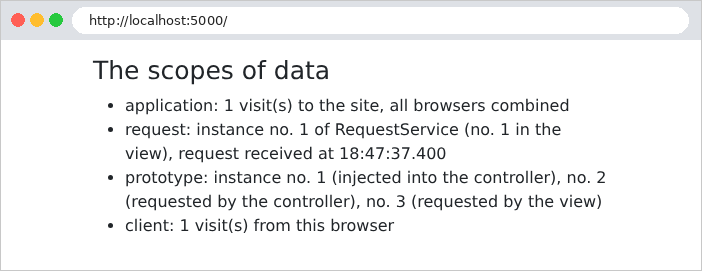
Let’s simulate two browsers using [curl] and two cookie files, [a.txt] and [b.txt]: The [-b] option sends the cookies from the file, while the [-c] option saves the cookies set by the server to the file. Browser A made two requests, then browser B made one, and then A made one last request (the server has just been restarted):
(only the items in the list are shown). We observe that:
- the application counter counts all visits: 1, 2, 3, 4;
- each request has its own instance of [RequestService]: 1, 2, 3, 4. During a request, the controller (via its proxy) and the view access the same instance;
- the prototype injected into the controller is always No. 1: created at startup with the controller, it will never be replaced. The requested prototypes are new each time: the controller and the view receive two different ones, and each request creates two new ones;
- the client counter is unique to each browser: A has 3 visits, B has 1.
The file [a.txt], maintained by [curl], contains browser A’s cookie:
This cookie is controlled by the client, which can send whatever value it wants:
For a visitor counter, this is irrelevant. For sensitive data (the user’s identity, their role), the server must be able to detect tampering: Chapter 8 shows how.
A rule follows from these scopes: a bean must not retain a bean with a shorter scope. A singleton that directly received a request-scope instance would retain it indefinitely, well beyond the request for which it was created. [ASP.NET Core] checks for this rule at startup, in development mode, and refuses to start if it is violated. [Spring] takes a different approach: for the request scope, [@RequestScope] injects a proxy, which makes the injection safe; for the prototype scope, it performs no checks, and we’ve just seen the result: a “prototype” that behaves like a singleton. When a new instance is actually needed, it is requested from [Spring] via a [ObjectProvider].
In the case study:
Scope | Data | Where? |
Application | lists of doctors and clients, dictionaries, pending CAPTCHAs, attempt counters | Singleton beans ([ApplicationModel], [Translator], [CaptchaService], [AttemptLimiterService]...); the business layer and data access are also stateless singletons |
query | view model, logged-in user | the model ([Model]), supplemented by [CommonModel]; the security context of [Spring Security] |
client | authentication token, language, flash message | cookies |