5. Navigation
An application has multiple screens. In [Android], along with [Compose], an activity is not opened per screen: a SINGLE activity displays the application’s screens in turn, controlled by a ROUTER. This is the [navigation-compose] library for [Jetpack], the equivalent of the [go_router] package for [Flutter].
5.1. Example 17: The Router
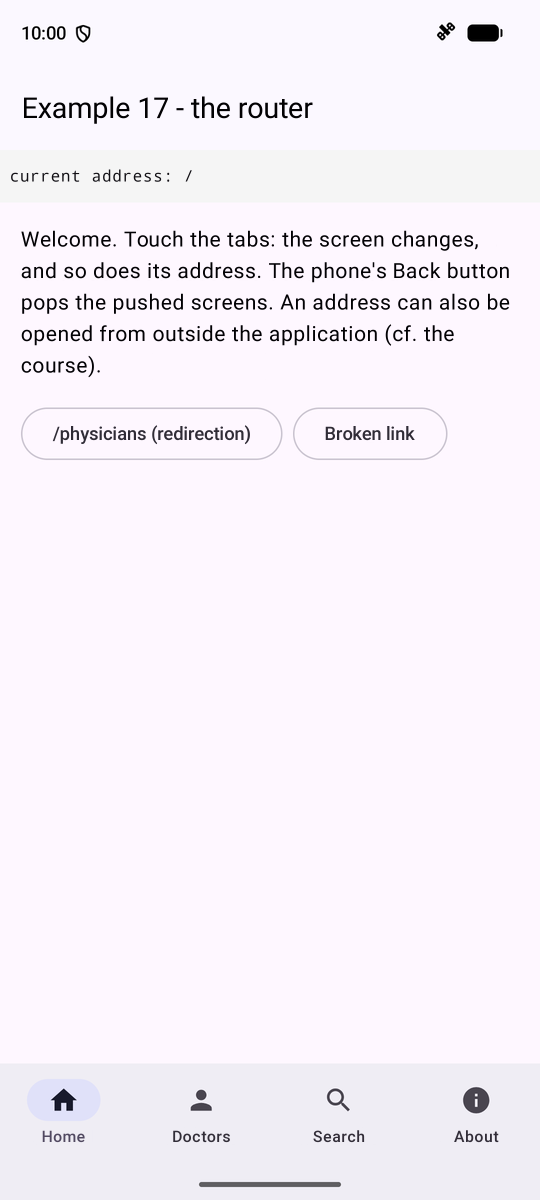
The router associates a ROUTE with each screen and manages a STACK of screens: a screen ([navigate]) is stacked, and the phone’s Back button unstacks it ([popBackStack]). The routes in the example:
| // =========================================================================
// ex17/Routes.kt - the ROUTES of the application
// -------------------------------------------------------------------------
// An application has several screens ("pages"). The ROUTER associates a
// ROUTE with each screen. The Jetpack Navigation library (navigation-
// compose) manages a STACK of screens: a screen is pushed (navigate), the
// phone's Back button pops it (popBackStack).
// A route is a Kotlin object, @Serializable:
// - an "object" for a screen without parameters (Home);
// - a "data class" for a screen with parameters: DoctorDetail(id = 2).
// The type of the parameters is checked at compile time: DoctorDetail("2")
// would be rejected. (Navigation can store these objects in the stack, hence
// @Serializable.)
// Each screen can also have an ADDRESS, a "deep link"
// such as app://examples/doctors/2: it is the closest thing,
// on Android, to web addresses (cf. Ex17Activity.kt).
// =========================================================================
package fr.stahe.examples.ex17
import kotlinx.serialization.Serializable
@Serializable
object Home
@Serializable
object DoctorList
// a route parameter
@Serializable
data class DoctorDetail(val id: Int)
// an OPTIONAL parameter (with a default value): ?q=... in the address
@Serializable
data class Search(val q: String = "")
@Serializable
object About
// an old address, which REDIRECTS to the list of doctors
@Serializable
object Physicians
// the screen of the unknown addresses
@Serializable
data class NotFoundPage(val address: String)
// the beginning of all the addresses of this example
const val BASE = "app://examples"
|
- lines 23–30: a route is a [Kotlin] object [@Serializable]: a [object] for a screen without parameters; a [data class] for a screen with parameters: [DoctorDetail(id = 2)]. The type of the parameters is checked at compile time ([DoctorDetail("2")] would be rejected); [@Serializable]: [Navigation] knows how to store these objects on the stack and restore them if the activity is recreated;
- line 34: an optional parameter with a default value;
- line 48: each screen can have an ADDRESS, a “deep link” of the form [app://examples/doctors/2]: this is the closest thing, in [Android], to web addresses.
"Hard-coded" data, to avoid dependence on a server:
| // ex17/Data.kt - "hard-coded" data, so as not to depend on a server in this example
package fr.stahe.examples.ex17
data class Doctor(val id: Int, val title: String, val firstName: String, val lastName: String, val specialty: String)
val doctors = listOf(
Doctor(1, "Mme", "Marie", "PELISSIER", "general practitioner"),
Doctor(2, "Mr", "Paul", "TATOU", "pediatrician"),
Doctor(3, "Melle", "Sophie", "DUPONT", "general practitioner"),
)
|
The navigation graph: one entry per route, and the screen to display:
| // =========================================================================
// ex17/Ex17Activity.kt - the NavHost: the routes and their screens
// -------------------------------------------------------------------------
// - rememberNavController(): the navigation controller (the stack);
// - NavHost(nav, startDestination = Home) { ... }: the screen of the
// current route. The block describes the navigation GRAPH: one
// composable<Route> { ... } entry per route;
// - entry.toRoute<DoctorDetail>(): the route object of the screen, with
// its parameters;
// - deepLinks: the address of the screen. Thanks to the intent filter of
// the activity (AndroidManifest.xml), an app://examples/... address
// can even be opened from outside the application:
// adb shell am start -a android.intent.action.VIEW -d "app://examples/doctors/2"
// =========================================================================
package fr.stahe.examples.ex17
import android.os.Bundle
import androidx.activity.ComponentActivity
import androidx.activity.compose.setContent
import androidx.activity.enableEdgeToEdge
import androidx.compose.runtime.Composable
import androidx.compose.runtime.LaunchedEffect
import androidx.navigation.compose.NavHost
import androidx.navigation.compose.composable
import androidx.navigation.compose.rememberNavController
import androidx.navigation.navDeepLink
import androidx.navigation.toRoute
import fr.stahe.examples.common.ExamplesTheme
import fr.stahe.examples.ex17.pages.AboutPage
import fr.stahe.examples.ex17.pages.HomePage
import fr.stahe.examples.ex17.pages.DoctorDetailPage
import fr.stahe.examples.ex17.pages.DoctorListPage
import fr.stahe.examples.ex17.pages.SearchPage
import fr.stahe.examples.ex17.pages.NotFoundPage as NotFoundScreen
class Ex17Activity : ComponentActivity() {
override fun onCreate(savedInstanceState: Bundle?) {
super.onCreate(savedInstanceState)
enableEdgeToEdge()
setContent { ExamplesTheme { App() } }
}
}
@Composable
fun App() {
val nav = rememberNavController()
Shell(nav) {
NavHost(navController = nav, startDestination = Home) {
composable<Home>(deepLinks = listOf(navDeepLink<Home>(basePath = "$BASE/home"))) {
HomePage(onLink = { nav.openLink(it) }, onRedirect = { nav.navigate(Physicians) })
}
composable<DoctorList>(deepLinks = listOf(navDeepLink<DoctorList>(basePath = "$BASE/doctors"))) {
// navigate: the doctor's screen is PUSHED on top of the list
DoctorListPage(onView = { id -> nav.navigate(DoctorDetail(id)) })
}
// app://examples/doctors/2: the id parameter is taken from the address
composable<DoctorDetail>(deepLinks = listOf(navDeepLink<DoctorDetail>(basePath = "$BASE/doctors"))) { entry ->
val route = entry.toRoute<DoctorDetail>()
DoctorDetailPage(
id = route.id,
// popBackStack: popping the screen (like the Back button); if
// there is nothing below (screen opened by an address), going to the list
onBack = { if (!nav.popBackStack()) nav.navigate(DoctorList) },
// REPLACING the current screen (no push): the current doctor
// is popped (inclusive) before pushing the next one
onNext = { next ->
nav.navigate(DoctorDetail(next)) { popUpTo<DoctorDetail> { inclusive = true } }
},
)
}
// app://examples/search?q=pediatrician
composable<Search>(deepLinks = listOf(navDeepLink<Search>(basePath = "$BASE/search"))) { entry ->
SearchPage(q = entry.toRoute<Search>().q, onSearch = { input -> nav.navigate(Search(input)) })
}
composable<About> { AboutPage() }
// a REDIRECTION: the screen displays nothing, it immediately replaces
// its own route with another one
composable<Physicians> {
LaunchedEffect(Unit) {
nav.navigate(DoctorList) { popUpTo<Physicians> { inclusive = true } }
}
}
composable<NotFoundPage> { entry ->
NotFoundScreen(address = entry.toRoute<NotFoundPage>().address, onHome = { nav.goTo(Home) })
}
}
}
}
|
- line 34: [import ... as NotFoundScreen]: an alias, because the [NotFoundPage] screen function has the same name as the route [NotFoundPage];
- lines 46–48: [rememberNavController()]: the navigation controller (the stack); [NavHost(nav, startDestination = Home)] displays the screen for the current route;
- lines 49–54: one [composable<Route>] entry per route, with its address ([deepLinks]). The screens are not aware of the router: they receive FUNCTIONS to navigate ([onLink], [onView]...);
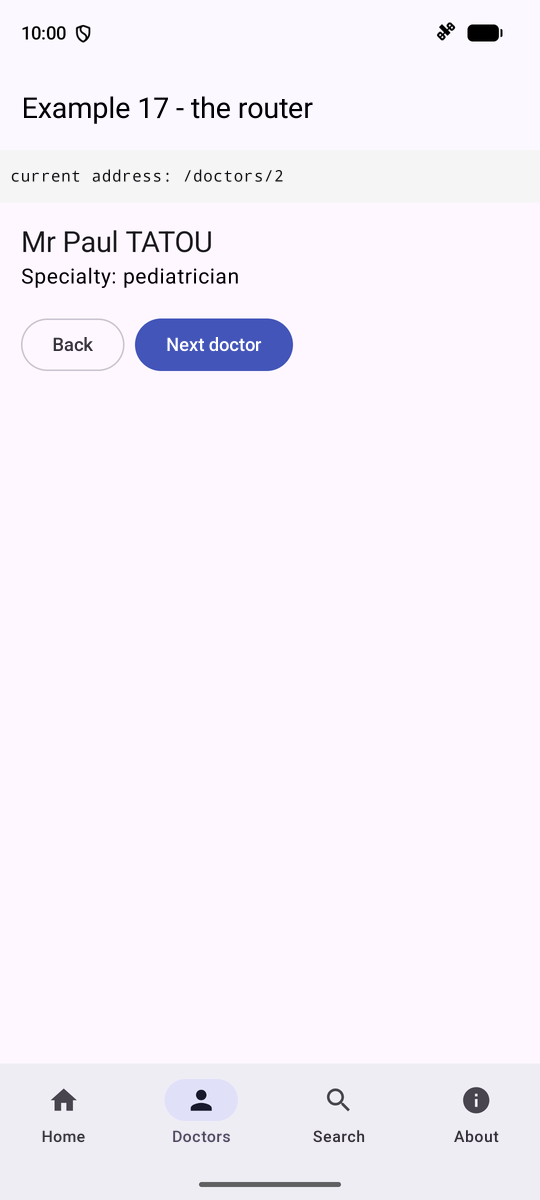
- lines 57–58: [entry.toRoute<DoctorDetail>()]: the route object, with its parameters. With [navDeepLink<DoctorDetail>(basePath = ...)], the parameter [id] is taken from the address ([.../doctors/2]);
- line 63: [popBackStack()] pops the screen, like the Back button, and returns [false] if there is nothing below it (screen opened by an address);
- lines 66–67: REPLACING the current screen: the current doctor ([popUpTo<DoctorDetail> [ inclusive = true ]]) is popped before the next one is pushed;
- lines 78–80: a REDIRECTION: the screen displays nothing; it immediately replaces its route with another one. Navigation is an “effect” ([LaunchedEffect]): one never navigates DURING the display.
The app’s “shell”: the top bar, the bottom tab bar—typical of a mobile device—and, between the two, the screen showing the current route:
| // =========================================================================
// ex17/Shell.kt - the "shell" of the application
// -------------------------------------------------------------------------
// The top bar, the bottom navigation bar, and, between the two,
// the screen of the current route (content: the NavHost, cf. Ex17Activity.kt).
// - nav.currentBackStackEntryAsState(): the screen at the TOP of the stack,
// an observed state (the shell is recomposed on each navigation);
// - destination.hasRoute<DoctorList>(): is the screen the one of
// this route?; entry.toRoute<DoctorDetail>(): the route object, and
// its parameters;
// - navigate(route) { ... }: going to a route; the options of the block
// say what to do with the stack (cf. goTo).
// =========================================================================
@file:OptIn(ExperimentalMaterial3Api::class)
package fr.stahe.examples.ex17
import android.net.Uri
import androidx.compose.foundation.background
import androidx.compose.foundation.layout.Box
import androidx.compose.foundation.layout.Column
import androidx.compose.foundation.layout.fillMaxSize
import androidx.compose.foundation.layout.fillMaxWidth
import androidx.compose.foundation.layout.padding
import androidx.compose.material.icons.Icons
import androidx.compose.material.icons.filled.Home
import androidx.compose.material.icons.filled.Info
import androidx.compose.material.icons.filled.Person
import androidx.compose.material.icons.filled.Search
import androidx.compose.material3.ExperimentalMaterial3Api
import androidx.compose.material3.Icon
import androidx.compose.material3.NavigationBar
import androidx.compose.material3.NavigationBarItem
import androidx.compose.material3.Scaffold
import androidx.compose.material3.Text
import androidx.compose.material3.TopAppBar
import androidx.compose.runtime.Composable
import androidx.compose.runtime.getValue
import androidx.compose.ui.Modifier
import androidx.compose.ui.graphics.Color
import androidx.compose.ui.graphics.vector.ImageVector
import androidx.compose.ui.text.font.FontFamily
import androidx.compose.ui.unit.dp
import androidx.compose.ui.unit.sp
import androidx.navigation.NavBackStackEntry
import androidx.navigation.NavDestination
import androidx.navigation.NavDestination.Companion.hasRoute
import androidx.navigation.NavGraph.Companion.findStartDestination
import androidx.navigation.NavHostController
import androidx.navigation.compose.currentBackStackEntryAsState
import androidx.navigation.toRoute
// a tab: the route it leads to, its label, its icon, and the test that
// says whether it is active for a given screen
class Tab(val route: Any, val label: String, val icon: ImageVector, val active: (NavDestination) -> Boolean)
val tabs = listOf(
Tab(Home, "Home", Icons.Default.Home) { it.hasRoute<Home>() },
// the Doctors tab stays active on the screen of a doctor
Tab(DoctorList, "Doctors", Icons.Default.Person) { it.hasRoute<DoctorList>() || it.hasRoute<DoctorDetail>() },
Tab(Search("general practitioner"), "Search", Icons.Default.Search) { it.hasRoute<Search>() },
Tab(About, "About", Icons.Default.Info) { it.hasRoute<About>() },
)
// the address of the current screen, to display it
fun addressOf(entry: NavBackStackEntry?): String {
val d = entry?.destination ?: return ""
return when {
d.hasRoute<Home>() -> "/"
d.hasRoute<DoctorList>() -> "/doctors"
d.hasRoute<DoctorDetail>() -> "/doctors/${entry.toRoute<DoctorDetail>().id}"
d.hasRoute<Search>() -> "/search?q=${entry.toRoute<Search>().q}"
d.hasRoute<About>() -> "/about"
d.hasRoute<NotFoundPage>() -> entry.toRoute<NotFoundPage>().address
else -> "?"
}
}
// going to a tab: the stack is REPLACED by that of this tab
fun NavHostController.goTo(route: Any) {
navigate(route) {
// everything is popped, down to the first screen (excluded)...
popUpTo(graph.findStartDestination().id)
// ... and the same screen is not pushed twice
launchSingleTop = true
}
}
// following a LINK (an address); an unknown address leads to NotFoundPage
fun NavHostController.openLink(address: String) {
try {
navigate(Uri.parse("$BASE$address"))
} catch (e: IllegalArgumentException) {
navigate(NotFoundPage(address))
}
}
@Composable
fun Shell(nav: NavHostController, content: @Composable () -> Unit) {
val entry by nav.currentBackStackEntryAsState()
val destination = entry?.destination
Scaffold(
topBar = { TopAppBar(title = { Text("Example 17 - the router") }) },
// NavigationBar: the bottom tab bar, typical of a mobile
bottomBar = {
NavigationBar {
for (t in tabs) {
NavigationBarItem(
selected = destination != null && t.active(destination),
onClick = { nav.goTo(t.route) },
icon = { Icon(t.icon, contentDescription = null) },
label = { Text(t.label) },
)
}
}
},
) { insets ->
Column(Modifier.padding(insets).fillMaxSize()) {
Text(
"current address: ${addressOf(entry)}",
fontFamily = FontFamily.Monospace,
fontSize = 12.sp,
modifier = Modifier.fillMaxWidth().background(Color(0xFFF5F5F5)).padding(8.dp),
)
Box(Modifier.padding(16.dp).weight(1f)) { content() }
}
}
}
|
- lines 55–62: the tabs. [hasRoute<DoctorList>()]: Is this the screen for this route? The “Doctors” tab remains active on a doctor’s screen;
- lines 66–75: the address of the current screen, to display it;
- lines 80–85: Go to a tab: the stack is REPLACED ([popUpTo] is the first screen), and the same screen ([launchSingleTop]) is not pushed onto the stack twice;
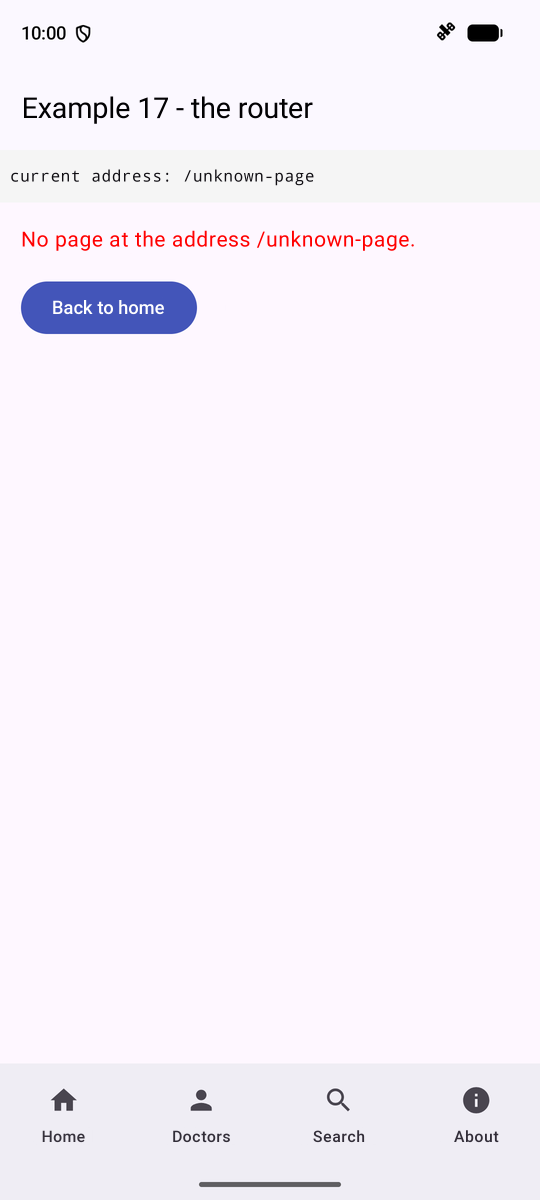
- lines 90–94: follow an address: [navigate(Uri)]; an unknown address raises an exception: the “Page not found” screen is then displayed;
- lines 100–101: [currentBackStackEntryAsState()]: the screen ON TOP of the stack, an observed state: the shell is rebuilt with each navigation;
- lines 106–112: the tab bar ([NavigationBar]).
The screens:
| // =========================================================================
// ex17/pages/Pages.kt - the screens of example 17
// -------------------------------------------------------------------------
// The screens do not know the router: they receive their parameters
// (id, q...) and FUNCTIONS to navigate (onView, onBack...). It is the
// NavHost (Ex17Activity.kt) that links these functions to the routes. A screen
// thus remains an ordinary component, easy to display on its own (in an
// Android Studio preview, in a test).
// =========================================================================
@file:OptIn(ExperimentalLayoutApi::class)
package fr.stahe.examples.ex17.pages
import androidx.compose.foundation.layout.Arrangement
import androidx.compose.foundation.layout.Column
import androidx.compose.foundation.layout.ExperimentalLayoutApi
import androidx.compose.foundation.layout.FlowRow
import androidx.compose.foundation.layout.Spacer
import androidx.compose.foundation.layout.fillMaxWidth
import androidx.compose.foundation.layout.height
import androidx.compose.foundation.text.KeyboardActions
import androidx.compose.foundation.text.KeyboardOptions
import androidx.compose.material.icons.Icons
import androidx.compose.material.icons.automirrored.filled.KeyboardArrowRight
import androidx.compose.material.icons.filled.Search
import androidx.compose.material3.Button
import androidx.compose.material3.Icon
import androidx.compose.material3.ListItem
import androidx.compose.material3.MaterialTheme
import androidx.compose.material3.OutlinedButton
import androidx.compose.material3.OutlinedTextField
import androidx.compose.material3.Text
import androidx.compose.runtime.Composable
import androidx.compose.runtime.getValue
import androidx.compose.runtime.mutableStateOf
import androidx.compose.runtime.saveable.rememberSaveable
import androidx.compose.runtime.setValue
import androidx.compose.foundation.clickable
import androidx.compose.ui.Modifier
import androidx.compose.ui.graphics.Color
import androidx.compose.ui.text.input.ImeAction
import androidx.compose.ui.unit.dp
import fr.stahe.examples.common.TaskTitle
import fr.stahe.examples.ex17.doctors
@Composable
fun HomePage(onLink: (String) -> Unit, onRedirect: () -> Unit) {
TaskTitle("Home")
Column {
Text(
"Welcome. Touch the tabs: the screen changes, and so does its address. The phone's Back " +
"button pops the pushed screens. An address can also be opened from " +
"outside the application (cf. the course).",
)
Spacer(Modifier.height(16.dp))
// links to particular addresses
FlowRow(horizontalArrangement = Arrangement.spacedBy(8.dp)) {
OutlinedButton(onClick = onRedirect) { Text("/physicians (redirection)") }
OutlinedButton(onClick = { onLink("/unknown-page") }) { Text("Broken link") }
}
}
}
@Composable
fun DoctorListPage(onView: (Int) -> Unit) {
TaskTitle("Doctors")
Column {
for (d in doctors) {
ListItem(
headlineContent = { Text("${d.title} ${d.firstName} ${d.lastName}") },
trailingContent = { Icon(Icons.AutoMirrored.Filled.KeyboardArrowRight, contentDescription = null) },
// the doctor is PUSHED; the Back button returns here
modifier = Modifier.clickable { onView(d.id) },
)
}
}
}
// a page with a parameter: the router passes it id, an Int
@Composable
fun DoctorDetailPage(id: Int, onBack: () -> Unit, onNext: (Int) -> Unit) {
// find: the first matching doctor, or null
val doctor = doctors.find { it.id == id }
if (doctor == null) {
Text("Doctor no. $id does not exist.", color = Color.Red)
return
}
val next = doctor.id % doctors.size + 1
TaskTitle("${doctor.firstName} ${doctor.lastName}")
Column {
Text("${doctor.title} ${doctor.firstName} ${doctor.lastName}", style = MaterialTheme.typography.titleLarge)
Text("Specialty: ${doctor.specialty}")
Spacer(Modifier.height(16.dp))
FlowRow(horizontalArrangement = Arrangement.spacedBy(8.dp)) {
OutlinedButton(onClick = onBack) { Text("Back") }
Button(onClick = { onNext(next) }) { Text("Next doctor") }
}
}
}
// =========================================================================
// a page driven by its route: Search(q = "pediatrician"). Searching
// means GOING to the route Search(q = <input>): the page displays what
// the route says, and nothing else (the Back button returns to the previous
// search).
// =========================================================================
@Composable
fun SearchPage(q: String, onSearch: (String) -> Unit) {
TaskTitle("Search")
val results = doctors.filter { "${it.firstName} ${it.lastName} ${it.specialty}".lowercase().contains(q.lowercase()) }
// the input starts with the value of the route; rememberSaveable(q):
// if the route changes (Back button), the input starts again from the new value
var input by rememberSaveable(q) { mutableStateOf(q) }
Column {
OutlinedTextField(
value = input,
onValueChange = { input = it },
placeholder = { Text("name or specialty") },
trailingIcon = { Icon(Icons.Default.Search, contentDescription = null) },
singleLine = true,
// the "search" key of the keyboard
keyboardOptions = KeyboardOptions(imeAction = ImeAction.Search),
keyboardActions = KeyboardActions(onSearch = { onSearch(input.trim()) }),
modifier = Modifier.fillMaxWidth(),
)
Spacer(Modifier.height(8.dp))
for (d in results) {
ListItem(headlineContent = { Text("${d.firstName} ${d.lastName} (${d.specialty})") })
}
if (results.isEmpty()) {
ListItem(headlineContent = { Text("No result.", color = Color.Gray) })
}
}
}
@Composable
fun AboutPage() {
TaskTitle("About")
Text(
"On a phone, all the code of the application is in its .apk file: there is nothing " +
"to download on the first visit of a screen (for a very big application, Google " +
"Play can deliver some modules on demand: Play Feature Delivery).",
)
}
@Composable
fun NotFoundPage(address: String, onHome: () -> Unit) {
TaskTitle("Page not found")
Column {
Text("No page at the address $address.", color = Color.Red)
Spacer(Modifier.height(16.dp))
Button(onClick = onHome) { Text("Back to home") }
}
}
|
- line 73: [Modifier.clickable]: the entire line is a link;
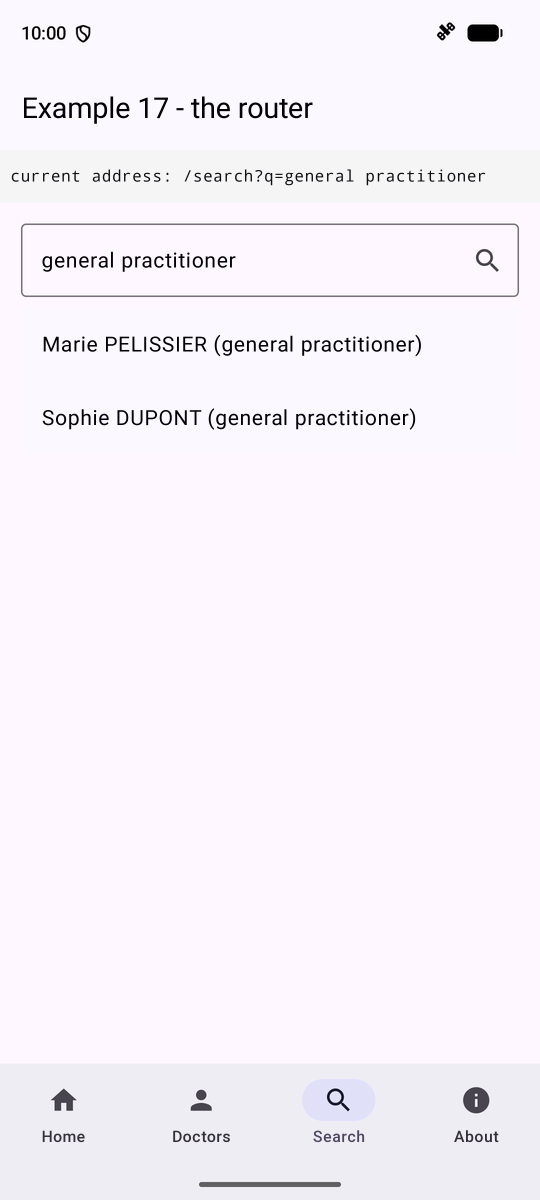
- lines 108–113: a page driven by its route: “Search” GOES to the route [Search(q = input)]; the page displays the route information. [rememberSaveable(q)]: If the route changes (Back button), the input resets to the new value.
For an address to be opened from OUTSIDE the app (a link in an email, another app), the activity declares an intent filter in the manifest:
| <activity android:name=".ex17.Ex17Activity" android:exported="true" android:windowSoftInputMode="adjustResize">
<intent-filter>
<action android:name="android.intent.action.VIEW" />
<category android:name="android.intent.category.DEFAULT" />
<data android:scheme="app" android:host="examples" />
</intent-filter>
</activity>
|
You can then test it from a command window on the PC, using the [adb] tool from the [Android] SDK (emulator launched):
| adb shell am start -a android.intent.action.VIEW -d "app://examples/doctors/2"
|
Example 17 opens directly on Doctor No. 2’s screen; “Back” then takes you to the list ([popBackStack()] returned [false]).
5.2. Example 18: Navigation Guards
Certain screens are accessible only to a logged-in user or to specific roles. The logged-in user—simulated here without a server—is stored in a single object:
| // =========================================================================
// ex18/Session.kt - a SIMULATED session (without a server)
// -------------------------------------------------------------------------
// The logged-in user must be known to the SCREENS (the top bar,
// the schedule) and to the GUARDS of the router. It is stored in a UNIQUE object
// (object: a class that has only one instance, created on first use):
// - a state property, observed by Compose (mutableStateOf): any
// component that reads it is recomposed when it changes;
// - functions to modify it.
// (Example 23 will do the same thing with a real server.)
// =========================================================================
package fr.stahe.examples.ex18
import androidx.compose.runtime.getValue
import androidx.compose.runtime.mutableStateOf
import androidx.compose.runtime.setValue
enum class Role { ADMIN, DOCTOR, USER }
data class User(val login: String, val role: Role)
// three "hard-coded" accounts (password = login)
private val accounts = mapOf("admin" to Role.ADMIN, "pelissier" to Role.DOCTOR, "martin" to Role.USER)
object Session {
// the state: null, nobody is logged in. private set: modifiable only here
var user by mutableStateOf<User?>(null)
private set
fun logIn(login: String, password: String): Boolean {
val role = accounts[login]
if (role == null || password != login) {
return false
}
user = User(login, role)
return true
}
fun logOut() {
user = null
}
}
|
- Lines 25–26: [object]: a class with only one instance, created on first use; its property [user] is an observed state: any component that reads it is recomposed when it changes.
Routes and guards:
| // =========================================================================
// ex18/Routes.kt - routes PROTECTED by guards
// -------------------------------------------------------------------------
// A GUARD is a function that receives the logged-in user (or null) and
// returns:
// - null: the screen can be displayed;
// - a route: the screen is REPLACED by this route (a redirection).
// The Protected(...) component applies the guards of a screen. As it READS
// the user of the session (an observed state), it is re-evaluated on each
// login or logout: a screen that is no longer allowed is left.
//
// It is the client-side equivalent of the NestJS guards (JwtAuthGuard,
// RolesGuard) - with a FUNDAMENTAL difference: a client guard is
// only a convenience. The application is in the hands of the user, who
// can modify it at will. The real protection of the data remains that
// of the SERVER (cf. chapter on the black box).
// =========================================================================
package fr.stahe.examples.ex18
import androidx.compose.runtime.Composable
import androidx.compose.runtime.LaunchedEffect
import androidx.navigation.NavHostController
import kotlinx.serialization.Serializable
// denied: left by the requireRole guard when the role does not fit
@Serializable
data class Home(val denied: String? = null)
// redirect: the address of the screen the user wanted to open
@Serializable
data class Login(val redirect: String? = null)
@Serializable
object Schedule
@Serializable
object Administration
const val BASE = "app://examples18"
typealias Guard = (User?) -> Any?
// the "login required" guard: not logged in -> to the login page,
// remembering the address of the requested screen
fun requireLogin(address: String): Guard = { u -> if (u == null) Login(redirect = address) else null }
// the "role required" guard: logged in, but not with the right role -> back to
// the home page, with a reason
fun requireRole(address: String, vararg roles: Role): Guard = { u ->
if (u == null || u.role !in roles) Home(denied = address) else null
}
// the guards, in order: the first that returns a route wins
@Composable
fun Protected(nav: NavHostController, vararg guards: Guard, content: @Composable () -> Unit) {
val redirection = guards.firstNotNullOfOrNull { guard -> guard(Session.user) }
if (redirection == null) {
content()
} else {
// navigation is an "effect": we do not navigate DURING the display
LaunchedEffect(redirection) {
val here = nav.currentBackStackEntry?.destination?.id ?: return@LaunchedEffect
// the denied screen is replaced (inclusive) by the redirection
nav.navigate(redirection) { popUpTo(here) { inclusive = true } }
}
}
}
|
- line 41: a GUARD is a function that takes the user (or [null]) as an argument and returns [null] (the screen may be displayed) or a ROUTE (the screen is replaced by this route);
- lines 45–50: two guard functions: “login required” redirects to the login screen while retaining the requested address; “role required” redirects to the welcome screen with a reason;
- lines 55–64: [Protected] applies the guards for a screen: [firstNotNullOfOrNull], the first result that is not [null]. Since it READS the session, it is reevaluated with each login or logout: a screen that is no longer permitted is exited.
This is the client-side equivalent of the [NestJS] checks ([JwtAuthGuard], [RolesGuard]), with one difference: a client-side check is merely a convenience. The application is in the user’s hands; true data protection remains that provided by the SERVER.
| // =========================================================================
// ex18/Ex18Activity.kt - the navigation graph, with its guards
// -------------------------------------------------------------------------
// The protected screens are wrapped by Protected(nav, guards...): their
// guards are evaluated when the screen opens... and again on each
// change of the session.
// After logging in, the user is sent back to the screen he wanted to
// open (its address, stored by the guard in Login.redirect), or to
// the home page.
// =========================================================================
package fr.stahe.examples.ex18
import android.net.Uri
import android.os.Bundle
import androidx.activity.ComponentActivity
import androidx.activity.compose.setContent
import androidx.activity.enableEdgeToEdge
import androidx.compose.runtime.Composable
import androidx.navigation.compose.NavHost
import androidx.navigation.compose.composable
import androidx.navigation.compose.rememberNavController
import androidx.navigation.navDeepLink
import androidx.navigation.navOptions
import androidx.navigation.toRoute
import fr.stahe.examples.common.ExamplesTheme
class Ex18Activity : ComponentActivity() {
override fun onCreate(savedInstanceState: Bundle?) {
super.onCreate(savedInstanceState)
enableEdgeToEdge()
setContent { ExamplesTheme { App() } }
}
}
@Composable
fun App() {
val nav = rememberNavController()
Shell(nav) {
NavHost(navController = nav, startDestination = Home()) {
composable<Home> { entry -> HomePage(denied = entry.toRoute<Home>().denied) }
composable<Login> { entry ->
LoginPage(
redirection = entry.toRoute<Login>().redirect,
onLoggedIn = { r ->
// only an address of THIS application is accepted
// the stack is emptied (popUpTo the whole graph): the login page
// does not stay in it, Back will not reopen it
val clearStack = navOptions { popUpTo(nav.graph.id) { inclusive = true } }
if (r != null && r.startsWith("$BASE/")) {
nav.navigate(Uri.parse(r), clearStack)
} else {
nav.navigate(Home(), clearStack)
}
},
)
}
composable<Schedule>(deepLinks = listOf(navDeepLink<Schedule>(basePath = "$BASE/schedule"))) {
Protected(nav, requireLogin("$BASE/schedule")) { SchedulePage() }
}
composable<Administration>(deepLinks = listOf(navDeepLink<Administration>(basePath = "$BASE/administration"))) {
Protected(nav, requireLogin("$BASE/administration"), requireRole("/administration", Role.ADMIN)) {
AdministrationPage()
}
}
}
}
}
|
- lines 44–52: after logging in, the program goes to the address stored by the guard (only if it is an address of THIS application), otherwise to the home page; [navOptions { popUpTo(nav.graph.id) [ inclusive = true ] }] clears the stack: the Back button will not reopen the login screen;
- lines 58–62: the protected screens, wrapped by [Protected].
The shell and the screens:
| // =========================================================================
// ex18/Shell.kt - the links, and the logged-in user
// -------------------------------------------------------------------------
// The top bar reads Session.user: it is recomposed on each
// login and logout.
// =========================================================================
@file:OptIn(ExperimentalMaterial3Api::class, ExperimentalLayoutApi::class)
package fr.stahe.examples.ex18
import androidx.compose.foundation.layout.Box
import androidx.compose.foundation.layout.Column
import androidx.compose.foundation.layout.ExperimentalLayoutApi
import androidx.compose.foundation.layout.FlowRow
import androidx.compose.foundation.layout.fillMaxSize
import androidx.compose.foundation.layout.padding
import androidx.compose.material.icons.Icons
import androidx.compose.material.icons.automirrored.filled.ExitToApp
import androidx.compose.material3.ExperimentalMaterial3Api
import androidx.compose.material3.HorizontalDivider
import androidx.compose.material3.Icon
import androidx.compose.material3.IconButton
import androidx.compose.material3.Scaffold
import androidx.compose.material3.SuggestionChip
import androidx.compose.material3.Text
import androidx.compose.material3.TextButton
import androidx.compose.material3.TopAppBar
import androidx.compose.runtime.Composable
import androidx.compose.runtime.getValue
import androidx.compose.ui.Modifier
import androidx.compose.ui.text.font.FontWeight
import androidx.compose.ui.unit.dp
import androidx.navigation.NavDestination.Companion.hasRoute
import androidx.navigation.NavHostController
import androidx.navigation.compose.currentBackStackEntryAsState
@Composable
fun Shell(nav: NavHostController, content: @Composable () -> Unit) {
val destination = nav.currentBackStackEntryAsState().value?.destination
val u = Session.user
// a link: in bold if it designates the displayed screen
@Composable
fun Link(route: Any, active: Boolean, label: String) {
TextButton(onClick = { nav.navigate(route) { launchSingleTop = true } }) {
Text(label, fontWeight = if (active) FontWeight.Bold else FontWeight.Normal)
}
}
Scaffold(
topBar = {
TopAppBar(
title = { Text("Example 18 - guards") },
actions = {
if (u == null) {
TextButton(onClick = { nav.navigate(Login()) }) { Text("login") }
} else {
SuggestionChip(onClick = {}, label = { Text("${u.login} ${u.role}") })
IconButton(onClick = {
Session.logOut()
nav.navigate(Home()) { popUpTo(nav.graph.id) { inclusive = true } }
}) {
Icon(Icons.AutoMirrored.Filled.ExitToApp, contentDescription = "logout")
}
}
},
)
},
) { insets ->
Column(Modifier.padding(insets).fillMaxSize()) {
FlowRow {
Link(Home(), destination?.hasRoute<Home>() == true, "Home")
Link(Schedule, destination?.hasRoute<Schedule>() == true, "Schedule (logged in)")
Link(Administration, destination?.hasRoute<Administration>() == true, "Administration (ADMIN)")
}
HorizontalDivider()
Box(Modifier.padding(16.dp).weight(1f)) { content() }
}
}
}
// =========================================================================
// ex18/Pages.kt - the screens of example 18
// =========================================================================
package fr.stahe.examples.ex18
import androidx.compose.foundation.layout.Column
import androidx.compose.foundation.layout.Spacer
import androidx.compose.foundation.layout.fillMaxWidth
import androidx.compose.foundation.layout.height
import androidx.compose.foundation.layout.padding
import androidx.compose.foundation.text.KeyboardActions
import androidx.compose.foundation.text.KeyboardOptions
import androidx.compose.material3.Button
import androidx.compose.material3.Card
import androidx.compose.material3.CardDefaults
import androidx.compose.material3.OutlinedTextField
import androidx.compose.material3.Text
import androidx.compose.runtime.Composable
import androidx.compose.runtime.getValue
import androidx.compose.runtime.mutableStateOf
import androidx.compose.runtime.remember
import androidx.compose.runtime.setValue
import androidx.compose.ui.Modifier
import androidx.compose.ui.graphics.Color
import androidx.compose.ui.text.SpanStyle
import androidx.compose.ui.text.buildAnnotatedString
import androidx.compose.ui.text.font.FontWeight
import androidx.compose.ui.text.input.ImeAction
import androidx.compose.ui.text.input.PasswordVisualTransformation
import androidx.compose.ui.text.withStyle
import androidx.compose.ui.unit.dp
@Composable
fun HomePage(denied: String?) {
Column {
if (denied != null) {
Card(colors = CardDefaults.cardColors(containerColor = Color(0xFFFFEBEE))) {
Text("Your role does not allow opening $denied.", Modifier.padding(12.dp))
}
Spacer(Modifier.height(8.dp))
}
Text("Public page. Try the other two links, logged in or not (admin, pelissier, martin - password = login).")
}
}
@Composable
fun SchedulePage() {
Text(
buildAnnotatedString {
append("The schedule of ")
withStyle(SpanStyle(fontWeight = FontWeight.Bold)) { append(Session.user?.login ?: "") }
append(": this page requires being logged in.")
},
)
}
@Composable
fun AdministrationPage() {
Text("Administration: page reserved for the ADMIN role.")
}
// =========================================================================
// the login. After a successful login, onLoggedIn receives the address of
// the screen the user wanted to open (redirect parameter left by the guard),
// or null
// =========================================================================
@Composable
fun LoginPage(redirection: String?, onLoggedIn: (String?) -> Unit) {
var login by remember { mutableStateOf("") }
var password by remember { mutableStateOf("") }
var error by remember { mutableStateOf(false) }
fun validate() {
if (!Session.logIn(login.trim(), password)) {
error = true
return
}
onLoggedIn(redirection)
}
Column {
if (redirection != null) {
Card(colors = CardDefaults.cardColors(containerColor = Color(0xFFFFF8E1))) {
Text("Log in to open ${redirection.removePrefix(BASE)}.", Modifier.padding(12.dp))
}
}
OutlinedTextField(value = login, onValueChange = { login = it }, label = { Text("login") }, singleLine = true, modifier = Modifier.fillMaxWidth())
OutlinedTextField(
value = password,
onValueChange = { password = it },
label = { Text("password") },
singleLine = true,
visualTransformation = PasswordVisualTransformation(),
keyboardOptions = KeyboardOptions(imeAction = ImeAction.Go),
keyboardActions = KeyboardActions(onGo = { validate() }),
modifier = Modifier.fillMaxWidth(),
)
Spacer(Modifier.height(16.dp))
Button(onClick = { validate() }) { Text("Log in") }
if (error) {
Text("Incorrect login or password.", color = Color.Red, modifier = Modifier.padding(top = 8.dp))
}
}
}
|
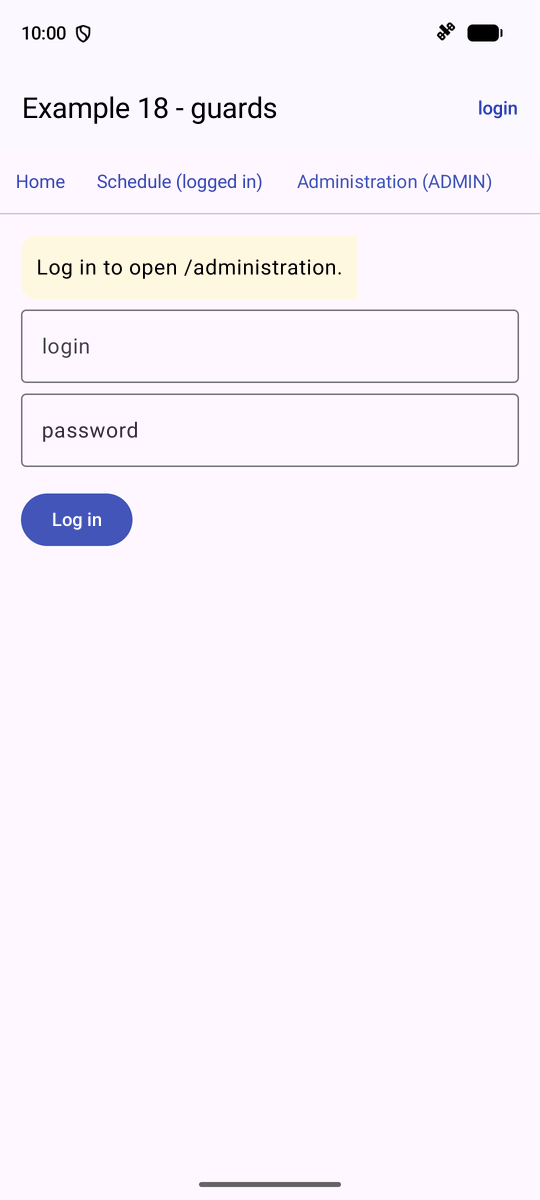
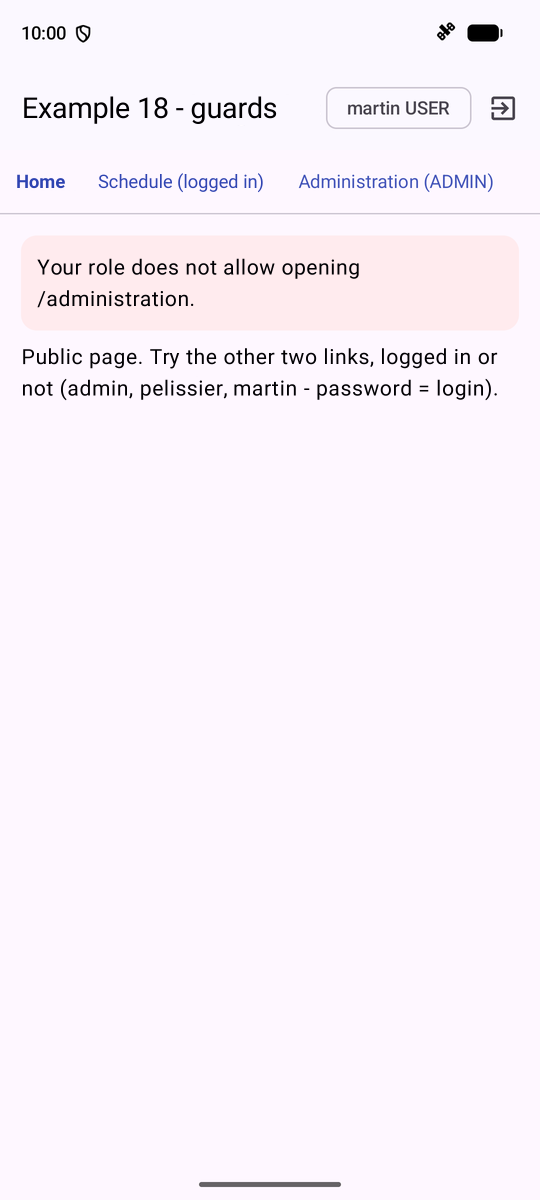
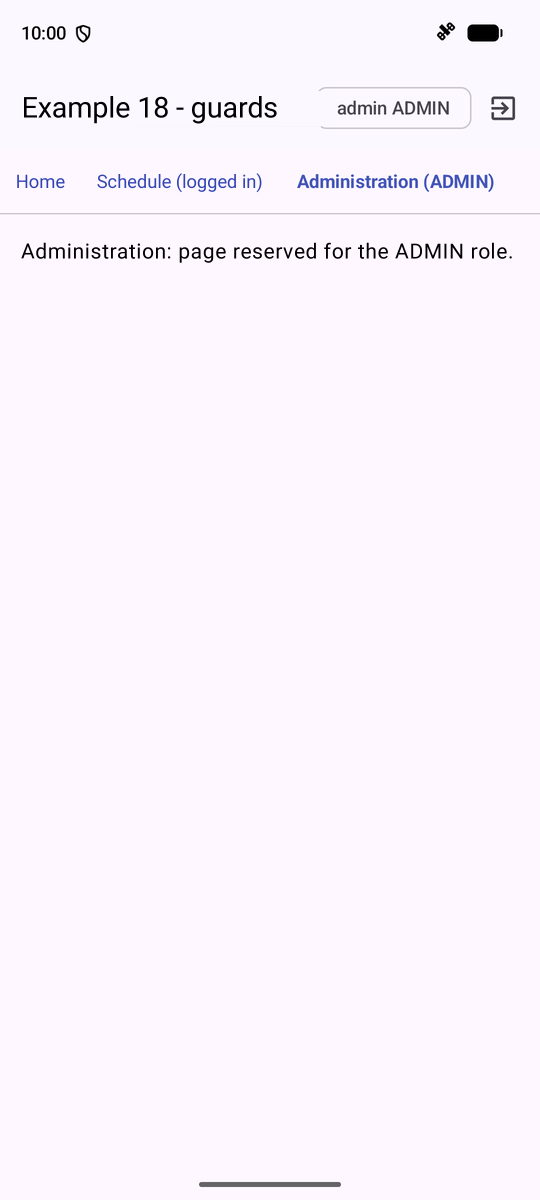
On the left, “Administration” without being logged in: the guard led to the login screen; in the middle, logged in as [martin] (role USER): return to the home page, with the reason; on the right, logged in as [admin].