// =========================================================================
// ex21/Ex21Activity.kt - an application in two languages
// -------------------------------------------------------------------------
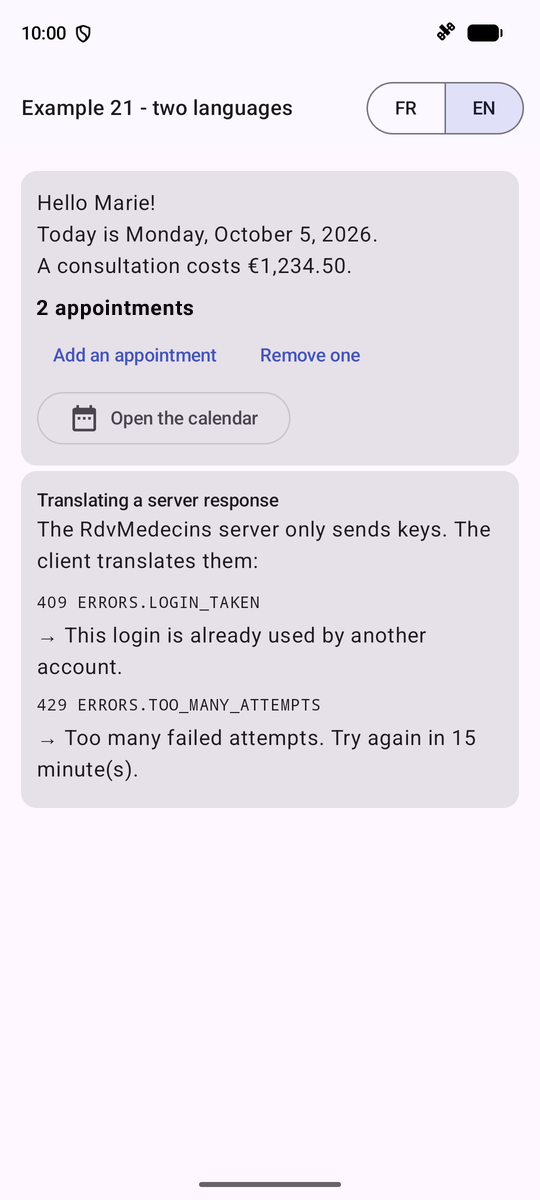
// The Android way:
//   - the TEXTS of the application are RESOURCES: a file
//     res/values/strings.xml (the default language, here English) and one
//     file per translation (res/values-fr/strings.xml). Each text has a
//     name; the code only knows this name (R.string.ex21_hello), and
//     Android picks the file according to the language of the application;
//   - stringResource(R.string.ex21_hello, "Marie"): the text, whose
//     parameters (%1$s) are replaced; pluralStringResource: a plural
//     text, whose form follows the rules of the language;
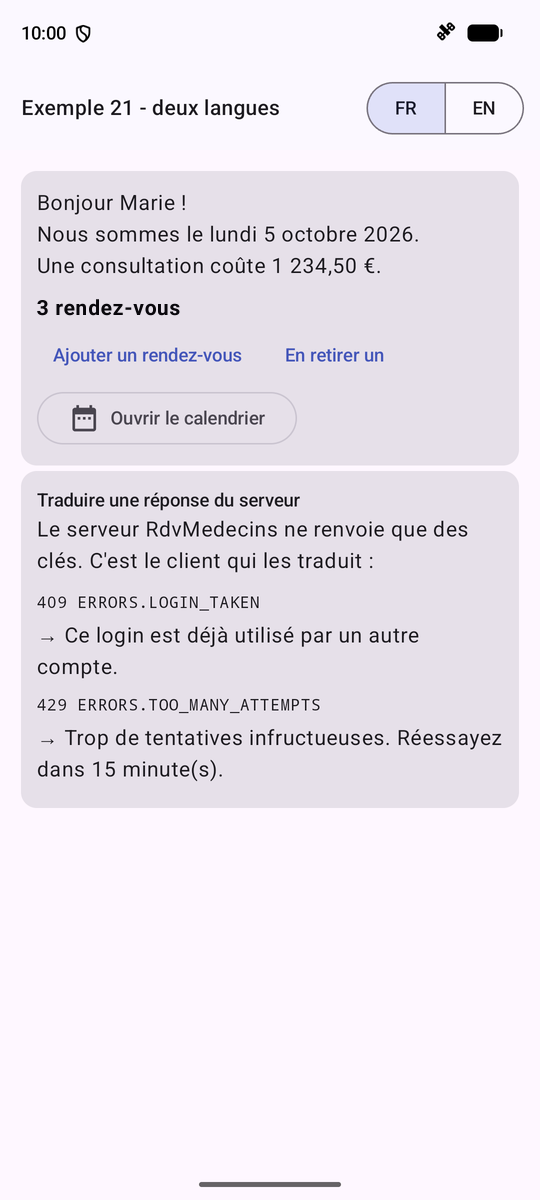
//   - the language of the application: that of the phone... or the one the
//     application chooses itself, AppCompatDelegate.setApplicationLocales.
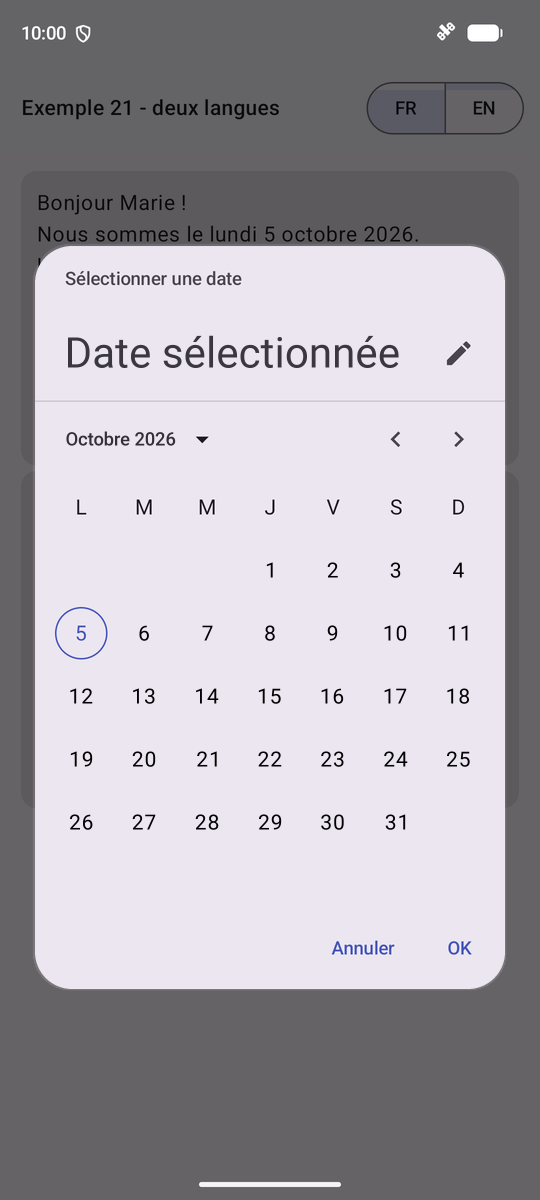
//     Android then RECREATES the activity, in the new language: the texts,
//     the dates, the amounts, and the texts of Android itself (the
//     calendar, its buttons).
// The RdvMedecins server, for its part, only returns KEYS ("ERRORS.LOGIN_TAKEN"):
// they are associated with the resources by a table (serverKeys).
// The activity is an AppCompatActivity: the activity class that can
// apply the chosen language, even on the Android versions prior
// to 13.
// =========================================================================
@file:OptIn(ExperimentalMaterial3Api::class, ExperimentalLayoutApi::class)

package fr.stahe.examples.ex21

import android.os.Bundle
import androidx.activity.compose.setContent
import androidx.activity.enableEdgeToEdge
import androidx.appcompat.app.AppCompatActivity
import androidx.appcompat.app.AppCompatDelegate
import androidx.compose.foundation.layout.Arrangement
import androidx.compose.foundation.layout.Column
import androidx.compose.foundation.layout.ExperimentalLayoutApi
import androidx.compose.foundation.layout.FlowRow
import androidx.compose.foundation.layout.Spacer
import androidx.compose.foundation.layout.fillMaxWidth
import androidx.compose.foundation.layout.height
import androidx.compose.foundation.layout.padding
import androidx.compose.foundation.layout.width
import androidx.compose.material.icons.Icons
import androidx.compose.material.icons.filled.DateRange
import androidx.compose.material3.Card
import androidx.compose.material3.DatePicker
import androidx.compose.material3.DatePickerDialog
import androidx.compose.material3.ExperimentalMaterial3Api
import androidx.compose.material3.Icon
import androidx.compose.material3.MaterialTheme
import androidx.compose.material3.OutlinedButton
import androidx.compose.material3.SegmentedButton
import androidx.compose.material3.SegmentedButtonDefaults
import androidx.compose.material3.SingleChoiceSegmentedButtonRow
import androidx.compose.material3.Text
import androidx.compose.material3.TextButton
import androidx.compose.material3.rememberDatePickerState
import androidx.compose.runtime.Composable
import androidx.compose.runtime.getValue
import androidx.compose.runtime.mutableIntStateOf
import androidx.compose.runtime.mutableStateOf
import androidx.compose.runtime.saveable.rememberSaveable
import androidx.compose.runtime.setValue
import androidx.compose.ui.Modifier
import androidx.compose.ui.platform.LocalConfiguration
import androidx.compose.ui.res.pluralStringResource
import androidx.compose.ui.res.stringResource
import androidx.compose.ui.text.font.FontFamily
import androidx.compose.ui.text.font.FontWeight
import androidx.compose.ui.unit.dp
import androidx.compose.ui.unit.sp
import androidx.core.os.LocaleListCompat
import fr.stahe.examples.R
import fr.stahe.examples.common.ExamplePage
import fr.stahe.examples.common.ExamplesTheme
import java.text.NumberFormat
import java.time.LocalDate
import java.time.format.DateTimeFormatter
import java.time.format.FormatStyle
import java.util.Currency

val languages = listOf("fr", "en")

// what the RdvMedecins server would return (cf. chapter on the black box)
data class ServerResponse(val statusCode: Int, val key: String, val params: Map<String, String>)

val serverResponses = listOf(
    ServerResponse(409, "ERRORS.LOGIN_TAKEN", emptyMap()),
    ServerResponse(429, "ERRORS.TOO_MANY_ATTEMPTS", mapOf("minutes" to "15")),
)

// the server's key -> the resource that translates it
val serverKeys = mapOf(
    "ERRORS.LOGIN_TAKEN" to R.string.errors_login_taken,
    "ERRORS.TOO_MANY_ATTEMPTS" to R.string.errors_too_many_attempts,
)

class Ex21Activity : AppCompatActivity() {
    override fun onCreate(savedInstanceState: Bundle?) {
        super.onCreate(savedInstanceState)
        enableEdgeToEdge()
        setContent { ExamplesTheme { TranslatedPage() } }
    }
}

// choosing the language of the application: Android stores it, and recreates the activity
fun changeLanguage(language: String) {
    AppCompatDelegate.setApplicationLocales(LocaleListCompat.forLanguageTags(language))
}

@Composable
fun TranslatedPage() {
    // rememberSaveable: the count survives the recreation of the activity
    var count by rememberSaveable { mutableIntStateOf(2) }
    var calendarOpen by rememberSaveable { mutableStateOf(false) }
    // the CURRENT language: that of the activity's configuration
    val locale = LocalConfiguration.current.locales[0]
    // formatters in the current language
    val date = LocalDate.now().format(DateTimeFormatter.ofLocalizedDate(FormatStyle.FULL).withLocale(locale))
    val price = NumberFormat.getCurrencyInstance(locale).apply { currency = Currency.getInstance("EUR") }.format(1234.5)

    ExamplePage(
        title = stringResource(R.string.ex21_title),
        // the languages: "segmented" buttons, in the top bar
        actions = {
            SingleChoiceSegmentedButtonRow(Modifier.padding(end = 8.dp).width(120.dp)) {
                languages.forEachIndexed { i, l ->
                    SegmentedButton(
                        selected = locale.language == l,
                        onClick = { changeLanguage(l) },
                        shape = SegmentedButtonDefaults.itemShape(i, languages.size),
                        icon = {},
                    ) { Text(l.uppercase()) }
                }
            }
        },
    ) {
        Card(Modifier.fillMaxWidth()) {
            Column(Modifier.padding(12.dp)) {
                Text(stringResource(R.string.ex21_hello, "Marie"))
                Text(stringResource(R.string.ex21_today, date))
                Text(stringResource(R.string.ex21_price, price))
                Spacer(Modifier.height(8.dp))
                // the plural: the "zero" category exists neither in French nor in
                // English (0 is "one" in French, "other" in English): 0 is
                // handled separately
                Text(
                    if (count == 0) stringResource(R.string.ex21_no_appointment) else pluralStringResource(R.plurals.ex21_appointments, count, count),
                    fontWeight = FontWeight.Bold,
                )
                FlowRow(horizontalArrangement = Arrangement.spacedBy(8.dp)) {
                    TextButton(onClick = { count++ }) { Text(stringResource(R.string.ex21_add)) }
                    TextButton(onClick = { count-- }, enabled = count > 0) { Text(stringResource(R.string.ex21_remove)) }
                }
                // the Material calendar: its texts follow the language of the application
                OutlinedButton(onClick = { calendarOpen = true }) {
                    Icon(Icons.Default.DateRange, contentDescription = null)
                    Spacer(Modifier.width(8.dp))
                    Text(stringResource(R.string.ex21_calendar))
                }
            }
        }
        Card(Modifier.fillMaxWidth()) {
            Column(Modifier.padding(12.dp)) {
                Text(stringResource(R.string.ex21_server_title), style = MaterialTheme.typography.titleSmall)
                Text(stringResource(R.string.ex21_server_explanation))
                Spacer(Modifier.height(8.dp))
                for (r in serverResponses) {
                    Text("${r.statusCode} ${r.key}", fontFamily = FontFamily.Monospace, fontSize = 12.sp)
                    // the resource of the key; its parameters, in order (*: "spreads" the array)
                    val id = serverKeys[r.key]
                    Text("→ " + if (id == null) r.key else stringResource(id, *r.params.values.toTypedArray()))
                    Spacer(Modifier.height(6.dp))
                }
            }
        }
    }

    if (calendarOpen) {
        val state = rememberDatePickerState()
        DatePickerDialog(
            onDismissRequest = { calendarOpen = false },
            // the OK / Cancel texts of Android itself, in the language of the application
            confirmButton = { TextButton(onClick = { calendarOpen = false }) { Text(stringResource(android.R.string.ok)) } },
            dismissButton = { TextButton(onClick = { calendarOpen = false }) { Text(stringResource(android.R.string.cancel)) } },
        ) {
            DatePicker(state = state)
        }
    }
}