1. Introduction
The PDF in the document is HERE.
The code in this document is HERE.
This document is a product of Anthropic’s Claude AI. It adapts the course “Step-by-Step Introduction to the Flutter Mobile Framework”—including its outline, 25 examples, server, and case study—and changes the tool used:
- In the course [Flutter], the application is written in [Dart], using a framework that draws every pixel on the screen itself, and the same code produces a [Android] application, [iOS], or web;
- In this course, the app is a [Android] NATIVE app, written in [Kotlin] (the language recommended by Google for Android since 2019), using [Jetpack Compose], Android’s declarative UI library.
The server, however, remains unchanged: it is the JSON [RdvMedecins] server written in [NestJS], already used by React, Vue.js, Angular, and Flutter clients. And the screens are the ones familiar to readers of these courses: login with CAPTCHA, a doctor’s schedule, a booking window, the patient portal, doctor and client management, account creation, and French and English language support.
The 25 examples have the same numbers as those in the [Flutter] course (and the React, Vue.js, and Angular courses): readers familiar with any of these frameworks will find each concept in its proper place. When a concept from [Flutter] has no direct equivalent in [Compose], the example demonstrates the approach used in [Android] (a form written with regular classes, [strings.xml] resources for text, deep links instead of web addresses...).
A course on this topic already exists: A Client/Server Example—Kotlin Android / NestJS (2026), which presents a complete client right from the start. This document differs in its approach: we learn [Compose] step by step, through small examples, before tackling the complete client; and the server is treated as a black box, of which only the API and JSON interest us.
The basics of the [Kotlin] language (classes, data classes, nullability, lambdas, extension functions, collections) are assumed to be known: they are covered in the Kotlin course. The language features that are particularly relevant to [Compose] (functions as parameters, final lambdas, [by] delegation, sealed interfaces, coroutines) are reviewed throughout the examples as they are used.
Claude wrote all the code, compiled it, and ran it on a [Android] emulator on the reviewer’s computer with the reviewer’s permission; the screenshots were taken during these runs.
1.1. The Role of Android and Compose in a Client/Server Application
The application has two parts, which communicate with each other only through HTTP requests:
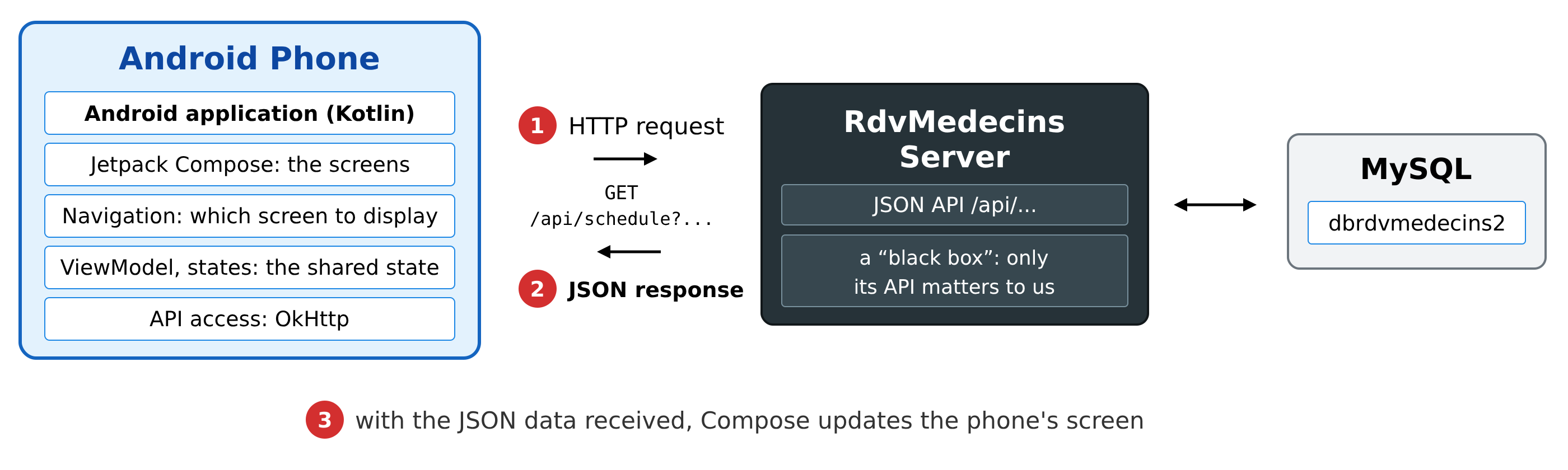
- 1: The [Android] application, running on the phone, sends a HTTP request to the server, for example, [GET /api/schedule?doctorId=1&day=2026-10-05];
- 2: The server responds with data JSON: this doctor’s schedule for that day. It does not generate any pages;
- 3: Using this data, [Compose] updates the phone’s screen.
This is exactly the architecture of the clients [React], [Vue.js], [Angular], and [Flutter]: the only difference is what generates the display. [Jetpack Compose] is based on the same concepts as [React] and [Flutter]:
- the screen is described by FUNCTIONS: an annotated function [@Composable] describes a part of the interface (text, a button, a column, an entire screen) by calling other functions [@Composable]. They form a tree;
- the interface is a function of state: when an observed piece of data changes (a “state,” [mutableStateOf]), [Compose] re-executes the functions that read it—this is RECOMPOSITION—and updates the screen. We never write code that modifies the screen: we describe the screen as a function of the state;
- a modern language, [Kotlin], compiled for the virtual machine of [Android]: its lambdas, extension functions, and coroutines make this style of writing natural.
Unlike [Flutter], [Compose] is specific to [Android] (a variant, [Compose Multiplatform], exists for other platforms, but it is not covered here). On the other hand, the application is a “run-of-the-mill” [Android] application: it directly uses Google’s libraries ([Jetpack]) and system services (application language, activity lifecycle, password manager, etc.).
Like [Flutter], [Compose] is not an “all-in-one” framework for communicating with a server: the HTTP client, navigation, and shared state are provided by libraries. This course uses the ones recommended by Google ([Jetpack]: Navigation, ViewModel, DataStore, AppCompat) and the most widely used libraries in the [Kotlin] ecosystem ([OkHttp], [kotlinx.serialization]).
1.2. Tools Used
The examples were written and tested using the following tools:
- [Android Studio] (Quail version 2026.1), Google’s development environment: editor, SDK [Android], emulator. It includes its own JDK ([JBR] 25), which is used for [Gradle];
- [Gradle] 9.6 and the [Android] (AGP) 9.4 plugin, which compile the application. The [Android] 9 plugin itself includes support for [Kotlin] 2.2;
- a [Android] emulator (a Pixel 8, [Android] 17, API 37) or a real [Android] phone connected to the computer;
- the DBMS [MySQL] (or [MariaDB]), for example, the one for [Laragon] under [Windows], and [Node.js]: these are required for the JSON server, starting from the chapter that introduces it;
- the command-line tool [curl], which displays the raw HTTP responses.
The libraries used are declared in the [gradle/libs.versions.toml] file for each project: "BOM," [Compose] 2026.02 (Material 3), [Navigation Compose] 2.9, [Lifecycle] 2.9 (ViewModel), [DataStore] 1.1, [AppCompat] 1.7, [OkHttp] 4.12, [kotlinx.serialization] 1.9, [AndroidSVG] 1.4.
1.3. Screenshots
The screenshots in this document were generated automatically through “instrumented” tests ([app/src/androidTest] project folders): these tests run on the emulator, launch each example, interact with it as a user would (entering text, clicking buttons), and then capture the entire screen. The clock in the status bar is frozen at 10:00 (the “demo mode” of [Android]).
1.4. The examples
The code in this document is organized into three folders:
The examples form a single project, [Android Studio], and a single application, [Android]: Each example is an ACTIVITY (a screen), stored in its own package ([fr.stahe.examples.ex01], [fr.stahe.examples.ex02]...), and a menu—the startup activity—allows you to launch them all:
Open the [examples_kotlin] folder within [Android Studio] ([File / Open]); [Gradle] will then download the libraries. Launch the application using the [Run] button (the green triangle): the menu appears, and each line opens an example. You can also launch an example directly from a console using the [adb] tool from SDK [Android]:
Examples 22 through 25 query the JSON [RdvMedecins] server: you will need to have it installed and running, as explained in the chapter dedicated to it.
1.5. Document Contents
- Getting Started (Examples 01 through 09): an activity, the [@Composable] functions, the state ([remember], [mutableStateOf]), events, input fields, a reducer, validation, a reusable form, formatting;
- Components (10 through 16): parameters, functions with parameters, composition (content within parameters), lifecycle and effects, [CompositionLocal], reusable behaviors (animations, [remember...] functions), confirmation window;
- Navigation (17 and 18): [Navigation Compose], typed routes, parameters, deep links, guards;
- Asynchronous Operations and Shared State (19 and 20): coroutines, [Flow], debounce, expired responses, [ViewModel], [DataStore];
- Internationalization (21): resources [strings.xml], plurals, application language;
- The Server, a Black Box: installing the JSON server, its API, [curl] examples;
- Communicating with the Server (22–25): [OkHttp], the server address, the token cookie, an access layer to API, a view model, server errors;
- Case Study: The [Android] client for the [RdvMedecins] application;
- Deployment: the signed application (APK), the production server.
Each example is presented with its complete, commented code and screenshots of its execution. The code itself is extensively commented: these comments are part of the course.