6. Asynchronous Processing and Shared State
6.1. Example 19: Coroutines, Flow, and Timers
Many things happen “later”: timer ticks, keystrokes, a server’s response. Where [Dart] has its [Future] and [Stream], [Kotlin] has the COROUTINES:
- A [suspend] function can WAIT ([delay], a server response...) without freezing the phone: while waiting, the screen remains active. It returns ONE value later: this is equivalent to a [async] function that returns a [Future];
- a [Flow<T>] is a SEQUENCE of values over time, which are transformed using operators ([map], [debounce]...) : the equivalent of a [Stream];
- a coroutine is launched in a SCOPE ([LaunchedEffect], [rememberCoroutineScope], [viewModelScope]...); it is CANCELLED when its scope ends.
| // =========================================================================
// ex19/Ex19Activity.kt - coroutines, Flow, timers
// -------------------------------------------------------------------------
// Many things happen "later": the ticks of a timer, the
// keystrokes, the response of a server. Kotlin has
// COROUTINES for that:
// - a "suspend" function can WAIT (delay, the response of a
// server...) without blocking the phone: during the wait, the screen
// goes on living. It returns ONE value, later;
// - a Flow<T> is a SEQUENCE of values, over time (ticks,
// inputs...), transformed with operators (map, debounce...);
// - a coroutine is launched in a SCOPE: LaunchedEffect,
// rememberCoroutineScope...; it is cancelled when its scope disappears.
// Compose can display a Flow, recomposing itself on each value:
// collectAsStateWithLifecycle.
// =========================================================================
@file:OptIn(FlowPreview::class, ExperimentalCoroutinesApi::class)
package fr.stahe.examples.ex19
import android.os.Bundle
import androidx.activity.ComponentActivity
import androidx.activity.compose.setContent
import androidx.activity.enableEdgeToEdge
import androidx.compose.foundation.layout.Column
import androidx.compose.foundation.layout.fillMaxWidth
import androidx.compose.foundation.layout.padding
import androidx.compose.material3.Card
import androidx.compose.material3.MaterialTheme
import androidx.compose.material3.OutlinedTextField
import androidx.compose.material3.Text
import androidx.compose.runtime.Composable
import androidx.compose.runtime.LaunchedEffect
import androidx.compose.runtime.getValue
import androidx.compose.runtime.mutableStateListOf
import androidx.compose.runtime.mutableStateOf
import androidx.compose.runtime.produceState
import androidx.compose.runtime.remember
import androidx.compose.runtime.setValue
import androidx.compose.runtime.snapshotFlow
import androidx.compose.ui.Modifier
import androidx.compose.ui.graphics.Color
import androidx.compose.ui.unit.dp
import androidx.compose.ui.unit.sp
import androidx.lifecycle.compose.collectAsStateWithLifecycle
import fr.stahe.examples.common.ExamplePage
import fr.stahe.examples.common.ExamplesTheme
import kotlinx.coroutines.CancellationException
import kotlinx.coroutines.ExperimentalCoroutinesApi
import kotlinx.coroutines.FlowPreview
import kotlinx.coroutines.delay
import kotlinx.coroutines.flow.Flow
import kotlinx.coroutines.flow.debounce
import kotlinx.coroutines.flow.flow
import kotlinx.coroutines.flow.map
import kotlinx.coroutines.flow.mapLatest
import java.time.LocalTime
import java.time.format.DateTimeFormatter
import kotlin.random.Random
val doctors = listOf("Marie PELISSIER", "Paul TATOU", "Sophie DUPONT", "Jacques DURAND", "Martine PELLETIER")
// a simulated "server": a SUSPEND function, whose response arrives
// after a random delay
suspend fun search(text: String): List<String> {
delay(200L + Random.nextLong(600))
return doctors.filter { it.lowercase().contains(text) }
}
// 1. a Flow built by the flow { } builder: each emit SENDS a
// value to whoever collects it
fun countdown(start: Int): Flow<Int> = flow {
for (remaining in start downTo 0) {
emit(remaining)
if (remaining > 0) delay(1000)
}
}
fun currentTime(): String = LocalTime.now().format(DateTimeFormatter.ofPattern("HH:mm:ss"))
class Ex19Activity : ComponentActivity() {
override fun onCreate(savedInstanceState: Bundle?) {
super.onCreate(savedInstanceState)
enableEdgeToEdge()
setContent { ExamplesTheme { AsynchronousPage() } }
}
}
@Composable
fun AsynchronousPage() {
val log = remember { mutableStateListOf<String>() }
fun trace(message: String) = log.add("${currentTime()} $message")
// the Flow is created ONCE (remember): without it, each recomposition
// would restart the countdown!
val countdownFlow = remember { countdown(20) }
// collectAsStateWithLifecycle: a state that follows the values of the Flow
// (null before the first one); the collection stops if the application
// goes to the background
val remaining by countdownFlow.collectAsStateWithLifecycle(initialValue = null)
// 2. the search as you type
var input by remember { mutableStateOf("") }
var results by remember { mutableStateOf(listOf<String>()) }
LaunchedEffect(Unit) {
// snapshotFlow: a Flow of the successive values of a Compose state
snapshotFlow { input }
// the DEBOUNCE: an input is only passed on after 400 ms without a keystroke
.debounce(400)
.map { it.trim().lowercase() }
// mapLatest: a new input CANCELS the previous search,
// if it is not finished: no stale response
.mapLatest { text ->
// fewer than two letters: no search, no result
if (text.length < 2) return@mapLatest emptyList()
trace("search sent: \"$text\"")
try {
search(text)
} catch (e: CancellationException) {
trace("search cancelled (stale): \"$text\"")
throw e // a cancelled coroutine must remain cancelled
}
}
// collect: consumes the values of the Flow, one by one
.collect { results = it }
}
// 3. a value that arrives after one second: produceState launches a
// coroutine that PRODUCES a state
val message by produceState<String?>(initialValue = null) {
delay(1000)
value = "three (one second later)"
}
val titleStyle = MaterialTheme.typography.titleSmall
ExamplePage("Example 19 - asynchronous code") {
Card(Modifier.fillMaxWidth()) {
Column(Modifier.padding(12.dp)) {
Text("A countdown (a Flow, collected)", style = titleStyle)
Text(remaining?.toString() ?: "...", style = MaterialTheme.typography.displaySmall)
}
}
Card(Modifier.fillMaxWidth()) {
Column(Modifier.padding(12.dp)) {
Text("A search as you type (debounce, stale responses)", style = titleStyle)
OutlinedTextField(
value = input,
onValueChange = { input = it },
placeholder = { Text("at least two letters: pel, dur...") },
singleLine = true,
modifier = Modifier.fillMaxWidth(),
)
for (r in results) Text("• $r")
if (results.isEmpty()) Text("no result", color = Color.Gray)
}
}
Card(Modifier.fillMaxWidth()) {
Column(Modifier.padding(12.dp)) {
Text("Waiting for a value (produceState)", style = titleStyle)
// as long as the value has not arrived: the waiting text
if (message == null) Text("waiting...", color = Color.Gray) else Text("received: $message")
}
}
Text("Log", style = titleStyle)
log.forEachIndexed { i, line -> Text("${i + 1}. $line", fontSize = 12.sp) }
}
}
|
- lines 65–67: a simulated “server”: a suspended function whose response arrives after a random delay;
- lines 72–75: a [Flow] created by [flow [ ... ]]: each [emit] sends a value to the one that collects it; [downTo]: a descending loop;
- lines 96–100: the [Flow] is created ONCE ([remember]): otherwise, each recomposition would restart the countdown! [collectAsStateWithLifecycle] actually creates a state that tracks its values; the collection stops when the app goes into the background;
- lines 107–125: search as you type. [snapshotFlow [ input ]]: the [Flow] of successive values from a [Compose] state; [debounce(400)], DEBOUNCE: an entry is sent only after 400 ms without keystrokes; [mapLatest]: a new entry CANCELS the previous search, if it is not complete: no expired response;
- lines 119–121: a canceled coroutine receives a [CancellationException]: it can be traced, but must be restarted ([throw e]) for the cancellation to complete;
- lines 130–132: [produceState]: a coroutine that PRODUCES a state (here, a value that arrives after one second).
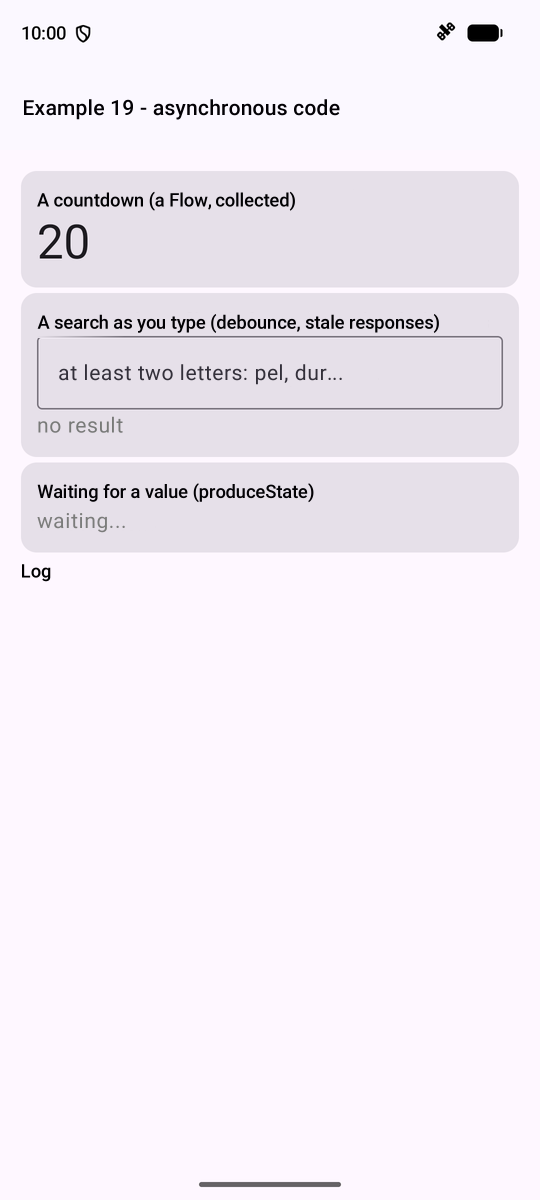
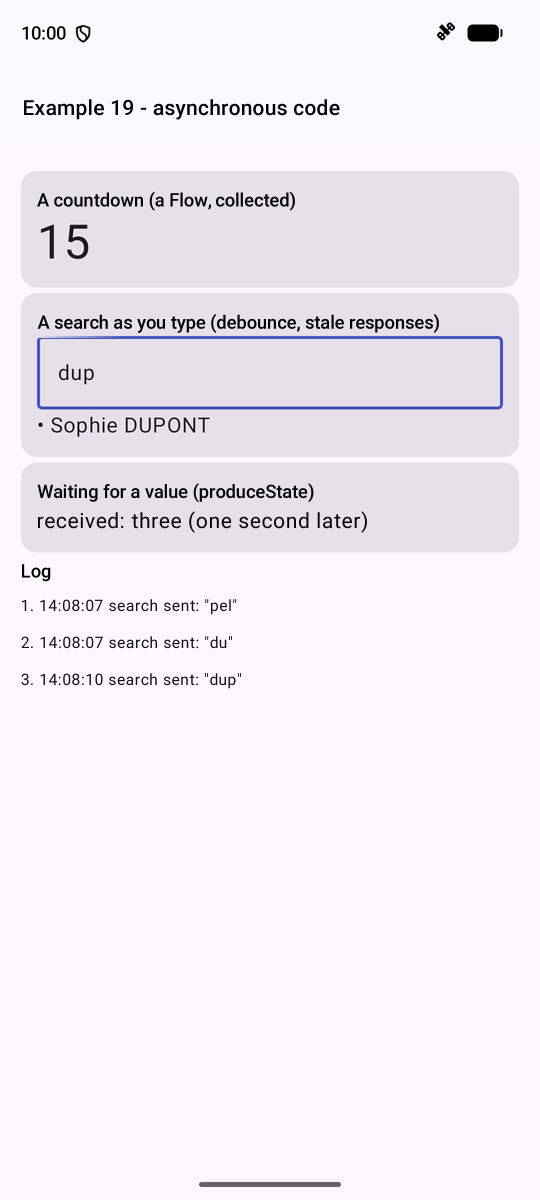
On the left, at startup; on the right, after quickly typing “pel,” “du,” and then “dup”: only the keystrokes followed by a pause triggered a search, and the display shows the result of the last one.
6.2. Example 20: A shared state
A “store” is a state that lives OUTSIDE the screens, as ONE single instance, shared by everyone who reads it. Example 14 did this manually; [Android] provides the following for this purpose: an object created upon request ([viewModel()]), then rendered identically to everyone who requests it, and which is recreated upon a change in activity (screen rotation, language change). This is equivalent to the [provider] or [riverpod] packages from [Flutter].
| // =========================================================================
// ex20/stores/Cart.kt - a SHARED STATE, in a ViewModel
// -------------------------------------------------------------------------
// A "store" is a state that lives OUTSIDE the screens, in ONE single
// copy, shared by all those who read it. Example 14 did it
// by hand (CompositionLocal); Android provides the ViewModel for that:
// - an object created on the FIRST request, then given back identically to
// all the functions of the activity that ask for it: viewModel();
// - which SURVIVES the recreation of the activity (screen rotation,
// change of language): it is only destroyed when the activity is
// closed for good.
// Usual organization:
// - the STATE: a PRIVATE MutableStateFlow, an observable value; outside, only
// a read-only version of it is seen (StateFlow);
// - the ACTIONS: functions, the only ones that modify the state;
// - the computed values: other StateFlows, deduced from the first one (map),
// which ONLY change if their value changes.
// =========================================================================
package fr.stahe.examples.ex20.stores
import androidx.lifecycle.ViewModel
import androidx.lifecycle.viewModelScope
import kotlinx.coroutines.flow.MutableStateFlow
import kotlinx.coroutines.flow.SharingStarted
import kotlinx.coroutines.flow.StateFlow
import kotlinx.coroutines.flow.asStateFlow
import kotlinx.coroutines.flow.map
import kotlinx.coroutines.flow.stateIn
import kotlinx.coroutines.flow.update
data class Item(val label: String, val price: Double)
class Cart : ViewModel() {
private val _items = MutableStateFlow(listOf<Item>())
val items: StateFlow<List<Item>> = _items.asStateFlow()
// DEDUCED values: stateIn makes StateFlows of them, which live as
// long as the ViewModel (viewModelScope)
val count: StateFlow<Int> = items.map { it.size }.stateIn(viewModelScope, SharingStarted.Eagerly, 0)
val total: StateFlow<Double> = items.map { list -> list.sumOf { it.price } }.stateIn(viewModelScope, SharingStarted.Eagerly, 0.0)
// update: replaces the value with a new one, computed from the old one
fun add(item: Item) = _items.update { it + item }
fun clear() {
_items.value = emptyList()
}
}
|
- lines 34–35: the STATE: a PRIVATE [MutableStateFlow], an observable value; externally, only a read-only version ([StateFlow]) is visible;
- lines 39–40: DEDUCED values: [map], then [stateIn], which in turn creates [StateFlow] that exist as long as [ViewModel] ([viewModelScope]). A [StateFlow] emits only if its value CHANGES;
- Lines 43–46: the ACTIONS are the only ones that modify the state; [update] replaces the value with a new one, calculated from the old one.
For data to survive the application’s STOPPING, it must be stored on the device. The [DataStore] library of [Jetpack] provides a small key-to-value dictionary, stored in a file specific to the application:
| // =========================================================================
// ex20/stores/Preferences.kt - a state that survives the stopping
// -------------------------------------------------------------------------
// For a piece of data to survive the stopping of the application, it must be stored
// ON THE DEVICE. The Jetpack DataStore library offers a small
// key -> value dictionary (Boolean, Int, Float, String...), specific to
// the application and kept in a file of the phone:
// - reading is a Flow: it emits the stored values (read
// asynchronously, without blocking the screen), then each new value;
// - writing is a suspend function (edit).
// NEVER store sensitive data in it (password, token): they are
// written in clear text.
// =========================================================================
package fr.stahe.examples.ex20.stores
import android.content.Context
import androidx.datastore.core.DataStore
import androidx.datastore.preferences.core.Preferences
import androidx.datastore.preferences.core.booleanPreferencesKey
import androidx.datastore.preferences.core.edit
import androidx.datastore.preferences.core.floatPreferencesKey
import androidx.datastore.preferences.preferencesDataStore
import kotlinx.coroutines.flow.Flow
import kotlinx.coroutines.flow.map
// THE preferences file of the example: an extension property of
// Context, delegated to preferencesDataStore (a single DataStore per file)
val Context.storage: DataStore<Preferences> by preferencesDataStore(name = "example20")
// what is stored
data class Settings(val dark: Boolean, val size: Float)
class UserPreferences(private val storage: DataStore<Preferences>) {
private val darkKey = booleanPreferencesKey("dark")
private val sizeKey = floatPreferencesKey("size")
// what the device has stored, otherwise the default values
val settings: Flow<Settings> = storage.data.map { p -> Settings(p[darkKey] ?: false, p[sizeKey] ?: 16f) }
// one optional named parameter per preference: only what is provided is changed
suspend fun update(dark: Boolean? = null, size: Float? = null) {
storage.edit { p ->
if (dark != null) p[darkKey] = dark
if (size != null) p[sizeKey] = size
}
}
}
|
- line 28: THE example’s preferences file: an extension property of [Context], delegated to [preferencesDataStore] (only one [DataStore] per file);
- line 38: the read operation is a [Flow]: it outputs the stored values (read without blocking the screen), then each new value;
- lines 41–44: the write operation is a suspended function ([edit]). Sensitive data (passwords, tokens) is NEVER stored there: it would be written in plain text.
Components that use the shopping cart:
| // =========================================================================
// ex20/components/Components.kt - three components of example 20
// -------------------------------------------------------------------------
// viewModel(): the Cart of the activity, created on the first request, then
// the SAME for all those who ask for it.
// =========================================================================
package fr.stahe.examples.ex20.components
import androidx.compose.foundation.layout.Column
import androidx.compose.foundation.layout.Row
import androidx.compose.foundation.layout.Spacer
import androidx.compose.foundation.layout.padding
import androidx.compose.foundation.layout.width
import androidx.compose.material.icons.Icons
import androidx.compose.material.icons.filled.Add
import androidx.compose.material.icons.filled.ShoppingCart
import androidx.compose.material3.Card
import androidx.compose.material3.Icon
import androidx.compose.material3.ListItem
import androidx.compose.material3.MaterialTheme
import androidx.compose.material3.OutlinedButton
import androidx.compose.material3.Text
import androidx.compose.material3.TextButton
import androidx.compose.runtime.Composable
import androidx.compose.runtime.getValue
import androidx.compose.runtime.mutableIntStateOf
import androidx.compose.runtime.saveable.rememberSaveable
import androidx.compose.runtime.setValue
import androidx.compose.ui.Alignment
import androidx.compose.ui.Modifier
import androidx.compose.ui.unit.dp
import androidx.lifecycle.compose.collectAsStateWithLifecycle
import androidx.lifecycle.viewmodel.compose.viewModel
import fr.stahe.examples.ex20.stores.Item
import fr.stahe.examples.ex20.stores.Cart
val products = listOf(Item("Consultation", 30.0), Item("Vaccine", 12.5))
// ADDS to the shared cart: the shop does not READ the cart, it is
// not recomposed when the cart changes
@Composable
fun Shop(cart: Cart = viewModel()) {
Card {
Column(Modifier.padding(12.dp)) {
Text("Shop", style = MaterialTheme.typography.titleSmall)
for (p in products) {
TextButton(onClick = { cart.add(p) }) {
Icon(Icons.Default.Add, contentDescription = null)
Text("${p.label} (€${p.price})")
}
}
}
}
}
// READS the same cart: only the count and the total (recomposed
// only if one of the two changes)
@Composable
fun CartSummary(cart: Cart = viewModel()) {
val count by cart.count.collectAsStateWithLifecycle()
val total by cart.total.collectAsStateWithLifecycle()
Card {
Row(Modifier.padding(12.dp), verticalAlignment = Alignment.CenterVertically) {
Icon(Icons.Default.ShoppingCart, contentDescription = null)
Spacer(Modifier.width(8.dp))
Text("$count item(s), €$total", Modifier.weight(1f))
TextButton(onClick = { cart.clear() }, enabled = count > 0) { Text("Clear") }
}
}
}
// a LOCAL state (rememberSaveable), which disappears with the component...
// unless it is placed in a SaveableStateProvider (cf. Ex20Activity.kt)
@Composable
fun LocalCounter(title: String) {
var clicks by rememberSaveable { mutableIntStateOf(0) }
Card {
ListItem(
headlineContent = { Text(title) },
trailingContent = { OutlinedButton(onClick = { clicks++ }) { Text("$clicks click(s)") } },
)
}
}
|
- Line 42: [cart: Cart = viewModel()]: the activity’s shopping cart, created on the first request. The shop ([Shop]) ADDS to the shopping cart without reading it: it is not regenerated when the cart changes;
- Lines 60–61: The summary reads only the quantity and the total; it is regenerated only if either of these changes;
- lines 75–76: a counter (LOCAL), which disappears along with the component.
The screen:
| // =========================================================================
// ex20/Ex20Activity.kt - three "scopes" of data
// -------------------------------------------------------------------------
// - the LOCAL state of a component (LocalCounter) disappears with it;
// - the state of a STORE (the cart, a ViewModel) is shared by all
// the components and survives their removal, and even a rotation of
// the screen - but not the stopping of the application;
// - the state stored on the device (the preferences, DataStore) survives
// the stopping.
// And the SaveableStateHolder: it KEEPS the local state (rememberSaveable)
// of a content removed from the screen, and gives it back if it returns.
// Uncheck then recheck "show the area", then stop and restart
// the application: compare.
// =========================================================================
package fr.stahe.examples.ex20
import android.os.Bundle
import androidx.activity.ComponentActivity
import androidx.activity.compose.setContent
import androidx.activity.enableEdgeToEdge
import androidx.compose.foundation.layout.padding
import androidx.compose.foundation.selection.toggleable
import androidx.compose.material3.Checkbox
import androidx.compose.material3.ListItem
import androidx.compose.material3.Slider
import androidx.compose.material3.Switch
import androidx.compose.material3.Text
import androidx.compose.runtime.Composable
import androidx.compose.runtime.CompositionLocalProvider
import androidx.compose.runtime.getValue
import androidx.compose.runtime.mutableStateOf
import androidx.compose.runtime.rememberCoroutineScope
import androidx.compose.runtime.saveable.rememberSaveable
import androidx.compose.runtime.saveable.rememberSaveableStateHolder
import androidx.compose.runtime.setValue
import androidx.compose.ui.Modifier
import androidx.compose.ui.platform.LocalDensity
import androidx.compose.ui.unit.Density
import androidx.compose.ui.unit.dp
import androidx.lifecycle.compose.collectAsStateWithLifecycle
import fr.stahe.examples.common.ExamplePage
import fr.stahe.examples.common.ExamplesTheme
import fr.stahe.examples.ex20.components.Shop
import fr.stahe.examples.ex20.components.LocalCounter
import fr.stahe.examples.ex20.components.CartSummary
import fr.stahe.examples.ex20.stores.UserPreferences
import fr.stahe.examples.ex20.stores.storage
import kotlinx.coroutines.launch
import kotlin.math.roundToInt
class Ex20Activity : ComponentActivity() {
// lazy: the object is created on first use (the application context
// does not exist yet when the activity is constructed)
private val preferences by lazy { UserPreferences(applicationContext.storage) }
override fun onCreate(savedInstanceState: Bundle?) {
super.onCreate(savedInstanceState)
enableEdgeToEdge()
setContent { App(preferences) }
}
}
@Composable
fun App(preferences: UserPreferences) {
// the stored preferences: null as long as they have not been read
val settings by preferences.settings.collectAsStateWithLifecycle(initialValue = null)
val s = settings ?: return // nothing to display before the reading (a few milliseconds)
val scope = rememberCoroutineScope()
// the dark theme, or the light one
ExamplesTheme(dark = s.dark) {
// the text size: fontScale multiplies the size of ALL the texts
val density = LocalDensity.current
CompositionLocalProvider(LocalDensity provides Density(density.density, fontScale = s.size / 16f)) {
SharedStatePage(
dark = s.dark,
size = s.size,
onDark = { v -> scope.launch { preferences.update(dark = v) } },
onSize = { v -> scope.launch { preferences.update(size = v) } },
)
}
}
}
@Composable
fun SharedStatePage(dark: Boolean, size: Float, onDark: (Boolean) -> Unit, onSize: (Float) -> Unit) {
var areaVisible by rememberSaveable { mutableStateOf(true) }
// the keeper of the states of the removed contents
val keptStates = rememberSaveableStateHolder()
ExamplePage("Example 20 - a shared state") {
ListItem(
headlineContent = { Text("dark theme") },
trailingContent = { Switch(checked = dark, onCheckedChange = onDark) },
)
ListItem(
headlineContent = { Text("text size: ${size.roundToInt()}") },
supportingContent = { Slider(value = size, onValueChange = onSize, valueRange = 12f..22f, steps = 9) },
)
ListItem(
modifier = Modifier.toggleable(value = areaVisible, onValueChange = { areaVisible = it }),
leadingContent = { Checkbox(checked = areaVisible, onCheckedChange = null) },
headlineContent = { Text("show the area") },
)
if (areaVisible) {
// removed: these components disappear, with their local state
Shop()
CartSummary()
LocalCounter("Local state")
// removed too, but its state is KEPT by keptStates, under the key "counter"
keptStates.SaveableStateProvider("counter") {
LocalCounter("Local state, kept by a SaveableStateHolder")
}
}
Text(
"Outside the area, a second summary of the SAME cart (it stays there when the area disappears):",
Modifier.padding(vertical = 8.dp),
)
CartSummary()
}
}
|
- line 54: [by lazy]: the object is created upon first use (the application context does not yet exist when the activity is built);
- lines 66–67: preferences are read; [?: return]: nothing to display until they have been read (a few milliseconds);
- lines 71–79: the dark or light theme, and the size of the text (ALL the texts: [fontScale], and [LocalDensity]); Changing a preference launches a coroutine;
- Lines 89–112: [rememberSaveableStateHolder]: a keeper that SAVES the local state ([rememberSaveable]) of content removed from the screen, and restores it if the content returns.
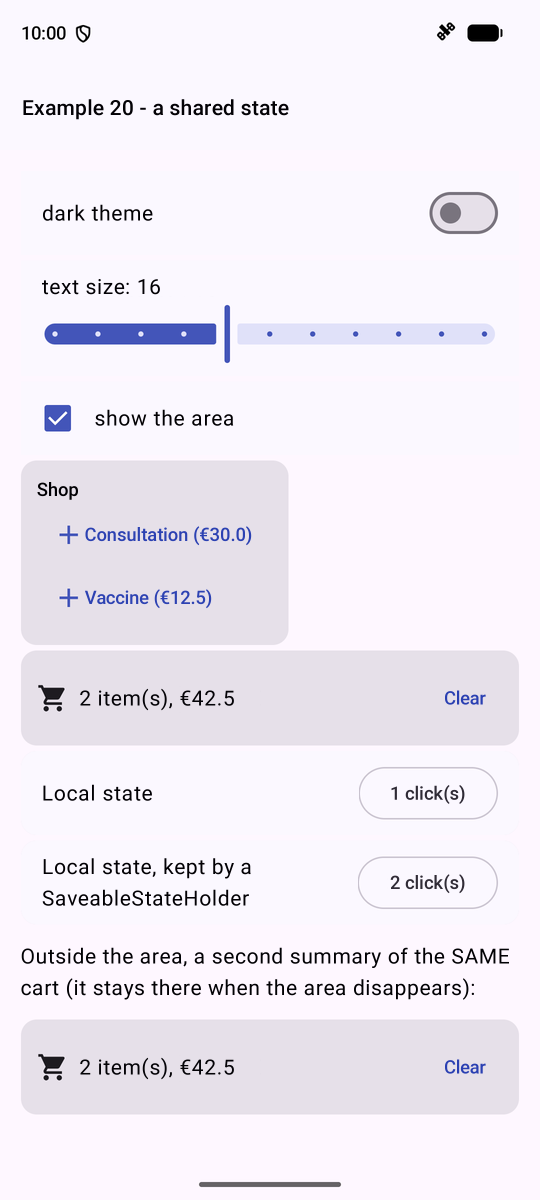
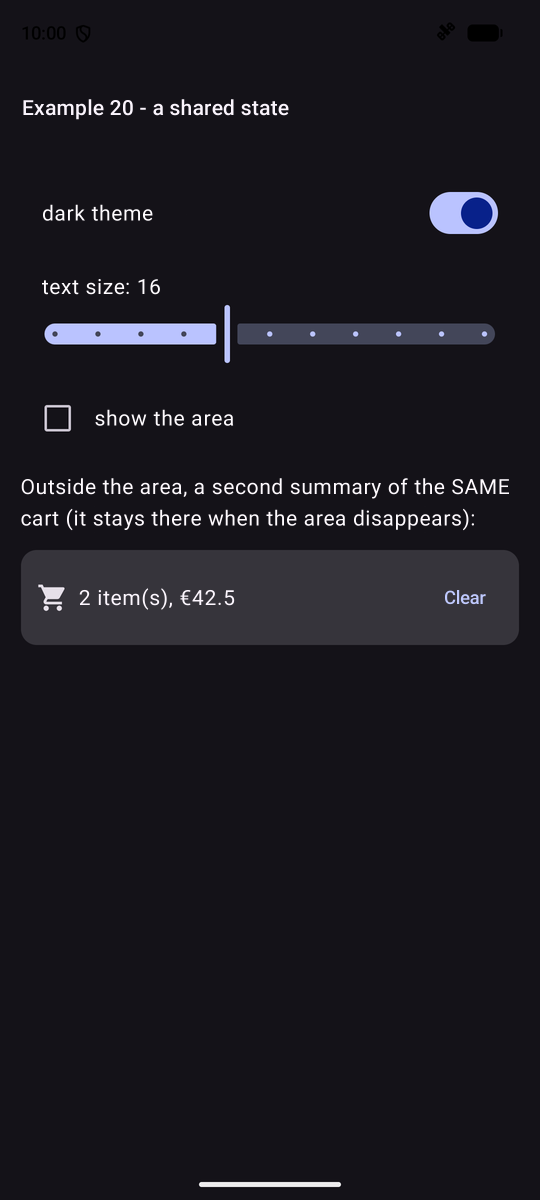
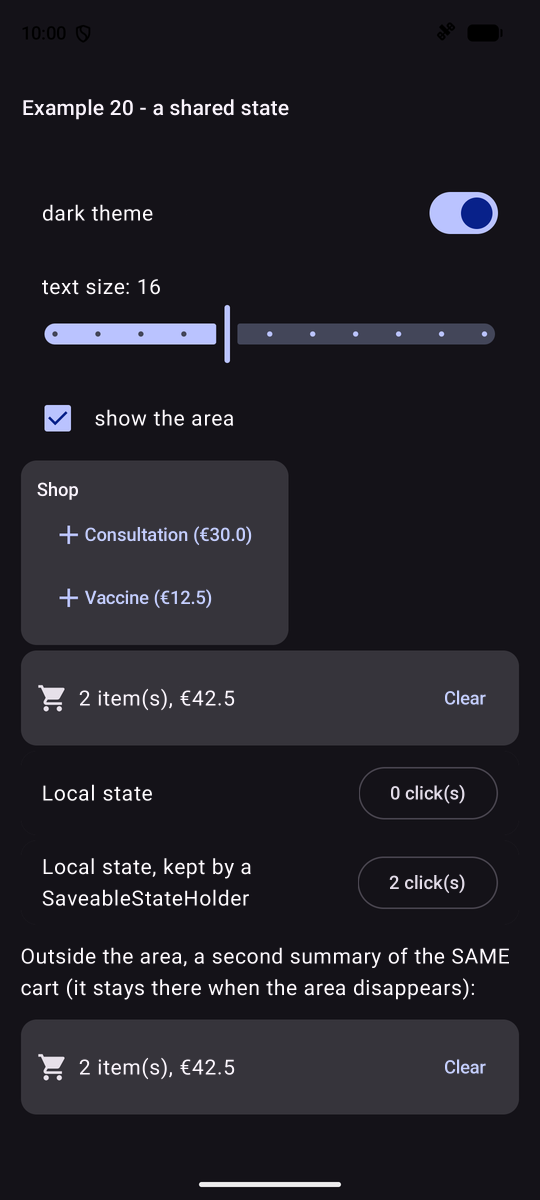
On the left, two items and clicks on both counters; in the middle, dark theme and hidden area: the summary outside the area still shows the shopping cart; on the right, the area redisplayed: the shopping cart is intact, the local counter has reset to 0, and the saved counter has returned to its original value. Stop and then restart the application: only the preferences (theme, text size) have been preserved.