11. Case Study: The Kotlin Client for the RdvMedecins Application
11.1. The Problem
The [RdvMedecins] application allows users to schedule appointments at a doctor's office. The [NestJS] course developed it as a HTML application, in which the server generated the pages; the courses [Vue.js], [Angular], and [React] developed web clients for it, and the [Flutter] course created a mobile client, which generates the SAME screens from the JSON data provided by the server described in the chapter “The RdvMedecins Server: A Black Box.” This chapter describes how to write a native [Android] client, in [Kotlin] and [Jetpack Compose].
The client must provide everything the others provided:
- a login screen, protected by a CAPTCHA, with the option to create a patient account;
- a doctor’s schedule for a given day, with appointment booking (patient selection window) and cancellation;
- for the administrator, management of doctors and clients (list, add, edit, delete);
- for the patient, a personal dashboard (showing upcoming appointments, which they can cancel) and account management;
- two languages: French and English;
- the same screens as the web clients ([/login], [/schedule], [/doctors], [/my-area]...), which here become ROUTES navigation screens.
A mobile app adds its own requirements: a narrow screen (no five-column tables), a keyboard that hides half the screen, a Back button, screen rotation and language switching that affect the activity (they RECREATE it), a password manager, and the absence of a browser to store the token cookie.
11.2. Installation and Execution
The JSON server must be installed and running (see the chapter “The RdvMedecins Server: A Black Box”). The CAPTCHA test mode is not required: you can leave [CAPTCHA_TEST] empty in the server’s [.env] file.
In [Android Studio], [File / Open] opens the [rdvmedecins_kotlin] folder; [Gradle] downloads the libraries (the first time, this takes a few minutes). Once the emulator is running, a command window connects its port 8080 to the computer’s port:
| adb reverse tcp:8080 tcp:8080
|
then the [Run] button installs and launches the application. You can also do everything in a command window opened to the [rdvmedecins_kotlin] folder:
| gradlew installDebug
gradlew installDebug -Pserver=http://10.0.2.2:8080
gradlew installDebug -Pserver=http://192.168.1.20:8080
|
- The first line compiles and installs the application on the connected device (emulator or phone), which connects to the server at the address [http://localhost:8080] using [adb reverse];
- the second, for the emulator, without [adb reverse]: the emulator sees the computer at the address [10.0.2.2];
- the third, for a real phone connected via Wi-Fi to the same network as the computer: we provide the computer’s address on that network ([ipconfig] under [Windows]); the firewall on [Windows] must allow incoming connections on port 8080. A phone connected to USB (with “USB debugging” enabled in its developer options) can also use [adb reverse].
Demo accounts are listed on the login screen (password = login).
11.3. Using the App
The screenshots in this section are from a Pixel 8 emulator (1080 × 2400 pixels, 412 × 915 dp). They were generated automatically by an instrumented test ([app/src/androidTest/.../CaseStudyCaptures.kt], see appendices) that navigates the app as a user would.
11.3.1. The login screen
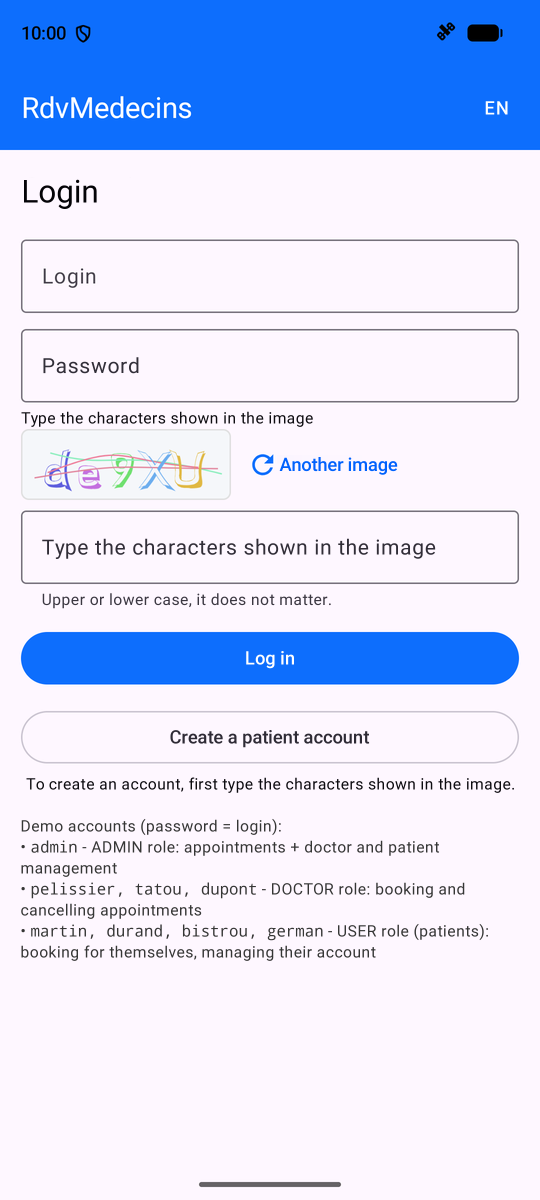
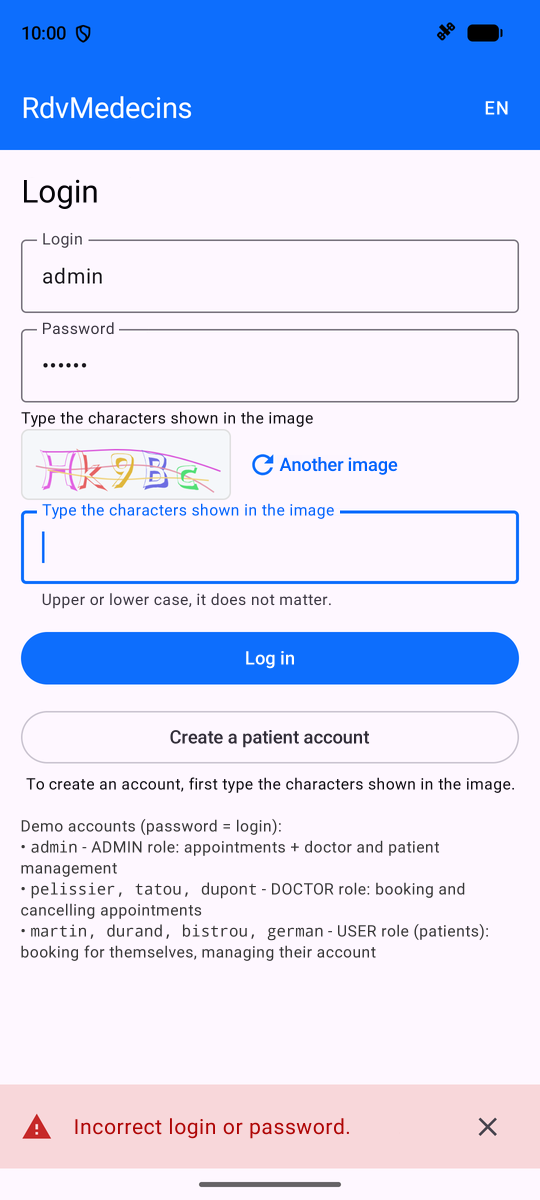
The login screen; incorrect password: the message appears at the bottom of the screen, and a new image is displayed (each image is used only once):
11.3.2. The schedule, as seen by the administrator and doctors
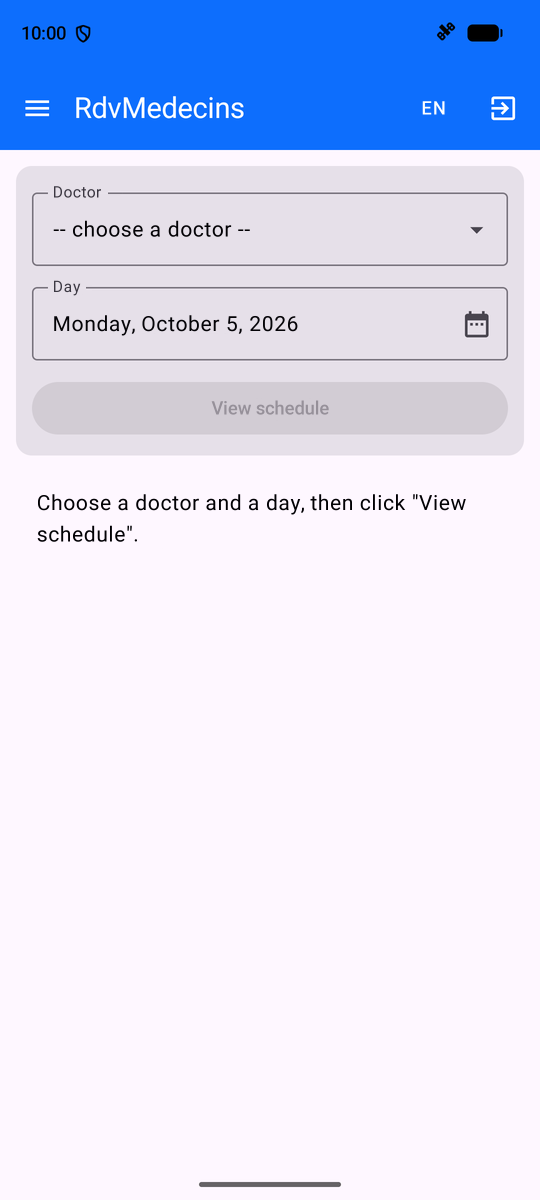
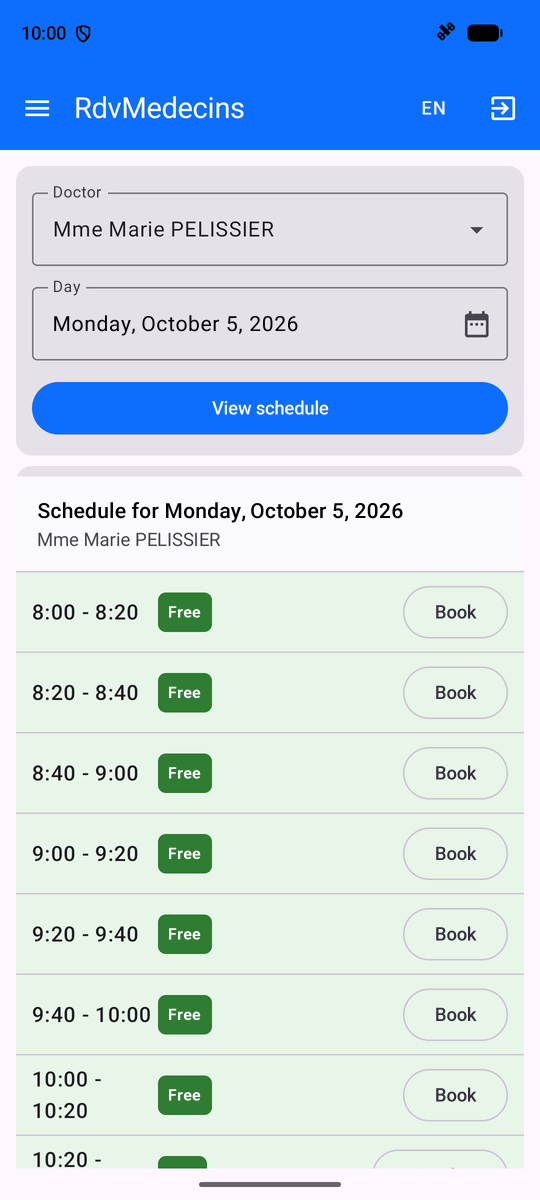
Logged in as [admin], you arrive at the calendar. Select a doctor and a day (the day, from a calendar), then “View schedule”:
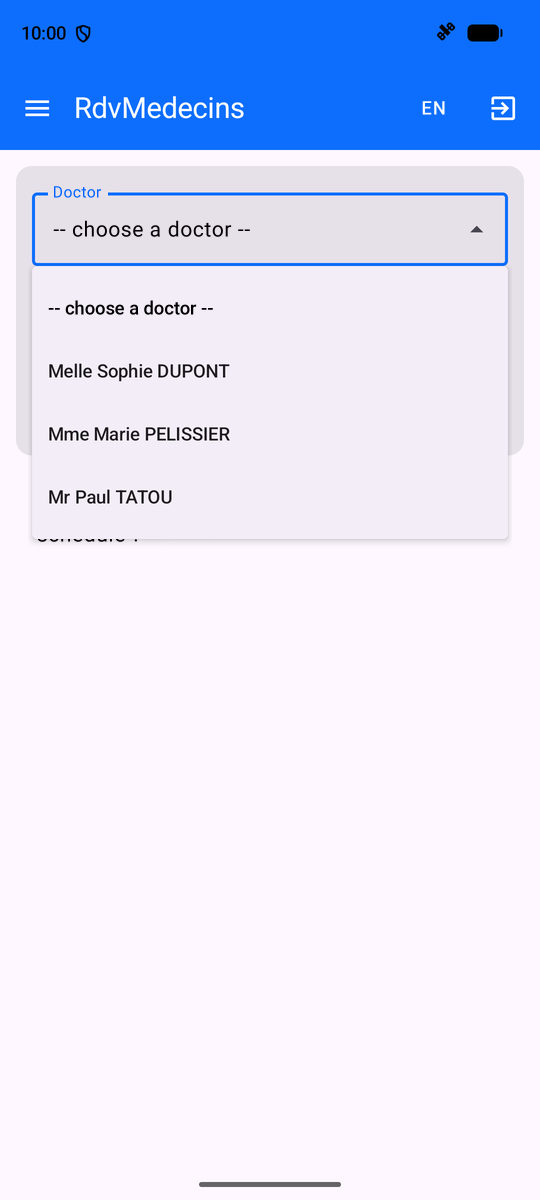
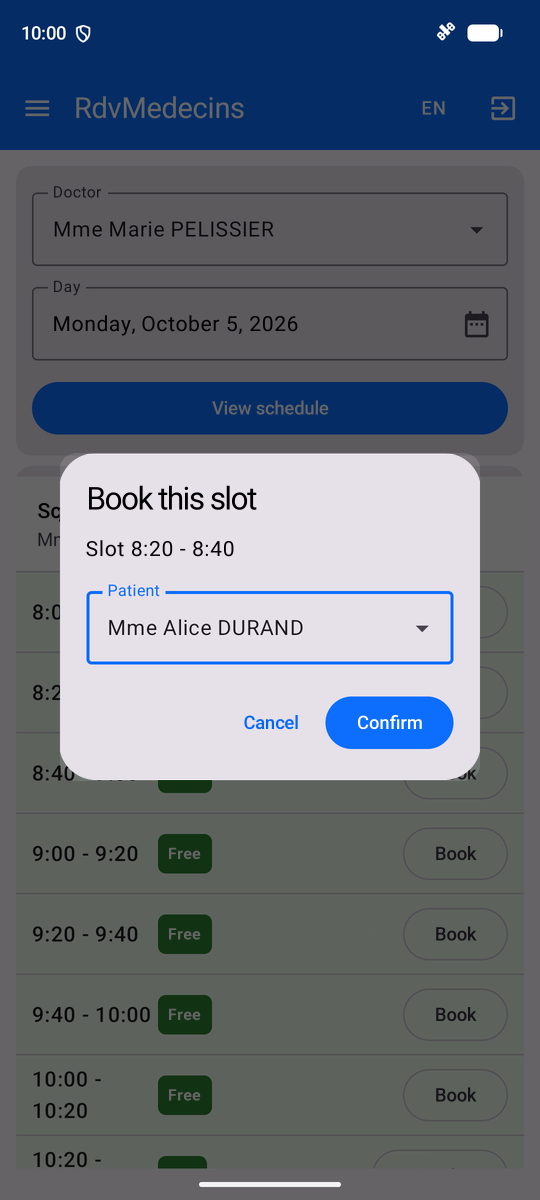
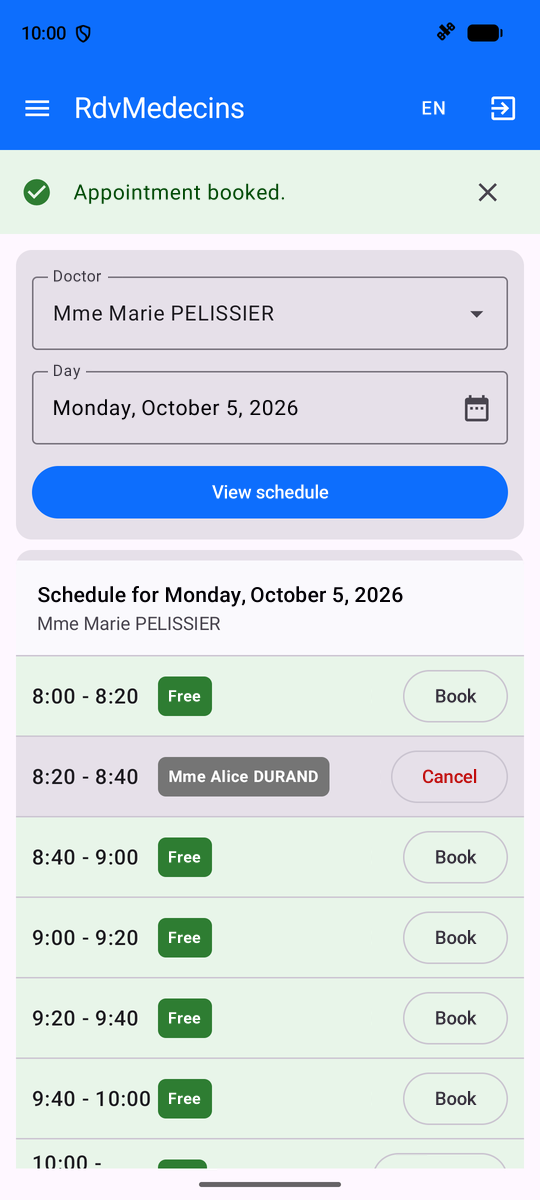
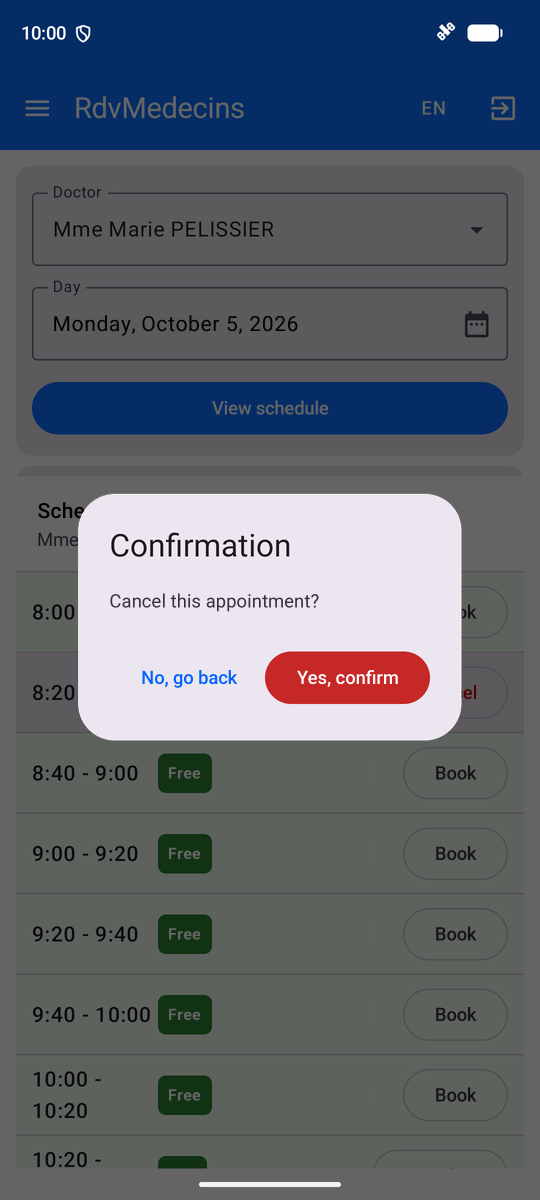
“Book” opens the booking window, with a navigation path displayed over the calendar; the appointment is saved; “Cancel” prompts for confirmation:
A doctor ([pelissier]) is taken directly to THEIR daily calendar:
11.3.3. The Patient’s Area
A patient ([martin]) accesses “My area.” In a calendar, they book an appointment for themselves without selecting a patient:
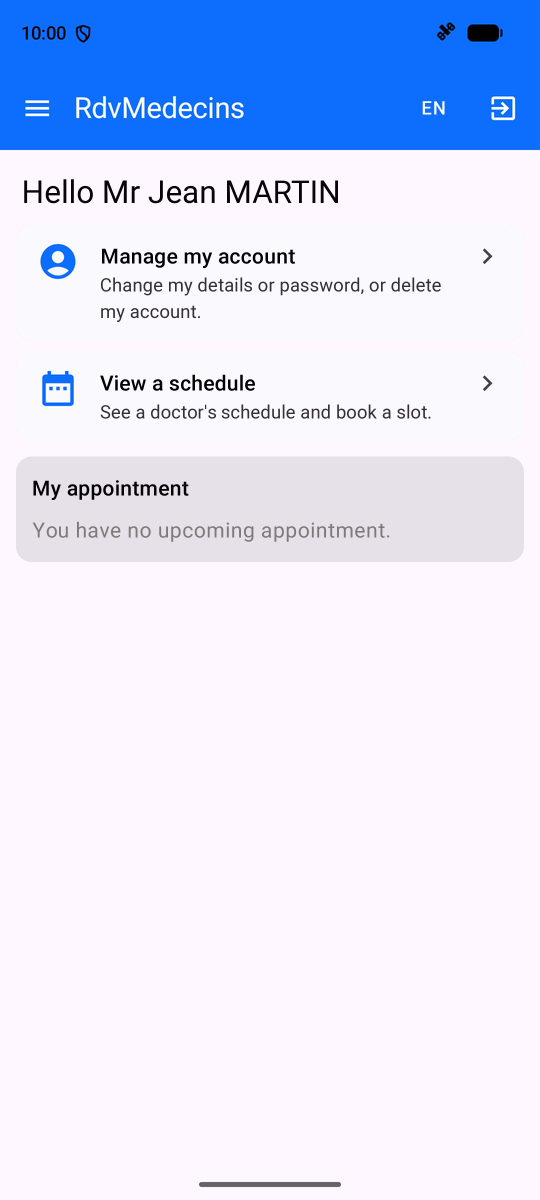
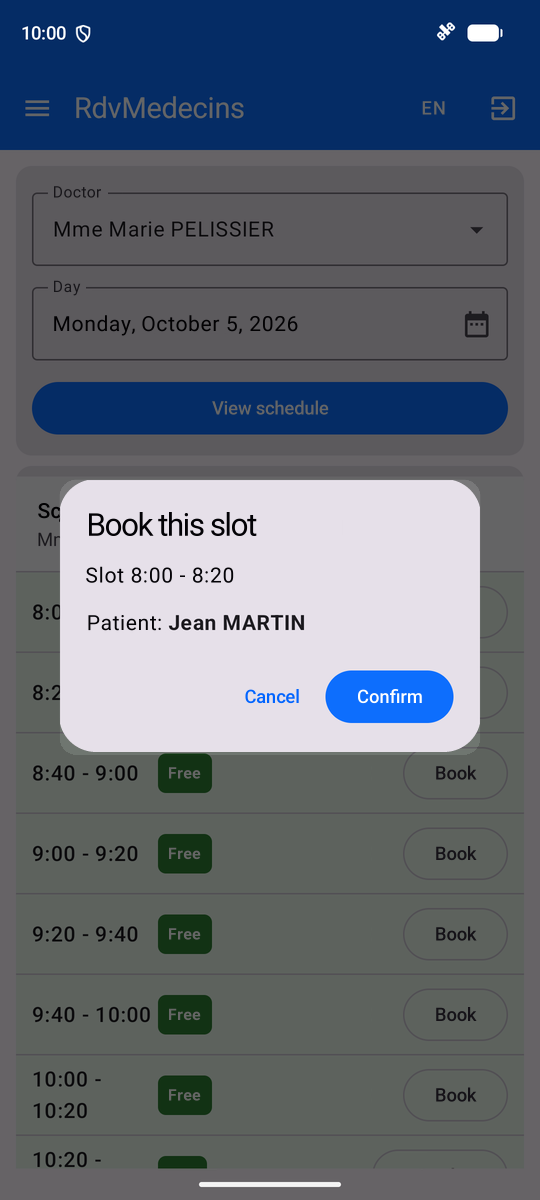
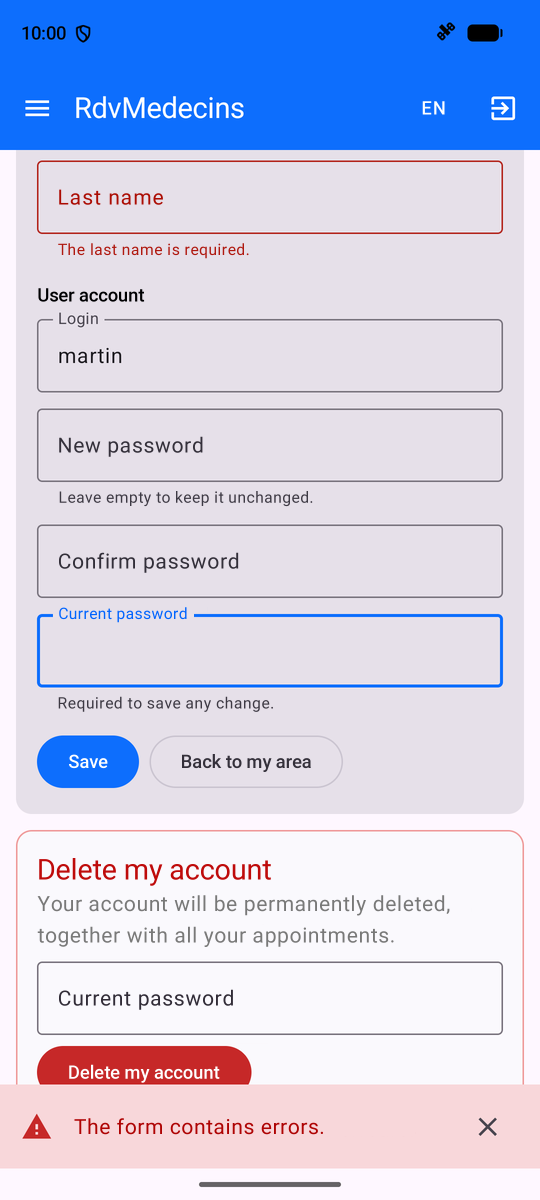
Their appointment appears under their name; the “Book” button is no longer available (only one upcoming appointment), and a message explains why. Their account shows the appointment. “Manage my account”: any changes require the current password; errors are server-related:
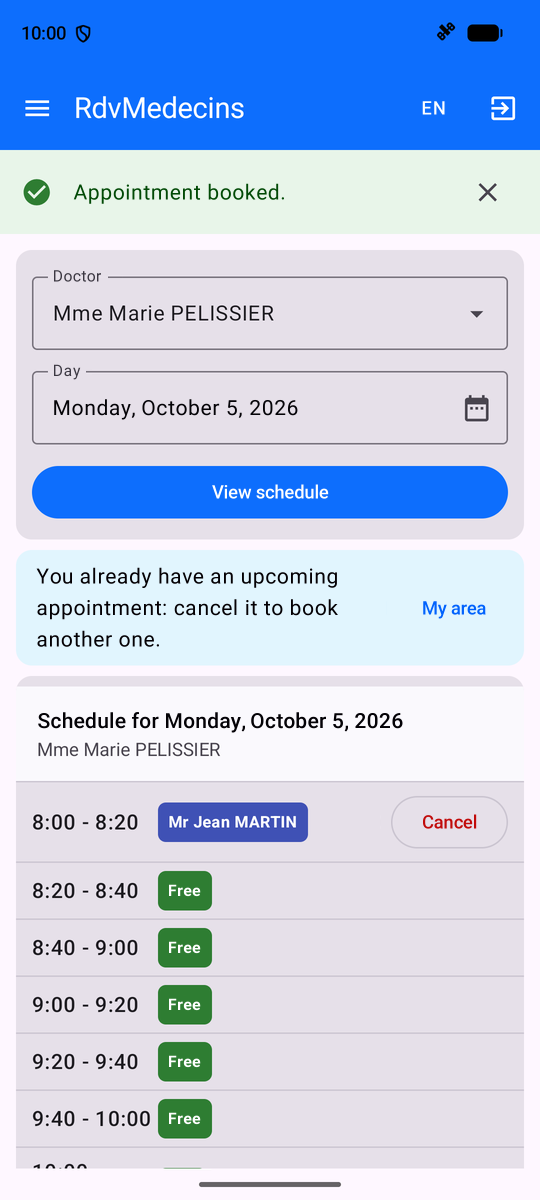
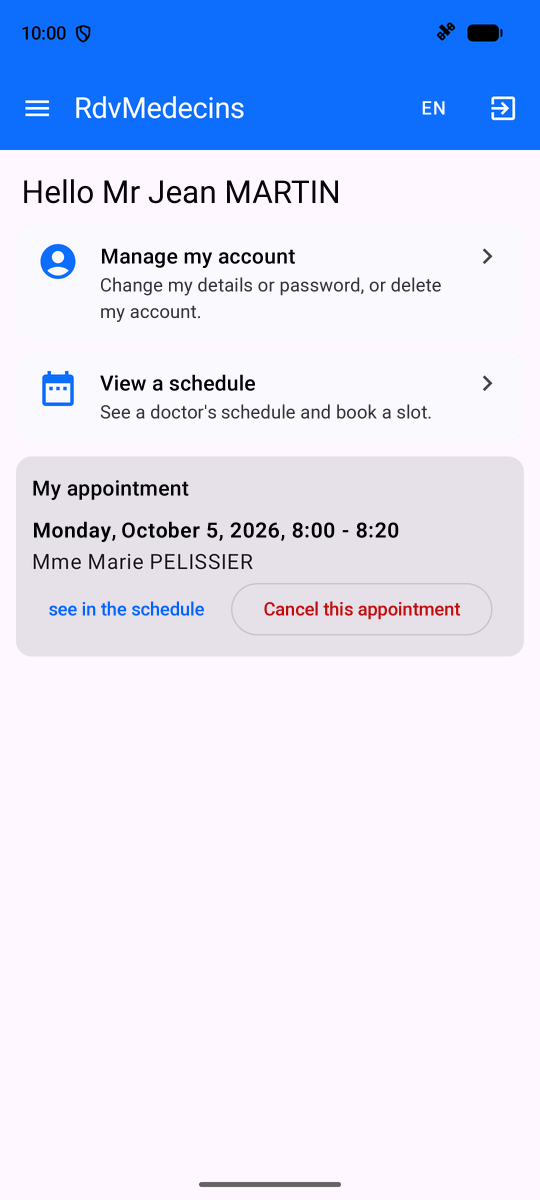
A patient’s menu does not have a “Doctors” entry. If they were to open this screen anyway (via a link), the navigation would display a 403 error page (see [navigation/Navigation.kt]).
11.3.4. Managing Doctors and Clients
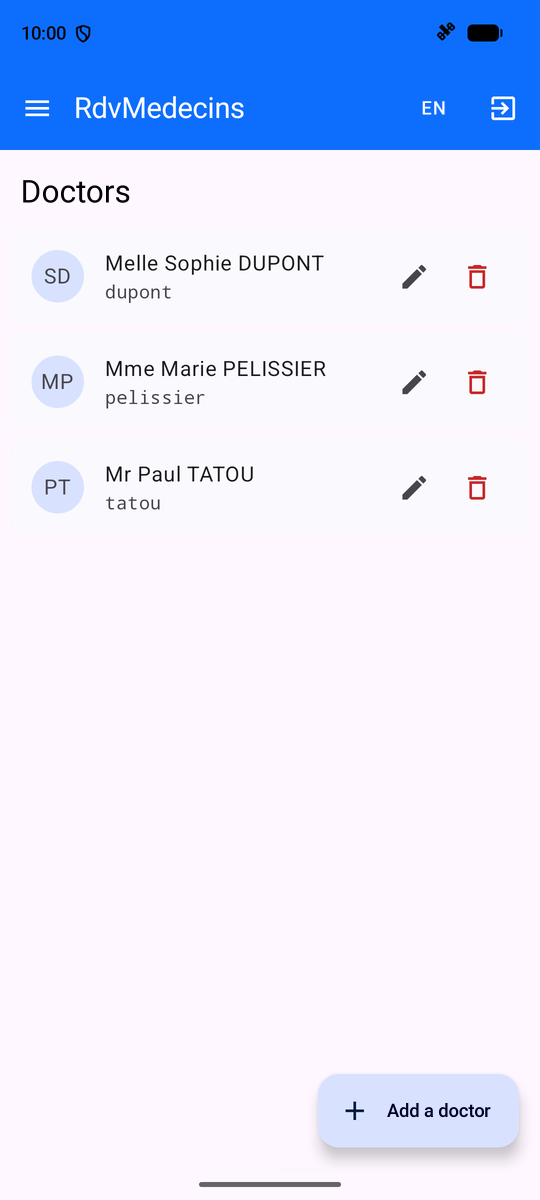
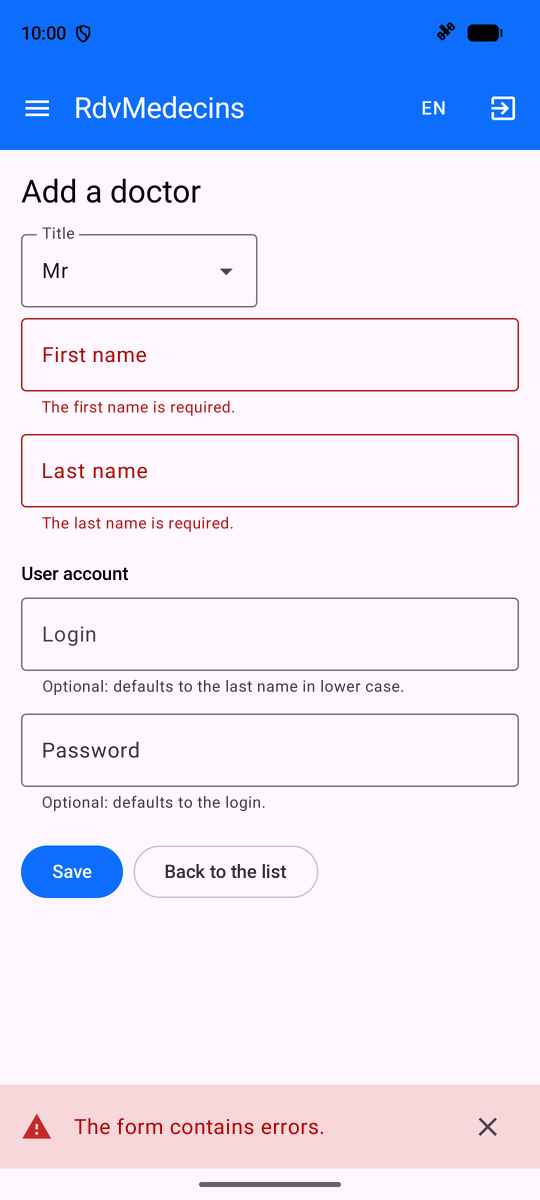
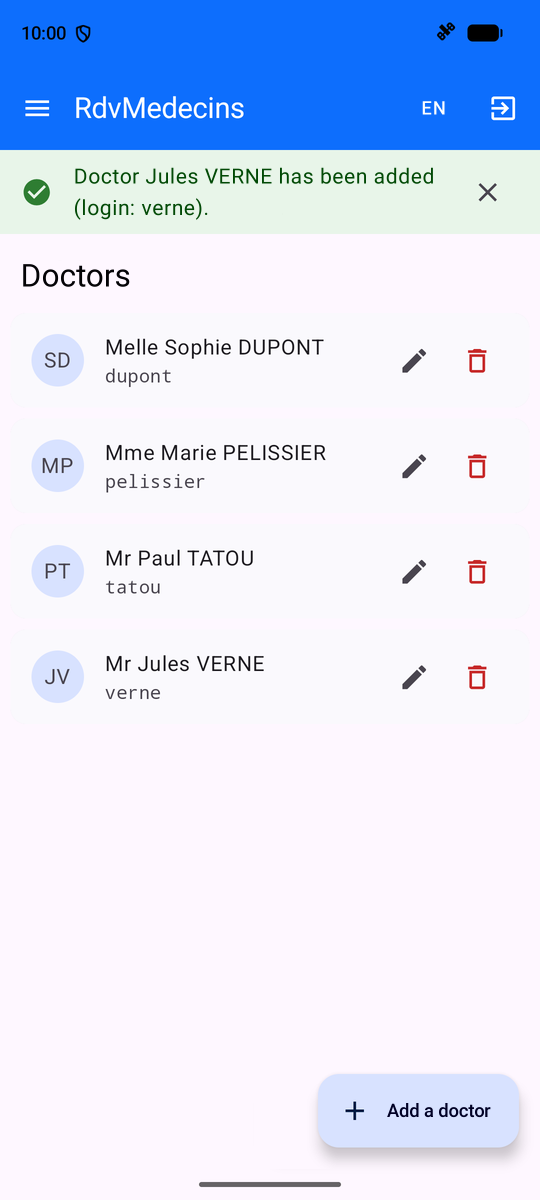
The list of doctors; an incorrectly filled-out addition; a successful addition:
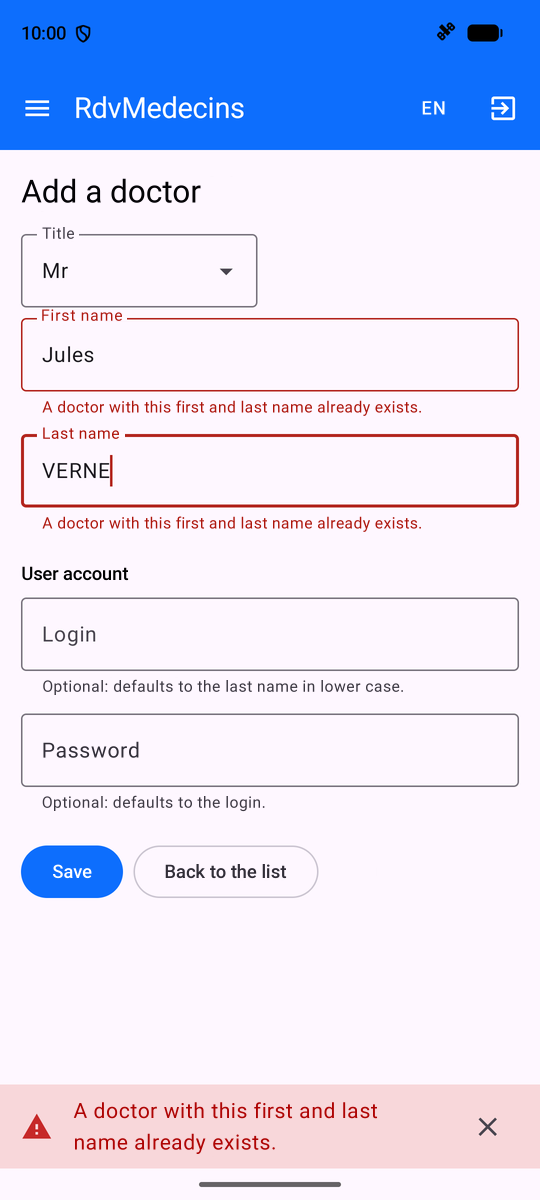
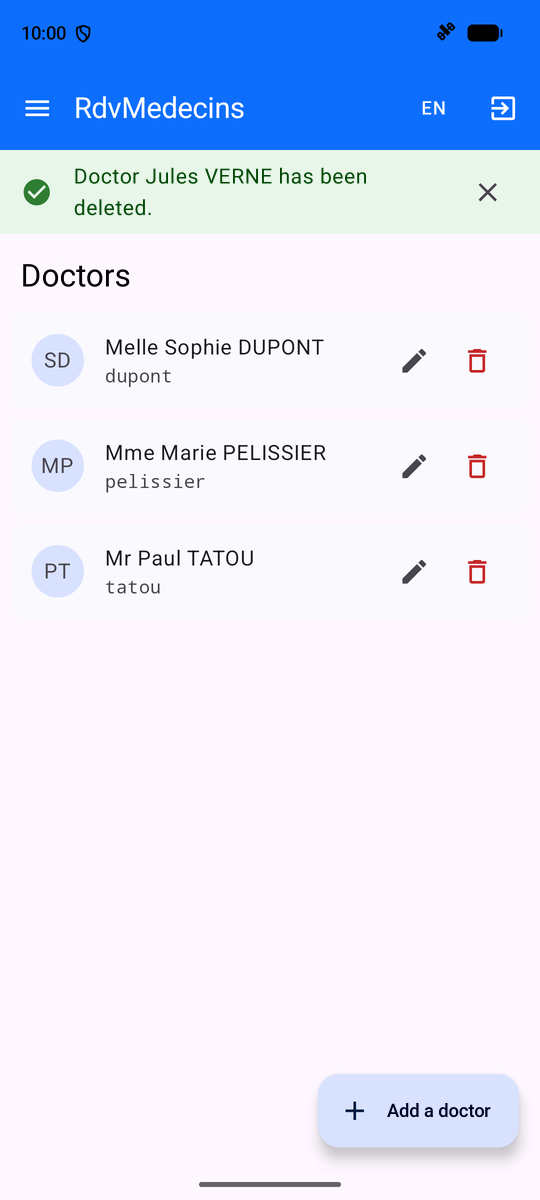
A duplicate entry; a successful deletion:
11.3.5. Creating an Account
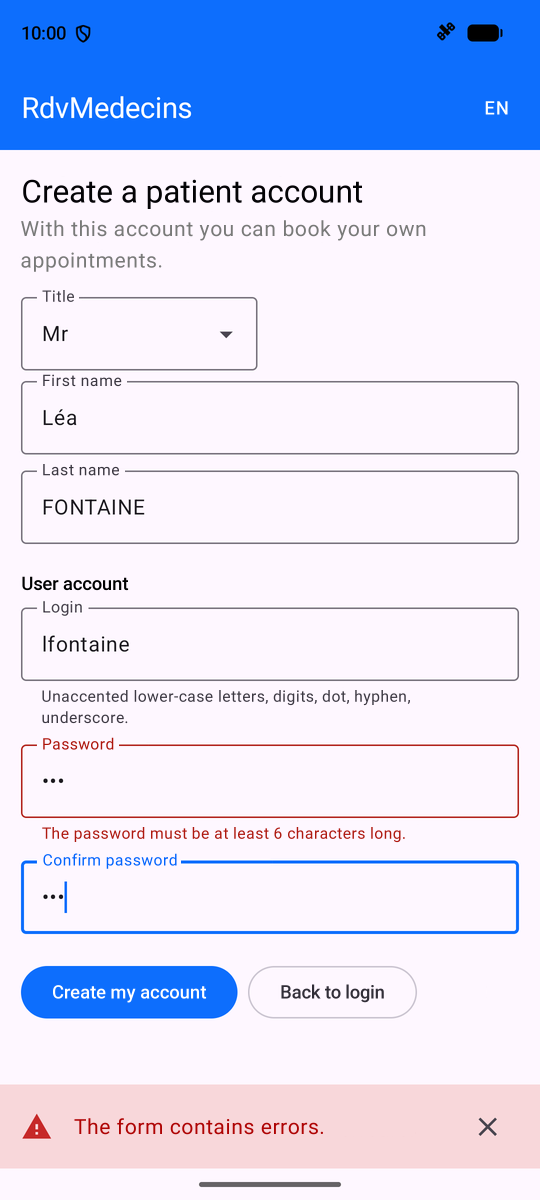
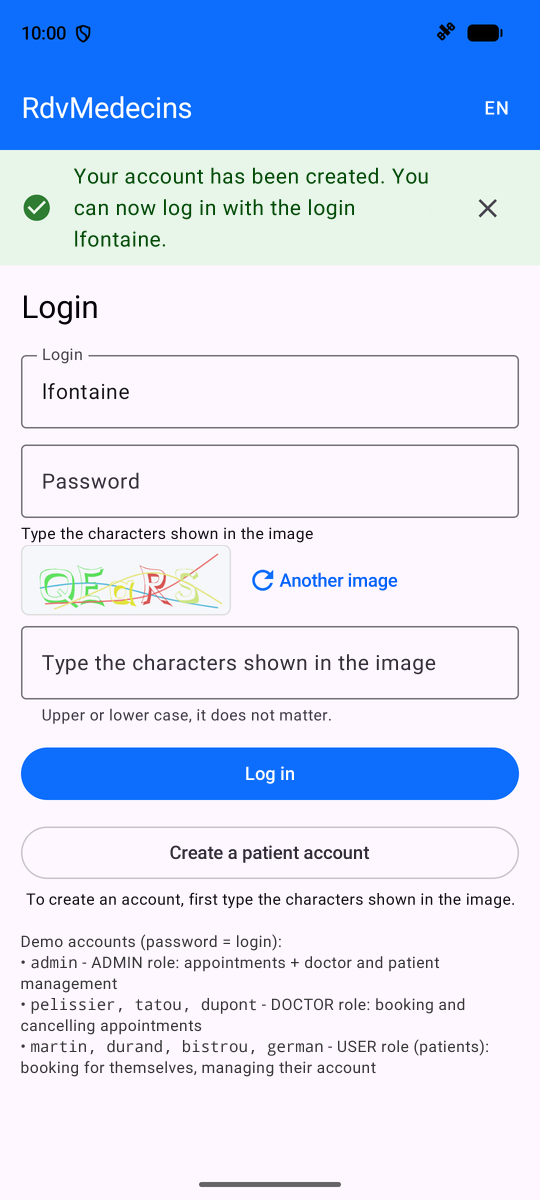
On the login screen, enter the CAPTCHA and then tap “Create a patient account.” The form is rejected by the server; once the account is created, return to the login screen, where the login information is pre-filled:
11.3.6. In French, then on a large screen
The FR / EN menu in the top bar changes the application’s language: the activity is recreated, and EVERYTHING is re-translated, including the calendar and dates. On a wide screen (a tablet or a phone held horizontally), the menu remains displayed on the left:
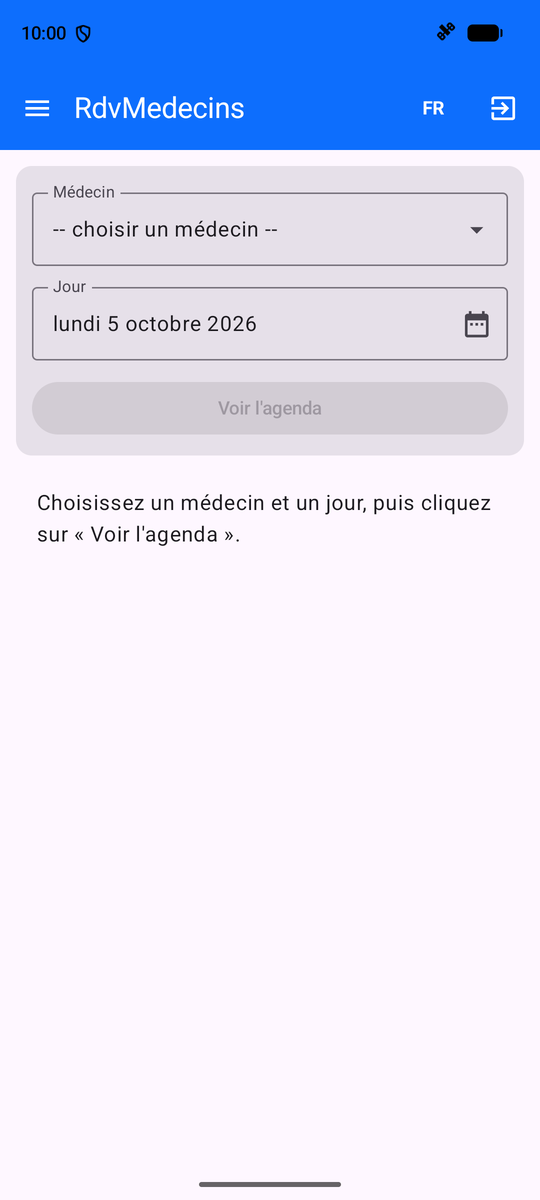
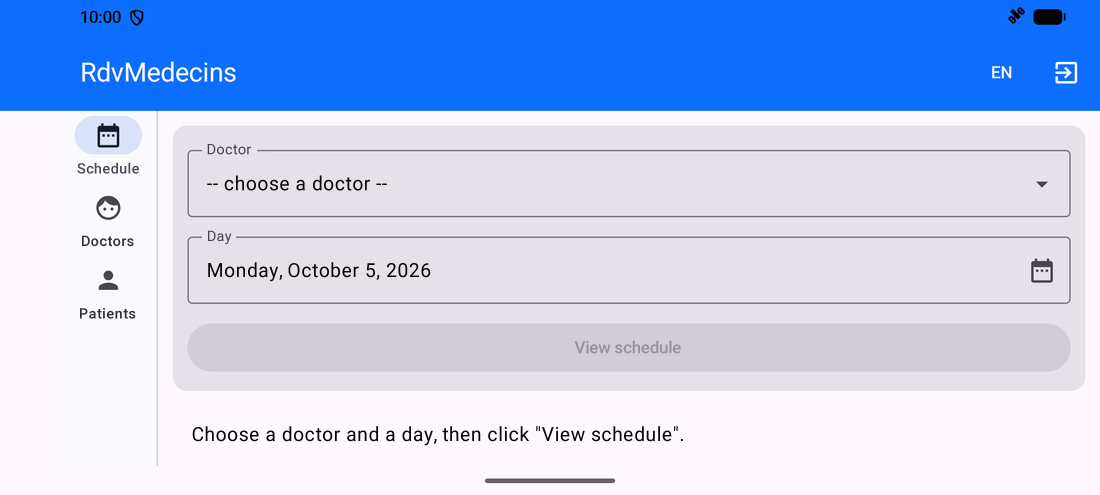
11.3.7. Session expired
If the token expires (or if the cookie is deleted), the next request returns a 401; the application redirects to the login screen. After logging in, it will redirect the user back to the screen they wanted to view:
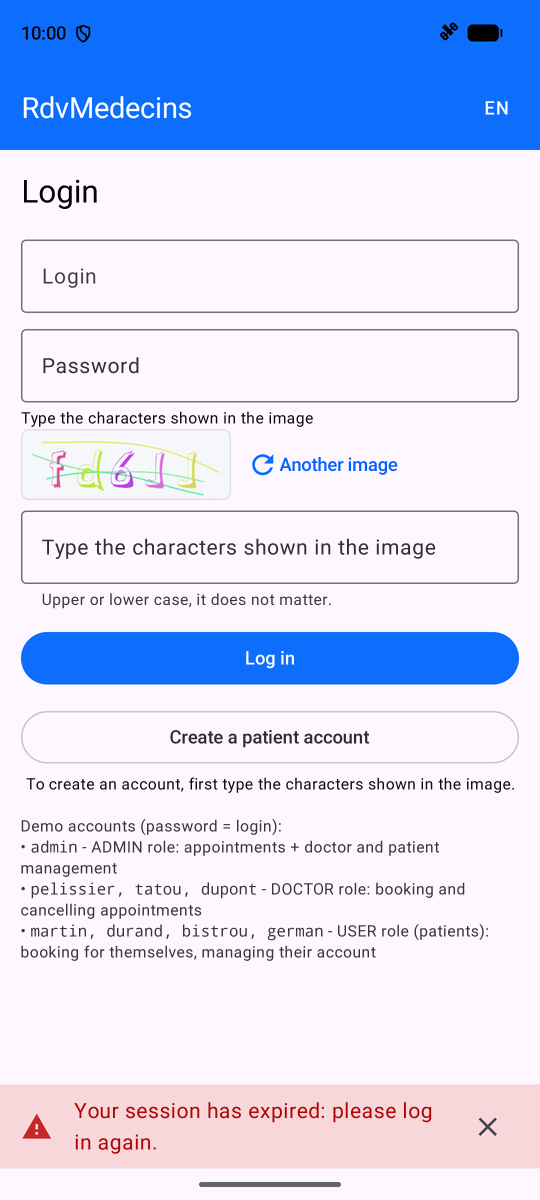
11.4. Client Architecture
| rdvmedecins_kotlin/
├── settings.gradle.kts, build.gradle.kts the Gradle project
├── gradle/libs.versions.toml the versions of the libraries
└── app/
├── build.gradle.kts the module of the application
└── src/
├── androidTest/ the test that makes the screenshots
└── main/
├── AndroidManifest.xml
├── assets/i18n/ the dictionaries fr.json, en.json
├── res/ icon, name, theme, languages
└── java/fr/stahe/rdvmedecins/
├── RdvMedecinsApplication.kt the shared objects
├── MainActivity.kt the single activity
├── Config.kt the address of the server
├── Formatting.kt hours and days
├── api/ the API access layer
├── state/ session, messages, cache
├── i18n/ the languages
├── navigation/ the screens, their routes, their access rights
├── widgets/ the layout and the reusable components
└── pages/ the screens
|
This is the architecture recommended by the [Android] guide (“Guide to App Architecture”), simplified as follows:
- a data layer ([api/]): the only layer that knows about [OkHttp], the URL objects, and the JSON object;
- a state layer ([state/]): objects whose properties are [Compose] states, created once by the [Application] object and provided to all screens ([LocalDependencies]);
- an interface layer ([pages/], [widgets/]): functions [@Composable], which display the state and transmit user actions.
The following table compares the HTML application from the [NestJS] course, the [Flutter] client, and this client:
Application HTML (NestJS) | Flutter client | Kotlin client |
The server renders each page ([res.render]) | Widgets render the screens | Functions [@Composable] generate the screens |
[views/layout.hbs] and its partial views | [layout.dart] (a [ShellRoute]) | [AppLayout.kt], around [NavHost] |
the controller routes | [go_router] | [navigation-compose], routes [@Serializable] |
[JwtAuthGuard], [RolesGuard] | The [redirect] function of the router | [Protected] and an effect that observes the session |
the token cookie, stored by the browser | a client HTTP that manages cookies | the [CookieJar] from [OkHttp] |
Flash message in a cookie | a [ChangeNotifier], [Messages] | a stateful class [Compose], [Messages] |
Dictionaries read by the server | [Translations] (JSON) | [Translations] (SAME JSON files) |
language stored in a cookie | in [shared_preferences] | by [Android] ([setApplicationLocales]) |
data that has already been read | [Cache] (a few lines) | [Cache] (a few lines, from [Deferred]) |
Form rejected: the server reloads the page | 400/409 response, errors below the fields | same |
All of the client’s files are shown below. They are extensively commented; their comments are part of the course.
11.5. Project configuration
11.5.1. settings.gradle.kts, build.gradle.kts
| // =========================================================================
// settings.gradle.kts - the GLOBAL configuration of the Gradle project
// (generated by Android Studio; only rootProject.name has been changed)
// =========================================================================
// where Gradle looks for its PLUGINS (the Android plugin, the Compose plugin...)
pluginManagement {
repositories {
google {
content {
includeGroupByRegex("com\\.android.*")
includeGroupByRegex("com\\.google.*")
includeGroupByRegex("androidx.*")
}
}
mavenCentral()
gradlePluginPortal()
}
}
plugins {
id("org.gradle.toolchains.foojay-resolver-convention") version "1.0.0"
}
// where Gradle looks for the LIBRARIES: google() for AndroidX and Compose,
// mavenCentral() for OkHttp, kotlinx.serialization, AndroidSVG
dependencyResolutionManagement {
repositoriesMode.set(RepositoriesMode.FAIL_ON_PROJECT_REPOS)
repositories {
google()
mavenCentral()
}
}
rootProject.name = "rdvmedecins_kotlin"
// a single module: the application, in the app/ folder
include(":app")
// =========================================================================
// build.gradle.kts (root) - declares the Gradle plugins used by the
// modules of the project, without applying them here ("apply false"): it is
// app/build.gradle.kts that applies them.
// =========================================================================
plugins {
alias(libs.plugins.android.application) apply false
alias(libs.plugins.kotlin.compose) apply false
alias(libs.plugins.kotlin.serialization) apply false
}
|
The example files (see Example 01).
11.5.2. gradle/libs.versions.toml
| # =========================================================================
# gradle/libs.versions.toml - the "version catalog" of the project
# -------------------------------------------------------------------------
# ALL the versions of the plugins and of the libraries, in one single place.
# The build.gradle.kts files refer to them by names
# (libs.okhttp, libs.plugins.kotlin.compose...). It is the equivalent of the
# dependencies section of Flutter's pubspec.yaml.
# =========================================================================
[versions]
agp = "9.4.1"
kotlin = "2.2.10"
coreKtx = "1.17.0"
lifecycle = "2.9.4"
activityCompose = "1.11.0"
composeBom = "2026.02.01"
appcompat = "1.7.1"
navigation = "2.9.5"
okhttp = "4.12.0"
kotlinxSerializationJson = "1.9.0"
androidsvg = "1.4"
junit = "4.13.2"
junitVersion = "1.3.0"
espressoCore = "3.7.0"
testRunner = "1.7.0"
[libraries]
# --- generated by Android Studio ("Empty Activity" template) ---
androidx-core-ktx = { group = "androidx.core", name = "core-ktx", version.ref = "coreKtx" }
androidx-lifecycle-runtime-ktx = { group = "androidx.lifecycle", name = "lifecycle-runtime-ktx", version.ref = "lifecycle" }
androidx-activity-compose = { group = "androidx.activity", name = "activity-compose", version.ref = "activityCompose" }
androidx-compose-bom = { group = "androidx.compose", name = "compose-bom", version.ref = "composeBom" }
androidx-compose-ui = { group = "androidx.compose.ui", name = "ui" }
androidx-compose-ui-graphics = { group = "androidx.compose.ui", name = "ui-graphics" }
androidx-compose-ui-tooling = { group = "androidx.compose.ui", name = "ui-tooling" }
androidx-compose-ui-tooling-preview = { group = "androidx.compose.ui", name = "ui-tooling-preview" }
androidx-compose-ui-test-manifest = { group = "androidx.compose.ui", name = "ui-test-manifest" }
androidx-compose-ui-test-junit4 = { group = "androidx.compose.ui", name = "ui-test-junit4" }
androidx-compose-material3 = { group = "androidx.compose.material3", name = "material3" }
junit = { group = "junit", name = "junit", version.ref = "junit" }
androidx-junit = { group = "androidx.test.ext", name = "junit", version.ref = "junitVersion" }
androidx-espresso-core = { group = "androidx.test.espresso", name = "espresso-core", version.ref = "espressoCore" }
androidx-test-runner = { group = "androidx.test", name = "runner", version.ref = "testRunner" }
# --- added for RdvMedecins ---
# the basic Material icons (Add, Delete, Search...)
androidx-compose-material-icons-core = { group = "androidx.compose.material", name = "material-icons-core" }
# the activity's lifecycle seen from Compose
androidx-lifecycle-runtime-compose = { group = "androidx.lifecycle", name = "lifecycle-runtime-compose", version.ref = "lifecycle" }
# viewModel() in a @Composable function
androidx-lifecycle-viewmodel-compose = { group = "androidx.lifecycle", name = "lifecycle-viewmodel-compose", version.ref = "lifecycle" }
# the application's OWN language
androidx-appcompat = { group = "androidx.appcompat", name = "appcompat", version.ref = "appcompat" }
# the router
androidx-navigation-compose = { group = "androidx.navigation", name = "navigation-compose", version.ref = "navigation" }
# the HTTP client
okhttp = { group = "com.squareup.okhttp3", name = "okhttp", version.ref = "okhttp" }
# JSON (de)serialization
kotlinx-serialization-json = { group = "org.jetbrains.kotlinx", name = "kotlinx-serialization-json", version.ref = "kotlinxSerializationJson" }
# drawing an SVG image (the captcha)
androidsvg = { group = "com.caverock", name = "androidsvg-aar", version.ref = "androidsvg" }
[plugins]
android-application = { id = "com.android.application", version.ref = "agp" }
kotlin-compose = { id = "org.jetbrains.kotlin.plugin.compose", version.ref = "kotlin" }
# generates the (de)serialization code of the @Serializable classes
kotlin-serialization = { id = "org.jetbrains.kotlin.plugin.serialization", version.ref = "kotlin" }
|
The libraries from the examples, except for [DataStore]: the language is stored by [Android] itself, and the token is stored in the cookie jar.
11.5.3. app/build.gradle.kts
| // =========================================================================
// app/build.gradle.kts - the configuration of the "app" module: the
// RdvMedecins Android client. Generated by Android Studio ("Empty
// Activity" template), then completed (lines marked "added").
// =========================================================================
plugins {
alias(libs.plugins.android.application)
alias(libs.plugins.kotlin.compose)
// added: the kotlinx.serialization plugin (@Serializable classes)
alias(libs.plugins.kotlin.serialization)
}
android {
namespace = "fr.stahe.rdvmedecins"
compileSdk {
version = release(37)
}
defaultConfig {
applicationId = "fr.stahe.rdvmedecins"
minSdk = 26
targetSdk = 37
versionCode = 1
versionName = "1.0"
// added: the address of the JSON server, can be changed at compile time:
// gradlew installDebug -Pserver=http://192.168.1.20:8080
val server = providers.gradleProperty("server").getOrElse("http://localhost:8080")
buildConfigField("String", "SERVER_URL", "\"$server\"")
testInstrumentationRunner = "androidx.test.runner.AndroidJUnitRunner"
}
buildTypes {
release {
optimization {
enable = false
}
}
}
compileOptions {
sourceCompatibility = JavaVersion.VERSION_11
targetCompatibility = JavaVersion.VERSION_11
}
buildFeatures {
compose = true
// added: the BuildConfig class (BuildConfig.SERVER_URL)
buildConfig = true
}
}
dependencies {
implementation(platform(libs.androidx.compose.bom))
implementation(libs.androidx.activity.compose)
implementation(libs.androidx.compose.material3)
implementation(libs.androidx.compose.ui)
implementation(libs.androidx.compose.ui.graphics)
implementation(libs.androidx.compose.ui.tooling.preview)
implementation(libs.androidx.core.ktx)
implementation(libs.androidx.lifecycle.runtime.ktx)
// added for RdvMedecins
implementation(libs.androidx.compose.material.icons.core)
implementation(libs.androidx.lifecycle.runtime.compose)
implementation(libs.androidx.lifecycle.viewmodel.compose)
implementation(libs.androidx.appcompat)
implementation(libs.androidx.navigation.compose)
implementation(libs.okhttp)
implementation(libs.kotlinx.serialization.json)
implementation(libs.androidsvg)
// the tests: making the course's screenshots (androidTest folder)
testImplementation(libs.junit)
androidTestImplementation(platform(libs.androidx.compose.bom))
androidTestImplementation(libs.androidx.compose.ui.test.junit4)
androidTestImplementation(libs.androidx.espresso.core)
androidTestImplementation(libs.androidx.junit)
androidTestImplementation(libs.androidx.test.runner)
debugImplementation(libs.androidx.compose.ui.test.manifest)
debugImplementation(libs.androidx.compose.ui.tooling)
}
|
The one from the examples, with a different application ID ([fr.stahe.rdvmedecins]): both applications can be installed side by side. The [buildTypes] block describes the version of PRODUCTION (see the “Deployment” chapter).
11.5.4. AndroidManifest.xml
| <?xml version="1.0" encoding="utf-8"?>
<!-- =====================================================================
AndroidManifest.xml - the "identity card" of the application
===================================================================== -->
<manifest xmlns:android="http://schemas.android.com/apk/res/android"
xmlns:tools="http://schemas.android.com/tools">
<!-- network access (the JSON server) -->
<uses-permission android:name="android.permission.INTERNET" />
<!-- android:name: the Application class (RdvMedecinsApplication.kt).
usesCleartextTraffic: the "cleartext" HTTP of the development server
(to be removed for a production server in https, see Deployment).
localeConfig: the languages offered by the application -->
<application
android:name=".RdvMedecinsApplication"
android:allowBackup="true"
android:dataExtractionRules="@xml/data_extraction_rules"
android:fullBackupContent="@xml/backup_rules"
android:icon="@mipmap/ic_launcher"
android:label="@string/app_name"
android:localeConfig="@xml/locales_config"
android:roundIcon="@mipmap/ic_launcher_round"
android:supportsRtl="true"
android:theme="@style/Theme.RdvMedecins"
android:usesCleartextTraffic="true"
tools:targetApi="33">
<!-- the only activity. windowSoftInputMode="adjustResize": the
keyboard shrinks the screen instead of hiding it -->
<activity
android:name=".MainActivity"
android:exported="true"
android:windowSoftInputMode="adjustResize">
<intent-filter>
<action android:name="android.intent.action.MAIN" />
<category android:name="android.intent.category.LAUNCHER" />
</intent-filter>
</activity>
<!-- before Android 13: AppCompat remembers the chosen language -->
<service
android:name="androidx.appcompat.app.AppLocalesMetadataHolderService"
android:enabled="false"
android:exported="false">
<meta-data
android:name="autoStoreLocales"
android:value="true" />
</service>
</application>
</manifest>
|
- a single activity, [MainActivity]: all screens are functions of [@Composable];
- [windowSoftInputMode="adjustResize"]: when the keyboard appears, the screen shrinks (instead of being hidden by the keyboard);
- [android:localeConfig] and the service for [AppCompat]: the application-specific language (see Example 21).
11.5.5. Resources
| <?xml version="1.0" encoding="utf-8"?>
<!-- the name of the application (under its icon). The texts of the interface,
for their part, are in the dictionaries assets/i18n/fr.json and en.json -->
<resources>
<string name="app_name">RdvMedecins</string>
</resources>
<?xml version="1.0" encoding="utf-8"?>
<resources>
<!-- the "Android" theme, only visible during the launch; an
AppCompat theme, required by AppCompatActivity (see MainActivity.kt) -->
<style name="Theme.RdvMedecins" parent="Theme.AppCompat.DayNight.NoActionBar" />
</resources>
<?xml version="1.0" encoding="utf-8"?>
<!-- =====================================================================
res/xml/locales_config.xml - the languages of the application (example 21)
............................................................................
Declared in AndroidManifest.xml (android:localeConfig). Since
Android 13, the user can also choose the language of EACH
application in the phone's settings: Settings > System >
Languages > App languages.
===================================================================== -->
<locale-config xmlns:android="http://schemas.android.com/apk/res/android">
<locale android:name="fr" />
<locale android:name="en" />
</locale-config>
|
The application texts are NOT included there (only the application name is present): they are in the dictionaries JSON, [assets/i18n/fr.json], and [en.json], and in the client dictionaries [Vue.js], [Angular], [React], and [Flutter]. An excerpt:
| {
"APP": {
"TITLE": "RdvMedecins",
"LOGOUT": "Se déconnecter",
"MENU_SCHEDULE": "Agenda",
"MENU_DOCTORS": "Médecins",
"MENU_PATIENTS": "Clients",
"MENU_MY_AREA": "Mon espace",
"LOADING": "Chargement...",
"LANGUAGE": "Langue",
"MENU_ACCOUNT": "Mon compte",
"CONNECTED_AS": "Connecté : {{name}}",
"RETRY": "Réessayer"
},
"LOGIN": {
"TITLE": "Connexion",
"LOGIN_LABEL": "Login",
"PASSWORD_LABEL": "Mot de passe",
"SUBMIT": "Se connecter",
"ERROR": "Login ou mot de passe incorrect.",
"DEMO_ACCOUNTS": "Comptes de démonstration (mot de passe = login) :",
"DEMO_ADMIN": "rôle ADMIN : rendez-vous + gestion des médecins et des clients",
"DEMO_DOCTOR": "rôle DOCTOR : prise et annulation de rendez-vous",
"DEMO_USER": "rôle USER (patients) : réservation pour eux-mêmes, gestion de leur compte",
"CREATE_ACCOUNT": "Créer un compte client",
"CREATE_ACCOUNT_HELP": "Pour créer un compte, recopiez d'abord les caractères de l'image."
},
"DOCTOR_DAY_PICKER": {
"DOCTOR_LABEL": "Médecin",
"CHOOSE_DOCTOR": "-- choisir un médecin --",
"DAY_LABEL": "Jour",
"VIEW_SCHEDULE": "Voir l'agenda",
"CHOOSE_DAY": "Choisir le jour"
},
"SCHEDULE": {
"PAGE_TITLE": "Agenda",
"TITLE_PREFIX": "Agenda du",
"COLUMN_SLOT": "Créneau",
"COLUMN_STATUS": "Statut",
"FREE": "Libre",
|
11.6. Launching the application
11.6.1. Config.kt
| // =========================================================================
// Config.kt - WHERE is the JSON server?
// -------------------------------------------------------------------------
// A mobile application has no "origin": it must be given the full address
// of the server (see example 22 and common/Config.kt of the examples):
// - by default http://localhost:8080, with the command
// adb reverse tcp:8080 tcp:8080
// which connects port 8080 of the phone (or of the emulator) to that of the
// computer;
// - or another address, set at compile time:
// gradlew installDebug -Pserver=http://10.0.2.2:8080 (emulator)
// gradlew installDebug -Pserver=http://192.168.1.20:8080 (phone on Wi-Fi)
// =========================================================================
package fr.stahe.rdvmedecins
object Config {
val serverUrl: String = BuildConfig.SERVER_URL
}
|
The server address, set at compile time (see Example 22).
11.6.2. RdvMedecinsApplication.kt
| // =========================================================================
// RdvMedecinsApplication.kt - the objects shared by the whole application
// -------------------------------------------------------------------------
// Android creates ONE Application object at launch, before any activity, and
// keeps it until the application stops. There we build, once and
// for all, the objects shared by all the screens:
// - the HTTP client (and its cookie jar), the API access layer;
// - the session (who is logged in?), the messages, the data cache.
// They thus survive the recreation of the activity (rotation, change
// of language). The screens get them through LocalDependencies (see
// MainActivity.kt): it is a hand-written "dependency injection".
// Two mechanisms connect these objects together:
// 1. the 401 response to a protected request (expired session): the user
// is forgotten and the message is prepared; the navigation, which observes
// the session, then goes back to the login screen;
// 2. a change of user: the data read for the previous user
// are worth nothing any more, the cache is cleared.
// =========================================================================
package fr.stahe.rdvmedecins
import android.app.Application
import androidx.compose.runtime.snapshotFlow
import androidx.compose.runtime.staticCompositionLocalOf
import fr.stahe.rdvmedecins.api.ApiClient
import fr.stahe.rdvmedecins.api.RdvMedecinsApi
import fr.stahe.rdvmedecins.api.createHttpClient
import fr.stahe.rdvmedecins.state.Cache
import fr.stahe.rdvmedecins.state.Messages
import fr.stahe.rdvmedecins.state.Session
import kotlinx.coroutines.MainScope
import kotlinx.coroutines.launch
class RdvMedecinsApplication : Application() {
// a coroutine scope that lives as long as the application
val scope = MainScope()
lateinit var api: RdvMedecinsApi
private set
lateinit var session: Session
private set
val messages = Messages()
val cache = Cache(scope)
override fun onCreate() {
super.onCreate()
val client = ApiClient(createHttpClient(this))
api = RdvMedecinsApi(client)
session = Session(api)
// 1. the expired session
client.onSessionExpired = {
session.forget()
messages.flash("ERRORS.SESSION_EXPIRED", success = false)
}
// 2. the user changes: snapshotFlow turns a Compose state into a Flow
scope.launch {
snapshotFlow { session.user }.collect { cache.clear() }
}
}
}
// the Application object, provided to all the screens
val LocalDependencies = staticCompositionLocalOf<RdvMedecinsApplication> { error("no dependencies provided") }
|
- Lines 35–41: shared objects, created once. [lateinit var]: a non-[null] property, initialized later (in [onCreate]); [MainScope()]: a coroutine scope that lives as long as the application;
- lines 49–51: the session has expired: the function entrusted to the API client (which knows nothing else) forgets the user and prepares the message;
- line 55: [snapshotFlow] transforms a [Compose] state into a [Flow] state (see Example 19): every time the user changes, the cache is cleared;
- line 61: the object [Application], supplied to all screens by a [CompositionLocal] (see Example 14): a hand-coded “dependency injection.”
11.6.3. MainActivity.kt
| // =========================================================================
// MainActivity.kt - the only activity of the application
// -------------------------------------------------------------------------
// All the screens are @Composable functions, displayed by the NavHost
// (see navigation/Navigation.kt) in THIS activity. It provides to all
// the screens (CompositionLocalProvider):
// - the shared objects of the application (LocalDependencies);
// - the translations of the current language (LocalTranslations).
// It is an AppCompatActivity: it knows how to apply the language chosen by
// the user (see example 21), even before Android 13.
// =========================================================================
package fr.stahe.rdvmedecins
import android.os.Bundle
import androidx.activity.compose.setContent
import androidx.activity.enableEdgeToEdge
import androidx.appcompat.app.AppCompatActivity
import androidx.compose.material3.MaterialTheme
import androidx.compose.material3.lightColorScheme
import androidx.compose.runtime.CompositionLocalProvider
import androidx.compose.ui.graphics.Color
import fr.stahe.rdvmedecins.i18n.LocalTranslations
import fr.stahe.rdvmedecins.i18n.rememberTranslations
import fr.stahe.rdvmedecins.navigation.Navigation
// the colors: the blue of the other RdvMedecins clients (Bootstrap)
private val colors = lightColorScheme(
primary = Color(0xFF0D6EFD),
onPrimary = Color.White,
primaryContainer = Color(0xFFD8E2FF),
onPrimaryContainer = Color(0xFF001A41),
secondaryContainer = Color(0xFFDAE2F9),
onSecondaryContainer = Color(0xFF131C2B),
surface = Color(0xFFFAF9FD),
)
class MainActivity : AppCompatActivity() {
override fun onCreate(savedInstanceState: Bundle?) {
super.onCreate(savedInstanceState)
enableEdgeToEdge()
val dependencies = application as RdvMedecinsApplication
setContent {
MaterialTheme(colorScheme = colors) {
CompositionLocalProvider(
LocalDependencies provides dependencies,
LocalTranslations provides rememberTranslations(),
) {
Navigation()
}
}
}
}
}
|
- lines 27–34: the theme colors, the blue used by other clients;
- lines 37–48: a [AppCompatActivity] (the language, see Example 21), which provides shared objects and translations to all screens, then displays the navigation.
| // =========================================================================
// Formatting.kt - the display of times and days
// -------------------------------------------------------------------------
// The server sends RAW data (startHour: 8, startMinute: 0; day:
// "2026-10-05"); the formatting, which depends on the language, is the business
// of the client (see example 09).
// =========================================================================
package fr.stahe.rdvmedecins
import fr.stahe.rdvmedecins.api.Slot
import fr.stahe.rdvmedecins.api.ScheduleSlot
import java.time.Instant
import java.time.LocalDate
import java.time.ZoneOffset
import java.time.format.DateTimeFormatter
import java.time.format.FormatStyle
import java.util.Locale
// "8:05" rather than "8:5"
fun time(h: Int, m: Int) = "$h:${m.toString().padStart(2, '0')}"
// "8:00 - 8:20"
fun timeRange(c: Slot) = "${time(c.startHour, c.startMinute)} - ${time(c.endHour, c.endMinute)}"
fun timeRange(c: ScheduleSlot) = "${time(c.startHour, c.startMinute)} - ${time(c.endHour, c.endMinute)}"
fun today(): String = LocalDate.now().toString() // "yyyy-MM-dd", the format of the API
// true if day is a date that exists, in the yyyy-MM-dd format ("2026-02-30": no)
fun isValidDate(day: String): Boolean =
Regex("^\\d{4}-\\d{2}-\\d{2}$").matches(day) && runCatching { LocalDate.parse(day) }.isSuccess
// "lundi 5 octobre 2026" / "Monday, October 5, 2026"
fun longDate(day: String, language: String): String =
LocalDate.parse(day).format(DateTimeFormatter.ofLocalizedDate(FormatStyle.FULL).withLocale(Locale.forLanguageTag(language)))
// the Material calendar works in milliseconds (UTC)
fun toMillis(day: String): Long = LocalDate.parse(day).atStartOfDay(ZoneOffset.UTC).toInstant().toEpochMilli()
fun fromMillis(ms: Long): String = Instant.ofEpochMilli(ms).atZone(ZoneOffset.UTC).toLocalDate().toString()
|
The server sends RAW data ([startHour: 8], [day: "2026-10-05"]): their formatting, which depends on the language, is the client’s responsibility (see Example 09).
11.7. The access layer for the API
11.7.1. api/HttpClient.kt
| // =========================================================================
// api/HttpClient.kt - an HTTP client that handles COOKIES
// -------------------------------------------------------------------------
// Taken from example 23 (common/HttpClient.kt). The RdvMedecins server
// puts the JWT token in an httpOnly cookie. On a phone, there is no
// browser to keep it: it is the "cookie jar" (CookieJar) of the
// OkHttp client that stores it, and sends it back with each request. The
// cookies are also stored on the device (SharedPreferences): we stay
// logged in when we stop then restart the application.
// Two cookies travel: the token (rdvmedecins_jwt, path /api) and the
// account-creation pass (path /api/register).
// =========================================================================
package fr.stahe.rdvmedecins.api
import android.content.Context
import android.content.SharedPreferences
import androidx.core.content.edit
import fr.stahe.rdvmedecins.Config
import okhttp3.Cookie
import okhttp3.CookieJar
import okhttp3.HttpUrl
import okhttp3.HttpUrl.Companion.toHttpUrl
import okhttp3.OkHttpClient
import java.util.concurrent.TimeUnit
class DeviceCookieJar(private val storage: SharedPreferences) : CookieJar {
// cookie name -> the cookie
private val cookies = mutableMapOf<String, Cookie>()
init {
// the cookies remembered during a previous use
val base = Config.serverUrl.toHttpUrl()
for (text in storage.getStringSet(KEY, emptySet()).orEmpty()) {
Cookie.parse(base, text)?.let { cookies[it.name] = it }
}
}
// the response brings cookies: we store them; an expired cookie (this is
// how the server clears the token at logout) is removed
@Synchronized
override fun saveFromResponse(url: HttpUrl, cookies: List<Cookie>) {
for (c in cookies) {
if (c.expiresAt < System.currentTimeMillis() || c.value.isEmpty()) {
this.cookies.remove(c.name)
} else {
this.cookies[c.name] = c
}
}
storage.edit { putStringSet(KEY, this@DeviceCookieJar.cookies.values.map { it.toString() }.toSet()) }
}
// a request leaves: the cookies that concern it, not expired
@Synchronized
override fun loadForRequest(url: HttpUrl): List<Cookie> =
cookies.values.filter { it.expiresAt >= System.currentTimeMillis() && it.matches(url) }
companion object {
private const val KEY = "rdvmedecins.cookies"
}
}
fun createHttpClient(context: Context): OkHttpClient = OkHttpClient.Builder()
.cookieJar(DeviceCookieJar(context.getSharedPreferences("rdvmedecins", Context.MODE_PRIVATE)))
.connectTimeout(10, TimeUnit.SECONDS)
.readTimeout(10, TimeUnit.SECONDS)
.build()
|
The HTTP client from Example 23, and its cookie jar. Two cookies are in circulation: the token ([rdvmedecins_jwt]) and the account creation pass.
11.7.2. api/ApiError.kt
| // =========================================================================
// api/ApiError.kt - ONE class for all the errors of the API
// -------------------------------------------------------------------------
// Taken from example 24 (common/ApiError.kt). All the error responses
// of the server have the same shape:
// { "statusCode": 409, "key": "ERRORS.LOGIN_TAKEN", "params": {...}, "fields": {...} }
// A request without a response (network, server stopped) or a response that
// does not come from our server also become an ApiError.
// =========================================================================
package fr.stahe.rdvmedecins.api
import kotlinx.serialization.json.Json
import kotlinx.serialization.json.JsonObject
import kotlinx.serialization.json.JsonPrimitive
import kotlinx.serialization.json.jsonObject
class ApiError(
val statusCode: Int, // 0: the server did not answer
val key: String, // e.g. "ERRORS.LOGIN_TAKEN"
val params: Map<String, String> = emptyMap(),
val fields: Map<String, String> = emptyMap(),
) : Exception("$statusCode $key") {
override fun toString() = "$statusCode $key"
companion object {
fun fromResponse(statusCode: Int, body: String): ApiError {
val json = runCatching { Json.parseToJsonElement(body).jsonObject }.getOrNull()
val key = (json?.get("key") as? JsonPrimitive)?.content
if (json == null || key == null) {
// no key: the proxy or the network answered instead of the server
return ApiError(statusCode, if (statusCode >= 500) "ERRORS.SERVER_UNREACHABLE" else "ERRORS.SERVER_ERROR")
}
return ApiError(statusCode, key, strings(json["params"]), strings(json["fields"]))
}
private fun strings(json: Any?): Map<String, String> =
(json as? JsonObject)?.mapValues { (_, v) -> (v as? JsonPrimitive)?.content ?: v.toString() } ?: emptyMap()
}
}
|
11.7.3. api/ApiClient.kt
| // =========================================================================
// api/ApiClient.kt - ALL the requests to the API go through here
// -------------------------------------------------------------------------
// Taken from example 24 (common/Api.kt), with one novelty: the centralized
// handling of the 401 response.
//
// A 401 can arrive at any time: the token has expired (2 hours), the
// account has been deleted, the server has restarted with another secret
// key... Rather than handling this case in each screen, we handle it
// HERE, once. But this file knows neither the navigation nor the
// messages (it depends on nothing): it calls a function that was handed
// to it at startup (onSessionExpired, see RdvMedecinsApplication.kt),
// which forgets the user; the navigation, which observes the session, then
// goes back to the login screen.
//
// Some requests handle their 401 themselves (the login, GET
// /api/auth/me...): they are "public" (see RdvMedecinsApi.kt).
// =========================================================================
package fr.stahe.rdvmedecins.api
import fr.stahe.rdvmedecins.Config
import kotlinx.coroutines.Dispatchers
import kotlinx.coroutines.withContext
import kotlinx.serialization.json.Json
import kotlinx.serialization.json.JsonElement
import okhttp3.MediaType.Companion.toMediaType
import okhttp3.OkHttpClient
import okhttp3.Request
import okhttp3.RequestBody.Companion.toRequestBody
import java.io.IOException
class ApiClient(private val client: OkHttpClient) {
// what to do when the server answers 401 to a protected request
var onSessionExpired: () -> Unit = {}
// isPublic: true for the routes that handle the 401 themselves.
// withContext(Dispatchers.Main.immediate): the function ALWAYS ends
// on the main thread, the screen's thread, whatever the caller's
// thread (in an application, that is already the case: nothing
// changes; in an instrumented test, the caller may be elsewhere). We
// can therefore, on return, navigate or touch the state without care
suspend fun request(method: String, url: String, body: JsonElement? = null, isPublic: Boolean = false): JsonElement? =
withContext(Dispatchers.Main.immediate) { execute(method, url, body, isPublic) }
private suspend fun execute(method: String, url: String, body: JsonElement?, isPublic: Boolean): JsonElement? {
val response = withContext(Dispatchers.IO) {
val httpBody = body?.toString()?.toRequestBody("application/json".toMediaType())
val request = Request.Builder().url("${Config.serverUrl}/api$url").method(method, httpBody).build()
try {
client.newCall(request).execute().use { it.code to it.body?.string().orEmpty() }
} catch (e: IOException) {
// no response: network down, server stopped, wrong address
throw ApiError(0, "ERRORS.SERVER_UNREACHABLE")
}
}
// destructuring of the (code, text) pair
val (code, text) = response
if (code >= 400) {
val error = ApiError.fromResponse(code, text)
if (error.statusCode == 401 && !isPublic) {
// back on the screen's thread: we can touch the state
onSessionExpired()
// the screen that was waiting for the response will display THIS message too
throw ApiError(401, "ERRORS.SESSION_EXPIRED")
}
throw error
}
return if (text.isEmpty()) null else Json.parseToJsonElement(text)
}
}
|
- lines 42–43: the function exits ALWAYS on the main thread, the screen thread ([Dispatchers.Main.immediate]): upon return, you can navigate or interact with the state without caution;
- lines 46–53: the request, on the I/O thread (see Example 24);
- lines 60–64: the new feature: a 401 on a protected route indicates an expired session. We handle it HERE, once for all requests: [onSessionExpired()], then an [ApiError] whose key is the message to be displayed.
11.7.4. api/Types.kt
| // =========================================================================
// api/Types.kt - the JSON objects exchanged with the server
// -------------------------------------------------------------------------
// The translation, into Kotlin @Serializable classes, of the API described in
// the chapter "The server, a black box" (see common/Types.kt of the
// examples). Reading a JSON that does not have the expected shape fails
// as soon as it is received.
// =========================================================================
package fr.stahe.rdvmedecins.api
import kotlinx.serialization.Serializable
import kotlinx.serialization.json.Json
import kotlinx.serialization.json.JsonElement
import kotlinx.serialization.serializer
enum class Role { ADMIN, DOCTOR, USER }
// POST /api/auth/login, GET /api/auth/me, PUT /api/my-account
@Serializable
data class User(val login: String, val name: String, val role: Role)
// GET /api/captcha
@Serializable
data class Captcha(val id: String, val svg: String)
// a title, a first name, a last name
@Serializable
data class Identity(val title: String, val firstName: String, val lastName: String) {
val label get() = "$title $firstName $lastName" // "Mme Alice DURAND"
}
// a doctor or a client: GET /api/doctors, GET /api/clients/:id...
@Serializable
data class Person(
val id: Int,
val version: Int, // optimistic lock: to be sent back with an update
val title: String,
val firstName: String,
val lastName: String,
val login: String? = null, // only for the ADMIN
) {
val label get() = "$title $firstName $lastName"
}
// a time slot
@Serializable
data class Slot(val id: Int, val startHour: Int, val startMinute: Int, val endHour: Int, val endMinute: Int)
// a row of the schedule, with the RIGHTS of the logged-in user
@Serializable
data class ScheduleSlot(
val id: Int,
val startHour: Int,
val startMinute: Int,
val endHour: Int,
val endMinute: Int,
val free: Boolean,
val patient: Identity?, // null: free, or taken by another patient
val mine: Boolean, // the logged-in patient's appointment
val bookable: Boolean,
val appointmentId: Int?, // set if the user can cancel
)
// GET /api/schedule?doctorId=...&day=...
@Serializable
data class Schedule(
val doctor: Person,
val day: String, // "yyyy-MM-dd"
val slots: List<ScheduleSlot>,
val info: String?, // translation key (patient who already has an appointment)
)
// an appointment of GET /api/my-area
@Serializable
data class Appointment(val id: Int, val day: String, val slot: Slot, val doctor: Person)
// GET /api/my-area
@Serializable
data class MyArea(val patient: Identity, val appointments: List<Appointment>)
// GET /api/my-account
@Serializable
data class MyAccount(val title: String, val firstName: String, val lastName: String, val login: String, val version: Int)
val apiJson = Json { ignoreUnknownKeys = true }
// JsonElement -> Kotlin object
inline fun <reified T> JsonElement?.read(): T =
apiJson.decodeFromJsonElement(serializer<T>(), this ?: throw IllegalStateException("empty response"))
|
11.7.5. api/RdvMedecinsApi.kt
| // =========================================================================
// api/RdvMedecinsApi.kt - one function per route of the API
// -------------------------------------------------------------------------
// The "data access layer" of the client (a "repository"): the screens
// call these typed functions, without knowing anything about the URLs, OkHttp or
// JSON. If the API changes, only this file changes.
// Each function is suspending; on failure, it throws an ApiError.
// The form data are simple Map<String, Any?>: their
// keys are the names of the fields expected by the server - and those of the
// errors it sends back (ApiError.fields).
// =========================================================================
package fr.stahe.rdvmedecins.api
import android.net.Uri
import kotlinx.serialization.json.JsonElement
import kotlinx.serialization.json.JsonNull
import kotlinx.serialization.json.JsonObject
import kotlinx.serialization.json.JsonPrimitive
import kotlinx.serialization.json.boolean
import kotlinx.serialization.json.jsonObject
import kotlinx.serialization.json.jsonPrimitive
// /api/doctors or /api/clients: both are handled the same way
enum class PersonType(val path: String) { DOCTORS("doctors"), CLIENTS("clients") }
typealias FormData = Map<String, Any?>
// form data -> a JSON object
fun FormData.toJson(): JsonObject = JsonObject(
mapValues { (_, v) ->
when (v) {
null -> JsonNull
is Number -> JsonPrimitive(v)
is Boolean -> JsonPrimitive(v)
else -> JsonPrimitive(v.toString())
}
},
)
class RdvMedecinsApi(private val client: ApiClient) {
private suspend fun get(url: String, isPublic: Boolean = false) = client.request("GET", url, isPublic = isPublic)
private suspend fun post(url: String, body: JsonElement, isPublic: Boolean = false) =
client.request("POST", url, body, isPublic)
// ------------------------------------------------ login (public routes)
suspend fun captcha(): Captcha = get("/captcha", isPublic = true).read()
suspend fun me(): User = get("/auth/me", isPublic = true).read()
suspend fun login(login: String, password: String, captchaId: String, captcha: String): User =
post(
"/auth/login",
mapOf("login" to login, "password" to password, "captchaId" to captchaId, "captcha" to captcha).toJson(),
isPublic = true,
).read()
suspend fun logout() {
post("/auth/logout", JsonObject(emptyMap()), isPublic = true)
}
// ------------------------------------------------ account creation (public)
suspend fun registrationAccess(captchaId: String, captcha: String) {
post("/register/access", mapOf("captchaId" to captchaId, "captcha" to captcha).toJson(), isPublic = true)
}
suspend fun registrationAccessStatus(): Boolean =
get("/register/access", isPublic = true)?.jsonObject?.get("valid")?.jsonPrimitive?.boolean ?: false
// returns the login of the created account
suspend fun register(data: FormData): String =
post("/register", data.toJson(), isPublic = true)!!.jsonObject["login"]!!.jsonPrimitive.content
// ------------------------------------------------ schedule and appointments
// doctorId null: for a logged-in doctor, THEIR schedule
suspend fun schedule(doctorId: Int?, day: String): Schedule {
val params = Uri.Builder().appendQueryParameter("day", day).apply {
if (doctorId != null) appendQueryParameter("doctorId", "$doctorId")
}.build().encodedQuery
return get("/schedule?$params").read()
}
suspend fun book(day: String, slotId: Int, clientId: Int?) {
post("/appointments", buildMap { put("day", day); put("slotId", slotId); if (clientId != null) put("clientId", clientId) }.toJson())
}
suspend fun cancelAppointment(appointmentId: Int) {
client.request("DELETE", "/appointments/$appointmentId")
}
// ------------------------------------------------ doctors and clients
suspend fun list(type: PersonType): List<Person> = get("/${type.path}").read()
suspend fun read(type: PersonType, id: Int): Person = get("/${type.path}/$id").read()
suspend fun add(type: PersonType, data: FormData): Person = post("/${type.path}", data.toJson()).read()
suspend fun update(type: PersonType, id: Int, data: FormData): Person =
client.request("PUT", "/${type.path}/$id", data.toJson()).read()
suspend fun delete(type: PersonType, id: Int) {
client.request("DELETE", "/${type.path}/$id")
}
// ------------------------------------------------ the patient's area
suspend fun myArea(): MyArea = get("/my-area").read()
suspend fun myAccount(): MyAccount = get("/my-account").read()
suspend fun updateMyAccount(data: FormData): User = client.request("PUT", "/my-account", data.toJson()).read()
suspend fun deleteMyAccount(currentPassword: String) {
client.request("DELETE", "/my-account", mapOf("currentPassword" to currentPassword).toJson())
}
}
|
- line 24: doctors or clients: an enumeration, with the path to the API for each;
- lines 26–29: form data: a [Map] whose keys are the names of the fields expected by the server, converted to JSON;
- lines 40–110: one function per route of the API, grouped by theme; the routes that handle the 401 themselves are “public.”
11.8. Languages
11.8.1. i18n/Translations.kt
| // =========================================================================
// i18n/Translations.kt - the dictionaries, the current language
// -------------------------------------------------------------------------
// Taken from example 25 (Dictionary.kt). The dictionaries
// (assets/i18n/fr.json, en.json) are those of the Vue.js, Angular,
// React and Flutter clients: same keys, same conventions ({{param}}). The server
// only sends back KEYS ("ERRORS.LOGIN_TAKEN"): it is here that they
// become text.
// - t("KEY", mapOf("param" to value)): the text of the current language;
// - changeLanguage("fr"): the application's OWN language (see example
// 21), remembered by Android; the activity is recreated in the new
// language: our texts, but also those of Android (the calendar), the
// dates and the numbers.
// =========================================================================
package fr.stahe.rdvmedecins.i18n
import android.content.Context
import androidx.appcompat.app.AppCompatDelegate
import androidx.compose.runtime.Composable
import androidx.compose.runtime.remember
import androidx.compose.runtime.staticCompositionLocalOf
import androidx.compose.ui.platform.LocalConfiguration
import androidx.compose.ui.platform.LocalContext
import androidx.core.os.LocaleListCompat
import kotlinx.serialization.json.Json
import kotlinx.serialization.json.JsonElement
import kotlinx.serialization.json.JsonObject
import kotlinx.serialization.json.JsonPrimitive
val languages = listOf("fr", "en")
class Translations(context: Context, val language: String) {
private val root: JsonObject = context.assets.open("i18n/$language.json").bufferedReader().use {
Json.parseToJsonElement(it.readText()) as JsonObject
}
// "LOGIN.TITLE" -> root["LOGIN"]["TITLE"]; null if missing
private fun find(key: String): String? {
var node: JsonElement? = root
for (part in key.split('.')) node = (node as? JsonObject)?.get(part)
return (node as? JsonPrimitive)?.takeIf { it.isString }?.content
}
// an unknown key is displayed as is: we immediately see what is missing
fun t(key: String, params: Map<String, String> = emptyMap()): String {
val text = find(key) ?: return key
return Regex("\\{\\{(\\w+)\\}\\}").replace(text) { m -> params[m.groupValues[1]] ?: m.value }
}
}
// the application's language: Android remembers it, and recreates the activity
fun changeLanguage(language: String) {
AppCompatDelegate.setApplicationLocales(LocaleListCompat.forLanguageTags(language))
}
// the translations, provided to all the screens (see MainActivity.kt)
val LocalTranslations = staticCompositionLocalOf<Translations> { error("no translations provided") }
// the translations of the language of the current configuration
@Composable
fun rememberTranslations(): Translations {
val context = LocalContext.current
val language = LocalConfiguration.current.locales[0].language.let { if (it in languages) it else "en" }
return remember(language) { Translations(context, language) }
}
// a shortcut, in a @Composable function: t("LOGIN.TITLE")
@Composable
fun t(key: String, params: Map<String, String> = emptyMap()): String = LocalTranslations.current.t(key, params)
|
- lines 32–45: the dictionary from Example 25, with the same files as other clients;
- lines 57–64: the translations for the current language, provided to all screens (see [MainActivity.kt]); the dictionary is re-read only if the language changes;
- line 69: a shortcut [@Composable], [t("LOGIN.TITLE")]. Like any function [@Composable], it can only be called from within another: in an ordinary lambda (a [onClick], the [text] of a drop-down list), you must first translate it, or use [LocalTranslations.current.t(...)].
11.9. The shared state
11.9.1. state/Session.kt
| // =========================================================================
// state/Session.kt - WHO is logged in?
// -------------------------------------------------------------------------
// The logged-in user (or null), in a state observed by Compose
// (mutableStateOf): the screens that read it are recomposed when it
// changes, and the navigation (see navigation/Navigation.kt) observes it to
// leave a screen that is no longer allowed.
//
// The JWT token itself is NOT here: it is in a cookie, stored by
// the HTTP client. The session only keeps the DESCRIPTION of the user
// ({ login, name, role }).
//
// When the application starts, the session is empty: check() asks
// the server, only once, who is logged in (GET /api/auth/me).
// =========================================================================
package fr.stahe.rdvmedecins.state
import androidx.compose.runtime.getValue
import androidx.compose.runtime.mutableStateOf
import androidx.compose.runtime.setValue
import fr.stahe.rdvmedecins.api.RdvMedecinsApi
import fr.stahe.rdvmedecins.api.Role
import fr.stahe.rdvmedecins.api.User
class Session(private val api: RdvMedecinsApi) {
var user by mutableStateOf<User?>(null)
private set
// true after a WANTED logout (button, account deletion);
// false after an expired session. The navigation takes it into account
var leftVoluntarily = false
private set
// the screen we wanted to see when the session expired (a route):
// we will come back to it after logging in
var requestedScreen: Any? = null
// the displayed screen (a route), recorded by each protected screen
var currentScreen: Any? = null
// has the question "who is logged in?" already been asked?
var checked by mutableStateOf(false)
private set
// only asks the server the first time
suspend fun check() {
if (checked) return
user = try {
api.me()
} catch (e: Exception) {
null // 401: nobody; or server unreachable
}
checked = true
}
suspend fun login(login: String, password: String, captchaId: String, captcha: String) {
change(api.login(login, password, captchaId, captcha))
}
// the user has changed their name or login (PUT /api/my-account)
fun update(u: User) = change(u)
suspend fun logout() {
try {
api.logout()
} finally {
forget(voluntary = true) // even if the server does not answer
}
}
// without asking the server anything: expired session, deleted account
fun forget(voluntary: Boolean = false) = change(null, voluntary)
private fun change(u: User?, voluntary: Boolean = false) {
leftVoluntarily = voluntary
user = u
}
}
// what is deduced from the user: EXTENSION properties of the type
// User? (they also apply to null)
val User?.isAdmin get() = this?.role == Role.ADMIN
val User?.isPatient get() = this?.role == Role.USER
// ADMIN and DOCTOR: book and cancel the appointments of any patient
val User?.isManager get() = this?.role == Role.ADMIN || this?.role == Role.DOCTOR
|
- lines 26–27: the user, an observed state: the top bar, the menu, and the navigation read it;
- lines 31–39: what is needed to return, after a session has expired, to the screen you wanted to see;
- lines 82–86: properties of EXTENSION of the type [User?]: they also apply to [null] ([this?.role]).
11.9.2. state/Messages.kt
| // =========================================================================
// state/Messages.kt - the messages displayed to the user
// -------------------------------------------------------------------------
// Same presentation as the other RdvMedecins clients:
// - a SUCCESS is displayed at the TOP of the screen (green banner);
// - an ERROR at the BOTTOM (pink banner), always visible.
// A message is a translation KEY (+ its parameters): it is therefore
// translated again on its own if the user changes the language.
//
// The "flash" messages: an action that ends with a change of
// screen (booking, adding a doctor...) leaves its message with
// flash(); it will be displayed on the NEXT screen, then will disappear at the
// following navigation. It is the navigation that calls newPage() at
// each change of screen (see navigation/Navigation.kt).
// =========================================================================
package fr.stahe.rdvmedecins.state
import androidx.compose.runtime.getValue
import androidx.compose.runtime.mutableStateOf
import androidx.compose.runtime.setValue
import fr.stahe.rdvmedecins.api.ApiError
data class Message(val key: String, val params: Map<String, String> = emptyMap())
class Messages {
var success by mutableStateOf<Message?>(null)
private set
var error by mutableStateOf<Message?>(null)
private set
// the messages to display on the next screen
private var pendingSuccess: Message? = null
private var pendingError: Message? = null
fun showSuccess(key: String, params: Map<String, String> = emptyMap()) {
success = Message(key, params)
error = null
}
fun showError(key: String, params: Map<String, String> = emptyMap()) {
error = Message(key, params)
success = null
}
fun showApiError(e: ApiError) = showError(e.key, e.params)
fun clear() {
success = null
error = null
}
// for the NEXT screen
fun flash(key: String, params: Map<String, String> = emptyMap(), success: Boolean = true) {
if (success) pendingSuccess = Message(key, params) else pendingError = Message(key, params)
}
// a new screen: the messages of the previous one disappear, the
// flash messages appear
fun newPage() {
success = pendingSuccess
error = pendingError
pendingSuccess = null
pendingError = null
}
}
|
11.9.3. state/Cache.kt
| // =========================================================================
// state/Cache.kt - the data already read from the server
// -------------------------------------------------------------------------
// The list of doctors almost never changes: no need to read it again at
// each visit of the schedule. The cache keeps the result of each read,
// under a KEY ("doctors", "schedule/1/2026-10-05"...):
//
// val doctors = cache.read("doctors") { api.list(PersonType.DOCTORS) }
//
// returns the result already kept, or launches the read and keeps its
// result. Two simultaneous requests for the same key share the same
// read (a Deferred: a result to come). A failed read is not
// kept: the next one will try again.
// After an update, the affected keys are INVALIDATED:
// cache.invalidate("schedule"). The version property, an observed state,
// then changes: the screens that read it (even hidden under a dialog)
// read their data again. It is, in a few lines, what the
// TanStack Query library of the React client does.
// =========================================================================
package fr.stahe.rdvmedecins.state
import androidx.compose.runtime.getValue
import androidx.compose.runtime.mutableIntStateOf
import androidx.compose.runtime.setValue
import kotlinx.coroutines.CoroutineScope
import kotlinx.coroutines.Deferred
import kotlinx.coroutines.async
class Cache(private val scope: CoroutineScope) {
private val reads = mutableMapOf<String, Deferred<Any?>>()
var version by mutableIntStateOf(0)
private set
@Suppress("UNCHECKED_CAST")
suspend fun <T> read(key: String, load: suspend () -> T): T {
val reading = reads.getOrPut(key) { scope.async { load() } }
try {
return reading.await() as T
} catch (e: Exception) {
// on failure, this read is forgotten (the next request will try again)
if (reads[key] === reading) reads.remove(key)
throw e
}
}
// forgets all the keys that start with prefix, and notifies the screens
fun invalidate(prefix: String) {
reads.keys.removeAll { it.startsWith(prefix) }
version++
}
// change of user: everything is forgotten, WITHOUT notifying (the screens of
// the previous user are about to disappear, they must not read anything again)
fun clear() = reads.clear()
}
|
- Lines 36–39: [getOrPut]: If a read operation has already been started for this key, continue with that one; otherwise, start a new one. [async] launches a coroutine that produces a [Deferred], a result to come: two simultaneous requests are waiting ([await]) for the SAME read;
- Lines 48–50: [invalidate]: The screens that read [version] from the key of a [LaunchedEffect] re-read their data.
11.10. Navigation
11.10.1. navigation/Screens.kt
| // =========================================================================
// navigation/Screens.kt - the ROUTES of the application (see example 17)
// -------------------------------------------------------------------------
// The same screens as the other clients (/login, /schedule, /doctors,
// /my-area...), described by Kotlin @Serializable objects, gathered
// in a Screens object: Screens.Schedule(doctorId = 1, day = "2026-10-05").
// ALL the state of a screen is in its route (the doctor, the day...): the
// phone's Back button restores it as is.
// The booking dialog is also a route (Screens.Booking):
// a destination of type "dialog", displayed ON TOP of the schedule; the
// Back button closes it.
// =========================================================================
package fr.stahe.rdvmedecins.navigation
import fr.stahe.rdvmedecins.api.Role
import fr.stahe.rdvmedecins.api.PersonType
import fr.stahe.rdvmedecins.api.User
import kotlinx.serialization.Serializable
object Screens {
// the first screen: the time to ask the server who is logged in
@Serializable
object Startup
// login: pre-filled just after the creation of an account
@Serializable
data class Login(val login: String = "")
// day: as is, maybe invalid (it is checked by the screen)
@Serializable
data class Schedule(val doctorId: Int? = null, val day: String? = null)
@Serializable
data class Booking(val doctorId: Int?, val day: String, val slotId: Int)
// the management screens of the doctors OR of the clients (ADMIN)
@Serializable
data class Persons(val type: PersonType)
// id null: creation; otherwise, update
@Serializable
data class Person(val type: PersonType, val id: Int? = null)
@Serializable
object Register
@Serializable
object MyArea
@Serializable
object MyAccount
}
// the roles allowed for a protected screen (null: all the logged-in roles)
val adminRoles = setOf(Role.ADMIN)
val patientRoles = setOf(Role.USER)
// the home page of each role, just after logging in
fun home(u: User): Any = if (u.role == Role.USER) Screens.MyArea else Screens.Schedule()
|
The application’s navigation paths, organized in a [Screens] object. A screen’s ENTIRE state is stored in its navigation path; the phone’s Back button restores it exactly as it was. The reservation window is also a navigation path.
11.10.2. navigation/Navigation.kt
| // =========================================================================
// navigation/Navigation.kt - the screens of the application and their rights
// -------------------------------------------------------------------------
// The NavHost (see example 17) displays the screen of the current route, in the
// AppLayout (top bar, menu, messages).
//
// The GUARDS (see example 18):
// - a protected screen is wrapped by Protected(route, roles): it is only
// displayed for a logged-in user, with the right role (otherwise,
// the 403 error screen);
// - an effect observes the SESSION: a user who disappears (logout,
// expired session) goes back to the login screen; a user who
// appears (login) leaves the login screen for the screen requested
// before the expiry, otherwise for the home page of their role.
// REMINDER: these checks are only a CONVENIENCE (not displaying a useless
// screen). The protection of the data is ensured by the server, which
// checks the token and the role again on EACH request.
//
// The "flash" messages: on each new screen, Messages.newPage().
// =========================================================================
package fr.stahe.rdvmedecins.navigation
import androidx.compose.runtime.Composable
import androidx.compose.runtime.LaunchedEffect
import androidx.navigation.NavDestination
import androidx.navigation.NavDestination.Companion.hasRoute
import androidx.navigation.NavHostController
import androidx.navigation.compose.NavHost
import androidx.navigation.compose.composable
import androidx.navigation.compose.dialog
import androidx.navigation.compose.rememberNavController
import androidx.navigation.toRoute
import fr.stahe.rdvmedecins.LocalDependencies
import fr.stahe.rdvmedecins.api.Role
import fr.stahe.rdvmedecins.pages.SchedulePage
import fr.stahe.rdvmedecins.pages.LoginPage
import fr.stahe.rdvmedecins.pages.StartupPage
import fr.stahe.rdvmedecins.pages.ErrorPage
import fr.stahe.rdvmedecins.pages.PatientAreaPage
import fr.stahe.rdvmedecins.pages.RegisterPage
import fr.stahe.rdvmedecins.pages.MyAccountPage
import fr.stahe.rdvmedecins.pages.PersonFormPage
import fr.stahe.rdvmedecins.pages.PersonsPage
import fr.stahe.rdvmedecins.widgets.BookingDialog
import fr.stahe.rdvmedecins.widgets.AppLayout
import kotlinx.coroutines.flow.distinctUntilChanged
import kotlinx.coroutines.flow.map
// the public screens (without login)
fun isPublic(d: NavDestination) =
d.hasRoute<Screens.Login>() || d.hasRoute<Screens.Register>() || d.hasRoute<Screens.Startup>()
// go to a screen by EMPTYING the stack: Back will not lead back to the previous screen
fun NavHostController.goTo(route: Any) {
navigate(route) {
popUpTo(graph.id) { inclusive = true }
launchSingleTop = true
}
}
@Composable
fun Navigation() {
val nav = rememberNavController()
val d = LocalDependencies.current
val session = d.session
val user = session.user
// the flash messages: on each new screen (a new entry of the stack)
LaunchedEffect(nav) {
nav.currentBackStackEntryFlow.map { it.id }.distinctUntilChanged().collect { d.messages.newPage() }
}
// the session changes: relaunched on each change of user
LaunchedEffect(user, session.checked) {
if (!session.checked) return@LaunchedEffect
val here = nav.currentBackStackEntry?.destination ?: return@LaunchedEffect
if (user == null && !isPublic(here)) {
// expired session: the current screen is remembered, to come back to it
session.requestedScreen = if (session.leftVoluntarily) null else session.currentScreen
nav.goTo(Screens.Login())
} else if (user != null && (here.hasRoute<Screens.Login>() || here.hasRoute<Screens.Startup>())) {
// logged in: the login screen no longer makes sense
val target = session.requestedScreen ?: home(user)
session.requestedScreen = null
nav.goTo(target)
}
}
AppLayout(nav) {
NavHost(navController = nav, startDestination = Screens.Startup) {
composable<Screens.Startup> { StartupPage(onNobody = { nav.goTo(Screens.Login()) }) }
composable<Screens.Login> { e ->
LoginPage(login = e.toRoute<Screens.Login>().login.take(30), onRegister = { nav.navigate(Screens.Register) })
}
composable<Screens.Schedule> { e ->
val route = e.toRoute<Screens.Schedule>()
Protected(route) {
SchedulePage(
doctorId = route.doctorId,
day = route.day,
// view another schedule: the current route is REPLACED
onView = { id, day ->
nav.navigate(Screens.Schedule(id, day)) { popUpTo<Screens.Schedule> { inclusive = true } }
},
// book: the dialog is PUSHED on top of the schedule
onBook = { id, day, slotId -> nav.navigate(Screens.Booking(id, day, slotId)) },
onMyArea = { nav.goTo(Screens.MyArea) },
)
}
}
dialog<Screens.Booking> { e ->
val route = e.toRoute<Screens.Booking>()
Protected(route) { BookingDialog(route, onClose = { nav.popBackStack() }) }
}
composable<Screens.Persons> { e ->
val route = e.toRoute<Screens.Persons>()
Protected(route, adminRoles) {
PersonsPage(
type = route.type,
onAdd = { nav.navigate(Screens.Person(route.type)) },
onEdit = { id -> nav.navigate(Screens.Person(route.type, id)) },
)
}
}
composable<Screens.Person> { e ->
val route = e.toRoute<Screens.Person>()
Protected(route, adminRoles) {
// back to the list: the form is popped
PersonFormPage(type = route.type, id = route.id, onList = {
if (!nav.popBackStack()) nav.goTo(Screens.Persons(route.type))
})
}
}
composable<Screens.Register> {
RegisterPage(onLogin = { login -> nav.goTo(Screens.Login(login)) })
}
composable<Screens.MyArea> {
Protected(Screens.MyArea, patientRoles) {
PatientAreaPage(
onMyAccount = { nav.navigate(Screens.MyAccount) },
onSchedule = { id, day -> nav.navigate(Screens.Schedule(id, day)) },
)
}
}
composable<Screens.MyAccount> {
Protected(Screens.MyAccount, patientRoles) {
MyAccountPage(onMyArea = { nav.goTo(Screens.MyArea) })
}
}
}
}
}
// a protected screen: logged in, and, if roles is not null, with one of these roles
@Composable
fun Protected(route: Any, roles: Set<Role>? = null, content: @Composable () -> Unit) {
val session = LocalDependencies.current.session
val u = session.user ?: return // not logged in: the navigation goes back to the login
// the displayed screen, remembered to come back to it after an expired session
LaunchedEffect(route) { session.currentScreen = route }
if (roles != null && u.role !in roles) {
ErrorPage(code = 403)
} else {
content()
}
}
|
- lines 54–57: Go to a screen by CLEARING the stack: Back will not return to the previous screen (you do not return to the login screen after logging in);
- lines 69–70: Flash messages: [currentBackStackEntryFlow], [Flow] for successive screens;
- lines 74–85: THE application guard: an effect that is triggered each time the user changes. If no one is on a protected screen: upon login (retaining the current screen if the session has expired); if someone is on the login screen: to the requested screen, otherwise to the home screen for their role;
- lines 89–113: the navigation graph, in the layout; [dialog<Screens.Booking>]: a destination displayed ON TOP OF the previous screen, which the Back button closes;
- lines 156–164: [Protected]: not logged in, nothing (the effect above refers to the login); incorrect role, the 403 error screen.
11.11. Reusable components
| // =========================================================================
// widgets/AppLayout.kt - the LAYOUT common to all the screens
// -------------------------------------------------------------------------
// It wraps the NavHost (see navigation/Navigation.kt):
// - the top bar: title, language (FR / EN), logout;
// - the side menu ("drawer", ModalNavigationDrawer), opened by the
// ☰ button: the screens allowed to the user's role. "Doctors" and
// "Patients" only appear for the ADMIN: a simple display
// convenience, the real protection being the server's;
// - a success message at the TOP;
// - the current screen (content);
// - the error panel at the BOTTOM.
// On a large screen (tablet, phone held horizontally), the menu is
// displayed permanently on the left: a NavigationRail instead of the drawer.
// =========================================================================
@file:OptIn(ExperimentalMaterial3Api::class)
package fr.stahe.rdvmedecins.widgets
import androidx.compose.foundation.layout.Column
import androidx.compose.foundation.layout.Row
import androidx.compose.foundation.layout.Spacer
import androidx.compose.foundation.layout.consumeWindowInsets
import androidx.compose.foundation.layout.fillMaxSize
import androidx.compose.foundation.layout.fillMaxWidth
import androidx.compose.foundation.layout.height
import androidx.compose.foundation.layout.imePadding
import androidx.compose.foundation.layout.padding
import androidx.compose.material.icons.Icons
import androidx.compose.material.icons.automirrored.filled.ExitToApp
import androidx.compose.material.icons.filled.AccountCircle
import androidx.compose.material.icons.filled.CheckCircle
import androidx.compose.material.icons.filled.Close
import androidx.compose.material.icons.filled.DateRange
import androidx.compose.material.icons.filled.Face
import androidx.compose.material.icons.filled.Home
import androidx.compose.material.icons.filled.Menu
import androidx.compose.material.icons.filled.Person
import androidx.compose.material.icons.filled.Warning
import androidx.compose.material3.DrawerValue
import androidx.compose.material3.DropdownMenu
import androidx.compose.material3.DropdownMenuItem
import androidx.compose.material3.ExperimentalMaterial3Api
import androidx.compose.material3.HorizontalDivider
import androidx.compose.material3.Icon
import androidx.compose.material3.IconButton
import androidx.compose.material3.ListItem
import androidx.compose.material3.ListItemDefaults
import androidx.compose.material3.MaterialTheme
import androidx.compose.material3.ModalDrawerSheet
import androidx.compose.material3.ModalNavigationDrawer
import androidx.compose.material3.NavigationDrawerItem
import androidx.compose.material3.NavigationRail
import androidx.compose.material3.NavigationRailItem
import androidx.compose.material3.Scaffold
import androidx.compose.material3.SuggestionChip
import androidx.compose.material3.Text
import androidx.compose.material3.TextButton
import androidx.compose.material3.TopAppBar
import androidx.compose.material3.TopAppBarDefaults
import androidx.compose.material3.VerticalDivider
import androidx.compose.material3.rememberDrawerState
import androidx.compose.runtime.Composable
import androidx.compose.runtime.getValue
import androidx.compose.runtime.mutableStateOf
import androidx.compose.runtime.remember
import androidx.compose.runtime.rememberCoroutineScope
import androidx.compose.runtime.setValue
import androidx.compose.ui.Modifier
import androidx.compose.ui.graphics.Color
import androidx.compose.ui.graphics.vector.ImageVector
import androidx.compose.ui.platform.LocalConfiguration
import androidx.compose.ui.text.font.FontWeight
import androidx.compose.ui.unit.dp
import androidx.navigation.NavDestination
import androidx.navigation.NavDestination.Companion.hasRoute
import androidx.navigation.NavHostController
import androidx.navigation.compose.currentBackStackEntryAsState
import androidx.navigation.toRoute
import fr.stahe.rdvmedecins.LocalDependencies
import fr.stahe.rdvmedecins.api.PersonType
import fr.stahe.rdvmedecins.api.User
import fr.stahe.rdvmedecins.state.isAdmin
import fr.stahe.rdvmedecins.state.isPatient
import fr.stahe.rdvmedecins.i18n.LocalTranslations
import fr.stahe.rdvmedecins.i18n.changeLanguage
import fr.stahe.rdvmedecins.i18n.languages
import fr.stahe.rdvmedecins.i18n.t
import fr.stahe.rdvmedecins.navigation.Screens
import fr.stahe.rdvmedecins.navigation.goTo
import kotlinx.coroutines.launch
// a menu entry: the route it leads to, the key of its label, its
// icon, and the test that says whether it is active for a given screen
class MenuEntry(val route: Any, val key: String, val icon: ImageVector, val active: (NavDestination, Any?) -> Boolean)
fun menuEntries(u: User?): List<MenuEntry> {
if (u == null) return emptyList()
// buildList: we fill a list, with ifs
return buildList {
if (u.isPatient) add(MenuEntry(Screens.MyArea, "APP.MENU_MY_AREA", Icons.Default.Home) { d, _ -> d.hasRoute<Screens.MyArea>() })
add(MenuEntry(Screens.Schedule(), "APP.MENU_SCHEDULE", Icons.Default.DateRange) { d, _ -> d.hasRoute<Screens.Schedule>() })
if (u.isAdmin) {
add(MenuEntry(Screens.Persons(PersonType.DOCTORS), "APP.MENU_DOCTORS", Icons.Default.Face) { _, type -> type == PersonType.DOCTORS })
add(MenuEntry(Screens.Persons(PersonType.CLIENTS), "APP.MENU_PATIENTS", Icons.Default.Person) { _, type -> type == PersonType.CLIENTS })
}
if (u.isPatient) add(MenuEntry(Screens.MyAccount, "APP.MENU_ACCOUNT", Icons.Default.AccountCircle) { d, _ -> d.hasRoute<Screens.MyAccount>() })
}
}
@Composable
fun AppLayout(nav: NavHostController, content: @Composable () -> Unit) {
val d = LocalDependencies.current
val u = d.session.user
val language = LocalTranslations.current.language
val scope = rememberCoroutineScope()
val entries = menuEntries(u)
// the current screen, and the type of persons if it is a list or a form
val entry by nav.currentBackStackEntryAsState()
val destination = entry?.destination
val type: PersonType? = when {
destination?.hasRoute<Screens.Persons>() == true -> entry?.toRoute<Screens.Persons>()?.type
destination?.hasRoute<Screens.Person>() == true -> entry?.toRoute<Screens.Person>()?.type
else -> null
}
fun isActive(e: MenuEntry) = destination != null && e.active(destination, type)
// a large screen: at least 800 dp wide
val largeScreen = LocalConfiguration.current.screenWidthDp >= 800
val drawer = rememberDrawerState(DrawerValue.Closed)
var languageMenu by remember { mutableStateOf(false) }
val page = @Composable {
Scaffold(
topBar = {
TopAppBar(
title = { Text(t("APP.TITLE")) },
navigationIcon = {
if (u != null && !largeScreen) {
IconButton(onClick = { scope.launch { drawer.open() } }) { Icon(Icons.Default.Menu, contentDescription = "menu") }
}
},
colors = TopAppBarDefaults.topAppBarColors(
containerColor = MaterialTheme.colorScheme.primary,
titleContentColor = MaterialTheme.colorScheme.onPrimary,
navigationIconContentColor = MaterialTheme.colorScheme.onPrimary,
actionIconContentColor = MaterialTheme.colorScheme.onPrimary,
),
actions = {
// FR / EN: a menu; the activity is recreated in the new language
TextButton(onClick = { languageMenu = true }) {
Text(language.uppercase(), color = MaterialTheme.colorScheme.onPrimary, fontWeight = FontWeight.Bold)
}
DropdownMenu(expanded = languageMenu, onDismissRequest = { languageMenu = false }) {
for (l in languages) {
DropdownMenuItem(text = { Text(l.uppercase()) }, onClick = {
languageMenu = false
changeLanguage(l)
})
}
}
if (u != null) {
// the session is emptied; the navigation, which observes it, displays the login screen
IconButton(onClick = { scope.launch { runCatching { d.session.logout() } } }) {
Icon(Icons.AutoMirrored.Filled.ExitToApp, contentDescription = t("APP.LOGOUT"))
}
}
},
)
},
) { innerPadding ->
Row(Modifier.padding(innerPadding).consumeWindowInsets(innerPadding).fillMaxSize()) {
// on a large screen: the menu, permanently
if (u != null && largeScreen) {
NavigationRail {
for (e in entries) {
NavigationRailItem(
selected = isActive(e),
onClick = { nav.goTo(e.route) },
icon = { Icon(e.icon, contentDescription = null) },
label = { Text(t(e.key)) },
)
}
}
VerticalDivider()
}
Column(Modifier.weight(1f).fillMaxSize().imePadding()) {
SuccessMessage()
Column(Modifier.weight(1f)) { content() }
ErrorPanel()
}
}
}
}
if (u == null || largeScreen) {
page()
} else {
// the drawer: only when logged in, and only on a small screen
ModalNavigationDrawer(
drawerState = drawer,
drawerContent = {
ModalDrawerSheet {
// the header: who is logged in
Column(Modifier.padding(start = 28.dp, top = 16.dp, end = 16.dp, bottom = 10.dp)) {
Text(u.name, style = MaterialTheme.typography.titleMedium)
SuggestionChip(onClick = {}, label = { Text(u.role.name) })
}
for (e in entries) {
NavigationDrawerItem(
label = { Text(t(e.key)) },
icon = { Icon(e.icon, contentDescription = null) },
selected = isActive(e),
onClick = {
scope.launch { drawer.close() }
nav.goTo(e.route)
},
modifier = Modifier.padding(horizontal = 12.dp),
)
}
}
},
) { page() }
}
}
// the success message, at the top
@Composable
private fun SuccessMessage() {
val messages = LocalDependencies.current.messages
val success = messages.success ?: return
ListItem(
colors = ListItemDefaults.colors(containerColor = Color(0xFFE8F5E9)),
leadingContent = { Icon(Icons.Default.CheckCircle, contentDescription = null, tint = Color(0xFF2E7D32)) },
headlineContent = { Text(t(success.key, success.params), color = Color(0xFF1B5E20)) },
trailingContent = { IconButton(onClick = { messages.clear() }) { Icon(Icons.Default.Close, contentDescription = null) } },
)
}
// the error panel, at the bottom: always visible, even if the screen scrolls
@Composable
private fun ErrorPanel() {
val messages = LocalDependencies.current.messages
val error = messages.error ?: return
ListItem(
colors = ListItemDefaults.colors(containerColor = Color(0xFFF8D7DA)),
leadingContent = { Icon(Icons.Default.Warning, contentDescription = null, tint = Color(0xFFC62828)) },
headlineContent = { Text(t(error.key, error.params), color = Color(0xFFB71C1C)) },
trailingContent = { IconButton(onClick = { messages.clear() }) { Icon(Icons.Default.Close, contentDescription = null) } },
)
}
|
- lines 95–97: menu entries, depending on the role ([buildList]: populates a list with [if]);
- lines 13–174: a large screen, at least 800 dp wide: the menu is [NavigationRail], displayed permanently; on a portrait-oriented phone, a drawer ([ModalNavigationDrawer]) opened by the ☰ button;
- lines 228–241: messages: success at the top, error at the bottom.
| // =========================================================================
// widgets/InputField.kt - a complete form field
// -------------------------------------------------------------------------
// Label + field + help message OR error message. All the
// forms of the application use it:
//
// InputField(label = "PERSONS.LASTNAME_LABEL", maxLength = 20,
// value = input["lastName"], onChange = { update("lastName", it) },
// error = submit.errors["lastName"])
//
// It is a CONTROLLED component (see example 11): the value belongs to the
// parent form. label, help and error are translation KEYS;
// params, the parameters of their messages ({{min}}...).
// =========================================================================
package fr.stahe.rdvmedecins.widgets
import androidx.compose.foundation.layout.fillMaxWidth
import androidx.compose.foundation.layout.padding
import androidx.compose.foundation.text.KeyboardOptions
import androidx.compose.material3.OutlinedTextField
import androidx.compose.material3.Text
import androidx.compose.runtime.Composable
import androidx.compose.ui.Modifier
import androidx.compose.ui.autofill.ContentType
import androidx.compose.ui.semantics.contentType
import androidx.compose.ui.semantics.semantics
import androidx.compose.ui.text.input.KeyboardType
import androidx.compose.ui.text.input.PasswordVisualTransformation
import androidx.compose.ui.text.input.VisualTransformation
import androidx.compose.ui.unit.dp
import fr.stahe.rdvmedecins.i18n.t
@Composable
fun InputField(
label: String,
value: String,
onChange: (String) -> Unit,
error: String? = null,
help: String? = null,
params: Map<String, String> = emptyMap(),
secret: Boolean = false, // a password: hidden characters
maxLength: Int? = null,
// for the phone's password manager (username, password...)
autofillType: ContentType? = null,
) {
val errorMessage = error?.let { t(it, params) }
val helpMessage = help?.let { t(it, params) }
OutlinedTextField(
value = value,
// the field refuses the extra characters
onValueChange = { v -> if (maxLength == null || v.length <= maxLength) onChange(v) },
label = { Text(t(label)) },
singleLine = true,
isError = errorMessage != null,
// the error, otherwise the help
supportingText = (errorMessage ?: helpMessage)?.let { m -> { Text(m) } },
visualTransformation = if (secret) PasswordVisualTransformation() else VisualTransformation.None,
keyboardOptions = KeyboardOptions(keyboardType = if (secret) KeyboardType.Password else KeyboardType.Text),
modifier = Modifier
.fillMaxWidth()
.padding(bottom = 4.dp)
.semantics { if (autofillType != null) contentType = autofillType },
)
}
|
| // =========================================================================
// widgets/PersonFields.kt - title, first name, last name
// -------------------------------------------------------------------------
// The identity fields, common to three forms: the ADMIN's doctor / client,
// "Create a patient account" and "Manage my account". The parent passes it
// the values, the errors, and the function that updates a field:
// PersonFields(values = input, errors = submit.errors, onChange = ::update)
// =========================================================================
package fr.stahe.rdvmedecins.widgets
import androidx.compose.foundation.layout.Column
import androidx.compose.foundation.layout.width
import androidx.compose.runtime.Composable
import androidx.compose.ui.Modifier
import androidx.compose.ui.unit.dp
import fr.stahe.rdvmedecins.i18n.t
val titles = listOf("Mr", "Mme", "Melle")
@Composable
fun PersonFields(values: Map<String, Any?>, errors: Map<String, String>, onChange: (String, String) -> Unit) {
Column {
DropdownList(
label = t("PERSONS.TITLE_LABEL"),
value = values["title"] as String,
choices = titles,
onChange = { onChange("title", it) },
error = errors["title"]?.let { t(it) },
modifier = Modifier.width(180.dp),
)
InputField(
label = "PERSONS.FIRSTNAME_LABEL",
maxLength = 20,
value = values["firstName"] as String,
onChange = { onChange("firstName", it) },
error = errors["firstName"],
)
InputField(
label = "PERSONS.LASTNAME_LABEL",
maxLength = 20,
value = values["lastName"] as String,
onChange = { onChange("lastName", it) },
error = errors["lastName"],
)
}
}
|
| // =========================================================================
// widgets/FormSubmit.kt - sending a form to the server
// -------------------------------------------------------------------------
// All the forms of the application follow the same pattern as
// example 25: no rule is checked on the phone (they live
// in ONE single place, the server), and in case of refusal:
// - the error of each field (ApiError.fields) is displayed under the field;
// - the general message (ApiError.key) is displayed at the bottom of the screen.
// This class groups these actions (it is the Command of example 23,
// completed with the errors of the fields). A screen creates one per form:
//
// val submit = remember { FormSubmit(messages) }
// if (submit.send { api.register(input) }) { ... }
// InputField(..., error = submit.errors["lastName"])
// =========================================================================
package fr.stahe.rdvmedecins.widgets
import androidx.compose.runtime.getValue
import androidx.compose.runtime.mutableStateOf
import androidx.compose.runtime.setValue
import fr.stahe.rdvmedecins.api.ApiError
import fr.stahe.rdvmedecins.state.Messages
class FormSubmit(private val messages: Messages) {
// the error of each field: a translation KEY
var errors by mutableStateOf(mapOf<String, String>())
private set
// the parameters of the error messages ({{min}}...), sent back by the server
var params by mutableStateOf(mapOf<String, String>())
private set
var inProgress by mutableStateOf(false)
private set
// runs the submission; returns true if it succeeded. In case of ApiError, the
// errors are displayed and false is returned
suspend fun send(action: suspend () -> Unit): Boolean {
if (inProgress) return false // no double submission
errors = emptyMap()
params = emptyMap()
inProgress = true
try {
action()
return true
} catch (e: ApiError) {
messages.showApiError(e)
errors = e.fields
params = e.params
return false
} finally {
inProgress = false
}
}
// the user changes a field: its error disappears
fun clearError(field: String) {
if (field in errors) errors = errors - field
}
}
|
The [Command] from Example 23, with field errors added: all forms in the application use it.
| // =========================================================================
// widgets/Confirmation.kt - "Are you sure?"
// -------------------------------------------------------------------------
// Taken from example 16. The message is a translation KEY:
// if (confirmation.confirm("SCHEDULE.CANCEL_CONFIRM")) { ... }
// "No, go back" rather than "Cancel": the question is sometimes "Cancel this
// appointment?", and a "Cancel" button would be ambiguous there.
// A new question clears the messages of the previous action.
// =========================================================================
package fr.stahe.rdvmedecins.widgets
import androidx.compose.material3.AlertDialog
import androidx.compose.material3.Button
import androidx.compose.material3.ButtonDefaults
import androidx.compose.material3.Text
import androidx.compose.material3.TextButton
import androidx.compose.runtime.Composable
import androidx.compose.runtime.getValue
import androidx.compose.runtime.mutableStateOf
import androidx.compose.runtime.remember
import androidx.compose.runtime.setValue
import androidx.compose.ui.graphics.Color
import fr.stahe.rdvmedecins.state.Messages
import fr.stahe.rdvmedecins.i18n.t
import kotlinx.coroutines.CompletableDeferred
class Confirmation(private val messages: Messages) {
var question by mutableStateOf<String?>(null)
private set
private var pending: CompletableDeferred<Boolean>? = null
suspend fun confirm(key: String): Boolean {
messages.clear()
val waiting = CompletableDeferred<Boolean>()
pending = waiting
question = key
try {
return waiting.await()
} finally {
question = null
}
}
fun answer(yes: Boolean) {
pending?.complete(yes)
}
}
@Composable
fun rememberConfirmation(messages: Messages): Confirmation = remember { Confirmation(messages) }
@Composable
fun ConfirmDialog(confirmation: Confirmation) {
val key = confirmation.question ?: return
AlertDialog(
onDismissRequest = { confirmation.answer(false) },
title = { Text(t("CONFIRMATION.TITLE")) },
text = { Text(t(key)) },
dismissButton = { TextButton(onClick = { confirmation.answer(false) }) { Text(t("CONFIRMATION.NO")) } },
confirmButton = {
Button(
onClick = { confirmation.answer(true) },
colors = ButtonDefaults.buttonColors(containerColor = Color(0xFFC62828)),
) { Text(t("CONFIRMATION.YES")) }
},
)
}
|
| // =========================================================================
// widgets/CaptchaField.kt - the captcha image and the input field
// -------------------------------------------------------------------------
// A display component: the image (svg), the "Another image" button
// (onReload), and the field, CONTROLLED by the parent form (value,
// onChange). The image and its identifier are requested from the server by
// the login screen, which needs them to send the answer.
// =========================================================================
package fr.stahe.rdvmedecins.widgets
import androidx.compose.foundation.background
import androidx.compose.foundation.border
import androidx.compose.foundation.layout.Box
import androidx.compose.foundation.layout.Column
import androidx.compose.foundation.layout.Row
import androidx.compose.foundation.layout.size
import androidx.compose.foundation.shape.RoundedCornerShape
import androidx.compose.material.icons.Icons
import androidx.compose.material.icons.filled.Refresh
import androidx.compose.material3.Icon
import androidx.compose.material3.MaterialTheme
import androidx.compose.material3.Text
import androidx.compose.material3.TextButton
import androidx.compose.runtime.Composable
import androidx.compose.ui.Alignment
import androidx.compose.ui.Modifier
import androidx.compose.ui.graphics.Color
import androidx.compose.ui.unit.dp
import fr.stahe.rdvmedecins.i18n.t
@Composable
fun CaptchaField(svg: String?, value: String, onChange: (String) -> Unit, onReload: () -> Unit, error: String? = null) {
Column {
Text(t("CAPTCHA.LABEL"), style = MaterialTheme.typography.bodySmall)
Row(verticalAlignment = Alignment.CenterVertically) {
Box(
contentAlignment = Alignment.Center,
modifier = Modifier
.size(160.dp, 54.dp)
.background(Color(0xFFF5F7FA), RoundedCornerShape(6.dp))
.border(1.dp, Color(0xFFE0E0E0), RoundedCornerShape(6.dp)),
) {
// description: what a screen reader reads instead of the image
if (svg != null) SvgImage(svg, height = 50.dp, description = t("CAPTCHA.IMAGE_ALT"))
}
TextButton(onClick = onReload) {
Icon(Icons.Default.Refresh, contentDescription = null)
Text(t("CAPTCHA.NEW_IMAGE"))
}
}
InputField(label = "CAPTCHA.LABEL", help = "CAPTCHA.HELP", maxLength = 10, value = value, onChange = onChange, error = error)
}
}
|
| // =========================================================================
// widgets/SvgImage.kt (taken from the examples, common/SvgImage.kt) - drawing an SVG image given as text
// -------------------------------------------------------------------------
// The captcha image is built by the server, in the SVG format (a text
// that describes a drawing). Android cannot display it on its own: the
// AndroidSVG library draws it into an image (a Bitmap), that
// Compose displays with the Image component.
// =========================================================================
package fr.stahe.rdvmedecins.widgets
import android.graphics.Bitmap
import android.graphics.Canvas
import androidx.compose.foundation.Image
import androidx.compose.foundation.layout.height
import androidx.compose.runtime.Composable
import androidx.compose.runtime.remember
import androidx.compose.ui.Modifier
import androidx.compose.ui.graphics.asImageBitmap
import androidx.compose.ui.layout.ContentScale
import androidx.compose.ui.unit.Dp
import androidx.compose.ui.unit.dp
import com.caverock.androidsvg.SVG
@Composable
fun SvgImage(svg: String, modifier: Modifier = Modifier, height: Dp = 50.dp, description: String? = null) {
// the drawing is only redone if the SVG text changes (remember(svg))
val image = remember(svg) {
val document = SVG.getFromString(svg)
// drawn 3 times bigger than its "natural" size: a sharp image
val scale = 3f
val docWidth = (document.documentWidth.takeIf { it > 0 } ?: 150f)
val docHeight = (document.documentHeight.takeIf { it > 0 } ?: 50f)
val bitmap = Bitmap.createBitmap((docWidth * scale).toInt(), (docHeight * scale).toInt(), Bitmap.Config.ARGB_8888)
val canvas = Canvas(bitmap)
canvas.scale(scale, scale)
document.renderToCanvas(canvas)
bitmap.asImageBitmap()
}
Image(image, contentDescription = description, contentScale = ContentScale.Fit, modifier = modifier.height(height))
}
|
| // =========================================================================
// widgets/DropdownList.kt (taken from the examples, common/DropdownList.kt) - a ready-to-use dropdown list
// -------------------------------------------------------------------------
// Material 3 for Compose has no all-in-one "dropdown list"
// component: it is assembled from three elements - ExposedDropdownMenuBox,
// a read-only text field, and the ExposedDropdownMenu menu. We
// do it here once and for all (examples 05 to 08, 24, 25):
//
// DropdownList("Country", value = country, choices = listOf("fr", "be", "ch"),
// text = { countryNames[it] }, onChange = { country = it })
//
// The function is GENERIC (<T>): the choices can be strings,
// numbers, doctors... text says how to DISPLAY a choice. A choice
// can be null ("-- choose --") if T is a "nullable" type (Int?).
// =========================================================================
@file:OptIn(ExperimentalMaterial3Api::class)
package fr.stahe.rdvmedecins.widgets
import androidx.compose.foundation.layout.fillMaxWidth
import androidx.compose.material3.DropdownMenuItem
import androidx.compose.material3.ExperimentalMaterial3Api
import androidx.compose.material3.ExposedDropdownMenuAnchorType
import androidx.compose.material3.ExposedDropdownMenuBox
import androidx.compose.material3.ExposedDropdownMenuDefaults
import androidx.compose.material3.OutlinedTextField
import androidx.compose.material3.Text
import androidx.compose.runtime.Composable
import androidx.compose.runtime.getValue
import androidx.compose.runtime.mutableStateOf
import androidx.compose.runtime.remember
import androidx.compose.runtime.setValue
import androidx.compose.ui.Modifier
@Composable
fun <T> DropdownList(
label: String,
value: T,
choices: List<T>,
onChange: (T) -> Unit,
modifier: Modifier = Modifier,
text: (T) -> String = { it.toString() },
// an error message under the field (see examples 07 and 25)
error: String? = null,
) {
// is the menu open? a state SPECIFIC to each dropdown list
var expanded by remember { mutableStateOf(false) }
ExposedDropdownMenuBox(expanded = expanded, onExpandedChange = { expanded = it }, modifier = modifier) {
// the field that displays the current choice; menuAnchor makes it the
// anchor point of the menu (touching it opens the menu)
OutlinedTextField(
value = text(value),
onValueChange = {},
readOnly = true,
singleLine = true,
label = { Text(label) },
trailingIcon = { ExposedDropdownMenuDefaults.TrailingIcon(expanded = expanded) },
isError = error != null,
supportingText = if (error == null) null else { { Text(error) } },
modifier = Modifier.menuAnchor(ExposedDropdownMenuAnchorType.PrimaryNotEditable).fillMaxWidth(),
)
// the menu: one row per choice
ExposedDropdownMenu(expanded = expanded, onDismissRequest = { expanded = false }) {
for (c in choices) {
DropdownMenuItem(
text = { Text(text(c)) },
onClick = {
onChange(c)
expanded = false
},
)
}
}
}
}
|
| // widgets/Tag.kt - a colored tag (the "badge" of the other clients)
package fr.stahe.rdvmedecins.widgets
import androidx.compose.foundation.background
import androidx.compose.foundation.layout.padding
import androidx.compose.foundation.shape.RoundedCornerShape
import androidx.compose.material3.Text
import androidx.compose.runtime.Composable
import androidx.compose.ui.Modifier
import androidx.compose.ui.graphics.Color
import androidx.compose.ui.text.font.FontWeight
import androidx.compose.ui.unit.dp
import androidx.compose.ui.unit.sp
@Composable
fun Tag(text: String, color: Color) {
Text(
text,
color = Color.White,
fontSize = 12.sp,
fontWeight = FontWeight.Bold,
modifier = Modifier.background(color, RoundedCornerShape(6.dp)).padding(horizontal = 8.dp, vertical = 3.dp),
)
}
|
| // =========================================================================
// widgets/BookingDialog.kt - the booking dialog of a slot
// -------------------------------------------------------------------------
// A destination of type "dialog" of the navigation (Screens.Booking):
// it is displayed ON TOP of the schedule, greyed background included, and the phone's
// Back button closes it. Its route contains everything it needs:
// the doctor, the day, the slot.
// It reads the schedule again from the CACHE (no request: the schedule has just been
// read) to find the slot in it and check that it is bookable.
// After the booking: a flash message, the closing, and the invalidation
// of the cache; the schedule, still alive under the dialog, reads itself again.
// =========================================================================
package fr.stahe.rdvmedecins.widgets
import androidx.compose.foundation.layout.Arrangement
import androidx.compose.foundation.layout.Column
import androidx.compose.foundation.layout.Row
import androidx.compose.foundation.layout.Spacer
import androidx.compose.foundation.layout.fillMaxWidth
import androidx.compose.foundation.layout.height
import androidx.compose.foundation.layout.padding
import androidx.compose.material3.Button
import androidx.compose.material3.Card
import androidx.compose.material3.MaterialTheme
import androidx.compose.material3.Text
import androidx.compose.material3.TextButton
import androidx.compose.runtime.Composable
import androidx.compose.runtime.LaunchedEffect
import androidx.compose.runtime.getValue
import androidx.compose.runtime.mutableStateOf
import androidx.compose.runtime.remember
import androidx.compose.runtime.rememberCoroutineScope
import androidx.compose.runtime.setValue
import androidx.compose.ui.Modifier
import androidx.compose.ui.text.SpanStyle
import androidx.compose.ui.text.buildAnnotatedString
import androidx.compose.ui.text.font.FontWeight
import androidx.compose.ui.text.withStyle
import androidx.compose.ui.unit.dp
import fr.stahe.rdvmedecins.LocalDependencies
import fr.stahe.rdvmedecins.api.ScheduleSlot
import fr.stahe.rdvmedecins.api.ApiError
import fr.stahe.rdvmedecins.api.Person
import fr.stahe.rdvmedecins.api.PersonType
import fr.stahe.rdvmedecins.state.isManager
import fr.stahe.rdvmedecins.state.isPatient
import fr.stahe.rdvmedecins.timeRange
import fr.stahe.rdvmedecins.i18n.t
import fr.stahe.rdvmedecins.navigation.Screens
import fr.stahe.rdvmedecins.pages.scheduleKey
import kotlinx.coroutines.launch
@Composable
fun BookingDialog(route: Screens.Booking, onClose: () -> Unit) {
val d = LocalDependencies.current
val u = d.session.user
var slot by remember { mutableStateOf<ScheduleSlot?>(null) }
// ADMIN / DOCTOR: the patients to choose from
var clients by remember { mutableStateOf(listOf<Person>()) }
var clientId by remember { mutableStateOf<Int?>(null) }
var sending by remember { mutableStateOf(false) }
val scope = rememberCoroutineScope()
LaunchedEffect(Unit) {
try {
val schedule = d.cache.read(scheduleKey(route.doctorId, route.day)) { d.api.schedule(route.doctorId, route.day) }
// only if this slot is bookable by this user
slot = schedule.slots.find { it.id == route.slotId && it.bookable }
if (slot == null) onClose()
if (u.isManager) clients = d.cache.read("clients") { d.api.list(PersonType.CLIENTS) }
} catch (e: ApiError) {
d.messages.showApiError(e)
}
}
fun confirm() {
val c = slot ?: return
scope.launch {
sending = true
try {
d.api.book(route.day, c.id, if (u.isManager) clientId else null)
d.messages.flash("SCHEDULE.BOOKED")
} catch (e: ApiError) {
if (e.key == "ERRORS.CHOOSE_PATIENT") {
// no patient chosen: the dialog stays open
d.messages.showError(e.key)
sending = false
return@launch
}
// slot taken in the meantime, patient who already has an appointment...:
// the message will be displayed on the schedule, dialog closed
d.messages.flash(e.key, e.params, success = false)
}
sending = false
onClose()
// the server is the reference: the schedule (and the patient's area) will be read again
d.cache.invalidate("my-area")
d.cache.invalidate("schedule")
}
}
val c = slot ?: return
Card(Modifier.fillMaxWidth()) {
Column(Modifier.padding(20.dp)) {
Text(t("BOOKING_DIALOG.TITLE"), style = MaterialTheme.typography.titleLarge)
Spacer(Modifier.height(12.dp))
Text(t("BOOKING_DIALOG.SLOT", mapOf("time" to timeRange(c))))
Spacer(Modifier.height(12.dp))
if (u.isPatient) {
// a patient books for themselves: no list (and the server
// would ignore a possible clientId anyway)
Text(
buildAnnotatedString {
append("${t("BOOKING_DIALOG.PATIENT_LABEL")}: ")
withStyle(SpanStyle(fontWeight = FontWeight.Bold)) { append(u?.name ?: "") }
},
)
} else {
val prompt = t("BOOKING_DIALOG.CHOOSE_PATIENT")
DropdownList(
label = t("BOOKING_DIALOG.PATIENT_LABEL"),
value = clientId,
choices = listOf<Int?>(null) + clients.map { it.id },
text = { i -> clients.find { it.id == i }?.label ?: prompt },
onChange = { clientId = it },
modifier = Modifier.fillMaxWidth(),
)
}
// an error (no patient chosen): the error panel of the screen is
// hidden under the dialog, we repeat it here
d.messages.error?.let { m ->
Text(t(m.key, m.params), color = androidx.compose.ui.graphics.Color(0xFFC62828), modifier = Modifier.padding(top = 8.dp))
}
Spacer(Modifier.height(20.dp))
Row(Modifier.fillMaxWidth(), horizontalArrangement = Arrangement.spacedBy(8.dp, androidx.compose.ui.Alignment.End)) {
TextButton(onClick = onClose) { Text(t("BOOKING_DIALOG.CANCEL")) }
Button(onClick = { confirm() }, enabled = !sending) { Text(t("BOOKING_DIALOG.CONFIRM")) }
}
}
}
}
|
- lines 64–70: the calendar, re-read in CACHE (no query: it has just been read), to find the time slot; the patients, for an administrator;
- lines 76–98: the reservation: a pop-up message, closing the window, and invalidating the cache; the calendar, which remains active beneath the window, reloads automatically.
11.12. The screens
11.12.1. pages/StartupPage.kt
| // =========================================================================
// pages/StartupPage.kt - the first screen
// -------------------------------------------------------------------------
// The time to ask the server, once, who is logged in (GET
// /api/auth/me: the token cookie may have been kept from a previous
// use). Logged in: the navigation (which observes the session) leads to
// the home page of the role; nobody: onNobody, the login screen.
// =========================================================================
package fr.stahe.rdvmedecins.pages
import androidx.compose.foundation.layout.Box
import androidx.compose.foundation.layout.fillMaxSize
import androidx.compose.material3.CircularProgressIndicator
import androidx.compose.runtime.Composable
import androidx.compose.runtime.LaunchedEffect
import androidx.compose.ui.Alignment
import androidx.compose.ui.Modifier
import fr.stahe.rdvmedecins.LocalDependencies
@Composable
fun StartupPage(onNobody: () -> Unit) {
val session = LocalDependencies.current.session
LaunchedEffect(Unit) {
session.check()
if (session.user == null) onNobody()
}
Box(Modifier.fillMaxSize(), contentAlignment = Alignment.Center) { CircularProgressIndicator() }
}
|
11.12.2. pages/ErrorPage.kt
| // =========================================================================
// pages/ErrorPage.kt - the error screen: 403 (insufficient role, see
// navigation/Navigation.kt) or 404
// =========================================================================
package fr.stahe.rdvmedecins.pages
import androidx.compose.foundation.layout.Column
import androidx.compose.foundation.layout.Spacer
import androidx.compose.foundation.layout.height
import androidx.compose.foundation.layout.padding
import androidx.compose.material3.MaterialTheme
import androidx.compose.material3.Text
import androidx.compose.runtime.Composable
import androidx.compose.ui.Modifier
import androidx.compose.ui.graphics.Color
import androidx.compose.ui.unit.dp
import fr.stahe.rdvmedecins.i18n.t
@Composable
fun ErrorPage(code: Int) {
Column(Modifier.padding(24.dp)) {
Text("${t("ERROR_PAGE.TITLE")} $code", style = MaterialTheme.typography.headlineMedium, color = Color(0xFFC62828))
Spacer(Modifier.height(8.dp))
Text(t(if (code == 403) "ERRORS.FORBIDDEN" else "ERRORS.NOT_FOUND"))
}
}
|
11.12.3. pages/LoginPage.kt
| // =========================================================================
// pages/LoginPage.kt - the login screen
// -------------------------------------------------------------------------
// Same screen as in the other clients: login, password, captcha, and
// a second button "Create a patient account" that checks the SAME captcha
// before opening the account creation.
// login: the field is pre-filled (just after the creation of an account).
// After a successful login, this screen does NOT navigate itself: the
// session changes, and it is the navigation that leaves the login screen
// (see navigation/Navigation.kt).
// =========================================================================
package fr.stahe.rdvmedecins.pages
import androidx.compose.foundation.layout.Column
import androidx.compose.foundation.layout.Spacer
import androidx.compose.foundation.layout.fillMaxSize
import androidx.compose.foundation.layout.fillMaxWidth
import androidx.compose.foundation.layout.height
import androidx.compose.foundation.layout.padding
import androidx.compose.foundation.rememberScrollState
import androidx.compose.foundation.verticalScroll
import androidx.compose.material3.Button
import androidx.compose.material3.MaterialTheme
import androidx.compose.material3.OutlinedButton
import androidx.compose.material3.Text
import androidx.compose.runtime.Composable
import androidx.compose.runtime.LaunchedEffect
import androidx.compose.runtime.getValue
import androidx.compose.runtime.mutableStateOf
import androidx.compose.runtime.remember
import androidx.compose.runtime.rememberCoroutineScope
import androidx.compose.runtime.saveable.rememberSaveable
import androidx.compose.runtime.setValue
import androidx.compose.ui.Modifier
import androidx.compose.ui.autofill.ContentType
import androidx.compose.ui.graphics.Color
import androidx.compose.ui.text.SpanStyle
import androidx.compose.ui.text.buildAnnotatedString
import androidx.compose.ui.text.font.FontFamily
import androidx.compose.ui.text.style.TextAlign
import androidx.compose.ui.text.withStyle
import androidx.compose.ui.unit.dp
import fr.stahe.rdvmedecins.LocalDependencies
import fr.stahe.rdvmedecins.api.Captcha
import fr.stahe.rdvmedecins.i18n.t
import fr.stahe.rdvmedecins.widgets.CaptchaField
import fr.stahe.rdvmedecins.widgets.InputField
import fr.stahe.rdvmedecins.widgets.FormSubmit
import kotlinx.coroutines.launch
@Composable
fun LoginPage(login: String, onRegister: () -> Unit) {
val d = LocalDependencies.current
val submit = remember { FormSubmit(d.messages) }
// the input: a Map, field -> value; rememberSaveable: it survives a
// change of language (the activity is recreated)
var input by rememberSaveable { mutableStateOf(mapOf("login" to login, "password" to "", "captcha" to "")) }
var captcha by remember { mutableStateOf<Captcha?>(null) }
val scope = rememberCoroutineScope()
// a new image: it is needed after EACH attempt, because an image can only
// be used ONCE (the server forgets it as soon as it has checked it)
suspend fun reloadCaptcha() {
captcha = try {
d.api.captcha()
} catch (e: Exception) {
null // server unreachable: the login will fail with a clear message
}
}
LaunchedEffect(Unit) { reloadCaptcha() }
fun update(field: String, value: String) {
input = input + (field to value)
submit.clearError(field)
}
// the two buttons share this sequence: sending, then, in case
// of failure, error message and NEW image
fun attempt(action: suspend () -> Unit) {
scope.launch {
d.messages.clear()
if (!submit.send(action)) {
input = input + ("captcha" to "")
reloadCaptcha()
}
}
}
// on success, nothing else to do here: the navigation changes the screen
fun logIn() = attempt {
d.session.login(input.getValue("login").trim(), input.getValue("password"), captcha?.id ?: "", input.getValue("captcha"))
}
fun createAccount() = attempt {
d.api.registrationAccess(captcha?.id ?: "", input.getValue("captcha"))
onRegister()
}
Column(Modifier.fillMaxSize().verticalScroll(rememberScrollState()).padding(16.dp)) {
Text(t("LOGIN.TITLE"), style = MaterialTheme.typography.headlineSmall)
Spacer(Modifier.height(12.dp))
// autofillType: the phone's password manager can fill in the form
InputField(
label = "LOGIN.LOGIN_LABEL",
value = input.getValue("login"),
onChange = { update("login", it) },
error = submit.errors["login"],
autofillType = ContentType.Username,
)
InputField(
label = "LOGIN.PASSWORD_LABEL",
secret = true,
value = input.getValue("password"),
onChange = { update("password", it) },
error = submit.errors["password"],
autofillType = ContentType.Password,
)
CaptchaField(
svg = captcha?.svg,
value = input.getValue("captcha"),
onChange = { update("captcha", it) },
onReload = { scope.launch { reloadCaptcha() } },
error = submit.errors["captcha"],
)
Spacer(Modifier.height(8.dp))
Button(onClick = { logIn() }, enabled = !submit.inProgress, modifier = Modifier.fillMaxWidth()) { Text(t("LOGIN.SUBMIT")) }
Spacer(Modifier.height(12.dp))
OutlinedButton(onClick = { createAccount() }, enabled = !submit.inProgress, modifier = Modifier.fillMaxWidth()) {
Text(t("LOGIN.CREATE_ACCOUNT"))
}
Text(
t("LOGIN.CREATE_ACCOUNT_HELP"),
textAlign = TextAlign.Center,
style = MaterialTheme.typography.bodySmall,
modifier = Modifier.fillMaxWidth().padding(top = 4.dp),
)
Spacer(Modifier.height(16.dp))
DemoAccounts()
}
}
// the demo accounts
@Composable
private fun DemoAccounts() {
val style = MaterialTheme.typography.bodySmall
Text(t("LOGIN.DEMO_ACCOUNTS"), style = style, color = Color.DarkGray)
for ((accounts, key) in listOf(
"admin" to "LOGIN.DEMO_ADMIN",
"pelissier, tatou, dupont" to "LOGIN.DEMO_DOCTOR",
"martin, durand, bistrou, german" to "LOGIN.DEMO_USER",
)) {
Text(
buildAnnotatedString {
append("• ")
withStyle(SpanStyle(fontFamily = FontFamily.Monospace)) { append(accounts) }
append(" - ${t(key)}")
},
style = style,
color = Color.DarkGray,
)
}
}
|
- line 32: the entry, a [Map] field → value, stored by [rememberSaveable]: it survives a language change;
- lines 61–70: a new image after EVERY attempt: an image is used only once;
- line 89: if successful, nothing else to do: the session changes, and the navigation leaves the login screen.
11.12.4. pages/SchedulePage.kt
| // =========================================================================
// pages/SchedulePage.kt - the schedule screen
// -------------------------------------------------------------------------
// Three blocks, as in the other clients:
// 1. the choice of the doctor and of the day;
// 2. the schedule of this doctor on that day;
// 3. the booking dialog of a slot: another route,
// Screens.Booking, displayed on top (see BookingDialog.kt).
//
// ALL the state of the screen is in its ROUTE: Screens.Schedule(doctorId, day).
// The screen DEDUCES from it what it displays, and the user's actions
// change the route (onView, onBook); the phone's Back button
// closes the booking dialog.
//
// What each one sees and can do is decided by the SERVER (fields
// patient, mine, bookable, appointmentId of each slot): the screen merely
// displays it. A patient does not even receive the name of the other patients.
// =========================================================================
@file:OptIn(ExperimentalMaterial3Api::class)
package fr.stahe.rdvmedecins.pages
import androidx.compose.foundation.background
import androidx.compose.foundation.clickable
import androidx.compose.foundation.layout.Box
import androidx.compose.foundation.layout.Column
import androidx.compose.foundation.layout.Row
import androidx.compose.foundation.layout.Spacer
import androidx.compose.foundation.layout.fillMaxSize
import androidx.compose.foundation.layout.fillMaxWidth
import androidx.compose.foundation.layout.height
import androidx.compose.foundation.layout.padding
import androidx.compose.foundation.layout.width
import androidx.compose.foundation.rememberScrollState
import androidx.compose.foundation.verticalScroll
import androidx.compose.material.icons.Icons
import androidx.compose.material.icons.filled.DateRange
import androidx.compose.material3.Button
import androidx.compose.material3.ButtonDefaults
import androidx.compose.material3.Card
import androidx.compose.material3.CardDefaults
import androidx.compose.material3.CircularProgressIndicator
import androidx.compose.material3.DatePicker
import androidx.compose.material3.DatePickerDialog
import androidx.compose.material3.ExperimentalMaterial3Api
import androidx.compose.material3.HorizontalDivider
import androidx.compose.material3.Icon
import androidx.compose.material3.ListItem
import androidx.compose.material3.MaterialTheme
import androidx.compose.material3.OutlinedButton
import androidx.compose.material3.OutlinedTextField
import androidx.compose.material3.Text
import androidx.compose.material3.TextButton
import androidx.compose.material3.rememberDatePickerState
import androidx.compose.runtime.Composable
import androidx.compose.runtime.LaunchedEffect
import androidx.compose.runtime.getValue
import androidx.compose.runtime.mutableStateOf
import androidx.compose.runtime.remember
import androidx.compose.runtime.rememberCoroutineScope
import androidx.compose.runtime.saveable.rememberSaveable
import androidx.compose.runtime.setValue
import androidx.compose.ui.Alignment
import androidx.compose.ui.Modifier
import androidx.compose.ui.graphics.Color
import androidx.compose.ui.res.stringResource
import androidx.compose.ui.text.font.FontWeight
import androidx.compose.ui.unit.dp
import fr.stahe.rdvmedecins.LocalDependencies
import fr.stahe.rdvmedecins.api.Schedule
import fr.stahe.rdvmedecins.api.ScheduleSlot
import fr.stahe.rdvmedecins.api.ApiError
import fr.stahe.rdvmedecins.api.Person
import fr.stahe.rdvmedecins.api.Role
import fr.stahe.rdvmedecins.api.PersonType
import fr.stahe.rdvmedecins.today
import fr.stahe.rdvmedecins.fromMillis
import fr.stahe.rdvmedecins.isValidDate
import fr.stahe.rdvmedecins.timeRange
import fr.stahe.rdvmedecins.i18n.LocalTranslations
import fr.stahe.rdvmedecins.i18n.t
import fr.stahe.rdvmedecins.longDate
import fr.stahe.rdvmedecins.toMillis
import fr.stahe.rdvmedecins.widgets.Tag
import fr.stahe.rdvmedecins.widgets.ConfirmDialog
import fr.stahe.rdvmedecins.widgets.DropdownList
import fr.stahe.rdvmedecins.widgets.rememberConfirmation
import kotlinx.coroutines.launch
// the key of the schedule of a doctor on a given day, in the cache
fun scheduleKey(doctorId: Int?, day: String) = "schedule/$doctorId/$day"
@Composable
fun SchedulePage(
doctorId: Int?,
day: String?, // as is in the route: maybe invalid
onView: (Int?, String) -> Unit,
onBook: (Int?, String, Int) -> Unit,
onMyArea: () -> Unit,
) {
val d = LocalDependencies.current
val user = d.session.user
val confirmation = rememberConfirmation(d.messages)
val scope = rememberCoroutineScope()
// the day: the route's one if it is valid, otherwise today
val invalidDay = day != null && !isValidDate(day)
val theDay = if (day != null && !invalidDay) day else today()
var doctors by remember { mutableStateOf(listOf<Person>()) }
// the schedule (null as long as it has not arrived, or if there is none)
var schedule by remember { mutableStateOf<Schedule?>(null) }
var loading by remember { mutableStateOf(false) }
// the doctors: read once (cache); an error is displayed at the bottom of the screen
LaunchedEffect(Unit) {
try {
doctors = d.cache.read("doctors") { d.api.list(PersonType.DOCTORS) }
} catch (e: ApiError) {
d.messages.showApiError(e)
}
if (invalidDay) d.messages.showError("ERRORS.INVALID_DATE")
}
// the schedule: read again if the route changes (another doctor, another day) or if the
// cache is invalidated (booking, cancellation: d.cache.version changes).
// Without a doctor in the route, a DOCTOR sees THEIR schedule (the server
// finds it from the token); the others see nothing
val hasSchedule = !invalidDay && (doctorId != null || user?.role == Role.DOCTOR)
LaunchedEffect(doctorId, theDay, d.cache.version) {
if (!hasSchedule) {
schedule = null
return@LaunchedEffect
}
loading = true
try {
schedule = d.cache.read(scheduleKey(doctorId, theDay)) { d.api.schedule(doctorId, theDay) }
} catch (e: ApiError) {
schedule = null
d.messages.showApiError(e)
}
loading = false
}
// the server is the reference: after a cancellation, the schedule is read again
// (and the patient's area, which shows their appointment)
fun cancel(c: ScheduleSlot) {
val appointmentId = c.appointmentId ?: return
scope.launch {
if (!confirmation.confirm("SCHEDULE.CANCEL_CONFIRM")) return@launch
try {
d.api.cancelAppointment(appointmentId)
d.messages.showSuccess("SCHEDULE.CANCELLED")
} catch (e: ApiError) {
d.messages.showApiError(e)
}
d.cache.invalidate("my-area")
d.cache.invalidate("schedule")
}
}
val a = schedule
// the displayed doctor: the route's one, or the one of the received schedule (DOCTOR)
val shownId = doctorId ?: a?.doctor?.id
Column(Modifier.fillMaxSize().verticalScroll(rememberScrollState()).padding(12.dp)) {
// 1. the choice of the doctor and of the day. key: if the route changes, the
// form is recreated, and starts again from the new values
androidx.compose.runtime.key(shownId, theDay) {
DoctorDayPicker(doctors = doctors, doctorId = shownId, day = theDay, onView = onView)
}
// patient who already has an upcoming appointment: why there is no "Book" button
a?.info?.let { info ->
Card(colors = CardDefaults.cardColors(containerColor = Color(0xFFE1F5FE)), modifier = Modifier.padding(top = 8.dp)) {
ListItem(
colors = androidx.compose.material3.ListItemDefaults.colors(containerColor = Color.Transparent),
headlineContent = { Text(t(info)) },
trailingContent = { TextButton(onClick = onMyArea) { Text(t("APP.MENU_MY_AREA")) } },
)
}
}
Spacer(Modifier.height(8.dp))
when {
loading && a == null -> Box(Modifier.fillMaxWidth().padding(24.dp), contentAlignment = Alignment.Center) { CircularProgressIndicator() }
a != null -> ScheduleView(
schedule = a,
// "Book" changes the ROUTE: the booking dialog opens
onBook = { c -> onBook(shownId, theDay, c.id) },
onCancel = ::cancel,
)
else -> Text(t("SCHEDULE.EMPTY_STATE"), Modifier.padding(16.dp))
}
}
ConfirmDialog(confirmation)
}
// -------------------------------------------------------------------------
// 1. the choice of the doctor and of the day: a small form, whose state is
// only useful before sending. It STARTS with the values of the route.
// -------------------------------------------------------------------------
@Composable
private fun DoctorDayPicker(doctors: List<Person>, doctorId: Int?, day: String, onView: (Int?, String) -> Unit) {
var id by rememberSaveable { mutableStateOf(doctorId) }
var theDay by rememberSaveable { mutableStateOf(day) }
var calendar by remember { mutableStateOf(false) }
val language = LocalTranslations.current.language
// the chosen doctor must be in the list (otherwise: none)
val knownId = id.takeIf { i -> doctors.any { it.id == i } }
// t() is a @Composable function: we translate BEFORE the text lambda, which is not one
val prompt = t("DOCTOR_DAY_PICKER.CHOOSE_DOCTOR")
Card(Modifier.fillMaxWidth()) {
Column(Modifier.padding(12.dp)) {
DropdownList(
label = t("DOCTOR_DAY_PICKER.DOCTOR_LABEL"),
value = knownId,
choices = listOf<Int?>(null) + doctors.map { it.id },
text = { i -> doctors.find { it.id == i }?.label ?: prompt },
onChange = { id = it },
modifier = Modifier.fillMaxWidth(),
)
Spacer(Modifier.height(8.dp))
// the day: a read-only field; touching it opens the calendar
Box {
OutlinedTextField(
value = longDate(theDay, language),
onValueChange = {},
readOnly = true,
label = { Text(t("DOCTOR_DAY_PICKER.DAY_LABEL")) },
trailingIcon = { Icon(Icons.Default.DateRange, contentDescription = t("DOCTOR_DAY_PICKER.CHOOSE_DAY")) },
modifier = Modifier.fillMaxWidth(),
)
// a transparent surface, on top of the field, that receives the touch
Box(Modifier.matchParentSize().clickable { calendar = true })
}
Spacer(Modifier.height(12.dp))
Button(onClick = { onView(knownId, theDay) }, enabled = knownId != null, modifier = Modifier.fillMaxWidth()) {
Text(t("DOCTOR_DAY_PICKER.VIEW_SCHEDULE"))
}
}
}
if (calendar) {
val state = rememberDatePickerState(initialSelectedDateMillis = toMillis(theDay))
DatePickerDialog(
onDismissRequest = { calendar = false },
// Android's OK / Cancel texts, in the application's language
confirmButton = {
TextButton(onClick = {
state.selectedDateMillis?.let { theDay = fromMillis(it) }
calendar = false
}) { Text(stringResource(android.R.string.ok)) }
},
dismissButton = { TextButton(onClick = { calendar = false }) { Text(stringResource(android.R.string.cancel)) } },
) { DatePicker(state = state) }
}
}
// -------------------------------------------------------------------------
// 2. the schedule
// -------------------------------------------------------------------------
@Composable
private fun ScheduleView(schedule: Schedule, onBook: (ScheduleSlot) -> Unit, onCancel: (ScheduleSlot) -> Unit) {
val language = LocalTranslations.current.language
Card(Modifier.fillMaxWidth()) {
Column(Modifier.padding(vertical = 8.dp)) {
ListItem(
headlineContent = { Text("${t("SCHEDULE.TITLE_PREFIX")} ${longDate(schedule.day, language)}", style = MaterialTheme.typography.titleMedium) },
supportingContent = { Text(schedule.doctor.label) },
)
if (schedule.slots.isEmpty()) Text(t("SCHEDULE.NO_SLOTS"), Modifier.padding(16.dp))
for (c in schedule.slots) {
HorizontalDivider()
Row(
verticalAlignment = Alignment.CenterVertically,
modifier = Modifier
.fillMaxWidth()
// the bookable slots are slightly colored
.background(if (c.bookable) Color(0xFFE8F5E9) else Color.Transparent)
.padding(horizontal = 12.dp, vertical = 6.dp),
) {
Text(timeRange(c), fontWeight = FontWeight.Medium, modifier = Modifier.width(96.dp))
Box(Modifier.weight(1f)) {
when {
c.free -> Tag(t("SCHEDULE.FREE"), Color(0xFF2E7D32))
c.patient != null -> Tag(c.patient.label, if (c.mine) Color(0xFF3F51B5) else Color(0xFF757575))
else -> Tag(t("SCHEDULE.BOOKED_BY_OTHER"), Color(0xFF757575))
}
}
when {
c.bookable -> OutlinedButton(onClick = { onBook(c) }) { Text(t("SCHEDULE.BOOK")) }
c.appointmentId != null -> OutlinedButton(
onClick = { onCancel(c) },
colors = ButtonDefaults.outlinedButtonColors(contentColor = Color(0xFFC62828)),
) { Text(t("SCHEDULE.CANCEL_APPOINTMENT")) }
}
}
}
}
}
}
|
- line 91: the calendar key in the cache;
- lines 115–117: doctors, read once (cache);
- lines 129–136: the calendar, re-read if the route changes or if the cache is invalidated;
- lines 149–157: cancellation: confirmation, request, cache invalidation;
- lines 200–230: selection of the doctor and the day; the day is a read-only field, covered by a transparent overlay that opens the calendar;
- lines 259–274: the calendar: what each user sees and can do is determined by the SERVER.
11.12.5. pages/PatientAreaPage.kt
| // =========================================================================
// pages/PatientAreaPage.kt - "My area" (USER role)
// -------------------------------------------------------------------------
// The patient's home screen, just after logging in:
// - two options: [Manage my account] and [View a schedule];
// - their upcoming appointment, if they have one, with the means to cancel it.
// =========================================================================
@file:OptIn(ExperimentalLayoutApi::class)
package fr.stahe.rdvmedecins.pages
import androidx.compose.foundation.clickable
import androidx.compose.foundation.layout.Arrangement
import androidx.compose.foundation.layout.Box
import androidx.compose.foundation.layout.Column
import androidx.compose.foundation.layout.ExperimentalLayoutApi
import androidx.compose.foundation.layout.FlowRow
import androidx.compose.foundation.layout.Spacer
import androidx.compose.foundation.layout.fillMaxSize
import androidx.compose.foundation.layout.fillMaxWidth
import androidx.compose.foundation.layout.height
import androidx.compose.foundation.layout.padding
import androidx.compose.foundation.layout.size
import androidx.compose.foundation.rememberScrollState
import androidx.compose.foundation.verticalScroll
import androidx.compose.material.icons.Icons
import androidx.compose.material.icons.automirrored.filled.KeyboardArrowRight
import androidx.compose.material.icons.filled.AccountCircle
import androidx.compose.material.icons.filled.DateRange
import androidx.compose.material3.ButtonDefaults
import androidx.compose.material3.Card
import androidx.compose.material3.CircularProgressIndicator
import androidx.compose.material3.Icon
import androidx.compose.material3.ListItem
import androidx.compose.material3.MaterialTheme
import androidx.compose.material3.OutlinedButton
import androidx.compose.material3.Text
import androidx.compose.material3.TextButton
import androidx.compose.runtime.Composable
import androidx.compose.runtime.LaunchedEffect
import androidx.compose.runtime.getValue
import androidx.compose.runtime.mutableStateOf
import androidx.compose.runtime.remember
import androidx.compose.runtime.rememberCoroutineScope
import androidx.compose.runtime.setValue
import androidx.compose.ui.Alignment
import androidx.compose.ui.Modifier
import androidx.compose.ui.graphics.Color
import androidx.compose.ui.graphics.vector.ImageVector
import androidx.compose.ui.text.font.FontWeight
import androidx.compose.ui.unit.dp
import fr.stahe.rdvmedecins.LocalDependencies
import fr.stahe.rdvmedecins.api.ApiError
import fr.stahe.rdvmedecins.api.MyArea
import fr.stahe.rdvmedecins.timeRange
import fr.stahe.rdvmedecins.i18n.LocalTranslations
import fr.stahe.rdvmedecins.i18n.t
import fr.stahe.rdvmedecins.longDate
import fr.stahe.rdvmedecins.widgets.ConfirmDialog
import fr.stahe.rdvmedecins.widgets.rememberConfirmation
import kotlinx.coroutines.launch
@Composable
fun PatientAreaPage(onMyAccount: () -> Unit, onSchedule: (Int?, String?) -> Unit) {
val d = LocalDependencies.current
val language = LocalTranslations.current.language
val confirmation = rememberConfirmation(d.messages)
val scope = rememberCoroutineScope()
var area by remember { mutableStateOf<MyArea?>(null) }
LaunchedEffect(d.cache.version) {
try {
area = d.cache.read("my-area") { d.api.myArea() }
} catch (e: ApiError) {
d.messages.showApiError(e)
}
}
fun cancel(appointmentId: Int) {
scope.launch {
if (!confirmation.confirm("SCHEDULE.CANCEL_CONFIRM")) return@launch
try {
d.api.cancelAppointment(appointmentId)
d.messages.showSuccess("SCHEDULE.CANCELLED")
} catch (e: ApiError) {
d.messages.showApiError(e)
}
// the area AND the schedules have changed
d.cache.invalidate("my-area")
d.cache.invalidate("schedule")
}
}
val e = area
if (e == null) {
Box(Modifier.fillMaxSize(), contentAlignment = Alignment.Center) { CircularProgressIndicator() }
return
}
Column(Modifier.fillMaxSize().verticalScroll(rememberScrollState()).padding(12.dp)) {
Text(t("AREA.HELLO", mapOf("name" to e.patient.label)), style = MaterialTheme.typography.headlineSmall, modifier = Modifier.padding(4.dp))
Option(Icons.Default.AccountCircle, t("AREA.MANAGE_ACCOUNT"), t("AREA.MANAGE_ACCOUNT_HELP"), onMyAccount)
Option(Icons.Default.DateRange, t("AREA.VIEW_SCHEDULE"), t("AREA.VIEW_SCHEDULE_HELP")) { onSchedule(null, null) }
Spacer(Modifier.height(8.dp))
Card(Modifier.fillMaxWidth()) {
Column(Modifier.padding(12.dp)) {
Text(t("AREA.MY_APPOINTMENT"), style = MaterialTheme.typography.titleMedium)
// normally only one (rule "one upcoming appointment at a time"),
// but the screen can display several
for (appt in e.appointments) {
Spacer(Modifier.height(8.dp))
Text("${longDate(appt.day, language)}, ${timeRange(appt.slot)}", fontWeight = FontWeight.SemiBold)
Text(appt.doctor.label)
FlowRow(horizontalArrangement = Arrangement.spacedBy(8.dp)) {
// the doctor's schedule on that day: the patient sees their name in it
TextButton(onClick = { onSchedule(appt.doctor.id, appt.day) }) { Text(t("AREA.SEE_IN_SCHEDULE")) }
OutlinedButton(
onClick = { cancel(appt.id) },
colors = ButtonDefaults.outlinedButtonColors(contentColor = Color(0xFFC62828)),
) { Text(t("AREA.CANCEL_APPOINTMENT")) }
}
}
if (e.appointments.isEmpty()) Text(t("AREA.NO_APPOINTMENT"), color = Color.Gray, modifier = Modifier.padding(top = 8.dp))
}
}
}
ConfirmDialog(confirmation)
}
// an option "card", that is touched to open a screen
@Composable
private fun Option(icon: ImageVector, title: String, help: String, onClick: () -> Unit) {
Card(Modifier.fillMaxWidth().padding(vertical = 4.dp).clickable(onClick = onClick)) {
ListItem(
leadingContent = { Icon(icon, contentDescription = null, tint = MaterialTheme.colorScheme.primary, modifier = Modifier.size(32.dp)) },
headlineContent = { Text(title, style = MaterialTheme.typography.titleMedium) },
supportingContent = { Text(help) },
trailingContent = { Icon(Icons.AutoMirrored.Filled.KeyboardArrowRight, contentDescription = null) },
)
}
}
|
11.12.6. pages/PersonsConfig.kt
| // =========================================================================
// pages/PersonsConfig.kt - doctors or clients?
// -------------------------------------------------------------------------
// The management screens of the doctors and of the clients are IDENTICAL: same
// list, same form. We write them ONCE (PersonsPage.kt,
// PersonFormPage.kt); only the address of the API and the
// keys of the labels change, described here. The route passes the type to each screen.
// =========================================================================
package fr.stahe.rdvmedecins.pages
import fr.stahe.rdvmedecins.api.Person
import fr.stahe.rdvmedecins.api.PersonType
data class PersonKeys(
val title: String, // "Doctors"
val add: String, // "Add a doctor"
val edit: String, // "Edit a doctor"
val empty: String, // "No doctors."
val confirmDelete: String,
val added: String, // "Doctor {{name}} has been added (login: {{login}})."
val updated: String,
val deleted: String,
val notFound: String, // the record has been deleted in the meantime
)
// the keys of a type: written only once, thanks to the "DOCTORS." or "CLIENTS." prefix
fun keys(type: PersonType): PersonKeys {
val p = if (type == PersonType.DOCTORS) "DOCTORS" else "CLIENTS"
return PersonKeys(
title = "$p.TITLE",
add = "$p.ADD",
edit = "$p.EDIT",
empty = "$p.EMPTY",
confirmDelete = "$p.DELETE_CONFIRM",
added = "$p.ADDED",
updated = "$p.UPDATED",
deleted = "$p.DELETED",
notFound = if (type == PersonType.DOCTORS) "ERRORS.DOCTOR_NOT_FOUND" else "ERRORS.PATIENT_NOT_FOUND",
)
}
// {{name}} and {{login}} of the "added / updated / deleted" messages
fun messageParams(p: Person) = mapOf("name" to "${p.firstName} ${p.lastName}", "login" to (p.login ?: ""))
|
11.12.7. pages/PersonsPage.kt
| // =========================================================================
// pages/PersonsPage.kt - the list of the doctors OR of the clients (ADMIN)
// -------------------------------------------------------------------------
// One single screen for both: the type (doctors or clients) arrives through the
// route; the labels specific to each are in PersonsConfig.kt.
// On a phone, a five-column table does not fit: one list row
// per person (name, login), with its two buttons; the round button
// "+" (FloatingActionButton) adds a person.
// The list is a LazyColumn: only the visible rows are built.
// =========================================================================
package fr.stahe.rdvmedecins.pages
import androidx.compose.foundation.background
import androidx.compose.foundation.layout.Box
import androidx.compose.foundation.layout.PaddingValues
import androidx.compose.foundation.layout.Row
import androidx.compose.foundation.layout.fillMaxSize
import androidx.compose.foundation.layout.padding
import androidx.compose.foundation.layout.size
import androidx.compose.foundation.lazy.LazyColumn
import androidx.compose.foundation.lazy.items
import androidx.compose.foundation.shape.CircleShape
import androidx.compose.material.icons.Icons
import androidx.compose.material.icons.filled.Add
import androidx.compose.material.icons.filled.Edit
import androidx.compose.material.icons.outlined.Delete
import androidx.compose.material3.Card
import androidx.compose.material3.CircularProgressIndicator
import androidx.compose.material3.ExtendedFloatingActionButton
import androidx.compose.material3.Icon
import androidx.compose.material3.IconButton
import androidx.compose.material3.ListItem
import androidx.compose.material3.MaterialTheme
import androidx.compose.material3.Text
import androidx.compose.runtime.Composable
import androidx.compose.runtime.LaunchedEffect
import androidx.compose.runtime.getValue
import androidx.compose.runtime.mutableStateOf
import androidx.compose.runtime.remember
import androidx.compose.runtime.rememberCoroutineScope
import androidx.compose.runtime.setValue
import androidx.compose.ui.Alignment
import androidx.compose.ui.Modifier
import androidx.compose.ui.graphics.Color
import androidx.compose.ui.text.font.FontFamily
import androidx.compose.ui.unit.dp
import fr.stahe.rdvmedecins.LocalDependencies
import fr.stahe.rdvmedecins.api.ApiError
import fr.stahe.rdvmedecins.api.Person
import fr.stahe.rdvmedecins.api.PersonType
import fr.stahe.rdvmedecins.i18n.t
import fr.stahe.rdvmedecins.widgets.ConfirmDialog
import fr.stahe.rdvmedecins.widgets.rememberConfirmation
import kotlinx.coroutines.launch
@Composable
fun PersonsPage(type: PersonType, onAdd: () -> Unit, onEdit: (Int) -> Unit) {
val d = LocalDependencies.current
val c = keys(type)
val confirmation = rememberConfirmation(d.messages)
val scope = rememberCoroutineScope()
// null: not loaded yet
var list by remember(type) { mutableStateOf<List<Person>?>(null) }
var failed by remember(type) { mutableStateOf(false) }
// read again if the type changes or if the cache is invalidated
LaunchedEffect(type, d.cache.version) {
try {
list = d.cache.read(type.path) { d.api.list(type) }
} catch (e: ApiError) {
failed = true
d.messages.showApiError(e)
}
}
fun delete(p: Person) {
scope.launch {
if (!confirmation.confirm(c.confirmDelete)) return@launch
try {
d.api.delete(type, p.id)
d.messages.showSuccess(c.deleted, messageParams(p))
} catch (e: ApiError) {
// a doctor who still has appointments: 409 ERRORS.DOCTOR_HAS_APPOINTMENTS
d.messages.showApiError(e)
}
d.cache.invalidate(type.path)
}
}
Box(Modifier.fillMaxSize()) {
val l = list
if (l == null) {
// not loaded yet (or loading failed: the message is at the bottom of the screen)
if (!failed) CircularProgressIndicator(Modifier.align(Alignment.Center))
} else {
// some room at the bottom, so as not to hide the last row under the floating button
LazyColumn(contentPadding = PaddingValues(start = 8.dp, top = 8.dp, end = 8.dp, bottom = 88.dp)) {
item { Text(t(c.title), style = MaterialTheme.typography.headlineSmall, modifier = Modifier.padding(8.dp)) }
if (l.isEmpty()) item { ListItem(headlineContent = { Text(t(c.empty)) }) }
// one row per person; key: the identity of the row
items(l, key = { it.id }) { p ->
Card(Modifier.padding(vertical = 4.dp)) {
ListItem(
leadingContent = {
Box(Modifier.size(40.dp).background(MaterialTheme.colorScheme.primaryContainer, CircleShape), contentAlignment = Alignment.Center) {
Text("${p.firstName.first()}${p.lastName.first()}")
}
},
headlineContent = { Text(p.label) },
supportingContent = { Text(p.login ?: "", fontFamily = FontFamily.Monospace) },
trailingContent = {
Row {
IconButton(onClick = { onEdit(p.id) }) { Icon(Icons.Default.Edit, contentDescription = t("PERSONS.EDIT")) }
IconButton(onClick = { delete(p) }) {
Icon(Icons.Outlined.Delete, contentDescription = t("PERSONS.DELETE"), tint = Color(0xFFC62828))
}
}
},
)
}
}
}
}
ExtendedFloatingActionButton(
onClick = onAdd,
icon = { Icon(Icons.Default.Add, contentDescription = null) },
text = { Text(t(c.add)) },
modifier = Modifier.align(Alignment.BottomEnd).padding(16.dp),
)
}
ConfirmDialog(confirmation)
}
|
- line 97: a [LazyColumn]: only the visible lines are generated (equivalent to [ListView.builder] from [Flutter]); [contentPadding] leaves space below the last line for the floating button;
- line 124: the floating button ([ExtendedFloatingActionButton]) that adds a person.
11.12.8. pages/PersonFormPage.kt
| // =========================================================================
// pages/PersonFormPage.kt - creation OR update of a doctor
// or of a client (ADMIN)
// -------------------------------------------------------------------------
// Screens.Person(DOCTORS) -> creation (no id)
// Screens.Person(DOCTORS, id = 3) -> update
// Two components:
// - PersonFormPage reads the record to update (if there is one);
// - Form is only displayed once the record has been read: it STARTS with
// its values (initial state), without having to copy them later.
// No rule is checked here: the server validates everything, and its errors
// are displayed under the fields (see widgets/FormSubmit.kt).
// The VERSION read with the record goes back with the update: if another
// ADMIN has updated it in the meantime, the server answers 409 CONCURRENT_UPDATE.
// =========================================================================
@file:OptIn(ExperimentalLayoutApi::class)
package fr.stahe.rdvmedecins.pages
import androidx.compose.foundation.layout.Arrangement
import androidx.compose.foundation.layout.Box
import androidx.compose.foundation.layout.Column
import androidx.compose.foundation.layout.ExperimentalLayoutApi
import androidx.compose.foundation.layout.FlowRow
import androidx.compose.foundation.layout.Spacer
import androidx.compose.foundation.layout.fillMaxSize
import androidx.compose.foundation.layout.height
import androidx.compose.foundation.layout.padding
import androidx.compose.foundation.rememberScrollState
import androidx.compose.foundation.verticalScroll
import androidx.compose.material3.Button
import androidx.compose.material3.CircularProgressIndicator
import androidx.compose.material3.MaterialTheme
import androidx.compose.material3.OutlinedButton
import androidx.compose.material3.Text
import androidx.compose.runtime.Composable
import androidx.compose.runtime.LaunchedEffect
import androidx.compose.runtime.getValue
import androidx.compose.runtime.mutableStateOf
import androidx.compose.runtime.remember
import androidx.compose.runtime.rememberCoroutineScope
import androidx.compose.runtime.saveable.rememberSaveable
import androidx.compose.runtime.setValue
import androidx.compose.ui.Alignment
import androidx.compose.ui.Modifier
import androidx.compose.ui.unit.dp
import fr.stahe.rdvmedecins.LocalDependencies
import fr.stahe.rdvmedecins.api.FormData
import fr.stahe.rdvmedecins.api.ApiError
import fr.stahe.rdvmedecins.api.PersonType
import fr.stahe.rdvmedecins.i18n.t
import fr.stahe.rdvmedecins.widgets.InputField
import fr.stahe.rdvmedecins.widgets.PersonFields
import fr.stahe.rdvmedecins.widgets.FormSubmit
import kotlinx.coroutines.launch
private val empty = mapOf("title" to "Mr", "firstName" to "", "lastName" to "", "login" to "", "password" to "")
@Composable
fun PersonFormPage(type: PersonType, id: Int?, onList: () -> Unit) {
val d = LocalDependencies.current
// the starting values: empty (creation), or those of the record read
var initial by remember { mutableStateOf<FormData?>(if (id == null) empty else null) }
if (id != null) {
LaunchedEffect(id) {
try {
// WITHOUT cache: the record must be up to date (otherwise the form
// would start with an outdated version: 409 CONCURRENT_UPDATE)
val p = d.api.read(type, id)
initial = mapOf("title" to p.title, "firstName" to p.firstName, "lastName" to p.lastName, "login" to (p.login ?: ""), "password" to "", "version" to p.version)
} catch (e: ApiError) {
// record that does not exist (deleted in the meantime...): back to the list
d.messages.flash(e.key, e.params, success = false)
onList()
}
}
}
val start = initial
if (start == null) {
Box(Modifier.fillMaxSize(), contentAlignment = Alignment.Center) { CircularProgressIndicator() }
} else {
Form(type, id, start, onList)
}
}
// the form itself
@Composable
private fun Form(type: PersonType, id: Int?, initial: FormData, onList: () -> Unit) {
val d = LocalDependencies.current
val c = keys(type)
val creating = id == null
val submit = remember { FormSubmit(d.messages) }
// an editable COPY of the starting values
var input by rememberSaveable { mutableStateOf(initial) }
val scope = rememberCoroutineScope()
fun update(field: String, value: String) {
input = input + (field to value)
submit.clearError(field)
}
fun save() {
scope.launch {
val succeeded = submit.send {
val p = if (id == null) d.api.add(type, input) else d.api.update(type, id, input)
d.messages.flash(if (creating) c.added else c.updated, messageParams(p))
}
val key = d.messages.error?.key
if (succeeded) {
d.cache.invalidate(type.path) // the list has changed
onList()
} else if (key == c.notFound) {
// deleted in the meantime by another ADMIN: back to the list
d.messages.flash(key, success = false)
onList()
}
}
}
Column(Modifier.fillMaxSize().verticalScroll(rememberScrollState()).padding(16.dp)) {
Text(t(if (creating) c.add else c.edit), style = MaterialTheme.typography.headlineSmall)
Spacer(Modifier.height(8.dp))
PersonFields(values = input, errors = submit.errors, onChange = ::update)
Spacer(Modifier.height(16.dp))
Text(t("PERSONS.ACCOUNT_SECTION"), style = MaterialTheme.typography.titleSmall)
InputField(
label = "PERSONS.LOGIN_LABEL",
maxLength = 30,
value = input["login"] as String,
onChange = { update("login", it) },
error = submit.errors["login"],
help = if (creating) "PERSONS.LOGIN_HELP_CREATE" else "PERSONS.LOGIN_HELP_EDIT",
)
// never pre-filled: the password never comes back from the server
InputField(
label = "PERSONS.PASSWORD_LABEL",
secret = true,
maxLength = 72,
value = input["password"] as String,
onChange = { update("password", it) },
error = submit.errors["password"],
params = submit.params,
help = if (creating) "PERSONS.PASSWORD_HELP_CREATE" else "PERSONS.PASSWORD_HELP_EDIT",
)
Spacer(Modifier.height(16.dp))
FlowRow(horizontalArrangement = Arrangement.spacedBy(8.dp)) {
Button(onClick = { save() }, enabled = !submit.inProgress) { Text(t("PERSONS.SAVE")) }
OutlinedButton(onClick = onList) { Text(t("PERSONS.BACK")) }
}
}
}
|
11.12.9. pages/RegisterPage.kt
| // =========================================================================
// pages/RegisterPage.kt - "Create a patient account"
// -------------------------------------------------------------------------
// We only get here after having copied the captcha of the login screen
// (button "Create a patient account"): the server has then issued a
// pass (a cookie). The screen checks it as soon as it opens (GET
// /api/register/access): without a pass, back to the login.
// Same fields as the ADMIN's form, but the login and the
// password are required, with confirmation.
// =========================================================================
@file:OptIn(ExperimentalLayoutApi::class)
package fr.stahe.rdvmedecins.pages
import androidx.compose.foundation.layout.Arrangement
import androidx.compose.foundation.layout.Column
import androidx.compose.foundation.layout.ExperimentalLayoutApi
import androidx.compose.foundation.layout.FlowRow
import androidx.compose.foundation.layout.Spacer
import androidx.compose.foundation.layout.fillMaxSize
import androidx.compose.foundation.layout.height
import androidx.compose.foundation.layout.padding
import androidx.compose.foundation.rememberScrollState
import androidx.compose.foundation.verticalScroll
import androidx.compose.material3.Button
import androidx.compose.material3.MaterialTheme
import androidx.compose.material3.OutlinedButton
import androidx.compose.material3.Text
import androidx.compose.runtime.Composable
import androidx.compose.runtime.LaunchedEffect
import androidx.compose.runtime.getValue
import androidx.compose.runtime.mutableStateOf
import androidx.compose.runtime.remember
import androidx.compose.runtime.rememberCoroutineScope
import androidx.compose.runtime.saveable.rememberSaveable
import androidx.compose.runtime.setValue
import androidx.compose.ui.Modifier
import androidx.compose.ui.autofill.ContentType
import androidx.compose.ui.graphics.Color
import androidx.compose.ui.unit.dp
import fr.stahe.rdvmedecins.LocalDependencies
import fr.stahe.rdvmedecins.i18n.t
import fr.stahe.rdvmedecins.widgets.InputField
import fr.stahe.rdvmedecins.widgets.PersonFields
import fr.stahe.rdvmedecins.widgets.FormSubmit
import kotlinx.coroutines.launch
// minimum length of a password chosen by a patient: same value
// as the server (which also sends {min} with the PASSWORD_TOO_SHORT error)
const val PASSWORD_MIN = "6"
@Composable
fun RegisterPage(onLogin: (String) -> Unit) {
val d = LocalDependencies.current
val submit = remember { FormSubmit(d.messages) }
var input by rememberSaveable {
mutableStateOf(mapOf("title" to "Mr", "firstName" to "", "lastName" to "", "login" to "", "password" to "", "confirmation" to ""))
}
val scope = rememberCoroutineScope()
// the guard SPECIFIC to this screen: without a pass, back to the login
LaunchedEffect(Unit) {
val valid = runCatching { d.api.registrationAccessStatus() }.getOrDefault(false)
if (!valid) {
d.messages.flash("ERRORS.CAPTCHA_BEFORE_ACCOUNT", success = false)
onLogin("")
}
}
fun update(field: String, value: String) {
input = input + (field to value)
submit.clearError(field)
}
fun create() {
scope.launch {
var login = ""
val succeeded = submit.send { login = d.api.register(input) }
if (succeeded) {
// back to the login screen, login pre-filled
d.messages.flash("REGISTRATION.DONE", mapOf("login" to login))
onLogin(login)
} else if (d.messages.error?.key == "ERRORS.CAPTCHA_BEFORE_ACCOUNT") {
// expired pass (15 minutes): back to the captcha
d.messages.flash("ERRORS.CAPTCHA_BEFORE_ACCOUNT", success = false)
onLogin("")
}
}
}
// the parameters of the help message AND of the password errors
val passwordParams = mapOf("min" to PASSWORD_MIN) + submit.params
Column(Modifier.fillMaxSize().verticalScroll(rememberScrollState()).padding(16.dp)) {
Text(t("REGISTRATION.TITLE"), style = MaterialTheme.typography.headlineSmall)
Text(t("REGISTRATION.INTRO"), color = Color.Gray)
Spacer(Modifier.height(8.dp))
PersonFields(values = input, errors = submit.errors, onChange = ::update)
Spacer(Modifier.height(16.dp))
Text(t("PERSONS.ACCOUNT_SECTION"), style = MaterialTheme.typography.titleSmall)
InputField(
label = "PERSONS.LOGIN_LABEL",
maxLength = 30,
value = input.getValue("login"),
onChange = { update("login", it) },
error = submit.errors["login"],
help = "REGISTRATION.LOGIN_HELP",
autofillType = ContentType.NewUsername,
)
InputField(
label = "PERSONS.PASSWORD_LABEL",
secret = true,
maxLength = 72,
value = input.getValue("password"),
onChange = { update("password", it) },
error = submit.errors["password"],
params = passwordParams,
help = "REGISTRATION.PASSWORD_HELP",
autofillType = ContentType.NewPassword,
)
InputField(
label = "ACCOUNT.CONFIRMATION_LABEL",
secret = true,
maxLength = 72,
value = input.getValue("confirmation"),
onChange = { update("confirmation", it) },
error = submit.errors["confirmation"],
)
Spacer(Modifier.height(16.dp))
FlowRow(horizontalArrangement = Arrangement.spacedBy(8.dp)) {
Button(onClick = { create() }, enabled = !submit.inProgress) { Text(t("REGISTRATION.SUBMIT")) }
OutlinedButton(onClick = { onLogin("") }) { Text(t("REGISTRATION.BACK_TO_LOGIN")) }
}
}
}
|
11.12.10. pages/MyAccountPage.kt
| // =========================================================================
// pages/MyAccountPage.kt - "Manage my account" (USER role)
// -------------------------------------------------------------------------
// Two independent forms:
// 1. the update (identity, login, optional new password);
// 2. the deletion of the account - which also cancels its appointments.
// Both require the CURRENT password (checked by the server).
// Two forms, hence two FormSubmit (two sets of errors). As
// for the persons' form, the update is only displayed once
// the account has been read, and starts with its values.
// =========================================================================
@file:OptIn(ExperimentalLayoutApi::class)
package fr.stahe.rdvmedecins.pages
import androidx.compose.foundation.BorderStroke
import androidx.compose.foundation.layout.Arrangement
import androidx.compose.foundation.layout.Box
import androidx.compose.foundation.layout.Column
import androidx.compose.foundation.layout.ExperimentalLayoutApi
import androidx.compose.foundation.layout.FlowRow
import androidx.compose.foundation.layout.Spacer
import androidx.compose.foundation.layout.fillMaxSize
import androidx.compose.foundation.layout.fillMaxWidth
import androidx.compose.foundation.layout.height
import androidx.compose.foundation.layout.padding
import androidx.compose.foundation.rememberScrollState
import androidx.compose.foundation.verticalScroll
import androidx.compose.material3.Button
import androidx.compose.material3.ButtonDefaults
import androidx.compose.material3.Card
import androidx.compose.material3.CircularProgressIndicator
import androidx.compose.material3.MaterialTheme
import androidx.compose.material3.OutlinedButton
import androidx.compose.material3.OutlinedCard
import androidx.compose.material3.Text
import androidx.compose.runtime.Composable
import androidx.compose.runtime.LaunchedEffect
import androidx.compose.runtime.getValue
import androidx.compose.runtime.mutableStateOf
import androidx.compose.runtime.remember
import androidx.compose.runtime.rememberCoroutineScope
import androidx.compose.runtime.saveable.rememberSaveable
import androidx.compose.runtime.setValue
import androidx.compose.ui.Alignment
import androidx.compose.ui.Modifier
import androidx.compose.ui.graphics.Color
import androidx.compose.ui.unit.dp
import fr.stahe.rdvmedecins.LocalDependencies
import fr.stahe.rdvmedecins.api.ApiError
import fr.stahe.rdvmedecins.api.MyAccount
import fr.stahe.rdvmedecins.i18n.t
import fr.stahe.rdvmedecins.widgets.InputField
import fr.stahe.rdvmedecins.widgets.PersonFields
import fr.stahe.rdvmedecins.widgets.FormSubmit
import fr.stahe.rdvmedecins.widgets.ConfirmDialog
import fr.stahe.rdvmedecins.widgets.rememberConfirmation
import kotlinx.coroutines.launch
@Composable
fun MyAccountPage(onMyArea: () -> Unit) {
val d = LocalDependencies.current
// read again at each visit, without cache: its version must be up to date
var account by remember { mutableStateOf<MyAccount?>(null) }
LaunchedEffect(Unit) {
try {
account = d.api.myAccount()
} catch (e: ApiError) {
d.messages.showApiError(e)
}
}
Column(Modifier.fillMaxSize().verticalScroll(rememberScrollState()).padding(12.dp)) {
val c = account
if (c == null) {
Box(Modifier.fillMaxWidth().padding(24.dp), contentAlignment = Alignment.Center) { CircularProgressIndicator() }
} else {
EditAccount(c, onMyArea)
}
Spacer(Modifier.height(12.dp))
DeleteAccount()
}
}
// -------------------------------------------------------------------------
// 1. the update
// -------------------------------------------------------------------------
@Composable
private fun EditAccount(account: MyAccount, onMyArea: () -> Unit) {
val d = LocalDependencies.current
val submit = remember { FormSubmit(d.messages) }
val scope = rememberCoroutineScope()
var input by rememberSaveable {
mutableStateOf(
mapOf<String, Any?>(
"title" to account.title,
"firstName" to account.firstName,
"lastName" to account.lastName,
"login" to account.login,
"password" to "",
"confirmation" to "",
"currentPassword" to "",
"version" to account.version,
),
)
}
fun update(field: String, value: String) {
input = input + (field to value)
submit.clearError(field)
}
fun save() {
scope.launch {
val succeeded = submit.send {
// the server has issued a NEW token (name, login): the top bar must follow
d.session.update(d.api.updateMyAccount(input))
d.messages.flash("MY_ACCOUNT.UPDATED")
}
if (succeeded) {
d.cache.invalidate("my-area")
onMyArea()
} else {
// never a password left in the field after a refused submission;
// the value is changed WITHOUT going through update(), so as not to
// clear the error that the server has just attached to it
input = input + ("currentPassword" to "")
}
}
}
Card(Modifier.fillMaxWidth()) {
Column(Modifier.padding(16.dp)) {
Text(t("MY_ACCOUNT.TITLE"), style = MaterialTheme.typography.titleLarge)
PersonFields(values = input, errors = submit.errors, onChange = ::update)
Spacer(Modifier.height(12.dp))
Text(t("PERSONS.ACCOUNT_SECTION"), style = MaterialTheme.typography.titleSmall)
InputField("PERSONS.LOGIN_LABEL", input["login"] as String, { update("login", it) }, submit.errors["login"], maxLength = 30)
InputField(
label = "MY_ACCOUNT.NEW_PASSWORD_LABEL",
secret = true,
maxLength = 72,
value = input["password"] as String,
onChange = { update("password", it) },
error = submit.errors["password"],
params = submit.params,
help = "PERSONS.PASSWORD_HELP_EDIT",
)
InputField(
label = "ACCOUNT.CONFIRMATION_LABEL",
secret = true,
maxLength = 72,
value = input["confirmation"] as String,
onChange = { update("confirmation", it) },
error = submit.errors["confirmation"],
)
InputField(
label = "MY_ACCOUNT.CURRENT_PASSWORD_LABEL",
secret = true,
maxLength = 72,
value = input["currentPassword"] as String,
onChange = { update("currentPassword", it) },
error = submit.errors["currentPassword"],
help = "MY_ACCOUNT.CURRENT_PASSWORD_HELP",
)
Spacer(Modifier.height(8.dp))
FlowRow(horizontalArrangement = Arrangement.spacedBy(8.dp)) {
Button(onClick = { save() }, enabled = !submit.inProgress) { Text(t("PERSONS.SAVE")) }
OutlinedButton(onClick = onMyArea) { Text(t("MY_ACCOUNT.BACK")) }
}
}
}
}
// -------------------------------------------------------------------------
// 2. the deletion: a form with a single field
// -------------------------------------------------------------------------
@Composable
private fun DeleteAccount() {
val d = LocalDependencies.current
val submit = remember { FormSubmit(d.messages) }
val confirmation = rememberConfirmation(d.messages)
val scope = rememberCoroutineScope()
var currentPassword by remember { mutableStateOf("") }
fun delete() {
scope.launch {
if (!confirmation.confirm("MY_ACCOUNT.DELETE_CONFIRM")) return@launch
val succeeded = submit.send { d.api.deleteMyAccount(currentPassword) }
if (succeeded) {
// the message first: it will be displayed on the login screen,
// where the navigation takes us as soon as the session is empty
d.messages.flash("MY_ACCOUNT.DELETED")
d.session.forget(voluntary = true) // the server has cleared the token cookie
}
}
}
OutlinedCard(Modifier.fillMaxWidth(), border = BorderStroke(1.dp, Color(0xFFEF9A9A))) {
Column(Modifier.padding(16.dp)) {
Text(t("MY_ACCOUNT.DELETE_TITLE"), style = MaterialTheme.typography.titleLarge, color = Color(0xFFC62828))
Text(t("MY_ACCOUNT.DELETE_HELP"), color = Color.Gray)
InputField(
label = "MY_ACCOUNT.CURRENT_PASSWORD_LABEL",
secret = true,
maxLength = 72,
value = currentPassword,
onChange = {
currentPassword = it
submit.clearError("currentPassword")
},
error = submit.errors["currentPassword"],
)
Button(
onClick = { delete() },
enabled = !submit.inProgress,
colors = ButtonDefaults.buttonColors(containerColor = Color(0xFFC62828)),
) { Text(t("MY_ACCOUNT.DELETE_SUBMIT")) }
}
}
ConfirmDialog(confirmation)
}
|