9. Communicating with the server
The RdvMedecins server is running (see the previous chapter, with [CAPTCHA_TEST=test] in its [.env] file for testing). Examples 22 through 25 query it from the phone.
9.0.1. Where is the server?
A web application served by the server itself doesn’t have to ask this question: its requests go to the same origin as the page. A MOBILE application does: it must be given the server’s full address. However, the phone is not the computer running the server:
| // =========================================================================
// common/Config.kt - WHERE is the JSON server? (examples 22 to 25)
// -------------------------------------------------------------------------
// A web application served by the server itself does not have to ask
// this question: its requests go to the SAME origin as the
// page. A MOBILE application does: it must be given the full address
// of the server. But the phone is not the computer that runs the
// server:
// - "localhost", for the phone (or the emulator), is ITSELF. The
// command adb reverse tcp:8080 tcp:8080 fixes that: it links the
// phone's port 8080 to the computer's port 8080, through the USB cable
// (or, for the emulator, directly). It is the solution chosen by
// default: http://localhost:8080;
// - the Android emulator also sees the computer at the special address
// 10.0.2.2;
// - a real phone, connected to the same Wi-Fi network as the computer, can
// use the computer's address on this network (192.168.1.20...).
// The address is fixed at COMPILE time (BuildConfig, cf. app/build.gradle.kts):
// gradlew installDebug -Pserver=http://10.0.2.2:8080
// =========================================================================
package fr.stahe.examples.common
import fr.stahe.examples.BuildConfig
object Config {
val serverUrl: String = BuildConfig.SERVER_URL
}
|
- “localhost,” for the phone (or emulator), is ITSELF. The command [adb reverse tcp:8080 tcp:8080] connects port 8080 on the phone to port 8080 on the computer via the USB cable (or directly, for the emulator). This is the default solution: [http://localhost:8080]. The command must be rerun each time the emulator is started;
- the emulator also sees the computer at the special address [10.0.2.2];
- a real phone connected to the same Wi-Fi network as the computer can use the computer’s address on that network ([192.168.1.20]...), provided that the computer’s firewall allows traffic through port 8080.
The address is a field of the [BuildConfig] class, generated at compile time (see [app/build.gradle.kts], Example 01); it can be changed without modifying the code:
| gradlew installDebug -Pserver=http://10.0.2.2:8080
|
Finally, the manifest requests permission [INTERNET] and allows “unencrypted” traffic HTTP ([usesCleartextTraffic]): Starting with [Android] 9, only HTTPS is allowed by default.
9.1. Example 22: An initial request HTTP
A CAPTCHA is requested from the server: [GET /api/captcha] returns [{ "id": "...", "svg": "<svg ...>" }]. The client HTTP is [OkHttp], the most commonly used on [Android] (the equivalent of the [http] packet from [Flutter]).
| // =========================================================================
// ex22/Ex22Activity.kt - a first HTTP request to the server
// -------------------------------------------------------------------------
// The RdvMedecins JSON server must be running (port 8080). We ask it for
// a captcha: GET /api/captcha -> { "id": "...", "svg": "<svg ...>" }.
//
// - OkHttp, the most used HTTP client on Android: we describe the
// request (Request), the client executes it (newCall(...).execute()) and
// returns the response: its status code (code), its headers
// (headers), its body (body);
// - execute() BLOCKS until the response: Android forbids calling it
// on the screen's thread. withContext(Dispatchers.IO)
// executes it on another thread, and the coroutine WAITS for the result;
// - Json.parseToJsonElement(text): the JSON body -> Kotlin objects;
// - the address of the server depends on where the application runs
// (emulator, phone...): cf. common/Config.kt;
// - three states to display: loading, succeeded, in error;
// - the captcha image is SVG: cf. common/SvgImage.kt.
// =========================================================================
package fr.stahe.examples.ex22
import android.os.Bundle
import androidx.activity.ComponentActivity
import androidx.activity.compose.setContent
import androidx.activity.enableEdgeToEdge
import androidx.compose.foundation.border
import androidx.compose.foundation.layout.Spacer
import androidx.compose.foundation.layout.fillMaxWidth
import androidx.compose.foundation.layout.height
import androidx.compose.foundation.layout.padding
import androidx.compose.foundation.shape.RoundedCornerShape
import androidx.compose.material3.Button
import androidx.compose.material3.Card
import androidx.compose.material3.CardDefaults
import androidx.compose.material3.LinearProgressIndicator
import androidx.compose.material3.Text
import androidx.compose.runtime.Composable
import androidx.compose.runtime.LaunchedEffect
import androidx.compose.runtime.getValue
import androidx.compose.runtime.mutableIntStateOf
import androidx.compose.runtime.mutableStateOf
import androidx.compose.runtime.remember
import androidx.compose.runtime.setValue
import androidx.compose.ui.Modifier
import androidx.compose.ui.graphics.Color
import androidx.compose.ui.text.font.FontFamily
import androidx.compose.ui.unit.dp
import androidx.compose.ui.unit.sp
import fr.stahe.examples.common.Config
import fr.stahe.examples.common.SvgImage
import fr.stahe.examples.common.ExamplePage
import fr.stahe.examples.common.ExamplesTheme
import kotlinx.coroutines.CancellationException
import kotlinx.coroutines.Dispatchers
import kotlinx.coroutines.withContext
import kotlinx.serialization.json.Json
import kotlinx.serialization.json.jsonObject
import kotlinx.serialization.json.jsonPrimitive
import okhttp3.OkHttpClient
import okhttp3.Request
// what GET /api/captcha returns
data class Captcha(val id: String, val svg: String)
// an HTTP client: an object costly to create, which is created ONCE
val client = OkHttpClient()
// the request: a SUSPEND function, which returns the captcha or throws an exception
suspend fun readCaptcha(): Captcha = withContext(Dispatchers.IO) {
val request = Request.Builder().url("${Config.serverUrl}/api/captcha").build()
client.newCall(request).execute().use { response ->
// OkHttp does NOT throw an exception for an error response (4xx,
// 5xx): the status code is tested
if (!response.isSuccessful) {
throw Exception("the server responded ${response.code} ${response.message}")
}
val json = Json.parseToJsonElement(response.body!!.string()).jsonObject
Captcha(json["id"]!!.jsonPrimitive.content, json["svg"]!!.jsonPrimitive.content)
}
}
class Ex22Activity : ComponentActivity() {
override fun onCreate(savedInstanceState: Bundle?) {
super.onCreate(savedInstanceState)
enableEdgeToEdge()
setContent { ExamplesTheme { CaptchaPage() } }
}
}
@Composable
fun CaptchaPage() {
var captcha by remember { mutableStateOf<Captcha?>(null) }
var loading by remember { mutableStateOf(true) }
var error by remember { mutableStateOf<String?>(null) }
var requestCount by remember { mutableIntStateOf(0) }
// the number of the DEMAND: changing it relaunches the effect below
var demand by remember { mutableIntStateOf(0) }
// the request, as soon as the screen appears (demand = 0), then on each
// new demand. If a demand arrives before the response to the
// previous one, the previous coroutine is CANCELLED: its stale response
// will never be displayed
LaunchedEffect(demand) {
loading = true
error = null
try {
captcha = readCaptcha()
requestCount++
} catch (e: CancellationException) {
throw e // the coroutine has been cancelled (new demand): nothing to display
} catch (e: Exception) {
// no response at all (server stopped, wrong address...), or error
error = e.message ?: e.toString()
captcha = null
}
loading = false
}
ExamplePage("Example 22 - a first HTTP request") {
Text("Server: ${Config.serverUrl}", color = Color.Gray)
Spacer(Modifier.height(12.dp))
if (loading) LinearProgressIndicator(Modifier.fillMaxWidth())
error?.let {
Card(colors = CardDefaults.cardColors(containerColor = Color(0xFFFFEBEE))) {
Text("Unable to get a captcha: $it.\nIs the RdvMedecins JSON server running (port 8080)?", Modifier.padding(12.dp))
}
}
val c = captcha
if (c != null && !loading) {
SvgImage(
c.svg,
height = 60.dp,
modifier = Modifier.border(1.dp, Color(0xFFE0E0E0), RoundedCornerShape(6.dp)).padding(4.dp),
)
Spacer(Modifier.height(8.dp))
Text("id: ${c.id}", fontFamily = FontFamily.Monospace, fontSize = 11.sp)
}
Spacer(Modifier.height(12.dp))
Button(onClick = { demand++ }, enabled = !loading) { Text("Another image") }
Spacer(Modifier.height(8.dp))
Text("$requestCount successful request(s)", color = Color.Gray)
}
}
|
- Line 66: a HTTP client, an object that is expensive to create, which is created ONCE;
- Lines 69–71: the request, a SUSPEND function. The request ([Request]) is described; the client executes it ([newCall(...).execute()]) and returns the response: its status code, headers, and body. [execute()] BLOCKS until the response: [Android] prohibits calling it on the screen’s execution thread ([NetworkOnMainThreadException]). [withContext(Dispatchers.IO)] executes it on a thread reserved for I/O, and the coroutine WAITS for the result;
- Lines 74–75: [OkHttp] does not throw an exception for an error response (4xx, 5xx); instead, it checks the status code. However, it does throw a [IOException] if there is no response at all (server down, incorrect address);
- lines 77–78: the JSON body, read “manually”: [jsonObject], [jsonPrimitive.content];
- lines 103–116: the request is triggered by a [LaunchedEffect] whose key is a REQUEST number: the “Another image” button increments it, which restarts the effect. If a request arrives before the previous one has responded, the previous coroutine is CANCELLED: its response, now stale, will never be displayed;
- lines 122–136: three states to display: in progress (a progress bar), error, and success.
The CAPTCHA image is in the SVG format, which [Android] cannot display on its own: the [AndroidSVG] library renders it into an image ([Bitmap]):
| // =========================================================================
// common/SvgImage.kt - drawing an SVG image given as text
// -------------------------------------------------------------------------
// The captcha image is made by the server, in SVG format (a text
// that describes a drawing). Android cannot display it on its own: the
// AndroidSVG library draws it into an image (a Bitmap), which
// Compose displays with the Image component.
// =========================================================================
package fr.stahe.examples.common
import android.graphics.Bitmap
import android.graphics.Canvas
import androidx.compose.foundation.Image
import androidx.compose.foundation.layout.height
import androidx.compose.runtime.Composable
import androidx.compose.runtime.remember
import androidx.compose.ui.Modifier
import androidx.compose.ui.graphics.asImageBitmap
import androidx.compose.ui.layout.ContentScale
import androidx.compose.ui.unit.Dp
import androidx.compose.ui.unit.dp
import com.caverock.androidsvg.SVG
@Composable
fun SvgImage(svg: String, modifier: Modifier = Modifier, height: Dp = 50.dp, description: String? = null) {
// the drawing is only redone if the SVG text changes (remember(svg))
val image = remember(svg) {
val document = SVG.getFromString(svg)
// drawn 3 times bigger than its "natural" size: a sharp image
val scale = 3f
val width = (document.documentWidth.takeIf { it > 0 } ?: 150f)
val tall = (document.documentHeight.takeIf { it > 0 } ?: 50f)
val bitmap = Bitmap.createBitmap((width * scale).toInt(), (tall * scale).toInt(), Bitmap.Config.ARGB_8888)
val canvas = Canvas(bitmap)
canvas.scale(scale, scale)
document.renderToCanvas(canvas)
bitmap.asImageBitmap()
}
Image(image, contentDescription = description, contentScale = ContentScale.Fit, modifier = modifier.height(height))
}
|
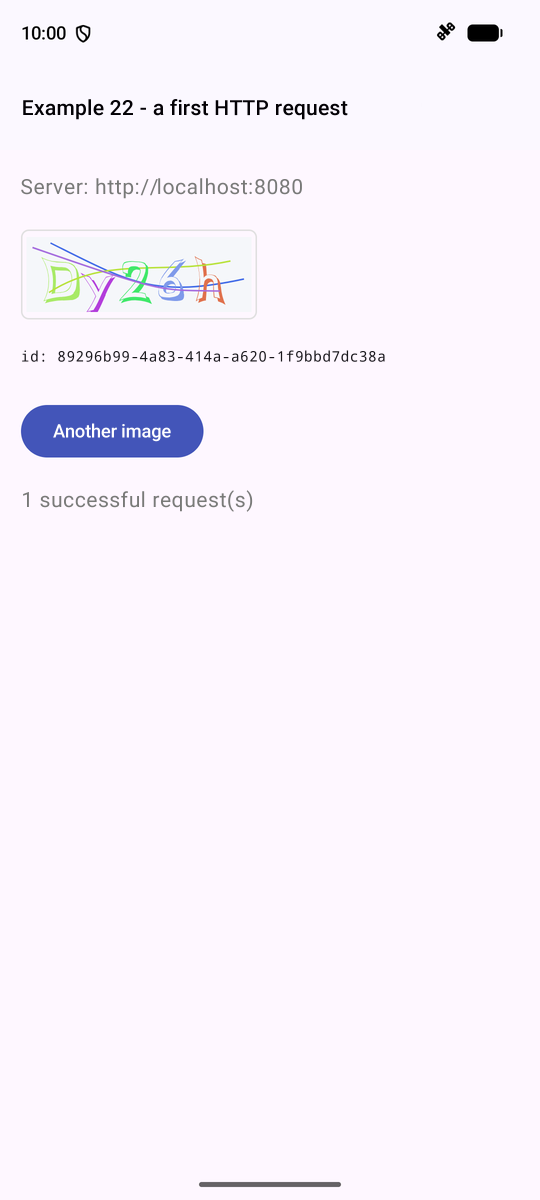
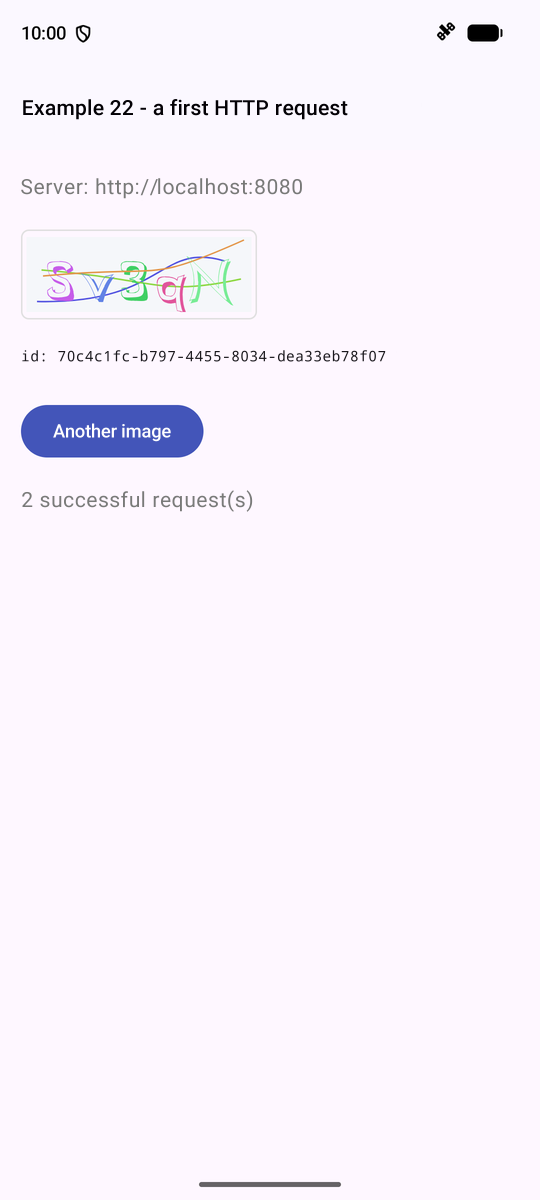
Stop the server, and click “Another image”: the error is displayed.
9.2. Example 23: Login, Cookie, and Session
The server places the token JWT in a COOKIE. In a browser, the browser is responsible for storing cookies and sending them back; the application code doesn’t need to do anything. On a phone, there is no browser: it’s up to the application to handle this. [OkHttp] does so, if provided with a “cookie jar” ([CookieJar]):
| // =========================================================================
// common/HttpClient.kt - an HTTP client that handles COOKIES
// -------------------------------------------------------------------------
// The RdvMedecins server puts the JWT token in a COOKIE (httpOnly).
// In a browser, it is the browser that stores the cookies and sends them
// back with each request: the application's code has nothing to do.
// On a phone, there is NO browser: it is up to the application to
// play its role, that is:
// 1. read the "Set-Cookie" header of each response, and store the cookies;
// 2. send them back in the "Cookie" header of each request.
// The OkHttp library does it for us, if we give it a CookieJar
// (a "cookie jar"): a class with two functions, saveFromResponse
// (store) and loadForRequest (take out). This one also stores the cookies
// on the device (SharedPreferences): we stay logged in when we stop
// then restart the application.
// =========================================================================
package fr.stahe.examples.common
import android.content.Context
import android.content.SharedPreferences
import androidx.core.content.edit
import okhttp3.Cookie
import okhttp3.CookieJar
import okhttp3.HttpUrl
import okhttp3.HttpUrl.Companion.toHttpUrl
import okhttp3.OkHttpClient
import java.util.concurrent.TimeUnit
class DeviceCookieJar(private val storage: SharedPreferences) : CookieJar {
// cookie name -> the cookie (its value, its domain, its expiry...)
private val cookies = mutableMapOf<String, Cookie>()
init {
// the cookies stored during a previous use: each one
// is stored in the form of its Set-Cookie header
val base = Config.serverUrl.toHttpUrl()
for (text in storage.getStringSet(KEY, emptySet()).orEmpty()) {
Cookie.parse(base, text)?.let { cookies[it.name] = it }
}
}
// the response brings cookies: we store them. A cookie already expired
// (logout: the server deletes it this way) is removed
@Synchronized
override fun saveFromResponse(url: HttpUrl, cookies: List<Cookie>) {
for (c in cookies) {
if (c.expiresAt < System.currentTimeMillis() || c.value.isEmpty()) {
this.cookies.remove(c.name)
} else {
this.cookies[c.name] = c
}
}
storage.edit { putStringSet(KEY, this@DeviceCookieJar.cookies.values.map { it.toString() }.toSet()) }
}
// a request leaves: the cookies that concern it (address, path), not expired
@Synchronized
override fun loadForRequest(url: HttpUrl): List<Cookie> =
cookies.values.filter { it.expiresAt >= System.currentTimeMillis() && it.matches(url) }
companion object {
private const val KEY = "rdvmedecins.cookies"
}
}
// the HTTP client of the examples: a single one for the whole application
fun createHttpClient(context: Context): OkHttpClient = OkHttpClient.Builder()
.cookieJar(DeviceCookieJar(context.getSharedPreferences("examples", Context.MODE_PRIVATE)))
// no response after 10 seconds: the request fails
.connectTimeout(10, TimeUnit.SECONDS)
.readTimeout(10, TimeUnit.SECONDS)
.build()
|
- line 29: a [CookieJar] has two functions: [saveFromResponse] (storing cookies from a response) and [loadForRequest] (retrieving those from a request);
- lines 33–38: Upon startup, cookies stored during a previous session—saved on the device ([SharedPreferences], a small key-value file; see Example 20)—are retrieved in the form of their header [Set-Cookie];
- lines 44–53: A cookie that has already expired or is empty is removed; this is how the server deletes the cookie upon logout; [@Synchronized]: [OkHttp] can call these functions from multiple threads at once;
- lines 67–72: the HTTP client from the examples, with its jar and timeouts.
The client is created once for the entire application, within the [Application] object (declared in the manifest), which [Android] creates at launch, before any activity begins:
| // =========================================================================
// ExamplesApplication.kt - the "application" object
// -------------------------------------------------------------------------
// Android creates ONE Application object when the application starts, before
// any activity, and keeps it until it stops (it is declared in
// AndroidManifest.xml, android:name=".ExamplesApplication"). It is
// the place for what must be shared by ALL the activities:
// here, the HTTP client and its cookie jar (examples 23 to 25). An
// activity gets it with (application as ExamplesApplication).api.
// =========================================================================
package fr.stahe.examples
import android.app.Application
import fr.stahe.examples.common.Api
import fr.stahe.examples.common.createHttpClient
import okhttp3.OkHttpClient
class ExamplesApplication : Application() {
// by lazy: created on first request
val httpClient: OkHttpClient by lazy { createHttpClient(this) }
val api: Api by lazy { Api(httpClient) }
}
|
An asynchronous action (log in, save, etc.) has a status that the screen must display: is it in progress? Did it end with an error? A small class handles this:
| // =========================================================================
// ex23/Command.kt - an ACTION, its state, its result
// -------------------------------------------------------------------------
// An asynchronous action (logging in, saving...) has a state that
// the screen must show: is it IN PROGRESS (button disabled)? did it
// end with an ERROR (message)? It is the "Command" pattern, reduced to
// the essentials:
//
// val loginCommand = remember { Command() }
// scope.launch { loginCommand.execute { logIn() } } // launches the action
// loginCommand.inProgress, loginCommand.error // its state
//
// Its two properties are states observed by Compose: the screen is
// redrawn when the action starts and when it ends.
// =========================================================================
package fr.stahe.examples.ex23
import androidx.compose.runtime.getValue
import androidx.compose.runtime.mutableStateOf
import androidx.compose.runtime.setValue
import kotlinx.coroutines.CancellationException
class Command {
var inProgress by mutableStateOf(false)
private set
var error by mutableStateOf<String?>(null)
private set
// executes the action, if another one is not already in progress
suspend fun execute(action: suspend () -> Unit) {
if (inProgress) return // no double submission (double press on the button)
inProgress = true
error = null
try {
action()
} catch (e: CancellationException) {
throw e // a cancelled coroutine must remain cancelled
} catch (e: Exception) {
error = e.message ?: e.toString() // the error is KEPT, to be displayed
} finally {
// finally: executed in ALL cases, success or error
inProgress = false
}
}
fun clearError() {
error = null
}
}
|
- line 31: prevents double submission (double-tapping the button);
- lines 40–42: [finally]: executed in ALL cases, success and error.
The login screen:
| // =========================================================================
// ex23/Ex23Activity.kt - logging in to the RdvMedecins server
// -------------------------------------------------------------------------
// 1. at startup: GET /api/auth/me - are we already logged in?
// (the application may have been stopped; the server, for its part, reads the cookie
// presented to it);
// 2. login: POST /api/auth/login, JSON body { login, password,
// captchaId, captcha }. On success, the server sends the cookie
// of the JWT token (Set-Cookie header);
// 3. protected request: GET /api/doctors. The cookie goes with it;
// 4. logout: POST /api/auth/logout - the server deletes the cookie.
// It is the HTTP client of the application (common/HttpClient.kt), with its
// cookie jar, that stores the cookie and sends it back.
// =========================================================================
package fr.stahe.examples.ex23
import android.os.Bundle
import androidx.activity.ComponentActivity
import androidx.activity.compose.setContent
import androidx.activity.enableEdgeToEdge
import androidx.compose.foundation.layout.Column
import androidx.compose.foundation.layout.Row
import androidx.compose.foundation.layout.Spacer
import androidx.compose.foundation.layout.fillMaxWidth
import androidx.compose.foundation.layout.height
import androidx.compose.foundation.layout.padding
import androidx.compose.material3.Button
import androidx.compose.material3.Card
import androidx.compose.material3.CardDefaults
import androidx.compose.material3.MaterialTheme
import androidx.compose.material3.OutlinedButton
import androidx.compose.material3.OutlinedTextField
import androidx.compose.material3.Text
import androidx.compose.material3.TextButton
import androidx.compose.runtime.Composable
import androidx.compose.runtime.LaunchedEffect
import androidx.compose.runtime.getValue
import androidx.compose.runtime.mutableStateOf
import androidx.compose.runtime.remember
import androidx.compose.runtime.rememberCoroutineScope
import androidx.compose.runtime.setValue
import androidx.compose.ui.Alignment
import androidx.compose.ui.Modifier
import androidx.compose.ui.graphics.Color
import androidx.compose.ui.text.SpanStyle
import androidx.compose.ui.text.buildAnnotatedString
import androidx.compose.ui.text.font.FontWeight
import androidx.compose.ui.text.input.PasswordVisualTransformation
import androidx.compose.ui.text.withStyle
import androidx.compose.ui.unit.dp
import androidx.compose.ui.unit.sp
import fr.stahe.examples.ExamplesApplication
import fr.stahe.examples.common.Config
import fr.stahe.examples.common.SvgImage
import fr.stahe.examples.common.ExamplePage
import fr.stahe.examples.common.ExamplesTheme
import kotlinx.coroutines.Dispatchers
import kotlinx.coroutines.launch
import kotlinx.coroutines.withContext
import kotlinx.serialization.json.Json
import kotlinx.serialization.json.JsonArray
import kotlinx.serialization.json.JsonElement
import kotlinx.serialization.json.JsonObject
import kotlinx.serialization.json.buildJsonObject
import kotlinx.serialization.json.jsonArray
import kotlinx.serialization.json.jsonObject
import kotlinx.serialization.json.jsonPrimitive
import kotlinx.serialization.json.put
import okhttp3.MediaType.Companion.toMediaType
import okhttp3.OkHttpClient
import okhttp3.Request
import okhttp3.RequestBody.Companion.toRequestBody
// the few messages this example needs (example 25 will use dictionaries)
val messages = mapOf(
"LOGIN.ERROR" to "Incorrect login or password.",
"ERRORS.WRONG_CAPTCHA" to "The characters do not match the image.",
"ERRORS.TOO_MANY_ATTEMPTS" to "Too many failed attempts. Try again later.",
)
// a response that is not a 2xx becomes an exception, which keeps its code and its body
class ErrorResponse(val code: Int, val body: String) : Exception("the server responded $code")
// an HTTP response reduced to what interests us
data class Response(val code: Int, val body: String)
class Ex23Activity : ComponentActivity() {
override fun onCreate(savedInstanceState: Bundle?) {
super.onCreate(savedInstanceState)
enableEdgeToEdge()
// the HTTP client of the application, with its cookie jar
val client = (application as ExamplesApplication).httpClient
setContent { ExamplesTheme { LoginPage(client) } }
}
}
// executing a request, on the input-output thread
suspend fun send(client: OkHttpClient, request: Request): Response = withContext(Dispatchers.IO) {
client.newCall(request).execute().use { Response(it.code, it.body?.string().orEmpty()) }
}
@Composable
fun LoginPage(client: OkHttpClient) {
var user by remember { mutableStateOf<JsonObject?>(null) } // null: nobody is logged in
var doctors by remember { mutableStateOf<JsonArray?>(null) }
var captcha by remember { mutableStateOf<JsonObject?>(null) }
var ready by remember { mutableStateOf(false) } // is the initial check finished?
var serverError by remember { mutableStateOf<String?>(null) }
val loginCommand = remember { Command() }
var login by remember { mutableStateOf("admin") }
var password by remember { mutableStateOf("") }
var captchaAnswer by remember { mutableStateOf("") }
val scope = rememberCoroutineScope()
fun url(path: String) = "${Config.serverUrl}/api$path"
// a GET request whose JSON body we want; an exception if it is not a 2xx
suspend fun read(path: String): JsonElement {
val r = send(client, Request.Builder().url(url(path)).build())
if (r.code >= 300) throw ErrorResponse(r.code, r.body)
return Json.parseToJsonElement(r.body)
}
// a POST with a JSON body
suspend fun post(path: String, body: JsonObject): Response =
send(client, Request.Builder().url(url(path)).post(body.toString().toRequestBody("application/json".toMediaType())).build())
suspend fun loadCaptcha() {
captcha = read("/captcha").jsonObject
captchaAnswer = ""
}
suspend fun loadDoctors() {
doctors = read("/doctors").jsonArray
}
// 1. who is logged in? 200 -> the user; 401 -> nobody
LaunchedEffect(Unit) {
try {
user = read("/auth/me").jsonObject
loadDoctors()
} catch (e: ErrorResponse) {
// "catch (e: Type)": ONLY catches this type of exception
if (e.code == 401) loadCaptcha() else serverError = "The server responded ${e.code}."
} catch (e: java.io.IOException) {
serverError = "Is the RdvMedecins JSON server running (${Config.serverUrl})?"
}
ready = true
}
// 2. the login: an action executed by the Command, which remembers its error
suspend fun logIn() {
val r = post(
"/auth/login",
buildJsonObject {
put("login", login.trim())
put("password", password)
put("captchaId", captcha?.get("id")?.jsonPrimitive?.content)
put("captcha", captchaAnswer)
},
)
if (r.code != 200) {
// the JSON body of the error response: { statusCode, key, ... }
val key = Json.parseToJsonElement(r.body).jsonObject["key"]!!.jsonPrimitive.content
loadCaptcha() // each image is only used once
throw Exception("${r.code} - ${messages[key] ?: key}")
}
password = ""
user = Json.parseToJsonElement(r.body).jsonObject
loadDoctors()
}
// 4. the logout
suspend fun logOut() {
post("/auth/logout", JsonObject(emptyMap()))
user = null
doctors = null
loadCaptcha()
}
// a JSON text -> its value, without the quotes
fun JsonObject.text(key: String) = this[key]?.jsonPrimitive?.content.orEmpty()
ExamplePage("Example 23 - logging in to the server") {
val u = user
when {
!ready -> Text("Checking the session...", color = Color.Gray)
// logged in
u != null -> Card(Modifier.fillMaxWidth()) {
Column(Modifier.padding(12.dp)) {
Text(
buildAnnotatedString {
append("Logged in: ")
withStyle(SpanStyle(fontWeight = FontWeight.Bold)) { append(u.text("name")) }
append(" (${u.text("login")}), role ${u.text("role")}")
},
)
Spacer(Modifier.height(8.dp))
Text("GET /api/doctors", style = MaterialTheme.typography.titleSmall)
for (d in doctors.orEmpty()) {
val o = d.jsonObject
Text("• ${o.text("title")} ${o.text("firstName")} ${o.text("lastName")}")
}
Spacer(Modifier.height(8.dp))
Text("Stop then restart the application: you stay logged in.", color = Color.Gray)
Spacer(Modifier.height(8.dp))
OutlinedButton(onClick = { scope.launch { logOut() } }) { Text("Log out") }
}
}
// not logged in: the form
serverError == null -> Card(Modifier.fillMaxWidth()) {
Column(Modifier.padding(12.dp)) {
OutlinedTextField(login, { login = it }, label = { Text("Login") }, singleLine = true, modifier = Modifier.fillMaxWidth())
OutlinedTextField(
password,
{ password = it },
label = { Text("Password") },
singleLine = true,
visualTransformation = PasswordVisualTransformation(),
modifier = Modifier.fillMaxWidth(),
)
Spacer(Modifier.height(12.dp))
Row(verticalAlignment = Alignment.CenterVertically) {
captcha?.let { SvgImage(it.text("svg"), height = 50.dp) }
TextButton(onClick = { scope.launch { runCatching { loadCaptcha() } } }) { Text("Another image") }
}
OutlinedTextField(
captchaAnswer,
{ captchaAnswer = it },
label = { Text("Copy the characters of the image") },
singleLine = true,
modifier = Modifier.fillMaxWidth(),
)
Spacer(Modifier.height(16.dp))
// this piece follows the state of the command
Button(onClick = { scope.launch { loginCommand.execute { logIn() } } }, enabled = !loginCommand.inProgress) {
Text(if (loginCommand.inProgress) "Logging in..." else "Log in")
}
loginCommand.error?.let { Text(it, color = Color.Red, modifier = Modifier.padding(top = 12.dp)) }
Spacer(Modifier.height(8.dp))
Text("Accounts: admin, pelissier, martin... (password = login).", color = Color.Gray, fontSize = 12.sp)
}
}
}
serverError?.let {
Card(colors = CardDefaults.cardColors(containerColor = Color(0xFFFFEBEE))) { Text(it, Modifier.padding(12.dp)) }
}
}
}
|
- Line 92: the application’s HTTP client ([application as ExamplesApplication]: a type conversion);
- Lines 138–148: At startup, [GET /api/auth/me]: Are we already logged in? The application may have been shut down; however, the cookie was retained on the device. [catch (e: ErrorResponse)] catches ONLY this type of exception; a 401 means “unauthorized”;
- lines 152–170: [POST /api/auth/login], body JSON generated by [buildJsonObject]. If the attempt fails, the response body provides the error code; a new CAPTCHA is requested (each image is used only once);
- lines 174–178: logout, [POST /api/auth/logout]: the server deletes the cookie;
- line 182: an extension function LOCAL, to read text from an object JSON;
- lines 236–239: the button tracks the state of the command.
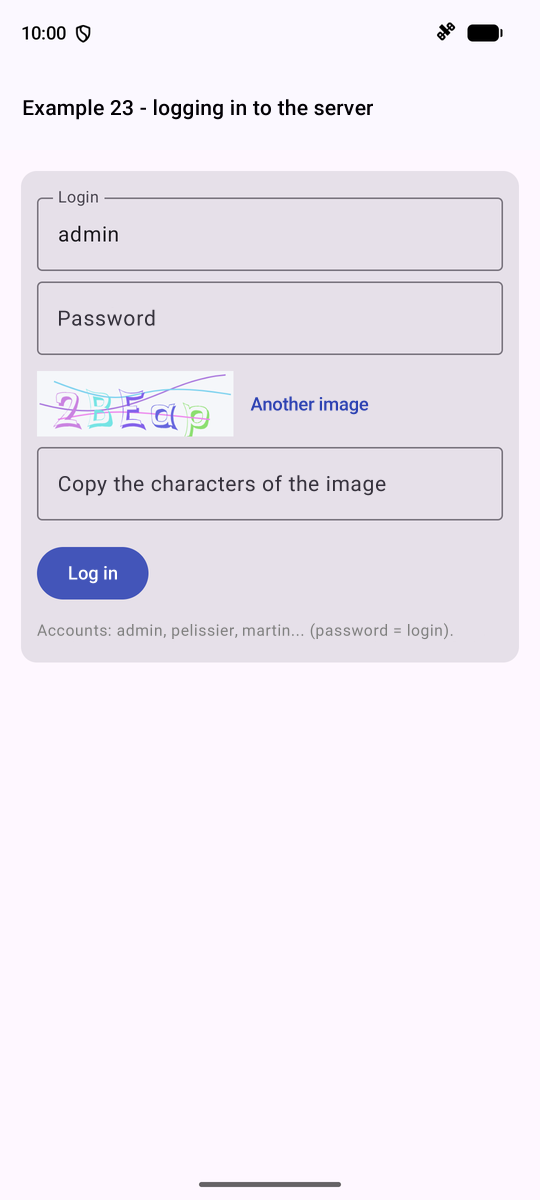
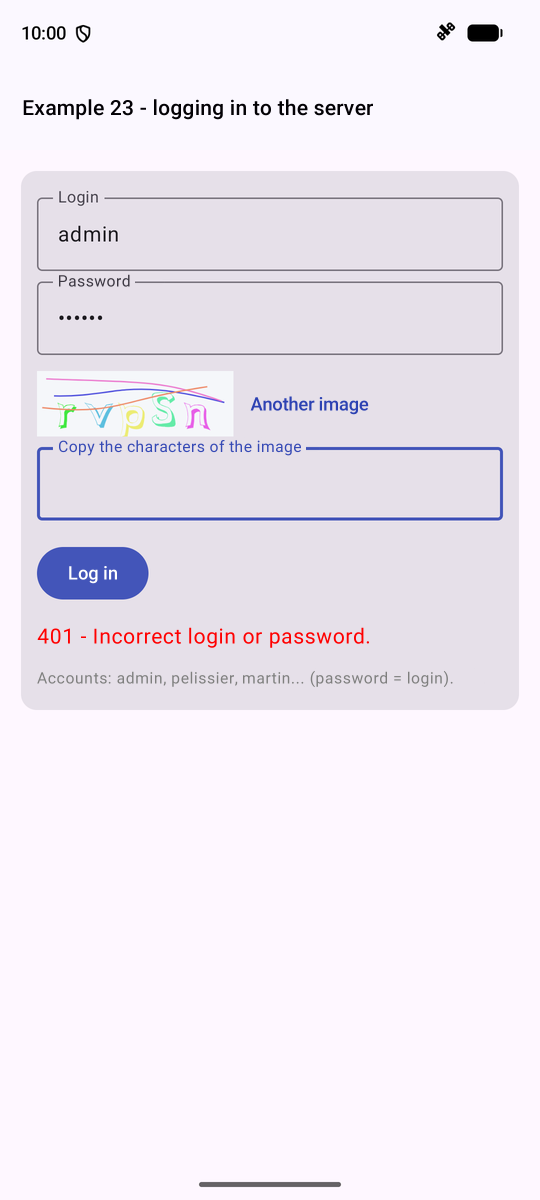
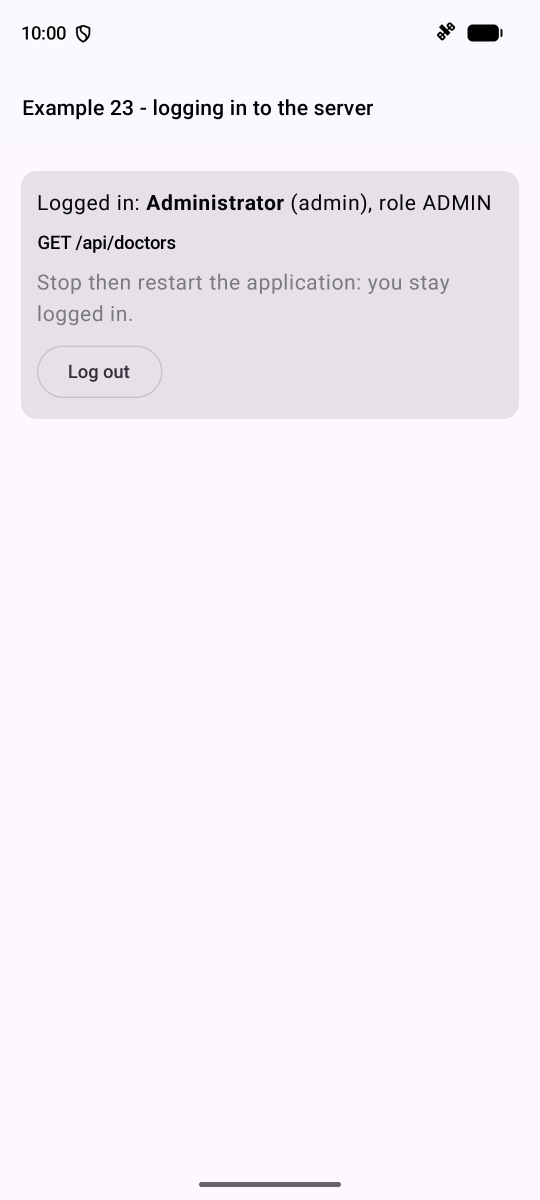
Stop the application (by removing it from the list of recent apps), then restart the example: you are still logged in.
9.3. Example 24: An Access Layer for API
Example 23 repeats the same steps for each request: server address, [/api] prefix, JSON body, status code check, and reading the error body. These are grouped into three layers. The first layer executes a request and converts ANY error into a single exception class:
| // =========================================================================
// common/ApiError.kt - ONE class for all the API errors
// -------------------------------------------------------------------------
// All the error responses of the RdvMedecins server have the same shape:
// { "statusCode": 409, "key": "ERRORS.LOGIN_TAKEN", "params": {...}, "fields": {...} }
// But a request can also fail OTHERWISE: no response at all
// (network down, server stopped, wrong address), or a response that does
// not come from our server (an error page from a proxy). We convert
// all of this into ONE exception class, ApiError, which carries the translation
// key sent by the server (and, if any, its parameters and
// the error of each field).
// =========================================================================
package fr.stahe.examples.common
import kotlinx.serialization.json.Json
import kotlinx.serialization.json.JsonObject
import kotlinx.serialization.json.JsonPrimitive
import kotlinx.serialization.json.jsonObject
class ApiError(
val statusCode: Int, // 0: the server did not respond
val key: String, // e.g.: "ERRORS.LOGIN_TAKEN"
val params: Map<String, String> = emptyMap(),
val fields: Map<String, String> = emptyMap(),
) : Exception("$statusCode $key") {
override fun toString() = "$statusCode $key"
// companion object: what belongs to the CLASS (Java's "static")
companion object {
// an error response (4xx, 5xx) -> an ApiError
fun fromResponse(statusCode: Int, body: String): ApiError {
// runCatching: the result, or null if the body is not JSON
// (it is then not our server that responded)
val json = runCatching { Json.parseToJsonElement(body).jsonObject }.getOrNull()
val key = (json?.get("key") as? JsonPrimitive)?.content
if (json == null || key == null) {
return ApiError(statusCode, if (statusCode >= 500) "ERRORS.SERVER_UNREACHABLE" else "ERRORS.SERVER_ERROR")
}
return ApiError(statusCode, key, strings(json["params"]), strings(json["fields"]))
}
// a JSON object { "name": "ERRORS..." } -> Map<String, String> (empty otherwise)
private fun strings(json: Any?): Map<String, String> =
(json as? JsonObject)?.mapValues { (_, v) -> (v as? JsonPrimitive)?.content ?: v.toString() } ?: emptyMap()
}
}
// =========================================================================
// common/Api.kt - requests to the API, in one line
// -------------------------------------------------------------------------
// In example 23, each request repeats the same steps: server
// address, /api prefix, JSON body, test of the status code, reading of the
// error body... They are grouped here:
//
// val json = api.get("/doctors")
// api.post("/appointments", buildJsonObject { put("day", day); put("slotId", 3) })
//
// - on success, the function returns the JSON body (a JsonElement:
// an object, an array...), or null for an empty body;
// - on failure, it throws an ApiError.
// They are SUSPEND functions: they wait for the server's response
// without blocking the phone. The request itself is executed on a thread
// reserved for input-output (Dispatchers.IO): Android
// forbids network access on the screen's thread.
// All the requests go through the request function: it is the place where
// a problem COMMON to all of them would be handled (cf. the case study and the
// 401 response). Used by examples 24 and 25.
// =========================================================================
package fr.stahe.examples.common
import kotlinx.coroutines.Dispatchers
import kotlinx.coroutines.withContext
import kotlinx.serialization.json.Json
import kotlinx.serialization.json.JsonElement
import kotlinx.serialization.json.JsonObject
import okhttp3.MediaType.Companion.toMediaType
import okhttp3.OkHttpClient
import okhttp3.Request
import okhttp3.RequestBody.Companion.toRequestBody
import java.io.IOException
class Api(private val client: OkHttpClient) {
suspend fun request(method: String, url: String, body: JsonElement? = null): JsonElement? =
withContext(Dispatchers.IO) {
// a JSON body (the server rejects a POST that does not have one)
val httpBody = body?.toString()?.toRequestBody("application/json".toMediaType())
val request = Request.Builder().url("${Config.serverUrl}/api$url").method(method, httpBody).build()
try {
// use: the response is closed (released) at the end of the block
client.newCall(request).execute().use { response ->
val text = response.body?.string().orEmpty()
if (!response.isSuccessful) throw ApiError.fromResponse(response.code, text)
if (text.isEmpty()) null else Json.parseToJsonElement(text)
}
} catch (e: IOException) {
// NO response (network, server stopped, wrong address)
throw ApiError(0, "ERRORS.SERVER_UNREACHABLE")
}
}
suspend fun get(url: String) = request("GET", url)
// a POST always has a JSON body: {} by default
suspend fun post(url: String, body: JsonElement = JsonObject(emptyMap())) = request("POST", url, body)
suspend fun put(url: String, body: JsonElement) = request("PUT", url, body)
suspend fun delete(url: String, body: JsonElement? = null) = request("DELETE", url, body)
}
|
- lines 37–47: if successful, the function returns the JSON body ([JsonElement]), or [null] for an empty body; if unsuccessful, a [ApiError];
- lines 55–62: shortcuts via the HTTP method.
The exchanged JSON objects become [Kotlin] and [@Serializable] classes:
| // =========================================================================
// common/Types.kt - the JSON objects exchanged with the RdvMedecins API
// (cf. the chapter on the black box, which describes each route)
// -------------------------------------------------------------------------
// Each class is @Serializable: the kotlinx.serialization plugin writes
// for it the code that builds it from JSON. Reading CHECKS the
// shape of the received JSON: a missing field or one of a wrong type throws an
// exception on reception, and not later, in the middle of the display.
// val u = json.decodeFromJsonElement<User>(response)
// An OPTIONAL field has a default value (login: String? = null).
// =========================================================================
package fr.stahe.examples.common
import kotlinx.serialization.Serializable
import kotlinx.serialization.json.Json
import kotlinx.serialization.json.JsonElement
import kotlinx.serialization.serializer
enum class Role { ADMIN, DOCTOR, USER }
// POST /api/auth/login, GET /api/auth/me
@Serializable
data class User(val login: String, val name: String, val role: Role)
// GET /api/captcha
@Serializable
data class Captcha(val id: String, val svg: String)
// a doctor or a client (GET /api/doctors, GET /api/clients...)
@Serializable
data class Person(
val id: Int,
val version: Int,
val title: String,
val firstName: String,
val lastName: String,
val login: String? = null, // only for the ADMIN
) {
val fullName get() = "$title $firstName $lastName"
}
// the name of a person, nothing else
@Serializable
data class Identity(val title: String, val firstName: String, val lastName: String) {
override fun toString() = "$title $firstName $lastName"
}
// a line of GET /api/schedule
@Serializable
data class ScheduleSlot(
val id: Int,
val startHour: Int,
val startMinute: Int,
val endHour: Int,
val endMinute: Int,
val free: Boolean,
val patient: Identity?,
val mine: Boolean,
val bookable: Boolean,
val appointmentId: Int?,
) {
// "8:00 - 8:20"
val timeRange: String
get() {
fun hm(h: Int, m: Int) = "$h:${m.toString().padStart(2, '0')}"
return "${hm(startHour, startMinute)} - ${hm(endHour, endMinute)}"
}
}
// GET /api/schedule?doctorId=...&day=...
@Serializable
data class Schedule(val doctor: Person, val day: String, val slots: List<ScheduleSlot>, val info: String?)
// the JSON reader: ignoreUnknownKeys, the fields the client does not use
// are ignored (the server can add some without breaking the client)
val apiJson = Json { ignoreUnknownKeys = true }
// JsonElement -> Kotlin object: a "reified" generic function (the type T
// is known at run time); serializer<T>(): the code written by the plugin
inline fun <reified T> JsonElement?.read(): T =
apiJson.decodeFromJsonElement(serializer<T>(), this ?: throw IllegalStateException("empty response"))
|
- line 37: an optional field has a default value; [Identity?]: an object, or [null];
- line 76: [ignoreUnknownKeys]: fields that the client does not use are ignored (the server can add them without breaking the client);
- lines 80–81: an extension function GENERIC is “reified” ([reified]: the type [T] is known at runtime, which is permitted by [inline]). [serializer<T>()]: the code written by the plugin for [T]. Reading CHECKS the format of the JSON: a missing field or a field of the wrong type throws an exception upon receipt, rather than later, in the middle of the display.
The second layer: a type-safe function per route for API. The screens no longer recognize URL, [OkHttp], or JSON. This is the client-side equivalent of the DAO layer on the server side; in the [Android] architecture guide, a “repository”:
| // =========================================================================
// ex24/RdvMedecins.kt - the API access layer
// -------------------------------------------------------------------------
// One typed function per API route. The screens know neither the
// URLs, nor OkHttp, nor the JSON format: they call functions that
// return Kotlin objects (Person, Schedule...).
// It is the client-side equivalent of the server-side DAO layer: if the API
// changes (a URL, a field name), only this file is modified. In the
// Android architecture guide, it is a "repository".
// =========================================================================
package fr.stahe.examples.ex24
import android.net.Uri
import fr.stahe.examples.common.Schedule
import fr.stahe.examples.common.Api
import fr.stahe.examples.common.Person
import fr.stahe.examples.common.read
import kotlinx.serialization.json.buildJsonObject
import kotlinx.serialization.json.put
class RdvMedecins(private val api: Api) {
suspend fun getDoctors(): List<Person> = api.get("/doctors").read()
suspend fun getClients(): List<Person> = api.get("/clients").read()
// Uri.Builder builds "doctorId=1&day=2030-01-15", encoding what needs to be
suspend fun getSchedule(doctorId: Int, day: String): Schedule {
val params = Uri.Builder()
.appendQueryParameter("doctorId", "$doctorId")
.appendQueryParameter("day", day)
.build().encodedQuery
return api.get("/schedule?$params").read()
}
// clientId: optional; the key is only placed in the JSON if it is not null
suspend fun book(day: String, slotId: Int, clientId: Int? = null) {
api.post(
"/appointments",
buildJsonObject {
put("day", day)
put("slotId", slotId)
if (clientId != null) put("clientId", clientId)
},
)
}
suspend fun cancelAppointment(appointmentId: Int) {
api.delete("/appointments/$appointmentId")
}
}
|
- line 22: [api.get("/doctors").read()]: the expected type, [List<Person>], is inferred from the function’s return type;
- lines 28–31: [Uri.Builder] constructs the parameter string, encoding the necessary information.
The third layer: the screen's state and actions, in a [ViewModel] (see Example 20). This time, the state consists of [Compose] ([mutableStateOf]) properties, which are easier to read than a [StateFlow] when only the screen observes them:
| // =========================================================================
// ex24/ScheduleModel.kt - the "view model" of the screen
// -------------------------------------------------------------------------
// The Android architecture guide recommends separating:
// - the VIEW: the @Composable functions, which display and pass on the
// user's actions;
// - the VIEW MODEL (ViewModel): the state of the screen (the chosen doctor,
// the day, the received schedule...), the actions (choose, book, cancel),
// and the calls to the API access layer.
// The view no longer has any logic: it is easy to read; the view model
// has no components: it is easy to test. And it survives the
// recreation of the activity (screen rotation).
// The actions launch their coroutines in viewModelScope: they are
// cancelled if the ViewModel is destroyed (activity closed for good).
//
// It also does what we do not want to rewrite for each screen:
// - a CACHE: the schedule of each (doctor, day) already read is kept; coming
// back to it displays it at once, while it is read again in the background;
// - STALE responses are ignored: a new reading CANCELS the
// previous one (cf. example 19).
// =========================================================================
package fr.stahe.examples.ex24
import androidx.compose.runtime.getValue
import androidx.compose.runtime.mutableStateOf
import androidx.compose.runtime.setValue
import androidx.lifecycle.ViewModel
import androidx.lifecycle.viewModelScope
import fr.stahe.examples.common.Schedule
import fr.stahe.examples.common.ScheduleSlot
import fr.stahe.examples.common.ApiError
import fr.stahe.examples.common.Person
import fr.stahe.examples.common.Role
import fr.stahe.examples.common.User
import kotlinx.coroutines.Job
import kotlinx.coroutines.launch
import java.time.LocalDate
// a message displayed to the user
data class Message(val success: Boolean, val text: String)
class ScheduleModel(private val rdvmedecins: RdvMedecins) : ViewModel() {
// ---- the state: Compose states, modifiable only here ----
var user by mutableStateOf<User?>(null)
private set
var doctors by mutableStateOf(listOf<Person>())
private set
var clients by mutableStateOf(listOf<Person>())
private set
var doctorId by mutableStateOf<Int?>(null)
private set
var day by mutableStateOf(LocalDate.now().plusDays(1).toString()) // tomorrow, "2026-10-06"
private set
var clientId by mutableStateOf<Int?>(null)
private set
var schedule by mutableStateOf<Schedule?>(null)
private set
var loading by mutableStateOf(false)
private set
var message by mutableStateOf<Message?>(null)
private set
private val cache = mutableMapOf<String, Schedule>()
private var reading: Job? = null
// ---- computed values ----
val loggedIn get() = user != null
val isManager get() = user.let { it != null && it.role != Role.USER }
// ---- the actions ----
fun changeUser(u: User?) {
user = u
doctors = emptyList()
clients = emptyList()
schedule = null
doctorId = null
cache.clear() // the rights have changed: everything is forgotten
if (u == null) return
viewModelScope.launch {
try {
doctors = rdvmedecins.getDoctors()
if (isManager) clients = rdvmedecins.getClients() // a USER would receive 403
} catch (e: ApiError) {
message = Message(false, e.toString())
}
}
}
fun chooseDoctor(id: Int?) {
doctorId = id
message = null
readSchedule()
}
fun chooseDay(d: LocalDate) {
day = d.toString()
message = null
readSchedule()
}
fun chooseClient(id: Int?) {
clientId = id
}
fun book(s: ScheduleSlot) = act("Slot ${s.timeRange} booked.") {
rdvmedecins.book(day, s.id, if (isManager) clientId else null)
}
fun cancel(s: ScheduleSlot) = act("Appointment at ${s.timeRange} cancelled.") { rdvmedecins.cancelAppointment(s.appointmentId!!) }
// an action, then ALWAYS a new reading of the schedule: the SERVER is the reference
private fun act(success: String, action: suspend () -> Unit) {
viewModelScope.launch {
message = try {
action()
Message(true, success)
} catch (e: ApiError) {
Message(false, e.toString())
}
readSchedule()
}
}
private fun readSchedule() {
val id = doctorId ?: return
val key = "$id/$day"
// an older reading is still in progress: it is cancelled
reading?.cancel()
// the cache first (or nothing), then the reading
schedule = cache[key]
loading = true
reading = viewModelScope.launch {
try {
val read = rdvmedecins.getSchedule(id, day)
cache[key] = read
schedule = read
} catch (e: ApiError) {
schedule = null
message = Message(false, e.toString())
}
loading = false
}
}
}
|
- lines 44–62: the state, which can only be modified here;
- lines 70–83: a user switch—everything is cleared (permissions have changed), then reloaded. [viewModelScope.launch]: a coroutine that lives as long as [ViewModel];
- lines 111–119: each action ALWAYS ends by re-reading the calendar: the SERVER is the authoritative version;
- lines 123–140: reading the calendar: any older read operation still in progress is canceled; the cache provides an immediate response, which is then replaced by the server’s response.
The view, which simply displays the model. The connection is handled by a reusable component, the [common/LoginBar.kt] bar (the form from Example 23, rewritten with [Api]):
| // =========================================================================
// common/LoginBar.kt - login / logout, in one bar
// -------------------------------------------------------------------------
// The form of example 23, reduced to a bar and rewritten with Api.kt.
// The component calls onUserChange with the logged-in user (or
// null) each time it changes - including at startup, after
// querying GET /api/auth/me. Used by examples 24 and 25.
// =========================================================================
package fr.stahe.examples.common
import androidx.compose.foundation.layout.Column
import androidx.compose.foundation.layout.Row
import androidx.compose.foundation.layout.Spacer
import androidx.compose.foundation.layout.padding
import androidx.compose.foundation.layout.width
import androidx.compose.material.icons.Icons
import androidx.compose.material.icons.automirrored.filled.ExitToApp
import androidx.compose.material.icons.filled.Check
import androidx.compose.material.icons.filled.Person
import androidx.compose.material3.Card
import androidx.compose.material3.CardDefaults
import androidx.compose.material3.Icon
import androidx.compose.material3.IconButton
import androidx.compose.material3.OutlinedTextField
import androidx.compose.material3.Text
import androidx.compose.material3.TextButton
import androidx.compose.runtime.Composable
import androidx.compose.runtime.LaunchedEffect
import androidx.compose.runtime.getValue
import androidx.compose.runtime.mutableStateOf
import androidx.compose.runtime.rememberCoroutineScope
import androidx.compose.runtime.saveable.rememberSaveable
import androidx.compose.runtime.setValue
import androidx.compose.runtime.remember
import androidx.compose.ui.Alignment
import androidx.compose.ui.Modifier
import androidx.compose.ui.graphics.Color
import androidx.compose.ui.text.input.PasswordVisualTransformation
import androidx.compose.ui.unit.dp
import kotlinx.coroutines.launch
import kotlinx.serialization.json.buildJsonObject
import kotlinx.serialization.json.put
@Composable
fun LoginBar(api: Api, onUserChange: (User?) -> Unit) {
var user by remember { mutableStateOf<User?>(null) }
var captcha by remember { mutableStateOf<Captcha?>(null) }
var login by rememberSaveable { mutableStateOf("admin") }
var password by rememberSaveable { mutableStateOf("") }
var captchaAnswer by rememberSaveable { mutableStateOf("") }
var error by remember { mutableStateOf<String?>(null) }
val scope = rememberCoroutineScope()
fun changeUser(u: User?) {
user = u
onUserChange(u)
}
suspend fun newCaptcha() {
captcha = api.get("/captcha").read<Captcha>()
captchaAnswer = ""
}
// at startup: are we already logged in?
LaunchedEffect(Unit) {
try {
changeUser(api.get("/auth/me").read<User>())
} catch (e: ApiError) {
changeUser(null) // 401: nobody is logged in
try {
newCaptcha()
} catch (e: ApiError) {
error = "Is the JSON server running (${Config.serverUrl})?"
}
}
}
suspend fun logIn() {
error = null
try {
val body = buildJsonObject {
put("login", login.trim())
put("password", password)
put("captchaId", captcha?.id)
put("captcha", captchaAnswer)
}
val u = api.post("/auth/login", body).read<User>()
password = ""
changeUser(u)
} catch (e: ApiError) {
error = e.toString() // "401 LOGIN.ERROR"
runCatching { newCaptcha() }
}
}
suspend fun logOut() {
runCatching { api.post("/auth/logout") }
changeUser(null)
runCatching { newCaptcha() }
}
Card(colors = CardDefaults.cardColors(containerColor = Color(0xFFECEFF1))) {
val u = user
if (u != null) {
Row(Modifier.padding(8.dp), verticalAlignment = Alignment.CenterVertically) {
Icon(Icons.Default.Person, contentDescription = null)
Spacer(Modifier.width(8.dp))
Text("${u.name} (${u.role})", Modifier.weight(1f))
TextButton(onClick = { scope.launch { logOut() } }) {
Icon(Icons.AutoMirrored.Filled.ExitToApp, contentDescription = null)
Text("Log out")
}
}
} else {
Column(Modifier.padding(8.dp)) {
Row {
OutlinedTextField(login, { login = it }, label = { Text("login") }, singleLine = true, modifier = Modifier.weight(1f))
Spacer(Modifier.width(8.dp))
OutlinedTextField(
password,
{ password = it },
label = { Text("password") },
singleLine = true,
visualTransformation = PasswordVisualTransformation(),
modifier = Modifier.weight(1f),
)
}
Row(verticalAlignment = Alignment.CenterVertically) {
// the SVG image of the captcha, made by OUR server (cf. example 22)
captcha?.let { SvgImage(it.svg, height = 40.dp) }
Spacer(Modifier.width(8.dp))
OutlinedTextField(captchaAnswer, { captchaAnswer = it }, label = { Text("captcha") }, singleLine = true, modifier = Modifier.weight(1f))
IconButton(onClick = { scope.launch { logIn() } }) {
Icon(Icons.Default.Check, contentDescription = "Log in")
}
}
error?.let { Text(it, color = Color.Red) }
}
}
}
}
// =========================================================================
// ex24/Ex24Activity.kt - a schedule, with the API access layer
// -------------------------------------------------------------------------
// Log in (top bar), choose a doctor and a day:
// the schedule is displayed. ADMIN and DOCTOR can book for a patient and
// cancel; a patient (martin...) books for himself. Each action
// ends with a new reading of the schedule.
// Three layers, from the bottom up:
// Api (common/Api.kt) the HTTP requests, the errors;
// RdvMedecins (RdvMedecins.kt) one typed function per API route;
// ScheduleModel (ScheduleModel.kt) the state and the actions of the screen;
// and the view, below, which only displays the model.
// =========================================================================
@file:OptIn(ExperimentalMaterial3Api::class)
package fr.stahe.examples.ex24
import android.os.Bundle
import androidx.activity.ComponentActivity
import androidx.activity.compose.setContent
import androidx.activity.enableEdgeToEdge
import androidx.compose.foundation.layout.Row
import androidx.compose.foundation.layout.fillMaxWidth
import androidx.compose.foundation.layout.padding
import androidx.compose.foundation.layout.width
import androidx.compose.material.icons.Icons
import androidx.compose.material.icons.filled.AddCircle
import androidx.compose.material.icons.filled.Close
import androidx.compose.material.icons.filled.DateRange
import androidx.compose.material3.Card
import androidx.compose.material3.CardDefaults
import androidx.compose.material3.DatePicker
import androidx.compose.material3.DatePickerDialog
import androidx.compose.material3.ExperimentalMaterial3Api
import androidx.compose.material3.Icon
import androidx.compose.material3.IconButton
import androidx.compose.material3.LinearProgressIndicator
import androidx.compose.material3.ListItem
import androidx.compose.material3.MaterialTheme
import androidx.compose.material3.SuggestionChip
import androidx.compose.material3.SuggestionChipDefaults
import androidx.compose.material3.Text
import androidx.compose.material3.TextButton
import androidx.compose.material3.rememberDatePickerState
import androidx.compose.runtime.Composable
import androidx.compose.runtime.getValue
import androidx.compose.runtime.mutableStateOf
import androidx.compose.runtime.remember
import androidx.compose.runtime.setValue
import androidx.compose.ui.Alignment
import androidx.compose.ui.Modifier
import androidx.compose.ui.graphics.Color
import androidx.compose.ui.unit.dp
import androidx.lifecycle.viewmodel.compose.viewModel
import fr.stahe.examples.ExamplesApplication
import fr.stahe.examples.common.Api
import fr.stahe.examples.common.LoginBar
import fr.stahe.examples.common.ScheduleSlot
import fr.stahe.examples.common.DropdownList
import fr.stahe.examples.common.ExamplePage
import fr.stahe.examples.common.ExamplesTheme
import java.time.Instant
import java.time.LocalDate
import java.time.ZoneOffset
class Ex24Activity : ComponentActivity() {
override fun onCreate(savedInstanceState: Bundle?) {
super.onCreate(savedInstanceState)
enableEdgeToEdge()
val api = (application as ExamplesApplication).api
setContent { ExamplesTheme { SchedulePage(api) } }
}
}
@Composable
fun SchedulePage(api: Api) {
// viewModel { ... }: the model of the activity, created by this block on the
// first request (it needs a parameter: the API access layer)
val model = viewModel { ScheduleModel(RdvMedecins(api)) }
var calendarOpen by remember { mutableStateOf(false) }
ExamplePage("Example 24 - an API access layer") {
LoginBar(api, onUserChange = { model.changeUser(it) })
if (model.loggedIn) {
DropdownList(
label = "Doctor",
value = model.doctorId,
choices = listOf<Int?>(null) + model.doctors.map { it.id },
text = { id -> model.doctors.find { it.id == id }?.fullName ?: "-- choose a doctor --" },
onChange = { model.chooseDoctor(it) },
modifier = Modifier.fillMaxWidth(),
)
Row(verticalAlignment = Alignment.CenterVertically) {
Text("Day: ${model.day}")
IconButton(onClick = { calendarOpen = true }) { Icon(Icons.Default.DateRange, contentDescription = "choose the day") }
}
if (model.isManager) {
DropdownList(
label = "Patient",
value = model.clientId,
choices = listOf<Int?>(null) + model.clients.map { it.id },
text = { id -> model.clients.find { it.id == id }?.fullName ?: "-- patient to book for --" },
onChange = { model.chooseClient(it) },
modifier = Modifier.fillMaxWidth(),
)
}
model.message?.let { m ->
Card(colors = CardDefaults.cardColors(containerColor = if (m.success) Color(0xFFE8F5E9) else Color(0xFFFFEBEE))) {
Text(m.text, Modifier.padding(10.dp))
}
}
if (model.loading) LinearProgressIndicator(Modifier.fillMaxWidth())
model.schedule?.let { schedule ->
// info: the key sent by the server when a patient already has an upcoming appointment
schedule.info?.let { Text(it, color = Color(0xFF1976D2)) }
Text(
"Schedule of ${schedule.day} - ${schedule.doctor.fullName}",
style = MaterialTheme.typography.titleSmall,
modifier = Modifier.padding(vertical = 8.dp),
)
for (s in schedule.slots) {
SlotRow(s, onBook = { model.book(s) }, onCancel = { model.cancel(s) })
}
}
}
}
if (calendarOpen) {
val state = rememberDatePickerState(
initialSelectedDateMillis = LocalDate.parse(model.day).atStartOfDay(ZoneOffset.UTC).toInstant().toEpochMilli(),
)
DatePickerDialog(
onDismissRequest = { calendarOpen = false },
confirmButton = {
TextButton(onClick = {
state.selectedDateMillis?.let { model.chooseDay(Instant.ofEpochMilli(it).atZone(ZoneOffset.UTC).toLocalDate()) }
calendarOpen = false
}) { Text("OK") }
},
) { DatePicker(state = state) }
}
}
// a line of the schedule: the time range, the occupant, the allowed buttons
@Composable
fun SlotRow(s: ScheduleSlot, onBook: () -> Unit, onCancel: () -> Unit) {
ListItem(
leadingContent = { Text(s.timeRange, Modifier.width(96.dp)) },
headlineContent = {
if (s.free) {
SuggestionChip(
onClick = {},
label = { Text("Free") },
colors = SuggestionChipDefaults.suggestionChipColors(containerColor = Color(0xFFC8E6C9)),
)
} else {
SuggestionChip(
onClick = {},
label = { Text(s.patient?.toString() ?: "Booked") },
colors = SuggestionChipDefaults.suggestionChipColors(
containerColor = if (s.mine) Color(0xFFC5CAE9) else Color(0xFFE0E0E0),
),
)
}
},
// the buttons follow the rights computed by the server
trailingContent = {
when {
s.bookable -> IconButton(onClick = onBook) {
Icon(Icons.Default.AddCircle, contentDescription = "Book", tint = Color(0xFF2E7D32))
}
s.appointmentId != null -> IconButton(onClick = onCancel) {
Icon(Icons.Default.Close, contentDescription = "Cancel", tint = Color.Red)
}
}
},
)
}
|
- line 79: [viewModel [ ... ]]: the model, created by this block on the first request (it requires a parameter);
- lines 86–90: the list of doctors: its options are [Int?] and [null] for “-- choose a doctor --”;
- lines 169–172: the buttons on each line correspond to the permissions COMPUTED BY THE SERVER ([bookable], [appointmentId]).
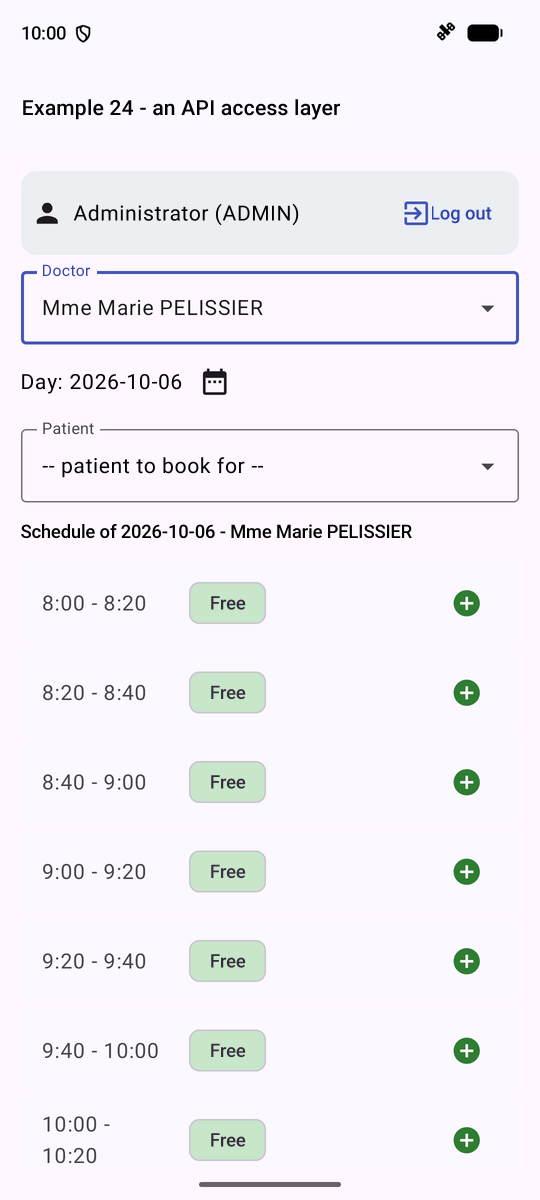
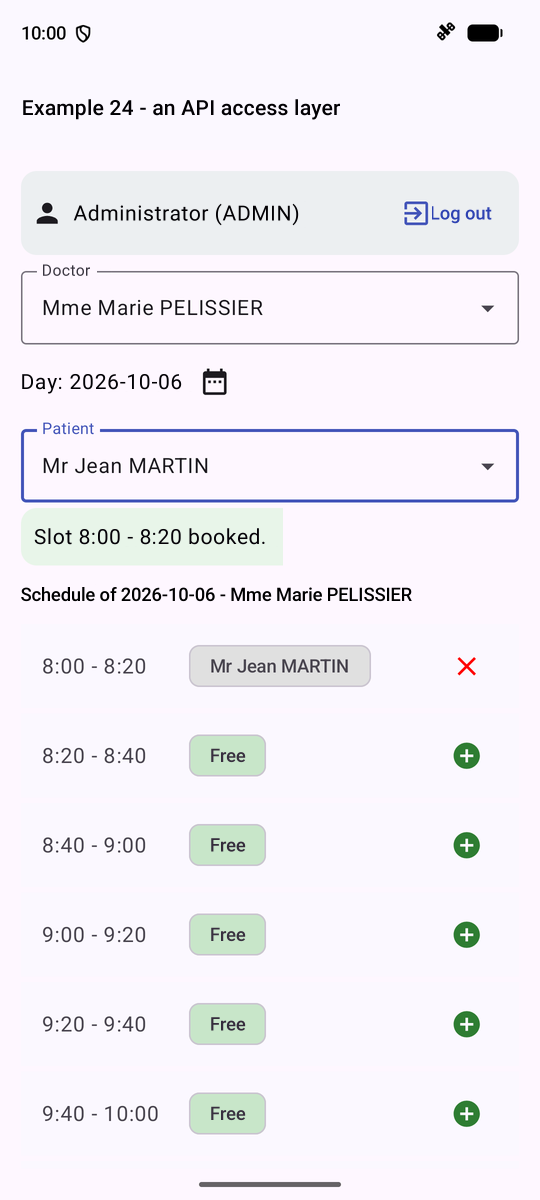
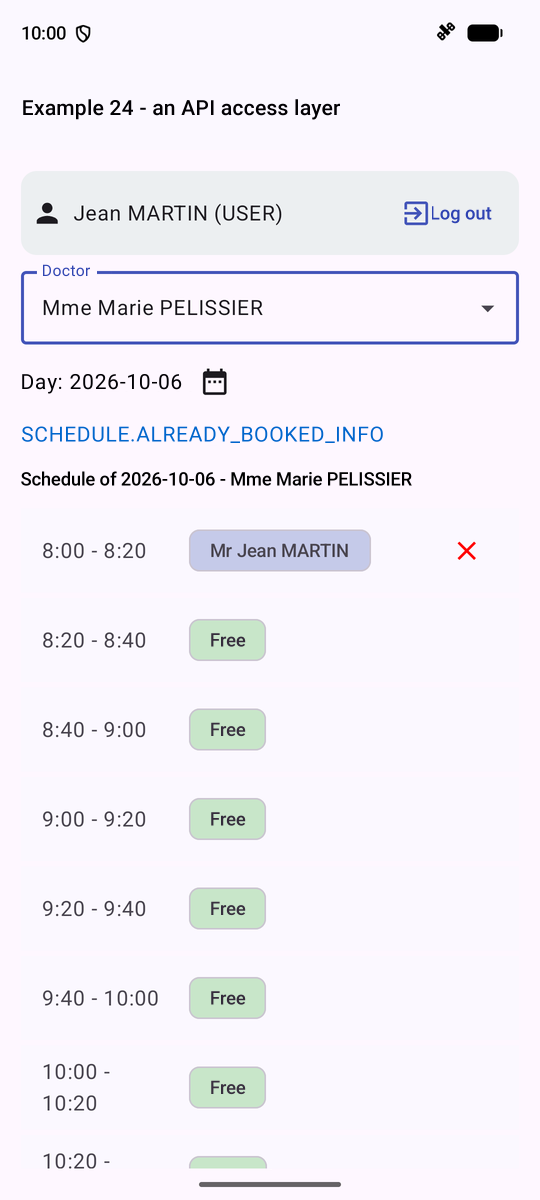
On the left and in the middle, ADMIN reserves the first time slot for Jean MARTIN; on the right, logged in as [martin]: the server set [bookable] to [false] for all time slots, because this patient already has an upcoming appointment, as indicated by the key [SCHEDULE.ALREADY_BOOKED_INFO]. This raw key isn’t very meaningful: Example 25 translates the server’s keys.
9.4. Example 25: Errors Returned by the Server
The server validates EVERYTHING what it receives (see Example 07), and responds, in the event of a rejection, with an error JSON, which provides the key for the general message and the error key of EACH field:
| 400 { key: 'ERRORS.INVALID_FORM', fields: { lastName: 'ERRORS.LASTNAME_REQUIRED' } }
409 { key: 'ERRORS.PATIENT_ALREADY_EXISTS', fields: { firstName: ..., lastName: ... } }
409 { key: 'ERRORS.CONCURRENT_UPDATE' }
|
There are many such keys. The server’s clients—[Vue.js], [Angular], [React], and [Flutter]—translate them using JSON dictionaries, one per language. Rather than copying these hundreds of texts into [strings.xml] files (and writing the key → resource table from Example 21), we reuse these dictionaries as-is, stored in the application’s [assets/] folder: files included with the application, which are read by their path ([assets/i18n/ex25_fr.json], [ex25_en.json]):
| // =========================================================================
// ex25/Dictionary.kt - the dictionaries shared with the other clients
// -------------------------------------------------------------------------
// The RdvMedecins server only returns KEYS ("ERRORS.LOGIN_TAKEN"),
// in large numbers: the error messages of each field, of each
// route... The web clients (Vue.js, Angular, React) and Flutter of this
// server translate them with JSON DICTIONARIES, one per language, where
// each text has its key:
// { "ERRORS": { "LOGIN_TAKEN": "This login is already used..." } }
// Rather than copying these hundreds of texts into strings.xml files (and
// writing the key -> resource table of example 21), we reuse these
// dictionaries as they are. They are stored in the assets/ folder of
// the application: files shipped with it, read by their path.
// - t("FORM.ADDED", mapOf("name" to "Marie DUPONT")): the text of the
// current language, whose {{name}} parameters are replaced;
// - an unknown key is displayed as is: we see what is missing.
// The language remains that of the APPLICATION (example 21): the dictionary
// is chosen according to it.
// =========================================================================
package fr.stahe.examples.ex25
import android.content.Context
import androidx.compose.runtime.Composable
import androidx.compose.runtime.remember
import androidx.compose.ui.platform.LocalConfiguration
import androidx.compose.ui.platform.LocalContext
import kotlinx.serialization.json.Json
import kotlinx.serialization.json.JsonElement
import kotlinx.serialization.json.JsonObject
import kotlinx.serialization.json.JsonPrimitive
class Dictionary(context: Context, file: String) {
// the content of the JSON file, read once and for all
private val root: JsonObject = context.assets.open(file).bufferedReader().use { reader ->
Json.parseToJsonElement(reader.readText()) as JsonObject
}
// "FORM.ADDED" -> root["FORM"]["ADDED"]; null if missing
private fun find(key: String): String? {
var node: JsonElement? = root
for (part in key.split('.')) {
node = (node as? JsonObject)?.get(part)
}
return (node as? JsonPrimitive)?.takeIf { it.isString }?.content
}
fun t(key: String, params: Map<String, String> = emptyMap()): String {
val text = find(key) ?: return key
// {{name}} -> the value of the name parameter (or {{name}} if it is not provided)
return Regex("\\{\\{(\\w+)\\}\\}").replace(text) { m -> params[m.groupValues[1]] ?: m.value }
}
}
// the dictionary of the current language: assets/i18n/<prefix>_<language>.json
@Composable
fun rememberDictionary(prefix: String): Dictionary {
val context = LocalContext.current
val language = LocalConfiguration.current.locales[0].language.let { if (it == "fr") "fr" else "en" }
// read again only if the language changes
return remember(language) { Dictionary(context, "i18n/${prefix}_$language.json") }
}
|
- lines 34–35: the file JSON, read once and for all ([context.assets.open]);
- lines 39–48: ["FORM.ADDED"] → [root["FORM"]["ADDED"]]; an unknown key is displayed as-is: we can see what’s missing;
- line 50: the [{{name}}] parameters are replaced by a regular expression;
- lines 56–60: the dictionary for the language of APPLICATION (example 21), re-read only if it changes.
The screen’s model: this form performs no validation on the phone; everything is sent to the server.
| // =========================================================================
// ex25/ClientsModel.kt - the state of the clients screen
// -------------------------------------------------------------------------
// This form DELIBERATELY does no validation on the phone:
// everything is sent to the server, which answers, in case of refusal, with a JSON
// error (converted into an ApiError by common/Api.kt):
//
// 400 { key: 'ERRORS.INVALID_FORM', fields: { lastName: 'ERRORS.LASTNAME_REQUIRED' } }
// 409 { key: 'ERRORS.PATIENT_ALREADY_EXISTS', fields: { firstName: ..., lastName: ... } }
// 409 { key: 'ERRORS.CONCURRENT_UPDATE' } (optimistic lock)
//
// The error of EACH field (ApiError.fields) is stored in the state and
// displayed under the field; its message is the KEY sent by the server,
// which the screen translates. Modifying a field clears its error.
// The state is in a ViewModel: changing the language RECREATES the activity
// (cf. example 21), and the input in progress must not be lost.
// =========================================================================
package fr.stahe.examples.ex25
import androidx.compose.runtime.getValue
import androidx.compose.runtime.mutableStateOf
import androidx.compose.runtime.setValue
import androidx.lifecycle.ViewModel
import fr.stahe.examples.common.Api
import fr.stahe.examples.common.ApiError
import fr.stahe.examples.common.Person
import fr.stahe.examples.common.Role
import fr.stahe.examples.common.User
import fr.stahe.examples.common.read
import fr.stahe.examples.ex23.Command
import kotlinx.serialization.json.buildJsonObject
import kotlinx.serialization.json.put
// a message to translate: a key and its parameters
data class KeyMessage(val key: String, val params: Map<String, String> = emptyMap())
class ClientsModel(private val api: Api) : ViewModel() {
var user by mutableStateOf<User?>(null)
private set
var clients by mutableStateOf(listOf<Person>())
private set
// the form: editedId == null -> creation, otherwise update
var editedId by mutableStateOf<Int?>(null)
private set
private var version = 0
// the typed values, by field name (the names expected by the server)
var input by mutableStateOf(empty)
private set
// the error of each field (a translation KEY), returned by the server
var errors by mutableStateOf(mapOf<String, String>())
private set
// the general message of the last error, and that of a success
var pageError by mutableStateOf<ApiError?>(null)
private set
var success by mutableStateOf<KeyMessage?>(null)
private set
// sending to the server: a Command (example 23), which says whether it is in progress
val sending = Command()
val isAdmin get() = user?.role == Role.ADMIN
suspend fun onUserChange(u: User?) {
user = u
clients = emptyList()
if (u?.role == Role.ADMIN) reload()
}
private suspend fun reload() {
clients = try {
api.get("/clients").read()
} catch (e: ApiError) {
emptyList()
}
}
private fun clearMessages() {
errors = emptyMap()
pageError = null
success = null
}
// a modified field: its value changes, its error disappears
fun change(field: String, value: String) {
input = input + (field to value)
errors = errors - field
}
fun newForm() {
editedId = null
version = 0
input = empty
clearMessages()
}
fun edit(c: Person) {
editedId = c.id
// the VERSION read with the record goes back with the update: if
// someone has modified the record in the meantime, the server will answer 409
// CONCURRENT_UPDATE
version = c.version
input = mapOf("title" to c.title, "firstName" to c.firstName, "lastName" to c.lastName, "login" to (c.login ?: ""), "password" to "")
clearMessages()
}
suspend fun save() {
clearMessages()
val body = buildJsonObject {
for ((field, value) in input) put(field, value)
put("version", version)
}
try {
val id = editedId
val client: Person = (if (id == null) api.post("/clients", body) else api.put("/clients/$id", body)).read()
val key = if (id == null) "FORM.ADDED" else "FORM.UPDATED"
newForm() // form emptied, messages cleared...
// ... except this one
success = KeyMessage(key, mapOf("name" to "${client.firstName} ${client.lastName}", "login" to (client.login ?: "")))
reload()
} catch (e: ApiError) {
pageError = e // the general message
errors = e.fields // the error of each field
}
}
suspend fun remove(c: Person) {
clearMessages()
try {
api.delete("/clients/${c.id}")
success = KeyMessage("FORM.DELETED", mapOf("name" to "${c.firstName} ${c.lastName}"))
} catch (e: ApiError) {
pageError = e
}
reload()
}
companion object {
val empty = mapOf("title" to "Mr", "firstName" to "", "lastName" to "", "login" to "", "password" to "")
}
}
|
- lines 49–53: the input, by field name (the names expected by the server), and the error for each field (a translation);
- lines 88–90: modifying a field clears its error;
- line 105: the VERSION read from the record is sent back with the modification; if someone has modified the record in the meantime, the server responds with a 409 [CONCURRENT_UPDATE] (optimistic lock);
- lines 110–126: saving: in case of an error, the general message and the error for each field ([e.fields]) are stored in the state.
The screen:
| // =========================================================================
// ex25/Ex25Activity.kt - displaying the errors of the SERVER
// -------------------------------------------------------------------------
// The management of the clients (admin account), cf. ClientsModel.kt. The screen
// displays, under each field, the error that the server attached to it,
// translated by the dictionaries (Dictionary.kt), and the general message
// at the bottom of the form.
// Try: an empty name, a "Dr" title, a namesake (Alice DURAND), a
// login already taken (martin), the same record modified on two devices...
// =========================================================================
package fr.stahe.examples.ex25
import android.os.Bundle
import androidx.activity.compose.setContent
import androidx.activity.enableEdgeToEdge
import androidx.appcompat.app.AppCompatActivity
import androidx.appcompat.app.AppCompatDelegate
import androidx.compose.foundation.layout.Column
import androidx.compose.foundation.layout.Row
import androidx.compose.foundation.layout.Spacer
import androidx.compose.foundation.layout.fillMaxWidth
import androidx.compose.foundation.layout.padding
import androidx.compose.foundation.layout.width
import androidx.compose.material.icons.Icons
import androidx.compose.material.icons.filled.Edit
import androidx.compose.material.icons.filled.MoreVert
import androidx.compose.material.icons.outlined.Delete
import androidx.compose.material3.Button
import androidx.compose.material3.Card
import androidx.compose.material3.CardDefaults
import androidx.compose.material3.DropdownMenu
import androidx.compose.material3.DropdownMenuItem
import androidx.compose.material3.Icon
import androidx.compose.material3.IconButton
import androidx.compose.material3.ListItem
import androidx.compose.material3.MaterialTheme
import androidx.compose.material3.OutlinedButton
import androidx.compose.material3.OutlinedTextField
import androidx.compose.material3.Text
import androidx.compose.runtime.Composable
import androidx.compose.runtime.getValue
import androidx.compose.runtime.mutableStateOf
import androidx.compose.runtime.remember
import androidx.compose.runtime.rememberCoroutineScope
import androidx.compose.runtime.setValue
import androidx.compose.ui.Modifier
import androidx.compose.ui.graphics.Color
import androidx.compose.ui.text.SpanStyle
import androidx.compose.ui.text.buildAnnotatedString
import androidx.compose.ui.text.input.PasswordVisualTransformation
import androidx.compose.ui.text.input.VisualTransformation
import androidx.compose.ui.text.withStyle
import androidx.compose.ui.unit.dp
import androidx.compose.ui.unit.sp
import androidx.core.os.LocaleListCompat
import androidx.lifecycle.viewmodel.compose.viewModel
import fr.stahe.examples.ExamplesApplication
import fr.stahe.examples.common.Api
import fr.stahe.examples.common.LoginBar
import fr.stahe.examples.common.DropdownList
import fr.stahe.examples.common.ExamplePage
import fr.stahe.examples.common.ExamplesTheme
import fr.stahe.examples.ex16.ConfirmDialog
import fr.stahe.examples.ex16.rememberConfirmation
import kotlinx.coroutines.launch
class Ex25Activity : AppCompatActivity() {
override fun onCreate(savedInstanceState: Bundle?) {
super.onCreate(savedInstanceState)
enableEdgeToEdge()
val api = (application as ExamplesApplication).api
setContent { ExamplesTheme { ClientsPage(api) } }
}
}
@Composable
fun ClientsPage(api: Api) {
val model = viewModel { ClientsModel(api) }
val dict = rememberDictionary("ex25")
// a shortcut: t("KEY") calls dict.t("KEY")
fun t(key: String, params: Map<String, String> = emptyMap()) = dict.t(key, params)
val confirmation = rememberConfirmation()
val scope = rememberCoroutineScope()
var languageMenu by remember { mutableStateOf(false) }
// an input field, with its error (a server key) translated
@Composable
fun Field(field: String, secret: Boolean = false) {
val error = model.errors[field]
OutlinedTextField(
value = model.input[field].orEmpty(),
onValueChange = { model.change(field, it) },
label = { Text(t("FORM.${field.uppercase()}")) },
singleLine = true,
isError = error != null,
supportingText = error?.let { e -> { Text(t(e)) } },
visualTransformation = if (secret) PasswordVisualTransformation() else VisualTransformation.None,
modifier = Modifier.fillMaxWidth(),
)
}
ExamplePage(
title = t("FORM.PAGE_TITLE"),
// the language: a menu
actions = {
IconButton(onClick = { languageMenu = true }) { Icon(Icons.Default.MoreVert, contentDescription = "language") }
DropdownMenu(expanded = languageMenu, onDismissRequest = { languageMenu = false }) {
for (l in listOf("fr", "en")) {
DropdownMenuItem(text = { Text(l.uppercase()) }, onClick = {
languageMenu = false
AppCompatDelegate.setApplicationLocales(LocaleListCompat.forLanguageTags(l))
})
}
}
},
) {
LoginBar(api, onUserChange = { u -> scope.launch { model.onUserChange(u) } })
if (model.user != null && !model.isAdmin) {
Card(colors = CardDefaults.cardColors(containerColor = Color(0xFFFFF8E1))) {
Text(t("FORM.ADMIN_ONLY"), Modifier.padding(12.dp))
}
}
if (model.isAdmin) {
for (c in model.clients) {
ListItem(
headlineContent = { Text(c.fullName) },
supportingContent = { Text(c.login ?: "") },
trailingContent = {
Row {
IconButton(onClick = { model.edit(c) }) { Icon(Icons.Default.Edit, contentDescription = t("FORM.EDIT")) }
IconButton(onClick = {
scope.launch {
val name = "${c.firstName} ${c.lastName}"
if (confirmation.confirm(t("FORM.DELETE_CONFIRM", mapOf("name" to name)))) model.remove(c)
}
}) {
Icon(Icons.Outlined.Delete, contentDescription = t("FORM.DELETE"), tint = Color.Red)
}
}
},
)
}
Card(Modifier.fillMaxWidth()) {
Column(Modifier.padding(12.dp)) {
Text(t(if (model.editedId == null) "FORM.TITLE_ADD" else "FORM.TITLE_EDIT"), style = MaterialTheme.typography.titleMedium)
// a "Dr" title that the server will reject: to see ERRORS.INVALID_TITLE
DropdownList(
label = t("FORM.TITLE"),
value = model.input["title"].orEmpty(),
choices = listOf("Mr", "Mme", "Melle", "Dr"),
onChange = { model.change("title", it) },
error = model.errors["title"]?.let { t(it) },
modifier = Modifier.width(200.dp),
)
Field("firstName")
Field("lastName")
Field("login")
Field("password", secret = true)
Row(Modifier.padding(top = 12.dp)) {
Button(onClick = { scope.launch { model.sending.execute { model.save() } } }, enabled = !model.sending.inProgress) {
Text(t("FORM.SAVE"))
}
Spacer(Modifier.width(8.dp))
OutlinedButton(onClick = { model.newForm() }) { Text(t("FORM.CANCEL")) }
}
model.success?.let { s ->
Text(t(s.key, s.params), color = Color(0xFF2E7D32), modifier = Modifier.padding(top = 12.dp))
}
// the general message, and the HTTP status, to understand
model.pageError?.let { e ->
Text(
buildAnnotatedString {
withStyle(SpanStyle(color = Color.Red)) { append(t(e.key, e.params)) }
withStyle(SpanStyle(color = Color.Gray, fontSize = 12.sp)) { append(" ($e)") }
},
modifier = Modifier.padding(top = 12.dp),
)
}
}
}
}
}
ConfirmDialog(confirmation)
}
|
- lines 79–81: the dictionary, and a shortcut [t(...)];
- lines 88–96: a field and its error, a server key, translated;
- lines 106–111: the language, in a menu on the top bar ([DropdownMenu]);
- lines 170–174: the general message and the status HTTP, for reference.
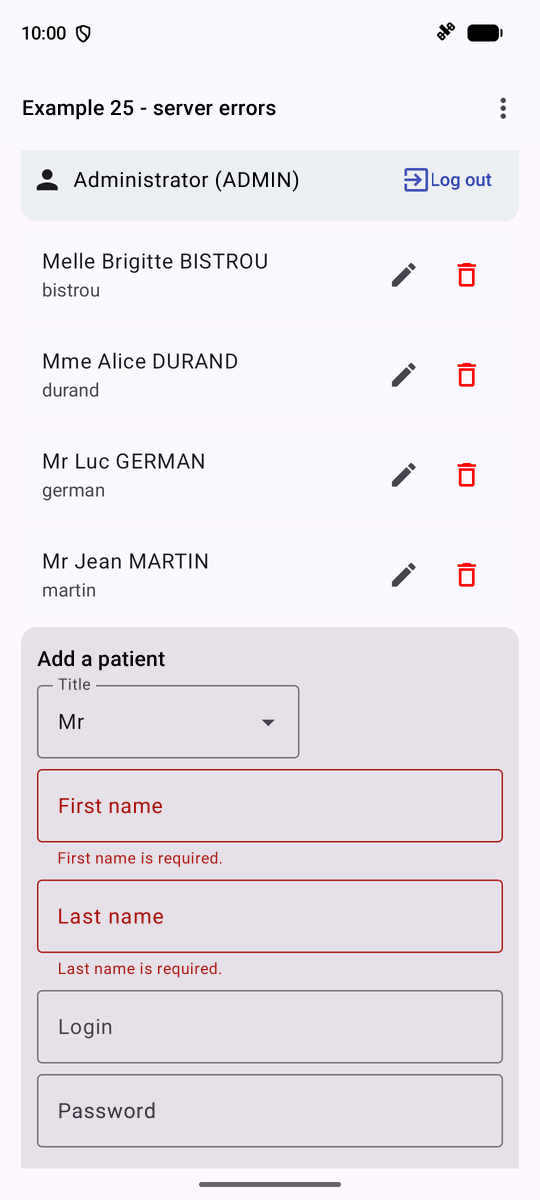
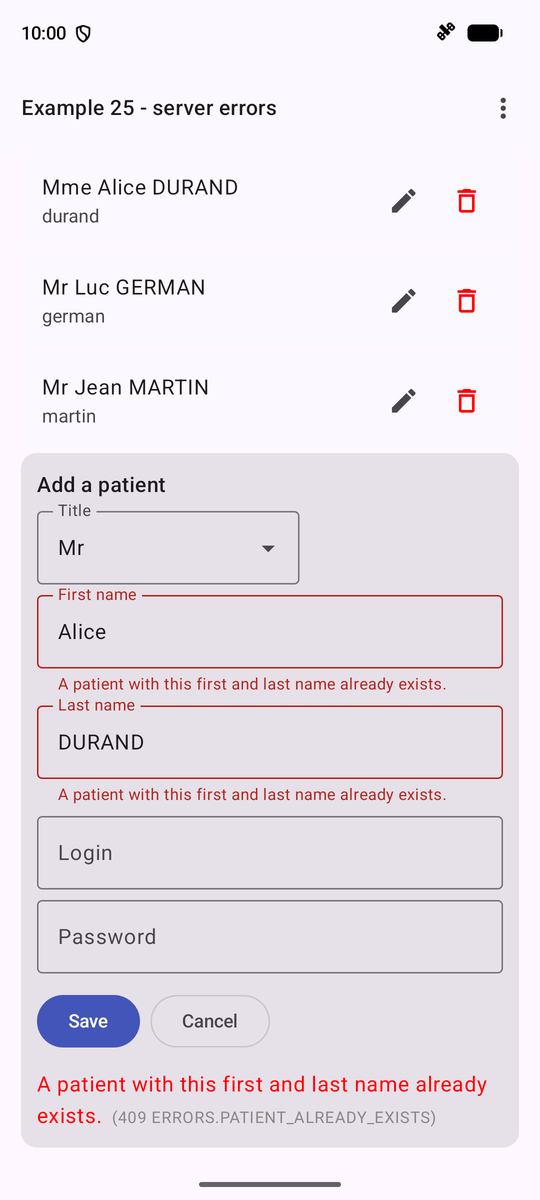
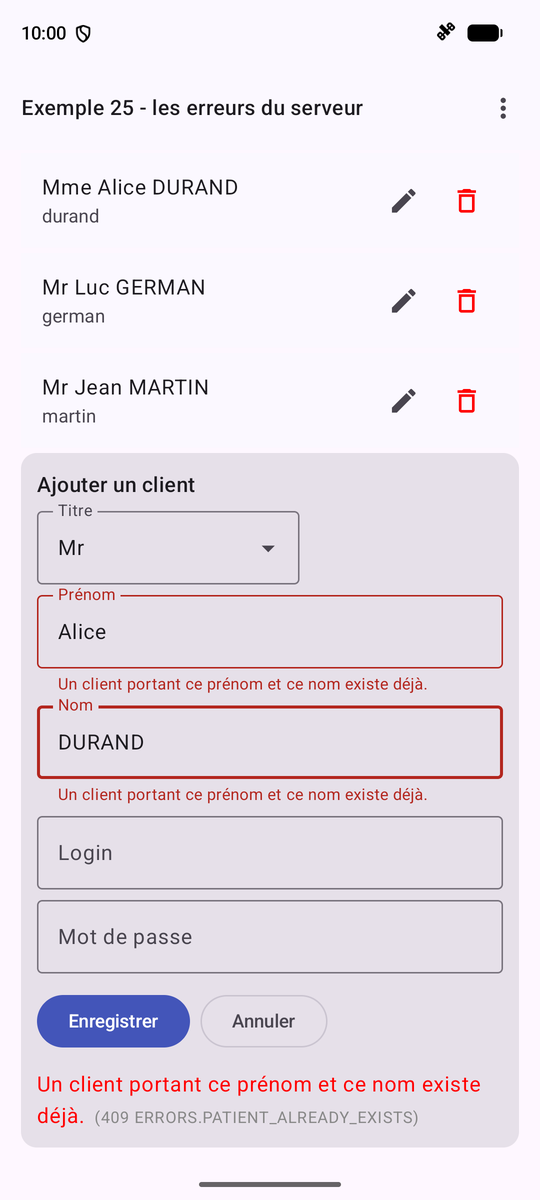
On the left, a record with blank first and last names: error 400; in the middle, a homonym of Alice DURAND: error 409; on the right, the same error in French: the current entry survived the recreation of the activity, thanks to [ViewModel].