12. The functions HTTP of Javascript
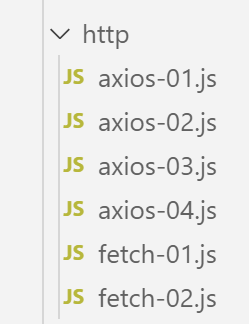
12.1. Selecting a library HTTP
We have selected two libraries here:
EcmaScript 6 natively has a function called HTTP, which is not implemented by [node.js] (Sept. 2019). There is a library called [node-fetch] that allows the [fetch] function to be used under Node. This library uses certain API features specific to [node.js]. A [node-fetch] code may therefore not be 100% portable to a non-[node] environment, such as a browser;
There is also a library named [axios] dedicated to HTTP queries, compatible with both [node.js] and browsers. This is the library we will ultimately use.
We will present the same script written using both of these libraries to demonstrate that the coding process is similar.
12.2. Setting up a development environment
12.2.1. Installing the tax calculation server
Ultimately, we will write a web application with the following architecture:
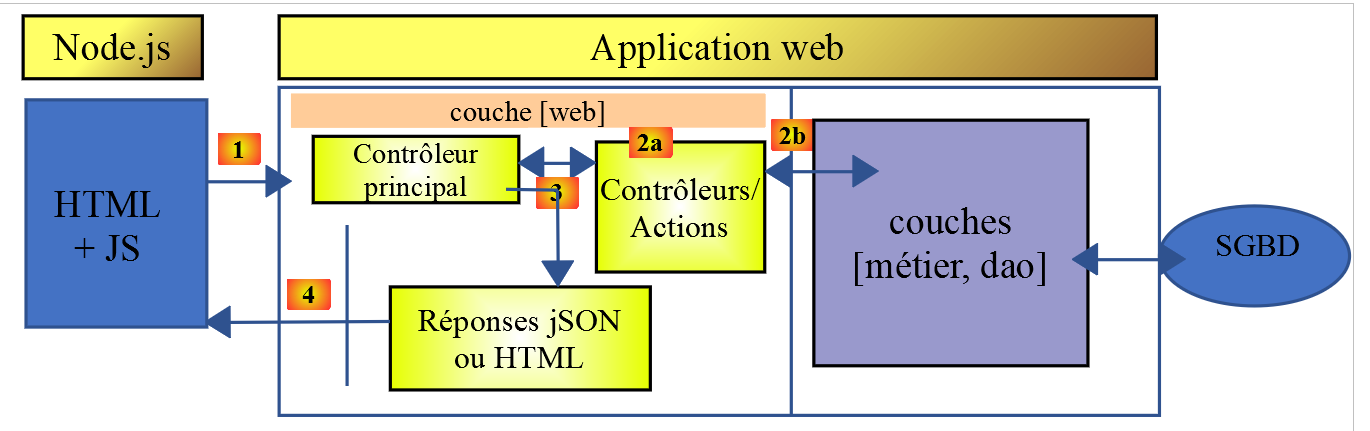
JS: Javascript
The code Javascript is a client:
- of a service for static pages or fragments;
- of a jSON service;
The code Javascript is therefore a client of jSON and, as such, can be organized into layers [UI, métier, dao] (UI: User Interface) just as our clients and jSON were written in PHP.
The server will be the tax calculation server for which we have already written 13 versions. We are going to write a 14th version. So we start by duplicating, under Netbeans, the folder for version 13, into the folder for version 14:
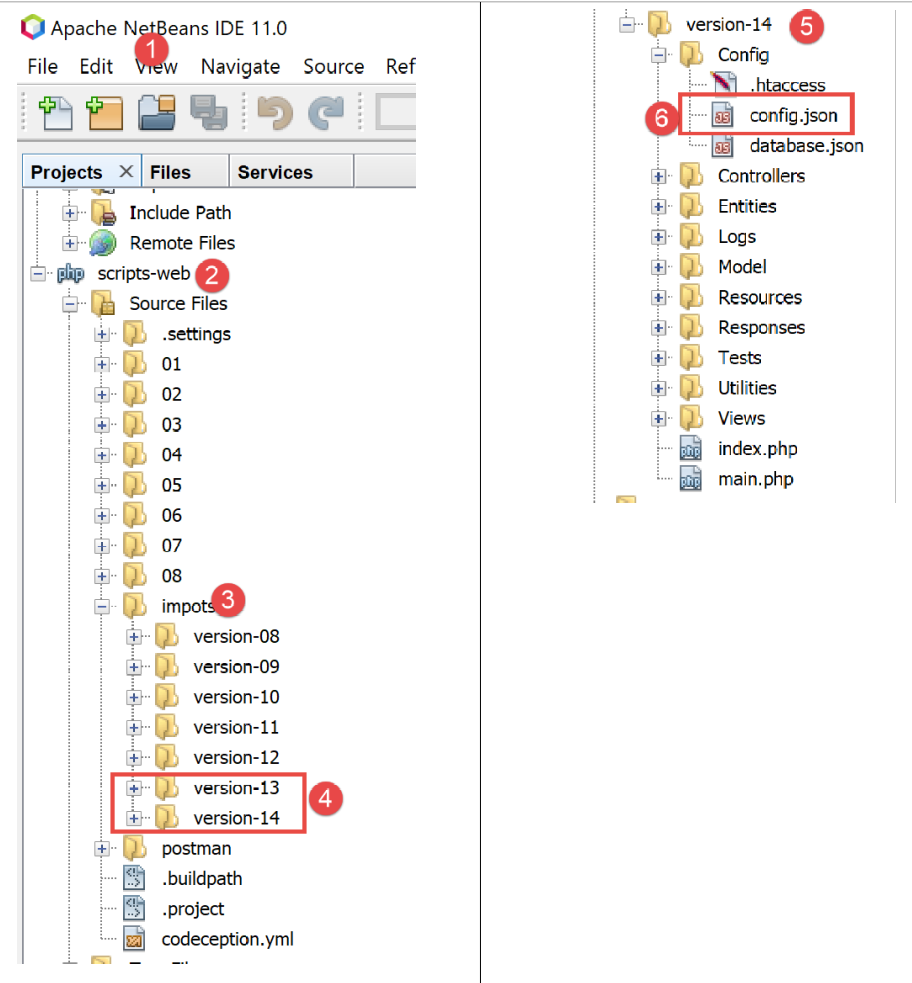
- In [6], we modify the [config.json] file from version 14 as follows:
{
    "databaseFilename": "Config/database.json",
    "rootDirectory": "C:/myprograms/laragon-lite/www/php7/scripts-web/impots/version-14",
    "relativeDependencies": [

        "/Entities/BaseEntity.php",
        "/Entities/Simulation.php",
        ...
    "vues": {
        "vue-authentification.php": [700, 221, 400],
        "vue-calcul-impot.php": [200, 300, 341, 350, 800],
        "vue-liste-simulations.php": [500, 600]
    },
    "vue-erreurs": "vue-erreurs.php"
}
- On line 3, we change the application's root directory;
To access this server, you must start the [Laragon] services.
Once this is done, we can test with [Postman] (see linked article), this new version on the server, which is currently identical to version 13. We can use the set of requests used to test the server’s version 12:
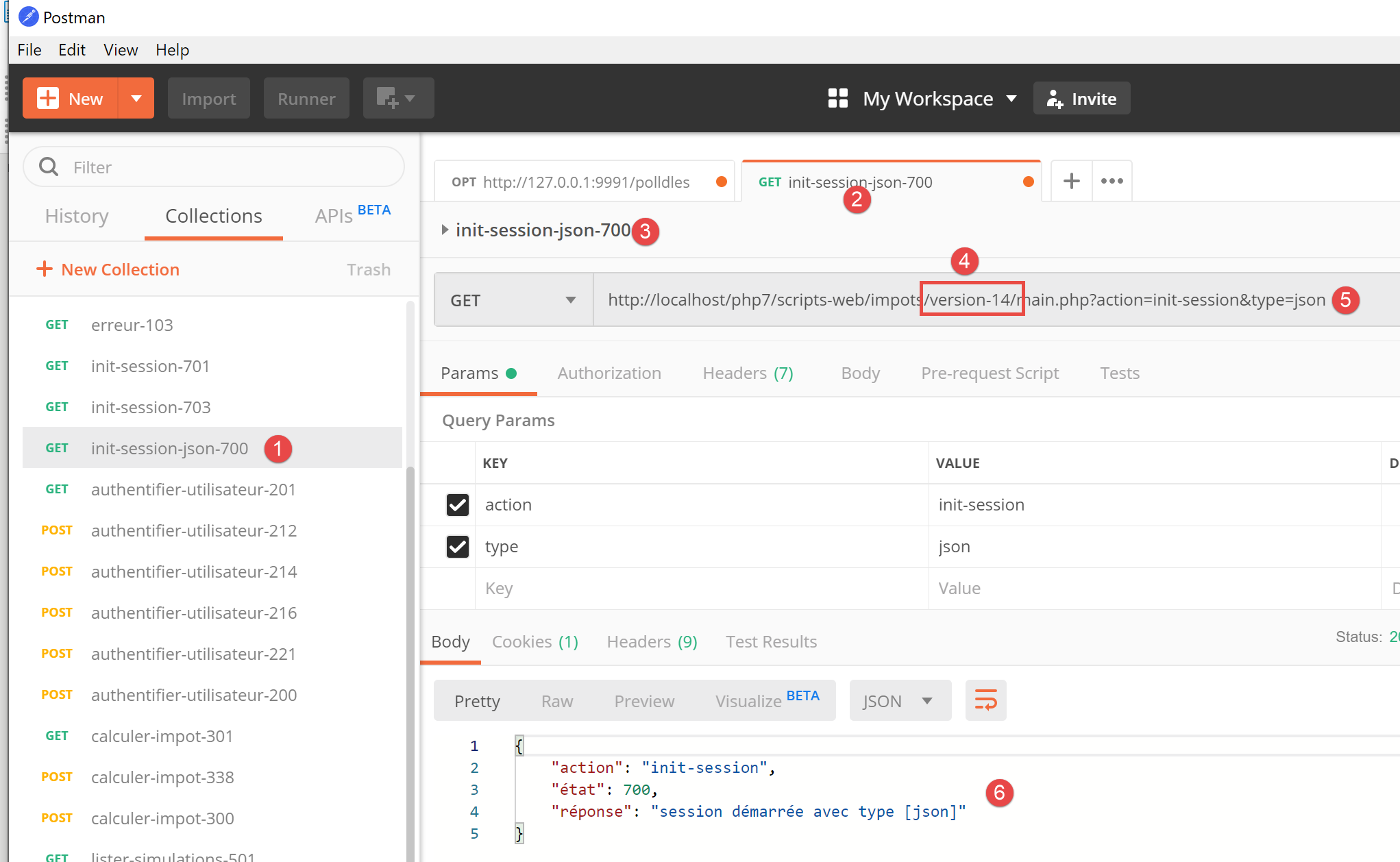
- In [1-4], use the query [init-session-700] to initialize a session jSON;
- In [4-5], replace [version-12] with [version-14] to test version 14 of the project;
- Upon execution, we should receive the response jS0N [6] from the server;
The server’s version 14 is now operational. We will need to modify it slightly. Recall the API from this server:
Action | Role | Execution Context |
init-session | Used to set the type (json, xml, html) of the desired responses | Request GET main.php?action=init-session&type=x can be issued at any time |
authenticate-user | Authorizes or denies a user's login | Request POST main.php?action=authenticate-user The request must have two posted parameters [user, password] Can only be issued if the session type (json, xml, html) is known |
calculate-tax | Performs a tax calculation simulation | Query POST main.php?action=calculate-tax The request must have three posted parameters [marié, enfants, salaire] Can only be issued if the session type (json, xml, html) is known and the user is authenticated |
list-simulations | Request to view the list of simulations performed since the start of the session | Query GET main.php?action=list-simulations The request does not accept any other parameters Can only be issued if the session type (json, xml, html) is known and the user is authenticated |
delete-simulation | Deletes a simulation from the list of simulations | Query GET main.php?action=list-simulations&number=x The request does not accept any other parameters Can only be issued if the session type (json, xml, html) is known and the user is authenticated |
end-session | Ends the simulation session. | Technically, the old web session is deleted and a new session is created Can only be issued if the session type (json, xml, html) is known and the user is authenticated |
12.2.2. Installation of the HTTP libraries for the Javascript client
Initially, we will work with the following architecture:
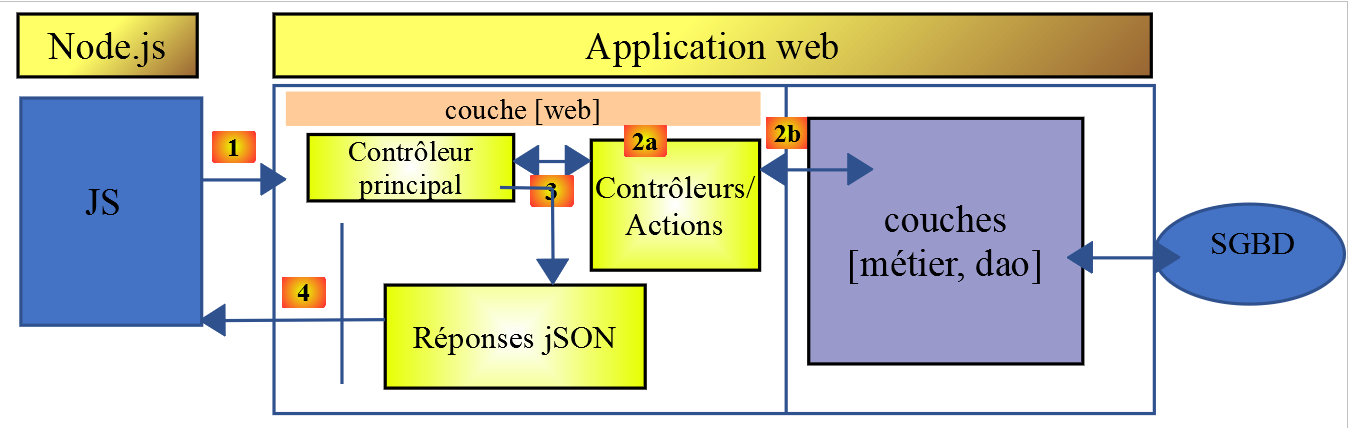
- In [1], a console script [node.js] sends a request HTTP to the tax calculation server jSON;
- in [4], it receives this response and displays it on the console;
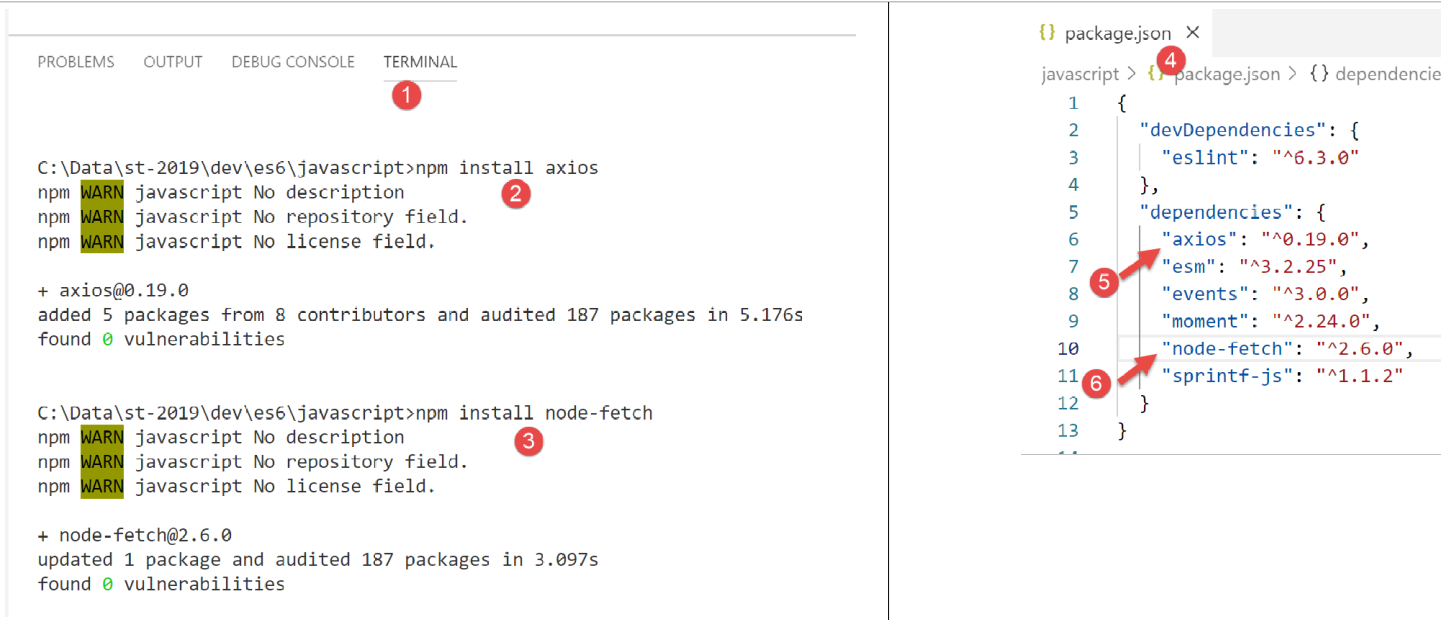
In Example 1, we will use the [node-fetch] and [axios] libraries, and then we will retain only [axios] for the following examples. We will now install these two Javascript libraries from the [VSCode] terminal:
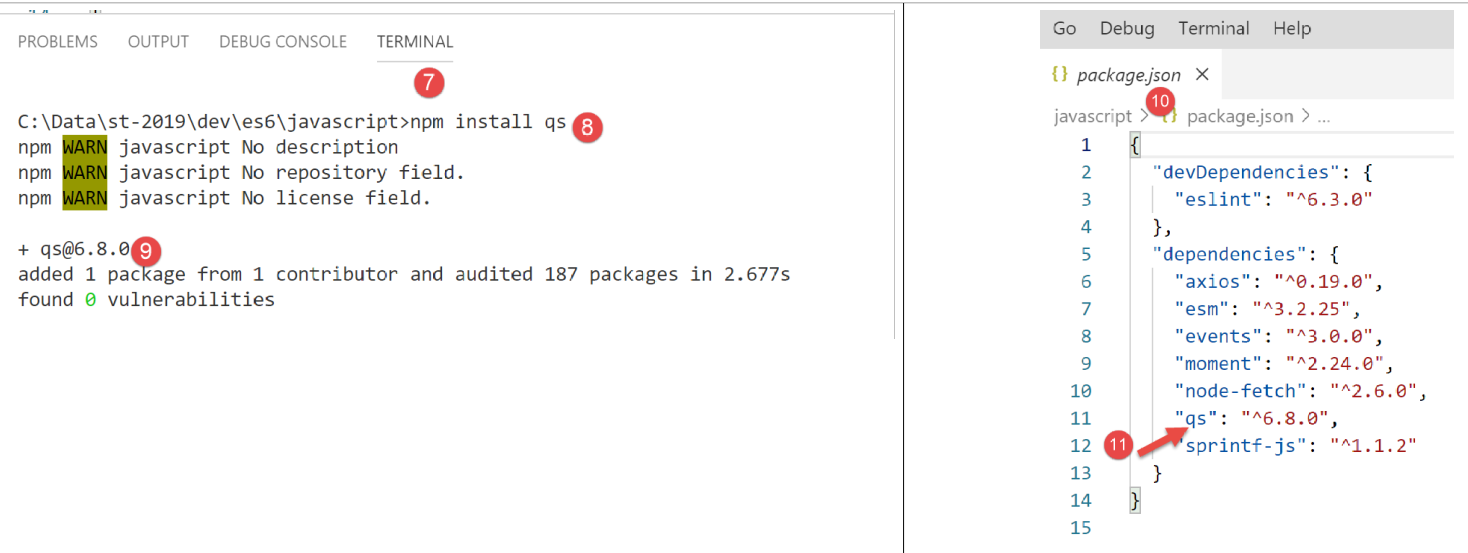
We will also use the [qs] library, which enables the encoding of a string. Recall that this encoding is used to encode the parameters of a HTTP, GET, or POST request.
12.3. [fetch-01] script
The [fetch-01] script uses the [node-fetch] library to initialize a jSON session with the tax calculation server. Its code is as follows:
'use strict';

// imports
import fetch from 'node-fetch';
import qs from 'qs';
import { sprintf } from 'sprintf-js';
import moment from 'moment';


// URL base of tax calculation server
const baseUrl = 'http://localhost/php7/scripts-web/impots/version-14/main.php?';
// init session
async function initSession() {
  // query options HHTP [get /main.php?action=init-session&type=json]
  const options = {
    method: "GET",
    timeout: 2000
  };
  // query execution HTTP [get /main.php?action=init-session&type=json]
  let débutFetch;
  try {
    // asynchronous request - [fetch] makes a promise
    débutFetch = moment(Date.now());
    const response = await fetch(baseUrl + qs.stringify({
      action: 'init-session',
      type: 'json'
    }), options);
    // [response] is the entire HTTP response from the server (HTTP headers + response itself)
    // display this answer to see its structure
    console.log(sprintf("réponse fetch formatée en json,=%j, %s", response, heure(débutFetch)));
    console.log("réponse fetch en javascript=", response);
    // you can have HTTP headers
    console.log("entêtes de la réponse=", response.headers);
    // if application response / json, server response json is obtained with asynchronous function [response.json()]
    // in which case the calling code obtains a [Promise] object
    // [await] allows you to obtain the server's [json] response rather than its promise
    const débutJson = moment(Date.now());
    const objet = await response.json();
    console.log(sprintf("réponse json=%j, type=%s, %s", objet, typeof (objet), heure(débutJson)));
    return objet;
    // if text / plain response, the text response from the server is obtained with [response.text()]
    // in which case the calling code obtains a [Promise] object
    // [await] allows you to obtain the server's [text] response rather than its promise
    // const text = await response.text();
    // console.log("answer text=", text);
    // return text;
  } catch (error) {
    // we're here because the server has sent an error code [404 Not Found, ...] accompanied by an empty body - we display the error to see its structure
    // or because the [fetch] client has thrown an exception (network inaccessible, ...)
    // the error structure is displayed
    console.log(sprintf("error fetch en json=%j, %s", error, heure(débutFetch)));
    console.log("error fetch en javascript=", typeof (error), error);
    // launch the error message received
    throw error.message;
  }
}

// the main function executes the asynchronous function [initSession]
async function main() {
  try {
    console.log("requête HTTP vers le serveur en cours ---------------------------------------------");
    const response = await initSession();
    console.log("succès ---------------------------------------------");
    console.log("réponse=", response, typeof (response))
  } catch (error) {
    console.log("erreur ---------------------------------------------");
    console.log("erreur=", error, typeof (error));
  }
}

// test
main();

// time and duration display utility
function heure(début) {
  // current time
  const now = moment(Date.now());
  // time formatting
  let result = "heure=" + now.format("HH:mm:ss:SSS");
  // is it necessary to calculate a duration?
  if (début) {
    const durée = now - début;
    const milliseconds = durée % 1000;
    const seconds = Math.floor(durée / 1000);
    // format time + duration
    result = result + sprintf(", durée= %s seconde(s) et %s millisecondes", seconds, milliseconds);
  }
  // result
  return result;
}
Comments
- The functions HTTP and Javascript are asynchronous functions. Here we apply what we learned in the previous section (see link);
- line 24: to wait for the response from the asynchronous function [fetch] to be published on the event loop of [node.js], we use the keyword [await]. We know that this statement must be within code prefixed by the keyword [async] (line 13);
- lines 13–56: we encapsulate the HTTP code within the asynchronous function [initSession];
- lines 59–69: a second asynchronous function [main] is used to call the asynchronous function [initSession] in a blocking manner (async/await);
- line 72: the asynchronous function [main] is called;
- although the entire code resembles synchronous code, these are indeed asynchronous functions that are executed, but in a blocking manner;
- line 19: to initialize a jSON session with the tax calculation server, you must send it the command HTTP [get /main.php?action=init-session&type=json]. This is what the code in lines 24–27 does. The syntax of [fetch] is as follows: [fetch(URL, options)] with:
- [URL]: the URL being queried;
- [options]: an object defining the query options. This is where, in particular, we define the HTTP headers that we want to send to the target machine;
- lines 15–18: we define the options for the request we want to make:
- [method]: we want to perform a GET;
- [timeout]: We want the client [fetch] to wait no more than 2 seconds for the server’s response. If this timeout is exceeded, [fetch] will throw an exception;
- Line 24: To obtain the URL [/main.php?action=init-session&type=json], we use the [qs] library to obtain the URL encoding of the [action,type] parameters of the GET. The resulting string is [init-session&type=json], which we could have constructed ourselves. We simply wanted to show how to obtain an encoded URL string;
- line 24: the keyword [await] indicates that an asynchronous task is being launched here and that we are waiting for it to publish its response to the event loop of [node.js];
- line 24: in [response], we obtain a complex object that describes the entire HTTP response received (headers and document);
- lines 30–31: we display the [response] object to view its structure, first as a string and then as a Javascript object;
- line 33: the HTTP headers sent by the server are displayed;
- line 38: we know that the tax calculation server will send a string jSON. This is encapsulated in the object [response]. We can obtain it using the method [response.json()]. However, this method is asynchronous. We therefore write [await response.json()] to obtain the string jSON, which will be published on the event loop of [node.js]. In fact, it is not the string jSON that we obtain, but the object Javascript represented by it;
- line 39: display of the received string jSON;
- line 40: the received object Javascript is returned;
- line 47: we catch any potential error from the [fetch] statement. This statement only throws an exception if the HTTP operation failed and no response was received from the server. If a response was received, even with a HTTP code different from [200 OK], [fetch] does not throw an exception, and the server response will be available on line 38;
- lines 51–52: the object [error] received by the clause [catch] is displayed, first as a string jSON and then as an object Javascript;
- line 54: the error message for [fetch] is located in [error.message];
- lines 59–69: The asynchronous function [main] calls the asynchronous function [initSession] in a blocking manner (await on line 62);
- Line 72: The asynchronous function [main] is launched, and the main script code is then complete. The overall script will be complete once the launched asynchronous tasks have published their results to the event loop;
The results of the execution are as follows:
Case 1: the Laragon server is not running
[Running] C:\myprograms\laragon-lite\bin\nodejs\node-v10\node.exe -r esm "c:\Data\st-2019\dev\es6\javascript\http\fetch-01.js"
requête HTTP vers le serveur en cours ---------------------------------------------
error fetch en json={"message":"network timeout at: http://localhost/php7/scripts-web/impots/version-14/main.php?action=init-session&type=json","type":"request-timeout"}, heure=10:08:48:180, durée= 2 seconde(s) et 62 millisecondes
error fetch en javascript= object { FetchError: network timeout at: http://localhost/php7/scripts-web/impots/version-14/main.php?action=init-session&type=json
    at Timeout.<anonymous> (c:\Data\st-2019\dev\es6\javascript\node_modules\node-fetch\lib\index.js:1448:13)
    at ontimeout (timers.js:436:11)
    at tryOnTimeout (timers.js:300:5)
    at listOnTimeout (timers.js:263:5)
    at Timer.processTimers (timers.js:223:10)
  message:
   'network timeout at: http://localhost/php7/scripts-web/impots/version-14/main.php?action=init-session&type=json',
  type: 'request-timeout' }
erreur ---------------------------------------------
erreur= network timeout at: http://localhost/php7/scripts-web/impots/version-14/main.php?action=init-session&type=json string

[Done] exited with code=0 in 2.804 seconds
Comments
- line 3: the HTTP request fails after 2 seconds and 62 milliseconds due to the 2-second timeout imposed on the HTTP request;
- lines 4–9: the Javascript object [error] intercepted by the [catch(error)] clause. This object has two properties:
- [FetchError]: line 4;
- [message]: lines 10–12;
- line 14: the error message received by the asynchronous function [main];
Case 2: the Laragon server is running
[Running] C:\myprograms\laragon-lite\bin\nodejs\node-v10\node.exe -r esm "c:\Data\st-2019\dev\es6\javascript\http\fetch-01.js"
requête HTTP vers le serveur en cours ---------------------------------------------
réponse fetch formatée en json,={"size":0,"timeout":2000}, heure=10:13:50:814, durée= 0 seconde(s) et 375 millisecondes
réponse fetch en javascript= Response {
  size: 0,
  timeout: 2000,
  [Symbol(Body internals)]:
   { body:
      PassThrough {
        _readableState: [ReadableState],
        readable: true,
        domain: null,
        _events: [Object],
        _eventsCount: 2,
        _maxListeners: undefined,
        _writableState: [WritableState],
        writable: false,
        allowHalfOpen: true,
        _transformState: [Object] },
     disturbed: false,
     error: null },
  [Symbol(Response internals)]:
   { url:
      'http://localhost/php7/scripts-web/impots/version-14/main.php?action=init-session&type=json',
     status: 200,
     statusText: 'OK',
     headers: Headers { [Symbol(map)]: [Object] },
     counter: 0 } }
entêtes de la réponse= Headers {
  [Symbol(map)]:
   [Object: null prototype] {
     date: [ 'Sat, 14 Sep 2019 08:13:50 GMT' ],
     server: [ 'Apache/2.4.35 (Win64) OpenSSL/1.1.0i PHP/7.2.11' ],
     'x-powered-by': [ 'PHP/7.2.11' ],
     'cache-control': [ 'max-age=0, private, must-revalidate, no-cache, private' ],
     'set-cookie': [ 'PHPSESSID=99q2iinusmhl55fa600aie2mmu; path=/' ],
     'content-length': [ '86' ],
     connection: [ 'close' ],
     'content-type': [ 'application/json' ] }
réponse json={"action":"init-session","état":700,"réponse":"session démarrée avec type [json]"}, type=object, heure=10:13:50:825, durée= 0 seconde(s) et 1 millisecondes
succès ---------------------------------------------
réponse= { action: 'init-session',
  'condition': 700,
  'answer': 'session started with type [json]' } object

[Done] exited with code=0 in 1.022 seconds
Comments
- line 3: [fetch] receives the server response after 375 ms;
- lines 4–39: the structure of the Javascript [response] object encapsulating the server response. Among its properties, some may be of interest to us:
- [status] (line 25): HTTP code of the server response;
- [statusText] (line 26): text associated with this code;
- [headers] (line 27): the headers HTTP from the server response;
- [body] (line 8): represents the document sent by the server. The [fetch] statement provides methods for processing it;
- lines 29–39: the HTTP headers of the server response;
- line 40: the asynchronous function [response.json()] returned its response after 1 millisecond;
- lines 42–44: the Javascript object received by the asynchronous function [main];
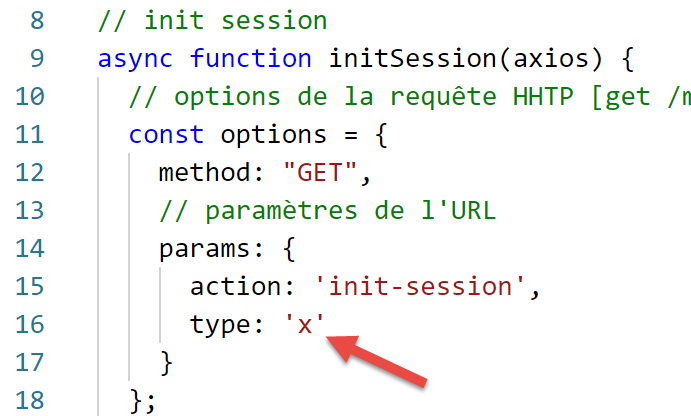
Case 3: The Laragon server is running but is sent an incorrect command:
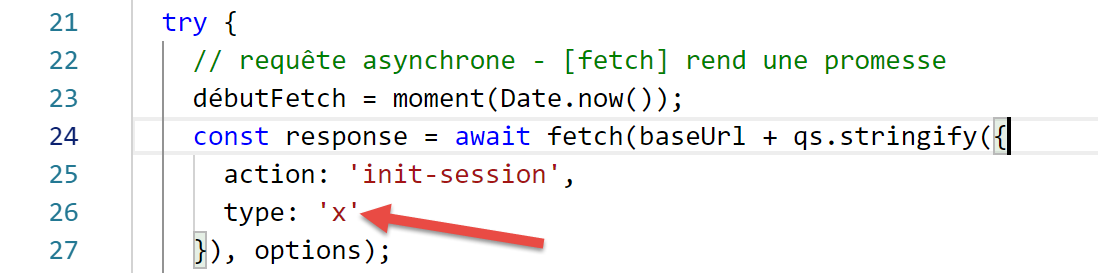
- above, line 26, an incorrect session type is passed to the server;
The execution results are as follows:
requête HTTP vers le serveur en cours ---------------------------------------------
réponse fetch formatée en json,={"size":0,"timeout":2000}, heure=10:27:54:114, durée= 0 seconde(s) et 136 millisecondes
réponse fetch en javascript= Response {
  size: 0,
  timeout: 2000,
  [Symbol(Body internals)]:
   { body:
      PassThrough {
        _readableState: [ReadableState],
        readable: true,
        domain: null,
        _events: [Object],
        _eventsCount: 2,
        _maxListeners: undefined,
        _writableState: [WritableState],
        writable: false,
        allowHalfOpen: true,
        _transformState: [Object] },
     disturbed: false,
     error: null },
  [Symbol(Response internals)]:
   { url:
      'http://localhost/php7/scripts-web/impots/version-14/main.php?action=init-session&type=x',
     status: 400,
     statusText: 'Bad Request',
     headers: Headers { [Symbol(map)]: [Object] },
     counter: 0 } }
entêtes de la réponse= Headers {
  [Symbol(map)]:
   [Object: null prototype] {
     date: [ 'Sat, 14 Sep 2019 08:27:54 GMT' ],
     server: [ 'Apache/2.4.35 (Win64) OpenSSL/1.1.0i PHP/7.2.11' ],
     'x-powered-by': [ 'PHP/7.2.11' ],
     'cache-control': [ 'max-age=0, private, must-revalidate, no-cache, private' ],
     'set-cookie': [ 'PHPSESSID=5ku9gfok81ikj98hia0meeum57; path=/' ],
     'content-length': [ '79' ],
     connection: [ 'close' ],
     'content-type': [ 'application/json' ] }
réponse json={"action":"init-session","état":703,"réponse":"paramètre type=[x] invalide"}, type=object, heure=10:27:54:127, durée= 0 seconde(s) et 2 millisecondes
succès ---------------------------------------------
réponse= { action: 'init-session',
  'condition': 703,
  'answer': 'parameter type=[x] invalid' } object

[Done] exited with code=0 in 0.712 seconds
- The server response is received on line 2;
- line 24: we can see that the code HTTP in the server response is 400, an error code. However, [fetch] did not throw an exception. As long as [fetch] receives a response from the server, it processes it and does not throw an exception;
- lines 41–43: the response obtained by the asynchronous function [main];
12.4. script [fetch-02]
The following script is based on the [fetch-01] script, stripped of all unnecessary details:
'use strict';

// imports
import fetch from 'node-fetch';
import qs from 'qs';

// URL base of tax calculation server
const baseUrl = 'http://localhost/php7/scripts-web/impots/version-14/main.php?';
// init session
async function initSession() {
  // query options HHTP [get /main.php?action=init-session&type=json]
  const options = {
    method: "GET",
    timeout: 2000
  };
  // execute query HTTP [get /main.php?action=init-session&type=json]
  const response = await fetch(baseUrl + qs.stringify({
    action: 'init-session',
    type: 'json'
  }), options);
  // result received in jSON
  return await response.json();
}

// the main function executes the asynchronous function [initSession]
async function main() {
  try {
    console.log("requête HTTP vers le serveur en cours ---------------------------------------------");
    const response = await initSession();
    console.log("succès ---------------------------------------------");
    console.log("réponse=", response)
  } catch (error) {
    console.log("erreur ---------------------------------------------");
    console.log("erreur=", error.message);
  }
}

// test
main();
Results of a normal execution:
[Running] C:\myprograms\laragon-lite\bin\nodejs\node-v10\node.exe -r esm "c:\Data\st-2019\dev\es6\javascript\http\fetch-02.js"
requête HTTP vers le serveur en cours ---------------------------------------------
succès ---------------------------------------------
réponse= { action: 'init-session',
  'condition': 700,
  'answer': 'session started with type [json]' }

[Done] exited with code=0 in 0.56 seconds
Results of an execution with an exception (stopping the Laragon server):
[Running] C:\myprograms\laragon-lite\bin\nodejs\node-v10\node.exe -r esm "c:\Data\st-2019\dev\es6\javascript\http\fetch-02.js"
requête HTTP vers le serveur en cours ---------------------------------------------
erreur ---------------------------------------------
erreur= network timeout at: http://localhost/php7/scripts-web/impots/version-14/main.php?action=init-session&type=json

[Done] exited with code=0 in 2.701 seconds
12.5. script [axios-01]
Here we revisit the [fetch-01] script, which we rewrite using the [axios] library. As a reminder, our interest in this library lies in its portability between the [node.js] environment and those of common browsers. This allows us to:
- in phase 1, to test our scripts in a [node.js] environment;
- in phase 2, porting them to a browser;
The [axios-01] script follows the structure of the [fetch-01] script:
'use strict';
import axios from 'axios';

// axios default configuration
axios.defaults.timeout = 2000;
axios.defaults.baseURL = 'http://localhost/php7/scripts-web/impots/version-14';

// init session
async function initSession(axios) {
  // query options HHTP [get /main.php?action=init-session&type=json]
  const options = {
    method: "GET",
    // URL parameters
    params: {
      action: 'init-session',
      type: 'json'
    }
  };
  // execute query HTTP [get /main.php?action=init-session&type=json]
  try {
    // asynchronous request
    const response = await axios.request('main.php', options);
    // response is the entire HTTP response from the server (HTTP headers + response itself)
    // display this answer to see its structure
    console.log("réponse axios=", response);
    // the server response is in [response.data]
    return response.data;
  } catch (error) {
    // we're here because the server has sent an error code [404 Not Found, 500 Internal Server Error, ...]
    // parameter [error] is an exception instance - it can take various forms
    // display it to see its structure
    console.log("axios error=", typeof (error), error);
    if (error.response) {
      // the server reported an error in status HTTP but also sent a response
      // then it is found in [error.response.data]
      // we know that the server sends jSON responses with structure {action, status, response}
      // and that in the event of an error, the error msg is in [reply]
      return error.response.data;
    } else {
      // we launch the error
      throw error;
    }
  }
}

// the main function executes the asynchronous function [initSession]
async function main() {
  try {
    console.log("requête HTTP vers le serveur en cours ---------------------------------------------");
    const response = await initSession(axios);
    console.log("succès ---------------------------------------------");
    console.log("réponse=", response, typeof (response))
  } catch (error) {
    console.log("erreur ---------------------------------------------");
    console.log("erreur=", error.message);
  }
}

// test
main();
Comments
- line 2: import the [axios] library;
- lines 5-6: default configuration of HTTP queries. The [axios.defaults] options apply to all HTTP requests issued by the [axios] object without needing to be specified for each new request;
- line 5: 2-second timeout for all requests;
- line 6: all URL requests will be relative to the base URL;
- line 9: the asynchronous function [initSession];
- lines 11–18: the options for the HTTP query that will be issued (in addition to the default options already defined in lines 5–6);
- lines 14–17: the parameters of URL [action=init-session&type=json]. The object [params] will be automatically converted into an encoded string URL;
- line 22: blocking call to the asynchronous function [axios.request]. The first parameter is the target URL, constructed by adding [main.php] to the base URL defined in line 6. The second parameter is the [options] object from lines 11–18;
- line 25: [response] is a Javascript object encapsulating the entire HTTP response from the server (HTTP headers + response document). We display it to view its structure Javascript;
- line 27: if the server sent a document, then it is found in [response.data]. Here we know that the server sends a response jSON accompanied by the header HTTP [Content-type : application/json]. The presence of this header causes [axios] to automatically deserialize [response.data] into a Javascript object;
- Line 28: The function [axios] can throw an exception. This is where [axios] differs from [fetch]. An exception is thrown in the following cases:
- the HTTP request could not be sent (client-side error);
- the server sent an error code HTTP (400, 404, 500, …) (this setting is actually configurable). Note that if this HTTP code is accompanied by a response, [fetch] does not throw an exception, whereas [axios] does. However, if the error code HTTP is accompanied by a document, the document is placed in [error.response];
- line 32: the structure Javascript of the object [error] is displayed;
- lines 33–38: if the object [error] contains an object [response], then this response is returned to the calling code;
- lines 39–42: in all other cases, the object [error] is returned to the calling code;
- lines 47–57: the asynchronous function [main];
- line 50: blocking call to the asynchronous function [initSession]. We retrieve the response jSON from the server as an object Javascript;
- lines 53–56: handling of any errors. The error message is stored in [error.message];
The results of the execution are as follows:
Case 1: The Laragon server is not running
[Running] C:\myprograms\laragon-lite\bin\nodejs\node-v10\node.exe -r esm "c:\Data\st-2019\dev\es6\javascript\http\axios-01.js"
requête HTTP vers le serveur en cours ---------------------------------------------
axios error= object { Error: timeout of 2000ms exceeded
    at createError (c:\Data\st-2019\dev\es6\javascript\node_modules\axios\lib\core\createError.js:16:15)
    at Timeout.handleRequestTimeout (c:\Data\st-2019\dev\es6\javascript\node_modules\axios\lib\adapters\http.js:252:16)
    at ontimeout (timers.js:436:11)
    at tryOnTimeout (timers.js:300:5)
    at listOnTimeout (timers.js:263:5)
    at Timer.processTimers (timers.js:223:10)
  config:
   { url:
      'http://localhost/php7/scripts-web/impots/version-14/main.php',
     method: 'get',
     params: { action: 'init-session', type: 'json' },
     headers:
      { Accept: 'application/json, text/plain, */*',
        'User-Agent': 'axios/0.19.0' },
     baseURL: 'http://localhost/php7/scripts-web/impots/version-14',
     transformRequest: [ [Function: transformRequest] ],
     transformResponse: [ [Function: transformResponse] ],
     timeout: 2000,
     adapter: [Function: httpAdapter],
     xsrfCookieName: 'XSRF-TOKEN',
     xsrfHeaderName: 'X-XSRF-TOKEN',
     maxContentLength: -1,
     validateStatus: [Function: validateStatus],
     data: undefined },
  code: 'ECONNABORTED',
  request:
   Writable {
     _writableState:
      WritableState {
        objectMode: false,
        highWaterMark: 16384,
        finalCalled: false,
        needDrain: false,
        ending: false,
        ended: false,
        finished: false,
        destroyed: false,
        decodeStrings: true,
        defaultEncoding: 'utf8',
        length: 0,
        writing: false,
        corked: 0,
        sync: true,
        bufferProcessing: false,
        onwrite: [Function: bound onwrite],
        writecb: null,
        writelen: 0,
        bufferedRequest: null,
        lastBufferedRequest: null,
        pendingcb: 0,
        prefinished: false,
        errorEmitted: false,
        emitClose: true,
        bufferedRequestCount: 0,
        corkedRequestsFree: [Object] },
     writable: true,
     domain: null,
     _events:
      [Object: null prototype] {
        response: [Function: handleResponse],
        error: [Function: handleRequestError] },
     _eventsCount: 2,
     _maxListeners: undefined,
     _options:
      { protocol: 'http:',
        maxRedirects: 21,
        maxBodyLength: 10485760,
        path:
         '/php7/scripts-web/impots/version-14/main.php?action=init-session&type=json',
        method: 'GET',
        headers: [Object],
        agent: undefined,
        auth: undefined,
        hostname: 'localhost',
        port: null,
        nativeProtocols: [Object],
        pathname: '/php7/scripts-web/impots/version-14/main.php',
        search: '?action=init-session&type=json' },
     _redirectCount: 0,
     _redirects: [],
     _requestBodyLength: 0,
     _requestBodyBuffers: [],
     _onNativeResponse: [Function],
     _currentRequest:
      ClientRequest {
        domain: null,
        _events: [Object],
        _eventsCount: 6,
        _maxListeners: undefined,
        output: [],
        outputEncodings: [],
        outputCallbacks: [],
        outputSize: 0,
        writable: true,
        _last: true,
        chunkedEncoding: false,
        shouldKeepAlive: false,
        useChunkedEncodingByDefault: false,
        sendDate: false,
        _removedConnection: false,
        _removedContLen: false,
        _removedTE: false,
        _contentLength: 0,
        _hasBody: true,
        _trailer: '',
        finished: true,
        _headerSent: true,
        socket: [Socket],
        connection: [Socket],
        _header:
         'GET /php7/scripts-web/impots/version-14/main.php?action=init-session&type=json HTTP/1.1\r\nAccept: application/json, text/plain, */*\r\nUser-Agent: axios/0.19.0\r\nHost: localhostr\nConnection: close\r\n\r\n',
        _onPendingData: [Function: noopPendingOutput],
        agent: [Agent],
        socketPath: undefined,
        timeout: undefined,
        method: 'GET',
        path:
         '/php7/scripts-web/impots/version-14/main.php?action=init-session&type=json',
        _ended: false,
        res: null,
        aborted: 1568528450762,
        timeoutCb: null,
        upgradeOrConnect: false,
        parser: [HTTPParser],
        maxHeadersCount: null,
        _redirectable: [Circular],
        [Symbol(isCorked)]: false,
        [Symbol(outHeadersKey)]: [Object] },
     _currentUrl:
      'http://localhost/php7/scripts-web/impots/version-14/main.php?action=init-session&type=json' },
  response: undefined,
  isAxiosError: true,
  toJSON: [Function] }
erreur ---------------------------------------------
erreur= timeout of 2000ms exceeded

[Done] exited with code=0 in 2.784 seconds
Comments
- lines 33-136: the [error] object contains a lot of information;
- [Error], lines 3-9: a description of the error that occurred;
- [config], lines 10-27: the configuration of the HTTP request that led to this error;
- [config.url], lines 11–12: the target URL;
- [config.method], line 13: request method;
- [config.params], line 14: the parameters of URL;
- [config.headers], lines 16–17: request headers for HTTP;
- [config.baseURL], line 18: the base URL of the target URL;
- [config.timeout], line 21: the request timeout;
- [code], line 28: an error code;
- [request], lines 29–133: a detailed description of the HTTP request. Note that most properties are prefixed with an underscore (_), indicating that they are internal properties of the [request] object and not intended for direct use by the developer;
- [response], line 134: the server response, which is missing here;
- Line 138: the error message displayed by function [main];
Case 2: The Laragon server is running
[Running] C:\myprograms\laragon-lite\bin\nodejs\node-v10\node.exe -r esm "c:\Data\st-2019\dev\es6\javascript\http\axios-01.js"
requête HTTP vers le serveur en cours ---------------------------------------------
réponse axios= { status: 200,
  statusText: 'OK',
  headers:
   { date: 'Sun, 15 Sep 2019 07:09:26 GMT',
     server: 'Apache/2.4.35 (Win64) OpenSSL/1.1.0i PHP/7.2.11',
     'x-powered-by': 'PHP/7.2.11',
     'cache-control': 'max-age=0, private, must-revalidate, no-cache, private',
     'set-cookie': [ 'PHPSESSID=uas6lugtblstktcifpd8e5irm6; path=/' ],
     'content-length': '86',
     connection: 'close',
     'content-type': 'application/json' },
  config:
   { url:
      'http://localhost/php7/scripts-web/impots/version-14/main.php',
     method: 'get',
     params: { action: 'init-session', type: 'json' },
     headers:
      { Accept: 'application/json, text/plain, */*',
        'User-Agent': 'axios/0.19.0' },
     baseURL: 'http://localhost/php7/scripts-web/impots/version-14',
     transformRequest: [ [Function: transformRequest] ],
     transformResponse: [ [Function: transformResponse] ],
     timeout: 2000,
     adapter: [Function: httpAdapter],
     xsrfCookieName: 'XSRF-TOKEN',
     xsrfHeaderName: 'X-XSRF-TOKEN',
     maxContentLength: -1,
     validateStatus: [Function: validateStatus],
     data: undefined },
  request:
   ClientRequest {
     domain: null,
     _events:
      [Object: null prototype] {
        socket: [Function],
        abort: [Function],
        aborted: [Function],
        error: [Function],
        timeout: [Function],
        prefinish: [Function: requestOnPrefinish] },
     _eventsCount: 6,
     _maxListeners: undefined,
     output: [],
     outputEncodings: [],
     outputCallbacks: [],
     outputSize: 0,
     writable: true,
     _last: true,
     chunkedEncoding: false,
     shouldKeepAlive: false,
     useChunkedEncodingByDefault: false,
     sendDate: false,
     _removedConnection: false,
     _removedContLen: false,
     _removedTE: false,
     _contentLength: 0,
     _hasBody: true,
     _trailer: '',
     finished: true,
     _headerSent: true,
     socket:
      Socket {
        connecting: false,
        _hadError: false,
        _handle: [TCP],
        _parent: null,
        _host: 'localhost',
        _readableState: [ReadableState],
        readable: true,
        domain: null,
        _events: [Object],
        _eventsCount: 7,
        _maxListeners: undefined,
        _writableState: [WritableState],
        writable: false,
        allowHalfOpen: false,
        _sockname: null,
        _pendingData: null,
        _pendingEncoding: '',
        server: null,
        _server: null,
        parser: null,
        _httpMessage: [Circular],
        [Symbol(asyncId)]: 6,
        [Symbol(lastWriteQueueSize)]: 0,
        [Symbol(timeout)]: null,
        [Symbol(kBytesRead)]: 0,
        [Symbol(kBytesWritten)]: 0 },
     connection:
      Socket {
        connecting: false,
        _hadError: false,
        _handle: [TCP],
        _parent: null,
        _host: 'localhost',
        _readableState: [ReadableState],
        readable: true,
        domain: null,
        _events: [Object],
        _eventsCount: 7,
        _maxListeners: undefined,
        _writableState: [WritableState],
        writable: false,
        allowHalfOpen: false,
        _sockname: null,
        _pendingData: null,
        _pendingEncoding: '',
        server: null,
        _server: null,
        parser: null,
        _httpMessage: [Circular],
        [Symbol(asyncId)]: 6,
        [Symbol(lastWriteQueueSize)]: 0,
        [Symbol(timeout)]: null,
        [Symbol(kBytesRead)]: 0,
        [Symbol(kBytesWritten)]: 0 },
     _header:
      'GET /php7/scripts-web/impots/version-14/main.php?action=init-session&type=json HTTP/1.1\r\nAccept: application/json, text/plain, */*\r\nUser-Agent: axios/0.19.0\r\nHost: localhostr\nConnection: close\r\n\r\n',
     _onPendingData: [Function: noopPendingOutput],
     agent:
      Agent {
        domain: null,
        _events: [Object],
        _eventsCount: 1,
        _maxListeners: undefined,
        defaultPort: 80,
        protocol: 'http:',
        options: [Object],
        requests: {},
        sockets: [Object],
        freeSockets: {},
        keepAliveMsecs: 1000,
        keepAlive: false,
        maxSockets: Infinity,
        maxFreeSockets: 256 },
     socketPath: undefined,
     timeout: undefined,
     method: 'GET',
     path:
      '/php7/scripts-web/impots/version-14/main.php?action=init-session&type=json',
     _ended: true,
     res:
      IncomingMessage {
        _readableState: [ReadableState],
        readable: false,
        domain: null,
        _events: [Object],
        _eventsCount: 3,
        _maxListeners: undefined,
        socket: [Socket],
        connection: [Socket],
        httpVersionMajor: 1,
        httpVersionMinor: 0,
        httpVersion: '1.0',
        complete: true,
        headers: [Object],
        rawHeaders: [Array],
        trailers: {},
        rawTrailers: [],
        aborted: false,
        upgrade: false,
        url: '',
        method: null,
        statusCode: 200,
        statusMessage: 'OK',
        client: [Socket],
        _consuming: false,
        _dumped: false,
        req: [Circular],
        responseUrl:
         'http://localhost/php7/scripts-web/impots/version-14/main.php?action=init-session&type=json',
        redirects: [] },
     aborted: undefined,
     timeoutCb: null,
     upgradeOrConnect: false,
     parser: null,
     maxHeadersCount: null,
     _redirectable:
      Writable {
        _writableState: [WritableState],
        writable: true,
        domain: null,
        _events: [Object],
        _eventsCount: 2,
        _maxListeners: undefined,
        _options: [Object],
        _redirectCount: 0,
        _redirects: [],
        _requestBodyLength: 0,
        _requestBodyBuffers: [],
        _onNativeResponse: [Function],
        _currentRequest: [Circular],
        _currentUrl:
         'http://localhost/php7/scripts-web/impots/version-14/main.php?action=init-session&type=json' },
     [Symbol(isCorked)]: false,
     [Symbol(outHeadersKey)]:
      [Object: null prototype] { accept: [Array], 'user-agent': [Array], host: [Array] },
  data:
   { action: 'init-session',
     'condition': 700,
     'response': 'session started with type [json]' } }
succès ---------------------------------------------
réponse= { action: 'init-session',
  'condition': 700,
  'answer': 'session started with type [json]' } object

[Done] exited with code=0 in 1.115 seconds
Comments
- lines 3–203: the object Javascript [response], which encapsulates the server’s response HTTP;
- line 3, [status]: the code HTTP of the response;
- line 4, [statusText]: the text associated with the previous code HTTP;
- lines 5–13, [headers]: the HTTP headers of the response:
- line 10, [Set-Cookie]: the session cookie;
- line 13, [Content-Type]: the type of document sent by the server;
- lines 14–31, [config]: the configuration of the HTTP request sent;
- lines 32–199, [request]: the Javascript object detailing the HTTP request sent;
- lines 200–203, [request.data]: the Javascript object encapsulating the jSON response from the server;
- lines 205–207: the response retrieved by the asynchronous function [main];
Case 3: An incorrect [init-session] request is sent to the Laragon server;
The execution results are as follows:
[Running] C:\myprograms\laragon-lite\bin\nodejs\node-v10\node.exe -r esm "c:\Data\st-2019\dev\es6\javascript\http\axios-01.js"
requête HTTP vers le serveur en cours ---------------------------------------------
axios error= object { Error: Request failed with status code 400
   ...
  config:
   { url:
      'http://localhost/php7/scripts-web/impots/version-14/main.php',
     ...
     data: undefined },
  request:
   ...
     [Symbol(outHeadersKey)]:
      [Object: null prototype] { accept: [Array], 'user-agent': [Array], host: [Array] },
  response:
   { status: 400,
     statusText: 'Bad Request',
     headers:
      { date: 'Sun, 15 Sep 2019 07:25:58 GMT',
        server: 'Apache/2.4.35 (Win64) OpenSSL/1.1.0i PHP/7.2.11',
        'x-powered-by': 'PHP/7.2.11',
        'cache-control': 'max-age=0, private, must-revalidate, no-cache, private',
        'set-cookie': [Array],
        'content-length': '79',
        connection: 'close',
        'content-type': 'application/json' },
     config:
      { url:
         'http://localhost/php7/scripts-web/impots/version-14/main.php',
        ...
        data: undefined },
     request:
      ...
        [Symbol(outHeadersKey)]: [Object] },
     data:
      { action: 'init-session',
        'condition': 703,
        'answer': 'parameter type=[x] invalid' },
  isAxiosError: true,
  toJSON: [Function] }
succès ---------------------------------------------
réponse= { action: 'init-session',
  'condition': 703,
  'answer': 'parameter type=[x] invalid' } object

[Done] exited with code=0 in 0.69 seconds
Because the server responded with a 400 status code (line 15), HTTP threw an exception (again, this behavior is configurable). Although [axios] threw an exception, we do receive the server’s response HTTP in [error.response] (line 14) and the document jSON sent to [error.response.data] (line 34). Lines 41–43: The [main] function correctly retrieves the jSON response from the server.
12.6. script [axios-02]
Now that we have detailed the objects handled by the [axios] library during a HTTP request, we can rewrite the [axios-01] script as follows:
'use strict';
import axios from 'axios';

// axios default configuration
axios.defaults.timeout = 2000;
axios.defaults.baseURL = 'http://localhost/php7/scripts-web/impots/version-14';

// init session
async function initSession(axios) {
  // query options HHTP [get /main.php?action=init-session&type=json]
  const options = {
    method: "GET",
    // URL parameters
    params: {
      action: 'init-session',
      type: 'json'
    }
  };
  try {
    // query execution HTTP [get /main.php?action=init-session&type=json]
    const response = await axios.request('main.php', options);
    // the server response is in [response.data]
    return response.data;
  } catch (error) {
    // server response
    if (error.response) {
      // the answer jSON is in [error.response.data]
      return error.response.data;
    } else {
      // error restart
      throw error;
    }
  }
}

// the main function executes the asynchronous function [initSession]
async function main() {
  try {
    console.log("requête HTTP vers le serveur en cours ---------------------------------------------");
    const response = await initSession(axios);
    console.log("succès ---------------------------------------------");
    console.log("réponse=", response, typeof (response))
  } catch (error) {
    console.log("erreur ---------------------------------------------");
    console.log("erreur=", error.message);
  }
}

// test
main();
12.7. script [axios-03]
The script [axios-03] follows the methodology of the script [axios-02]. This time, we add the request HTTP [authentifier-utilisateur] to the server, which is made using a POST:
'use strict';
import axios from 'axios';
import qs from 'qs'

// axios configuration
axios.defaults.timeout = 2000;
axios.defaults.baseURL = 'http://localhost/php7/scripts-web/impots/version-14';


// init session
async function initSession(axios) {
  // query options HHTP [get /main.php?action=init-session&type=json]
  const options = {
    method: "GET",
    // URL parameters
    params: {
      action: 'init-session',
      type: 'json'
    }
  };
  try {
    // query execution HTTP [get /main.php?action=init-session&type=json]
    const response = await axios.request('main.php', options);
    // the server response is in [response.data]
    return response.data;
  } catch (error) {
    // server response
    if (error.response) {
      // the answer jSON is in [error.response.data]
      return error.response.data;
    } else {
      // error restart
      throw error;
    }
  }
}

async function authentifierUtilisateur(axios, user, password) {
  // query options HHTP [POST /main.php?action=authenticate-user]
  const options = {
    method: "POST",
    headers: {
      'Content-type': 'application/x-www-form-urlencoded',
    },
    // body of POST
    data: qs.stringify({
      user: user,
      password: password
    }),
    // URL parameters
    params: {
      action: 'authenticate-user
    }
  };
  try {
    // execute query HTTP [post /main.php?action=authenticate-user]
    const response = await axios.request('main.php', options);
    // the server response is in [response.data]
    return response.data;
  } catch (error) {
    // server response
    if (error.response) {
      // the answer jSON is in [error.response.data]
      return error.response.data;
    } else {
      // error restart
      throw error;
    }
  }
}

// the main function executes asynchronous functions one by one
async function main() {
  try {
    // init-session
    console.log("action init-session en cours ---------------------------------------------");
    const response1 = await initSession(axios);
    console.log("succès ---------------------------------------------");
    console.log("réponse=", response1);
    // authenticate-user
    console.log("action authentifier-utilisateur en cours ---------------------------------------------");
    const response2 = await authentifierUtilisateur(axios, 'admin', 'admin');
    console.log("succès ---------------------------------------------");
    console.log("réponse=", response2)
  } catch (error) {
    console.log("erreur ---------------------------------------------");
    console.log("erreur=", error);
  }
}

// test
main();
Comments
- lines 38-70: the asynchronous function [authentifierUtilisateur];
- line 39: the [POST /main.php?action=authentifier-utilisateur] query must be executed;
- lines 40-54: the options for the HTTP request;
- line 41: this is a POST;
- lines 42–44: the parameters of POST will be encoded in a document that the client sends with its request;
- lines 46–49: the [data] property must contain the encoded string from POST URL. To do this, we use the [qs] library imported on line 3;
- lines 55–69: to execute the query, we use the same code as in the [initSession] method;
- lines 73–89: the [asynchrone] method successively calls, in a blocking manner, the [initSession, authentifierUtilisateur] methods on lines 77 and 82;
- line 82: the pair (admin, admin) is used as the login credentials. We know that they are recognized by the server;
The results of the execution are as follows:
[Running] C:\myprograms\laragon-lite\bin\nodejs\node-v10\node.exe -r esm "c:\Data\st-2019\dev\es6\javascript\http\axios-03.js"
action init-session en cours ---------------------------------------------
succès ---------------------------------------------
réponse= { action: 'init-session',
  'condition': 700,
  'answer': 'session started with type [json]' }
action authentifier-utilisateur en cours ---------------------------------------------
succès ---------------------------------------------
réponse= { action: 'authenticate-user',
  'condition': 103,
  'answer':
   [ 'no session in progress. Start with [init-session]' action ] }

[Done] exited with code=0 in 0.834 seconds
- lines 9-12: user authentication fails: the server did not retain the fact that a session jSON had been initiated. This is because the session cookie sent in response to the first request [init-session] was not sent back;
12.8. script [axios-04]
The script [axios-04] introduces two improvements to the script [axios-03]:
- it handles the session cookie;
- it factors into a function [getRemoteData] what is common to the functions [initSession] and [authentifierUtilisateur];
'use strict';
import axios from 'axios';
import qs from 'qs'

// axios configuration
axios.defaults.timeout = 2000;
axios.defaults.baseURL = 'http://localhost/php7/scripts-web/impots/version-14';

// session cookie
const sessionCookieName = "PHPSESSID";
let sessionCookie = '';

// init session
async function initSession(axios) {
  // query options HHTP [get /main.php?action=init-session&type=json]
  const options = {
    method: "GET",
    // URL parameters
    params: {
      action: 'init-session',
      type: 'json'
    }
  };
  // execute query HTTP
  return await getRemoteData(axios, options);
}

async function authentifierUtilisateur(axios, user, password) {
  // query options HHTP [post /main.php?action=authenticate-user]
  const options = {
    method: "POST",
    headers: {
      'Content-type': 'application/x-www-form-urlencoded',
    },
    // body of POST
    data: qs.stringify({
      user: user,
      password: password
    }),
    // URL parameters
    params: {
      action: 'authentifier-utilisateur'
    }
  };
  // execute query HTTP
  return await getRemoteData(axios, options);
}

async function getRemoteData(axios, options) {
  // for the session cookie
  if (!options.headers) {
    options.headers = {};
  }
  options.headers.Cookie = sessionCookie;
  // execute query HTTP
  let response;
  try {
    // asynchronous request
    response = await axios.request('main.php', options);
  } catch (error) {
    // parameter [error] is an exception instance - it can take various forms
    if (error.response) {
      // the server response is in [error.response]
      response = error.response;
    } else {
      // error restart
      throw error;
    }
  }
  // response is the entire HTTP response from the server (HTTP headers + response itself)
  // retrieve the session cookie if it exists
  const setCookie = response.headers['set-cookie'];
  if (setCookie) {
    // setCookie is an array
    // look for the session cookie in this table
    let trouvé = false;
    let i = 0;
    while (!trouvé && i < setCookie.length) {
      // look for the session cookie
      const results = RegExp('^(' + sessionCookieName + '.+?);').exec(setCookie[i]);
      if (results) {
        // the session cookie is stored
        // eslint-disable-next-line require-atomic-updates
        sessionCookie = results[1];
        // we found
        trouvé = true;
      } else {
        // next item
        i++;
      }
    }
  }
  // the server response is in [response.data]
  return response.data;
}

// the main function executes asynchronous functions one by one
async function main() {
  try {
    // init-session
    console.log("action init-session en cours ---------------------------------------------");
    const response1 = await initSession(axios);
    console.log("succès ---------------------------------------------");
    console.log("réponse=", response1);
    // authenticate-user
    console.log("action authentifier-utilisateur en cours ---------------------------------------------");
    const response2 = await authentifierUtilisateur(axios, 'admin', 'admin');
    console.log("succès ---------------------------------------------");
    console.log("réponse=", response2)
  } catch (error) {
    console.log("erreur ---------------------------------------------");
    console.log("erreur=", error.message);
  }
}

// test
main();
Comments
- lines 14–26: the [initSession] function. It now simply prepares the HTTP request to be sent to the server but does not execute it. It delegates this task to the [getRemoteDate] method in lines 49–95;
- lines 28–47: the [authentifierUtilisateur] function follows the same procedure;
- line 49: the [getRemoteData] function receives the two pieces of information that allow it to execute a HTTP request:
- [axios], the object responsible for sending the request and receiving the response;
- [options], the configuration options for the request to be sent to the server;
- line 59: execution of the request and blocking wait for its response jSON;
- lines 60–68: handling of any exception;
- line 64: retrieve the response, which may be encapsulated in the error object;
- line 67: if the server threw an exception without including the server response, the received error is propagated to the calling code;
- The function [getRemoteData] handles the session cookie:
- it stores it in the variable [sessionCookie] (line 11) when it receives it for the first time;
- it then returns it with each new request (HTTP);
- lines 72–92: [getRemoteData] analyzes each server response to determine whether it sent the header HTTP [Set-Cookie]. We know that the server sends a session cookie named [PHPSESSID] (line 10). This is therefore the cookie we are looking for (line 10);
- line 72: we retrieve the headers HTTP and [Set-Cookie] if they exist (case is not sensitive). There may indeed be multiple [Set-Cookie] headers, so we retrieve an array;
- line 73: if an array of cookies has been retrieved;
- lines 78–90: we search for the session cookie among all the cookies in the array;
- line 80: the relational expression used to search for the session cookie in cookie #i;
- line 81: if the comparison returned results;
- line 84: we have in results[1], the first parenthesis of the relational expression pattern, i.e., (PHPSESSID=xxxx) up to the semicolon (not included) that ends the session cookie;
- lines 50–54: with each request, the session cookie is included in the request headers as HTTP. The first time, this cookie is empty and will therefore be ignored by the server;
The execution results are as follows:
[Running] C:\myprograms\laragon-lite\bin\nodejs\node-v10\node.exe -r esm "c:\Data\st-2019\dev\es6\javascript\http\axios-04.js"
action init-session en cours ---------------------------------------------
succès ---------------------------------------------
réponse= { action: 'init-session',
  'condition': 700,
  'answer': 'session started with type [json]' }
action authentifier-utilisateur en cours ---------------------------------------------
succès ---------------------------------------------
réponse= { action: 'authenticate-user',
  'condition': 200,
  'answer': 'Authentication successful [admin, admin]' }

[Done] exited with code=0 in 0.982 seconds