7. The lifecycle of a request
Between the arrival of a request and the execution of the action, [ASP.NET Core] involves several types of objects, each with a specific role. We have already encountered some of them: middleware ([UseStaticFiles], [UseRequestLocalization], the middleware from Example 23), and the model binding ([IModelBinder], Example 12). The MVC component adds filters that run around the action. The case study uses each of them:
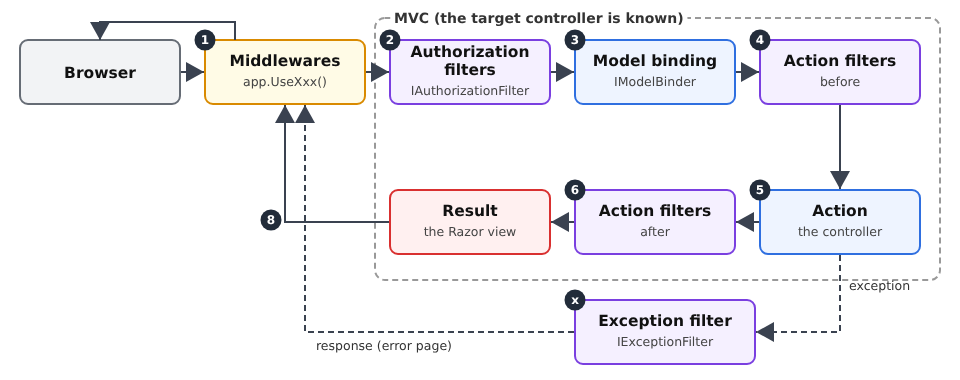
Object | Role | In the case study |
middleware | Prepares the request; does not yet know the action | static files, language, authentication (reading the token), error pages |
authorization filter | allow or deny access to the action | [[Authorize]], [[Authorize(Roles = ...)]] |
Template binding | Convert and validate parameters | forms, [ModelState] |
action filter | Code before and after the action | (not used: services and the view parent class are sufficient) |
exception filter | Convert an exception into a response | Session expired: redirect to /login |
7.1. Example 24: The steps in processing a request
Example 24 has an action that calculates the square of a number, and one object of each type. Each writes a line to the console, so we can see the order in which they are executed.
| 24-lifecycle/
├── Controllers/
│ ├── CalcController.cs
│ └── ErrorController.cs
├── Filters/
│ ├── BlockAttribute.cs
│ ├── ErrorPageFilter.cs
│ ├── IntegerBinder.cs
│ ├── LoggerMiddleware.cs
│ └── TimingAttribute.cs
├── Views/
│ ├── Calc/
│ │ └── Result.cshtml
│ ├── Shared/
│ │ ├── _Layout.cshtml
│ │ └── Error.cshtml
│ └── _ViewStart.cshtml
├── appsettings.json
├── Example24.csproj
└── Program.cs
|
The file [Filters/LoggerMiddleware.cs]:
| namespace Example24.Filters;
// a middleware written as a class: it receives the rest of the pipeline
// (next) in its constructor, and handles each request in InvokeAsync
public class LoggerMiddleware(RequestDelegate next)
{
public async Task InvokeAsync(HttpContext context)
{
Console.WriteLine();
Console.WriteLine($"--- {context.Request.Method} {context.Request.Path}{context.Request.QueryString}");
Console.WriteLine("1. middleware (before)");
await next(context); // the whole rest: routing, filters, action, view
Console.WriteLine($"8. middleware (after: code {context.Response.StatusCode})");
}
}
|
- Line 5: A middleware can be a class. Its constructor takes a [RequestDelegate]: the rest of the pipeline (the subsequent middlewares, followed by MVC);
- line 7: the [InvokeAsync] method is called for each request;
- line 12: the middleware calls the rest of the pipeline and waits for it to finish. If it did not call it, the request would stop there (it would then have to generate the response itself). The code placed before this call executes on the outbound request, and the code placed after it executes on the return: the middleware “wraps” everything else and sees the final status code of the response.
The file [Filters/BlockAttribute.cs]:
| using Microsoft.AspNetCore.Mvc;
using Microsoft.AspNetCore.Mvc.Controllers;
using Microsoft.AspNetCore.Mvc.Filters;
namespace Example24.Filters;
// an AUTHORIZATION filter: it decides whether the action can be executed.
// It is also an attribute: it is set on a controller or an action.
public class BlockAttribute : Attribute, IAuthorizationFilter
{
public void OnAuthorization(AuthorizationFilterContext context)
{
// the filter knows the targeted action, unlike the middleware
var action = (ControllerActionDescriptor)context.ActionDescriptor;
Console.WriteLine($"2. authorization filter (targeted action: {action.ActionName})");
if (context.HttpContext.Request.Query.ContainsKey("block"))
{
// setting Result short-circuits the rest: no binding, no action
context.Result = new StatusCodeResult(StatusCodes.Status403Forbidden);
}
}
}
|
- line 9: an authorization filter implements [IAuthorizationFilter]. The class also derives from [Attribute]: it can be applied, in square brackets, to a controller or an action;
- lines 14–15: Unlike middleware, the filter knows the target action ([ActionDescriptor]). This is what allows the [[Authorize(Roles = "ADMIN")]] attribute (see the next chapter) to protect only certain actions;
- lines 16–19: A filter rejects the request by setting [context.Result]: the sequence (binding, action) is not executed, and this result becomes the response. Here, a 403 response (access denied), with no content.
The file [Filters/IntegerBinder.cs]:
| using Microsoft.AspNetCore.Mvc.ModelBinding;
namespace Example24.Filters;
// the model binding of an integer parameter (see example 12)
public class IntegerBinder : IModelBinder
{
public Task BindModelAsync(ModelBindingContext context)
{
var value = context.ValueProvider.GetValue(context.ModelName).FirstValue;
Console.WriteLine($"3. model binding (received value: \"{value}\")");
if (int.TryParse(value, out var integer))
{
context.Result = ModelBindingResult.Success(integer);
}
else
{
context.ModelState.AddModelError(context.ModelName, $"\"{value}\" is not an integer.");
}
return Task.CompletedTask;
}
}
|
A custom template binding, like those in Example 12. An invalid value does not stop anything: the error is logged in [ModelState], and the action determines the outcome (line 18).
The file [Filters/TimingAttribute.cs]:
| using System.Diagnostics;
using Microsoft.AspNetCore.Mvc.Filters;
namespace Example24.Filters;
// an ACTION filter: code before and after the action.
// ActionFilterAttribute: a framework class, whose useful methods we override
public class TimingAttribute : ActionFilterAttribute
{
private const string Key = "timing";
public override void OnActionExecuting(ActionExecutingContext context)
{
// the action parameters are already bound: the filter can read them
Console.WriteLine($"4. action filter (before; parameters: {string.Join(", ", context.ActionArguments.Values)})");
context.HttpContext.Items[Key] = Stopwatch.StartNew();
}
public override void OnActionExecuted(ActionExecutedContext context)
{
var timer = (Stopwatch)context.HttpContext.Items[Key]!;
// context.Exception: the exception possibly thrown by the action
var outcome = context.Exception is null ? "" : $", exception {context.Exception.GetType().Name}";
Console.WriteLine($"6. action filter (after, {timer.ElapsedMilliseconds} ms{outcome})");
}
}
|
- line 8: an action filter. [ActionFilterAttribute] is a framework class that already implements the necessary interfaces: we override ([override]) the relevant methods;
- Lines 12–16: [OnActionExecuting] runs before the action. Model binding has already taken place: the action parameters are available ([ActionArguments]). A timer is started ([Stopwatch]), stored in [HttpContext.Items] (query scope; see Chapter 6);
- lines 19–24: [OnActionExecuted] runs after the action. If the action threw an exception, it is available in [context.Exception]. An action filter can also override the result of the action ([context.Result]).
The file [Filters/ErrorPageFilter.cs]:
| using Microsoft.AspNetCore.Mvc;
using Microsoft.AspNetCore.Mvc.Filters;
using Microsoft.AspNetCore.Mvc.ModelBinding;
using Microsoft.AspNetCore.Mvc.ViewFeatures;
namespace Example24.Filters;
// an EXCEPTION filter: it turns an exception into a response
public class ErrorPageFilter(IModelMetadataProvider metadata) : IExceptionFilter
{
public void OnException(ExceptionContext context)
{
Console.WriteLine($"x. exception filter ({context.Exception.GetType().Name}: {context.Exception.Message})");
// instead of the default error page, our Error view, with the 500 code
context.Result = new ViewResult
{
ViewName = "Error",
StatusCode = StatusCodes.Status500InternalServerError,
ViewData = new ViewDataDictionary(metadata, context.ModelState) { Model = 500 },
};
context.ExceptionHandled = true; // the exception is handled: it goes no further
}
}
|
- Line 9: An exception filter implements [IExceptionFilter]. It receives exceptions thrown by the model binding, the action filters, and the action. This is a service: it receives the [IModelMetadataProvider] object via injection, which is necessary to construct the [ViewData] dictionary for a view;
- lines 15–20: instead of the default error page, the filter generates a HTML page: the [Error] view, with status code 500. This is what the [View] method of a controller does, written here by hand;
- Line 21: The exception is marked as handled; it does not propagate further up the chain.
The file [Program.cs]:
| using System.Text.Encodings.Web;
using System.Text.Unicode;
using Example24.Filters;
using Microsoft.Extensions.FileProviders;
var builder = WebApplication.CreateBuilder(args);
builder.Services.AddControllersWithViews(options =>
{
// a GLOBAL filter: it applies to all the actions of the application
options.Filters.Add<ErrorPageFilter>();
});
builder.Services.AddSingleton(HtmlEncoder.Create(UnicodeRanges.All));
var app = builder.Build();
// the middlewares run in the order in which they are added
app.UseMiddleware<LoggerMiddleware>();
// an error response WITHOUT content (400, 403, 404...): the request is
// re-executed with the /error/{code} address, which builds a page
app.UseStatusCodePagesWithReExecute("/error/{0}");
app.UseStaticFiles(new StaticFileOptions
{
FileProvider = new PhysicalFileProvider(Path.GetFullPath(Path.Combine(builder.Environment.ContentRootPath, "..", "common", "bootstrap"))),
RequestPath = "/bootstrap",
});
app.MapControllers();
app.Run();
|
- line 10: a global filter is applied to all actions in the application. It is added to the options of MVC;
- line 17: a class-based middleware is added via [UseMiddleware]. Middlewares execute in the order they are added: this one is first, so it processes all requests;
- line 20: a framework middleware. When an error response (codes 400–599) has no content, it re-executes the request using the address [/error/{code}] (where [{0}] is replaced by the code), and returns the resulting page while retaining the error code. This is how 403 responses from the authorization filter, 400 responses from the action, and 404 responses from routing become HTML pages.
The [Controllers/CalcController.cs] file:
| using Example24.Filters;
using Microsoft.AspNetCore.Mvc;
namespace Example24.Controllers;
// two filters set on the controller: they apply to all its actions
[Block]
[Timing]
public class CalcController : Controller
{
[HttpGet("square/{n}")]
public IActionResult Square([ModelBinder(typeof(IntegerBinder))] int n)
{
Console.WriteLine($"5. action Square({n}); valid model: {ModelState.IsValid}");
if (!ModelState.IsValid)
{
return BadRequest(); // a 400 without content: see UseStatusCodePagesWithReExecute
}
if (n == 13)
{
throw new InvalidOperationException("13 brings bad luck"); // an "unexpected" error
}
return View("Result", n * n);
}
}
|
- lines 7–8: two filters applied to the controller; they apply to all of its actions (they can also be applied to a single action);
- line 12: the custom parameter binding;
- lines 15–17: an invalid parameter: a 400 response with no content;
- lines 19–21: an “unexpected” error, to see the exception filter in action.
The file [Controllers/ErrorController.cs]:
| using Microsoft.AspNetCore.Mvc;
namespace Example24.Controllers;
public class ErrorController : Controller
{
// [Route] without an HTTP method: the re-executed request keeps its original method
[Route("error/{code:int}")]
public IActionResult Display(int code)
{
Console.WriteLine($"7. error page {code} (re-executed request)");
Response.StatusCode = code; // the page keeps the error code
return View("Error", code);
}
}
|
- line 8: the action for the error page. [[Route]], without a method; HTTP, accepts all methods: a re-executed POST request remains a POST request;
- Line 12: The page retains the original error code.
The file [Views/Shared/Error.cshtml]:
| @* the error page; its model: the error code *@
@model int
@{
var message = Model switch
{
400 => "Bad request.",
403 => "Access denied.",
404 => "Page not found.",
_ => "Internal server error.",
};
}
<div class="alert alert-danger">
<h1 class="h4">Error @Model</h1>
<p class="mb-0">@message</p>
</div>
|
- Lines 4–10: a switch expression [C#]: it returns the value of the first branch whose pattern matches the template. [_] corresponds to everything else. The view is in [Views/Shared]: it is found regardless of the controller ([CalcController] for the exception filter, [ErrorController] otherwise).
Five requests: a normal calculation (http://localhost:5000/square/7), an invalid parameter ([/square/abc]), a request blocked by the authorization filter ([/square/7?block=1]), an unexpected error ([/square/13]), and an unknown address ([/unknown]). The server console:
| --- GET /square/7
1. middleware (before)
2. authorization filter (targeted action: Square)
3. model binding (received value: "7")
4. action filter (before; parameters: 7)
5. action Square(7); valid model: True
6. action filter (after, 0 ms)
8. middleware (after: code 200)
--- GET /square/abc
1. middleware (before)
2. authorization filter (targeted action: Square)
3. model binding (received value: "abc")
4. action filter (before; parameters: )
5. action Square(0); valid model: False
6. action filter (after, 0 ms)
7. error page 400 (re-executed request)
8. middleware (after: code 400)
--- GET /square/7?block=1
1. middleware (before)
2. authorization filter (targeted action: Square)
7. error page 403 (re-executed request)
8. middleware (after: code 403)
--- GET /square/13
1. middleware (before)
2. authorization filter (targeted action: Square)
3. model binding (received value: "13")
4. action filter (before; parameters: 13)
5. action Square(13); valid model: True
6. action filter (after, 0 ms, exception InvalidOperationException)
x. exception filter (InvalidOperationException: 13 brings bad luck)
8. middleware (after: code 500)
--- GET /unknown
1. middleware (before)
7. error page 404 (re-executed request)
8. middleware (after: code 404)
|
This log shows:
- the order of the steps: middleware, authorization filter, model binding, action filter (before), action, action filter (after), and then the middleware again, which sees the final response code;
- the authorization filter that rejects the request bypasses the rest of MVC (no binding, no action);
- an invalid parameter does not prevent the action from executing: the action itself decides, based on [ModelState] (see example 09);
- an exception from the action is handled by the exception filter, which generates the response;
- an empty error response (400, 403, 404) is converted into a page by re-executing the request (step 7). For an unknown address, MVC does not even come into play: no route matches.
The resulting pages:

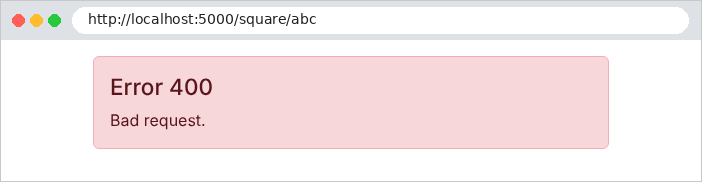
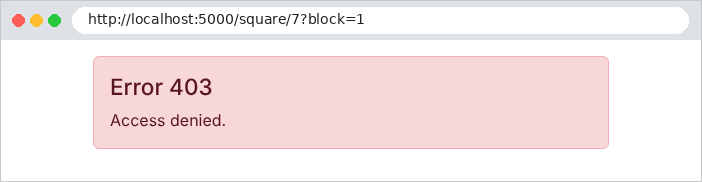
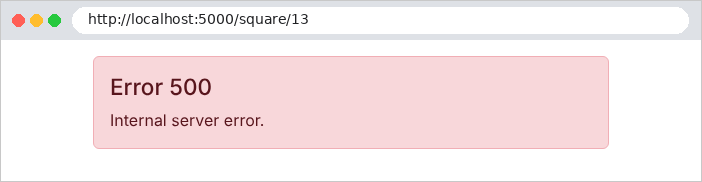
Let's check that the error code is preserved:
| curl -i http://localhost:5000/square/7?block=1
|
| HTTP/1.1 403 Forbidden
Content-Type: text/html; charset=utf-8
<!doctype html>
<html lang="en">
<head>
<meta charset="utf-8">
<title>Lifecycle</title>
<link rel="stylesheet" href="/bootstrap/css/bootstrap.min.css">
</head>
<body>
<div class="container py-3">
<div class="alert alert-danger">
<h1 class="h4">Error 403</h1>
<p class="mb-0">Access denied.</p>
</div>
</div>
</body>
</html>
|
The case study combines these mechanisms: [UseStatusCodePagesWithReExecute("/error/{0}")] and a controller ([ErrorController]) for 400, 403, and 404 pages; the [UseExceptionHandler("/error/500")] middleware, which similarly re-executes any request that ends with an unhandled exception; and an exception filter ([Web/HtmlExceptionFilter.cs]) for a specific case: an expired session does not display an error page but redirects to the login page.