8. Authentication and Authorization
Two distinct questions arise for each request:
- Who is the user? This is authentication: the user has identified themselves with a username and password, and each subsequent request must prove that it comes from them;
- Does the user have permission to access this page? This is authorization: in the case study, only a user with the role ADMIN manages doctors and clients.
Since the server is stateless (Chapter 6), proof of identity must be included with every request. A token JWT ([JSON Web Token]) is used: after login, the server generates a token containing the user’s identity and signs it with a secret key. The token is stored in a cookie; the browser sends it back with every request; the server verifies the signature. The user can read their token but cannot modify it: any modification invalidates the signature.
[ASP.NET Core] clearly distinguishes between the two issues:
- authentication is handled by middleware ([UseAuthentication]) and an authentication scheme: in this case, the [JwtBearer] scheme, provided by the [NuGet] [Microsoft.AspNetCore.Authentication.JwtBearer] package. For each request, it looks for a token, verifies it, and derives the user from it, [HttpContext.User];
- Authorization is handled by the [[Authorize]] attribute, verified by the [UseAuthorization] middleware: it compares the action’s requirements with what is known about the user.
The examples in this chapter use two [NuGet] packages: [Microsoft.AspNetCore.Authentication.JwtBearer] and [BCrypt.Net-Next] (password hashing). They are declared in the project file; the command [dotnet build] (or [dotnet run]) downloads them from nuget.org during the first compilation: an Internet connection is therefore required.
8.1. Example 25: Login, Token, Protected Page
| 25-jwt/
├── Auth/
│ ├── AuthService.cs
│ └── UsersService.cs
├── Controllers/
│ ├── AuthController.cs
│ └── ProfileController.cs
├── Views/
│ ├── Auth/
│ │ └── Login.cshtml
│ ├── Profile/
│ │ └── Profile.cshtml
│ ├── Shared/
│ │ └── _Layout.cshtml
│ ├── _ViewImports.cshtml
│ └── _ViewStart.cshtml
├── appsettings.json
├── Example25.csproj
└── Program.cs
|
The file [Example25.csproj]:
| <Project Sdk="Microsoft.NET.Sdk.Web">
<ItemGroup>
<!-- JWT token authentication (token verification) -->
<PackageReference Include="Microsoft.AspNetCore.Authentication.JwtBearer" Version="10.0.0" />
<!-- password hashing (bcrypt) -->
<PackageReference Include="BCrypt.Net-Next" Version="4.0.3" />
</ItemGroup>
</Project>
|
- Lines 5–7: the [NuGet] packages used, and their versions. The elements common to all examples (version of [.NET]...) are in the file [Directory.Build.props] in the [examples] folder.
The [appsettings.json] file:
| {
"Logging": {
"LogLevel": {
"Default": "Information",
"Microsoft.AspNetCore": "Warning"
}
},
"AllowedHosts": "*",
"Jwt": {
"Secret": "a-secret-key-of-at-least-32-characters-for-example-25",
"DurationMinutes": 60
}
}
|
- Lines 9–11: an application-specific configuration section: the key used to sign tokens and their lifetime. Anyone who knows the key can generate valid tokens: in production, it is not stored in a project file; instead, it is provided by an environment variable ([Jwt__Secret]) or a secret vault. The algorithm used (HMAC-SHA256) requires a key of at least 32 bytes.
The file [Auth/UsersService.cs]:
| namespace Example25.Auth;
public record User(string Login, string Name, string Role, string PasswordHash);
// the users, in memory (the next chapter will put them in a database)
public class UsersService
{
private readonly List<User> users =
[
// a password is NEVER kept, only its hash
Create("marie", "Marie Pélissier", "USER", "marie"),
Create("admin", "Administrator", "ADMIN", "admin"),
];
public User? Find(string login) =>
users.Find(u => u.Login == login);
// bcrypt, with a cost of 10: 2^10 rounds of computation, deliberately slow
private static User Create(string login, string name, string role, string password) =>
new(login, name, role, BCrypt.Net.BCrypt.HashPassword(password, 10));
}
|
- line 3: a user, along with their role;
- lines 10–12: a password is never stored; only its hash is retained—a fingerprint calculated by a one-way function. It is possible to verify that a password matches a fingerprint, but not to recover the password from the fingerprint;
- lines 19–20: [BCrypt.Net.BCrypt.HashPassword(password, 10)] calculates the hash using the [bcrypt] algorithm. The 10 represents the “cost”: [bcrypt] is intentionally slow (2¹⁰ calculation cycles) to discourage anyone from trying millions of passwords. Two hashes of the same password are different (a random “salt” is added): [BCrypt.Verify] is responsible for verifying them.
The file [Auth/AuthService.cs]:
| using System.Text;
using Microsoft.IdentityModel.JsonWebTokens;
using Microsoft.IdentityModel.Tokens;
namespace Example25.Auth;
public class AuthService(UsersService users, IConfiguration configuration)
{
// the name of the cookie that carries the token
public const string Cookie = "token";
// the key that signs the tokens, read from appsettings.json (Jwt section)
public static SymmetricSecurityKey Key(IConfiguration configuration) =>
new(Encoding.UTF8.GetBytes(configuration["Jwt:Secret"]!));
// null if the login is unknown or the password wrong
public User? Validate(string? login, string? password)
{
var user = users.Find(login ?? "");
if (user is null || password is null)
{
return null;
}
return BCrypt.Net.BCrypt.Verify(password, user.PasswordHash) ? user : null;
}
// the user's JWT token, signed with the secret key
public string CreateToken(User user)
{
var descriptor = new SecurityTokenDescriptor
{
// the content of the token: the "claims" (statements about the user)
Claims = new Dictionary<string, object>
{
["sub"] = user.Login,
["name"] = user.Name,
["role"] = user.Role,
},
Expires = DateTime.UtcNow.AddMinutes(configuration.GetValue<int>("Jwt:DurationMinutes")),
SigningCredentials = new SigningCredentials(Key(configuration), SecurityAlgorithms.HmacSha256),
};
return new JsonWebTokenHandler().CreateToken(descriptor);
}
}
|
Let’s break down this code:
- line 10: the name of the cookie that carries the token;
- Lines 13–14: The signature key, generated from the text of [appsettings.json]. [IConfiguration] provides access to the configuration; ["Jwt:Secret"] refers to the [Secret] property in the [Jwt] section. The same key is used to sign and verify tokens (symmetric algorithm);
- lines 17–24: verification of the username and password;
- lines 33–37: the token’s content, the claims (statements about the user). [sub] ([subject]) is the conventional name for the user’s identifier. We include what the pages need (name, role) so we don’t have to query the database with every request;
- line 39: the token’s expiration date;
- line 40: the signature key and algorithm;
- line 42: the class [JsonWebTokenHandler] (package [Microsoft.IdentityModel.JsonWebTokens], provided by [JwtBearer]) generates the signed token.
The file [Program.cs]:
| using System.Text.Encodings.Web;
using System.Text.Unicode;
using Example25.Auth;
using Microsoft.AspNetCore.Authentication.JwtBearer;
using Microsoft.Extensions.FileProviders;
using Microsoft.IdentityModel.Tokens;
var builder = WebApplication.CreateBuilder(args);
builder.Services.AddControllersWithViews();
builder.Services.AddSingleton(HtmlEncoder.Create(UnicodeRanges.All));
builder.Services.AddSingleton<UsersService>();
builder.Services.AddSingleton<AuthService>();
// authentication: a JWT token, verified at each request
builder.Services
.AddAuthentication(JwtBearerDefaults.AuthenticationScheme)
.AddJwtBearer(options =>
{
options.MapInboundClaims = false; // keep the claim names as they are ("sub", "role"...)
options.TokenValidationParameters = new TokenValidationParameters
{
ValidateIssuerSigningKey = true,
IssuerSigningKey = AuthService.Key(builder.Configuration), // the signature must be ours
ValidateLifetime = true, // the token must not be expired
ValidateIssuer = false,
ValidateAudience = false,
NameClaimType = "name", // User.Identity.Name
RoleClaimType = "role", // [Authorize(Roles = ...)], User.IsInRole(...)
};
options.Events = new JwtBearerEvents
{
// 1. the token is read from the cookie (and not from the Authorization header)
OnMessageReceived = context =>
{
context.Token = context.Request.Cookies[AuthService.Cookie];
return Task.CompletedTask;
},
// 2. protected page without a valid token: off to the login page
OnChallenge = context =>
{
context.HandleResponse(); // we build the response ourselves (no 401)
context.Response.Redirect("/login");
return Task.CompletedTask;
},
};
});
builder.Services.AddAuthorization();
var app = builder.Build();
app.UseStaticFiles(new StaticFileOptions
{
FileProvider = new PhysicalFileProvider(Path.GetFullPath(Path.Combine(builder.Environment.ContentRootPath, "..", "common", "bootstrap"))),
RequestPath = "/bootstrap",
});
app.UseAuthentication(); // who is it? -> HttpContext.User
app.UseAuthorization(); // is it allowed? -> [Authorize]
app.MapControllers();
app.Run();
|
Let’s comment on this code:
- lines 16–17: We declare the [JwtBearer] authentication schema and set it as the default schema;
- line 19: By default, [JwtBearer] renames certain claims using long names inherited from Microsoft technologies ([role] would become [http://schemas.microsoft.com/ws/2008/06/identity/claims/role]). We retain the token names;
- Lines 20–26: The checks performed on each token: the signature (using our key) and the expiration date. Our tokens do not specify either the issuer ([issuer]) or the recipient ([audience]), so we do not verify them;
- lines 27–28: which claim contains the user’s name ([User.Identity.Name]), and which one contains their role ([[Authorize(Roles = ...)]], [User.IsInRole(...)]);
- lines 33–36: the events from [JwtBearer] allow its behavior to be customized. By default, it looks for the token in the [Authorization: Bearer ...] header of the request: this is how a [JavaScript] client or a mobile app operates. A browser does not add this header on its own: the token is retrieved from the cookie;
- lines 39–42: the challenge occurs when a protected page is requested without a valid token. By default, the response is a 401 error with no content: useful for a [JavaScript] client, but confusing for a user. The user is redirected to the login page. [HandleResponse()] tells [JwtBearer] that the response is being handled;
- lines 56–57: the two middleware components, in this order: first determine who the user is, then verify their permissions.
The file [Controllers/AuthController.cs]:
| using Example25.Auth;
using Microsoft.AspNetCore.Mvc;
namespace Example25.Controllers;
public class AuthController(AuthService auth, IConfiguration configuration) : Controller
{
[HttpGet("/")]
public IActionResult Home() => Redirect("/profile");
[HttpGet("login")]
public IActionResult Form() => View("Login");
[HttpPost("login")]
public IActionResult Login(string? login, string? password)
{
var user = auth.Validate(login, password);
if (user is null)
{
// a deliberately vague message: we do not say whether it is the login or the password
ViewData["Error"] = "Incorrect login or password.";
ViewData["Login"] = login;
return View("Login");
}
// the token, in a cookie that the page's JavaScript cannot read
Response.Cookies.Append(AuthService.Cookie, auth.CreateToken(user), new CookieOptions
{
HttpOnly = true,
SameSite = SameSiteMode.Lax,
MaxAge = TimeSpan.FromMinutes(configuration.GetValue<int>("Jwt:DurationMinutes")),
});
return Redirect("/profile");
}
// logging out changes the user's state: it is a POST
[HttpPost("logout")]
public IActionResult Logout()
{
Response.Cookies.Delete(AuthService.Cookie);
return Redirect("/login");
}
}
|
Let’s comment on this code:
- lines 14–23: the login. If the login fails, the form is redisplayed with a deliberately vague message: saying “this login does not exist” would help an attacker find valid logins;
- lines 26–32: if successful, the token is stored in an [HttpOnly] cookie; the page’s [JavaScript] cannot read it, which protects the token if a malicious script were to execute on the page. [SameSite = Lax]: The cookie is not included in POST requests sent from another site, which protects against request forgery ([CSRF]). The cookie’s lifetime matches that of the token;
- Lines 36–40: Logging out deletes the cookie ([Cookies.Delete]). This is a POST: it changes the user’s status (see Example 21).
The file [Controllers/ProfileController.cs]:
| using Microsoft.AspNetCore.Authorization;
using Microsoft.AspNetCore.Mvc;
namespace Example25.Controllers;
// [Authorize]: reserved for authenticated users
[Authorize]
public class ProfileController : Controller
{
[HttpGet("profile")]
public IActionResult Profile()
{
// User: the user authenticated by the token (HttpContext.User)
return View(User.Claims.Select(c => (c.Type, c.Value)).ToList());
}
}
|
- Line 7: The [[Authorize]] attribute, set on the controller, restricts all its actions to authenticated users. This is an authorization filter (see Chapter 7). Without a valid token, it triggers the challenge, resulting in a redirect to [/login];
- Line 14: [User] (the [HttpContext.User] from the request) is the user established by [JwtBearer] based on the token. [User.Claims] is the list of its claims; this is converted into a list of (type, value) pairs for the view.
The file [Views/Profile/Profile.cshtml]:
| @model List<(string Type, string Value)>
<h1 class="h3">Hello @User.Identity!.Name</h1>
<p>Your role: <b>@(User.IsInRole("ADMIN") ? "administrator" : "user")</b>.</p>
<p>The content of your token:</p>
<table class="table table-sm w-auto">
@foreach (var (type, value) in Model)
{
<tr><td><code>@type</code></td><td>@value</td></tr>
}
</table>
@* logging out: a POST form reduced to its button *@
<form method="post" action="/logout">
<button class="btn btn-outline-secondary" type="submit">Log out</button>
</form>
|
- line 2: the property [User] is also accessible in a view. The name is the claim [name] (see [NameClaimType]);
- line 3: [IsInRole] tests the claim [role] (see [RoleClaimType]);
- line 6: the loop breaks down each pair into two variables;
- line 12: logout via a POST form.
The file [Views/Auth/Login.cshtml]:
| <h1 class="h3">Login</h1>
<form method="post" action="/login">
<div class="mb-2">
<label class="form-label" for="login">Login</label>
<input class="form-control" id="login" name="login" value="@ViewData["Login"]" required>
</div>
<div class="mb-3">
<label class="form-label" for="password">Password</label>
<input class="form-control" type="password" id="password" name="password" required>
</div>
<button class="btn btn-primary" type="submit">Log in</button>
</form>
@if (ViewData["Error"] is string error)
{
<div class="alert alert-danger mt-3">@error</div>
}
<p class="text-muted small mt-3">Test accounts (password = login): marie (USER), admin (ADMIN).</p>
|
8.1.1. Execution
Without a cookie, the protected page redirects to the login page:
| curl -i http://localhost:5000/profile
|
| HTTP/1.1 302 Found
Content-Length: 0
Location: /login
|
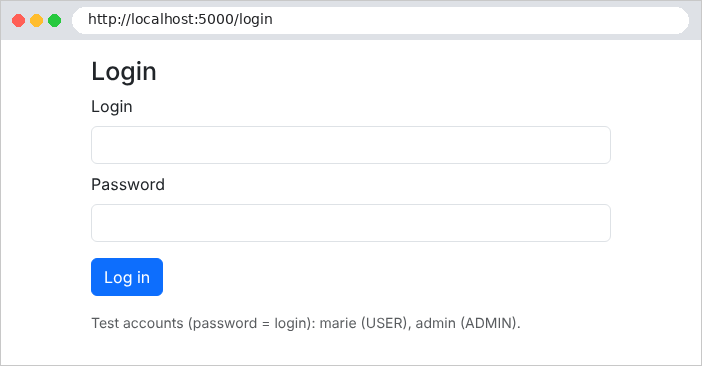
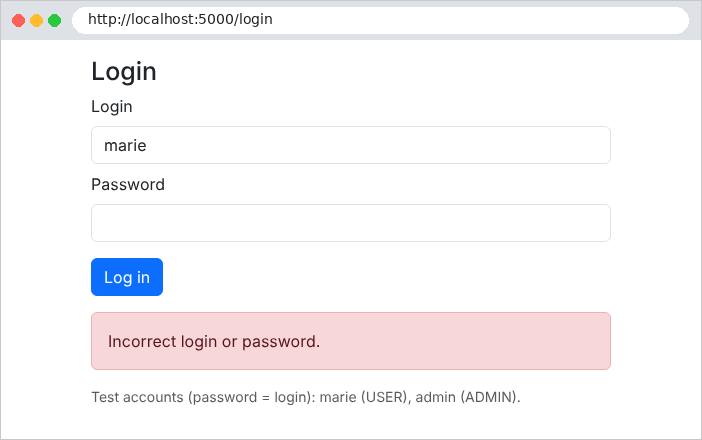
An incorrect password:
Successful login, as seen by [curl]:
| curl -i -c cookies.txt -d "login=marie&password=marie" http://localhost:5000/login
|
| HTTP/1.1 302 Found
Content-Length: 0
Location: /profile
Set-Cookie: token=eyJhbGciOiJIUzI1NiIsInR5cCI6IkpXVCJ9.eyJleHAiOjE3OTAzMzU1MzgsInN1YiI6Im1hcmllIiwibmFtZSI6Ik1hcmllIFDDqWxpc3NpZXIiLCJyb2xlIjoiVVNFUiIsImlhdCI6MTc5MDMzMTkzOCwibmJmIjoxNzkwMzMxOTM4fQ.uAKi5OB-jReuSrQR12_AWdiLR1l6ZLORBYSfHwg99xk; max-age=3600; path=/; samesite=lax; httponly
|
The token consists of three parts separated by periods: a header, the content, and the signature. The first two are simply encoded as [base64url]. The decoded header:
| {"alg":"HS256","typ":"JWT"}
|
(the signature algorithm and the token type). The decoded content:
| {
"exp": 1790335538,
"sub": "marie",
"name": "Marie Pélissier",
"role": "USER",
"iat": 1790331938,
"nbf": 1790331938
}
|
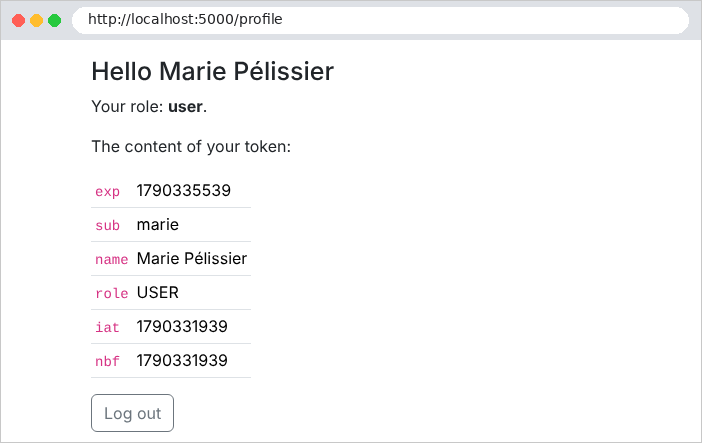
We find the claims generated by [CreateToken], plus three fields added by [JsonWebTokenHandler]: [exp] (the expiration date), [iat] ([issued at], the creation date), and [nbf] ([not before], the date from which the token is valid), in seconds since January 1, 1970. The token is not encrypted: it does not contain any confidential information. In the browser, at the URL http://localhost:5000/profile:
Now let’s try modifying the token to assign ourselves the role ADMIN: we decode the content, replace [USER] with [ADMIN], and re-encode it… but we can’t recalculate the signature without the secret key:
| curl -i -b "token=eyJhbGciOi...(modified content)...(old signature)" http://localhost:5000/profile
|
| HTTP/1.1 302 Found
Content-Length: 0
Location: /login
|
The signature no longer matches the content: the token is rejected, the user is not authenticated, and [[Authorize]] redirects to the login page. Logout:
| curl -i -b cookies.txt -X POST http://localhost:5000/logout
|
| HTTP/1.1 302 Found
Content-Length: 0
Location: /login
Set-Cookie: token=; expires=Thu, 01 Jan 1970 00:00:00 GMT; path=/
|
The server deletes the cookie by resetting it—empty—with an expired expiration date.
8.2. Example 26: Roles
Example 26 builds on Example 25 and adds a page reserved for the role ADMIN. With [ASP.NET Core], there is almost nothing to write: the role is a claim in the token, and [[Authorize]] knows how to verify it. The [Controllers/AdminController.cs] file:
| using Microsoft.AspNetCore.Authorization;
using Microsoft.AspNetCore.Mvc;
namespace Example26.Controllers;
// the whole controller is reserved for the ADMIN role: one must be authenticated
// AND have the "role" claim equal to "ADMIN" (see RoleClaimType in Program.cs)
[Authorize(Roles = "ADMIN")]
public class AdminController : Controller
{
[HttpGet("admin")]
public IActionResult Admin() => View();
}
|
- Line 8: The entire controller is reserved for the role ADMIN. The filter first checks that the user is authenticated (if not: challenge, i.e., the login page), then that the user has the requested role (if not: 403 response, “access denied”). [Roles = "ADMIN,DOCTOR"] would accept either of these roles.
The file [Program.cs] has only one additional line:
| var app = builder.Build();
// 403 (insufficient role), 404...: an error page
app.UseStatusCodePagesWithReExecute("/error/{0}");
app.UseStaticFiles(new StaticFileOptions
{
FileProvider = new PhysicalFileProvider(Path.GetFullPath(Path.Combine(builder.Environment.ContentRootPath, "..", "common", "bootstrap"))),
RequestPath = "/bootstrap",
});
app.UseAuthentication(); // who is it? -> HttpContext.User
app.UseAuthorization(); // is it allowed? -> [Authorize]
app.MapControllers();
app.Run();
|
- Line 4: The 403 response has no content; it is rendered as a page by the [ErrorController] controller (see Example 24).
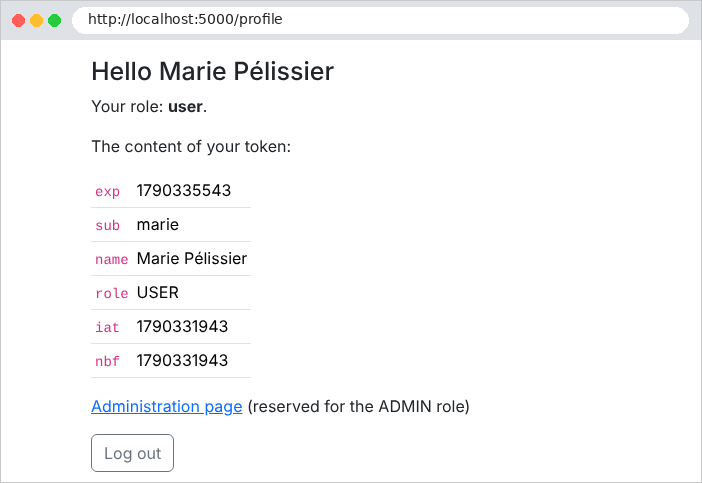
User [marie] (role USER) is attempting to open the administration page from their profile:
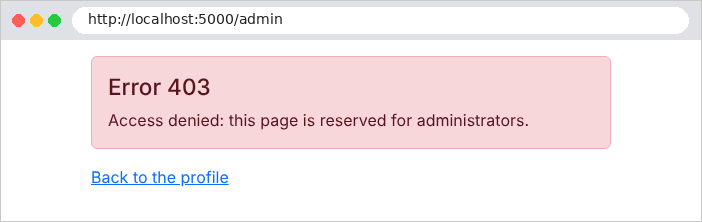
The same attempt by [admin]:
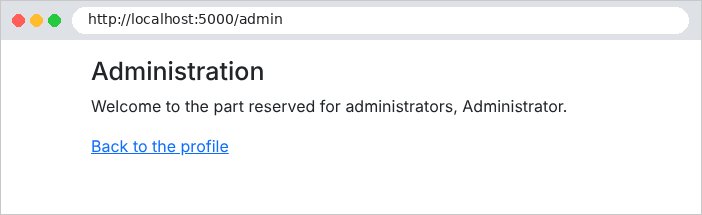
With [curl], we see a 403 error:
| curl -i -c cookies.txt -d "login=marie&password=marie" http://localhost:5000/login
curl -i -b cookies.txt http://localhost:5000/admin
|
| HTTP/1.1 403 Forbidden
Content-Type: text/html; charset=utf-8
<!doctype html>
<html lang="en">
<head>
<meta charset="utf-8">
<title>Authentication</title>
<link rel="stylesheet" href="/bootstrap/css/bootstrap.min.css">
</head>
<body>
<div class="container py-3" style="max-width: 34rem">
<div class="alert alert-danger">
<h1 class="h4">Error 403</h1>
<p class="mb-0">Access denied: this page is reserved for administrators.</p>
</div>
<p><a href="/profile">Back to the profile</a></p>
</div>
</body>
</html>
|
The case study has three roles (ADMIN, DOCTOR, USER) and uses exactly these attributes: [[Authorize]] on all page controllers, [[Authorize(Roles = "ADMIN")]] for doctor and client management, and [[Authorize(Roles = "USER")]] for the patient area. The 403 page is translated there.
8.3. Example 27: CAPTCHA and attempt limits
A login page attracts bots: programs that try thousands of login/password combinations. Two complementary safeguards:
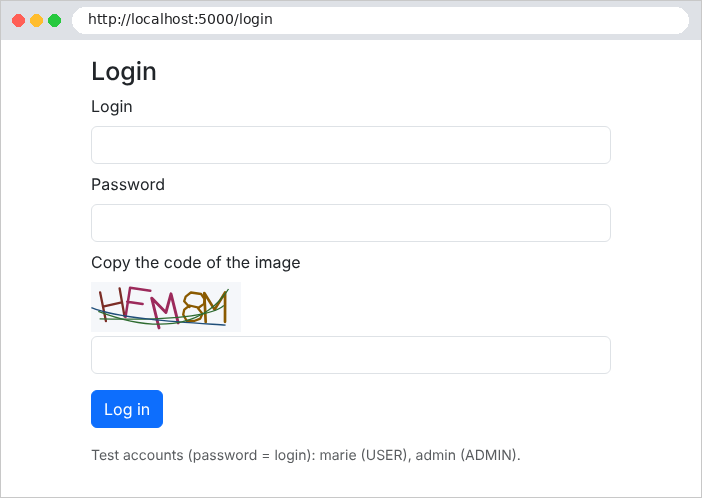
- a CAPTCHA: an image of distorted characters that a human can easily read but that a simple bot cannot decipher;
- an attempt limit: after a few failed attempts, the address IP is blocked for a while.
Example 27 adds these two safeguards to Example 25. The file [Auth/CaptchaService.cs]:
| using System.Collections.Concurrent;
namespace Example27.Auth;
// a captcha: its identifier, and its image (SVG)
public record Captcha(string Id, string Svg);
// singleton: the pending captchas are kept in memory by the server
public class CaptchaService
{
private static readonly TimeSpan Lifetime = TimeSpan.FromMinutes(10);
// identifier -> (expected answer, expiry date).
// ConcurrentDictionary: a dictionary usable by several simultaneous requests
private readonly ConcurrentDictionary<string, (string Text, DateTime Expires)> pending = new();
public Captcha Generate()
{
var text = CaptchaDrawing.RandomText(5);
var id = Guid.NewGuid().ToString(); // a random identifier, impossible to guess
pending[id] = (text, DateTime.UtcNow + Lifetime);
return new Captcha(id, CaptchaDrawing.Svg(text));
}
// the captcha is CONSUMED in every case: an image is used only once
public bool Check(string? id, string? input)
{
if (id is null || input is null || !pending.TryRemove(id, out var expected))
{
return false;
}
return expected.Expires > DateTime.UtcNow
&& string.Equals(expected.Text, input.Trim(), StringComparison.OrdinalIgnoreCase);
}
}
|
Let’s break down this code:
- line 15: the expected responses are stored by the server under a random identifier. The page contains only the image and the identifier: the response never leaves the server. The service is a singleton, used by concurrent requests: [ConcurrentDictionary] is a dictionary designed for this purpose;
- lines 17–22: a five-character text string is randomly selected, stored, and drawn as an image. The drawing is handled by the class [CaptchaDrawing] (file [Auth/CaptchaDrawing.cs], taken from the case study and commented on line by line): each character is a set of lines that is enlarged, tilted, and randomly distorted, and the image is blurred by three curves. Characters that are easily confused (0 and O, 1, I and L) are excluded;
- lines 26–33: the verification process consumes the CAPTCHA ([TryRemove] removes it from the dictionary): an image is used only once; a bot cannot reuse a solution it has already found. Uppercase letters do not count.
The file [Auth/LimiterService.cs]:
| namespace Example27.Auth;
// singleton: counts the login failures of each IP address
public class LimiterService
{
private const int MaxFailures = 3;
private static readonly TimeSpan BlockDuration = TimeSpan.FromMinutes(1);
private class Counter
{
public int Failures;
public DateTime BlockedUntil;
}
private readonly Dictionary<string, Counter> counters = [];
private readonly Lock padlock = new(); // several simultaneous requests: one access at a time
// the number of remaining blocking seconds (0: not blocked)
public int BlockedSeconds(string ip)
{
lock (padlock)
{
if (!counters.TryGetValue(ip, out var c)) return 0;
var remaining = c.BlockedUntil - DateTime.UtcNow;
return remaining > TimeSpan.Zero ? (int)Math.Ceiling(remaining.TotalSeconds) : 0;
}
}
public void Failure(string ip)
{
lock (padlock)
{
if (!counters.TryGetValue(ip, out var c))
{
c = new Counter();
counters[ip] = c;
}
c.Failures++;
if (c.Failures >= MaxFailures)
{
c.BlockedUntil = DateTime.UtcNow + BlockDuration;
c.Failures = 0; // after the block, we start again from zero
}
}
}
public void Success(string ip)
{
lock (padlock)
{
counters.Remove(ip);
}
}
}
|
- lines 6–7: three failed attempts block the address IP for one minute;
- line 16: the counter dictionary is shared by all queries. The instruction [lock (padlock) { ... }] ensures that only one query at a time executes the block: two simultaneous failures cannot be lost (see [Interlocked], Chapter 6). [Lock] is the lock type for [.NET] 9 and later versions;
- lines 19–25: the remaining lock time;
- lines 29–42: a failure is counted; on the third failure, the address is blocked;
- lines 47–51: a success resets the counter to zero.
The file [Controllers/AuthController.cs]:
| using Example27.Auth;
using Microsoft.AspNetCore.Mvc;
namespace Example27.Controllers;
public class AuthController(AuthService auth, CaptchaService captchas, LimiterService limiter,
IConfiguration configuration) : Controller
{
[HttpGet("/")]
public IActionResult Home() => Redirect("/profile");
[HttpGet("login")]
public IActionResult Form() => LoginPage(null, null);
[HttpPost("login")]
public IActionResult Login(string? login, string? password, string? captchaId, string? captcha)
{
// the client's IP address
var ip = HttpContext.Connection.RemoteIpAddress?.ToString() ?? "?";
// 1. a blocked address is not even listened to
var seconds = limiter.BlockedSeconds(ip);
if (seconds > 0)
{
return LoginPage(login, $"Too many attempts: try again in {seconds} s.");
}
// 2. the captcha first (cheap), the password (bcrypt, expensive) next
if (!captchas.Check(captchaId, captcha))
{
limiter.Failure(ip);
return LoginPage(login, "The image code is incorrect.");
}
var user = auth.Validate(login, password);
if (user is null)
{
limiter.Failure(ip);
return LoginPage(login, "Incorrect login or password.");
}
limiter.Success(ip);
Response.Cookies.Append(AuthService.Cookie, auth.CreateToken(user), new CookieOptions
{
HttpOnly = true,
SameSite = SameSiteMode.Lax,
MaxAge = TimeSpan.FromMinutes(configuration.GetValue<int>("Jwt:DurationMinutes")),
});
return Redirect("/profile");
}
[HttpPost("logout")]
public IActionResult Logout()
{
Response.Cookies.Delete(AuthService.Cookie);
return Redirect("/login");
}
// each display of the form builds a NEW captcha
private ViewResult LoginPage(string? login, string? error)
{
ViewData["Login"] = login;
ViewData["Error"] = error;
return View("Login", captchas.Generate());
}
}
|
Let’s comment on this code:
- line 19: the client’s address, IP, provided by the network connection;
- lines 22–25: A blocked address isn’t even listened to;
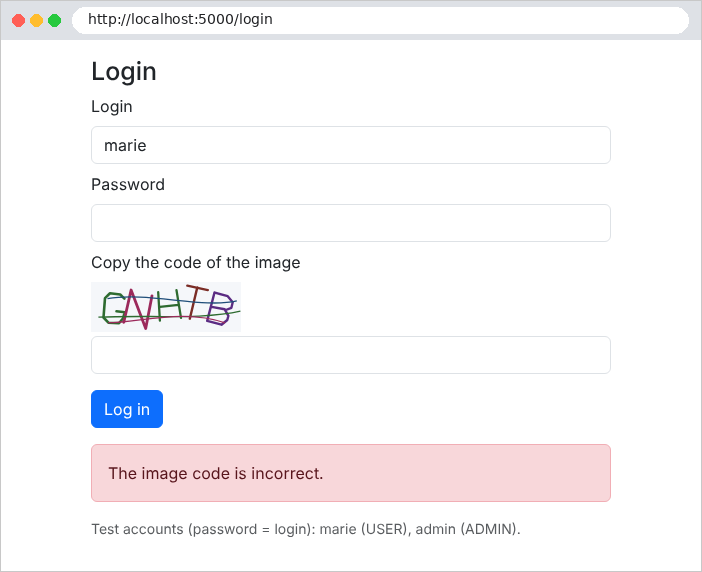
- lines 28–31: the CAPTCHA is verified first, then the password (a computationally expensive [bcrypt] operation) only if the CAPTCHA is correct. An incorrect CAPTCHA counts as a failure;
- lines 57–61: Each time the form is displayed, a new CAPTCHA is generated, which becomes the view’s template.
The file [Views/Auth/Login.cshtml]:
| @model Captcha
<h1 class="h3">Login</h1>
<form method="post" action="/login">
<div class="mb-2">
<label class="form-label" for="login">Login</label>
<input class="form-control" id="login" name="login" value="@ViewData["Login"]" required>
</div>
<div class="mb-2">
<label class="form-label" for="password">Password</label>
<input class="form-control" type="password" id="password" name="password" required>
</div>
<div class="mb-3">
<label class="form-label" for="captcha">Copy the code of the image</label>
@* the SVG image, built by the server: inserted without escaping *@
<div class="mb-1">@Html.Raw(Model.Svg)</div>
@* the captcha identifier travels in a hidden field; the answer stays on the server *@
<input type="hidden" name="captchaId" value="@Model.Id">
<input class="form-control" id="captcha" name="captcha" autocomplete="off" required>
</div>
<button class="btn btn-primary" type="submit">Log in</button>
</form>
@if (ViewData["Error"] is string error)
{
<div class="alert alert-danger mt-3">@error</div>
}
<p class="text-muted small mt-3">Test accounts (password = login): marie (USER), admin (ADMIN).</p>
|
- line 15: the image SVG is text (from XML): it is inserted into the page as-is. [Html.Raw] is legitimate here: it is HTML generated by the server, not user input;
- Line 17: The CAPTCHA ID is passed in a hidden field; the response, however, remains on the server.
The login page, at URL http://localhost:5000/login:
An incorrectly entered CAPTCHA:
After three failed attempts, even the correct password is rejected for one minute:
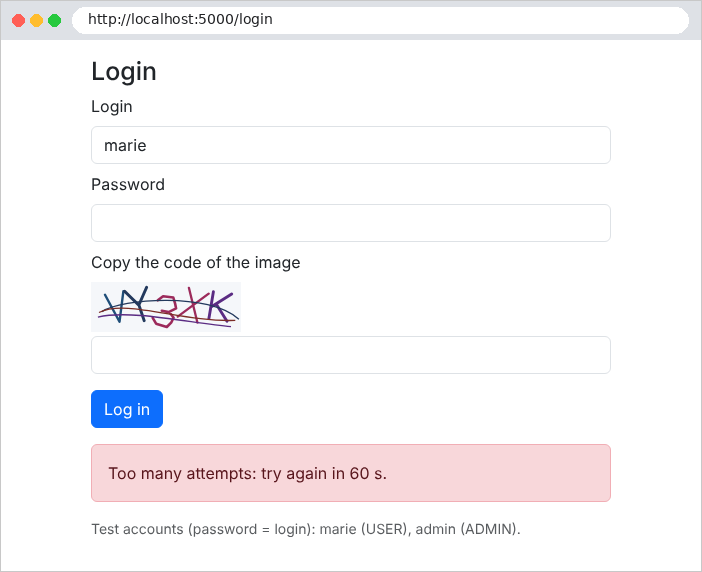
The case study applies these two security measures to its login page and account creation process, with adjustable thresholds in the file [appsettings.json] (section [Protection]).