Skip to content

2. Controllers, Actions, Routing

This chapter examines the path a request takes, from the browser to the action that processes it, and the response that action returns. Views will not be introduced until Chapter 4: here, actions return text or JSON directly.

2.1. Example 01: The Structure of a ASP.NET Core Application MVC

The first example is the smallest possible [ASP.NET Core MVC] application. In addition to the [Example01.csproj] and [appsettings.json] files presented in the introduction, it has two files:

1
2
3
4
5
6
01-structure/
├── Controllers/
│   └── HomeController.cs
├── appsettings.json
├── Example01.csproj
└── Program.cs

2.1.1. The entry point: Program.cs

// the application "builder": configuration, logging, services...
var builder = WebApplication.CreateBuilder(args);

// register the services MVC needs to find and run the controllers
builder.Services.AddControllers();

// build the application
var app = builder.Build();

// the routes declared by the controllers ([HttpGet("/")]...) are enabled
app.MapControllers();

// start the HTTP server (http://localhost:5000 by default); Ctrl-C stops it
app.Run();

Let’s break down this code:

  • Line 2: [WebApplication.CreateBuilder] creates the application’s “constructor.” It reads the configuration (the [appsettings.json] file, environment variables, etc.), sets up logging, and prepares the list of application services, [builder.Services]. The [args] parameter contains the command-line arguments;
  • line 5: the services required by [MVC] to locate the application’s controllers and execute their actions are added to the list;
  • line 8: the application is built. After this line, the list of services can no longer be modified;
  • line 11: the routes declared by the controllers (the attributes [[HttpGet]], [[Route]]..., which we will discuss) are enabled: without this line, no action would ever be called;
  • line 14: starts the [Kestrel] web server and waits for requests until the application is stopped ([Ctrl-C]). Unless otherwise specified, the server listens on port 5000.

This file contains neither a class nor a method named [Main]: it is a high-level instruction-based program. The [C#] compiler itself wraps these instructions into a method named [Main], which serves as the program’s entry point. Note also the absence of [using] directives: [WebApplication] belongs to the [Microsoft.AspNetCore.Builder] namespace, which is imported automatically (see [ImplicitUsings] in the introduction).

2.1.2. The controller: Controllers/HomeController.cs

using Microsoft.AspNetCore.Mvc;

namespace Example01.Controllers;

// a controller is a class that inherits from Controller
public class HomeController : Controller
{
    // an action: the method called for the GET / request
    [HttpGet("/")]
    public string Index()
    {
        // the value returned by the action is the response sent to the browser
        return "Hello from ASP.NET Core MVC!";
    }
}
  • Line 1: the namespace containing the class [Controller] and the attributes of [MVC];
  • line 3: the namespace for the classes in this file. By convention, it includes the project name ([Example01]) and the file’s directory ([Controllers]). The form [namespace X;] (without curly braces) applies to the entire file;
  • line 6: A controller is a public class that inherits from the [Controller] class. By convention, its name ends with [Controller]. [ASP.NET Core] automatically finds the application’s controllers—there is no need to declare them;
  • line 9: the [[HttpGet("/")]] attribute associates the [Index] method with [GET /] requests. A method associated in this way with a route is an action. A [C#] attribute is written in square brackets, immediately before what it describes: it adds information to the method, which the framework reads at startup;
  • Line 13: The value returned by the action is the response sent to the browser.

2.1.3. Execution

In a terminal window open to the [01-structure] directory, type [dotnet run]. After compilation, the server starts:

1
2
3
4
5
6
7
8
info: Microsoft.Hosting.Lifetime[14]
      Now listening on: http://localhost:5000
info: Microsoft.Hosting.Lifetime[0]
      Application started. Press Ctrl+C to shut down.
info: Microsoft.Hosting.Lifetime[0]
      Hosting environment: Production
info: Microsoft.Hosting.Lifetime[0]
      Content root path: C:\course\examples\01-structure

The startup messages indicate the listening address ([http://localhost:5000]) and the runtime environment: [Production], the default environment. We will see that certain behaviors of [ASP.NET Core] depend on the environment ([Development] or [Production]). Let’s request URL and [http://localhost:5000/] using a browser:

Image

then with [curl]. The [-i] option also displays the HTTP headers from the response (we’re only showing a few of them here):

curl -i http://localhost:5000/
1
2
3
4
HTTP/1.1 200 OK
Content-Type: text/plain; charset=utf-8

Hello from ASP.NET Core MVC!

A string returned by an action is sent with the header [Content-Type: text/plain]: the browser displays it as plain text, without interpreting it. This differs from [NestJS], which sent it as HTML ([text/html]). Example 03 will show how to send HTML.

2.2. Example 02: Routing

Routing associates a URL and a HTTP method (GET, POST...) with an action. Example 02 has two controllers:

1
2
3
4
5
6
7
02-routing/
├── Controllers/
│   ├── FirstController.cs
│   └── HomeController.cs
├── appsettings.json
├── Example02.csproj
└── Program.cs

The file [Program.cs] is identical to the one in Example 01: this is true for all the examples in this chapter, except for the last one. The file [Controllers/HomeController.cs]:

using Microsoft.AspNetCore.Mvc;

namespace Example02.Controllers;

public class HomeController : Controller
{
    // GET /: an HTML page containing links to the other actions
    [HttpGet("/")]
    public ContentResult Index()
    {
        const string html = """
            <h2>Example 02 - routing</h2>
            <ul>
              <li><a href="/first">/first</a></li>
              <li><a href="/first/action01">/first/action01</a></li>
              <li><a href="/first/products/17">/first/products/17</a></li>
              <li><a href="/first/products/17/reviews/3">/first/products/17/reviews/3</a></li>
              <li><a href="/first/files/images/logo.png">/first/files/images/logo.png</a></li>
              <li><a href="/first/products/abc">/first/products/abc</a></li>
              <li><a href="/unknown">/unknown</a></li>
            </ul>
            """;
        // Content(text, type): a response whose type we choose (here HTML)
        return Content(html, "text/html; charset=utf-8");
    }
}
  • line 9: the action no longer returns a string, but a [ContentResult]: a response whose content and type are specified;
  • lines 11–22: a raw string [C#] ([raw string literal]), delimited by three quotation marks. It can span multiple lines and contain quotation marks without escaping them. Spaces preceding the closing ["""] are removed from each line;
  • line 24: the [Content(text, type)] method of the [Controller] class generates a [ContentResult]. The [text/html] type instructs the browser to interpret the text as HTML.

The [Index] action thus returns a HTML page that contains links to the actions of the other controller:
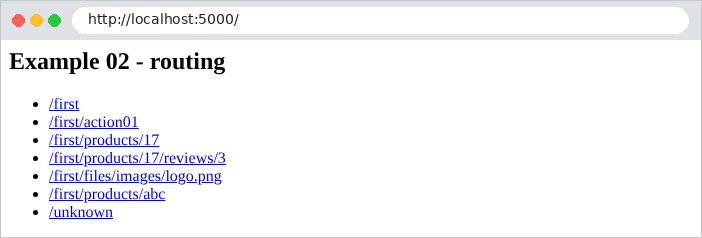
Image

The [Controllers/FirstController.cs] file:

using Microsoft.AspNetCore.Mvc;

namespace Example02.Controllers;

// prefix shared by all the routes of the controller
[Route("first")]
public class FirstController : Controller
{
    // GET /first
    [HttpGet("")]
    public string Index()
    {
        return "Action [Index] of the [First] controller";
    }

    // GET /first/action01
    [HttpGet("action01")]
    public string Action01()
    {
        return "Action [Action01] of the [First] controller, GET request";
    }

    // POST /first/action01: same path, another HTTP method
    [HttpPost("action01")]
    public string Action01Post()
    {
        return "Action [Action01Post] of the [First] controller, POST request";
    }

    // GET /first/products/17: {id} is a route parameter, ":int" a constraint
    [HttpGet("products/{id:int}")]
    public string Product(int id)
    {
        return $"Product no. {id}";
    }

    // GET /first/products/17/reviews/3: two route parameters
    [HttpGet("products/{id:int}/reviews/{number:int}")]
    public string Review(int id, int number)
    {
        return $"Review no. {number} of product no. {id}";
    }

    // GET /first/files/...: {**path} accepts any end of path
    [HttpGet("files/{**path}")]
    public string File(string path)
    {
        return $"Requested file: {path}";
    }
}

Let’s break down this code:

  • line 6: the [[Route("first")]] attribute, applied to the class, sets the prefix common to all the controller’s routes: its actions handle URL routes that begin with [/first];
  • lines 10–11: [[HttpGet("")]]: the action [Index] handles [GET /first]. The URL for an action is the concatenation of the controller prefix and the action path;
  • lines 17–18: The action [Action01] processes [GET /first/action01];
  • lines 24–25: the same path, but for the POST method: [[HttpPost]] replaces [[HttpGet]]. There are also [[HttpPut]], [[HttpDelete]], [[HttpPatch]]... The name of the method [C#] ([Action01Post]) is arbitrary: only the attributes matter for routing. Furthermore, within the same class, two methods cannot have the same name with the same parameters;
  • Lines 31–32: [{id}] is a route parameter: this segment of URL can take on multiple values. [:int] is a constraint: the segment must be an integer; otherwise, the route does not match. The value of the segment is passed to the action’s parameter of the same name, [id], which has already been converted to [int]: for [/first/products/17], [id] is equal to the number 17. This is the template binding ([model binding]), which the next chapter will examine in detail;
  • lines 38–39: two route parameters, passed to two parameters of the action;
  • Lines 44–46: [{**path}] is a "catch-all" parameter ([catch-all]): it accepts any ending for URL, including [/].

Here are the results for a few queries:

curl -i http://localhost:5000/first
1
2
3
4
HTTP/1.1 200 OK
Content-Type: text/plain; charset=utf-8

Action [Index] of the [First] controller
curl -i http://localhost:5000/first/action01
1
2
3
4
HTTP/1.1 200 OK
Content-Type: text/plain; charset=utf-8

Action [Action01] of the [First] controller, GET request
curl -i http://localhost:5000/first/products/17
1
2
3
4
HTTP/1.1 200 OK
Content-Type: text/plain; charset=utf-8

Product no. 17
curl -i http://localhost:5000/first/products/17/reviews/3
1
2
3
4
HTTP/1.1 200 OK
Content-Type: text/plain; charset=utf-8

Review no. 3 of product no. 17
curl -i http://localhost:5000/first/files/images/logo.png
1
2
3
4
HTTP/1.1 200 OK
Content-Type: text/plain; charset=utf-8

Requested file: images/logo.png

To send a POST request, use the [-X POST] option of [curl]:

curl -i -X POST http://localhost:5000/first/action01
1
2
3
4
HTTP/1.1 200 OK
Content-Type: text/plain; charset=utf-8

Action [Action01Post] of the [First] controller, POST request

A HTTP method that is not handled by any action for this path results in a 405 error ([Method Not Allowed]). The [Allow] header lists the accepted methods:

curl -i -X PUT http://localhost:5000/first/action01
1
2
3
HTTP/1.1 405 Method Not Allowed
Content-Length: 0
Allow: GET, POST

Finally, a URL that no route handles results in a 404 error. This is also the case for an identifier that does not meet the [:int] constraint: no route matches [/first/products/abc].

curl -i http://localhost:5000/first/products/abc
HTTP/1.1 404 Not Found
Content-Length: 0
curl -i http://localhost:5000/unknown
HTTP/1.1 404 Not Found
Content-Length: 0

The 404 response from [ASP.NET Core] has no content ([Content-Length: 0]): the browser displays its own error page.

Image

Chapter 7 will show how to replace this empty response with a HTML page.

2.3. Example 03: Responses from an action

What an action returns determines the response HTTP. Example 03 reviews the main cases. The file [Controllers/ResponsesController.cs]:

using Microsoft.AspNetCore.Mvc;

namespace Example03.Controllers;

[Route("responses")]
public class ResponsesController : Controller
{
    // a string: sent as is, with the [text/plain] type
    [HttpGet("text")]
    public string Text()
    {
        return "<h1>Action [Text]</h1>";
    }

    // the same string, announced as HTML: the browser interprets it
    [HttpGet("html")]
    public ContentResult Html()
    {
        return Content("<h1>Action [Html]</h1>", "text/html; charset=utf-8");
    }

    // an object: serialized to JSON, with the [application/json] type
    [HttpGet("json")]
    public object Json()
    {
        return new { lastName = "Martin", firstName = "Jean", age = 42 };
    }

    // an array: also serialized to JSON
    [HttpGet("array")]
    public string[] Array()
    {
        return ["Mme", "Melle", "Mr"];
    }

    // IActionResult: the action chooses the complete response (code, content)
    // StatusCode(201, ...): the 201 code (Created) instead of 200 (OK)
    [HttpGet("created")]
    public IActionResult ResourceCreated()
    {
        return StatusCode(201, new { message = "resource created" });
    }

    // no response: the 204 code (No Content) means "nothing to display"
    [HttpGet("empty")]
    public IActionResult EmptyResponse()
    {
        return NoContent();
    }

    // an asynchronous action: ASP.NET waits for the end of the task (Task)
    [HttpGet("task")]
    public async Task<object> AsyncTask()
    {
        var start = DateTime.Now;
        await Task.Delay(500); // a 500 ms wait, without blocking the server
        return new { wait = $"{(DateTime.Now - start).TotalMilliseconds:0} ms" };
    }

    // an "expected" error: NotFound(...) produces a 404 response
    [HttpGet("not-found")]
    public IActionResult NotFoundError()
    {
        return NotFound(new { message = "This resource does not exist" });
    }

    // an "unexpected" error: an unhandled exception produces a 500 response
    [HttpGet("exception")]
    public string Exception()
    {
        throw new InvalidOperationException("An unexpected error");
    }
}

Let’s break down this code:

  • lines 9–12: a string is sent as-is, with the header [Content-Type: text/plain; charset=utf-8];
  • lines 16–19: the same string, declared as HTML (see Example 02): the browser interprets it;
  • lines 23–26: an object is serialized as JSON, with the header [Content-Type: application/json]. [new { lastName = ..., firstName = ... }] creates an object of an anonymous type: a nameless type generated by the compiler, useful for data that is used only once. The property names of JSON are written as “camelCase” (first letter lowercase), following the convention of [JavaScript];
  • lines 30–33: An array is also serialized as JSON. [["Mme", "Melle", "Mr"]] is a collection expression ([C#] 12), which here creates an array of strings;
  • lines 39–41: when the action needs to select the status code, it returns a [IActionResult]: an object that describes the complete response. The methods of the [Controller] class generate many of these: [StatusCode(201, object)] produces a 201-code response ([Created]) whose content is the object serialized in JSON;
  • lines 46–48: [NoContent()] returns a 204 status code ([No Content]): “no content”;
  • lines 53–57: An action can be asynchronous ([async]): it then returns a task ([Task<T>]), the equivalent of a promise ([JavaScript]), and [ASP.NET Core] waits for the task to complete before responding. [await Task.Delay(500)] waits 500 ms without blocking the server: while waiting, the thread that was executing the action is returned to the server, which can use it to process other requests. This is how all actions that query a database are written;
  • Lines 62–64: An error expected by the program: [NotFound(object)] returns a 404 response with the content JSON. Similarly, there are [BadRequest(...)] (400), [Unauthorized()] (401), [Forbid()] (403), [Ok(...)] (200)...;
  • Lines 69–71: an unexpected error: the action throws an exception, which it does not handle. [ASP.NET Core] then responds with a 500 error ([Internal Server Error]).

Responses received:

curl -i http://localhost:5000/responses/text
1
2
3
4
HTTP/1.1 200 OK
Content-Type: text/plain; charset=utf-8

<h1>Action [Text]</h1>
curl -i http://localhost:5000/responses/html
1
2
3
4
5
HTTP/1.1 200 OK
Content-Length: 22
Content-Type: text/html; charset=utf-8

<h1>Action [Html]</h1>
curl -i http://localhost:5000/responses/json
1
2
3
4
HTTP/1.1 200 OK
Content-Type: application/json; charset=utf-8

{"lastName":"Martin","firstName":"Jean","age":42}
curl -i http://localhost:5000/responses/array
1
2
3
4
HTTP/1.1 200 OK
Content-Type: application/json; charset=utf-8

["Mme","Melle","Mr"]
curl -i http://localhost:5000/responses/created
1
2
3
4
HTTP/1.1 201 Created
Content-Type: application/json; charset=utf-8

{"message":"resource created"}
curl -i http://localhost:5000/responses/empty
HTTP/1.1 204 No Content
curl -i http://localhost:5000/responses/task
1
2
3
4
HTTP/1.1 200 OK
Content-Type: application/json; charset=utf-8

{"wait":"514 ms"}
curl -i http://localhost:5000/responses/not-found
1
2
3
4
HTTP/1.1 404 Not Found
Content-Type: application/json; charset=utf-8

{"message":"This resource does not exist"}
curl -i http://localhost:5000/responses/exception
HTTP/1.1 500 Internal Server Error
Content-Length: 0

In this exception, the response does not provide any information about the error: the details could help an attacker. They are logged in the server console (we are only reproducing the beginning here):

1
2
3
4
5
fail: Microsoft.AspNetCore.Server.Kestrel[13]
      Connection id "0HNP6TN0D56ES", Request id "0HNP6TN0D56ES:00000001": An unhandled exception was thrown by the application.
      System.InvalidOperationException: An unexpected error
         at Example03.Controllers.ResponsesController.Exception() in ...\03-responses\Controllers\ResponsesController.cs:line 71
         ...

In a browser, the difference between [text/plain] and [text/html] is visible:

Image

Image

2.4. Example 04: Redirects

An action may respond with a redirect: a 301 or 302 status code and a [Location] header that tells the browser which URL to request next. The browser requests it immediately, without any user intervention. Redirects are ubiquitous in a web application: after a successful form submission, after logging in, after changing the language...

The [Controllers/RedirectsController.cs] file:

using Microsoft.AspNetCore.Mvc;

namespace Example04.Controllers;

public class RedirectsController : Controller
{
    // permanent redirect (301): the page has permanently changed address
    [HttpGet("old")]
    public IActionResult OldPage()
    {
        return RedirectPermanent("/new");
    }

    [HttpGet("new")]
    public string NewPage()
    {
        return "You are on the [new] page";
    }

    // temporary redirect (302), to a computed address
    [HttpGet("go/{destination}")]
    public IActionResult Go(string destination)
    {
        return Redirect($"/page/{destination}");
    }

    // redirect to an ACTION: ASP.NET builds the URL itself
    [HttpGet("to-action/{destination}")]
    public IActionResult ToAction(string destination)
    {
        return RedirectToAction(nameof(Page), new { name = destination });
    }

    [HttpGet("page/{name}")]
    public string Page(string name)
    {
        return $"You are on the [{name}] page";
    }

    // redirect to another site
    [HttpGet("documentation")]
    public IActionResult Documentation()
    {
        return Redirect("https://learn.microsoft.com/aspnet/core");
    }
}

Let’s break down this code:

  • lines 9–11: [RedirectPermanent(url)] generates a permanent redirect (status code 301, [Moved Permanently]): the page’s address has permanently changed. Browsers and search engines can cache the new address;
  • lines 22–24: [Redirect(url)] generates a temporary redirect (status code 302, [Found]), in this case to a calculated address. [$"/page/{destination}"] is an interpolated string: the expression within curly braces is replaced by its value;
  • lines 29–31: [RedirectToAction(action, values)] redirects to an action, not to a URL: [ASP.NET Core] itself generates the URL for the action [Page] based on its route ([page/{name}]) and the provided values ([name = destination]). If the action’s path ever changes, the redirection follows suit. [nameof(Page)] returns the method name (["Page"]): a typo would cause a compilation error, which is not the case with a hand-written string;
  • Lines 42–44: You can redirect to another site.

[curl] demonstrates the redirect without following it:

curl -i http://localhost:5000/old
1
2
3
HTTP/1.1 301 Moved Permanently
Content-Length: 0
Location: /new

With the option [-L], [curl] follows the redirect, just as a browser would. We then see the two successive responses:

curl -i -L http://localhost:5000/old
1
2
3
4
5
6
7
8
HTTP/1.1 301 Moved Permanently
Content-Length: 0
Location: /new

HTTP/1.1 200 OK
Content-Type: text/plain; charset=utf-8

You are on the [new] page
curl -i http://localhost:5000/go/contact
1
2
3
HTTP/1.1 302 Found
Content-Length: 0
Location: /page/contact
curl -i http://localhost:5000/to-action/contact
1
2
3
HTTP/1.1 302 Found
Content-Length: 0
Location: /page/contact

Both actions result in the same redirect: one with a handwritten URL, the other with a URL generated by [ASP.NET Core]. In the browser, only the final page is visible; the address bar displays the new URL:

Image

curl -i http://localhost:5000/documentation
1
2
3
HTTP/1.1 302 Found
Content-Length: 0
Location: https://learn.microsoft.com/aspnet/core

2.5. Example 05: The Request and Response Objects

Each request is represented by a [HttpContext] object, which contains the request ([Request]) and the response currently being generated ([Response]). An action accesses it directly through the properties [HttpContext], [Request], and [Response] of the [Controller] class. This is sometimes necessary, and we’ll do it in the case study (to read or set a cookie, for example), but you need to know what you’re doing.

The file [Controllers/HttpController.cs]:

using Microsoft.AspNetCore.Mvc;

namespace Example05.Controllers;

[Route("http")]
public class HttpController : Controller
{
    // the request: method, path, parameters, headers...
    [HttpGet("request")]
    public object RequestInfo()
    {
        return new
        {
            method = Request.Method,
            path = Request.Path.Value,
            parameters = Request.QueryString.Value,
            browser = Request.Headers.UserAgent.ToString(),
            ip = HttpContext.Connection.RemoteIpAddress?.ToString(),
        };
    }

    // the response: we add a header to it, then the action returns its value normally
    [HttpGet("header")]
    public string Header()
    {
        Response.Headers["X-Example"] = "05-httpcontext";
        return "Response with an added header";
    }

    // the response written "by hand": code, type, then the body
    [HttpGet("response")]
    public async Task ResponseByHand()
    {
        Response.StatusCode = 200;
        Response.ContentType = "text/plain; charset=utf-8";
        await Response.WriteAsync("Response written by [Response.WriteAsync]");
    }

    // MISTAKE not to make: write the response, THEN return a result
    [HttpGet("double")]
    public async Task<IActionResult> Double()
    {
        await Response.WriteAsync("Start of the response... ");
        // the response has already left: its code and headers can no longer change
        return NotFound();
    }
}

Let’s break down this code:

  • lines 10–18: the request: the HTTP method ([Request.Method]), the path ([Request.Path]), the parameters of URL ([Request.QueryString]), the headers ([Request.Headers]), and, via [HttpContext.Connection], the client’s address (IP). [?.] is the “null conditional” operator: if [RemoteIpAddress] equals [null], the expression evaluates to [null] instead of causing an error;
  • lines 24–27: the action adds a header to the response, then returns its value normally, which [ASP.NET Core] sends. This is the most common use of [Response];
  • lines 32–36: The action writes the response itself—status code, type, then the body—using [Response.WriteAsync]. It does not return anything ([Task], not [Task<T>]);
  • lines 41–45: the mistake to avoid: writing part of the response and then returning a result. Once the first bytes of the body have been sent to the browser, the status code and headers—which were sent before the body—can no longer be changed.

The responses obtained:

curl -i -A "Mozilla/5.0 (example)" "http://localhost:5000/http/request?name=martin"
1
2
3
4
HTTP/1.1 200 OK
Content-Type: application/json; charset=utf-8

{"method":"GET","path":"/http/request","parameters":"?name=martin","browser":"Mozilla/5.0 (example)","ip":"127.0.0.1"}

(The [-A] option in [curl] sets the [User-Agent] header, which identifies the browser)

curl -i http://localhost:5000/http/header
1
2
3
4
5
HTTP/1.1 200 OK
Content-Type: text/plain; charset=utf-8
X-Example: 05-httpcontext

Response with an added header
curl -i http://localhost:5000/http/response
1
2
3
4
HTTP/1.1 200 OK
Content-Type: text/plain; charset=utf-8

Response written by [Response.WriteAsync]
curl -i http://localhost:5000/http/double
1
2
3
HTTP/1.1 200 OK

Start of the response... 

For the last action, the browser receives a 200 status code and the beginning of the response, rather than the requested 404. The server console reports the error:

1
2
3
4
fail: Microsoft.AspNetCore.Server.Kestrel[13]
      Connection id "0HNP6TN1VG5OL", Request id "0HNP6TN1VG5OL:00000001": An unhandled exception was thrown by the application.
      System.InvalidOperationException: StatusCode cannot be set because the response has already started.
      ...

In the rest of the document, the actions will almost always return a result ([IActionResult]), and let [ASP.NET Core] write the response. [Request] and [Response] will only be used to read the request and set cookies.

2.6. Example 06: Services and Dependency Injection

Controllers should not contain application logic; they delegate it to services. A service is a regular object that [ASP.NET Core] creates and provides to the classes that need it: this is dependency injection. Example 06 breaks down a small application into two parts: products and customers:

06-services/
├── Clients/
│   └── ClientsController.cs
├── Products/
│   ├── IProductsService.cs
│   ├── Product.cs
│   ├── ProductsController.cs
│   ├── ProductsExtensions.cs
│   └── ProductsService.cs
├── appsettings.json
├── Example06.csproj
└── Program.cs

2.6.1. The Product

1
2
3
4
namespace Example06.Products;

// a "record": a data class whose properties are set by the constructor
public record Product(int Id, string Name, decimal Price);

A record: a data class declared in a single line. The compiler creates the properties [Id], [Name], and [Price], a constructor that initializes them, and utility methods (comparison, display). The type [decimal] represents amounts without rounding errors.

2.6.2. The service contract: IProductsService

1
2
3
4
5
6
7
8
namespace Example06.Products;

// the service CONTRACT: what it can do, without saying how
public interface IProductsService
{
    IReadOnlyList<Product> FindAll();
    Product? FindById(int id);
}
  • Line 4: An interface describes what the service can do, without specifying how. Classes that use the service will only be aware of this interface;
  • line 6: [IReadOnlyList<Product>]: a list that the caller can read but not modify;
  • line 7: [Product?]: a product, or [null] if no product has this identifier (see [Nullable] in the introduction).

2.6.3. The implementation: ProductsService

namespace Example06.Products;

// an IMPLEMENTATION of the contract: here, in-memory data
public class ProductsService : IProductsService
{
    private readonly List<Product> products =
    [
        new Product(1, "pen", 1.5m),
        new Product(2, "notebook", 3.2m),
        new Product(3, "eraser", 0.8m),
    ];

    public IReadOnlyList<Product> FindAll() => products;

    public Product? FindById(int id) => products.FirstOrDefault(p => p.Id == id);
}
  • line 4: the class implements the interface: it must provide all of its methods;
  • lines 6–11: the data, here in memory, in a list initialized by a collection expression;
  • lines 13–15: the two methods, written using the [=>] syntax (a method whose body is a single expression). [FirstOrDefault] ([LINQ]) returns the first result that satisfies the condition, or [null] if there are none.

2.6.4. The ProductsController controller

using Microsoft.AspNetCore.Mvc;

namespace Example06.Products;

[Route("products")]
public class ProductsController : Controller
{
    private readonly IProductsService productsService;

    // dependency injection: ASP.NET provides the implementation of IProductsService
    public ProductsController(IProductsService productsService)
    {
        this.productsService = productsService;
    }

    [HttpGet("")]
    public IReadOnlyList<Product> List()
    {
        return productsService.FindAll();
    }

    [HttpGet("{id:int}")]
    public IActionResult OneProduct(int id)
    {
        var product = productsService.FindById(id);
        if (product is null)
        {
            return NotFound(new { message = $"Product no. {id} not found" });
        }
        return Ok(product);
    }
}
  • Lines 11–13: Dependency injection. The controller declares, in its constructor, that it needs a [IProductsService]; [ASP.NET Core] provides it with the object registered for that type (see below). The controller never calls [new ProductsService()]: it doesn’t even know this class, only the interface. The implementation could be replaced (with a version that reads a database, or with a test version) without modifying the controller;
  • lines 17–19: the action delegates to the service. The list is serialized using JSON;
  • lines 23–30: [{id:int}] converts the ID; a nonexistent product returns a 404 response. [Ok(object)] returns a 200 response whose content is the object serialized in JSON. [is null] checks whether a value is null.

2.6.5. The ClientsController controller

using Example06.Products;
using Microsoft.AspNetCore.Mvc;

namespace Example06.Clients;

// "primary constructor" (C# 12): the constructor parameter is written
// right after the class name, and usable in the whole class
[Route("clients")]
public class ClientsController(IProductsService productsService) : Controller
{
    [HttpGet("cart")]
    public object Cart()
    {
        var products = productsService.FindAll();
        return new { client = "Jean Martin", items = products.Count, total = products.Sum(p => p.Price) };
    }
}
  • line 9: a primary constructor ([C#] 12): the constructor parameter is written directly after the class name. It can be used throughout the class: there’s no need to copy it into a field. This is the most compact form of dependency injection; it will be used throughout the rest of this document. [ClientsController] receives the same service as [ProductsController];
  • lines 12–15: it uses it to calculate the total for a shopping cart. [Sum] ([LINQ]) adds up the prices.

2.6.6. Service Registration

[ASP.NET Core] can only provide a service if it knows about it: each service is registered in [builder.Services], along with its lifetime. The file [Products/ProductsExtensions.cs]:

namespace Example06.Products;

// an "extension method": it is called as if it were part of
// IServiceCollection (builder.Services.AddProducts()). It groups the
// registrations of the "products" part of the application.
public static class ProductsExtensions
{
    public static IServiceCollection AddProducts(this IServiceCollection services)
    {
        // "when an IProductsService is requested, provide a ProductsService";
        // Singleton: a single instance, shared by all the requests
        services.AddSingleton<IProductsService, ProductsService>();
        return services;
    }
}
  • line 6: a static class, which contains only static methods;
  • line 8: an extension method. The keyword [this] before the first parameter allows it to be called as if it were part of that parameter’s type: [builder.Services.AddProducts()]. This is how the [ASP.NET Core] libraries add their services ([AddControllers], [AddAuthentication]...), and it is a good way to group records from a specific part of the application;
  • Line 12: “When a class requests a [IProductsService], provide it with a [ProductsService].” [Singleton] is the service’s lifetime: a single instance, created on the first request and shared by all requests. There are two other lifetimes: [Scoped] (one instance per request) and [Transient] (one new instance for each request). Chapter 6 will revisit this topic;
  • line 13: the method returns the list of services so that calls can be chained together.

The file [Program.cs]:

using Example06.Products;

var builder = WebApplication.CreateBuilder(args);

// the MVC services
builder.Services.AddControllers();
// the services of the "products" part (see Products/ProductsExtensions.cs)
builder.Services.AddProducts();

var app = builder.Build();
app.MapControllers();
app.Run();
  • line 1: the namespace of the extension method;
  • line 8: the product service record.

Controllers, on the other hand, are not registered individually: [AddControllers] finds them all, and [ASP.NET Core] creates a new controller object for each request, injecting the services it requests into it.

2.6.7. Execution

curl -i http://localhost:5000/products
1
2
3
4
HTTP/1.1 200 OK
Content-Type: application/json; charset=utf-8

[{"id":1,"name":"pen","price":1.5},{"id":2,"name":"notebook","price":3.2},{"id":3,"name":"eraser","price":0.8}]
curl -i http://localhost:5000/products/2
1
2
3
4
HTTP/1.1 200 OK
Content-Type: application/json; charset=utf-8

{"id":2,"name":"notebook","price":3.2}
curl -i http://localhost:5000/products/9
1
2
3
4
HTTP/1.1 404 Not Found
Content-Type: application/json; charset=utf-8

{"message":"Product no. 9 not found"}
curl -i http://localhost:5000/clients/cart
1
2
3
4
HTTP/1.1 200 OK
Content-Type: application/json; charset=utf-8

{"client":"Jean Martin","items":3,"total":5.5}

The case study is structured exactly like this: lightweight controllers that delegate to injected services, described by interfaces and registered in [Program.cs].
