9. Layered Architecture and Data Access
The previous examples kept their data in memory. A real application stores it in a database and is organized into layers (see the diagram in the introduction):
- the web layer (controllers, views): read the request, call the business layer, select the view;
- the business layer: business rules;
- the DAO ([Data Access Object]) layer: database queries.
Each layer is aware only of the layer below it, and as few details about it as possible: the web layer is unaware of SQL, and the business layer is unaware of HTML. This separation makes each layer easier to understand, test, and evolve. Example 28 applies this to managing a list of people: it is, on a smaller scale, the management of doctors and clients from the case study.
Database access is handled by Entity Framework Core (EF Core), the ORM ([Object-Relational Mapper]) of [.NET]: it maps [C#] classes (the entities) to the database tables, translates queries written in [LINQ] into SQL, and transforms the retrieved rows into objects. EF Core communicates with each database type via a provider ([provider]): for [MySQL], the [NuGet] package, which includes [Pomelo.EntityFrameworkCore.MySql], which in turn includes the EF Core and the [MySqlConnector] driver.
9.1. Example 28: A Three-Tiered Personnel Management System
| 28-layers/
├── Business/
│ ├── BusinessException.cs
│ └── PersonsBusiness.cs
├── Controllers/
│ └── PersonsController.cs
├── Dao/
│ └── PersonsDao.cs
├── Data/
│ └── PersonsDbContext.cs
├── database/
│ └── dbpersons.sql
├── Entities/
│ └── Person.cs
├── Models/
│ └── PersonForm.cs
├── Views/
│ ├── Persons/
│ │ ├── Form.cshtml
│ │ └── List.cshtml
│ ├── Shared/
│ │ ├── _Confirmation.cshtml
│ │ ├── _Field.cshtml
│ │ └── _Layout.cshtml
│ ├── _ViewImports.cshtml
│ └── _ViewStart.cshtml
├── wwwroot/
│ ├── css/
│ │ └── styles.css
│ └── js/
│ └── app.js
├── appsettings.json
├── Example28.csproj
└── Program.cs
|
9.1.1. The database
The database [dbpersons] is created by a script named SQL. Using [Laragon], you can run it, for example, in the [HeidiSQL] tool (File menu / Run a SQL file), or from the command line:
| mysql -u root < database/dbpersons.sql
|
The [database/dbpersons.sql] file:
| -- database of example 28: a single table, [persons]
DROP DATABASE IF EXISTS dbpersons;
CREATE DATABASE dbpersons CHARACTER SET utf8mb4 COLLATE utf8mb4_unicode_ci;
USE dbpersons;
CREATE TABLE persons (
id INT NOT NULL AUTO_INCREMENT,
version INT NOT NULL DEFAULT 1,
first_name VARCHAR(30) NOT NULL,
last_name VARCHAR(30) NOT NULL,
age INT NOT NULL,
PRIMARY KEY (id),
-- two persons cannot have the same first and last names
CONSTRAINT unq_persons_first_name_last_name UNIQUE (first_name, last_name)
) ENGINE = InnoDB;
INSERT INTO persons (first_name, last_name, age) VALUES
('Marie', 'Pélissier', 42),
('Jacques', 'Bromard', 35),
('Philippe', 'Jandot', 58);
|
- Line 3: The [utf8mb4] character set accepts all characters (accents, emojis, etc.). The collation [utf8mb4_unicode_ci] compares strings without regard to uppercase letters or accents: for [MySQL], [pelissier], and [Pélissier] are equal;
- line 8: a version number, incremented each time the line is modified (see “optimistic lock,” below);
- line 14: a named uniqueness constraint: the database does not allow two people with the same first and last names. The name will be used to identify the error.
9.1.2. The configuration
The file [Example28.csproj]:
| <Project Sdk="Microsoft.NET.Sdk.Web">
<ItemGroup>
<!-- Entity Framework Core and its MySQL / MariaDB provider -->
<PackageReference Include="Pomelo.EntityFrameworkCore.MySql" Version="9.0.0" />
</ItemGroup>
<ItemGroup>
<!-- the SQL script is not an application file -->
<Content Remove="database\**" />
<None Include="database\**" />
</ItemGroup>
</Project>
|
- line 5: the provider [MySQL] for EF Core;
- Lines 10–11: The script SQL is not an application file: it is excluded from the published files.
The file [appsettings.json]:
| {
"Logging": {
"LogLevel": {
"Default": "Information",
"Microsoft.AspNetCore": "Warning",
"Microsoft.EntityFrameworkCore.Database.Command": "Warning"
}
},
"AllowedHosts": "*",
"ConnectionStrings": {
"DbPersons": "server=localhost;port=3306;database=dbpersons;user=root;password="
},
"MySql": {
"ServerVersion": "8.0.30-mysql"
}
}
|
- line 6: EF Core logs every SQL command sent to the database at the [Information] level. The [Warning] level masks them; simply replace it with [Information] to view them in the console;
- lines 10–11: the connection string: server, port, database, username, password. These are the default values for [Laragon] (username [root], no password);
- line 14: the [MySQL] server version. The provider [Pomelo] adapts the SQL it generates to this version. For example, a version of [MariaDB] would be written as [10.11.0-mariadb].
The file [Program.cs]:
| using System.Text.Encodings.Web;
using System.Text.Unicode;
using Example28.Dao;
using Example28.Data;
using Example28.Business;
using Microsoft.EntityFrameworkCore;
using Microsoft.Extensions.FileProviders;
var builder = WebApplication.CreateBuilder(args);
// the database connection: connection string and server version, read from appsettings.json
var connectionString = builder.Configuration.GetConnectionString("DbPersons")!;
var version = ServerVersion.Parse(builder.Configuration["MySql:ServerVersion"]!);
// AddDbContext: one DbContext per request (Scoped lifetime)
builder.Services.AddDbContext<PersonsDbContext>(options => options.UseMySql(connectionString, version));
// the DAO and business layers: Scoped, like the DbContext they use
builder.Services.AddScoped<PersonsDao>();
builder.Services.AddScoped<PersonsBusiness>();
builder.Services.AddControllersWithViews(options =>
options.ModelBindingMessageProvider.SetAttemptedValueIsInvalidAccessor((value, field) => $"The value [{value}] is not valid."));
builder.Services.AddSingleton(HtmlEncoder.Create(UnicodeRanges.All));
var app = builder.Build();
app.UseStaticFiles();
app.UseStaticFiles(new StaticFileOptions
{
FileProvider = new PhysicalFileProvider(Path.GetFullPath(Path.Combine(builder.Environment.ContentRootPath, "..", "common", "bootstrap"))),
RequestPath = "/bootstrap",
});
app.MapControllers();
app.Run();
|
- line 12: [GetConnectionString("DbPersons")] reads the [DbPersons] property from the [ConnectionStrings] section;
- line 15: [AddDbContext] saves [DbContext] (see below), with a lifetime of [Scoped]: one per request. [UseMySql] selects the provider [MySQL];
- lines 18–19: the DAO and business layers, which also have a lifetime of [Scoped]: they use [DbContext], which cannot last longer than a single request (see Chapter 6);
- line 22: a conversion error message (see Example 19).
9.1.3. The Person Entity
The file [Entities/Person.cs]:
| using System.ComponentModel.DataAnnotations;
using System.ComponentModel.DataAnnotations.Schema;
namespace Example28.Entities;
// a row of the [persons] table
[Table("persons")]
public class Person
{
// the primary key: an integer key is, by convention, generated by the database
// (AUTO_INCREMENT); EF Core reads its value back after each INSERT
[Key]
[Column("id")]
public int Id { get; set; }
// the optimistic lock: each UPDATE carries the condition "AND version = <value read>"
[Column("version")]
[ConcurrencyCheck]
public int Version { get; set; } = 1;
[Column("first_name")]
[MaxLength(30)]
public string FirstName { get; set; } = "";
[Column("last_name")]
[MaxLength(30)]
public string LastName { get; set; } = "";
[Column("age")]
public int Age { get; set; }
}
|
- line 7: the class [Person] corresponds to the table [persons]: each row of the table will be a [Person] object;
- Lines 12–14: the primary key ([[Key]]). [[Column]] specifies the column name corresponding to each property;
- lines 18–19: the version column. [[ConcurrencyCheck]] instructs EF Core to add the condition [AND version = <value read>] to each [UPDATE]: this is the optimistic lock, explained further below;
- line 22: the other columns. [[MaxLength]] specifies the column size.
9.1.4. The DbContext
The [Data/PersonsDbContext.cs] file:
| using Example28.Entities;
using Microsoft.EntityFrameworkCore;
namespace Example28.Data;
// the DbContext: the connection to the database, and the tracking of the entities read
public class PersonsDbContext(DbContextOptions<PersonsDbContext> options) : DbContext(options)
{
// the "table" of persons: it is queried with LINQ
public DbSet<Person> Persons => Set<Person>();
// just before each save: the version of every MODIFIED person
// is increased by 1. The generated UPDATE compares the OLD value:
// UPDATE persons SET ..., version = 2 WHERE id = 1 AND version = 1
public override Task<int> SaveChangesAsync(bool acceptAllChangesOnSuccess, CancellationToken cancellationToken = default)
{
foreach (var entry in ChangeTracker.Entries<Person>())
{
if (entry.State == EntityState.Modified)
{
entry.Entity.Version++;
}
}
return base.SaveChangesAsync(acceptAllChangesOnSuccess, cancellationToken);
}
}
|
- line 7: DbContext is the central object of EF Core. It represents a work session with the database: it opens connections, sends queries, and tracks the entities it has read (it knows which ones have been modified);
- Line 10: A [DbSet<Person>] represents the table: it is queried using [LINQ], and entities are added to it;
- Lines 15–24: [SaveChangesAsync] sends all pending changes to the database. It is redefined to increment the version number for each modified person. [ChangeTracker] tracks the changes: for each tracked entity, it knows its status ([Added], [Modified], [Deleted], [Unchanged]). EF Core, unlike [TypeORM], does not manage an integer version column on its own: it is up to us to increment it.
9.1.5. The DAO layer
The [Dao/PersonsDao.cs] file:
| using Example28.Data;
using Example28.Entities;
using Microsoft.EntityFrameworkCore;
namespace Example28.Dao;
// the DAO layer: queries, no business rule
public class PersonsDao(PersonsDbContext db)
{
// SELECT ... FROM persons ORDER BY last_name, first_name
public Task<List<Person>> ListAsync() =>
db.Persons.AsNoTracking().OrderBy(p => p.LastName).ThenBy(p => p.FirstName).ToListAsync();
// SELECT ... FROM persons WHERE id = @id LIMIT 1; null if missing
public Task<Person?> ReadAsync(int id) =>
db.Persons.FirstOrDefaultAsync(p => p.Id == id);
// a person with the same first and last names, other than [exceptId]
public Task<Person?> NamesakeAsync(string firstName, string lastName, int exceptId) =>
db.Persons.FirstOrDefaultAsync(p => p.FirstName == firstName && p.LastName == lastName && p.Id != exceptId);
// INSERT if the person is new (Id = 0), UPDATE of the modified columns otherwise
public async Task<Person> SaveAsync(Person person)
{
if (person.Id == 0)
{
db.Persons.Add(person);
}
await db.SaveChangesAsync();
return person;
}
// DELETE FROM persons WHERE id = @id, without reading the person first
public Task DeleteAsync(int id) =>
db.Persons.Where(p => p.Id == id).ExecuteDeleteAsync();
}
|
- line 8: DAO receives [DbContext] via injection;
- Lines 11–12: A [LINQ] request, translated to SQL by EF Core. Nothing is sent to the database before the call to [ToListAsync], which executes the query and returns the list. [AsNoTracking()] indicates that these entities will not be modified: [DbContext] does not need to track them;
- lines 15–16: the first function that checks the condition, or [null];
- Lines 19–20: A person with the same first and last name, other than [exceptId]: useful for modifying a record, which must not conflict with itself. The comparison is performed by [MySQL], so according to the database’s collation: without regard to uppercase letters or accents;
- Lines 23–30: A new person ([Id] set to 0) is added to [DbSet]; [SaveChangesAsync] then creates a [INSERT] and re-reads the identifier assigned by the database. A person read by this same [DbContext] and modified is detected by change tracking: [SaveChangesAsync] creates a [UPDATE] containing only the modified columns;
- Lines 34–35: [ExecuteDeleteAsync] sends a [DELETE] directly to the database, without reading the records first.
The DAO layer contains no rules: only queries. These methods are asynchronous ([Task], [async] / [await]): while the database is processing, the thread is freed up and serves other requests.
9.1.6. The business layer
The file [Business/BusinessException.cs]:
| namespace Example28.Business;
// a business rule rejects the operation: the message is intended for the user
public class BusinessException(string message) : Exception(message);
|
A [BusinessException] indicates that a business rule has rejected an operation. This is not a program error: the message is intended for the user.
The [Business/PersonsBusiness.cs] file:
| using Example28.Dao;
using Example28.Data;
using Example28.Entities;
using Microsoft.EntityFrameworkCore;
using MySqlConnector;
namespace Example28.Business;
public record PersonData(string FirstName, string LastName, int Age);
// the BUSINESS layer: the business rules, and only them
public class PersonsBusiness(PersonsDao dao, PersonsDbContext db)
{
private const string Namesake = "A person already has these first and last names.";
public Task<List<Person>> ListAsync() => dao.ListAsync();
public async Task<Person> ReadAsync(int id) =>
await dao.ReadAsync(id) ?? throw new BusinessException("This person does not exist (anymore).");
public Task<Person> AddAsync(PersonData data) =>
TransactionAsync(async () =>
{
// rule 1: no two persons with the same first and last names
if (await dao.NamesakeAsync(data.FirstName, data.LastName, 0) is not null)
{
throw new BusinessException(Namesake);
}
var person = new Person { FirstName = data.FirstName, LastName = data.LastName, Age = data.Age };
return await dao.SaveAsync(person);
});
public Task<Person> EditAsync(int id, int version, PersonData data) =>
TransactionAsync(async () =>
{
var person = await ReadAsync(id);
// rule 2: we do not modify a record modified meanwhile by someone else
if (person.Version != version)
{
throw new BusinessException("This record has been modified meanwhile: reload it.");
}
if (await dao.NamesakeAsync(data.FirstName, data.LastName, id) is not null)
{
throw new BusinessException(Namesake);
}
person.FirstName = data.FirstName;
person.LastName = data.LastName;
person.Age = data.Age;
return await dao.SaveAsync(person);
});
public async Task<Person> DeleteAsync(int id)
{
var person = await ReadAsync(id);
await dao.DeleteAsync(id);
return person;
}
// [work] runs inside a transaction: COMMIT if it succeeds, ROLLBACK
// if it throws an exception. The database errors become BusinessExceptions
private async Task<R> TransactionAsync<R>(Func<Task<R>> work)
{
await using var transaction = await db.Database.BeginTransactionAsync(); // START TRANSACTION
try
{
var result = await work();
await transaction.CommitAsync(); // COMMIT
return result;
}
catch (DbUpdateConcurrencyException)
{
// the UPDATE "WHERE id = ... AND version = ..." modified no row
throw new BusinessException("This record has been modified meanwhile: reload it.");
}
catch (DbUpdateException e) when (e.InnerException is MySqlException { ErrorCode: MySqlErrorCode.DuplicateKeyEntry } sqlError
&& sqlError.Message.Contains("unq_persons_first_name_last_name"))
{
// two simultaneous additions: the uniqueness constraint of the database rejected the second
throw new BusinessException(Namesake);
}
// any other exception goes on its way; the transaction, closed
// without COMMIT by "await using", is cancelled (ROLLBACK)
}
}
|
Let’s break down this code:
- line 9: a person’s data, as transmitted by the web layer;
- line 12: the business layer uses DAO and [DbContext] to open transactions. Both are [Scoped] services: during a request, the DAO and the business layer receive the same [DbContext], and therefore the same connection and the same transaction. (With [TypeORM], the transaction object had to be passed to each method of DAO);
- lines 18–19: An absent person is a [BusinessException]. The [??] operator provides a replacement value; [throw] can serve as a substitute;
- lines 21–30: the addition, within a transaction. Rule: no two people may have the same first and last names. This is checked before the write to display a clear message;
- lines 33–49: the update. Additional rule: the optimistic lock (lines 38–40). The update form retrieved the record’s version as it was when the form was opened. If it has changed in the meantime (another user has modified the same record), the update is rejected rather than silently overwriting the user’s work;
- lines 61–67: [BeginTransactionAsync] opens a transaction ([START TRANSACTION]), and [CommitAsync] commits it ([COMMIT]). [await using] closes the transaction upon exiting the block, no matter what happens: if closed without [COMMIT], it is rolled back ([ROLLBACK]). Thus, an exception thrown by [work] (including a [BusinessException]) rolls back everything that has been done;
- lines 70–73: the version check mentioned earlier is not always sufficient: two users can save the same record at the same time, and both pass the check. The second user’s [UPDATE ... WHERE id = ... AND version = ...] then does not modify any lines; EF Core detects this and raises a [DbUpdateConcurrencyException], which becomes the same [BusinessException];
- Lines 75–79: Similarly, two simultaneous additions by the same person pass the homonym check, but the database’s uniqueness constraint does not allow them to be added. The error [MySQL] (code [DuplicateKeyEntry], No. 1062) occurs nested within a [DbUpdateException] (property [InnerException]); its message includes the name of the constraint. The clause [when] intercepts the exception only if the condition is true. [is MySqlException { ErrorCode: ... } sqlError] is a pattern filter: it tests the type and value of a property and stores the object in a variable.
9.1.7. The Web Layer
The file [Models/PersonForm.cs]:
| using System.ComponentModel.DataAnnotations;
namespace Example28.Models;
// the form fields and their constraints (see example 19)
public class PersonForm
{
private string? firstName;
private string? lastName;
[Required(ErrorMessage = "The first name is required.")]
[MaxLength(30, ErrorMessage = "30 characters at most.")]
public string? FirstName { get => firstName; set => firstName = value?.Trim(); }
[Required(ErrorMessage = "The last name is required.")]
[MaxLength(30, ErrorMessage = "30 characters at most.")]
public string? LastName { get => lastName; set => lastName = value?.Trim(); }
[Required(ErrorMessage = "The age is required.")]
[Range(0, 150, ErrorMessage = "The age must be between 0 and 150.")]
public int? Age { get; set; }
// the version of the record, carried by a hidden field (edit only)
public int? Version { get; set; }
}
// the model of the form view
public class FormView
{
public required string Title { get; init; } // "Add a person"...
public required string Action { get; init; } // the address the form is sent to
public PersonForm Values { get; init; } = new();
public Dictionary<string, string> Errors { get; init; } = new(StringComparer.OrdinalIgnoreCase);
}
// the model of the _Field partial view
public record FieldModel(string Name, string Label, string Type, string? Value, string? Error);
|
The form and its constraints (see Example 19), including the record version (line 24); the form view template, used for adding and modifying records (different title and submission address, [Action]); the partial view template [_Field] (see Example 19).
The file [Controllers/PersonsController.cs]:
| using Example28.Business;
using Example28.Models;
using Microsoft.AspNetCore.Mvc;
namespace Example28.Controllers;
// the WEB layer: it only knows the business layer
public class PersonsController(PersonsBusiness business) : Controller
{
[HttpGet("/")]
public IActionResult Home() => RedirectToAction(nameof(List));
[HttpGet("persons")]
public async Task<IActionResult> List()
{
return View(await business.ListAsync());
}
[HttpGet("persons/add")]
public IActionResult AddForm() => Form(BuildView("Add a person", "/persons/add", new()));
[HttpPost("persons/add")]
public async Task<IActionResult> Add(PersonForm input)
{
var view = BuildView("Add a person", "/persons/add", input);
if (!ModelState.IsValid)
{
return Form(view);
}
try
{
var person = await business.AddAsync(new PersonData(input.FirstName!, input.LastName!, input.Age!.Value));
TempData["Success"] = $"{person.FirstName} {person.LastName} has been added.";
return RedirectToAction(nameof(List));
}
catch (BusinessException e)
{
// a business rule refuses: we display the form again, the message at the bottom of the page
return Form(view, e.Message);
}
}
[HttpGet("persons/{id:int}/edit")]
public async Task<IActionResult> EditForm(int id)
{
try
{
var p = await business.ReadAsync(id);
var values = new PersonForm { FirstName = p.FirstName, LastName = p.LastName, Age = p.Age, Version = p.Version };
return Form(BuildView("Edit a person", $"/persons/{id}/edit", values));
}
catch (BusinessException e)
{
TempData["Error"] = e.Message;
return RedirectToAction(nameof(List));
}
}
[HttpPost("persons/{id:int}/edit")]
public async Task<IActionResult> Edit(int id, PersonForm input)
{
var view = BuildView("Edit a person", $"/persons/{id}/edit", input);
if (!ModelState.IsValid)
{
return Form(view);
}
try
{
var data = new PersonData(input.FirstName!, input.LastName!, input.Age!.Value);
var person = await business.EditAsync(id, input.Version ?? 0, data);
TempData["Success"] = $"{person.FirstName} {person.LastName} has been edited.";
return RedirectToAction(nameof(List));
}
catch (BusinessException e)
{
return Form(view, e.Message);
}
}
[HttpPost("persons/{id:int}/delete")]
public async Task<IActionResult> Delete(int id)
{
try
{
var person = await business.DeleteAsync(id);
TempData["Success"] = $"{person.FirstName} {person.LastName} has been deleted.";
}
catch (BusinessException e)
{
// no form to display again: the error also travels in TempData
TempData["Error"] = e.Message;
}
return RedirectToAction(nameof(List));
}
// the model of the form view, with the ModelState errors sorted by field
private FormView BuildView(string title, string action, PersonForm values) => new()
{
Title = title,
Action = action,
Values = values,
Errors = ModelState
.Where(c => c.Value!.Errors.Count > 0)
.ToDictionary(c => c.Key, c => c.Value!.Errors[0].ErrorMessage, StringComparer.OrdinalIgnoreCase),
};
private ViewResult Form(FormView view, string? error = null)
{
ViewData["Error"] = error;
return View("Form", view);
}
}
|
Let’s comment on this code:
- line 8: the controller only knows the business layer;
- line 11: the site root redirects to the list;
- lines 14–16: an asynchronous action: it returns a [Task<IActionResult>] and waits ([await]) for the list to be read from the database;
- lines 23–39: the addition, in three steps: form validation (errors: page reload), call to the business layer (success: message in [TempData] and redirection, see Example 20), [BusinessException] (re-display with the message at the bottom of the page). Another exception is not caught: this is an anomaly that will result in a 500 error;
- lines 44–55: the update form, pre-filled with the record retrieved from the database, including its version;
- lines 60–76: same process as for adding; the version returned by the form is passed to the business layer;
- lines 81–93: deletion. There is no form to redisplay: any errors are also passed through [TempData];
- lines 97–104: the form view template, with the errors from [ModelState] sorted by field (see Example 19).
The file [Views/Persons/Form.cshtml]:
| @model FormView
@{
string? Error(string field) => Model.Errors.GetValueOrDefault(field);
}
<h1 class="h3">@Model.Title</h1>
<form method="post" action="@Model.Action" novalidate>
@* the version of the record read: it will come back with the form *@
<input type="hidden" name="version" value="@Model.Values.Version">
<partial name="_Field" model='new FieldModel("firstName", "First name", "text", Model.Values.FirstName, Error("firstName"))' />
<partial name="_Field" model='new FieldModel("lastName", "Last name", "text", Model.Values.LastName, Error("lastName"))' />
<partial name="_Field" model='new FieldModel("age", "Age", "number", Model.Values.Age?.ToString(), Error("age"))' />
<button class="btn btn-primary" type="submit">Save</button>
<a class="btn btn-link" href="/persons">Cancel</a>
</form>
|
- line 8: the hidden field that carries the record version. The view is used for adding and modifying records: its title and the submission URL ([action]) are provided by the controller.
The [Views/Shared/_Layout.cshtml] file:
| <!doctype html>
<html lang="en">
<head>
<meta charset="utf-8">
<title>Persons</title>
<link rel="stylesheet" href="/bootstrap/css/bootstrap.min.css">
<link rel="stylesheet" href="/css/styles.css">
</head>
<body>
<div class="container py-3" style="max-width: 40rem">
@* the success message (TempData, after a redirect): at the top *@
@if (TempData["Success"] is string success)
{
<div class="alert alert-success" role="status">@success</div>
}
@RenderBody()
@* the error: from the current request (ViewData) or from before the redirect (TempData) *@
@if ((ViewData["Error"] ?? TempData["Error"]) is string error)
{
<div class="error-area" role="alert">@error</div>
}
</div>
<partial name="_Confirmation" />
<script src="/js/app.js"></script>
</body>
</html>
|
- line 12: the success message, at the top of the page;
- line 18: the error message, at the bottom of the page: either the one for the current request ([ViewData]) or the one displayed before a redirect ([TempData]).
The views [List.cshtml] and [_Field.cshtml], and the confirmation script, are the same as those in Examples 19 and 21.
9.1.8. Execution
If the values in [appsettings.json] are unsuitable (a password for [root], for example), they can be replaced—without modifying the file—with environment variables: the section separator [:] is written as [__] (two underscores). Under [Windows] ([PowerShell]):
| $env:ConnectionStrings__DbPersons="server=localhost;database=dbpersons;user=root;password=secret"; dotnet run
|
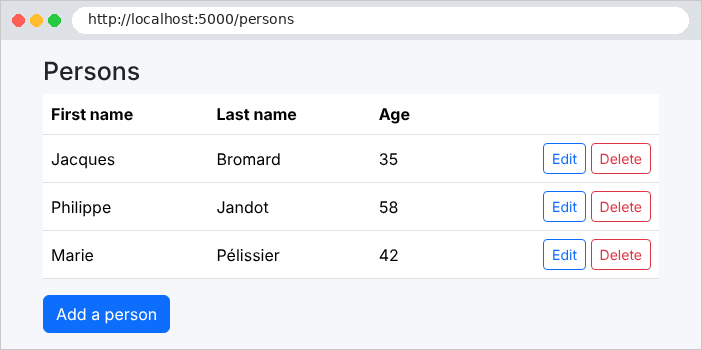
The list, starting with URL http://localhost:5000/:
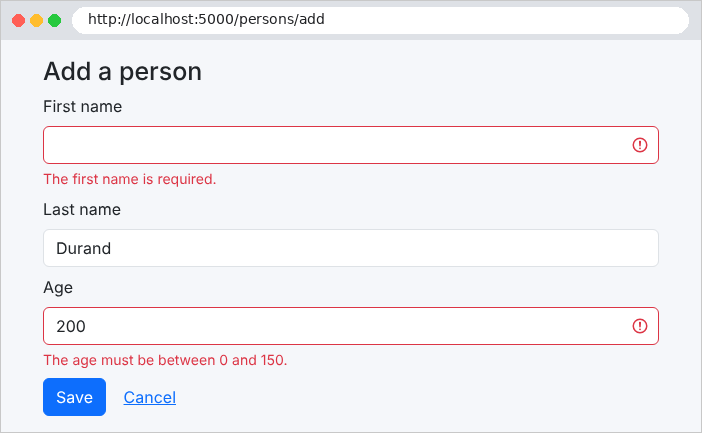
An invalid form:
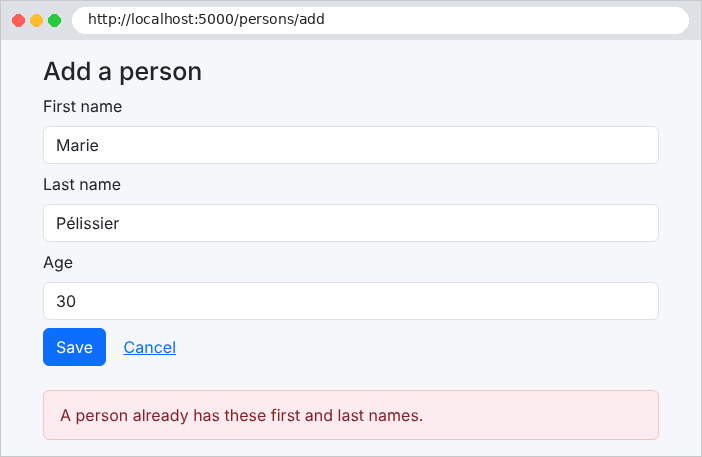
A homonym: the business rule detects it. [MySQL], which compares based on the database’s collation, would also reject [marie pelissier]—written in lowercase and without accents:
A successful addition:
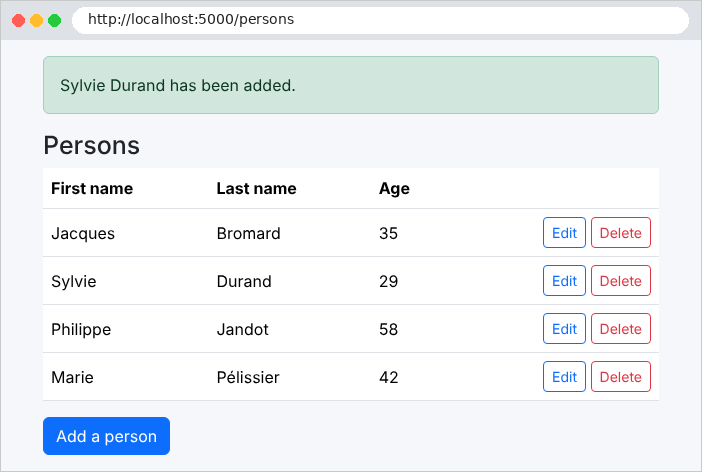
With logging level [Information] set for [Microsoft.EntityFrameworkCore.Database.Command], the console then displays, for each SQL request, the request text, its parameters (hidden by default, as a precaution), and its execution time: We can see the transaction, the homonym search ([SELECT ... LIMIT 1]), the [INSERT] followed by the reading of the assigned identifier, the [COMMIT], and then, after the redirection, the reading of the list ([SELECT ... ORDER BY]).
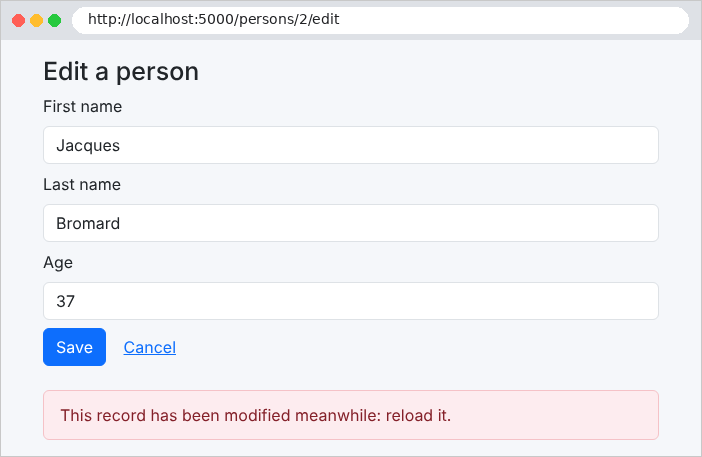
The optimistic lock: two forms are open on the same record; the first is saved (the version increases to 2); the second, which still has version 1, is rejected:
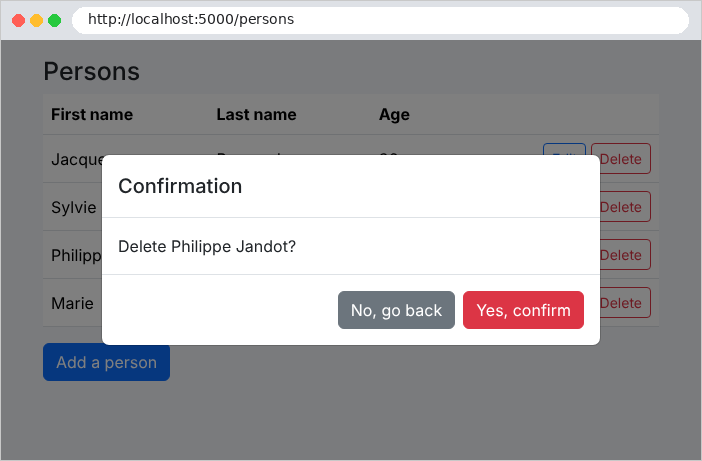
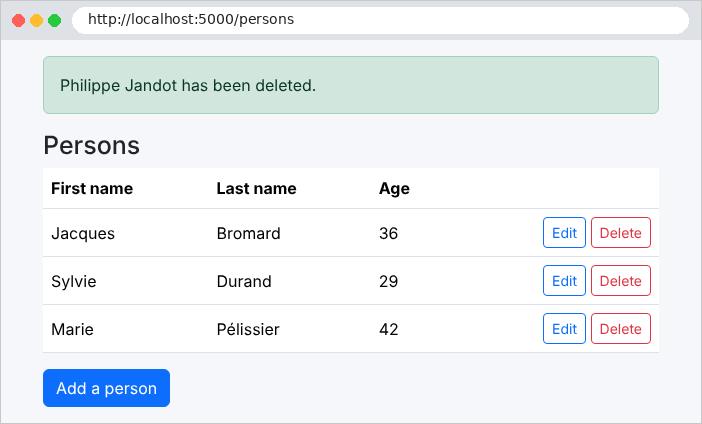
Deletion, with confirmation: