3. The Action Model
An action requires information sent by the browser: the parameters from URL ([?name=martin&age=42]), form fields, and route parameters. The source course refers to all of this information as the action model. This chapter shows how [ASP.NET Core] provides this information to the action, converts it to the correct type, and validates it. This process is called model binding ([model binding]).
3.1. Example 07: URL Parameters
The [Controllers/ParametersController.cs] file:
| using Microsoft.AspNetCore.Mvc;
namespace Example07.Controllers;
[Route("parameters")]
public class ParametersController : Controller
{
// /parameters/action01?name=martin: the [name] URL parameter -> the [name] action parameter
[HttpGet("action01")]
public string Action01(string? name)
{
return $"name = [{name}], of type {name?.GetType().Name ?? "null"}";
}
// /parameters/action02?age=42: the value is CONVERTED to the parameter type
[HttpGet("action02")]
public string Action02(int age)
{
return $"age = [{age}], of type {age.GetType().Name}, ModelState.IsValid = {ModelState.IsValid}";
}
// /parameters/action03?age=42: int? distinguishes a missing parameter (null) from a zero
[HttpGet("action03")]
public string Action03(int? age)
{
return $"age = [{age?.ToString() ?? "null"}], ModelState.IsValid = {ModelState.IsValid}";
}
// /parameters/action04?page=2: a default value if the parameter is missing
[HttpGet("action04")]
public string Action04(int page = 1)
{
return $"page = [{page}]";
}
// /parameters/action05?q=nest: [FromQuery(Name = ...)] when the names differ
[HttpGet("action05")]
public string Action05([FromQuery(Name = "q")] string? search)
{
return $"search = [{search}]";
}
// /parameters/action06?name=martin&age=42: all the parameters at once
[HttpGet("action06")]
public Dictionary<string, string> Action06()
{
return Request.Query.ToDictionary(p => p.Key, p => p.Value.ToString());
}
}
|
Let’s break down this code:
- Lines 10–12: The model binding associates the action’s parameters with the query data by name: the action’s parameter [name] receives the value of the parameter [name] from URL (the part following [?], called the query string or [query string]). The type [string?] indicates that the value may be missing; in that case, it is [null]. [name?.GetType().Name ?? "null"]: the name of the value type, or the string ["null"] if the value is [null] (the operator [??] provides a replacement value);
- lines 17–19: the parameter is declared as type [int]: the template binding converts the received string (["42"]) to a number. If the conversion fails ([?age=abc]), the action is still executed, using the type’s default value (0 for a [int]), and the failure is logged in [ModelState]; the status of the model binding—[ModelState.IsValid]—then becomes [false];
- lines 24–26: with type [int?] (a “nullable” integer), a missing parameter is represented as [null], not 0: this allows distinguishing between “no age” and “age 0”;
- lines 31–33: a default value of [C#] replaces a missing parameter;
- Lines 38–40: The attribute [[FromQuery(Name = "q")]] specifies where to look for the value (in URL) and under what name: The [search] parameter of the action receives the [q] parameter from the URL;
- Lines 45–47: [Request.Query] provides access to all parameters of URL, without any mapping or conversion. [ToDictionary] ([LINQ]) creates a dictionary from it, serialized in JSON.
The results:
| curl -i "http://localhost:5000/parameters/action01?name=martin"
|
| HTTP/1.1 200 OK
Content-Type: text/plain; charset=utf-8
name = [martin], of type String
|
| curl -i "http://localhost:5000/parameters/action01"
|
| HTTP/1.1 200 OK
Content-Type: text/plain; charset=utf-8
name = [], of type null
|
| curl -i "http://localhost:5000/parameters/action02?age=42"
|
| HTTP/1.1 200 OK
Content-Type: text/plain; charset=utf-8
age = [42], of type Int32, ModelState.IsValid = True
|
| curl -i "http://localhost:5000/parameters/action02?age=abc"
|
| HTTP/1.1 200 OK
Content-Type: text/plain; charset=utf-8
age = [0], of type Int32, ModelState.IsValid = False
|
| curl -i "http://localhost:5000/parameters/action02"
|
| HTTP/1.1 200 OK
Content-Type: text/plain; charset=utf-8
age = [0], of type Int32, ModelState.IsValid = True
|
| curl -i "http://localhost:5000/parameters/action03?age=42"
|
| HTTP/1.1 200 OK
Content-Type: text/plain; charset=utf-8
age = [42], ModelState.IsValid = True
|
| curl -i "http://localhost:5000/parameters/action03"
|
| HTTP/1.1 200 OK
Content-Type: text/plain; charset=utf-8
age = [null], ModelState.IsValid = True
|
| curl -i "http://localhost:5000/parameters/action03?age=abc"
|
| HTTP/1.1 200 OK
Content-Type: text/plain; charset=utf-8
age = [null], ModelState.IsValid = False
|
| curl -i "http://localhost:5000/parameters/action04"
|
| HTTP/1.1 200 OK
Content-Type: text/plain; charset=utf-8
page = [1]
|
| curl -i "http://localhost:5000/parameters/action04?page=2"
|
| HTTP/1.1 200 OK
Content-Type: text/plain; charset=utf-8
page = [2]
|
| curl -i "http://localhost:5000/parameters/action05?q=aspnet"
|
| HTTP/1.1 200 OK
Content-Type: text/plain; charset=utf-8
search = [aspnet]
|
| curl -i "http://localhost:5000/parameters/action06?name=martin&age=42"
|
| HTTP/1.1 200 OK
Content-Type: application/json; charset=utf-8
{"name":"martin","age":"42"}
|
The quotation marks around URL are necessary when it contains the character [&], which has a specific meaning for the console. Note that:
- a parameter is bound by its name, regardless of case ([?NAME=martin] is also valid);
- its value is converted to the declared type. This is an important difference from [NestJS], where a parameter’s type was merely a declaration ([TypeScript]) that was removed at compile time;
- an impossible conversion does not cause an error: the action is executed with a default value, and it is up to the action to check [ModelState.IsValid]. A “nullable” type ([int?]) prevents a missing or invalid value from being confused with 0.
Accented characters and spaces are encoded in a URL ([%C3%A9] for [é], etc.): [ASP.NET Core] decodes them before binding.

3.2. Example 08: An action template described by a class
When an action has multiple parameters, they are described by a class. Each property of the class carries validation attributes provided by the standard namespace [System.ComponentModel.DataAnnotations]. This is equivalent to the decorators in the [class-validator] library of [NestJS].
The [Models/PersonModel.cs] file:
| using System.ComponentModel.DataAnnotations;
namespace Example08.Models;
// the action model: a class whose every property carries its constraints
public class PersonModel
{
[Required(ErrorMessage = "the name is required")]
[StringLength(20, MinimumLength = 2, ErrorMessage = "the name must have 2 to 20 characters")]
public string? Name { get; set; }
[Required(ErrorMessage = "the age is required")]
[Range(0, 150, ErrorMessage = "the age must be between 0 and 150")]
public int? Age { get; set; }
[Required(ErrorMessage = "the title is required")]
[AllowedValues("Mr", "Mme", "Melle", ErrorMessage = "unknown title")]
public string? Title { get; set; }
// optional: no [Required]
[EmailAddress(ErrorMessage = "invalid email address")]
public string? Email { get; set; }
}
|
Let’s comment on this code:
- line 1: the namespace for validation attributes;
- line 10: each expected parameter is a public property ([{ get; set; }]: it can be read and written). The model binding creates a [PersonModel] object, then populates each property with the parameter of the same name;
- lines 8–9: the name is required ([[Required]]) and must be between 2 and 20 characters long ([[StringLength]]). Each attribute accepts a custom error message ([ErrorMessage]). The properties are declared “nullable” ([string?], [int?]): a parameter may be omitted from a query, and [[Required]] enforces this requirement;
- lines 12–14: age is converted to an integer, which is required and must be between 0 and 150 ([[Range]]);
- Line 17: The title must be part of a list of values ([[AllowedValues]], introduced with [.NET] 8);
- Line 21: The email address is optional (no [[Required]]); if included, it must be valid.
The [Controllers/PersonsController.cs] file:
| using Example08.Models;
using Microsoft.AspNetCore.Mvc;
namespace Example08.Controllers;
// [ApiController]: a request whose model is invalid is rejected
// AUTOMATICALLY (400 error), even before the action runs
[ApiController]
[Route("persons")]
public class PersonsController : Controller
{
// /persons/action01?name=martin&age=42&title=Mr
[HttpGet("action01")]
public object Action01([FromQuery] PersonModel person)
{
return new { person, ageType = person.Age?.GetType().Name };
}
}
|
- line 6: the [[ApiController]] attribute directs the controller to a JSON server (a API). It changes several behaviors, including this one: a request with an invalid template is automatically rejected with a 400 error before the action is even executed. This is equivalent to the global [ValidationPipe] of [NestJS];
- Line 14: The action receives a [PersonModel], populated from the parameters of the URL. With [[ApiController]], a class-type parameter is searched for by default in the request body (in JSON): [[FromQuery]] specifies that it should be searched for in URL;
- Line 16: The action returns the person received and their age type.
A valid query with a [pirate] parameter that does not correspond to any property:
| curl -i "http://localhost:5000/persons/action01?name=martin&age=42&title=Mr&pirate=1"
|
| HTTP/1.1 200 OK
Content-Type: application/json; charset=utf-8
{"person":{"name":"martin","age":42,"title":"Mr","email":null},"ageType":"Int32"}
|
The age is indeed a number, and the parameter [pirate] was ignored: the binding populates only the properties of the class. An invalid request (the response JSON has been formatted for readability):
| curl -i "http://localhost:5000/persons/action01?name=m&age=abc&title=Dr&email=xx"
|
| HTTP/1.1 400 Bad Request
Content-Type: application/problem+json; charset=utf-8
{
"type": "https://tools.ietf.org/html/rfc9110#section-15.5.1",
"title": "One or more validation errors occurred.",
"status": 400,
"errors": {
"Age": [
"The value 'abc' is not valid for Age."
],
"Name": [
"the name must have 2 to 20 characters"
],
"Email": [
"invalid email address"
],
"Title": [
"unknown title"
]
},
"traceId": "00-ea340e76f456fbefae537611139be71b-2db7a84085adc345-00"
}
|
[[ApiController]] rejected the request with a 400 error; its body, JSON, in the standard format [Problem Details] (RFC 9110), lists the errors by field. The action was not executed. The age conversion error has a message in English, provided by [ASP.NET Core]; we’ll see how to replace it. The same applies without any parameters:
| curl -i http://localhost:5000/persons/action01
|
| HTTP/1.1 400 Bad Request
Content-Type: application/problem+json; charset=utf-8
{
"type": "https://tools.ietf.org/html/rfc9110#section-15.5.1",
"title": "One or more validation errors occurred.",
"status": 400,
"errors": {
"Age": [
"the age is required"
],
"Name": [
"the name is required"
],
"Title": [
"the title is required",
"unknown title"
]
},
"traceId": "00-af1f22e662507d8f360028f71752ded1-4ff5a136398590da-00"
}
|
This behavior is appropriate for a JSON server, queried by a [JavaScript] client that displays errors in its own way. For a HTML application, an error code like JSON makes no sense: we want to redisplay the form along with its errors. The following example shows how to take control.
Example 09 does not use [[ApiController]]. The [PersonModel] class is identical; only the controller changes. The [Controllers/PersonsController.cs] file:
| using System.Net;
using Example09.Models;
using Microsoft.AspNetCore.Mvc;
namespace Example09.Controllers;
// no [ApiController]: the action is ALWAYS executed, and it is the action that
// decides what to do with an invalid model
[Route("persons")]
public class PersonsController : Controller
{
[HttpGet("action01")]
public ContentResult Action01(PersonModel person)
{
// ModelState: the result of the binding AND of the validation of the model
if (ModelState.IsValid)
{
return Page($"<p>Welcome {person.Title} {person.Name} ({person.Age} years old)</p>");
}
// the errors, field by field
var items = ModelState
.Where(field => field.Value!.Errors.Count > 0)
.Select(field => $"<li>{field.Key}: {string.Join(", ", field.Value!.Errors.Select(e => e.ErrorMessage))}</li>");
return Page($"<p>The form contains errors:</p><ul>{string.Join("", items)}</ul>");
}
// an HTML page (code 200 in both cases)
private ContentResult Page(string html) => Content(html, "text/html; charset=utf-8");
}
|
Let’s comment on this code:
- line 9: without [[ApiController]], the action is always executed, regardless of whether the model is valid or not. A class-type parameter is searched for everywhere: in URL, in form fields, and in the route;
- line 13: the model binding and validation were performed before the action was executed: the [person] object is populated, and [ModelState] contains any errors;
- lines 16–18: no errors: a welcome page;
- lines 21–23: otherwise, the list of errors. [ModelState] is a dictionary in which each key is the name of a field ([Name], [Age]...) and each value is the status of that field, along with its list of errors ([Errors]). The methods [LINQ], [Where] (filter), and [Select] (transform) retain the fields with errors and generate one line HTML per field. [!] informs the compiler that a value is not [null];
- line 24: a page listing the errors;
- line 28: in both cases, the response is a HTML page, with status code 200.

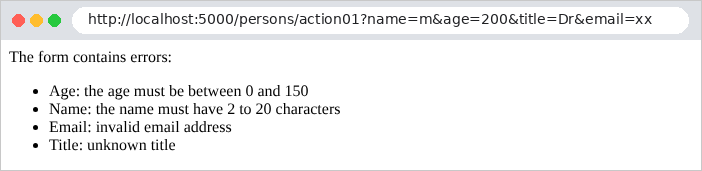
A conversion error appears in [ModelState] as a validation error:
| curl -i "http://localhost:5000/persons/action01?name=martin&age=abc&title=Mr"
|
| HTTP/1.1 200 OK
Content-Length: 92
Content-Type: text/html; charset=utf-8
<p>The form contains errors:</p><ul><li>Age: The value 'abc' is not valid for Age.</li></ul>
|
This is the technique that all forms in the case study will use (see Example 19): the action checks [ModelState.IsValid] and redispays the form if there are any errors.
3.4. Example 10: Multiple Parameters
A single parameter can appear multiple times in a query: this is the case with checkboxes on a form or a multiple-selection list ([?color=red&color=green]).
The [Controllers/ArraysController.cs] file:
| using Example10.Models;
using Microsoft.AspNetCore.Mvc;
namespace Example10.Controllers;
[Route("arrays")]
public class ArraysController : Controller
{
// /arrays/action01?color=red&color=green: a simple parameter
[HttpGet("action01")]
public object Action01(string? color)
{
return new { color };
}
// /arrays/action02?color=red&color=green: an array
[HttpGet("action02")]
public object Action02(string[] color)
{
return new { color, count = color.Length };
}
// /arrays/action03?color=red: a list, validated by ChoiceModel
[HttpGet("action03")]
public object Action03(ChoiceModel choice)
{
return new
{
colors = choice.Color,
valid = ModelState.IsValid,
errors = ModelState.Values.SelectMany(v => v.Errors).Select(e => e.ErrorMessage),
};
}
}
|
The [Action01] action (lines 11–13) shows what a single parameter receives:
| curl -i "http://localhost:5000/arrays/action01?color=red"
|
| HTTP/1.1 200 OK
Content-Type: application/json; charset=utf-8
{"color":"red"}
|
| curl -i "http://localhost:5000/arrays/action01?color=red&color=green"
|
| HTTP/1.1 200 OK
Content-Type: application/json; charset=utf-8
{"color":"red"}
|
A parameter of type [string] receives only the first value. An array-type parameter ([Action02], lines 18–20) receives all of them, whether there are zero, one, or more:
| curl -i "http://localhost:5000/arrays/action02?color=red"
|
| HTTP/1.1 200 OK
Content-Type: application/json; charset=utf-8
{"color":["red"],"count":1}
|
| curl -i "http://localhost:5000/arrays/action02?color=red&color=green"
|
| HTTP/1.1 200 OK
Content-Type: application/json; charset=utf-8
{"color":["red","green"],"count":2}
|
| curl -i "http://localhost:5000/arrays/action02"
|
| HTTP/1.1 200 OK
Content-Type: application/json; charset=utf-8
{"color":[],"count":0}
|
[ASP.NET Core] thus avoids a common pitfall found in [NestJS] ([Express]), where the same variable was a string for a single value and an array for multiple values. The list still needs to be validated. The file [Models/ChoiceModel.cs]:
| using System.ComponentModel.DataAnnotations;
namespace Example10.Models;
// IValidatableObject: a validation written in C#, for what the attributes
// cannot express (here: EACH element of the list)
public class ChoiceModel : IValidatableObject
{
private static readonly string[] Colors = ["red", "green", "blue"];
[MinLength(1, ErrorMessage = "choose at least one color")]
public List<string> Color { get; set; } = [];
public IEnumerable<ValidationResult> Validate(ValidationContext context)
{
foreach (var color in Color.Where(c => !Colors.Contains(c)))
{
// yield return: the method returns the errors one by one
yield return new ValidationResult($"unknown color: {color}", [nameof(Color)]);
}
}
}
|
Let’s comment on this code:
- line 7: the class implements the [IValidatableObject] interface: a validation written in [C#] for what the attributes cannot express;
- line 11: [[MinLength(1)]]: the list must have at least one element;
- lines 14–18: the method [Validate], called by the validation after the attributes, checks each color. It returns an error ([ValidationResult]) for each unknown color, indicating the relevant field. [yield return] returns errors one by one, without creating a list.
The controller’s [Action03] action receives a [ChoiceModel] and returns its contents along with the validation status:
| curl -i "http://localhost:5000/arrays/action03?color=red&color=green"
|
| HTTP/1.1 200 OK
Content-Type: application/json; charset=utf-8
{"colors":["red","green"],"valid":true,"errors":[]}
|
| curl -i "http://localhost:5000/arrays/action03?color=red&color=black"
|
| HTTP/1.1 200 OK
Content-Type: application/json; charset=utf-8
{"colors":["red","black"],"valid":false,"errors":["unknown color: black"]}
|
| curl -i "http://localhost:5000/arrays/action03"
|
| HTTP/1.1 200 OK
Content-Type: application/json; charset=utf-8
{"colors":[],"valid":false,"errors":["choose at least one color"]}
|
3.5. Example 11: Parameters of a POST request
A HTML form sent using the POST method places its fields in the request body, not in the URL. The [Controllers/PostController.cs] file:
| using System.Text.Json;
using Example11.Models;
using Microsoft.AspNetCore.Mvc;
namespace Example11.Controllers;
[Route("post")]
public class PostController : Controller
{
// the fields of an HTML form (application/x-www-form-urlencoded body)
[HttpPost("action01")]
public object Action01()
{
return new
{
receivedType = Request.ContentType,
fields = Request.Form.ToDictionary(c => c.Key, c => c.Value.ToString()),
};
}
// a JSON body: [FromBody] deserializes it
[HttpPost("action02")]
public object Action02([FromBody] JsonElement body)
{
return new { receivedType = Request.ContentType, body };
}
// a single field of the form: [FromForm]
[HttpPost("action03")]
public string Action03([FromForm] string? name)
{
return $"name = [{name}]";
}
// the form fields, bound and validated by the PersonModel class
[HttpPost("action04")]
public object Action04([FromForm] PersonModel person)
{
return new
{
person,
valid = ModelState.IsValid,
errors = ModelState.Values.SelectMany(v => v.Errors).Select(e => e.ErrorMessage),
};
}
}
|
Let’s break down this code:
- lines 12–17: [Request.Form] contains the fields of a HTML form (body type [application/x-www-form-urlencoded]), without any binding or conversion. [Request.ContentType] is the body type;
- lines 23–25: [[FromBody]] instructs the system to read the request body as a JSON document (this is what a [JavaScript] client sends). [JsonElement] represents any JSON document; a class could have been declared;
- lines 30–32: [[FromForm]]: a field in the form;
- lines 37–43: the entire form, bound and validated by the [PersonModel] class from Example 08.
The [-d] option of [curl] sends a POST request with a body in the format of a HTML ([application/x-www-form-urlencoded]):
| curl -i -d "name=martin&age=42" http://localhost:5000/post/action01
|
| HTTP/1.1 200 OK
Content-Type: application/json; charset=utf-8
{"receivedType":"application/x-www-form-urlencoded","fields":{"name":"martin","age":"42"}}
|
The same content in JSON format:
| curl -i -H "Content-Type: application/json" -d '{"name":"martin","age":42}' http://localhost:5000/post/action02
|
| HTTP/1.1 200 OK
Content-Type: application/json; charset=utf-8
{"receivedType":"application/json","body":{"name":"martin","age":42}}
|
(for [Windows], enter [-d "{\"name\":\"martin\",\"age\":42}"] at the command prompt). The age is a string in the first case (a HTML form carries only text) and a number in the second. A [[FromBody]] action rejects a body that is not in the JSON format, returning a 415 error ([Unsupported Media Type]):
| curl -i -d "name=martin&age=42" http://localhost:5000/post/action02
|
| HTTP/1.1 415 Unsupported Media Type
Content-Length: 0
|
The other two actions:
| curl -i -d "name=martin&age=42" http://localhost:5000/post/action03
|
| HTTP/1.1 200 OK
Content-Type: text/plain; charset=utf-8
name = [martin]
|
| curl -i -d "name=martin&age=42&title=Mme" http://localhost:5000/post/action04
|
| HTTP/1.1 200 OK
Content-Type: application/json; charset=utf-8
{"person":{"name":"martin","age":42,"title":"Mme","email":null},"valid":true,"errors":[]}
|
| curl -i -d "name=martin&age=200" http://localhost:5000/post/action04
|
| HTTP/1.1 200 OK
Content-Type: application/json; charset=utf-8
{"person":{"name":"martin","age":200,"title":null,"email":null},"valid":false,"errors":["the age must be between 0 and 150","the title is required","unknown title"]}
|
An action POST returns a 200 status code, just like an action GET ([NestJS], on the other hand, returned a 201 by default). For a HTML application, a POST action responds either with a page (the form redisplayed) or with a redirect (see Example 20).
3.6. Example 12: Custom Binding and Validation
You can extend the template binding and validation. The case study makes moderate use of these features, but understanding them helps you grasp how [ASP.NET Core] works.
| 12-custom-binding/
├── Binding/
│ ├── DateFrBinder.cs
│ ├── LanguageBinder.cs
│ └── NoSpaceAttribute.cs
├── Controllers/
│ └── ExamplesController.cs
├── appsettings.json
├── Example12.csproj
└── Program.cs
|
3.6.1. A model binder: DateFrBinder
A model binder is the object that constructs a parameter’s value from the request. [ASP.NET Core] provides them for all common types; you can write your own. The file [Binding/DateFrBinder.cs]:
| using System.Globalization;
using Microsoft.AspNetCore.Mvc.ModelBinding;
namespace Example12.Binding;
// a "model binder": turns a French date "23/09/2026" into a DateOnly
public class DateFrBinder : IModelBinder
{
public Task BindModelAsync(ModelBindingContext context)
{
// the raw value, found in the URL, the form, the route...
var raw = context.ValueProvider.GetValue(context.ModelName).FirstValue;
if (DateOnly.TryParseExact(raw, "dd/MM/yyyy", CultureInfo.InvariantCulture, DateTimeStyles.None, out var date))
{
// success: the value the action will receive
context.Result = ModelBindingResult.Success(date);
}
else
{
// failure: an error in ModelState ("31/02/2026" is rejected too)
context.ModelState.AddModelError(context.ModelName, $"[{raw}] is not a valid dd/mm/yyyy date");
}
return Task.CompletedTask;
}
}
|
- line 7: a model binder implements the [IModelBinder] interface;
- line 9: its method [BindModelAsync] receives the binding context: the parameter name ([ModelName]), the value sources ([ValueProvider]: URL, the form, the route...), [ModelState]...;
- line 12: the raw value of the parameter ([FirstValue]: the first one, if there are multiple);
- lines 13–16: [DateOnly.TryParseExact] converts a string in the [dd/mm/yyyy] format to [DateOnly] (a date without a time), and returns [false] if this is impossible, including for a date that does not exist (31/02/2026). If successful, [ModelBindingResult.Success(date)] provides the value that the action will receive;
- line 21: if the operation fails, an error is added to [ModelState];
- line 23: the method is asynchronous by nature ([Task]), but there is nothing to wait for: it returns a task that has already completed.
3.6.2. A second model binder: LanguageBinder
A parameter may come from somewhere other than URL or the form. The file [Binding/LanguageBinder.cs]:
| using Microsoft.AspNetCore.Mvc.ModelBinding;
namespace Example12.Binding;
// the browser's preferred language, read from the header
// "Accept-Language: fr-FR,fr;q=0.9,en;q=0.8" -> "fr"
public class LanguageBinder : IModelBinder
{
public Task BindModelAsync(ModelBindingContext context)
{
var header = context.HttpContext.Request.Headers.AcceptLanguage.ToString();
var first = header.Split(',')[0].Trim();
var language = first.Length >= 2 ? first[..2].ToLowerInvariant() : "fr";
context.Result = ModelBindingResult.Success(language);
return Task.CompletedTask;
}
}
|
- line 11: the [Accept-Language] header, which specifies the user’s preferred languages;
- lines 12–13: the first two letters of the first language. [first[..2]] is a range ([range]): the characters with indices 0 and 1.
3.6.3. A validation attribute: [NoSpace]
The file [Binding/NoSpaceAttribute.cs]:
| using System.ComponentModel.DataAnnotations;
namespace Example12.Binding;
// a "home-made" validation attribute: [NoSpace]
public class NoSpaceAttribute : ValidationAttribute
{
public NoSpaceAttribute() : base("the {0} field must not contain any space")
{
}
public override bool IsValid(object? value)
{
// null is accepted: requiring it is the job of [Required]
return value is not string text || !text.Contains(' ');
}
}
|
- line 6: a validation attribute inherits from [ValidationAttribute]. By convention, the name of an attribute class ends with [Attribute], which is omitted in practice: [[NoSpace]];
- line 8: the default error message, passed to the parent class. [{0}] will be replaced by the field name;
- Lines 12–15: The rule. [value is not string text]: If the value is not a string ([null], for example), it is accepted; otherwise, it is assigned to the variable [text], which must not contain any spaces. The case study has an attribute of this type: [[OneOf]].
3.6.4. The controller
The file [Controllers/ExamplesController.cs]:
| using Example12.Binding;
using Microsoft.AspNetCore.Mvc;
namespace Example12.Controllers;
[Route("examples")]
public class ExamplesController : Controller
{
// /examples/schedule?day=23/09/2026: a custom model binder
[HttpGet("schedule")]
public IActionResult Schedule([ModelBinder(typeof(DateFrBinder))] DateOnly day)
{
if (!ModelState.IsValid)
{
return BadRequest(ModelState[nameof(day)]!.Errors[0].ErrorMessage);
}
return Ok($"schedule for the day [{day:yyyy-MM-dd}]");
}
// /examples/hello: a parameter that does not come from the URL, but from a header
[HttpGet("hello")]
public string Hello([ModelBinder(typeof(LanguageBinder))] string language)
{
return language == "en" ? "Hello!" : "Bonjour !";
}
// /examples/search?keyword=aspnet: a custom validation attribute
[HttpGet("search")]
public IActionResult Search([NoSpace] string? keyword)
{
if (!ModelState.IsValid)
{
return BadRequest(ModelState[nameof(keyword)]!.Errors[0].ErrorMessage);
}
return Ok($"search for [{keyword}]");
}
}
|
- line 11: the attribute [[ModelBinder]] specifies the model binder to be used for this parameter;
- line 15: an invalid date results in a 400 error, with the message from the model binder;
- line 22: the parameter [language] is provided by the second model binder;
- line 29: A validation attribute can also be applied directly to an action parameter.
The results:
| curl -i "http://localhost:5000/examples/schedule?day=23/09/2026"
|
| HTTP/1.1 200 OK
Content-Type: text/plain; charset=utf-8
schedule for the day [2026-09-23]
|
| curl -i "http://localhost:5000/examples/schedule?day=2026-09-23"
|
| HTTP/1.1 400 Bad Request
Content-Type: text/plain; charset=utf-8
[2026-09-23] is not a valid dd/mm/yyyy date
|
| curl -i "http://localhost:5000/examples/schedule?day=31/02/2026"
|
| HTTP/1.1 400 Bad Request
Content-Type: text/plain; charset=utf-8
[31/02/2026] is not a valid dd/mm/yyyy date
|
| curl -i -H "Accept-Language: fr-FR,fr;q=0.9" http://localhost:5000/examples/hello
|
| HTTP/1.1 200 OK
Content-Type: text/plain; charset=utf-8
Bonjour !
|
| curl -i -H "Accept-Language: en-US,en;q=0.9" http://localhost:5000/examples/hello
|
| HTTP/1.1 200 OK
Content-Type: text/plain; charset=utf-8
Hello!
|
(The [-H] option of [curl] adds a header to the request)
| curl -i "http://localhost:5000/examples/search?keyword=aspnet"
|
| HTTP/1.1 200 OK
Content-Type: text/plain; charset=utf-8
search for [aspnet]
|
| curl -i "http://localhost:5000/examples/search?keyword=asp%20net"
|
| HTTP/1.1 400 Bad Request
Content-Type: text/plain; charset=utf-8
the keyword field must not contain any space
|
([%20] encodes a space in a URL)
3.6.5. Conclusion
The action template is constructed by the template binding based on the request: route parameters, URL, form fields, JSON body, and headers. The values are converted to the parameter types and then validated against the attributes. The result of these two steps is stored in [ModelState]. For a server JSON, [[ApiController]] automatically rejects an invalid model; for a HTML application, the action itself tests [ModelState.IsValid] (example 09) so that the form can be redisplayed. This is the subject of the next chapter.