1. Introduction
The document’s PDF is |HERE|.
The document’s codes are |HERE|.
This document is a product of Anthropic’s IA Claude. It follows the document “Step-by-Step Introduction to the [NestJS] Web Framework” (2026), which itself adapted the document “Introduction to ASP.NET MVC by Example” (2013) to the [NestJS] framework. This document takes the reverse path and returns to the [.NET] platform, in its current version:
- the [NestJS] framework and the [TypeScript] language are replaced by the [ASP.NET Core MVC] framework and the [C#] language;
- the [Handlebars] views are replaced by [Razor] views;
- ORM and [TypeORM] are replaced by ORM and [Entity Framework Core], still based on [MySQL].
The document closely follows the progression of the [NestJS] course: first, numerous small projects, each focused on a single concept, followed by a comprehensive case study—a web application for scheduling appointments at a medical practice—with all files fully commented. The examples have the same numbers and cover the same topics as in the [NestJS] course: a reader familiar with that course can compare the two frameworks example by example. However, this is not necessary: this document stands on its own and assumes no prior knowledge of [NestJS], nor, for that matter, of [ASP.NET]. The only prerequisites are a basic understanding of web programming (the HTTP protocol, the HTML language) and the [C#] language.
1.1. The Role of ASP.NET Core MVC in a Web Application
A web application is often built in layers, with each layer communicating only with its neighboring layers:
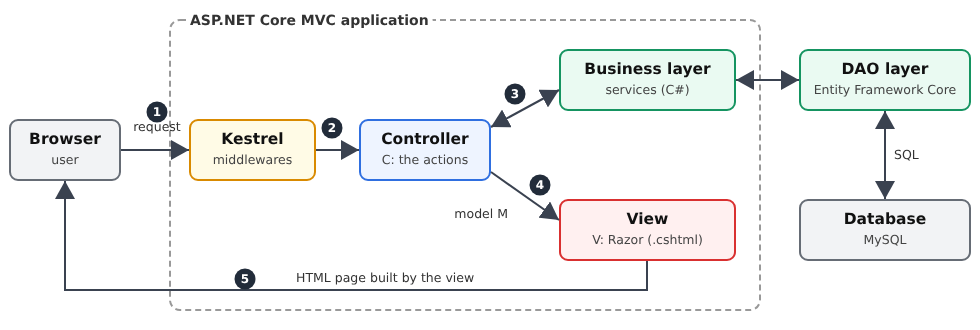
- the web layer receives requests HTTP from the browser and returns pages HTML to it. This is the layer that [ASP.NET Core MVC] helps us write;
- The business layer contains the application’s business rules (for example, “a patient can have only one upcoming appointment”). It knows nothing about the web: it could just as easily serve a command-line application;
- The data access layer (layer [DAO], for [Data Access Object]) reads from and writes to the database. We will use the ORM [Entity Framework Core] ([Object Relational Mapper]), which maps the rows of the tables and objects in [C#].
The web layer itself follows the [MVC] ([Model – View – Controller]) model:
- the controller (C) is a class whose methods—called actions—each handle a specific type of request (for example, [GET /schedule]). An action reads the request parameters, invokes the business layer, and then selects the view to display;
- the model (M) is the set of data that the action passes to the view: a [C#] object;
- the view (V) is a [Razor] file (extension [.cshtml]): from HTML, in which [C#] expressions—preceded by the character [@]—are replaced by data from the model.
The processing of a request follows the numbered steps in the diagram:
- 1: The browser sends a HTTP request, for example, [GET /schedule?doctorId=1&day=2026-09-24];
- 2: The web server [Kestrel], integrated with [ASP.NET Core], receives the request. It passes through a series of middleware components (cookie reading, authentication, static files, etc.), then [ASP.NET Core] selects the action responsible for handling this request: this is routing. Before reaching the action, the request may still pass through filters, which we’ll explore in later chapters;
- 3: The action requests the data it needs from the business layer;
- 4: It constructs the view template and designates the view that should display it;
- 5: The [Razor] view engine renders the HTML page, which [ASP.NET Core] returns to the browser.
[ASP.NET Core] is the web framework for Microsoft’s [.NET] platform. Free and open-source, it runs on [Windows], [Linux], and [macOS]. It can create servers that return JSON to a [JavaScript] client ([Angular], [React], [Flutter]...) as well as traditional web applications, where the server generates the HTML pages and the browser simply displays them. It is this second use case—the MVC part of the framework—that this document examines. Like [NestJS], which drew heavily on it, [ASP.NET Core] is based on two ideas: attributes ([[HttpGet]], [[Route]], [[Authorize]]...) describe the roles of classes and methods, and dependency injection provides each object with the dependencies it needs.
1.2. Tools Used
The examples were written and tested using the following tools (their installation is described in the appendix):
- SDK [.NET] 10 ([Software Development Kit]), which contains the [C#] compiler, the [ASP.NET Core] framework, and the [dotnet] command-line tool. [.NET] 10 is the current LTS (Long-Term Support) version;
- the [Visual Studio Code] editor, with the [C# Dev Kit] extension;
- a recent browser ([Chrome], [Firefox], [Edge]);
- the command-line tool [curl], which displays the raw HTTP responses (it is included with [Windows] 10 and 11);
- the SGBD [MySQL] (or [MariaDB]), for example, the one for [Laragon] under [Windows], starting from the chapter on data access, and for the case study.
The [ASP.NET Core] framework is part of SDK: the examples do not require any additional libraries until Chapter 8. Examples 25 through 28 and the case study use three libraries, which are automatically downloaded from the [nuget.org] website during their first compilation (so you must be connected to the Internet on that day): [Microsoft.AspNetCore.Authentication.JwtBearer] (JWT tokens), [BCrypt.Net-Next] (password hashes), and [Pomelo.EntityFrameworkCore.MySql] ([Entity Framework Core] for [MySQL]).
1.3. Run the case study
Reviewer’s note: I advise the reader to complete the case study immediately as described below. Once you fully understand the role of this appointment scheduling application, ask your favorite IA to modify the application as follows: from now on, each doctor will be able to:
- set their own appointment slots between two dates. This will allow them to adjust their schedule as needed;
- remove certain time slots from the calendar for a given day—for example, if they are unavailable for personal reasons;
The modification is not straightforward because it involves a change to the database structure. Ask IA to provide you with the new application code and the SQL script to create the new database. To do this, you’ll need to provide him with the ZIP file containing the complete project as well as the SQL script for the old database.
Also, I haven’t reviewed the course created by Claude. He had already produced a perfect [NestJS] course. I assumed the same was true for this one. If you run into a problem understanding something, the solution is always the same: ask your favorite IA to explain what you don’t understand. Claude, for example, is very good at this. You may need to “upload” the example you don’t understand to him.
End of note.
The case study at the end of this document is a complete application. Readers will likely want to see it in action before delving into the details of the framework: here’s how to run it. It’s located in the [rdvmedecins2-aspnetcore-mvc] folder, next to the [examples] folder:
You must have installed SDK, [.NET] 10, [Visual Studio Code], and [MySQL] (see appendices). Then:
- Create the [dbrdvmedecins2] database by running the [rdvmedecins2-aspnetcore-mvc/database/dbrdvmedecins2.sql] script. With [Laragon], open the [HeidiSQL] tool (Database button), then run the script via the File / Run SQL menu. At the command line:
- Check the database connection. The application connects to [MySQL] on [localhost], port 3306, using the user [root] without a password (the default settings for [Laragon]). If your [root] account has a password, enter it in the application’s [appsettings.json] file, at the end of the [ConnectionStrings:RdvMedecins] connection string ([...;User=root;Password=myPassword;]). For [MariaDB], also specify its version in the [MySql:ServerVersion] key (for example, [10.11.0-mariadb]);
- Open the [rdvmedecins2-aspnetcore-mvc] folder in [Visual Studio Code] (File menu / Open Folder), then open a terminal (Terminal menu / New Terminal);
- Launch the application:
- Upon first execution, [dotnet] downloads the libraries from [nuget.org], compiles the application, and then starts it. The console then displays the application’s address:
- Open the address [http://localhost:8081] in a browser:
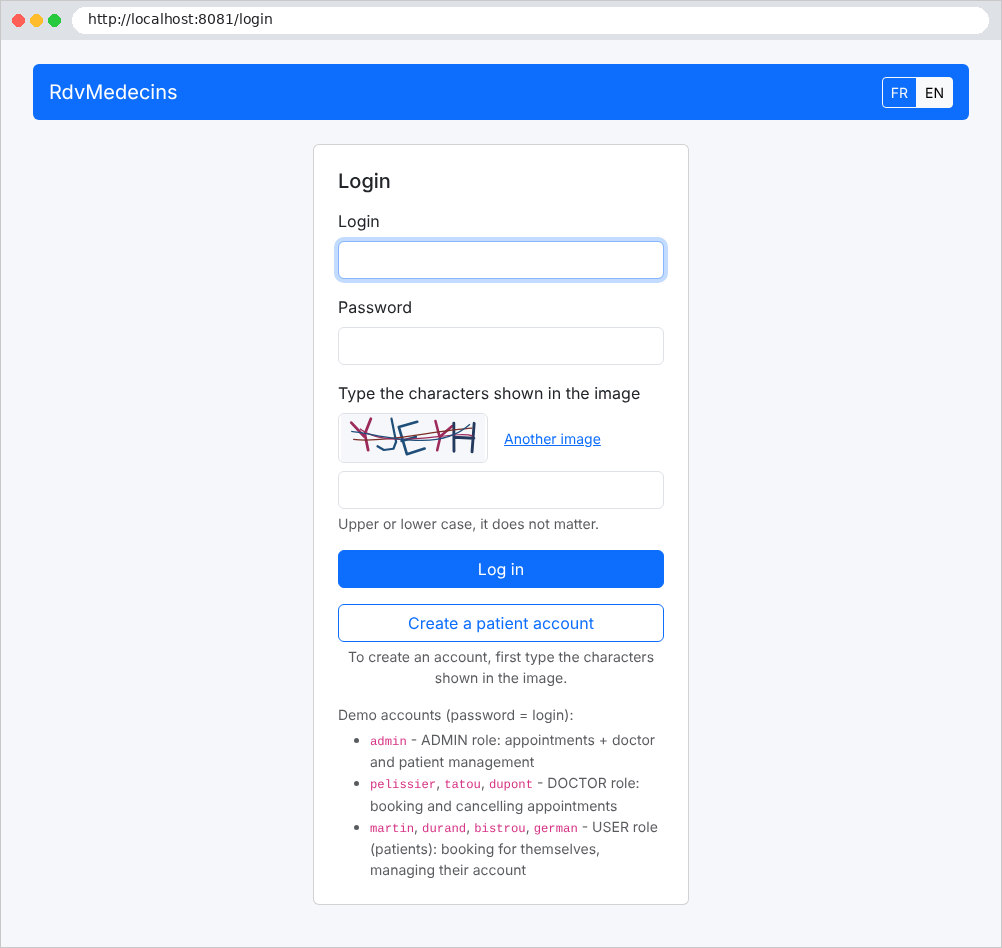
- Log in with one of the demo accounts, whose password is the same as the username: [admin] (administrator), [pelissier], [tatou], [dupont] (doctors), [martin], [durand], [bistrou], [german] (patients). You must also enter the characters from the image, in uppercase or lowercase.
If the application closes immediately with the message [Unable to connect to any of the specified MySQL hosts], it means that [MySQL] has not been started; with [Access denied for user 'root'@'localhost'], the connection string password is incorrect; with [Unknown database 'dbrdvmedecins2'], the script SQL has not been executed. The application’s [README.md] file describes other scenarios. The application is stopped using [Ctrl-C] in the terminal.
The last chapter of the document explains how to use the application and then discusses each of its files.
1.4. Examples
The examples are stored in the [examples] folder, with one subfolder per example:
Each example is an independent [.NET] project that can be compiled and run on its own. The file [examples.slnx] is a solution: a list of all these projects. When you open the [examples] folder in [Visual Studio Code], the [C# Dev Kit] extension finds the solution and loads all the projects (Solution Explorer pane): You then have access to syntax highlighting, code completion, and error reporting in each file.
The [common/bootstrap] folder contains the CSS and [Bootstrap] frameworks, shared by the examples that format their pages (starting with Example 15).
Each example has the structure of a [ASP.NET Core MVC] project:
- [Program.cs]: the application’s entry point—configuration, services, and server startup;
- [Controllers]: the controllers;
- [Models]: the classes that describe the models (actions and views);
- [Views]: the views [Razor] (starting in Chapter 4);
- [appsettings.json]: the application configuration (logging levels, and later, database connection, etc.);
- [Example13.csproj]: the project file, which describes how to compile the application.
To run an example, open a terminal in its folder (in [Visual Studio Code]: right-click the example folder, then select “Open in the built-in terminal”) and type:
[dotnet run] compiles the project (in its [bin] folder), then runs the application. With [dotnet watch], the code is recompiled and the application is restarted whenever a file is modified. [.cs] or [.cshtml]:
All examples listen on port 5000, the default port for [ASP.NET Core]: only one can be running at a time. Stop the server using [Ctrl-C] in the terminal. You can also compile all the examples at once from the [examples] folder to verify that the installation is complete:
The project file for an example is reduced to a single line. For example, [01-structure/Example01.csproj]:
- Line 1: [Microsoft.NET.Sdk.Web] is the SDK for web applications. It alone provides the entire [ASP.NET Core] framework: controllers, views, configuration, web server...
The settings common to all examples are written only once, in the [examples/Directory.Build.props] file, which the compiler automatically reads for any project located in the [examples] folder:
Let’s go over this file:
- line 9: the target version of [.NET]: [.NET] 10;
- line 11: “nullable” reference types. The compiler distinguishes between a variable of type [string], which must never be assigned the value [null], from a variable of type [string?], which can be set to that value, and issues a warning for any potential error involving [NullReferenceException];
- Line 13: The most common namespaces ([System], [System.Linq], [System.Threading.Tasks], [Microsoft.AspNetCore.Builder]...) are automatically imported into each file: there is no need to write the corresponding [using] directives.
Finally, the file [appsettings.json] is the same for all examples up to Chapter 8:
- Lines 4–5: logging levels. Application messages are displayed starting at level [Information]; those from [ASP.NET Core] itself—which are very numerous—are displayed only starting at level [Warning]. Thus, the console will display startup messages and errors, but not the details of each request;
- Line 8: the domain names accepted in requests ([*]: all).
1.5. Document Contents
The document is organized as follows:
Chapter | Contents | Examples |
Controllers, actions, | From the browser to the action: routes, responses, redirects, services | 01 through 06 |
The Action Model | Request parameters: binding, conversion, validation, forms POST | 07 to 12 |
The view and its model | Razor, template, partial views, helpers, forms, validation, PRG | 13 to 21 |
Internationalization | An Application in French and English | 22 |
Data Scopes | application, query, client | 23 |
The lifecycle of a request | middleware, authorization filters, action filters, exception filters, model binding | 24 |
Authentication and authorization | JWT in a cookie, roles, CAPTCHA, attempt limits | 25–27 |
Layered architecture | Web / Business Logic / DAO with Entity Framework Core and MySQL | 28 |
Case Study | The RdvMedecins application, explained file by file | - |
Each example introduces only a few new concepts, and the chapters build on one another: it is best to read them in order. The case study, meanwhile, draws on all the concepts from the previous chapters: whenever relevant, its commentary refers to the example where the concept was introduced.