5. Internationalization
An internationalized application displays its text in the user’s language. The case study is in French and English. The principle is simple: views no longer contain text, but keys ([MENU.HOME]), and a dictionary for each language associates a text with each key. The selected language is stored in a cookie.
[ASP.NET Core] has its own translation system (the [IStringLocalizer] interface and [.resx] resource files). Instead, we will use JSON dictionaries, read by a small class written for this purpose: these are the same files as those in the [NestJS] version of the case study, and their format can be read and written without any special tools. However, we will let [ASP.NET Core] handle the selection of the language for each request: this is the role of its localization middleware.
5.1. Example 22: A Bilingual Application
| 22-i18n/
├── Controllers/
│ ├── LanguageController.cs
│ └── PagesController.cs
├── i18n/
│ ├── en.json
│ └── fr.json
├── Translation/
│ ├── Translator.cs
│ └── ViewPage.cs
├── Views/
│ ├── Pages/
│ │ ├── Home.cshtml
│ │ └── Products.cshtml
│ ├── Shared/
│ │ ├── _Layout.cshtml
│ │ └── _Navbar.cshtml
│ ├── _ViewImports.cshtml
│ └── _ViewStart.cshtml
├── wwwroot/
│ └── css/
│ └── styles.css
├── appsettings.json
├── Example22.csproj
└── Program.cs
|
5.1.1. Dictionaries
The file [i18n/fr.json]:
| {
"MENU": {
"HOME": "Accueil",
"PRODUCTS": "Produits"
},
"HOME": {
"TITLE": "Bienvenue",
"HELLO": "Bonjour {name} !",
"DATE": "Nous sommes le {date}."
},
"PRODUCTS": {
"TITLE": "Nos produits",
"NAME": "Produit",
"PRICE": "Prix",
"COUNT": "{n} produit(s) au catalogue."
}
}
|
The file [i18n/en.json]:
| {
"MENU": {
"HOME": "Home",
"PRODUCTS": "Products"
},
"HOME": {
"TITLE": "Welcome",
"HELLO": "Hello {name}!",
"DATE": "Today is {date}."
},
"PRODUCTS": {
"TITLE": "Our products",
"NAME": "Product",
"PRICE": "Price",
"COUNT": "{n} product(s) in the catalogue."
}
}
|
- A dictionary is a JSON file, organized by page or by topic: The key [HOME.HELLO] refers to the text [HELLO] in section [HOME];
- Line 8: A text may contain parameters, enclosed in curly braces, which are replaced during translation. Word order varies from one language to another: this is why a text is not created by simply concatenating translated segments.
5.1.2. The translation service
The file [Translation/Translator.cs]:
| using System.Globalization;
using System.Text.Json;
using System.Text.RegularExpressions;
namespace Example22.Translation;
// the dictionaries, read ONCE at startup: the service is a singleton
public partial class Translator
{
public static readonly string[] Languages = ["fr", "en"];
public const string DefaultLanguage = "en";
// language -> (full key "HOME.HELLO" -> text)
private readonly Dictionary<string, Dictionary<string, string>> dictionaries = [];
public Translator(IWebHostEnvironment environment)
{
foreach (var language in Languages)
{
var path = Path.Combine(environment.ContentRootPath, "i18n", $"{language}.json");
using var document = JsonDocument.Parse(File.ReadAllText(path));
var dictionary = new Dictionary<string, string>();
Flatten(document.RootElement, "", dictionary);
dictionaries[language] = dictionary;
}
}
// the language of the current request, set by the localization middleware
public static string CurrentLanguage()
{
var language = CultureInfo.CurrentUICulture.TwoLetterISOLanguageName;
return Languages.Contains(language) ? language : DefaultLanguage;
}
// Translate("HOME.HELLO", { ["name"] = "Marie" }) -> "Hello Marie!"
public string Translate(string? key, IReadOnlyDictionary<string, string>? parameters = null)
{
if (string.IsNullOrEmpty(key)) return "";
// a missing key displays the key itself: an oversight shows on screen
var text = dictionaries[CurrentLanguage()].GetValueOrDefault(key) ?? key;
if (parameters is null) return text;
// each {name} is replaced by the value of the parameter of the same name
return Parameter().Replace(text, m => parameters.TryGetValue(m.Groups[1].Value, out var value) ? value : m.Value);
}
// { "MENU": { "HOME": "Home" } } -> { "MENU.HOME": "Home" }
private static void Flatten(JsonElement node, string prefix, Dictionary<string, string> result)
{
foreach (var property in node.EnumerateObject())
{
var key = prefix == "" ? property.Name : $"{prefix}.{property.Name}";
if (property.Value.ValueKind == JsonValueKind.Object)
{
Flatten(property.Value, key, result);
}
else
{
result[key] = property.Value.GetString() ?? "";
}
}
}
// the {name} regular expression, compiled by the C# compiler
[GeneratedRegex(@"\{(\w+)\}")]
private static partial Regex Parameter();
}
|
Let’s comment on this code:
- line 8: the keyword [partial] is required by the regular expression at the end of the file (see below);
- lines 10–11: the supported languages and the default language;
- line 14: for each language, a dictionary [C#] that associates each complete key ([HOME.HELLO]) with its text;
- lines 16–24: the builder reads the JSON files. The [IWebHostEnvironment] service, provided by [ASP.NET Core], returns the project folder ([ContentRootPath]). [JsonDocument.Parse] parses the text JSON; [using var] releases the object at the end of the block. The service will be a singleton (see [Program.cs]): the files are read only once;
- lines 29–32: the language of the current request. We will see that the localization middleware stores it in [CultureInfo.CurrentUICulture]. [TwoLetterISOLanguageName] returns its two-letter code ([fr], [en]);
- Lines 36–43: the translation. The key is looked up in the dictionary of the current language; if it is not found, the key itself is displayed: an omission is immediately visible on the screen. The regular expression finds each [{name}] parameter in the text and replaces it with its value; a parameter without a value is left as is;
- Lines 47–58: The function “flattens” the JSON: the object ["HOME": { "HELLO": "..." }] yields the key [HOME.HELLO]. It calls itself (recursive function) to traverse nested objects;
- lines 64–65: the regular expression [\{(\w+)\}] (an opening curly brace, one or more word characters, captured, an closing curly brace). The attribute [[GeneratedRegex]] instructs the compiler to generate its parsing code once and for all during compilation. The method is declared as [partial]: its body is generated by the compiler.
5.1.3. Implementing in Views
A view could obtain the service using the [@inject Translator Translator] directive, then write [@Translator.Translate("MENU.HOME")]. This is time-consuming, and it would have to be repeated in every view. We take a different approach: each [Razor] view is compiled into a [C#] class, which by default derives from the framework’s [RazorPage<TModel>] class. We can insert our own class, which provides all views with the methods they need. The file [Translation/ViewPage.cs]:
| using System.Globalization;
using Microsoft.AspNetCore.Mvc.Razor;
using Microsoft.AspNetCore.Mvc.Razor.Internal;
namespace Example22.Translation;
// the base class of all the views (see Views/_ViewImports.cshtml: @inherits)
public abstract class ViewPage<TModel> : RazorPage<TModel>
{
// filled by dependency injection, as @inject would do in a view
[RazorInject]
public Translator Translator { get; set; } = null!;
// @T("HOME.HELLO", ("name", "Marie")): the parameters are (name, value) pairs
public string T(string? key, params (string Name, object? Value)[] parameters) =>
Translator.Translate(key, parameters.ToDictionary(p => p.Name, p => p.Value?.ToString() ?? ""));
// "fr" or "en"
public string Language => Translator.CurrentLanguage();
// a date in full words, in the current language
public string LongDate(DateOnly date) => date.ToString("D", CultureInfo.CurrentCulture);
// an amount in euros, in the format of the current language
public string Money(decimal amount)
{
var format = (NumberFormatInfo)CultureInfo.CurrentCulture.NumberFormat.Clone();
format.CurrencySymbol = "€";
return amount.ToString("C", format);
}
}
|
Let’s comment on this code:
- line 8: a generic class—[TModel]—is the view model type, which is different for each view. The class is abstract: only the views inherit from it;
- lines 11–12: the [[RazorInject]] attribute instructs [Razor] to populate the property via dependency injection: this is the equivalent of [@inject] for a class;
- lines 15–16: The method [T] translates a key. Its parameters are [(name, value)] tuples: a compact syntax for writing value pairs, [("name", "Marie")]. The keyword [params] allows you to pass as many as you want, separated by commas. The method organizes them into a dictionary for the service. The rendered text is a string: [Razor] will escape it, just like any [@] expression;
- line 19: the current language, [fr] or [en];
- lines 22–29: dates and amounts are formatted according to the current culture, which is also set by the localization middleware (see Example 16).
The file [Views/_ViewImports.cshtml]:
| @addTagHelper *, Microsoft.AspNetCore.Mvc.TagHelpers
@using Example22.Controllers
@using Example22.Translation
@* all the views derive from ViewPage: they have T(...), Language...;
TModel denotes the model type of each view (@model ...) *@
@inherits ViewPage<TModel>
|
- line 6: the directive [@inherits] specifies the parent class of the views. Placed in [_ViewImports.cshtml], it applies to all of them. Each view can now write [@T("MENU.HOME")].
5.1.4. Language Selection
The file [Program.cs]:
| using System.Globalization;
using System.Text.Encodings.Web;
using System.Text.Unicode;
using Example22.Translation;
using Microsoft.AspNetCore.Localization;
using Microsoft.Extensions.FileProviders;
var builder = WebApplication.CreateBuilder(args);
builder.Services.AddControllersWithViews();
builder.Services.AddSingleton(HtmlEncoder.Create(UnicodeRanges.All));
// the dictionaries: a single instance, created when first needed
builder.Services.AddSingleton<Translator>();
var app = builder.Build();
app.UseStaticFiles();
app.UseStaticFiles(new StaticFileOptions
{
FileProvider = new PhysicalFileProvider(Path.GetFullPath(Path.Combine(builder.Environment.ContentRootPath, "..", "common", "bootstrap"))),
RequestPath = "/bootstrap",
});
// the language of each request: the cookie's, English otherwise
var cultures = Translator.Languages.Select(l => new CultureInfo(l)).ToList();
var localization = new RequestLocalizationOptions
{
DefaultRequestCulture = new RequestCulture(Translator.DefaultLanguage),
SupportedCultures = cultures, // the languages of the formats (dates, numbers)
SupportedUICultures = cultures, // the languages of the texts
};
// only the cookie decides (neither the browser language, nor a URL parameter)
localization.RequestCultureProviders = [new CookieRequestCultureProvider()];
app.UseRequestLocalization(localization);
app.MapControllers();
app.Run();
|
Let’s break down this code:
- line 12: the translation service, with a single instance;
- lines 24–29: the localization middleware configuration. [.NET] distinguishes between two concepts: the culture ([CurrentCulture]), which defines the format of dates and numbers, and the interface culture ([CurrentUICulture]), which defines the language of the text. Both are assigned the same list of languages here; a language not on the list is rejected;
- line 32: where to look for the request language. By default, the middleware checks, in order, a parameter from URL ([?culture=en]), a cookie, and then the [Accept-Language] header sent by the browser (its language). Only the cookie is retained: the user makes the selection using the FR / EN buttons;
- Line 33: The middleware is added to the pipeline. For each request, it reads the cookie and sets [CultureInfo.CurrentCulture] and [CultureInfo.CurrentUICulture] for the duration of the request. If there is no cookie, the default language is English.
The [Controllers/LanguageController.cs] file:
| using Example22.Translation;
using Microsoft.AspNetCore.Localization;
using Microsoft.AspNetCore.Mvc;
namespace Example22.Controllers;
public class LanguageController : Controller
{
// GET /language/fr: stores the choice in a cookie, then goes back to the previous page
[HttpGet("language/{language}")]
public IActionResult Change(string language)
{
if (!Translator.Languages.Contains(language))
{
return NotFound();
}
Response.Cookies.Append(
CookieRequestCultureProvider.DefaultCookieName, // the cookie name
CookieRequestCultureProvider.MakeCookieValue(new RequestCulture(language)), // "c=fr|uic=fr"
new CookieOptions { MaxAge = TimeSpan.FromDays(365), SameSite = SameSiteMode.Lax, HttpOnly = true });
return Redirect(OriginPage());
}
// the page we come from (Referer header), of which we keep only the path:
// redirecting to a full address taken from the request would allow
// sending the user to another site ("open redirect" vulnerability)
private string OriginPage()
{
var referer = Request.Headers.Referer.ToString();
if (!Uri.TryCreate(referer, UriKind.Absolute, out var url))
{
return "/";
}
return url.PathAndQuery;
}
}
|
Let’s break down this code:
- lines 10–21: [GET /language/en] stores the selection in a cookie valid for one year, then redirects to the page the user came from. An unknown language results in a 404 error;
- lines 17–20: [Response.Cookies.Append(name, value, options)] sets a cookie: the browser will send it back with every subsequent request. The name and format of its value are those expected by the localization middleware: we obtain them from the [CookieRequestCultureProvider] class, without having to write them ourselves. Options: [MaxAge] (lifetime), [HttpOnly] (the page’s [JavaScript] cannot read it), [SameSite = Lax] (it is not sent by POST requests coming from other sites);
- lines 27–34: The original page is specified by the [Referer] header, which the browser adds when a link is clicked. We retain only the path and parameters ([PathAndQuery]): redirecting to a full URL from the request would allow a malicious site to create a link that, after passing through our site, sends the user to the malicious site (a vulnerability known as [open redirect]).
5.1.5. The views
The file [Views/Shared/_Layout.cshtml]:
| <!doctype html>
<html lang="@Language">
<head>
<meta charset="utf-8">
@* the title is a KEY, set by the view, translated by the layout *@
<title>@T(ViewData["Title"] as string)</title>
<link rel="stylesheet" href="/bootstrap/css/bootstrap.min.css">
<link rel="stylesheet" href="/css/styles.css">
</head>
<body>
<div class="container py-3">
<partial name="_Navbar" />
@RenderBody()
</div>
</body>
</html>
|
- line 2: the page’s [lang] attribute reflects the selected language (useful for screen readers and spell-checkers);
- line 6: the page title is a key, stored by the view in [ViewData], and translated by the template. [as string] converts the value (of type [object]) to a string, or to [null] if it is not one.
The [Views/Shared/_Navbar.cshtml] file:
| <nav class="navbar navbar-expand bg-light rounded mb-3 px-3">
<div class="navbar-nav me-auto">
<a class="nav-link" href="/">@T("MENU.HOME")</a>
<a class="nav-link" href="/products">@T("MENU.PRODUCTS")</a>
</div>
@* the current language is highlighted *@
<div class="btn-group btn-group-sm">
<a class="btn @(Language == "fr" ? "btn-primary" : "btn-outline-primary")" href="/language/fr">FR</a>
<a class="btn @(Language == "en" ? "btn-primary" : "btn-outline-primary")" href="/language/en">EN</a>
</div>
</nav>
|
- Lines 8–9: two links (changing the language does not modify any application data: a GET is sufficient), with the current language highlighted.
The file [Views/Pages/Home.cshtml]:
| @model HomeModel
@{
ViewData["Title"] = "HOME.TITLE";
}
<h1>@T("HOME.TITLE")</h1>
<p>@T("HOME.HELLO", ("name", Model.Name))</p>
<p>@T("HOME.DATE", ("date", LongDate(Model.Today)))</p>
|
- line 6: a parameter, passed as a tuple;
- line 7: the date is first formatted by [LongDate], then passed as the parameter [date] to [T].
The [Views/Pages/Products.cshtml] file:
| @model List<Product>
@{
ViewData["Title"] = "PRODUCTS.TITLE";
}
<h1>@T("PRODUCTS.TITLE")</h1>
<table class="table table-sm w-auto">
<thead><tr><th>@T("PRODUCTS.NAME")</th><th class="text-end">@T("PRODUCTS.PRICE")</th></tr></thead>
<tbody>
@foreach (var product in Model)
{
<tr><td>@product.Name</td><td class="text-end">@Money(product.Price)</td></tr>
}
</tbody>
</table>
<p>@T("PRODUCTS.COUNT", ("n", Model.Count))</p>
|
- line 11: the amount, formatted according to the language;
- line 15: a numeric parameter; [T] converts it to a string.
The file [Controllers/PagesController.cs]:
| using Microsoft.AspNetCore.Mvc;
namespace Example22.Controllers;
public record Product(string Name, decimal Price);
public record HomeModel(string Name, DateOnly Today);
public class PagesController : Controller
{
[HttpGet("/")]
public IActionResult Home()
{
return View(new HomeModel("Marie", new DateOnly(2026, 9, 23)));
}
[HttpGet("products")]
public IActionResult Products()
{
List<Product> products =
[
new Product("Keyboard", 25m),
new Product("Mouse", 12.5m),
new Product("Screen", 1149m),
];
return View(products);
}
}
|
Actions are language-agnostic: they provide data, and views translate and format it.
5.1.6. Execution
In English (no cookie yet), at URL http://localhost:5000/ and http://localhost:5000/products:
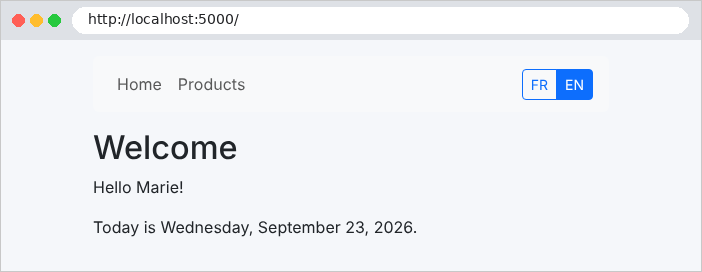
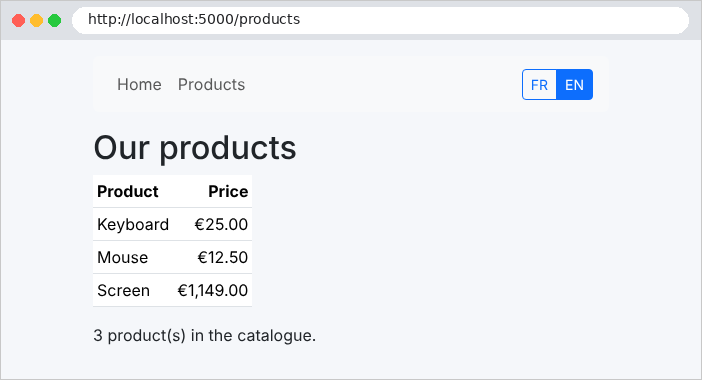
A click on FR, simulated with [curl] (the [-H] option adds the [Referer] header that the browser would have sent):
| curl -i -H "Referer: http://localhost:5000/products" http://localhost:5000/language/fr
|
| HTTP/1.1 302 Found
Content-Length: 0
Location: /products
Set-Cookie: .AspNetCore.Culture=c%3Dfr%7Cuic%3Dfr; max-age=31536000; path=/; samesite=lax; httponly
|
The server sets the [.AspNetCore.Culture] cookie, whose encoded value is [c=fr|uic=fr] (the culture and interface culture), and redirects to the original page, now in French:
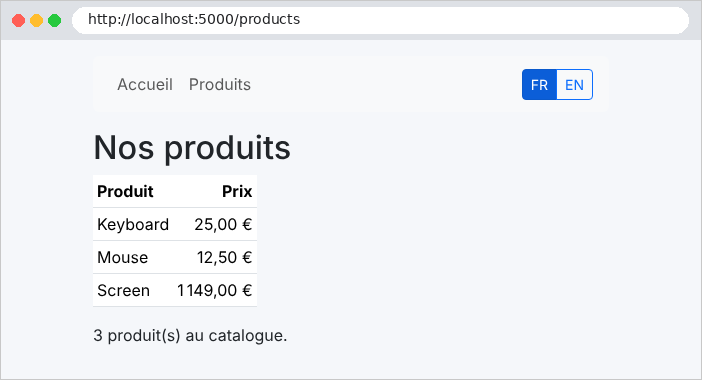
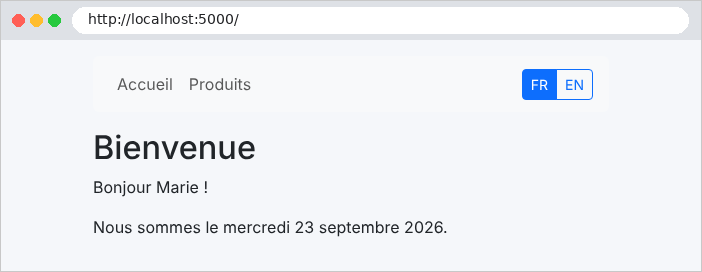
An unsupported language:
| curl -i http://localhost:5000/language/de
|
| HTTP/1.1 404 Not Found
Content-Length: 0
|
The case study proceeds exactly this way, using more comprehensive dictionaries ([i18n/fr.json] and [i18n/en.json]): same service ([Translator]), same parent view class (with a few additional properties), same controller ([/language/{language}]), same cookie. There is only one difference: the error messages generated by the business and web layers are also keys, translated at the last moment by the view.