11. Case Study: The RdvMedecins Application
11.1. The Problem
The RdvMedecins application manages appointments for a medical practice. Each doctor has time slots (from 8:00 a.m. to 12:00 p.m. in 20-minute increments, for example); an appointment consists of a day, a time slot, and a client (a patient). This is the exact implementation, in [ASP.NET Core MVC], of the [NestJS] application from the previous lesson: same database, same business rules, same pages, same translation dictionaries. The HTML pages are generated by the server using [Razor] views.
Three user roles share the application:
Role | Who | What it can do |
ADMIN | The administrator ([admin]) | View schedules, make and cancel appointments for any patient; manage (list, add, edit, delete) doctors and clients |
DOCTOR | Doctors | View schedules, make appointments, and cancel appointments for any patient |
USER | clients (patients) | view schedules without seeing other patients’ names; book an appointment for themselves; cancel their appointment; manage their account; create an account |
Key management rules:
- No appointments in the past;
- a time slot can only be booked once per day;
- a patient may have only one upcoming appointment at a time;
- Two doctors (or two clients) cannot have the same first and last names, and a login belongs to only one account;
- A doctor with appointments cannot be deleted; A client is deleted along with their appointments;
- the login page is protected against bots (CAPTCHA, limited attempts), and creating a client account requires first solving the CAPTCHA on that page.
11.2. Using the Application
11.2.1. The login page
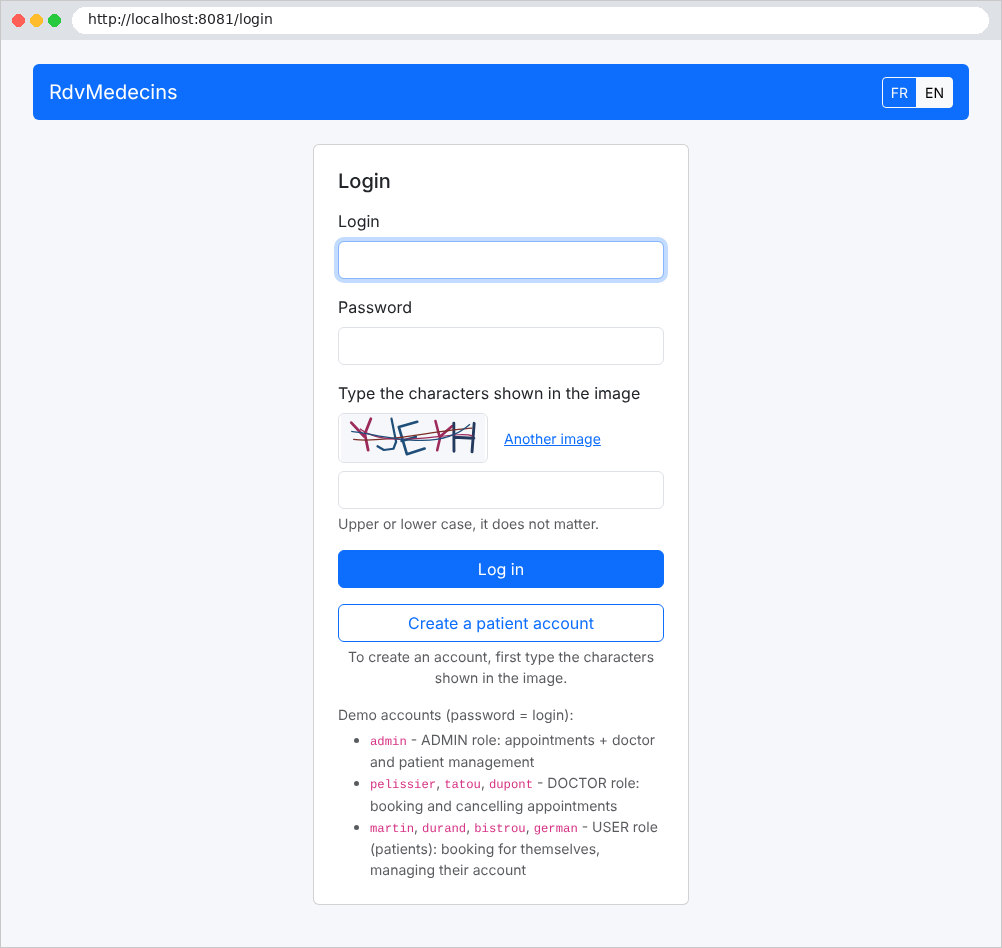
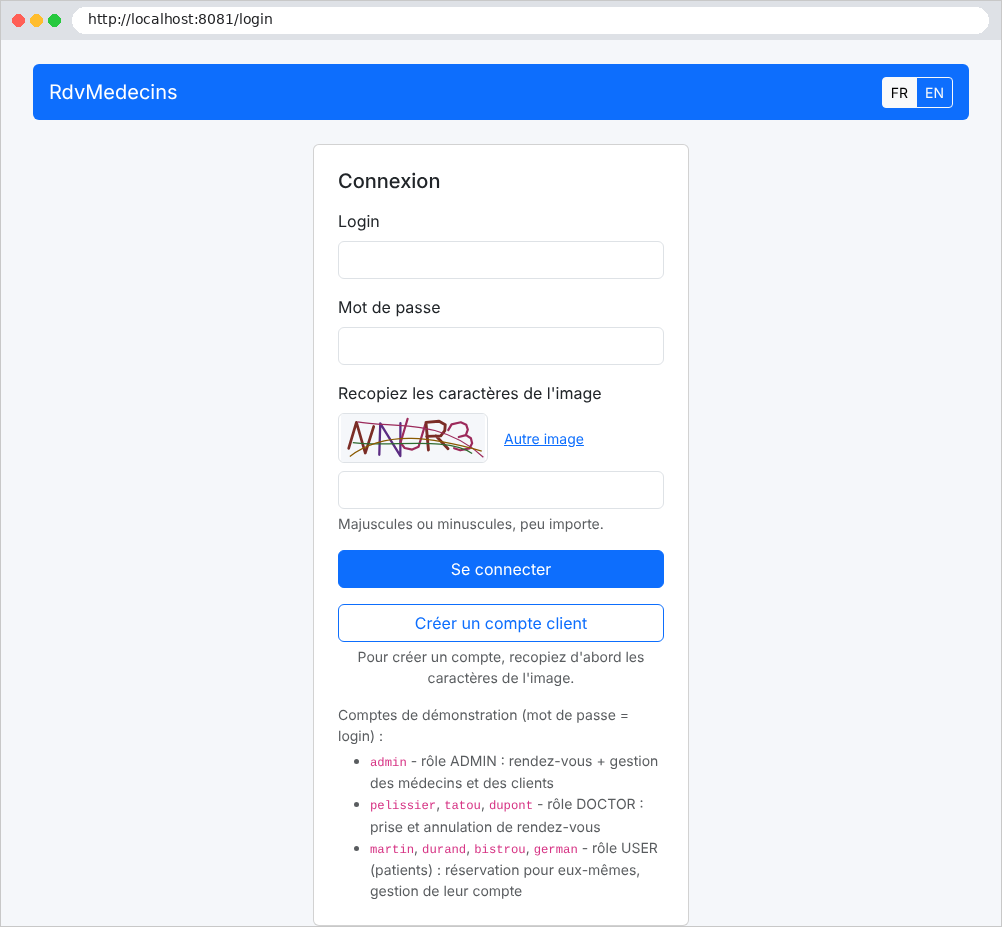
The page features two buttons: Log in and Create a patient account. Both require you to enter the characters shown in the image. The buttons FR / EN change the language:
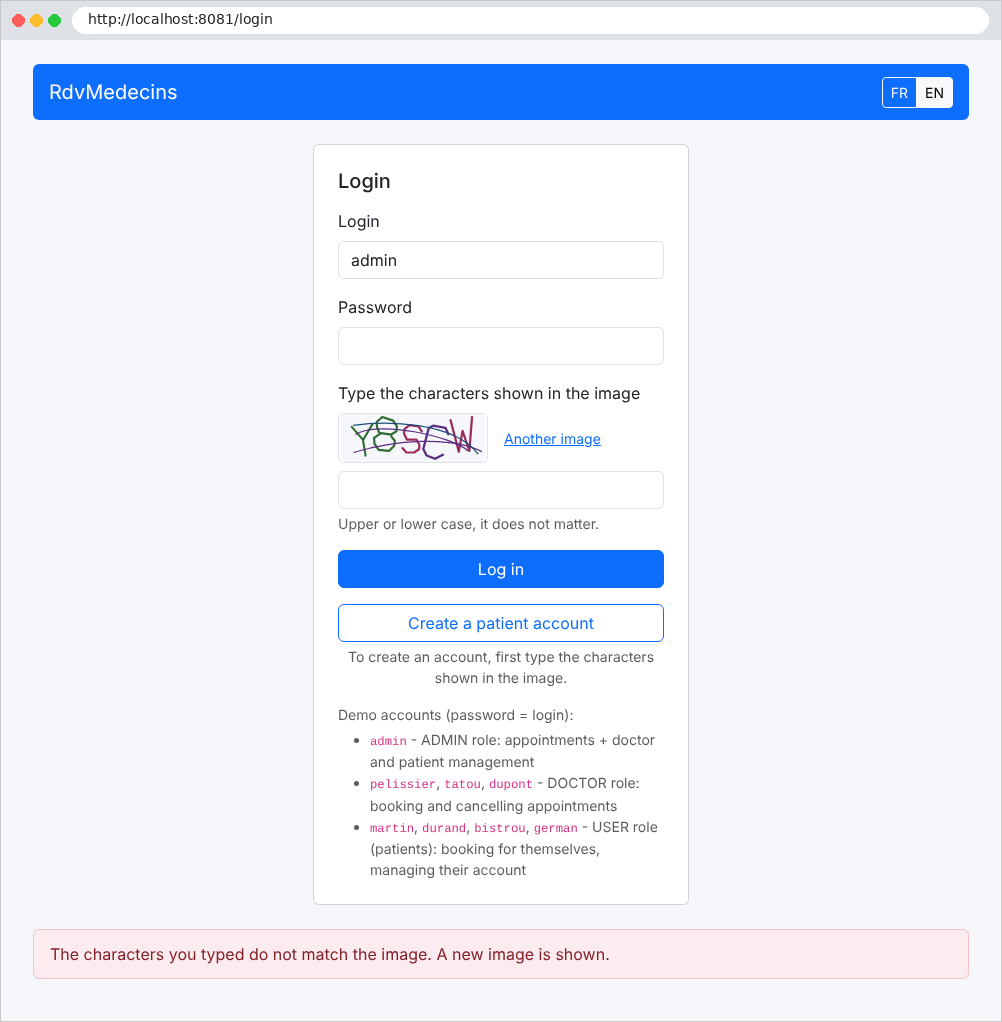
An error (in this case, an incorrectly entered CAPTCHA) is displayed at the bottom of the page on a light pink background:
11.2.2. The calendar, as seen by the administrator and doctors
Once logged in, the administrator is taken to the calendar page. They select a doctor and a day:
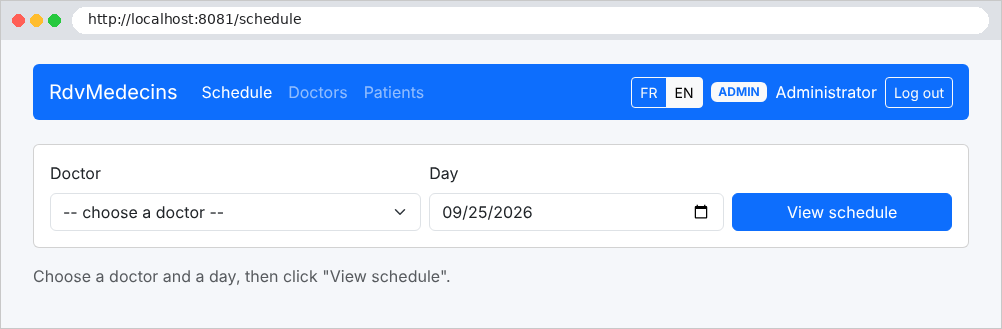
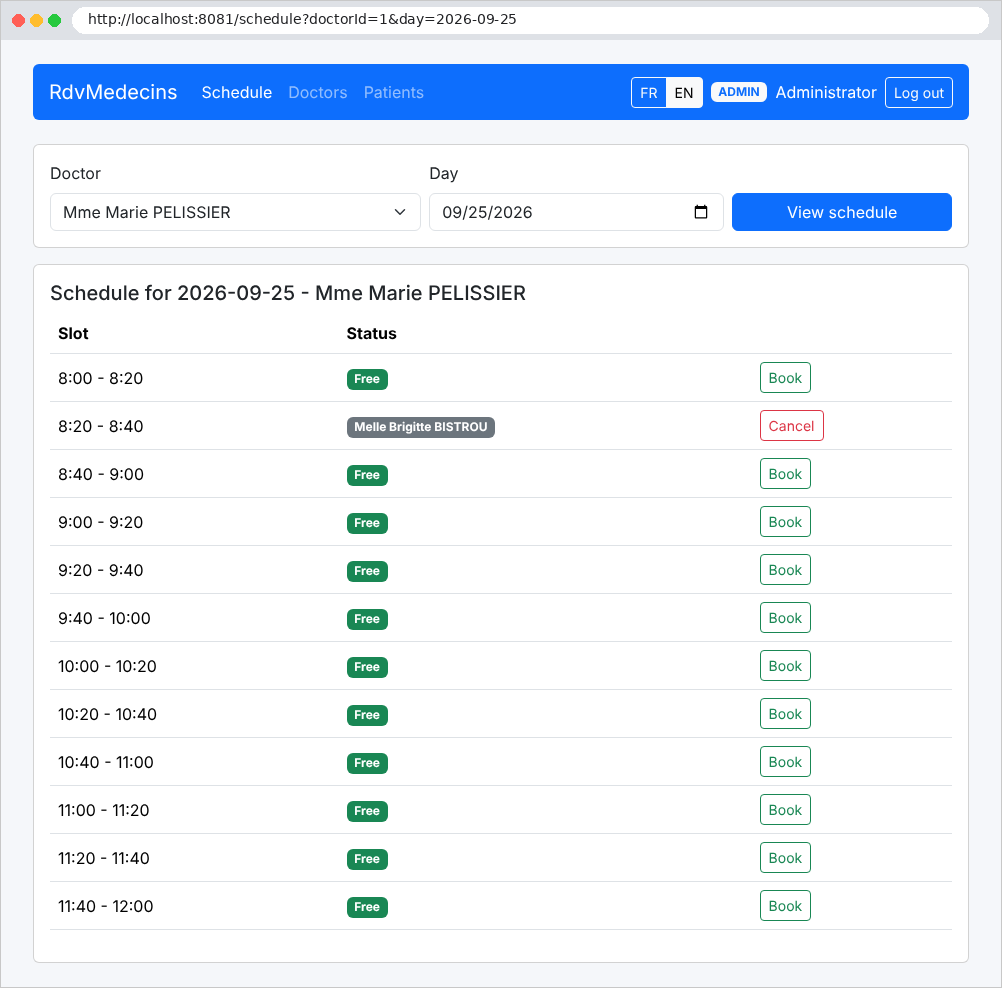
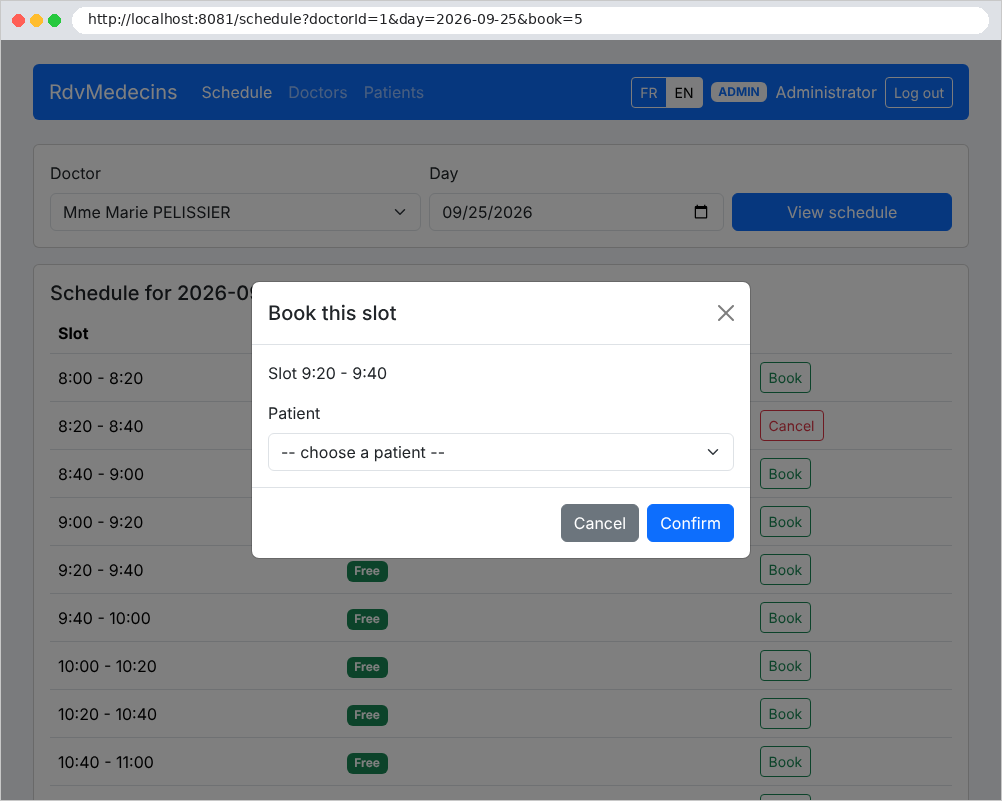
Each time slot is either available (Book button) or occupied (patient’s name, Cancel button). Clicking Book opens a window asking for the patient’s information:
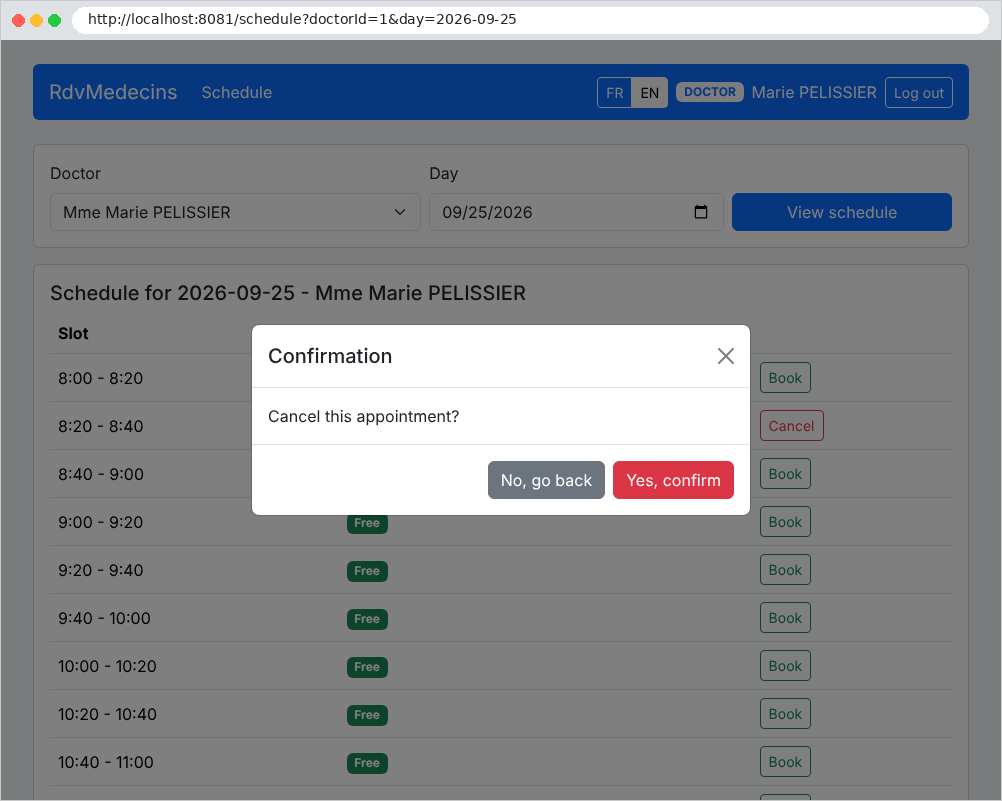
Clicking “Cancel” prompts a confirmation (here by Dr. Pélissier, whose navigation bar does not include the administration menus):
11.2.3. The Patient Dashboard
A patient (role USER) arrives at My area: their upcoming appointment, which they can cancel, and links to their account management and calendar:
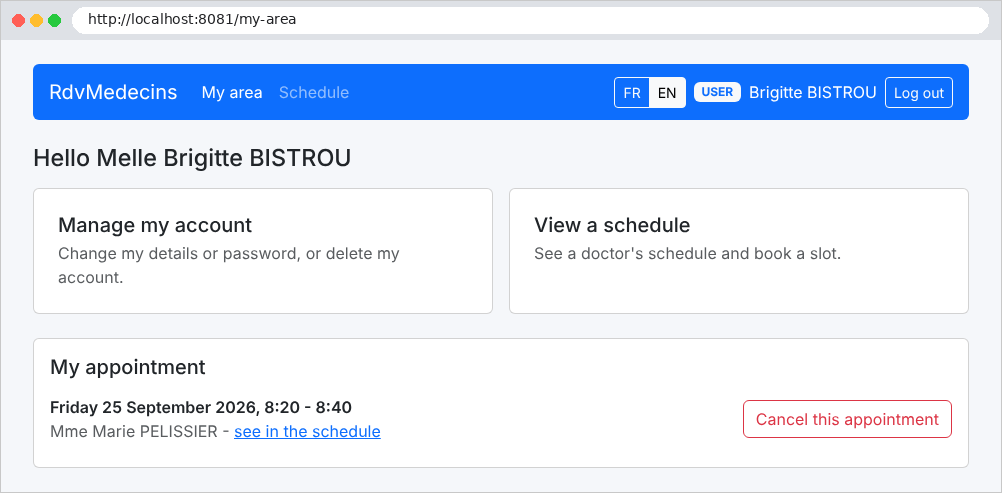
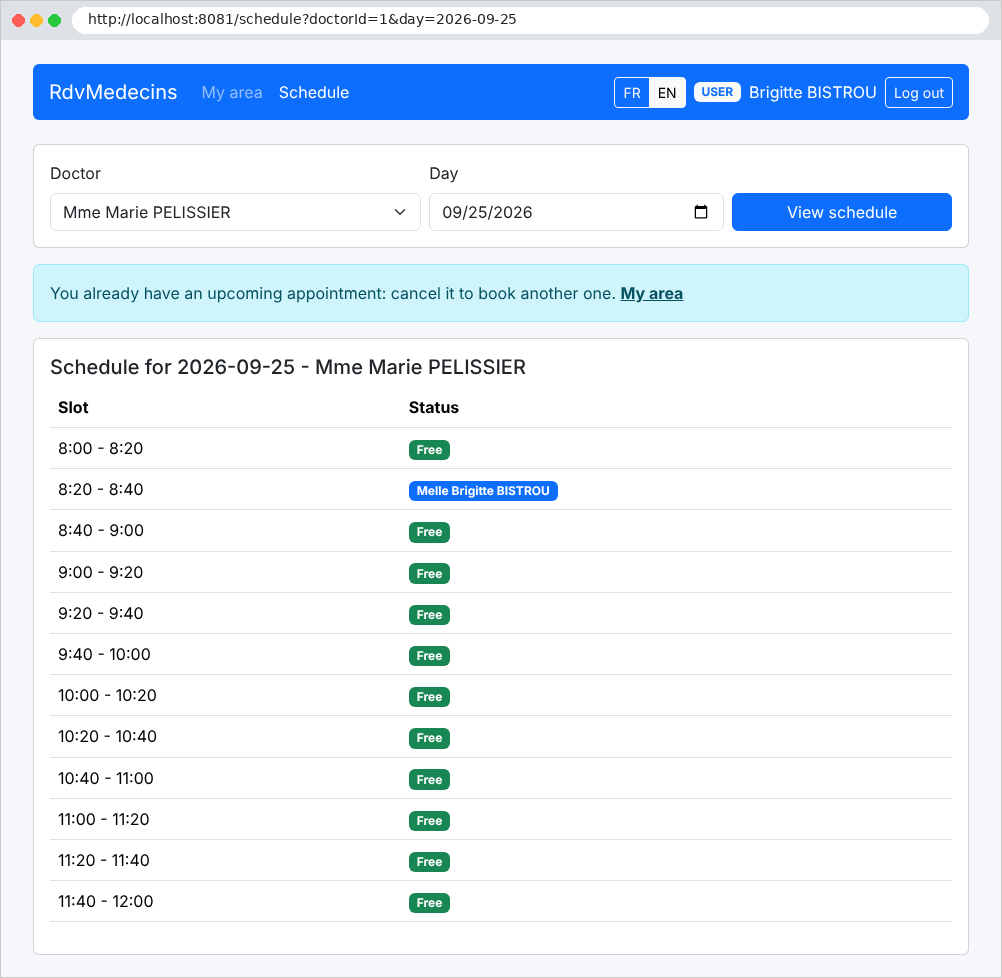
In the calendar, they see their own appointment, but not the names of other patients. Since they already have an upcoming appointment, they cannot schedule another one:
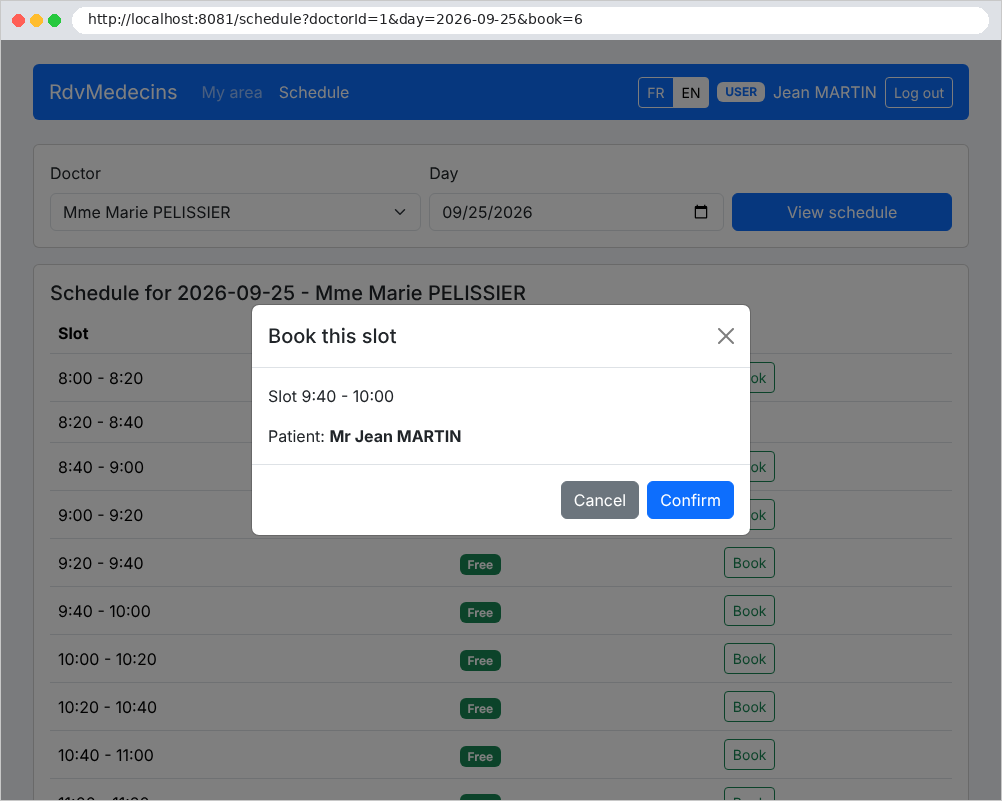
A patient without an appointment can book an available time slot for themselves:
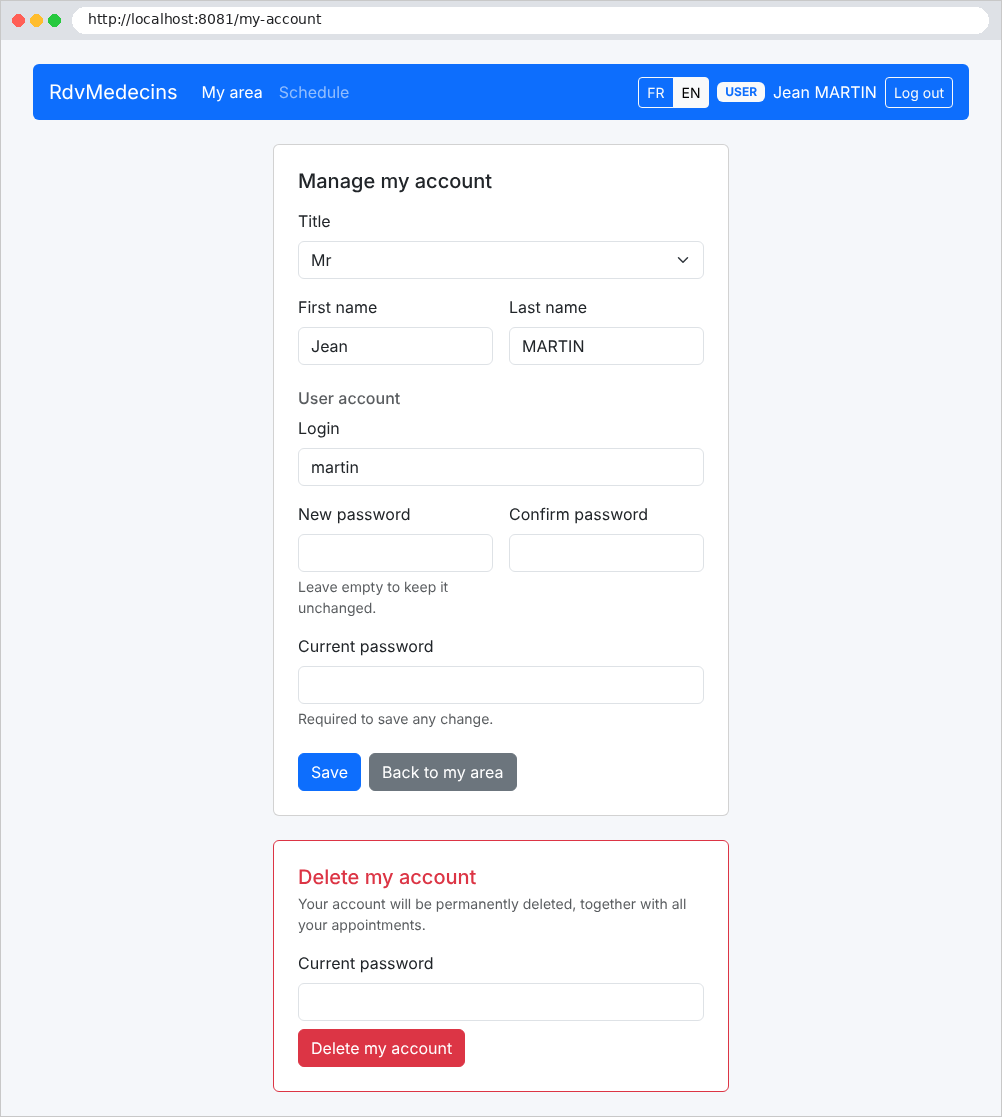
Account management: edit personal information, change the password, or delete the account (and its appointments). The current password is required for any changes:
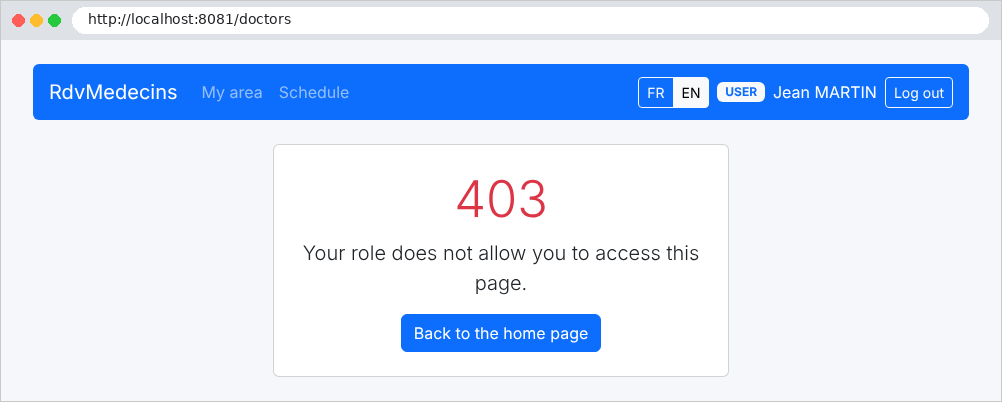
A patient who attempts to open a page reserved for the administrator receives an error page:
11.2.4. Managing Doctors and Clients
The administrator has two additional menus, “Doctors” and “Patients”:
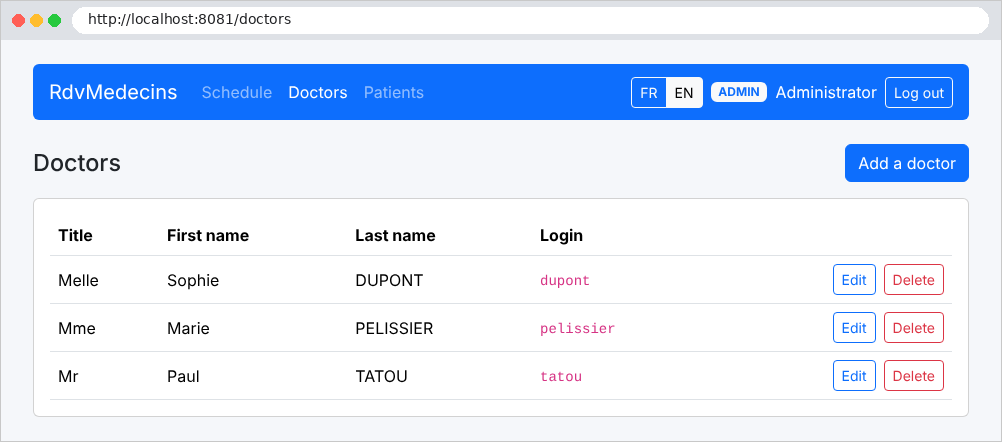
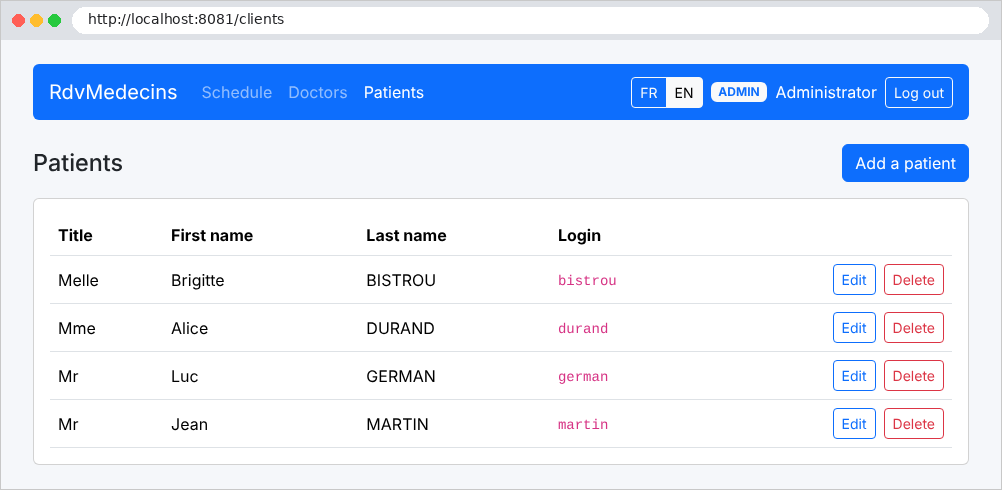
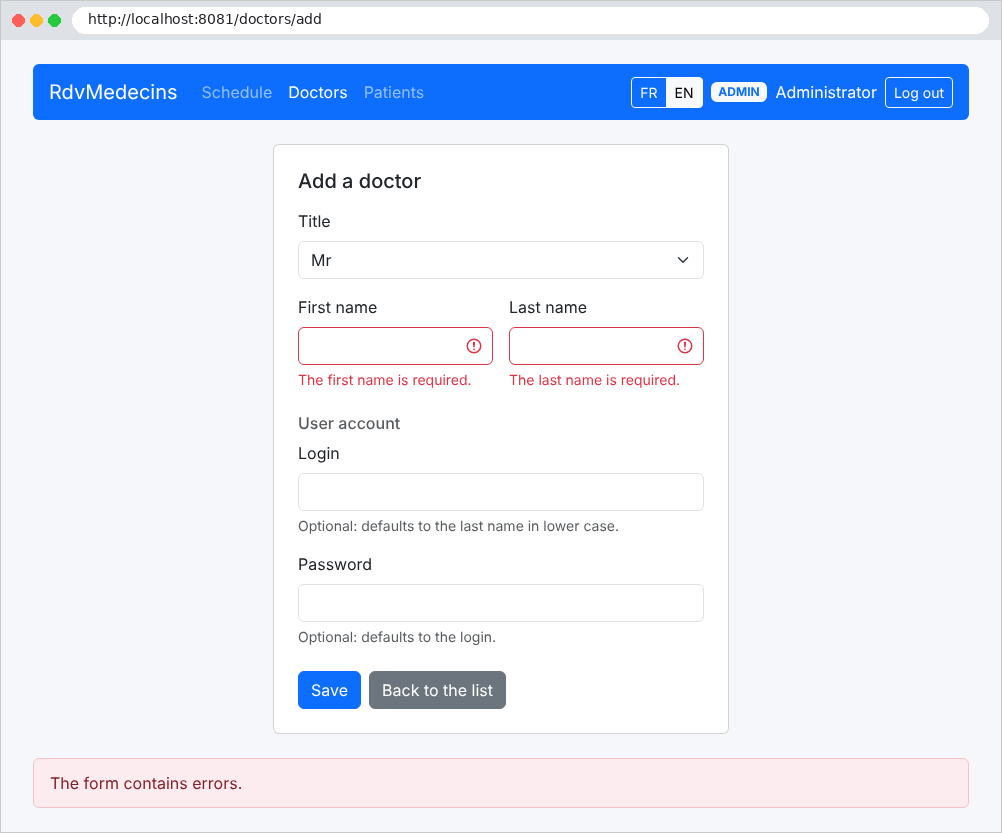
The form for adding a doctor, submitted with errors:
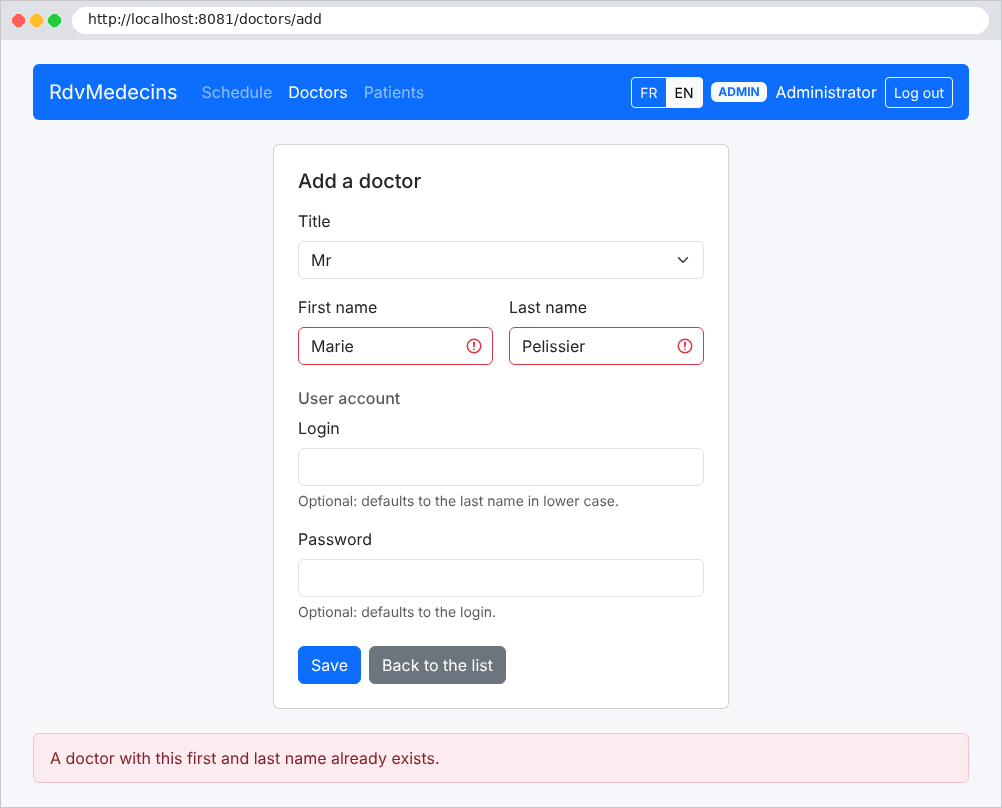
A name that matches an existing doctor is rejected:
Deleting a client requires confirmation:
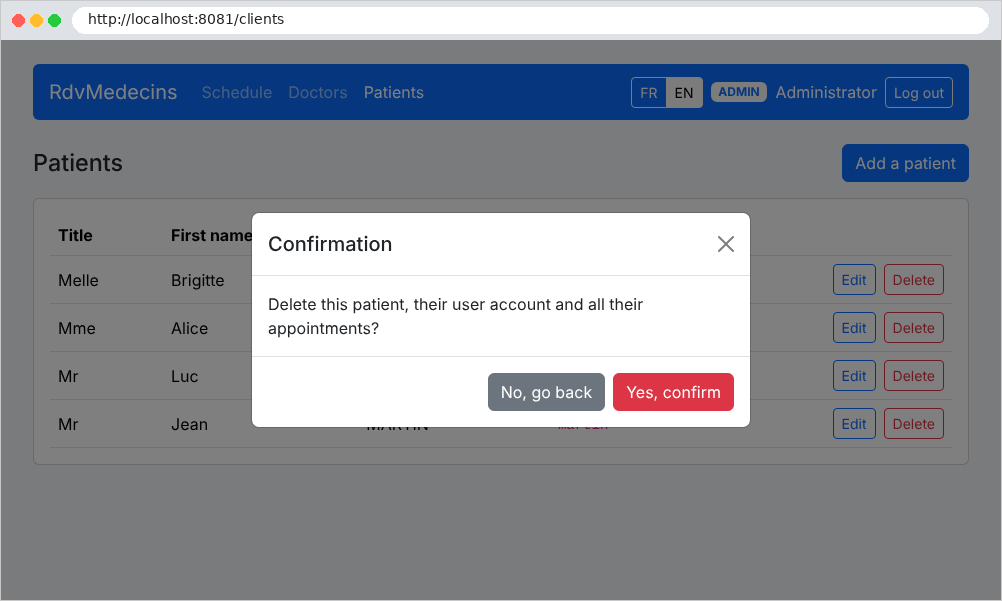
11.2.5. Creating a customer account
From the login page, the "Create a patient account" button only opens the form if the CAPTCHA has been entered correctly:
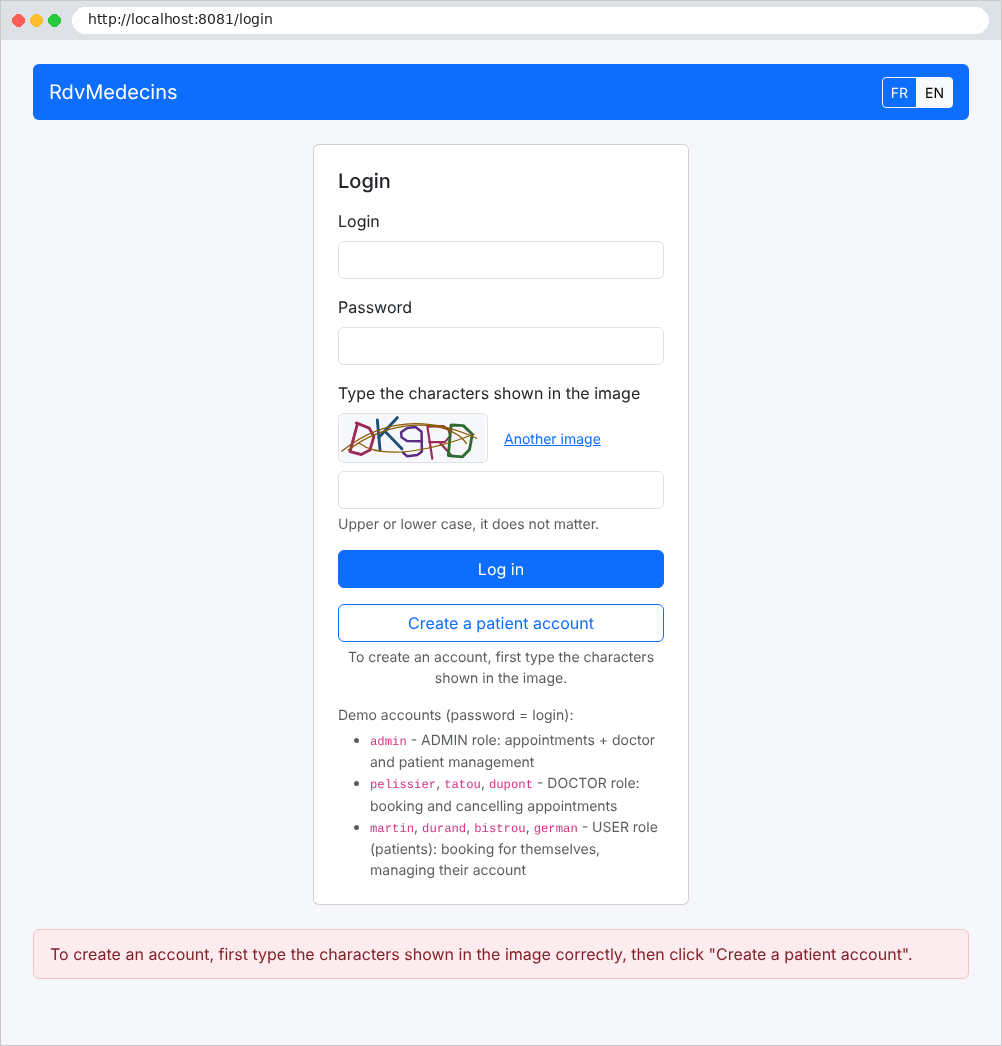
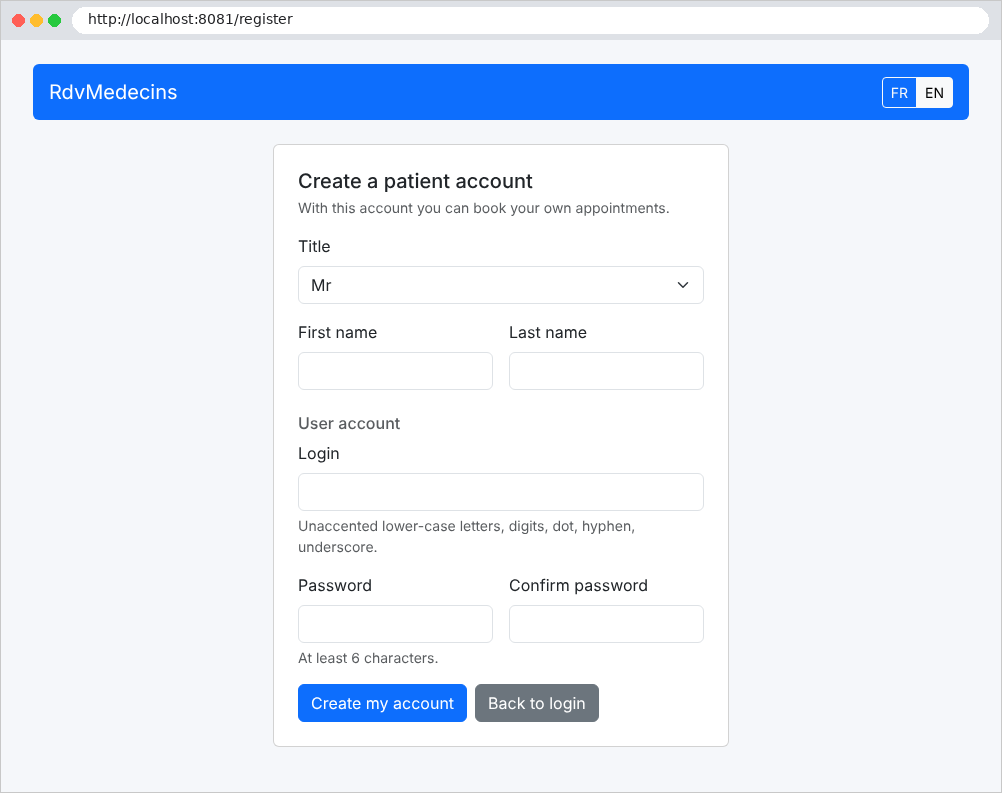
11.3. Installation and Execution
The installation steps were provided at the beginning of this document (in the “Running the Case Study” section of the introduction): create the database using the script SQL, verify the connection string using [appsettings.json], then run [dotnet run] in the application folder. The application folder:
1 2 3 4 5 6 7 8 9 10 11 12 13 14 15 16 17 18 19 20 21 22 23 24 25 26 27 28 29 30 31 32 33 34 35 36 37 38 39 40 41 42 43 44 45 46 47 48 49 50 51 52 53 54 55 56 57 58 59 60 61 62 63 64 65 66 67 68 69 70 71 72 73 74 75 76 77 78 79 80 81 82 83 84 85 86 87 88 89 90 91 92 93 94 95 96 97 98 99 100 101 102 103 104 105 106 107 108 109 110 111 112 113 114 115 116 117 | |
Each folder contains a file named [README.md] that lists its files. The console at startup:
In development mode (see [Properties/launchSettings.json]), the console also displays each SQL command sent to the database by EF Core. You can also:
- launch the application using [dotnet watch]: it is recompiled and relaunched whenever a file is modified;
- step through it in [Visual Studio Code]: with the [C# Dev Kit] extension, the F5 key starts the application under the debugger’s control; Set a breakpoint with a single click in the margin of a line of code.
11.4. The application architecture
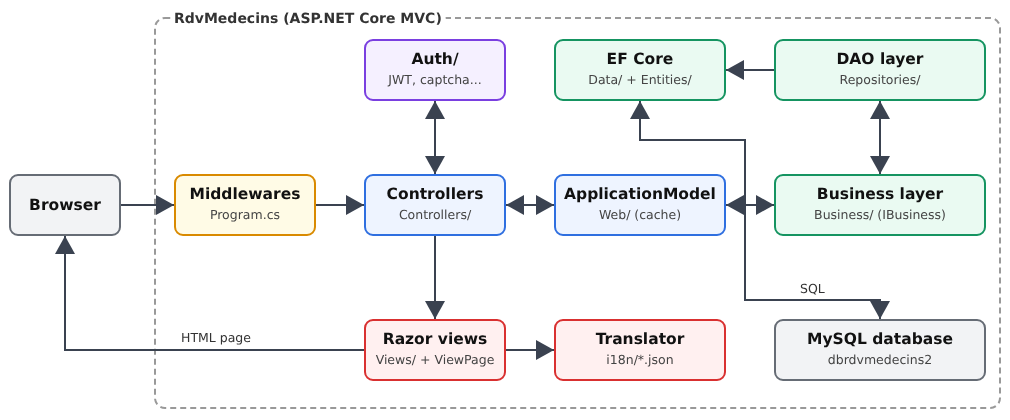
- [Program.cs] configures the application: services (dependency injection), middleware (static files, error pages, language, authentication), controllers;
- [Auth]: connection, JWT tokens, roles, CAPTCHA, and attempt limits;
- [Controllers]: web layer controllers. They all pass through a single service, [ApplicationModel] (folder [Web]), which stores the lists of doctors and clients in memory and forwards other requests to the business layer;
- [Web]: Common elements of the web layer: translation, flash messages, validation, view parent class, exception filter; [Models]: Form and view templates;
- [Business]: business rules;
- [Repositories]: the DAO layer, one class per table; [Data]: the [DbContext] layer of EF Core;
- [Entities]: the EF Core entities; [Domain]: the calendar objects, calculated by the business layer;
- [Views]: the views [Razor]; [i18n]: dictionaries; [wwwroot]: the style sheet, the page script, and [Bootstrap].
The suite comments on all files, from the lower layers (database) to the upper layers (views).
11.5. The database
The [dbrdvmedecins2] database is created by the [database/dbrdvmedecins2.sql] script, which is run in the same way as in Example 28 (the [HeidiSQL] tool from [Laragon], or the [mysql -u root < database/dbrdvmedecins2.sql] command). It is, word for word, the script for the [NestJS] application: both applications can work on the same database, and one can replace the other without making any changes.
11.5.1. database/dbrdvmedecins2.sql
1 2 3 4 5 6 7 8 9 10 11 12 13 14 15 16 17 18 19 20 21 22 23 24 25 26 27 28 29 30 31 32 33 34 35 36 37 38 39 40 41 42 43 44 45 46 47 48 49 50 51 52 53 54 55 56 57 58 59 60 61 62 63 64 65 66 67 68 69 70 71 72 73 74 75 76 77 78 79 80 81 82 83 84 85 86 87 88 89 90 91 92 93 94 95 96 97 98 99 100 101 102 103 104 105 106 107 108 109 110 111 112 113 114 115 116 117 118 119 120 121 122 123 124 125 126 127 128 129 130 131 132 133 134 135 136 137 138 139 140 141 142 143 144 145 146 147 148 149 150 151 152 153 154 155 156 157 158 159 160 161 162 163 164 165 166 167 168 | |
Let’s go over this script:
- Line 30: The database is created if it does not yet exist, using the character set [utf8mb4] and the collation [utf8mb4_unicode_ci], as in Example 28: string comparisons are case-insensitive and ignore accents. This also applies to uniqueness constraints: [Hélène DUPONT] and [helene dupont] are, for [MySQL], two instances of the same person;
- Lines 34–38: The script starts with an empty database on each execution. Tables are deleted from the “child” tables to the “parent” tables: a table referenced by a foreign key ([users], for example, referenced by [doctors] and [clients]) cannot be deleted as long as another table still references it. Tables are created in the reverse order;
- lines 43–52: user accounts. Each table begins with a primary key [id], assigned by the database ([AUTO_INCREMENT]), and a column [version], which is set to 0 when the row is created;
- rows 46–49: the login, password, display name after logging in, and role ([ADMIN], [DOCTOR], or [USER]). The [password] column never contains the password itself, but rather its hash, [bcrypt] (see Example 25): 60 characters, hence the column width;
- Line 51: A login belongs to only one account. As in Example 28, the constraint is named: when [MySQL] rejects a write operation, its error message specifies the name of the violated constraint, and the business layer uses this to select the message to display (see [Business/BusinessService.cs]);
- lines 57–69: doctors: title, last name, first name;
- Line 59: The column [version] is used for optimistic locking (see Example 28): it is incremented each time the row is modified, which makes it possible to detect whether another user has modified the row between the time it was read and the time it was written. As in Example 28, the application increments this value (see [DbContext], below);
- lines 63–64: Each doctor has an account: the column [user] is a foreign key referencing [users(id)]. The database rejects a value that does not refer to any account, and refuses to delete an account that is still referenced by a doctor. Since [user] is a reserved word in [MySQL], the column name is enclosed in backticks;
- line 66: an account belongs to only one doctor: the relationship between [doctors] and [users] is a “one-to-one” relationship;
- line 68: Two doctors cannot have the same first and last names. The constraint applies to the pair of columns: two doctors can have the same last name if they do not have the same first name;
- Lines 74–86: Clients (patients), following the same pattern: one account per client (foreign key [fk_clients_user], uniqueness constraint [unq_clients_user]); no two clients can have the same first and last names;
- rows 91–100: each doctor’s time slots (foreign key [doctor_id]): start hour and minute, end hour and minute. A time slot does not have a date; it repeats every day;
- lines 105–115: appointments: a date (type [DATE], without a time), a time slot, and a client, identified by two foreign keys;
- line 114: the same time slot can only be booked once per day. The database itself enforces this rule: if two users book the same time slot at the same time, the second [INSERT] is rejected, regardless of what the application verified just before;
- Lines 127–137: Demo accounts: the administrator, three doctors (role [DOCTOR]), and four clients (role [USER]). Each user’s password is their login ([admin] / [admin], [pelissier] / [pelissier]...). The hashes begin with [$2b$10$]: the algorithm [bcrypt], with a cost of 10 (see Example 25); the application’s library [BCrypt.Net-Next] knows how to verify them;
- lines 141–144: each doctor’s [user] column is retrieved via a subquery on the login, rather than assuming the identifiers assigned by the database to the accounts;
- lines 146–150: clients are handled in the same way;
- lines 153–157: twelve 20-minute time slots, from 8:00 a.m. to 12:00 p.m., for Dr. PELISSIER. Here, the doctor’s ID (1) is hard-coded: the table [doctors] has just been created, so its IDs start at 1;
- lines 160–164: twelve time slots, from 2:00 PM to 6:00 PM, for Dr. TATOU. Dr. DUPONT has no time slots: his schedule is empty;
- lines 167–168: an appointment has already been scheduled for Brigitte BISTROU (client #3) during the second time slot of Dr. PELISSIER (8:20 a.m.). [CURDATE()] is the date the script is run: upon the first login, today’s calendar shows a slot that is already booked.
11.6. Project configuration
11.6.1. RdvMedecins.csproj
Let’s go over this file:
- line 12: the SDK for web applications, as in all the examples (see introduction);
- lines 14–23: the settings that the examples found in the shared file [examples/Directory.Build.props]: [.NET] 10, “nullable” reference types, [using] implicit. The case study is a standalone project: it writes these files itself. [RootNamespace] is the project’s root namespace, the one that [Visual Studio Code] proposes for a new file;
- line 29: the [MySQL] provider from EF Core, which includes EF Core and the [MySqlConnector] driver (see Example 28);
- lines 31–34: the two authentication packages, already used in Chapter 8: JWT token verification and password hashing;
- line 41: the translation dictionaries [i18n/*.json] are read from disk at startup. When preparing the application for a production server (command [dotnet publish]), they must be copied along with it: this is what [CopyToPublishDirectory] does;
- Lines 43–44: The script SQL is not an application file; it is excluded from the published files, as shown in Example 28.
11.6.2. appsettings.json
The file [appsettings.json] serves the same purpose as the file [.env] in the [NestJS] application. One important difference: the file [.env] was never shared, and a file named [.env.example] served as its template. Here, [appsettings.json] is part of the project; machine-specific values (such as a password) can be provided in another way, without modifying it (see below).
Let’s go over this file:
- lines 1–9: Unlike the standard JSON, [ASP.NET Core] allows comments in its configuration files;
- line 13: the address and listening port. The examples listened on port 5000, the default port; the application listens on port 8081, like the [NestJS] version;
- lines 16–18: the connection string to the [dbrdvmedecins2] database, using the default values from [Laragon] (username [root], no password); see Example 28;
- lines 19–23: the server version, which tells the provider [Pomelo] which dialect SQL to generate (see Example 28);
- lines 26–36: the authentication section: the secret key that signs the tokens (at least 32 characters; must be replaced in production), the token’s lifetime (two hours), and the [Secure] option in the cookie that carries it. In production, the site is served as HTTPS, and the cookie must never travel over an unencrypted connection: the option is set to [true];
- lines 39–49: bot protection thresholds (see Example 27): number of allowed failed login attempts and duration of the resulting block; number of customer accounts created per hour from the same IP address IP;
- lines 51–57: logging levels (see introduction). Messages from EF Core are only displayed starting at level [Warning]: SQL commands, which are at level [Information], do not appear (see Example 28);
- Line 58: All domain names are accepted.
The sections [Auth] and [Protection] are interpreted as typed classes (see [Config/AuthOptions.cs], below). Each value is designated by its path, with the levels separated by [:]: [Auth:JwtSecret], [ConnectionStrings:RdvMedecins], [MySql:ServerVersion]. [ASP.NET Core] reads the configuration from several successive sources, each of which can override the values from the previous ones: [appsettings.json], then [appsettings.{environment}.json] (see the next file), then, in development, “user secrets” (values stored outside the project, in the user’s profile), then environment variables, and finally command-line arguments. A password can thus be provided via an environment variable, where [:] is written as [__]:
The application’s [README.md] file details these options.
11.6.3. appsettings.Development.json
- Line 10: [ASP.NET Core] knows the environment in which the application is running: [Development], [Production]... It reads this from the environment variable [ASPNETCORE_ENVIRONMENT] (see the following file); otherwise, it uses [Production]. After [appsettings.json], it reads the file [appsettings.{environment}.json], if it exists, and merges the two: the keys present in the second file replace those in the first, while the others are retained. During development, we therefore add the level [Information] for the category [Microsoft.EntityFrameworkCore.Database.Command]: the more specific rule takes precedence over the more general one for [appsettings.json] ([Warning] for any [Microsoft.EntityFrameworkCore]), and every SQL command sent to the database is displayed in the console. This is equivalent to the [logging] option of [TypeORM], which the [NestJS] version enabled outside of production. All other values (connection, authentication, etc.) remain the same as in [appsettings.json].
11.6.4. Properties/launchSettings.json
This file is used only during development by [dotnet run], [dotnet watch], and [Visual Studio Code]; it is not published. Let’s comment on it:
- lines 3–4: A launch profile describes a way to launch the application. There is only one here; [dotnet run] uses the first one;
- line 5: the application is launched directly, with its own web server;
- lines 6–7: [dotnet run] displays its compilation messages, and the browser opens to the application when it is ready;
- line 8: the listening address, the same as the key [Urls] from [appsettings.json]. When launched via this profile, the application uses this address; when launched outside the profile (for example, once published), it uses the address from [appsettings.json];
- Lines 9–10: the environment variables passed to the application. [ASPNETCORE_ENVIRONMENT=Development] sets the environment: [appsettings.Development.json] is read, and the commands in SQL are displayed. On a production server, without this file or this variable, the environment is [Production].
11.6.5. Config/AuthOptions.cs
Let’s comment on this code:
- line 15: the [Auth] section of [appsettings.json], in the form of a regular class: one property per key, with the same name. This is the options template ([options pattern]) for [ASP.NET Core]. In [Program.cs], [Configure<AuthOptions>(...)] links the section to the class: the framework creates a [AuthOptions] object and populates its properties with the values from the section, converting them to the correct type (["7200"] becomes the integer 7200, [false] becomes the boolean [false]). A class that needs it receives it via dependency injection, in the form of a
***[IOptions<AuthOptions>], whose***[Value]property is the populated object: This is what [Auth/AuthService.cs] does, with its parameter [IOptions<AuthOptions> options] and its field [auth = options.Value]. This avoids having to read character strings all over the place, as [process.env.JWT_SECRET] did in version [NestJS]: the key names are verified by the compiler, and the values are already converted; - line 17: the section name, written only once;
- Lines 21–29: The three values for this section. The default values ([7200], [false] for a Boolean) are those that are used if the key is missing from the configuration.
11.6.6. Config/ProtectionOptions.cs
- Lines 10–25: the [Protection] section of [appsettings.json], following the same pattern. It is injected, in the form of a [IOptions<ProtectionOptions>], into [Auth/AttemptLimiterService.cs], which reads its thresholds from it.
11.7. Application startup
11.7.1. Program.cs
The file [Program.cs] serves both the role of [main.ts] (startup, middleware) and that of [app.module.ts] (which service provides what) from version [NestJS]. It follows the structure of all the examples: first register the services, then build the middleware pipeline. We’ll break it down into sections.
11.7.1.1. The configuration
- lines 21–31: the namespaces used, in addition to the implicit [using] ones: those of the framework (localization, EF Core, encoding HTML), and those of the application, one per folder;
- line 33: the application constructor, as in all examples. It has already read the configuration ([appsettings.json], [appsettings.Development.json], environment variables...), accessible via [builder.Configuration];
- Lines 40–41: the options template (see [Config/AuthOptions.cs]): each section is linked to its class. [GetSection("Auth")] designates the section; [Configure<T>] registers the corresponding service [IOptions<T>], which the authentication services will receive via injection;
- Line 42: the same section, this time read directly as an object ([Get<AuthOptions>()]), or an object with default values if the section is missing. The configuration of [JwtBearer] (below) requires the secret key right now, during service registration: at this point, the dependency injection container has not yet been built, and no [IOptions<AuthOptions>] can be injected.
11.7.1.2. The database and the DAO and business layers
- Lines 4–5: the connection string, as in Example 28. The operator [??] returns the value on the left if it is not [null]; otherwise, it returns the value on the right: if the key is missing, the application stops immediately, displaying a message indicating what is missing, rather than returning an obscure error on the first request;
- line 6: the server version [MySQL], with a default value if the key is missing;
- line 7: the application’s [DbContext] (see [Data/RdvMedecinsDbContext.cs]), one per request ([Scoped]), with the provider [MySQL] (see Example 28);
- Lines 11–15: the DAO layer: one class per table (except for [users], whose repository is used for authentication). It is [Scoped], just like the [DbContext] it uses. A service must never outlive its dependencies: a DAO [Singleton] would retain the [DbContext] from the first request indefinitely, even though it is destroyed at the end of that request (see Chapter 6);
- Line 19: the business layer. [AddScoped<IBusiness, BusinessService>()] reads: “when a service requests an [IBusiness], provide it with a [BusinessService].” Those who use the business layer depend on the interface, not the class: we could replace the implementation (with a test version, for example) by modifying only this line. The [NestJS] version required a token ([BUSINESS_TOKEN]) for this, since the [TypeScript] interfaces disappear at compile time; in [C#], the interface itself serves as the token;
- Lines 22–23: The web layer cache (the lists of doctors and clients) has application-level scope: [Singleton], a single instance shared by all requests (see Example 23). Its facade, [ApplicationModel], through which all controllers pass, uses the business layer: it is therefore [Scoped]. The cache itself, which is independent of anything else, can outlive the facade.
11.7.1.3. Authentication, translation, and encoding: HTML
- line 2: the login service (verifying the username and password, generating the token; see Example 25). It uses the account repository: it is [Scoped];
- Lines 3–5: pending CAPTCHAs, failure counters, and account creation passcodes (see Example 27). This data is kept in memory and must be the same for all requests: all three services are [Singleton]. The downside: they are lost every time the server restarts;
- line 6: the configuration of [JwtBearer] (token read from the cookie, redirection to the login page...), as shown in Example 25. It is stored in an extension method of [IServiceCollection] (see [Auth/JwtAuthentication.cs]), which is called like a framework method and thereby lightens the load on [Program.cs];
- line 7: the authorization services, used by [[Authorize]] and by the middleware [UseAuthorization];
- line 10: the translation service, which reads the dictionaries once and for all (see Example 22);
- line 16: the HTML encoder from [Razor] allows characters from all languages to pass through, as in Example 15.
11.7.1.4. MVC and its options
- line 2: the [Razor] controllers and views. The function passed as a parameter sets the options for MVC;
- line 5: a global exception filter (see Example 24), which applies to all actions. It handles only one case: a [InvalidSessionException] (the token is valid, but the account it refers to has since been deleted) leads to the login page. The other exceptions continue on their path to the [UseExceptionHandler] middleware (below);
- line 10: a pitfall of “nullable” types. When enabled, MVC treats a (non-nullable) property [string] of a model as required, exactly as if it had the [[Required]] attribute, with an error message in English that we do not understand. This option removes this default behavior: a field is required only if it explicitly has the [[Required]] attribute, with our own message (see [Models/Forms.cs]);
- Lines 14–25: binding error messages (see Example 19): text where a number is expected ([version=abc]), a missing value... Example 19 redefined only two of them, in English; the case study redefines them all, and each returns the same translation key, [ERRORS.INVALID_FORM], rather than a text: the message is translated at the time of display, in the user’s language. The character [_] refers to a parameter that is not used (the field name, the entered value): the message is the same regardless of the field. These errors should never occur with the application’s forms: they indicate a manually constructed request.
11.7.1.5. Loading the cache
- Line 1: Application setup. The dependency injection container is now created: you can no longer register services, but you can retrieve them;
- Lines 9–12: The lists of doctors and clients are loaded into the cache before the server starts listening. [ApplicationModel] is a service of [Scoped]: it can only be created within a scope, and outside of a request, there is no scope. [CreateScope()] creates one; [GetRequiredService<ApplicationModel>()] obtains the service from it (along with the business layer, the repositories, and the [DbContext] on which it depends), and [LoadAsync()] populates the cache, which is a [Singleton] and therefore survives the scope. The [using] statement destroys the scope—and the [DbContext] along with it—when the block ends. If the database is inaccessible, the EF Core exception is not caught: the application terminates, with an error message displayed in the console. This is the first sign of an incorrect connection string or a [MySQL] server that has stopped.
11.7.1.6. The middleware pipeline
Each request passes through the middleware components in the order in which they are declared (see Chapter 7): this order is therefore important.
- Line 8: The first middleware wraps all the others. If an exception has not been handled by anyone (a programming error, a database that has become inaccessible, etc.), it logs the exception and re-executes the request with the address [/error/500]: the user sees an application error page, not a technical message (see Chapter 7);
- Line 9: An empty error response (400, 403, 404) is converted into a page in the same way, via the [/error/{code}] action of the [ErrorController] controller (see Examples 24 and 26). The re-executed request passes through the following middleware again: the error page is therefore rendered and recognizes the logged-in user;
- line 12: the static files in the [wwwroot] folder (see Example 15): the style sheet, the page script, and [Bootstrap], stored here in [wwwroot/lib/bootstrap]. Placed early in the pipeline, this middleware responds to file requests without routing them through localization or authentication;
- lines 17–23: the localization configuration, as in Example 22. The supported languages and the default language are those of the translation service ([Translator.Languages], [Translator.DefaultLanguage]): they are defined in only one place;
- line 25: only the cookie set by [LanguageController] determines the language (see Example 22). The syntax [[...]] is a collection expression: in this case, a list with a single element;
- line 26: the localization middleware, which sets the language for each request;
- lines 30–32: routing, followed by authentication, followed by authorization. Routing selects the action that will handle the request, based on the routes declared by attributes. The examples did not call it: [WebApplication] therefore adds it automatically at the beginning of the pipeline. Calling it explicitly makes the order visible: authorization must come after routing, because it is the selected action that carries the attribute [[Authorize]] to be verified; and after authentication, which determines, based on the token, who the user is (see Example 25);
- line 35: the controllers and their routes, declared by attributes ([[Route("schedule")]]...);
- line 37: the server starts up and waits for requests on port 8081.
11.8. The entities
The EF Core entities correspond to the database tables and the [C#] classes (see Example 28). They replicate, one by one, the [TypeORM] entities from version [NestJS]: the attributes [[Table]], [[Column]], [[Key]], [[ForeignKey]] serve as the decorators [@Entity], [@Column], [@PrimaryGeneratedColumn], and [@JoinColumn]. The database is not created by EF Core, but by the script SQL [database/dbrdvmedecins2.sql]: the entities simply need to accurately describe the tables that already exist.
11.8.1. Entities/AbstractEntity.cs
- line 23: an abstract class with no attributes [[Table]]: it does not correspond to any table, but its properties are added to those of its child classes’ tables. All entities in the application inherit from it and therefore have an identifier and a version;
- Lines 28–30: the primary key ([[Key]]), column [id]. By convention in EF Core, an integer key is generated by the database ([AUTO_INCREMENT]): EF Core re-reads its value after each [INSERT];
- Lines 40–42: the line version for the optimistic lock (see Example 28). [[ConcurrencyCheck]] adds the condition [AND version = <value read>] to each [UPDATE]. Unlike [@VersionColumn] from [TypeORM], EF Core does not increment the version itself: [DbContext] handles this (see below).
11.8.2. Entities/Person.cs
- Line 17: the parent class—which is also abstract—of [Doctor] and [Client], itself a child of [AbstractEntity]. Doctors and clients have the same columns: they are defined only once;
- Lines 19–29: the title (Mme, Mr, Melle), last name, and first name. [[MaxLength]] specifies the column width. These properties are of type [string] (not [string?]): they must never be set to [null], and the compiler therefore requires an initial value, in this case the empty string [""];
- lines 42–43: the foreign key to the user account, column [user]. The account ID can be read without loading the account itself: this is what [@RelationId] did in version [NestJS];
- lines 47–48: the navigation property: the [User] object itself. [[ForeignKey(nameof(UserId))]] indicates which property contains the foreign key ([nameof(UserId)] is equal to the string ["UserId"], but the compiler verifies that the property exists). A navigation property is populated only if the query requests it ([Include]; see the DAO layer); otherwise, it is set to [null]. The notation [= null!] suppresses the compiler warning: it guarantees that the property will only be read after it has been loaded. The “one-to-one” nature of the relationship is specified in [DbContext]. A relationship declared in a parent class is inherited, just like columns: the tables [doctors] and [clients] each have their own relationship to [users].
11.8.3. Entities/Doctor.cs
- Line 15: The class [Doctor] corresponds to the table [doctors]. It inherits all its properties from [Person]. The uniqueness constraint [unq_doctors_first_name_last_name], mentioned in the comment, is created by the script SQL; the business layer recognizes it by its name (see Example 28);
- line 21: the inverse relationship of that from [Slot] to its physician: this physician’s appointment slots. EF Core automatically associates the two navigations ([Doctor.Slots] and [Slot.Doctor]), which describe the same “one doctor, multiple time slots” relationship as seen from each side. Like any navigation, it is populated only on request; the application does not actually use it: it reads the appointment slots via the DAO layer. [[]] is a collection expression: in this case, an empty list.
11.8.4. Entities/Client.cs
A client, meaning a patient at the practice (not an HTTP client): a [Person] from the [clients] table (row 15), with no additional properties.
11.8.5. Entities/Slot.cs
- lines 14–17: the hour and minute of the slot’s start and end. The attribute and property are written on the same line: this is allowed and more compact for these four similar columns;
- Lines 21–25: the “many-to-one” relationship to the doctor: multiple time slots for one doctor. Same technique as in [Person]: the foreign key [DoctorId] (column [doctor_id]) and the navigation key [Doctor], linked by [[ForeignKey]]. EF Core requires no further clarification: a reference on one side, a list on the other—this is a “one-to-many” relationship.
11.8.6. Entities/Appointment.cs
- Line 15: the appointment table. Its uniqueness constraint [unq1_appointments (day, slot_id)] ensures that a time slot is reserved only once per day;
- Lines 22–23: the day of the appointment. The type [DateOnly] (a date without a time) corresponds exactly to the type SQL and [DATE]: no time, so no time zone issue. The [NestJS] version handled a string of type [yyyy-mm-dd], since there was no such type as [JavaScript]. Two [DateOnly] records compare directly with [<], [>=]..., in [C#] as in the [LINQ] queries;
- Lines 25–35: the customer and the appointment time slot: two “many-to-one” relationships, each defined with a foreign key and a navigation. To create an appointment, simply populate the foreign keys [ClientId] and [SlotId]: this is what the business layer does.
11.8.7. Entities/Role.cs
- lines 17–21: the three roles, in the form of an enumeration ([enum]): A variable of type [Role] can only take the values [Role.ADMIN], [Role.DOCTOR], or [Role.USER], and the compiler rejects any other value. This is equivalent to the string union type ['ADMIN' | 'DOCTOR' | 'USER'] from version [NestJS]. By default, EF Core would store a base enumeration as a number (0, 1, 2); the [role] column contains text: the conversion is requested in [DbContext].
11.8.8. Entities/User.cs
- Line 18: the accounts of users authorized to log in: the administrator, each doctor, and each client. The constraint [unq_users_login] prohibits two accounts with the same login;
- Lines 21–23: the username;
- lines 26–28: the hash [bcrypt] of the password, never the password itself (see example 25);
- lines 32–34: the name displayed in the navigation bar once logged in (“Marie PELISSIER”);
- lines 37–38: the role, of type [Role]. Since the class [User] does not declare a navigation to the doctor or client that owns it, the relationship is known only on the [Person] side.
11.9. The DbContext
The [DbContext] in the application is based on the one from Example 28, with five tables instead of one, and a few clarifications about the model that the attributes cannot express.
11.9.1. Data/RdvMedecinsDbContext.cs
Let’s comment on this code:
- line 29: As in Example 28, the [DbContext] receives its options ([MySQL] provider, connection string) from [AddDbContext], within [Program.cs]. It is registered with the [Scoped] lifetime: one [DbContext] per request, shared by all repositories for that request, meaning a single connection and, if applicable, a single transaction. It thus fulfills the roles of both the [DataSource] and the [Repository<T>] for [TypeORM];
- Lines 33–37: one [DbSet] per table. There are none for either [AbstractEntity] or [Person]: these abstract classes have no tables. EF Core does not include them in the model as entities; it simply adds their properties to those of the child classes;
- Line 39: [OnModelCreating] is called once, when EF Core constructs its model (the description of tables and relationships). It supplements the entity attributes with a fluid API: a chain of method calls;
- Lines 47–48: The relationship between a doctor (a customer) and their account is “one-to-one”: [HasOne(d => d.User)] (a doctor has one account), [WithOne()] (an account has at most one doctor; the empty parentheses indicate that [User] has no reverse lookup), [HasForeignKey<Doctor>(d => d.UserId)] (the foreign key is in table [doctors]). Without these rows, EF Core would assume a “many-to-one” relationship (multiple doctors for a single account), which would also work but would inaccurately describe the model: in the database, the [user] column is unique;
- line 52: [HasConversion<string>()] stores the role in the database as text (['ADMIN']...), and converts it back to [Role] upon reading;
- lines 68–77: the version number of each modified entity is incremented just before saving, as in Example 28. [ChangeTracker.Entries<AbstractEntity>()] iterates through all tracked entities whose class derives from [AbstractEntity]: thanks to the common parent class, this single loop applies to all five tables. The variant of [SaveChangesAsync] is redefined with two parameters, because it is this variant that ultimately calls [SaveChangesAsync()] without parameters. EF Core compares the old version in the [WHERE] clause of [UPDATE] and writes the new one: if the line has changed in the meantime, no lines are modified, and EF Core raises a [DbUpdateConcurrencyException].
11.10. The domain: the calendar
The [Domain] folder contains two classes that do not correspond to any tables: they describe a doctor’s schedule for a single day, calculated by the business layer ([BusinessService.GetDoctorDayScheduleAsync]) and displayed by the schedule controller.
11.10.1. Domain/DoctorDaySlot.cs
- Line 17: a time slot, and the appointment scheduled for that time slot on that day, [null] if the time slot is available (hence the type [Appointment?]). A [record] written this way, with its parameters in parentheses (positional record), declares in a single line a class, its constructor, and its properties [Slot] and [Appointment], which cannot be modified after construction: This is equivalent to the [constructor(public slot: Slot, ...)] syntax in the [NestJS] version. We have already encountered the records for data passed to the business layer (see Example 28).
11.10.2. Domain/DoctorDaySchedule.cs
The schedule (line 14): a doctor, a day, and the list of their available or booked time slots, in chronological order.
11.11. The DAO layer
One class per table, as in Example 28: short methods, without business logic, that simply query or modify the database. Here, they are called “repositories,” as in the version [NestJS]. Two differences from that version:
- queries are written in [LINQ], which EF Core translates into SQL: you navigate from one entity to another using navigation properties, and EF Core writes the joins itself;
- The methods have no [manager] parameter for transactions: all repositories in a query share the same [DbContext], and a transaction opened on this [DbContext] by the business layer automatically encompasses all their queries.
All methods are asynchronous and return a [Task]: the caller waits for it with [await]. Many are written in the form [=> expression]: they directly return the [Task] for the request, without [async] or [await], since they have nothing else to do afterward.
11.11.1. Repositories/PersonRepository.cs
In version [NestJS], the repositories for doctors and clients were identical, except for a single line. In [C#], a generic class writes them once.
Let’s comment on this code:
- Line 24: [PersonRepository<T>] is a generic class; [T] is a type parameter, replaced by an actual type ([Doctor] or [Client]) when the class is used, such as [T] in [List<T>]. The constraint [where T : Person] only accepts [Person] or its child classes for [T]: the compiler then knows that a [T] contains [Id], [LastName], [FirstName], [UserId], [User]... and accepts [p.LastName] in queries. The class is abstract: only its two child classes, listed below, are used;
- line 26: the [db] parameter of the main constructor is visible only within this class. It is copied to a [protected] field so that the child classes ([ClientRepository]) can access it;
- line 29: the table of persons of type [T]. [db.Set<T>()] maps [DbSet] to this type: [db.Doctors] for [T = Doctor], [db.Clients] for [T = Client];
- lines 38–39: all individuals, sorted by last name then first name ([OrderBy], then [ThenBy] to break ties for identical last names). [Include(p => p.User)] also loads each person’s account via a join ([INNER JOIN users]): without it, [p.User] would be equivalent to [null]. The account is used to display the login in the lists. [AsNoTracking()] (see Example 28): these lists are kept in memory by [ApplicationModel] long after the query has ended; there is no need for [DbContext] to process them. Expressions such as [p => p.LastName] are not executed in [C#]: EF Core parses them to translate them into SQL ([ORDER BY last_name, first_name]);
- lines 41–42: a person and their account, or [null]. Here, there is no [AsNoTracking()]: the business layer modifies the retrieved person (and their account), then calls [SaveAsync]; the [DbContext], which tracks both objects, knows what has changed;
- lines 45–46: the person whose account is [userId]. This is how a logged-in patient, whose token contains the account ID, retrieves their customer record. The filter targets the foreign key itself ([WHERE clients.user = ...]); the join with [users] serves only to load the account ([Include]);
- lines 52–53: a possible homonym. The operator [==] is converted to [=] SQL: the comparison is performed using [MySQL], according to the database’s collation, without regard to uppercase letters or accents, exactly as in the uniqueness constraint (see Example 28). A comparison using [C#] would take uppercase letters into account;
- Lines 57–64: Creation or modification, as in Example 28: A new person ([Id] set to 0) is added to [DbSet]; a person already in the system requires no action. Note: [SaveChangesAsync] logs all pending changes for [DbContext], not just those from [person]: the account modified at the same time is included in the same call;
- line 69: deletion via [ExecuteDeleteAsync] (see example 28): a [DELETE] sent directly to the database, without prior reading. It does not go through change tracking, nor therefore through the optimistic lock;
- line 73: the doctors’ repository: [PersonRepository<Doctor>], with nothing else. It forwards the received [DbContext] to the constructor of its parent class; the final semicolon replaces an empty class body;
- line 75: the client repository, with an additional method;
- lines 89–92: reading a client with a lock: [SELECT ... FOR UPDATE] places a lock on the line until the end of the current transaction; another transaction requesting the same lock waits until the first one is complete. The appointment scheduling method ([BusinessService.AddAppointmentAsync]) uses this to process two simultaneous reservations for the same patient one after the other: the second reservation sees the appointment created by the first and thus complies with the “only one upcoming appointment” rule. [LINQ] cannot express [FOR UPDATE]: you must write the query SQL yourself using [FromSqlInterpolated]. The string [$"..."] is an interpolated string; [FromSqlInterpolated] does not copy it as-is: each value enclosed in curly braces ([{id}]) becomes a parameter SQL. Therefore, there is no string concatenation, and no SQL injection is possible. The query is executed as-is ([ToListAsync]), and the first client in the resulting list ([FirstOrDefault], in memory): an operator [LINQ] added after [FromSqlInterpolated] would cause EF Core to wrap our SQL in a subquery.
11.11.2. Repositories/SlotRepository.cs
- lines 15–16: an appointment slot, with its doctor ([Include]);
- lines 19–24: a doctor’s time slots, in chronological order: [Where] filters, [OrderBy] and [ThenBy] sort (by hour, then by start minute). The query is built method by method, as with QueryBuilder from [TypeORM], and is executed only when [ToListAsync] is called: [SELECT ... FROM slots WHERE doctor_id = @p ORDER BY start_hour, start_minute]. The value [doctorId] is also passed as a parameter to SQL;
- Lines 28–29: Deleting a doctor’s appointment slots using a single [DELETE]. The business layer calls it before deleting the doctor; otherwise, the foreign key [slots.doctor_id] would prevent the deletion.
11.11.3. Repositories/AppointmentRepository.cs
Let’s comment on this code:
- lines 19–20: an appointment with a client and its time slot: two [Include] records, so two joins;
- lines 22–29: same pattern as for people. In practice, it is used only for creation: the business layer generates an [Appointment] in which only the foreign keys are populated; after [SaveChangesAsync], [appointment.Id] contains the identifier assigned by the database;
- line 32: canceling an appointment;
- Lines 37–42: A doctor’s appointments for a given day, each with its own patient and time slot (the equivalent of [leftJoinAndSelect] in the [NestJS] version). The [appointments] table does not directly reference doctors: the [a.Slot.DoctorId == doctorId] filter goes through the [Slot] navigation, and EF Core adds the join with [slots]. It is important to distinguish between the two uses of a navigation: in [Where], it is used for filtering; only [Include] loads the object into the result;
- lines 47–54: a client’s appointments starting from the day [fromDay], along with their time slot and the doctor for that slot: [Include(a => a.Slot)] loads the time slot, then [ThenInclude(s => s.Doctor)] loads the doctor for that time slot (two cascading joins). The sort is based first on the day, then on the time of the time slot. This is what is displayed in “My area”;
- lines 57–58: the number of these appointments ([SELECT COUNT(*)]), for the rule “only one upcoming appointment.” [CountAsync] directly satisfies the condition, as does [FirstOrDefaultAsync];
- lines 62–63: the deletion of all of a client’s appointments, past and future: the business layer calls this before deleting the client, which the foreign key [appointments.client_id] would otherwise protect;
- lines 67–68: the number of appointments for a doctor, to prevent the deletion of a doctor who has any. Once again, the [a.Slot] navigation generates a join ([INNER JOIN slots]) without loading anything: this is the [innerJoin] from the [NestJS] version.
11.11.4. Repositories/UserRepository.cs
- line 17: the account associated with this login, or [null]. It is used for logging in ([AuthService]) and to verify that a login is available before assigning it;
- Lines 19–26: Creating or modifying an account. To create a doctor or a client, you must first create their account: the person needs the account ID for their foreign key;
- line 29: Deleting an account. The order is the reverse of the creation process: the business layer first deletes the person, who references the account, and then deletes the account.
11.12. The Business Layer
The business layer contains the application’s business rules: no appointments in the past, only one upcoming appointment per patient, unique usernames and individuals, and the deletion of a doctor or a client. It relies on the DAO layer (folder [Repositories]) for reading and writing, and knows nothing about HTML or the interface language. More specifically, this is the [PersonsBusiness] layer from Example 28.
11.12.1. Business/Dates.cs
- line 11: a [static] class is not instantiated; it simply groups methods, which are called by the class name ([Dates.Today()]);
- line 14: today’s date, in the server’s time zone. [DateTime.Now] returns both the date and time; [DateOnly.FromDateTime] returns only the date (the type [DateOnly] was covered in Example 12; this is the format of the [appointments.day] column). Two [DateOnly] values can be compared directly with [<] or [>=]; the [NestJS] version, which processed [yyyy-mm-dd] strings, had to generate this format itself. The current date is used for business rules, so it resides in the business layer; the web layer reuses it (for example, in [ScheduleController], to determine whether a day is still bookable).
11.12.2. Business/BusinessException.cs
- Line 18: The exception thrown when a business rule rejects a transaction (see Example 28). The class uses a primary constructor (the parameters [key] and [messageParams] are listed after the class name); [: Exception(key)] passes the key to the constructor of the parent class [Exception], which sets it as the property [Message] (useful in error logs). Difference from Example 28: The exception does not carry text in English, but rather a translation key ([ERRORS.LOGIN_TAKEN]). The business layer thus ignores the interface language: it is the web layer that will translate the key, using the dictionaries [i18n/fr.json] and [i18n/en.json] (see Chapter 5);
- line 21: the translation key, read-only ([get] without [set]);
- line 24: any message parameters, which will replace markers such as [{minutes}] in the translated text. [IReadOnlyDictionary] is a read-only dictionary. The [??] operator returns an empty dictionary when no parameters are provided: the web layer never needs to check for [null]. The exceptions thrown by [BusinessService] actually only use keys without parameters.
A [BusinessException] is not an error: it is a normal response (“this login is already taken”), which controllers intercept to display to the user, either on the page or in a pop-up message. Any other exception is a true error, which results in a 500 error page.
11.12.3. Business/IBusiness.cs
- Lines 17–33: Data for a doctor or client to be created or modified, as transmitted by the web layer (see Example 28). [required] requires the title, last name, and first name; [init] prevents these from being modified later (see Example 18). Username and password are optional ([string?]): upon creation, they default to the name in lowercase; upon modification, they change only if they have been entered. [Version] is the version of the record read when the edit form is displayed: it is used for optimistic locking (see below);
- line 36: the business layer’s contract: what other layers can request from it, without specifying how it is done (interfaces were discussed in Example 06). By convention, [.NET], an asynchronous method returns a [Task<T>] (the equivalent of a [Promise<T>] of [JavaScript]) and its name ends with [Async];
- lines 39–53: the readings. A type followed by [?] ([Task<Client?>]) indicates that the method can return [null]: no one has this identifier. The comments for [/// <summary>] are documentation comments: [Visual Studio Code] displays them when you hover over the method;
- lines 57–64: appointments. The comment for [AddAppointmentAsync] lists the possible error codes: this is part of the contract that testers must be familiar with;
- lines 68–74: doctor management (reserved for ADMIN). Each doctor is created, modified, and deleted along with their user account;
- lines 80–88: client management, following the same logic. [AddClientAsync] is also used to register a patient, while [EditClientAsync] and [DeleteClientAsync] are for patients who manage their own accounts.
The implementation is recorded in [Program.cs] via line [builder.Services.AddScoped<IBusiness, BusinessService>()]: “When a constructor requests a [IBusiness], provide them with a [BusinessService],” one per request ([Scoped]), such as [DbContext] and the DAO entries it uses (see Example 28 and Chapter 6). With [NestJS], a [TypeScript] interface disappeared at compile time: a token ([BUSINESS_TOKEN]) and [@Inject(BUSINESS_TOKEN)] were required. In [C#], the interfaces exist at runtime: the interface itself serves as the token. The only service that receives a [IBusiness] is [ApplicationModel] (folder [Web]), which also implements [IBusiness]: the controllers therefore see the same contract, enriched with a cache of lists of doctors and clients.
11.12.4. Business/BusinessService.cs
This is the most comprehensive file in the application. We’ll show it in five successive excerpts.
11.12.4.1. The descriptors
1 2 3 4 5 6 7 8 9 10 11 12 13 14 15 16 17 18 19 20 21 22 23 24 25 26 27 28 29 30 31 32 33 34 35 36 37 38 39 40 41 42 43 44 45 46 47 48 49 50 51 52 53 54 55 56 57 58 59 60 61 62 63 64 65 66 67 68 69 70 71 72 73 74 75 76 77 78 79 80 81 82 83 84 85 86 87 88 89 90 91 92 93 94 95 96 97 98 99 100 101 102 103 104 105 106 107 108 109 110 | |
- lines 6–29: The header comment summarizes the five business rules applied by the class;
- line 34: the [MySQL] driver (see Chapter 9): the class uses its [MySqlException] exception to detect violations of uniqueness constraints;
- line 42: the class implements the interface; it must provide all of its methods;
- line 45: the cost of [bcrypt] (see Example 25), which is the same as that of the passwords in the SQL script (prefix [$2b$10$]);
- lines 49–60: everything that distinguishes a doctor from a client in terms of business rules: their DAO, their account role ([DOCTOR] or [USER]), their error messages, and what happens when they are deleted. Since doctors and clients follow the same rules, the code for these rules is written only once, in generic methods (parameterized by a [T] type) that accept a descriptor. The constraint [where T : Person, new()] requires that [T] inherit from [Person] (we could read [LastName], [FirstName], [User]...) and have a parameterless constructor (we could write [new T()]). [Func<int, Task<int>>] is the type of a function that takes a [int] and returns a [Task<int>]; [Func<int, Task>] is the type of an asynchronous function that returns nothing. These parameters have a default value ([= null]): they are optional;
- lines 62–69: the class fields: the [DbContext], the five DAO, and the two descriptors. [readonly] prevents them from being modified after the constructor;
- lines 74–87: all dependencies are provided by dependency injection. The [DbContext] is used here only to open transactions: the requests remain in the DAO layer. As in Example 28, DAO and the business layer receive the same [DbContext] during a query, and thus the same connection and the same transaction;
- Lines 89–99: the doctor descriptor. The named arguments ([CountAppointments:], [HasAppointmentsKey:]...) refer to a parameter by name, which allows optional parameters to be skipped (the client descriptor, further down, thus omits [CountAppointments] and [HasAppointmentsKey]). [appointmentRepository.CountByDoctorAsync] is not called here: the method itself is passed, and it will be called later (a method can thus serve as a value of type [Func]). Deleting a doctor will be denied as long as they have appointments; their time slots, however, will be deleted before the doctor is deleted;
- Lines 101–109: The client descriptor. No [CountAppointments]: Deleting a client is never denied, and its appointments (past and future) are deleted before the client itself; otherwise, the foreign key [appointments.client_id] would prevent the deletion.
11.12.4.2. Read operations and the calendar
- lines 5–22: The read operations simply delegate to the DAO layer. The [=> expression] syntax (an expression body) replaces a [{ return expression; }] block. These methods are not [async]: they directly return the [Task] from the DAO, without waiting for it;
- lines 24–25: a patient’s upcoming appointments: the business layer provides the current date to DAO;
- lines 28–42: calculation of a doctor’s schedule for a given day, using the same algorithm as the [NestJS] version. An unknown doctor yields [null]; otherwise, the doctor’s time slots and appointments for the day are read;
- line 38: [ToDictionary] stores the appointments in a dictionary where the key is the slot ID (equivalent to [Map] in the [NestJS] version). The dictionary eliminates the need to scan the list of appointments for each time slot;
- lines 39–41: Each time slot is associated with its appointment, or with [null] ([GetValueOrDefault] returns the default value, [null], when the key is missing). [Select] transforms each item in a list (see [LINQ], Chapter 9). The result is a [DoctorDaySchedule] object in the [Domain] folder, which the calendar view will display.
11.12.4.3. Scheduling an appointment
- lines 17–18: The entire booking takes place within a single transaction: the method passes an asynchronous anonymous function, [async () => { ... }], to [TransactionAsync] (see below), which performs the task;
- lines 20–23: no appointments in the past. The rule is verified here regardless of the role of the person making the reservation (ADMIN, DOCTOR, or the patient), even if the web layer has already hidden the “Book” buttons for past dates: a request can be created manually;
- lines 25–27: the patient’s record is locked: [LockAsync] executes [SELECT * FROM clients WHERE id = ... FOR UPDATE] (see [Repositories/PersonRepository.cs]). This is a pessimistic lock: it is acquired before processing begins, assuming a potential conflict, and remains in place until the end of the transaction. Without it, two reservations for the same patient sent at the exact same time (two tabs, a double-click) could both pass the following test before either one has written its appointment to the database. With this lock, the second transaction waits for the first to finish, then sees the appointment it created. A patient who cannot be found (deleted in the meantime) is rejected;
- lines 29–31: only one upcoming appointment per patient;
- lines 35–36: the insertion. Only the foreign keys [SlotId] and [ClientId] are specified: there is no need to link the objects [Slot] and [Client] to write the row [appointments]. If another patient has just booked the same time slot, the lock did not prevent it (the lock applies to the patient’s row): it is the database’s [unq1_appointments (day, slot_id)] uniqueness constraint that rejects the insertion, and [TransactionAsync] translates the error into [BusinessException] with the key [ERRORS.SLOT_ALREADY_BOOKED];
- Line 39: Cancellation of an appointment: a simple [DELETE], with no specific rules.
11.12.4.4. Managing Doctors and Clients
1 2 3 4 5 6 7 8 9 10 11 12 13 14 15 16 17 18 19 20 21 22 23 24 25 26 27 28 29 30 31 32 33 34 35 36 37 38 39 40 41 42 43 44 45 46 47 48 49 50 51 52 53 54 55 56 57 58 59 60 61 62 63 64 65 66 67 68 69 70 71 72 73 74 75 76 77 78 79 80 81 82 83 84 85 86 87 88 89 90 91 92 93 94 95 96 97 98 99 100 101 102 103 104 105 106 107 108 109 110 111 112 113 114 115 116 117 118 119 120 121 122 123 124 125 126 127 128 129 130 131 132 133 134 135 136 137 138 139 140 141 142 143 | |
- Lines 6–20: The six public methods delegate to the three private generic methods, using the correct descriptor. The compiler infers [T] from the descriptor: [Doctor] for [doctorDescriptor], [Client] for [clientDescriptor];
- Lines 26–50: Creating a person and their account;
- lines 28–33: data preparation, outside of a transaction. [Trim] removes leading and trailing spaces from the string; the name is capitalized. By default, the login is the same as the name and is always in lowercase; by default, the password is the same as the login: these are the account rules for the SQL script;
- lines 37–38: within the transaction, the two uniqueness rules: no duplicate names, and a free choice of login. These are checked before writing to the database to provide a clear message (see Example 28);
- lines 40–47: The user account is created first, since the person references it (foreign key). The password is never stored in plain text: [BCrypt.Net.BCrypt.HashPassword] calculates its hash (see Example 25). [$"{firstName} {lastName}"] is an interpolated string: the displayed name of the account;
- Lines 49–50: Then, based on the constraint [new()], the person uses [new T] to generate either [Doctor] or [Client]. If this second write operation fails, the transaction also rolls back the first one: an account can never exist without a person;
- lines 59–95: modifying the person and their account in a single transaction;
- line 63: a person not found is a [BusinessException], with the descriptor key. [?? throw] was seen in Example 28;
- lines 70–72: the optimistic lock (see Example 28): the form has carried over the version of the record read to its display; if the version in the database is different, someone has modified the record in the meantime, and the system rejects the update rather than silently overwriting their work. Unlike the pessimistic lock used for reservations, nothing is blocked: we assume that conflicts are rare, and we simply detect them. If the concurrent modification occurs after this read, it is the condition [WHERE version = ...] of [UPDATE] that will detect it (see [TranslateDatabaseError], below);
- Lines 77–80: The read object is simply modified: the subsequent [DbContext] will send the necessary [UPDATE] to the next [SaveChangesAsync]. The name check transmits the person’s identifier: they are, of course, entitled to keep their own first and last names;
- lines 82–88: the account follows the person (navigation property [User], loaded by DAO): their displayed name is recalculated. The login changes only if it has been entered and differs from the current one; in that case, it must be available;
- lines 90–92: The password changes only if it has been entered; it is then hashed;
- lines 94–95: saving the account and the person. Our [DbContext] increments the version number of each modified entity (see [Data/RdvMedecinsDbContext.cs]);
- lines 107–121: deletion, within a single transaction, in the order dictated by the foreign keys;
- lines 111–113: potential rejection: a doctor with scheduled appointments cannot be deleted (their patients would lose their appointments without being notified). [d.CountAppointments(id)] calls the function stored in the descriptor;
- lines 115–117: deletion of what references the person: a doctor’s time slots, a client’s appointments;
- lines 119–120: the person, then their account, which the person was referencing;
- line 121: [TransactionAsync] expects a function that returns a result: one is returned, but no one will use it;
- lines 127–133: a homonym is rejected, unless it is the person currently being edited ([currentId], [null] for a new creation). The method is [static]: it does not use any fields from the object;
- Lines 137–141: A login name already in use—by a doctor, a client, or the administrator—is rejected.
11.12.4.5. Transactions and uniqueness constraints
- line 15: all multi-step entries go through this generic method: [R] is the type of the result of the operation ([Appointment], [Doctor], [Client], [bool]), and [Func<Task<R>>] is the type of a parameterless asynchronous function that returns a [R]. This is the [TransactionAsync] method from Example 28, expanded;
- line 17: [BeginTransactionAsync] opens a transaction ([START TRANSACTION]). [await using var] declares a variable that will be automatically closed upon exiting the block that contains it, regardless of what happens (normal termination or exception); the version [await] allows for asynchronous closure. A transaction that is closed without having been committed is rolled back ([ROLLBACK]);
- Lines 20–22: The task is executed; if it succeeds, [CommitAsync] commits the transaction ([COMMIT]). If an exception is thrown—including [BusinessException]—[CommitAsync] is never reached: everything that has been written is rolled back;
- line 24: Example 28 caught two specific types of exceptions; here, we catch all exceptions to clean up before restarting them;
- line 29: the cleanup. The database has rolled back everything, but the [DbContext] is still tracking entities that no longer correspond to anything: for example, the doctor whose insertion failed remains in the [Added] state. Since the [DbContext] persists throughout the entire query, it would be sent back to the database with the next [SaveChangesAsync] for that query. [ChangeTracker.Clear()] causes the [DbContext] to forget all the entities it was tracking;
- lines 30–32: if the error is a known database error, the corresponding [BusinessException] is raised instead. [is { } businessError] is a pattern filter: it checks that the value is not [null] and stores it in the variable [businessError];
- line 34: otherwise, the original exception is rethrown as-is. [throw;] alone, within a [catch], keeps its call stack intact (the one that indicates where the error occurred), whereas [throw e;] would reset it. A [BusinessException] raised by the job is thus passed back, unchanged, to the controller; any other error is an anomaly, which will generate a 500 error page;
- lines 51–56: for each named uniqueness constraint in the SQL script, its translation key. This is why the script SQL names all its constraints. [new()] without a type name is allowed when the type is already specified on the left; [["key"] = value] populates the dictionary;
- lines 59–77: translation of a database error into [BusinessException], or [null] if the error is not recognized;
- lines 62–64: [UPDATE ... WHERE id = ... AND version = ...] did not modify any lines: EF Core raises a [DbUpdateConcurrencyException] (optimistic lock; see Example 28). This test comes first because [DbUpdateConcurrencyException] inherits from [DbUpdateException]: if placed later, the following test would have intercepted it;
- line 68: a uniqueness constraint violation. The error [MySQL] (code [DuplicateKeyEntry], No. 1062) occurs nested within a [DbUpdateException], in its property [InnerException]. Pattern filtering checks everything in a single expression, on two levels: [e] is a [DbUpdateException], whose [InnerException] is a [MySqlException], which is a [ErrorCode] that equals [DuplicateKeyEntry]; this [MySqlException] is contained within [sqlError]. The [NestJS] version also tested the [ER_DUP_ENTRY] code of a [QueryFailedError];
- line 71: the error message lists the constraint name, for example, [Duplicate entry 'marie-pelissier' for key 'doctors.unq_doctors_first_name_last_name']. The regular expression extracts it: [(?:[^'.]*\.)?] skips the optional prefix [doctors.] (written by [MySQL] 8, not by [MariaDB]), and the group [([^']+)] captures the name up to the apostrophe. The [@] at the beginning of the string makes it a verbatim string, where [\] is not an escape character;
- Lines 72–74: If the name was found and is listed in the dictionary, [TryGetValue] stores the translation key in [key], and the error becomes [BusinessException]. Any other error, including a violation of a constraint not present in the dictionary, is left untranslated: this is a true anomaly.
11.13. Authentication
The [Auth] folder includes, in a more comprehensive form, examples 25 through 27: the JWT token in a cookie, roles, CAPTCHA, and attempt limits. It also includes a “pass” for creating a customer account. The [AuthController] controller, discussed at the end of this section, brings these components together for the login page.
11.13.1. Auth/ConnectedUser.cs
- lines 24–29: the names of the token claims, grouped into constants: a typo in [JwtClaims.Name] is flagged by the compiler, whereas an error in the string ["name"] would only be discovered at runtime;
- line 33: the user logged in using a typed form: an integer identifier, a role of type [Role] (the enumeration ADMIN, DOCTOR, USER from the [Entities] folder), instead of the list of string pairs that constitute the claims. This is equivalent to the [req.user] object created by the [Passport] strategy of the [NestJS] project;
- lines 39–42: an extension method (see Example 06) on
***[ClaimsPrincipal], the type of the***[User]property of controllers and views (see Example 25). The pages simply write [User.CurrentUser()]; - lines 44–48: the method returns [null] if the request is not authenticated, or if the claims are not as expected. [Identity?.IsAuthenticated] is equal to [null] if [Identity] is missing: the [!= true] comparison treats this case as “unauthenticated.” [int.TryParse] and [Enum.TryParse<Role>] attempt a conversion and return [false] if the conversion fails, rather than throwing an exception; the result is stored in the variable declared by [out var];
- lines 50–54: [FindFirstValue] returns the value of the first claim of the requested type, or [null]; the operator [??] then replaces it with an empty string.
11.13.2. Auth/AuthService.cs
1 2 3 4 5 6 7 8 9 10 11 12 13 14 15 16 17 18 19 20 21 22 23 24 25 26 27 28 29 30 31 32 33 34 35 36 37 38 39 40 41 42 43 44 45 46 47 48 49 50 51 52 53 54 55 56 57 58 59 60 61 62 63 64 65 66 67 68 69 70 71 72 73 74 75 76 77 78 79 80 81 82 83 84 85 86 87 88 89 90 91 92 93 94 95 96 97 98 99 100 101 102 103 104 105 106 | |
Let’s comment on this code:
- line 38: the service receives, via injection, the DAO containing user accounts ([UserRepository], discussed with the DAO layer) and the authentication configuration. [IOptions<AuthOptions>] provides the [Auth] section of [appsettings.json] in the form of a [AuthOptions] object ([Config] folder): its [Value] property contains the secret key, the token lifetime, and the [CookieSecure] option. The service is registered as [Scoped] in [Program.cs], just like the DAO it uses (see Chapter 6);
- line 41: the name of the cookie that carries the token;
- lines 47–56: the signature key (see Example 25). New feature: a key that is too short is rejected with a clear exception. The method is static: it depends only on its parameter, and it is called when the application starts, by [JwtAuthentication] (next file), at a time when no services yet exist. Since the length check occurs at this point, an incorrect configuration prevents the application from starting, rather than causing the first connection to fail;
- lines 62–69: the account if the username and password are correct; otherwise, [null] (see Example 25). The method is asynchronous: the account lookup is a database query (see Chapter 9);
- lines 78–92: the token, generated as in Example 25. It contains the account ID, the username, the name displayed in the navigation bar, and the role; its lifetime is determined by the configuration (two hours by default);
- Lines 94–100: the cookie, with the options from Example 25 ([HttpOnly], [SameSite = Lax]) and two additional ones: [Secure], enabled in production (the site is served with [HTTPS]), prevents the browser from sending the cookie over an unencrypted connection; [Path = "/"] ensures it is included with every request to the site. [MaxAge] deletes the cookie when the token expires;
- lines 104–105: Logging out deletes the cookie. For the browser to recognize the cookie to be deleted, the path ([Path]) must be that of the storage location. The method is static: it is also used by the handler [JwtBearer] (next file) and the exception filter [HtmlExceptionFilter] (folder [Web]), which do not have an instance of [AuthService] available.
11.13.3. Auth/JwtAuthentication.cs
In Example 25, the configuration for [JwtBearer] was written in [Program.cs]. Here, it is stored in an extension method, which [Program.cs] calls in a single line: [builder.Services.AddJwtAuthentication(authOptions)]. Let’s comment on this code:
- Lines 32–34: the extension method (see Example 06). It directly receives a [AuthOptions] object, read from the configuration by [Program.cs]: when services are registered, dependency injection is not yet available, so we cannot request a [IOptions<AuthOptions>];
- lines 37–42: the authentication schema [JwtBearer], which stores the token’s claim names (see Example 25);
- lines 44–54: the checks performed on each token: the signature, using the key generated by [AuthService.SigningKey], and the expiration date. New feature compared to Example 25: [ClockSkew = TimeSpan.Zero]. By default, [JwtBearer] still accepts a token for five minutes after it expires, to account for a slight discrepancy between the clocks of the server that generates the token and the one that verifies it. Here, it is the same server: an expired token is rejected immediately;
- lines 57–58: the claim [name] yields [User.Identity.Name], the claim [role] is the one verified by [[Authorize(Roles = "ADMIN")]] and [User.IsInRole] (see Example 26);
- lines 64–67: the token is read from the cookie, not from the [Authorization] header (see Example 25);
- lines 71–82: A request for a protected page without a valid token redirects to the login page (see Example 25). New feature (lines 77–80): If the request included a token cookie, it means the user was logged in, but their token has expired (or was tampered with). We delete this now-useless cookie and display a flash message (see Example 20; the [Flash] class is discussed with the [Web] folder): the login page will display “Your session has expired,” rather than leaving the user wondering why they are there. The message is a translation key (see Example 22).
A 403 Forbidden response (insufficient role) does not require an event: as in Example 26, the empty response is converted into an error page by [UseStatusCodePagesWithReExecute]. In the [NestJS] project, this task was divided among the [Passport] and [jwt] strategies (read and verify the token), the guard [JwtAuthGuard] (require a token), and the exception filter (convert the denial to a redirect); here, the handler [JwtBearer], its events, and the attribute [[Authorize]] are sufficient.
11.13.4. Auth/InvalidSessionException.cs
- Line 13: A token may be valid (properly signed, not expired) even though the account it refers to has been deleted since the login. The patient’s pages detect this by searching for the client associated with the account (method [ConnectedPatientAsync] in file [Web/Utils.cs]) and then throw this exception; the exception filter [HtmlExceptionFilter] (see Example 24 for filters) intercepts it, deletes the cookie, and redirects to the login page with the message “session expired.” The class has a main constructor with no parameters, which passes its message to the constructor of the parent class [Exception].
11.13.5. Auth/CaptchaService.cs
1 2 3 4 5 6 7 8 9 10 11 12 13 14 15 16 17 18 19 20 21 22 23 24 25 26 27 28 29 30 31 32 33 34 35 36 37 38 39 40 41 42 43 44 45 46 47 48 49 50 51 52 53 54 55 56 57 58 59 60 61 62 63 64 65 66 67 68 69 70 71 72 73 74 75 76 77 78 79 80 81 82 83 84 85 86 87 88 89 90 91 92 93 94 95 96 97 98 99 100 101 102 103 104 105 106 107 108 109 110 111 112 113 114 115 116 117 118 119 120 121 122 123 124 125 126 127 128 129 130 131 132 133 134 135 136 137 138 139 140 141 142 143 144 145 146 147 148 149 150 151 152 153 154 155 156 157 158 159 160 161 162 163 164 165 166 167 168 169 170 171 172 173 174 175 176 177 178 179 180 181 182 183 184 185 186 187 188 189 190 191 192 193 194 195 196 197 198 199 200 | |
The file contains two classes: the service class, which is identical to the one in Example 27 except for one safeguard, and the [CaptchaDrawing] class that generates the image, which was already discussed in Example 27 (file [Auth/CaptchaDrawing.cs]). Let’s go over this code:
- line 44: a CAPTCHA, as received by the page: the identifier, to be placed in a hidden form field, and the image [SVG];
- lines 49–52: An image is valid for ten minutes, and there is a cap on the number of pending captchas. Each time the login page is displayed, a captcha is added to memory; without a cap, a bot that requested this page millions of times without ever responding would eventually exhaust the server’s memory;
- line 55: id → (expected answer, expiry date). The pair is a tuple whose elements are named ([Text], [Expires]). The service is a singleton, used by concurrent requests: hence the [ConcurrentDictionary] (see Example 27);
- lines 57–63: the cleanup, followed by a randomly generated five-character text string, stored under a random identifier ([Guid.NewGuid()], impossible to guess), and displayed;
- lines 70–77: verification, identical to that in Example 27: the CAPTCHA is consumed in all cases ([TryRemove]), then the system verifies that it has not expired and that the entered text, with spaces removed, is correct, regardless of case. [TryRemove] is atomic: if two requests present the same CAPTCHA at the same time, only one removes it;
- lines 80–87: Expired captchas are discarded; if the limit is reached, valid captchas are also removed until the count falls below the limit. A [ConcurrentDictionary] can be modified while it is being processed, which is not allowed with a standard [Dictionary] (see [AttemptLimiterService], below). However, it does not preserve the insertion order: the CAPTCHAs removed in this way are not necessarily the oldest ones, whereas the [Map] from the [NestJS] project allowed the oldest ones to be removed first. This situation only occurs in the event of an attack: the approximation is sufficient;
- line 96: the image drawing. [internal]: the class is only visible within the application itself;
- lines 104–136: the “font”: for each character, a list of strokes, each stroke being a sequence of (x, y) coordinates in a 4 × 6 grid. The square brackets [[...]] are collection expressions ([C#] 12), a compact notation for arrays;
- line 139: the usable characters, i.e., the font keys. [..] spreads one collection into another;
- lines 146–147 and lines 149–150: the randomization uses [RandomNumberGenerator], a cryptographic generator whose outputs are unpredictable;
- lines 152–194: the image is a [SVG] text, assembled into a [StringBuilder] (a string that is extended without being rewritten each time an element is added). Each character (lines 160–181) becomes a [<path>] path: each point on the grid is slightly shifted, enlarged, rotated, and placed in its position within the image, with a randomly selected color and line thickness. The characters are lines, never text: a bot cannot read them in the image’s code. Three scrambling curves then cross the image (lines 185–190);
- line 199: the numbers in [SVG] are written with a decimal point. [CultureInfo.InvariantCulture] enforces this notation regardless of the server’s language: in French, [ToString()] would use a comma (see Chapter 5).
11.13.6. Auth/AttemptLimiterService.cs
1 2 3 4 5 6 7 8 9 10 11 12 13 14 15 16 17 18 19 20 21 22 23 24 25 26 27 28 29 30 31 32 33 34 35 36 37 38 39 40 41 42 43 44 45 46 47 48 49 50 51 52 53 54 55 56 57 58 59 60 61 62 63 64 65 66 67 68 69 70 71 72 73 74 75 76 77 78 79 80 81 82 83 84 85 86 87 88 89 90 91 92 93 94 95 96 97 98 99 100 101 102 103 104 105 106 107 108 109 110 111 112 113 114 115 116 117 118 119 120 121 122 123 124 125 126 127 128 129 130 131 132 133 134 135 136 137 138 139 140 141 142 143 144 145 146 147 148 | |
Compared to Example 27, the limiter protects two operations (the connection and account creation); the connection block applies to the pair (address IP, login), and the thresholds are configurable in [appsettings.json]. Let’s break down this code:
- line 31: [IOptions<ProtectionOptions>] specifies the section [Protection] of [appsettings.json] (folder [Config]): the number of allowed failed login attempts (5 by default), the lockout duration (15 minutes), and the number of accounts created per hour (10);
- lines 33–37: a counter: the number of attempts, the start of the counting window, and the end of the lockout ([DateTime.MinValue], the earliest possible date, if there is no lockout). This is a nested, private class: it exists only for this service. It is a class, not a [record] or a structure: a counter read from the dictionary is modified in place;
- Lines 42–43: an ordinary [Dictionary], protected by a lock (see Example 27). A [ConcurrentDictionary] would not be sufficient: counting an attempt involves reading a counter, modifying it, and possibly replacing it, and this entire sequence of operations must be executed without another request interrupting it. Each public method therefore performs its task within a [lock (syncLock)] block;
- lines 45–47: the thresholds, read once and for all. The main constructor’s parameter can be used to initialize the fields;
- lines 52–56: the remaining lockout time for a connection attempt: the longer of the two possible lockout periods, that of the pair (address IP, login) and that of the address IP alone;
- lines 60–65: A failed attempt is counted twice. For the pair (address IP, login): five failed attempts with the same login block that login, from that address only. For the address IP alone, with a threshold five times higher: a bot that tries a large number of different logins is also blocked. In a classroom, all computers often connect to the Internet via the same address, IP: a student who enters the wrong password should not block their neighbors, hence the blocking by pair;
- lines 70–74: a successful login resets the counter for that specific login (not the one for the address IP);
- lines 80–84 and lines 89–93: For account creation, only successful attempts are counted: a maximum of ten accounts per hour from the same address IP. Once the quota is reached, the address is blocked for one hour;
- lines 100–107: the remaining minutes of the block, rounded up to the next whole number ([Math.Ceiling]): it shows “1 minute” rather than “0 minutes” when there are 20 seconds remaining. These private methods do not acquire the lock: they are always called by a public method that already holds it;
- lines 111–125: counting. An unknown key, or one whose counting window has expired, starts with a new counter. When the threshold is reached, the key is locked, and counting will resume from zero at the end of the lock;
- lines 130–140: cleaning up counters that are no longer needed (neither locked nor recent), performed only when the dictionary exceeds 1,000 entries. We iterate through a copy of the entries ([ToList()]): a [Dictionary] cannot be modified while it is being iterated over;
- lines 145–147: generating the dictionary keys. Spaces are removed from the login and it is converted to lowercase: [Admin] and [admin] share the same counter; a bot cannot bypass the lock by changing the case.
11.13.7. Auth/RegistrationPassService.cs
You can create a customer account from the login page, provided you have solved the CAPTCHA. The registration form is displayed and submitted via subsequent requests: these requests must know that a previous request successfully solved the CAPTCHA. This is the role of the pass, issued and verified by [RegistrationController] (documented in the controllers):
- line 29: the name of the cookie that carries the pass;
- lines 31–35: a pass is valid for fifteen minutes; pending passes are kept in memory, like captchas, with the same time limit;
- lines 38–43: A pass is a random identifier, stored along with its expiration date; the controller places it in a cookie;
- lines 47–48: the registration form is displayed—and accepted—only with a valid pass. Verification does not consume the pass ([TryGetValue], not [TryRemove]): the user can resubmit the form multiple times if they made input errors;
- lines 51–55: Creating an account consumes the pass: solving a CAPTCHA entitles the user to one account, and no more;
- lines 60–65: cookie options. [new()] creates an object of the type declared by the method ([CookieOptions]). The option [Path = "/register"] limits the sending of the cookie to URL values that begin with [/register]: other requests do not carry it unnecessarily;
- lines 68–75: the cleanup process, identical to that of the CAPTCHA.
11.13.8. Controllers/AuthController.cs
1 2 3 4 5 6 7 8 9 10 11 12 13 14 15 16 17 18 19 20 21 22 23 24 25 26 27 28 29 30 31 32 33 34 35 36 37 38 39 40 41 42 43 44 45 46 47 48 49 50 51 52 53 54 55 56 57 58 59 60 61 62 63 64 65 66 67 68 69 70 71 72 73 74 75 76 77 78 79 80 81 82 83 84 85 86 87 88 89 90 91 92 93 94 95 96 97 98 99 100 101 102 103 104 105 106 107 108 109 110 111 112 113 114 115 116 117 118 119 120 121 122 123 124 125 126 127 | |
Let’s comment on this code:
- lines 31–34: the controller receives the three services it needs. No attributes [[Authorize]]: its pages are accessible without being logged in;
- line 37: The home page depends on the role: “My area” for a patient, the calendar for others;
- lines 39–45: The site root redirects to the role-specific home page or to the login page. The authentication middleware runs for all requests, whether protected or not: if the cookie contains a valid token, [User] is populated, even here. The [NestJS] project, on the other hand, was supposed to verify the token itself (method [readToken]), since the token check is not applied to this route;
- lines 50–59: a user who is already logged in is redirected to their home page. The optional parameter [login], which comes from URL (see Example 07), pre-fills the field after an account is created. [login[..n]] (range operator) preserves the first [n] characters: its length is limited to 30, because data from the request is never used without taking precautions;
- Lines 65–70: the fields of the login form (see Example 11), including the CAPTCHA ID, transmitted via a hidden field, and the user’s input. All are declared as [string?]: a missing field yields [null], and it is the action that determines what to do with it;
- lines 72–74: A missing login becomes an empty string; [password ??= ""] only affects the empty string if [password] is [null];
- lines 77–80: 1. A blocked pair isn’t even processed: neither the CAPTCHA nor the password is checked. The error is a translation key with one parameter: the number of minutes to wait;
- lines 84–87: 2. the CAPTCHA. An incorrect CAPTCHA counts as a failure (see example 27);
- lines 91–95: 3. Only then is the password checked. An empty username or password is not subjected to the computationally expensive [bcrypt] calculation. Unknown username or incorrect password: the same deliberately vague message (see Example 25), and another failure;
- lines 98–100: success: counter reset to zero, token stored in the cookie, redirection to the role’s home page;
- lines 105–109: logout, using POST (see Example 25);
- line 115: the client’s address IP, provided by the network connection ([RemoteIpAddress], which may be [null], hence [?.] and [??]). The method is public and static: [RegistrationController] and [PatientAreaController] also use it for the limiter. Behind an intermediary server (a reverse proxy such as [nginx]), this address would be that of the proxy: the comment specifies the middleware to enable in this case;
- lines 118–125: the login page, always with a new CAPTCHA: each image is used only once. Its template, [LoginModel] (folder [Models]), contains the page title (a translation key), the entered username (never the password), the CAPTCHA, and any error messages, along with the translation key and parameters. [error] and [errorParams] are optional parameters: they default to [null] when the call does not provide them.
11.14. The Web Layer: Shared Services
Before we get to the controllers and views, here’s what they have in common: translation, the parent class for views, flash messages, the exception filter, the cache for lists of doctors and clients, the preparation of forms to be re-displayed, and a few utility functions. All these files are in the [Web] folder. It brings together most of the techniques from Examples 16 through 24.
11.14.1. Web/Translator.cs
This is the translation service from Example 22, saved as a singleton in [Program.cs]: The dictionaries [i18n/fr.json] and [i18n/en.json] are the same files as those in version [NestJS], read only once at startup. There is only one difference:
- lines 65–67: a key missing from the French dictionary is looked up in the English dictionary ([DefaultLanguage]); if it is missing everywhere, the key itself is displayed. The two [??] operators are chained together: the first value that is not [null] is taken.
11.14.2. Web/ViewPage.cs
Let’s break down this code:
- line 25: the parent class of all views, designated by the [@inherits] directive of [Views/_ViewImports.cshtml], as in Example 22. It serves the same purpose as [res.locals] in version [NestJS]: it provides each view with what all pages need;
- lines 29–30: the translation service, injected into the property (see Example 22);
- lines 39–40: the [T] method from Example 22: [@T("KEY", ("name", value))]. The rendered text is escaped by [Razor]: a name entered by a user cannot inject HTML into the page;
- line 43: a second version of [T], which directly accepts a dictionary: this is the form in which the parameters of a flash message or a [BusinessException] are passed. Two methods with the same name, which differ in their parameters, are overloaded methods: the compiler selects the correct one based on the arguments;
- line 45: the current language ([fr] or [en]), for the page’s [lang] attribute and the FR / EN;
- Line 47: the logged-in user, for the navigation bar, or [null] if there is none. [Context.User] is the request user, reconstructed from the token JWT by the authentication middleware (see Chapter 8); the method [CurrentUser()] (file [Auth/ConnectedUser.cs]) extracts the account from it. In version [NestJS], an interceptor was required to copy [req.user] into [res.locals] after the guards; here, the property is calculated when the view reads it, well after authentication;
- line 49: the request’s flash message (see [Web/Flash.cs], below);
- lines 51–54: the path of the requested URL, and the method that returns [active] if the current page is under a given path: this is how the navigation bar highlights the current menu item, for example [@Active("/my-")] (see Example 16). [StringComparison.Ordinal] compares characters one by one, regardless of language;
- lines 60–70: the logged-in user as seen by the views: login, name, role, and two Booleans, [IsAdmin] and [IsPatient], which prevent the views from comparing roles. The static method [Of] creates this object from the logged-in account, or returns [null]; the operator [? :] chooses between the two. The arguments [IsAdmin:] and [IsPatient:] are named: the parameter name is written before the value, which makes the call more readable.
11.14.3. Web/Flash.cs
Let’s comment on this code:
- lines 23–26: the two types of messages: a success message, displayed at the top of the page (partial view [_Flash.cshtml]), and an error message, displayed at the bottom (partial view [_Errors.cshtml]);
- line 30: a flash message consists of a translation key and its parameters, not pre-translated text; it will be translated on the next page, in that page’s language;
- line 32: a static class that contains only functions (see [Web/Utils.cs]). [TempData] (see Example 20) does most of the work: it stores the value in an encrypted cookie until the next request and deletes it once it has been read. In the [NestJS] version, this short-lived cookie had been programmed manually;
- lines 43–51: sets a message. [TempData] can only store simple values (text, numbers): the message is stored as text JSON ([JsonSerializer.Serialize]). The method receives [HttpContext] and not the [TempData] property of a controller: it can therefore be called from outside MVC, for example by the authentication JWT, when a session has expired (see [Auth/JwtAuthentication.cs]). Outside of MVC, no one would save [TempData] at the end of the request: [Save()] writes the cookie immediately;
- Lines 60–79: reads the request message. Reading [TempData] marks it as consumed; however, the page requests it twice (at the top for a success, at the bottom for an error). The first call therefore stores the result in [HttpContext.Items], the request-scope dictionary (see Chapter 6), where the second call retrieves it (line 62);
- lines 71–73: [Deserialize] reconstructs the object [FlashMessage] from JSON. An unreadable text should not cause the page to fail: the exception is caught and the message is ignored;
- lines 82–83: the [TempData] from the request, obtained from the [ITempDataDictionaryFactory] service. [RequestServices] provides access to dependency injection from a static class, which cannot receive services via its constructor.
11.14.4. Web/HtmlExceptionFilter.cs
Let’s comment on this code:
- Line 25: An exception filter, as in Example 24, added as a global filter in [Program.cs]. In version [NestJS], a single filter converted all errors into HTML pages. Here, the work is shared between two middleware components of the framework, configured in [Program.cs]: [UseStatusCodePagesWithReExecute] replaces 400, 403, and 404 responses with no content with the corresponding error page (see Example 24), and [UseExceptionHandler("/error/500")] intercepts all other exceptions: the error is logged in the server log, along with its call stack, but the user sees only the 500 error page, as these details could assist an attacker;
- lines 29–34: the filter handles only one scenario: the logged-in user’s account has been deleted since they logged in, even though their token is still valid (see [Web/Utils.cs], below). The token cookie is cleared, a “session expired” flash message is displayed, and the user is redirected to the login page. The other exceptions are not marked as handled: they continue on to [UseExceptionHandler].
11.14.5. Web/ApplicationModel.cs
1 2 3 4 5 6 7 8 9 10 11 12 13 14 15 16 17 18 19 20 21 22 23 24 25 26 27 28 29 30 31 32 33 34 35 36 37 38 39 40 41 42 43 44 45 46 47 48 49 50 51 52 53 54 55 56 57 58 59 60 61 62 63 64 65 66 67 68 69 70 71 72 73 74 75 76 77 78 79 80 81 82 83 84 85 86 87 88 89 90 91 92 93 94 95 96 97 98 99 100 101 102 103 104 105 106 107 108 109 110 111 112 113 114 115 116 117 118 119 120 121 122 123 124 125 126 127 128 129 130 131 132 133 134 135 136 137 138 139 140 141 142 143 144 145 146 147 148 149 150 151 152 153 | |
Lists of doctors and clients are displayed on almost every page (calendar drop-down lists, administration pages). Rather than retrieving them from the database with every request, they are kept in memory: this is application-scope data (see Chapter 6). Version [NestJS] assigned this role to a single service, which was a singleton like all [NestJS] services. In [ASP.NET Core], this is impossible: the business layer uses [DbContext], which exists only for the duration of a request ([Scoped] service; see Chapter 9), and a singleton cannot accept a [Scoped] service. We therefore separate the two roles into two classes.
Let’s comment on this code:
- line 39: the cache itself, registered as a singleton ([AddSingleton<ListCache>()] within [Program.cs]). It contains only the two lists;
- Lines 41–42: [ASP.NET Core] processes requests in parallel across multiple threads ([threads]), whereas [Node.js] has only one. A shared list must therefore never be modified while another request is iterating through it. The rule we’ve chosen is simple: we never modify a list; we replace it with a new one. Replacing a reference is done in a single operation, and the keyword [volatile] ensures that all threads immediately see the new list. [IReadOnlyList] allows only reading: the compiler prohibits adding or removing an element;
- Line 60: the facade, registered as service [Scoped] ([AddScoped<ApplicationModel>()]). It receives the business layer for the current request and the shared cache. It implements the same [IBusiness] interface as the business layer: for the controllers, it is the business layer, and it is the only one they receive;
- Lines 65–68: the initial loading of the two lists. It is called once, by [Program.cs], before the server starts. A [Scoped] service exists only within a scope: [Program.cs] creates one for this purpose ([CreateScope]). If the database is inaccessible, the exception terminates the application with an explicit message, which is better than starting a server with empty lists;
- lines 71–73: reloading a list: the entire list is read from the database and replaces the one in the cache;
- lines 77–79: the lists are served from memory. The [IBusiness] interface declares an asynchronous method: [Task.FromResult] creates a task that has already completed, which carries the result. [ToList()] returns a copy of the list: the caller can modify it without affecting the cache;
- line 83: the doctor associated with an account, retrieved from the cache: a logged-in doctor immediately sees their own schedule;
- lines 87–110: the other requests are forwarded as-is to the business layer;
- line 104: a client associated with an account is intentionally not looked up in the cache; a patient who has just modified or deleted their account must be displayed as they appear in the database;
- lines 114–151: Any write operation involving doctors or clients is followed by a refresh of the relevant list. Since this service is the only entry point for controllers to the business layer, the rule “write = cache refresh” is implemented only here, and the cache cannot become stale. If the business layer rejects the operation ([BusinessException]), the exception terminates the method before the cache is reloaded, as this step is no longer necessary.
11.14.6. Web/Validation.cs
Let’s comment on this code:
- Lines 20–31: Convert [ModelState] (see examples 07 and 19) into a simple “field → message key” dictionary. Only the first message for each field is retained: a single message is displayed under the field. The dictionary ignores uppercase letters (line 22): [ModelState] names the fields based on the properties ([LastName], [Login]), whereas the views request them based on the HTML fields ([lastName], [login]);
- lines 27–28: As a precaution, an error without a message (such as one caused by an exception) is assigned the generic message [ERRORS.INVALID_FORM];
- lines 38–42: certain errors in the business layer relate to specific fields: a username that is already taken, or a doctor or client with the same name. These fields will be highlighted in red, with the message displayed at the bottom of the page. The syntax [["key"] = value] populates the dictionary as soon as it is created;
- lines 53–64: prepares a form template for display or redisply: the messages below the fields ([Errors]), the fields to be framed in red ([InvalidFields]: those with a message, plus the [otherFields] fields, line 61), the message at the bottom of the page, and its parameters. In the absence of an explicit message, field errors result in the message “The form contains errors” (line 62). The method is generic: the constraint [where T : FormView] (line 58) accepts any model derived from [FormView] (see [Models/ViewModels.cs]), and it returns the model with its exact type, ready to be passed to [View]. The parameters have default values ([= null]): the caller provides only those it needs.
11.14.7. Web/Utils.cs
Let’s break down this code:
- line 24: the name of a doctor or a client: “Mme Alice DURAND.” The parameter is of type [Person], the parent class of entities [Doctor] and [Client]: the same function is used for both;
- line 30: the date format in the URL entities and in the [<input type="date">] field;
- Lines 34–35: true if the text is a date in the [yyyy-MM-dd] format that exists; [2026-02-30] is rejected (see Example 12). The result is returned in the parameter [out day]. [CultureInfo.InvariantCulture] makes the analysis independent of the query language;
- line 37: the reverse operation: a date to the text [yyyy-MM-dd];
- lines 40–42: a time in the [8:05] format (the [00] format requires two digits for the minutes), and the time of a time slot: [8:00 - 8:20];
- lines 47–48: a day written out in full, according to the request’s locale, as determined by the localization middleware (see Example 22): “mercredi 23 septembre 2026” or “Wednesday 23 September 2026”;
- lines 54–55: an identifier sent by the browser (in the URL or a form field): a strictly positive integer, or [null]. [NumberStyles.None] accepts only digits: no signs, spaces, or thousands separators. The controller simply needs to test [null];
- lines 70–73: the patient (entity [Client]) associated with the logged-in user. The token JWT contains only the account ID; we look for the customer associated with that account. If it no longer exists, it means the account has been deleted since the user logged in: [InvalidSessionException] will be processed by the [HtmlExceptionFilter] filter described above, which redirects to the login page. [?? throw] throws an exception when the value on the left is [null] (see Chapter 9).
11.15. Form and View Templates
Two types of classes transport data between the browser, controllers, and views: forms, populated by the model binding based on what the browser sends, and view models, prepared by controllers for the views. The former correspond to the DTO objects in version [NestJS], while the latter correspond to the objects passed to [res.render].
11.15.1. Models/Forms.cs
1 2 3 4 5 6 7 8 9 10 11 12 13 14 15 16 17 18 19 20 21 22 23 24 25 26 27 28 29 30 31 32 33 34 35 36 37 38 39 40 41 42 43 44 45 46 47 48 49 50 51 52 53 54 55 56 57 58 59 60 61 62 63 64 65 66 67 68 69 70 71 72 73 74 75 76 77 78 79 80 81 82 83 84 85 86 87 88 89 90 91 92 93 94 95 96 97 98 99 100 101 102 103 104 105 106 107 108 109 110 111 112 113 114 115 116 117 118 119 120 121 122 123 124 125 126 127 128 129 130 131 132 133 134 135 136 137 138 139 140 141 142 143 144 145 146 147 148 149 150 151 152 153 154 155 156 157 158 159 160 161 162 163 164 | |
Let's discuss this code:
- line 43: possible titles;
- line 46: the format of a username, described by a regular expression: 1 to 30 characters consisting of lowercase letters, digits, a period, a hyphen, and an underscore;
- line 49: the minimum length of a password chosen by a patient. This is a constant ([const]), so it can be used as an argument for an attribute, such as [[MinLength(InputRules.PasswordMin)]] below;
- line 52: cleaning up an entry: leading and trailing spaces are removed, and a field consisting solely of spaces becomes [null], meaning it is invalid;
- lines 59–62: a validation attribute we wrote: the value must appear in a list. All we need to do is derive it from [ValidationAttribute] and redefine [IsValid]. [null] is accepted: it is the role of [[Required]] to reject a missing field. We use it under the name [[OneOf]]: by convention, the suffix [Attribute] can be omitted;
- Line 66: the identity fields, common to all three forms. All properties are of type [string?]: a field may always be missing in the data sent by the browser, and it is [[Required]] that requires it. Error messages are translation keys (see Example 22);
- Lines 68–70: the title, which is required and selected from the list. The values are repeated in [[OneOf(...)]]: an attribute’s argument must be known at compile time, which is not the case for the array [InputRules.Titles] (a [static readonly] field, created at runtime);
- lines 73–80 and lines 83–90: the first name and last name, which are required and may be up to 20 characters long (the width of the SQL columns). These properties have a body: their value is stored in a private field, and [set] cleans it up as it passes through. Since the model binding affects the properties before validation, it is the cleaned-up value that is validated. This is equivalent to the [@Transform] in version [NestJS]; [ASP.NET Core MVC] already automatically converts an empty field to [null];
- line 95: the ADMIN form, for adding or editing a doctor or a client. The class inherits the identity fields and their validation attributes;
- lines 97–104: the login, which is optional here but must be in the correct format if present (line 100); it is sanitized and converted to lowercase. [?.] calls [ToLowerInvariant] only if the value is not [null];
- lines 108–109: the password, also optional, with a maximum of 72 characters: the [bcrypt] algorithm, which encrypts it, ignores any characters following it. A password is not sanitized: spaces are included as part of it;
- line 114: the record’s version, in a hidden field of the update form (optimistic lock; see Example 28). A missing or empty field results in [null]; text that is not a number produces a binding error, whose message is configured in [Program.cs] (see Example 19);
- Line 118: A patient creates an account: username, password (6 to 72 characters, line 131), and confirmation (lines 135–136) are required. Verifying that the password matches its confirmation involves two fields: this is checked by the validator ([Controllers/RegistrationController.cs]);
- Line 140: A patient modifying their account. The new password is optional (line 153): if left blank, the password remains unchanged; its confirmation (line 157) is therefore not required here. The current password, however, is required for any changes (lines 160–161), and the record version is stored in a hidden field (line 163).
11.15.2. Models/ViewModels.cs
1 2 3 4 5 6 7 8 9 10 11 12 13 14 15 16 17 18 19 20 21 22 23 24 25 26 27 28 29 30 31 32 33 34 35 36 37 38 39 40 41 42 43 44 45 46 47 48 49 50 51 52 53 54 55 56 57 58 59 60 61 62 63 64 65 66 67 68 69 70 71 72 73 74 75 76 77 78 79 80 81 82 83 84 85 86 87 88 89 90 91 92 93 94 95 96 97 98 99 100 101 102 103 104 105 106 107 108 109 110 111 112 113 114 115 116 117 118 119 120 121 122 123 124 125 126 127 128 129 130 131 132 133 134 135 136 137 138 139 140 141 142 143 144 145 146 147 148 149 150 151 152 153 154 155 156 157 158 159 160 161 162 163 164 165 166 167 | |
The view templates follow the rule already applied with [Handlebars]: no logic in the views. The controllers prepare data that is already formatted (“Mme Marie PELISSIER,” “8:00 – 8:20”) and already filtered according to the user’s role; the views simply place this data into the HTML. Each view declares the type of its template ([@model ScheduleModel], see Example 13): the compiler checks each [@Model.Xxx], and a typo results in a compilation error.
Let’s comment on this code:
- lines 22–31: what all pages have in common, as read by the [_Layout.cshtml] template: the translation key for the page title (line 25), and the page’s error message, displayed at the bottom, along with its parameters. The class is abstract: each page has its own template, which derives from it;
- line 35: an option from a drop-down list (a doctor, a patient), already marked as selected or unselected (see Example 18);
- lines 38–41: the login page: the username already entered and the CAPTCHA to be displayed. The keyword [required] requires the person creating the object to assign a value to the property; failing to do so results in a compilation error;
- lines 45–54: a calendar entry, i.e., a time slot. The controller has already determined everything: whether the patient’s name is displayed (a patient cannot see the names of others), whether the “Book” button is displayed, and whether the “Cancel” button is displayed ([AppointmentId] is set). The properties [init] can only be assigned a value when the object is created;
- Line 57: A doctor's schedule for a single day: the doctor's name, the day spelled out in full, and the lines;
- Lines 59–66: The appointment window: the list of patients for ADMIN and the doctors, or just the name of the logged-in patient;
- lines 69–79: the calendar page: the list of doctors, the selected doctor and day, the calendar ([null] as long as no doctor is selected), the booking window (if present), the calendar URL without this window (line 76), and the message explaining to a patient why they cannot book an appointment;
- lines 85–91: the values displayed in the fields of a “person” form, never the password: a password is not sent back to the browser;
- line 95: the parent class of the templates for the three “person” forms, the one required by [Validation.Prepare]: the field values, the messages below the fields (line 100), and the fields to be highlighted in red (line 104). A [HashSet] is a set: each element appears only once, and the membership test is fast;
- Lines 106–108: two methods for views: a field’s message (or [null]), and the class [Bootstrap] [is-invalid], which frames a field in red. Views are named, for example, [@Model.InvalidClass("login")];
- lines 110–111: the options in the title list, with the selected option marked (see Example 18). Each option is a tuple [(Value, Selected)];
- lines 114–118: the ADMIN form, used for adding and modifying entries (see Example 28): the mode, the form submission URL, and the list URL for the back button;
- lines 121–128: the registration and account management forms; they pass the minimum password length to the view, which is used as the [{min}] parameter for the field’s error message and, for registration, for the help text;
- lines 134–142: the doctor and client management pages are the same views; only their text differs. This [record] contains the translation keys specific to each type of person;
- lines 144–150: a row in the list of doctors or clients, with the addresses of its Edit and Delete buttons, and the template for the list page;
- lines 154–159: the patient’s area: their name and upcoming appointments, each with a link to the daily calendar;
- lines 163–166: the error page: the code HTTP and the message key, which by default is that of a server error.
11.16. The Web Layer: Controllers
Controllers are the visible part of the web layer: each one receives requests from a group of pages, reads their parameters, queries the business layer (always through the [ApplicationModel] service), then selects a view and passes it a typed model, or redirects the request. All POST forms follow the Post/Redirect/Get pattern (see Example 20); all messages are translation keys, translated by the view. The login controller, [AuthController], was discussed with authentication.
11.16.1. Controllers/LanguageController.cs
This is, except for one line, the controller from Example 22: same route [/language/{language}], same localization middleware cookie, same return to the original page via the header [Referer]. Two clarifications:
- line 34: the option [Path = "/"] makes the cookie valid for all addresses on the site, regardless of the page from which the language was changed;
- line 49: if the original page is itself a [/language/...] page, the user is redirected to the site’s root rather than back to that page, which would cause the browser to go in a loop.
11.16.2. Controllers/ScheduleController.cs
The application’s main page and the most feature-rich controller. Let’s break it down section by section.
11.16.2.1. The URL files on the page
- Lines 7–12: the page’s routes. Note that the booking window is not opened by [JavaScript]: it is a parameter of URL ([book=7]) that instructs the server to render the page with the window open. The “Book” button is therefore simply a link. The entire page is described by its URL: you can reload it, bookmark it, or use the browser’s “Back” button;
- lines 18–28: what each role sees and can do. This table is the page’s “specification”: the rest of the controller implements it;
- lines 30–33: the privacy rule, which we’ll come back to: the names of other patients are not hidden by the view; they are never sent to the browser;
- lines 55–57: [[Authorize]] on the class: all actions require a logged-in user, regardless of their role (see Example 25). [[Route("schedule")]] is the prefix for all routes in the controller (see Example 02). The controller receives the [ApplicationModel] service via injection (see Example 06) through its main constructor: the parameters written in parentheses after the class name are accessible in all of its methods;
- lines 60–63: what the controller knows about the logged-in user, calculated once per request (see [RightsAsync], below). A private [record], declared inside the class: it is used only by that class. [Manager] is true for an ADMIN or a DOCTOR; [Patient] is populated only for a client (role USER).
11.16.2.2. GET /schedule
- Lines 6–7: the route [GET /schedule] (controller prefix, followed by an empty string). The action has no parameters: it automatically reads URL as [Request.Query] (see Example 05). The model binding would convert a [int? doctorId] parameter to [null] whether it is missing or empty; however, these two cases must be distinguished (see below);
- Lines 10–11: the logged-in user and their permissions. [CurrentUser()] is an extension method (see Example 06) defined in [Auth/ConnectedUser.cs]: it reads the token’s claims and converts them into a typed object. [!] informs the compiler that the result is not [null]: this is certain, since [[Authorize]] has filtered out unauthenticated requests;
- lines 14–26: the requested day, if valid; today otherwise. [TryGetValue] returns [false] if the parameter [day] is missing: in that case, it returns today, without a message. If present but invalid ([day=2026-02-30]), it generates an error message. Reservations can only be made starting today ([dayBookable]);
- lines 29–32: the requested doctor. [Input.PositiveInteger] (folder [Web]) returns a strictly positive integer, or [null] if the value is missing, empty, or invalid. If the [doctorId] parameter is missing from URL, a logged-in doctor sees their own schedule: this is their home page. If it is empty ([doctorId=], the “-- choose a doctor --” option in the list), no schedule is displayed;
- lines 35–37: the options in the doctors’ drop-down list, read from the cache of [ApplicationModel]; the option for the requested doctor is selected (see the [Option] function at the end of the file and Example 18);
- lines 40–46: The schedule is calculated only if a doctor is selected and the date is valid. [doctorId is int id] checks that the value (of type [int?]) is not [null], and stores its value in a new variable [id], of type [int]. An unknown doctor ID triggers a message, not an error page;
- lines 50–56: The schedule calculated by the business layer (a [DoctorDaySchedule] object from the [Domain] folder) is converted into array elements, one per time slot. [var (slot, appointment) = ...] breaks down a value pair into two variables. [mine] determines whether the appointment belongs to the logged-in patient;
- Lines 58–59: The view receives only data that has already been formatted ([8:00 - 8:20]); it no longer has anything to calculate;
- line 63: the application’s privacy control. The patient’s name is included in the model only for an administrator or for the patient whose appointment it is. For everyone else, the model contains [null], and the view displays “Booked.” The name is not simply hidden by the view: it is never sent to the browser, and “View Page Source” would not reveal it;
- lines 65–67: what the view must display, as determined by the controller: the “Book” button (available time slot, date not past, and user authorized to reserve), its link (the page’s URL, with [book]), and the “Cancel” button ([AppointmentId] is populated only for an administrator). The view does not make any decisions: it follows these instructions;
- line 70: the complete schedule: the doctor, the day, the rows.
11.16.2.3. The appointment window and the view template
- lines 3–5: the time slot for which URL is requesting a reservation ([book=7]). It must appear in the displayed schedule and be bookable by this user: a manually created URL (a past time slot, a booked time slot, or a slot for another doctor) does not open the window. [schedule?.Rows] is equivalent to [null] if [schedule] is [null] (operator [?.]);
- lines 6–15: the window template. An administrator selects a patient from a list (all clients, read from the cache); a patient makes a reservation for themselves: the window simply displays their name. [[]] is an empty list;
- lines 19–29: the page template. Its classes ([ScheduleModel], [ScheduleView], [ScheduleRowView], [BookingView], [OptionView]) are defined in [Models/ViewModels.cs]; [PageTitle] and [Error] are derived from their common parent class [ViewModel]. [PageTitle] is, like all texts, a translation key;
- line 27: the address of the displayed calendar, without the booking window—this is the address of the button that closes the window;
- line 28: an informational message for patients who already have an upcoming appointment: it explains why they do not see a “Book” button.
11.16.2.4. POST /schedule/book
- Lines 12–13: [[Authorize(Roles = ...)]] on the action is added to the class’s [[Authorize]]: all three roles can make reservations (see Example 26). Here, this attribute imposes no further restrictions; it documents the rule and would protect it if a fourth role were to appear;
- lines 15–18: the fields in the reservation window form (see Example 11). They are received as strings and then carefully converted;
- lines 20–23: the doctor and the day are hidden fields in the form; they allow the user to return to the displayed calendar. If they are invalid, the request did not originate from our page: it was manually crafted. [BadRequest()] returns a 400 response with no content, which the [UseStatusCodePagesWithReExecute] middleware transforms into an error page (see Example 24). [is not int sltId] is the opposite of [is int]: true if the value is [null]; otherwise, [sltId] receives the value;
- Lines 27–29: For a patient, the [clientId] field is ignored—the system always makes the reservation for the patient itself. Relying on this field, which is sent by the browser, would allow a malicious patient to make a reservation in someone else’s name. [Patient.ConnectedPatientAsync] (folder [Web]) identifies the client using the token; [nameof(Role.USER)] is the string ["USER"], verified by the compiler;
- Lines 33–39: A manager who has not selected a patient is redirected to the booking window (URL with [book]), accompanied by a pop-up error message. [Flash.Put] (folder [Web]) stores the message in [TempData] (see Example 20);
- lines 42–49: the patient must exist, and the time slot must exist and belong to the doctor in the calendar: you cannot book a time slot belonging to one doctor for another;
- lines 57–58: The business rules (not in the past, slot available, only one upcoming appointment per patient) are verified by the business logic layer, which raises a [BusinessException] in case of rejection;
- Lines 63–65: [when] adds a condition to [catch]: it is an exception filter [C#]. This block only catches the [BusinessException] if the condition is true: for a patient, the message “this patient already has an appointment” is replaced by a second-person message. Otherwise, the exception proceeds to the next [catch];
- lines 69–71: any other [BusinessException] becomes a flash message, along with its key and parameters ([e.Params] is a read-only dictionary: a copy is made of it, of the type expected by [Flash.Put]). The other exceptions are not caught: these are true errors, which result in a 500 error page;
- Line 74: the PRG schema: regardless of the result, a flash message is displayed and the user is redirected to the calendar, which will display the message. In version [NestJS], a utility function handled this business error conversion; here, the two [catch] blocks are sufficient.
11.16.2.5. POST /schedule/cancel
- lines 5–7: Cancellation is restricted to administrators; a patient cancels their appointment from “My area” (see [PatientAreaController]). A patient who sends this request would receive a 403 page;
- Lines 9–12: The same checks as for the reservation;
- lines 14–18: An appointment that has already been canceled (by double-clicking or by another administrator) triggers an error message, not an error page;
- lines 22–25: deletion, followed by schema PRG.
11.16.2.6. Permissions and Utility Functions
- lines 4–12: An administrator has full permissions; a patient can make a reservation if they have no upcoming appointments. The named arguments ([Manager: true]) make the call to the [record] constructor readable;
- lines 18–21: reading the two hidden fields common to the POST forms. The [out] parameters are additional results from the method: it returns a Boolean (are the fields valid?) and, via its [out] parameters, the converted values. This is the process of [int.TryParse];
- lines 24–27: the URL for a doctor’s schedule on a given day, possibly with the booking window open. All controller redirects generate this via this function: the URL for the page are written in a single location;
- line 30: a drop-down list option (ID, label, selection), for both a doctor and a client: the parameter is of type [Person], the parent class of both entities.
11.16.3. Controllers/PersonsControllerBase.cs
1 2 3 4 5 6 7 8 9 10 11 12 13 14 15 16 17 18 19 20 21 22 23 24 25 26 27 28 29 30 31 32 33 34 35 36 37 38 39 40 41 42 43 44 45 46 47 48 49 50 51 52 53 54 55 56 57 58 59 60 61 62 63 64 65 66 67 68 69 70 71 72 73 74 75 76 77 78 79 80 81 82 83 84 85 86 87 88 89 90 91 92 93 94 95 96 97 98 99 100 101 102 103 104 105 106 107 108 109 110 111 112 113 114 115 116 117 118 119 120 121 122 123 124 125 126 127 128 129 130 131 132 133 134 135 136 137 138 139 140 141 142 143 144 145 146 147 148 149 150 151 152 153 154 155 156 157 158 159 160 161 162 163 164 165 166 167 168 169 170 171 172 173 174 175 176 177 178 179 180 181 182 183 184 185 186 187 188 189 190 191 192 193 194 195 196 197 198 199 200 201 202 203 204 205 206 207 208 209 210 211 212 213 214 215 216 217 218 219 220 221 222 223 224 225 226 227 228 229 230 231 | |
The management of doctors and clients is identical. Rather than writing two similar controllers, we write their actions once, in an abstract and generic parent class. Let’s comment on this code:
- lines 15–20: the routes for doctors; the same ones exist in [/clients];
- lines 22–23: the views are also shared (folder [Views/Persons]);
- lines 25–26: MVC accepts only concrete classes as controllers: only [DoctorsController] and [ClientsController] receive requests;
- lines 38–45: the configuration provided by each subclass: the base URL, the texts (translation keys, grouped in [record] and [PersonKeys] from [Models/ViewModels.cs]), and the functions to be called for listing, searching, adding, modifying, and deleting. [Func<int, Task<T?>>] is the type of a function that takes a [int] and returns a [Task<T?>]: this is how methods are stored in properties, to be called later. [where T : Person] is a constraint on the generic type: [T] will be either [Doctor] or [Client], two classes derived from [Person]; the code can therefore use [p.FirstName] or [p.User], which are common to all people;
- Line 47: the parent class, which is generic (see the [ViewPage<TModel>] class in Example 22) and abstract. It receives [ApplicationModel] via its main constructor and passes it to its subclasses via the protected property [Application] ([protected]: visible only to subclasses);
- line 51: an abstract property: each subclass must define it;
- lines 56–69: the list. The route attributes set on a parent class’s methods are inherited: combined with the subclass’s [[Route("doctors")]], they yield [GET /doctors]. For each person, the model contains the URL for their Edit and Delete buttons. [p.User?.Login ?? ""]: the login for the associated account, or an empty string if the person does not have an account;
- line 60: the view is specified by its full path. If only its name were used, MVC would search for it in the controller’s folder ([Views/Doctors] or [Views/Clients], see Example 13), whereas it is shared by both;
- lines 75–76: the empty form;
- lines 83–98: the addition, in three steps, as in Example 28. The parameter [form] was populated and validated by MVC prior to the call (see Example 19): an invalid entry redisplays the form, showing the entered values and a message below each incorrect field; a valid entry is passed to the business layer, then the browser is redirected to the list, with a flash message (PRG); a rejection by the business layer (a homonym, a login already in use) re-displays the form;
- Lines 107–121: the pre-filled modification form. The route constraint [:int] (see Example 02) only accepts an integer identifier: [/doctors/abc/edit] does not correspond to any route, resulting in a 404 page ([ParseIntPipe] derived from [NestJS] resulted in a 400 error). A nonexistent person also results in a 404. The version number, a hidden field in the form, will be used for the optimistic lock (see example 28);
- lines 128–143: the update, following the same pattern as the insertion;
- lines 152–165: deletion. The person is retrieved beforehand to display their name in the confirmation message. A rejection from the business layer (e.g., a doctor who has appointments) results in a flash error message on the list page;
- lines 171–188: the form for creation ([id] is equivalent to [null]), as for modification: only the title and the submission address ([Action]) change. [Validation.Prepare] (folder [Web]) populates the template with field-specific error messages, the footer message, and the fields to be highlighted in red;
- lines 193–203: a person who has since been deleted (by another administrator) is listed again; other business errors re-display the form, with the footer message and the affected fields highlighted in red ([Validation.BusinessErrorFields] associates each error code with its corresponding fields: [firstName] and [lastName] for a homonym). [is "A" or "B"] compares a value to several constants;
- lines 207–213: the values to be redisplayed—never the password;
- lines 217–224: the data transmitted to the business layer. The [!] fields pose no risk: validation has verified the presence of these fields;
- lines 228–230: the [{name}] and [{login}] parameters in the success messages: the person’s first and last name, and their login.
11.16.4. Controllers/DoctorsController.cs
- Lines 20–22: Reserved for ADMIN. The attribute set on the class applies to all its actions, including inherited ones. The controller inherits from [PersonsControllerBase<Doctor>]: the parent class’s type, [T], becomes [Doctor]. Its main constructor passes [application] to the parent class’s constructor. (In [TypeScript], an explicit constructor had to be written so that [NestJS] would know what to inject; there is no need for that here);
- lines 24–34: the configuration. [override] redefines the parent class’s abstract property; [=>] turns it into a computed property, which creates the object each time it is read. The named arguments ([Url:], [Keys:]...) make the list readable;
- lines 35–39: the functions to be called, which are methods of [ApplicationModel]. [Application.GetAllDoctorsAsync], written without parentheses, does not call the method: it refers to it, and the compiler converts it to a value of the expected type [Func].
11.16.5. Controllers/ClientsController.cs
The same controller, for clients: different route, different translation keys, different methods of [ApplicationModel].
11.16.6. Controllers/RegistrationController.cs
1 2 3 4 5 6 7 8 9 10 11 12 13 14 15 16 17 18 19 20 21 22 23 24 25 26 27 28 29 30 31 32 33 34 35 36 37 38 39 40 41 42 43 44 45 46 47 48 49 50 51 52 53 54 55 56 57 58 59 60 61 62 63 64 65 66 67 68 69 70 71 72 73 74 75 76 77 78 79 80 81 82 83 84 85 86 87 88 89 90 91 92 93 94 95 96 97 98 99 100 101 102 103 104 105 106 107 108 109 110 111 112 113 114 115 116 117 118 119 120 121 122 123 124 125 126 127 128 129 130 131 132 133 134 135 136 137 138 139 140 141 142 143 144 145 146 147 148 149 150 151 152 153 154 155 156 157 158 159 160 161 162 163 164 165 166 167 168 169 170 171 172 173 174 175 176 177 178 179 180 181 182 | |
Let’s comment on this code:
- lines 14–24: protection against bots, in four steps. The CAPTCHA and attempt limiter were introduced in Example 27;
- lines 40–45: The controller does not have the [[Authorize]] attribute; its pages are open to everyone. It receives four services via injection;
- lines 51–52: The “Create a patient account” button on the login page sends the login form to this address (attribute [formaction]; see Example 20). Only the CAPTCHA fields are read;
- line 54: the browser’s address IP, via a static method from [AuthController];
- lines 57–61: Too many accounts have been created from this address within the last hour: the user is redirected to the login page, with a pop-up message indicating the number of minutes to wait. [new() { ["minutes"] = ... }] creates the message parameter dictionary: its type is inferred from the parameter of [Flash.Put];
- lines 66–70: a missing or incorrect CAPTCHA counts as a failed login attempt (with an empty username): a bot cannot keep trying indefinitely. Returning to the login page displays a new image;
- lines 74–75: the CAPTCHA is correct: a pass (see [Auth/RegistrationPassService.cs]) is stored in a cookie, and the browser is redirected to the form;
- Lines 81–88: the form, only with a valid pass. Typing the address [/register] directly is pointless;
- lines 96–97: creation. The form [RegistrationForm] (folder [Models]) was linked and validated by MVC;
- lines 99–101: The pass is verified again: the request POST might have been sent without going through the form;
- lines 104–109: the values to be redisplayed in case of an error, without the password. The default title is [Mr];
- lines 113–116: the time limit, checked again at the time of creation;
- lines 121–128: input errors, field by field (see Example 19). The match between the password and its confirmation—which spans two fields—is verified here manually; it is tested only if these two fields are otherwise correct. All errors are reported together: the user corrects them all at once;
- lines 136–148: creation of the customer and their account USER, using the business layer method employed by ADMIN. If a username or first-name-last-name combination is already taken, the form is re-displayed with the relevant fields highlighted in red; the pass remains valid;
- Lines 152–154: The pass has been used: it is consumed on the server side, and its cookie is deleted. To delete a cookie, you must specify the same path ([Path]) as when it was created: the pass cookie is sent only to addresses [/register...]. The creation is finally counted toward the hourly limit;
- lines 157–158: return to the login page, with the username pre-filled, and a success message. [Uri.EscapeDataString] encodes the username so it can be included in a URL;
- line 163: the pass is read from the request cookie;
- lines 166–169: if no pass is present, return to the login page with a message;
- lines 173–181: the form, prepared by [Validation.Prepare], is the same as those for doctors and clients. [errorParams] is used for the parameters of the footer message (the number of minutes).
11.16.7. Controllers/PatientAreaController.cs
1 2 3 4 5 6 7 8 9 10 11 12 13 14 15 16 17 18 19 20 21 22 23 24 25 26 27 28 29 30 31 32 33 34 35 36 37 38 39 40 41 42 43 44 45 46 47 48 49 50 51 52 53 54 55 56 57 58 59 60 61 62 63 64 65 66 67 68 69 70 71 72 73 74 75 76 77 78 79 80 81 82 83 84 85 86 87 88 89 90 91 92 93 94 95 96 97 98 99 100 101 102 103 104 105 106 107 108 109 110 111 112 113 114 115 116 117 118 119 120 121 122 123 124 125 126 127 128 129 130 131 132 133 134 135 136 137 138 139 140 141 142 143 144 145 146 147 148 149 150 151 152 153 154 155 156 157 158 159 160 161 162 163 164 165 166 167 168 169 170 171 172 173 174 175 176 177 178 179 180 181 182 183 184 185 186 187 188 189 190 191 192 193 194 195 196 197 198 199 200 201 202 203 204 205 206 207 208 209 210 211 212 213 214 215 216 217 218 | |
Let’s break down this code:
- lines 14–17: the golden rule of this controller: the patient in question is always the one associated with the token, never an identifier sent by the browser;
- lines 35–39: reserved for patients. The controller has no [[Route]] attribute: each action provides its full address, since they do not share a prefix ([/my-area], [/my-account]);
- lines 44–59: the “My area” page. [Patient.ConnectedPatientAsync] identifies the user based on the token; if their account has been deleted since they logged in, it triggers a [InvalidSessionException], which the [Web/HtmlExceptionFilter.cs] filter redirects back to the login page. The date is formatted by [WebDates.FormatDay] according to the language of the request, set by the localization middleware (see Example 22); each appointment includes a link to the doctor’s schedule for that day;
- lines 66–82: cancellation of the patient’s appointment. [condition ? value1 : value2] returns the appointment here, or [null] if the ID is invalid. A nonexistent appointment and one belonging to another patient (line 73) receive the same response: no information is disclosed about other patients’ appointments;
- lines 88–98: the account form, pre-filled, with the version number (optimistic lock);
- lines 105–106: the modification process, in three steps: validation, verification of the current password, business logic;
- lines 109–115: the values to be redisplayed in case of an error, never passwords;
- lines 118–125: input errors. The new password is optional (blank: unchanged); its confirmation is compared only if it was entered;
- lines 129–138: the current password. [var (key, messageParams) = ...] parses the pair returned by the verification. An incorrect password is displayed below its field and at the bottom of the page; a lockout (too many attempts) is shown only at the bottom of the page, along with the number of minutes;
- lines 143–150: modification by the business layer, which applies the same rules as for ADMIN (uniqueness, optimistic lock);
- line 154: the token contains the login and the display name: after a change, a new token is issued; otherwise, the navigation bar would retain the old name;
- lines 158–160: a rejection by the business layer re-displays the form, with the relevant fields highlighted in red;
- lines 169–183: Deleting the account, which also requires the current password. An error is indicated by a pop-up message on the account page (PRG);
- lines 180–181: Deletion of the record, the account, and all appointments (the business layer method used by ADMIN), followed by logout: the token cookie is cleared;
- lines 190–191: verification of the current password. This returns [null] if the password is correct; otherwise, it returns a tuple: a pair of named values (the message key and its parameters). The final [?] makes this tuple “nullable”;
- lines 195–198: The current password is subject to the same limiter as the connection (see Example 27). Someone who found a session that remained open would be unable to change the password, delete the account, or attempt passwords indefinitely;
- lines 200–204: the authentication process itself, handled by [AuthService]; a failed authentication attempt is counted as a failed login attempt;
- lines 209–217: the account form.
11.16.8. Controllers/ErrorController.cs
This is the controller from Example 24, with translated messages:
- lines 23–28: the message key for each error code. [static readonly]: a single dictionary, created when the class is loaded and never replaced;
- lines 30–31: [[Route]], which lacks the HTTP method, accepts all methods: a re-executed POST request (for example, a patient attempting a cancellation reserved for administrators) remains a POST request;
- lines 35–37: a non-error code HTTP (a manually entered [/error/200] address) becomes a 500 error;
- line 39: the page retains the original error code;
- lines 40–44: the page template. [GetValueOrDefault] returns the key associated with the code, or [ERRORS.SERVER_ERROR] for any other code (500 in particular).
11.17. The Views
The views have almost nothing to decide: their template has been prepared by the controllers in the classes of the [Models/ViewModels.cs] file (which buttons to display, which URL elements, which translation keys). Each view declares the type of its template ([@model], see Example 13): a typo in [@Model.Xxx] will cause a compilation error. Each view also begins with a comment [Razor] [@* ... *@] that describes its role; these comments do not appear in the pages sent to the browser.
One difference from the examples in Chapter 4: the case study does not use Tag Helpers. Partial views are inserted using [@await Html.PartialAsync("_Name")], the equivalent of the [<partial name="_Name">] tag from Example 15. A second, optional argument provides the partial view’s model; without it, the partial view receives the page’s model. The method is asynchronous (the partial view may need to be compiled or read from disk): [await] waits for its result.
11.17.1. The Template and Partial Views
11.17.1.1. Views/_ViewImports.cshtml
- lines 9–11: the namespaces whose types are used by the views: the view templates ([RdvMedecins.Models]), the flash messages ([RdvMedecins.Web]);
- line 12: the parent class of all views, [Web/ViewPage.cs], as in Example 22. It provides them with the translation [@T("KEY")], the language [Language], the logged-in user [CurrentUser], the flash message [FlashMessage], the requested path [CurrentPath], and the method [Active] (active menu item in the navigation bar). In version [NestJS], this information was passed through [res.locals]. There is no [@addTagHelper] directive: the application does not use Tag Helpers.
11.17.1.2. Views/_ViewStart.cshtml
- Line 9: All pages use the [Views/Shared/_Layout.cshtml] template (see Example 15). [Handlebars] automatically used [views/layout.hbs]; [Razor] requires this to be specified.
11.17.1.3. Views/Shared/_Layout.cshtml
- Line 20: The template shares the page model, accessible via [ViewData.Model] (of type [object]). All page templates derive from the abstract class [ViewModel], which contains the title key ([PageTitle]) and the page error ([Error]). [as ViewModel] returns [null] if the template is not a [ViewModel]: the template works with any page;
- line 23: the page's language (see example 22);
- Line 27: the title, translated, for example, “Schedule - RdvMedecins.” Unlike Example 22, the key is not set by the view in [ViewData]: it is provided by the controller in the typed model. [page?.PageTitle] is equal to [null] if [page] is [null], and the operator [??] then replaces the key with [APP.TITLE];
- lines 28–29: the style sheets, served by [UseStaticFiles] from the [wwwroot] folder: [Bootstrap] ([wwwroot/lib/bootstrap]) and the application-specific style sheet;
- lines 33–36: the navigation bar, the success message (at the top), the requested page ([@RenderBody()]), and the error area (at the bottom);
- lines 39–40: the confirmation window (hidden) and its script (see Example 21), loaded at the bottom of the page.
11.17.1.4. Views/Shared/_Navbar.cshtml
- line 12: the logged-in user, as described by the [ViewUser] class of [Web/ViewPage.cs] (login, name, role, [IsAdmin], [IsPatient]), derived from the token JWT. It is set to [null] on public pages (login, account creation);
- lines 17–31: The menus depend on the role: “My area” for a patient, “Doctors” and “Patients” for the ADMIN. This is merely for convenience: security is ensured by the [[Authorize(Roles = ...)]] attributes of the controllers (a patient who manually enters [/doctors] will receive a 403 page). [Active("/doctors")] returns [active] if the requested path begins with [/doctors]: [Bootstrap] then highlights this menu. The prefix [/my-] covers both patient pages, [/my-area] and [/my-account];
- line 34: without menus, an empty block takes its place ([me-auto]: automatic right margin), so that the rest of the content remains to the right of the bar;
- lines 40–41: the links FR / EN from Example 22. The expression [@( ... )] is enclosed in parentheses because it contains spaces (see Example 14);
- lines 44–52: the role, name, and logout button in a POST form (see Example 21).
11.17.1.5. Views/Shared/_Flash.cshtml
- line 9: the flash message posted by the previous action (see example 20 and [Web/Flash.cs]). Reading a flash message clears it; since the page reads it twice (here and in [_Errors.cshtml]), the [Flash] class stores it, once read, in [HttpContext.Items] (see Chapter 6);
- line 11: [flash is { Type: FlashType.Success }] is a property pattern: the condition is true if [flash] is not [null] and if its property [Type] is equal to [FlashType.Success]. Only a success message is displayed here;
- line 14: the message is a key; its possible parameters ([name], [login], [minutes]) are a dictionary, passed to the second form of the [T] method. [role="status"]: A screen reader announces the message without interrupting the user.
11.17.1.6. Views/Shared/_Errors.cshtml
- Lines 15–18: the two sources of error: the error on the displayed page (property [Error] of the template: form rejected, incorrect password, etc.), and a flash error message displayed before a redirect (slot already reserved, deletion rejected, etc.);
- Lines 20–22: The field is displayed if either one is present. [role="alert"]: A screen reader announces the message as soon as the page is displayed, even though it is at the bottom. The class [error-zone] is defined in [wwwroot/css/styles.css];
- line 25: the operator [!] tells the compiler that [page] is not [null]: it cannot deduce this on its own, even though it is certain because [error], read from [page], is not.
11.17.1.7. Views/Shared/_Confirmation.cshtml
The window from Example 21, with labels translated by the server—like the rest of the page—and accessibility attributes:
- line 16: a single window for the entire page, initially hidden ([d-none]);
- lines 18–19: [role="alertdialog"] indicates a window waiting for a response; [aria-modal="true"] indicates that the rest of the page is inactive; [aria-labelledby] and [aria-describedby] designate the title and the message read by a screen reader;
- line 24: the close button, which means “No” ([data-action="no"]). It has no text: [aria-label] provides a name for screen readers;
- Lines 32–33: “No, go back” rather than “Cancel”: the question is sometimes “Cancel this appointment?”, and a “Cancel” button would be ambiguous in that context.
11.17.1.8. Views/Auth/_Captcha.cshtml
- line 15: the partial view has its own template, the CAPTCHA generated by [Auth/CaptchaService.cs] (see example 27): its ID and image;
- line 19: the image SVG is inserted as-is (see example 14): it is generated by the server, with no input from the user. [role="img"] and [aria-label] generate an image for screen readers;
- Line 20: “Another image” simply reloads the current page: a new CAPTCHA is generated;
- line 22: the captcha ID, in a hidden field: it tells the server which captcha to verify. The correct answer, however, never leaves the server;
- lines 23–24: the input. [autocomplete="off"], [autocapitalize="off"], and [spellcheck="false"] prevent the browser from suggesting, capitalizing, or correcting the copied characters.
11.17.1.9. Views/Shared/_PersonFields.cshtml
The identity fields (title, first name, last name), common to three forms: doctor or client of ADMIN, account creation, and patient account management.
- Line 11: [FormView] is the parent (abstract) class for the templates of these three forms. It contains the entered values ([Values]), the error message for each rejected field ([Errors]), and the fields to be highlighted in red ([InvalidFields]). The partial view therefore accepts the template for each of the three pages;
- lines 14–19: the list of titles. [Model.Titles] returns tuples (value, selected?); [var (value, selected)] breaks down each tuple into two variables. [selected="@selected"] is a Boolean attribute, written only if the value is true (see Example 17). [InvalidClass("title")] returns [is-invalid] if the field is to be framed in red (see Example 19);
- lines 20–23: the field’s error message, if any. [ErrorOf] returns the message, or [null]; the condition [is { } titleError] is true if the value is not [null], and then stores it in the new variable [titleError];
- Lines 26–45: the first name and last name, following the same format, side by side on a sufficiently wide screen (grid [Bootstrap]: [col-sm-6]). The attributes [maxlength] and [required] are merely for convenience: forms that insert this partial view have the attribute [novalidate], and the server handles validation.
11.17.1.10. Views/Schedule/_Booking.cshtml
- Line 11: The partial view receives the calendar page template. [Model.Booking!]: the page inserts it only if [Booking] is not [null], which the operator [!] asserts to the compiler;
- lines 15–16: the classes [Bootstrap] for a modal window and its gray background, made visible “hard-coded” ([show d-block]): the server decides to display the window when URL contains the parameter [book]. The [JavaScript] from [Bootstrap] is not used (it isn’t even loaded);
- line 18: the window’s content is the reservation form itself;
- line 21: closing the window follows a link to the same calendar, without the [book] parameter ([BackUrl], prepared by the controller);
- line 25: “Slot 8:00 - 8:20”: a translation parameter;
- lines 28–30: hidden fields: additional information the server needs in addition to the selected patient;
- lines 32–48: a patient sees their name; an administrator (ADMIN, DOCTOR) selects the patient from a list. The first option has an empty value: with [required], the browser requires that a real patient be selected. [autofocus] places the cursor in the list;
- lines 52–53: “Cancel” is a link, as is the X; “Confirm” submits the form.
11.17.2. The pages
11.17.2.1. Views/Auth/Login.cshtml
- line 13: After a failure, the controller returns this page with the username already entered;
- line 20: a standard HTML form: the browser submits the username, password, and CAPTCHA answer on its own;
- lines 23–29: [autofocus] is a Boolean attribute: only one of the two fields receives it. The cursor is placed in the username field, or in the password field if the username is already known. The values of [autocomplete] ([username], [current-password]) assist the browsers’ password managers;
- line 32: the CAPTCHA; the second argument provides the partial view template;
- lines 45–46: the second button submits the same form to [/register/access] (attribute [formaction], see Example 20): the server verifies the CAPTCHA there before opening the account creation page. [formnovalidate]: the browser does not require a username and password, as they are not needed to create an account. Pressing the Enter key in a field always triggers the first button on the form: “Log in”;
- lines 51–56: demo accounts (password = username).
11.17.2.2. Views/Schedule/Schedule.cshtml
1 2 3 4 5 6 7 8 9 10 11 12 13 14 15 16 17 18 19 20 21 22 23 24 25 26 27 28 29 30 31 32 33 34 35 36 37 38 39 40 41 42 43 44 45 46 47 48 49 50 51 52 53 54 55 56 57 58 59 60 61 62 63 64 65 66 67 68 69 70 71 72 73 74 75 76 77 78 79 80 81 82 83 84 85 86 87 88 89 90 91 92 93 94 95 96 97 98 99 100 101 102 103 104 105 106 107 108 109 110 111 112 113 114 115 116 117 118 119 120 121 122 123 | |
Let’s comment on this code:
- lines 14–34: selecting the doctor and the day: a GET form (see Example 17), which reloads the page with [?doctorId=...&day=...] in the URL. Each doctor is a [OptionView] that indicates whether they are selected. A [type="date"] field sends the date in [yyyy-mm-dd] format (see Example 18);
- lines 37–42: a message for a patient who already has an upcoming appointment: it explains why the “Book” buttons are missing;
- line 45: the calendar, if requested. The condition [is { } schedule] checks that the property is not [null] and stores its value in the variable [schedule];
- line 48: the title: “Schedule for 2026-09-25 – Mme Marie PELISSIER”;
- line 63: a bookable time slot changes color on hover (class [free-slot], see [styles.css]). When an attribute’s value is [null], [Razor] does not write the attribute at all: the other lines do not have the [class] attribute;
- Lines 69–80: three cases: available; booked, with the patient’s name (in blue if it is the logged-in patient’s appointment, [Mine]); booked with no visible name, “Booked.” The controller only populates [Patient] if the user has permission to view that name;
- Lines 85–90: “Book” is a link: it reopens this page, displaying the reservation window for this time slot ([BookUrl], prepared by the controller);
- lines 91–101: “Cancel” modifies data: it is a POST form, with confirmation ([data-confirmation], see Example 21). The hidden fields [doctorId] and [day] allow the controller to redirect to the same calendar. In the loop, [Model] always refers to the page template: there is no need for the equivalent of [@root] or [Handlebars];
- lines 110 and 116: a doctor with no available time slots, or no calendar has been requested yet;
- lines 120–123: the booking window, if the controller has prepared it.
11.17.2.3. Views/Persons/List.cshtml
A single view for doctors and clients:
- Lines 8–9: text specific to each user appears as keys ([Model.Keys], of the type [PersonKeys]), provided by [DoctorsController] or [ClientsController]: [DOCTORS.TITLE] or [CLIENTS.TITLE], etc.;
- Lines 26–45: one line per person, with two buttons;
- line 35: “Edit” is a link to the form;
- lines 38–41: “Delete” is a POST form, with confirmation;
- line 51: “No doctors.” or “No patients.”
11.17.2.4. Views/Persons/Form.cshtml
Let’s comment on this code:
- line 17: The title (“Add a doctor,” “Edit a patient,” etc.) is the page title key, provided by the controller;
- line 22: The URL is provided by the controller: the same view is used for both adding and editing doctors and clients. [novalidate]: The server handles validation (see Example 19);
- lines 23–25: for an edit, the record version, in a hidden field: this is the optimistic lock from Example 28;
- line 29: the identity fields;
- lines 34–44: the login, with an error message or, if none, a help text. The help text differs depending on whether it is an addition (“Optional: defaults to the last name in lower case.”) or an edit;
- lines 48–59: the password, which is never pre-filled; it is never sent back to the browser. [autocomplete="new-password"]: the browser does not suggest the administrator’s saved password. The length is limited to 72 characters because the [bcrypt] algorithm ignores the following characters;
- Line 64: The link back to the list is a hyperlink.
11.17.2.5. Views/Registration/Registration.cshtml
Creating a customer account, public page. No CAPTCHA here: you can only reach this page after entering the CAPTCHA from the login page.
- line 17: the same identity fields as the form on ADMIN;
- Lines 22–32: the username, which is required this time;
- lines 37–47: the help text and the “too short” message have a parameter, [{min}], which is the minimum password length provided by the template ([PasswordMin]). A message without the parameter [{min}] simply ignores the provided value;
- lines 50–56: password confirmation;
- line 62: return to the login page.
11.17.2.6. Views/PatientArea/Area.cshtml
- line 8: “Hello Mr Jean MARTIN”;
- lines 12–21: both options are links, displayed as cards (class [option-card], see [styles.css]);
- lines 31–46: upcoming appointments (usually just one). Within a [@if] block, the format is [C#]: the [for] loop is written without [@]. A border ([border-bottom]) separates the appointments, except after the last one;
- lines 40–44: the cancellation, a POST form with confirmation.
11.17.2.7. Views/PatientArea/Account.cshtml
- lines 16–76: account modification: identity, login, new password (optional), and its confirmation;
- line 17: the version of the customer record (optimistic lock);
- lines 59–69: the current password, required for any changes;
- Lines 83–91: Deletion, with confirmation. Two independent forms on the same page: each submits only its own fields. The password field therefore has a different name here ([deletePassword]) and a different identifier. This form does not have the [novalidate] attribute: the browser requires the password ([required]) even before triggering the [submit] event—that is, before asking the confirmation question.
11.17.2.8. Views/Shared/Error.cshtml
- Lines 9–10: The error page generated by [ErrorController] (400, 403, 404, 500): the code HTTP and the translated message. Stored in [Views/Shared], it is retrieved regardless of which controller requests it.
11.18. The dictionaries
The dictionaries are those from version [NestJS], with no changes: they are read by the [Translator] service (see Example 22).
11.18.1. i18n/fr.json
1 2 3 4 5 6 7 8 9 10 11 12 13 14 15 16 17 18 19 20 21 22 23 24 25 26 27 28 29 30 31 32 33 34 35 36 37 38 39 40 41 42 43 44 45 46 47 48 49 50 51 52 53 54 55 56 57 58 59 60 61 62 63 64 65 66 67 68 69 70 71 72 73 74 75 76 77 78 79 80 81 82 83 84 85 86 87 88 89 90 91 92 93 94 95 96 97 98 99 100 101 102 103 104 105 106 107 108 109 110 111 112 113 114 115 116 117 118 119 120 121 122 123 124 125 126 127 128 129 130 131 132 133 134 135 136 137 138 139 140 141 142 143 144 145 146 147 148 149 150 151 152 153 154 155 156 157 158 159 160 161 162 163 164 165 166 167 168 169 170 171 172 173 174 175 176 177 178 179 180 181 182 183 184 185 186 | |
- The sections group the texts by page ([LOGIN], [SCHEDULE], [AREA]...) or by topic ([ERRORS], [CONFIRMATION]). Some names ([DOCTOR_DAY_PICKER], [BOOKING_DIALOG]) correspond to components of the client [Angular], whose dictionaries were inherited by version [NestJS];
- line 80: text with two parameters, [{name}] and [{login}], which are replaced during translation;
- Lines 98–136: error messages. These are the keys used by the [BusinessException] components in the business layer, the form validation attributes ([ErrorMessage = "ERRORS.FIRSTNAME_REQUIRED"]), the controllers, and the exception filter. Three of them have a parameter: [{minutes}] and [{min}].
11.18.2. i18n/en.json
1 2 3 4 5 6 7 8 9 10 11 12 13 14 15 16 17 18 19 20 21 22 23 24 25 26 27 28 29 30 31 32 33 34 35 36 37 38 39 40 41 42 43 44 45 46 47 48 49 50 51 52 53 54 55 56 57 58 59 60 61 62 63 64 65 66 67 68 69 70 71 72 73 74 75 76 77 78 79 80 81 82 83 84 85 86 87 88 89 90 91 92 93 94 95 96 97 98 99 100 101 102 103 104 105 106 107 108 109 110 111 112 113 114 115 116 117 118 119 120 121 122 123 124 125 126 127 128 129 130 131 132 133 134 135 136 137 138 139 140 141 142 143 144 145 146 147 148 149 150 151 152 153 154 155 156 157 158 159 160 161 162 163 164 165 166 167 168 169 170 171 172 173 174 175 176 177 178 179 180 181 182 183 184 185 186 | |
The English dictionary has exactly the same keys.
11.19. Static files
The [wwwroot] folder is served by [UseStaticFiles] (see Example 15). The [wwwroot/lib/bootstrap] folder contains [Bootstrap] (its stylesheet [css/bootstrap.min.css] and its license), which are not displayed.
11.19.1. wwwroot/css/styles.css
- lines 10–12: a bookable time slot changes color on hover;
- lines 23–33: the error area, on a light pink background. [position: sticky] and [bottom: 1rem]: if the page is taller than the window, the area remains at the bottom of the window instead of disappearing off the screen; [z-index] places it above the gray background of the booking window;
- lines 36–43: the two “My area” options respond to mouseover;
- lines 46–50: the captcha image frame.
11.19.2. wwwroot/js/app.js
The script for the confirmation window in Example 21, enhanced with keyboard handling. It follows the same principle of progressive enhancement: without [JavaScript], forms submit without confirmation, and the application still works.
- Lines 16–19: A page without a confirmation window has nothing to do;
- line 24: the element that had keyboard focus (the one receiving keystrokes) before the window opened: focus is returned to it when the window closes;
- Lines 26–35: Focus is placed on “No, go back”; accidentally pressing Enter does not delete anything;
- lines 37–43: The window is hidden, and focus is restored;
- lines 46–51: We intercept the submission of forms that have the attribute [data-confirmation], as in Example 21;
- Lines 54–67: “Yes,” “No,” the close button, and clicking outside the window. [closest('[data-action]')] finds the element containing the attribute, even if you clicked on an element within it. The operator [?.] returns [undefined] instead of failing when no element is found;
- lines 71–86: the Esc key closes the window; the Tab key (and Shift+Tab) cycles the focus among the buttons in the window, rather than letting it move to the grayed-out page behind it.