19. 案例研究 – 版本 1
19.1. 模拟的 [metier] 层
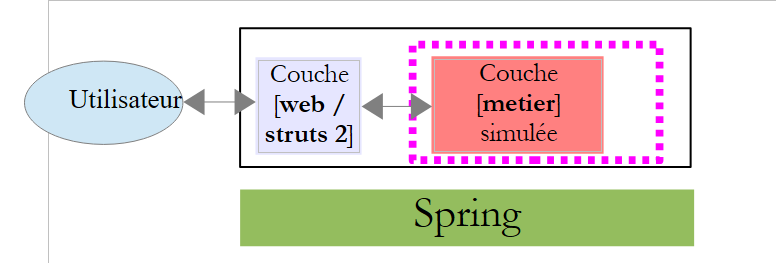
让我们回顾一下正在构建的应用程序架构:
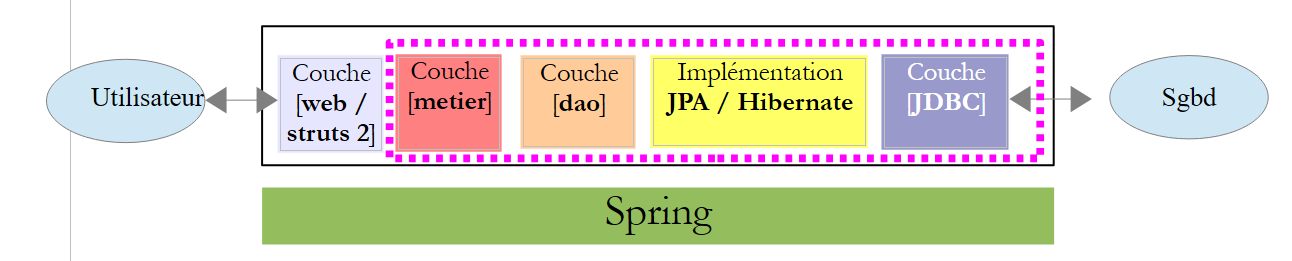 |
我们已获取 [metier, dao, jpa] 层的归档文件,并介绍了 [web] 层需要了解的这些层中的元素。现在,我们已准备好使用 Struts 框架编写该层。
为了简化正在开发中的应用程序的测试,我们将创建一个模拟业务层,该层将遵循 [metier] 层的接口。架构将变为如下所示:
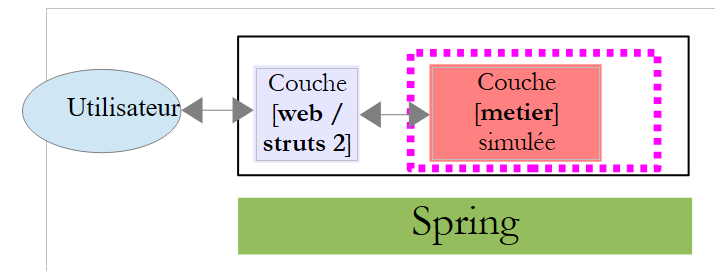 |
我们将结合模拟的 [métier] 层来开发 [web] 层。由于架构中不再包含数据库,测试将变得更加简单。 得益于Spring框架和接口的使用,日后将模拟的[metier]层替换为真正的[metier, dao, jpa]架构时,对[web / struts2]层的代码将毫无影响。 我们接下来要开发的 [web / struts2] 层可以直接使用。
我们将使用的模拟层 [metier] 如下所示:
package metier;

import java.util.ArrayList;
import java.util.HashMap;
import java.util.List;
import java.util.Map;
import jpa.Cotisation;
import jpa.Employe;
import jpa.Indemnite;

public class MetierSimule implements IMetier {

  // 员工列表
  private Map<String, Employe> hashEmployes = new HashMap<String, Employe>();
  private List<Employe> listEmployes;

  // 获取工资单
  public FeuilleSalaire calculerFeuilleSalaire(String SS,
          double nbHeuresTravaillées, int nbJoursTravaillés) {
    // 根据编号检索员工 SS
    Employe e = hashEmployes.get(SS);
    // 生成一份虚构的工资单
    return new FeuilleSalaire(e, new Cotisation(3.49, 6.15, 9.39, 7.88), new ElementsSalaire(100, 100, 100, 100, 100));
  }

  // 员工名单
  public List<Employe> findAllEmployes() {
    if (listEmployes == null) {
      // 创建包含两名员工的名单
      listEmployes = new ArrayList<Employe>();
      listEmployes.add(new Employe("254104940426058", "Jouveinal", "Marie", "5 rue des oiseaux", "St Corentin", "49203", new Indemnite(2, 2.1, 2.1, 3.1, 15)));
      listEmployes.add(new Employe("260124402111742", "Laverti", "Justine", "La br�lerie", "St Marcel", "49014", new Indemnite(1, 1.93, 2, 3, 12)));
      // 员工名录
      for (Employe e : listEmployes) {
        hashEmployes.put(e.getSS(), e);
      }
    }
    // 生成员工名单
    return listEmployes;
  }
}
- 第 11 行:类 [MetierSimule] 实现了接口 [IMetier],而真正的 [metier] 层也实现了该接口。
- 第 14 行:一个按 INSEE 编号索引的员工字典
- 第15行:员工列表
- 第 27-39 行:实现接口 [IMetier] 的方法 findAllEmployes。
- 第30-33行:创建包含两名员工的列表
- 第 34-36 行:创建以编号 INSEE 为索引的员工字典
- 第 18-24 行:实现接口 [IMetier] 中的方法 calculerSalaire。此处返回一份虚拟的工资单。
19.2. NetBeans 项目
NetBeans 项目如下:
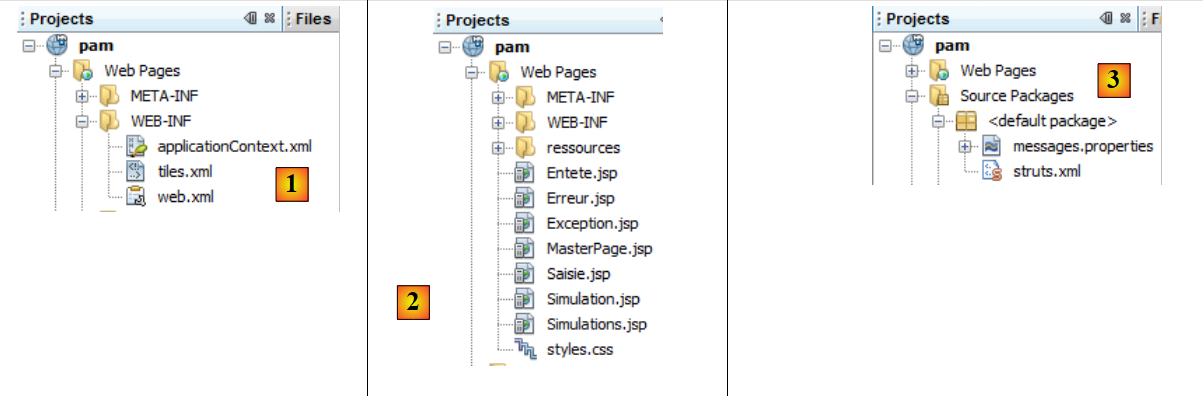 |
- 在 [1] 中:
- [applicationContext.xml] 是 Spring 的配置文件
- [tiles.xml] 是名为 Tiles 的框架的配置文件。
- [web.xml] 是 Web 应用程序的配置文件
- 在 [2] 中:应用程序的各个视图
- 在 [3] 中:
- [messages.properties]:消息文件
- [struts.xml]:Struts配置文件
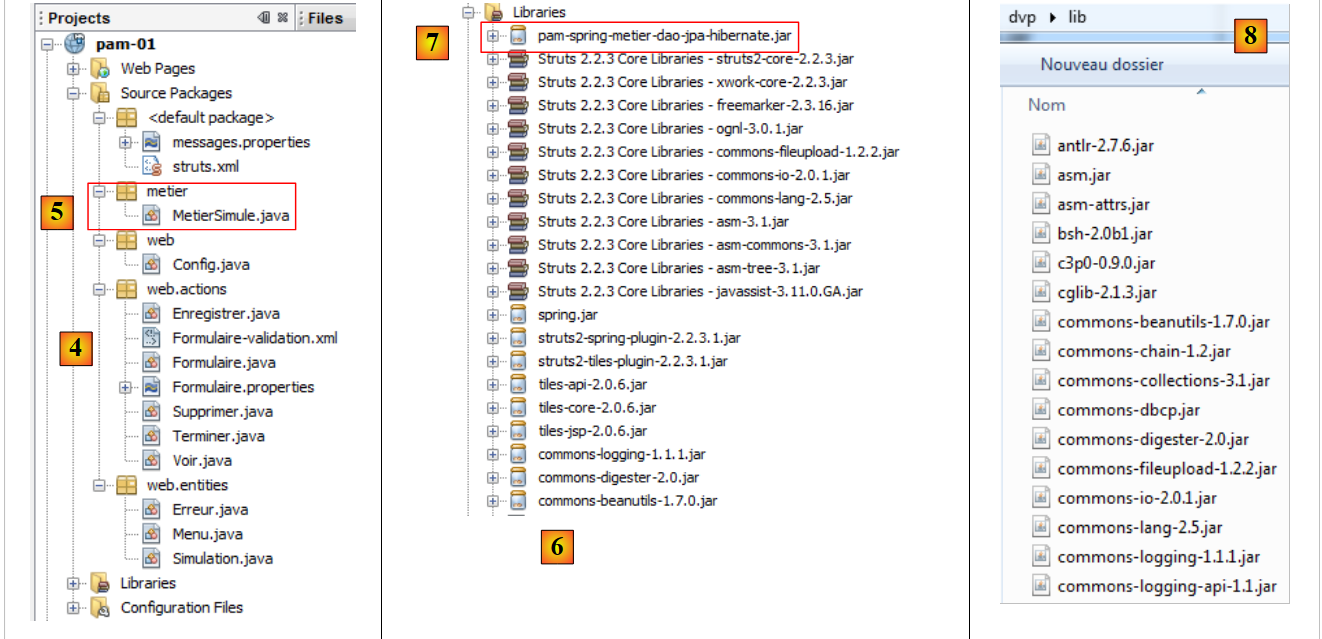 |
- 在 [4] 中:应用程序的源代码。Struts 动作位于 [web.actions] 包中。
- [5]:模拟的 [metier] 层
- [6]:所使用的存档文件。其中包含各类工具的存档:Spring、Tiles、Struts 2、Struts 2/Spring 集成插件、Struts 2/Tiles 集成插件。
- 在 [7] 中:真实的 [metier, dao, jpa] 层归档文件。 通过该归档,我们可以访问 JPA 实体、[IMetier] 接口,以及 [FeuilleSalaire] 和 [ElementsSalaire] 类。实际上,我们的 [MetierSimule] 类使用了所有这些元素。
19.3. 项目配置
该项目由以下文件进行配置:
- [web.xml] 用于配置 Web 应用程序
- [struts.xml]:用于配置 Struts 框架
- [applicationContext.xml]:用于配置 Spring 框架
- [tiles.xml],用于配置 Tiles 框架
19.3.1. Web 应用程序配置
文件 [web.xml] 内容如下:
<?xml version="1.0" encoding="UTF-8"?>
<web-app id="pam_struts_01" version="2.4" xmlns="http://java.sun.com/xml/ns/j2ee" xmlns:xsi="http://www.w3.org/2001/XMLSchema-instance" xsi:schemaLocation="http://java.sun.com/xml/ns/j2ee http://java.sun.com/xml/ns/j2ee/web-app_2_4.xsd">
  <display-name>Pam</display-name>
    <!-- Tiles -->
  <context-param>
    <param-name> org.apache.tiles.impl.BasicTilesContainer.DEFINITIONS_CONFIG </param-name>
    <param-value>/WEB-INF/tiles.xml</param-value>
  </context-param>
  <listener>
    <listener-class>org.apache.struts2.tiles.StrutsTilesListener</listener-class>
  </listener>
    <!-- Struts 2 -->
  <filter>
    <filter-name>struts2</filter-name>
    <filter-class>org.apache.struts2.dispatcher.FilterDispatcher</filter-class>
  </filter>
  <filter-mapping>
    <filter-name>struts2</filter-name>
    <url-pattern>/*</url-pattern>
  </filter-mapping>
     <!-- Spring -->
  <listener>
    <listener-class>org.springframework.web.context.ContextLoaderListener</listener-class>
  </listener>
</web-app>
- 第 13-20 行:配置 Struts 2 过滤器——已见
- 第 22-24 行:配置 Spring 监听器——已见
- 第 9-11 行:配置 Tiles 监听器。 [org.apache.struts2.tiles.StrutsTilesListener] 类将在 Web 应用程序启动时被实例化。随后它将使用其配置文件。该配置文件由第 5-8 行定义。因此,Tiles 的配置文件即为 [WEB-INF/tiles.xml] 文件。
最终,在 Struts 应用程序启动时,将实例化三个类:
- 其中一个用于 Struts 2 过滤器,它负责 MVC 中的 C 部分。
- 另一个用于 Spring 监听器。Spring 将利用文件 [applicationContext.xml] 来实例化应用程序的 [métier, dao, jpa] 层。Spring 还将像前面的示例一样,实例化一个 [Config] 类,该类将包含 Application 作用域的数据。 最后,Spring 会向每个需要它的 Struts 动作注入对该唯一实例 [Config] 的引用。
- 另一个用于 Tiles 监听器。该框架将负责视图管理。我们稍后将再次讨论这一点。
19.3.2. Struts 框架的配置
Struts 框架通过以下 [struts.xml] 文件进行配置:
<?xml version="1.0" encoding="UTF-8" ?>
<!DOCTYPE struts PUBLIC
    "-//Apache Software Foundation//DTD Struts Configuration 2.0//EN"
    "http://struts.apache.org/dtds/struts-2.0.dtd">

<struts>
  <!-- 国际化 -->
  <constant name="struts.custom.i18n.resources" value="messages" />
  <!-- Spring 集成 -->
  <constant name="struts.objectFactory.spring.autoWire" value="name" />


  <!-- Struts /Tiles 操作 -->
  <package name="default" namespace="/" extends="tiles-default">
    <!-- 默认操作 -->
    <default-action-ref name="index" />
    <action name="index">
      <result type="redirectAction">
        <param name="actionName">Formulaire</param>
        <param name="namespace">/</param>
      </result>
    </action>
    <!-- 表单操作 -->
    <action name="Formulaire" class="web.actions.Formulaire" method="input">
      <result name="success" type="tiles">saisie</result>
      <result name="exception" type="tiles">exception</result>
    </action>
    <!-- 操作 FaireSimulation -->
    <action name="FaireSimulation" class="web.actions.Formulaire" method="calculSalaire">
      <result name="success" type="tiles">simulation</result>
      <result name="exception" type="tiles">exception</result>
      <result name="input" type="tiles">saisie</result>
    </action>
    <!-- 操作 EnregistrerSimulation -->
    <action name="EnregistrerSimulation" class="web.actions.Enregistrer" method="execute">
      <result name="error" type="tiles">erreur</result>
      <result name="simulations" type="tiles">simulations</result>
    </action>
   <!-- 操作 RetourFormulaire -->
    <action name="RetourFormulaire" >
      <result type="redirectAction">
        <param name="actionName">Formulaire</param>
        <param name="namespace">/</param>
      </result>
    </action>
   <!-- 操作 VoirSimulations -->
    <action name="VoirSimulations" class="web.actions.Voir">
      <result name="success" type="tiles">simulations</result>
    </action>
   <!-- 操作 RetirerSimulation -->
    <action name="SupprimerSimulation" class="web.actions.Supprimer" method="execute">
      <result name="erreur" type="tiles">erreur</result>
      <result name="simulations" type="tiles">simulations</result>
    </action>
   <!-- 操作 TerminerSession -->
    <action name="TerminerSession" class="web.actions.Terminer" method="execute">
      <result name="success" type="redirectAction">
        <param name="actionName">Formulaire</param>
        <param name="namespace">/</param>
      </result>
    </action>
  </package>

</struts>
我们将随着后续学习逐步讲解各个 Struts 动作。目前,请注意以下几点:
- 第 8 行:定义消息文件
- 第10行:定义了Spring Bean在Struts动作中的注入方式。注入是根据Bean的名称进行的。需要由Spring初始化的Struts动作字段必须与待注入的Bean名称一致。
- 第25行:定义了用于显示操作[Formulaire]的导航键success的视图。 可以看到,结果 <result> 包含一个我们未知的属性 type='tiles'。 我们已知redirect类型,它用于将客户端重定向到某个视图。在此,tiles类型的视图由框架Tiles管理。 类型 tiles 定义在存档 [struts2-tiles-plugin-2.2.3.1.jar] 中的文件 [struts-plugin.xml] 中:
<struts>
    <package name="tiles-default" extends="struts-default">
        <result-types>
            <result-type name="tiles" class="org.apache.struts2.views.tiles.TilesResult"/>
        </result-types>
    </package>
</struts>
- 第 3-5 行:结果类型 tiles 的定义。
- 第 2 行:该类型定义在 [tiles-default] 包中,该包继承自 [struts-default] 包。
- 第 14 行:定义了 [default] 包,应用程序的所有操作都将位于该包中。为了利用视图类型 tiles 的定义,该包继承自 [tiles-default]。
19.3.3. Spring 框架配置
Spring框架通过以下文件进行配置:[WEB-INF/applicationContext.xml]:
<?xml version="1.0" encoding="UTF-8"?>
<beans xmlns="http://www.springframework.org/schema/beans" xmlns:xsi="http://www.w3.org/2001/XMLSchema-instance"
       xmlns:tx="http://www.springframework.org/schema/tx"
       xsi:schemaLocation="http://www.springframework.org/schema/beans http://www.springframework.org/schema/beans/spring-beans-2.0.xsd http://www.springframework.org/schema/tx http://www.springframework.org/schema/tx/spring-tx-2.0.xsd">

  <!-- 应用层 -->

<!-- Web -->
  <bean id="config" class="web.Config" init-method="init">
    <property name="metier" ref="metier"/>
  </bean>
  <!-- 业务 -->
  <bean id="metier" class="metier.MetierSimule"/>

</beans>
- 第 13 行:由类 [metier.MetierSimule] 实例化的模拟层 [metier]
- 第 9-11 行:配置了一个名为 config 的 Bean。与之前研究的一个示例一样,该 Bean 将用于封装作用域 Application 的信息。与该 Bean 关联的类是以下 [Config] 类:
package web;

import java.util.List;
import jpa.Employe;
import metier.IMetier;

public class Config {

  // 由 Spring 初始化的业务层
  private IMetier metier;
  // 员工列表
  private List<Employe> employes;
  // 错误
  private Exception initException;

  // 构造函数
  public Config() {
  }

  // Spring 对象初始化方法
  public void init() {
    // 查询员工列表
    try {
      employes = metier.findAllEmployes();
    } catch (Exception ex) {
      initException = ex;
    }
  }

  // getter 和 setter
  ...
}
让我们回到 config Bean 的配置:
  <bean id="config" class="web.Config" init-method="init">
    <property name="metier" ref="metier"/>
  </bean>
  <!-- 业务逻辑 -->
  <bean id="metier" class="metier.Metier">
    ...
</bean>
第 2 行显示,第 5 行中的 Bean metier 被注入(ref)到对象 [Config] 的名为 metier(name)的字段中。 Bean metier 是 [metier] 层上的一个引用:
 |
为了与 [metier] 层进行交互,[web] 层中的所有 Struts 操作都需要引用该层。 可以说,对 [metier] 层的引用是 Application 范围内的数据。所有用户的所有请求都需要它。因此,我们将此引用放入 [Config] 对象中。 此外,在第 1 行,Bean config 的配置中包含一个 init-method 属性。该属性指定了在 Bean 实例化后应执行的 Bean 方法。 此处指定,在实例化类 [web.Config] 之后,必须执行其方法 init。该方法如下:
// 由 Spring 初始化的业务层
  private IMetier metier;
  // 员工列表
  private List<Employe> employes;
  // 错误
  private Exception initException;

  // 构造函数
  public Config() {
  }

  // Spring 对象初始化方法
  public void init() {
    // 查询员工列表
    try {
      employes = metier.findAllEmployes();
    } catch (Exception ex) {
      initException = ex;
    }
  }
当方法 init 被执行时,该类的字段 metier 已被 Spring 实例化。 因此,方法 init 可以访问接口 [IMetier] 的业务层(第 2 行):
package metier;

import java.util.List;
import jpa.Employe;

public interface IMetier {
  // 获取工资单
  FeuilleSalaire calculerFeuilleSalaire(String SS, double nbHeuresTravaillées, int nbJoursTravaillés );
  // 员工列表
  List<Employe> findAllEmployes();
}
- 第 8 行:该方法用于计算员工的工资
- 第 10 行:该方法用于获取员工列表
可以看到,方法 init 向 [métier] 层请求员工列表。该列表存储在第 4 行的字段中。如果发生异常,则该异常将存储在第 6 行的字段中。
综上所述,唯一对象 [Config] 包含:
- 对 [métier] 层的引用
- 员工列表
19.4. 生成 Tiles 视图
正如我们在 Struts 配置文件中所见,视图将由框架 Tiles 生成。我们仅解释编写本应用程序所必需的内容。
Tiles 允许基于主页面生成视图。此处称为 [MasterPage.jsp] 的主页面将由以下 JSP 片段组合而成:
这些 JSP 片段在 NetBeans 项目中定义如下:
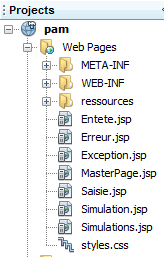
Tiles框架允许我们定义哪些片段将被插入到主页面中。
主页面 [MasterPage.jsp] 如下所示:
<%@ page contentType="text/html; charset=UTF-8" pageEncoding="UTF-8"%>
<%@ taglib prefix="s" uri="/struts-tags" %>
<%@ taglib uri="http://tiles.apache.org/tags-tiles" prefix="tiles" %>
<!DOCTYPE HTML PUBLIC "-//W3C//DTD HTML 4.01 Transitional//EN"
  "http://www.w3.org/TR/html4/loose.dtd">

<html>
  <head>
    <meta http-equiv="Content-Type" content="text/html; charset=UTF-8">
    <link href="styles.css" rel="stylesheet" type="text/css"/>
    <title>
      <tiles:insertAttribute name="titre" ignore="true" />
    </title>
    <s:head/>
  </head>
  <body background="<s:url value="/ressources/standard.jpg"/>">
    <tiles:insertAttribute name="entete" />
    <hr/>
    <tiles:insertAttribute name="saisie" />
    <tiles:insertAttribute name="simulation" />
    <tiles:insertAttribute name="exception" />
    <tiles:insertAttribute name="erreur" />
    <tiles:insertAttribute name="simulations" />
  </body>
</html>
主页面是一个JSP片段容器。在此,它由六个片段组成,即第17行至第23行的内容。在生成时,主页面中可能包含0到6个片段。 此生成过程由文件 [WEB-INF/tiles.xml] 控制,该文件定义了视图 Tiles:
<?xml version="1.0" encoding="UTF-8" ?>

<!DOCTYPE tiles-definitions PUBLIC "-//Apache Software Foundation//DTD Tiles Configuration 2.0//EN"
 "http://tiles.apache.org/dtds/tiles-config_2_0.dtd">

<tiles-definitions>

<!-- 主页面 -->
  <definition name="masterPage" template="/MasterPage.jsp">
    <put-attribute name="entete" value="/Entete.jsp"/>
    <put-attribute name="titre"  value="Pam"/>
    <put-attribute name="saisie" value=""/>
    <put-attribute name="simulation" value=""/>
    <put-attribute name="simulations" value=""/>
    <put-attribute name="exception" value=""/>
    <put-attribute name="erreur" value=""/>
  </definition>

<!-- 录入视图 -->
  <definition name="saisie" extends="masterPage">
    <put-attribute name="saisie"   value="/Saisie.jsp"/>
  </definition>

  <!-- 模拟视图 -->
 <definition name="simulation" extends="saisie">
    <put-attribute name="simulation"   value="/Simulation.jsp"/>
  </definition>

<!-- 模拟视图 -->
  <definition name="simulations" extends="masterPage">
    <put-attribute name="simulations"   value="/Simulations.jsp"/>
  </definition>

<!-- 异常视图 -->
  <definition name="exception" extends="masterPage">
    <put-attribute name="exception"   value="/Exception.jsp"/>
  </definition>

<!-- 错误视图 -->
 <definition name="erreur" extends="masterPage">
    <put-attribute name="erreur"   value="/Erreur.jsp"/>
  </definition>
</tiles-definitions>
- 上述文件定义了六个名为 Tiles 的视图:masterPage(第 9 行)、输入(第 20 行)、模拟(第 25 行)、模拟(第 30 行)、异常(第 35 行)、错误(第 40 行)。
- 第 9-17 行:定义了一个名为 masterPage(name)的视图,并将其关联到主页面 [MasterPage.jsp](template)。 我们看到该 JSP 页面定义了六个子视图。与主页面关联的视图 Tiles 必须指定与这六个子视图各自关联的 JSP 片段。可以看到,某些子视图的值(value)为空字符串。 这些子视图将不会被包含在主页面 [MasterPage.jsp] 中。因此,名为 masterPage 的视图 Tiles 仅由子片段 [Entete.jsp] 构成。
- 第20-22行:定义了一个名为saisie(name)的视图,该视图继承(extends)了前文提到的名为masterPage的视图。 这意味着它继承了视图 masterPage 的所有定义。其定义等同于以下内容:
<definition name="saisie" template="/MasterPage.jsp">
    <put-attribute name="entete" value="/Entete.jsp"/>
    <put-attribute name="titre"  value="Pam"/>
    <put-attribute name="saisie" value=""/>
    <put-attribute name="simulation" value=""/>
    <put-attribute name="simulations" value=""/>
    <put-attribute name="exception" value=""/>
    <put-attribute name="erreur" value=""/>
    <put-attribute name="saisie" value="/Saisie.jsp"/>
  </definition>
可以看出,它与 JSP 页面 [MasterPage.jsp] 相关联,因此必须定义该页面的六个子视图。 可见第9行的定义覆盖了第4行的定义。因此,名为saisie的视图Tiles由JSP片段[Entete.jsp, Saisie.jsp]
若继续此推论,我们将得到以下表格:
视图 Tiles | JSP页面 |
19.5. 消息文件
该应用程序已实现国际化。消息位于文件 [messages.properties] 和 [Formulaire.properties] 中。
文件 [messages.properties] 的内容如下:
Pam.titre=Calcul du salaire des assistantes maternelles
Pam.Erreurs.titre=Les erreurs suivantes se sont produites :
Pam.Erreurs.classe=Exception
Pam.Erreurs.message=Message
Pam.Erreur.libelle=L''erreur suivante s''est produite
Pam.Saisie.Heures.libell\u00e9=Heures travaill\u00e9es
Pam.Saisie.Jours.libell\u00e9=Jours travaill\u00e9s
Pam.Saisie.employ\u00e9=Employ\u00e9
Pam.BtnSalaire.libell\u00e9=Salaire
Pam.BtnEffacer.libell\u00e9=Effacer
Simulation.Infos.employe=Informations Employ\u00e9
Simulation.Employe.nom=Nom
Simulation.Employe.prenom=Pr\u00e9nom
Simulation.Employe.adresse=Adresse
Simulation.Employe.indice=Indice
Simulation.Employe.ville=Ville
Simulation.Employe.codePostal=Code Postal
Simulation.Infos.cotisations=Cotisations Sociales
Simulation.Cotisations.csgrds=CsgRds
Simulation.Cotisations.csgrds=Csgd
Simulation.Cotisations.retraite=Retraite
Simulation.Cotisations.secu=S\u00e9cu
Form.Infos.indemnites=Indemnit\u00e9s
Simulation.Indemnites.salaireHoraire=Salaire horaire
Simulation.Indemnites.entretienJour=Entretien/Jour
Simulation.Indemnites.repasJour=Repas/Jour
Simulation.Indemnites.cong\u00e9sPay\u00e9s=Cong\u00e9s pay\u00e9s
Simulation.Infos.Salaire=Salaire
Simulation.Salaire.salaireBase=Salaire de base
Simulation.Salaire.cotisationsSociales=Cotisations sociales
Simulation.Salaire.entretien=Indemnit\u00e9s d''entretien
Simulation.Salaire.repas=Indemnit\u00e9s de repas
Simulation.salaireNet=Salaire net
# 格式
Format.heure = {0,time}
Format.nombre = {0,number,#0.0##}
Format.pourcent = {0,number,##0.00' %'}
Format.monnaie={0,number,##0.00' \u20ac'}
# 模拟列表
Pam.Simulations.titre=Liste des simulations
Pam.Simulations.num=Num\u00e9ro
Pam.Simulations.nom=Nom
Pam.Simulations.prenom=Pr\u00e9nom
Pam.Simulations.heures=Heures
Pam.Simulations.jours=Jours
Pam.Simulations.salairebase=Salaire de base
Pam.Simulations.indemnites=Indemnites
Pam.Simulations.cotisationsociales=Cotisations
Pam.Simulations.salairenet=Salaire
Pam.SimulationsVides.titre=La liste des simulations est vide
# 菜单
Menu.FaireSimulation=Faire la simulation
Menu.EffacerSimulation=Effacer la simulation
Menu.VoirSimulations=Voir les simulations
Menu.RetourFormulaire=Retour au formulaire de navigation
Menu.EnregistrerSimulation=Enregistrer la simulation
Menu.TerminerSession=Terminer la session
# 错误信息
Erreur.sessionexpiree=La session a expir\u00e9
Erreur.numSimulation=N\u00b0 de simulation incorrect
# 转换错误
xwork.default.invalid.fieldvalue=Valeur invalide pour le champ "{0}".
文件 [Formulaire.properties] 内容如下:
# 使双精度数值采用本地格式
double.format={0,number,#0.00##}
# 错误信息
joursTravaill\u00e9s.error=Tapez un nombre entier compris entre 1 et 31
heuresTravaill\u00e9es.error=Tapez un nombre r\u00e9el entre 0 et 300
19.6. 样式表
Tiles 视图使用以下样式表 [styles.css]:
.libelle{
  background-color: #ccffff;
  font-family: 'Times New Roman',Times,serif;
  font-size: 14px;
  font-weight: bold;;
  padding-right: 5px;
  padding-left: 5px;
  padding-bottom: 5px;
  padding-top: 5px;
}


.info{
  background-color: #99cc00;;
  padding-right: 5px;
  padding-left: 5px;
  padding-bottom: 5px;
  padding-top: 5px;
}

.titreInfos{
  background-color: #ffcc00
}
19.7. 初始视图
为了研究该应用程序,我们将从用户的不同操作入手进行介绍。每次我们将研究执行该操作的 Struts 操作,以及作为响应发送的 Tiles 视图。
在 [struts.xml] 中,我们有以下操作:
  <!-- 默认操作 -->
    <default-action-ref name="index" />
    <action name="index">
      <result type="redirectAction">
        <param name="actionName">Formulaire!input</param>
        <param name="namespace">/</param>
      </result>
    </action>
    <!-- 表单操作 -->
    <action name="Formulaire" class="web.actions.Formulaire">
      <result name="success" type="tiles">saisie</result>
      <result name="exception" type="tiles">exception</result>
      <result name="input" type="tiles">saisie</result>
      <result name="simulation" type="tiles">simulation</result>
</action>
- 第 2-8 行:应用程序的默认操作是 [Formulaire!input]。
类 [Formulaire] 如下所示:
package web.actions;

...
public class Formulaire extends ActionSupport implements Preparable, SessionAware {

  // 由 Spring 初始化的配置
  private Config config;
  // 员工列表
  private List<Employe> employes;
  // 错误列表
  private List<Erreur> erreurs;
  // 工资单
  private FeuilleSalaire feuilleSalaire;
  // 数据录入
  private String comboEmployesValue;
  private Double heuresTravaillees;
  private Integer joursTravailles;
  // 会话
  private Map<String, Object> session;
  // 菜单
  private Menu menu;

  @Override
  public void prepare() throws Exception {
    ...
  }

  @Override
  public String input() {
  ....
  }

  // 工资计算
  public String calculSalaire() {
 ...
    }
  }

  @Override
  public void validate() {
  ...
  }

  @Override
  public void setSession(Map<String, Object> map) {
    session = map;
  }

  // 获取器和设置器
  ...
}
- 第 4 行:操作 [Formulaire] 实现了接口 Preparable。该接口仅有一个方法,即第 24 行中的方法 prepare。该方法会在操作中的任何方法执行之前被调用一次。 它通常用于初始化操作的模型。
操作模板由第 6 至 21 行组成:
- 第7行:如前所述,字段config由Spring初始化。它提供了对应用程序作用域数据的访问:
- 对 [métier] 层的引用
- 员工列表的引用
- 对在实例化 [Config] 对象时可能发生的异常的引用
- 第 9 行:员工列表。该列表将作为 [Saisie.jsp] 片段中员工下拉列表的数据源。
- 第 11 行:错误列表。该列表将作为 [Erreur.jsp] 片段的数据源。
- 第 21 行:片段 [Entete.jsp] 的菜单选项列表
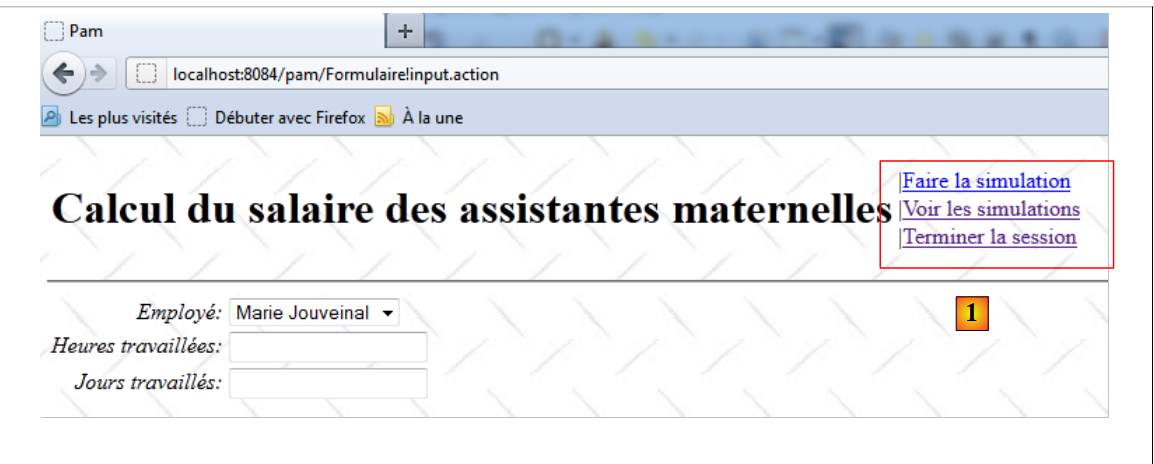 |
在 [1] 中,显示的菜单链接由操作 [Formulaire] 的字段 menu 控制。
方法 prepare 在方法 input 之前执行。具体如下:
  @Override
  public void prepare() throws Exception {
    // 配置错误?
    Exception initException = config.getInitException();
    if (initException != null) {
      erreurs = new ArrayList<Erreur>();
      Throwable th = initException;
      while (th != null) {
        erreurs.add(new Erreur(th.getClass().getName(), th.getMessage()));
        th = th.getCause();
      }
    } else {
      employes = config.getEmployes();
    }
}
- 第 4 行:从 Spring 实例化的 [Config] 对象中获取异常
- 第 5 行:如果在实例化 [Config] 对象时发生异常,则初始化第 11 行的错误列表。[Erreur] 类如下:
package web.entities;

import java.io.Serializable;

public class Erreur implements Serializable{

  public Erreur() {
  }

  // 字段
  private String classe;
  private String message;

  // 构造函数
  public Erreur(String classe, String message){
    this.setClasse(classe);
    this.message=message;
  }

  // getter 和 setter
...
}
该类用于存储异常堆栈:
- 第 11 行:异常的类
- 第 12 行:异常消息
回到方法 prepare:
- 第 13 行:对象 [Config] 的员工列表存储在操作的字段 employes 中。
执行完方法 prepare 后,将依次执行方法 input。该方法如下:
  @Override
  public String input() {
    if (erreurs == null) {
      // 菜单
      menu = new Menu(true, false, false, true, false, true);
      return SUCCESS;
    } else {
      // 菜单
      menu = new Menu(false, false, false, false, false, false);
      return "exception";
    }
}
方法 input 仅负责设置要显示的菜单选项列表。类 [Menu] 如下所示:
package web.entities;

import java.io.Serializable;

public class Menu implements Serializable {
  // 菜单项

  private boolean faireSimulation;
  private boolean effacerSimulation;
  private boolean enregistrerSimulation;
  private boolean voirSimulations;
  private boolean retourFormulaire;
  private boolean terminerSession;

  public Menu() {
  }

  public Menu(boolean faireSimulation, boolean effacerSimulation, boolean enregistrerSimulation, boolean voirSimulations, boolean retourFormulaire, boolean terminerSession) {
    this.faireSimulation = faireSimulation;
    this.effacerSimulation = effacerSimulation;
    this.enregistrerSimulation = enregistrerSimulation;
    this.voirSimulations = voirSimulations;
    this.retourFormulaire = retourFormulaire;
    this.terminerSession = terminerSession;
  }

  // 获取器和设置器
...
}
- 第 8-13 行:菜单中共有 6 个可能的链接
- 第18-25行:该类的构造函数用于确定应显示和不应显示的链接。
菜单链接显示在 [Entete.jsp] 中,这是一个存在于所有 Tiles 视图中的 JSP 片段。每个操作都将有一个 menu 字段,用于控制 [Entete.jsp] 菜单的显示。
让我们回到方法 input:
  @Override
  public String input() {
    if (erreurs == null) {
      // 菜单
      menu = new Menu(true, false, false, true, false, true);
      return SUCCESS;
    } else {
      // 菜单
      menu = new Menu(false, false, false, false, false, false);
      return "exception";
    }
}
- 第 3-6 行:如果错误列表为空,则显示 [Faire la simulation, Voir les simulations, Terminer la session] 菜单并返回键值 input。
- 第 9-10 行:如果错误列表不为空,则菜单为空,并返回键值 exception。
让我们回到 [struts.xml] 中 [Formulaire] 操作的配置:
    <!-- 表单操作 -->
    <action name="Formulaire" class="web.actions.Formulaire">
      <result name="success" type="tiles">saisie</result>
      <result name="exception" type="tiles">exception</result>
      <result name="input" type="tiles">saisie</result>
      <result name="simulation" type="tiles">simulation</result>
</action>
- 第 5 行:键 input 显示名为 saisie 的 Tiles 视图
- 第 4 行:键 exception 显示名为 exception 的 Tiles 视图
首先来看名为 saisie 的 Tiles 视图。它由 JSP 片段 [Entete.jsp] 和 [Saisie.jsp] 组成。
片段 [Entete.jsp] 内容如下:

其代码如下:
<%@ page contentType="text/html; charset=UTF-8" pageEncoding="UTF-8"%>
<%@ taglib prefix="s" uri="/struts-tags" %>

<table>
  <tr>
    <td><h1><s:text name="Pam.titre"/></h1></td>
    <td>
      <s:if test="menu.faireSimulation">
        |<a href="javascript:doSimulation()"><s:text name="Menu.FaireSimulation"/></a><br/>
      </s:if>
      <s:if test="menu.effacerSimulation">
        |<a href="<s:url action="Formulaire!input"/>"><s:text name="Menu.EffacerSimulation"/></a><br/>
      </s:if>
      <s:if test="menu.voirSimulations">
        |<a href="<s:url action="VoirSimulations"/>"><s:text name="Menu.VoirSimulations"/></a><br/>
      </s:if>
      <s:if test="menu.retourFormulaire">
        |<a href="<s:url action="RetourFormulaire"/>"><s:text name="Menu.RetourFormulaire"/></a><br/>
      </s:if>
      <s:if test="menu.enregistrerSimulation">
        |<a href="<s:url action="EnregistrerSimulation"/>"><s:text name="Menu.EnregistrerSimulation"/></a><br/>
      </s:if>
      <s:if test="menu.terminerSession">
        |<a href="<s:url action="TerminerSession"/>"><s:text name="Menu.TerminerSession"/></a><br/>
      </s:if>
    </td>
  </tr>
</table>
- 第 8-25 行:显示菜单中的六个链接 [进行模拟(第 8-10 行)、清除模拟(第 11-13 行)、 查看模拟(第14-16行)、返回表单(第17-19行)、保存模拟(第20-22行)、结束会话(第23-25行)。
- 第 8、11、14、17、20、23 行:链接的显示由当前操作的字段 menu 控制。
需要注意的是,片段 [Entete.jsp] 显示了一个 HTML 表格(第 4-28 行),但并非完整的 HTML 页面。这里必须记住,应用程序的所有视图都嵌入在接下来的主页面 [MasterPage.jsp] 中:
<%@ page contentType="text/html; charset=UTF-8" pageEncoding="UTF-8"%>
<%@ taglib prefix="s" uri="/struts-tags" %>
<%@ taglib uri="http://tiles.apache.org/tags-tiles" prefix="tiles" %>
<!DOCTYPE HTML PUBLIC "-//W3C//DTD HTML 4.01 Transitional//EN"
  "http://www.w3.org/TR/html4/loose.dtd">

<html>
  <head>
    <meta http-equiv="Content-Type" content="text/html; charset=UTF-8">
    <link href="styles.css" rel="stylesheet" type="text/css"/>
    <title>
      <tiles:insertAttribute name="titre" ignore="true" />
    </title>
    <s:head/>
  </head>
  <body background="<s:url value="/ressources/standard.jpg"/>">
    <tiles:insertAttribute name="entete" />
    <hr/>
    <tiles:insertAttribute name="saisie" />
    <tiles:insertAttribute name="simulation" />
    <tiles:insertAttribute name="exception" />
    <tiles:insertAttribute name="erreur" />
    <tiles:insertAttribute name="simulations" />
  </body>
</html>
片段 [Entete.jsp] 插入在第 17 行,位于一个常规 HTML 页面内部。
片段 [Saisie.jsp] 插入在第 19 行。这是以下视图:
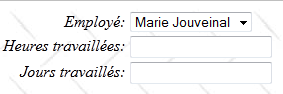
片段 [Saisie.jsp] 的代码如下:
<%@ page contentType="text/html; charset=UTF-8" pageEncoding="UTF-8"%>
<%@ taglib prefix="s" uri="/struts-tags" %>
<%@ taglib uri="http://tiles.apache.org/tags-tiles" prefix="tiles" %>
<!DOCTYPE HTML PUBLIC "-//W3C//DTD HTML 4.01 Transitional//EN"
  "http://www.w3.org/TR/html4/loose.dtd">


<script language="javascript" type="text/javascript">
  function doSimulation(){
    // 提交表单
    document.forms['Saisie'].elements['action'].name='action:Formulaire!calculSalaire'
    document.forms['Saisie'].submit();
  }
</script>

<!-- 信息输入 -->
<s:form name="Saisie" id="Saisie">
  <s:select name="comboEmployesValue" list="employes" listKey="SS" listValue="prenom+' ' +nom" key="Pam.Saisie.employé"/>
  <s:textfield name="heuresTravaillees" key="Pam.Saisie.Heures.libellé" value="%{#parameters['heuresTravaillees']!=null ? #parameters['heuresTravaillees'] : heuresTravaillees==null ? '' : getText('double.format',{heuresTravaillees})}"/>
  <s:textfield name="joursTravailles" key="Pam.Saisie.Jours.libellé" value="%{#parameters['joursTravailles']!=null ? #parameters['joursTravailles'] : joursTravailles==null ? '' : joursTravailles}"/>
  <input type="hidden" name="action"/>
</s:form>
- 第 17 行:表单没有 action 属性。默认情况下,该属性为 action='Formulaire'。
- 第18行:显示员工下拉列表。下拉列表的内容(属性list)由当前操作的字段employes提供。 选项的属性 value 将对应员工的编号 SS(属性 listKey)。 每个选项显示的名称将是员工的姓名(属性 listValue)。 在组合框中选定的员工的编号 SS 将被写入字段 [Formulaire].comboEmployesvalue(属性 name)。
- 第 19 行:工作小时数输入字段。 显示的值(属性 value)来自操作 [Formulaire] 的字段 heuresTravaillees,格式如下(Formulaire.properties):
double.format={0,number,#0.00##}
该值将写入字段 [Formulaire].heuresTravaillees(属性 name)。
- 第 20 行:工作天数输入字段。显示的值(属性 value)来自操作 [Formulaire] 中的字段 joursTravailles。
该值将写入字段 [Formulaire].joursTravailles(属性 name)。
最终,在启动时若无错误,显示的 Tiles saisie 视图如下:
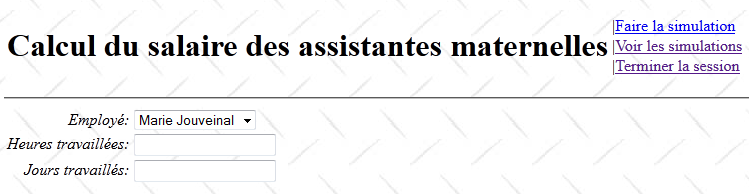
让我们回到 [Formulaire] 操作的配置:
    <!-- 表单操作 -->
    <action name="Formulaire" class="web.actions.Formulaire">
      <result name="success" type="tiles">saisie</result>
      <result name="exception" type="tiles">exception</result>
      <result name="input" type="tiles">saisie</result>
      <result name="simulation" type="tiles">simulation</result>
</action>
我们看到,操作 [Formulaire].input 同样可能生成第 4 行中的键 exception。 在这种情况下,显示的是名为 exception 的 Tiles 视图。该视图由片段 [Entete.jsp] 和 [Exception.jsp] 组成。我们之前已经介绍了片段 [Entete.jsp]。 片段 [Exception.jsp] 如下所示:
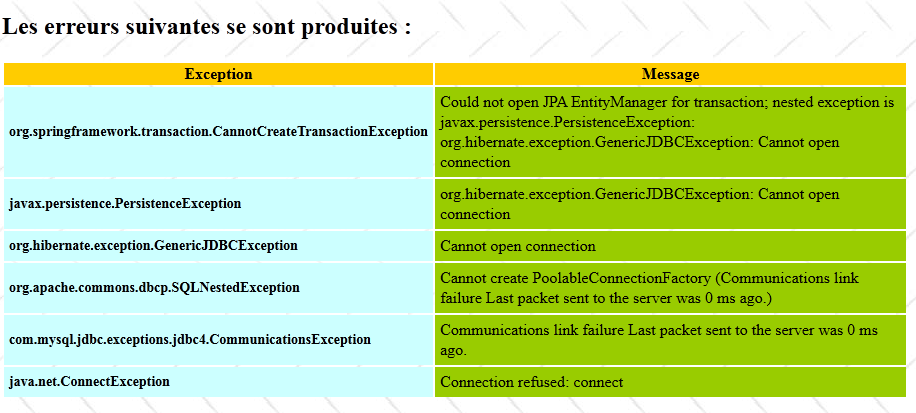
这是在数据库管理系统(SGBD)未启动时,应用程序第2版的启动页面。片段[Erreur.jsp]的JSP代码如下:
<%@ page contentType="text/html; charset=UTF-8" pageEncoding="UTF-8"%>
<%@ taglib prefix="s" uri="/struts-tags" %>

<h2><s:text name="Pam.Erreurs.titre"/></h2>
<table>
  <tr class="titreInfos">
    <th><s:text name="Pam.Erreurs.classe"/></th>
    <th><s:text name="Pam.Erreurs.message"/></th>
  </tr>
  <s:iterator value="erreurs">
    <tr>
      <td class="libelle"><s:property value="classe"/></td>
      <td class="info"><s:property value="message"/></td>
    </tr>
  </s:iterator>
</table>
- 第10-14行:对操作[Formulaire]中的List<Erreur>错误集合进行迭代。需要提醒的是,在发生错误时,我们曾在此处存储了一个异常堆栈。
19.8. 进行模拟
获得初始视图后,可通过链接 [Faire une simulation] 进行薪资计算。
19.8.1. 输入验证
考虑以下操作序列:
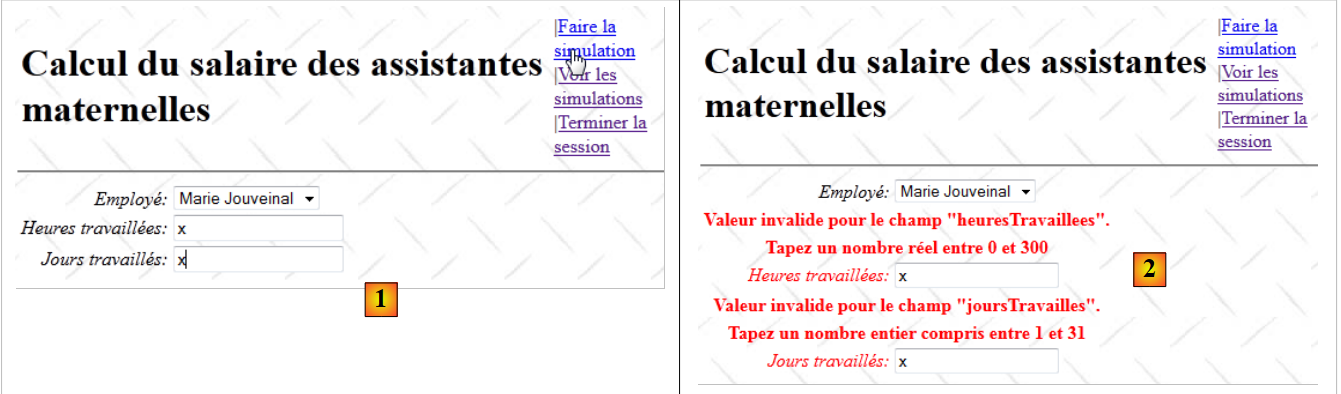 |
- 在 [1] 中,输入有误
- 在 [2] 中,已发送的响应。
考虑 [Formulaire] 操作在 [struts.xml] 中的配置:
    <!-- 表单操作 -->
    <action name="Formulaire" class="web.actions.Formulaire">
      <result name="success" type="tiles">saisie</result>
      <result name="exception" type="tiles">exception</result>
      <result name="input" type="tiles">saisie</result>
      <result name="simulation" type="tiles">simulation</result>
</action>
已知若验证失败,验证拦截器将返回键值 input。因此返回的是视图 Tiles saisie。验证过程会使错误字段附带错误信息。
操作 [Formulaire] 的验证由以下文件 [Formulaire-validation.xml] 负责:
<!DOCTYPE validators PUBLIC "-//OpenSymphony Group//XWork Validator 1.0.2//EN" "http://www.opensymphony.com/xwork/xwork-validator-1.0.2.dtd">


<validators>

  <field name="heuresTravaillees" >
    <field-validator type="required" short-circuit="true">
      <message key="heuresTravaillées.error"/>
    </field-validator>

    <field-validator type="conversion" short-circuit="true">
      <message key="heuresTravaillées.error"/>
    </field-validator>

    <field-validator type="double" short-circuit="true">
      <param name="minInclusive">0</param>
      <param name="maxInclusive">300</param>
      <message key="heuresTravaillées.error"/>
    </field-validator>
  </field>

  <field name="joursTravailles" >
    <field-validator type="required" short-circuit="true">
      <message key="joursTravaillés.error"/>
    </field-validator>

    <field-validator type="conversion" short-circuit="true">
      <message key="joursTravaillés.error"/>
    </field-validator>

    <field-validator type="int" short-circuit="true">
      <param name="min">0</param>
      <param name="max">31</param>
      <message key="joursTravaillés.error"/>
    </field-validator>
  </field>

</validators>
- 第 6-20 行验证字段 heuresTravaillees 是否为 [0,300] 区间内的实数。
- 第 22-36 行验证字段 joursTravailles 是否为 [0,31] 区间内的整数。
让我们回到 [struts.xml] 中 [Formulaire] 操作的配置:
    <!-- 表单操作 -->
    <action name="Formulaire" class="web.actions.Formulaire">
      ...
      <result name="input" type="tiles">saisie</result>
</action>
我们知道,如果验证出错,验证拦截器会返回键 input。因此返回的是视图 Tiles saisie。
需要提醒的是,该视图由片段 [Entete.jsp] 和 [Saisie.jsp] 组成,其中 [Entete.jsp] 包含标题和选项列表,而 [Saisie.jsp] 则包含输入表单。 若发生输入错误,验证流程会使错误字段显示错误提示,并同时显示其错误值。片段 [Entete.jsp] 在验证过程中不发挥任何作用。让我们看看它的代码:
<%@ page contentType="text/html; charset=UTF-8" pageEncoding="UTF-8"%>
<%@ taglib prefix="s" uri="/struts-tags" %>

<table>
  <tr>
    <td><h1><s:text name="Pam.titre"/></h1></td>
    <td>
      <s:if test="menu.faireSimulation">
        |<a href="javascript:doSimulation()"><s:text name="Menu.FaireSimulation"/></a><br/>
      </s:if>
      <s:if test="menu.effacerSimulation">
        |<a href="<s:url action="Formulaire!input"/>"><s:text name="Menu.EffacerSimulation"/></a><br/>
      </s:if>
      <s:if test="menu.voirSimulations">
        |<a href="<s:url action="VoirSimulations"/>"><s:text name="Menu.VoirSimulations"/></a><br/>
      </s:if>
      <s:if test="menu.retourFormulaire">
        |<a href="<s:url action="RetourFormulaire"/>"><s:text name="Menu.RetourFormulaire"/></a><br/>
      </s:if>
      <s:if test="menu.enregistrerSimulation">
        |<a href="<s:url action="EnregistrerSimulation"/>"><s:text name="Menu.EnregistrerSimulation"/></a><br/>
      </s:if>
      <s:if test="menu.terminerSession">
        |<a href="<s:url action="TerminerSession"/>"><s:text name="Menu.TerminerSession"/></a><br/>
      </s:if>
    </td>
  </tr>
</table>
这六个链接由模板中的字段 menu 配置(第 8、11、14、17、20、23 行)。当出现错误时,该模板不会被操作更新,因此会显示一个没有菜单的页面。 为解决此问题,类 [Formulaire] 包含以下方法 validate:
package web.actions;

import com.opensymphony.xwork2.ActionSupport;
...
public class Formulaire extends ActionSupport implements Preparable, SessionAware {

  ...
  // 菜单
  private Menu menu;

  @Override
  public void prepare() throws Exception {
  ...
  }

  @Override
  public String input() {
  ...
  }

  // 工资计算
  public String calculSalaire() {
  ...
  }

  @Override
  public void validate() {
    // 有错误吗?
    if (!getFieldErrors().isEmpty()) {
      // 菜单
      menu = new Menu(true, false, false, true, false, true);
    }
  }

  // 获取器和设置器
  ...
}
- 第27行:已知当该行存在时,验证过程会执行方法validate。我们借此机会更新第4行的菜单,该菜单属于片段模板[Entete.jsp]的一部分。
- 第29-32行:如果验证出现错误,则将菜单定位为重新显示视图 Tiles saisie。如果验证没有错误,则不执行任何操作。 此时由方法 calculSalaire 负责创建待显示视图的模板。
19.8.2. 工资计算
让我们回到页眉的 JSP 代码:
<%@ page contentType="text/html; charset=UTF-8" pageEncoding="UTF-8"%>
<%@ taglib prefix="s" uri="/struts-tags" %>

<table>
  <tr>
    <td><h1><s:text name="Pam.titre"/></h1></td>
    <td>
      <s:if test="menu.faireSimulation">
        |<a href="javascript:doSimulation()"><s:text name="Menu.FaireSimulation"/></a><br/>
      </s:if>
      ...
    </td>
  </tr>
</table>
- 第 9 行:当用户点击链接 [Faire la simulation] 时,将执行 JavaScript 函数 doSimulation。该函数在片段 [Saisie.jsp] 中定义:
<script language="javascript" type="text/javascript">
  function doSimulation(){
    // 提交表格
    document.forms['Saisie'].elements['action'].name='action:Formulaire!calculSalaire'
    document.forms['Saisie'].submit();
  }
</script>

<!-- 信息录入 -->
<s:form name="Saisie" id="Saisie">
  <s:select name="comboEmployesValue" list="employes" listKey="SS" listValue="prenom+' ' +nom" key="Pam.Saisie.employé"/>
  <s:textfield name="heuresTravaillees" key="Pam.Saisie.Heures.libellé" value="%{#parameters['heuresTravaillees']!=null ? #parameters['heuresTravaillees'] : heuresTravaillees==null ? '' : getText('double.format',{heuresTravaillees})}"/>
  <s:textfield name="joursTravailles" key="Pam.Saisie.Jours.libellé" value="%{#parameters['joursTravailles']!=null ? #parameters['joursTravailles'] : joursTravailles==null ? '' : joursTravailles}"/>
  <input type="hidden" name="action"/>
</s:form>
- 第 14 行:一个名为 action 的隐藏字段将被提交至操作 [Formulaire]。该字段将使我们能够指定在表单的 POST 位置应执行的操作和方法。 大家可能还记得前面的示例,这些参数可以通过名为 action:Action!method 的参数来指定。该参数的具体值并不重要,只要存在即可。
- 第2-6行:当用户点击片段[Entete.jsp]中的链接[Faire la simulation]时执行的JavaScript函数。
- 第 4 行:修改隐藏字段 action 的 name 属性。确保其格式为 Struts 所期望的 action:Action!method。
- 第 5 行:提交第 5 行中名为 Saisie 的表单。因此,将提交以下参数字符串:
SS1:下拉列表中选定员工的编号 INSEE
heuresTravaillees:工作小时数
joursTravailles:工作天数
操作:表单!calculSalaire:上述元素将发送至操作 [Formulaire],随后执行该操作的 calculSalaire 方法。
方法 [Formulaire].calculSalaire 如下:
// 计算工资
  public String calculSalaire() {
    try {
      // 计算工资
      feuilleSalaire = config.getMetier().calculerFeuilleSalaire(comboEmployesValue, heuresTravaillees, joursTravailles);
      // 将模拟结果放入会话
      session.put("simulation", new Simulation(0, "" + heuresTravaillees, "" + joursTravailles, feuilleSalaire));
      // 菜单
      menu = new Menu(true, true, true, true, false, true);
      // 完成
      return "simulation";
    } catch (Throwable th) {
      ...
    }
  }
- 第 5 行:向 [métier] 层请求计算工资单
- 第 7 行:将一个类型为 Simulation 的对象放入用户会话中。因为在后续查询中可能需要用到它。类 [Simulation] 如下所示:
package web.entities;

import java.io.Serializable;
import metier.FeuilleSalaire;

public class Simulation implements Serializable{

  public Simulation() {
  }

  // 模拟的字段
  private Integer num;
  private FeuilleSalaire feuilleSalaire;
  private String heuresTravaillées;
  private String joursTravaillés;

  // 构造函数
  public Simulation(Integer num,String heuresTravaillées, String joursTravaillés, FeuilleSalaire feuilleSalaire){
    this.setNum(num);
    this.setFeuilleSalaire(feuilleSalaire);
    this.setHeuresTravaillées(heuresTravaillées);
    this.setJoursTravaillés(joursTravaillés);
  }

  public double getIndemnites(){
    return feuilleSalaire.getElementsSalaire().getIndemnitesEntretien()+ feuilleSalaire.getElementsSalaire().getIndemnitesRepas();
  }

  // 获取器和设置器
...
}
- 第 12 行:模拟编号。每次记录新的模拟时,该编号会递增。
- 第13行:员工的工资单
- 第 14 行:其工作小时数
- 第 15 行:其工作天数
- 第25行:方法getIndemnites返回该员工的津贴总额
我们将看到,类 [Simulation] 是片段 [Simulations.jsp] 的模板,该片段展示了所有已进行的模拟。
返回方法 [Formulaire]。calculSalaire:
// 工资计算
  public String calculSalaire() {
    try {
      // 工资计算
      feuilleSalaire = config.getMetier().calculerFeuilleSalaire(comboEmployesValue, heuresTravaillees, joursTravailles);
      // 将模拟放入会话
      session.put("simulation", new Simulation(0, "" + heuresTravaillees, "" + joursTravailles, feuilleSalaire));
      // 菜单
      menu = new Menu(true, true, true, true, false, true);
      // 完成
      return "simulation";
    } catch (Throwable th) {
 ...
  }
- 第 9 行:更新菜单
- 第 11 行:返回导航键 simulation。
返回操作配置 [Formulaire]:
    <!-- 表单操作 -->
    <action name="Formulaire" class="web.actions.Formulaire">
         ...
      <result name="simulation" type="tiles">simulation</result>
</action>
第 4 行显示,导航键 simulation 会显示名为 simulation 的 Tiles 视图。该视图由以下 JSP 片段组成:[Entete, Saisie, Simulation]。
渲染后的视图如下:
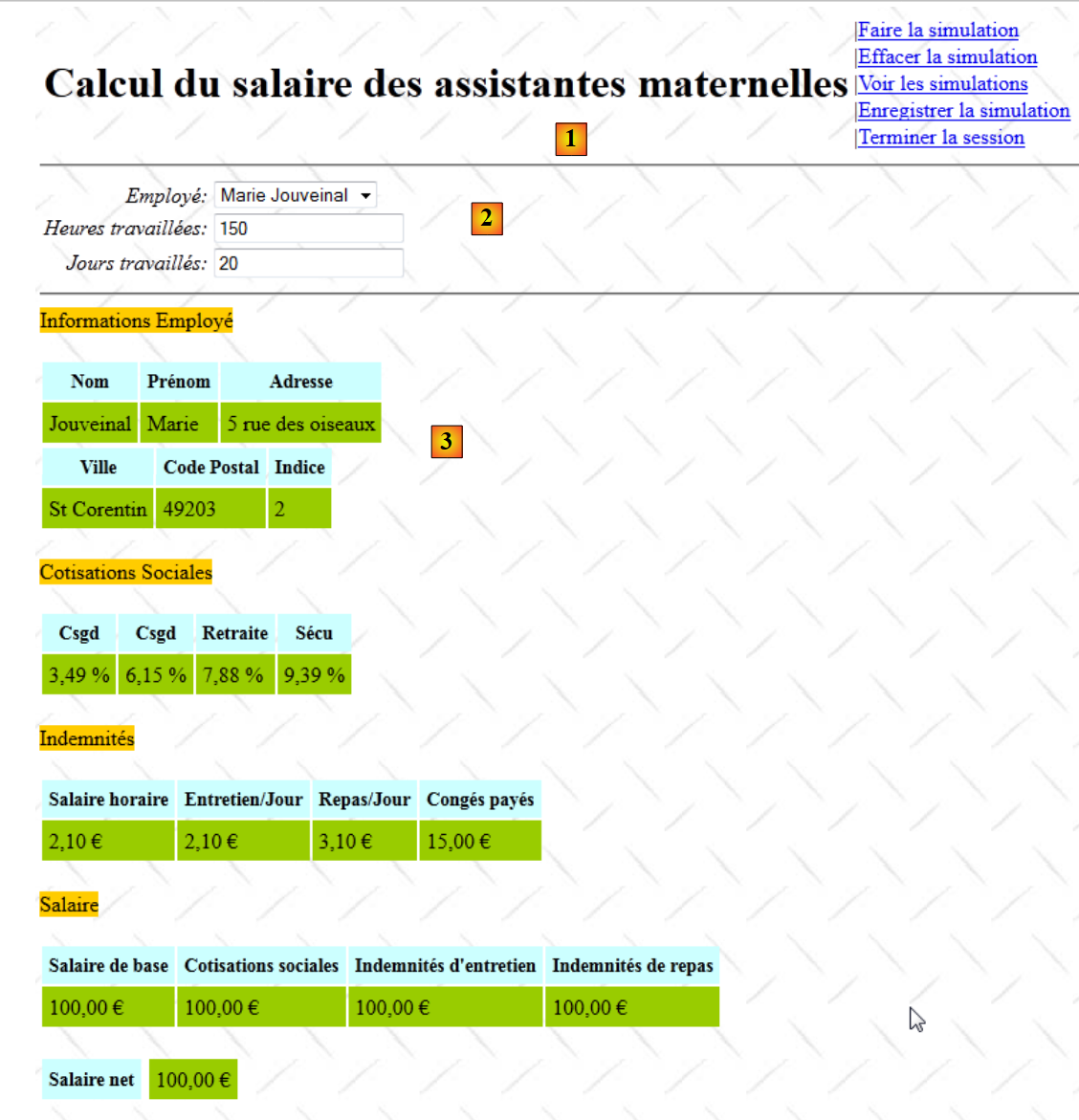 |
- 在 [1] 中,片段 [Entete.jsp]
- 在 [2] 中,片段 [Saisie.jsp]
- 变为 [3],片段 [Simulation.jsp]。需要说明的是,所展示的工资单是 [metier] 层渲染出的虚拟工资单。
前两个片段已展示过。片段 [Simulation.jsp] 如下:
<%@ page contentType="text/html; charset=UTF-8" pageEncoding="UTF-8"%>
<%@ taglib prefix="s" uri="/struts-tags" %>

<hr/>
<!-- 员工信息 -->
<span class="titreInfos">
  <s:text  name="Simulation.Infos.employe"/>
</span>
<br/><br/>
<table>
  <!-- 第 1 行 -->
  <tr>
    <th class="libelle">
      <s:text name="Simulation.Employe.nom"/>
    </th>
    <th class="libelle">
      <s:text name="Simulation.Employe.prenom"/>
    </th>
    <th class="libelle">
      <s:text name="Simulation.Employe.adresse"/>
    </th>
  </tr>
  <!-- 第 2 行 -->
  <tr>
    <td class="info">
      <s:property value="feuilleSalaire.employe.nom"/>
    </td>
    <td class="info">
      <s:property value="feuilleSalaire.employe.prenom"/>
    </td>
    <td class="info">
      <s:property value="feuilleSalaire.employe.adresse"/>
    </td>
</table>
<table>
  <!-- 第 1 行 -->
  <tr>
    <th class="libelle"><s:text name="Simulation.Employe.ville"/></th>
    <th class="libelle">
      <s:text name="Simulation.Employe.codePostal"/>
    </th>
    <th class="libelle">
      <s:text name="Simulation.Employe.indice"/>
    </th>
  </tr>
  <!-- 第 2 行 -->
  <tr>
    <td class="info">
      <s:property value="feuilleSalaire.employe.ville"/>
    </td>
    <td class="info">
      <s:property value="feuilleSalaire.employe.codePostal"/>
    </td>
    <td class="info">
      <s:property value="feuilleSalaire.employe.indemnite.indice"/>
    </td>
</table>
<!-- 缴费信息 -->
<br/>
<span class="titreInfos">
  <s:text name="Simulation.Infos.cotisations"/>
</span>

<br/><br/>
<table>
  <!-- 第 1 行 -->
  <tr>
    <th class="libelle">
      <s:text name="Simulation.Cotisations.csgrds"/>
    </th>
    <th class="libelle">
      <s:text name="Simulation.Cotisations.csgrds"/>
    </th>
    <th class="libelle">
      <s:text name="Simulation.Cotisations.retraite"/>
    </th>
    <th class="libelle">
      <s:text name="Simulation.Cotisations.secu"/>
    </th>
  </tr>
  <!-- 第 2 行 -->
  <tr>
    <td class="info">
      <s:text name="Format.pourcent">
        <s:param value="feuilleSalaire.cotisation.csgrds"/>
      </s:text>
    </td>
    <td  class="info">
      <s:text name="Format.pourcent">
        <s:param value="feuilleSalaire.cotisation.csgd"/>
      </s:text>
    </td>
    <td class="info">
      <s:text name="Format.pourcent">
        <s:param value="feuilleSalaire.cotisation.retraite"/>
      </s:text>
    </td>
    <td class="info">
      <s:text name="Format.pourcent">
        <s:param value="feuilleSalaire.cotisation.secu"/>
      </s:text>
    </td>
</table>
<!-- 赔偿金信息 -->
<br/>
<span class="titreInfos">
  <s:text name="Form.Infos.indemnites"/>
</span>
<br/><br/>
<table>
  <!-- 第 1 行 -->
  <tr>
    <th class="libelle">
      <s:text name="Simulation.Indemnites.salaireHoraire"/>
    </th>
    <th class="libelle">
      <s:text name="Simulation.Indemnites.entretienJour"/>
    </th>
    <th class="libelle">
      <s:text name="Simulation.Indemnites.repasJour"/>
    </th>
    <th class="libelle">
      <s:text name="Simulation.Indemnites.congésPayés"/>
    </th>
  </tr>
  <!-- 第 2 行 -->
  <tr>
    <td class="info">
      <s:text name="Format.monnaie">
        <s:param value="feuilleSalaire.employe.indemnite.baseHeure"/>
      </s:text>
    </td>
    </td>
    <td class="info">
      <s:text name="Format.monnaie">
        <s:param value="feuilleSalaire.employe.indemnite.entretienJour"/>
      </s:text>
    </td>
    <td class="info">
      <s:text name="Format.monnaie">
        <s:param value="feuilleSalaire.employe.indemnite.repasJour"/>
      </s:text>
    </td>
    <td class="info">
      <s:text name="Format.monnaie">
        <s:param value="feuilleSalaire.employe.indemnite.indemnitesCP"/>
      </s:text>
    </td>
  </tr>
</table>
<!-- 工资信息 -->
<br/>
<span class="titreInfos">
  <s:text name="Simulation.Infos.Salaire"/>
</span>
<br/><br/>
<table>
  <!-- 第 1 行 -->
  <tr>
    <th class="libelle">
      <s:text name="Simulation.Salaire.salaireBase"/>
    </th>
    <th class="libelle">
      <s:text name="Simulation.Salaire.cotisationsSociales"/>
    </th>
    <th class="libelle">
      <s:text name="Simulation.Salaire.entretien"/>
    </th>
    <th class="libelle">
      <s:text name="Simulation.Salaire.repas"/>
    </th>
  </tr>

  <!-- 第 2 行 -->
  <tr>
    <td class="info">
      <s:text name="Format.monnaie">
        <s:param value="feuilleSalaire.elementsSalaire.salaireBase"/>
      </s:text>
    </td>
    <td class="info">
      <s:text name="Format.monnaie">
        <s:param value="feuilleSalaire.elementsSalaire.cotisationsSociales"/>
      </s:text>
    </td>
    <td class="info">
      <s:text name="Format.monnaie">
        <s:param value="feuilleSalaire.elementsSalaire.indemnitesEntretien"/>
      </s:text>
    </td>
    <td class="info">
      <s:text name="Format.monnaie">
        <s:param value="feuilleSalaire.elementsSalaire.indemnitesRepas"/>
      </s:text>
    </td>
  </tr>
</table>
<!-- 净工资-->
<br/>
<table>
  <tr>
    <td class="libelle">
      <s:text name="Simulation.salaireNet"/>
    <td></td>
    <td class="info">
      <s:text name="Format.monnaie">
        <s:param value="feuilleSalaire.elementsSalaire.salaireNet"/>
      </s:text>
    </td>
  </tr>
</table>
虽然代码较长……但功能上很简单。该片段展示了字段 [Formulaire].feuilleSalaire 的各项属性,该字段代表员工的工资单。
回到方法 [Formulaire].calculSalaire:
// 工资计算
  public String calculSalaire() {
    try {
      ...
      return "simulation";
    } catch (Throwable th) {
      erreurs = new ArrayList<Erreur>();
      while (th != null) {
        erreurs.add(new Erreur(th.getClass().getName(), th.getMessage()));
        th = th.getCause();
      }
      // 菜单
      menu = new Menu(false, false, false, false, true, true);
      return "exception";
    }
  }
工资计算可能出现问题。特别是当与 Sgbd 的连接中断时,就会发生这种情况。在这种情况下,我们会处理由此产生的异常。我们在研究方法 [Formulaire].input 时已经遇到过这种情况。
- 第7-11行:从异常堆栈中创建一个名为Erreur的对象列表
- 第 13 行:设置菜单
- 第 14 行:返回键值 exception。
键 exception 将显示视图 Tiles exception:
    <!-- 表单操作 -->
    <action name="Formulaire" class="web.actions.Formulaire">
      <result name="exception" type="tiles">exception</result>
      ...
</action>
该 Tiles 视图此前已介绍过。其外观如下:
19.9. 保存模拟
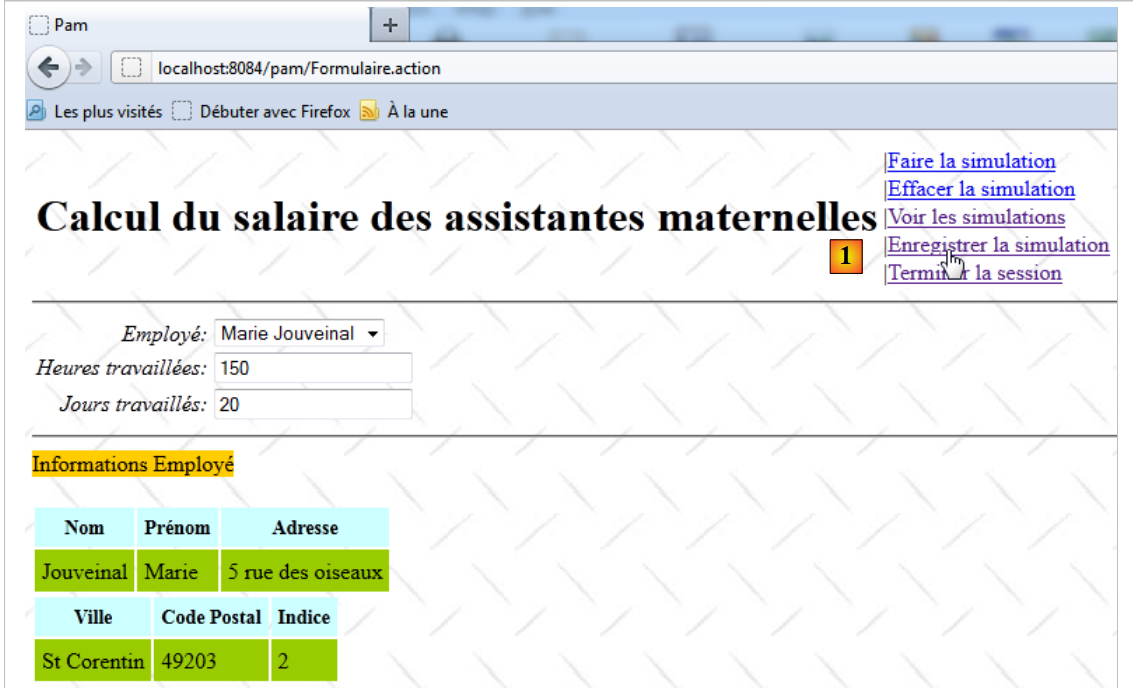
完成模拟后,用户可能希望将其保存到当前会话中。
 |
 |
- 在 [1] 中,将模拟
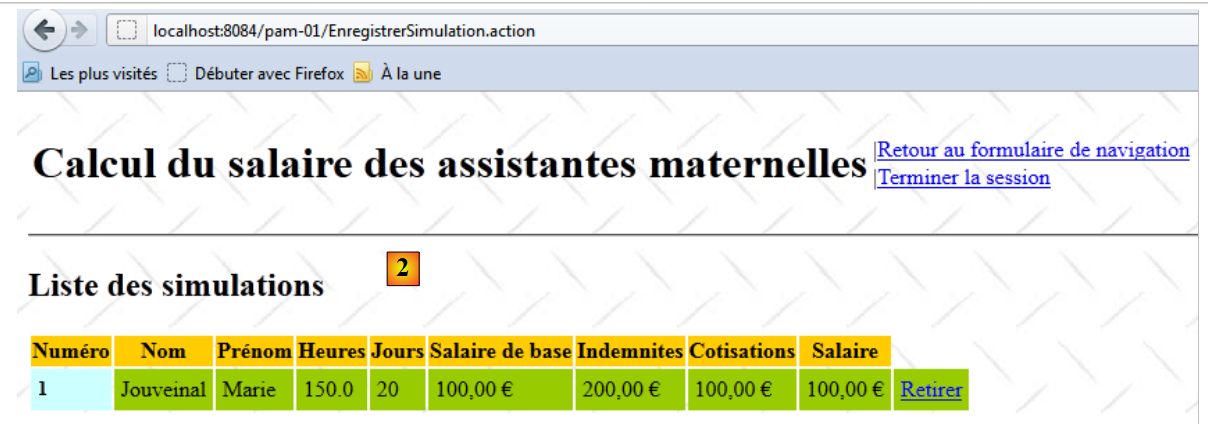
- 在 [2] 中,显示已进行模拟列表的响应,其中已添加了新的模拟
链接 [Enregistrer la simulation] 位于片段 [Entete.jsp] 中:
<%@ page contentType="text/html; charset=UTF-8" pageEncoding="UTF-8"%>
<%@ taglib prefix="s" uri="/struts-tags" %>

<table>
  <tr>
    <td><h1><s:text name="Pam.titre"/></h1></td>
    <td>
      ...
      <s:if test="menu.enregistrerSimulation">
        |<a href="<s:url action="EnregistrerSimulation"/>"><s:text name="Menu.EnregistrerSimulation"/></a><br/>
      </s:if>
      ...
    </td>
  </tr>
</table>
可见,点击该链接将触发操作 [EnregistrerSimulation]。该操作在文件 [struts.xml] 中配置如下:
   <!-- 操作EnregistrerSimulation -->
    <action name="EnregistrerSimulation" class="web.actions.Enregistrer" method="execute">
      <result name="error" type="tiles">erreur</result>
      <result name="simulations" type="tiles">simulations</result>
</action>
- 第 1 行:操作 [EnregistrerSimulation] 关联到类 [Enregistrer] 及其方法 execute。
类 [Enregistrer] 如下所示:
package web.actions;

...
public class Enregistrer extends ActionSupport implements SessionAware {

  // 会话
  private Map<String, Object> session;
  // 菜单
  private Menu menu;

  @Override
  public void setSession(Map<String, Object> session) {
    this.session = session;
  }

  // 执行操作
  public String execute() {
    // 从会话中获取最新模拟
    Simulation simulation = (Simulation) session.get("simulation");
    if (simulation == null) {
      return ERROR;
    }
    ...
  }

  // 获取器和设置器
  ...
}
- 第 4 行:由于该操作需要访问会话,因此它实现了接口 SessionAware。
- 第 7 行:会话
- 第 9 行:菜单
当操作 [Enregistrer] 被实例化时,其方法 execute 会被执行。需要说明的是,该方法的职责是将最近一次模拟结果存入会话。该结果将被添加到已完成的模拟列表中,该列表同样保存在会话中。
- 第 19 行:从会话中检索最近放入的模拟。
- 第 20-22 行:如果找不到该模拟,则说明会话可能已过期。实际上,会话仅持续一定时间,该时间可在配置应用程序的 [web.xml] 文件中设定。
- 第 21 行:返回密钥 error。
返回 [EnregistrerSimulation] 操作的配置:
   <!-- 操作EnregistrerSimulation -->
    <action name="EnregistrerSimulation" class="web.actions.Enregistrer" method="execute">
      <result name="error" type="tiles">erreur</result>
      <result name="simulations" type="tiles">simulations</result>
</action>
可以看到,键 error(第 3 行)会显示名为 erreur 的 Tiles 视图。 该视图由片段 [Entete.jsp] 和 [Erreur.jsp] 组成,外观如下:
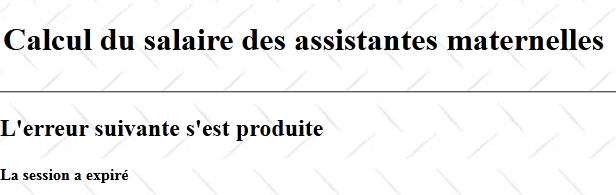
片段 [Erreur.jsp] 如下所示:
<%@ page contentType="text/html; charset=UTF-8" pageEncoding="UTF-8"%>
<%@ taglib prefix="s" uri="/struts-tags" %>

<h2><s:text name="Pam.Erreur.libelle"/></h2>
<h4><s:text name="Erreur.sessionexpiree"/></h4>
返回方法 [Enregistrer].execute:
// 执行操作
  public String execute() {
    // 获取会话中的最后一次模拟
    Simulation simulation = (Simulation) session.get("simulation");
    if (simulation == null) {
      return ERROR;
    }
    // 获取最后一次模拟的编号
    Integer numDerniereSimulation = (Integer) session.get("numDerniereSimulation");
    if (numDerniereSimulation == null) {
      numDerniereSimulation = 0;
    }
    // 递增该编号
    numDerniereSimulation++;
    // 将新编号写入会话
    session.put("numDerniereSimulation", numDerniereSimulation);
    // 获取模拟列表
    List<Simulation> simulations = (List<Simulation>) session.get("simulations");
    if (simulations == null) {
      simulations = new ArrayList<Simulation>();
      session.put("simulations", simulations);
    }
    // 向其中添加当前模拟
    simulation.setNum(numDerniereSimulation);
    simulations.add(simulation);
    // 显示模拟列表
    menu = new Menu(false, false, false, false, true, true);
    return "simulations";
  }
- 第 9-16 行:各种模拟从 1 开始编号。分配的最后一个编号被存入会话中,键名为 numDerniereSimulation。第 9-16 行的代码用于检索该键并递增其关联的值。
- 第18-22行:模拟列表保存在与键simulations关联的会话中。第18-22行的功能是:若该列表存在则检索它,若不存在则创建它。
- 第24-25行:获取模拟列表后,将其当前模拟添加到列表中(第25行)。此前,当前模拟已被分配了一个编号(第24行)。
- 第27行:确定要显示的菜单
- 第28行:将导航键设置为simulations。
返回 [struts.xml] 中 [EnregistrerSimulation] 操作的配置:
   <!-- 操作 EnregistrerSimulation -->
    <action name="EnregistrerSimulation" class="web.actions.Enregistrer" method="execute">
      <result name="error" type="tiles">erreur</result>
      <result name="simulations" type="tiles">simulations</result>
</action>
第4行,键simulations会触发显示名为simulations的 Tiles视图。该视图由片段[Entete.jsp]和[Simulations.jsp]组成。 显示的视图如下:
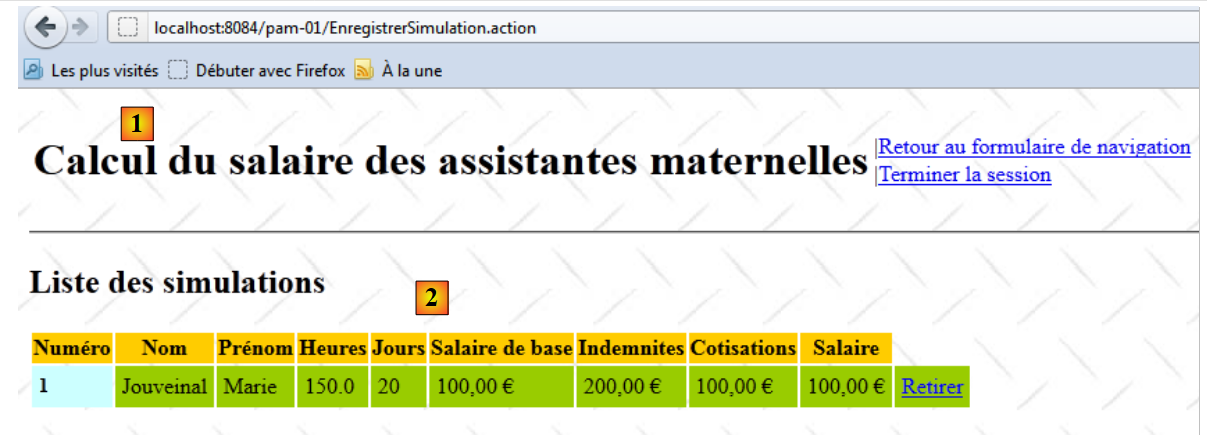 |
- 在 [1] 中,我们现在已经非常熟悉的片段 [Entete.jsp]。
- 在 [2] 中,片段 [Simulations.jsp]
片段 [Simulations.jsp] 如下:
<%@ page contentType="text/html; charset=UTF-8" pageEncoding="UTF-8"%>
<%@ taglib prefix="s" uri="/struts-tags" %>

<!-- 模拟列表为空 -->
<s:if test="#session['simulations']==null || #session['simulations'].size()==0">
  <h2><s:text name="Pam.SimulationsVides.titre"/></h2>
</s:if>
<!-- 非空模拟列表 -->
<s:if test="#session['simulations'].size()!=0">
  <h2><s:text name="Pam.Simulations.titre"/></h2>
  <table>
    <tr class="titreInfos">
      <th><s:text name="Pam.Simulations.num"/></th>
      <th><s:text name="Pam.Simulations.nom"/></th>
      <th><s:text name="Pam.Simulations.prenom"/></th>
      <th><s:text name="Pam.Simulations.heures"/></th>
      <th><s:text name="Pam.Simulations.jours"/></th>
      <th><s:text name="Pam.Simulations.salairebase"/></th>
      <th><s:text name="Pam.Simulations.indemnites"/></th>
      <th><s:text name="Pam.Simulations.cotisationsociales"/></th>
      <th><s:text name="Pam.Simulations.salairenet"/></th>
    </tr>
    <s:iterator value="#session['simulations']">
      <s:url action="SupprimerSimulation" var="url">
        <s:param name="id" value="num"/>
      </s:url>
      <tr>
        <td class="libelle"><s:property value="num"/></td>
        <td class="info"><s:property value="feuilleSalaire.employe.nom"/></td>
        <td class="info"><s:property value="feuilleSalaire.employe.prenom"/></td>
        <td class="info"><s:property value="heuresTravaillées"/></td>
        <td class="info"><s:property value="joursTravaillés"/></td>
        <td class="info">
          <s:text name="Format.monnaie">
            <s:param value="feuilleSalaire.elementsSalaire.salaireBase"/>
          </s:text>
        </td>
        <td class="info">
          <s:text name="Format.monnaie">
            <s:param value="indemnites"/>
          </s:text>
        </td>
        <td class="info">
          <s:text name="Format.monnaie">
            <s:param value="feuilleSalaire.elementsSalaire.cotisationsSociales"/>
          </s:text>
        </td>
        <td class="info">
          <s:text name="Format.monnaie">
            <s:param value="feuilleSalaire.elementsSalaire.salaireNet"/>
          </s:text>
        </td>
        <td class="info"><a href="<s:property value="#url"/>">删除</a></td>
      </tr>
    </s:iterator>
  </table>
</s:if>
- 第5-7行:如果该会话中没有模拟,则显示以下视图:

- 第 13-21 行:显示表格的列标题

- 第 23-55 行:遍历会话中找到的模拟列表
- 第24-26行:创建一个名为url的URL(属性为id)。该URL生成的HTML链接如下:
<a href="<a href="view-source:http://localhost:8084/pam/SupprimerSimulation.action?id=1">/pam/SupprimerSimulation.action?id=1</a>">Retirer</a>
可以看出,该链接指向操作 [SupprimerSimulation],并带有一个名为 id 的参数,该参数代表要从列表中移除的模拟编号。
- 第28-54行:在遍历模拟列表的每次迭代中,显示当前模拟的属性。

19.10. 删除模拟
用户可能希望从模拟列表中删除一个模拟:
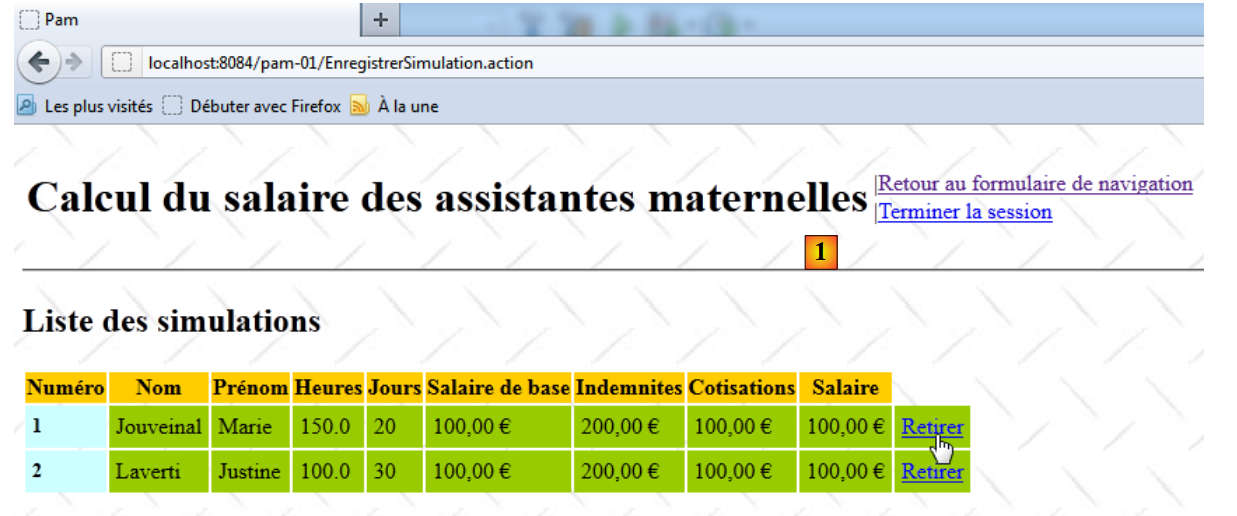 |
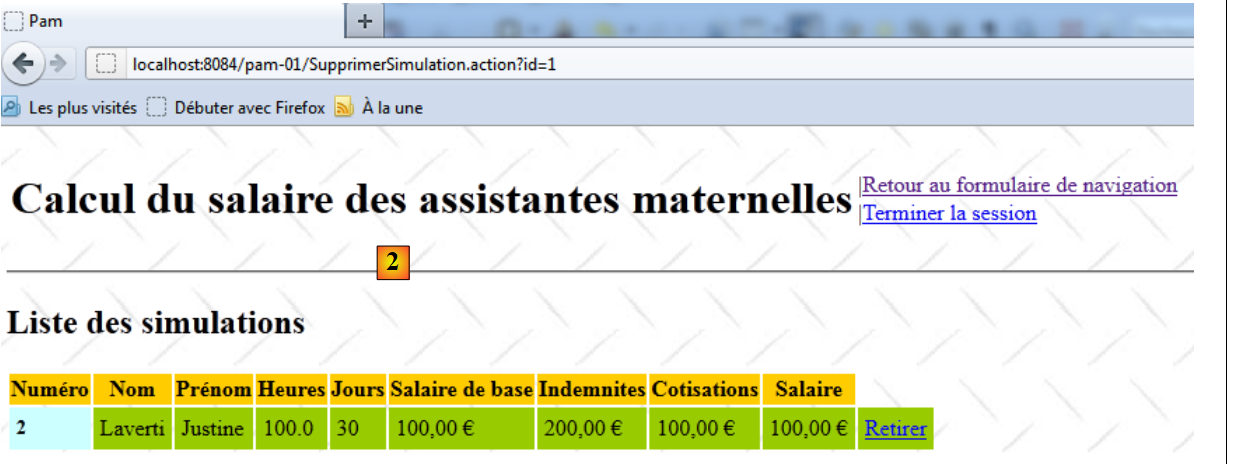 |
- 在 [1] 中,删除第 1 号模拟
- 在 [2] 中,模拟 1 已被删除
链接 [Retirer] 位于我们之前已分析过的片段 [Simulations.jsp] 中:
<%@ page contentType="text/html; charset=UTF-8" pageEncoding="UTF-8"%>
<%@ taglib prefix="s" uri="/struts-tags" %>

<!-- 空的模拟列表 -->
<s:if test="#session['simulations']==null || #session['simulations'].size()==0">
  <h2><s:text name="Pam.SimulationsVides.titre"/></h2>
</s:if>
<!-- 非空模拟列表 -->
<s:if test="#session['simulations'].size()!=0">
  <h2><s:text name="Pam.Simulations.titre"/></h2>
  <table>
    <tr class="titreInfos">
      ...
    </tr>
    <s:iterator value="#session['simulations']">
      <s:url action="SupprimerSimulation" var="url">
        <s:param name="id" value="num"/>
      </s:url>
      <tr>
        ...
        <td class="info">
          <s:text name="Format.monnaie">
            <s:param value="feuilleSalaire.elementsSalaire.salaireNet"/>
          </s:text>
        </td>
        <td class="info"><a href="<s:property value="#url"/>">移除</a></td>
      </tr>
    </s:iterator>
  </table>
</s:if>
- 第16-18行:生成HTML链接
<a href="<a href="view-source:http://localhost:8084/pam-01/SupprimerSimulation.action?id=2">/pam-01/SupprimerSimulation.action?id=</a>num">Retirer</a>
其中 num 是待删除的模拟编号。
在文件 [struts.xml] 中,操作 [SupprimerSimulation] 定义如下:
<?xml version="1.0" encoding="UTF-8" ?>
<!DOCTYPE struts PUBLIC
    "-//Apache Software Foundation//DTD Struts Configuration 2.0//EN"
    "http://struts.apache.org/dtds/struts-2.0.dtd">

<struts>
  <!-- 国际化 -->
  <constant name="struts.custom.i18n.resources" value="messages" />
  <!-- Spring集成 -->
  <constant name="struts.objectFactory.spring.autoWire" value="name" />


  <!-- Struts /Tiles 操作 -->
  <package name="default" namespace="/" extends="tiles-default">
    ...
   <!-- 操作RetirerSimulation -->
    <action name="SupprimerSimulation" class="web.actions.Supprimer">
      <result name="erreur" type="tiles">erreur</result>
      <result name="simulations" type="tiles">simulations</result>
    </action>
   ...
  </package>

    <!-- 在此添加包 -->

</struts>
- 第 16 行:操作 [SupprimerSimulation] 关联到类 [Supprimer]。由于未指定具体方法,因此将执行其方法 execute。 类 [Supprimer] 如下:
package web.actions;

...
public class Supprimer extends ActionSupport implements SessionAware {

  // 会话
  private Map<String, Object> session;
  // 要删除的模拟 ID
  private String id;
  // 菜单
  private Menu menu;

  @Override
  public void setSession(Map<String, Object> session) {
    this.session = session;
  }

  // 执行操作
  public String execute() {
    // 从会话中检索模拟
    List<Simulation> simulations = (List<Simulation>) session.get("simulations");
    if (simulations == null) {
      // 异常情况——会话可能已过期
      menu = new Menu(false, false, false, false, true, true);
      return "erreur";
    }
    // ID 验证
    int num = 0;
    boolean erreur = false;
    try {
      num = Integer.parseInt(id);
      erreur = num <= 0;
    } catch (NumberFormatException ex) {
      // 异常
      erreur = true;
    }
    // 错误?
    if (erreur) {
      menu = new Menu(false, false, false, false, true, true);
      return "erreur";
    }
    // 正在查找待删除的模拟
    for (int i = 0; i < simulations.size(); i++) {
      if (num == simulations.get(i).getNum()) {
        simulations.remove(i);
        break;
      }
    }
    // 显示模拟列表
    menu = new Menu(false, false, false, false, true, true);
    return "simulations";
  }

  // 获取器和设置器
...
}
- 第 4 行:操作 [Supprimer] 实现了接口 [SessionAware],以便访问会话。
- 第 7 行:会话
- 第 9 行:要删除的模拟编号。实际上,我们通过 HTML 链接:
<a href="<a href="view-source:http://localhost:8084/pam-01/SupprimerSimulation.action?id=2">/pam-01/SupprimerSimulation.action?id=</a>num">Retirer</a>
其中 num 即为待删除的模拟编号。该编号将存储在第 9 行的 id 字段中。
- 第 11 行:响应请求时将显示的视图菜单
- 第19行:用于生成请求响应的execute方法。
- 第 21 行:获取本会话中已执行的模拟列表
- 第22-26行:若无法从会话中获取该列表,通常意味着会话已过期。我们曾遇到过这种情况。返回键值erreur,该键值将显示视图Tiles erreur:
<!-- 操作 RetirerSimulation -->
    <action name="SupprimerSimulation" class="web.actions.Supprimer">
      <result name="erreur" type="tiles">erreur</result>
      ...
</action>
Tiles视图erreur已在第19.9节中介绍。
- 第28-36行:验证第9行的字符串id是否确实是一个大于0的整数。
- 第38-40行:若非如此,则再次返回键值erreur,该键值将显示视图Tiles erreur
- 第43-48行:在模拟列表中查找待删除的模拟。若找到,则将其删除。
- 第 50 行:更新“Tiles simulations”视图的菜单。
- 第51行:返回键值simulations。该键值将显示视图Tiles simulations:
<!-- 操作 RetirerSimulation -->
    <action name="SupprimerSimulation" class="web.actions.Supprimer">
      ...
      <result name="simulations" type="tiles">simulations</result>
</action>
Tiles视图simulations已在第19.9节中介绍。
19.11. 返回表单
从视图 Tiles simulations 开始,用户可以返回表单:
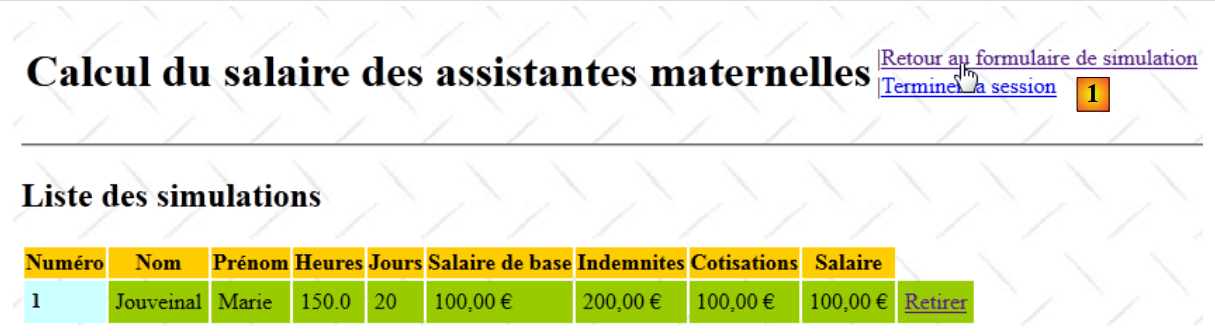 |
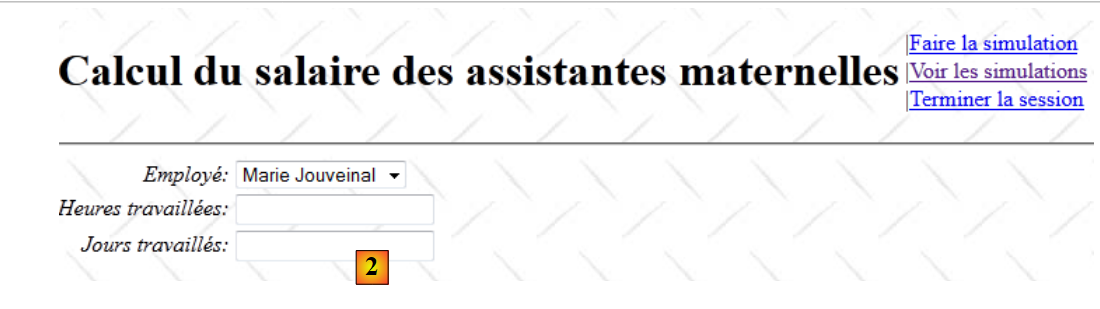 |
- 在 [1] 中,点击返回表单的链接
- 在 [2] 中,会看到一个空表单
链接 [Retour au formulaire de simulation] 在片段 [Entete.jsp] 中定义:
<%@ page contentType="text/html; charset=UTF-8" pageEncoding="UTF-8"%>
<%@ taglib prefix="s" uri="/struts-tags" %>

<table>
  <tr>
    <td><h1><s:text name="Pam.titre"/></h1></td>
    <td>
      ...
      <s:if test="menu.retourFormulaire">
        |<a href="<s:url action="RetourFormulaire"/>"><s:text name="Menu.RetourFormulaire"/></a><br/>
      </s:if>
      ...
    </td>
  </tr>
</table>
- 第 10 行:该链接指向操作 [RetourFormulaire]。该操作在文件 [struts.xml] 中定义如下:
   <!-- 操作 RetourFormulaire -->
    <action name="RetourFormulaire" >
      <result type="redirectAction">
        <param name="actionName">Formulaire!input</param>
        <param name="namespace">/</param>
      </result>
</action>
可以看出,该操作未关联任何类。它仅将客户端浏览器重定向至操作 [/Formulaire!input]。 这与第 19.7 节中所述的初始视图显示情况相同。因此,我们再次看到该初始视图 [2]。
19.12. 查看模拟列表
在视图 Tiles simulation 或 saisie 中,用户可以请求查看模拟结果:
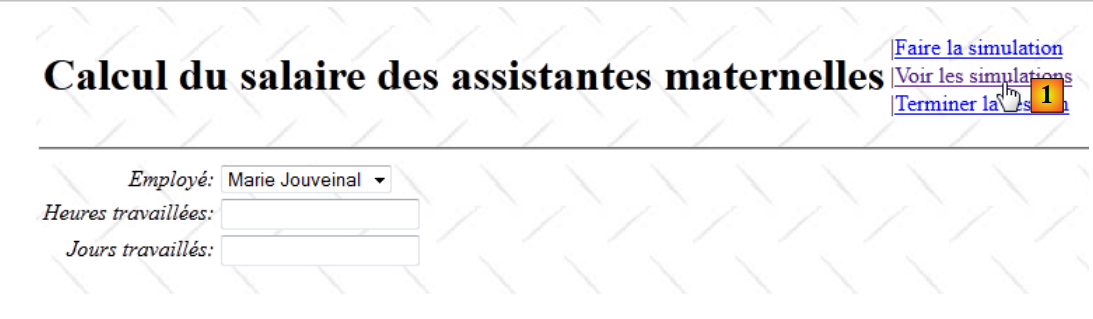 |
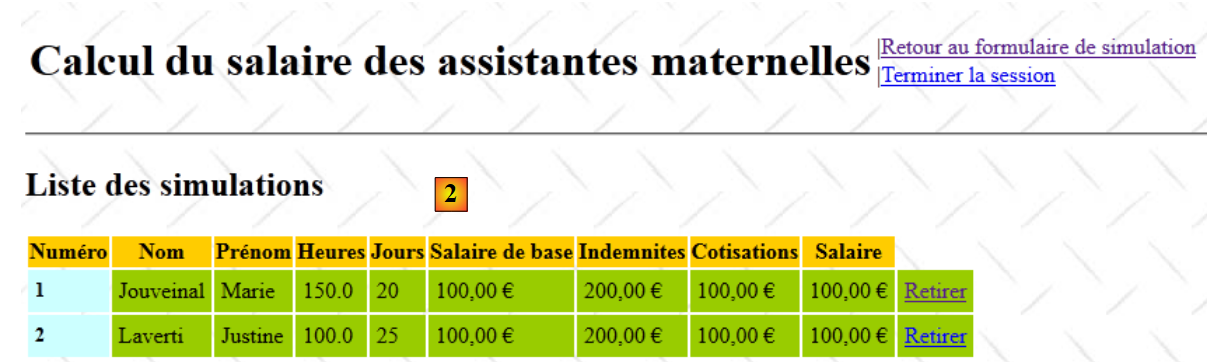 |
- 在 [1] 中,点击链接 [Voir les simulations]
- 在 [2] 中,可查看模拟列表
链接 [Voir les simulations] 在片段 [Entete.jsp] 中定义:
<%@ page contentType="text/html; charset=UTF-8" pageEncoding="UTF-8"%>
<%@ taglib prefix="s" uri="/struts-tags" %>

<table>
  <tr>
    <td><h1><s:text name="Pam.titre"/></h1></td>
    <td>
      ...
      <s:if test="menu.voirSimulations">
        |<a href="<s:url action="VoirSimulations"/>"><s:text name="Menu.VoirSimulations"/></a><br/>
      </s:if>
      ...
    </td>
  </tr>
</table>
- 第 10 行:链接 [Voir les simulations] 调用了操作 [VoirSimulations]。该操作在文件 [struts.xml] 中定义如下:
   <!-- 操作 VoirSimulations -->
    <action name="VoirSimulations" class="web.actions.Voir">
      <result name="success" type="tiles">simulations</result>
</action>
操作 [VoirSimulations] 关联到类 [Voir],但未指定具体方法。因此将执行方法 [Voir].execute。 类 [Voir] 如下所示:
package web.actions;

import com.opensymphony.xwork2.ActionSupport;
import web.entities.Menu;

public class Voir extends ActionSupport{
  // 菜单
  private Menu menu=new Menu(false,false,false,false,true,true);
  // 获取器和设置器

  public Menu getMenu() {
    return menu;
  }

  public void setMenu(Menu menu) {
    this.menu = menu;
  }

}
操作 [Voir] 仅执行一项操作:为“模拟磁贴”视图定位菜单(第 8 行)。不存在 execute 方法。因此将执行父类 [ActionSupport] 中的方法。 我们知道,该方法除了返回键值 success 之外,不会执行任何操作。
回到 [struts.xml] 的代码:
   <!-- 操作 VoirSimulations -->
    <action name="VoirSimulations" class="web.actions.Voir">
      <result name="success" type="tiles">simulations</result>
</action>
第 3 行,可以看到键 success 导致显示视图 Tiles simulations。该视图已在第 156 页中描述。
19.13. 清除当前模拟
在“Tiles”视图 simulation 中,用户可请求清除当前模拟:
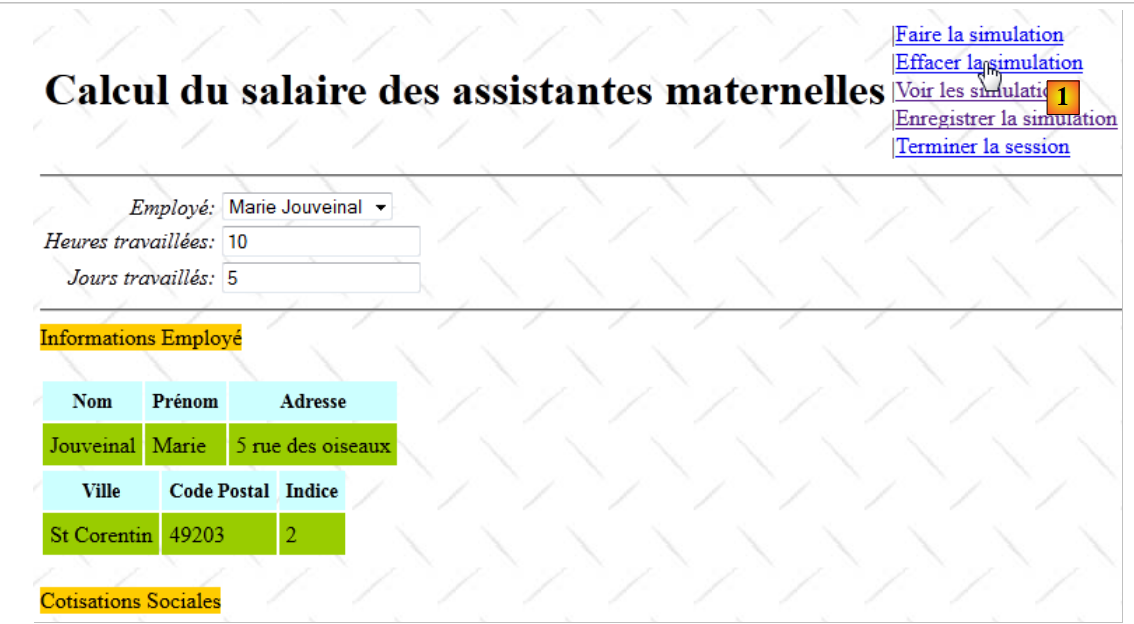 |
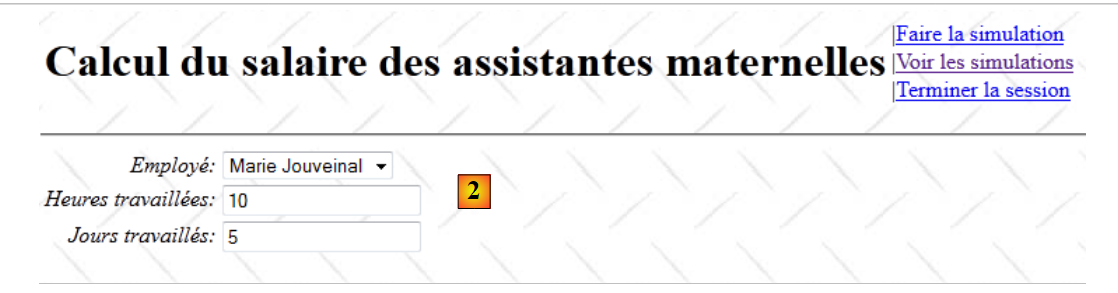 |
- 在 [1] 中,清除当前模拟
- 在 [2] 中,显示空白的输入表单
链接 [Effacer la simulation] 在片段 [Entete.jsp] 中定义:
<%@ page contentType="text/html; charset=UTF-8" pageEncoding="UTF-8"%>
<%@ taglib prefix="s" uri="/struts-tags" %>

<table>
  <tr>
    <td><h1><s:text name="Pam.titre"/></h1></td>
    <td>
      ...
      <s:if test="menu.effacerSimulation">
        |<a href="<s:url action="Formulaire!input"/>"><s:text name="Menu.EffacerSimulation"/></a><br/>
      </s:if>
      ...
    </td>
  </tr>
</table>
第10行,可见链接[Effacer la simulation]触发了操作[Formulaire!input]。已知该操作将跳转至初始视图[2]。
19.14. 结束当前会话
在所有 Tiles 视图中,用户均可请求结束会话:
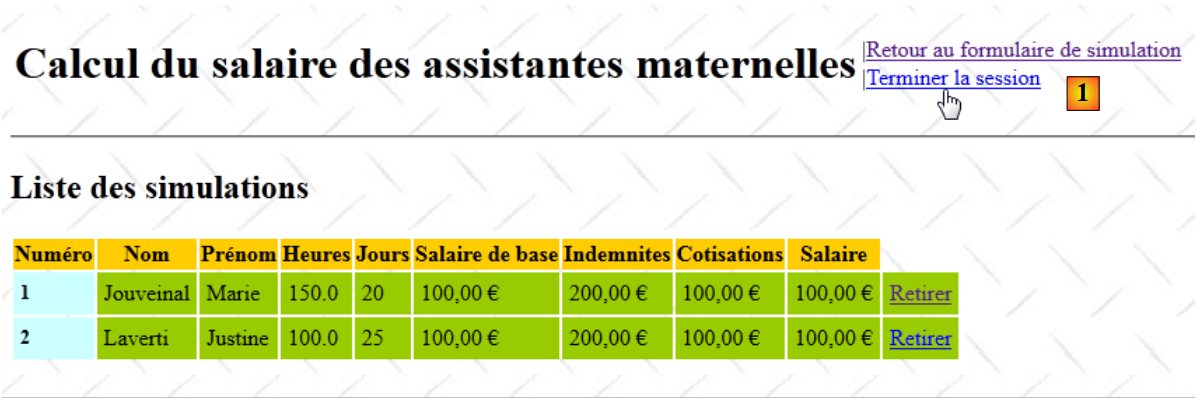 |
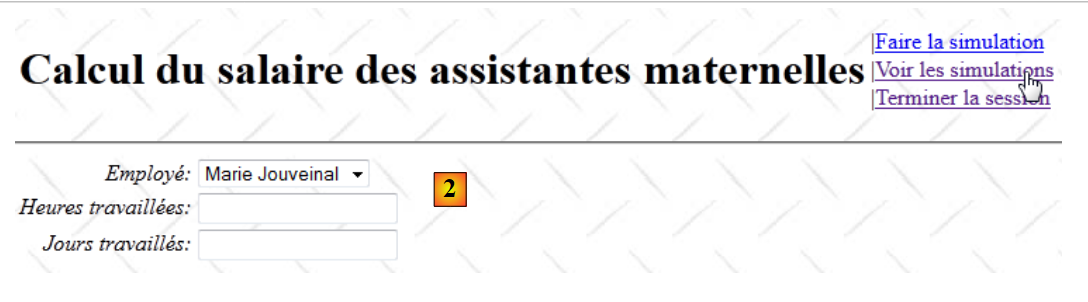 |
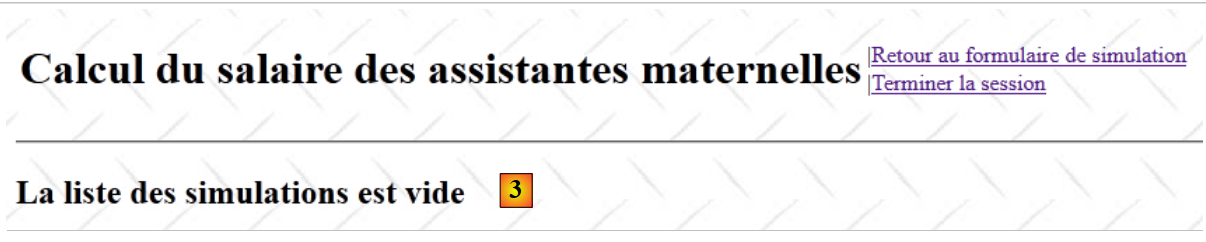 |
- 在 [1] 中,从模拟视图开始并结束会话
- 在 [2] 中,看到的是空白的输入表单。请求查看模拟。
- 在 [3] 中,模拟列表现已清空。
链接 [Terminer la session] 在片段 [Entete.jsp] 中定义:
<%@ page contentType="text/html; charset=UTF-8" pageEncoding="UTF-8"%>
<%@ taglib prefix="s" uri="/struts-tags" %>

<table>
  <tr>
    <td><h1><s:text name="Pam.titre"/></h1></td>
    <td>
      ...
      <s:if test="menu.terminerSession">
        |<a href="<s:url action="TerminerSession"/>"><s:text name="Menu.TerminerSession"/></a><br/>
      </s:if>
    </td>
  </tr>
</table>
第 10 行可见,链接 [Terminer la session] 触发了操作 [TerminerSession]。该操作在文件 [struts.xml] 中定义如下:
    <action name="TerminerSession" class="web.actions.Terminer">
      <result name="success" type="redirectAction">
        <param name="actionName">Formulaire!input</param>
        <param name="namespace">/</param>
      </result>
</action>
- 第 1 行:可以看到 [Terminer] 类将被实例化,并执行其 execute 方法。
- 第2-5行:在执行完方法 [Terminer].execute 之后,将重定向至初始数据录入视图。这解释了屏幕2的显示内容。
类 [Terminer] 如下所示:
package web.actions;

import com.opensymphony.xwork2.ActionSupport;
import java.util.Map;
import org.apache.struts2.interceptor.SessionAware;

public class Terminer extends ActionSupport implements SessionAware {

  // 会话
  private Map<String, Object> session;

  @Override
  public String execute() {
    // 放弃当前会话
    session.clear();
    return SUCCESS;
  }

  @Override
  public void setSession(Map<String, Object> session) {
    this.session = session;
  }
}
操作 [Terminer] 的作用是清空当前会话的属性。
- 第 7 行:操作 [Terminer] 实现了接口 [SessionAware],以便访问会话。
- 第 10 行:会话字典
- 第 13 行:正在执行的方法 execute
- 第 15 行:它清空了会话字典。因此,会话中的模拟列表将消失。这解释了屏幕 3 的情况。
- 第16行:该方法返回键值success,如前所述,该键值将显示视图Tiles saisie [2]。
19.15. Conclusion
我们已对案例研究第 1 版进行了完整注释,该版本使用模拟的图层 [metier]:
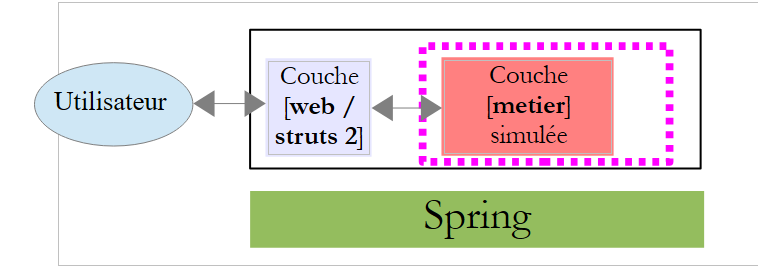 |
接下来,我们只需将真正的业务层“接入”[web]层即可。