11. 示例 09 - 整数的转换与验证
接下来我们将介绍一系列关于表单参数转换与验证的示例。 问题如下。为了处理形式为 [http://machine:port/.../Action] 的 URL,控制器 [FilterDispatcher] 会实例化实现所请求操作的类,并执行其中一个方法,默认情况下是名为 execute 的方法。 对该方法 execute 的调用会经过一系列拦截器:
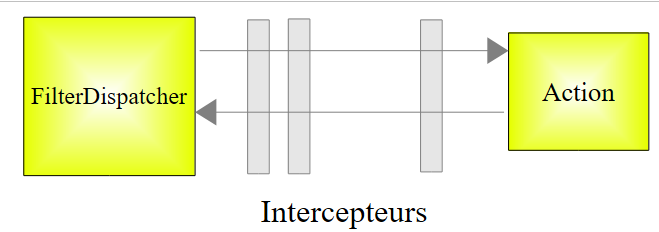 |
拦截器列表定义在 [struts2-core.jar] 归档文件根目录下的 [struts-default.xml] 文件中。其中定义的拦截器列表如下:
             <interceptor-stack name="defaultStack">
                <interceptor-ref name="exception"/>
                <interceptor-ref name="alias"/>
                <interceptor-ref name="servletConfig"/>
                <interceptor-ref name="i18n"/>
                <interceptor-ref name="prepare"/>
                <interceptor-ref name="chain"/>
                <interceptor-ref name="debugging"/>
                <interceptor-ref name="scopedModelDriven"/>
                <interceptor-ref name="modelDriven"/>
                <interceptor-ref name="fileUpload"/>
                <interceptor-ref name="checkbox"/>
                <interceptor-ref name="multiselect"/>
                <interceptor-ref name="staticParams"/>
                <interceptor-ref name="actionMappingParams"/>
                <interceptor-ref name="params">
                  <param name="excludeParams">dojo\..*,^struts\..*</param>
                </interceptor-ref>
                <interceptor-ref name="conversionError"/>
                <interceptor-ref name="validation">
                    <param name="excludeMethods">input,back,cancel,browse</param>
                </interceptor-ref>
                <interceptor-ref name="workflow">
                    <param name="excludeMethods">input,back,cancel,browse</param>
                </interceptor-ref>
</interceptor-stack>
在这些拦截器中,有一个负责将随请求以 parami=valeuri 形式附带的 parami 参数的值 valeuri 注入到操作中。 已知如果方法 setParami 存在,则 valeuri 将通过该方法注入到操作的 parami 字段中。否则,不会进行任何注入,也不会报告任何错误。
字符串 parami=valeuri 是一个字符串。截至目前,已将 valeuri 注入到类型为 String 的 parami 字段中:
将字符串 valeuri 注入为字符串 parami 的值时,并未出现问题。 如果 parami 不是 String 类型,那么 valeuri 必须从 parami 转换为 Ti 类型。 这就是转换的问题。例如,我们希望年龄为整数,因此会在操作中写入:
此外,我们可能希望将年龄限定在1到150之间。这便涉及一个有效性验证问题。参数parami虽然可以转换为正确的类型,但未必是有效的。因此需要经过两个步骤。如果回到请求处理流程图:
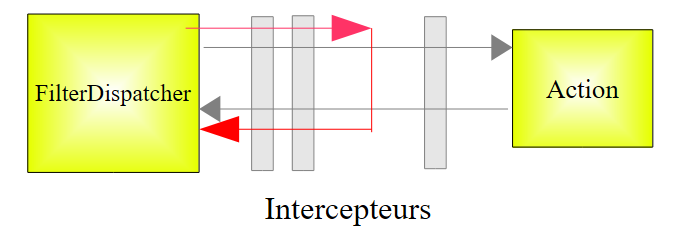 |
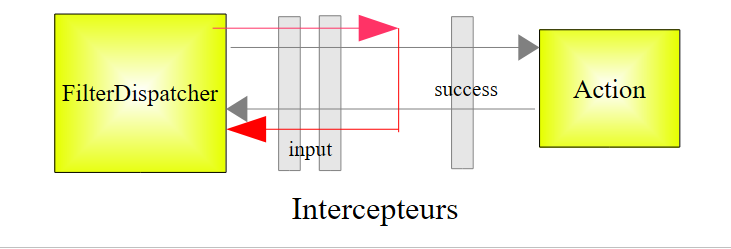
将分别由两个拦截器负责参数的转换和验证。如果其中任何一个步骤失败,请求将不会继续传递到操作(如上图红色路径所示)。提交了错误参数的表单将重新显示,并附带错误信息。
负责参数转换和验证的拦截器分别是前文拦截器列表第19行和第20行的conversionError与validation。 请注意第20-22行:如果被调用的方法是 input、back、 cancel、browse中的任一方法,则拦截器validation不会被应用。我们将在后续内容中利用这一特性。
我们首先研究整数的转换和验证。我们将花时间讲解这个第一个示例,因为验证涉及许多要素。一旦掌握了这些要素,我们就能更快地处理后续的示例。
11.1. 表单
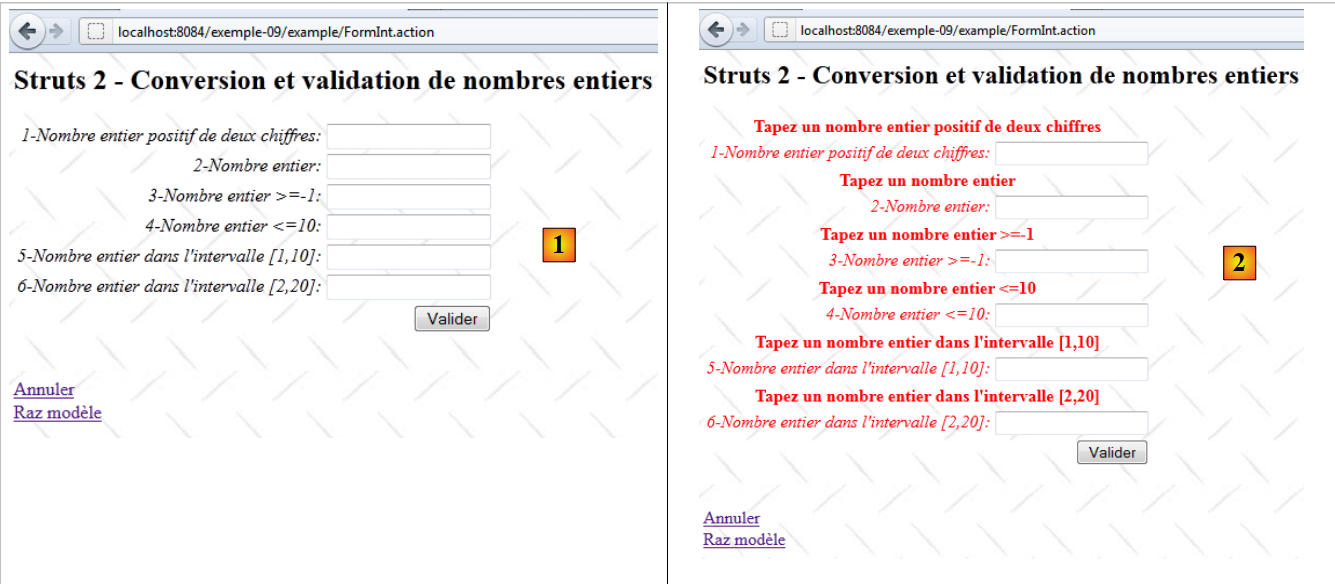 |
- 转换为 [1],输入表单
- 转换为 [2],未输入任何值直接提交时的结果
11.2. NetBeans 项目
NetBeans 项目如下:
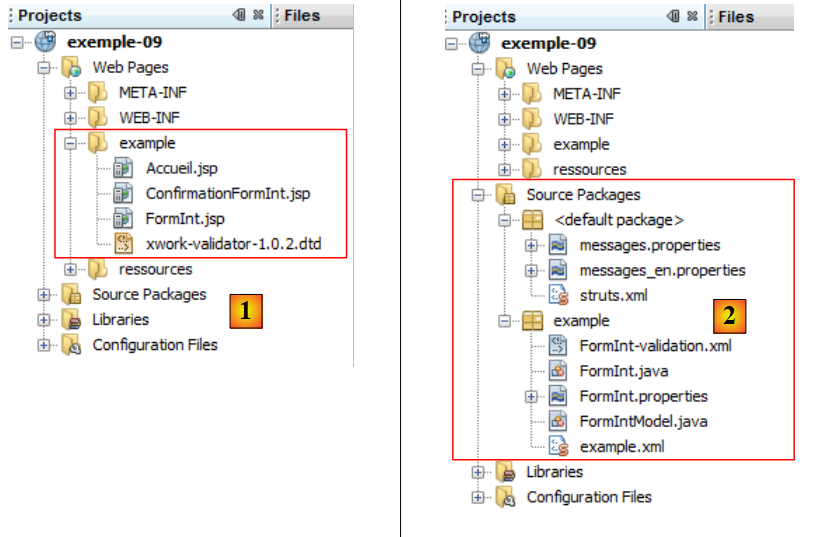 |
- 在 [1] 中,应用程序的三个视图
- 在 [2] 中,源代码、国际化消息文件以及 Struts 配置文件。
11.3. Struts 配置
该应用程序通过文件 [struts.xml] 和 [example.xml] 进行配置。
文件 [struts.xml] 内容如下:
<?xml version="1.0" encoding="UTF-8" ?>
<!DOCTYPE struts PUBLIC
    "-//Apache Software Foundation//DTD Struts Configuration 2.0//EN"
    "http://struts.apache.org/dtds/struts-2.0.dtd">

<struts>
  <constant name="struts.custom.i18n.resources" value="messages" />

  <include file="example/example.xml"/>

  <package name="default" namespace="/" extends="struts-default">
    <default-action-ref name="index" />
    <action name="index">
      <result type="redirectAction">
        <param name="actionName">Accueil</param>
        <param name="namespace">/example</param>
      </result>
    </action>
  </package>
</struts>
第 12-18 行将 [/example/Accueil] 定义为用户未指定时默认的 Action。
文件 [example.xml] 内容如下:
<?xml version="1.0" encoding="UTF-8" ?>
<!DOCTYPE struts PUBLIC
        "-//Apache Software Foundation//DTD Struts Configuration 2.0//EN"
        "http://struts.apache.org/dtds/struts-2.0.dtd">

<struts>
  <package name="example" namespace="/example" extends="struts-default">
    <action name="Accueil">
      <result name="success">/example/Accueil.jsp</result>
    </action>
    <action name="FormInt" class="example.FormInt">
      <result name="input">/example/FormInt.jsp</result>
      <result name="cancel" type="redirect">/example/Accueil.jsp</result>
      <result name="success">/example/ConfirmationFormInt.jsp</result>
    </action>
  </package>
</struts>
- 第 8-10 行:操作 [Accueil] 用于显示视图 [Accueil.jsp]
- 第 11 行:操作 [FormInt] 默认调用类 [example.FormInt] 中的方法 execute。 我们将看到另外两个方法也会被执行,即 input 和 cancel。这些方法将在查询参数中进行指定。
- 第 12 行:键 input 将显示视图 [FormInt.jsp](第 5 行)。该视图即表单视图。
- 第 13 行:键 cancel 将由关联链接 [Annuler] 的方法 cancel 返回。 重定向(type=redirect)后,渲染的视图将变为 [Accueil.jsp]。
- 第14行:键值 success 由操作 [FormInt] 的方法 execute 返回。 如果请求到达了 execute 方法,说明它已成功通过了所有拦截器,特别是那些验证参数有效性的拦截器。 此时,方法 execute 仅需返回键 success,该键将显示确认视图 [ConfirmationInt.jsp]。
11.4. 消息文件
文件 [messages.properties] 内容如下:
Accueil.titre=Accueil
Accueil.message=Struts 2 - Conversions et validations
Accueil.FormInt=Saisie de nombres entiers
Form.titre=Conversions et validations
FormInt.message=Struts 2 - Conversion et validation de nombres entiers
Form.submitText=Valider
Form.cancelText=Annuler
Form.clearModel=Raz mod\u00e8le
Confirmation.titre=Confirmation
Confirmation.message=Confirmation des valeurs saisies
Confirmation.champ=champ
Confirmation.valeur=valeur
Confirmation.lien=Formulaire de test
除了该文件外,视图还使用以下文件 [FormInt.properties]:
int1.prompt=1-Nombre entier positif de deux chiffres
int1.error=Tapez un nombre entier positif de deux chiffres
int2.prompt=2-Nombre entier
int2.error=Tapez un nombre entier
int3.prompt=3-Nombre entier >=-1
int3.error=Tapez un nombre entier >=-1
int4.prompt=4-Nombre entier <=10
int4.error=Tapez un nombre entier <=10
int5.prompt=5-Nombre entier dans l''intervalle [1,10]
int5.error=Tapez un nombre entier dans l''intervalle [1,10]
int6.prompt=6-Nombre entier dans l''intervalle [2,20]
int6.error=Tapez un nombre entier dans l''intervalle [2,20]
仅当生成视图的操作是 [FormInt] 时,才会使用文件 [FormInt.properties]。这是在消息文件过大时对其进行分割的一种方式。 我们在文件 [Action.properties] 中对操作 Action 的消息进行国际化处理。
11.5. 视图与操作
现在介绍该应用程序的视图和操作。根据应用程序的配置:
<?xml version="1.0" encoding="UTF-8" ?>
<!DOCTYPE struts PUBLIC
        "-//Apache Software Foundation//DTD Struts Configuration 2.0//EN"
        "http://struts.apache.org/dtds/struts-2.0.dtd">

<struts>
  <package name="example" namespace="/example" extends="struts-default">
    <action name="Accueil">
      <result name="success">/example/Accueil.jsp</result>
    </action>
    <action name="FormInt" class="example.FormInt">
      <result name="input">/example/FormInt.jsp</result>
      <result name="cancel" type="redirect">/example/Accueil.jsp</result>
      <result name="success">/example/ConfirmationFormInt.jsp</result>
    </action>
  </package>
</struts>
可见包含三个视图 [Accueil.jsp, FormInt.jsp, ConfirmationFormInt.jsp] 和两个操作 [Accueil, FormInt]。
11.5.1. Accueil.jsp
视图 [Accueil.jsp] 如下所示:
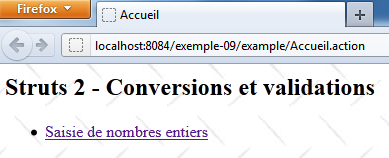
其代码如下:
<%@ page contentType="text/html; charset=UTF-8" pageEncoding="UTF-8"%>
<%@ taglib prefix="s" uri="/struts-tags" %>
<html>
  <head>
    <title><s:text name="Accueil.titre"/></title>
    <s:head/>
  </head>

  <body background="<s:url value="/ressources/standard.jpg"/>">
    <h2><s:text name="Accueil.message"/></h2>
    <ul>
      <li>
        <s:url id="url" action="FormInt!input"/>
        <s:a href="%{url}"><s:text name="Accueil.FormInt"/></s:a>
      </li>
    </ul>
  </body>
</html>
第 14 行的链接生成了以下 HTML 代码:
<a href="<a href="view-source:http://localhost:8084/exemple-09/example/FormInt.action">/exemple-09/example/FormInt!input.action</a>">Saisie de nombres entiers</a>
因此,这是一个指向操作 [FormInt] 的链接,该操作在 [example.xml] 中配置如下:
    <action name="FormInt" class="example.FormInt">
      <result name="input">/example/FormInt.jsp</result>
      <result name="cancel" type="redirect">/example/Accueil.jsp</result>
      <result name="success">/example/ConfirmationFormInt.jsp</result>
</action>
点击该链接将实例化类 [example.FormInt],并执行该类的 input 方法。 由于该方法不存在,因此将执行父类 ActionSupport 中的 input 方法。该方法除了返回键 input 之外,不执行任何操作。 因此,最终显示的是视图 [/example/FormInt.jsp]。
此外,方法 input 是被验证拦截器忽略的方法之一:
        <interceptor-ref name="validation">
          <param name="excludeMethods">input,back,cancel,browse</param>
</interceptor-ref>
因此不会对参数进行验证。这一点很重要,因为此处没有参数,而我们稍后会看到,验证规则将强制要求存在六个参数。
11.5.2. 操作 [FormInt]
操作 [FormInt] 关联到以下类 [FormInt]:
package example;

import com.opensymphony.xwork2.ActionSupport;
import com.opensymphony.xwork2.ModelDriven;
import java.util.Map;
import org.apache.struts2.interceptor.SessionAware;
import org.apache.struts2.interceptor.validation.SkipValidation;

public class FormInt extends ActionSupport implements ModelDriven, SessionAware {

  // 无参构造函数
  public FormInt() {
  }

  // 操作模型
  public Object getModel() {
    if (session.get("model") == null) {
      session.put("model", new FormIntModel());
    }
    return session.get("model");
  }

  public String cancel() {
    // 清理模型
    ((FormIntModel) getModel()).clearModel();
    // 结果
    return "cancel";
  }

  @SkipValidation
  public String clearModel() {
    // 清空模型
    ((FormIntModel) getModel()).clearModel();
    // 结果
     return INPUT;
  }

  // SessionAware
  private Map<String, Object> session;

  public void setSession(Map<String, Object> session) {
    this.session = session;
  }

  // 验证
  @Override
  public void validate() {
    // int6 输入有效吗?
    if (getFieldErrors().get("int6") == null) {
      int int6 = Integer.parseInt(((FormIntModel) getModel()).getInt6());
      if (int6 < 2 || int6 > 20) {
        addFieldError("int6", getText("int6.error"));
      }
    }
  }
}
我们将根据需要逐步对该代码进行注释。目前:
- 第 9 行,类 [FormInt] 实现了两个接口:
- ModelDriven(仅含一个方法)、第16行的getModel
- SessionAware 仅包含一个方法,即第 41 行的 setSession
- 第 16-21 行:实现 ModelDriven 接口。需要说明的是,该接口允许将视图的模型移至外部类中,此处即为以下 [FormIntModel] 类:
package example;

public class FormIntModel {

  // 无参数的构造函数
  public FormIntModel() {
  }

  // 表单字段
  private String int1;
  private Integer int2;
  private Integer int3;
  private Integer int4;
  private Integer int5;
  private String int6;

  // 模型清空
  public void clearModel(){
    int1=null;
    int2=null;
    int3=null;
    int4=null;
    int5=null;
    int6=null;
  }

  // 获取器和设置器
   ...
}
模型 [FormIntModel] 包含六个字段,分别对应视图 [FormInt.jsp] 中的六个输入字段。这六个字段将接收提交的值。其中四个字段的类型为 Integer。 因此,针对这四个字段,将面临从 String 转换为 Integer 的问题。方法 clearModel 可用于重置该模型。
让我们回到操作 [FormInt] 中的方法 getModel:
  // 操作模型
  public Object getModel() {
    if (session.get("model") == null) {
      session.put("model", new FormIntModel());
    }
    return session.get("model");
}
- 第 3-5 行:在会话中查找模型。如果找不到,则创建一个模型实例并将其放入会话中。
- 第 6 行:虽然每次向该操作发出新请求时都会创建一个操作实例,但其模型将保留在会话中。
我们可以看到,该类并未定义 input 方法,但其父类中存在一个该方法,该方法返回键 input。执行此方法将导致显示视图 [FormInt.jsp],我们现在将展示该视图。
11.5.3. 视图 [FormInt.jsp]
视图 [FormInt.jsp] 如下所示:
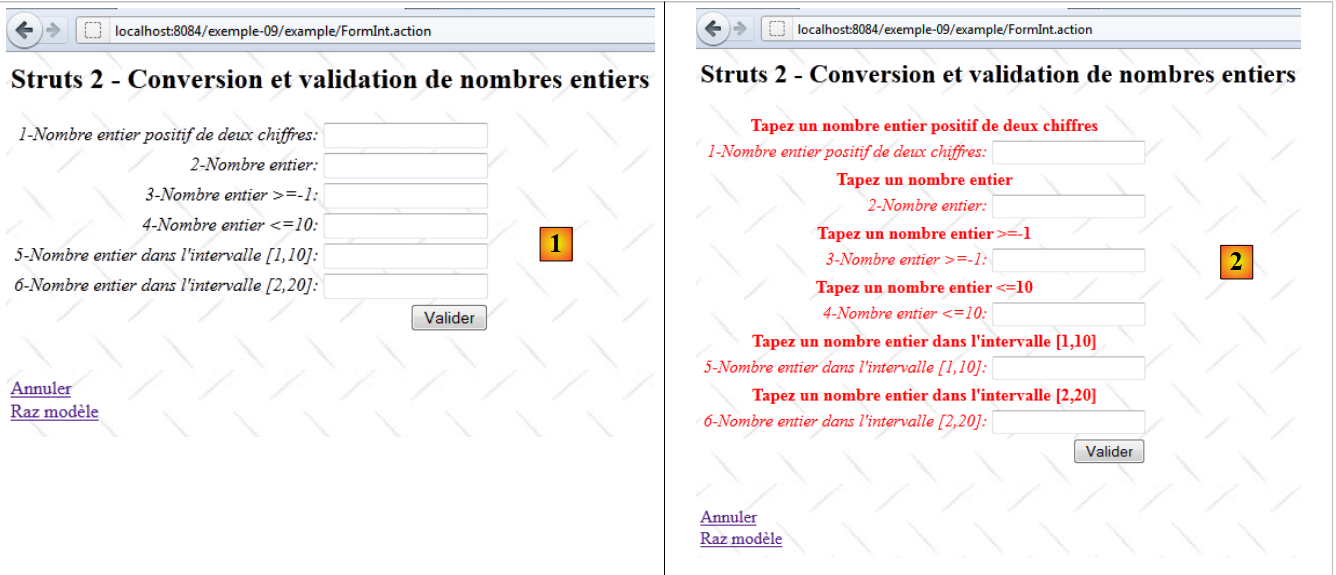 |
- 在 [1] 中,显示空白表单
- 在 [2] 中,参数验证错误后的表单。
其代码如下:
<%@ page contentType="text/html; charset=UTF-8" pageEncoding="UTF-8"%>
<%@ taglib prefix="s" uri="/struts-tags" %>
<html>
  <head>
    <title><s:text name="Form.titre"/></title>
    <s:head/>
  </head>

  <body background="<s:url value="/ressources/standard.jpg"/>">
    <h2><s:text name="FormInt.message"/></h2>
    <s:form name="formulaire" action="FormInt">
      <s:textfield name="int1" key="int1.prompt"/>
      <s:textfield name="int2" key="int2.prompt"/>
      <s:textfield name="int3" key="int3.prompt"/>
      <s:textfield name="int4" key="int4.prompt"/>
      <s:textfield name="int5" key="int5.prompt"/>
      <s:textfield name="int6" key="int6.prompt"/>
      <s:submit key="Form.submitText" method="execute"/>
    </s:form>
    <br/>
    <s:url id="url" action="FormInt" method="cancel"/>
    <s:a href="%{url}"><s:text name="Form.cancelText"/></s:a>
      <br/>
    <s:url id="url" action="FormInt" method="clearModel"/>
    <s:a href="%{url}"><s:text name="Form.clearModel"/></s:a>
  </body>
</html>
- 第12-17行:这六个输入字段对应于操作[FormInt]中模板[FormIntModel]的六个字段。 在视图显示时,这些输入字段的显示值使用的是其 value 属性。 如果缺少 value 属性,则使用 name 属性。
- 第 12 行:如果该操作实现了 ModelDriven 接口,则该输入字段(name)将与操作或其模型中的 int1 字段相关联。本例中即为这种情况。 其他所有字段也同样如此。
- 第 18 行:按钮 [Valider] 将输入数据提交至第 11 行定义的操作 [FormInt]。此时将执行该操作的方法 execute。
- 第 21-22 行:链接 [Annuler] 执行方法 [FormInt.cancel]。
- 第 24-25 行:链接 [Raz modèle] 执行方法 [FormInt.clearModel]。
11.5.4. 视图 [ConfirmationFormInt.jsp]
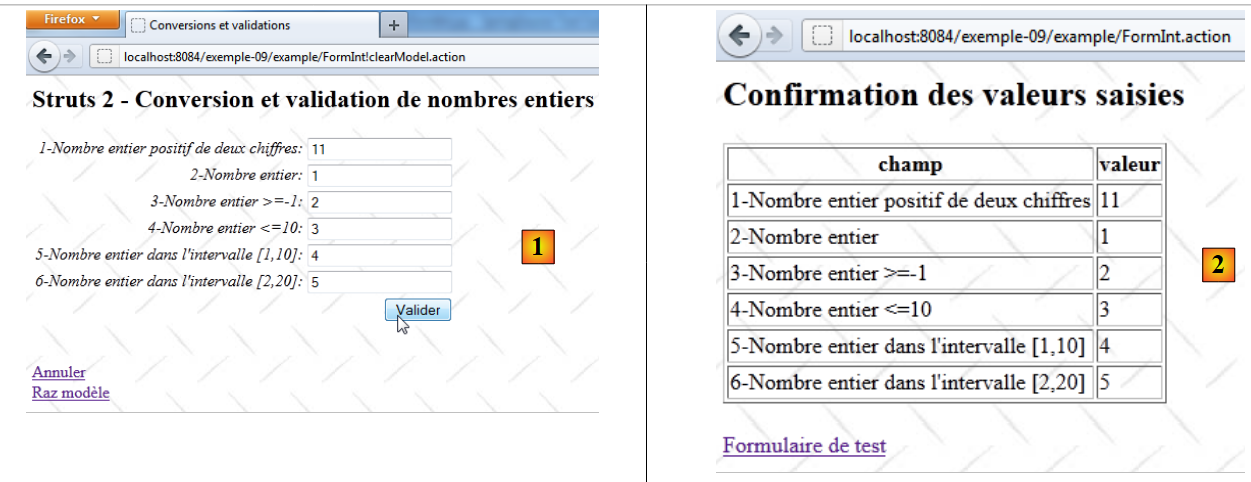 |
当表单 [FormInt.jsp] 中的所有输入均有效时,将显示该视图。
- 在 [1] 中,将有效值
- 在 [2] 中,显示确认页面
视图 [ConfirmationInt.jsp] 的代码如下:
<%@ page contentType="text/html; charset=UTF-8" pageEncoding="UTF-8"%>
<%@ taglib prefix="s" uri="/struts-tags" %>
<html>
  <head>
    <title><s:text name="Confirmation.titre"/></title>
    <s:head/>
  </head>

  <body background="<s:url value="/ressources/standard.jpg"/>">
    <h2><s:text name="Confirmation.message"/></h2>
    <table border="1">
      <tr>
        <th><s:text name="Confirmation.champ"/></th>
        <th><s:text name="Confirmation.valeur"/></th>
      </tr>
      <tr>
        <td><s:text name="int1.prompt"/></td>
        <td><s:property value="int1"/></td>
      </tr>
      <tr>
        <td><s:text name="int2.prompt"/></td>
        <td><s:property value="int2"/></td>
      </tr>
      <tr>
        <td><s:text name="int3.prompt"/></td>
        <td><s:property value="int3"/></td>
      </tr>
      <tr>
        <td><s:text name="int4.prompt"/></td>
        <td><s:property value="int4"/></td>
      </tr>
      <tr>
        <td><s:text name="int5.prompt"/></td>
        <td><s:property value="int5"/></td>
      </tr>
      <tr>
        <td><s:text name="int6.prompt"/></td>
        <td><s:property value="int6"/></td>
      </tr>
    </table>
    <br/>
    <s:url id="url" action="FormInt" method="input"/>
    <s:a href="%{url}"><s:text name="Confirmation.lien"/></s:a>
  </body>
</html>
要理解该代码,需注意视图是在实例化类 [FormInt] 之后显示的。因此,该类及其模型 [FormIntModel] 的字段均可被视图访问。
- 第 16-38 行:显示六个字段的值
- 第42-43行:指向操作[FormInt]的链接。为此链接生成的代码如下:
<a href="/exemple-09/example/FormInt!input.action">Formulaire de test</a>
该链接的特定 URL 表明,[FormInt] 操作中的 input 方法应处理此请求。回顾 [example.xml] 中 [FormInt] 操作的配置:
    <action name="FormInt" class="example.FormInt">
      <result name="input">/example/FormInt.jsp</result>
      <result name="cancel" type="redirect">/example/Accueil.jsp</result>
      <result name="success">/example/ConfirmationFormInt.jsp</result>
</action>
类 [FormInt] 的方法 input 将继承自其父类 ActionSupport。 类 [FormInt] 的方法 input 的执行将在拦截器执行之后进行
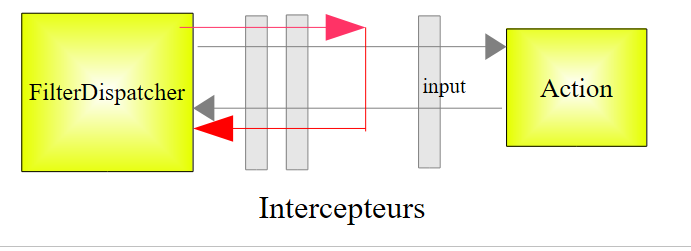 |
已知对方法 input 的调用会被验证拦截器忽略。因此不会进行验证。
显示视图 [FormInt.jsp]:
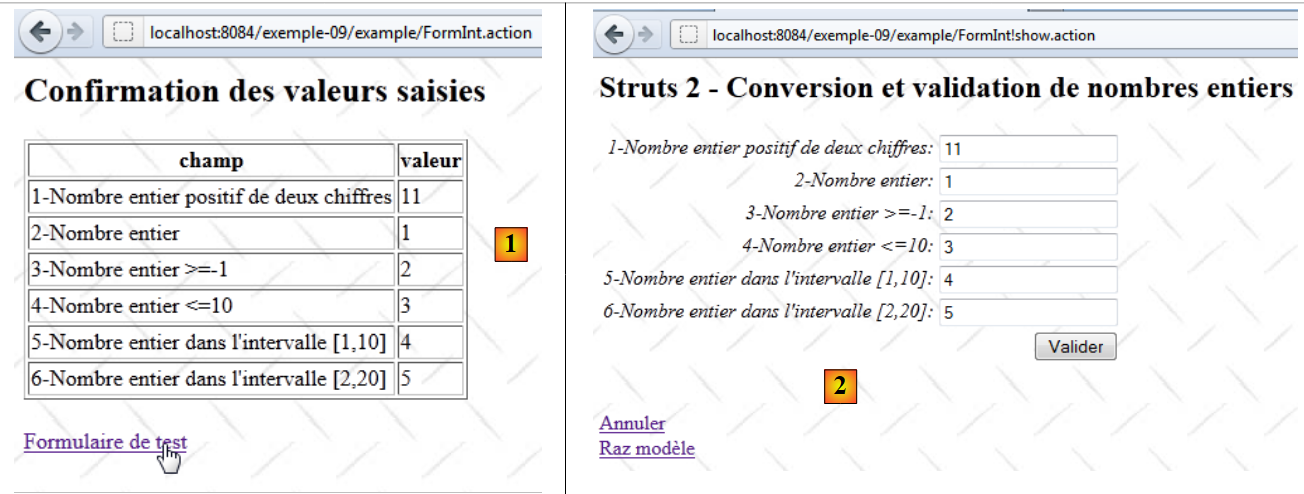 |
在 [2] 中,输入字段恢复了其输入值。这看似正常,实则不然。 由于调用了操作 [FormInt],因此实例化了关联类 [FormInt]。由于该类实现了接口 ModelDriven,因此调用了其方法 getModel:
  // 操作模型
  public Object getModel() {
    if (session.get("model") == null) {
      session.put("model", new FormIntModel());
    }
    return session.get("model");
}
可以看到,操作的模型是从会话中获取的。在上一步中,该模型已根据提交的值进行了更新。因此,我们在此处看到了这些值。如果未将会话中的模型,视图 [FormInt.jsp] 中将出现六个空字段。
11.5.5. 操作 [FormInt!clearModel]
点击链接 [Raz modèle] 将触发操作 [Formint!clearModel]:
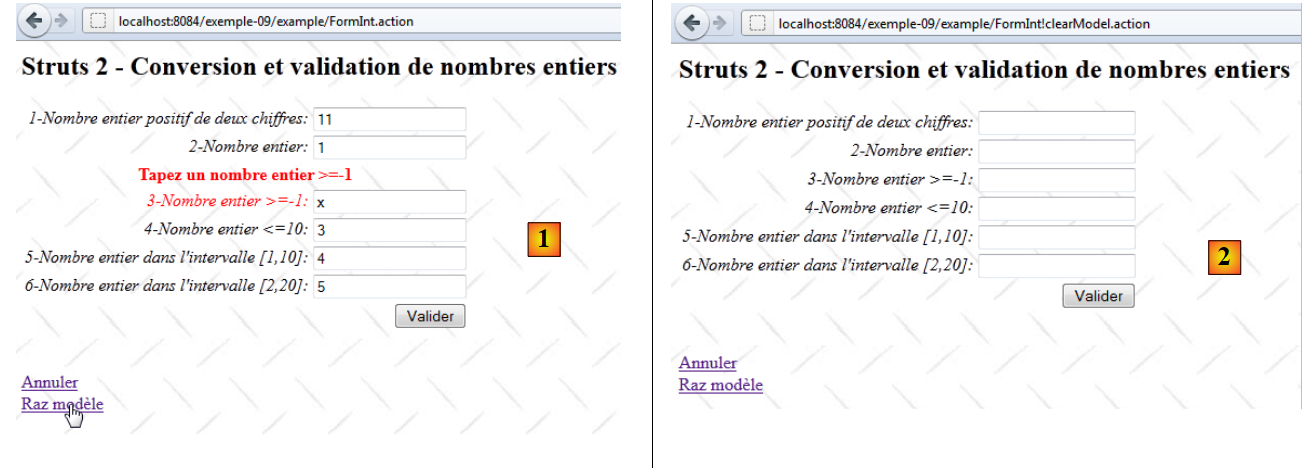 |
- 在 [1] 中,输入错误后的表单
- 在 [2] 中,点击链接 [Raz modèle] 后的表单。
方法 [FormInt.clearModel] 如下:
  @SkipValidation
  public String clearModel() {
    // 模型清空
    ((FormIntModel) getModel()).clearModel();
    // 结果
    return INPUT;
}
- 第1行:无需进行验证。使用 @SkipValidation 表示法来标注。此时验证拦截器将不会执行验证。
- 第 4 行:执行方法 [FormIntModel].clearModel。我们之前已经遇到过该方法。它将模型的六个字段重置为 null。
- 第 7 行:该方法返回键 input。
若回到 [FormInt] 操作的配置:
    <action name="FormInt" class="example.FormInt">
      <result name="input">/example/FormInt.jsp</result>
      <result name="cancel" type="redirect">/example/Accueil.jsp</result>
      <result name="success">/example/ConfirmationFormInt.jsp</result>
</action>
可以看到,键 input 将显示视图 [FormInt.jsp]。该视图显示了模型的六个字段。 由于这些字段位于 null 中,因此视图显示了六个空字段 [2]。
11.5.6. 操作 [FormInt!cancel]
点击链接 [Annuler] 将触发操作 [Formint!cancel]:
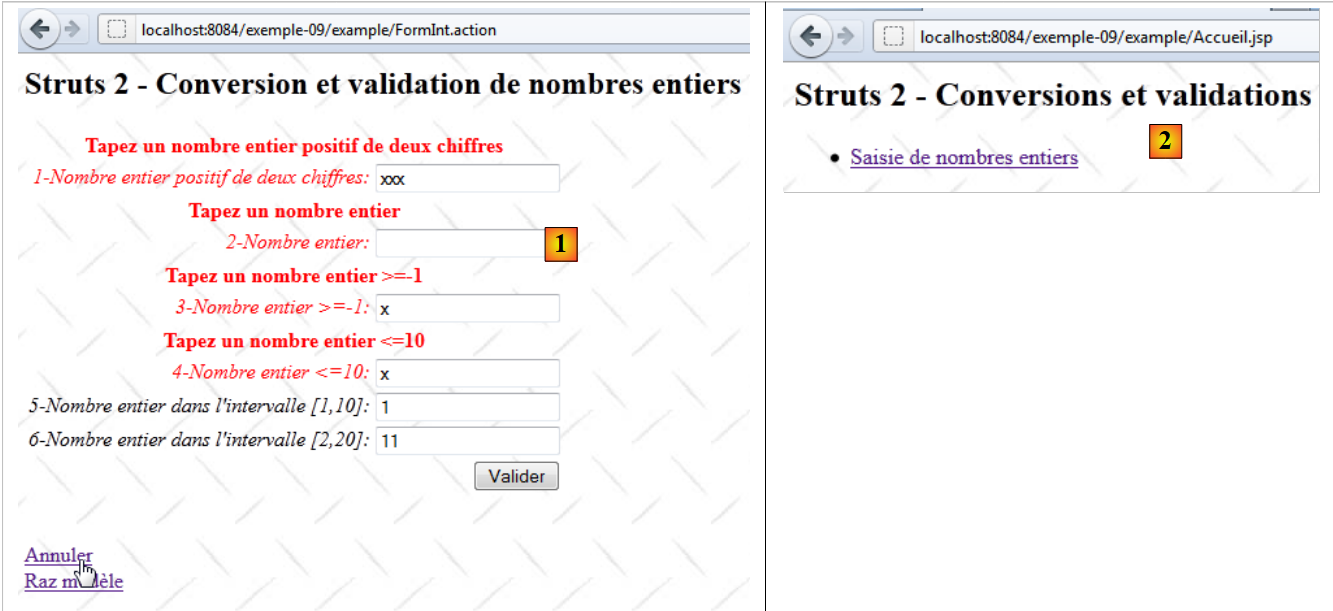 |
- 在 [1] 中,表单在输入错误后的状态
- 在[2]中,点击链接[Annuler]后显示的首页。
方法 [FormInt.cancel] 如下:
  public String cancel() {
    // 清理模型
    ((FormIntModel) getModel()).clearModel();
    // 结果
    return "cancel";
}
- 第 1 行:请注意,该方法前未带有注释 SkipValidation。而我们并不希望进行验证。方法 cancel 属于以下四个方法之一:input、 back、cancel、browse这四个方法之一,这些方法会被验证拦截器忽略,因此注解SkipValidation也是不必要的。
- 第3行:清空模型
- 第 5 行:返回键 cancel
若回到操作 [FormInt] 的配置:
    <action name="FormInt" class="example.FormInt">
      <result name="input">/example/FormInt.jsp</result>
      <result name="cancel" type="redirect">/example/Accueil.jsp</result>
      <result name="success">/example/ConfirmationFormInt.jsp</result>
</action>
可以看到,在客户端重定向后,键 cancel 将显示视图 [Accueil.jsp]。这正是视图 [2] 所展示的内容。
11.6. 验证流程
现在我们来讨论与模型中以下六个字段相关的六个输入字段的验证:
  // 表单字段
  private String int1;
  private Integer int2;
  private Integer int3;
  private Integer int4;
  private Integer int5;
private String int6;
每次实例化类 [FormInt] 且执行的方法未被验证拦截器忽略时,都会进行此验证。该验证由以下内容驱动:
- 文件 [FormInt-validation.xml](如果它与类 [FormInt] 位于同一文件夹中)
- 方法 [FormInt.validate](如果存在)。
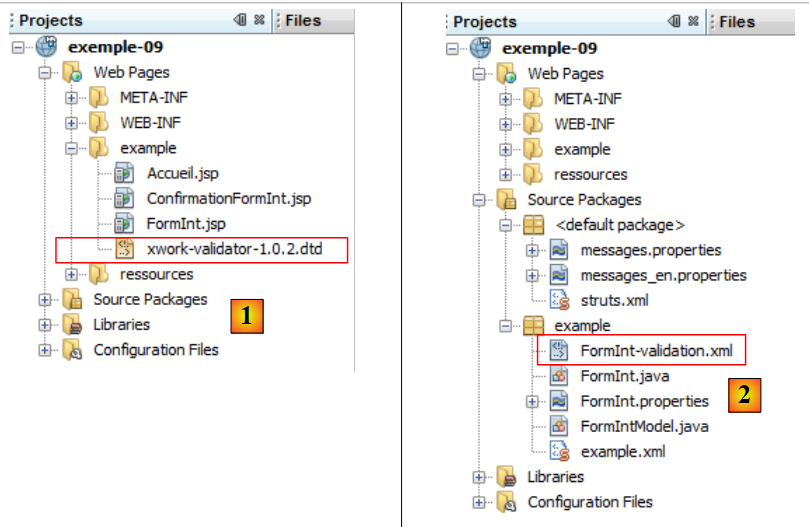 |
- 在 [1] 中:[xwork-validator-1.0.2.dtd] 文件(验证流程所需)
- 转换为 [2]:文件 [FormInt-validation.xml] 位于与类 [FormInt] 相同的文件夹中
文件 [FormInt-validation.xml] 如下:
<!--
<!DOCTYPE validators PUBLIC "-//OpenSymphony Group//XWork Validator 1.0.2//
EN" "http://www.opensymphony.com/xwork/xwork-validator-1.0.2.dtd">
-->

<!DOCTYPE validators PUBLIC "-//OpenSymphony Group//XWork Validator 1.0.2//
EN" "http://localhost:8084/example-09/example/xwork-validator-1.0.2.dtd">

<validators>

  <field name="int1" >
    <field-validator type="requiredstring" short-circuit="true">
      <message key="int1.error"/>
    </field-validator>
    <field-validator type="regex" short-circuit="true">
      <param name="expression">^\d{2}$</param>
      <param name="trim">true</param>
      <message key="int1.error"/>
    </field-validator>
  </field>

  <field name="int2" >
    ...
  </field>

...
</validators>
- 在 [3] 中,需填写验证文件 DTD(文档类型定义)的 URL。该 URL 必须可访问,否则验证文件将无法使用。
- 在 [7] 中,是应用程序所使用的 DTD 的 URL。 我们将文件 DTD 放置在项目 exemple-09 [1] 的 [example] 文件夹中,以便即使无法访问互联网也能使用该文件。
- 第 11-20 行:设定与表单字段 int1 关联的参数 int1 的验证条件。
表单中名为 int1 的标签如下:
<s:textfield name="int1" key="int1.prompt" />
模板中的字段 int1 声明如下:
private String int1;
- 第 12-14 行:验证参数 int1 是否存在(非 null)且长度不为零。若不满足条件,则在输入字段中显示错误信息。 该参数在 [FormInt.properties] 中定义如下:
int1.error=Tapez un nombre entier positif de deux chiffres
如果出现错误,则 int1 参数的验证过程将终止(short-circuit=true)。
- 第 15-19 行:通过正则表达式验证参数 int1 的有效性。
- 第 16 行:正则表达式,此处为 2 位数字,前后均无其他字符。
- 第 17 行:在将参数 int1 与正则表达式进行比较之前,将去除其首尾的空格。
- 第 18 行:可能出现的错误信息。与前一个验证器相同。
让我们看看运行效果:
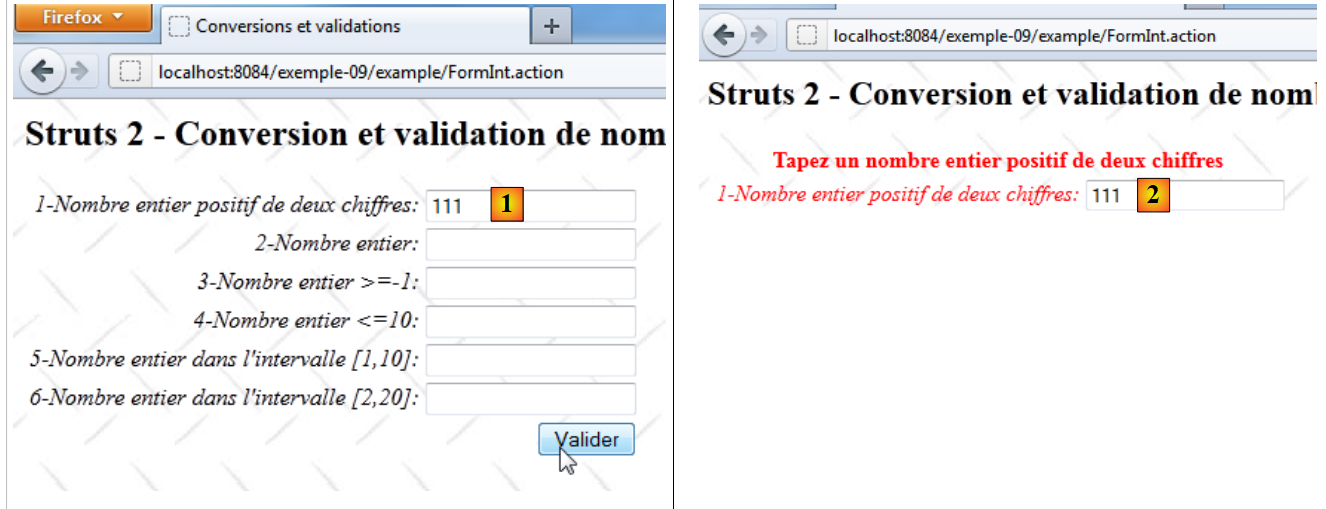 |
- 转换为 [1],int1 字段输入错误
- 在 [2] 中,返回的页面:
- 显示了键 int1.error 的错误信息。该信息以红色显示。
- 错误字段的标签也显示为红色。
- 错误的输入内容再次显示。必须预先考虑这一点,因为这未必是默认行为。
我们已看到,如果请求成功通过所有拦截器(特别是验证拦截器),表单验证将触发方法 [FormInt].execute 的执行:
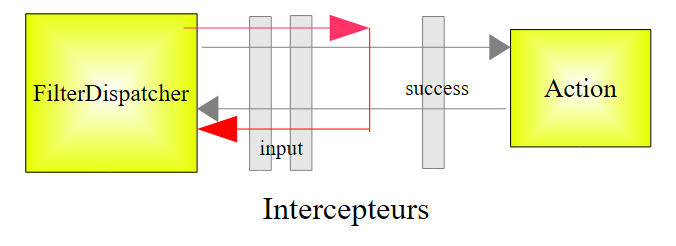 |
- 如果请求到达操作的 execute 方法,该方法会如前所述将键 success 返回给控制器。
- 如果验证拦截器因测试参数无效而阻止了请求,则会将键 input 返回给控制器。
由于操作 [FormInt] 配置如下:
    <action name="FormInt" class="example.FormInt">
      <result name="input">/example/FormInt.jsp</result>
      <result name="cancel" type="redirect">/example/Accueil.jsp</result>
      <result name="success">/example/ConfirmationFormInt.jsp</result>
</action>
因此,当发生验证错误时,将显示视图 [FormInt.jsp],即表单。 Struts 标签的设计使其能够显示关联的错误消息。因此,视图 [FormInt.jsp] 将显示各字段关联的错误消息。这正是视图 [2] 所展示的内容。
现在让我们来检查字段 int2 的验证,该字段在模型中声明如下:
private Integer int2;
[FormInt-validation.xml] 中 int2 字段的验证规则如下:
<field name="int2" >
    <field-validator type="required" short-circuit="true">
      <message key="int2.error"/>
    </field-validator>
    <field-validator type="conversion" short-circuit="true">
      <message key="int2.error"/>
    </field-validator>
  </field>
- 第 2-4 行:验证参数 int2 是否存在。
- 第 5-7 行:验证字符串(String)到整数(Integer)的转换是否可行
- 第 3、6 行:键 int2.error 的错误消息如下:
int2.error=Tapez un nombre entier
[FormInt-validation.xml]中模型字段Integer和int3的验证规则如下:
<field name="int3" >
    <field-validator type="required" short-circuit="true">
      <message key="int3.error"/>
    </field-validator>
    <field-validator type="conversion" short-circuit="true">
      <message key="int2.error"/>
    </field-validator>
    <field-validator type="int" short-circuit="true">
      <param name="min">-1</param>
      <message key="int3.error"/>
    </field-validator>
  </field>
- 第 8-11 行:验证字段 int3 是否为整数类型且值 >= -1
- 第3、7行:键int3.error的错误消息如下:
int3.error=Tapez un nombre entier >=-1
Integer 表单中 int4 字段在 [FormInt-validation.xml] 中的验证规则如下:
<field name="int4" >
    <field-validator type="required" short-circuit="true">
      <message key="int4.error"/>
    </field-validator>
    <field-validator type="conversion" short-circuit="true">
      <message key="int2.error"/>
    </field-validator>
    <field-validator type="int" short-circuit="true">
      <param name="max">10</param>
      <message key="int4.error"/>
    </field-validator>
  </field>
- 第 8-11 行:验证其类型为整数且 <=10
- 第 3、7 行:键 int4.error 的错误信息如下:
int4.error=Tapez un nombre entier <=10
Integer int5 字段在 [FormInt-validation.xml] 中的验证规则如下:
<field name="int5" >
    <field-validator type="required" short-circuit="true">
      <message key="int5.error"/>
    </field-validator>
    <field-validator type="conversion" short-circuit="true">
      <message key="int2.error"/>
    </field-validator>
    <field-validator type="int" short-circuit="true">
      <param name="min">1</param>
      <param name="max">10</param>
      <message key="int5.error"/>
    </field-validator>
  </field>
- 第 5-9 行:验证其类型为整数且值在 [1, 10] 范围内。
- 第3、8行:键int5.error的错误信息如下:
int5.error=Tapez un nombre entier dans l''intervalle [1,10]
String 表单中 int6 字段的验证规则如下:
<field name="int6" >
    <field-validator type="requiredstring" short-circuit="true">
      <message key="int6.error"/>
    </field-validator>
    <field-validator type="regex" short-circuit="true">
      <param name="expression">^\d{1,2}$</param>
      <param name="trim">true</param>
      <message key="int6.error"/>
    </field-validator>
  </field>
- 第 5-9 行:验证 int6 是否为 2 位数字字符串。
- 第3、8行:int6.error的错误信息如下:
int6.error=Tapez un nombre entier dans l''intervalle [2,20]
上述验证未检查参数 int6 是否为 [2,20] 区间内的整数。 该验证在方法 [FormInt].validate 中进行,该方法在文件 [FormInt-validation.xml] 被调用后执行。该方法如下:
  // 验证
  @Override
  public void validate() {
    // int6 输入有效吗?
    if (getFieldErrors().get("int6") == null) {
      int int6 = Integer.parseInt(((FormIntModel) getModel()).getInt6());
      if (int6 < 2 || int6 > 20) {
        addFieldError("int6", getText("int6.error"));
      }
    }
}
- 第 5 行:检查字段 int6 是否存在关联错误。若存在,则不再继续执行。
- 第 6 行:若无错误,则获取模型中的 String int6 字段,并将其转换为整数。
- 第7行:验证获取的整数是否在[2,20]的范围内。
- 第8行:若不在该范围内,则向字段int6附加一条错误消息。该错误消息通过键值int6.error在消息文件中进行查找。
如果在此验证过程结束时存在错误,则中断对方法 [FormInt].execute 的调用,并将键 input 返回给 Struts 控制器。
 |
11.7. 最后细节
我们已经了解了多种输入整数的方法。这些方法并非完全等效。例如,考虑输入字段 int5 和 int6:
在视图 [FormInt.jsp] 中,它们的声明如下:
      <s:textfield name="int5" key="int5.prompt"/>
<s:textfield name="int6" key="int6.prompt"/>
其模板在 [FormIntModel.java] 中声明如下:
  private Integer int5;
private String int6;
字段 int5 的类型为 Integer,而字段 int6 的类型为 String。它们的验证规则不同:
<field name="int5" >
    <field-validator type="required" short-circuit="true">
      <message key="int5.error"/>
    </field-validator>
    <field-validator type="conversion" short-circuit="true">
      <message key="int2.error"/>
    </field-validator>
    <field-validator type="int" short-circuit="true">
      <param name="min">1</param>
      <param name="max">10</param>
      <message key="int5.error"/>
    </field-validator>
  </field>

  <field name="int6" >
    <field-validator type="requiredstring" short-circuit="true">
      <message key="int6.error"/>
    </field-validator>
    <field-validator type="regex" short-circuit="true">
      <param name="expression">^\d{1,2}$</param>
      <param name="trim">true</param>
      <message key="int6.error"/>
    </field-validator>
  </field>
字段 int6 的验证由操作 [FormInt] 中的方法 validate 完成:
  public void validate() {
    // int6 输入有效吗?
    if (getFieldErrors().get("int6") == null) {
      int int6 = Integer.parseInt(((FormIntModel) getModel()).getInt6());
      if (int6 < 2 || int6 > 20) {
        addFieldError("int6", getText("int6.error"));
      }
}
尽管表述方式不同,这两条验证规则都旨在检查所输入的字段是否为某个区间内的整数。然而,如下面的屏幕截图所示,字段 int5 和 int6 在运行时的行为却有所不同:
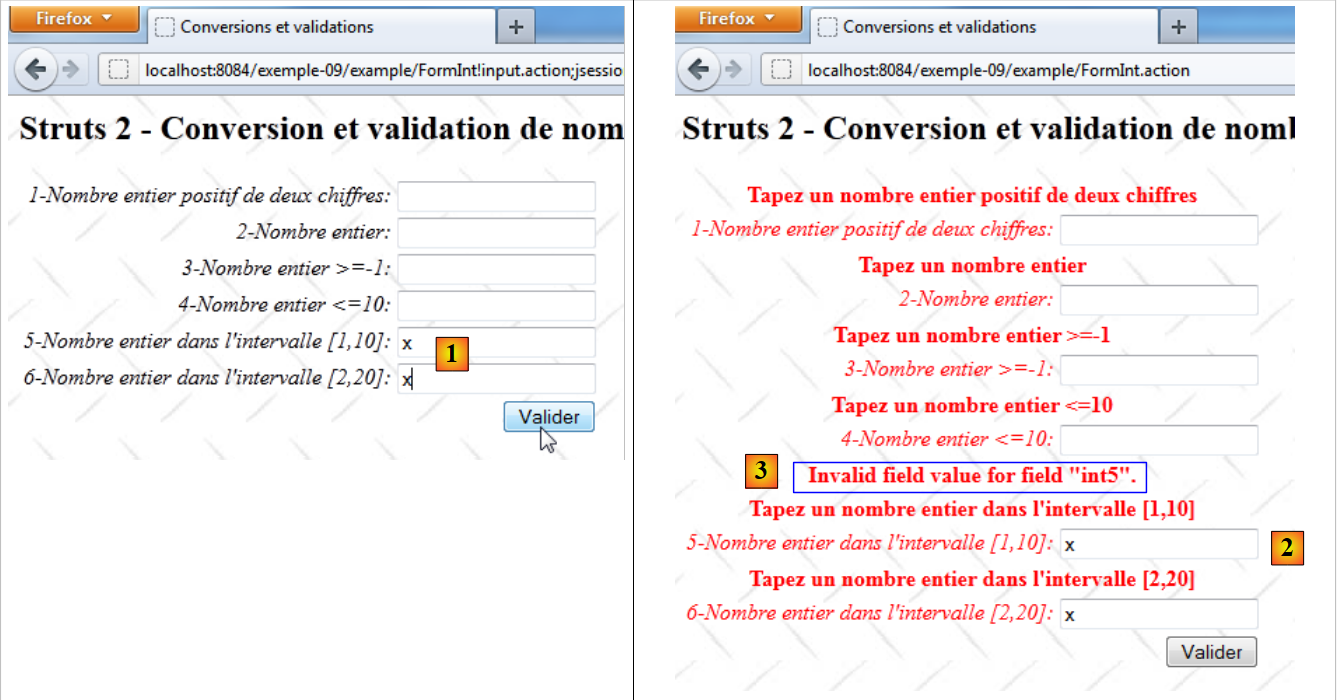 |
- 在 [1] 中,两个字段均输入了相同的错误值
- 在 [2] 中,返回了错误页面。这两个字段显示的错误信息不同。
- 在 [3] 中,字段 int5 显示了一条不希望出现的错误信息,因为它是英文的。这是由于字符串转整数失败导致的。此外,Apache 日志中还出现了一个异常:
颇为奇怪的是,Struts 尝试调用 FormIntModel.setInt5(String value) 方法但未找到。
该异常消息的键值为 xwork.default.invalid.fieldvalue。要将其转换为法语,只需将法语文本与该键关联即可。因此,我们在文件 [messages.properties] 中添加以下行:
...
xwork.default.invalid.fieldvalue=Valeur invalide pour le champ "{0}".
11.8. Conclusion
关于此首个参数验证专用应用程序的讲解到此结束。该内容较为复杂,难以详尽阐述。接下来我们将研究类似的应用程序,因此仅对变更之处进行说明。