16. 示例 13 - 操作的上下文
本应用旨在展示操作可访问:
- 请求参数
- 请求的属性
- 用户会话的属性
16.1. NetBeans 项目
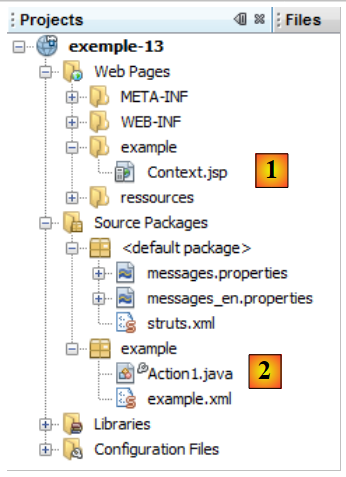 |
NetBeans 项目如下:
- 在 [1] 中,视图 [Context.jsp]
- 在 [2] 中,操作 [Action1.java] 和 Struts 配置文件 [example.xml]
16.2. Configuration
项目配置在 [example.xml] 中完成:
<?xml version="1.0" encoding="UTF-8" ?>
<!DOCTYPE struts PUBLIC
        "-//Apache Software Foundation//DTD Struts Configuration 2.0//EN"
        "http://struts.apache.org/dtds/struts-2.0.dtd">

<struts>
  <package name="example" namespace="/example" extends="struts-default">
    <action name="Action1" class="example.Action1">
      <result name="success">/example/Context.jsp</result>
    </action>
  </package>
</struts>
- 第 8 行:对 URL [/example/Action1] 的请求将触发类 [example.Action] 的实例化。由于未指定具体方法,将执行方法 execute。
- 第9行:仅接受一个键。键 success 将导致显示视图 [Context.jsp]。
请求处理的简化架构如下:
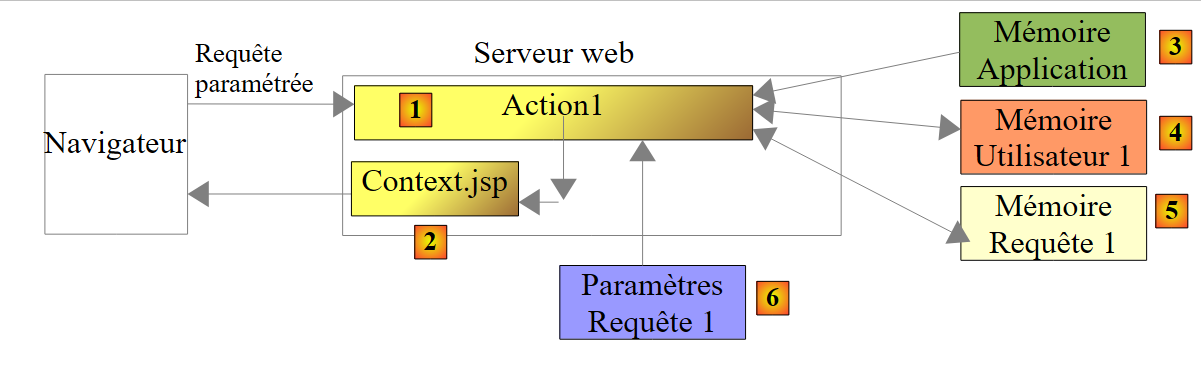 |
该请求将由 Web 应用程序的两个组件处理:操作 [Action1] [1] 和视图 [Context.jsp] [2]。 这两个组件可以访问不同类型的数据:
- 作用域数据 Application、[3]、c.a.d。这些数据对所有用户的所有请求均可见,且几乎始终为只读状态。 这些数据中通常包含应用程序的初始配置。在此,[Action1] 和 [Context.jsp] 具有访问这些数据的权限。
- 作用域为 Session、[4]、c.a.d 的数据。这些数据对同一用户的所有请求均可见,且支持读写操作。 在此,[Action1]将使用读写权限的会话,而[Context.jsp]将使用只读权限的会话。
- 作用域为 Requête 和 [5] 的数据,可供处理该请求的所有元素访问。在此,[Action1] 将数据写入该内存,而 [Context.jsp] 将从中读取数据。 请求作用域数据允许组件 N 向组件 N+1 传递信息。
- 由客户端发送的请求参数 [6]。处理该请求的组件仅可对其进行只读操作。
16.3. 操作 [Action1]
类 [Action1] 的代码如下:
package example;

import com.opensymphony.xwork2.ActionSupport;
import java.util.Map;
import java.util.Set;
import org.apache.struts2.interceptor.ParameterAware;
import org.apache.struts2.interceptor.RequestAware;
import org.apache.struts2.interceptor.SessionAware;

public class Action1 extends ActionSupport implements SessionAware, RequestAware, ParameterAware {

  // 无参数构造函数
  public Action1() {
  }
  // 会话、请求、参数
  Map<String, Object> session;
  Map<String, Object> request;
  Map<String, String[]> parameters;

  @Override
  public String execute() {
    // 参数列表
    System.out.println("Paramètres...");
    Set<String> clés = parameters.keySet();
    for (String clé : clés) {
      for (String valeur : parameters.get(clé)) {
        System.out.println(String.format("[%s,%s]", clé, valeur));
      }
    }
    // 会话
    System.out.println("Session...");
    if (session.get("compteur") == null) {
      session.put("compteur", new Integer(0));
    }
    Integer compteur = (Integer) session.get("compteur");
    compteur = compteur + 1;
    session.put("compteur", compteur);
    System.out.println(String.format("compteur=%s", compteur));
    // 请求
    request.put("info1", "information1");
    // 页面显示JSP
    return SUCCESS;
  }

  // 会话
  public void setSession(Map<String, Object> session) {
    this.session = session;
  }

  // 请求
  public void setRequest(Map<String, Object> request) {
    this.request = request;
  }

  // 参数
  public void setParameters(Map<String, String[]> parameters) {
    this.parameters = parameters;
  }
}
- 第 10 行:该类实现了以下接口
- SessionAware:用于访问会话属性字典(第 16 行)。该接口仅有一个方法,即第 46 行中的方法。
- RequestAware:用于访问请求属性字典(第17行)。该接口仅有一个方法,即第51行中的方法。
- ParameterAware:用于访问查询参数字典(第 18 行)。 需要注意的是,每个键(即参数名称)对应一个值数组。这是为了处理那些提交多个值的输入字段,例如多选列表。接口 ParameterAware 仅有一个方法,即第 56 行中的方法。
- 第 21 行:方法 execute,该方法在调用操作 [Action1] 时执行。当其执行时,拦截器已完成其工作:
- 方法 setParameters(第 56 行)已被调用,且第 18 行的 parameters 字典包含请求的所有参数。
- 方法 setSession(第 46 行)已被调用,第 16 行的 session 字典包含会话的所有属性。
- 方法 setRequest(第 51 行)已被调用,第 17 行的 request 字典包含请求的所有属性。
- 第 31-38 行:将与键 compteur 关联的值写入会话
- 第 32-34 行:在会话中查找键 compteur。如果未找到,则将其与整数值 0 关联并存入会话。
- 第 35-37 行:在会话中查找键 compteur,将其值递增,然后将该键重新存入会话。
- 第 38 行:显示与键 compteur 关联的值。由于每次对操作 [Action1] 进行请求时都会进行递增,因此随着请求的进行,计数器的值应逐渐增加。
- 第 40 行:在请求属性字典中插入一个键为 info1、值为 information1 的属性。请求的属性与参数不同。参数是由 Web 应用程序的客户端发送的。 而请求属性则用于处理该请求的 Web 应用程序中不同组件之间的通信。因此,在执行 [Action1] 之后,将显示视图 [Context.jsp]。我们将看到它能够获取请求的属性。
- 第42行:方法execute返回键succes。
16.4. 消息文件
文件 [messages.properties] 内容如下:
Context.titre=Contexte de l''action
Context.message=Contexte de l''action
Context.parameters=Param\u00E8tres de l''action
Context.session=Elements de session
Context.request=Attributs de requ\u00EAte
16.5. 视图 [Context.jsp]
视图 [Context.jsp] 的作用是显示:
- 查询的某些参数
- 会话中 compteur 键的值
- 查询中 info1 键的值
其代码如下:
<%@ page contentType="text/html; charset=UTF-8" pageEncoding="UTF-8"%>
<%@ taglib prefix="s" uri="/struts-tags" %>
<html>
  <head>
    <title><s:text name="Context.titre"/></title>
    <s:head/>
  </head>

  <body background="<s:url value="/ressources/standard.jpg"/>">
    <h2><s:text name="Context.message"/></h2>
    <h3><s:text name="Context.parameters"/></h3>
    <s:iterator value="#parameters['nom']" var="nom">
      nom : <s:property value="nom"/><br/>
    </s:iterator>
    <s:iterator value="#parameters['prenom']" var="prenom">
      prenom : <s:property value="prenom"/><br/>
    </s:iterator>
    <s:iterator value="#parameters['age']" var="age">
      âge : <s:property value="age"/><br/>
    </s:iterator>
    <h3><s:text name="Context.session"/></h3>
    compteur : <s:property value="#session['compteur']"/>
    <h3><s:text name="Context.request"/></h3>
    info1 : <s:property value="#request['info1']"/>
  </body>
</html>
- 第 12-14 行:显示与参数 nom 相关的所有值
- 第 15-17 行:显示与参数 prenom 相关的所有值
- 第 18-20 行:显示与参数 age 相关的所有值
- 第22行:显示会话中与键compteur关联的值
- 第 24 行:显示查询中与键 info1 关联的值
16.6. 测试
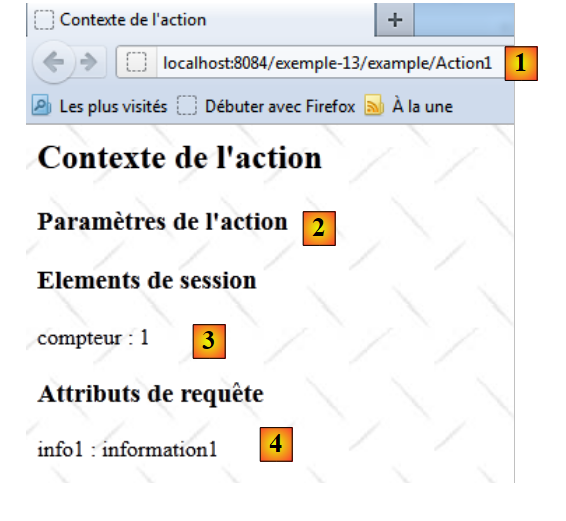 |
- 在 [1] 中,Action1 被调用时未带参数
- 在 [2] 中,[Context.jsp] 未找到参数
- 在 [3] 中,[Context.jsp] 在会话中找到了键 compteur
- 在 [4] 中,[Context.jsp] 在请求中找到了键 info1
再进行一次测试:
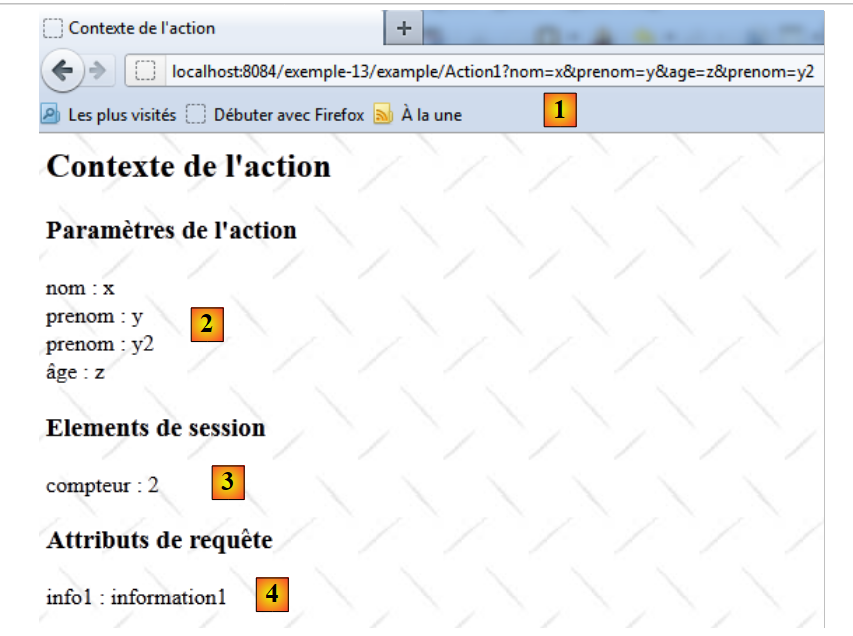 |
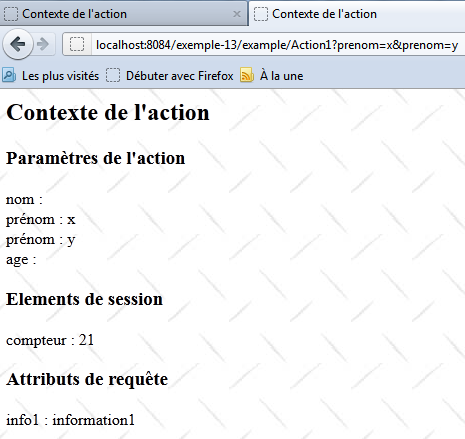
- 在 [1] 中,Action1 被调用,其参数
- 在 [2] 中,[Context.jsp] 显示这些参数
- 在 [3] 中,[Context.jsp] 在会话中找到了密钥 compteur。计数器确实增加了 1,这表明两次请求之间确实进行了缓存。
- 在 [4] 中,[Context.jsp] 在请求中找到了键 info1
需要提醒的是,方法 [Action1.execute] 会在 Web 服务器的控制台上输出信息。以下是一个示例:
16.7. Conclusion
请记住以下几点:
- 若需存储供所有用户所有请求共享的信息,将使用应用程序内存。我们稍后将展示一个示例。
- 为了存储供同一用户的所有请求共享的信息,将使用该用户的会话。
- 为了存储由处理同一请求的所有组件共享的信息,将使用请求内存。