7. 示例 05B – 导航数据输入表单
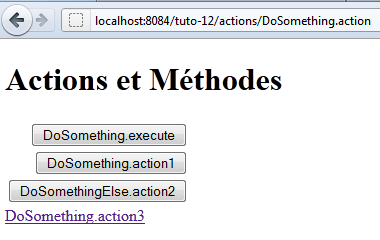
我们正在研究一个包含多个按钮的表单,用于将输入的数据提交给某个操作。
7.1. NetBeans 项目
NetBeans 项目如下:
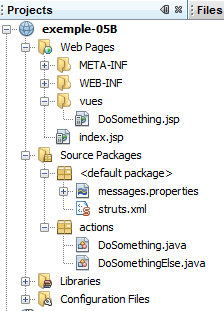
该项目的组成部分如下:
- [DoSomething.jsp]:应用程序的唯一视图,用于显示三个导航按钮和一个链接。
- [DoSomething.java] 和 [DoSomethingElse.java]:项目的两个操作
- [messages.properties]:国际化消息文件
- [struts.xml]:Struts 2 配置文件
7.2. 配置
以下 [struts.xml] 文件用于配置应用程序:
<!DOCTYPE struts PUBLIC
"-//Apache Software Foundation//DTD Struts Configuration 2.0//EN"
"http://struts.apache.org/dtds/struts-2.0.dtd">

<struts>
 <constant name="struts.custom.i18n.resources" value="messages" />
 <package name="actions" namespace="/actions" extends="struts-default">
    <action name="DoSomething" class="actions.DoSomething">
      <result name="success">/vues/DoSomething.jsp</result>
    </action>
    <action name="DoSomethingElse" class="actions.DoSomethingElse">
      <result name="success">/vues/DoSomething.jsp</result>
    </action>
  </package>
</struts>
- 动作 [/actions/DoSomething] 将实例化类 [actions.DoSomething],并默认执行其 execute 方法。如果传递给 [DoSomething] 动作的参数指定了其他方法,则可以覆盖此默认行为。无论执行哪个方法,它都必须返回导航键“success”,因为仅定义了此键。随后将显示视图 [DoSomething.jsp]。
- 动作 [/actions/DoSomethingElse] 的配置与此完全相同。
7.3. 消息文件
消息文件 [messages.properties] 如下所示:
formulaire.titre1=Actions et M\u00e9thodes
formulaire.titre2=Actions et M\u00e9thodes
formulaire.execute=DoSomething.execute
formulaire.action1=DoSomething.action1
formulaire.action2=DoSomethingElse.action2
formulaire.action3=DoSomething.action3
7.4. [DoSomething.jsp] 视图
[DoSomething.jsp] 视图如下:
其代码如下:
<%@page contentType="text/html" pageEncoding="UTF-8"%>
<%@ taglib prefix="s" uri="/struts-tags" %>
<!DOCTYPE html>
<html>
  <head>
    <meta http-equiv="Content-Type" content="text/html; charset=UTF-8">
    <title><s:text name="formulaire.titre1"/></title>
  </head>
  <body>
    <h1><s:text name="formulaire.titre2"/></h1>
    <s:form action="DoSomething">
      <s:submit key="formulaire.execute"/>
      <s:submit key="formulaire.action1" method="action1"/>
      <s:submit key="formulaire.action2" action="DoSomethingElse" method="action2"/>
    </s:form>
    <s:url id="url" action="DoSomething" method="action3"/>
    <s:a href="%{url}"><s:text name="formulaire.action3"/></s:a>
  </body>
</html>
- 第 11 行:表单将提交至 [DoSomething] 操作。这并不一定意味着该操作会被触发,具体取决于用于 POST 请求的提交按钮。
- 第 12 行:提交按钮既未指定操作,也未指定方法。由 <form> 标签指定的 [DoSomething] 操作将被实例化。执行的方法将是 [struts.xml] 文件中定义的 execute 方法。
- 第 13 行:提交按钮指定了方法。由 <form> 标签指定的 [DoSomething] 动作将被实例化。执行的方法将是 action1 方法。
- 第 14 行:提交按钮指定了操作和方法。将实例化 [DoSomethingElse] 操作。执行的方法将是 action2。
- 第 16–17 行:指向 [DoSomething] 操作及其 action3 方法的链接。[DoSomething] 操作将被实例化,并执行其 action3 方法。与提交按钮不同,点击该链接会触发 GET 请求而非 POST 请求。因此,不会提交任何参数。
当请求 URL [http://localhost:8084/exemple-05B/actions/DoSomething.action] 时,此代码生成的 HTML 代码如下:
- 第 9 行:HTML 表单的 form 标签。action 属性指定了表单参数将被提交到的 URL。该 URL 即 [DoSomething] 动作的地址。
- 第 11、13、15 行:按钮的 name 属性将作为提交按钮的目标操作进行提交。正是这一点使得 Struts 能够确定应实例化哪个操作以及执行哪个方法。
- 第 13 行:name=method:action1 属性表示必须执行 DoSomething.action1 方法。
- 第 15 行:name=method:action1 属性表示必须执行 DoSomethingElse.action1 方法。
- 第 11 行:name="form.execute" 属性既未指定 action 也未指定方法。因此,将执行 DoSomething.execute 方法。
- 第 19 行:该链接明确要求执行 DoSomething.action3 方法
7.5. 操作
[DoSomething] 操作如下:
package actions;

import com.opensymphony.xwork2.ActionSupport;

public class DoSomething extends ActionSupport {

  public DoSomething() {
    System.out.println("DoSomething");
  }

  @Override
  public String execute() {
    System.out.println("DoSomething.execute");
    return SUCCESS;
  }

  public String action1() {
    System.out.println("DoSomething.action1");
    return SUCCESS;
  }

  public String action3() {
    System.out.println("DoSomething.action3");
    return SUCCESS;
  }
}
- execute、action1 和 action3 方法会向 Web 服务器控制台输出信息,并返回成功导航键。
- 第 8 行:构造函数也会向 Web 服务器控制台输出信息
通过各种控制台输出,您可以查看在请求过程中执行了哪些方法。
[DoSomethingElse] 操作类似:
package actions;

import com.opensymphony.xwork2.ActionSupport;

public class DoSomethingElse extends ActionSupport {

  public DoSomethingElse() {
    System.out.println("DoSomethingElse");
  }

  @Override
  public String execute() {
    System.out.println("DoSomethingElse.execute");
    return SUCCESS;
  }

  public String action2() {
    System.out.println("DoSomethingElse.action2");
    return SUCCESS;
  }
}
7.6. 测试
测试显示了以下结果(在 Web 服务器控制台上):
- 当点击 [DoSomething.execute] 按钮时,[DoSomething] 操作会被实例化,并执行其 execute 方法。
- 点击 [DoSomething.action1] 按钮时,[DoSomething] 操作会被实例化,并执行其 action1 方法。
- 点击 [DoSomethingElse.action2] 按钮时,会实例化 [DoSomethingElse] 操作并执行其 action2 方法。
- 当点击 [DoSomething.action3] 链接时,将实例化 [DoSomething] 操作并执行其 action3 方法。