7. 示例 05B – 表单导航
我们研究一个包含多个按钮的表单,用于将输入的数据提交(submit)至某个操作。
7.1. NetBeans 项目
NetBeans 项目如下:
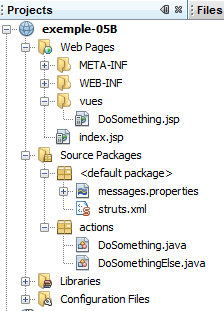
该项目的组成部分如下:
- [DoSomething.jsp]:应用程序的唯一视图,包含三个导航按钮和一个链接。
- [DoSomething.java] 和 [DoSomethingElse.java]:项目的两个操作
- [messages.properties]:国际化消息文件
- [struts.xml]:Struts 2 配置文件
7.2. Configuration
以下文件 [struts.xml] 用于配置应用程序:
<!DOCTYPE struts PUBLIC
"-//Apache Software Foundation//DTD Struts Configuration 2.0//EN"
"http://struts.apache.org/dtds/struts-2.0.dtd">

<struts>
 <constant name="struts.custom.i18n.resources" value="messages" />
 <package name="actions" namespace="/actions" extends="struts-default">
    <action name="DoSomething" class="actions.DoSomething">
      <result name="success">/vues/DoSomething.jsp</result>
    </action>
    <action name="DoSomethingElse" class="actions.DoSomethingElse">
      <result name="success">/vues/DoSomething.jsp</result>
    </action>
  </package>
</struts>
- [/actions/DoSomething] 操作将实例化 [actions.DoSomething] 类,并默认执行其 execute 方法。 如果传递给操作 [Something] 的参数指定了另一个方法,则可以取消此默认行为。无论执行哪个方法,它都必须返回导航键 success,因为只有该键已被定义。 随后将显示视图 [DoSomething.jsp]。
- 操作 [/actions/DoSomethingElse] 的配置与此相同。
7.3. 消息文件
消息文件 [messages.properties] 内容如下:
formulaire.titre1=Actions et M\u00e9thodes
formulaire.titre2=Actions et M\u00e9thodes
formulaire.execute=DoSomething.execute
formulaire.action1=DoSomething.action1
formulaire.action2=DoSomethingElse.action2
formulaire.action3=DoSomething.action3
7.4. 视图 [DoSomething.jsp]
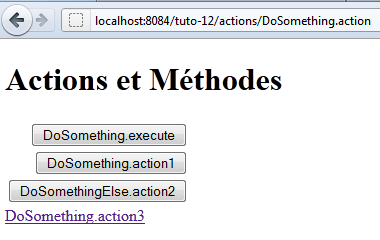
视图 [DoSomething.jsp] 如下所示:
其代码如下:
<%@page contentType="text/html" pageEncoding="UTF-8"%>
<%@ taglib prefix="s" uri="/struts-tags" %>
<!DOCTYPE html>
<html>
  <head>
    <meta http-equiv="Content-Type" content="text/html; charset=UTF-8">
    <title><s:text name="formulaire.titre1"/></title>
  </head>
  <body>
    <h1><s:text name="formulaire.titre2"/></h1>
    <s:form action="DoSomething">
      <s:submit key="formulaire.execute"/>
      <s:submit key="formulaire.action1" method="action1"/>
      <s:submit key="formulaire.action2" action="DoSomethingElse" method="action2"/>
    </s:form>
    <s:url id="url" action="DoSomething" method="action3"/>
    <s:a href="%{url}"><s:text name="formulaire.action3"/></s:a>
  </body>
</html>
- 第 11 行:表单将提交至操作 [DoSomething]。这并不一定意味着该操作会被触发。这取决于用于 POST 的按钮 submit。
- 第12行:按钮submit既未指定操作,也未指定方法。此时将实例化由<form>标签指定的操作[DoSomething]。 执行的方法将是文件 [struts.xml] 中定义的方法,即方法 execute。
- 第 13 行:按钮 submit 指定了一个方法。此时将实例化由 <form> 标签指定的操作 [DoSomething]。执行的方法将是 action1。
- 第 14 行:按钮 submit 指定了一个操作和一个方法。将实例化操作 [DoSomethingElse]。执行的方法将是 action2。
- 第16-17行:指向操作[DoSomething]和方法action3的链接。将实例化操作[DoSomething],并执行其方法action3。 与按钮 submit 不同,点击该链接不会触发 POST,而是触发 GET。因此不会提交任何参数。
当请求 URL [http://localhost:8084/exemple-05B/actions/DoSomething.action] 时,该代码生成的 HTML 代码如下:
- 第 9 行:HTML 表单中的 form 标签。action 属性指定了表单参数将提交到的 URL。该 URL 即为 [DoSomething] 操作的 URL。
- 第 11、13、15 行:按钮的 name 属性将提交至按钮 submit 的目标操作。正是通过这些属性,Struts 才能确定要实例化的操作以及要执行的方法。
- 第 13 行:name=method:action1 属性表示应执行 DoSomething.action1 方法。
- 第 15 行:name= action:DoSomethingElse!action2 属性表示应执行方法 DoSomethingElse.action2。
- 第 11 行:name= formulaire.execute 属性既未指定 action,也未指定方法。因此将执行方法 DoSomething.execute。
- 第 19 行:该链接明确要求执行方法 DoSomething.action3
7.5. 操作
操作 [DoSomething] 如下:
package actions;

import com.opensymphony.xwork2.ActionSupport;

public class DoSomething extends ActionSupport {

  public DoSomething() {
    System.out.println("DoSomething");
  }

  @Override
  public String execute() {
    System.out.println("DoSomething.execute");
    return SUCCESS;
  }

  public String action1() {
    System.out.println("DoSomething.action1");
    return SUCCESS;
  }

  public String action3() {
    System.out.println("DoSomething.action3");
    return SUCCESS;
  }
}
- 方法 execute、action1 和 action3 会在 Web 服务器控制台输出信息,并返回导航键 success。
- 第 8 行:构造函数也会在 Web 服务器控制台上输出
控制台上的不同输出信息有助于识别在请求过程中执行了哪些方法。
操作 [DoSomethingElse] 类似:
package actions;

import com.opensymphony.xwork2.ActionSupport;

public class DoSomethingElse extends ActionSupport {

  public DoSomethingElse() {
    System.out.println("DoSomethingElse");
  }

  @Override
  public String execute() {
    System.out.println("DoSomethingElse.execute");
    return SUCCESS;
  }

  public String action2() {
    System.out.println("DoSomethingElse.action2");
    return SUCCESS;
  }
}
7.6. 测试
测试显示了以下结果(在 Web 服务器控制台上):
- 点击按钮 [DoSomething.execute] 时,会实例化操作 [DoSomething] 并执行其方法 execute。
- 点击按钮 [DoSomething.action1] 时,会实例化操作 [DoSomething] 并执行其方法 action1。
- 点击按钮 [DoSomethingElse.action2] 时,将实例化操作 [DoSomethingElse] 并执行其方法 action2。
- 点击链接 [DoSomething.action3] 时,将实例化操作 [DoSomething] 并执行其方法 action3。