16. 使用 SGBD MySQL
16.1. 安装 SGBD MySQL
为了获取 SGBD MySQL,我们将安装 Laragon 软件。
16.1.1. 安装 Laragon
Laragon 是一个集成了多款软件的软件包:
- Apache Web 服务器。我们将使用它来编写 Python Web 脚本;
- SGBD MySQL;
- PHP脚本语言(我们不会使用);
- 一个为 Web 应用程序实现缓存的 Redis 服务器。我们将使用;
Laragon 可于 2020 年 2 月从以下地址下载:
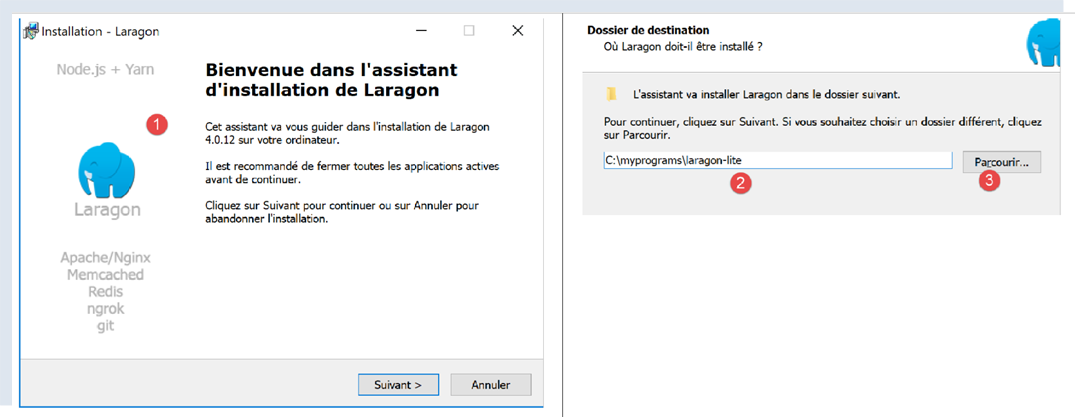
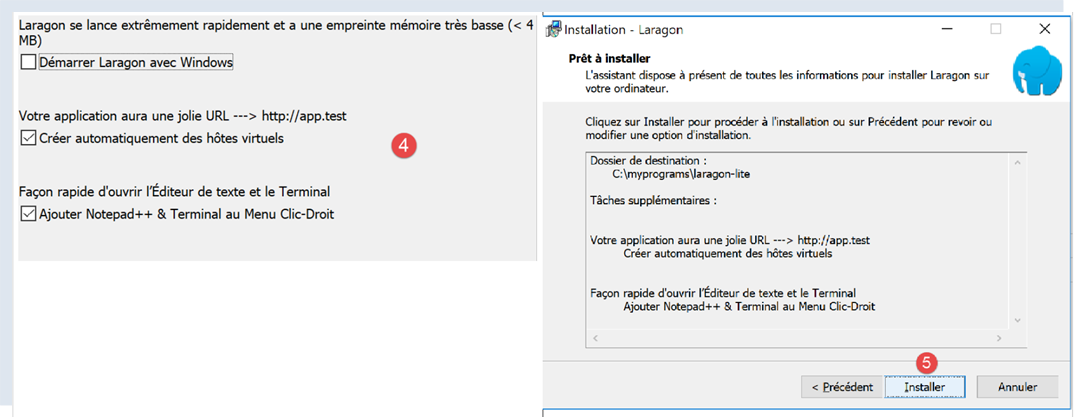
- 安装 [1-5] 后将生成以下目录结构:
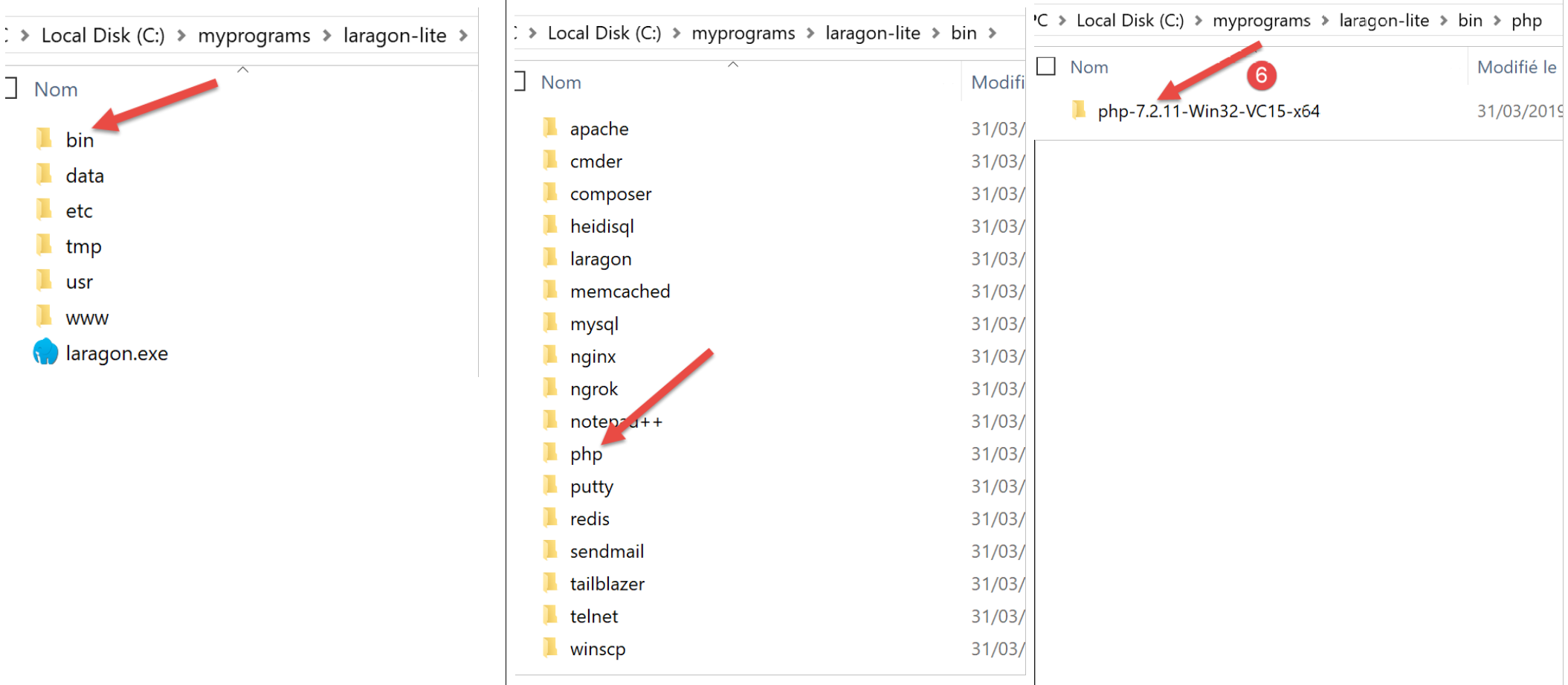
- 在 [6] 中,PHP 的安装文件夹(本文档中未使用);
运行 [Laragon] 后将显示以下窗口:
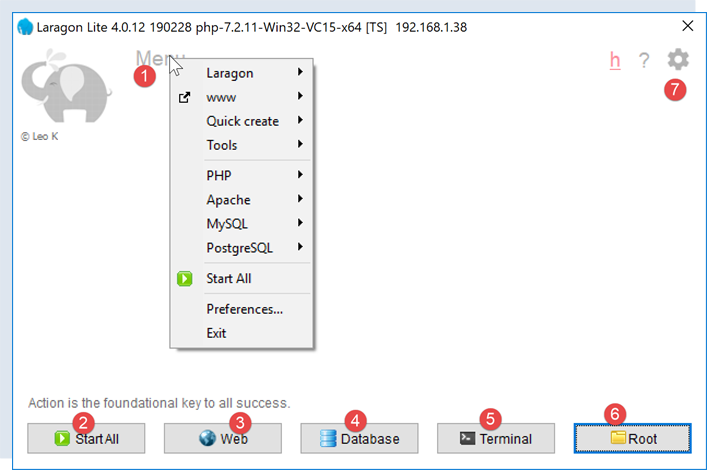
- [1]:Laragon的主菜单;
- [2]:[Start All] 按钮启动 Apache Web 服务器,以及 SGBD 和 MySQL;
- [3]:[WEB]按钮显示网页[http://localhost];
- [4]:[Database]按钮可通过[phpMyAdmin]工具管理SGBD和MySQL。 使用前需先安装该工具;
- [5]:[Terminal] 按钮将打开一个命令终端;
- [6]:[Root]按钮将打开Windows资源管理器,并定位到[<laragon>/www]文件夹,该文件夹是[http://localhost]网站的根目录。 Laragon 的 Apache 服务器管理的静态 Web 应用程序应放置在此处;
16.1.2. 创建数据库
接下来我们将演示如何使用 Laragon 工具创建数据库以及用户 MySQL。
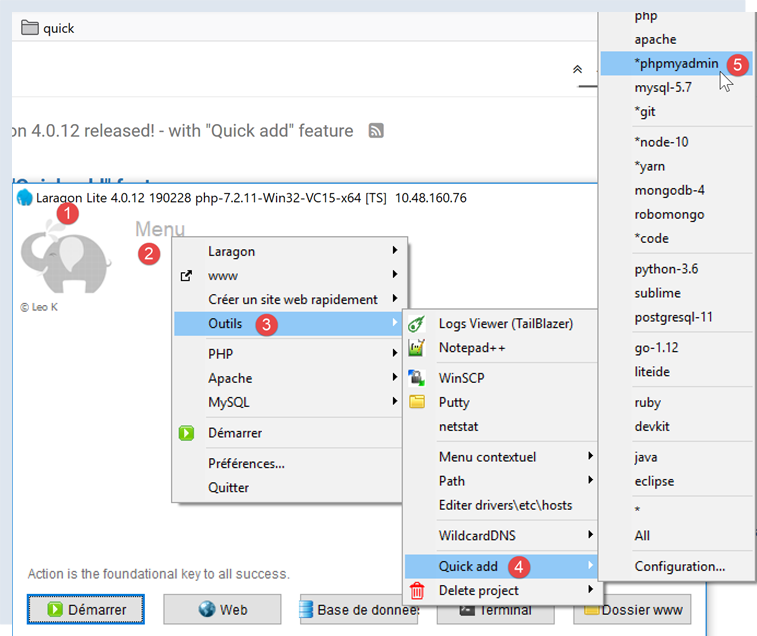
- 启动后,可通过菜单管理 Laragon [1];
- 在 [3-5] 中,若尚未安装,请安装 [phpMyAdmin] 管理工具;

- 在 [6] 中,启动 Apache Web 服务器以及 SGBD 和 MySQL;
- 在 [7] 中,启动 Apache 服务器;
- 在 [8] 中,启动 SGBD 和 MySQL;
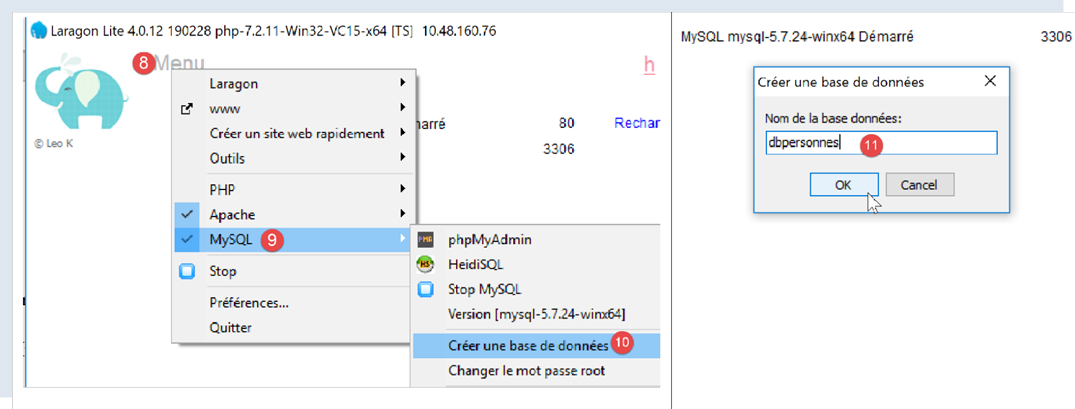
- 在 [8-10] 中,创建一个名为 [dbpersonnes] [11] 的数据库。我们将构建一个人员数据库;
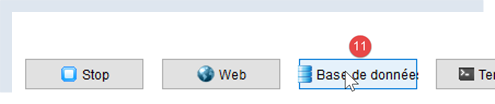
- 在 [11] 中,我们将管理刚刚创建的数据库;
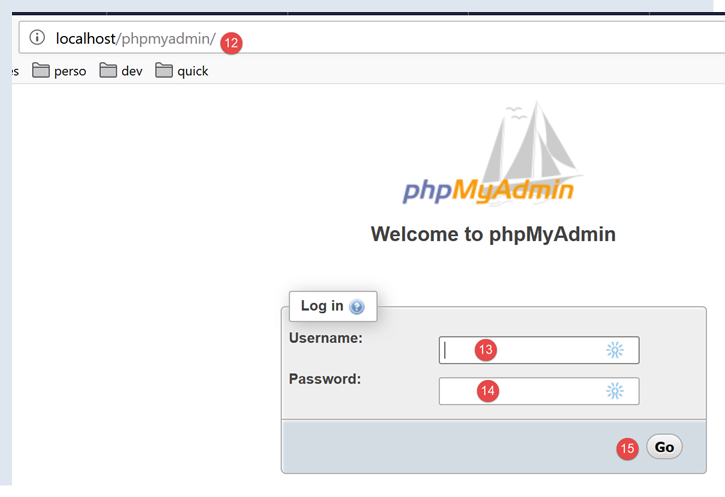
- 进程 [Bases de données] 向 URL、[http://localhost/phpmyadmin] 和 [12] 发送了一个 Web 请求。Laragon 的 Apache Web 服务器对此作出了响应。 URL [http://localhost/phpmyadmin] 是 URL 工具的 [phpMyAdmin],该工具是我们之前安装的 [5]。 该工具用于管理 MySQL 数据库;
- 默认情况下,数据库管理员的登录凭据为:root [13],无密码 [14];
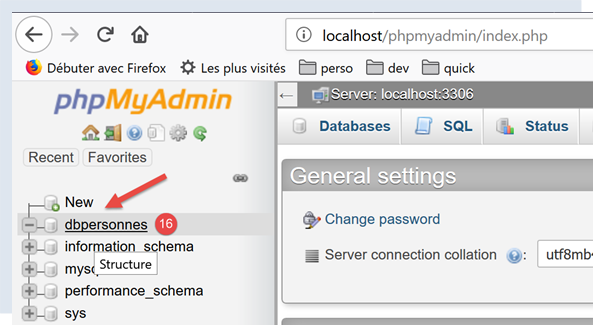
- 在 [16] 中,即我们之前创建的数据库;
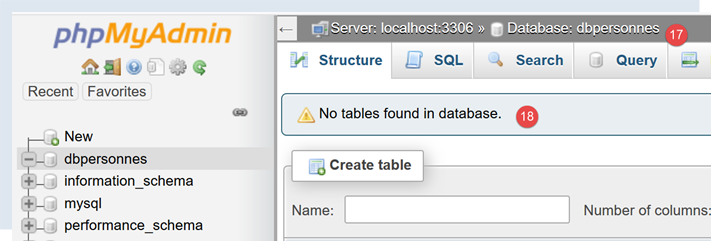
- 目前我们有一个名为 [dbpersonnes] 的数据库,[17] 数据库为空,[18];
创建用户 [admpersonnes],密码为 [nobody],该用户将拥有数据库 [dbpersonnes] 的所有权限:
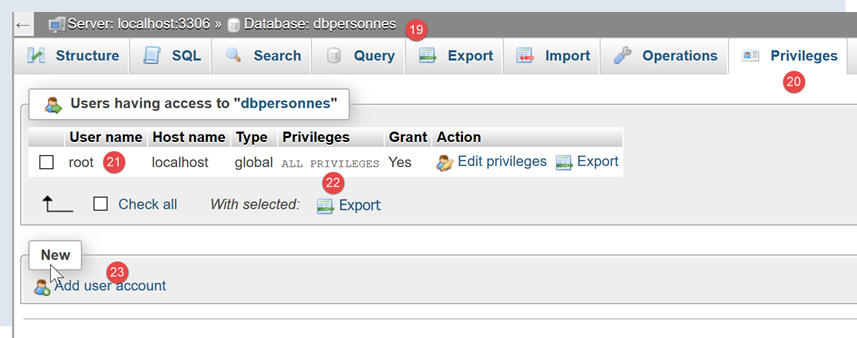
- 在 [19] 中,当前定位于数据库 [dbpersonnes];
- 在 [20] 中,选择 [Privileges] 选项卡;
- 在 [21-22] 中,可以看到用户 [root] 对数据库 [dbpersonnes] 拥有所有权限;
- 在 [23] 中,创建一个新用户;
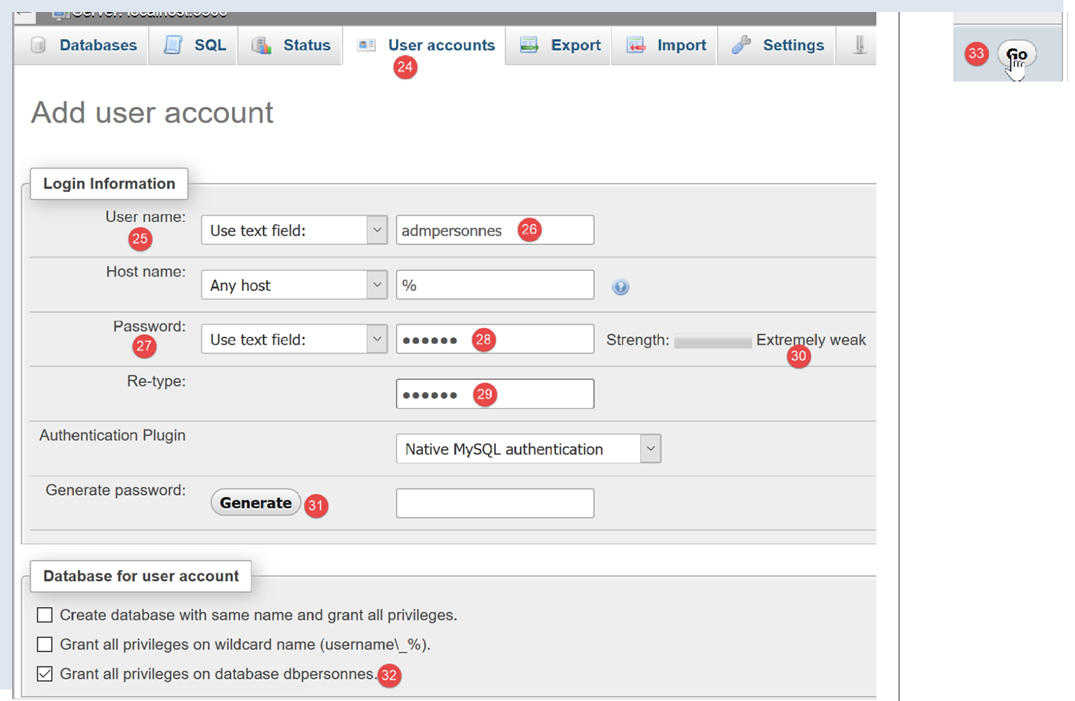
- 在 [25-26] 中,该用户的用户名将设置为 [admdbpersonnes];
- 在 [27-29] 中,其密码将为 [nobody];
- 在 [30] 中,phpMyAdmin 提示该密码强度极低(易被破解)。在生产环境中,建议使用 [31] 生成强密码;
- 在 [32] 中,指定用户 [admdbpersonnes] 应拥有数据库 [dbpersonnes] 的全部权限;
- 在 [33] 中,验证所提供的信息;

- 在 [35] 中,phpMyAdmin 表示用户已创建;
- 在 [36] 中,基于该数据库生成的 SQL 命令;
- 在 [37] 中,用户 [admpersonnes] 对数据库 [dbpersonnes] 拥有所有权限;
现在我们有:
- 一个名为 MySQL 的数据库;
- 用户 [admpersonnes/nobody] 对该数据库拥有所有权限;
16.2. 安装 [mysql-connector-python] 软件包
我们将编写 Python 脚本以利用之前创建的数据库,架构如下:

连接器用于将Python代码与所使用的SGBD设备隔离。针对不同的SGBD设备存在相应的连接器,且这些连接器遵循相同的接口规范。 因此,当上文中的 SGBD MySQL 被替换为 SGBD PostgreSQL 时,架构将变为如下所示:

由于所有 SGBD 连接器均遵循相同的接口,因此通常无需修改 Python 脚本。实际上,大多数 SGBD 都有一个专有的 SQL:
- 它们遵循 SQL 标准(结构化查询语言);
- 但因该标准功能有限,它们会通过专有语言扩展对其进行扩展;
因此,在更换SGBD时,脚本中通常需要对SQL进行相应修改。
Python本身不支持管理MySQL数据库。为此需要下载一个包。目前有多种选择。这里我们将使用[mysql-connector-python]包,这是Oracle(MySQL的所有者)提供的官方连接器。
该包的安装将在 PyCharm 的 [Terminal] 窗口中进行:
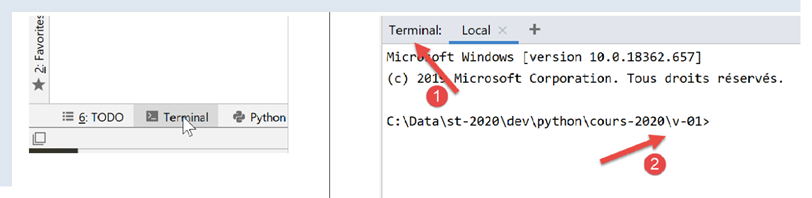
- [2] 文件夹对后续操作无关紧要;
在终端中输入命令 [pip search MySQL]:
- [pip](Python 包安装程序)是用于安装 Python 包的工具。工具 [pip] 用于连接包含 Python 包的仓库;
- [search MySQL]:查询名称中包含 [MySQL](区分大小写)的包列表;
该命令的执行结果如下:
mysql (0.0.2)                                                   - Virtual package for MySQL-python
jx-mysql (3.49.20042)                                           - jx-mysql - JSON Expressions for MySQL
weibo-mysql (0.1)                                               - insert mysql
bits-mysql (1.0.3)                                              - BITS MySQL
MySQL-python (1.2.5)                                            - Python interface to MySQL
deployfish-mysql (0.2.13)                                       - Deployfish MySQL plugin
mtstat-mysql (0.7.3.3)                                          - MySQL Plugins for mtstat
bottle-mysql (0.3.1)                                            - MySQL integration for Bottle.
WintxDriver-MySQL (2.0.0-1)                                     - MySQL support for Wintx
py-mysql (1.0)                                                  - Operating Mysql for Python.
mysql-utilities (1.4.3)                                         - MySQL Utilities 1.4.3 (part of MySQL Workbench Distribution 6.0.0)
….                                        - Tool to move slices of data from one MySQL store to another
mysql-tracer (2.0.2)                                            - A MySQL client to run queries, write execution reports and export results
mysql-utils (0.0.2)                                             - A simple MySQL library including a set of utility APIs for Python database programming
mysql-connector-repackaged (0.3.1)                              - MySQL driver written in Python
dffml-source-mysql (0.0.5)                                      - DFFML Source for MySQL Protocol
mysql-connector-python (8.0.19)                                 - MySQL driver written in Python
  INSTALLED: 8.0.19 (latest)
prometheus-mysql-exporter (0.2.0)                               - MySQL query Prometheus exporter
backwork-backup-mysql (0.3.0)                                   - Backwork plug-in for MySQL backups.
django-mysql-manager (0.1.4)                                    - django-mysql-manager is a Django based management interface for MySQL users and databases.
….                                              - mysql operate

C:\Data\st-2020\dev\python\cours-2020\v-01>
列出了所有名称或描述中包含关键词 MySQL 的模块。 我们将使用(2020年2月)的是第17行的 [mysql-connector-python]。要安装它,请在终端中输入命令 [pip install -U mysql-connector-python]:
C:\Data\st-2020\dev\python\cours-2020\v-01>pip install -U mysql-connector-python
Collecting mysql-connector-python
  Using cached mysql_connector_python-8.0.19-py2.py3-none-any.whl (355 kB)
Requirement already satisfied, skipping upgrade: protobuf==3.6.1 in c:\myprograms\python38\lib\site-packages (from mysql-connector-python) (3.6.1)
Requirement already satisfied, skipping upgrade: dnspython==1.16.0 in c:\myprograms\python38\lib\site-packages (from mysql-connector-python) (1.16.0)
Requirement already satisfied, skipping upgrade: six>=1.9 in c:\users\serge\appdata\roaming\python\python38\site-packages (from protobuf==3.6.1->mysql-connector-python) (1.14.0)
Requirement already satisfied, skipping upgrade: setuptools in c:\myprograms\python38\lib\site-packages (from protobuf==3.6.1->mysql-connector-python) (41.2.0)
Installing collected packages: mysql-connector-python
Successfully installed mysql-connector-python-8.0.19
- 第1行:选项 [install -U] (U=upgrade) 会自动更新与 [mysql-connector-python] 包相关的所有依赖包至最新版本;
要查看本机 Python 环境中已安装的软件包,请输入命令 [pip list]:
C:\Data\st-2020\dev\python\cours-2020\v-01>pip list
Package                Version
---------------------- ----------
asgiref                3.2.3
astroid                2.3.3
atomicwrites           1.3.0
attrs                  19.3.0
certifi                2019.11.28
…
MarkupSafe             1.1.1
mccabe                 0.6.1
more-itertools         8.1.0
mysql-connector-python 8.0.19
mysqlclient            1.4.6
packaging              20.0
pip                    20.0.1
pipenv                 2018.11.26
…
- 第 13 行:确实存在 [mysql-connector-python] 包;
若要了解如何使用 [mysql-connector-python] 包来管理 MySQL 数据库,请访问该包的网站 |https://dev.mysql.com/doc/connector-python/en/|。下文将展示一系列示例。
16.3. 脚本 [mysql_01]:连接 MySQL 数据库 - 1
脚本 [mysql_01] 展示了使用数据库的第一步。它将帮助我们验证能否连接到之前创建的 [dbpersonnes] 数据库。
# 导入模块 mysql.connector
from mysql.connector import connect, DatabaseError, InterfaceError

# 连接数据库 MySql [dbpersonnes]
# 用户身份为 (admpersonnes,nobody)
USER = "admpersonnes"
PWD = "nobody"
HOST = "localhost"
DATABASE = "dbpersonnes"

# 开始
connexion = None
try:
    print("Connexion au SGBD MySQL en cours...")
    # 登录
    connexion = connect(host=HOST, user=USER, password=PWD, database=DATABASE)
    # 跟踪
    print(
        f"Connexion MySQL réussie à la base database={DATABASE}, host={HOST} sous l'identité user={USER}, passwd={PWD}")
except (InterfaceError, DatabaseError) as erreur:
    # 显示错误
    print(f"L'erreur suivante s'est produite : {erreur}")
finally:
    # 若已建立连接则关闭
    if connexion:
        connexion.close()
注释
- 第 2 行:导入 [mysql.connector] 模块中的某些函数和类;
- 第 6-7 行:将要连接的用户凭据;
- 第8行:托管数据库的服务器。实际上,MySQL连接器支持与远程数据库进行交互;
- 第 9 行:要连接的数据库名称;
- 第11-26行:脚本将(第16行)使用用户[admpersonnes / nobody]连接数据库[dbpersonnes];
- 第 20-26 行:连接可能失败,因此使用 try / except / finally 语句进行处理;
- 第16行:模块[mysq.connector]中的方法connect支持以下命名参数:
- user:连接所有者用户 [admpersonnes];
- password:用户 [nobody] 的密码;
- host:SGBD、MySQL、[localhost] 的机器;
- database:要连接的数据库。可选。
- 第20行:若抛出异常,其类型为[DatabaseError]或[InterfaceError];
- 第23-26行:在[finally]子句中,关闭连接;
结果
16.4. 脚本 [mysql_02]:连接到数据库 MySQL - 2
在此新脚本中,数据库连接被封装在函数中:
# 导入模块 mysql.connector
from mysql.connector import DatabaseError, InterfaceError, connect


# ---------------------------------------------------------------------------------
def connexion(host: str, database: str, login: str, pwd: str):
    # 连接并断开(用户名、密码)服务器 [host] 上的数据库 [database]
    # 若出现问题,则抛出异常 DatabaseError
    connexion = None
    try:
        # 连接
        connexion = connect(host=host, user=login, password=pwd, database=database)
        print(
            f"Connexion réussie à la base database={database}, host={host} sous l'identité user={login}, passwd={pwd}")
    finally:
        # 若连接已建立,则关闭该连接
        if connexion:
            connexion.close()
            print("Déconnexion réussie\n")


# ---------------------------------------------- main
# 登录凭据
USER = "admpersonnes"
PASSWD = "nobody"
HOST = "localhost"
DATABASE = "dbpersonnes"

# 现有用户登录
try:
    connexion(host=HOST, login=USER, pwd=PASSWD, database=DATABASE)
except (InterfaceError, DatabaseError) as erreur:
    # 显示错误
    print(erreur)

# 登录不存在的用户
try:
    connexion(host=HOST, login="xx", pwd="xx", database=DATABASE)
except (InterfaceError, DatabaseError) as erreur:
    # 显示错误
    print(erreur)
注:
- 第 6-19 行:函数 [connexion] 尝试将用户连接到数据库 [dbpersonnes],然后断开连接。显示结果;
- 第29-41行:主程序——两次调用方法connexion,并显示可能出现的异常;
结果
16.5. 脚本 [mysql_03]:创建表 MySQL
既然已经知道如何建立与 SGBD MySQL 的连接,我们就开始通过该连接发出 SQL 命令。 为此,我们将连接到已创建的数据库 [dbpersonnes],并利用该连接在数据库中创建一个表。
# 导入
import sys

from mysql.connector import DatabaseError, InterfaceError, connect
from mysql.connector.connection import MySQLConnection


# ---------------------------------------------------------------------------------
def execute_sql(connexion: MySQLConnection, update: str):
    # 对连接执行更新请求
    curseur = None
    try:
        # 请求游标
        curseur = connexion.cursor()
        # 在连接上执行更新查询
        curseur.execute(update)
    finally:
        # 若已获取游标,则关闭游标
        if curseur:
            curseur.close()


# ---------------------------------------------- 主程序
# 连接凭据
# 用户身份
ID = "admpersonnes"
PWD = "nobody"
# 数据库管理系统的主机
HOST = "localhost"
# 数据库名称
DATABASE = "dbpersonnes"

# 让我们一步一步来
try:
    # 连接
    connexion = connect(host=HOST, user=ID, password=PWD, database=DATABASE)
    # 模式 AUTOCOMMIT
    connexion.autocommit = True
except (InterfaceError, DatabaseError) as erreur:
    # 显示错误
    print(f"L'erreur suivante s'est produite : {erreur}")
    # 退出
    sys.exit()

# 如果存在“person”表,则将其删除
# 若不存在则会发生错误——忽略该错误
requête = "drop table personnes"
try:
    execute_sql(connexion, requête)
except (InterfaceError, DatabaseError):
    pass

# 创建“personnes”表
requête = "create table personnes (id int PRIMARY KEY, prenom varchar(30) NOT NULL, nom varchar(30) NOT NULL, age integer NOT NULL, " \
          "unique(nom,prenom)) "
try:
    # 执行查询
    execute_sql(connexion, requête)
    # 显示
    print(f"{requête} : requête réussie")
except (InterfaceError, DatabaseError) as erreur:
    # 显示错误
    print(f"L'erreur suivante s'est produite : {erreur}")
finally:
    # 断开连接
    connexion.close()
注:
- 第 9 行:函数 execute_sql 在已打开的连接上执行查询 SQL;
- 第 14 行:连接上的 SQL 操作是通过一个名为游标的特定对象进行的;
- 第 14 行:获取游标;
- 第 16 行:执行查询 SQL;
- 第17-20行:无论是否发生错误,光标都会被关闭。这将释放与其关联的资源。如果发生异常,则此处不进行处理,异常将上报给调用代码;
- 第 33-43 行:建立与数据库的连接;
- 第 38 行:连接模式 AUTOCOMMIT=True 表示每次执行查询都会在自动事务中进行。默认模式为 AUTOCOMMIT=False,此时由开发人员负责管理事务。 事务是一种涵盖多个查询(1 到 n)执行的机制。要么所有查询都成功,要么全部失败。因此,如果查询 1 到 i 成功,但查询 i+1 失败,那么查询 1 到 i 将被“回滚”,以便数据库恢复到执行查询 1 之前的状态;
- 此处有两个查询 SQL(第 49、58 行)。它们将分别在各自的事务中执行。第二个查询的失败对第一个查询没有任何影响;
- 第45-51行:执行命令SQL [drop table personnes]。该命令将删除名为[personnes]的表。 如果该表不存在,可能会报错。此错误被忽略(第51行);
- 第53-55行:创建表[personnes]的语句。表可视为由行和列组成的集合。创建语句中指定了列名:
- [id]:一个整数标识符。该标识符对每个人都是唯一的。 该字段将作为主键(PRIMARY KEY)。这意味着在表中,该列不会出现重复值,且可用于识别个人;
- [nom]:长度不超过 30 个字符的字符串;
- [prenom]:长度不超过30个字符的字符串;
- [age]:一个整数;
- 对于上述每一列,属性 [NOT NULL] 表示:在表的每一行中,这三列均不得为空;
- 参数 [unique(nom,prenom)] 称为约束。此处的行级约束要求该行的 (姓, 名) 元组在表中必须唯一。这意味着,只要知道某人的姓和名,就能在表中唯一地识别出该人;
- 第 56-60 行:执行命令 SQL;
- 第61-63行:处理可能出现的异常;
- 第 64-66 行:从数据库断开连接;
结果
使用 [phpMyAdmin] 进行验证:
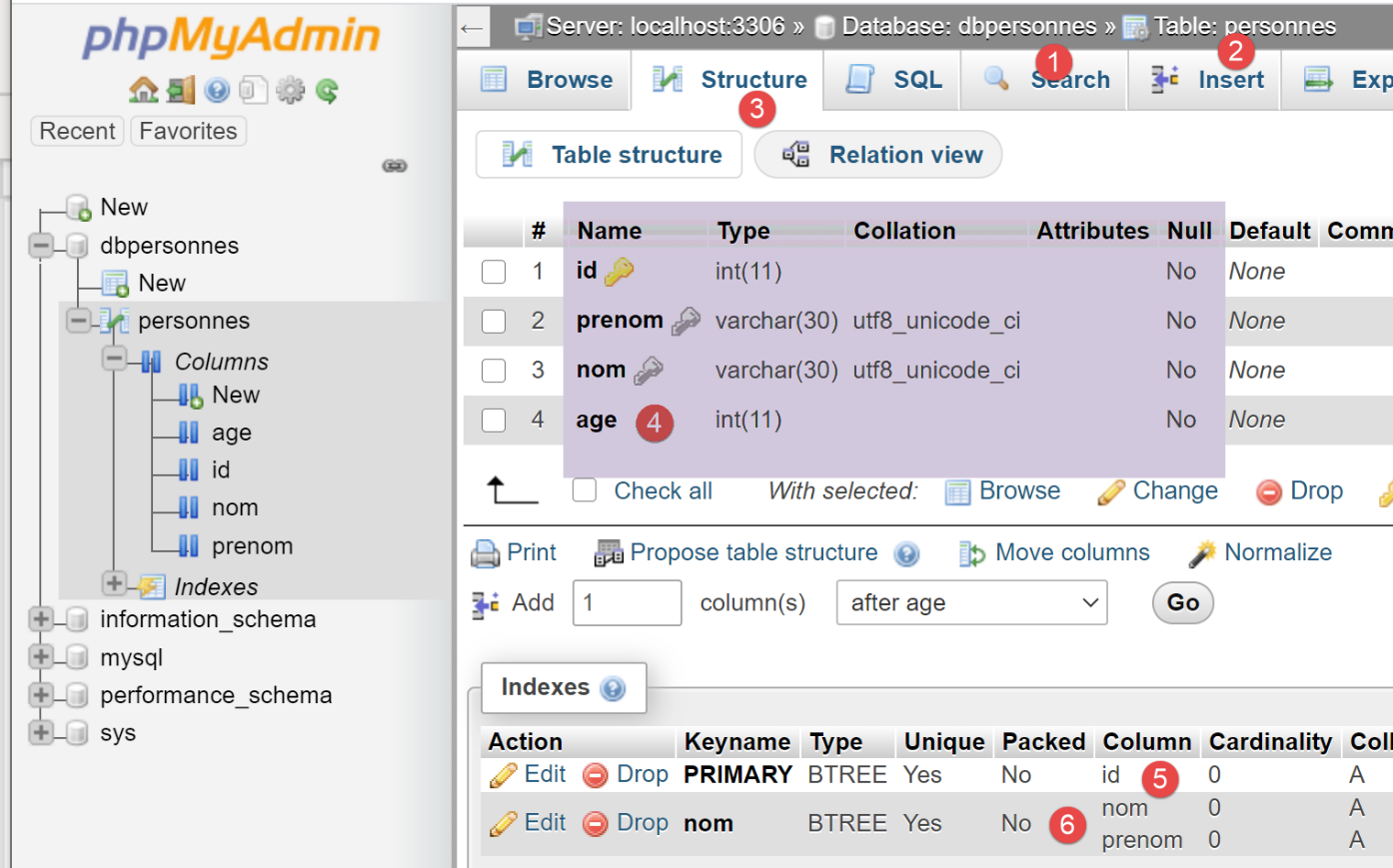
- 数据库 [dbpersonnes] [1] 包含表 [personnes] [2],该表具有结构 [3-4], 主键为 [5],唯一性约束为 [6];
16.6. 脚本 [mysql_04]:执行命令文件 SQL
在之前创建了表 [personnes] 之后,现在我们将填充该表,然后使用命令 SQL 对其进行操作。
我们希望从一个文本文件中执行 SQL 命令:
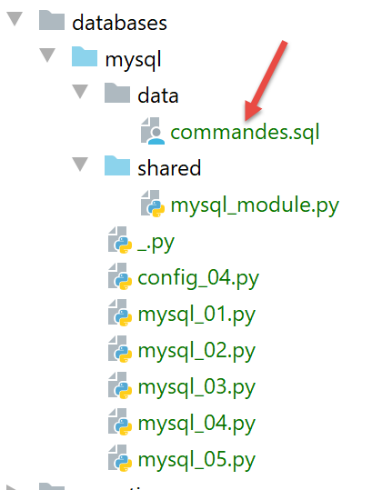
文件 [commandes.sql] 的内容如下:
# 删除表 [personnes]
drop table personnes
# 创建人员表
create table personnes (prenom varchar(30) not null, nom varchar(30) not null, age integer not null, primary key (nom,prenom))
# 插入两名人员
insert into personnes(prenom, nom, age) values('Paul','Langevin',48)
insert into personnes(prenom, nom, age) values ('Sylvie','Lefur',70)
# 显示表
select prenom, nom, age from personnes
# 故意引发错误
xx
# 插入三条人员记录
insert into personnes(prenom, nom, age) values ('Pierre','Nicazou',35)
insert into personnes(prenom, nom, age) values ('Geraldine','Colou',26)
insert into personnes(prenom, nom, age) values ('Paulette','Girond',56)
# 显示表
select prenom, nom, age from personnes
# 按姓氏字母顺序排列人员列表,同姓者按名字字母顺序排列
select nom,prenom from personnes order by nom asc, prenom desc
# 按年龄降序排列,年龄在 [20,40] 区间内的人员列表
# 随后按姓氏字母顺序排列(同姓者按名字字母顺序排列)
select nom,prenom,age from personnes where age between 20 and 40 order by age desc, nom asc, prenom asc
# 添加布鲁诺夫人
insert into personnes(prenom, nom, age) values('Josette','Bruneau',46)
# 更新其年龄
update personnes set age=47 where nom='Bruneau'
# 姓布鲁诺的人员名单
select nom,prenom,age from personnes where nom='Bruneau'
# 删除布鲁诺夫人
delete from personnes where nom='Bruneau'
# 姓Bruneau的人员名单
select nom,prenom,age from personnes where nom='Bruneau'
首先,我们定义一些函数并将其安装到模块中以便重复使用:
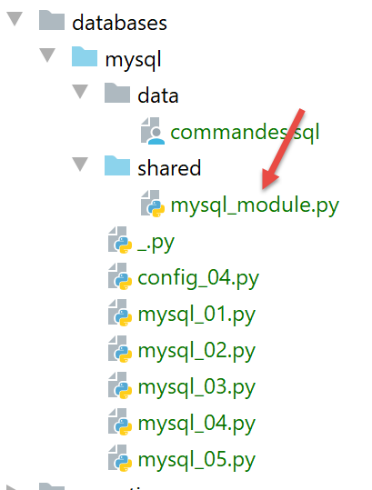
脚本 [mysql_module] 如下:
# 导入
from mysql.connector import DatabaseError, InterfaceError
from mysql.connector.connection import MySQLConnection
from mysql.connector.cursor import MySQLCursor


# ---------------------------------------------------------------------------------
def afficher_infos(curseur: MySQLCursor):
     # 显示 SQL 命令的结果
    …


# ---------------------------------------------------------------------------------
def execute_list_of_commands(connexion: MySQLConnection, sql_commands: list,
                             suivi: bool = False, arrêt: bool = True, with_transaction: bool = True):
    # 使用已打开的连接 [connexion]
    # 在此连接上执行列表 [sql_commands] 中包含的命令 SQL
    # 该文件是一个命令文件,其中每行包含一个待执行的 SQL 命令
    # 如果跟踪=True,则每次执行 SQL 命令时,都会显示其成功或失败的状态
    # 如果停止=True,则函数在遇到第一个错误时停止;否则执行所有SQL命令
    # 如果 with_transaction=True,则任何错误都会取消之前执行的所有 SQL 命令
    # 如果 with_transaction=False,则错误不会影响之前执行的 SQL 命令
    # 该函数返回一个列表 [erreur1, erreur2, ...]

    ….


# ---------------------------------------------------------------------------------
def execute_file_of_commands(connexion: MySQLConnection, sql_filename: str,
                             suivi: bool = False, arrêt: bool = True, with_transaction: bool = True):
    # 使用已打开的连接 [connexion]
    # 在此连接上执行文本文件 sql_filename 中包含的命令 SQL
    # 该文件是一个命令文件,其中每行包含一个待执行的 SQL 命令
    # 如果跟踪=True,则每次执行 SQL 命令时,都会显示其成功或失败的状态
    # 如果停止=True,则函数在遇到第一个错误时停止;否则执行所有SQL命令
    # 如果 with_transaction=True,则任何错误都会取消之前执行的所有 SQL 命令
    # 如果 with_transaction=False,则错误不会影响之前执行的 SQL 命令
    # 该函数返回一个列表 [erreur1, erreur2, ...]

    # 处理文件 SQL
    try:
        # 以读取模式打开文件
        file = open(sql_filename, "r")
        # 处理
        return execute_list_of_commands(connexion, file.readlines(), suivi, arrêt, with_transaction)
    except BaseException as erreur:
        # 返回错误数组
        return [f"Le fichier {sql_filename} n'a pu être être exploité : {erreur}"]
注:
- 第 29 行:函数 [execute_file_of_commands] 执行名为 [sql_filename] 的文本文件中包含的 SQL 命令:
- 请参阅第 31-38 行的注释以了解参数的含义;
- 第40-48行:处理文本文件[sql_filename];
- 第 43 行:打开文件;
- 第34行:执行函数[execute_list_of_commands],该函数会执行作为列表参数传递给它的SQL命令。此处该列表由文本文件[file.readlines()]中的所有行组成(第45行);
函数 [execute_list_of_commands] 如下:
# ---------------------------------------------------------------------------------
def execute_list_of_commands(connexion: MySQLConnection, sql_commands: list,
                             suivi: bool = False, arrêt: bool = True, with_transaction: bool = True):
    # 使用已打开的连接 [connexion]
    # 通过此连接执行列表 [sql_commands] 中包含的命令 SQL
    # 该文件是一个命令文件,其中每行包含一个待执行的 SQL 命令
    # 如果跟踪=True,则每次执行 SQL 命令时,都会显示其成功或失败的状态
    # 如果停止=True,则函数在遇到第一个错误时停止;否则执行所有SQL命令
    # 如果 with_transaction=True,则任何错误都会取消之前执行的所有 SQL 命令
    # 如果 with_transaction=False,则错误不会影响之前执行的 SQL 命令
    # 该函数返回一个列表 [erreur1, erreur2, ...]

    # 初始化
    curseur = None
    connexion.autocommit = not with_transaction
    erreurs = []
    try:
        # 需要一个滑块
        curseur = connexion.cursor()
        # 执行 sql_commands 中包含的 SQL
        # 依次执行
        for command in sql_commands:
            # 删除当前命令首尾的空格
            command = command.strip()
            # 是否为空命令或注释?如果是,则跳转到下一条命令
            if command == '' or command[0] == "#":
                continue
            # 执行当前命令
            error = None
            try:
                curseur.execute(command)
            except (InterfaceError, DatabaseError) as erreur:
                error = erreur
            # 是否发生错误?
            if error:
                # 又一个错误
                msg = f"{command} : Erreur ({error})"
                erreurs.append(msg)
                # 是否显示屏幕?
                if suivi:
                    print(msg)
                # 是否停止?
                if with_transaction or arrêt:
                    # 是否返回错误列表
                    return erreurs
            else:
                # 无错误
                if suivi:
                    print(f"[{command}] : Exécution réussie")
                # 显示命令结果
                afficher_infos(curseur)
        # 返回错误表
        return erreurs
    finally:
        # 关闭游标
        if curseur:
            curseur.close()
        # 若存在事务,则提交/回滚
        if with_transaction:
            if erreurs:
                # 撤销
                connexion.rollback()
            else:
                # 确认
                connexion.commit()
注释
- 第2行:函数[execute_list_of_commands]执行列表[sql_commands]中包含的命令SQL:
- 请参阅第 4-11 行的注释以了解参数的含义;
- 第2行:接收到的连接是一个已打开的数据库连接;
- 第15行:若希望列表[sql_commands]中的所有命令在事务内执行,则需在AUTOCOMMIT=False模式下运行。 否则,将以 AUTOCOMMIT=True 模式运行,此时列表 [sqlCommands] 中的每个命令都将在自动事务中执行,且不会有全局事务;
- 第 19 行:请求一个游标以执行 SQL 中的各项命令;
- 第 22-51 行:逐条执行命令;
- 第 26-27 行:允许在 SQL 命令列表中出现空行和注释。遇到此类情况,系统将直接忽略该命令;
- 第 30-33 行:执行当前查询;
- 第35-45行:处理当前查询可能出现的执行错误;
- 第 37-38 行:将错误添加到错误数组中;
- 第 40-41 行:如果请求了跟踪,则显示错误消息;
- 第43-45行:如果调用方代码要求在首次错误后终止,或者要求使用事务,则必须终止。返回错误数组;
- 第46-51行:当前查询执行未发生错误的情况;
- 第48-49行:若请求了跟踪,则显示已执行的查询并标注“成功”;
- 第50-51行:显示已执行查询的结果。稍后我们将再次讨论函数[afficher_infos];
- 第 54-65 行:无论是否发生异常,都会执行 [finally] 子句;
- 第 56-57 行:关闭游标。这将释放分配给该游标的资源;
- 第 59-65 行:处理调用方要求在事务中执行 SQL 命令的情况;
- 第 60 行:检查列表 [erreurs] 是否为空,这表示未发生任何异常。在此情况下,事务被提交(第 65 行),否则事务被回滚(第 62 行);
函数 [afficher_infos] 显示查询结果:
# ---------------------------------------------------------------------------------
def afficher_infos(curseur: MySQLCursor):
    print(type(curseur))
    # 显示 SQL 命令的结果
    # 是否为 SELECT 语句?
    if curseur.description:
        # 游标有描述——因此它执行了SELECT语句
        # description[i] 是 SELECT 语句中第 i 列的描述
        # descriptionQZXW2HTMLBW2ldZQXQZXW2HTMLBWzBdZQX 是 SELECT 语句中第 i 列的名称
        # 显示字段名称
        titre = ""
        for i in range(len(curseur.description)):
            titre += curseur.description[i][0] + ", "
        # 显示字段列表,不包含结尾逗号
        print(titre[0:len(titre) - 1])
        # 分隔行
        print("*" * (len(titre) - 1))
        # 显示选择框中的当前行
        ligne = curseur.fetchone()
        while ligne:
            # 显示
            print(ligne)
            # 下拉列表的下一行
            ligne = curseur.fetchone()
        # 分隔行
        print("*" * (len(titre) - 1))
    else:
        # 光标没有字段 [description] - 因此它执行了一条命令 SQL
        # 更新命令(插入、删除、更新)
        print(f"nombre de lignes modifiées : {curseur.rowcount}")
注释
- 第 1 行:该函数的参数是刚刚执行了 SQL 命令的游标。 根据该命令是 SELECT 还是更新命令 INSERT、UPDATE、DELETE,游标的内容并不相同;
- 第6行:如果游标包含字段[description],则表示其已执行SELECT,而[description]描述了SELECT中请求的字段:
- description[i] 描述了 SELECT 所请求的第 i 个字段。这是一个列表;
- description[i][0] 是第 i 个字段的名称;
- 第 11-17 行:显示 SELECT 所请求的字段名称;
- 第 18-24 行:处理 SELECT 的结果;
- 第 20、24 行:SELECT 的结果按顺序进行处理。该结果是一组行。当前行由 [curseur.fetchone()](第 19 行)获取。由此得到一个元组;
- 第27-30行: 如果游标不包含字段 [description],则说明它已执行了更新命令 INSERT、UPDATE、DELETE。 这样就可以知道该命令的执行修改了表中的多少行;
- 第 30 行:[curseur.rowcount] 即为该数值;
主脚本 [mysql-04] 调用了我们刚刚描述的模块 [mysql_module]:
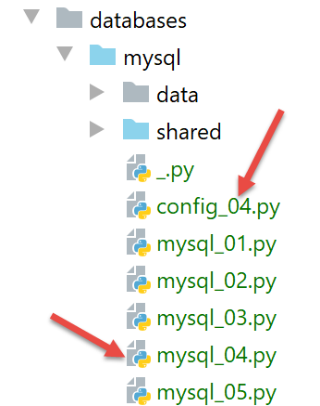
文件 [config_04] 配置了脚本 [mysql_04] 的执行环境:
def configure():
    import os

    # 配置文件所在文件夹的绝对路径
    script_dir = os.path.dirname(os.path.abspath(__file__))
    # syspath 文件夹配置
    absolute_dependencies = [
        # 本地文件夹
        f"{script_dir}/shared",
    ]

    # 设置 syspath
    from myutils import set_syspath
    set_syspath(absolute_dependencies)

    # 生成配置
    return {
        # 命令文件SQL
        "commands_filename": f"{script_dir}/data/commandes.sql",
        # 数据库连接凭据
        "host": "localhost",
        "database": "dbpersonnes",
        "user": "admpersonnes",
        "password": "nobody"
    }
脚本 [mysql_04] 如下所示:
# 获取应用程序配置
import config_04

config = config_04.configure()

# 已配置 syspath - 可以进行导入
import sys
from mysql_module import execute_file_of_commands
from mysql.connector import connect, DatabaseError, InterfaceError

# ---------------------------------------------- 主函数
# 验证调用语法
# argv[0] true / false
args = sys.argv
erreur = len(args) != 2
if not erreur:
    with_transaction = args[1].lower()
    erreur = with_transaction != "true" and with_transaction != "false"
# 错误?
if erreur:
    print(f"syntaxe : {args[0]} true / false")
    sys.exit()

# 文本计算
with_transaction = with_transaction == "true"
if with_transaction:
    texte = "avec transaction"
else:
    texte = "sans transaction"

# 屏幕日志
print("--------------------------------------------------------------------")
print(f"Exécution du fichier SQL {config['commands_filename']} {texte}")
print("--------------------------------------------------------------------")

# 执行文件中的命令 SQL
connexion = None
try:
    # 连接数据库
    connexion = connect(host=config['host'], user=config['user'], password=config['password'],
                        database=config['database'])
    # 执行命令文件 SQL
    erreurs = execute_file_of_commands(connexion, config["commands_filename"], suivi=True, arrêt=False,
                                       with_transaction=with_transaction)
except (InterfaceError, DatabaseError) as erreur:
     # 显示错误
    print(f"L'erreur fatale suivante s'est produite : {erreur}")
    # 程序结束
    sys.exit()
finally:
    # 若连接已建立,则关闭连接
    if connexion:
        connexion.close()

# 显示错误数量
print("--------------------------------------------------------------------")
print(f"Exécution terminée")
print("--------------------------------------------------------------------")
print(f"Il y a eu {len(erreurs)} erreur(s)")
# 显示错误
for erreur in erreurs:
    print(erreur)
注释
- 第 1-4 行:脚本配置;
- 第 8 行:导入前文所述的 [mysql_module] 模块:
- 第 12-22 行:脚本 [mysql-04] 等待一个参数,该参数必须取值 [true / false] 中的任意一个。 该参数用于指定是否应在事务中执行命令文件 SQL(true)或不在事务中执行(false);
- 第 14 行:用户传递给脚本的参数可在列表 [sys.argv] 中找到;
- 第 15 行:需要两个参数,例如 [mysql-04 true]。脚本名称也算作一个参数;
- 第17-18行:如果确实有两个参数,则第二个参数必须是值为'true'或'false'的字符串;
- 第24-29行:计算第33行显示的文本;
- 第 39-44 行:执行文件 [./data/commandes.sql] 中的命令;
- 第45-49行:若连接时发生错误(第40行)或[execute_file_of_commands]脚本未处理该错误,则显示错误并终止所有操作;
- 第55-62行:若执行成功,则显示在执行SQL命令时遇到的错误数量;
执行 1
首先进行一次非事务性执行。为此,我们将按照“执行上下文配置”一节中的方法创建一个执行配置:
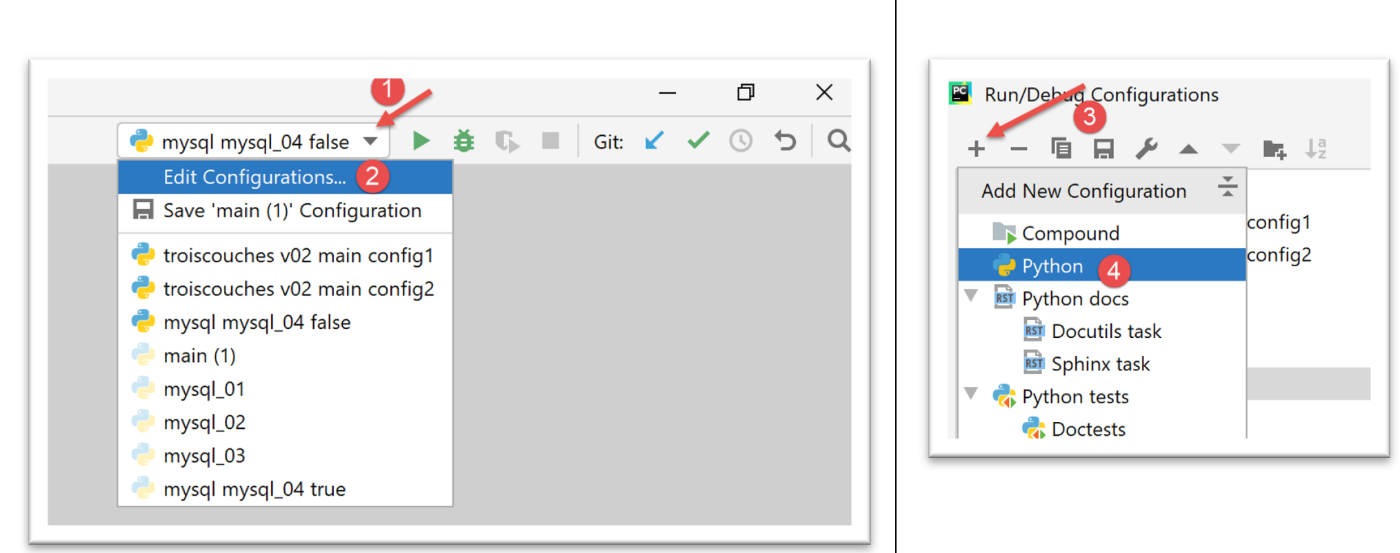
- 在 [1-4] 中,创建一个 Python 执行配置;
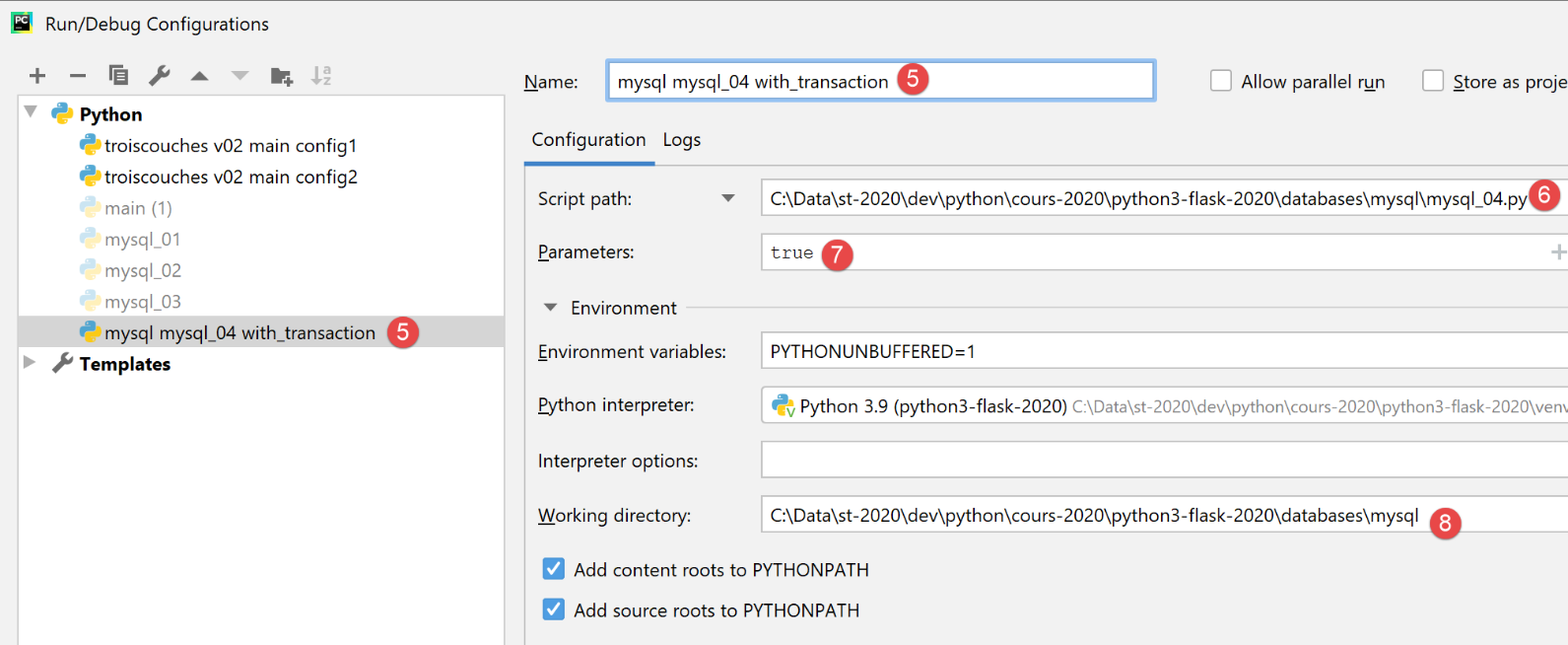
- [5]:执行配置的名称;
- [6]:待执行脚本的路径;
- [7]:脚本参数;
- [8]:执行目录;
因此,此配置对应于通过事务执行文件 SQL。使用按钮 [Apply] 确认配置。
我们以同样的方式创建执行配置 [mysql mysql-04 without_transaction]:
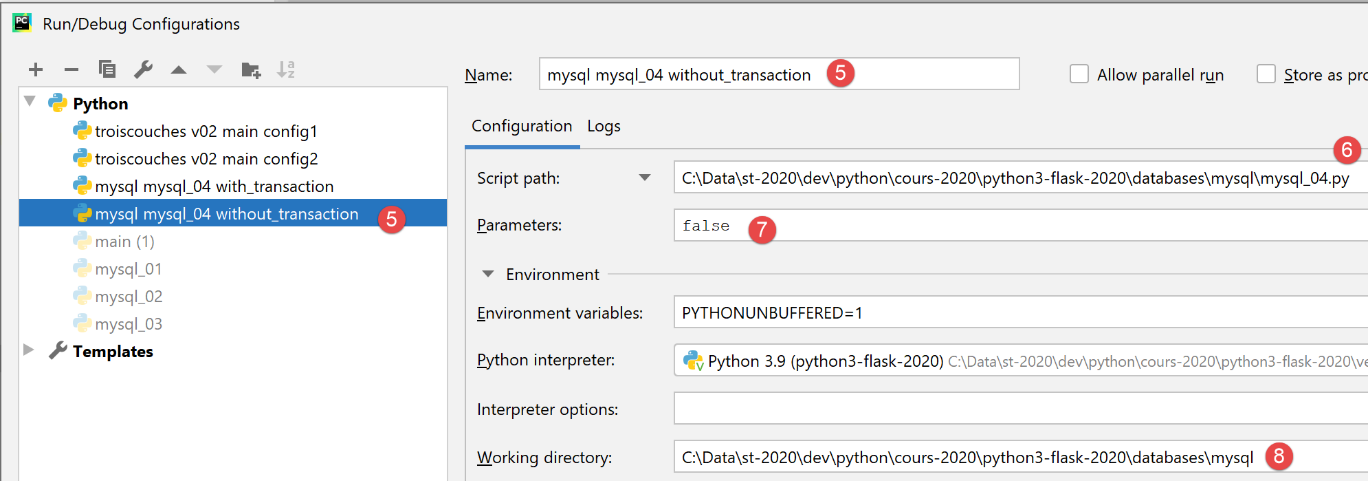
因此,此配置对应于在不使用事务的情况下执行文件 SQL。使用按钮 [Apply] 确认配置。
首先执行无事务版本:

结果如下:
C:\Data\st-2020\dev\python\cours-2020\python3-flask-2020\venv\Scripts\python.exe C:/Data/st-2020/dev/python/cours-2020/python3-flask-2020/databases/mysql/mysql_04.py false
--------------------------------------------------------------------
Exécution du fichier SQL C:\Data\st-2020\dev\python\cours-2020\python3-flask-2020\databases\mysql/data/commandes.sql sans transaction
--------------------------------------------------------------------
[drop table personnes] : Exécution réussie
nombre de lignes modifiées : 0
[create table personnes (id int primary key, prenom varchar(30) not null, nom varchar(30) not null, age integer not null, unique (nom,prenom))] : Exécution réussie
nombre de lignes modifiées : 0
[insert into personnes(id, prenom, nom, age) values(1, 'Paul','Langevin',48)] : Exécution réussie
nombre de lignes modifiées : 1
[insert into personnes(id, prenom, nom, age) values (2, 'Sylvie','Lefur',70)] : Exécution réussie
nombre de lignes modifiées : 1
[select prenom, nom, age from personnes] : Exécution réussie
prenom, nom, age,
*****************
('Paul', 'Langevin', 48)
('Sylvie', 'Lefur', 70)
*****************
xx : Erreur (1064 (42000): You have an error in your SQL syntax; check the manual that corresponds to your MySQL server version for the right syntax to use near 'xx' at line 1)
[insert into personnes(id, prenom, nom, age) values (3, 'Pierre','Nicazou',35)] : Exécution réussie
nombre de lignes modifiées : 1
[insert into personnes(id, prenom, nom, age) values (4, 'Geraldine','Colou',26)] : Exécution réussie
nombre de lignes modifiées : 1
[insert into personnes(id, prenom, nom, age) values (5, 'Paulette','Girond',56)] : Exécution réussie
nombre de lignes modifiées : 1
[select prenom, nom, age from personnes] : Exécution réussie
prenom, nom, age,
*****************
('Paul', 'Langevin', 48)
('Sylvie', 'Lefur', 70)
('Pierre', 'Nicazou', 35)
('Geraldine', 'Colou', 26)
('Paulette', 'Girond', 56)
*****************
[select nom,prenom from personnes order by nom asc, prenom desc] : Exécution réussie
nom, prenom,
************
('Colou', 'Geraldine')
('Girond', 'Paulette')
('Langevin', 'Paul')
('Lefur', 'Sylvie')
('Nicazou', 'Pierre')
************
[select nom,prenom,age from personnes where age between 20 and 40 order by age desc, nom asc, prenom asc] : Exécution réussie
nom, prenom, age,
*****************
('Nicazou', 'Pierre', 35)
('Colou', 'Geraldine', 26)
*****************
[insert into personnes(id, prenom, nom, age) values(6, 'Josette','Bruneau',46)] : Exécution réussie
nombre de lignes modifiées : 1
[update personnes set age=47 where nom='Bruneau'] : Exécution réussie
nombre de lignes modifiées : 1
[select nom,prenom,age from personnes where nom='Bruneau'] : Exécution réussie
nom, prenom, age,
*****************
('Bruneau', 'Josette', 47)
*****************
[delete from personnes where nom='Bruneau'] : Exécution réussie
nombre de lignes modifiées : 1
[select nom,prenom,age from personnes where nom='Bruneau'] : Exécution réussie
nom, prenom, age,
*****************
*****************
--------------------------------------------------------------------
Exécution terminée
--------------------------------------------------------------------
Il y a eu 1 erreur(s)
xx : Erreur (1064 (42000): You have an error in your SQL syntax; check the manual that corresponds to your MySQL server version for the right syntax to use near 'xx' at line 1)

Process finished with exit code 0
注:
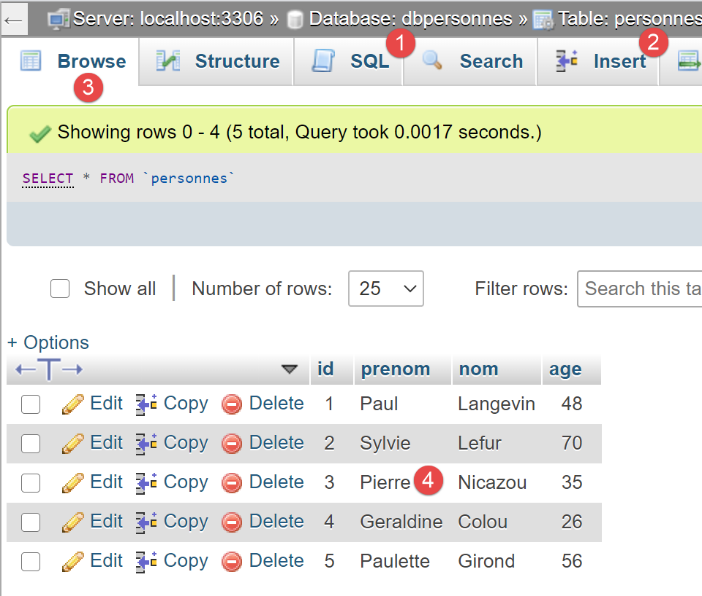
- 第 19 行:可以看到,在发生错误后,SQL 命令的执行仍在继续,这是因为执行是在无事务环境下进行的,并且使用了参数 [arrêt=False]。 因此,所有 SQL 命令均已执行。因此,应存在一个反映此执行情况的 [personnes] 表;
使用 phpMyAdmin 进行验证:
执行 2
现在我们执行配置 [mysql mysql-04 with_transaction]。结果如下:
C:\Data\st-2020\dev\python\cours-2020\python3-flask-2020\venv\Scripts\python.exe C:/Data/st-2020/dev/python/cours-2020/python3-flask-2020/databases/mysql/mysql_04.py true
--------------------------------------------------------------------
Exécution du fichier SQL C:\Data\st-2020\dev\python\cours-2020\python3-flask-2020\databases\mysql/data/commandes.sql avec transaction
--------------------------------------------------------------------
[drop table personnes] : Exécution réussie
nombre de lignes modifiées : 0
[create table personnes (id int primary key, prenom varchar(30) not null, nom varchar(30) not null, age integer not null, unique (nom,prenom))] : Exécution réussie
nombre de lignes modifiées : 0
[insert into personnes(id, prenom, nom, age) values(1, 'Paul','Langevin',48)] : Exécution réussie
nombre de lignes modifiées : 1
[insert into personnes(id, prenom, nom, age) values (2, 'Sylvie','Lefur',70)] : Exécution réussie
nombre de lignes modifiées : 1
[select prenom, nom, age from personnes] : Exécution réussie
prenom, nom, age,
*****************
('Paul', 'Langevin', 48)
('Sylvie', 'Lefur', 70)
*****************
xx : Erreur (1064 (42000): You have an error in your SQL syntax; check the manual that corresponds to your MySQL server version for the right syntax to use near 'xx' at line 1)
--------------------------------------------------------------------
Exécution terminée
--------------------------------------------------------------------
Il y a eu 1 erreur(s)
xx : Erreur (1064 (42000): You have an error in your SQL syntax; check the manual that corresponds to your MySQL server version for the right syntax to use near 'xx' at line 1)

Process finished with exit code 0
注:
- 第 19 行: 可以看到,在出现错误后,SQL命令不再执行,这是因为执行是在事务中进行的,而在遇到第一个错误时,我们回滚了事务并停止了SQL命令的执行。 这意味着第9、11、13行的命令结果已被撤销。因此,[personnes]表应为空;
通过phpMyAdmin进行验证:
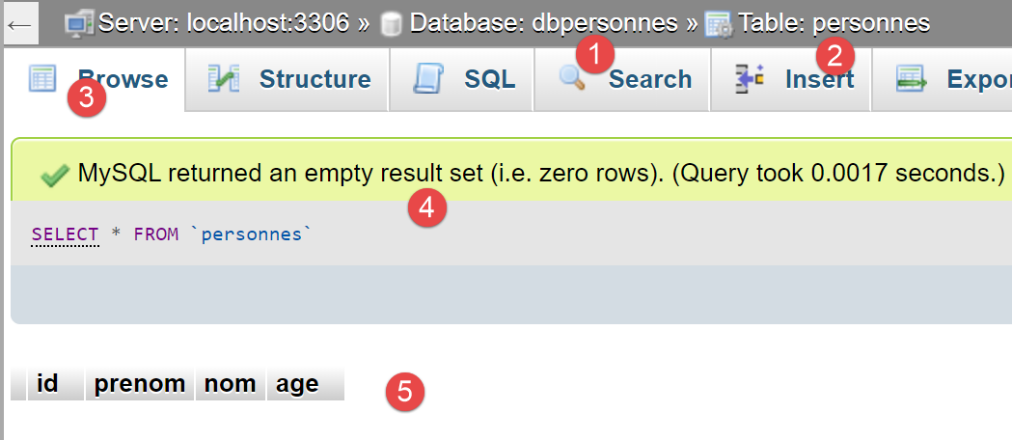
- 在 [5] 中,可以看到表 [personnes] 和 [2] 为空;
16.7. 脚本 [mysql_05]:使用带参数的查询
脚本 [mysql_05] 引入了参数化查询的概念:
# 导入
from mysql.connector import connect, DatabaseError, InterfaceError

# 用户身份
ID = "admpersonnes"
PWD = "nobody"
# 数据库管理系统的主机
HOST = "localhost"
# 数据库名称
BASE = "dbpersonnes"

# 人员列表(姓、名、年龄)
personnes = []
for i in range(5):
    personnes.append((i, f"n0{i}", f"p0{i}", i + 10))
personnes.append((40, "d'Aboot", "Y'éna", 18))
# 其他人员列表
autresPersonnes = []
for i in range(5):
    autresPersonnes.append((i + 100, f"n1{i}", f"p1{i}", i + 20))
autresPersonnes.append((200, "d'Aboot", "F'ilhem", 34))

# 访问 SGBD
connexion = None
try:
    # 登录
    connexion = connect(host=HOST, user=ID, password=PWD, database=BASE)
    # 光标
    curseur = connexion.cursor()
    # 删除现有记录
    curseur.execute("delete from personnes")
    # 使用预编译查询逐条插入
    for personne in personnes:
        curseur.execute("insert into personnes(id,nom,prenom,age) values(%s,%s,%s,%s)", personne)
    # 批量插入人员列表
    curseur.executemany("insert into personnes(id,nom,prenom,age) values(%s, %s,%s,%s)", autresPersonnes)
    # 事务提交
    connexion.commit()
except (DatabaseError, InterfaceError) as erreur:
    # 显示错误
    print(f"L'erreur suivante s'est produite : {erreur}")
    # 撤销交易
    if connexion:
        connexion.rollback()
finally:
    # 关闭连接
    if connexion:
        connexion.close()
注释
- 第 12-21 行:创建两个人员列表,用于导入 [dbpersonnes] 数据库;
- 第 27 行:连接数据库;
- 第 31 行:清空 [personnes] 表中的内容;
- 第33-34行:使用带参数的查询插入人员。 第34行,第一个参数是要执行的SQL命令。该命令是不完整的。它包含[%s]参数,这些参数将被第二个参数列表中的值按顺序逐个替换;
- 第36行:插入人员,此次仅使用一条指令[curseur.executemany]。此时[executemany]的第二个参数是一个列表的列表;
参数化查询的优势体现在两方面:
- 它们的执行速度比“硬编码”查询更快,后者每次执行都需要进行解析。参数化查询 [executemany] 仅需解析一次。之后,它可被执行 n 次而无需再次解析;
- 注入到参数化查询中的参数会经过验证。如果它们包含保留字符(例如单引号),这些字符会被“屏蔽”,以确保它们不会干扰 SQL 命令的执行。 正是为了验证这一点,我们在列表中加入了包含单引号的姓名(第16行和第21行);
在 phpMyAdmin 中获得的结果如下:
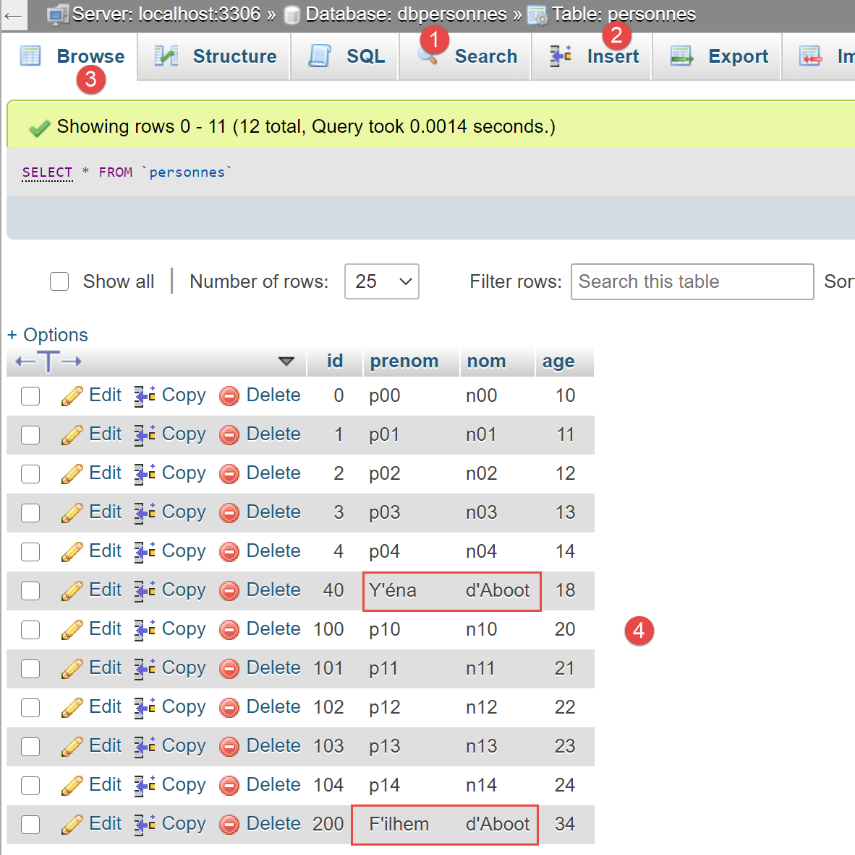
- 请注意,包含撇号(在 SQL 中为保留字符)的字符串已被正确插入。带参数的查询已对其进行了“保护”。若不使用带参数的查询,则需手动处理此问题;