15. 示例 [nuxt-12]:使用 axios 向 HTTP 发送请求
15.1. Présentation
在这个新示例中,我们将了解如何在 [asyncData] 函数中使用 [axios] 库进行 HTTP 请求。此外,我们将运用已掌握的知识:
- [nuxt-06]示例中的插件使用:
- 示例 [nuxt-06] 中将数据存储保存在会话 Cookie 中的方法;
- 示例 [nuxt-09] 中使用中间件控制导航;
- 示例 [nuxt-11] 中的错误处理;
示例的架构如下:
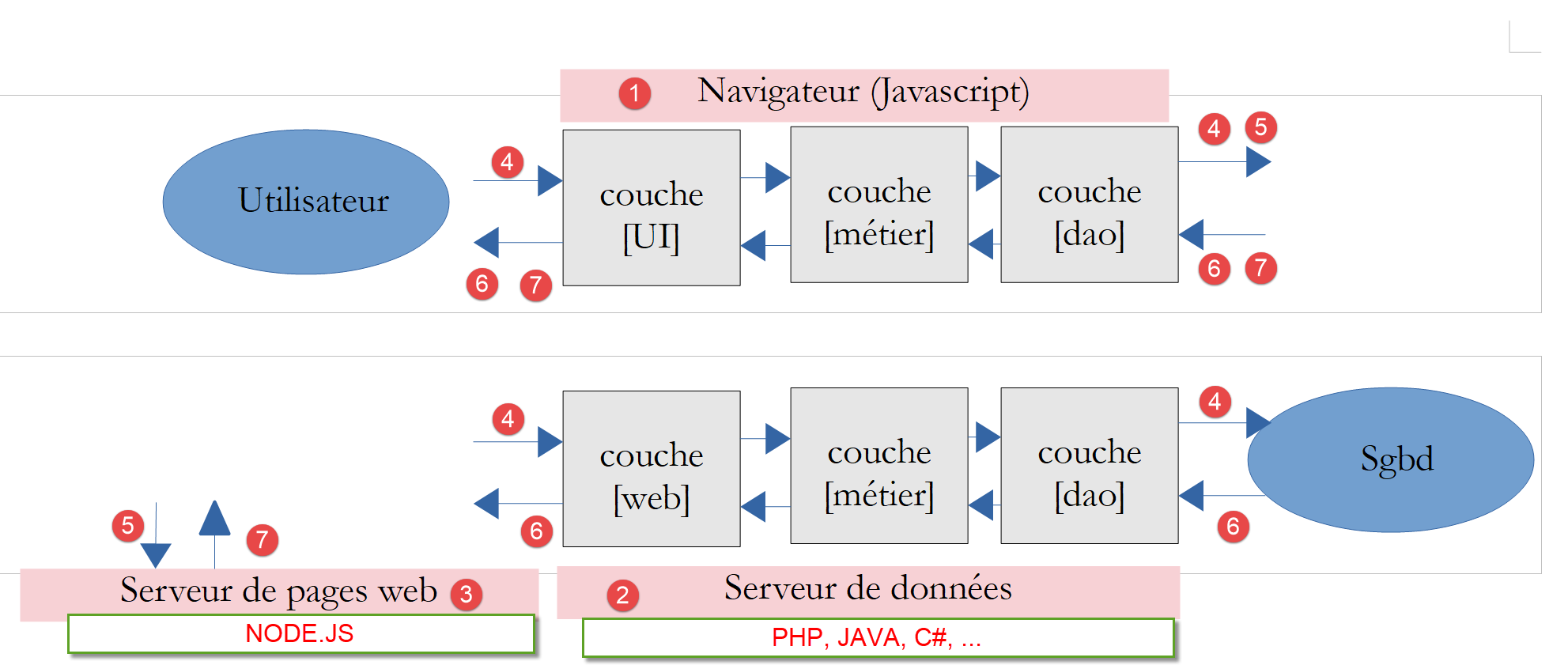
- 应用程序 [nuxt] 将存储在服务器 [node.js] [3] 上,由浏览器 [1] 下载并执行;
- 客户端 [nuxt] [1] 以及服务器 [nuxt] [3] 都将向数据服务器 HTTP 发起请求2HTMLP001451ZQX 服务器。该服务器即第 7 节中开发的税款计算服务器 PHP。我们将使用其最新版本(第 14 版),并授权 CORS 请求;
该示例的架构可简化如下:
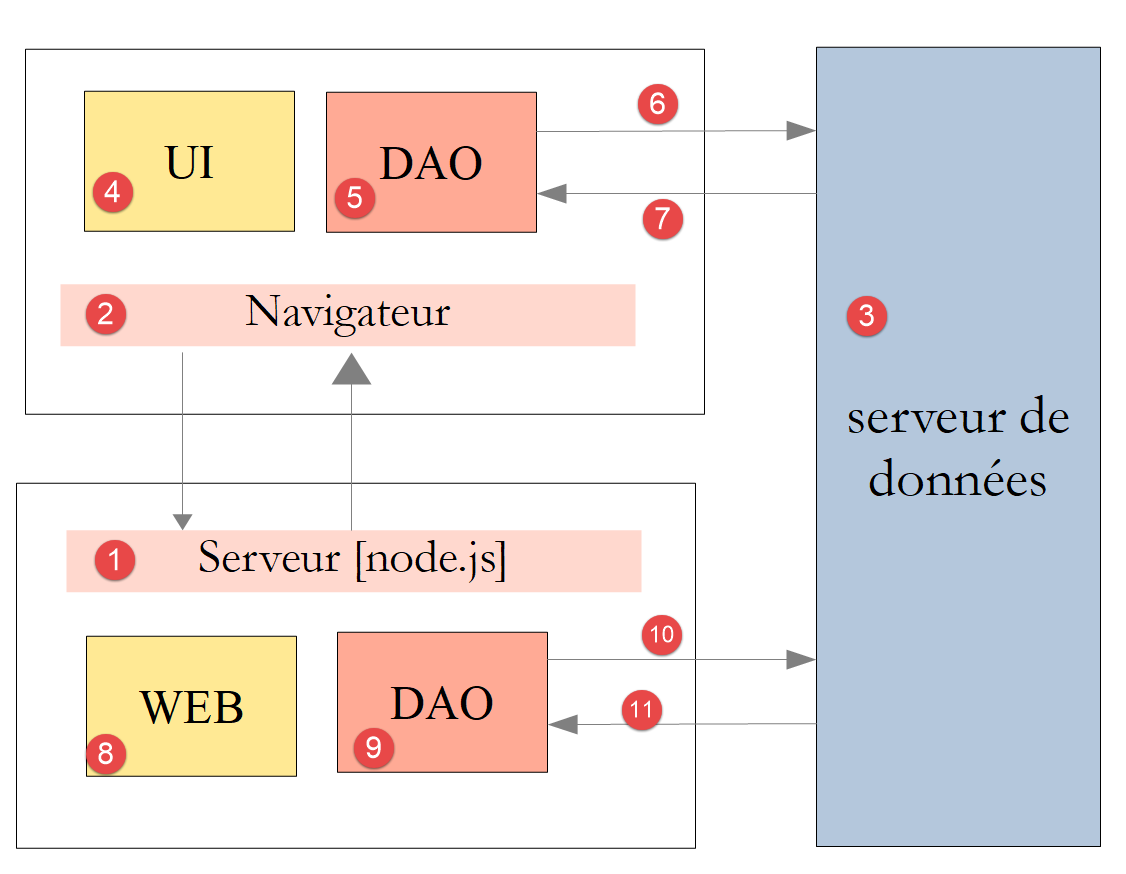
- 在 [1] 中,服务器 [node.js] 将页面 [nuxt] 交付给浏览器 [2]。 这些页面是由服务器中的 [web] [8] 层提供的。 为了提供该页面,服务器可能向数据服务器 [3] 请求了外部数据。由 [DAO] [9] 层执行必要的 HTTP 请求;
- 每次向 [node.js][1] 服务器调用页面时, 浏览器 [2] 会接收完整的应用程序 [nuxt],该应用程序随后将在 SPA 模式下运行。 [UI](用户界面)模块向用户展示[vue.js]页面。 该模块的操作或页面的自然生命周期可能会触发对数据服务器 [3] 的外部数据调用。 此时,[DAO] [5] 层将执行必要的 HTTP 请求;
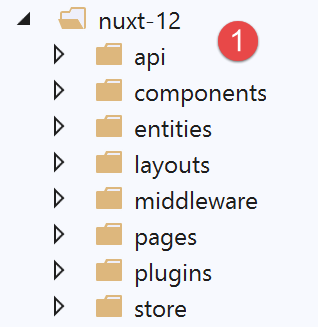
15.2. 项目结构树
15.3. 配置文件 [nuxt.config.js]
该项目将由以下文件进行控制:[nuxt.config.js]:
export default {
  mode: 'universal',
  /*
   ** Headers of the page
   */
  head: {
    title: 'Introduction à [nuxt.js]',
    meta: [
      { charset: 'utf-8' },
      { name: 'viewport', content: 'width=device-width, initial-scale=1' },
      {
        hid: 'description',
        name: 'description',
        content: 'ssr routing loading asyncdata middleware plugins store'
      }
    ],
    link: [{ rel: 'icon', type: 'image/x-icon', href: '/favicon.ico' }]
  },
  /*
   ** Customize the progress-bar color
   */
  loading: false,

  /*
   ** Global CSS
   */
  css: [],
  /*
   ** Plugins to load before mounting the App
   */
  plugins: [
    { src: '@/plugins/client/plgSession', mode: 'client' },
    { src: '@/plugins/server/plgSession', mode: 'server' },
    { src: '@/plugins/client/plgDao', mode: 'client' },
    { src: '@/plugins/server/plgDao', mode: 'server' },
    { src: '@/plugins/client/plgEventBus', mode: 'client' }
  ],
  /*
   ** Nuxt.js dev-modules
   */
  buildModules: [
    // 文档:https://github.com/nuxt-community/eslint-module
    '@nuxtjs/eslint-module'
  ],
  /*
   ** Nuxt.js modules
   */
  modules: [
    // 文档:https://bootstrap-vue.js.org
    'bootstrap-vue/nuxt',
    // 文档:https://axios.nuxtjs.org/usage
    '@nuxtjs/axios',
    // https://www.npmjs.com/package/cookie-universal-nuxt
    'cookie-universal-nuxt'
  ],
  /*
   ** Axios module configuration
   ** See https://axios.nuxtjs.org/options
   */
  axios: {},
  /*
   ** Build configuration
   */
  build: {
    /*
     ** You can extend webpack config here
     */
    extend(config, ctx) { }
  },
  // 源代码目录
  srcDir: 'nuxt-12',
  // 路由器
  router: {
    // 应用程序的 URL 根目录
    base: '/nuxt-12/',
    // 路由中间件
    middleware: ['routing']
  },
  // 服务器
  server: {
    // 服务端口,默认 3000
    port: 81,
    // 监听的网络地址,默认 localhost:127.0.0.1
    // 0.0.0.0 = 该机器的所有网络地址
    host: 'localhost'
  },
  // 环境
  env: {
    // axios 配置
    timeout: 2000,
    withCredentials: true,
    baseURL: 'http://localhost/php7/scripts-web/impots/version-14',
    // 会话cookie配置[nuxt]
    maxAge: 60 * 5
  }
}
- 第 22 行:我们自行处理异步操作结束的等待提示;
- 第 31 行:我们将使用各种插件,这些插件将专门针对客户端或服务器,但不会同时针对两者;
- 第 52 行:模块 [axios] 已集成到 [nuxt] 中。这将导致负责向计算税款的服务器 PHP 发送 HTTP 请求的对象 [axios][nuxt] 应用程序向 PHP 税款计算服务器发送请求的对象 [axios] 将在 [context.$axios] 中可用;
- 第 54 行:[cookie-universal-nuxt] 模块将允许我们将 [nuxt] 会话保存到 Cookie 中;
- 第60行:属性[axios]用于配置第52行的模块[@nuxtjs/axios]。我们将不使用此功能,而是优先采用第88行的属性[env];
- 第 90 行:等待税务计算服务器响应的最长时限;
- 第91行:[nuxt]客户端必填项——允许在与税费计算服务器的交互中使用Cookie;
- 第92行:税费计算服务器的基础URL;
- 第 94 行:Nuxt 会话时长(5 分钟);
- 第77行:客户端与[nuxt]服务器的通信将由路由中间件控制;
15.4. 应用程序的 [UI] 层
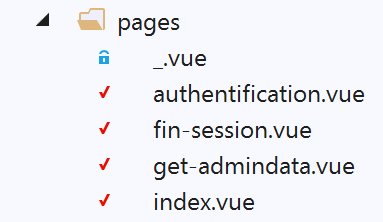
我们将通过以下视图,使应用程序 [nuxt] 能够访问税费计算服务器的 API:
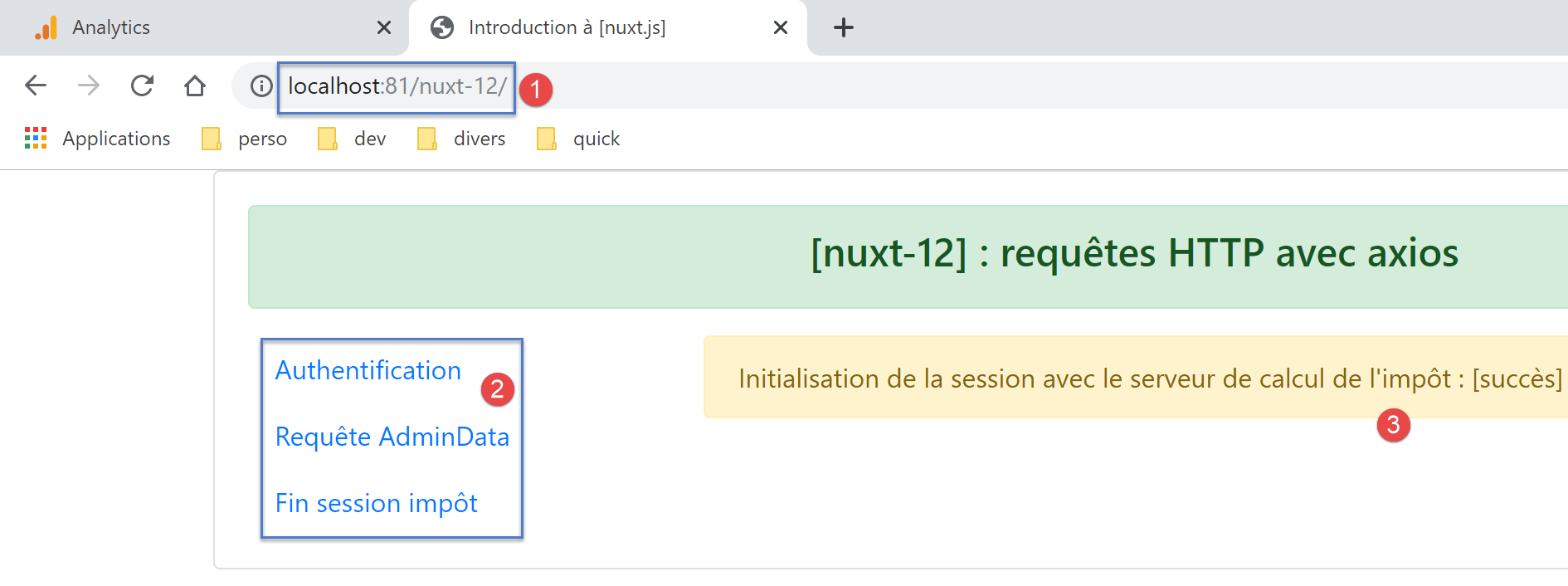
- 在 [2] 中,提供访问税务计算服务器上 API 的菜单:
- [Authentification]:对应页面 [authentification]。该页面使用 [admin, admin] 凭据向税费计算服务器发起身份验证请求,目前仅此凭据被授权。 显示的结果与 [3] 类似;
- [Requête AdminData]:对应页面 [get-admindata]。该页面向税款计算服务器请求数据(此处称为 [adminData]),以便进行税款计算。 显示的结果与 [3] 类似;
- [Fin session impôt]:对应页面 [fin-session]。该页面向税费计算服务器发送结束会话请求 PHP。 服务器随后终止当前会话 PHP,并初始化一个新的空白会话;
15.5. 应用程序 [nuxt] 的 [dao] 层
如上所述,应用程序 [nuxt] 的架构如下:
- 在 [1] 中,服务器 [node.js] 将页面 [nuxt] 发送给浏览器 [2]。 是服务器中的 [web] [8] 层负责提供这些页面。 为了提供该页面,服务器可能向数据服务器 [3] 请求了外部数据。正是 [DAO] [9] 层执行了必要的 HTTP 请求;
- 每次向 [node.js][1] 服务器调用页面时, 浏览器 [2] 会接收完整的应用程序 [nuxt],该应用程序随后将在 SPA 模式下运行。 [UI](用户界面)模块向用户展示[vue.js]页面。 该模块的操作或页面的生命周期可能会触发对数据服务器 [3] 的外部数据调用。 此时,[DAO] [5] 层将执行必要的 HTTP 请求;
我们将使用在文档《PHP7 语言示例入门》中开发的第 14 版税费计算服务器。我们将仅使用其 API(应用程序编程接口)jSON 的一部分:
请求 | 响应 |
| |
| |
| |
| |
15.5.1. 服务器 [nuxt] 的层 [dao]
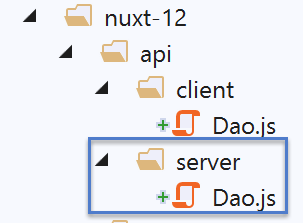
服务器 [node.js] [1] 将使用文档 |VUE.JS 框架示例入门| 中描述的 [dao] 层。在此重述其代码:
'use strict';

// 导入
import qs from 'qs'

class Dao {

  // 构造函数
  constructor(axios) {
    this.axios = axios;
    // 会话cookie
    this.sessionCookieName = "PHPSESSID";
    this.sessionCookie = '';
  }

  // 初始化会话
  async  initSession() {
    // 请求选项 HHTP [get /main.php?action=init-session&type=json]
    const options = {
      method: "GET",
      // URL 的参数
      params: {
        action: 'init-session',
        type: 'json'
      }
    };
    // 执行查询 HTTP
    return await this.getRemoteData(options);
  }

  async  authentifierUtilisateur(user, password) {
    // 请求选项 HHTP [post /main.php?action=authentifier-utilisateur]
    const options = {
      method: "POST",
      headers: {
        'Content-type': 'application/x-www-form-urlencoded',
      },
      // POST 的正文
      data: qs.stringify({
        user: user,
        password: password
      }),
      // URL的参数
      params: {
        action: 'authentifier-utilisateur'
      }
    };
    // HTTP 请求的执行
    return await this.getRemoteData(options);
  }

  async getAdminData() {
    // HHTP 查询选项[get /main.php?action=get-admindata]
    const options = {
      method: "GET",
      // URL 的参数
      params: {
        action: 'get-admindata'
      }
    };
    // 查询执行 HTTP
    const data = await this.getRemoteData(options);
    // 结果
    return data;
  }

  async  getRemoteData(options) {
    // 用于会话cookie
    if (!options.headers) {
      options.headers = {};
    }
    options.headers.Cookie = this.sessionCookie;
    // 执行请求 HTTP
    let response;
    try {
      // 异步请求
      response = await this.axios.request('main.php', options);
    } catch (error) {
      // 参数 [error] 是一个异常实例——它可能有各种形式
      if (error.response) {
        // 服务器响应位于 [error.response]
        response = error.response;
      } else {
        // 重新触发该错误
        throw error;
      }
    }
    // response 包含服务器响应的全部内容 HTTP(HTTP 头部 + 响应正文)
    // 若存在,则获取会话cookie
    const setCookie = response.headers['set-cookie'];
    if (setCookie) {
      // setCookie 是一个数组
      // 在此数组中查找会话cookie
      let trouvé = false;
      let i = 0;
      while (!trouvé && i < setCookie.length) {
        // 搜索会话cookie
        const results = RegExp('^(' + this.sessionCookieName + '.+?);').exec(setCookie[i]);
        if (results) {
          // 保存会话cookie
          // eslint-disable-next-line require-atomic-updates
          this.sessionCookie = results[1];
          // 已找到
          trouvé = true;
        } else {
          // 下一个元素
          i++;
        }
      }
    }
    // 服务器响应位于 [response.data]
    return response.data;
  }
}

// 导出类
export default Dao;
- [dao] 层的所有方法都会将 [{action : ‘xx’, état : nn, réponse : {...}] 数据服务器发送的对象返回,其中:
- [action]:数据服务器执行的操作名称;
- [état]:数字标记:
- [initSession]:状态=700,表示无错误响应;
- [authentifierUtilisateur]:状态=200,表示无错误响应;
- [getAdminData]:状态=1000,表示无错误响应;
- [fin-session]:状态=400,表示响应无错误;
- [réponse]:与数字标识符 [état] 关联的响应。可能因该数字标识符而异;
让我们来分析类[Dao]的构造函数:
// 构造函数
  constructor(axios) {
    this.axios = axios;
    // 会话cookie
    this.sessionCookieName = "PHPSESSID";
    this.sessionCookie = '';
}
- 第 2 行:作为构造函数参数传递的 [axios] 对象由调用方提供。该对象将执行 HTTP 请求;
- 第 5 行:数据服务器发送的会话 Cookie 名称,写为 PHP;
- 第 6 行:在 [dao] 层与数据服务器之间交换的会话 Cookie。该 Cookie 由第 67-113 行中的 [getRemoteData] 函数初始化;
对于会话cookie,我们需要考虑两个独立的[dao]层:
- 浏览器端;
- 服务器端;
我们需要管理三个会话cookie:
- 客户端 [nuxt] 与服务器 PHP 之间交换的 Cookie 7;
- 服务器 [nuxt] 与服务器 PHP 之间交换的 Cookie 7;
- 客户端 [nuxt] 与服务器 [nuxt] 之间交换的 Cookie;
我们将确保客户端与服务器 PHP 之间的会话 Cookie 与客户端和服务器 [nuxt] 之间的会话 Cookie 保持一致。 我们将该 Cookie 称为 PHP 会话 Cookie。此 Cookie 对应情况 1 和情况 2。我们将情况 3 的 Cookie 称为 [nuxt] 会话 Cookie。因此我们将有两个会话:
- 一个会话 PHP,其会话 Cookie 为 PHP;
- 会话 [nuxt],其会话 Cookie 为 [nuxt];
为什么客户端的 PHP 会话和浏览器的 [nuxt] 会话要使用相同的 Cookie? 我们希望应用程序能够与服务器 PHP 进行交互,无论对方是客户端还是服务器 [nuxt]:
- 如果服务器 [nuxt] 的操作 A 将服务器 PHP 置于状态 E,则该状态会反映在由服务器 PHP 维护的会话 PHP 中;
- 通过使用与服务器相同的会话cookie PHP,客户端 [nuxt] 执行的操作 B(紧随服务器 [nuxt] 的操作 A 之后)将发现服务器 PHP 处于,从而能够利用服务器 [nuxt] 已完成的工作;
- 如果客户端 [nuxt] 的操作 B 之后,紧接着是服务器 [nuxt] 的操作 C,基于与前文相同的理由,该操作将能够依托客户端 [nuxt] 的操作 B 所完成的工作;
为了使客户端 [nuxt] 的浏览器能够与税费计算服务器 PHP 进行交互,我们将使用该服务器的第 14 版,该版本允许跨域调用, 即从浏览器到服务器 PHP 的调用。而服务器 [nuxt] 向服务器 PHP 的调用则不属于跨域调用。这一概念仅适用于从浏览器发起的调用。
让我们回到前文提到的 [Dao] 类的构造函数代码:
// 构造函数
  constructor(axios) {
    this.axios = axios;
    // 会话cookie
    this.sessionCookieName = "PHPSESSID";
    this.sessionCookie = '';
}
- 第 5 行和第 6 行对应于 PHP 会话与税款计算服务器之间的 Cookie;
上述会话cookie PHP 的管理方式不适用于服务器 [nuxt]:其 [dao] 层会在每次向服务器 [nuxt] 发出新请求时被实例化。 需注意,向服务器 [nuxt] 请求页面相当于重置应用程序 [nuxt]。因此,当服务器 [nuxt] 向数据服务器发出首次请求后, [dao]层中的会话cookie PHP被初始化后,当同一服务器[nuxt]发出后续请求HTTP时,该值便会丢失, 因为在此期间其 [dao] 层已被重新创建,构造函数被重新执行,且会话 Cookie PHP 被重置为空字符串(第 6 行);
一种解决方案是使用另一个构造函数来处理该服务器的 [dao] 层:
// 构造函数
  constructor(axios, phpSessionCookie) {
    // axios 库
    this.axios = axios
    // 会话cookie的值
    this.phpSessionCookie = phpSessionCookie
    // 服务器会话cookie名称 PHP
    this.phpSessionCookieName = 'PHPSESSID'
  }
- 第 2 行:此次,会话 Cookie PHP 将被提供给数据服务器 [dao] 层的构造函数;
[nuxt] 服务器将如何将其会话 Cookie PHP 提供给其 [dao] 层的构造函数? 我们将把会话cookie PHP 存储在浏览器与服务器 [nuxt] 之间交换的会话cookie [nuxt] 中。具体流程如下:
- 启动应用程序 [nuxt];
- 当服务器 [nuxt] 向服务器 PHP 发出首次请求 HTTP 时, 它将收到的会话 Cookie PHP 存储在与客户端 [nuxt] 交换的会话 Cookie [nuxt] 中;
- 托管客户端 [nuxt] 的浏览器接收到了该会话 Cookie [nuxt],因此会在每次向服务器 [nuxt] 发送新请求时系统性地将其发回;
- 当服务器 [nuxt] 需要向服务器 PHP 发起新请求时,它将在浏览器发送的会话 Cookie [nuxt] 中找到会话 Cookie PHP。 随后,它将该cookie发送给服务器PHP;
这里确实存在两个会话cookie,切勿混淆:
- 在服务器 [nuxt] 与客户端浏览器 [nuxt] 之间交换的会话 Cookie [nuxt];
- 会话cookie PHP,在服务器 [nuxt] 与服务器 PHP 之间,或客户端 [nuxt] 与服务器 PHP 之间交换;X;
现在让我们回顾一下类 [Dao] 的方法代码。该方法中未包含用于关闭与税费计算服务器之间会话 PHP 的函数。我们添加该函数:
// 税费计算会话结束
  async finSession() {
    // 请求选项 HHTP  [get /main.php?action=fin-session]
    const options = {
      method: 'GET',
      // URL 的参数
      params: {
        action: 'fin-session'
      }
    }
    // 执行请求 HTTP
    const data = await this.getRemoteData(options)
    // 结果
    return data
  }
在测试中,我们发现第 12 行调用的 [getRemoteData] 函数不适用于 [finSession] 方法:
async  getRemoteData(options) {
    // 用于会话cookie
    if (!options.headers) {
      options.headers = {};
    }
    options.headers.Cookie = this.sessionCookie;
    // 执行请求 HTTP
    let response;
    try {
      // 异步请求
      response = await this.axios.request('main.php', options);
    } catch (error) {
      // 参数 [error] 是一个异常实例——它可能有各种形式
      if (error.response) {
        // 服务器响应位于 [error.response]
        response = error.response;
      } else {
        // 重新触发该错误
        throw error;
      }
    }
    // response 包含服务器响应的全部内容 HTTP(HTTP 头部 + 响应正文)
    // 若存在,则获取会话cookie
    const setCookie = response.headers['set-cookie'];
    if (setCookie) {
      // setCookie 是一个数组
      // 在此数组中查找会话cookie
      let trouvé = false;
      let i = 0;
      while (!trouvé && i < setCookie.length) {
        // 搜索会话cookie
        const results = RegExp('^(' + this.sessionCookieName + '.+?);').exec(setCookie[i]);
        if (results) {
          // 保存会话cookie
          // eslint-disable-next-line require-atomic-updates
          this.sessionCookie = results[1];
          // 已找到
          trouvé = true;
        } else {
          // 下一个元素
          i++;
        }
      }
    }
    // 服务器响应位于 [response.data]
    return response.data;
  }
- 第30-43行:搜索cookie [PHPSESSID=xxx]。若找到,则将其存储在类中(第36行);
该代码不适用于新方法 [finSession],因为在 [fin-session] 操作中,服务器 PHP 会发送两个名称为 [PHPSESSID] 的 Cookie。 以下是使用 [Postman] 客户端获得的示例:
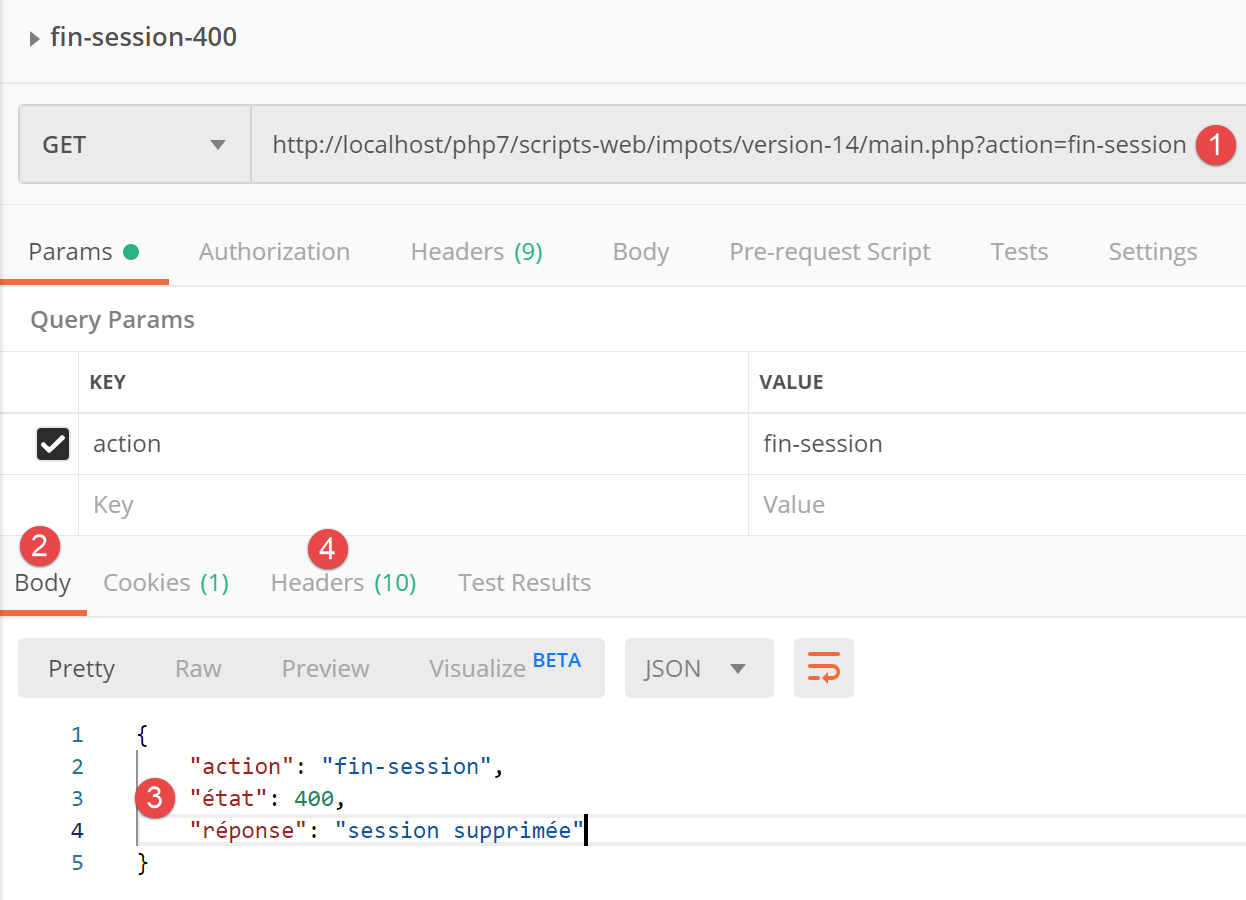
- 在 [1] 中,来自客户端 [Postman] 的请求;
- [3] 对应服务器 PHP 的响应;
- 在 [4] 中,服务器响应的头部信息为 HTTP,响应内容为 PHP;
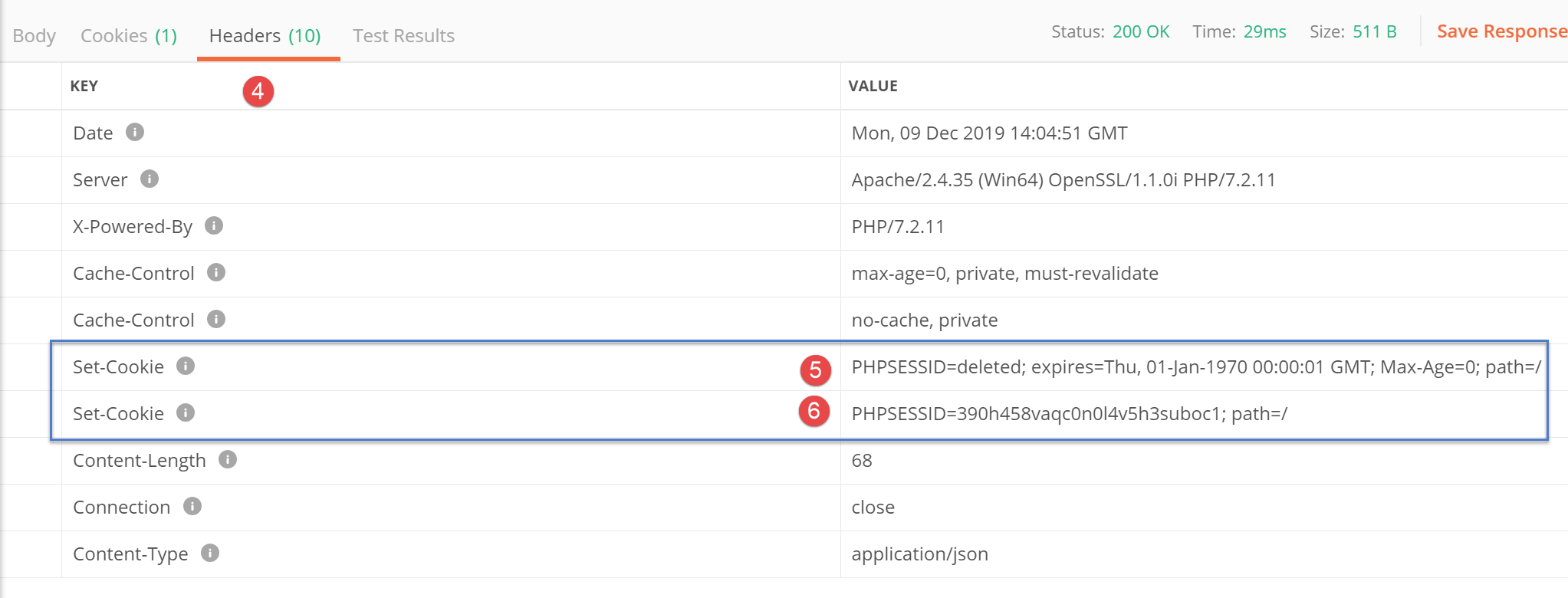
- 在 [5] 中,服务器 PHP 首先指出它已删除当前会话 PHP;
- 在 [6] 中,服务器 PHP 发送了新会话的 Cookie PHP;
根据当前代码,函数 [getRemoteData] 获取了 Cookie [5],而实际上应存储的是 Cookie [6]。
因此,需要修改函数 [getRemoteData] 的代码:
async getRemoteData(options) {
    // 是否有会话cookie PHP?
    if (this.phpSessionCookie) {
      // 是否有请求头?
      if (!options.headers) {
        // 创建一个空对象
        options.headers = {}
      }
      // 会话cookie的头部 PHP
      options.headers.Cookie = this.phpSessionCookie
    }
    // 执行请求 HTTP
    let response
    try {
      // 异步请求
      response = await this.axios.request('main.php', options)
    } catch (error) {
      // 参数 [error] 是一个异常实例——它可能有各种形式
      if (error.response) {
        // 服务器响应位于 [error.response]
        response = error.response
      } else {
        // 重新触发该错误
        throw error
      }
    }
    // response 包含服务器响应的全部内容 HTTP(HTTP 头部 + 响应正文)
    // 在接收到的 Cookie 中查找会话 Cookie PHP
    // 所有接收到的 Cookie
    const cookies = response.headers['set-cookie']
    if (cookies) {
      // cookie 是一个数组
      // 在此数组中查找会话cookie PHP
      let trouvé = false
      let i = 0
      while (!trouvé && i < cookies.length) {
        // 正在查找会话 Cookie PHP
        const results = RegExp('^(' + this.phpSessionCookieName + '.+?)$').exec(cookies[i])
        if (results) {
          // 将会话cookie PHP 存储起来
          const phpSessionCookie = results[1]
          // 其中是否包含字符串 [deleted] ?
          const results2 = RegExp(this.phpSessionCookieName + '=deleted').exec(phpSessionCookie)
          if (!results2) {
            // 我们拥有正确的会话cookie PHP
            this.phpSessionCookie = phpSessionCookie
            // 已找到
            trouvé = true
          } else {
            // 下一个元素
            i++
          }
        } else {
          // 下一个元素
          i++
        }
      }
    }
    // 服务器响应位于 [response.data]
    return response.data
  }
- 第 41 行:找到一个名为 [PHPSESSID] 的 Cookie,将其保存在本地;
- 第43行:检查保存的Cookie中是否包含字符串[PHPSESSID=deleted];
- 第46行:若结果为否,则说明已找到正确的Cookie [PHPSESSID]。将其存储在类中;
在函数 [getRemoteData] 之后,会话 Cookie PHP 被存储在类中,位于 [this.phpSessionCookie] 处。 我们提到,每当服务器收到新的 HTTP 请求时,该类都会被实例化。因此,会话 Cookie PHP 必须从类中提取出来。为此,我们在类中添加了一个新方法:
// 访问会话cookie PHP
  getPhpSessionCookie() {
    return this.phpSessionCookie
}
- 服务器 [nuxt] 向其 [dao] 层发起请求,并在构造函数中提供会话 Cookie PHP(如果该构造函数存在的话);
- 操作完成后,服务器 [nuxt] 通过前面的 [getPhpSessionCookie] 方法,从 [dao] 层检索其存储的会话 Cookie PHP。 该 Cookie 可能与前一个相同,也可能是另一个。后一种情况会在两种情况下发生:
- 在执行方法 [initSession] 时(此前不存在会话 Cookie PHP);
- 在执行方法 [finSession] 时(服务器 PHP 更改了会话 Cookie PHP);
需要注意会话cookie PHP 的一个特殊之处。服务器 [nuxt] 并非总是能从服务器 PHP 接收该cookie。实际上,后者仅发送一次。 此后便不再发送。若查看 [getRemoteData] 和 [getPhpSessionCookie] 的代码,会发现当服务器 PHP 未发送会话 Cookie 时, 函数 [getPhpSessionCookie] 便会返回传入构造函数的会话 Cookie PHP。 因此,服务器总是向 PHP 服务器发送该服务器此前发送给它的最新会话 Cookie PHP。
15.5.2. 客户端 [nuxt] 的 [dao] 层
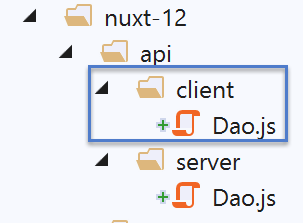
对于在浏览器中运行的客户端 [nuxt],我们采用文档《VUE.JS 框架入门示例》中 [Dao] 类的代码:
"use strict";

// 导入
import qs from "qs";

class Dao {
  // 构造函数
  constructor(axios) {
    this.axios = axios;
  }

  // 初始化会话
  async initSession() {
    // 请求选项 HHTP [get /main.php?action=init-session&type=json]
    const options = {
      method: "GET",
      // URL的参数
      params: {
        action: "init-session",
        type: "json"
      }
    };
    // 执行查询 HTTP
    return await this.getRemoteData(options);
  }

  async authentifierUtilisateur(user, password) {
    // 查询选项 HHTP [post /main.php?action=authentifier-utilisateur]
    const options = {
      method: "POST",
      headers: {
        "Content-type": "application/x-www-form-urlencoded"
      },
      // 正文 POST
      data: qs.stringify({
        user: user,
        password: password
      }),
      // URL的参数
      params: {
        action: "authentifier-utilisateur"
      }
    };
    // 查询执行 HTTP
    return await this.getRemoteData(options);
  }

  async getAdminData() {
    // HHTP 查询选项  [get /main.php?action=get-admindata]
    const options = {
      method: "GET",
      // URL 的参数
      params: {
        action: "get-admindata"
      }
    };
    // 执行请求 HTTP
    const data = await this.getRemoteData(options);
    // 结果
    return data;
  }

  async getRemoteData(options) {
    // 执行请求 HTTP
    let response;
    try {
      // 异步请求
      response = await this.axios.request("main.php", options);
    } catch (error) {
      // 参数 [error] 是一个异常实例——它可能有各种形式
      if (error.response) {
        // 服务器响应位于 [error.response]
        response = error.response;
      } else {
        // 重新抛出该错误
        throw error;
      }
    }
    // response 包含服务器响应的全部内容 HTTP(HTTP 头部 + 响应正文)
    // 服务器的响应位于 [response.data] 中
    return response.data;
  }
}

// 导出类
export default Dao;
该代码与服务器 [nuxt] 的 [dao] 层不同之处在于,它不负责与税费计算服务器之间 PHP 会话 Cookie 的管理:这项工作由浏览器负责。
我们将像处理服务器 [nuxt] 的 [dao] 层那样,添加一个 [finSession] 方法:
// 税款计算会话结束
  async finSession() {
    // 查询选项 HHTP  [get /main.php?action=fin-session]
    const options = {
      method: 'GET',
      // URL 的参数
      params: {
        action: 'fin-session'
      }
    }
    // 执行请求 HTTP
    const data = await this.getRemoteData(options)
    // 结果
    return data
  }
当客户端 [nuxt] 调用此方法时,它会像服务器 [nuxt] 一样,收到两个 PHP 会话 Cookie。 实际上是浏览器接收了这些cookie,并且它正确地处理了这种情况:它只保留了由税费计算服务器发起的新会话cookie PHP。 因此,当客户端 [nuxt] 下次向服务器 PHP 发起请求时,会发送会话 Cookie PHP,这完全正确,因为这是由浏览器发送的。 但存在一个问题:服务器 [nuxt] 并不知道会话 Cookie PHP 已发生变化。 因此,在与服务器 PHP 通信时,它将发送一个已不存在的会话 Cookie PHP,从而引发问题。 客户端 [nuxt] 应当通知服务器 [nuxt] 会话 Cookie PHP 已发生变更,并将其传递给服务器。 我们知道它可以通过哪种方式实现:利用会话cookie [nuxt],即客户端与服务器之间交换的 [nuxt]。 客户端 [nuxt] 至少有两种方式可以获取新的会话 Cookie PHP:
- 向浏览器请求;
- 使用服务器端的方法 [getRemoteData],该方法知道如何获取新的会话 Cookie PHP;
我们将采用第二种方案,因为它已经准备就绪。客户端 [nuxt] 的 [getRemoteData] 方法因此变为如下形式:
async getRemoteData(options) {
    // 执行请求 HTTP
    let response
    try {
      // 异步请求
      response = await this.axios.request('main.php', options)
    } catch (error) {
      // 参数 [error] 是一个异常实例——它可能有各种形式
      if (error.response) {
        // 服务器响应位于 [error.response]
        response = error.response
      } else {
        // 重新抛出该错误
        throw error
      }
    }
    // response 包含服务器响应的全部内容 HTTP(HTTP 头部信息 + 响应正文)
    // 在接收到的 Cookie 中查找会话 Cookie PHP
    // 所有接收到的 Cookie
    const cookies = response.headers['set-cookie']
    if (cookies) {
      // cookie 是一个数组
      // 在此数组中查找会话cookie PHP
      let trouvé = false
      let i = 0
      while (!trouvé && i < cookies.length) {
        // 正在查找会话 Cookie PHP
        const results = RegExp('^(' + this.phpSessionCookieName + '.+?)$').exec(cookies[i])
        if (results) {
          // 将会话cookie PHP 存储起来
          const phpSessionCookie = results[1]
          // 其中是否包含字符串 [deleted] ?
          const results2 = RegExp(this.phpSessionCookieName + '=deleted').exec(phpSessionCookie)
          if (!results2) {
            // 我们拥有正确的会话cookie PHP
            this.phpSessionCookie = phpSessionCookie
            // 已找到
            trouvé = true
          } else {
            // 下一个元素
            i++
          }
        } else {
          // 下一个元素
          i++
        }
      }
    }
    // 服务器的响应位于 [response.data]
    return response.data
  }
我们在 [getRemoteData] 中仅保留了利用服务器 PHP 的响应来查找会话 Cookie PHP 的代码。 我们未保留将会话cookie PHP 包含在对服务器 PHP 的请求中的代码,因为这是托管客户端 [nuxt] 的浏览器负责处理的。
一旦客户端 [nuxt] 获取了会话 Cookie PHP,就必须将其放入会话 [nuxt] 中,以便服务器 [nuxt] 能够利用它。 这并非由 [dao] 层负责,但该层通过一个方法提供了对其已存储的会话 Cookie PHP 的访问权限:
// 访问会话 Cookie PHP
  getPhpSessionCookie() {
    return this.phpSessionCookie
}
函数 [getPhpSessionCookie] 并不总是返回有效的会话 Cookie:
- 这里需要记住的是,客户端 [nuxt] 的 [dao] 层是持久的。它被实例化一次后便保留在内存中;
- 只要服务器 PHP 未向客户端 [nuxt] 发送会话 Cookie PHP, 客户端 [nuxt] 的函数 [getPhpSessionCookie] 返回值 [undefined];
- 当服务器 PHP 向客户端 [nuxt] 发送会话 Cookie PHP 时, 该cookie会被存储在[this.phpSessionCookie]中,并一直保留,直到被服务器PHP发送的新会话cookie PHP所替换。 随后,客户端 [nuxt] 的函数 [getPhpSessionCookie] 返回其收到的最新会话 Cookie PHP;
客户端 [nuxt] 的 [dao] 层与服务器 [nuxt] 的该层仅有一点不同: 它本身不会发送会话cookie PHP,因为这是由浏览器完成的。尽管如此,我们还是选择保留两个独立的 [dao] 层,因为导致它们各自编写逻辑的推理过程是不同的。
15.6. 会话 [nuxt]
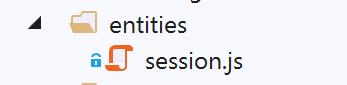
[nuxt] 会话(客户端与 Nuxt 服务器之间)将被封装在以下 [session] 对象中:
/* eslint-disable no-console */
// 会话定义
const session = {
  // 会话内容
  value: {
    // 存储未初始化
    initStoreDone: false,
    // Vuex 存储的值
    store: ''
  },
  // 将会话保存到 Cookie 中
  save(context) {
    // 将存储器保存到会话中
    this.value.store = context.store.state
    console.log('nuxt-session save=', this.value)
    // 保存会话值
    context.app.$cookies.set('nuxt-session', this.value, { path: context.base, maxAge: context.env.maxAge })
  },
  // 重置会话
  reset(context) {
    console.log('nuxt-session reset')
    // 重置存储
    context.store.commit('reset')
    // 将新存储器保存到会话中并保存会话
    this.save(context)
  }
}
// 导出会话
export default session
- 第 5-10 行:该会话仅有一个 [value] 属性,包含两个子属性:
- [initStoreDone],用于指示存储是否已初始化;
- [store]:应用程序 Vuex 存储的值 [store.state];
- 第 12-18 行:方法 [save] 用于将会话 [nuxt] 保存到 Cookie 中。此处使用库 [cookie-universal-nuxt] 来管理 Cookie。 请注意会话 [nuxt] 的 Cookie 名称:[nuxt-session](第 17 行);
- 第20-26行:方法[reset]重置会话[nuxt];
- 第 23 行:Vuex 存储被重置,随后在第 25 行保存到会话中;
15.7. 会话管理插件 [nuxt]
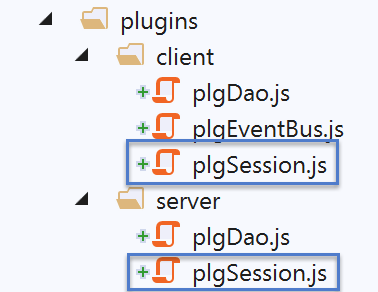
15.7.1. [nuxt] 会话管理插件(隶属于 serveur 和 [nuxt])
应用程序启动时,[nuxt] 服务器首先运行。因此,它将初始化 [nuxt] 会话。[server/plgSession] 脚本如下:
/* 禁用 eslint 的 no-console 规则 */

// 导入会话
import session from '@/entities/session'

export default (context, inject) => {
  // 服务器端会话管理
  console.log('[plugin server plgSession]')

  // 是否存在会话?
  const value = context.app.$cookies.get('nuxt-session')
  if (!value) {
    // 新建会话
    console.log("[plugin server plgSession], démarrage d'une nouvelle session")
  } else {
    // 已有会话
    console.log("[plugin server plgSession], reprise d'une session existante")
    session.value = value
  }

  // 向 [context, Vue] 注入一个函数,使其成为当前会话
  inject('session', () => session)
}
- 第 4 行:导入会话 [nuxt] 的代码;
- 第11行:获取会话[nuxt]的Cookie值;
- 第12-15行:如果会话[nuxt]的cookie不存在,那么第4行导入的会话[nuxt]就足够了。无需进行其他操作;
- 第15-19行:如果会话cookie [nuxt] 存在,则在第18行将其值存储到第4行导入的会话中;
- 第22行:会话已被初始化或恢复。通过函数[$session]使其可用;
15.7.2. 客户端 [nuxt] 的会话管理插件 [nuxt]
脚本 [client/plgSession] 如下:
/* eslint-disable no-console */

// 导入会话
import session from '@/entities/session'

export default (context, inject) => {
  // 客户端会话管理
  console.log('[plugin client plgSession], reprise de la session [nuxt] du serveur')
  // 从 Nuxt 服务器获取现有会话
  session.value = context.app.$cookies.get('nuxt-session')

  // 向 [context, Vue] 注入一个函数,使其成为当前会话
  inject('session', () => session)
}
- 第 4 行:导入会话 [nuxt];
- 第 10 行:从 [nuxt-session] cookie 中获取当前会话 [nuxt];
- 第13行:通过注入的函数[$session],返回第4行导入的会话[nuxt];
15.8. [dao] 层的插件
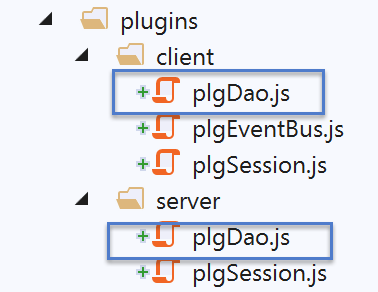
15.8.1. 客户端 [nuxt] 的图层插件 [dao]
脚本 [client/plgDao] 如下:
/* eslint-disable no-console */
// 在 [Dao] 层创建一个访问点
import Dao from '@/api/client/Dao'
export default (context, inject) => {
  // 配置 axios
  context.$axios.defaults.timeout = context.env.timeout
  context.$axios.defaults.baseURL = context.env.baseURL
  context.$axios.defaults.withCredentials = context.env.withCredentials
  // 实例化 [dao] 层
  const dao = new Dao(context.$axios)
  // 将函数 [$dao] 注入上下文
  inject('dao', () => dao)
  // 日志
  console.log('[fonction client $dao créée]')
}
- 第 3 行:导入客户端 [nuxt] 的 [dao] 层;
- 第 6-8 行:配置[context.$axios] 对象,该对象将使用 [nuxt.config] 文件中的信息,向客户端 [nuxt] 的 [dao] 层发送 HTTP 请求:
// 环境
  env: {
    // axios 配置
    timeout: 2000,
    withCredentials: true,
    baseURL: 'http://localhost/php7/scripts-web/impots/version-14',
    // 会话cookie配置[nuxt]
    maxAge: 60 * 5
  }
- 第 10 行:客户端 [nuxt] 的 [dao] 层被实例化;
- 第 12 行:函数 [$dao] 被注入到客户端的上下文和页面中。该函数提供了对第 10 行中 [dao] 层的访问权限;
因此需注意,若要在客户端 [nuxt] 执行时访问其 [dao] 层,应编写如下代码:
- [context.app.$dao()](此时上下文已知);
- 在 [Vue.js] 页面中,则应写为:[this.$dao()];
15.8.2. serveur 的 [dao] 层插件 [nuxt]
[server/plgDao]脚本如下:
/* eslint-disable no-console */
// 创建通往 [Dao] 层的访问点
import Dao from '@/api/server/Dao'
export default (context, inject) => {
  // 配置 axios
  context.$axios.defaults.timeout = context.env.timeout
  context.$axios.defaults.baseURL = context.env.baseURL
  // 获取会话cookie
  const store = context.app.$session().value.store
  const phpSessionCookie = store ? store.phpSessionCookie : ''
  console.log('session=', context.app.$session().value, 'phpSessionCookie=', phpSessionCookie)
  // 实例化 [dao] 层
  const dao = new Dao(context.$axios, phpSessionCookie)
  // 将函数 [$dao] 注入上下文
  inject('dao', () => dao)
  // 日志
  console.log('[fonction server $dao créée]')
}
- 第 3 行:导入来自服务器 [nuxt] 的图层 [dao];
- 第 6-7 行:配置[context.$axios] 对象,该对象将使用 [nuxt.config] 文件中的信息,向 [nuxt] 服务器的 [dao] 层发送 HTTP 请求:
// 环境
  env: {
    // axios 配置
    timeout: 2000,
    withCredentials: true,
    baseURL: 'http://localhost/php7/scripts-web/impots/version-14',
    // 会话cookie配置[nuxt]
    maxAge: 60 * 5
  }
- 第 9 行:获取应用程序 [nuxt] 的存储;
- 第 10 行:如果存储存在,则获取会话 PHP 的 Cookie,因为需要它来实例化服务器 [nuxt] 的 [dao] 层;
- 第 13 行:实例化服务器 [nuxt] 的 [dao] 层;
- 第15行:将函数[$dao]注入到服务器[nuxt]的上下文和页面中。该函数可访问第13行中的[dao]层;
因此需注意,若要在服务器 [nuxt] 运行时访问其 [dao] 层,应编写:
- [context.app.$dao()](此时上下文已知);
- 在 [Vue.js] 页面中,则应写为:[this.$dao()];
15.9. Vuex 存储
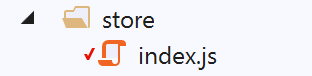
存储 [Vuex] 将存储所有需要由应用程序的不同组件 [pages, client, serveur] 共享的数据,但这些数据并不具备响应式特性。
/* eslint-disable no-console */

// 商店状态
export const state = () => ({
  // jSON 会话已启动
  jsonSessionStarted: false,
  // 用户已认证
  userAuthenticated: false,
  // 会话cookie PHP
  phpSessionCookie: '',
  // adminData
  adminData: ''
})

// 存储变更
export const mutations = {
  // 状态替换
  replace(state, newState) {
    for (const attr in newState) {
      state[attr] = newState[attr]
    }
  },
  // 存储器重置
  reset() {
    this.commit('replace', { jsonSessionStarted: false, userAuthenticated: false, phpSessionCookie: '', adminData: '' })
  }
}

// 存储器操作
export const actions = {
  nuxtServerInit(store, context) {
    // 谁在执行这段代码?
    console.log('nuxtServerInit, client=', process.client, 'serveur=', process.server, 'env=', context.env)
    // 初始化会话
    initStore(store, context)
  }
}

function initStore(store, context) {
  // store 是要初始化的存储
  // 获取会话
  const session = context.app.$session()
  // 会话是否已初始化?
  if (!session.value.initStoreDone) {
    // 启动一个新的存储区
    console.log("nuxtServerInit, initialisation d'une nouvelle session")
    // 将存储器放入会话中
    session.value.store = store.state
    // 存储区现已初始化
    session.value.initStoreDone = true
  } else {
    console.log("nuxtServerInit, reprise d'un store existant")
    // 使用会话中的存储器更新当前存储器
    store.commit('replace', session.value.store)
  }
  // 保存会话
  session.save(context)
  // 日志
  console.log('initStore terminé, store=', store.state)
}
存储在存储器中的数据如下:
- 第 6 行:一旦与服务器 PHP 的会话 jSON 初始化成功, 无论该初始化是由客户端还是服务器 [nuxt] 执行。初始化完成后,与服务器 PHP 的会话 Cookie 将被获取并存入第 10 行的属性 [phpSessionCookie] 中;
- 第8行:只要在PHP服务器上的身份验证成功,无论是由客户端还是[nuxt]服务器完成的,[userAuthenticated]都将被设为true;
- 第12行:[adminData]将取自PHP服务器,该值在认证成功后即为[adminData];
- 第 18-22 行:通过赋值 [replace],将前面的属性初始化为作为参数传递的对象的属性;
- 第24-26行:[reset]方法将存储器的属性恢复为初始值;
- 第 31-37 行:函数 [nuxtServerInit] 将其工作委托给函数 [initStore];
- 第 39-60 行:函数 [initStore] 有两个作用:
- 如果存储器尚未初始化,则对其进行初始化并存入会话;
- 如果存储器已初始化,则从 [nuxt] 会话中获取其值;
- 第 42 行:获取 nuxt 会话;
- 第 44 行:检查存储是否已初始化:
- 若未初始化,则将初始存储器放入会话中(第 48 行);
- 随后在第50行,标记存储已初始化;
- 第 51-55 行:如果存储已初始化,则使用该存储(第 54 行),将其初始化为会话中包含的值;
- 第57行:无论哪种情况,都会将会话及其包含的存储器保存到cookie [nuxt-session] 中;
15.10. 插件 [plgEventBus]
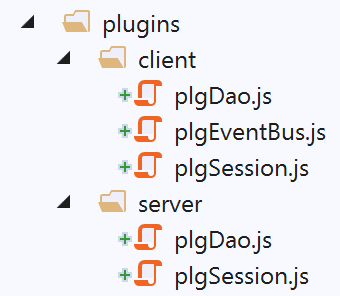
该插件旨在通过注入到 [nuxt] 客户端上下文中的 [$eventBus] 函数,使 [nuxt] 客户端能够访问事件总线。 将其注入 [nuxt] 服务器上下文中是毫无意义的,因为该服务器无法处理事件。不过我们已经看到,在服务器端注入并使用它并不会引发错误。
/* eslint-disable no-console */
// 在视图之间创建事件总线
import Vue from 'vue'
export default (context, inject) => {
  // 事件总线
  const eventBus = new Vue()
  // 将函数 [$eventBus] 注入上下文
  inject('eventBus', () => eventBus)
  // 日志
  console.log('[fonction $eventBus créée]')
}
我们在“链接”一节中已经遇到过这个插件。[$eventBus] 函数将通过以下语法在客户端可用:
- [context.app.$eventBus()](当上下文可用时);
- 在客户端的 [Vue.js] 页面中为 [this.$eventBus()];
15.11. [nuxt] 应用程序的组件
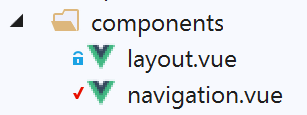
[layout] 组件即前文示例中的组件:
<!-- 视图布局 -->
<template>
  <!-- 行 -->
  <div>
    <b-row>
      <!-- 三列字段 -->
      <b-col v-if="left" cols="3">
        <slot name="left" />
      </b-col>
      <!-- 九列区域 -->
      <b-col v-if="right" cols="9">
        <slot name="right" />
      </b-col>
    </b-row>
  </div>
</template>

<script>
export default {
  // 参数
  props: {
    left: {
      type: Boolean
    },
    right: {
      type: Boolean
    }
  }
}
</script>
组件 [navigation] 如下所示:
<template>
  <!-- 三选项 Bootstrap 菜单 -->
  <b-nav vertical>
    <b-nav-item to="/authentification" exact exact-active-class="active">
      Authentification
    </b-nav-item>
    <b-nav-item to="/get-admindata" exact exact-active-class="active">
      Requête AdminData
    </b-nav-item>
    <b-nav-item to="/fin-session" exact exact-active-class="active">
      Fin session impôt
    </b-nav-item>
  </b-nav>
</template>
15.12. [nuxt] 应用程序的布局
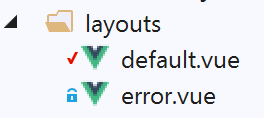
15.12.1. [default]
布局 [default] 是用于链接段落中示例 [nuxt-11] 的布局:
<template>
  <div class="container">
    <b-card>
      <!-- 一条消息 -->
      <b-alert show variant="success" align="center">
        <h4>[nuxt-12] : requêtes HTTP avec axios</h4>
      </b-alert>
      <!-- 当前路由视图 -->
      <nuxt />
      <!-- 等待消息 -->
      <b-alert v-if="showLoading" show variant="light">
        <strong>Requête au serveur de données en cours...</strong>
        <div class="spinner-border ml-auto" role="status" aria-hidden="true"></div>
      </b-alert>
      <!-- 异步操作错误 -->
      <b-alert v-if="showErrorLoading" show variant="danger">
        <strong>La requête au serveur de données a échoué : {{ errorLoadingMessage }}</strong>
      </b-alert>
    </b-card>
  </div>
</template>

<script>
/* eslint-disable no-console */
export default {
  name: 'App',
  data() {
    return {
      showLoading: false,
      showErrorLoading: false
    }
  },
  // 生命周期
  beforeCreate() {
    console.log('[default beforeCreate]')
  },
  created() {
    console.log('[default created]')
    if (process.client) {
      // 监听事件 [loading]
      this.$eventBus().$on('loading', this.mShowLoading)
      // 以及事件 [errorLoadingMessage]
      this.$eventBus().$on('errorLoading', this.mShowErrorLoading)
    }
  },
  beforeMount() {
    console.log('[default beforeMount]')
  },
  mounted() {
    console.log('[default mounted]')
  },
  methods: {
    // 待处理消息管理
    mShowLoading(value) {
      console.log('[default mShowLoading], showLoading=', value)
      this.showLoading = value
    },
    // 异步操作错误
    mShowErrorLoading(value, errorLoadingMessage) {
      console.log('[default mShowErrorLoading], showErrorLoading=', value, 'errorLoadingMessage=', errorLoadingMessage)
      this.showErrorLoading = value
      this.errorLoadingMessage = errorLoadingMessage
    }
  }
}
</script>
- 第 10-14 行:显示等待客户端异步操作结束的提示信息 [nuxt];
- 第 15-18 行:显示异步操作的错误消息(如有);
- 第 37 行:在页面 [default] 的 [mounted] 函数之前执行 [created] 函数;
- 第 39 行:如果执行者是客户端 [nuxt],则页面 [default] 开始监听事件:
- [loading],该事件标志着等待的开始或结束。随后执行函数 [mShowLoading];
- [errorLoading],该事件表示需要显示一条错误消息。此时将执行函数 [mShowErrorLoading];
- [nuxt] 页面:
- 通过在事件总线上发送事件 [‘loading’, true] 来显示等待消息;
- 通过在事件总线上发送事件 [‘loading’, false] 来隐藏等待消息;
- 通过在事件总线上发送事件 [‘errorLoading’, true] 来显示错误消息;
- 通过在事件总线上发送事件 [‘errorLoading’, false] 来隐藏错误消息;
15.12.2. [error]
布局 [error] 显示一条系统错误消息(非开发人员处理):
<!-- 视图定义 HTML -->
<template>
  <!-- 版面设计 -->
  <Layout :left="true" :right="true">
    <!-- 右侧列中的警报 -->
    <template slot="right">
      <!-- 粉色背景上的消息 -->
      <b-alert show variant="danger" align="center">
        <h4>L'erreur suivante s'est produite : {{ JSON.stringify(error) }}</h4>
      </b-alert>
    </template>
    <!-- 左侧栏导航菜单 -->
    <Navigation slot="left" />
  </Layout>
</template>

<script>
/* eslint-disable no-undef */
/* eslint-disable no-console */
/* eslint-disable nuxt/no-env-in-hooks */

import Layout from '@/components/layout'
import Navigation from '@/components/navigation'

export default {
  name: 'Error',
  // 使用的组件
  components: {
    Layout,
    Navigation
  },
  // 属性 [props]
  props: { error: { type: Object, default: () => 'waiting ...' } },
  // 生命周期
  beforeCreate() {
    // 客户端和服务器
    console.log('[error beforeCreate]')
  },
  created() {
    // 客户端与服务器
    console.log('[error created, error=]', this.error)
  },
  beforeMount() {
    // 仅客户端
    console.log('[error beforeMount]')
  },
  mounted() {
    // 仅客户端
    console.log('[error mounted]')
  }
}
</script>
15.13. 由服务器 [nuxt] 执行的页面 [index]
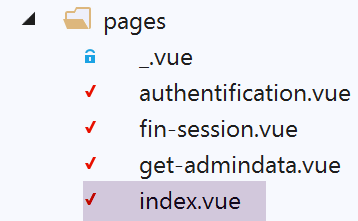
页面 [index.vue] 的特殊之处在于,它只能通过服务器 [nuxt] 访问。用户无法通过客户端 [nuxt] 访问该页面,系统未提供任何相关链接。其代码如下:
<!-- 主页 -->
<template>
  <Layout :left="true" :right="true">
    <!-- 导航 -->
    <Navigation slot="left" />
    <!-- 消息-->
    <b-alert slot="right" show variant="warning">Initialisation de la session avec le serveur de calcul de l'impôt : {{ result }} </b-alert>
  </Layout>
</template>

<script>
/* eslint-disable no-console */

import Navigation from '@/components/navigation'
import Layout from '@/components/layout'

export default {
  name: 'InitSession',
  // 使用的组件
  components: {
    Layout,
    Navigation
  },
  // 异步数据
  async asyncData(context) {
    // 日志
    console.log('[index asyncData started]')
    try {
      // 正在启动会话jSON
      const dao = context.app.$dao()
      const response = await dao.initSession()
      // 日志
      console.log('[index asyncData response=]', response)
      // 获取会话 Cookie PHP 以供后续请求使用
      const phpSessionCookie = dao.getPhpSessionCookie()
      // 将会话cookie PHP 存储在会话 [nuxt] 中
      context.store.commit('replace', { phpSessionCookie })
      // 是否发生错误?
      if (response.état !== 700) {
        // 错误位于 response.réponse
        throw new Error(response.réponse)
      }
      // 请注意会话 jSON 已启动
      context.store.commit('replace', { jsonSessionStarted: true })
      // 返回结果
      return { result: '[succès]' }
    } catch (e) {
      // 日志
      console.log('[index asyncData error=]', e)
      // 记录 jSON 会话未启动
      context.store.commit('replace', { jsonSessionStarted: false })
      // 报告错误
      return { result: '[échec]', showErrorLoading: true, errorLoadingMessage: e.message }
    } finally {
      // 保存存储区
      const session = context.app.$session()
      session.save(context)
      // 日志
      console.log('[index asyncData finished]')
    }
  },
  // 生命周期
  beforeCreate() {
    console.log('[index beforeCreate]')
  },
  created() {
    console.log('[index created]')
  },
  beforeMount() {
    console.log('[index beforeMount]')
  },
  mounted() {
    console.log('[index mounted]')
    // 仅客户端
    if (this.showErrorLoading) {
      console.log('[index mounted, showErrorLoading=true]')
      this.$eventBus().$emit('errorLoading', true, this.errorLoadingMessage)
    }
  }
}
</script>
- 第 7 行:该页面显示了异步请求(第 46 行和第 51 行)的 [result] 结果;
- 第 31 行:该异步操作是与税费计算服务器建立会话 jSON;
- 第25行:已知当页面直接向服务器[nuxt]发起请求时, 函数 [asyncData] 仅由服务器执行,而非由客户端 [nuxt] 执行——后者是在浏览器收到服务器 [nuxt] 的响应后才执行的;
- 第30行:在服务器[nuxt]的上下文中获取[dao]层;
- 第35行:如果服务器尚未向税费计算服务器发送请求,则接收其首个会话cookie PHP;否则接收其收到的最后一个会话cookie PHP (请参阅链接段落中服务器 [nuxt] 的 [dao] 层代码);
- 第37行:将该会话cookie PHP存储在存储器中;
- 第39-42行:检查操作是否成功。若未成功,则抛出异常,该异常将在第47行由[catch]捕获;
- 第 44 行:在存储中记录与服务器 PHP 的会话 jSON 已启动;
- 第46行:返回结果[result],该结果在第7行显示;
- 第47-54行:处理可能出现的异常。该异常可能有两种情况:
- 第31行的操作HTTP因服务器[nuxt]与服务器PHP之间的通信错误而失败;
- 第31行的操作HTTP虽已成功,但接收到的结果报告了错误(第39-42行);
- 第51行:注意到与服务器PHP的会话jSON未启动;
- 第53行:返回结果[result],该结果显示在第7行。 此外,还设置了 [showErrorLoading] 和 [errorLoadingMessage] 属性,客户端 [nuxt] 将在收到服务器 [nuxt] 发送的页面时,利用这些属性显示一条错误消息 (第 72-79 行);
- 第 54-60 行:无论成功还是失败,此代码都会执行;
- 第 56 行:在服务器 [nuxt] 的上下文中获取会话 [nuxt];
- 第57行:将其保存;
- 第 63-68 行:函数 [asyncData] 执行完毕后,服务器 [nuxt] 执行函数 [beforeCreate] 和 [create];
注:如果应用程序 [nuxt] 启动时税费计算服务器尚未启动,则服务器 [nuxt] 执行页面 [index] 可能会失败:
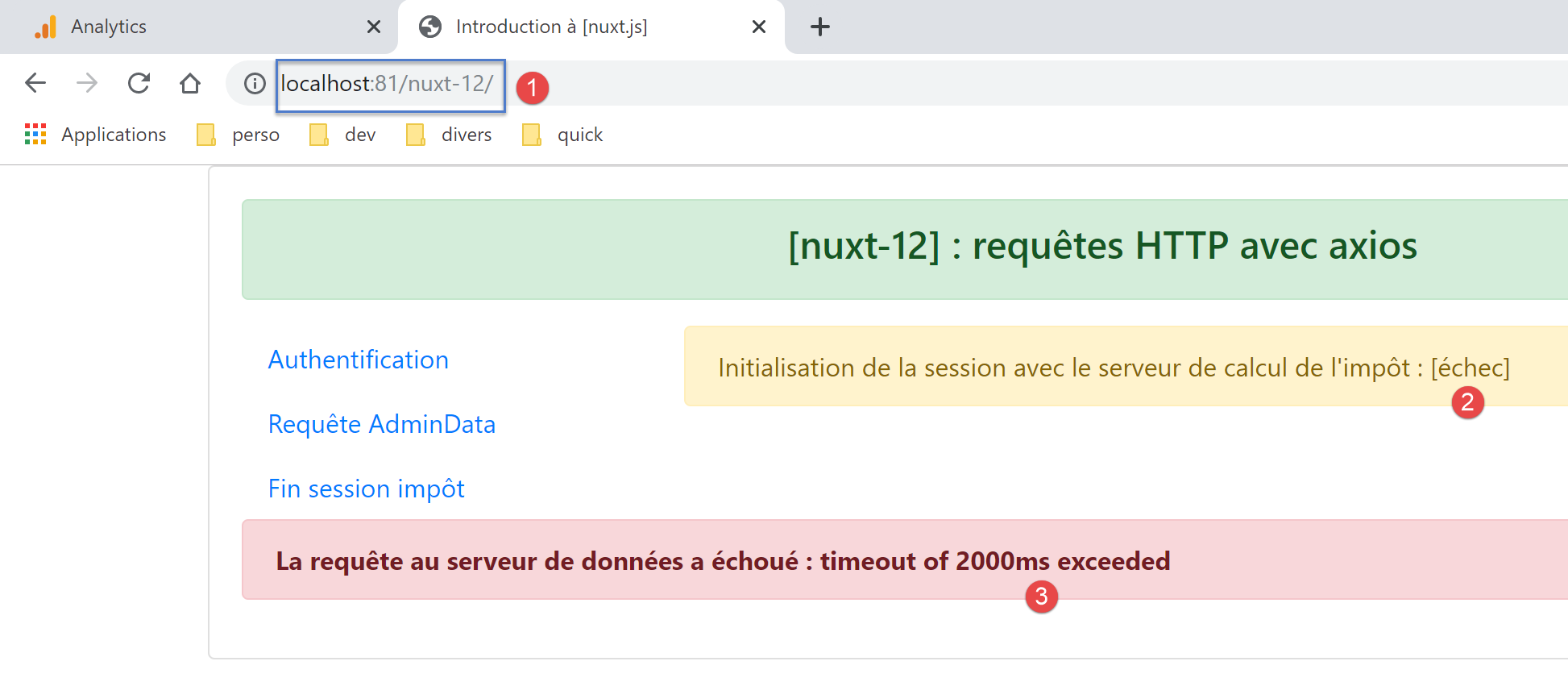
在这种情况下,唯一的解决方法是先启动税款计算服务器,然后启动 [nuxt] 应用程序本身,因为导航菜单中没有提供与税款计算服务器建立 jSON 会话的选项;
15.14. 由客户端 [nuxt] 调用的页面 [index]
只有在服务器[nuxt]将其发送给客户端[nuxt]之后,该客户端才会执行页面[index]。 该服务器向其发送了 [result] 信息,以及可能的 [showErrorLoading] 和 [errorLoadingMessage] 信息。
已知函数 [asyncData] 不会被执行。因此剩下的就是生命周期函数,特别是函数 [mounted]:
mounted() {
    console.log('[index mounted]')
    // 仅限客户端
    if (this.showErrorLoading) {
      console.log('[index mounted, showErrorLoading=true]')
      this.$eventBus().$emit('errorLoading', true, this.errorLoadingMessage)
    }
}
- 客户端 [nuxt] 会自动将服务器 [nuxt] 发送给它的 [result] 元素(以及可能的 [showErrorLoading, errorLoadingMessage] 元素)整合到页面属性中:
- 第 7 行显示属性 [result];
- [showErrorLoading, errorLoadingMessage] 属性由 [mounted] 方法使用:第 4 行,对 [showErrorLoading] 属性进行测试。 如果为真,则在第 6 行使用客户端事件总线 [nuxt] 来报告需要显示一条错误消息;
- 第 6 行触发的 [errorLoading] 事件,由“链接”段落中描述的 [layouts/default] 页面捕获;
15.15. 由服务器 [nuxt] 执行的页面 [authentification]
页面 [authentification] 负责向税费计算服务器验证用户身份。其代码如下:
<!-- 身份验证页面 -->
<template>
  <Layout :left="true" :right="true">
    <!-- 导航 -->
    <Navigation slot="left" />
    <!-- 消息-->
    <b-alert slot="right" show variant="warning">Authentification auprès du serveur de calcul de l'impôt : {{ result }} </b-alert>
  </Layout>
</template>

<script>
/* eslint-disable no-console */

import Navigation from '@/components/navigation'
import Layout from '@/components/layout'

export default {
  name: 'Authentification',
  // 使用的组件
  components: {
    Layout,
    Navigation
  },
  // 异步数据
  async asyncData(context) {
    // 日志
    console.log('[authentification asyncData started]')
    if (process.client) {
      // 开始等待客户端 [nuxt]
      context.app.$eventBus().$emit('loading', true)
      // 无错误
      context.app.$eventBus().$emit('errorLoading', false)
    }
    try {
      // 正在向服务器进行身份验证
      const dao = context.app.$dao()
      const response = await dao.authentifierUtilisateur('admin', 'admin')
      // 日志
      console.log('[authentification asyncData response=]', response)
      // 结果
      const userAuthenticated = response.état === 200
      // 记录用户是否已通过身份验证
      context.store.commit('replace', { userAuthenticated })
      // 将存储数据保存到会话中 [nuxt]
      const session = context.app.$session()
      session.save(context)
      // 身份验证错误?
      if (!userAuthenticated) {
        // 错误出现在 response.réponse
        throw new Error(response.réponse)
      }
      // 返回结果
      return { result: '[succès]' }
    } catch (e) {
      // 报告错误
      return { result: '[échec]', showErrorLoading: true, errorLoadingMessage: e.message }
    } finally {
      // 日志
      console.log('[authentification asyncData finished]')
      if (process.client) {
        // 结束等待客户端 [nuxt]
        context.app.$eventBus().$emit('loading', false)
      }
    }
  },
  // 生命周期
  beforeCreate() {
    console.log('[authentification beforeCreate]')
  },
  created() {
    console.log('[authentification created]')
  },
  beforeMount() {
    console.log('[authentification beforeMount]')
  },
  mounted() {
    console.log('[authentification mounted]')
    // 仅客户端
    if (this.showErrorLoading) {
      console.log('[authentification mounted, showErrorLoading=true]')
      this.$eventBus().$emit('errorLoading', true, this.errorLoadingMessage)
    }
  }
}
</script>
- 第 7 行:该页面显示第 25-65 行异步请求 [asyncData] 的结果 [result];
- 第28-33行:服务器不执行这些面向客户端的代码行 [nuxt];
- 第 36 行:从服务器 [nuxt] 获取 [dao] 层;
- 第37行:使用测试凭据[admin, admin]向税费计算服务器进行身份验证,该凭据是税费计算服务器唯一接受的;
- 第41行:仅当响应状态为200时,认证操作才算成功;
- 第43行:将属性[userAuthenticated]存入存储区;
- 第44-46行:将存储器保存到会话[nuxt]中;
- 第48-51行:若认证失败,则抛出异常,并附上税务计算服务器发送的错误信息;
- 否则,第53行返回成功结果,该结果将在第7行显示;
- 第54-57行:若发生错误,则设置页面[result, showErrorLoading, errorLoadingMessage]的三个属性。属性[result]将在第7行显示。这三个属性将发送给客户端[nuxt];
- 第60-63行:不会由服务器[nuxt]执行;
- 一旦 [asyncData] 返回结果,该结果将在第 7 行显示。随后执行方法 [beforeCreate](第 67-69 行)和 [created](第 70-72 行);
- 完成;
注意:如果与税费计算服务器之间的会话 jSON 未初始化,则服务器 [nuxt] 执行页面 [authentification] 可能会失败。可通过以下方式解决:
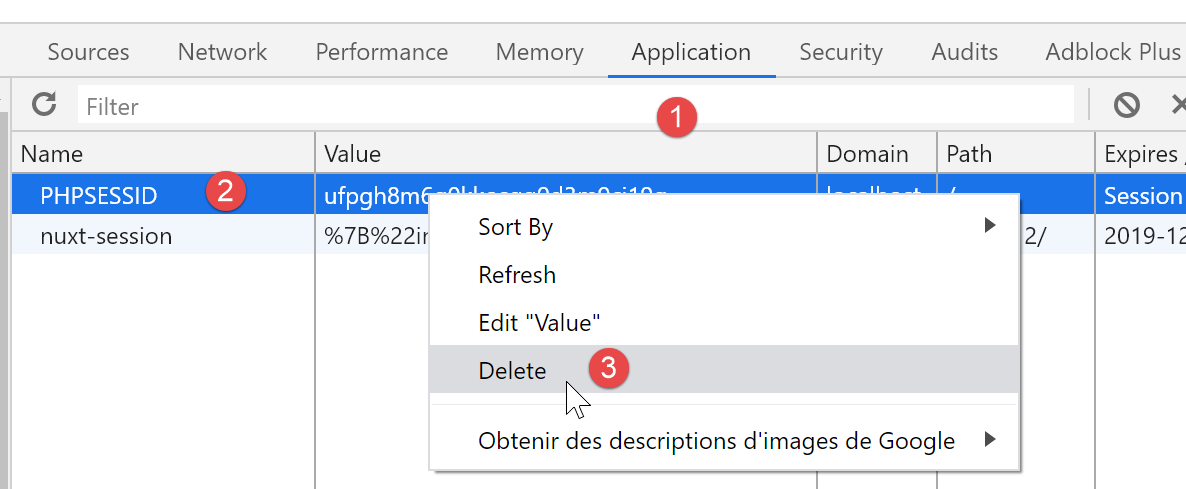
- 从浏览器中删除 PHP 会话 Cookie(以便从头开始):
- 在未启动计算服务器的情况下运行应用程序 [nuxt]:您将收到错误提示;
- 启动税款计算服务器;
- 直接在浏览器地址栏中输入 URL [/authentification]:
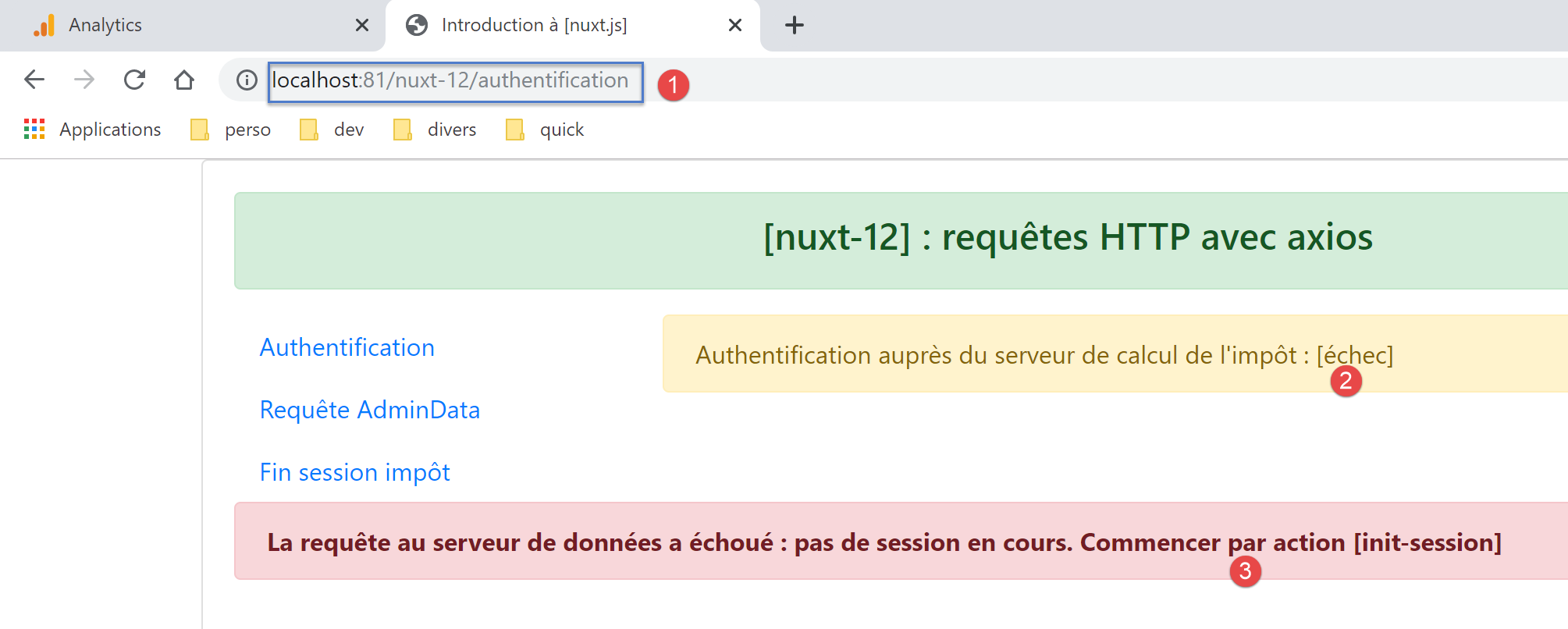
在这种情况下,唯一的解决方法是重新加载页面 [index]。
15.16. 由客户端执行的页面 [authentification]
让我们回顾一下该页面的代码:
<!-- 身份验证页面 -->
<template>
  <Layout :left="true" :right="true">
    <!-- 导航 -->
    <Navigation slot="left" />
    <!-- 消息-->
    <b-alert slot="right" show variant="warning">Authentification auprès du serveur de calcul de l'impôt : {{ result }} </b-alert>
  </Layout>
</template>

<script>
/* eslint-disable no-console */

import Navigation from '@/components/navigation'
import Layout from '@/components/layout'

export default {
  name: 'Authentification',
  // 使用的组件
  components: {
    Layout,
    Navigation
  },
  // 异步数据
  async asyncData(context) {
    // 日志
    console.log('[authentification asyncData started]')
    if (process.client) {
      // 开始等待客户端 [nuxt]
      context.app.$eventBus().$emit('loading', true)
      // 无错误
      context.app.$eventBus().$emit('errorLoading', false)
    }
    try {
      // 正在向服务器进行身份验证
      const dao = context.app.$dao()
      const response = await dao.authentifierUtilisateur('admin', 'admin')
      // 日志
      console.log('[authentification asyncData response=]', response)
      // 结果
      const userAuthenticated = response.état === 200
      // 记录用户是否已通过身份验证
      context.store.commit('replace', { userAuthenticated })
      // 将存储数据保存到会话中 [nuxt]
      const session = context.app.$session()
      session.save(context)
      // 身份验证错误?
      if (!userAuthenticated) {
        // 错误位于 response.réponse
        throw new Error(response.réponse)
      }
      // 返回结果
      return { result: '[succès]' }
    } catch (e) {
      // 报告错误
      return { result: '[échec]', showErrorLoading: true, errorLoadingMessage: e.message }
    } finally {
      // 日志
      console.log('[authentification asyncData finished]')
      if (process.client) {
        // 结束等待客户端 [nuxt]
        context.app.$eventBus().$emit('loading', false)
      }
    }
  },
  // 生命周期
  beforeCreate() {
    console.log('[authentification beforeCreate]')
  },
  created() {
    console.log('[authentification created]')
  },
  beforeMount() {
    console.log('[authentification beforeMount]')
  },
  mounted() {
    console.log('[authentification mounted]')
    // 仅客户端
    if (this.showErrorLoading) {
      console.log('[authentification mounted, showErrorLoading=true]')
      this.$eventBus().$emit('errorLoading', true, this.errorLoadingMessage)
    }
  }
}
</script>
客户端 [nuxt] 执行页面 [authentification] 有两种情况:
- 客户端 [nuxt] 在服务器 [nuxt] 向客户端 [nuxt] 的浏览器发送页面 [authentification] 之后执行;
- 客户端 [nuxt] 是因为用户点击了导航菜单中的链接 [Authentification]:
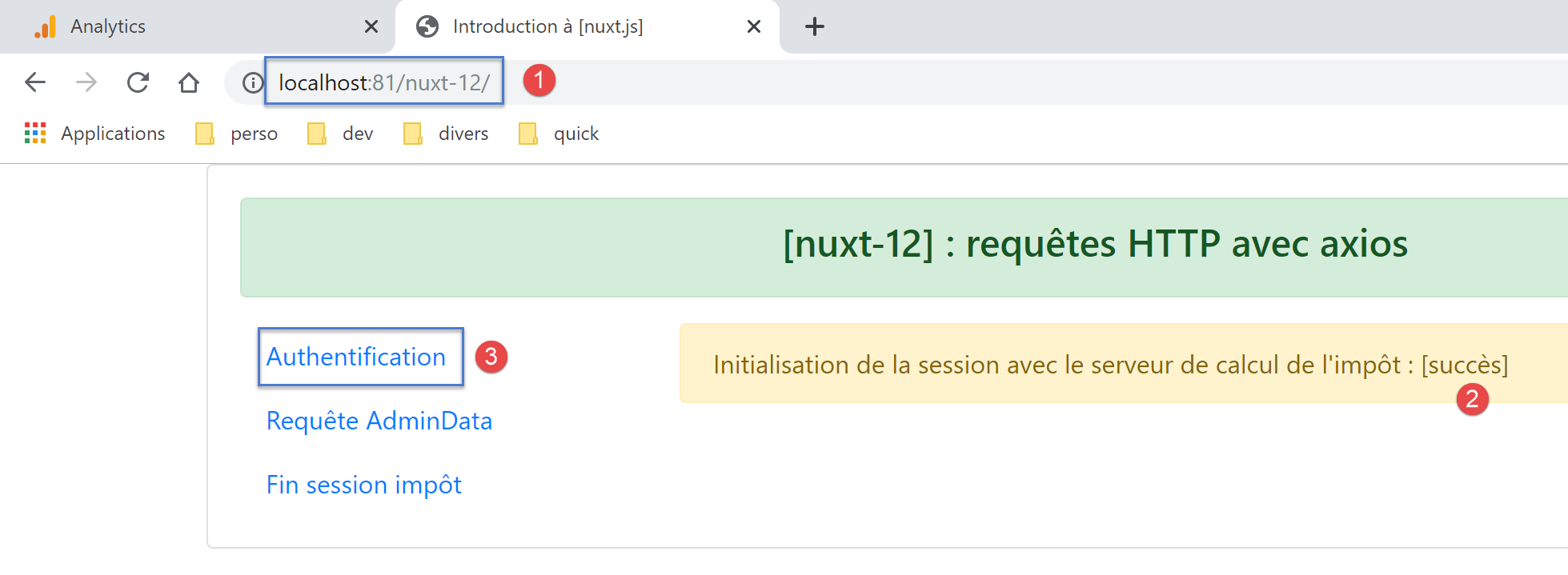
首先分析第一种情况。在此情况下,客户端 [nuxt] 不会执行函数 [asyncData]。 它将服务器 [nuxt] 发送给它的元素 [result] 以及可能的 [showErrorLoading, errorLoadingMessage] 集成到页面属性中:
- 第 7 行显示了 [result] 属性;
- [showErrorLoading, errorLoadingMessage] 属性由 [mounted] 方法使用:第 79 行,对 [showErrorLoading] 属性进行测试。 如果该属性为真,则在第81行使用客户端事件总线[nuxt]来报告需要显示一条错误消息;
关于页面 [index] 的错误消息显示机制,已在“链接”一节中进行说明。
情况2是指当用户点击链接[Authentification]时,客户端[nuxt]被执行的情况。 在此情况下,客户端 [nuxt] 是独立运行的,而非在服务器 [nuxt] 之后运行。此时将执行函数 [asyncData]。 我们仅列出与由服务器 [nuxt] 执行的页面说明不同的细节:
- 第 28-33 行:客户端 [nuxt] 请求显示等待消息,并清除之前可能显示过的任何错误消息;
- 第 36 行:此处获取的是客户端 [nuxt] 的 [dao] 层;
- 第 60-63 行:客户端 [nuxt] 请求停止显示等待消息;
- 一旦 [asyncData] 结束,页面生命周期将开始。第 76-83 行中的 [mounted] 函数将被执行。如果发生错误,则会显示错误消息;
注:若要触发错误,请按照“链接”段落末尾针对服务器 [nuxt] 所说明的步骤操作, 但请勿在地址栏中输入 URL 来请求 [authentification] 页面,而是使用导航菜单中的 [Authentification] 链接。 此时将运行的是客户端 [nuxt]。
15.17. 页面 [get-admindata]
[get-admindata] 页面的代码如下:
<!-- get-admindata 视图 -->
<template>
  <Layout :left="true" :right="true">
    <!-- 导航 -->
    <Navigation slot="left" />
    <!-- 消息 -->
    <b-alert slot="right" show variant="secondary"> Demande de [adminData] au serveur de calcul de l'impôt : {{ result }} </b-alert>
  </Layout>
</template>

<script>
/* eslint-disable no-console */

import Navigation from '@/components/navigation'
import Layout from '@/components/layout'

export default {
  name: 'GetAdmindata',
  // 使用的组件
  components: {
    Layout,
    Navigation
  },
  // 异步数据
  async asyncData(context) {
    // 日志
    console.log('[get-admindata asyncData started]')
    if (process.client) {
      // 开始等待
      context.app.$eventBus().$emit('loading', true)
      // 无错误
      context.app.$eventBus().$emit('errorLoading', false)
    }
    try {
      // 正在请求数据 [admindata]
      const response = await context.app.$dao().getAdminData()
      // 日志
      console.log('[get-admindata asyncData response=]', response)
      // 结果
      const adminData = response.état === 1000 ? response.réponse : ''
      // 将数据放入存储区
      context.store.commit('replace', { adminData })
      // 将存储区保存到会话中 [nuxt]
      const session = context.app.$session()
      session.save(context)
      // 是否发生错误?
      if (!adminData) {
        // 错误位于 response.réponse
        throw new Error(response.réponse)
      }
      // 返回接收到的值
      return { result: adminData }
    } catch (e) {
      // 报告错误
      return { result: '[échec]', showErrorLoading: true, errorLoadingMessage: e.message }
    } finally {
      // 日志
      console.log('[get-admindata asyncData finished]')
      if (process.client) {
        // 结束等待
        context.app.$eventBus().$emit('loading', false)
      }
    }
  },
  // 生命周期
  beforeCreate() {
    console.log('[get-admindata beforeCreate]')
  },
  created() {
    console.log('[get-admindata created]')
  },
  beforeMount() {
    console.log('[get-admindata beforeMount]')
  },
  mounted() {
    console.log('[get-admindata mounted]')
    // 客户端
    if (this.showErrorLoading) {
      console.log('[get-admindata mounted, showErrorLoading=true]')
      this.$eventBus().$emit('errorLoading', true, this.errorLoadingMessage)
    }
  }
}
</script>
该页面与页面 [authentification] 非常相似。无论是通过服务器 [nuxt] 执行,还是通过客户端 [nuxt] 执行,其原理均相同。 但需注意,第7行不再像之前那样显示成功/失败,而是显示从税费计算服务器接收到的数据值(第52行):
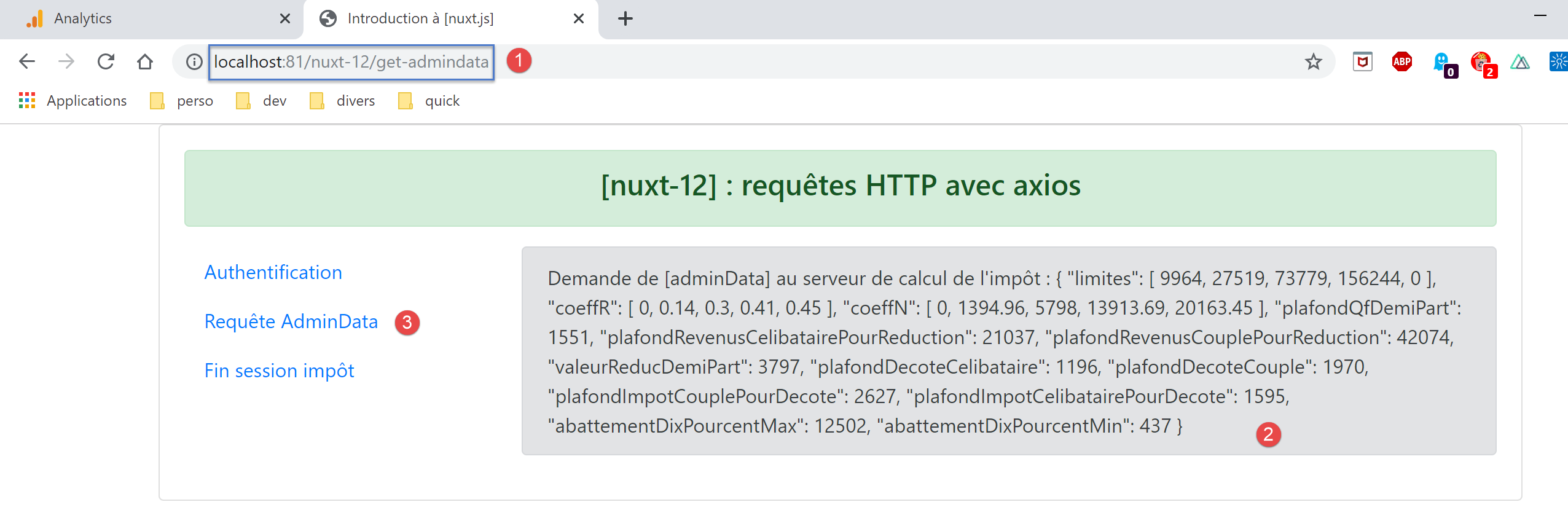
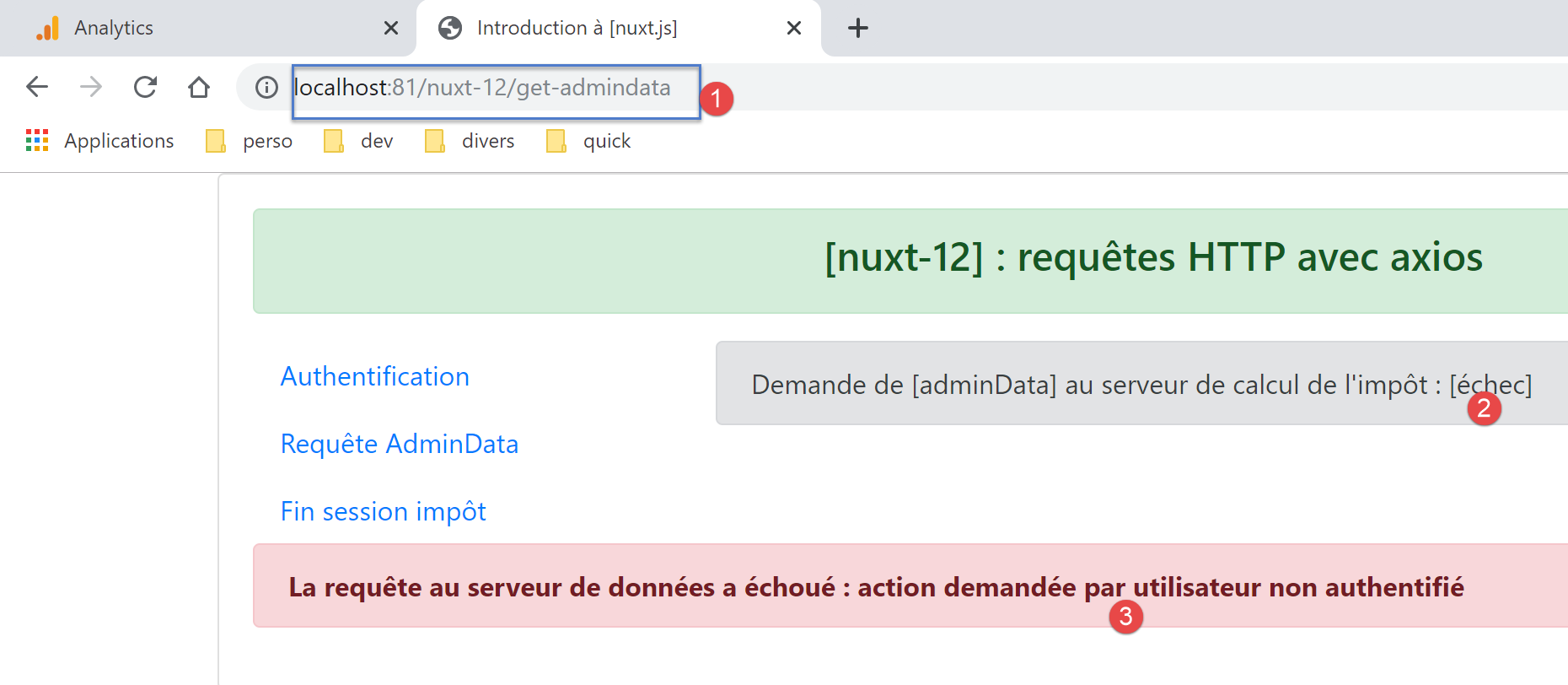
无论通过服务器还是客户端 [nuxt],均可获得上述结果。若要触发错误,请在未经过身份验证的情况下,通过服务器或客户端 [nuxt] 请求页面 [get-admindata]:
15.18. 页面 [fin-session]
该页面的代码如下:
<!-- 主页 -->
<template>
  <Layout :left="true" :right="true">
    <!-- 导航 -->
    <Navigation slot="left" />
    <!-- 消息-->
    <b-alert slot="right" show variant="warning">Fin de la session avec le serveur de calcul de l'impôt : {{ result }} </b-alert>
  </Layout>
</template>

<script>
/* eslint-disable no-console */

import Navigation from '@/components/navigation'
import Layout from '@/components/layout'

export default {
  name: 'FinSession',
  // 使用的组件
  components: {
    Layout,
    Navigation
  },
  // 异步数据
  async asyncData(context) {
    // 日志
    console.log('[fin-session asyncData started]')
    // 客户案例[nuxt]
    if (process.client) {
      // 开始等待
      context.app.$eventBus().$emit('loading', true)
      // 无错误
      context.app.$eventBus().$emit('errorLoading', false)
    }
    try {
      // 向税款计算服务器请求新会话 PHP
      const dao = context.app.$dao()
      const response = await dao.finSession()
      // 日志
      console.log('[fin-session asyncData response=]', response)
      // 是否发生错误?
      if (response.état !== 400) {
        // 错误位于 response.réponse
        throw new Error(response.réponse)
      }
      // 服务器发送了一个新的会话cookie PHP
      // 该cookie同时被服务器和Nuxt客户端获取
      // 如果该代码由客户端 [nuxt] 执行,则会话 Cookie PHP 必须放入 Nuxt 会话中
      // 以便服务器端插件 [plgDao] 能够获取该值,并使用
      // 如果该代码由服务器 [nuxt] 执行,则会话 Cookie PHP 必须放入 nuxt 会话中
      // 中,以便客户端 [nuxt] 的路由功能能够检索并将其传递给浏览器
      const phpSessionCookie = dao.getPhpSessionCookie()
      // 在存储中记录 jSON 会话已启动,并保存会话 Cookie PHP
      context.store.commit('replace', { jsonSessionStarted: true, phpSessionCookie, userAuthenticated: false, adminData: '' })
      // 将存储数据保存至会话 [nuxt]
      const session = context.app.$session()
      session.save(context)
      // 返回结果
      return { result: "[succès]. La session jSON reste initialisée mais vous n'êtes plus authentifié(e)." }
    } catch (e) {
      // 日志
      console.log('[fin-session asyncData error=]', e)
      // 报告错误
      return { result: '[échec]', showErrorLoading: true, errorLoadingMessage: e.message }
    } finally {
      // 日志
      console.log('[fin-session asyncData finished]')
      if (process.client) {
        // 等待结束
        context.app.$eventBus().$emit('loading', false)
      }
    }
  },
  // 生命周期
  beforeCreate() {
    console.log('[fin-session beforeCreate]')
  },
  created() {
    console.log('[fin-session created]')
  },
  beforeMount() {
    console.log('[fin-session beforeMount]')
  },
  mounted() {
    console.log('[fin-session mounted]')
    // 仅限客户端
    if (this.showErrorLoading) {
      console.log('[fin-session mounted, showErrorLoading=true]')
      this.$eventBus().$emit('errorLoading', true, this.errorLoadingMessage)
    }
  }
}
</script>
该代码与前几页的代码非常相似,说明也相同。只需重点关注一点:第38行的异步操作会导致税费计算服务器发送一个新的会话cookie PHP。 关于该 Cookie 的处理说明,取决于执行此代码的是服务器还是客户端 [nuxt]。
首先来看服务器 [nuxt]:
- 第 37 行:这里实例化的是 [nuxt] 服务器的 [dao] 层。回顾一下其构造函数的代码:
// 构造函数
  constructor(axios, phpSessionCookie) {
    // axios 库
    this.axios = axios
    // 会话cookie值
    this.phpSessionCookie = phpSessionCookie
    // PHP 服务器会话 Cookie 的名称
    this.phpSessionCookieName = 'PHPSESSID'
}
从第 1 行可以看出,构造函数需要当前的会话 Cookie PHP,即服务器或客户端 [nuxt] 接收到的最后一个 Cookie;
- 第 52 行:服务器 [nuxt] 获取新会话的 Cookie PHP,或者如果会话结束操作失败,则获取旧的 Cookie;
- 第54行:会话cookie PHP被放入存储区,随后在第56-57行保存到会话 [nuxt] 中;
- 服务器处理完毕后,客户端 [nuxt] 将使用服务器发送的数据执行页面 [fin-session]。我们知道它不会执行函数 [asyncData];
- 最终,在服务器和客户端 [nuxt] 完成工作后,我们知道与税费计算服务器进行交互所需的 Cookie PHP 位于会话 [nuxt] 中;
Cookie PHP 位于会话 [nuxt] 中这一事实对服务器而言已足够,因为其 [dao] 层将从该处获取该 Cookie。 在初始化服务器 [dao] 层的 [server/plgDao] 插件中,我们写道:
/* eslint-disable no-console */
// 创建通往 [Dao] 层的访问点
import Dao from '@/api/server/Dao'
export default (context, inject) => {
  // axios 配置
  context.$axios.defaults.timeout = context.env.timeout
  context.$axios.defaults.baseURL = context.env.baseURL
  // 获取会话cookie
  const store = context.app.$session().value.store
  const phpSessionCookie = store ? store.phpSessionCookie : ''
  console.log('session=', context.app.$session().value, 'phpSessionCookie=', phpSessionCookie)
  // 实例化 [dao] 层
  const dao = new Dao(context.$axios, phpSessionCookie)
  // 将函数 [$dao] 注入上下文
  inject('dao', () => dao)
  // 日志
  console.log('[fonction server $dao créée]')
}
- 第13行,服务器[nuxt]的[dao]层被实例化,并使用了从[nuxt]会话中获取的PHP会话cookie(第9-10行);
对于客户端 [nuxt] 而言,情况则截然不同。 实际上,发送该 Cookie 的并非客户端本身,而是运行它的浏览器。然而,该浏览器并不了解由服务器 [nuxt] 接收的新会话 PHP 的 Cookie。如果使用导航菜单 [3] 中的链接:
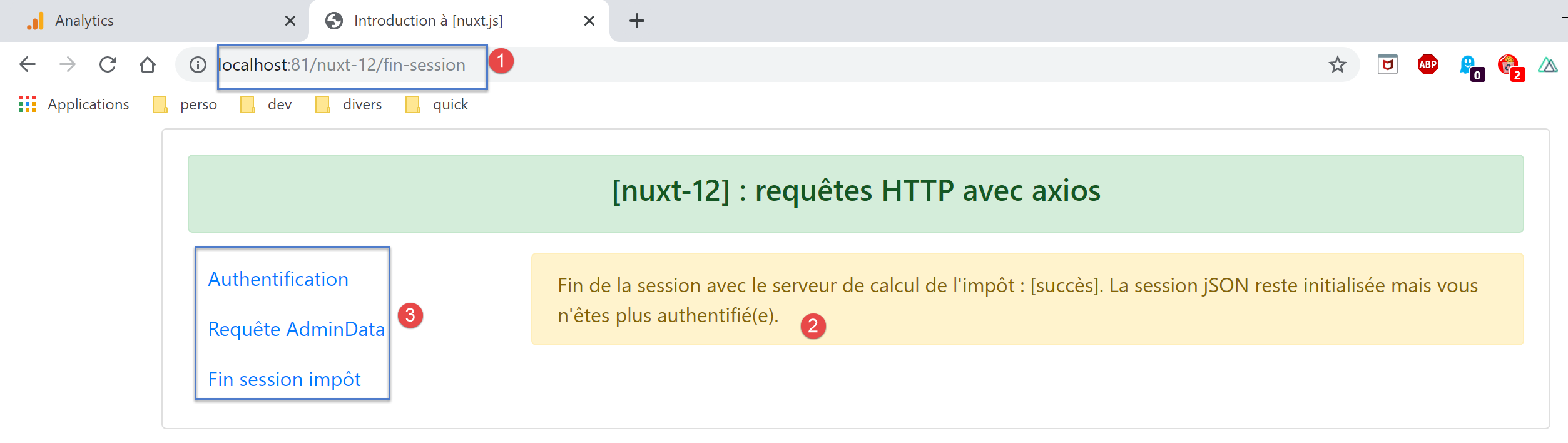
税费计算服务器将从浏览器接收一个过期的会话cookie PHP,并响应称该cookie未关联任何会话 jSON。我们需要找到一种方法,将新的会话cookie PHP传递给浏览器。
为此,我们可以使用路由中间件:
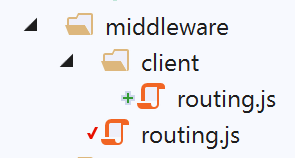
脚本 [client/routing] 是文件 [nuxt.config] 中声明的路由中间件:
// 路由器
  router: {
    // 应用程序的 URL 根节点
    base: '/nuxt-12/',
    // 路由中间件
    middleware: ['routing']
},
脚本 [middleware/routing] 如下所示:
/* eslint-disable no-console */

// 导入客户端中间件
import clientRouting from './client/routing'

export default function(context) {
  // 谁在执行这段代码?
  console.log('[middleware], process.server', process.server, ', process.client=', process.client)
  if (process.client) {
    // 客户端路由
    clientRouting(context)
  }
}
- 第 9-12 行:仅通过第 4 行导入的函数路由客户端;
脚本 [middleware/client/routing] 如下:
/* eslint-disable no-console */
export default function(context) {
  // 谁在执行这段代码?
  console.log('[middleware client], process.server', process.server, ', process.client=', process.client)
  // 浏览器中 PHP 会话 Cookie 的管理
  // 浏览器中的会话 Cookie PHP 必须与 Nuxt 会话中找到的 Cookie 完全一致
  // 操作 [fin-session] 接收一个新的 PHP Cookie(服务器作为 Nuxt 客户端)
  // 如果是由服务器接收该cookie,客户端必须将其转发给浏览器
  // 以便其自身与服务器 PHP 进行通信
  // 此处属于客户端路由

  // 获取会话cookie PHP
  const phpSessionCookie = context.store.state.phpSessionCookie
  if (phpSessionCookie) {
    // 若存在,则将会话cookie PHP 分配给浏览器
    document.cookie = phpSessionCookie
  }
}
让我们回到服务器 [nuxt] 执行完页面 [fin-session] 后的情况:
如果点击菜单 [3] 中的任意一个链接,客户端 [nuxt] 将接管控制。由于页面将发生切换,客户端的路由脚本将执行:
- 第 13 行:在 [nuxt] 应用程序的存储中找到了会话 Cookie PHP;
- 第 14 行:如果该存储不为空,则将其传递给浏览器(第 16 行)。从此时起,客户端 [nuxt] 的浏览器拥有正确的会话 Cookie PHP;
每当客户端 [nuxt] 切换页面时,都会执行脚本 [client/routing]。 无论目标页面为何,该脚本代码均有效:通常情况下,它只是向浏览器提供一个其已拥有的会话cookie PHP,但有两种例外情况:
- 应用程序启动后立即, 服务器 [nuxt] 执行页面 [index] 时,会收到第一个会话 Cookie PHP,而客户端浏览器 [nuxt] 尚未持有该 Cookie;
- 正如前文所述,当服务器 [nuxt] 执行页面 [fin-session] 时;
现在我们来研究一种情况:页面 [fin-session] 仅由客户端 [nuxt] 执行,因为用户点击了导航菜单中的该链接。 此时,由客户端 [nuxt] 执行函数 [asyncData]:
try {
      // 向税费计算服务器请求新的会话 PHP
      const dao = context.app.$dao()
      const response = await dao.finSession()
      // 日志
      console.log('[fin-session asyncData response=]', response)
      // 是否发生错误?
      if (response.état !== 400) {
        // 错误位于 response.réponse
        throw new Error(response.réponse)
      }
      // 服务器发送了一个新的会话cookie PHP
      // 该cookie同时被服务器和Nuxt客户端获取
      // 如果该代码由客户端 [nuxt] 执行,则会话 Cookie PHP 必须放入 Nuxt 会话中
      // 以便服务器端插件 [plgDao] 能够获取该值,并使用
      // 如果该代码由服务器 [nuxt] 执行,则会话 Cookie PHP 必须放入 nuxt 会话中
      // 中,以便客户端 [nuxt] 的路由功能能够检索并将其传递给浏览器
      const phpSessionCookie = dao.getPhpSessionCookie()
      // 在存储中记录 jSON 会话已启动,并保存会话 Cookie PHP
      context.store.commit('replace', { jsonSessionStarted: true, phpSessionCookie, userAuthenticated: false, adminData: '' })
      // 将存储数据保存至会话 [nuxt]
      const session = context.app.$session()
      session.save(context)
      // 返回结果
      return { result: "[succès]. La session jSON reste initialisée mais vous n'êtes plus authentifié(e)." }
    } catch (e) {
      // 日志
      console.log('[fin-session asyncData error=]', e)
      // 报告错误
      return { result: '[échec]', showErrorLoading: true, errorLoadingMessage: e.message }
    } finally {
      // 日志
      console.log('[fin-session asyncData finished]')
      if (process.client) {
        // 等待结束
        context.app.$eventBus().$emit('loading', false)
      }
    }
- 第 3 行:此处获取的是客户端 [nuxt] 的 [dao] 层;
- 第18行:由客户端[nuxt]的[dao]层获取的会话cookie PHP被存储,放入存储区 (第20行),随后保存至会话[nuxt]中(第22-23行);
- 此后一切正常,因为我们知道服务器 [nuxt] 的 [dao] 层将从 [nuxt] 会话中检索 PHP 会话 Cookie;
15.19. Exécution
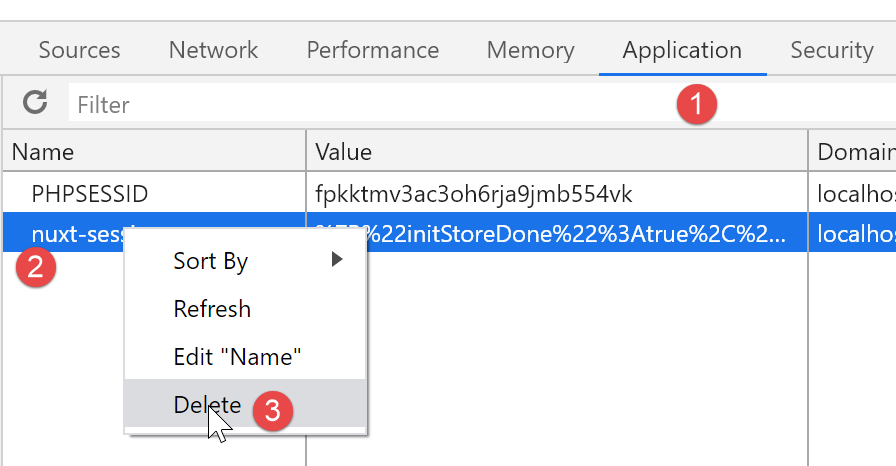
要运行此示例,请务必在执行前从运行 [nuxt] 客户端的浏览器中删除会话 Cookie [nuxt] 和 Cookie PHP,以确保从干净的状态开始。以下是使用 Chrome 浏览器的示例:
15.20. Conclusion
这个示例尤为复杂。它综合了前几个示例中掌握的知识:[nuxt]会话中存储的持久性、函数注入插件、路由中间件以及异步操作的错误处理。 复杂性进一步增加,因为我们希望用户既能使用导航菜单中的链接,也能手动输入URL,而不会导致应用程序崩溃。 为此,我们不得不研究每页面的行为表现,具体取决于其是由客户端还是服务器端执行的。
这种客户端与服务器[nuxt]的行为一致性并非绝对必要。我们可以设想一种常见情况:
- 首页由服务器 [nuxt] 提供;
- 后续所有页面均由客户端 [nuxt] 提供,此时该客户端处于 [SPA] 模式;
然而,即使在这种情况下,仍需验证由服务器 [nuxt] 处理所有页面时会产生什么结果,因为这是搜索引擎在请求这些页面时所获得的内容。