12. 示例 [nuxt-09]:导航控制
示例 [nuxt-09] 使用中间件来控制客户端的导航。此外,我们还添加了一个新视图,用于处理用户向服务器请求应用程序中不存在的 URL 的情况。
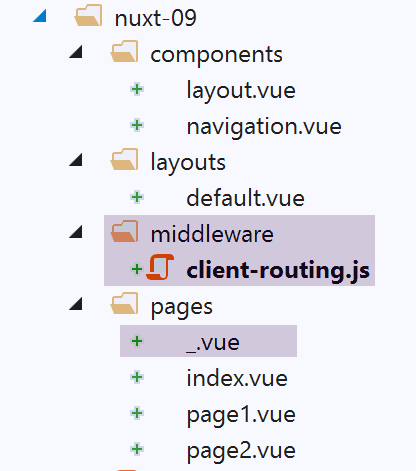
示例 [nuxt-09] 最初是通过复制示例 [nuxt-01] 获得的:
12.1. 页面 [_.vue]
我们曾提到,应用程序的路由是基于 [pages] 文件夹中的内容构建的。在此,我们向该文件夹中添加了页面 [_.vue]。每当应用程序被路由到一个不存在的页面时,都会显示这个特定的页面。 在本示例中,这种情况不会发生在客户端。但如果向服务器请求 URL 或 [/nuxt-09/abcd],则服务器可能会遇到这种情况。 由于页面 [abcd] 不存在,因此将显示页面 [_.vue]。在此情况下,显示内容如下:
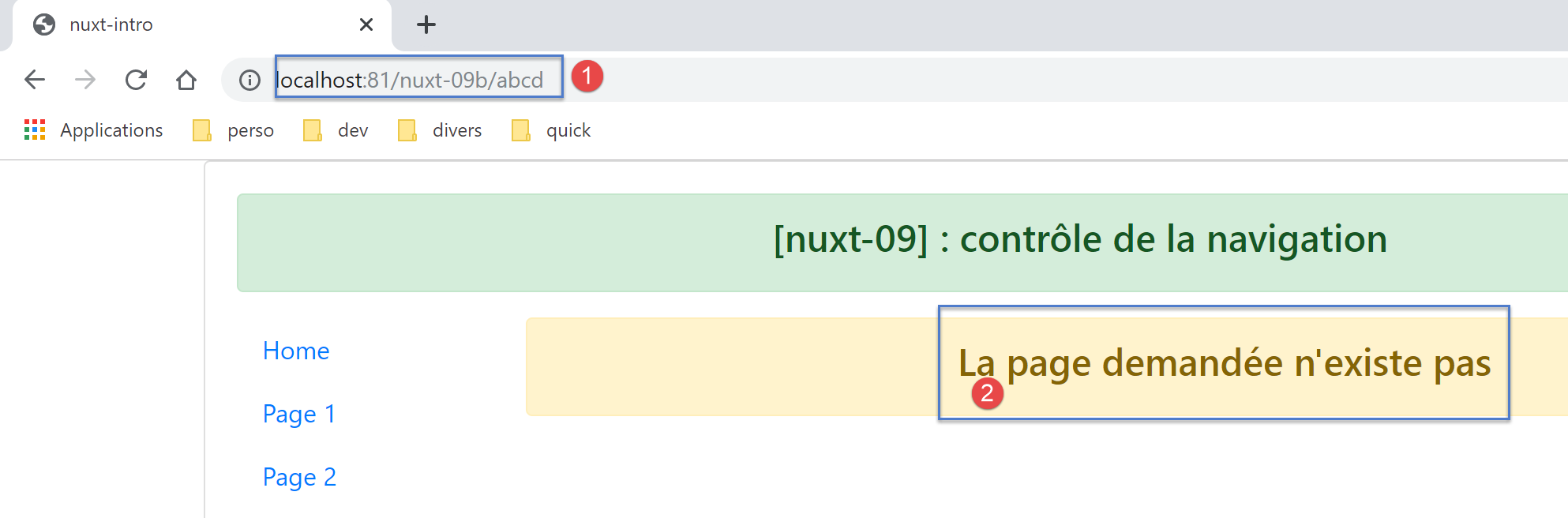
页面 [_.vue] 的代码如下:
<!-- 视图定义 HTML -->
<template>
  <!-- 版面设计 -->
  <Layout :left="true" :right="true">
    <!-- 右侧栏中的警报 -->
    <template slot="right">
      <!-- 黄色背景上的消息 -->
      <b-alert show variant="warning" align="center">
        <h4>La page demandée n'existe pas</h4>
      </b-alert>
    </template>
    <!-- 左侧栏导航菜单 -->
    <Navigation slot="left" />
  </Layout>
</template>

<script>
/* eslint-disable no-undef */
/* eslint-disable no-console */
/* eslint-disable nuxt/no-env-in-hooks */

import Layout from '@/components/layout'
import Navigation from '@/components/navigation'

export default {
  name: '404',
  // 使用的组件
  components: {
    Layout,
    Navigation
  },
  // 生命周期
  beforeCreate() {
    // 客户端与服务器
    console.log('[404 beforeCreate]')
  },
  created() {
    // 客户端与服务器
    console.log('[404 created]')
  },
  beforeMount() {
    // 仅客户端
    console.log('[404 beforeMount]')
  },
  mounted() {
    // 仅客户端
    console.log('[404 mounted]')
  }
}
</script>
12.2. 客户端中间件
客户端中间件 [client-routing] 的代码如下:
/* eslint-disable no-undef */
/* eslint-disable no-console */
export default function({ route, from, redirect }) {
  // 仅客户端
  if (process.client) {
    console.log('[client-routing]')
    // 期望的导航顺序
    const routes = ['index', 'page1', 'page2', 'index']
    // 当前路线
    const current = route.name
    // 上一条路线
    const previous = from.name
    // 需要环形导航
    // 路线[i] 到路线[i+1]
    for (let i = 0; i < routes.length - 1; i++) {
      if (previous === routes[i] && current !== routes[i + 1]) {
        // 保持在同一页面
        redirect({ name: routes[i] })
        return
      }
    }
  }
}
- 第 3 行:我们知道路由函数仅接收一个参数,即调用方(服务器或客户端)的 [context] 对象。符号 [function({ route, from, redirect })]
- 等同于 [function({ route:route, from:from, redirect:redirect })];
- 因此 { route:route, from:from, redirect:redirect } <-- 上下文;
- 从而生成三个 [route, from, redirect] 参数,例如:
- route=context.route;
- redirect=context.redirect;
- from=context.from;
[nuxt] 的文档中大量使用了这种表示法。必须了解它;
- 第 8 行:按所需导航顺序排列的页面名称数组
- 第 10 行:当前路由的目标页面名称;
- 第 12 行:当前路由的上一页名称;
- 第 14 行:作为练习,我们将仅允许 [index --> page1 --> page2 --> index] 这种循环导航;
- 第15-21行:遍历指定所需导航顺序的数组;
- 第16行:如果发现routes[i]是上一次路由的最后一个页面,那么下一个页面应为routes[i+1];
- 第18-19行:若非如此,则将应用程序重定向至routes[i],即不切换页面:拒绝导航;
12.3. Exécution
使用以下文件 [nuxt.config.js] 运行示例:
export default {
  mode: 'universal',
  /*
   ** Headers of the page
   */
  head: {
    title: process.env.npm_package_name || "Introduction à nuxt.js par l'exemple",
    meta: [
      { charset: 'utf-8' },
      { name: 'viewport', content: 'width=device-width, initial-scale=1' },
      { hid: 'description', name: 'description', content: process.env.npm_package_description || '' }
    ],
    link: [{ rel: 'icon', type: 'image/x-icon', href: '/favicon.ico' }]
  },
  /*
   ** Customize the progress-bar color
   */
  loading: { color: '#fff' },
  /*
   ** Global CSS
   */
  css: [],
  /*
   ** Plugins to load before mounting the App
   */
  plugins: [],
  /*
   ** Nuxt.js dev-modules
   */
  buildModules: [
    // 文档:https://github.com/nuxt-community/eslint-module
    '@nuxtjs/eslint-module'
  ],
  /*
   ** Nuxt.js modules
   */
  modules: [
    // 文档:https://bootstrap-vue.js.org
    'bootstrap-vue/nuxt',
    // 文档:https://axios.nuxtjs.org/usage
    '@nuxtjs/axios'
  ],
  /*
   ** Axios module configuration
   ** See https://axios.nuxtjs.org/options
   */
  axios: {},
  /*
   ** Build configuration
   */
  build: {
    /*
     ** You can extend webpack config here
     */
    extend(config, ctx) {}
  },
  // 源代码目录
  srcDir: 'nuxt-09',
  router: {
    base: '/nuxt-09/',
    middleware: ['client-routing']
  },
  // 服务器
  server: {
    port: 81, // 默认:3000
    host: 'localhost' // 默认:localhost
  }
}
请检查以下几点:
- 当您位于页面 [Home] 时,只能导航至页面 [Page 1];
- 当您位于页面 [Page 1] 时,只能导航至页面 [Page 2];
- 当您位于页面 [Page 2] 时,只能导航至页面 [Home];
- 当您请求一个不正确的 URL(例如 [http://localhost:81/nuxt-09b/abcd])时,您将看到提示所请求页面不存在的页面;