10. 第 5 版 - PAM Web / JSF 应用程序
10.1. 应用程序架构
PAM Web 应用程序的架构如下:
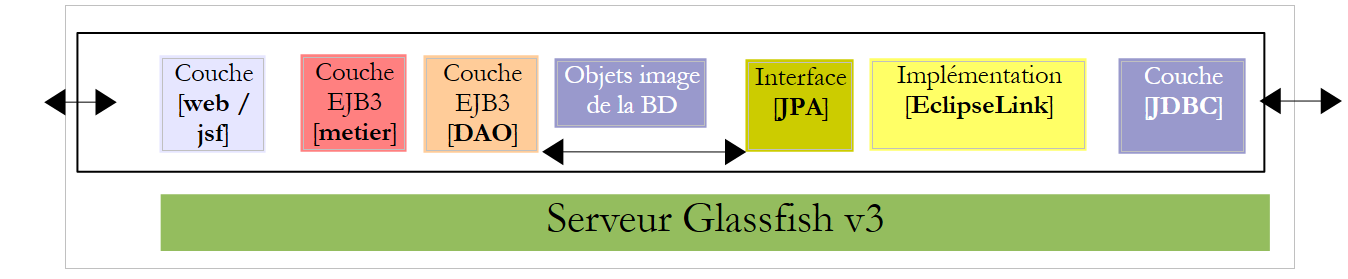 |
在此版本中,GlassFish 服务器将托管应用程序的所有层:
- [Web] 层由服务器的 Servlet 容器托管(下文第 1 项)
- 其余层 [业务逻辑、DAO、JPA] 由服务器的 EJB3 容器托管(下图中的 2)
 |
在 EJB3 容器中运行的应用程序的 [业务逻辑、DAO] 组件已在第 7.1 节讨论的客户端/服务器应用程序中实现,该应用程序具有以下架构:
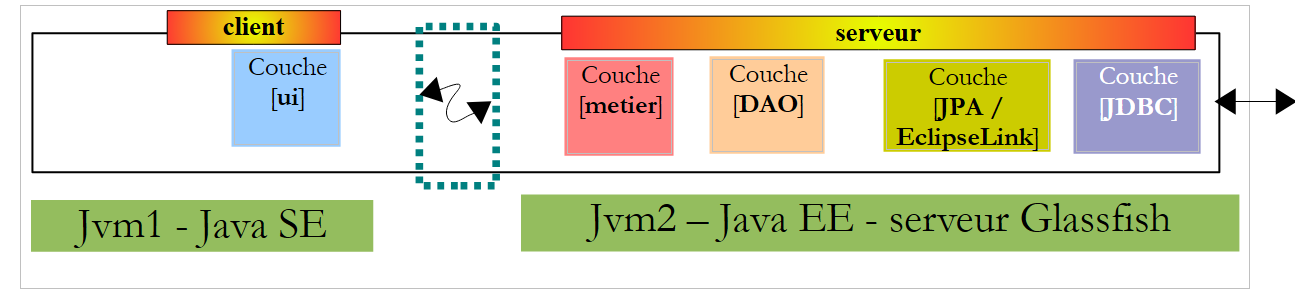 |
[业务逻辑、DAO] 层在 GlassFish 服务器的 EJB3 容器中运行,而 [UI] 层则在另一台机器上的控制台或 Swing 应用程序中运行:
 |
在新应用程序的架构中:
 |
只需编写 [Web / JSF] 层。其他层 [业务层、DAO、JPA] 已就绪。
在文档[ref3]中,展示了一个使用Java Server Faces实现Web层的Web应用程序,其架构类似于以下结构:
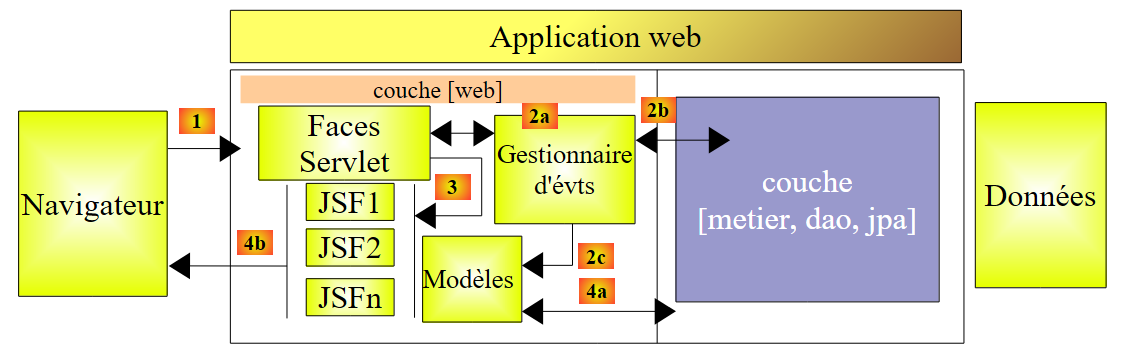 |
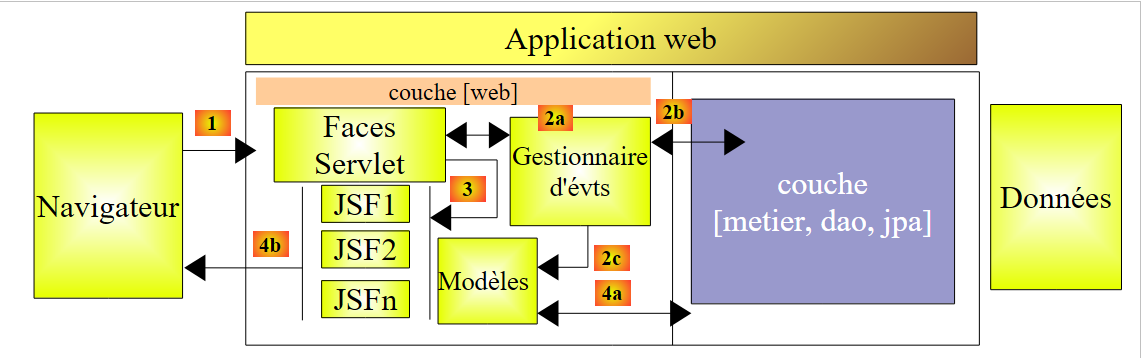
该架构实现了 MVC(模型、视图、控制器)设计模式。客户端请求的处理流程如下:
如果请求使用 GET 方法发起,则执行以下两个步骤:
- 请求 - 客户端浏览器向控制器 [Faces Servlet] 发送请求。控制器处理所有客户端请求,它是应用程序的入口点,即 MVC 中的 C。
- 响应 - C(控制器)指示选定的 JSF 页面进行渲染。这就是视图,即 MVC 中的 V。JSF 页面使用 M(模型)来初始化其必须发送给客户端的响应中的动态部分。该模型是一个 Java 类,可以调用 [业务] 层 [4a],为 V(视图)提供所需的数据。
如果请求是通过 POST 发出的,在请求和响应之间会发生两个额外的步骤:
- 请求 - 浏览器客户端向 [Faces Servlet] 控制器发起请求。
- 处理 - C控制器处理此请求。实际上,POST请求会携带必须处理的数据。为此,控制器会借助应用程序特有的事件处理程序[2a]。这些处理程序可能需要调用业务层[2b]。事件处理程序可能需要更新某些M模型[2c]。一旦客户端的请求被处理完毕,可能会触发各种响应。一个经典的例子是:
- 若请求无法正确处理,则返回错误页面
- 否则则返回确认页面
事件处理程序会向控制器返回一个称为导航键的字符串类型结果 [Faces Servlet]。
- 导航——控制器根据事件处理程序返回的导航键,选择要发送给客户端的 JSF 页面(即视图)。
- 响应 - 选定的 JSF 页面向客户端发送响应。它使用其 M 模型来初始化动态部分。该模型还可以调用 [业务] 层 [4a],为 JSF 页面提供所需的数据。
在 JSF 项目中:
- 控制器 C 是 [javax.faces.webapp.FacesServlet] Servlet。该组件位于 [jsf-api.jar] 库中。
- 视图(V)由 JSF 页面实现。
- M 模型和事件处理程序由通常称为“后端 Bean”的 Java 类实现。
- 在 JSF 1.x 版本中,Bean 定义以及页面间的导航规则都定义在 [faces-config.xml] 文件中。该文件包含视图列表以及视图之间的过渡规则。从 JSF 2 版本开始,可以使用注解来定义 Bean,并且可以在 Bean 代码中直接硬编码页面过渡逻辑。
10.2. 应用程序的工作原理
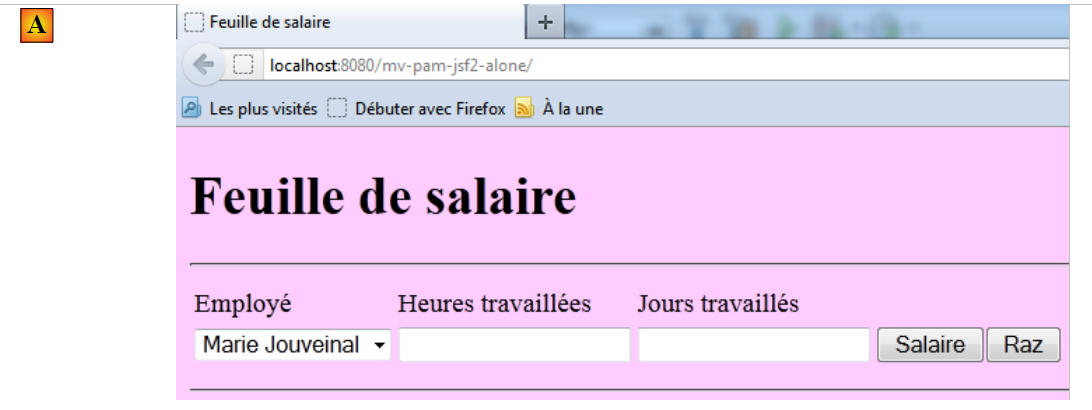
当首次请求应用程序时,将显示以下页面:
 |
随后,您需填写表格并申请薪资:
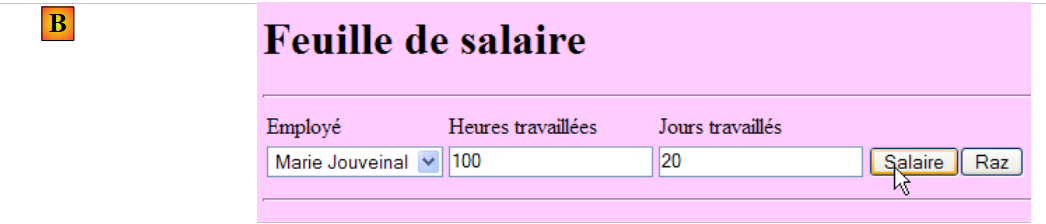 |
随后将显示以下结果:
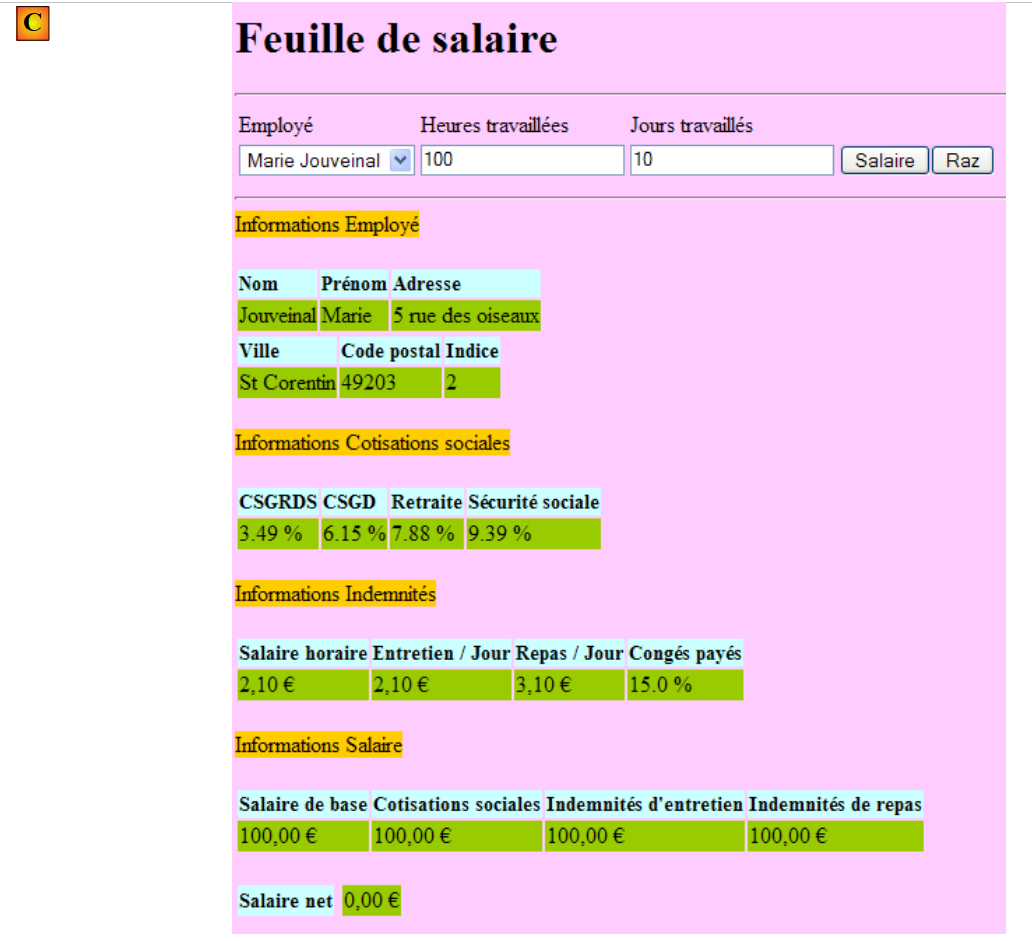 |
此版本计算的是一个虚拟薪资。请不要关注页面内容,而应关注其布局。点击[重置]按钮后,您将返回页面[A]。
输入错误时会显示标记,如下例所示:
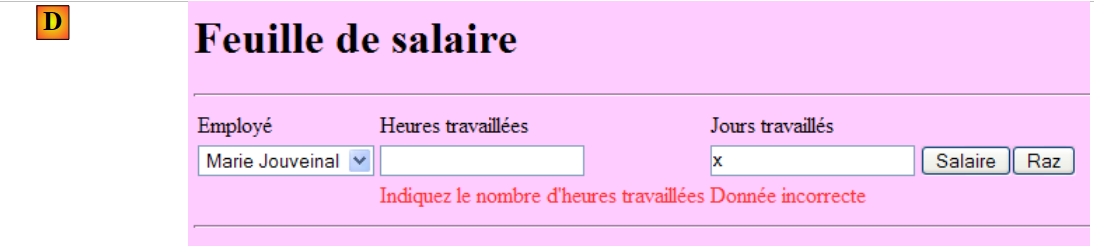 |
10.3. NetBeans 项目
我们将构建该应用程序的初始版本,其中将模拟 [业务] 层。我们将采用以下架构:
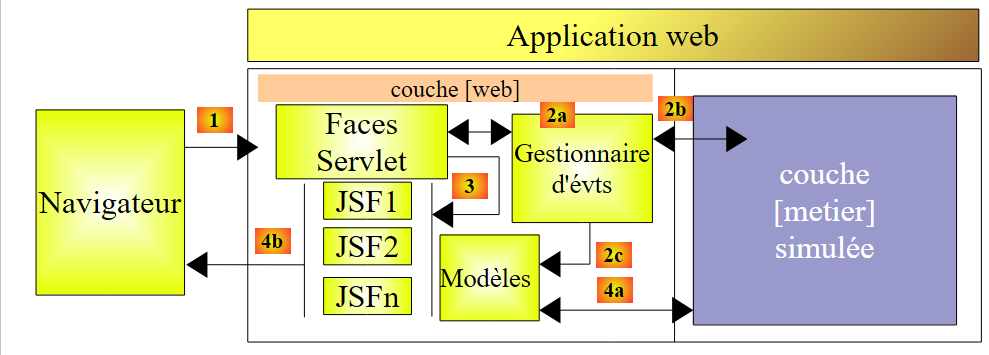 |
当事件处理程序或模型向 [业务] 层 [2b, 4a] 请求数据时,该层将向其提供虚拟数据。目标是构建一个能够正确响应用户请求的 Web 层。一旦实现这一点,剩下的工作就是安装第 7.1 节中开发的服务器层:
 |
这将是我们 PAM 应用程序 Web 版本的第 2 版。
第 1 版的 NetBeans 项目是以下 Maven 项目:
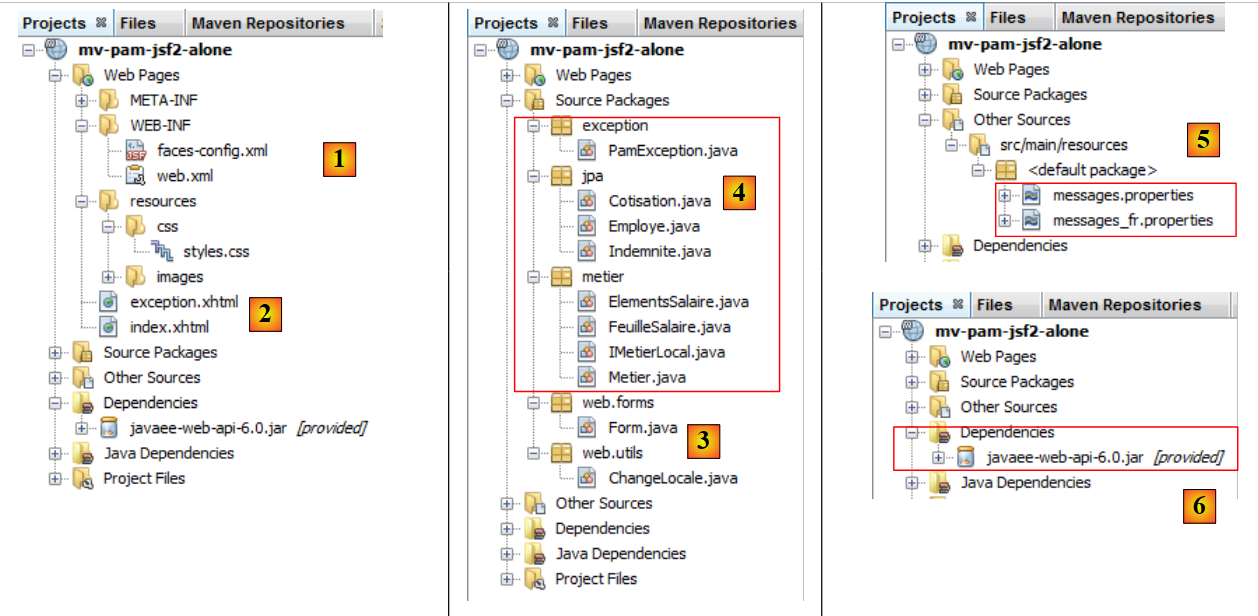 |
- 在 [1] 中,配置文件
- 在 [2] 中,XHTML 页面和样式表
- 在 [3] 中,[Web] 层的类
- 在 [4] 中,[Web] 层与 [业务] 层之间交换的对象,以及 [业务] 层本身
- 在 [5] 中,应用程序国际化的消息文件
- 在 [6] 中,应用程序的依赖项
我们将回顾其中的一些元素。
10.3.1. 配置文件
[web.xml] 文件是 NetBeans 默认生成的,其中包含异常页面的配置:
<?xml version="1.0" encoding="UTF-8"?>
<beans xmlns="http://www.springframework.org/schema/beans" xmlns:xsi="http://www.w3.org/2001/XMLSchema-instance"
       xmlns:tx="http://www.springframework.org/schema/tx"
       xmlns:jaxws="http://cxf.apache.org/jaxws"
       xsi:schemaLocation="http://www.springframework.org/schema/beans
       http://www.springframework.org/schema/beans/spring-beans-2.0.xsd
       http://www.springframework.org/schema/tx
       http://www.springframework.org/schema/tx/spring-tx-2.0.xsd
       http://cxf.apache.org/jaxws
       http://cxf.apache.org/schemas/jaxws.xsd">

  <!-- Apache CXF -->
  <import resource="classpath:META-INF/cxf/cxf.xml" />
  <import resource="classpath:META-INF/cxf/cxf-extension-soap.xml" />
  <import resource="classpath:META-INF/cxf/cxf-servlet.xml" />

  <!-- lower layers -->
  <import resource="classpath:spring-config-metier-dao.xml" />

  <!-- web service -->
  <bean id="wsMetier" class="pam.ws.PamWsMetier">
    <property name="metier" ref="metier"/>
  </bean>
  <jaxws:endpoint id="wsmetier"
                  implementor="#wsMetier"
                  address="/metier">
  </jaxws:endpoint>

</beans>
- 第 30 行:[index.html] 是应用程序的首页
- 第 32–39 行:异常页面的配置
[exception.html] 页面摘自 [ref3]。其代码如下:
Web 应用程序代码未明确处理的任何异常都会导致显示类似于下图的页面:
 |
[faces-config.xml] 文件内容如下:
请注意以下几点:
- 第 9–14 行:[messages.properties] 文件将用于页面国际化。在 XHTML 页面中,可通过 msg 键访问该文件。
- 第 15 行:将 [messages.properties] 文件定义为 <h:messages> 和 <h:message> 标签显示的错误消息的首选来源。这允许您覆盖某些默认的 JSF 错误消息。此处未使用此功能。
10.3.2. 样式表
[styles.css] 文件内容如下:
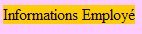
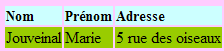
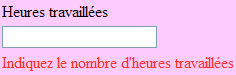
以下是一些使用这些样式的 JSF 代码示例:
|  |
|  |
|  |
10.3.3. 消息文件
消息文件 [messages_fr.properties] 内容如下:
.libelle{
   background-color: #ccffff;
   font-family: 'Times New Roman',Times,serif;
   font-size: 14px;
   font-weight: bold
}
body{
   background-color: #ffccff
}

.error{
   color: #ff3333
}

.info{
   background-color: #99cc00
}

.titreInfos{
   background-color: #ffcc00
}
这些消息均用于 [index.xhtml] 页面,但第 11–15 行中的消息除外,它们用于 [exception.xhtml] 页面。
10.3.4. Bean 的作用域
[web.forms.Form] Bean 将具有请求作用域:
form.titre=Feuille de salaire
form.comboEmployes.libell\u00e9=Employ\u00e9
form.heuresTravaill\u00e9es.libell\u00e9=Heures travaill\u00e9es
form.joursTravaill\u00e9s.libell\u00e9=Jours travaill\u00e9s
form.heuresTravaill\u00e9es.required=Indiquez le nombre d'heures travaill\u00e9es
form.heuresTravaill\u00e9es.validation=Donn\u00e9e incorrecte
form.joursTravaill\u00e9s.required=Indiquez le nombre de jours travaill\u00e9s
form.joursTravaill\u00e9s.validation=Donn\u00e9e incorrecte
form.btnSalaire.libell\u00e9=Salaire
form.btnRaz.libell\u00e9=Raz
exception.header=L'exception suivante s'est produite
exception.httpCode=Code HTTP de l'erreur
exception.message=Message de l'exception
exception.requestUri=Url demand\u00e9e lors de l'erreur
exception.servletName=Nom de la servlet demand\u00e9e lorsque l'erreur s'est produite
form.infos.employ\u00e9=Informations Employ\u00e9
form.employe.nom=Nom
form.employe.pr\u00e9nom=Pr\u00e9nom
form.employe.adresse=Adresse
form.employe.ville=Ville
form.employe.codePostal=Code postal
form.employe.indice=Indice
form.infos.cotisations=Informations Cotisations sociales
form.cotisations.csgrds=CSGRDS
form.cotisations.csgd=CSGD
form.cotisations.retraite=Retraite
form.cotisations.secu=S\u00e9curit\u00e9 sociale
form.infos.indemnites=Informations Indemnit\u00e9s
form.indemnites.salaireHoraire=Salaire horaire
form.indemnites.entretienJour=Entretien / Jour
form.indemnites.repasJour=Repas / Jour
form.indemnites.cong\u00e9sPay\u00e9s=Cong\u00e9s pay\u00e9s
form.infos.salaire=Informations Salaire
form.salaire.base=Salaire de base
form.salaire.cotisationsSociales=Cotisations sociales
form.salaire.entretien=Indemnit\u00e9s d'entretien
form.salaire.repas=Indemnit\u00e9s de repas
form.salaire.net=Salaire net
[web.utils.ChangeLocale] Bean 将具有应用程序作用域:
import java.io.Serializable;
import javax.faces.bean.ManagedBean;
import javax.faces.bean.RequestScoped;

@ManagedBean
@RequestScoped
public class Form implements Serializable {
10.3.5. [业务]层
[业务]层实现了以下IMetierLocal接口:
package web.utils;

import java.io.Serializable;
import javax.faces.bean.ManagedBean;
import javax.faces.bean.SessionScoped;

@ManagedBean
@SessionScoped
public class ChangeLocale implements Serializable{
  // page locale
  private String locale="fr";

  public ChangeLocale() {
  }

  public String setFrenchLocale(){
    locale="fr";
    return null;
  }

  public String setEnglishLocale(){
    locale="en";
    return null;
  }

  public String getLocale() {
    return locale;
  }

  public void setLocale(String locale) {
    this.locale = locale;
  }


}
该接口是第7.1节所述的客户端/服务器应用程序中服务器端所使用的接口。
我们将用于测试[Web]层的Business类实现了该接口,具体如下:
package metier;

import java.util.List;
import javax.ejb.Local;
import jpa.Employe;

@Local
public interface IMetierLocal {
  // get your payslip
  FeuilleSalaire calculerFeuilleSalaire(String SS, double nbHeuresTravaillées, int nbJoursTravaillés );
  // list of employees
  List<Employe> findAllEmployes();
}
我们留给读者自行解读这段代码。请注意所使用的方法:为了避免必须实现应用程序的 EJB 部分,我们模拟了 [业务] 层。一旦验证 [Web] 层正确无误,我们就可以将其替换为实际的 [业务] 层。
10.4. [index.xhtml]表单及其模板[Form.java]
接下来我们将构建表单的 XHTML 页面及其模型。
[ref3]中的推荐阅读:
- 示例 #3 (mv-jsf2-03),了解表单中可用的标签列表
- 示例 #4 (mv-jsf2-04):由模型填充的下拉列表
- 示例 #6 (mv-jsf2-06):输入验证
- 示例 #7 (mv-jsf2-07):处理 [清除] 按钮
10.4.1. 步骤 1
问题:构建 [index.xhtml] 表单及其 [Form.java] 模型,以显示以下页面:
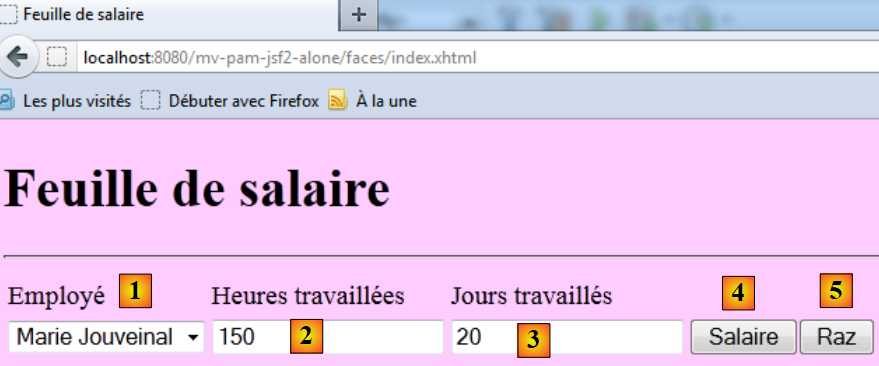 |
输入组件如下:
id | JSF类型 | 模型 | 角色 | |
comboEmployees | <h:selectOneMenu> | 字符串 comboEmployeesValue List<Employee> getEmployees() | 包含员工列表,格式为 “名字 姓氏”。 | |
工作时长 | <h:inputText> | 字符串 工作时长 | 工作小时数 - 实数 | |
工作天数 | <h:inputText> | 字符串 daysWorked | 工作天数 - 整数 | |
btnSalary | <h:commandButton> | 开始计算薪资 | ||
btnReset | <h:commandButton> | 将表单重置为初始状态 |
- getEmployees 方法将返回从 [business] 层检索到的员工列表。下拉列表中显示的对象将具有以下属性:itemValue 属性设置为员工的社会保险号,itemLabel 属性设置为由员工名字和姓氏组成的字符串。
- [Salary] 和 [Clear] 按钮目前尚未关联事件处理程序。
- 将对输入进行有效性检查。
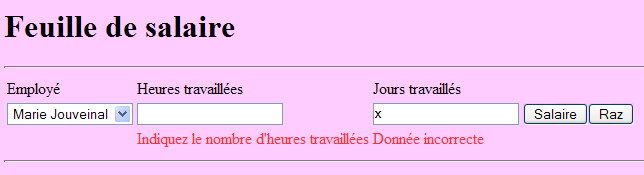
请测试此版本。特别要验证输入错误是否被正确标记。
注意:页面组件的 ID 属性中切勿包含带重音的字符。在 Glassfish 3.1.2 环境中,这会导致应用程序崩溃。
10.4.2. 步骤 2
问题:请完善 [index.xhtml] 表单及其 [Form.java] 模板,确保点击 [Salary] 按钮后显示以下页面:
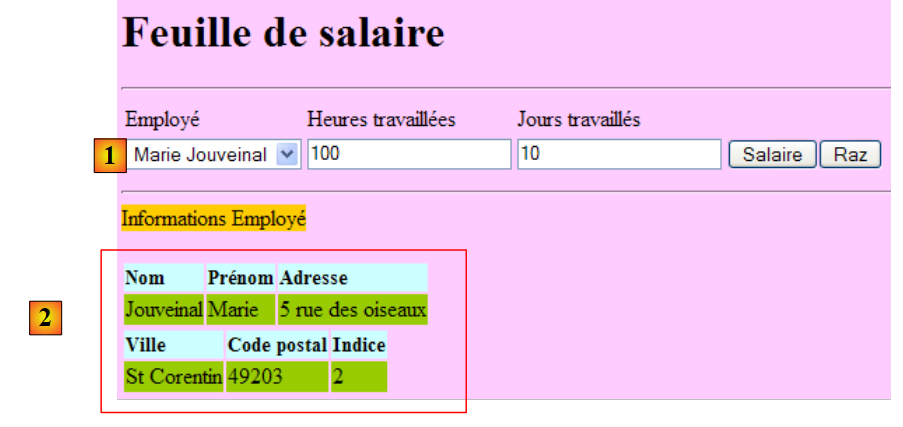 |
[薪资] 按钮将与模型的 calculateSalary 事件处理程序关联。该方法将调用 [业务] 层中的 calculatePaystub 方法。此工资单将针对 [1] 中选定的员工生成。
在模型中,工资单将由以下私有字段表示:
package metier;

...
public class Metier implements IMetierLocal {

  // employee dictionary indexed by n° SS
  private Map<String,Employe> hashEmployes=new HashMap<String,Employe>();
  // list of employees
  private List<Employe> listEmployes;

  // get your payslip
  public FeuilleSalaire calculerFeuilleSalaire(String SS,
    double nbHeuresTravaillées, int nbJoursTravaillés) {
    // we retrieve employee n° SS
    Employe e=hashEmployes.get(SS);
    // we make a fiictive payslip
    return new FeuilleSalaire(e,new Cotisation(3.49,6.15,9.39,7.88),new ElementsSalaire(100,100,100,100,100));
  }

  // list of employees
  public List<Employe> findAllEmployes() {
    if(listEmployes==null){
      // create a list of two employees
      listEmployes=new ArrayList<Employe>();
      listEmployes.add(new Employe("254104940426058","Jouveinal","Marie","5 rue des oiseaux","St Corentin","49203",new Indemnite(2,2.1,2.1,3.1,15)));
      listEmployes.add(new Employe("260124402111742","Laverti","Justine","La brûlerie","St Marcel","49014",new Indemnite(1,1.93,2,3,12)));
      // employee dictionary indexed by n° SS
      for(Employe e:listEmployes){
        hashEmployes.put(e.getSS(),e);
      }
    }
    // we return the list of employees
    return listEmployes;
  }
}
其中包含 get 和 set 方法。
要获取该对象中包含的信息,您可以在 JSF 页面中编写如下表达式:
private FeuilleSalaire feuilleSalaire;
value 属性中的表达式将按以下方式进行求值:
[form].getPayrollSheet().getEmployee().getName(),其中 [form] 代表 [Form.java] 类的实例。读者可以验证,此处使用的 get 方法确实分别存在于 [Form]、[PayrollSheet] 和 [Employee] 类中。如果情况并非如此,在求值时将抛出异常。
测试此新版本。
10.4.3. 步骤 3
问题:完善 [index.xhtml] 表单及其模板 [Form.java],以获取以下额外信息:
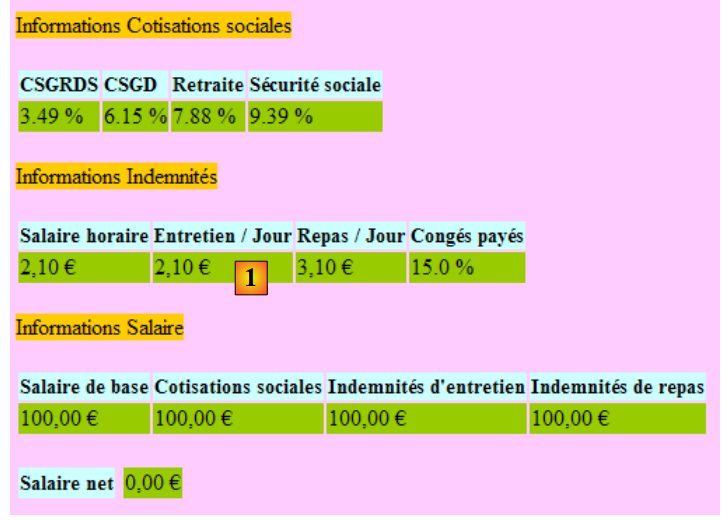 |
我们将采用与之前相同的方法。例如,[1] 中出现的欧元货币符号存在一个问题。在国际化应用程序中,最好使用所选区域设置(en、de、fr 等)的显示格式和货币符号。可通过以下方式实现:
<h:outputText value="#{form.feuilleSalaire.employe.nom}"/>
我们本可以这样写:
          <h:outputFormat value="{0,number,currency}">
            <f:param value="#{form.feuilleSalaire.employe.indemnite.entretienJour}"/>
</h:outputFormat>
但在 en_GB 语言环境(英式英语)下,金额仍会以欧元显示,而应显示为英镑(£)。<h:outputFormat> 标签允许根据显示的 JSF 页面的语言环境来显示信息:
- 第 1 行:显示 {0} 参数,该参数是一个代表货币金额的数字
- 第 2 行:<f:param> 标签为 {0} 参数赋值。第二个 <f:param> 标签将为标记为 {1} 的参数赋值,以此类推。
10.4.4. 步骤 4
推荐阅读:[ref3] 中的示例 #7 (mv-jsf2-07)。
问题:完善表单 [index.xhtml] 及其模板 [Form.java],以实现 [重置] 按钮的功能。
[重置]按钮将表单恢复到通过GET请求首次请求时的状态。这里存在几个挑战。其中一些已在[ref3]中进行了解释。
[Raz] 按钮返回的表单并非整个表单,而是仅包含已输入的部分:
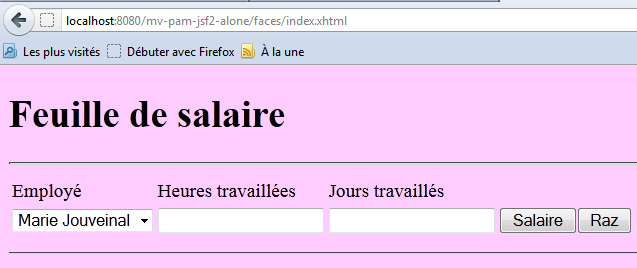
可通过如下方式使用 <f:subview> 标签实现此效果:
<h:outputText value="#{form.feuilleSalaire.employe.indemnite.entretienJour} є">
<f:subview> 标签包裹了表单中可以显示或隐藏的全部内容。任何组件都可以通过 rendered 属性来控制其显示与否。如果 rendered="true",则显示该组件;如果 rendered="false",则不显示。如果 rendered 属性的值来自模型,则可以通过编程方式控制该组件的显示。
在上例中,我们将通过以下字段控制 viewInfos 视图的显示:
      <f:subview id="viewInfos" rendered="#{form.viewInfosIsRendered}">
... la partie du formulaire qu'on veut pouvoir ne pas afficher
</f:subview>
以及相应的 get 和 set 方法。处理 [Salary] 和 [Clear] 按钮点击事件的方法将根据 viewInfos 视图是否应显示来更新此布尔值。