12. 版本 7 - 多视图/多页面的 PAM Web 应用程序
这里我们回到了最初的架构,当时[业务]层是模拟的。现在我们知道,这可以轻松地替换为实际的[业务]层。模拟的[业务]层有助于测试。
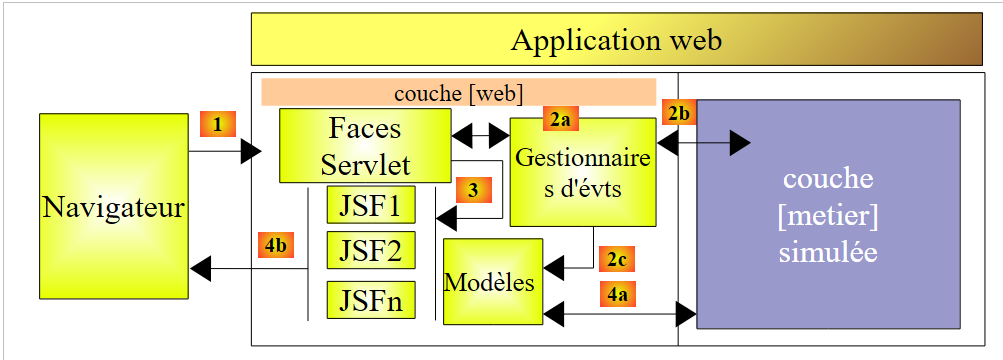 |
JSF 应用程序属于 MVC(模型-视图-控制器)类型:
- [Faces Servlet] 是 JSF 提供的通用控制器。该控制器通过应用程序特有的事件处理程序进行扩展。此前遇到的事件处理程序,是作为 JSF 页面模型的类的方法
- JSF 页面将响应发送给客户端浏览器。这些响应即为应用程序的视图。
- JSF 页面包含被称为页面模型的动态元素。请注意,对于某些作者而言,模型涵盖了应用程序操作的实体,例如 PayrollSheet 或 Employee 类。为了区分这两种模型,我们可以分别称之为应用程序模型和 JSF 页面模型。
在 JSF 架构中,从 JSFi 页面过渡到 JSFj 页面可能会遇到问题。
- JSFi 页面已显示。用户通过某个事件 [1] 从该页面触发 POST 请求
- 在 JSF 中,此 POST 请求通常由 JSFi 页面的 Mi 模型中的方法 C 处理 [2a,2b]。可以说方法 C 是一个二级控制器。
- 如果在此方法结束时需要显示 JSFj 页面,控制器 C 必须:
- 更新 [2c] JSFj 页面的 Mj 模型
- 向主控制器返回 [2a] 用于显示 JSFj 页面的导航键
步骤 1 要求 JSFi 页面的 Mi 模型必须引用 JSFj 页面的 Mj 模型。这在一定程度上增加了复杂性,使得 Mi 模型之间相互依赖。事实上,负责更新 Mj 模型的 Mi 模型的 C 管理器必须了解后者。如果需要更改 Mj 模型,则 Mi 模型的 C 管理器也需要相应调整。
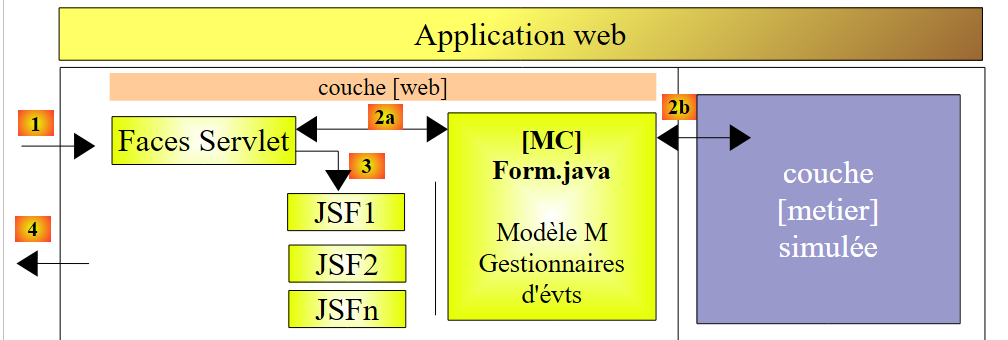
有一种场景可以避免模型依赖:即所有 JSF 页面共用一个 M 模型。这种架构仅适用于视图较少的应用程序,但使用起来非常简单。这正是我们目前采用的方案。
在此背景下,应用程序架构如下:
 |
12.1. 应用程序视图
向用户展示的不同视图如下:
-
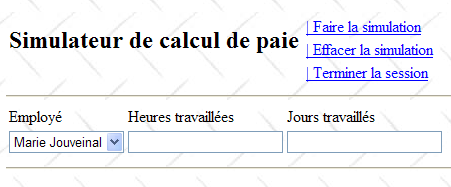
[VueSaisies] 视图,用于显示模拟表单
-
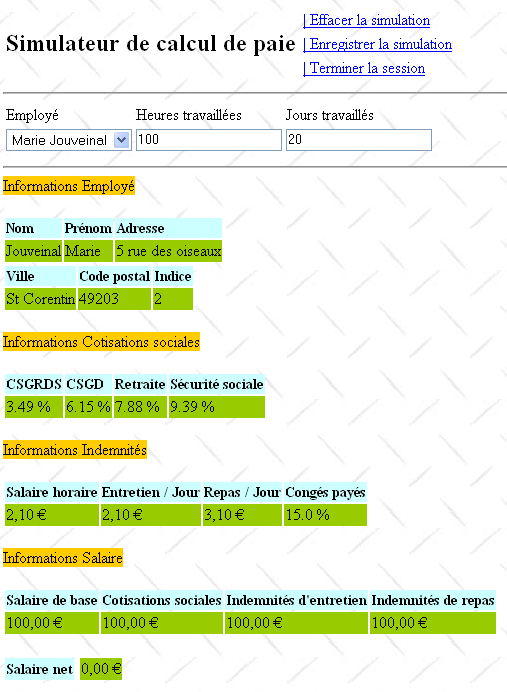
[VueSimulation] 视图,用于显示详细的模拟结果:
- [SimulationsView] 视图,用于列出客户执行的模拟
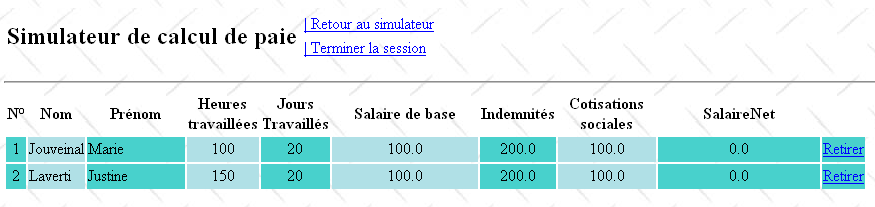
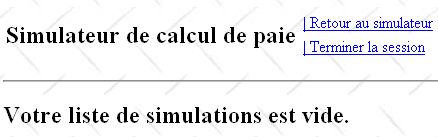
- [EmptySimulationsView],表示客户端没有模拟或已无更多模拟:
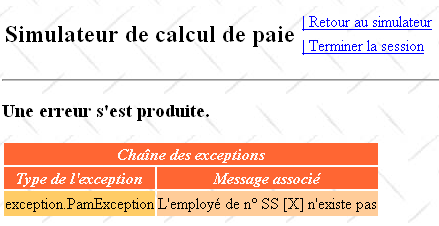
- [ErrorView] 视图,表示存在一个或多个错误:
12.2. 用于 [web] 层的 NetBeans 项目
此版本的 NetBeans 项目将是以下 Maven 项目:
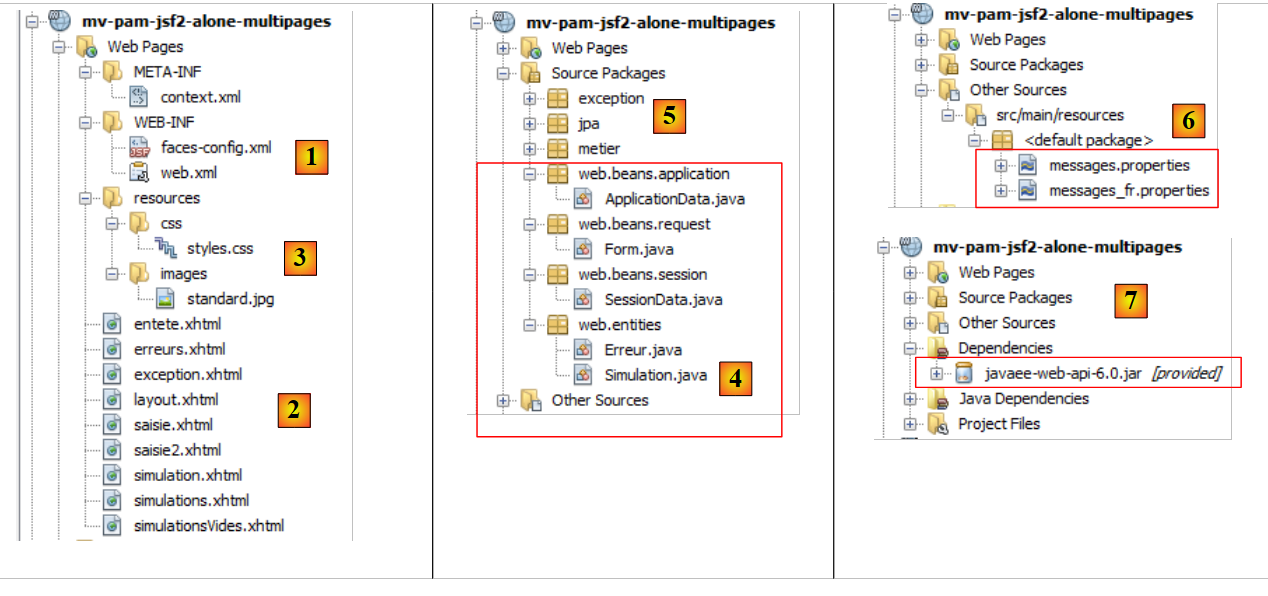 |
- 在 [1] 中,配置文件,
- 在 [2] 中,JSF 页面,
- 在 [3] 中,视图的样式表和背景图像,
- 在 [4] 中,[Web] 层类,
- 在 [5] 中,应用程序的底层,
- 在 [6] 中,应用程序国际化的消息文件,
- 在 [7] 中,项目依赖项。
让我们回顾一下其中的一些元素。
12.2.1. 配置文件
[web.xml] 和 [faces-config.xml] 文件与上一个项目中的完全相同,只是 [web.xml] 中有一个细节有所不同:
<dependencies>
        <dependency>
            <groupId>${project.groupId}</groupId>
            <artifactId>mv-pam-ejb-metier-dao-eclipselink</artifactId>
            <version>${project.version}</version>
            <type>ejb</type>
        </dependency>
        <dependency>
            <groupId>${project.groupId}</groupId>
            <artifactId>mv-pam-jsf2-ejb</artifactId>
            <version>${project.version}</version>
            <type>war</type>
        </dependency>
    </dependencies>
- 第4-6行:主页是[saisie.xhtml]页面
12.2.2. 样式表
[styles.css] 文件内容如下:
<?xml version="1.0" encoding="UTF-8"?>
<web-app version="3.0" xmlns="http://java.sun.com/xml/ns/javaee" xmlns:xsi="http://www.w3.org/2001/XMLSchema-instance" xsi:schemaLocation="http://java.sun.com/xml/ns/javaee http://java.sun.com/xml/ns/javaee/web-app_3_0.xsd">
  ...
  <welcome-file-list>
    <welcome-file>faces/saisie.xhtml</welcome-file>
  </welcome-file-list>
  ...
</web-app>
以下是一些使用这些样式的 JSF 代码示例:
模拟视图
.simulationsHeader {
   text-align: center;
   font-style: italic;
   color: Snow;
   background: Teal;
}

.simuNum {
   height: 25px;
   text-align: center;
   background: MediumTurquoise;
}
.simuNom {
   text-align: left;
   background: PowderBlue;
}
.simuPrenom {
   width: 6em;
   text-align: left;
   color: Black;
   background: MediumTurquoise;
}
.simuHT {
   width: 3em;
   text-align: center;
   color: Black;
   background: PowderBlue;
}
.simuJT {
   width: 3em;
   text-align: center;
   color: Black;
   background: MediumTurquoise;
}
.simuSalaireBase {
   width: 9em;
   text-align: center;
   color: Black;
   background: PowderBlue;
}
.simuIndemnites {
   width: 3em;
   text-align: center;
   color: Black;
   background: MediumTurquoise;
}
.simuCotisationsSociales {
   width: 6em;
   text-align: center;
   background: PowderBlue;
}

.simuSalaireNet {
   width: 10em;
   text-align: center;
   background: MediumTurquoise;
}

.erreursHeaders {
   background: Teal;
   background-color: #ff6633;
   color: Snow;
   font-style: italic;
   text-align: center

}

.erreurClasse {
   background: MediumTurquoise;
   background-color: #ffcc66;
   height: 25px;
   text-align: center
}

.erreurMessage {
   background: PowderBlue;
   background-color: #ffcc99;
   text-align: left
}
          <h:dataTable value="#{form.simulations}" var="simulation"
结果如下:
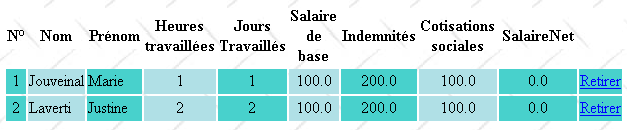
错误视图
                       headerClass="simulationsHeaders" columnClasses="simuNum,simuNom,simuPrenom,simuHT,simuJT,simuSalaireBase,simuIndemnites,simuCotisationsSociales,simuSalaireNet">
          <h:dataTable value="#{form.erreurs}" var="erreur"

12.2.3. 消息文件
消息文件 [messages_fr.properties] 内容如下:
headerClass="erreursHeaders" columnClasses="erreurClasse,erreurMessage">
12.2.4. [业务]层
模拟的[业务]层修改如下:
form.titre=Simulateur de calcul de paie
form.comboEmployes.libell\u00e9=Employ\u00e9
form.heuresTravaill\u00e9es.libell\u00e9=Heures travaill\u00e9es
form.joursTravaill\u00e9s.libell\u00e9=Jours travaill\u00e9s
form.heuresTravaill\u00e9es.required=Indiquez le nombre d'heures travaill\u00e9es
form.heuresTravaill\u00e9es.validation=Donn\u00e9e incorrecte
form.joursTravaill\u00e9s.required=Indiquez le nombre de jours travaill\u00e9s
form.joursTravaill\u00e9s.validation=Donn\u00e9e incorrecte
form.btnSalaire.libell\u00e9=Salaire
form.btnRaz.libell\u00e9=Raz
exception.header=L'exception suivante s'est produite
exception.httpCode=Code HTTP de l'erreur
exception.message=Message de l'exception
exception.requestUri=Url demand\u00e9e lors de l'erreur
exception.servletName=Nom de la servlet demand\u00e9e lorsque l'erreur s'est produite
form.infos.employ\u00e9=Informations Employ\u00e9
form.employe.nom=Nom
form.employe.pr\u00e9nom=Pr\u00e9nom
form.employe.adresse=Adresse
form.employe.ville=Ville
form.employe.codePostal=Code postal
form.employe.indice=Indice
form.infos.cotisations=Informations Cotisations sociales
form.cotisations.csgrds=CSGRDS
form.cotisations.csgd=CSGD
form.cotisations.retraite=Retraite
form.cotisations.secu=S\u00e9curit\u00e9 sociale
form.infos.indemnites=Informations Indemnit\u00e9s
form.indemnites.salaireHoraire=Salaire horaire
form.indemnites.entretienJour=Entretien / Jour
form.indemnites.repasJour=Repas / Jour
form.indemnites.cong\u00e9sPay\u00e9s=Cong\u00e9s pay\u00e9s
form.infos.salaire=Informations Salaire
form.salaire.base=Salaire de base
form.salaire.cotisationsSociales=Cotisations sociales
form.salaire.entretien=Indemnit\u00e9s d'entretien
form.salaire.repas=Indemnit\u00e9s de repas
form.salaire.net=Salaire net
form.menu.faireSimulation=| Faire la simulation
form.menu.effacerSimulation=| Effacer la simulation
form.menu.enregistrerSimulation=| Enregistrer la simulation
form.menu.retourSimulateur=| Retour au simulateur
form.menu.voirSimulations=| Voir les simulations
form.menu.terminerSession=| Terminer la session
simulations.headers.nom=Nom
simulations.headers.nom=Nom
simulations.headers.prenom=Pr\u00e9nom
simulations.headers.heuresTravaillees=Heures travaill\u00e9es
simulations.headers.joursTravailles=Jours Travaill\u00e9s
simulations.headers.salaireBase=Salaire de base
simulations.headers.indemnites=Indemnit\u00e9s
simulations.headers.cotisationsSociales=Cotisations sociales
simulations.headers.salaireNet=SalaireNet
simulations.headers.numero=N\u00b0
erreur.titre=Une erreur s'est produite.
erreur.exceptions=Cha\u00eene des exceptions
exception.type=Type de l'exception
exception.message=Message associ\u00e9
- 第 8 行:员工列表
- 第 7 行:以员工社保号为索引的字典形式的同一列表
- 第 24–39 行:findAllEmployees 方法,该方法返回员工列表。此方法创建了一个硬编码的列表,并通过第 8 行的 employees 字段引用该列表。
- 第 27–33 行:创建包含两名员工的列表和字典
- 第 35 行:将一名员工添加到 employees 列表(第 8 行)中,但未添加到 hashEmployees 字典(第 7 行)中。这样设计是为了让该员工出现在员工下拉列表中,但不会被 calculatePayroll 方法(第 14 行)识别,从而导致该方法抛出异常(第 17 行)。
- 第 11–21 行:calculatePayroll 方法
- 第 14 行:使用员工的 SSN 在 `hashEmployees` 字典中查找该员工。如果未找到,则抛出异常(第 16–18 行)。因此,对于在第 35 行被添加到 `employees` 列表但未添加到 `hashEmployees` 字典中的 SSN 为 X 的员工,我们将收到一个异常。
- 第 20 行:创建并返回一份虚构的工资单。
12.3. 应用程序的 Bean
将有三个作用域各异的 Bean:
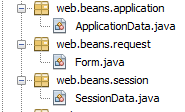 |
12.3.1. ApplicationData bean
ApplicationData Bean 的作用域为应用程序范围:
package metier;

...
public class Metier implements ImetierLocal, Serializable {

  // list of employees
  private Map<String,Employe> hashEmployes=new HashMap<String,Employe>();
  private List<Employe> listEmployes;

  // get your payslip
  public FeuilleSalaire calculerFeuilleSalaire(String SS,
    double nbHeuresTravaillées, int nbJoursTravaillés) {
    // we get the employee
    Employe e=hashEmployes.get(SS);
    // an exception is thrown if the employee does not exist
    if(e==null){
      throw new PamException(String.format("L'employé de n° SS [%s] n'existe pas",SS),1);
    }
    // a fictitious payslip is returned
    return new FeuilleSalaire(e,new Cotisation(3.49,6.15,9.39,7.88),e.getIndemnite(),new ElementsSalaire(100,100,100,100,100));
  }

  // list of employees
  public List<Employe> findAllEmployes() {
    if(listEmployes==null){
      // create a list of three employees
      listEmployes=new ArrayList<Employe>();
      listEmployes.add(new Employe("254104940426058","Jouveinal","Marie","5 rue des oiseaux","St Corentin","49203",new Indemnite(2,2.1,2.1,3.1,15)));
      listEmployes.add(new Employe("260124402111742","Laverti","Justine","La brûlerie","St Marcel","49014",new Indemnite(1,1.93,2,3,12)));
      // employee dictionary
      for(Employe e:listEmployes){
        hashEmployes.put(e.getSS(),e);
      }
      // we add an employee who doesn't exist in the dictionary
      listEmployes.add(new Employe("X","Y","Z","La brûlerie","St Marcel","49014",new Indemnite(1,1.93,2,3,12)));
    }
    // we return the list of employees
    return listEmployes;
  }
}
- 第 11 行:@Named 注解将该类定义为受管 Bean。请注意,与前一个项目不同,我们没有使用 @ManagedBean 注解。原因是,必须使用 @Inject 注解将对该类的引用注入到另一个类中,而 @Inject 仅会注入带有 @Named 注解的类。
- 第 12 行:@ApplicationScoped 注解将该类定义为应用程序范围的对象。请注意,该注解的类是 [javax.enterprise.context.ApplicationScoped](第 6 行),而非前一个项目中 Bean 所使用的 [javax.faces.bean.ApplicationScoped]。
ApplicationData Bean 具有两个用途:
- 第 16 行:维护对 [business] 层的引用,
- 第 18–19 行:定义一个日志器,供其他 Bean 调用以向 GlassFish 控制台记录日志。
12.3.2. SessionData Bean
SessionData Bean 将具有会话作用域:
package web.beans.application;

import java.io.Serializable;
import java.util.logging.Logger;
import javax.annotation.PostConstruct;
import javax.enterprise.context.ApplicationScoped;
import javax.inject.Named;
import metier.IMetierLocal;
import metier.Metier;

@Named
@ApplicationScoped
public class ApplicationData implements Serializable {

  // business layer
  private IMetierLocal metier = new Metier();
  // logger
  private boolean logsEnabled = true;
  private final Logger logger = Logger.getLogger("pam");

  public ApplicationData() {
  }

  @PostConstruct
  public void init() {
    // log
    if (isLogsEnabled()) {
      logger.info("ApplicationData");
    }
  }

  // getters and setters
...
}
- 第 13 行:SessionData 类是一个受管 Bean(@Named),可以注入到其他受管 Bean 中,
- 第 14 行:它具有会话作用域 (@SessionScoped),
- 第 18–19 行:向其中注入了对 ApplicationData Bean 的引用 (@Inject),
- 第 21–32 行:跨会话必须保持的应用程序数据。
- 第 21 行:用户执行的模拟列表,
- 第 22 行:上次保存的模拟编号,
- 第 23 行:最近执行的模拟,
- 第 25–30 行:菜单选项,
- 第 32 行:应用程序的区域设置。
第 39–44 行:init 方法在类实例化后执行(@PostConstruct)。此处仅用于记录其执行情况。由于该类属于会话作用域,我们必须确保该方法对每个用户仅执行一次。 第 42 行:该方法使用 ApplicationData 类中定义的日志器。这就是为什么我们需要注入对该 Bean 的引用(第 18–19 行)。
12.3.3. 表单 Bean
表单 Bean 属于请求作用域:
package web.beans.session;

import java.io.Serializable;
import java.util.ArrayList;
import java.util.List;
import javax.annotation.PostConstruct;
import javax.enterprise.context.SessionScoped;
import javax.inject.Inject;
import javax.inject.Named;
import web.beans.application.ApplicationData;
import web.entities.Simulation;

@Named
@SessionScoped
public class SessionData implements Serializable {

  // application
  @Inject
  private ApplicationData applicationData;
  // simulations
  private List<Simulation> simulations = new ArrayList<Simulation>();
  private int numDerniereSimulation = 0;
  private Simulation simulation;
  // menus
  private boolean menuFaireSimulationIsRendered = true;
  private boolean menuEffacerSimulationIsRendered = true;
  private boolean menuEnregistrerSimulationIsRendered;
  private boolean menuVoirSimulationsIsRendered;
  private boolean menuRetourSimulateurIsRendered;
  private boolean menuTerminerSessionIsRendered = true;
  // local
  private String locale="fr_FR";

  // manufacturer
  public SessionData() {
  }

  @PostConstruct
  public void init() {
    // log
    if (applicationData.isLogsEnabled()) {
      applicationData.getLogger().info("SessionData");
    }
  }

  // menu management
  public void setMenu(boolean menuFaireSimulationIsRendered, boolean menuEnregistrerSimulationIsRendered, boolean menuEffacerSimulationIsRendered, boolean menuVoirSimulationsIsRendered, boolean menuRetourSimulateurIsRendered, boolean menuTerminerSessionIsRendered) {
    this.setMenuFaireSimulationIsRendered(menuFaireSimulationIsRendered);
    this.setMenuEnregistrerSimulationIsRendered(menuEnregistrerSimulationIsRendered);
    this.setMenuVoirSimulationsIsRendered(menuVoirSimulationsIsRendered);
    this.setMenuEffacerSimulationIsRendered(menuEffacerSimulationIsRendered);
    this.setMenuRetourSimulateurIsRendered(menuRetourSimulateurIsRendered);
    this.setMenuTerminerSessionIsRendered(menuTerminerSessionIsRendered);
  }

  // getters and setters
  ...
}
- 第 17 行,该类是一个管理 Bean (@Named),
- 第 18 行,请求作用域 (@RequestScoped),
- 第 24–25 行:注入应用程序作用域 Bean ApplicationData 的引用,
- 第 26–27 行:注入会话作用域 Bean SessionData 的引用。
12.4. 应用程序页面
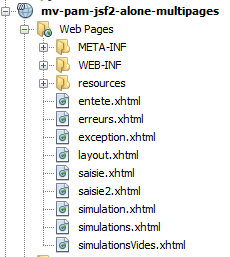 |
12.4.1. [layout.xhtml]
[layout.xhtml] 页面负责处理所有视图的布局:
package web.beans.request;

import java.util.ArrayList;
import java.util.List;
import javax.enterprise.context.RequestScoped;
import javax.faces.context.FacesContext;
import javax.inject.Inject;
import javax.inject.Named;
import javax.servlet.http.HttpServletRequest;
import jpa.Employe;
import metier.FeuilleSalaire;
import web.beans.application.ApplicationData;
import web.beans.session.*;
import web.entities.Erreur;
import web.entities.Simulation;

@Named
@RequestScoped
public class Form {

  public Form() {
  }
  // other beans
  @Inject
  private ApplicationData applicationData;
  @Inject
  private SessionData sessionData;
  // the view model
  private String comboEmployesValue = "";
  private String heuresTravaillées = "";
  private String joursTravaillés = "";
  private Integer numSimulationToDelete;
  private List<Erreur> erreurs = new ArrayList<Erreur>();
  private FeuilleSalaire feuilleSalaire;


  // list of employees
  public List<Employe> getEmployes(){
    return applicationData.getMetier().findAllEmployes();
  }

  // menu action
  public String faireSimulation() {
    ...
  }

  public String enregistrerSimulation() {
  ...
  }

  public String effacerSimulation() {
  ...
  }

  public String voirSimulations() {
  ...
  }

  public String retourSimulateur() {
   ...
  }

  public String terminerSession() {
  ...
  }

  public String retirerSimulation() {
 ...
  }

  private void razFormulaire() {
 ...
  }

// getters and setters
...
}
每个视图都包含以下元素:
- 由片段 [entete.xhtml] 显示的页眉(第 24 行),
- 一个主体,由名为 part1(第 26–28 行)和 part2(第 29 行)的两个片段组成,
- 第 8 行:locale 属性确保页面的国际化。此处仅有一个:fr_FR,
- 第 14–19 行:JavaScript 代码。
页面 [layout.xhtml] 的显示效果如下:
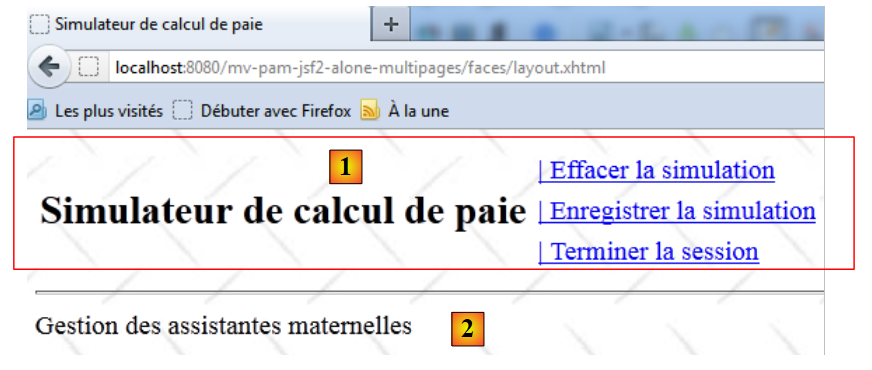 |
- 在 [1] 中,页眉 [entete.xhtml],
- 在 [2] 中,part1 片段。
12.4.2. 页眉 [entete.xhtml]
[entete.xhtml] 页面的代码如下:
<?xml version='1.0' encoding='UTF-8' ?>
<!DOCTYPE html PUBLIC "-//W3C//DTD XHTML 1.0 Transitional//EN" "http://www.w3.org/TR/xhtml1/DTD/xhtml1-transitional.dtd">
<html xmlns="http://www.w3.org/1999/xhtml"
      xmlns:h="http://java.sun.com/jsf/html"
      xmlns:f="http://java.sun.com/jsf/core"
      xmlns:ui="http://java.sun.com/jsf/facelets">

  <f:view locale="#{sessionData.locale}">
    <h:head>
      <title><h:outputText value="#{msg['form.titre']}"/></title>
      <h:outputStylesheet library="css" name="styles.css"/>
    </h:head>
    <script type="text/javascript">
      function raz(){
        // on change les valeurs postées
        document.forms['formulaire'].elements['formulaire:comboEmployes'].value="0";
        document.forms['formulaire'].elements['formulaire:heuresTravaillees'].value="0";
        document.forms['formulaire'].elements['formulaire:joursTravailles'].value="0";
      }
    </script>
    <h:body style="background-image: url('${request.contextPath}/resources/images/standard.jpg');">
      <h:form id="formulaire">
        <!-- entete -->
        <ui:include src="entete.xhtml" />
        <!-- content -->
        <ui:insert name="part1" >
          Gestion des assistantes maternelles
        </ui:insert>
        <ui:insert name="part2"/>
      </h:form>
    </h:body>
  </f:view>
</html>
- 第 12 行:应用程序标题,
- 第 16–21 行:六个链接,分别对应用户可执行的六项操作。这些链接由 SessionData Bean 中的布尔值控制(rendered 属性),
- 第 17 行:点击 [Clear Simulation] 链接将触发 JavaScript 函数 raz 的执行。该函数在 [layout.xhtml] 模板中定义,
- 第 18 行:immediate=true 属性确保在执行 [Form].enregistrerSimulation 方法之前不检查数据有效性。这是有意为之。 您可能希望保存一分钟前执行的最后一次模拟,即使此后在表单中输入的数据(尚未经过验证)无效。这同样适用于 [查看模拟]、[清除模拟]、[返回模拟器] 和 [结束会话] 这四个操作。
12.5. 该应用程序的使用场景
12.5.1. 显示主页
主页是以下 [saisie.xhtml] 页面:
<?xml version='1.0' encoding='UTF-8' ?>
<!DOCTYPE html PUBLIC "-//W3C//DTD XHTML 1.0 Transitional//EN" "http://www.w3.org/TR/xhtml1/DTD/xhtml1-transitional.dtd">
<html xmlns="http://www.w3.org/1999/xhtml"
      xmlns:h="http://java.sun.com/jsf/html"
      xmlns:f="http://java.sun.com/jsf/core"
      xmlns:ui="http://java.sun.com/jsf/facelets">

  <ui:composition>
    <!-- entete -->
    <h:panelGrid columns="2">
      <h:panelGroup>
        <h2><h:outputText value="#{msg['form.titre']}"/></h2>
      </h:panelGroup>
      <h:panelGroup>
        <h:panelGrid columns="1">
          <h:commandLink id="cmdFaireSimulation" value="#{msg['form.menu.faireSimulation']}" action="#{form.faireSimulation}" rendered="#{sessionData.menuFaireSimulationIsRendered}"/>
          <h:commandLink id="cmdEffacerSimulation"  onclick="raz()" value="#{msg['form.menu.effacerSimulation']}" action="#{form.effacerSimulation}" rendered="#{sessionData.menuEffacerSimulationIsRendered}"/>
          <h:commandLink id="cmdEnregistrerSimulation" immediate="true" value="#{msg['form.menu.enregistrerSimulation']}" action="#{form.enregistrerSimulation}" rendered="#{sessionData.menuEnregistrerSimulationIsRendered}"/>
          <h:commandLink id="cmdVoirSimulations" immediate="true" value="#{msg['form.menu.voirSimulations']}" action="#{form.voirSimulations}" rendered="#{sessionData.menuVoirSimulationsIsRendered}"/>
          <h:commandLink id="cmdRetourSimulateur" immediate="true" value="#{msg['form.menu.retourSimulateur']}" action="#{form.retourSimulateur}" rendered="#{sessionData.menuRetourSimulateurIsRendered}"/>
          <h:commandLink id="cmdTerminerSession" immediate="true" value="#{msg['form.menu.terminerSession']}" action="#{form.terminerSession}" rendered="#{sessionData.menuTerminerSessionIsRendered}"/>
        </h:panelGrid>
      </h:panelGroup>
    </h:panelGrid>
    <hr/>
  </ui:composition>
</html>
- 第 8 行:它在 [layout.xhtml] 页面中显示,
- 第 9 行:替换名为 part1 的片段。在此片段中,显示页面 [saisie2.xhtml]:
<?xml version='1.0' encoding='UTF-8' ?>
<!DOCTYPE html PUBLIC "-//W3C//DTD XHTML 1.0 Transitional//EN" "http://www.w3.org/TR/xhtml1/DTD/xhtml1-transitional.dtd">
<html xmlns="http://www.w3.org/1999/xhtml"
      xmlns:h="http://java.sun.com/jsf/html"
      xmlns:f="http://java.sun.com/jsf/core"
      xmlns:ui="http://java.sun.com/jsf/facelets">

  <ui:composition template="layout.xhtml">
    <ui:define name="part1">
      <ui:include src="saisie2.xhtml"/>
    </ui:define>
  </ui:composition>
</html>
此代码显示以下视图:
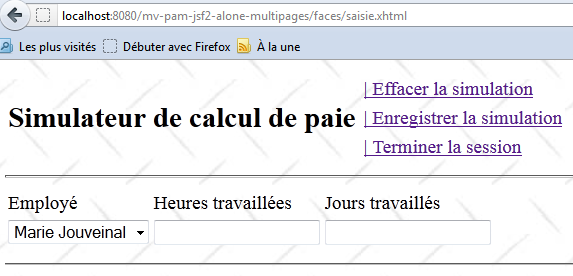 |
问题:请补全 XHTML 代码的第 13 行。员工下拉列表框中的项目列表由 [Form] Bean 的某个方法提供。请编写该方法。下拉列表框中显示的项目的 itemValue 属性将设置为员工的社保号,而 itemLabel 属性将是一个由员工名字和姓氏组成的字符串。
问题:应如何初始化 [SessionData] Bean,以便在向表单发送的初始 GET 请求中,顶部菜单显示为上图所示的内容?
12.5.2. [ faireSimulation] 操作
[runSimulation] 操作的 JSF 代码如下:
<?xml version='1.0' encoding='UTF-8' ?>
<!DOCTYPE html PUBLIC "-//W3C//DTD XHTML 1.0 Transitional//EN" "http://www.w3.org/TR/xhtml1/DTD/xhtml1-transitional.dtd">
<html xmlns="http://www.w3.org/1999/xhtml"
      xmlns:h="http://java.sun.com/jsf/html"
      xmlns:f="http://java.sun.com/jsf/core"
      xmlns:ui="http://java.sun.com/jsf/facelets">

  <h:panelGrid columns="3">
    <h:outputText value="#{msg['form.comboEmployes.libellé']}"/>
    <h:outputText value="#{msg['form.heuresTravaillées.libellé']}"/>
    <h:outputText value="#{msg['form.joursTravaillés.libellé']}"/>
    <h:selectOneMenu id="comboEmployes" value="#{form.comboEmployesValue}">
      <f:selectItems .../>
    </h:selectOneMenu>
    <h:inputText id="heuresTravaillees" value="#{form.heuresTravaillées}" required="true" requiredMessage="#{msg['form.heuresTravaillées.required']}" validatorMessage="#{msg['form.heuresTravaillées.validation']}">
      <f:validateDoubleRange minimum="0" maximum="300"/>
    </h:inputText>
    <h:inputText id="joursTravailles" value="#{form.joursTravaillés}" required="true" requiredMessage="#{msg['form.joursTravaillés.required']}" validatorMessage="#{msg['form.joursTravaillés.validation']}">
      <f:validateLongRange minimum="0" maximum="31"/>
    </h:inputText>
    <h:panelGroup></h:panelGroup>
    <h:message for="heuresTravaillees" styleClass="error"/>
    <h:message for="joursTravailles" styleClass="error"/>
  </h:panelGrid>
  <hr/>
</html>
[faireSimulation] 操作用于计算工资单:
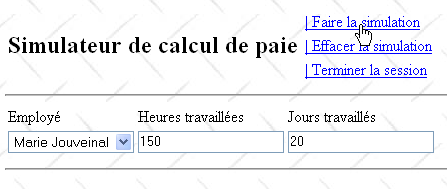
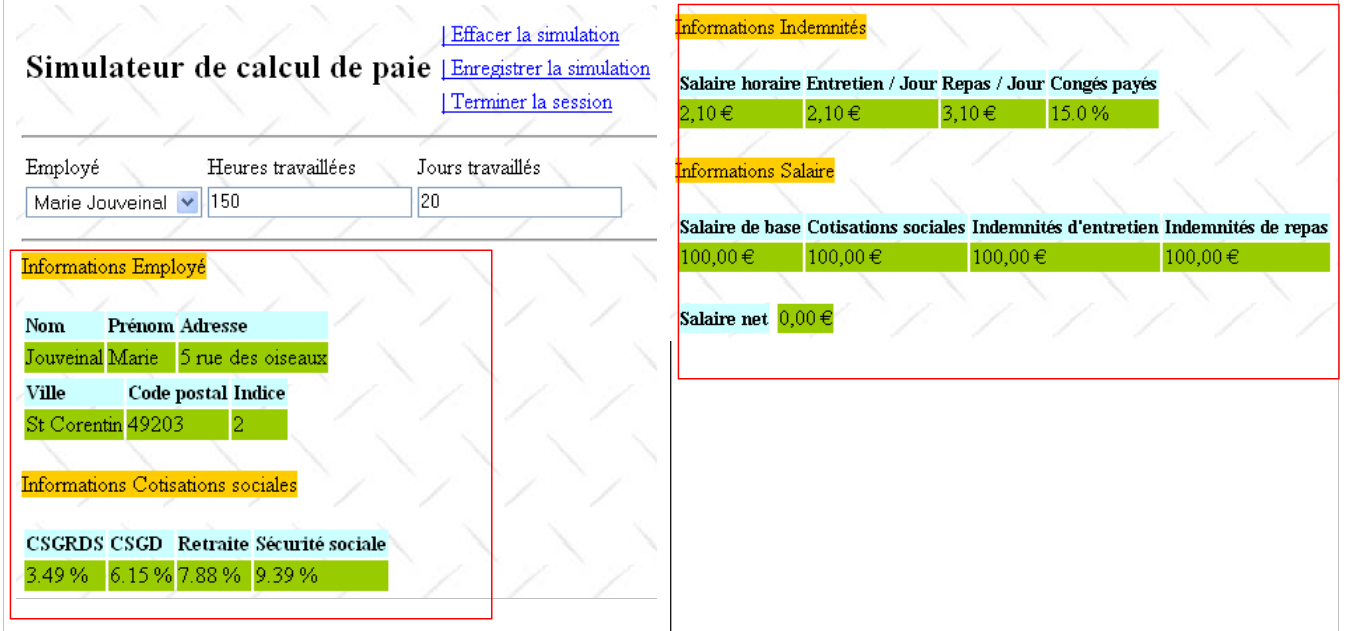
根据上一页的内容,我们得到以下结果:
 |
 |
该模拟结果显示在以下 [simulation.xhtml] 页面上:
<h:commandLink id="cmdFaireSimulation" value="#{msg['form.menu.faireSimulation']}" action="#{form.faireSimulation}" rendered="#{sessionData.menuFaireSimulationIsRendered}"/>
- 第 8 行:将 [simulation.xhtml] 页面插入到 [layout.xhtml] 页面中,
- 第 9–11 行:在布局页面的 part1 片段中显示输入区域,
- 第 12–91 行:模拟内容显示在布局页面的 part2 片段中。
问题:为 [Form] 类编写 [doSimulation] 方法。模拟结果将保存在 SessionData Bean 中。
12.5.3. 错误处理
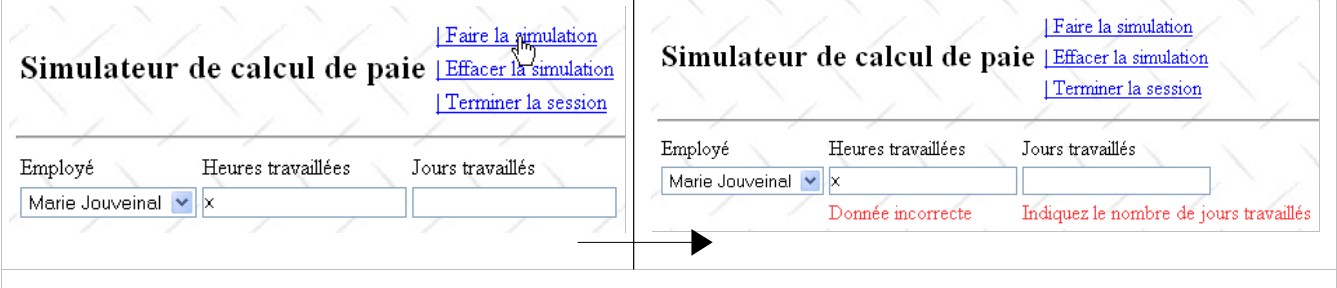
我们需要能够正确处理模拟计算过程中可能发生的异常。为此,[runSimulation] 方法的代码将使用 try/catch 代码块:
<?xml version='1.0' encoding='UTF-8' ?>
<!DOCTYPE html PUBLIC "-//W3C//DTD XHTML 1.0 Transitional//EN" "http://www.w3.org/TR/xhtml1/DTD/xhtml1-transitional.dtd">
<html xmlns="http://www.w3.org/1999/xhtml"
      xmlns:h="http://java.sun.com/jsf/html"
      xmlns:f="http://java.sun.com/jsf/core"
      xmlns:ui="http://java.sun.com/jsf/facelets">

  <ui:composition template="layout.xhtml">
    <ui:define name="part1">
      <ui:include src="saisie2.xhtml"/>
    </ui:define>
    <ui:define name="part2">
      <h:outputText value="#{msg['form.infos.employé']}" styleClass="titreInfos"/>
      <br/><br/>
      <h:panelGrid columns="3" rowClasses="libelle,info">
        <h:outputText value="#{msg['form.employe.nom']}"/>
        <h:outputText value="#{msg['form.employe.prénom']}"/>
        <h:outputText value="#{msg['form.employe.adresse']}"/>
        <h:outputText value="#{form.feuilleSalaire.employe.nom}"/>
        <h:outputText value="#{form.feuilleSalaire.employe.prenom}"/>
        <h:outputText value="#{form.feuilleSalaire.employe.adresse}"/>
      </h:panelGrid>
      <h:panelGrid columns="3" rowClasses="libelle,info">
        <h:outputText value="#{msg['form.employe.ville']}"/>
        <h:outputText value="#{msg['form.employe.codePostal']}"/>
        <h:outputText value="#{msg['form.employe.indice']}"/>
        <h:outputText value="#{form.feuilleSalaire.employe.ville}"/>
        <h:outputText value="#{form.feuilleSalaire.employe.codePostal}"/>
        <h:outputText value="#{form.feuilleSalaire.employe.indemnite.indice}"/>
      </h:panelGrid>
      <br/>
      <h:outputText value="#{msg['form.infos.cotisations']}" styleClass="titreInfos"/>
      <br/><br/>
      <h:panelGrid columns="4" rowClasses="libelle,info">
        <h:outputText value="#{msg['form.cotisations.csgrds']}"/>
        <h:outputText value="#{msg['form.cotisations.csgd']}"/>
        <h:outputText value="#{msg['form.cotisations.retraite']}"/>
        <h:outputText value="#{msg['form.cotisations.secu']}"/>
        <h:outputText value="#{form.feuilleSalaire.cotisation.csgrds} %"/>
        <h:outputText value="#{form.feuilleSalaire.cotisation.csgd} %"/>
        <h:outputText value="#{form.feuilleSalaire.cotisation.retraite} %"/>
        <h:outputText value="#{form.feuilleSalaire.cotisation.secu} %"/>
      </h:panelGrid>
      <br/>
      <h:outputText value="#{msg['form.infos.indemnites']}" styleClass="titreInfos"/>
      <br/><br/>
      <h:panelGrid columns="4" rowClasses="libelle,info">
        <h:outputText value="#{msg['form.indemnites.salaireHoraire']}"/>
        <h:outputText value="#{msg['form.indemnites.entretienJour']}"/>
        <h:outputText value="#{msg['form.indemnites.repasJour']}"/>
        <h:outputText value="#{msg['form.indemnites.congésPayés']}"/>
        <h:outputFormat value="{0,number,currency}">
          <f:param value="#{form.feuilleSalaire.employe.indemnite.baseHeure}"/>
        </h:outputFormat>
        <h:outputFormat value="{0,number,currency}">
          <f:param value="#{form.feuilleSalaire.employe.indemnite.entretienJour}"/>
        </h:outputFormat>
        <h:outputFormat value="{0,number,currency}">
          <f:param value="#{form.feuilleSalaire.employe.indemnite.repasJour}"/>
        </h:outputFormat>
        <h:outputText value="#{form.feuilleSalaire.employe.indemnite.indemnitesCP} %"/>
      </h:panelGrid>
      <br/>
      <h:outputText value="#{msg['form.infos.salaire']}" styleClass="titreInfos"/>
      <br/><br/>
      <h:panelGrid columns="4" rowClasses="libelle,info">
        <h:outputText value="#{msg['form.salaire.base']}"/>
        <h:outputText value="#{msg['form.salaire.cotisationsSociales']}"/>
        <h:outputText value="#{msg['form.salaire.entretien']}"/>
        <h:outputText value="#{msg['form.salaire.repas']}"/>
        <h:outputFormat value="{0,number,currency}">
          <f:param value="#{form.feuilleSalaire.elementsSalaire.salaireBase}"/>
        </h:outputFormat>
        <h:outputFormat value="{0,number,currency}">
          <f:param value="#{form.feuilleSalaire.elementsSalaire.cotisationsSociales}"/>
        </h:outputFormat>
        <h:outputFormat value="{0,number,currency}">
          <f:param value="#{form.feuilleSalaire.elementsSalaire.indemnitesEntretien}"/>
        </h:outputFormat>
        <h:outputFormat value="{0,number,currency}">
          <f:param value="#{form.feuilleSalaire.elementsSalaire.indemnitesRepas}"/>
        </h:outputFormat>
      </h:panelGrid>
      <br/>
      <h:panelGrid columns="3" columnClasses="libelle,col2,info">
        <h:outputText value="#{msg['form.salaire.net']}"/>
        <h:panelGroup></h:panelGroup>
        <h:outputFormat value="{0,number,currency}">
          <f:param value="#{form.feuilleSalaire.elementsSalaire.salaireNet}"/>
        </h:outputFormat>
      </h:panelGrid>
    </ui:define>
  </ui:composition>
</html>
第 15 行生成的错误列表如下:
  // action du menu
  public String faireSimulation(){
    try{
      // on calcule la feuille de salaire
      feuilleSalaire= ...
      // on affiche la simulation
      ...
      // on met à jour le menu
      ...
      // on rend la vue simulation
      return "simulation";
    }catch(Throwable th){
      // on vide la liste des erreurs précédentes
      ...
      // on crée la nouvelle liste des erreurs
      ...
      // on affiche la vue vueErreur
      ...
      // on met à jour le menu
      ...
      // on affiche la vue erreur
      return "erreurs";
    }
}
Error 类的定义如下:
  // le modèle des vues
  ...
  private List<Erreur> erreurs=new ArrayList<Erreur>();
...
错误将作为异常存在,其类名存储在 class 字段中,消息存储在 message 字段中。
在 [faireSimulation] 方法中构建的错误列表包含:
- 发生的初始 Throwable 类型异常 th,
- 其原因 th.getCause()(如果存在),
- 以及该原因的根源 h.getCause().getCause()(若存在)。
- ...
以下是一个错误列表的示例:
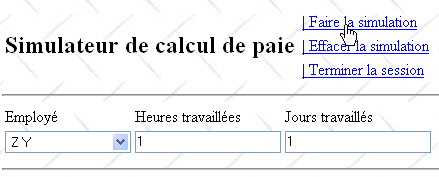
在上例中,员工 [Z Y] 不存在于模拟的 [业务] 层所使用的员工字典中。在此情况下,模拟的 [业务] 层会抛出异常(如下文第 6 行所示):
package web.entities;

public class Erreur {

  public Erreur() {
  }

  // field
  private String classe;
  private String message;

  // manufacturer
  public Erreur(String classe, String message){
    this.setClasse(classe);
    this.message=message;
  }

  // getters and setters
...
}
结果如下:
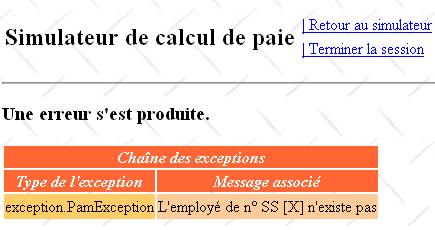
该视图由以下 [errors.xhtml] 页面显示:
  public FeuilleSalaire calculerFeuilleSalaire(String SS, double nbHeuresTravaillées, int nbJoursTravaillés) {
    // we get the employee
    Employe e=hashEmployes.get(SS);
    // an exception is thrown if the employee does not exist
    if(e==null){
      throw new PamException(String.format("L'employé de n° SS [%s] n'existe pas",SS),1);
    }
...
}
问题:完善 [faireSimulation] 方法,使其在发生异常时显示 [vueErreur] 视图。
12.5.4. 操作 [ effacerSimulation]
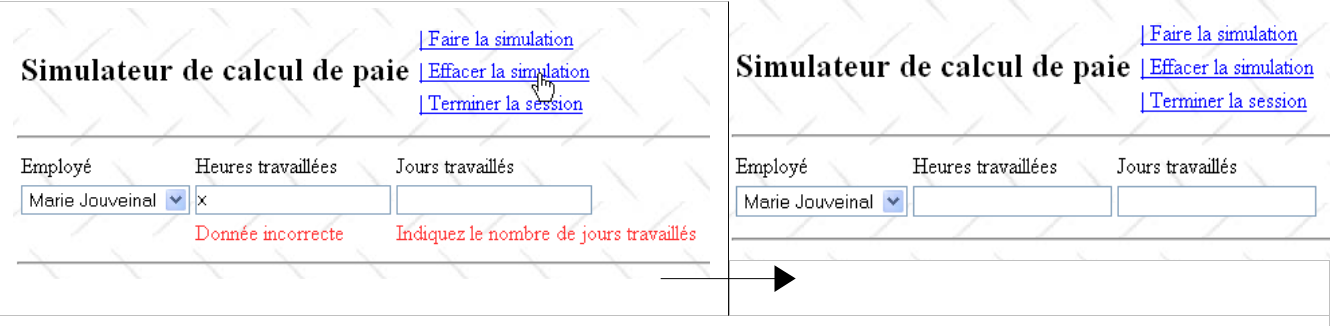
[clearSimulation] 操作允许用户返回一个空表单:
 |
[clearSimulation] 链接的 JSF 代码如下:
<?xml version='1.0' encoding='UTF-8' ?>
<!DOCTYPE html PUBLIC "-//W3C//DTD XHTML 1.0 Transitional//EN" "http://www.w3.org/TR/xhtml1/DTD/xhtml1-transitional.dtd">
<html xmlns="http://www.w3.org/1999/xhtml"
      xmlns:h="http://java.sun.com/jsf/html"
      xmlns:f="http://java.sun.com/jsf/core"
      xmlns:ui="http://java.sun.com/jsf/facelets">

  <ui:composition template="layout.xhtml">
    <ui:define name="part1">
      <h3><h:outputText value="#{msg['erreur.titre']}"/></h3>
      <h:dataTable value="#{form.erreurs}" var="erreur"
                   headerClass="erreursHeaders" columnClasses="erreurClasse,erreurMessage">
        <f:facet name="header">
          <h:outputText value="#{msg['erreur.exceptions']}"/>
        </f:facet>
        <h:column>
          <f:facet name="header">
            <h:outputText value="#{msg['exception.type']}"/>
          </f:facet>
          <h:outputText value="#{erreur.classe}"/>
        </h:column>
        <h:column>
          <f:facet name="header">
            <h:outputText value="#{msg['exception.message']}"/>
          </f:facet>
          <h:outputText value="#{erreur.message}"/>
        </h:column>
      </h:dataTable>
    </ui:define>
  </ui:composition>
</html>
首先点击 [ClearSimulation] 链接会触发对 JavaScript 函数 raz() 的调用。该方法在 [layout.xhtml] 页面中定义:
<h:commandLink id="cmdEffacerSimulation" onclick="raz()" value="#{msg['form.menu.effacerSimulation']}" action="#{form.effacerSimulation}" rendered="#{sessionData.menuEffacerSimulationIsRendered}"/>
第 4–6 行用于修改提交的值。请注意,
- 提交的值是有效的,即它们将通过 hoursWorked 和 daysWorked 输入字段的验证检查。
- `raz` 函数不会提交表单。相反,表单将通过 `cmdEffacerSimulation` 链接提交。该提交操作将在 JavaScript `raz` 函数执行完成后进行。
提交过程中,提交的值将遵循常规流程:先进行验证,然后赋值给模型字段。在 [Form] 类中,这些字段如下所示:
    <script type="text/javascript">
      function raz(){
        // change posted values
        document.forms['formulaire'].elements['formulaire:comboEmployes'].value="0";
        document.forms['formulaire'].elements['formulaire:heuresTravaillees'].value="0";
        document.forms['formulaire'].elements['formulaire:joursTravailles'].value="0";
      }
</script>
  // the view model
  private String comboEmployesValue;
  private String heuresTravaillées;
  private String joursTravaillés;
这三个字段将接收三个提交的值 {"0", "0", "0"}。一旦赋值完成,将执行 clearSimulation 方法。
问题:为 [Form] 类编写 [effacerSimulation] 方法。请确保:
-
仅显示输入字段,
-
下拉列表框设置为第一个选项,
-
hoursWorked 和 daysWorked 输入字段显示空字符串。
12.5.5. [ enregistrerSimulation] 操作
[saveSimulation] 链接的 JSF 代码如下:
...
与该链接关联的 [saveSimulation] 操作将当前模拟保存到 [SessionData] 类中维护的模拟列表中:
<h:commandLink id="cmdEnregistrerSimulation" immediate="true" value="#{msg['form.menu.enregistrerSimulation']}" action="#{form.enregistrerSimulation}" rendered="#{sessionData.menuEnregistrerSimulationIsRendered}"/>
web.entities 文件 中的 Simulation 类如下所示:
private List<Simulation> simulations=new ArrayList<Simulation>();
该类允许您保存用户创建的模拟:
- 第 11 行:模拟编号,
- 第 12 行:已计算的工资单,
- 第 13 行:工作小时数,
- 第 14 行:工作天数。
以下是一个记录示例:
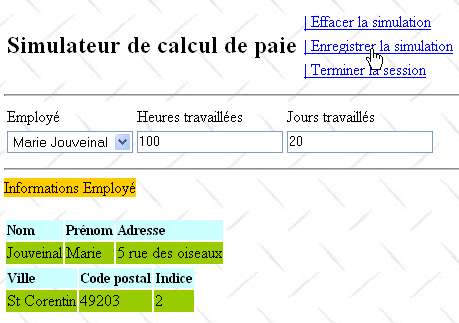
根据上一页的内容,我们得到以下结果:
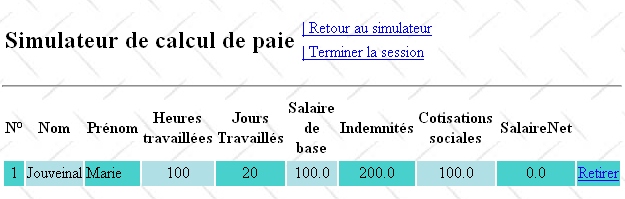
模拟编号会随着每条新记录的加入而递增。它属于 SessionData Bean:
package web.entities;

import metier.FeuilleSalaire;

public class Simulation {

  public Simulation() {
  }

  // simulation fields
  private Integer num;
  private FeuilleSalaire feuilleSalaire;
  private String heuresTravaillées;
  private String joursTravaillés;

  // manufacturer
  public Simulation(Integer num,String heuresTravaillées, String joursTravaillés, FeuilleSalaire feuilleSalaire){
    this.setNum(num);
    this.setFeuilleSalaire(feuilleSalaire);
    this.setHeuresTravaillées(heuresTravaillées);
    this.setJoursTravaillés(joursTravaillés);
  }

  public double getIndemnites(){
    return feuilleSalaire.getElementsSalaire().getIndemnitesEntretien()+ feuilleSalaire.getElementsSalaire().getIndemnitesRepas();
  }

  // getters and setters
...
}
- 第 2 行:上次执行的模拟的编号。
[saveSimulation] 方法可按以下步骤进行:
- 从 [SessionData] Bean 中获取上次模拟的编号并将其递增,
- 将新模拟添加到由 [SessionData] 类维护的模拟列表中,
- 显示模拟表:
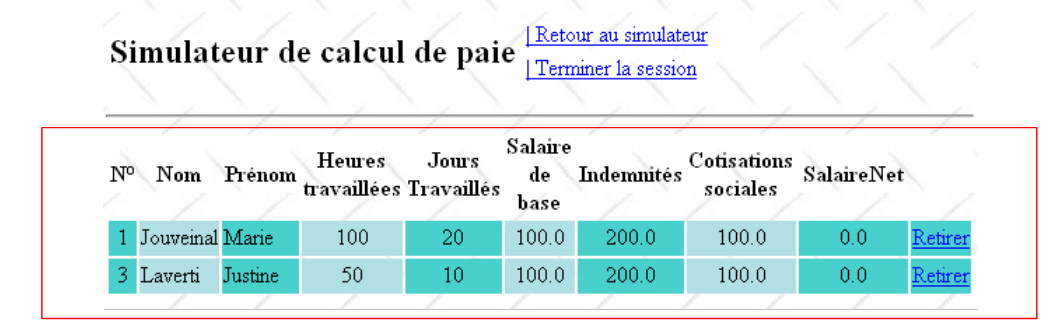 |
模拟表由 [simulations.xhtml] 页面显示:
  // simulations
  private List<Simulation> simulations = new ArrayList<Simulation>();
  private int numDerniereSimulation = 0;
private Simulation simulation;
- 第 8 行,将页面 [simulations.xhtml] 插入到页面 [layout.xhtml] 中,
- 第 9 行,替换名为 part1 的片段,
- 第 11 行,<h:dataTable> 标签使用字段 #{sessionData.simulations} 作为其数据源,即以下字段:
<?xml version='1.0' encoding='UTF-8' ?>
<!DOCTYPE html PUBLIC "-//W3C//DTD XHTML 1.0 Transitional//EN" "http://www.w3.org/TR/xhtml1/DTD/xhtml1-transitional.dtd">
<html xmlns="http://www.w3.org/1999/xhtml"
      xmlns:h="http://java.sun.com/jsf/html"
      xmlns:f="http://java.sun.com/jsf/core"
      xmlns:ui="http://java.sun.com/jsf/facelets">

  <ui:composition template="layout.xhtml">
    <ui:define name="part1">
      <!-- simulation table -->
      <h:dataTable value="#{sessionData.simulations}" var="simulation"
                   headerClass="simulationsHeaders" columnClasses="simuNum,simuNom,simuPrenom,simuHT,simuJT,simuSalaireBase,simuIndemnites,simuCotisationsSociales,simuSalaireNet">
        <h:column>
          <f:facet name="header">
            <h:outputText value="#{msg['simulations.headers.numero']}"/>
          </f:facet>
          <h:outputText value="#{simulation.num}"/>
        </h:column>
        <h:column>
          <f:facet name="header">
            <h:outputText value="#{msg['simulations.headers.nom']}"/>
          </f:facet>
          <h:outputText value="#{simulation.feuilleSalaire.employe.nom}"/>
        </h:column>
        <h:column>
          <f:facet name="header">
            <h:outputText value="#{msg['simulations.headers.prenom']}"/>
          </f:facet>
          <h:outputText value="#{simulation.feuilleSalaire.employe.prenom}"/>
        </h:column>
        <h:column>
          <f:facet name="header">
            <h:outputText value="#{msg['simulations.headers.heuresTravaillees']}"/>
          </f:facet>
          <h:outputText value="#{simulation.heuresTravaillées}"/>
        </h:column>
        <h:column>
          <f:facet name="header">
            <h:outputText value="#{msg['simulations.headers.joursTravailles']}"/>
          </f:facet>
          <h:outputText value="#{simulation.joursTravaillés}"/>
        </h:column>
        <h:column>
          <f:facet name="header">
            <h:outputText value="#{msg['simulations.headers.salaireBase']}"/>
          </f:facet>
          <h:outputText value="#{simulation.feuilleSalaire.elementsSalaire.salaireBase}"/>
        </h:column>
        <h:column>
          <f:facet name="header">
            <h:outputText value="#{msg['simulations.headers.indemnites']}"/>
          </f:facet>
          <h:outputText value="#{simulation.indemnites}"/>
        </h:column>
        <h:column>
          <f:facet name="header">
            <h:outputText value="#{msg['simulations.headers.cotisationsSociales']}"/>
          </f:facet>
          <h:outputText value="#{simulation.feuilleSalaire.elementsSalaire.cotisationsSociales}"/>
        </h:column>
        <h:column>
          <f:facet name="header">
            <h:outputText value="#{msg['simulations.headers.salaireNet']}"/>
          </f:facet>
          <h:outputText value="#{simulation.feuilleSalaire.elementsSalaire.salaireNet}"/>
        </h:column>
        <h:column>
          <h:commandLink value="Retirer" action="#{form.retirerSimulation}">
            <f:setPropertyActionListener target="#{form.numSimulationToDelete}" value="#{simulation.num}"/>
          </h:commandLink>
        </h:column>
      </h:dataTable>
    </ui:define>
  </ui:composition>
</html>
-
var="simulation" 属性用于设置 <h:datatable> 标签内表示当前模拟的变量名称
-
headerClass="simulationsHeaders" 属性用于设置表格列标题的样式。
-
columnClasses="...." 属性用于设置表格中各列的样式
让我们查看其中一列,了解其构建方式:
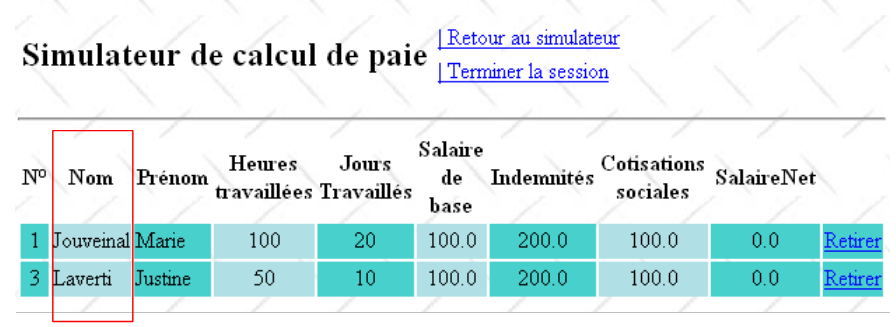 |
“姓名”列的 JSF 代码如下:
  // simulations
private List<Simulation> simulations;
- 第 2–4 行:<f:facet name="header"> 标签定义了列标题
- 第 5 行:写入员工姓名:
- simulation 指代 <h:dataTable ...> 标签的 var 属性:
            <h:column>
              <f:facet name="header">
                <h:outputText value="#{msg['simulations.headers.nom']}"/>
              </f:facet>
              <h:outputText value="#{simulation.feuilleSalaire.employe.nom}"/>
</h:column>
simulation 指模拟列表中的当前模拟:首先是第 1 个,然后是第 2 个,……
- (待续)
- simulation.payroll 指当前模拟中的薪资字段
- simulation.payroll.employee 指薪资字段中的员工字段
- simulation.payroll.employee.name 指员工字段中的姓名字段
对表中的所有列都重复使用相同的技术。津贴列存在一个问题,该列是通过以下代码生成的:
<h:dataTable value="#{sessionData.simulations}" var="simulation" ...>
第 5 行显示了 simulation.indemnites 的值。然而,Simulation 类中并不存在 indemnites 字段。这里需要记住的是,indemnites 字段并非直接使用,而是通过 simulation.getIndemnites() 方法间接获取。 因此,只要该方法存在即可。indemnites 字段本身可能并不存在。getIndemnites 方法必须返回该员工的津贴总额。由于工资单中无法直接获取该总额,因此需要进行中间计算。第 12.5.5 节提供了 getIndemnites 方法。
问题:为 [Form] 类编写 [enregistrerSimulation] 方法。
12.5.6. 操作 [ retourSimulateur]
[retourSimulateur] 链接的 JSF 代码如下:
            <h:column>
              <f:facet name="header">
                <h:outputText value="#{msg['simulations.headers.indemnites']}"/>
              </f:facet>
              <h:outputText value="#{simulation.indemnites}"/>
</h:column>
与该链接关联的 [returnSimulator] 操作允许用户从 [simulationsView] 返回至 [inputsView]:
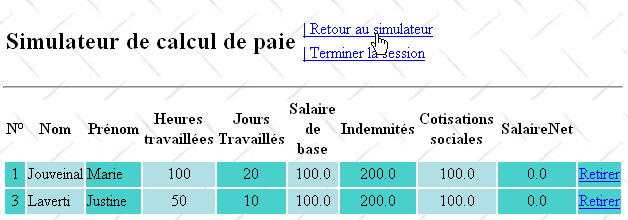
获得的结果:
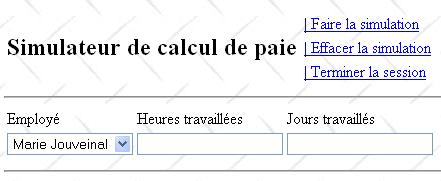
问题:为 [Form] 类编写 [retourSimulateur] 方法。所示的输入表单必须为空,如上所示。
12.5.7. [viewSimulations] 操作
[viewSimulations] 链接的 JSF 代码如下:
<h:commandLink id="cmdRetourSimulateur" immediate="true" value="#{msg['form.menu.retourSimulateur']}" action="#{form.retourSimulateur}" rendered="#{sessionData.menuRetourSimulateurIsRendered}"/>
与该链接关联的 [viewSimulations] 操作允许用户查看模拟表格,无论其输入状态如何:
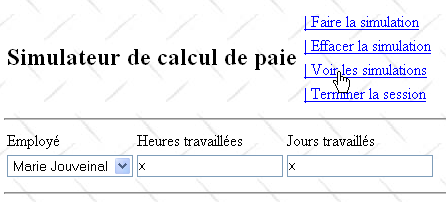
所得结果:
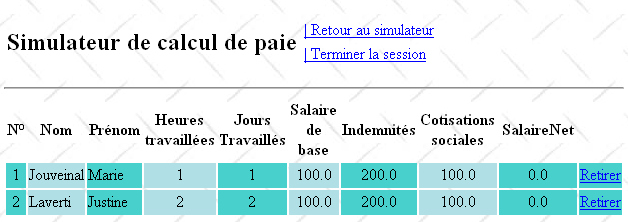
问题:为 [Form] 类编写 [viewSimulations] 方法。
我们将确保,如果模拟列表为空,则显示的视图为 [vueSimulationsVides]:
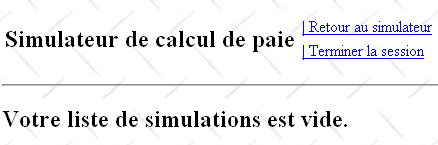
为了显示上述视图,我们将使用以下 [simulationsVides.xhtml] 页面:
<h:commandLink id="cmdVoirSimulations" immediate="true" value="#{msg['form.menu.voirSimulations']}" action="#{form.voirSimulations}" rendered="#{sessionData.menuVoirSimulationsIsRendered}"/>
12.5.8. [ removeSimulation] 操作
用户可以从列表中删除模拟:
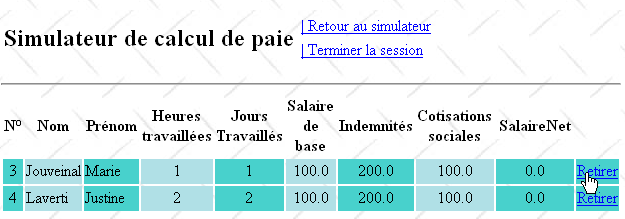
结果如下:
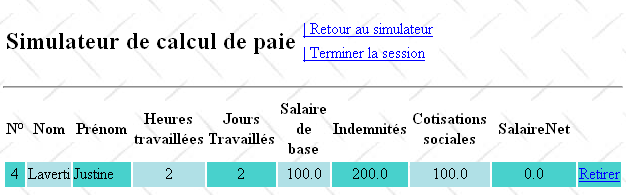
如果我们移除上方的最后一个模拟,将得到以下结果:
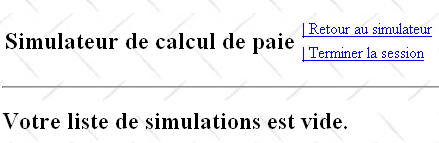
模拟表中[删除]列的JSF代码如下:
<?xml version='1.0' encoding='UTF-8' ?>
<!DOCTYPE html PUBLIC "-//W3C//DTD XHTML 1.0 Transitional//EN" "http://www.w3.org/TR/xhtml1/DTD/xhtml1-transitional.dtd">
<html xmlns="http://www.w3.org/1999/xhtml"
      xmlns:h="http://java.sun.com/jsf/html"
      xmlns:f="http://java.sun.com/jsf/core"
      xmlns:ui="http://java.sun.com/jsf/facelets">

  <ui:composition template="layout.xhtml">
    <ui:define name="part1">
      <h2>Votre liste de simulations est vide.</h2>
    </ui:define>
  </ui:composition>
</html>
- 第 5 行:[Remove] 链接与 [Form] 类的 [removeSimulation] 方法相关联。该方法需要知道要删除的模拟的编号。该编号由第 8 行的 <f:setPropertyActionListener> 标签提供。该标签有两个属性:target 和 value:target 属性指定模型中的一个字段,value 属性的值将被赋给该字段。 在此,待删除模拟的编号 #{simulation.num} 将被赋值给 [Form] 类的 numSimulationToDelete 字段:
          <h:dataTable value="#{form.simulations}" var="simulation"
                       headerClass="simulationsHeaders" columnClasses="simuNum,simuNom,simuPrenom,simuHT,simuJT,simuSalaireBase,simuIndemnites,simuCotisationsSociales,simuSalaireNet">
...
            <h:column>
              <h:commandLink value="Retirer" action="#{form.retirerSimulation}">
                <f:setPropertyActionListener target="#{form.numSimulationToDelete}" value="#{simulation.num}"/>
              </h:commandLink>
            </h:column>
          </h:dataTable>
当执行 [Form] 类的 [removeSimulation] 方法时,它将能够使用之前存储在 numSimulationToDelete 字段中的值。
问题:编写 [Form] 类的 [retirerSimulation] 方法。
12.5.9. [ terminateSession] 操作
[结束会话]链接的JSF代码如下:
  // the view model
  ...
  private Integer numSimulationToDelete;
与该链接关联的 [EndSession] 操作允许用户结束当前会话并返回空的输入表单:
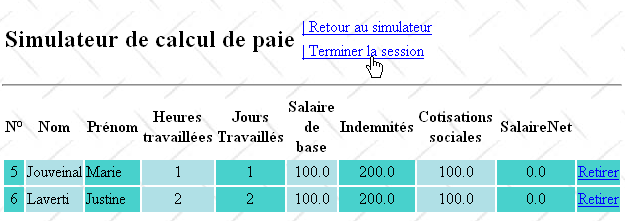
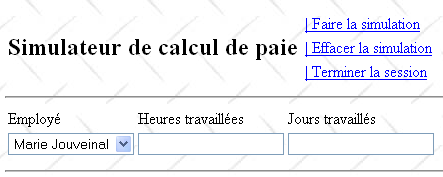
如果用户有一份模拟列表,该列表将被清空。此外,模拟编号将重置为 1。
问题:为 [Form] 类编写 [endSession] 方法。
12.6. 将Web层集成到三层架构中 JSF/EJB
先前Web应用程序的架构如下:
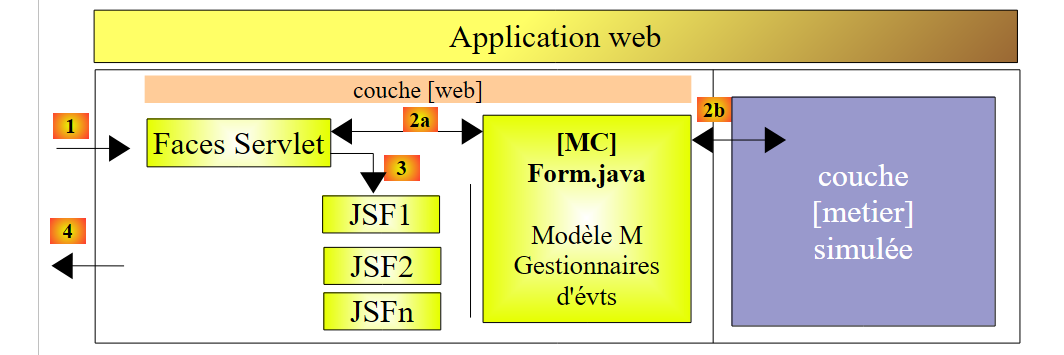 |
我们将模拟的 [业务] 层替换为第 7.1 节中由 EJB 实现的 [业务、DAO、JPA] 层:
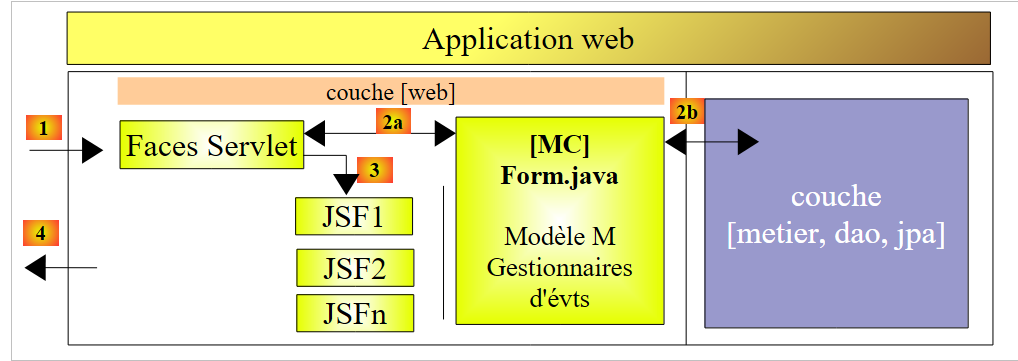 |
实践练习:按照第11节中的方法论,将JSF层与EJB层进行集成。
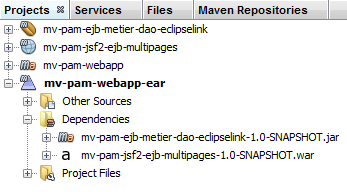 |